Session 2
Types of Operating Systems
RECAP
In the previous session we studied the following topics:
1. Need of Operating System
Resource Management: Manages CPU, memory, and I/O devices.
User Convenience: Provides a user-friendly interface.
Application Support: Offers a platform for running software.
2. Working of Operating System
Kernel Mode: Executes core system functions.
User Mode: Runs applications and user processes.
System Calls: Interface between user applications and hardware.
RECAP
3. Introduction to Operating System History
Early Systems: Batch processing on mainframes.
Time-Sharing: Multi-user capabilities.
Personal Computers: GUIs introduction.
Modern OS: Advanced features, security, and networking.
4. Current Operating Systems
Windows: Popular for personal/business use; known for GUI.
macOS: Sleek design; integrates with Apple devices.
Linux: Open-source; used in servers/desktops.
Android: Dominates mobile devices; open-source.
iOS: Apple's mobile OS; known for performance/security.
RECAP
5. Functions of Operating Systems
Process Management: Scheduling and execution.
Memory Management: Allocation and deallocation.
File System Management: Data organization/access.
Device Management: Hardware communication/control.
Security and Protection: Data security and user authentication.
User Interface: CLI and GUI for user interaction
Session 2 Outlook
• Batch Operating System
• Multiprogramming Operating
System
• Time-Sharing OS
• Multiprocessing OS
• Distributed OS
• Network OS
• Real Time OS
• Embedded OS
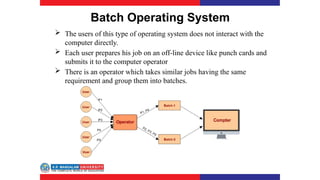
Batch Operating System
 The users of this type of operating system does not interact with the
computer directly.
 Each user prepares his job on an off-line device like punch cards and
submits it to the computer operator
 There is an operator which takes similar jobs having the same
requirement and group them into batches.
Batch Operating System cont..
Advantages of Batch Operating System:
 Processors of the batch systems know how long the job would be when it is in
queue
 Multiple users can share the batch systems
 The idle time for the batch system is very less
 It is easy to manage large work repeatedly in batch systems
Disadvantages of Batch Operating System:
 The computer operators should be well known with batch systems
 Batch systems are hard to debug
 It is sometimes costly
 The other jobs will have to wait for an unknown time if any job fails
Examples of Batch based Operating System:
IBM's MVS
Why Batch OS?
 Batch operating systems are oldest type of operating systems
 Batch operating systems are used when large amount data need to be
processed
 If we take a bank for example where cheques are deposited it is time
consuming to input cheques one by one
 A Batch OS does not need any human interaction so all cheques are
processed automatically
Examples of BOS
 Payroll system
- Batch systems are ideal for making payrolls.
- The salaries of the employees can be printed at the end of month by the batch
systems.
- Statements can be made easy by using Batch systems.
 Bank statements
- At the end of month bank makes statements for each account holder,
- So these bank statements can be made easily by the batch systems at the
end of the month
Time-Sharing Operating Systems
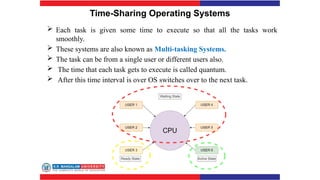
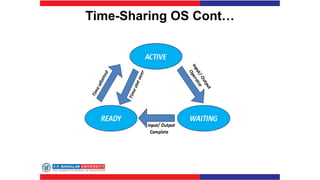
 Each task is given some time to execute so that all the tasks work
smoothly.
 These systems are also known as Multi-tasking Systems.
 The task can be from a single user or different users also.
 The time that each task gets to execute is called quantum.
 After this time interval is over OS switches over to the next task.
Time-Sharing OS Cont…
Time-Sharing Operating Systems cont..
• Advantages of Time-Sharing OS:
 Each task gets an equal opportunity
 Fewer chances of duplication of software
 CPU idle time can be reduced
• Disadvantages of Time-Sharing OS:
 Reliability problem
 One must have to take care of the security and integrity of user programs
and data
 Data communication problem
• Examples of Time-Sharing Oss
Multics, Unix, etc.
Examples of Time-Sharing OS
 Cloud Computing Platforms
- Cloud computing platforms such as Amazon Web Services (AWS), Microsoft Azure,
and Google Cloud Platform (GCP) utilize time-sharing systems to provide resources (such
as virtual machines, storage, and databases) to multiple users or clients simultaneously.
- Users can deploy their applications or services on virtual machines or containers
and access them over the internet.
 Mainframe Computers:
- Mainframe computers have historically used time-sharing systems to allow
multiple users to access the mainframe concurrently.
- Banks and financial institutions use mainframe computers for processing
transactions, and time-sharing systems enable multiple bank employees to access the
mainframe to perform tasks like customer inquiries, account management, and
transaction processing simultaneously
Multiprocessor operating systems
• Multiprocessor operating systems are also known as parallel OS or tightly
coupled OS.
• Such operating systems have more than one processor in close communication
that sharing the computer bus, the clock and sometimes memory and peripheral
devices
• It executes multiple jobs at the same time and makes the processing faster.
• It supports large physical address space and larger virtual address space.
• If one processor fails then other processor should retrieve the interrupted process
state so execution of process can continue.
• Inter-processes communication mechanism is provided and implemented in
hardware.
Multiprocessor Operating Systems cont..
• Advantages of Multiprocessor OS:
 Easily scale to accommodate additional processors or CPU cores.
 System can continue to operate even if one processor fails.
 Distribute tasks and workload evenly across multiple processors,
maximizing resource utilization.
Disadvantages of Multiprocessor OS:
 Multiple processors requires sophisticated scheduling algorithms
 Introduces synchronization overhead
 Implementing and maintaining can be costly
Examples of Multiprocessor OS
 Server Farms:
- Many large-scale internet services, such as search engines, social media
platforms, and cloud computing providers, rely on multiprocessor operating
systems to handle high volumes of requests efficiently..
- These systems often use clusters of servers with multiple processors or CPU cores
to distribute workloads and provide high availability and scalability.
 Supercomputers:
- Supercomputers, used for scientific research, weather forecasting, and
simulations, typically employ multiprocessor operating systems to harness the
computational power of multiple processors or CPU cores.
- These systems are designed to handle complex calculations and simulations
in parallel, enabling researchers to solve computationally intensive problems
more quickly.
Distributed Operating System
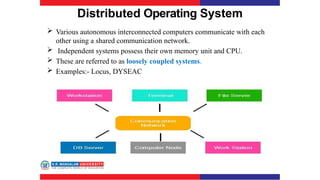
 Various autonomous interconnected computers communicate with each
other using a shared communication network.
 Independent systems possess their own memory unit and CPU.
 These are referred to as loosely coupled systems.
 Examples:- Locus, DYSEAC
Distributed Operating System cont…
• Advantages of Distributed OS:
 enable sharing of hardware resources such as printers, storage
devices, and processing power
 Tasks can be executed in parallel, reducing processing time and
improving throughput.
Disadvantages of Distributed OS:
 More complex than centralized operating systems due to the
distributed nature
 Rely heavily on network connectivity
 More susceptible to security threats and attacks
Examples of Distributed OS
 Google File System (GFS):
- GFS is a distributed file system developed by Google to provide scalable and
reliable storage for large-scale distributed applications.
- It distributes data across multiple storage servers and replicates data for fault
tolerance.
 Bitcoin Blockchain:
- The Bitcoin blockchain is a decentralized distributed ledger that records all
transactions of the Bitcoin cryptocurrency.
- Network of distributed nodes running Bitcoin software, each maintaining a
copy of the blockhain.
Network Operating System
 These systems run on a server and provide the capability to manage data,
users, groups, security, applications, and other networking functions.
 These types of operating systems allow shared access of files, printers,
security, applications, and other networking functions over a small private
network.
 The “ other" computers arc called client computers, and each computer that
connects to a network server must be running client software designed to
request a specific service.
 popularly known as tightly coupled systems.
Network Operating System
 These systems run on a server and provide the capability to manage data,
users, groups, security, applications, and other networking functions.
 These types of operating systems allow shared access of files, printers,
security, applications, and other networking functions over a small private
network.
 The “ other" computers arc called client computers, and each computer that
connects to a network server must be running client software designed to
request a specific service.
 popularly known as tightly coupled systems.
Network Operating System
Advantages of Network Operating System:
 Highly stable centralized servers
 Security concerns are handled through servers
 New technologies and hardware up-gradation are easily integrated into the
system
 Server access is possible remotely from different locations and types of systems
Disadvantages of Network Operating System:
 Servers are costly
 User has to depend on a central location for most operations
 Maintenance and updates are required regularly
Examples of Network Operating System are:
Microsoft Windows Server 2003/2008/2012, UNIX, Linux, Mac OS X, Novell
NetWare, and BSD, etc.
Examples of Network OS
 Windows Server:
- Developed by Microsoft for running servers in a networked environment..
-It provides features such as file sharing, print services, directory services (Active
Directory), web services (Internet Information Services), and remote access
(Remote Desktop Services)
 Cisco IOS (Internetwork Operating System):
- Cisco IOS is a network operating system used in Cisco networking devices,
including routers, switches, and firewalls.
- It provides features such as routing, switching, security, and management
capabilities for configuring and controlling network devices.
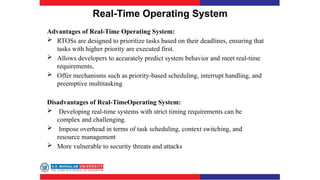
Real-Time Operating System
 These types of OSs serve real-time systems.
 The time interval required to process and respond to inputs is very
small.
 This time interval is called response time.
 Real-time systems are used when there are time requirements that are
very strict like
 missile systems,
 air traffic control systems,
 robots, etc.
Real-Time Operating System
Advantages of Real-Time Operating System:
 RTOSs are designed to prioritize tasks based on their deadlines, ensuring that
tasks with higher priority are executed first.
 Allows developers to accurately predict system behavior and meet real-time
requirements,
 Offer mechanisms such as priority-based scheduling, interrupt handling, and
preemptive multitasking
Disadvantages of Real-TimeOperating System:
 Developing real-time systems with strict timing requirements can be
complex and challenging.
 Impose overhead in terms of task scheduling, context switching, and
resource management
 More vulnerable to security threats and attacks
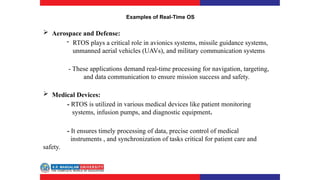
Examples of Real-Time OS
 Aerospace and Defense:
- RTOS plays a critical role in avionics systems, missile guidance systems,
unmanned aerial vehicles (UAVs), and military communication systems
- These applications demand real-time processing for navigation, targeting,
and data communication to ensure mission success and safety.
 Medical Devices:
- RTOS is utilized in various medical devices like patient monitoring
systems, infusion pumps, and diagnostic equipment.
- It ensures timely processing of data, precise control of medical
instruments , and synchronization of tasks critical for patient care and
safety.
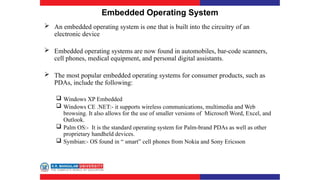
Embedded Operating System
 An embedded operating system is one that is built into the circuitry of an
electronic device
 Embedded operating systems are now found in automobiles, bar-code scanners,
cell phones, medical equipment, and personal digital assistants.
 The most popular embedded operating systems for consumer products, such as
PDAs, include the following:
 Windows XP Embedded
 Windows CE .NET:- it supports wireless communications, multimedia and Web
browsing. It also allows for the use of smaller versions of Microsoft Word, Excel, and
Outlook.
 Palm OS:- It is the standard operating system for Palm-brand PDAs as well as other
proprietary handheld devices.
 Symbian:- OS found in “ smart” cell phones from Nokia and Sony Ericsson
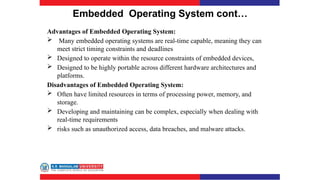
Embedded Operating System cont…
Advantages of Embedded Operating System:
 Many embedded operating systems are real-time capable, meaning they can
meet strict timing constraints and deadlines
 Designed to operate within the resource constraints of embedded devices,
 Designed to be highly portable across different hardware architectures and
platforms.
Disadvantages of Embedded Operating System:
 Often have limited resources in terms of processing power, memory, and
storage.
 Developing and maintaining can be complex, especially when dealing with
real-time requirements
 risks such as unauthorized access, data breaches, and malware attacks.
Examples of Embedded OS
 FreeRTOS:
- It is open-source and widely used in microcontrollers, IoT devices, and
small embedded systems.
- Provides a small footprint, preemptive scheduling, and support for tasks,
queues, semaphores, and software timers.
 ThreadX:
- It provides a small footprint, fast context switching, and deterministic
behavior, making it suitable for time-critical applications.
- Used in a wide range of embedded devices, including IoT devices,
wearables, and consumer electronics.
Session-2:Test Your knowledge
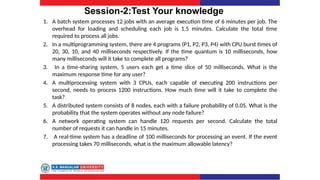
1. A batch system processes 12 jobs with an average execution time of 6 minutes per job. The
overhead for loading and scheduling each job is 1.5 minutes. Calculate the total time
required to process all jobs.
2. In a multiprogramming system, there are 4 programs (P1, P2, P3, P4) with CPU burst times of
20, 30, 10, and 40 milliseconds respectively. If the time quantum is 10 milliseconds, how
many milliseconds will it take to complete all programs?
3. In a time-sharing system, 5 users each get a time slice of 50 milliseconds. What is the
maximum response time for any user?
4. A multiprocessing system with 3 CPUs, each capable of executing 200 instructions per
second, needs to process 1200 instructions. How much time will it take to complete the
task?
5. A distributed system consists of 8 nodes, each with a failure probability of 0.05. What is the
probability that the system operates without any node failure?
6. A network operating system can handle 120 requests per second. Calculate the total
number of requests it can handle in 15 minutes.
7. A real-time system has a deadline of 100 milliseconds for processing an event. If the event
processing takes 70 milliseconds, what is the maximum allowable latency?
Session-2:Test Your knowledge
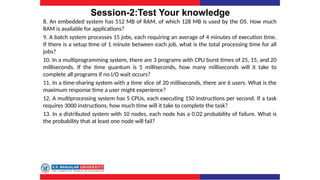
8. An embedded system has 512 MB of RAM, of which 128 MB is used by the OS. How much
RAM is available for applications?
9. A batch system processes 15 jobs, each requiring an average of 4 minutes of execution time.
If there is a setup time of 1 minute between each job, what is the total processing time for all
jobs?
10. In a multiprogramming system, there are 3 programs with CPU burst times of 25, 15, and 20
milliseconds. If the time quantum is 5 milliseconds, how many milliseconds will it take to
complete all programs if no I/O wait occurs?
11. In a time-sharing system with a time slice of 20 milliseconds, there are 6 users. What is the
maximum response time a user might experience?
12. A multiprocessing system has 5 CPUs, each executing 150 instructions per second. If a task
requires 3000 instructions, how much time will it take to complete the task?
13. In a distributed system with 10 nodes, each node has a 0.02 probability of failure. What is
the probability that at least one node will fail?
Session-2:Answer Key
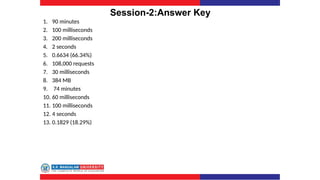
1. 90 minutes
2. 100 milliseconds
3. 200 milliseconds
4. 2 seconds
5. 0.6634 (66.34%)
6. 108,000 requests
7. 30 milliseconds
8. 384 MB
9. 74 minutes
10. 60 milliseconds
11. 100 milliseconds
12. 4 seconds
13. 0.1829 (18.29%)

Session 2(Types of operating system).pptx

  • 1.
    Session 2 Types ofOperating Systems
  • 2.
    RECAP In the previoussession we studied the following topics: 1. Need of Operating System Resource Management: Manages CPU, memory, and I/O devices. User Convenience: Provides a user-friendly interface. Application Support: Offers a platform for running software. 2. Working of Operating System Kernel Mode: Executes core system functions. User Mode: Runs applications and user processes. System Calls: Interface between user applications and hardware.
  • 3.
    RECAP 3. Introduction toOperating System History Early Systems: Batch processing on mainframes. Time-Sharing: Multi-user capabilities. Personal Computers: GUIs introduction. Modern OS: Advanced features, security, and networking. 4. Current Operating Systems Windows: Popular for personal/business use; known for GUI. macOS: Sleek design; integrates with Apple devices. Linux: Open-source; used in servers/desktops. Android: Dominates mobile devices; open-source. iOS: Apple's mobile OS; known for performance/security.
  • 4.
    RECAP 5. Functions ofOperating Systems Process Management: Scheduling and execution. Memory Management: Allocation and deallocation. File System Management: Data organization/access. Device Management: Hardware communication/control. Security and Protection: Data security and user authentication. User Interface: CLI and GUI for user interaction
  • 5.
    Session 2 Outlook •Batch Operating System • Multiprogramming Operating System • Time-Sharing OS • Multiprocessing OS • Distributed OS • Network OS • Real Time OS • Embedded OS
  • 6.
    Batch Operating System The users of this type of operating system does not interact with the computer directly.  Each user prepares his job on an off-line device like punch cards and submits it to the computer operator  There is an operator which takes similar jobs having the same requirement and group them into batches.
  • 7.
    Batch Operating Systemcont.. Advantages of Batch Operating System:  Processors of the batch systems know how long the job would be when it is in queue  Multiple users can share the batch systems  The idle time for the batch system is very less  It is easy to manage large work repeatedly in batch systems Disadvantages of Batch Operating System:  The computer operators should be well known with batch systems  Batch systems are hard to debug  It is sometimes costly  The other jobs will have to wait for an unknown time if any job fails Examples of Batch based Operating System: IBM's MVS
  • 8.
    Why Batch OS? Batch operating systems are oldest type of operating systems  Batch operating systems are used when large amount data need to be processed  If we take a bank for example where cheques are deposited it is time consuming to input cheques one by one  A Batch OS does not need any human interaction so all cheques are processed automatically
  • 9.
    Examples of BOS Payroll system - Batch systems are ideal for making payrolls. - The salaries of the employees can be printed at the end of month by the batch systems. - Statements can be made easy by using Batch systems.  Bank statements - At the end of month bank makes statements for each account holder, - So these bank statements can be made easily by the batch systems at the end of the month
  • 10.
    Time-Sharing Operating Systems Each task is given some time to execute so that all the tasks work smoothly.  These systems are also known as Multi-tasking Systems.  The task can be from a single user or different users also.  The time that each task gets to execute is called quantum.  After this time interval is over OS switches over to the next task.
  • 11.
  • 12.
    Time-Sharing Operating Systemscont.. • Advantages of Time-Sharing OS:  Each task gets an equal opportunity  Fewer chances of duplication of software  CPU idle time can be reduced • Disadvantages of Time-Sharing OS:  Reliability problem  One must have to take care of the security and integrity of user programs and data  Data communication problem • Examples of Time-Sharing Oss Multics, Unix, etc.
  • 13.
    Examples of Time-SharingOS  Cloud Computing Platforms - Cloud computing platforms such as Amazon Web Services (AWS), Microsoft Azure, and Google Cloud Platform (GCP) utilize time-sharing systems to provide resources (such as virtual machines, storage, and databases) to multiple users or clients simultaneously. - Users can deploy their applications or services on virtual machines or containers and access them over the internet.  Mainframe Computers: - Mainframe computers have historically used time-sharing systems to allow multiple users to access the mainframe concurrently. - Banks and financial institutions use mainframe computers for processing transactions, and time-sharing systems enable multiple bank employees to access the mainframe to perform tasks like customer inquiries, account management, and transaction processing simultaneously
  • 14.
    Multiprocessor operating systems •Multiprocessor operating systems are also known as parallel OS or tightly coupled OS. • Such operating systems have more than one processor in close communication that sharing the computer bus, the clock and sometimes memory and peripheral devices • It executes multiple jobs at the same time and makes the processing faster. • It supports large physical address space and larger virtual address space. • If one processor fails then other processor should retrieve the interrupted process state so execution of process can continue. • Inter-processes communication mechanism is provided and implemented in hardware.
  • 15.
    Multiprocessor Operating Systemscont.. • Advantages of Multiprocessor OS:  Easily scale to accommodate additional processors or CPU cores.  System can continue to operate even if one processor fails.  Distribute tasks and workload evenly across multiple processors, maximizing resource utilization. Disadvantages of Multiprocessor OS:  Multiple processors requires sophisticated scheduling algorithms  Introduces synchronization overhead  Implementing and maintaining can be costly
  • 16.
    Examples of MultiprocessorOS  Server Farms: - Many large-scale internet services, such as search engines, social media platforms, and cloud computing providers, rely on multiprocessor operating systems to handle high volumes of requests efficiently.. - These systems often use clusters of servers with multiple processors or CPU cores to distribute workloads and provide high availability and scalability.  Supercomputers: - Supercomputers, used for scientific research, weather forecasting, and simulations, typically employ multiprocessor operating systems to harness the computational power of multiple processors or CPU cores. - These systems are designed to handle complex calculations and simulations in parallel, enabling researchers to solve computationally intensive problems more quickly.
  • 17.
    Distributed Operating System Various autonomous interconnected computers communicate with each other using a shared communication network.  Independent systems possess their own memory unit and CPU.  These are referred to as loosely coupled systems.  Examples:- Locus, DYSEAC
  • 18.
    Distributed Operating Systemcont… • Advantages of Distributed OS:  enable sharing of hardware resources such as printers, storage devices, and processing power  Tasks can be executed in parallel, reducing processing time and improving throughput. Disadvantages of Distributed OS:  More complex than centralized operating systems due to the distributed nature  Rely heavily on network connectivity  More susceptible to security threats and attacks
  • 19.
    Examples of DistributedOS  Google File System (GFS): - GFS is a distributed file system developed by Google to provide scalable and reliable storage for large-scale distributed applications. - It distributes data across multiple storage servers and replicates data for fault tolerance.  Bitcoin Blockchain: - The Bitcoin blockchain is a decentralized distributed ledger that records all transactions of the Bitcoin cryptocurrency. - Network of distributed nodes running Bitcoin software, each maintaining a copy of the blockhain.
  • 20.
    Network Operating System These systems run on a server and provide the capability to manage data, users, groups, security, applications, and other networking functions.  These types of operating systems allow shared access of files, printers, security, applications, and other networking functions over a small private network.  The “ other" computers arc called client computers, and each computer that connects to a network server must be running client software designed to request a specific service.  popularly known as tightly coupled systems.
  • 21.
    Network Operating System These systems run on a server and provide the capability to manage data, users, groups, security, applications, and other networking functions.  These types of operating systems allow shared access of files, printers, security, applications, and other networking functions over a small private network.  The “ other" computers arc called client computers, and each computer that connects to a network server must be running client software designed to request a specific service.  popularly known as tightly coupled systems.
  • 22.
    Network Operating System Advantagesof Network Operating System:  Highly stable centralized servers  Security concerns are handled through servers  New technologies and hardware up-gradation are easily integrated into the system  Server access is possible remotely from different locations and types of systems Disadvantages of Network Operating System:  Servers are costly  User has to depend on a central location for most operations  Maintenance and updates are required regularly Examples of Network Operating System are: Microsoft Windows Server 2003/2008/2012, UNIX, Linux, Mac OS X, Novell NetWare, and BSD, etc.
  • 23.
    Examples of NetworkOS  Windows Server: - Developed by Microsoft for running servers in a networked environment.. -It provides features such as file sharing, print services, directory services (Active Directory), web services (Internet Information Services), and remote access (Remote Desktop Services)  Cisco IOS (Internetwork Operating System): - Cisco IOS is a network operating system used in Cisco networking devices, including routers, switches, and firewalls. - It provides features such as routing, switching, security, and management capabilities for configuring and controlling network devices.
  • 24.
    Real-Time Operating System These types of OSs serve real-time systems.  The time interval required to process and respond to inputs is very small.  This time interval is called response time.  Real-time systems are used when there are time requirements that are very strict like  missile systems,  air traffic control systems,  robots, etc.
  • 25.
    Real-Time Operating System Advantagesof Real-Time Operating System:  RTOSs are designed to prioritize tasks based on their deadlines, ensuring that tasks with higher priority are executed first.  Allows developers to accurately predict system behavior and meet real-time requirements,  Offer mechanisms such as priority-based scheduling, interrupt handling, and preemptive multitasking Disadvantages of Real-TimeOperating System:  Developing real-time systems with strict timing requirements can be complex and challenging.  Impose overhead in terms of task scheduling, context switching, and resource management  More vulnerable to security threats and attacks
  • 26.
    Examples of Real-TimeOS  Aerospace and Defense: - RTOS plays a critical role in avionics systems, missile guidance systems, unmanned aerial vehicles (UAVs), and military communication systems - These applications demand real-time processing for navigation, targeting, and data communication to ensure mission success and safety.  Medical Devices: - RTOS is utilized in various medical devices like patient monitoring systems, infusion pumps, and diagnostic equipment. - It ensures timely processing of data, precise control of medical instruments , and synchronization of tasks critical for patient care and safety.
  • 27.
    Embedded Operating System An embedded operating system is one that is built into the circuitry of an electronic device  Embedded operating systems are now found in automobiles, bar-code scanners, cell phones, medical equipment, and personal digital assistants.  The most popular embedded operating systems for consumer products, such as PDAs, include the following:  Windows XP Embedded  Windows CE .NET:- it supports wireless communications, multimedia and Web browsing. It also allows for the use of smaller versions of Microsoft Word, Excel, and Outlook.  Palm OS:- It is the standard operating system for Palm-brand PDAs as well as other proprietary handheld devices.  Symbian:- OS found in “ smart” cell phones from Nokia and Sony Ericsson
  • 28.
    Embedded Operating Systemcont… Advantages of Embedded Operating System:  Many embedded operating systems are real-time capable, meaning they can meet strict timing constraints and deadlines  Designed to operate within the resource constraints of embedded devices,  Designed to be highly portable across different hardware architectures and platforms. Disadvantages of Embedded Operating System:  Often have limited resources in terms of processing power, memory, and storage.  Developing and maintaining can be complex, especially when dealing with real-time requirements  risks such as unauthorized access, data breaches, and malware attacks.
  • 29.
    Examples of EmbeddedOS  FreeRTOS: - It is open-source and widely used in microcontrollers, IoT devices, and small embedded systems. - Provides a small footprint, preemptive scheduling, and support for tasks, queues, semaphores, and software timers.  ThreadX: - It provides a small footprint, fast context switching, and deterministic behavior, making it suitable for time-critical applications. - Used in a wide range of embedded devices, including IoT devices, wearables, and consumer electronics.
  • 30.
    Session-2:Test Your knowledge 1.A batch system processes 12 jobs with an average execution time of 6 minutes per job. The overhead for loading and scheduling each job is 1.5 minutes. Calculate the total time required to process all jobs. 2. In a multiprogramming system, there are 4 programs (P1, P2, P3, P4) with CPU burst times of 20, 30, 10, and 40 milliseconds respectively. If the time quantum is 10 milliseconds, how many milliseconds will it take to complete all programs? 3. In a time-sharing system, 5 users each get a time slice of 50 milliseconds. What is the maximum response time for any user? 4. A multiprocessing system with 3 CPUs, each capable of executing 200 instructions per second, needs to process 1200 instructions. How much time will it take to complete the task? 5. A distributed system consists of 8 nodes, each with a failure probability of 0.05. What is the probability that the system operates without any node failure? 6. A network operating system can handle 120 requests per second. Calculate the total number of requests it can handle in 15 minutes. 7. A real-time system has a deadline of 100 milliseconds for processing an event. If the event processing takes 70 milliseconds, what is the maximum allowable latency?
  • 31.
    Session-2:Test Your knowledge 8.An embedded system has 512 MB of RAM, of which 128 MB is used by the OS. How much RAM is available for applications? 9. A batch system processes 15 jobs, each requiring an average of 4 minutes of execution time. If there is a setup time of 1 minute between each job, what is the total processing time for all jobs? 10. In a multiprogramming system, there are 3 programs with CPU burst times of 25, 15, and 20 milliseconds. If the time quantum is 5 milliseconds, how many milliseconds will it take to complete all programs if no I/O wait occurs? 11. In a time-sharing system with a time slice of 20 milliseconds, there are 6 users. What is the maximum response time a user might experience? 12. A multiprocessing system has 5 CPUs, each executing 150 instructions per second. If a task requires 3000 instructions, how much time will it take to complete the task? 13. In a distributed system with 10 nodes, each node has a 0.02 probability of failure. What is the probability that at least one node will fail?
  • 32.
    Session-2:Answer Key 1. 90minutes 2. 100 milliseconds 3. 200 milliseconds 4. 2 seconds 5. 0.6634 (66.34%) 6. 108,000 requests 7. 30 milliseconds 8. 384 MB 9. 74 minutes 10. 60 milliseconds 11. 100 milliseconds 12. 4 seconds 13. 0.1829 (18.29%)