UNIT ONE
INFORMATION SYSTEMS
1.1 GENERAL CONCEPTS OF
INFORMATION SYSTEMS
1.1 GENERAL CONCEPTS OF
INFORMATION SYSTEMS
• What is computer? What is Information? Define the term
“System”.
• Information systems are assembled from parts or
components.
• All of the integrated components & systems are designed
to provide information we need, in the form we need it,
when we need it.
• Only small minority of people actually design computers
or ICT systems.
• The vast majority of end-users use computers in their own
fields of interest.
Some Applications of ICT
• What is ICT? What are its Components?
• ICT has large number of applications in different sectors of
life.
• Those applications of ICT are categorized as:
– At home
– At office
– At factory
– In transport
– In communications
– In education/training
– In health
At Home
If we have Personal Computer in our home, we can
• Use encyclopedic information, movies & animations,
• Visit our community or other parts of world,
• Search school or work assignments, exchange e-mail,
join special interest groups, download files, play games
or make airline reservations using internet,
• Do online shopping,
• Read newspaper through internet connection,
• Make our travel plans, chat with our friends, without
moving out of our home.
At Office
• Computers have become so deeply embedded in
information processing & communications systems that
almost no activity would possible without them.
• The ICTs are integrated into offices in the following ways:
I. Transaction processing
II. Home-based workers
III. Desktop publishing
IV. Financial analysis
V. Product design
VI. Architectural walk-through
VII. Factories, etc.
At Factory
• ICTs have major impact in industries where
products are designed by CAD(Computer
Aided Design) & manufactured by
CAM(Computer Aided Machine).
• Computers are used to run robots that create,
finish, assemble & test products and the
components.
In Transport
• To improve road, air & rail transportation.
• For air traffic control, monitoring of freight &
day-to-day transport system.
• Pilots are trained on software which simulates
flying.
In Communications
• Communication is one of the most recognized uses of ICTs.
Various communication technologies, ranging from broadcasting
to telecommunications and to the Internet are playing effective
roles in the acquisition & sharing of information.
• Almost all mobile phones have software embedded in them.
• Satellites relay signals from one point to another, eliminating
need of wires between two locations.
In Education/Training
• Computers are serving as the best friend to both teacher & student.
• ICTs create fantastic educational opportunities.
• Computers used to teach ICT courses like you are taking.
• E-learning software supplements knowledge you get by studying
books.
• We can take/give online examination & get instant results.
• We can check our examination results online.
• ICTs are especially valuable for students with special needs. SMS-for
HI, Voice activated dialing service for VI.
• To save money & improve performance, companies are using
Computer Based Training to train people on procedures &
techniques they need to know in their jobs.
• Training programs in organizations rely heavily on ICT sectors such
as video conferencing.
In Health
• ICTs
– are helpful in training doctors for surgery.
– support efficient exchange of information between
health professionals,
– enable transfer of patient records between sites &
– used to understand human body and to diagnose
disorders by physicians.
• Computer controlled laser machines are used in
surgery. The surgeries can be performed by
using laser techniques are operated through a
technique called endoscopy.
1.2 TYPES OF INFORMATION SYSTEM
IN THE ORGANIZATION
Definition & Characteristics of System
• The term “system” originates from the Greek term
‘systema’, which means to “place together.”
• System is a collection of an interrelated set of
components with identifiable boundary that work
together to realize its objective. Basically there are
three major components in every system, namely
input, processing and output.
• A system is an orderly arrangement of its components.
• A system has 9 characteristics.
Characteristics of System
1. Components (Subsystems): System is made up of
components. The simple concept of component is very
powerful.
2. Interrelated Components: The function of one component
is tied to functions of other components.
3. Boundary: A boundary separates a system from its
environment. A system should be defined by its
boundaries – the limits that identify its components,
processes and interrelationship when it interfaces with
another system. Components within boundary of system
can be changed, where as things outside the boundary
can not be changed.
4. Purpose: all of the components work together to achieve
some overall purpose for larger system.
5. Environment: A system exists within an
environment which comprises of everything
outside the system’s boundary that influences the
system.
6. Interfaces: The points at which the system meets
its environment and there are also interfaces
between subsystems. They have several special
important functions. Because of interface functions
are critical in communication between system
components or a system & its environment,
interfaces receive much attention in design of
information systems. Design of good interfaces
allow different systems to work together without
being too dependent on each other.
7. Input: System takes input from its
environment in order to function. Inputs
must be accurate to create good system.
8. Output - is result of system functioning.
Output from individual subsystems may be
inputs to other subsystems.
9. Constraints: System must face constraints
in its functioning because there are limits
(in terms of capacity, speed or capabilities)
to what it can do & how it can achieve its
purpose within its environment.
Applications of Information System Types
• The flow of information in organization is very vital.
• Information system is an arrangement of people,
data, processes, interfaces, networks & technology
that interact for the purpose of supporting &
improving both day-to-day operating in a business as
well as supporting the problem solving & decision
making needs of management.
• Basically Information systems are classified as
manual & computer-based.
• The main purpose of computer based information
system is to provide managers with the appropriate
kind of information to help them make decisions.
• There are 6 types of computer based
information systems which serve different
levels of management.
1. Transaction Processing Systems (TPS)
2. Management Information Systems (MIS)
3. Decision Support Systems (DSS)
4. Expert Systems (ES)
5. Executive Support System
6. Office Automation Systems
1. Transaction Processing Systems (TPSs)
• Transaction – is recorded event having to do
with routine.
• TPS is designed to process routine
transactions efficiently & accurately. It records
data but do little in the way of converting
data into information.
• TPS is computer based information system
that keeps track of the transactions needed to
conduct business. It automates handling of
data about business activities (transactions).
Some features of TPS are given below:
i. Input & output.
– Inputs to system are transaction data: bills, orders,
inventory levels, etc.
– Output consists of processed transactions: bills,
paychecks, etc.
ii. For lower managers.
iii. Produces detail reports. A manager at this level
typically will receive information in the form of
detailed reports.
iv. One TPS for each department.
v. Basis for MIS & DSS
• Examples of TPS include, but not limited to, sales order
entry, payroll, employee record keeping.
2. Management Information Systems (MISs)
• MIS is a Computer Based Information System
that uses raw data recorded by TPS as input
into programs which produce routine reports
(meaningful form) as output.
• MIS is a person-machine system and a highly
integrated grouping of information –
processing functions designed to provide
management with a complete representation
of specific operations. It is actually a
combination of information systems.
Some features of MIS are given below:
i. Input & output.
– Inputs consist of processed transaction data such as bills,
orders & paychecks plus other internal data.
– Outputs consist of summarized, structured reports:
budget summaries, production schedules, etc.
ii. For middle managers.
iii. Produces several kinds of reports.
 Summary reports show totals & trends.
 Exception reports show out-of-the-ordinary data.
 Periodic reports are produced on a regular schedule.
 Demand reports – produce information in response to
unscheduled demand. They are often produced on
computer screen rather than on paper.
iv. Draws from all departments, not just one.
3. Decision Support Systems (DSSs)
• Decision Support System is a CBIS that provides a
flexible tool for analysis & designed to help
managers (decision makers) focus on the future.
• To reach DSS level of sophistication in Information
Technology, an organization must have established
TPS & MIS systems first.
• DSS Provides interactive environment for decision
making.
Some features of DSS are given below:
i. Inputs & outputs.
– Inputs include internal data such as summarized reports &
processed transaction data and also external data to
organization.
– Outputs are demand reports on which top manager can
make decisions about unstructured problems.
ii. Mainly for middle managers.
i. Produces analytic models. Key attribute of DSS is it uses
models. The system is accessed using DSS software. Draws
from all departments, not just one.
• The model allows manager to do simulation - play “what-if”
game – to reach decisions. Many DSSs are developed to support
the types of decisions faced by managers in specific industries
such as airlines or real estate.
4. Executive Support Systems/Executive
Information Systems (ESSs/EISs)
• ESS is an easy-to-use DSS made especially for top
managers; it specifically supports strategic decision
making.
• ESS draws on data not only from systems internal to
organization but also from outside such as news
services or market-research databases.
• An ESS might allow senior executives to call up
predefined reports from their Personal Computers.
• An ESS includes capabilities for analyzing data &
doing “what-if” scenarios.
5. Office Automation Systems (OASs)
• OASs combine various technologies to reduce the
manual labor required in operating & efficient office
environment.
• OASs are systems that try to improve the productivity of
employees who need to process data & information.
• The backbone of OAS is network – LAN, intranet,
extranet – that connects everything.
• All office functions – dictation, typing, filing, copying,
fax, microfilm & records management, telephone calls
& switchboard operations – are candidates for
integration into network.
• OASs & Expert systems – for all levels of managers even
for non-managers.
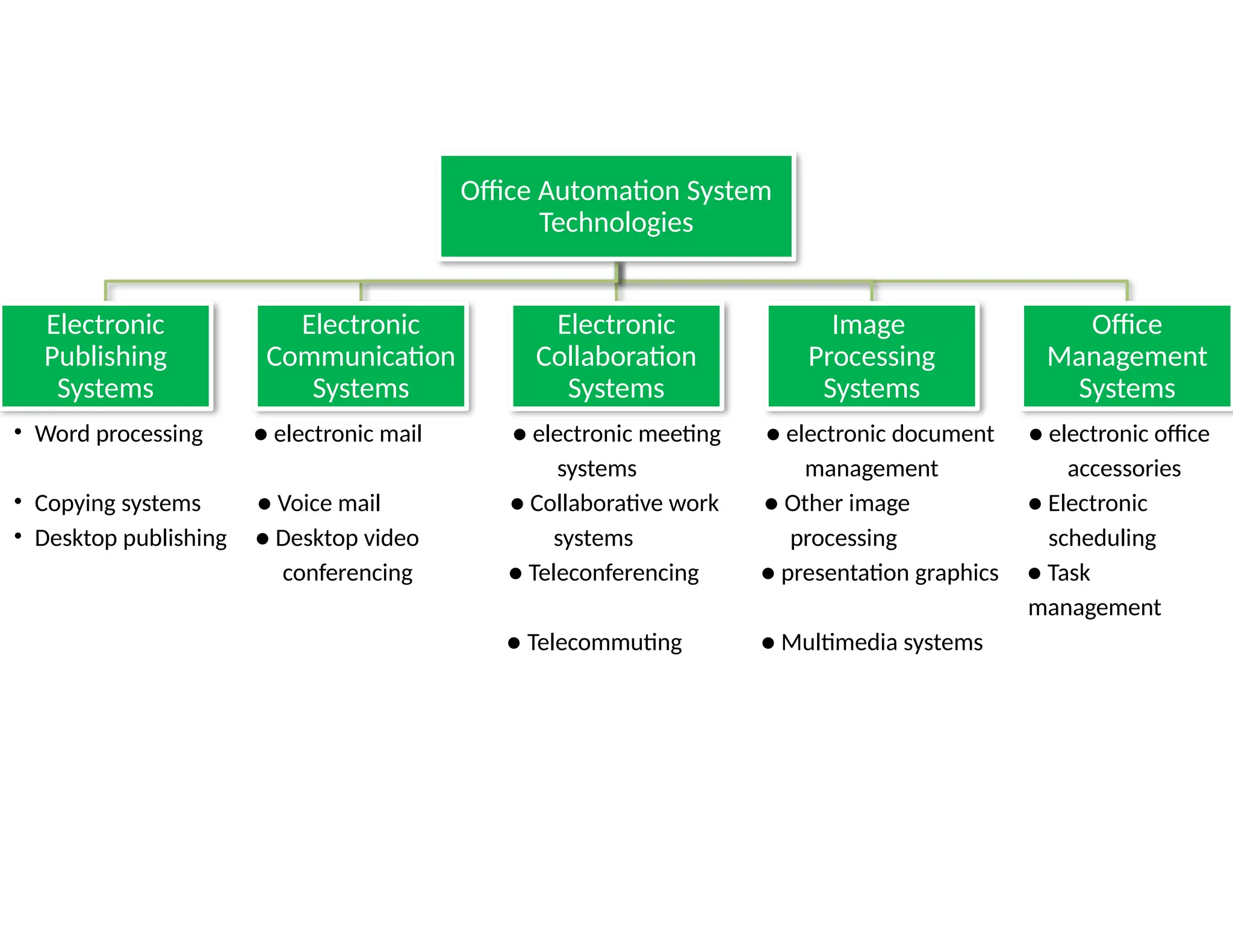
Office Automation System
Technologies
Electronic
Publishing
Systems
Electronic
Communication
Systems
Electronic
Collaboration
Systems
Image
Processing
Systems
Office
Management
Systems
• Word processing ● electronic mail ● electronic meeting ● electronic document ● electronic office
systems management accessories
• Copying systems ● Voice mail ● Collaborative work ● Other image ● Electronic
• Desktop publishing ● Desktop video systems processing scheduling
conferencing ● Teleconferencing ● presentation graphics ● Task
management
● Telecommuting ● Multimedia systems
6. Expert Systems (ESs)
• Expert system is different from other information
systems because it replicates the decision making
process by applying rules to information in help
of expert.
• ES is developed for particular area of knowledge
or domain.
– Example:- Medical diagnosis, weather forecasting,
etc.
Note: TPS-records data, MIS-Summarizes data,
DSS-Analyzes data
1.3 IMPACT OF ICT IN EVERYDAY LIFE
• ICT
– can be used to find, develop, analyze and present information as
well as to model situations & solve problems.
– enables rapid access to ideas & experiences from a wide range of
people, communities and cultures, and allows pupils to collaborate &
exchange information on a wide scale.
– acts as a powerful force for change in society and citizens should
have understanding of social, ethical, legal and economic
implications of its use, including how to use ICT safely & responsibly.
• Digital device is a device that works with discrete numbers or
digits. For example:- Digital Computers, Digital Cameras, MP3
Players, Mobile Chargers, Cell Phone, PDA, GSP Portables,
Mobile VoIP, etc.
J:To teachMPEGIInformation Technology Industry.mpg
J:To teachMPEGIIT Changing the Global Economy.mpg
Some Digital Devices
Impact of Using Computers in Offices
• Computer has brought many changes in employment,
including changes to office equipment, office location,
work schedules & types of work - people are seeking.
• Computer has created some amount of culture shock
as individuals attempt to deal this technology.
• One can create typed paper with typewriter, computer
has more features in word processing to do it with.
• Internet & communications, digital video and audio
composition and desktop publishing are all features
that are only offered on computers.
• E-mail has made it easy to send messages world wide
via computer networks.
• Office automation has become the term for linking workstations,
printers, database system and other tools by means of a Local Area
Network.
• An eventual goal of office automation has been termed the
paperless office.
• The increasing educational opportunities from use of computers in
turn increase the professional job opportunities in offices.
• Technological development also negatively influences the
advancement chances of workers in the offices. The experience and
knowledge are not valuable anymore because workers having high
skills of computer usage which are required by employers can start
out on high level jobs.
• There have been many job losses as computers have begun to do
more tasks in the offices. For example:
1. Reduced number of clerical staff, as there is less need for filling.
2. Reduced number of manual workers as we now have robots which
can do the work.
Impact of Mobile phones
• Mobile phones are one element of ICT. They provide sense of security
especially to dial away in the event of emergency.
Positive Effects of Cell Phones
1. Cost options for all customers.
2. Cell phones become small in size which make it easy to transport.
3. Conducting user’s business.
4. Cell phones allow to access internet service.
5. Cell phones now come with cameras.
Negative Impact of Mobile Phones
6. Spillover: The line between work & personal time has practically been
eradicated.
7. Dangerous: An accident may occur when drivers are driving and talking on a
mobile phones.
8. Health problems such as cancer & Alzheimer’s when we use mobile phones.
9. Environment pollution
10. Manners: People may not paying attention to where they are talking.
11. Addiction: Teens become addicted to using phone.
Impact of Satellite Broadcasting
• Satellite technology plays an important role in communication globally.
• The speed of satellite transmission is from 256KBPS to 100MBPS.
• Satellites work by receiving and transmitting radio signals from one earth
station to another.
• Satellite systems have advantages of transmission from point to multipoint
systems. Satellite technology has potential to beam signals across different
countries. It has also improved TV signal transmission as well.
• Satellite voice communication currently has direct access voice services
available on a large scale, even to rural subscribers.
• ETC is trying its best to improve ICT development. The Ethiopian government
has processed 3 primary projects:
i. Government network (‘Woredanet’)
ii. Education network (‘Schoolnet’)
iii. Agriculture network (‘Agrinet’) .
• Delivering education through satellites will greatly help in reducing
illiteracy, alleviating poverty, making the society more information rich
and in integrating the nation.
Differences between Information Poor and
Information Rich Society
• The Organization for Economic Co-operation & Development (OECD) defines
the Digital Divide as the difference between individuals , households,
businesses & geographic areas with regard to their
a) opportunities to access ICTs and
b) use the internet for a wide variety of activities.
• The information rich societies have good access to information – especially
online, but also through more traditional media such as newspapers, radio,
TV and books – and can plan their lives & react to changes in circumstances
on the basis of what they know or can find out.
• The information poor societies do not have such access and vulnerable to all
kinds of pressures. Lack of access to ICT goods & services poses social &
economic disadvantages. More & more, developing countries are
recognizing that they can not compete in the new global market unless they
take advantage of the ICT revolution.
• The greatest development in ICT in Africa in the 21st
century has been in the
area of mobile telephony. The Ethiopian Government is making strong
efforts to make ICT as a tool in its strategies of eradicating poverty. By HE

Unit 1 for Grade 11th Information system .pptx

  • 1.
    UNIT ONE INFORMATION SYSTEMS 1.1GENERAL CONCEPTS OF INFORMATION SYSTEMS
  • 2.
    1.1 GENERAL CONCEPTSOF INFORMATION SYSTEMS • What is computer? What is Information? Define the term “System”. • Information systems are assembled from parts or components. • All of the integrated components & systems are designed to provide information we need, in the form we need it, when we need it. • Only small minority of people actually design computers or ICT systems. • The vast majority of end-users use computers in their own fields of interest.
  • 3.
    Some Applications ofICT • What is ICT? What are its Components? • ICT has large number of applications in different sectors of life. • Those applications of ICT are categorized as: – At home – At office – At factory – In transport – In communications – In education/training – In health
  • 4.
    At Home If wehave Personal Computer in our home, we can • Use encyclopedic information, movies & animations, • Visit our community or other parts of world, • Search school or work assignments, exchange e-mail, join special interest groups, download files, play games or make airline reservations using internet, • Do online shopping, • Read newspaper through internet connection, • Make our travel plans, chat with our friends, without moving out of our home.
  • 5.
    At Office • Computershave become so deeply embedded in information processing & communications systems that almost no activity would possible without them. • The ICTs are integrated into offices in the following ways: I. Transaction processing II. Home-based workers III. Desktop publishing IV. Financial analysis V. Product design VI. Architectural walk-through VII. Factories, etc.
  • 6.
    At Factory • ICTshave major impact in industries where products are designed by CAD(Computer Aided Design) & manufactured by CAM(Computer Aided Machine). • Computers are used to run robots that create, finish, assemble & test products and the components.
  • 7.
    In Transport • Toimprove road, air & rail transportation. • For air traffic control, monitoring of freight & day-to-day transport system. • Pilots are trained on software which simulates flying.
  • 8.
    In Communications • Communicationis one of the most recognized uses of ICTs. Various communication technologies, ranging from broadcasting to telecommunications and to the Internet are playing effective roles in the acquisition & sharing of information. • Almost all mobile phones have software embedded in them. • Satellites relay signals from one point to another, eliminating need of wires between two locations.
  • 9.
    In Education/Training • Computersare serving as the best friend to both teacher & student. • ICTs create fantastic educational opportunities. • Computers used to teach ICT courses like you are taking. • E-learning software supplements knowledge you get by studying books. • We can take/give online examination & get instant results. • We can check our examination results online. • ICTs are especially valuable for students with special needs. SMS-for HI, Voice activated dialing service for VI. • To save money & improve performance, companies are using Computer Based Training to train people on procedures & techniques they need to know in their jobs. • Training programs in organizations rely heavily on ICT sectors such as video conferencing.
  • 10.
    In Health • ICTs –are helpful in training doctors for surgery. – support efficient exchange of information between health professionals, – enable transfer of patient records between sites & – used to understand human body and to diagnose disorders by physicians. • Computer controlled laser machines are used in surgery. The surgeries can be performed by using laser techniques are operated through a technique called endoscopy.
  • 11.
    1.2 TYPES OFINFORMATION SYSTEM IN THE ORGANIZATION Definition & Characteristics of System • The term “system” originates from the Greek term ‘systema’, which means to “place together.” • System is a collection of an interrelated set of components with identifiable boundary that work together to realize its objective. Basically there are three major components in every system, namely input, processing and output. • A system is an orderly arrangement of its components. • A system has 9 characteristics.
  • 12.
    Characteristics of System 1.Components (Subsystems): System is made up of components. The simple concept of component is very powerful. 2. Interrelated Components: The function of one component is tied to functions of other components. 3. Boundary: A boundary separates a system from its environment. A system should be defined by its boundaries – the limits that identify its components, processes and interrelationship when it interfaces with another system. Components within boundary of system can be changed, where as things outside the boundary can not be changed. 4. Purpose: all of the components work together to achieve some overall purpose for larger system.
  • 13.
    5. Environment: Asystem exists within an environment which comprises of everything outside the system’s boundary that influences the system. 6. Interfaces: The points at which the system meets its environment and there are also interfaces between subsystems. They have several special important functions. Because of interface functions are critical in communication between system components or a system & its environment, interfaces receive much attention in design of information systems. Design of good interfaces allow different systems to work together without being too dependent on each other.
  • 14.
    7. Input: Systemtakes input from its environment in order to function. Inputs must be accurate to create good system. 8. Output - is result of system functioning. Output from individual subsystems may be inputs to other subsystems. 9. Constraints: System must face constraints in its functioning because there are limits (in terms of capacity, speed or capabilities) to what it can do & how it can achieve its purpose within its environment.
  • 15.
    Applications of InformationSystem Types • The flow of information in organization is very vital. • Information system is an arrangement of people, data, processes, interfaces, networks & technology that interact for the purpose of supporting & improving both day-to-day operating in a business as well as supporting the problem solving & decision making needs of management. • Basically Information systems are classified as manual & computer-based. • The main purpose of computer based information system is to provide managers with the appropriate kind of information to help them make decisions.
  • 16.
    • There are6 types of computer based information systems which serve different levels of management. 1. Transaction Processing Systems (TPS) 2. Management Information Systems (MIS) 3. Decision Support Systems (DSS) 4. Expert Systems (ES) 5. Executive Support System 6. Office Automation Systems
  • 17.
    1. Transaction ProcessingSystems (TPSs) • Transaction – is recorded event having to do with routine. • TPS is designed to process routine transactions efficiently & accurately. It records data but do little in the way of converting data into information. • TPS is computer based information system that keeps track of the transactions needed to conduct business. It automates handling of data about business activities (transactions).
  • 18.
    Some features ofTPS are given below: i. Input & output. – Inputs to system are transaction data: bills, orders, inventory levels, etc. – Output consists of processed transactions: bills, paychecks, etc. ii. For lower managers. iii. Produces detail reports. A manager at this level typically will receive information in the form of detailed reports. iv. One TPS for each department. v. Basis for MIS & DSS • Examples of TPS include, but not limited to, sales order entry, payroll, employee record keeping.
  • 19.
    2. Management InformationSystems (MISs) • MIS is a Computer Based Information System that uses raw data recorded by TPS as input into programs which produce routine reports (meaningful form) as output. • MIS is a person-machine system and a highly integrated grouping of information – processing functions designed to provide management with a complete representation of specific operations. It is actually a combination of information systems.
  • 20.
    Some features ofMIS are given below: i. Input & output. – Inputs consist of processed transaction data such as bills, orders & paychecks plus other internal data. – Outputs consist of summarized, structured reports: budget summaries, production schedules, etc. ii. For middle managers. iii. Produces several kinds of reports.  Summary reports show totals & trends.  Exception reports show out-of-the-ordinary data.  Periodic reports are produced on a regular schedule.  Demand reports – produce information in response to unscheduled demand. They are often produced on computer screen rather than on paper. iv. Draws from all departments, not just one.
  • 21.
    3. Decision SupportSystems (DSSs) • Decision Support System is a CBIS that provides a flexible tool for analysis & designed to help managers (decision makers) focus on the future. • To reach DSS level of sophistication in Information Technology, an organization must have established TPS & MIS systems first. • DSS Provides interactive environment for decision making.
  • 22.
    Some features ofDSS are given below: i. Inputs & outputs. – Inputs include internal data such as summarized reports & processed transaction data and also external data to organization. – Outputs are demand reports on which top manager can make decisions about unstructured problems. ii. Mainly for middle managers. i. Produces analytic models. Key attribute of DSS is it uses models. The system is accessed using DSS software. Draws from all departments, not just one. • The model allows manager to do simulation - play “what-if” game – to reach decisions. Many DSSs are developed to support the types of decisions faced by managers in specific industries such as airlines or real estate.
  • 23.
    4. Executive SupportSystems/Executive Information Systems (ESSs/EISs) • ESS is an easy-to-use DSS made especially for top managers; it specifically supports strategic decision making. • ESS draws on data not only from systems internal to organization but also from outside such as news services or market-research databases. • An ESS might allow senior executives to call up predefined reports from their Personal Computers. • An ESS includes capabilities for analyzing data & doing “what-if” scenarios.
  • 24.
    5. Office AutomationSystems (OASs) • OASs combine various technologies to reduce the manual labor required in operating & efficient office environment. • OASs are systems that try to improve the productivity of employees who need to process data & information. • The backbone of OAS is network – LAN, intranet, extranet – that connects everything. • All office functions – dictation, typing, filing, copying, fax, microfilm & records management, telephone calls & switchboard operations – are candidates for integration into network. • OASs & Expert systems – for all levels of managers even for non-managers.
  • 25.
    Office Automation System Technologies Electronic Publishing Systems Electronic Communication Systems Electronic Collaboration Systems Image Processing Systems Office Management Systems •Word processing ● electronic mail ● electronic meeting ● electronic document ● electronic office systems management accessories • Copying systems ● Voice mail ● Collaborative work ● Other image ● Electronic • Desktop publishing ● Desktop video systems processing scheduling conferencing ● Teleconferencing ● presentation graphics ● Task management ● Telecommuting ● Multimedia systems
  • 26.
    6. Expert Systems(ESs) • Expert system is different from other information systems because it replicates the decision making process by applying rules to information in help of expert. • ES is developed for particular area of knowledge or domain. – Example:- Medical diagnosis, weather forecasting, etc. Note: TPS-records data, MIS-Summarizes data, DSS-Analyzes data
  • 27.
    1.3 IMPACT OFICT IN EVERYDAY LIFE • ICT – can be used to find, develop, analyze and present information as well as to model situations & solve problems. – enables rapid access to ideas & experiences from a wide range of people, communities and cultures, and allows pupils to collaborate & exchange information on a wide scale. – acts as a powerful force for change in society and citizens should have understanding of social, ethical, legal and economic implications of its use, including how to use ICT safely & responsibly. • Digital device is a device that works with discrete numbers or digits. For example:- Digital Computers, Digital Cameras, MP3 Players, Mobile Chargers, Cell Phone, PDA, GSP Portables, Mobile VoIP, etc. J:To teachMPEGIInformation Technology Industry.mpg J:To teachMPEGIIT Changing the Global Economy.mpg
  • 28.
  • 29.
    Impact of UsingComputers in Offices • Computer has brought many changes in employment, including changes to office equipment, office location, work schedules & types of work - people are seeking. • Computer has created some amount of culture shock as individuals attempt to deal this technology. • One can create typed paper with typewriter, computer has more features in word processing to do it with. • Internet & communications, digital video and audio composition and desktop publishing are all features that are only offered on computers. • E-mail has made it easy to send messages world wide via computer networks.
  • 30.
    • Office automationhas become the term for linking workstations, printers, database system and other tools by means of a Local Area Network. • An eventual goal of office automation has been termed the paperless office. • The increasing educational opportunities from use of computers in turn increase the professional job opportunities in offices. • Technological development also negatively influences the advancement chances of workers in the offices. The experience and knowledge are not valuable anymore because workers having high skills of computer usage which are required by employers can start out on high level jobs. • There have been many job losses as computers have begun to do more tasks in the offices. For example: 1. Reduced number of clerical staff, as there is less need for filling. 2. Reduced number of manual workers as we now have robots which can do the work.
  • 31.
    Impact of Mobilephones • Mobile phones are one element of ICT. They provide sense of security especially to dial away in the event of emergency. Positive Effects of Cell Phones 1. Cost options for all customers. 2. Cell phones become small in size which make it easy to transport. 3. Conducting user’s business. 4. Cell phones allow to access internet service. 5. Cell phones now come with cameras. Negative Impact of Mobile Phones 6. Spillover: The line between work & personal time has practically been eradicated. 7. Dangerous: An accident may occur when drivers are driving and talking on a mobile phones. 8. Health problems such as cancer & Alzheimer’s when we use mobile phones. 9. Environment pollution 10. Manners: People may not paying attention to where they are talking. 11. Addiction: Teens become addicted to using phone.
  • 33.
    Impact of SatelliteBroadcasting • Satellite technology plays an important role in communication globally. • The speed of satellite transmission is from 256KBPS to 100MBPS. • Satellites work by receiving and transmitting radio signals from one earth station to another. • Satellite systems have advantages of transmission from point to multipoint systems. Satellite technology has potential to beam signals across different countries. It has also improved TV signal transmission as well. • Satellite voice communication currently has direct access voice services available on a large scale, even to rural subscribers. • ETC is trying its best to improve ICT development. The Ethiopian government has processed 3 primary projects: i. Government network (‘Woredanet’) ii. Education network (‘Schoolnet’) iii. Agriculture network (‘Agrinet’) . • Delivering education through satellites will greatly help in reducing illiteracy, alleviating poverty, making the society more information rich and in integrating the nation.
  • 35.
    Differences between InformationPoor and Information Rich Society • The Organization for Economic Co-operation & Development (OECD) defines the Digital Divide as the difference between individuals , households, businesses & geographic areas with regard to their a) opportunities to access ICTs and b) use the internet for a wide variety of activities. • The information rich societies have good access to information – especially online, but also through more traditional media such as newspapers, radio, TV and books – and can plan their lives & react to changes in circumstances on the basis of what they know or can find out. • The information poor societies do not have such access and vulnerable to all kinds of pressures. Lack of access to ICT goods & services poses social & economic disadvantages. More & more, developing countries are recognizing that they can not compete in the new global market unless they take advantage of the ICT revolution. • The greatest development in ICT in Africa in the 21st century has been in the area of mobile telephony. The Ethiopian Government is making strong efforts to make ICT as a tool in its strategies of eradicating poverty. By HE

Editor's Notes

  • #2 Computer is an e-device that can accept, store & process data under the control of a set of instructions. Information is data that has been processed & presented in a form suitable for human interpretation. System is set of related parts that operate together to perform specific function.
  • #3 ICT refers to technologies that provide access to information through telecommunications. The main components of ICT are computer & communication Networks. But also include Cell phones, Internet, TV, etc.
  • #14 Some constraints are imposed inside system where as others are imposed by environment.
  • #21 Model is a mathematical representation of real system.
  • #25 telecommute· v. work from home, communicating with a central workplace using equipment such as telephones, fax machines, and modems. – DERIVATIVES telecommuter n. telecommuting n.