Computer Architecture and
Organization
Hari K.C.
Syllabus
• Subject: Computer Architecture and Organization
• Code: COMP 315
• Level: Bachelor 3rd Year 1st
• Semester Credit Hours: 3
Course Objective:
To extend and refine the elementary concepts of computer architecture introduced in the first
year computer foundation and second year first semester digital logic courses. This course will
lay the foundation for the microprocessors course. No practical for this course but a case-study
and paper based design of CPU (MPU) will help out to understand the internal architecture of a
computer system.
Contents:
1. Basic Structures: Sequential circuits, design procedure, state table and state
diagram Von Neumann architecture, stored program concepts and functional
units.[3 hrs.]
2. Addressing Methods and Programs: Programming view of a processor, data
types, and representation of data, arithmetic operations, basic operational
concepts, bus structures, instruction cycle and excitation cycle. [8 hrs.]
3. Processing Unit: Instruction formats: computer instruction, instruction length,
address instruction, arithmetic instruction, and logical instruction. [6 hrs.]
4. Addressing modes: General concepts, single-component addressing modes,
multi-component addressing modes, and position-independent code. [6 hrs.]
5. Input Output Organization: Basic principles of interrupt-driven I/O and DMA,
I/O operations, I/O programming, memory-mapped I/O, basic interrupt system,
direct memory access, DMA channel programming, and memory-mapped
screens.[6 hrs.]
6)Arithmetic: Magnitude comparator, complements, straight
subtraction, subtraction with complements, addition and subtraction
algorithms, hardware implementation, multiplication and division
algorithms, hardware implementation, and divide overflow [6 hrs.]
7) Memory System: Auxiliary memory: magnetic drum, magnetic disks,
and magnetic tapes; microcomputer. [4 hrs.]
8)Memory: RAM/ROM chips, memory address map, memory
connection to microprocessor; memory hierarchy; associative memory:
hardware organization, Match logic, read operation, write operation;
virtual memory: address space memory space, address mapping,
associative memory page table; cache memory: associative mapping,
direct mapping, set associative mapping; memory management
hardware [6 hrs.]
Unit 1: Basic Structures
Computer Organization:
• Computer organization refers to operational units(components) and
their inter connections that realize the architectural specification.
• Organization attributes include those hardware details transferring to
the programmer such as control signal, interfaces between computer
and peripheral and memory technology used.
• Computer organization is concerned with the way the hardware
components operate and the way they are connected.
• Examples include: adder, subtractor, Counters, Memory etc
Computer Architecture:
• Computer architecture refers to those attributes of a system
visible to a programmer or those attributes that help direct
impact on logical execution of program.
• Example of architectural attributes include instructions,
instruction set, number of bits used to represent various
data type, i/o mechanism and technique of addressing
memory.
• Computer architecture is concerned with the behavior of the
computer as seen by user.
• Example: Von Neumann architecture, Harvard architecture
• It is an architectural design issue whether a computer will have
multiply instructions.
• It is an organizational design issue whether the multiply instruction
will be implemented by a special multiply unit or by a mechanism that
makes repeated use of the adder unit of the system.
• Computer- the heart of computing ……without it, most of the
computing disciplines, theoretical mathematics are of no use.
MIPS processor architecture
• MIPS = Million Instructions per second processor
• Fixed 32-bit instructions
• 3 instruction formats
• 3 operand, load-store architecture
• 32 general purpose register
• Registers are of 32 bits size
• Addressing mode: register, immediate
8085 Microprocessor architecture
• The Intel 8085 is an 8-bit microprocessor that was introduced in the mid-1970s.
• It was widely used in various applications and played a significant role in the early
development of microprocessors.
• Here's an overview of the architecture of the Intel 8085 microprocessor:
Registers:
• Accumulator (A): This is the primary register used for arithmetic and logical
operations.
• General Purpose Registers (B, C, D, E, H, L): These are used for data manipulation.
• Stack Pointer (SP): It points to the top of the stack in memory.
• Program Counter (PC): It points to the memory address of the next instruction to
be executed.
Flags: The 8085 has five flag bits that indicate certain conditions after
arithmetic and logical operations:
• Sign (S): Set if the result of an operation is negative.
• Zero (Z): Set if the result of an operation is zero.
• Auxiliary Carry (AC): Set if there is a carry between bits 3 and 4 of the
result.
• Parity (P): Set if the result has an even number of 1s.
• Carry (CY): Set if there is a carry from the most significant bit.
Instructions: The 8085 supports a variety of instructions categorized
into different groups, including data transfer, arithmetic, logical,
branching, and control instructions.
Instructions are encoded as binary codes, and the microprocessor
fetches, decodes, and executes them in sequence.
• Memory: The 8085 can address up to 64 KB (65536 bytes) of
memory.
• The memory is organized into memory cells, each holding 8 bits.
• Memory addresses are 16 bits wide.
Addressing Modes: The 8085 supports various addressing modes that
dictate how operands are specified for instructions.
These include immediate addressing, direct addressing, register
addressing, indirect addressing, etc.
Instruction Execution Cycle: The execution of an instruction in the 8085
typically involves the fetch, decode, and execute cycle.
During the fetch phase, the microprocessor fetches the instruction
from memory. In the decode phase, the instruction is decoded to
determine the operation to be performed.
In the execute phase, the actual operation is carried out.
8086 microprocessor architecture
• The Intel 8086 is a 16-bit microprocessor introduced by Intel in 1978.
• It was a significant improvement over the earlier 8-bit microprocessors like the
8085.
• The 8086 marked the beginning of the x86 architecture, which has become one
of the most successful and enduring microprocessor architectures.
Registers:
• General Registers: The 8086 has eight 16-bit general-purpose registers, labeled as
AX, BX, CX, DX, SI, DI, BP, and SP. These can also be accessed as two separate 8-bit
registers if needed.
• Segment Registers: The 8086 has four 16-bit segment registers: CS (Code
Segment), DS (Data Segment), SS (Stack Segment), and ES (Extra Segment). These
are used for memory addressing in the segmented memory model.
• Flags: Similar to the 8085, the 8086 has flag bits that indicate various conditions
after arithmetic and logical operations. The flag bits are similar to those in the
8085 but have slightly different meanings in some cases.
Memory and Segmentation: The 8086 employs a segmented memory
model, where memory addresses are composed of a segment address
and an offset address.
• This allows it to access a total of 1 MB (2^20 bytes) of memory.
• The segment registers hold the base addresses of different memory
segments, and the offset is added to them to generate a physical
memory address.
Instructions and Addressing Modes: The 8086 supports a wide variety
of instructions, including data transfer, arithmetic, logical, branching,
and control instructions.
• It also has a rich set of addressing modes, such as direct addressing,
register addressing, indirect addressing, based addressing, indexed
addressing, etc.
Instruction Execution Cycle: The 8086 fetches and executes
instructions using a multi-stage pipeline.
• Instructions are fetched in one stage, decoded in the next, and
executed in subsequent stages.
Von Neumann Architecture and Stored
Program Concepts
• Von Neumann architecture was first published by John von Neumann
in 1945.
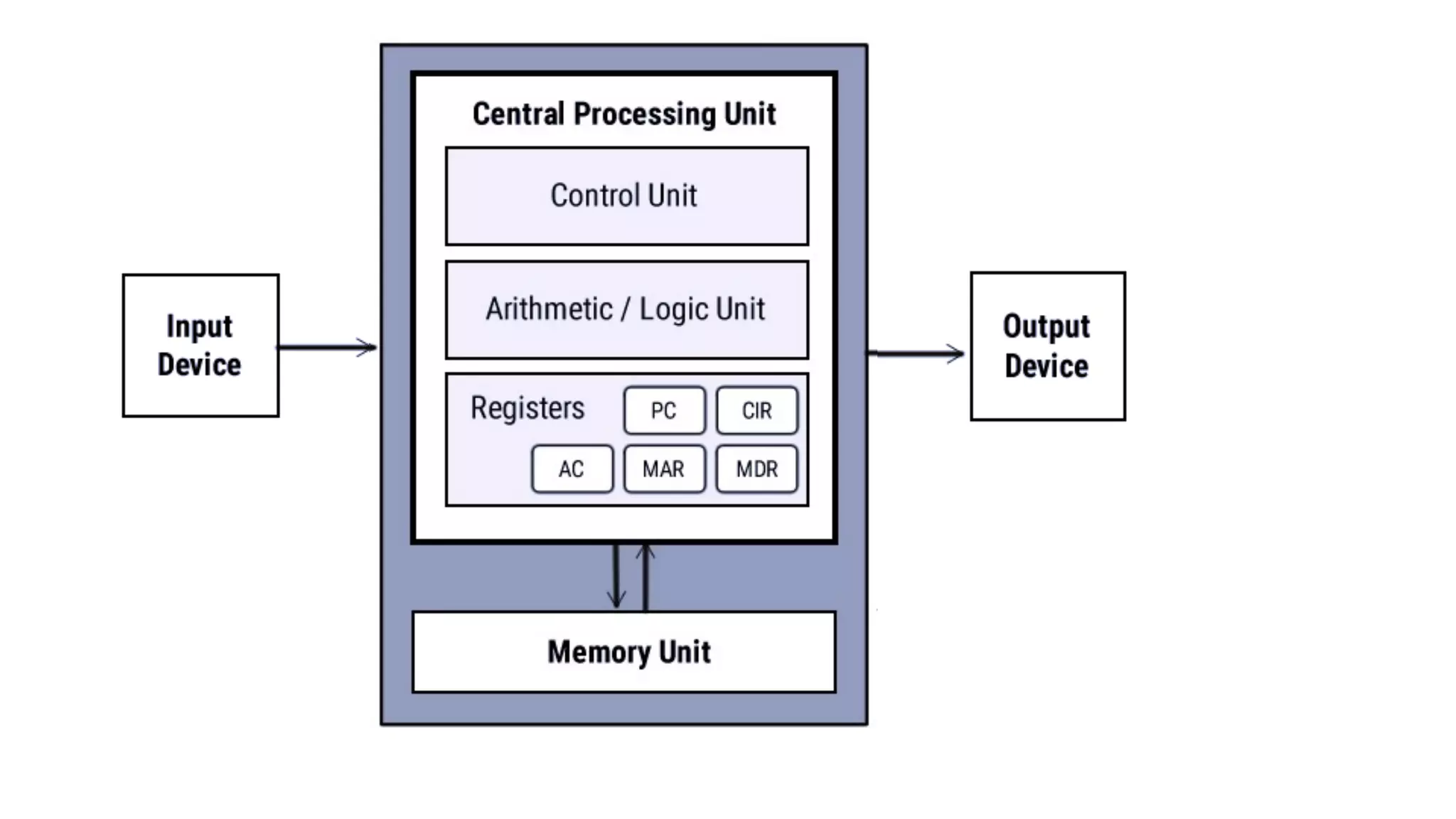
• This computer architecture design consists of a Control
Unit, Arithmetic and Logic Unit (ALU), Memory Unit, Registers and
Inputs/Outputs.
• Von Neumann architecture is based on the stored-program computer
concept, where instruction data and program data are stored in the
same memory.
• This design is still used in most computers produced today.
Central Processing Unit (CPU)
• The CPU is the electronic circuit responsible for executing the
instructions of a computer program.
• It is sometimes referred to as the microprocessor or processor.
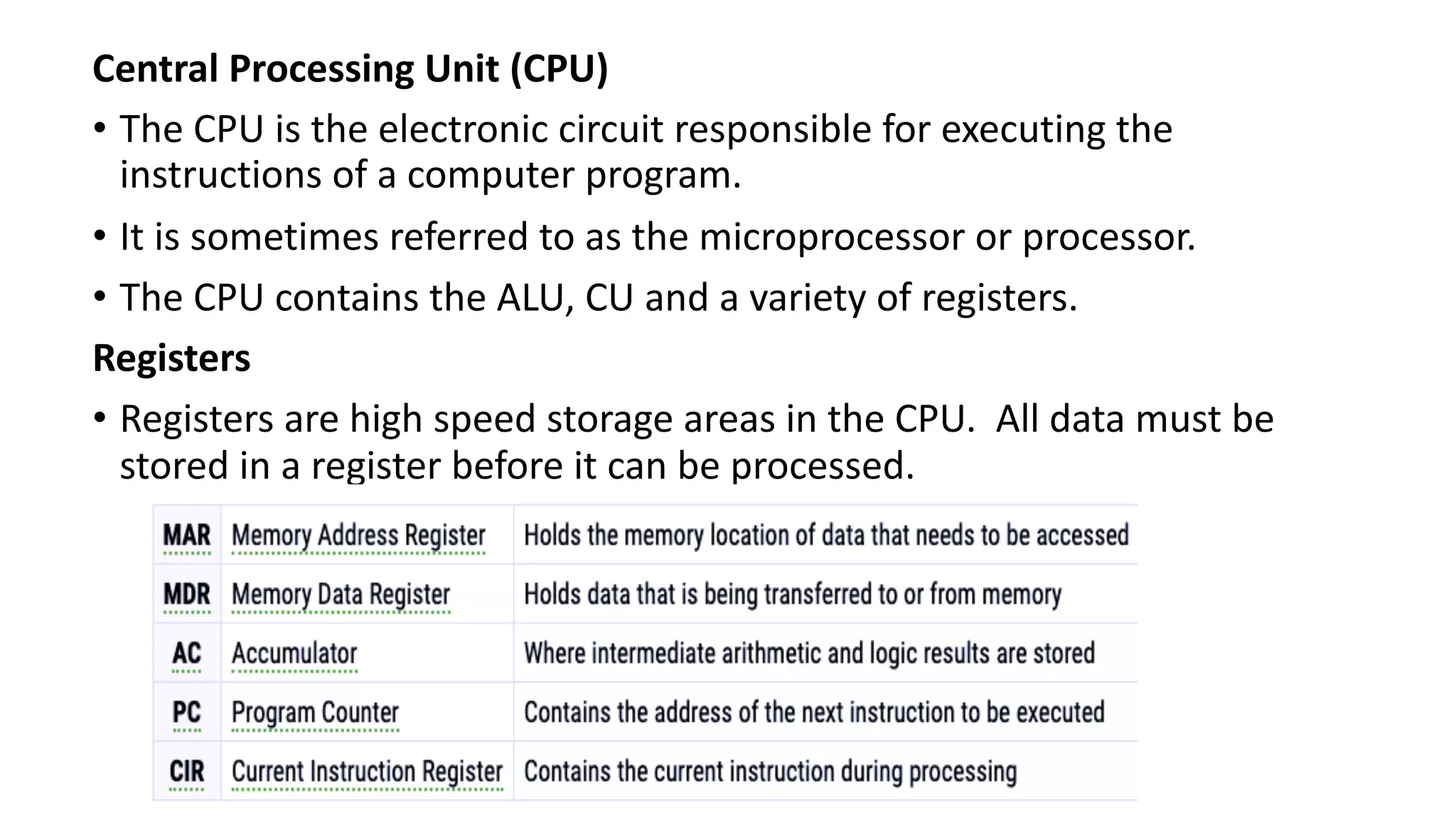
• The CPU contains the ALU, CU and a variety of registers.
Registers
• Registers are high speed storage areas in the CPU. All data must be
stored in a register before it can be processed.
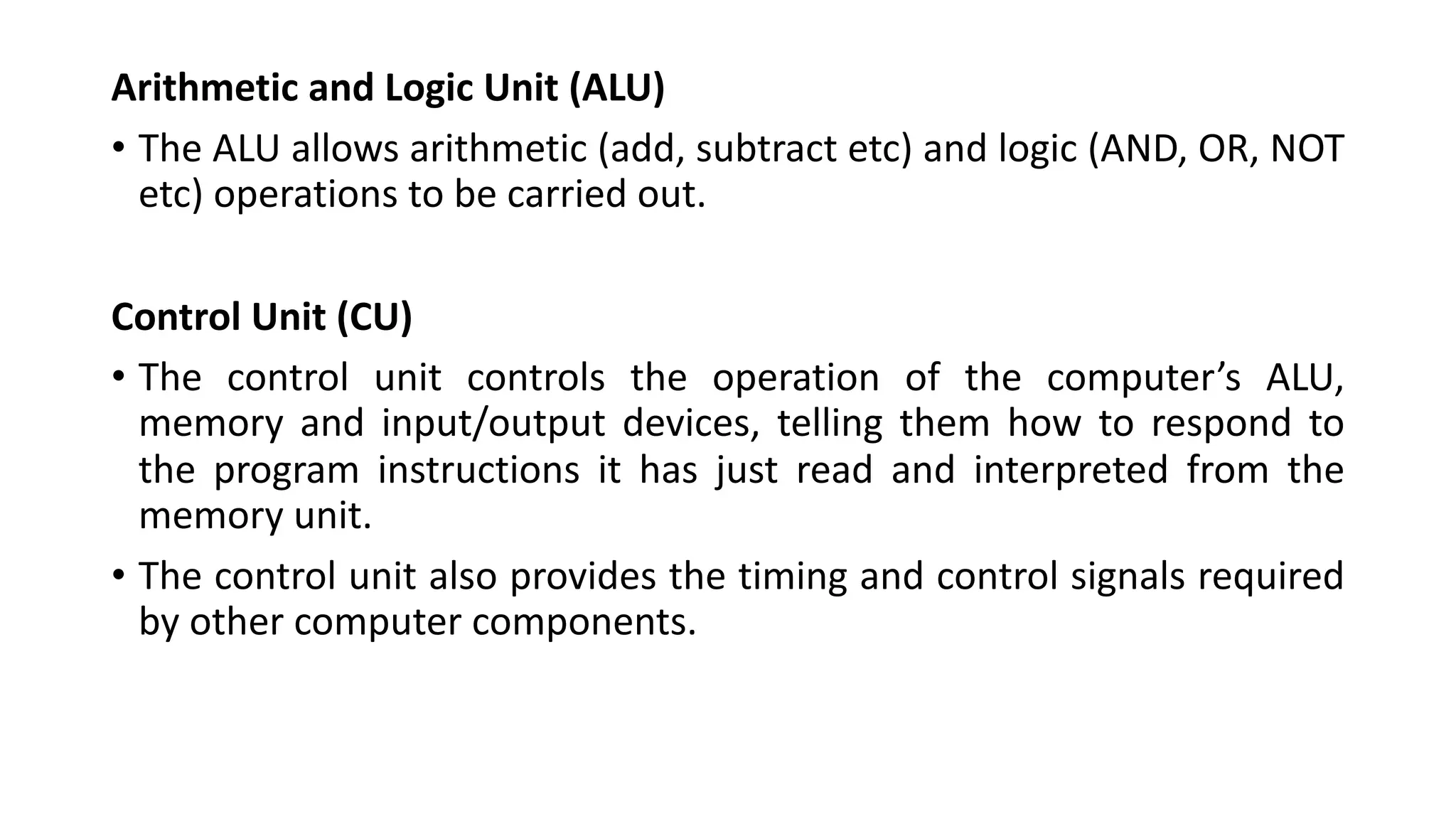
Arithmetic and Logic Unit (ALU)
• The ALU allows arithmetic (add, subtract etc) and logic (AND, OR, NOT
etc) operations to be carried out.
Control Unit (CU)
• The control unit controls the operation of the computer’s ALU,
memory and input/output devices, telling them how to respond to
the program instructions it has just read and interpreted from the
memory unit.
• The control unit also provides the timing and control signals required
by other computer components.
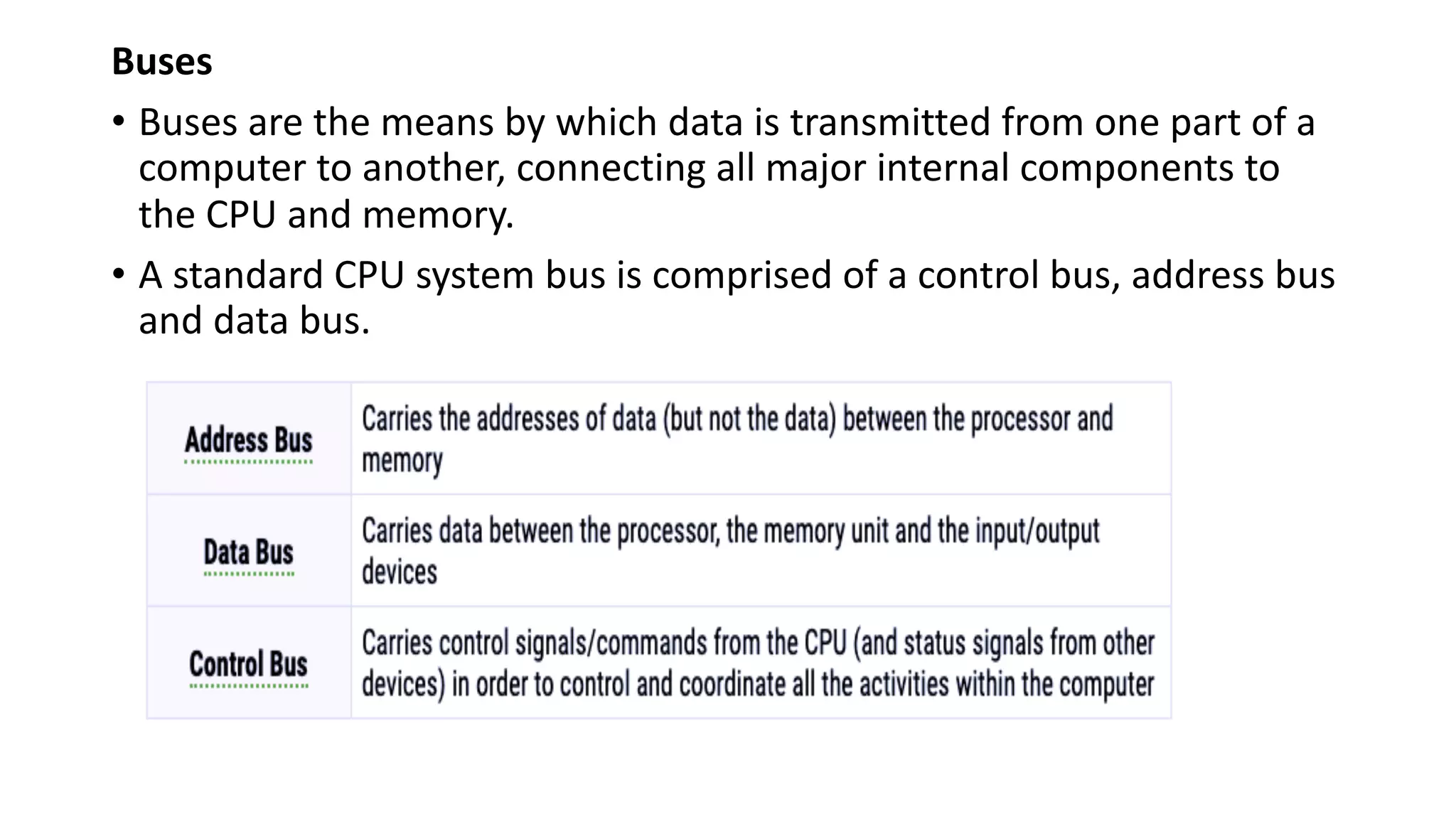
Buses
• Buses are the means by which data is transmitted from one part of a
computer to another, connecting all major internal components to
the CPU and memory.
• A standard CPU system bus is comprised of a control bus, address bus
and data bus.
Memory Unit
• The memory unit consists of RAM, sometimes referred to as primary
or main memory.
• Unlike a hard drive (secondary memory), this memory is fast and also
directly accessible by the CPU.
• RAM is split into partitions.
• Each partition consists of an address and its contents (both
in binary form).
• The address will uniquely identify every location in the memory.
• Loading data from permanent memory (hard drive), into the faster
and directly accessible temporary memory (RAM), allows the CPU to
operate much quicker.
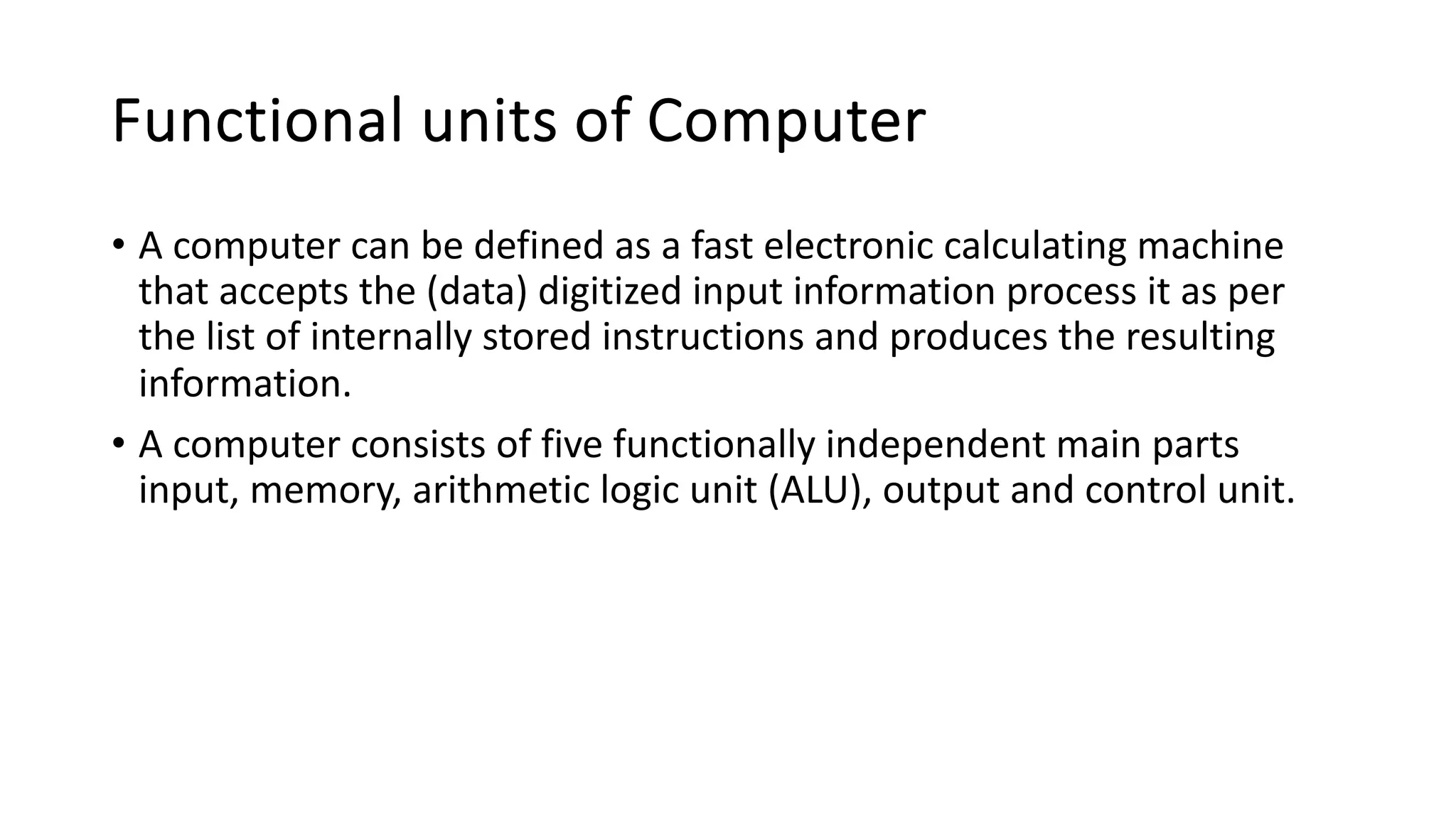
Harvard Architecture
• The Harvard architecture is a computer
architecture design that separates the storage
and manipulation of program instructions from
the data used by those instructions.
• It was named after the Harvard Mark I computer,
developed at Harvard University in the 1940s.
• The key characteristic of Harvard architecture is
its use of separate memory and buses for
program instructions and data, as opposed to the
more common Von Neumann architecture,
which uses a single memory for both instructions
and data.
Here are the main features and advantages of the Harvard architecture:
• Separate Instruction and Data Memory: In the Harvard architecture, there
are two distinct memory systems: one for storing program instructions
(instruction memory) and another for storing data (data memory).
• This separation allows for concurrent access to instructions and data,
potentially improving the overall performance of the system.
• Parallelism and Efficiency: Because the instruction and data paths are
separate, the Harvard architecture can fetch an instruction while
simultaneously accessing or processing data.
• This can result in reduced memory access conflicts and improved
throughput.
• Complex Instruction Set Computers (CISC): Many Complex Instruction Set
Computers (CISC) have adopted Harvard architecture to accommodate the
complex and variable-length instructions that are common in CISC
architectures.
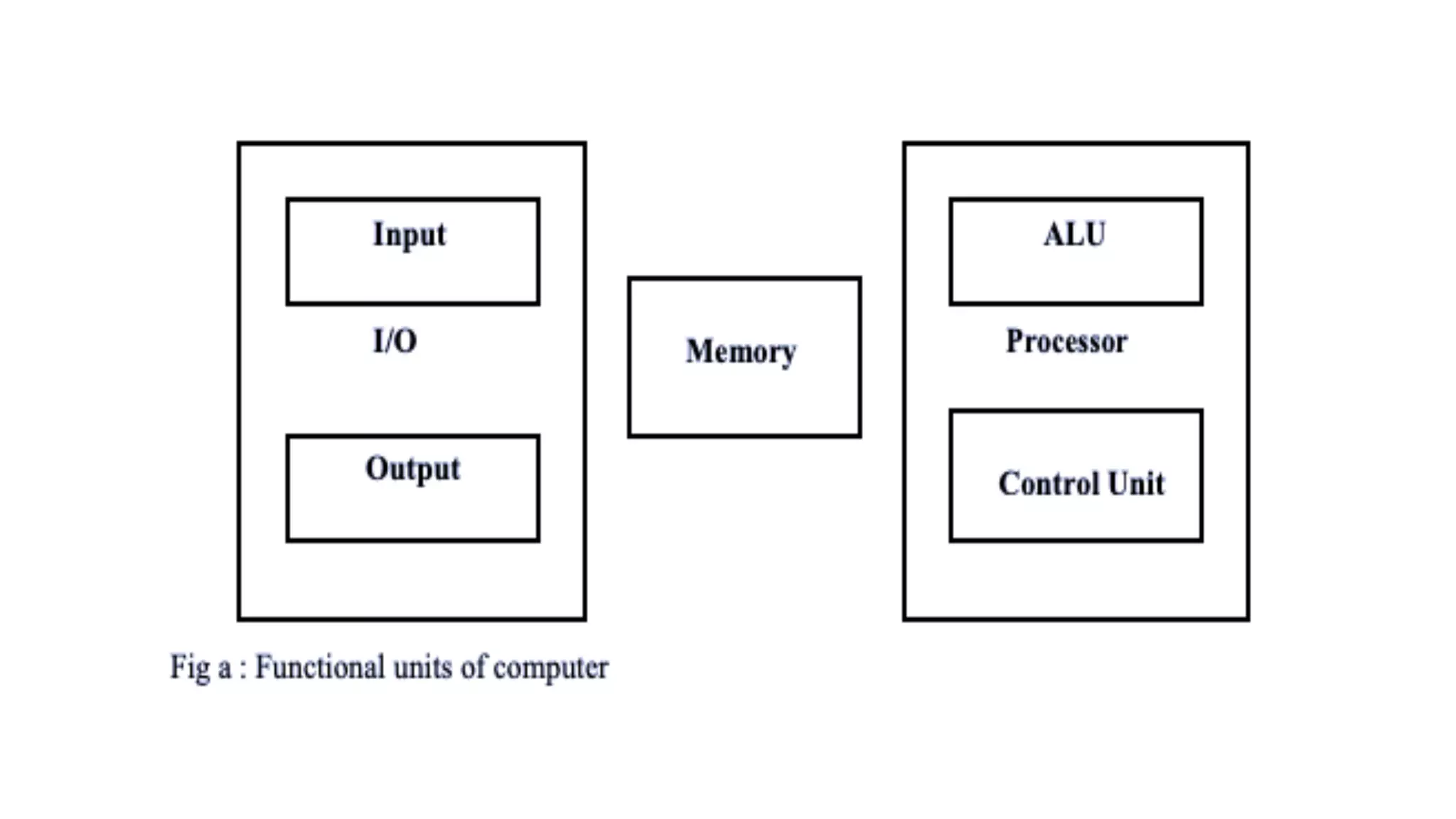
Functional units of Computer
• A computer can be defined as a fast electronic calculating machine
that accepts the (data) digitized input information process it as per
the list of internally stored instructions and produces the resulting
information.
• A computer consists of five functionally independent main parts
input, memory, arithmetic logic unit (ALU), output and control unit.
• Input device accepts the coded information as source program i.e.
high-level language.
• This is either stored in the memory or immediately used by the
processor to perform the desired operations.
• The program stored in the memory determines the processing steps.
• Basically the computer converts one source program to an object
program. i.e. into machine language.
• Finally, the results are sent to the outside world through output
device. All of these actions are coordinated by the control unit.
Input unit:
• The source program/high-level language program/coded
information/simply data is fed to a computer through input devices
keyboard is the most common type.
• Whenever a key is pressed, one corresponding word or number is
translated into its equivalent binary code over a cable & fed either to
memory or the processor.
• Joysticks, trackballs, mouse, scanners etc are other input devices.
Memory unit:
• Its function into store programs and data. It is basically two types
1. Primary memory 2. Secondary memory
Primary memory:
• It is the one exclusively associated with the processor and operates at
the electronics speeds programs must be stored in this memory while
they are being executed.
• The memory contains a large number of semiconductors storage cells.
Each capable of storing one bit of information.
• These are processed in a group of fixed site called word. To provide
easy access to a word in memory, a distinct address is associated with
each word location.
• Addresses are numbers that identify memory location.
• Memory in which any location can be reached in a short and fixed
amount of time after specifying its address is called random-access
memory (RAM).
• The time required to access one word in called memory access time.
Memory which is only readable by the user and contents of which
can’t be altered is called read only memory (ROM) it contains
operating system.
Secondary memory:
• It is used where large amounts of data & programs have to be stored,
particularly information that is accessed infrequently. Examples: -
Magnetic disks & tapes, optical disks (ie CD-ROM’s), floppies etc.
Arithmetic logic unit (ALU):
• Most of the computer operators are executed in ALU of the
processor like addition, subtraction, division, multiplication, etc.
• The operands are brought into the ALU from memory and stored in
high speed storage elements called register.
• Then according to the instructions the operation is performed in the
required sequence.
• The control and the ALU are may times faster than other devices
connected to a computer system.
• This enables a single processor to control a number of external
devices such as key boards, displays, magnetic and optical disks,
sensors and other mechanical controllers.
Output unit:
• These actually are the counterparts of input unit. Its basic function is
to send the processed results to the outside world.
• Examples:- Printer, speakers, monitor etc.
Control unit:
• It effectively is the nerve center that sends signals to other units and
senses their states.
• The actual timing signals that govern the transfer of data between
input unit, processor, memory and output unit are generated by the
control unit.
Basic operational concepts
• To perform a given task an appropriate program consisting of a list of
instructions is stored in the memory.
• Individual instructions are brought from the memory into the processor,
which executes the specified operations.
• Data to be stored are also stored in the memory.
Examples: - Add LOC_A, R0
This instruction adds the operand at memory location LOCA, to operand in
register R0 & places the sum into register.
This instruction requires the performance of several steps,
1. First the instruction is fetched from the memory into the processor.
2. The operand at LOC_A is fetched and added to the contents of R0.
3. Finally the resulting sum is stored in the register R0.
Combinational and Sequential circuits
What is a Combinational Circuit?
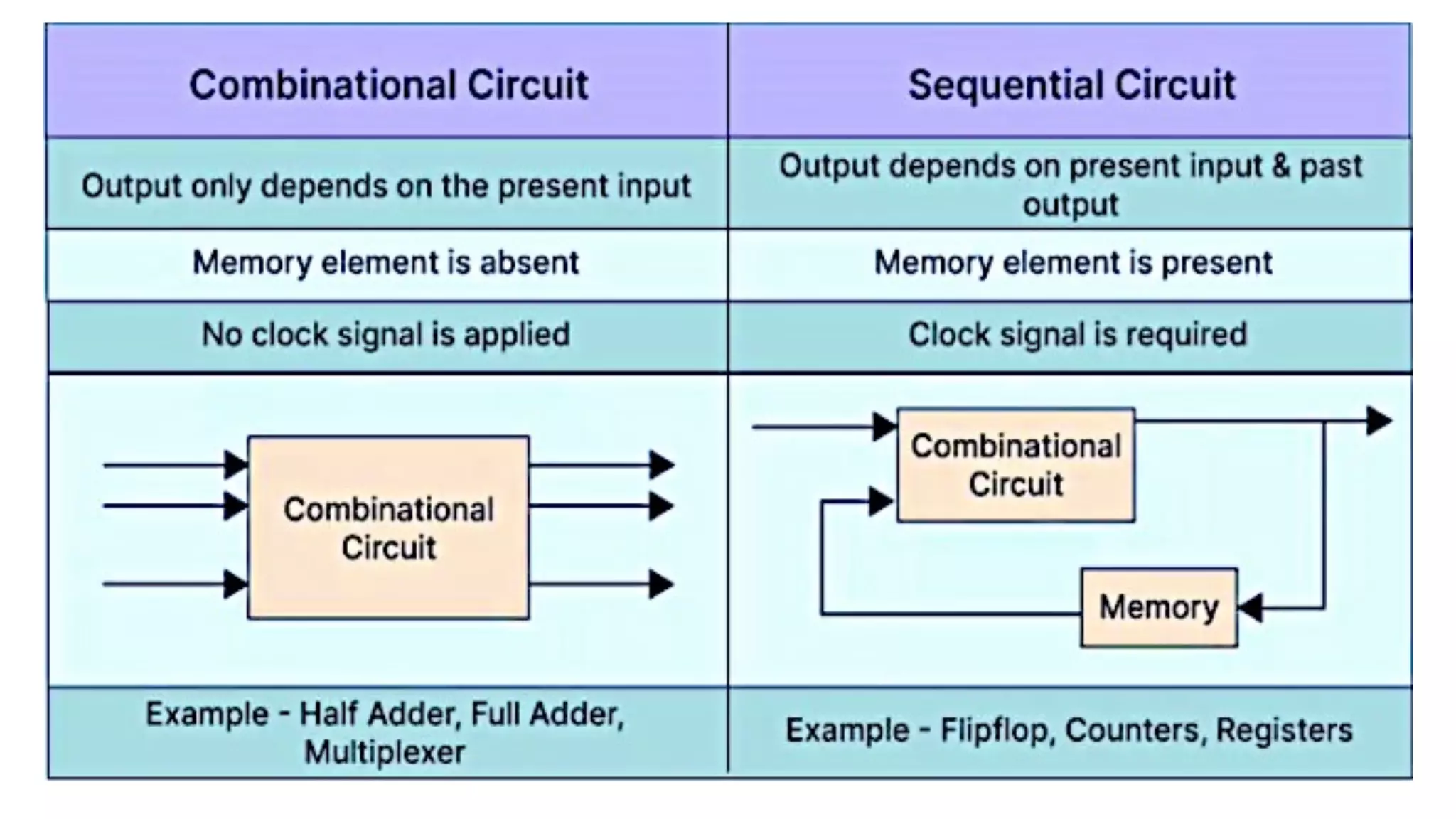
• The output of a Combinational Circuit depends entirely on the present
input.
• It exhibits a faster speed.
• It is comparatively easier to design.
• No feedback is present between the input and output.
• The combinational circuit depends on time.
• Logic gates form the building blocks of such circuits.
• One can make use of it for both Boolean and arithmetic operations.
• They don’t hold the capacity of storing any state.
• These circuits do not have a clock- thus, they don’t require triggering.
• They do not possess any memory element.
• Users can feasibly use as well as handle them.
• Example – Demultiplexer, Multiplexer, Decoder, Encoder, etc.
What is a Sequential Circuit?
• The output of a Sequential Circuit depends on both- past as well as
present inputs.
• It works at a comparatively slower speed.
• The design of these circuits is comparatively much tougher than the
Combinational Circuit.
• A feedback path exists between the output and the input.
• The circuit is time-dependent.
• Flip-flops constitute the building blocks of such a circuit.
• People mainly use them for storing data and information.
• They possess the capability of storing any data state or retaining an
earlier state at any given point.
• Because a Sequential circuit depends on a clock, it usually requires
triggering.
• They always possess a memory element.
• A user may not be able to handle and use these circuits easily.
• For Example – Counters, Flip-flops, etc.
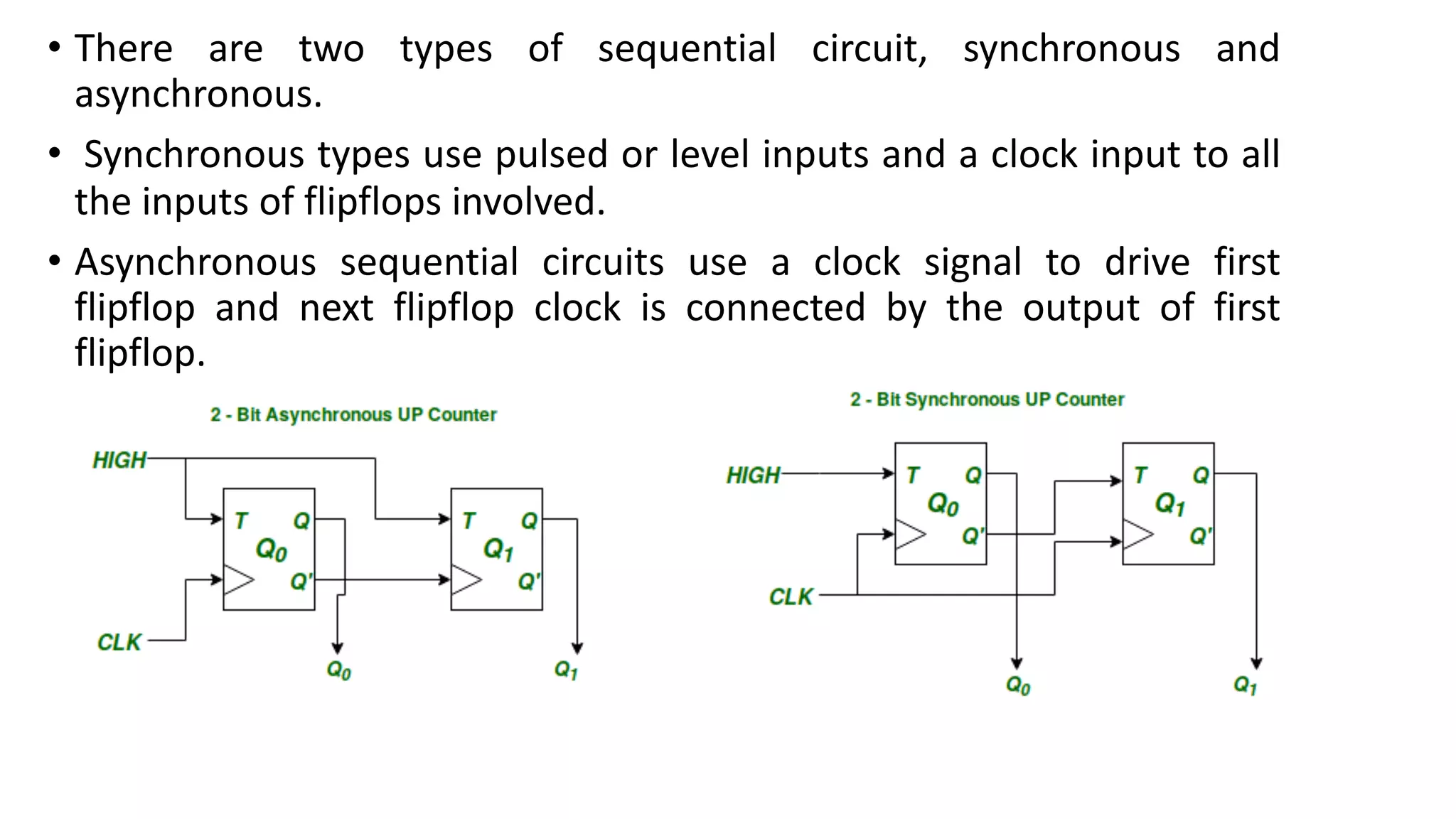
• There are two types of sequential circuit, synchronous and
asynchronous.
• Synchronous types use pulsed or level inputs and a clock input to all
the inputs of flipflops involved.
• Asynchronous sequential circuits use a clock signal to drive first
flipflop and next flipflop clock is connected by the output of first
flipflop.
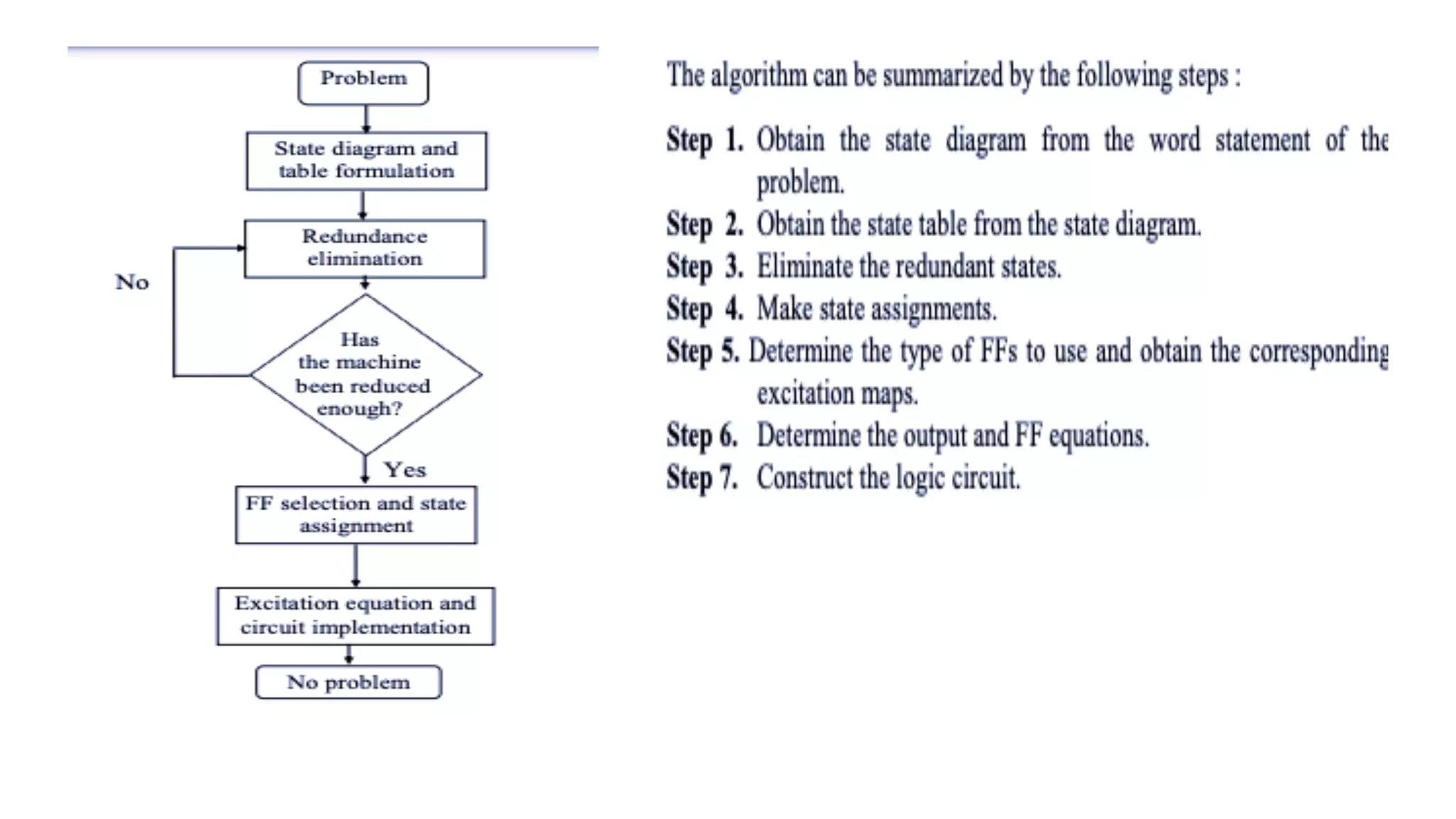
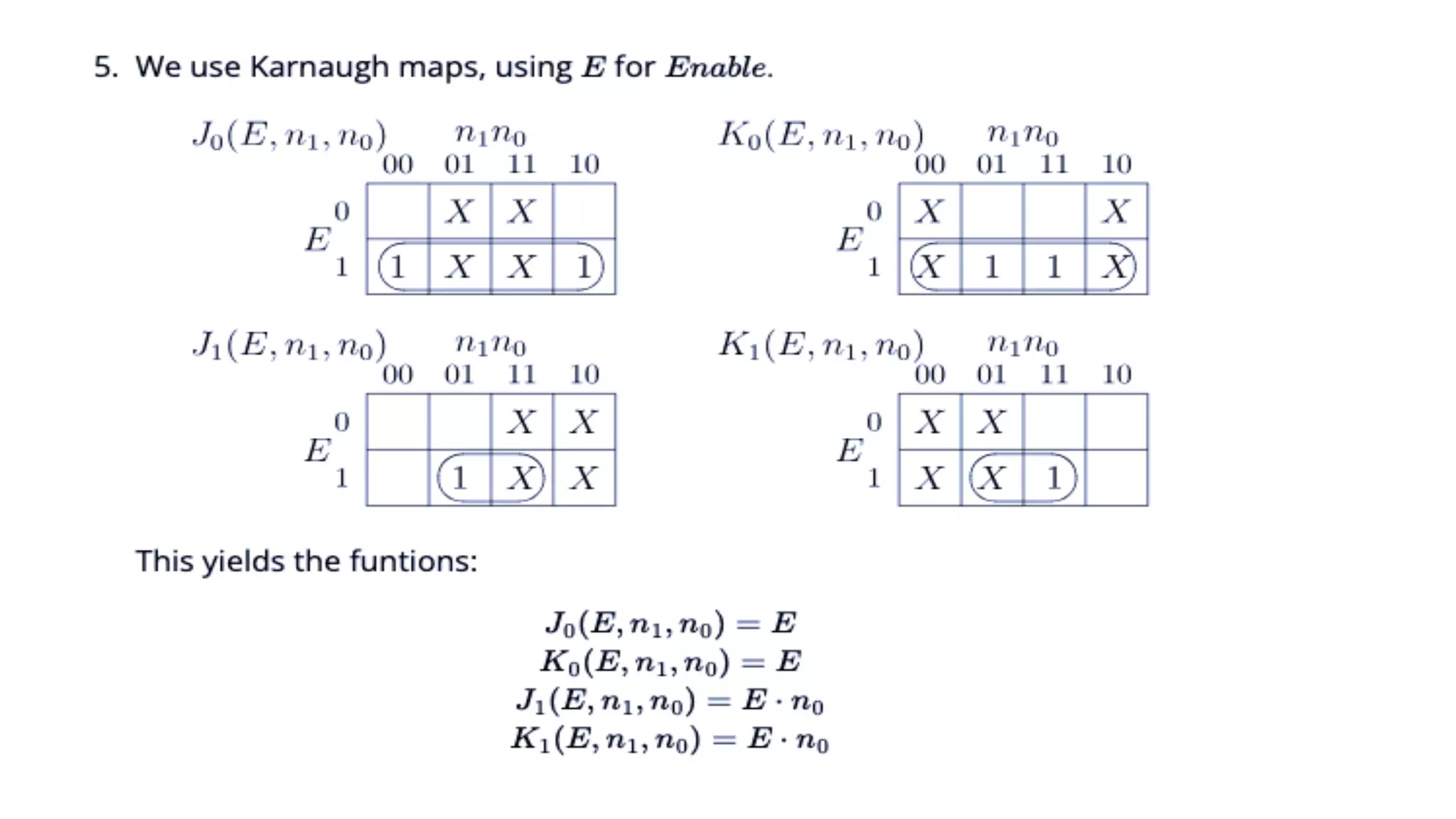
Design Procedure
To design of Sequential circuits, the procedure involves the following
steps:
• Derive the state table and state equations.
• Derive the state diagram using the state table.
• Reduce states using state reduction technique.
• Verify the number of Flip-Flops and type of Flip-Flop to be used.
• Derive the excitation equations using the excitation table.
• Derive the output function and the Flip-Flop input functions.
• Derive the logic functions or equation for each output variable.
• Draw the required logic diagram.
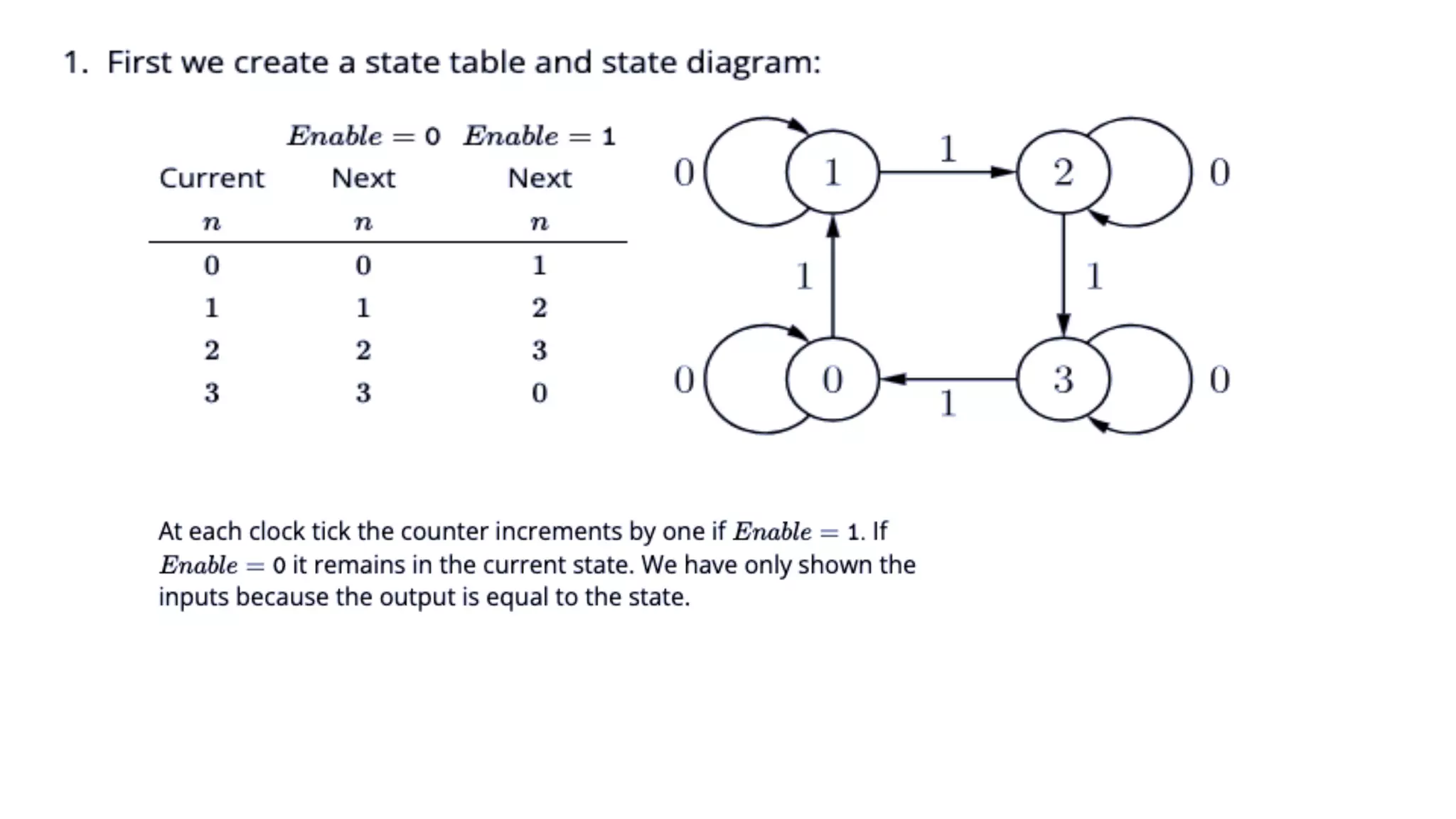
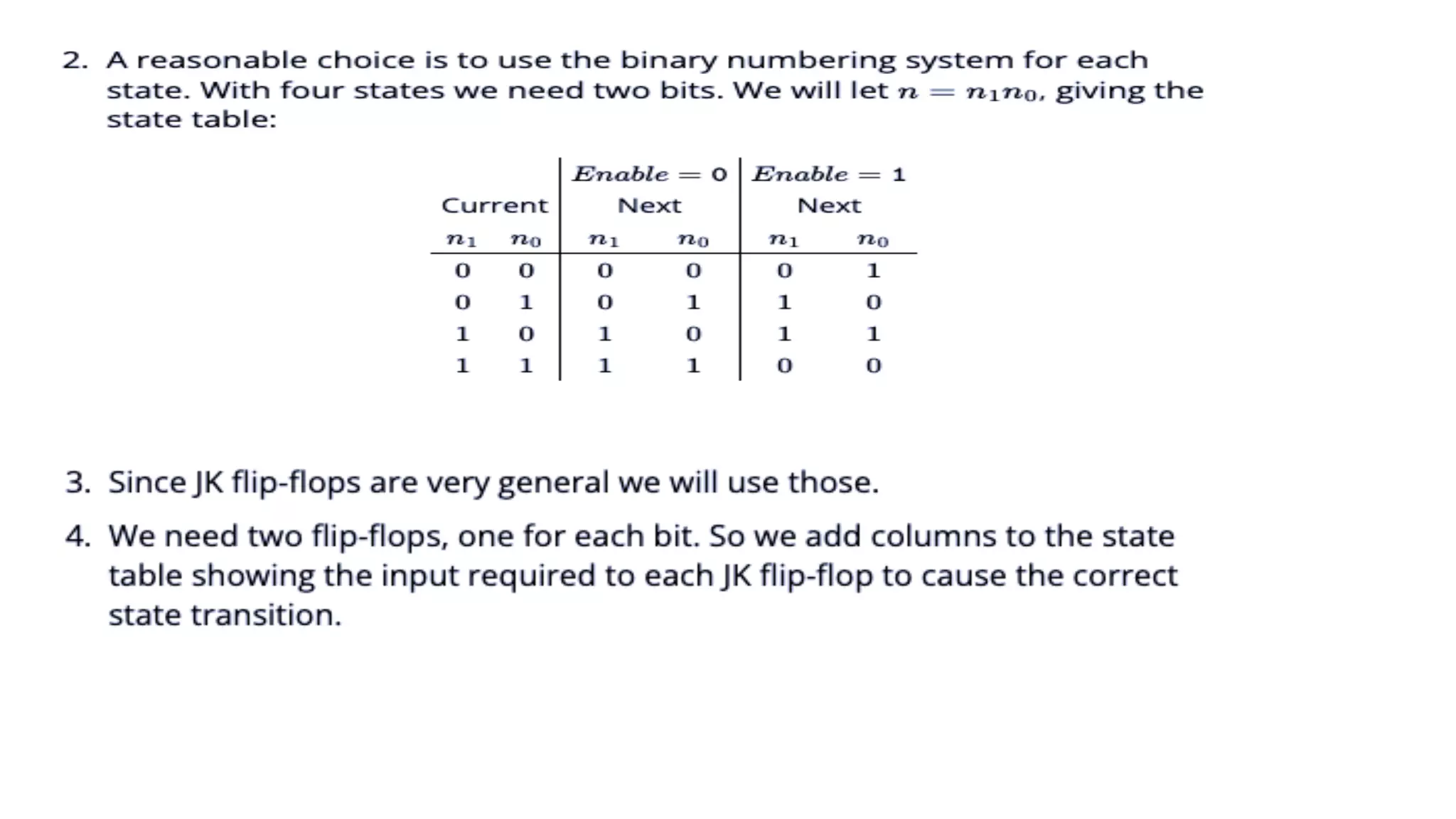
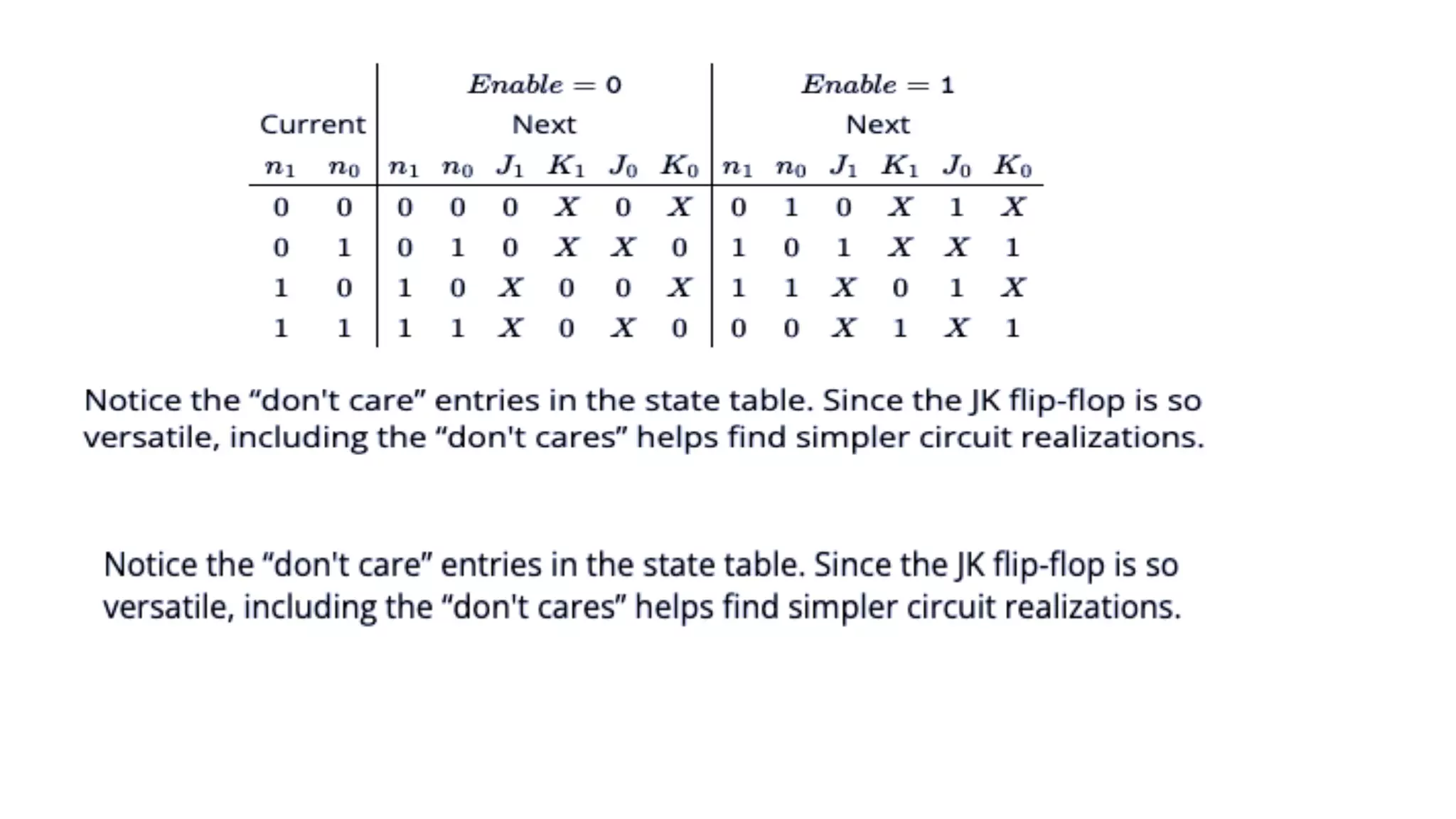
State Table and State Diagram
• The state diagram is a graphical representation of a sequential circuit in
which the state are represented by circles and transitions between states
shown by arrows.
• In another words, a state diagram consists of nodes interconnecting
directed line segments corresponding to each state of the circuit.
• The state table contains the same information as the state diagram in
tabular form.
• The transition table of a sequential machine shows the next state and
output for all possible combinations of input and present state of the
machine.
• This information are displayed in a table.
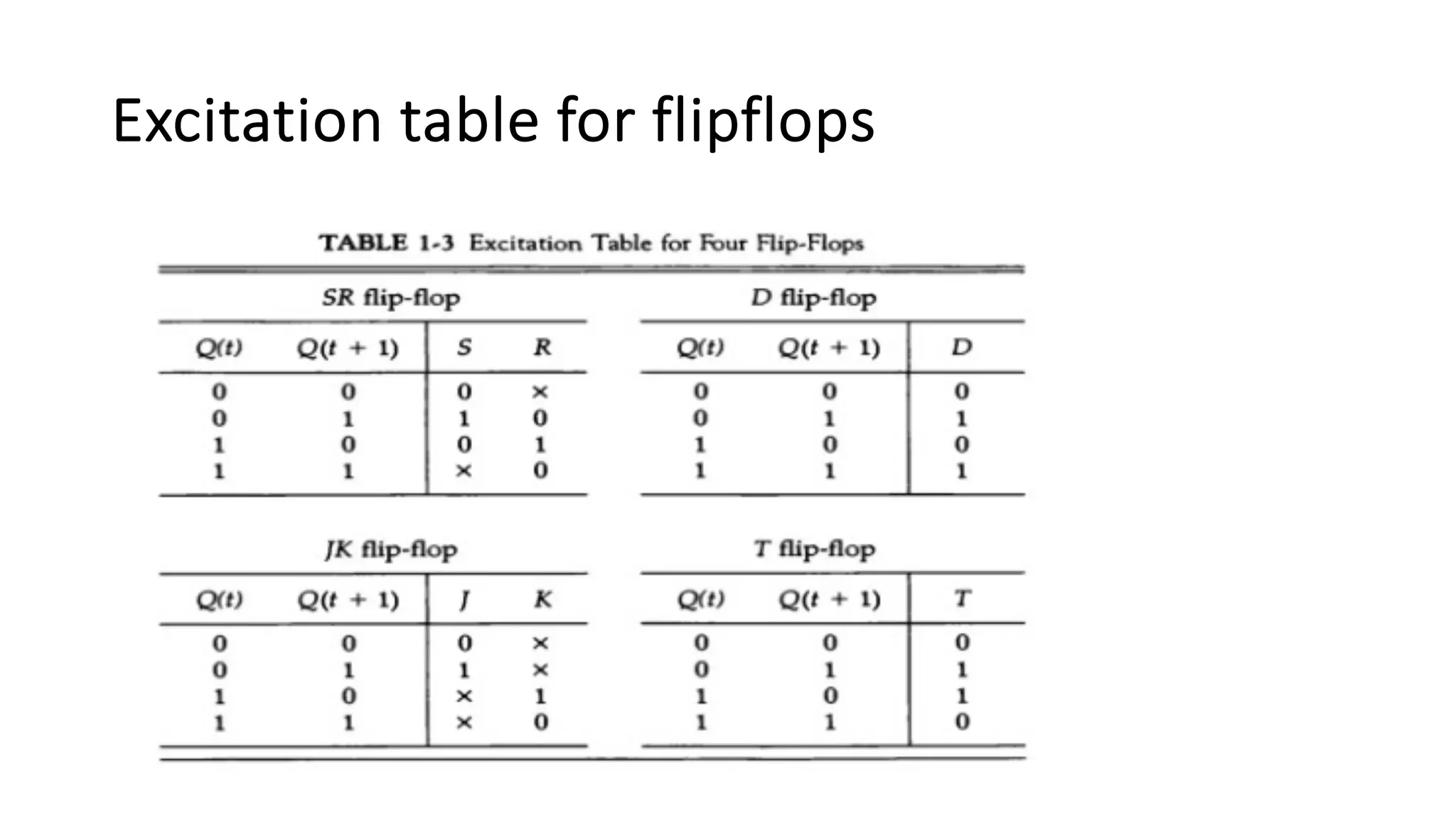
Excitation table for flipflops
Examples:
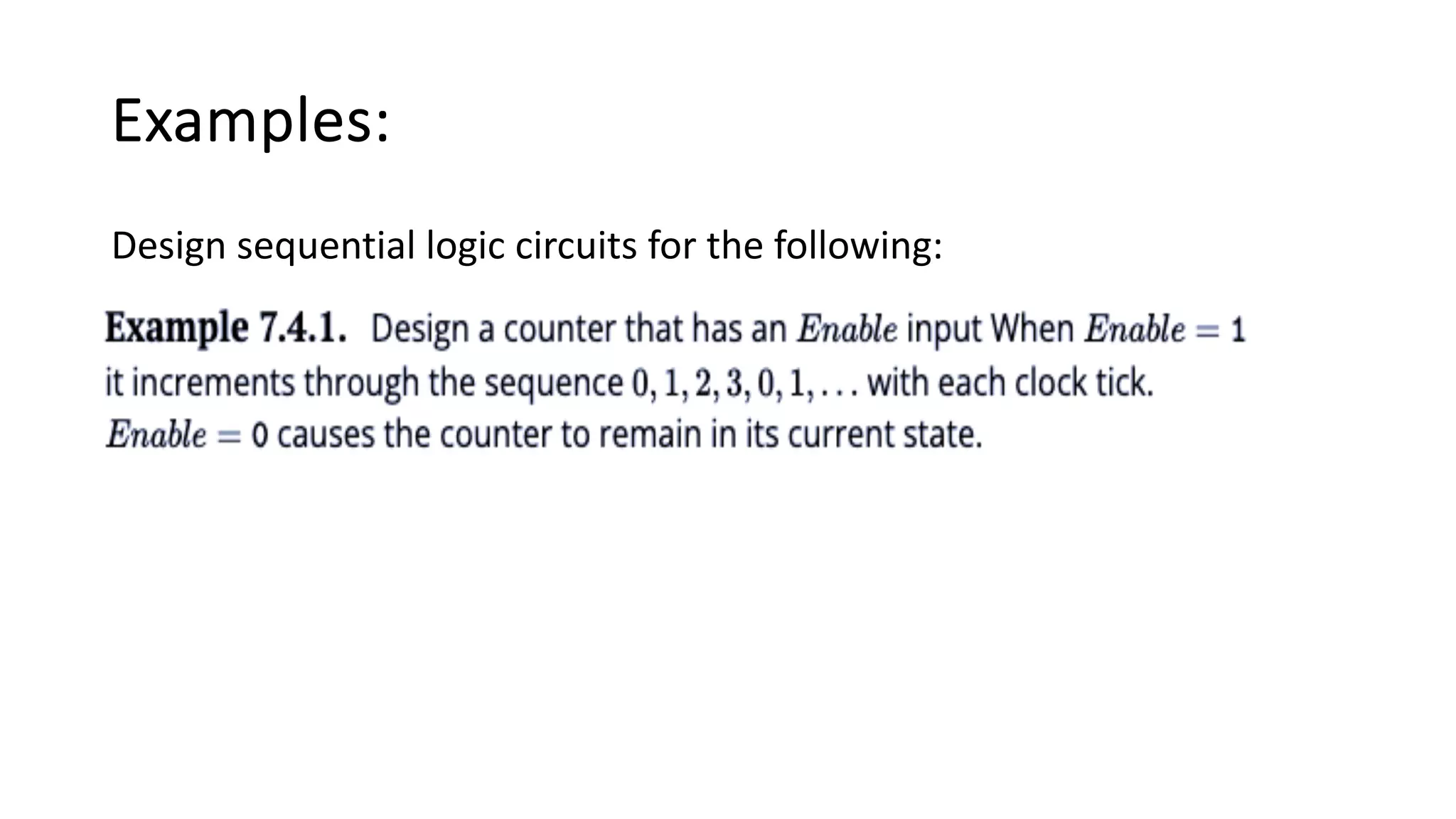
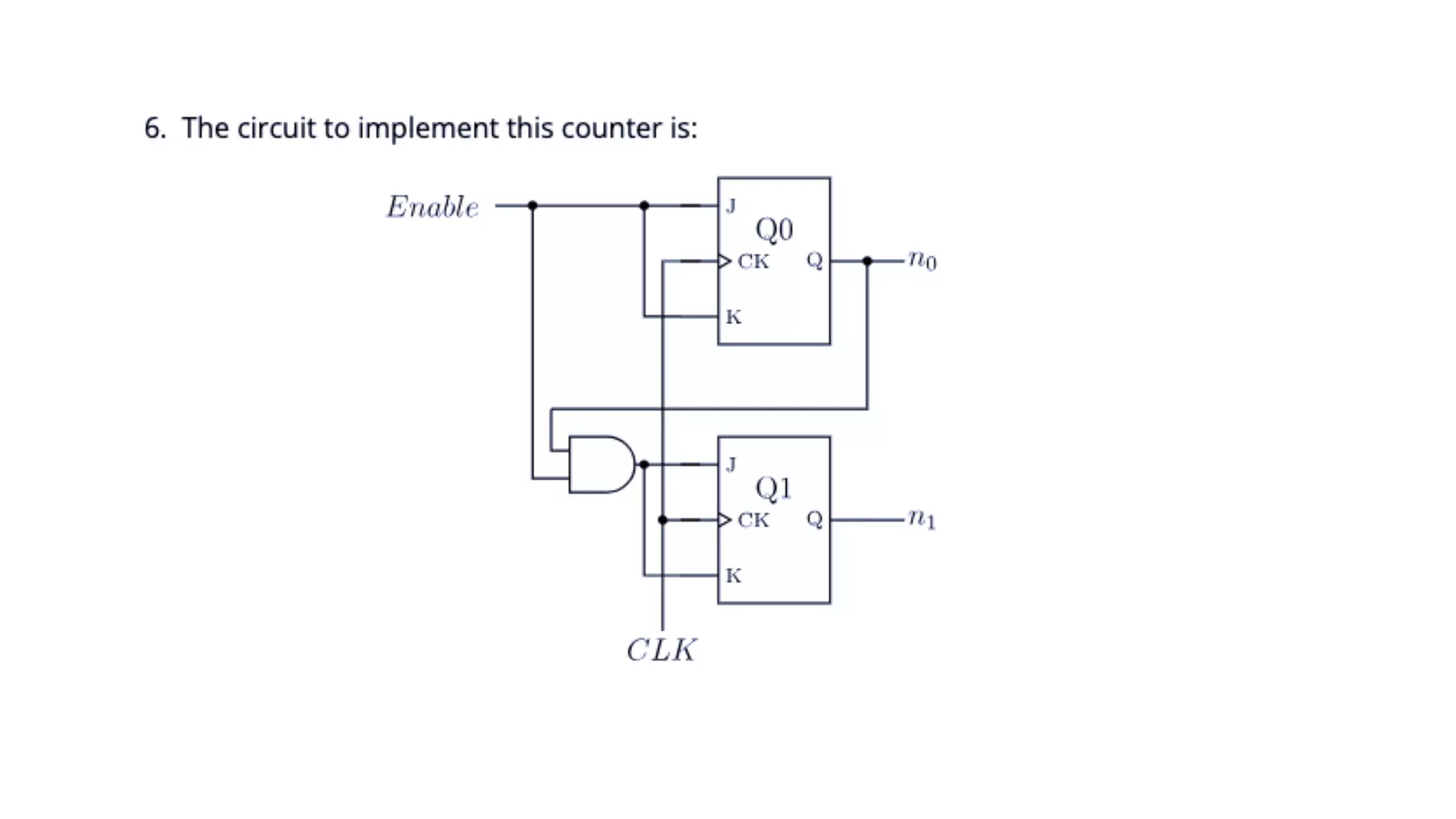
Design sequential logic circuits for the following:
Thank you!!!

Unit 1 Basic structureCOA.pdf

  • 1.
  • 2.
    Syllabus • Subject: ComputerArchitecture and Organization • Code: COMP 315 • Level: Bachelor 3rd Year 1st • Semester Credit Hours: 3 Course Objective: To extend and refine the elementary concepts of computer architecture introduced in the first year computer foundation and second year first semester digital logic courses. This course will lay the foundation for the microprocessors course. No practical for this course but a case-study and paper based design of CPU (MPU) will help out to understand the internal architecture of a computer system.
  • 3.
    Contents: 1. Basic Structures:Sequential circuits, design procedure, state table and state diagram Von Neumann architecture, stored program concepts and functional units.[3 hrs.] 2. Addressing Methods and Programs: Programming view of a processor, data types, and representation of data, arithmetic operations, basic operational concepts, bus structures, instruction cycle and excitation cycle. [8 hrs.] 3. Processing Unit: Instruction formats: computer instruction, instruction length, address instruction, arithmetic instruction, and logical instruction. [6 hrs.] 4. Addressing modes: General concepts, single-component addressing modes, multi-component addressing modes, and position-independent code. [6 hrs.] 5. Input Output Organization: Basic principles of interrupt-driven I/O and DMA, I/O operations, I/O programming, memory-mapped I/O, basic interrupt system, direct memory access, DMA channel programming, and memory-mapped screens.[6 hrs.]
  • 4.
    6)Arithmetic: Magnitude comparator,complements, straight subtraction, subtraction with complements, addition and subtraction algorithms, hardware implementation, multiplication and division algorithms, hardware implementation, and divide overflow [6 hrs.] 7) Memory System: Auxiliary memory: magnetic drum, magnetic disks, and magnetic tapes; microcomputer. [4 hrs.] 8)Memory: RAM/ROM chips, memory address map, memory connection to microprocessor; memory hierarchy; associative memory: hardware organization, Match logic, read operation, write operation; virtual memory: address space memory space, address mapping, associative memory page table; cache memory: associative mapping, direct mapping, set associative mapping; memory management hardware [6 hrs.]
  • 5.
    Unit 1: BasicStructures Computer Organization: • Computer organization refers to operational units(components) and their inter connections that realize the architectural specification. • Organization attributes include those hardware details transferring to the programmer such as control signal, interfaces between computer and peripheral and memory technology used. • Computer organization is concerned with the way the hardware components operate and the way they are connected. • Examples include: adder, subtractor, Counters, Memory etc
  • 6.
    Computer Architecture: • Computerarchitecture refers to those attributes of a system visible to a programmer or those attributes that help direct impact on logical execution of program. • Example of architectural attributes include instructions, instruction set, number of bits used to represent various data type, i/o mechanism and technique of addressing memory. • Computer architecture is concerned with the behavior of the computer as seen by user. • Example: Von Neumann architecture, Harvard architecture
  • 7.
    • It isan architectural design issue whether a computer will have multiply instructions. • It is an organizational design issue whether the multiply instruction will be implemented by a special multiply unit or by a mechanism that makes repeated use of the adder unit of the system. • Computer- the heart of computing ……without it, most of the computing disciplines, theoretical mathematics are of no use.
  • 8.
    MIPS processor architecture •MIPS = Million Instructions per second processor • Fixed 32-bit instructions • 3 instruction formats • 3 operand, load-store architecture • 32 general purpose register • Registers are of 32 bits size • Addressing mode: register, immediate
  • 9.
    8085 Microprocessor architecture •The Intel 8085 is an 8-bit microprocessor that was introduced in the mid-1970s. • It was widely used in various applications and played a significant role in the early development of microprocessors. • Here's an overview of the architecture of the Intel 8085 microprocessor: Registers: • Accumulator (A): This is the primary register used for arithmetic and logical operations. • General Purpose Registers (B, C, D, E, H, L): These are used for data manipulation. • Stack Pointer (SP): It points to the top of the stack in memory. • Program Counter (PC): It points to the memory address of the next instruction to be executed.
  • 10.
    Flags: The 8085has five flag bits that indicate certain conditions after arithmetic and logical operations: • Sign (S): Set if the result of an operation is negative. • Zero (Z): Set if the result of an operation is zero. • Auxiliary Carry (AC): Set if there is a carry between bits 3 and 4 of the result. • Parity (P): Set if the result has an even number of 1s. • Carry (CY): Set if there is a carry from the most significant bit. Instructions: The 8085 supports a variety of instructions categorized into different groups, including data transfer, arithmetic, logical, branching, and control instructions. Instructions are encoded as binary codes, and the microprocessor fetches, decodes, and executes them in sequence.
  • 11.
    • Memory: The8085 can address up to 64 KB (65536 bytes) of memory. • The memory is organized into memory cells, each holding 8 bits. • Memory addresses are 16 bits wide. Addressing Modes: The 8085 supports various addressing modes that dictate how operands are specified for instructions. These include immediate addressing, direct addressing, register addressing, indirect addressing, etc. Instruction Execution Cycle: The execution of an instruction in the 8085 typically involves the fetch, decode, and execute cycle. During the fetch phase, the microprocessor fetches the instruction from memory. In the decode phase, the instruction is decoded to determine the operation to be performed. In the execute phase, the actual operation is carried out.
  • 12.
    8086 microprocessor architecture •The Intel 8086 is a 16-bit microprocessor introduced by Intel in 1978. • It was a significant improvement over the earlier 8-bit microprocessors like the 8085. • The 8086 marked the beginning of the x86 architecture, which has become one of the most successful and enduring microprocessor architectures. Registers: • General Registers: The 8086 has eight 16-bit general-purpose registers, labeled as AX, BX, CX, DX, SI, DI, BP, and SP. These can also be accessed as two separate 8-bit registers if needed. • Segment Registers: The 8086 has four 16-bit segment registers: CS (Code Segment), DS (Data Segment), SS (Stack Segment), and ES (Extra Segment). These are used for memory addressing in the segmented memory model. • Flags: Similar to the 8085, the 8086 has flag bits that indicate various conditions after arithmetic and logical operations. The flag bits are similar to those in the 8085 but have slightly different meanings in some cases.
  • 13.
    Memory and Segmentation:The 8086 employs a segmented memory model, where memory addresses are composed of a segment address and an offset address. • This allows it to access a total of 1 MB (2^20 bytes) of memory. • The segment registers hold the base addresses of different memory segments, and the offset is added to them to generate a physical memory address. Instructions and Addressing Modes: The 8086 supports a wide variety of instructions, including data transfer, arithmetic, logical, branching, and control instructions. • It also has a rich set of addressing modes, such as direct addressing, register addressing, indirect addressing, based addressing, indexed addressing, etc.
  • 14.
    Instruction Execution Cycle:The 8086 fetches and executes instructions using a multi-stage pipeline. • Instructions are fetched in one stage, decoded in the next, and executed in subsequent stages.
  • 15.
    Von Neumann Architectureand Stored Program Concepts • Von Neumann architecture was first published by John von Neumann in 1945. • This computer architecture design consists of a Control Unit, Arithmetic and Logic Unit (ALU), Memory Unit, Registers and Inputs/Outputs. • Von Neumann architecture is based on the stored-program computer concept, where instruction data and program data are stored in the same memory. • This design is still used in most computers produced today.
  • 17.
    Central Processing Unit(CPU) • The CPU is the electronic circuit responsible for executing the instructions of a computer program. • It is sometimes referred to as the microprocessor or processor. • The CPU contains the ALU, CU and a variety of registers. Registers • Registers are high speed storage areas in the CPU. All data must be stored in a register before it can be processed.
  • 18.
    Arithmetic and LogicUnit (ALU) • The ALU allows arithmetic (add, subtract etc) and logic (AND, OR, NOT etc) operations to be carried out. Control Unit (CU) • The control unit controls the operation of the computer’s ALU, memory and input/output devices, telling them how to respond to the program instructions it has just read and interpreted from the memory unit. • The control unit also provides the timing and control signals required by other computer components.
  • 19.
    Buses • Buses arethe means by which data is transmitted from one part of a computer to another, connecting all major internal components to the CPU and memory. • A standard CPU system bus is comprised of a control bus, address bus and data bus.
  • 20.
    Memory Unit • Thememory unit consists of RAM, sometimes referred to as primary or main memory. • Unlike a hard drive (secondary memory), this memory is fast and also directly accessible by the CPU. • RAM is split into partitions. • Each partition consists of an address and its contents (both in binary form). • The address will uniquely identify every location in the memory. • Loading data from permanent memory (hard drive), into the faster and directly accessible temporary memory (RAM), allows the CPU to operate much quicker.
  • 21.
    Harvard Architecture • TheHarvard architecture is a computer architecture design that separates the storage and manipulation of program instructions from the data used by those instructions. • It was named after the Harvard Mark I computer, developed at Harvard University in the 1940s. • The key characteristic of Harvard architecture is its use of separate memory and buses for program instructions and data, as opposed to the more common Von Neumann architecture, which uses a single memory for both instructions and data.
  • 22.
    Here are themain features and advantages of the Harvard architecture: • Separate Instruction and Data Memory: In the Harvard architecture, there are two distinct memory systems: one for storing program instructions (instruction memory) and another for storing data (data memory). • This separation allows for concurrent access to instructions and data, potentially improving the overall performance of the system. • Parallelism and Efficiency: Because the instruction and data paths are separate, the Harvard architecture can fetch an instruction while simultaneously accessing or processing data. • This can result in reduced memory access conflicts and improved throughput. • Complex Instruction Set Computers (CISC): Many Complex Instruction Set Computers (CISC) have adopted Harvard architecture to accommodate the complex and variable-length instructions that are common in CISC architectures.
  • 23.
    Functional units ofComputer • A computer can be defined as a fast electronic calculating machine that accepts the (data) digitized input information process it as per the list of internally stored instructions and produces the resulting information. • A computer consists of five functionally independent main parts input, memory, arithmetic logic unit (ALU), output and control unit.
  • 25.
    • Input deviceaccepts the coded information as source program i.e. high-level language. • This is either stored in the memory or immediately used by the processor to perform the desired operations. • The program stored in the memory determines the processing steps. • Basically the computer converts one source program to an object program. i.e. into machine language. • Finally, the results are sent to the outside world through output device. All of these actions are coordinated by the control unit.
  • 26.
    Input unit: • Thesource program/high-level language program/coded information/simply data is fed to a computer through input devices keyboard is the most common type. • Whenever a key is pressed, one corresponding word or number is translated into its equivalent binary code over a cable & fed either to memory or the processor. • Joysticks, trackballs, mouse, scanners etc are other input devices. Memory unit: • Its function into store programs and data. It is basically two types 1. Primary memory 2. Secondary memory
  • 27.
    Primary memory: • Itis the one exclusively associated with the processor and operates at the electronics speeds programs must be stored in this memory while they are being executed. • The memory contains a large number of semiconductors storage cells. Each capable of storing one bit of information. • These are processed in a group of fixed site called word. To provide easy access to a word in memory, a distinct address is associated with each word location. • Addresses are numbers that identify memory location. • Memory in which any location can be reached in a short and fixed amount of time after specifying its address is called random-access memory (RAM).
  • 28.
    • The timerequired to access one word in called memory access time. Memory which is only readable by the user and contents of which can’t be altered is called read only memory (ROM) it contains operating system. Secondary memory: • It is used where large amounts of data & programs have to be stored, particularly information that is accessed infrequently. Examples: - Magnetic disks & tapes, optical disks (ie CD-ROM’s), floppies etc.
  • 29.
    Arithmetic logic unit(ALU): • Most of the computer operators are executed in ALU of the processor like addition, subtraction, division, multiplication, etc. • The operands are brought into the ALU from memory and stored in high speed storage elements called register. • Then according to the instructions the operation is performed in the required sequence. • The control and the ALU are may times faster than other devices connected to a computer system. • This enables a single processor to control a number of external devices such as key boards, displays, magnetic and optical disks, sensors and other mechanical controllers.
  • 30.
    Output unit: • Theseactually are the counterparts of input unit. Its basic function is to send the processed results to the outside world. • Examples:- Printer, speakers, monitor etc. Control unit: • It effectively is the nerve center that sends signals to other units and senses their states. • The actual timing signals that govern the transfer of data between input unit, processor, memory and output unit are generated by the control unit.
  • 31.
    Basic operational concepts •To perform a given task an appropriate program consisting of a list of instructions is stored in the memory. • Individual instructions are brought from the memory into the processor, which executes the specified operations. • Data to be stored are also stored in the memory. Examples: - Add LOC_A, R0 This instruction adds the operand at memory location LOCA, to operand in register R0 & places the sum into register. This instruction requires the performance of several steps, 1. First the instruction is fetched from the memory into the processor. 2. The operand at LOC_A is fetched and added to the contents of R0. 3. Finally the resulting sum is stored in the register R0.
  • 32.
    Combinational and Sequentialcircuits What is a Combinational Circuit? • The output of a Combinational Circuit depends entirely on the present input. • It exhibits a faster speed. • It is comparatively easier to design. • No feedback is present between the input and output. • The combinational circuit depends on time. • Logic gates form the building blocks of such circuits. • One can make use of it for both Boolean and arithmetic operations. • They don’t hold the capacity of storing any state. • These circuits do not have a clock- thus, they don’t require triggering. • They do not possess any memory element. • Users can feasibly use as well as handle them. • Example – Demultiplexer, Multiplexer, Decoder, Encoder, etc.
  • 33.
    What is aSequential Circuit? • The output of a Sequential Circuit depends on both- past as well as present inputs. • It works at a comparatively slower speed. • The design of these circuits is comparatively much tougher than the Combinational Circuit. • A feedback path exists between the output and the input. • The circuit is time-dependent. • Flip-flops constitute the building blocks of such a circuit. • People mainly use them for storing data and information. • They possess the capability of storing any data state or retaining an earlier state at any given point. • Because a Sequential circuit depends on a clock, it usually requires triggering. • They always possess a memory element. • A user may not be able to handle and use these circuits easily. • For Example – Counters, Flip-flops, etc.
  • 35.
    • There aretwo types of sequential circuit, synchronous and asynchronous. • Synchronous types use pulsed or level inputs and a clock input to all the inputs of flipflops involved. • Asynchronous sequential circuits use a clock signal to drive first flipflop and next flipflop clock is connected by the output of first flipflop.
  • 36.
    Design Procedure To designof Sequential circuits, the procedure involves the following steps: • Derive the state table and state equations. • Derive the state diagram using the state table. • Reduce states using state reduction technique. • Verify the number of Flip-Flops and type of Flip-Flop to be used. • Derive the excitation equations using the excitation table. • Derive the output function and the Flip-Flop input functions. • Derive the logic functions or equation for each output variable. • Draw the required logic diagram.
  • 38.
    State Table andState Diagram • The state diagram is a graphical representation of a sequential circuit in which the state are represented by circles and transitions between states shown by arrows. • In another words, a state diagram consists of nodes interconnecting directed line segments corresponding to each state of the circuit. • The state table contains the same information as the state diagram in tabular form. • The transition table of a sequential machine shows the next state and output for all possible combinations of input and present state of the machine. • This information are displayed in a table.
  • 39.
  • 40.
    Examples: Design sequential logiccircuits for the following:
  • 46.