
























Caching and tuning fun 
for high scalability 
Wim Godden 
Cu.be Solutions
Who am I ? 
Wim Godden (@wimgtr)
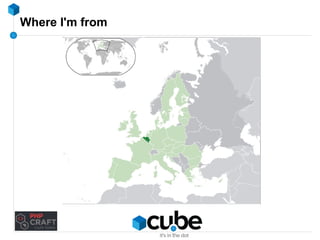
Where I'm from
Where I'm from
Where I'm from
Where I'm from
Where I'm from
Where I'm from
My town
My town
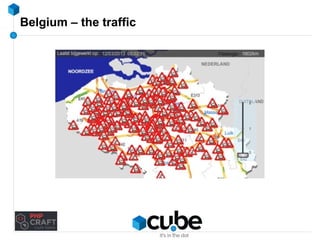
Belgium – the traffic
Who am I ? 
Wim Godden (@wimgtr) 
Founder of Cu.be Solutions (http://cu.be) 
Open Source developer since 1997 
Developer of OpenX, PHPCompatibility, Nginx SLIC, ... 
Speaker at PHP and Open Source conferences
Who are you ? 
Developers ? 
System/network engineers ? 
Managers ? 
Caching experience ?
Goals of this talk 
Everything about caching and tuning 
A few techniques 
How-to 
How-NOT-to 
Lot of ways, this is just one ;-) 
→ Increase reliability, performance and scalability 
5 visitors/day → 500.000 visitors/day 
(Don't expect miracle cure !)
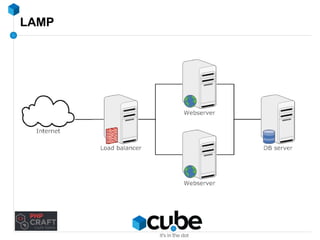
LAMP
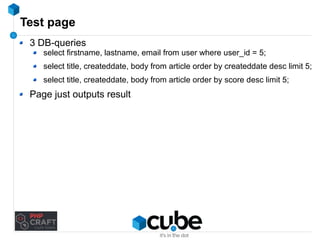
Test page 
3 DB-queries 
select firstname, lastname, email from user where user_id = 5; 
select title, createddate, body from article order by createddate desc limit 5; 
select title, createddate, body from article order by score desc limit 5; 
Page just outputs result
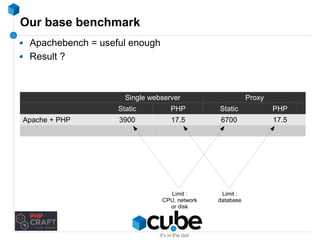
Our base benchmark 
Apachebench = useful enough 
Result ? 
Single webserver Proxy 
Static PHP Static PHP 
Apache + PHP 3900 17.5 6700 17.5 
Limit : 
CPU, network 
or disk 
Limit : 
database
CCaacchhiinngg
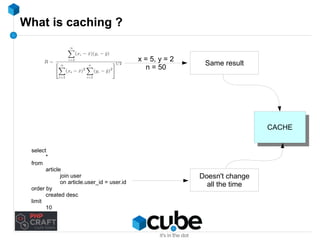
What is caching ? 
CCAACCHHEE
What is caching ? 
x = 5, y = 2 
n = 50 Same result 
CCAACCHHEE 
select 
* 
from 
article 
join user 
on article.user_id = user.id 
order by 
created desc 
limit 
10 
Doesn't change 
all the time
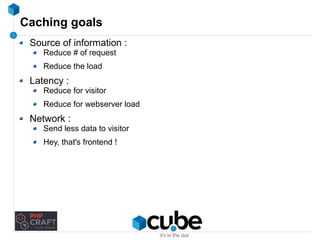
Caching goals 
Source of information : 
Reduce # of request 
Reduce the load 
Latency : 
Reduce for visitor 
Reduce for webserver load 
Network : 
Send less data to visitor 
Hey, that's frontend !
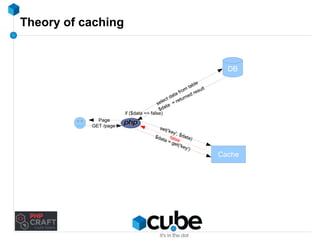
Theory of caching 
DB 
Cache 
if ($data == false) 
$data = false 
get('key') 
Page 
GET /page 
select data from table 
$data = returned result 
set('key', $data)
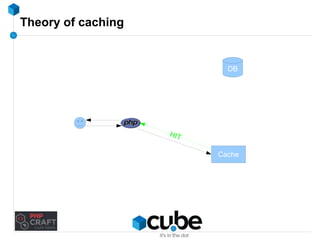
Theory of caching 
DB 
Cache 
HIT
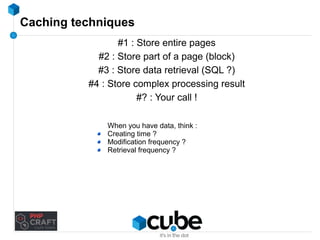
Caching techniques 
#1 : Store entire pages 
#2 : Store part of a page (block) 
#3 : Store data retrieval (SQL ?) 
#4 : Store complex processing result 
#? : Your call ! 
When you have data, think : 
Creating time ? 
Modification frequency ? 
Retrieval frequency ?
How to find cacheable data 
New projects : start from 'cache everything' 
Existing projects : 
Check page loading times 
Look at MySQL/PgSQL/Oracle/... slow query log 
Make a complete query log (don't forget to turn it off !) 
→ Use Percona Toolkit (pt-query-digest)
Caching storage - Disk 
Data with few updates : good 
Caching SQL queries : preferably not 
DON'T use NFS 
high latency 
possible problem for sessions : locking issues !
Caching storage - Disk / ramdisk 
Local 
5 Webservers → 5 local caches 
How will you keep them synchronized ? 
→ Don't say NFS or rsync !
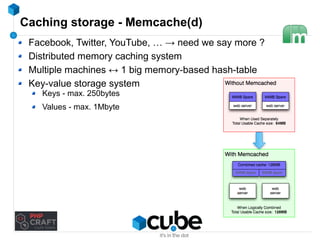
Caching storage - Memcache(d) 
Facebook, Twitter, YouTube, … → need we say more ? 
Distributed memory caching system 
Multiple machines ↔ 1 big memory-based hash-table 
Key-value storage system 
Keys - max. 250bytes 
Values - max. 1Mbyte
Caching storage - Memcache(d) 
Facebook, Twitter, YouTube, … → need we say more ? 
Distributed memory caching system 
Multiple machines ↔ 1 big memory-based hash-table 
Key-value storage system 
Keys - max. 250bytes 
Values - max. 1Mbyte 
Extremely fast... non-blocking, UDP (!)
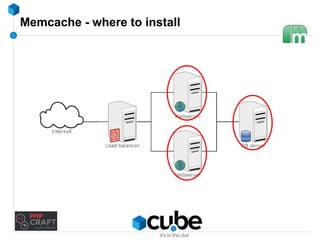
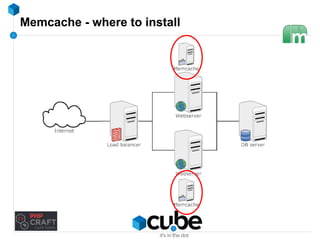
Memcache - where to install
Memcache - installation & running it 
Installation 
Distribution package 
PECL 
Windows : binaries 
Running 
No config-files 
memcached -d -m <mem> -l <ip> -p <port> 
ex. : memcached -d -m 2048 -l 172.16.1.91 -p 11211
Caching storage - Memcache - some notes 
Not fault-tolerant 
It's a cache ! 
Lose session data 
Lose shopping cart data 
… 
Firewall your Memcache port !
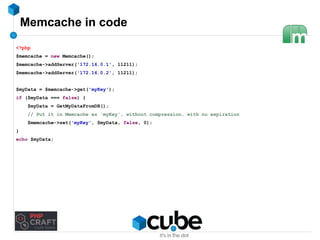
Memcache in code 
<?php 
$memcache = new Memcache(); 
$memcache->addServer('172.16.0.1', 11211); 
$memcache->addServer('172.16.0.2', 11211); 
$myData = $memcache->get('myKey'); 
if ($myData === false) { 
$myData = GetMyDataFromDB(); 
// Put it in Memcache as 'myKey', without compression, with no expiration 
$memcache->set('myKey', $myData, false, 0); 
} 
echo $myData;
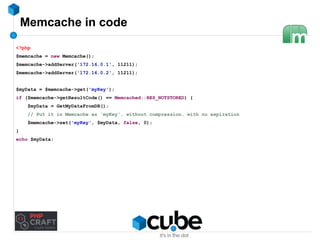
Memcache in code 
<?php 
$memcache = new Memcache(); 
$memcache->addServer('172.16.0.1', 11211); 
$memcache->addServer('172.16.0.2', 11211); 
$myData = $memcache->get('myKey'); 
if ($memcache->getResultCode() == Memcached::RES_NOTSTORED) { 
$myData = GetMyDataFromDB(); 
// Put it in Memcache as 'myKey', without compression, with no expiration 
$memcache->set('myKey', $myData, false, 0); 
} 
echo $myData;
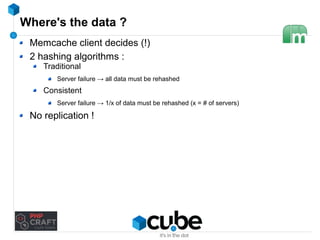
Where's the data ? 
Memcache client decides (!) 
2 hashing algorithms : 
Traditional 
Server failure → all data must be rehashed 
Consistent 
Server failure → 1/x of data must be rehashed (x = # of servers) 
No replication !
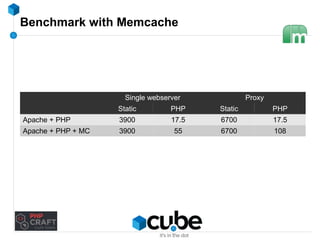
Benchmark with Memcache 
Single webserver Proxy 
Static PHP Static PHP 
Apache + PHP 3900 17.5 6700 17.5 
Apache + PHP + MC 3900 55 6700 108
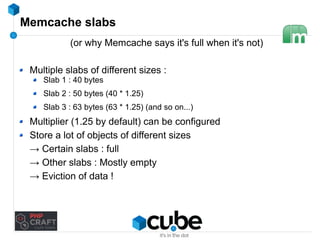
Memcache slabs 
(or why Memcache says it's full when it's not) 
Multiple slabs of different sizes : 
Slab 1 : 40 bytes 
Slab 2 : 50 bytes (40 * 1.25) 
Slab 3 : 63 bytes (63 * 1.25) (and so on...) 
Multiplier (1.25 by default) can be configured 
Store a lot of objects of different sizes 
→ Certain slabs : full 
→ Other slabs : Mostly empty 
→ Eviction of data !
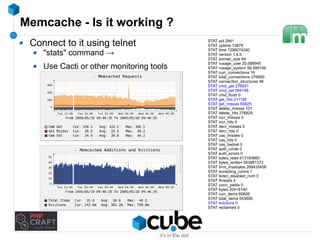
Memcache - Is it working ? 
Connect to it using telnet 
"stats" command → 
Use Cacti or other monitoring tools 
STAT pid 2941 
STAT uptime 10878 
STAT time 1296074240 
STAT version 1.4.5 
STAT pointer_size 64 
STAT rusage_user 20.089945 
STAT rusage_system 58.499106 
STAT curr_connections 16 
STAT total_connections 276950 
STAT connection_structures 96 
STAT cmd_get 276931 
STAT cmd_set 584148 
STAT cmd_flush 0 
STAT get_hits 211106 
STAT get_misses 65825 
STAT delete_misses 101 
STAT delete_hits 276829 
STAT incr_misses 0 
STAT incr_hits 0 
STAT decr_misses 0 
STAT decr_hits 0 
STAT cas_misses 0 
STAT cas_hits 0 
STAT cas_badval 0 
STAT auth_cmds 0 
STAT auth_errors 0 
STAT bytes_read 613193860 
STAT bytes_written 553991373 
STAT limit_maxbytes 268435456 
STAT accepting_conns 1 
STAT listen_disabled_num 0 
STAT threads 4 
STAT conn_yields 0 
STAT bytes 20418140 
STAT curr_items 65826 
STAT total_items 553856 
STAT evictions 0 
STAT reclaimed 0
Memcache - backing up
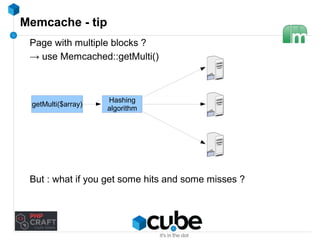
Memcache - tip 
Page with multiple blocks ? 
→ use Memcached::getMulti() 
getMulti($array) Hashing 
algorithm 
But : what if you get some hits and some misses ?
Naming your keys 
Key names must be unique 
Prefix / namespace your keys ! 
Only letters, numbers and underscore 
md5() is useful 
→ BUT : harder to debug 
Use clear names 
Document your key names !
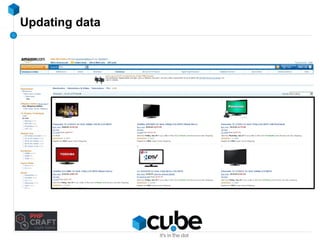
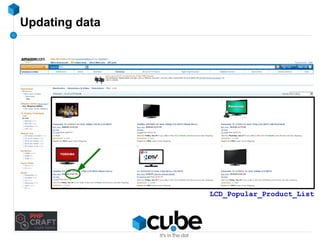
Updating data
Updating data 
LCD_Popular_Product_List
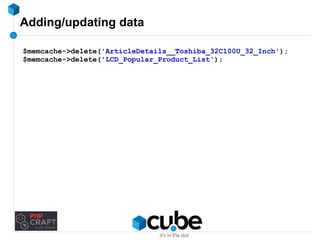
Adding/updating data 
$memcache->delete('ArticleDetails__Toshiba_32C100U_32_Inch'); 
$memcache->delete('LCD_Popular_Product_List');
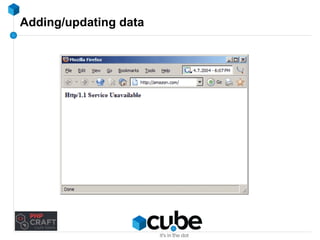
Adding/updating data
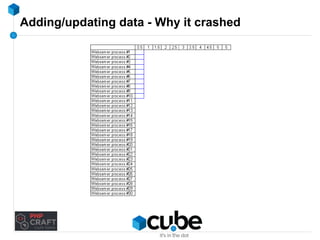
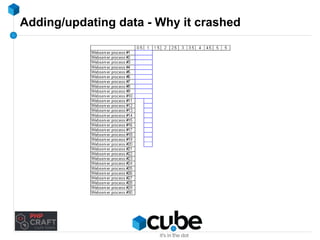
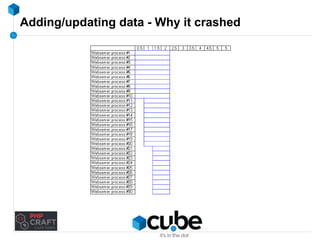
Adding/updating data - Why it crashed
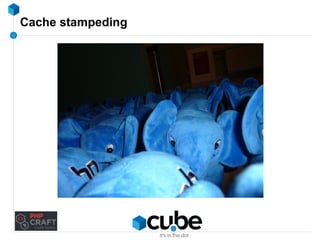
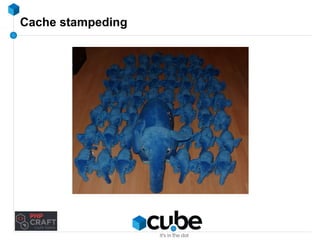
Cache stampeding
Cache stampeding
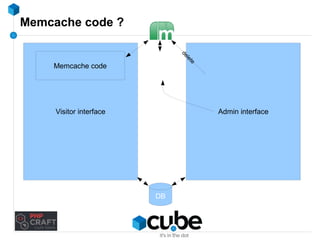
Memcache code ? 
Visitor interface Admin interface 
DB 
Memcache code 
delete
Cache warmup scripts 
Used to fill your cache when it's empty 
Run it before starting Webserver ! 
2 ways : 
Visit all URLs 
Error-prone 
Hard to maintain 
Call all cache-updating methods 
Make sure you have a warmup script !
Cache stampeding - what about locking ? 
Seems like a nice idea, but... 
While lock in place 
What if the process that created the lock fails ?
So... 
DON'T DELETE FROM CACHE 
& 
DON'T EXPIRE FROM CACHE 
(unless you know you'll never store it again)
Quick-tip 
Start small → disk or APC 
Move to Memcached/Redis/... later 
But : is your code ready ? 
→ Use a component like Zend_Cache to switch easily !
LAMP... 
→ LAMMP 
→ LNMMP
Nginx 
Web server 
Reverse proxy 
Lightweight, fast 
14.5% of all Websites
Nginx 
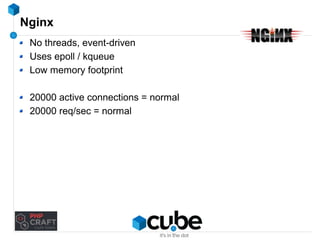
No threads, event-driven 
Uses epoll / kqueue 
Low memory footprint 
20000 active connections = normal 
20000 req/sec = normal
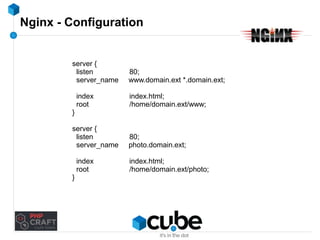
Nginx - Configuration 
server { 
listen 80; 
server_name www.domain.ext *.domain.ext; 
index index.html; 
root /home/domain.ext/www; 
} 
server { 
listen 80; 
server_name photo.domain.ext; 
index index.html; 
root /home/domain.ext/photo; 
}
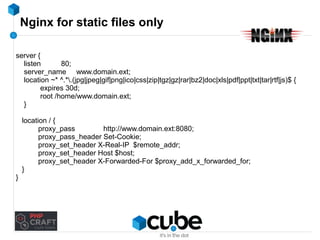
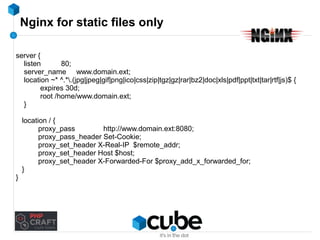
Nginx for static files only 
server { 
listen 80; 
server_name www.domain.ext; 
location ~* ^.*.(jpg|jpeg|gif|png|ico|css|zip|tgz|gz|rar|bz2|doc|xls|pdf|ppt|txt|tar|rtf|js)$ { 
expires 30d; 
root /home/www.domain.ext; 
} 
location / { 
proxy_pass http://www.domain.ext:8080; 
proxy_pass_header Set-Cookie; 
proxy_set_header X-Real-IP $remote_addr; 
proxy_set_header Host $host; 
proxy_set_header X-Forwarded-For $proxy_add_x_forwarded_for; 
} 
}
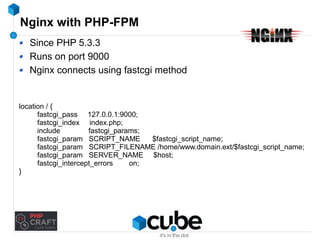
Nginx with PHP-FPM 
Since PHP 5.3.3 
Runs on port 9000 
Nginx connects using fastcgi method 
location / { 
fastcgi_pass 127.0.0.1:9000; 
fastcgi_index index.php; 
include fastcgi_params; 
fastcgi_param SCRIPT_NAME $fastcgi_script_name; 
fastcgi_param SCRIPT_FILENAME /home/www.domain.ext/$fastcgi_script_name; 
fastcgi_param SERVER_NAME $host; 
fastcgi_intercept_errors on; 
}
Nginx for static files only 
server { 
listen 80; 
server_name www.domain.ext; 
location ~* ^.*.(jpg|jpeg|gif|png|ico|css|zip|tgz|gz|rar|bz2|doc|xls|pdf|ppt|txt|tar|rtf|js)$ { 
expires 30d; 
root /home/www.domain.ext; 
} 
location / { 
proxy_pass http://www.domain.ext:8080; 
proxy_pass_header Set-Cookie; 
proxy_set_header X-Real-IP $remote_addr; 
proxy_set_header Host $host; 
proxy_set_header X-Forwarded-For $proxy_add_x_forwarded_for; 
} 
}
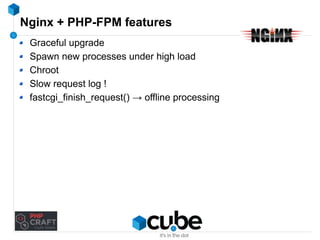
Nginx + PHP-FPM features 
Graceful upgrade 
Spawn new processes under high load 
Chroot 
Slow request log !
Nginx + PHP-FPM features 
Graceful upgrade 
Spawn new processes under high load 
Chroot 
Slow request log ! 
fastcgi_finish_request() → offline processing
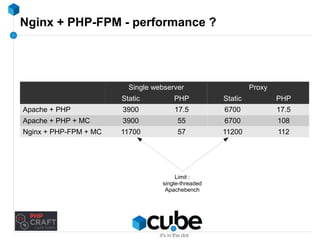
Nginx + PHP-FPM - performance ? 
Single webserver Proxy 
Static PHP Static PHP 
Apache + PHP 3900 17.5 6700 17.5 
Apache + PHP + MC 3900 55 6700 108 
Nginx + PHP-FPM + MC 11700 57 11200 112 
Limit : 
single-threaded 
Apachebench
So how far can you push Nginx ?
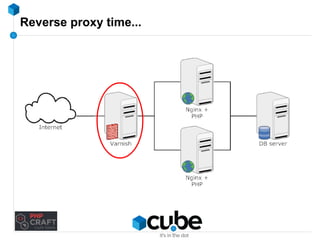
Reverse proxy time...
Varnish 
Not just a load balancer 
Reverse proxy cache / http accelerator / … 
Caches (parts of) pages in memory
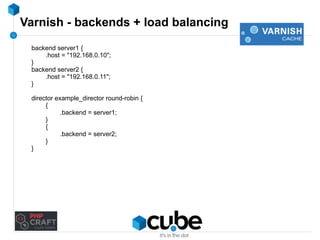
Varnish - backends + load balancing 
backend server1 { 
.host = "192.168.0.10"; 
} 
backend server2 { 
.host = "192.168.0.11"; 
} 
director example_director round-robin { 
{ 
.backend = server1; 
}{ 
.backend = server2; 
} 
}
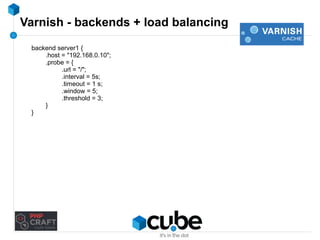
Varnish - backends + load balancing 
backend server1 { 
.host = "192.168.0.10"; 
.probe = { 
.url = "/"; 
.interval = 5s; 
.timeout = 1 s; 
.window = 5; 
.threshold = 3; 
} 
}
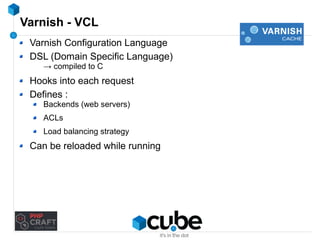
Varnish - VCL 
Varnish Configuration Language 
DSL (Domain Specific Language) 
→ compiled to C 
Hooks into each request 
Defines : 
Backends (web servers) 
ACLs 
Load balancing strategy 
Can be reloaded while running
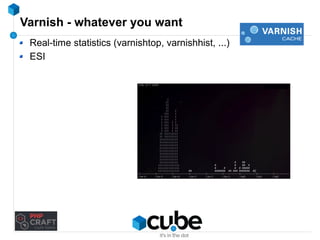
Varnish - whatever you want 
Real-time statistics (varnishtop, varnishhist, ...) 
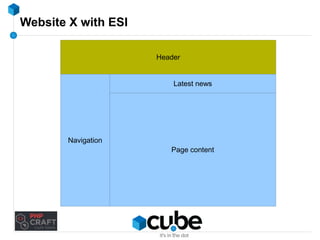
ESI
Website X with ESI 
Header 
Latest news 
Article content page 
Page content 
Navigation
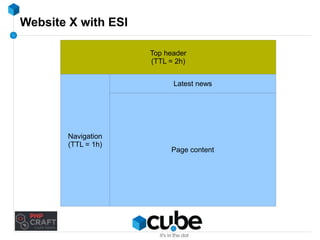
Website X with ESI 
Top header 
(TTL = 2h) 
Latest news 
Article content page 
Page content 
Navigation 
(TTL = 1h)
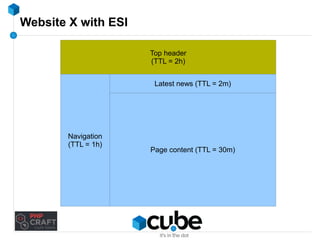
Website X with ESI 
Top header 
(TTL = 2h) 
Latest news (TTL = 2m) 
Article content page 
Page content (TTL = 30m) 
Navigation 
(TTL = 1h)
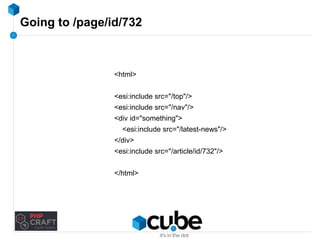
Going to /page/id/732 
<html> 
<esi:include src="/top"/> 
<esi:include src="/nav"/> 
<div id="something"> 
<esi:include src="/latest-news"/> 
</div> 
<esi:include src="/article/id/732"/> 
</html>
Article content page 
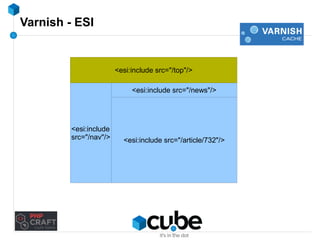
<esi:include src="/article/732"/> 
Varnish - ESI 
<esi:include src="/top"/> 
<esi:include src="/news"/> 
<esi:include 
src="/nav"/>
Varnish - what can/can't be cached ? 
Can : 
Static pages 
Images, js, css 
Pages or parts of pages that don't change often (ESI) 
Can't : 
POST requests 
Very large files (it's not a file server !) 
Requests with Set-Cookie 
User-specific content
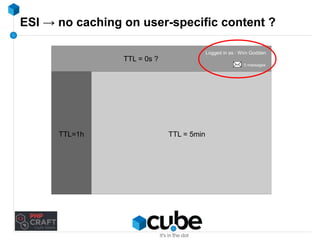
ESI → no caching on user-specific content ? 
Logged in as : Wim Godden 
5 messages 
TTL = 0s ? 
TTL=1h TTL = 5min
Coming soon... 
Based on Nginx 
Links Nginx directly with Memcached, Redis, … 
Supports sessions ! 
Reduces number of GET requests (up to 100%) 
Requires code changes ! 
Well-built project → few changes 
Effect on webservers and database servers
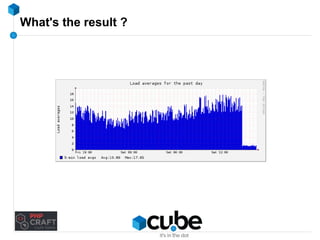
What's the result ?
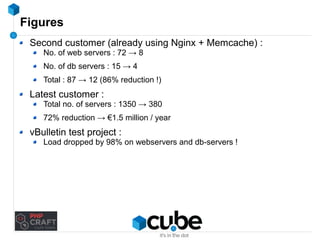
Figures 
Second customer (already using Nginx + Memcache) : 
No. of web servers : 72 → 8 
No. of db servers : 15 → 4 
Total : 87 → 12 (86% reduction !) 
Latest customer : 
Total no. of servers : 1350 → 380 
72% reduction → €1.5 million / year 
vBulletin test project : 
Load dropped by 98% on webservers and db-servers !
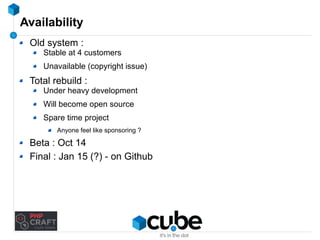
Availability 
Old system : 
Stable at 4 customers 
Unavailable (copyright issue) 
Total rebuild : 
Under heavy development 
Will become open source 
Spare time project 
Anyone feel like sponsoring ? 
Beta : Oct 14 
Final : Jan 15 (?) - on Github
Time to tune...
Apache - tuning tips 
Disable unused modules → fixes 10% of performance issues 
Set AllowOverride to None 
Disable SymLinksIfOwnerMatch 
Site in /var/www/domain.com/subdomain/html 
Check on /var, /var/www, /var/www/domain.com, etc. 
MinSpareServers, MaxSpareServers, StartServers, MaxClients, 
MPM selection → a whole session of its own ;-) 
Don't mod_proxy → use Nginx or Varnish ! 
High load on an SSL-site ? → put SSL on a reverse proxy
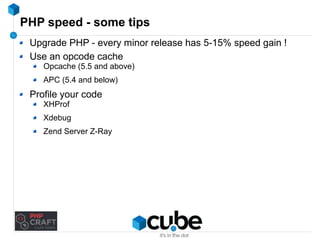
PHP speed - some tips 
Upgrade PHP - every minor release has 5-15% speed gain ! 
Use an opcode cache 
Opcache (5.5 and above) 
APC (5.4 and below) 
Profile your code 
XHProf 
Xdebug 
Zend Server Z-Ray
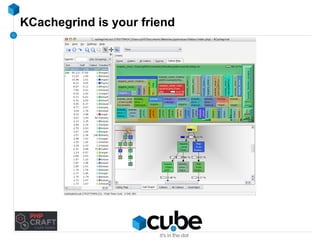
KCachegrind is your friend
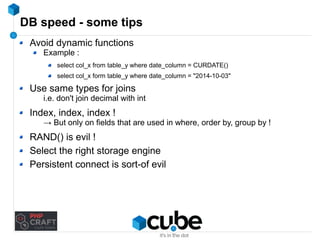
DB speed - some tips 
Avoid dynamic functions 
Example : 
select col_x from table_y where date_column = CURDATE() 
select col_x form table_y where date_column = "2014-10-03" 
Use same types for joins 
i.e. don't join decimal with int 
Index, index, index ! 
→ But only on fields that are used in where, order by, group by ! 
RAND() is evil ! 
Select the right storage engine 
Persistent connect is sort-of evil
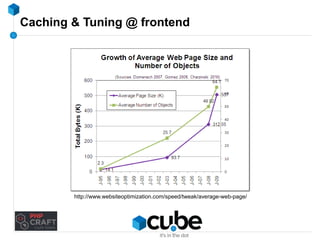
Caching & Tuning @ frontend 
http://www.websiteoptimization.com/speed/tweak/average-web-page/
Frontend tuning 
1. You optimize backend 
2. Frontend engineers messes up → havoc on backend 
3. Don't forget : frontend sends requests to backend ! 
SO... 
Care about frontend 
Test frontend 
Check what requests frontend sends to backend
Tuning frontend 
Minimize requests 
Combine CSS/JavaScript files
Tuning frontend 
Minimize requests 
Combine CSS/JavaScript files 
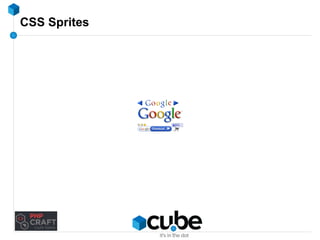
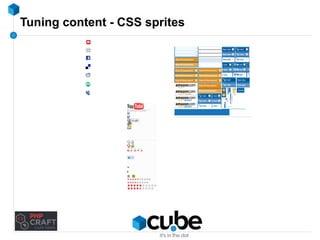
Use CSS Sprites
CSS Sprites
Tuning content - CSS sprites
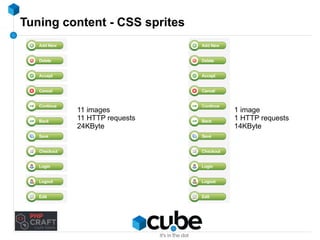
Tuning content - CSS sprites 
11 images 
11 HTTP requests 
24KByte 
1 image 
1 HTTP requests 
14KByte
Tuning frontend 
Minimize requests 
Combine CSS/JavaScript files 
Use CSS Sprites (horizontally if possible) 
Put CSS at top 
Put JavaScript at bottom 
Max. no connections 
Especially if JavaScript does Ajax (advertising-scripts, …) ! 
Avoid iFrames 
Again : max no. of connections 
Don't scale images in HTML 
Have a favicon.ico (don't 404 it !) 
→ see my blog
What else can kill your site ? 
Redirect loops 
Multiple requests 
More load on Webserver 
More code to process 
Additional latency for visitor 
Try to avoid redirects anyway 
Watch your logs, but equally important... 
Watch the logging process → 
Logging = disk I/O → can kill your server !
Above all else... be prepared ! 
Have a monitoring system 
Use a cache abstraction layer (disk → Memcache) 
Don't install for the worst → prepare for the worst 
Have a test-setup 
Have fallbacks 
→ Turn off non-critical functionality
So... 
Cache 
But : never delete, always push ! 
Have a warmup script 
Monitor your cache 
Have an abstraction layer 
Apache = fine, Nginx = better 
Static pages ? Use Varnish 
Tune your frontend → impact on backend !
Questions ?
Questions ?
Contact 
Twitter @wimgtr 
Web http://techblog.wimgodden.be 
Slides http://www.slideshare.net/wimg 
E-mail wim.godden@cu.be 
Please provide feedback via : 
http://joind.in/12120
Caching and tuning fun for high scalability

Caching and tuning fun for high scalability

  • 1.
    Caching and tuningfun for high scalability Wim Godden Cu.be Solutions
  • 2.
    Who am I? Wim Godden (@wimgtr)
  • 3.
  • 4.
  • 5.
  • 6.
  • 7.
  • 8.
  • 9.
  • 10.
  • 11.
  • 12.
    Who am I? Wim Godden (@wimgtr) Founder of Cu.be Solutions (http://cu.be) Open Source developer since 1997 Developer of OpenX, PHPCompatibility, Nginx SLIC, ... Speaker at PHP and Open Source conferences
  • 13.
    Who are you? Developers ? System/network engineers ? Managers ? Caching experience ?
  • 14.
    Goals of thistalk Everything about caching and tuning A few techniques How-to How-NOT-to Lot of ways, this is just one ;-) → Increase reliability, performance and scalability 5 visitors/day → 500.000 visitors/day (Don't expect miracle cure !)
  • 15.
  • 16.
    Test page 3DB-queries select firstname, lastname, email from user where user_id = 5; select title, createddate, body from article order by createddate desc limit 5; select title, createddate, body from article order by score desc limit 5; Page just outputs result
  • 17.
    Our base benchmark Apachebench = useful enough Result ? Single webserver Proxy Static PHP Static PHP Apache + PHP 3900 17.5 6700 17.5 Limit : CPU, network or disk Limit : database
  • 18.
  • 19.
    What is caching? CCAACCHHEE
  • 20.
    What is caching? x = 5, y = 2 n = 50 Same result CCAACCHHEE select * from article join user on article.user_id = user.id order by created desc limit 10 Doesn't change all the time
  • 21.
    Caching goals Sourceof information : Reduce # of request Reduce the load Latency : Reduce for visitor Reduce for webserver load Network : Send less data to visitor Hey, that's frontend !
  • 22.
    Theory of caching DB Cache if ($data == false) $data = false get('key') Page GET /page select data from table $data = returned result set('key', $data)
  • 23.
    Theory of caching DB Cache HIT
  • 24.
    Caching techniques #1: Store entire pages #2 : Store part of a page (block) #3 : Store data retrieval (SQL ?) #4 : Store complex processing result #? : Your call ! When you have data, think : Creating time ? Modification frequency ? Retrieval frequency ?
  • 25.
    How to findcacheable data New projects : start from 'cache everything' Existing projects : Check page loading times Look at MySQL/PgSQL/Oracle/... slow query log Make a complete query log (don't forget to turn it off !) → Use Percona Toolkit (pt-query-digest)
  • 26.
    Caching storage -Disk Data with few updates : good Caching SQL queries : preferably not DON'T use NFS high latency possible problem for sessions : locking issues !
  • 27.
    Caching storage -Disk / ramdisk Local 5 Webservers → 5 local caches How will you keep them synchronized ? → Don't say NFS or rsync !
  • 28.
    Caching storage -Memcache(d) Facebook, Twitter, YouTube, … → need we say more ? Distributed memory caching system Multiple machines ↔ 1 big memory-based hash-table Key-value storage system Keys - max. 250bytes Values - max. 1Mbyte
  • 29.
    Caching storage -Memcache(d) Facebook, Twitter, YouTube, … → need we say more ? Distributed memory caching system Multiple machines ↔ 1 big memory-based hash-table Key-value storage system Keys - max. 250bytes Values - max. 1Mbyte Extremely fast... non-blocking, UDP (!)
  • 30.
    Memcache - whereto install
  • 31.
    Memcache - whereto install
  • 32.
    Memcache - installation& running it Installation Distribution package PECL Windows : binaries Running No config-files memcached -d -m <mem> -l <ip> -p <port> ex. : memcached -d -m 2048 -l 172.16.1.91 -p 11211
  • 33.
    Caching storage -Memcache - some notes Not fault-tolerant It's a cache ! Lose session data Lose shopping cart data … Firewall your Memcache port !
  • 34.
    Memcache in code <?php $memcache = new Memcache(); $memcache->addServer('172.16.0.1', 11211); $memcache->addServer('172.16.0.2', 11211); $myData = $memcache->get('myKey'); if ($myData === false) { $myData = GetMyDataFromDB(); // Put it in Memcache as 'myKey', without compression, with no expiration $memcache->set('myKey', $myData, false, 0); } echo $myData;
  • 35.
    Memcache in code <?php $memcache = new Memcache(); $memcache->addServer('172.16.0.1', 11211); $memcache->addServer('172.16.0.2', 11211); $myData = $memcache->get('myKey'); if ($memcache->getResultCode() == Memcached::RES_NOTSTORED) { $myData = GetMyDataFromDB(); // Put it in Memcache as 'myKey', without compression, with no expiration $memcache->set('myKey', $myData, false, 0); } echo $myData;
  • 36.
    Where's the data? Memcache client decides (!) 2 hashing algorithms : Traditional Server failure → all data must be rehashed Consistent Server failure → 1/x of data must be rehashed (x = # of servers) No replication !
  • 37.
    Benchmark with Memcache Single webserver Proxy Static PHP Static PHP Apache + PHP 3900 17.5 6700 17.5 Apache + PHP + MC 3900 55 6700 108
  • 38.
    Memcache slabs (orwhy Memcache says it's full when it's not) Multiple slabs of different sizes : Slab 1 : 40 bytes Slab 2 : 50 bytes (40 * 1.25) Slab 3 : 63 bytes (63 * 1.25) (and so on...) Multiplier (1.25 by default) can be configured Store a lot of objects of different sizes → Certain slabs : full → Other slabs : Mostly empty → Eviction of data !
  • 39.
    Memcache - Isit working ? Connect to it using telnet "stats" command → Use Cacti or other monitoring tools STAT pid 2941 STAT uptime 10878 STAT time 1296074240 STAT version 1.4.5 STAT pointer_size 64 STAT rusage_user 20.089945 STAT rusage_system 58.499106 STAT curr_connections 16 STAT total_connections 276950 STAT connection_structures 96 STAT cmd_get 276931 STAT cmd_set 584148 STAT cmd_flush 0 STAT get_hits 211106 STAT get_misses 65825 STAT delete_misses 101 STAT delete_hits 276829 STAT incr_misses 0 STAT incr_hits 0 STAT decr_misses 0 STAT decr_hits 0 STAT cas_misses 0 STAT cas_hits 0 STAT cas_badval 0 STAT auth_cmds 0 STAT auth_errors 0 STAT bytes_read 613193860 STAT bytes_written 553991373 STAT limit_maxbytes 268435456 STAT accepting_conns 1 STAT listen_disabled_num 0 STAT threads 4 STAT conn_yields 0 STAT bytes 20418140 STAT curr_items 65826 STAT total_items 553856 STAT evictions 0 STAT reclaimed 0
  • 40.
  • 41.
    Memcache - tip Page with multiple blocks ? → use Memcached::getMulti() getMulti($array) Hashing algorithm But : what if you get some hits and some misses ?
  • 42.
    Naming your keys Key names must be unique Prefix / namespace your keys ! Only letters, numbers and underscore md5() is useful → BUT : harder to debug Use clear names Document your key names !
  • 43.
  • 44.
  • 45.
  • 46.
  • 47.
    Adding/updating data -Why it crashed
  • 48.
    Adding/updating data -Why it crashed
  • 49.
    Adding/updating data -Why it crashed
  • 50.
  • 51.
  • 52.
    Memcache code ? Visitor interface Admin interface DB Memcache code delete
  • 53.
    Cache warmup scripts Used to fill your cache when it's empty Run it before starting Webserver ! 2 ways : Visit all URLs Error-prone Hard to maintain Call all cache-updating methods Make sure you have a warmup script !
  • 54.
    Cache stampeding -what about locking ? Seems like a nice idea, but... While lock in place What if the process that created the lock fails ?
  • 55.
    So... DON'T DELETEFROM CACHE & DON'T EXPIRE FROM CACHE (unless you know you'll never store it again)
  • 56.
    Quick-tip Start small→ disk or APC Move to Memcached/Redis/... later But : is your code ready ? → Use a component like Zend_Cache to switch easily !
  • 57.
  • 58.
    Nginx Web server Reverse proxy Lightweight, fast 14.5% of all Websites
  • 59.
    Nginx No threads,event-driven Uses epoll / kqueue Low memory footprint 20000 active connections = normal 20000 req/sec = normal
  • 60.
    Nginx - Configuration server { listen 80; server_name www.domain.ext *.domain.ext; index index.html; root /home/domain.ext/www; } server { listen 80; server_name photo.domain.ext; index index.html; root /home/domain.ext/photo; }
  • 61.
    Nginx for staticfiles only server { listen 80; server_name www.domain.ext; location ~* ^.*.(jpg|jpeg|gif|png|ico|css|zip|tgz|gz|rar|bz2|doc|xls|pdf|ppt|txt|tar|rtf|js)$ { expires 30d; root /home/www.domain.ext; } location / { proxy_pass http://www.domain.ext:8080; proxy_pass_header Set-Cookie; proxy_set_header X-Real-IP $remote_addr; proxy_set_header Host $host; proxy_set_header X-Forwarded-For $proxy_add_x_forwarded_for; } }
  • 62.
    Nginx with PHP-FPM Since PHP 5.3.3 Runs on port 9000 Nginx connects using fastcgi method location / { fastcgi_pass 127.0.0.1:9000; fastcgi_index index.php; include fastcgi_params; fastcgi_param SCRIPT_NAME $fastcgi_script_name; fastcgi_param SCRIPT_FILENAME /home/www.domain.ext/$fastcgi_script_name; fastcgi_param SERVER_NAME $host; fastcgi_intercept_errors on; }
  • 63.
    Nginx for staticfiles only server { listen 80; server_name www.domain.ext; location ~* ^.*.(jpg|jpeg|gif|png|ico|css|zip|tgz|gz|rar|bz2|doc|xls|pdf|ppt|txt|tar|rtf|js)$ { expires 30d; root /home/www.domain.ext; } location / { proxy_pass http://www.domain.ext:8080; proxy_pass_header Set-Cookie; proxy_set_header X-Real-IP $remote_addr; proxy_set_header Host $host; proxy_set_header X-Forwarded-For $proxy_add_x_forwarded_for; } }
  • 64.
    Nginx + PHP-FPMfeatures Graceful upgrade Spawn new processes under high load Chroot Slow request log !
  • 65.
    Nginx + PHP-FPMfeatures Graceful upgrade Spawn new processes under high load Chroot Slow request log ! fastcgi_finish_request() → offline processing
  • 66.
    Nginx + PHP-FPM- performance ? Single webserver Proxy Static PHP Static PHP Apache + PHP 3900 17.5 6700 17.5 Apache + PHP + MC 3900 55 6700 108 Nginx + PHP-FPM + MC 11700 57 11200 112 Limit : single-threaded Apachebench
  • 67.
    So how farcan you push Nginx ?
  • 68.
  • 69.
    Varnish Not justa load balancer Reverse proxy cache / http accelerator / … Caches (parts of) pages in memory
  • 70.
    Varnish - backends+ load balancing backend server1 { .host = "192.168.0.10"; } backend server2 { .host = "192.168.0.11"; } director example_director round-robin { { .backend = server1; }{ .backend = server2; } }
  • 71.
    Varnish - backends+ load balancing backend server1 { .host = "192.168.0.10"; .probe = { .url = "/"; .interval = 5s; .timeout = 1 s; .window = 5; .threshold = 3; } }
  • 72.
    Varnish - VCL Varnish Configuration Language DSL (Domain Specific Language) → compiled to C Hooks into each request Defines : Backends (web servers) ACLs Load balancing strategy Can be reloaded while running
  • 73.
    Varnish - whateveryou want Real-time statistics (varnishtop, varnishhist, ...) ESI
  • 74.
    Website X withESI Header Latest news Article content page Page content Navigation
  • 75.
    Website X withESI Top header (TTL = 2h) Latest news Article content page Page content Navigation (TTL = 1h)
  • 76.
    Website X withESI Top header (TTL = 2h) Latest news (TTL = 2m) Article content page Page content (TTL = 30m) Navigation (TTL = 1h)
  • 77.
    Going to /page/id/732 <html> <esi:include src="/top"/> <esi:include src="/nav"/> <div id="something"> <esi:include src="/latest-news"/> </div> <esi:include src="/article/id/732"/> </html>
  • 78.
    Article content page <esi:include src="/article/732"/> Varnish - ESI <esi:include src="/top"/> <esi:include src="/news"/> <esi:include src="/nav"/>
  • 79.
    Varnish - whatcan/can't be cached ? Can : Static pages Images, js, css Pages or parts of pages that don't change often (ESI) Can't : POST requests Very large files (it's not a file server !) Requests with Set-Cookie User-specific content
  • 80.
    ESI → nocaching on user-specific content ? Logged in as : Wim Godden 5 messages TTL = 0s ? TTL=1h TTL = 5min
  • 81.
    Coming soon... Basedon Nginx Links Nginx directly with Memcached, Redis, … Supports sessions ! Reduces number of GET requests (up to 100%) Requires code changes ! Well-built project → few changes Effect on webservers and database servers
  • 82.
  • 83.
    Figures Second customer(already using Nginx + Memcache) : No. of web servers : 72 → 8 No. of db servers : 15 → 4 Total : 87 → 12 (86% reduction !) Latest customer : Total no. of servers : 1350 → 380 72% reduction → €1.5 million / year vBulletin test project : Load dropped by 98% on webservers and db-servers !
  • 84.
    Availability Old system: Stable at 4 customers Unavailable (copyright issue) Total rebuild : Under heavy development Will become open source Spare time project Anyone feel like sponsoring ? Beta : Oct 14 Final : Jan 15 (?) - on Github
  • 85.
  • 86.
    Apache - tuningtips Disable unused modules → fixes 10% of performance issues Set AllowOverride to None Disable SymLinksIfOwnerMatch Site in /var/www/domain.com/subdomain/html Check on /var, /var/www, /var/www/domain.com, etc. MinSpareServers, MaxSpareServers, StartServers, MaxClients, MPM selection → a whole session of its own ;-) Don't mod_proxy → use Nginx or Varnish ! High load on an SSL-site ? → put SSL on a reverse proxy
  • 87.
    PHP speed -some tips Upgrade PHP - every minor release has 5-15% speed gain ! Use an opcode cache Opcache (5.5 and above) APC (5.4 and below) Profile your code XHProf Xdebug Zend Server Z-Ray
  • 88.
  • 89.
    DB speed -some tips Avoid dynamic functions Example : select col_x from table_y where date_column = CURDATE() select col_x form table_y where date_column = "2014-10-03" Use same types for joins i.e. don't join decimal with int Index, index, index ! → But only on fields that are used in where, order by, group by ! RAND() is evil ! Select the right storage engine Persistent connect is sort-of evil
  • 90.
    Caching & Tuning@ frontend http://www.websiteoptimization.com/speed/tweak/average-web-page/
  • 91.
    Frontend tuning 1.You optimize backend 2. Frontend engineers messes up → havoc on backend 3. Don't forget : frontend sends requests to backend ! SO... Care about frontend Test frontend Check what requests frontend sends to backend
  • 92.
    Tuning frontend Minimizerequests Combine CSS/JavaScript files
  • 93.
    Tuning frontend Minimizerequests Combine CSS/JavaScript files Use CSS Sprites
  • 94.
  • 95.
    Tuning content -CSS sprites
  • 96.
    Tuning content -CSS sprites 11 images 11 HTTP requests 24KByte 1 image 1 HTTP requests 14KByte
  • 97.
    Tuning frontend Minimizerequests Combine CSS/JavaScript files Use CSS Sprites (horizontally if possible) Put CSS at top Put JavaScript at bottom Max. no connections Especially if JavaScript does Ajax (advertising-scripts, …) ! Avoid iFrames Again : max no. of connections Don't scale images in HTML Have a favicon.ico (don't 404 it !) → see my blog
  • 98.
    What else cankill your site ? Redirect loops Multiple requests More load on Webserver More code to process Additional latency for visitor Try to avoid redirects anyway Watch your logs, but equally important... Watch the logging process → Logging = disk I/O → can kill your server !
  • 99.
    Above all else...be prepared ! Have a monitoring system Use a cache abstraction layer (disk → Memcache) Don't install for the worst → prepare for the worst Have a test-setup Have fallbacks → Turn off non-critical functionality
  • 100.
    So... Cache But: never delete, always push ! Have a warmup script Monitor your cache Have an abstraction layer Apache = fine, Nginx = better Static pages ? Use Varnish Tune your frontend → impact on backend !
  • 101.
  • 102.
  • 103.
    Contact Twitter @wimgtr Web http://techblog.wimgodden.be Slides http://www.slideshare.net/wimg E-mail wim.godden@cu.be Please provide feedback via : http://joind.in/12120

Editor's Notes

  • #22 Caching serves 3 purposes : - Firstly, to reduce the number of requests or the load at the source of information, which can be a database server, content repository, or anything else.
  • #37 See slide &amp;gt;&amp;gt; replication!&amp;lt;&amp;lt;
  • #43 - Key names must be unique - Prefix/namespace your keys ! → might seem overkill at first, but it&amp;apos;s usually necessary after a while, at least for large systems. → Oh, and don&amp;apos;t share the same Memcache with multiple projects. Start separate instances for each !) - Be careful with charachters. Use only letters, numbers and underscore ! - Sometimes MD5() is your friend → but : harder to debug - Use clear names. Remember you can&amp;apos;t make a list of data in the cache, so you&amp;apos;ll need to document them. I know you don&amp;apos;t like to write documentation, but you&amp;apos;ll simply have to in this case.
  • #56 OK, that sort of covers the basics of how we can use Memcache to cache data for your site. So purely in terms of caching in the code, we&amp;apos;ve done a lot. → There&amp;apos;s still things that you can always add. If you&amp;apos;re using Zend Framework or any other major framework, you can cache things like the initialization of the configuration file, creation of the route object (which is a very heavy process if you have a lot of routes). → Things like translation and locale can be cached in Zend Framework using 1 command, so do that ! → But as I said before, the only limit is your imagination... → and your common sense ! → Don&amp;apos;t overdo it... make sure that the cache has enough space left for the things you really need to cache.
  • #57 If you&amp;apos;re starting a project where the number of hits to the site will be limited at first, but you have no idea on how fast it will grow in the future : - I would suggest to start by using disk-based caching or APC variable caching - You can always move to Memcache later when you deploy a second webserver Keep in mind that your code needs to be ready for this. So you need to use some kind of cache abstraction layer like Zend_Cache
  • #62 So, we&amp;apos;re serving all those extensions directly from disk and forwarding all the rest to the Apache running on port 8080. We&amp;apos;re also forwarding the Set-Cookie headers and adding a few headers so Apache can log the original IP if it wants to. → Something to keep in mind here : you will have 2 logfiles now : 1 from Nginx and 1 from Apache. → What you should notice once you start using this type of setup is that your performance from an enduser perspective will remain somewhat the same if your server was not overloaded yet. If it was having issues because of memory problems or too many Apache workers, ... → However, you will suddenly need a lot less Apache workers, which will save you quite a lot of memory. That memory can be used for... Memcache maybe ?
  • #64 So, we&amp;apos;re serving all those extensions directly from disk and forwarding all the rest to the Apache running on port 8080. We&amp;apos;re also forwarding the Set-Cookie headers and adding a few headers so Apache can log the original IP if it wants to. → Something to keep in mind here : you will have 2 logfiles now : 1 from Nginx and 1 from Apache. → What you should notice once you start using this type of setup is that your performance from an enduser perspective will remain somewhat the same if your server was not overloaded yet. If it was having issues because of memory problems or too many Apache workers, ... → However, you will suddenly need a lot less Apache workers, which will save you quite a lot of memory. That memory can be used for... Memcache maybe ?
  • #72 If one of the backend webservers goes down, you want all traffic to go to the other one ofcourse. That&amp;apos;s where health checks come in