Типичные ошибки при кастомизации Magento 2 и как
их избежать
Спикер: Влад Веселов
/me
2
Vlad
https://github.com/orlangur
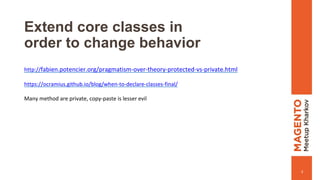
Extend core classes in
order to change behavior
3
http://fabien.potencier.org/pragmatism-over-theory-protected-vs-private.html
https://ocramius.github.io/blog/when-to-declare-classes-final/
Many method are private, copy-paste is lesser evil
Extend core classes in
order to add behavior
4
Do not increase core classes responsibility
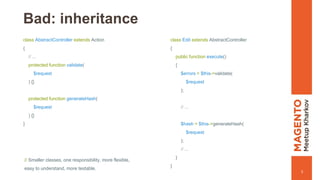
Bad: inheritance
5
class AbstractController extends Action
{
// ...
protected function validate(
$request
) {}
protected function generateHash(
$request
) {}
}
class Edit extends AbstractController
{
public function execute()
{
$errors = $this->validate(
$request
);
// ...
$hash = $this->generateHash(
$request
);
// ...
}
}
// Smaller classes, one responsibility, more flexible,
easy to understand, more testable.
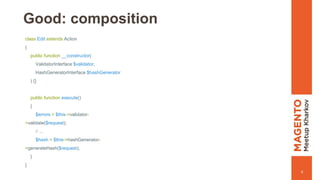
Good: composition
6
class Edit extends Action
{
public function __constructor(
ValidatorInterface $validator,
HashGeneratorInterface $hashGenerator
) {}
public function execute()
{
$errors = $this->validator-
>validate($request);
// ...
$hash = $this->hashGenerator-
>generateHash($request);
}
}
Entity management - EntityManager?
7
namespace MagentoFrameworkEntityManager;
/**
* It's not recommended to use EntityManager and its infrastructure for your entities persistence.
* In the nearest future new Persistence Entity Manager would be released which will cover all the requirements for
* persistence layer along with Query API as performance efficient APIs for Read scenarios.
* Currently, it's recommended to use Resource Model infrastructure and make a successor of
* MagentoFrameworkModelResourceModelDbAbstractDb class or successor of
* MagentoEavModelEntityAbstractEntity if EAV attributes support needed.
*
* For filtering operations, it's recommended to use successor of
* MagentoFrameworkModelResourceModelDbCollectionAbstractCollection class.
*/
class EntityManager
{
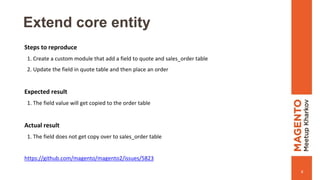
Extend core entity
8
Steps to reproduce
1. Create a custom module that add a field to quote and sales_order table
2. Update the field in quote table and then place an order
Expected result
1. The field value will get copied to the order table
Actual result
1. The field does not get copy over to sales_order table
https://github.com/magento/magento2/issues/5823
Extend @api interface with own
fields
9
You don’t need it, really
Extend @api interface with core
fields
10
Sometimes it may be valid but please don’t blindly fill a GitHub issue each time you meet
such situation
11
The standard was developed in the scope of our efforts to ensure the following:
• Decouple visual (CSS) layer from the functional (JavaScript) layer.
• Decouple functional (JavaScript) layer from the markup (HTML).
• Reinstate emphasis on using of jQuery templates.
• Reinstate emphasis on decoupling HTML, CSS and JS from PHP classes.
http://devdocs.magento.com/guides/v2.0/coding-standards/code-standard-demarcation.html
Code demarcation standard
Visual representation must rely only on
HTML class attributes, CSS pseudo-classes
and pseudo-elements, HTML tags, and form
element’s type attribute and form elements
state attributes (example: disabled, checked)
12
Bad
13
#header { ... }
[data-action="delete"] { ... }
form input[name="password"] { ... }
section[role="main"] { ... }
[role="menu] [role="menuitem"] { ... }
[role="menu] [role="menuitem"].active { ... }
Good
14
.notices-wrapper { ... }
.page-header:after { ... }
.payment-list:first-child { ... }
.caution { ... }
.caution.link { ... }
form input[type="password"] { ... }
.control-text:focus { ... }
a:hover { ... }
nav li._active { ... }
You must not hard-code CSS styles
in JavaScript files
15
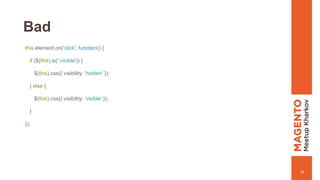
Bad
16
this.element.on('click', function() {
if ($(this).is(':visible')) {
$(this).css({ visibility: 'hidden' });
} else {
$(this).css({ visibility: 'visible' });
}
});
Good
17
...
options: {
hOffset: 0,
myCustomElement: '[data-container="my-custom-element"]',
hiddenClass: '_hidden'
}
...
this.element.toggleClass(this.options.hiddenClass);
...
this.options.hOffset = /* calculation based on dimensions of some DOM elements within a widget */
this.element.find(this.options.myCustomElement).css({'margin-top', this.options.hOffset + 'px'})
...
You must not use inline CSS styles
inside HTML tags
18
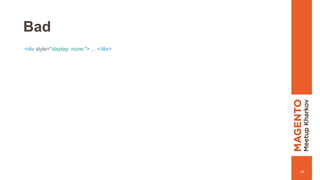
Bad
19
<div style="display: none;"> ... </div>
Good
20
<div class="no-display"> ... </div>
Business logic must rely on only the form,
form element name attributes, or data attributes
21
Good
22
<div id="my-widget"></div>
$('#my-widget').doSomething();
$('.parent').on('click', '.button', function() { ... });
$('form').validate();
$('[role="menu"]').navigation();
Actually, bad
23
<div id="my-widget"></div>
$('#my-widget').doSomething();
$('.parent').on('click', '.button', function() { ... });
$('form').validate();
$('[role="menu"]').navigation();
Really Good
24
<div data-action="delete" data-mage-init="{myWidget: [option1: 'string']}"></div>
<div data-role="tooltip">More details</div>
options {
deleteAction: '[data-action="delete"]',
tooltip: '[data-role="tooltip]'
}
...
this.element.find(this.options.deleteAction).on( ... );
this.element.on('click', this.options.deleteAction , function() { ... });
...
// Globally initialized widgets
$( this.options.tooltip).tooltip(); // Globally for ALL tooltip elements
...
You must not select DOM elements
based on HTML structure
25
Bad
26
this.element.children().children().html('hello world');
this.element.parent().find('[data-action="edit"]').data('entity_id');
Good
27
this.element.find('[data-action="edit"]');
this.elements.closest(‘[data-container]');
Don't use (arbitrary) core
code for reference
28
Спасибо за внимание!

Typical customization pitfalls in Magento 2

  • 1.
    Типичные ошибки прикастомизации Magento 2 и как их избежать Спикер: Влад Веселов
  • 2.
  • 3.
    Extend core classesin order to change behavior 3 http://fabien.potencier.org/pragmatism-over-theory-protected-vs-private.html https://ocramius.github.io/blog/when-to-declare-classes-final/ Many method are private, copy-paste is lesser evil
  • 4.
    Extend core classesin order to add behavior 4 Do not increase core classes responsibility
  • 5.
    Bad: inheritance 5 class AbstractControllerextends Action { // ... protected function validate( $request ) {} protected function generateHash( $request ) {} } class Edit extends AbstractController { public function execute() { $errors = $this->validate( $request ); // ... $hash = $this->generateHash( $request ); // ... } } // Smaller classes, one responsibility, more flexible, easy to understand, more testable.
  • 6.
    Good: composition 6 class Editextends Action { public function __constructor( ValidatorInterface $validator, HashGeneratorInterface $hashGenerator ) {} public function execute() { $errors = $this->validator- >validate($request); // ... $hash = $this->hashGenerator- >generateHash($request); } }
  • 7.
    Entity management -EntityManager? 7 namespace MagentoFrameworkEntityManager; /** * It's not recommended to use EntityManager and its infrastructure for your entities persistence. * In the nearest future new Persistence Entity Manager would be released which will cover all the requirements for * persistence layer along with Query API as performance efficient APIs for Read scenarios. * Currently, it's recommended to use Resource Model infrastructure and make a successor of * MagentoFrameworkModelResourceModelDbAbstractDb class or successor of * MagentoEavModelEntityAbstractEntity if EAV attributes support needed. * * For filtering operations, it's recommended to use successor of * MagentoFrameworkModelResourceModelDbCollectionAbstractCollection class. */ class EntityManager {
  • 8.
    Extend core entity 8 Stepsto reproduce 1. Create a custom module that add a field to quote and sales_order table 2. Update the field in quote table and then place an order Expected result 1. The field value will get copied to the order table Actual result 1. The field does not get copy over to sales_order table https://github.com/magento/magento2/issues/5823
  • 9.
    Extend @api interfacewith own fields 9 You don’t need it, really
  • 10.
    Extend @api interfacewith core fields 10 Sometimes it may be valid but please don’t blindly fill a GitHub issue each time you meet such situation
  • 11.
    11 The standard wasdeveloped in the scope of our efforts to ensure the following: • Decouple visual (CSS) layer from the functional (JavaScript) layer. • Decouple functional (JavaScript) layer from the markup (HTML). • Reinstate emphasis on using of jQuery templates. • Reinstate emphasis on decoupling HTML, CSS and JS from PHP classes. http://devdocs.magento.com/guides/v2.0/coding-standards/code-standard-demarcation.html Code demarcation standard
  • 12.
    Visual representation mustrely only on HTML class attributes, CSS pseudo-classes and pseudo-elements, HTML tags, and form element’s type attribute and form elements state attributes (example: disabled, checked) 12
  • 13.
    Bad 13 #header { ...} [data-action="delete"] { ... } form input[name="password"] { ... } section[role="main"] { ... } [role="menu] [role="menuitem"] { ... } [role="menu] [role="menuitem"].active { ... }
  • 14.
    Good 14 .notices-wrapper { ...} .page-header:after { ... } .payment-list:first-child { ... } .caution { ... } .caution.link { ... } form input[type="password"] { ... } .control-text:focus { ... } a:hover { ... } nav li._active { ... }
  • 15.
    You must nothard-code CSS styles in JavaScript files 15
  • 16.
    Bad 16 this.element.on('click', function() { if($(this).is(':visible')) { $(this).css({ visibility: 'hidden' }); } else { $(this).css({ visibility: 'visible' }); } });
  • 17.
    Good 17 ... options: { hOffset: 0, myCustomElement:'[data-container="my-custom-element"]', hiddenClass: '_hidden' } ... this.element.toggleClass(this.options.hiddenClass); ... this.options.hOffset = /* calculation based on dimensions of some DOM elements within a widget */ this.element.find(this.options.myCustomElement).css({'margin-top', this.options.hOffset + 'px'}) ...
  • 18.
    You must notuse inline CSS styles inside HTML tags 18
  • 19.
  • 20.
  • 21.
    Business logic mustrely on only the form, form element name attributes, or data attributes 21
  • 22.
    Good 22 <div id="my-widget"></div> $('#my-widget').doSomething(); $('.parent').on('click', '.button',function() { ... }); $('form').validate(); $('[role="menu"]').navigation();
  • 23.
    Actually, bad 23 <div id="my-widget"></div> $('#my-widget').doSomething(); $('.parent').on('click','.button', function() { ... }); $('form').validate(); $('[role="menu"]').navigation();
  • 24.
    Really Good 24 <div data-action="delete"data-mage-init="{myWidget: [option1: 'string']}"></div> <div data-role="tooltip">More details</div> options { deleteAction: '[data-action="delete"]', tooltip: '[data-role="tooltip]' } ... this.element.find(this.options.deleteAction).on( ... ); this.element.on('click', this.options.deleteAction , function() { ... }); ... // Globally initialized widgets $( this.options.tooltip).tooltip(); // Globally for ALL tooltip elements ...
  • 25.
    You must notselect DOM elements based on HTML structure 25
  • 26.
  • 27.
  • 28.
    Don't use (arbitrary)core code for reference 28
  • 29.