Time To Get Stuck Into Twitter
(Disclaimer*)
Let’s Rank Ourselves
Twitter? LinkedIn?
Social Media Defined…
Social Media List
• Blogs
• Forums
• Wiki’s
• Video Sharing (YouTube, Vimeo)
• Photo Sharing (Flickr, Instagram)
• Link Sharing (Delicio.us)
• Location Based (Foursquare)
• Social Networks (Facebook, LinkedIn, Orkut)
Social Media List
• Microblogs (Twitter, Tumblr, Posterous)
Born on 21 March 2006
Total number of Twitter users: 500 million
Monthly active users: 200 million
Average number of followers/user: 206
Average time spent per user/month: 170
mins
% Users accessing via mobile: 60%
Twitter Lingo
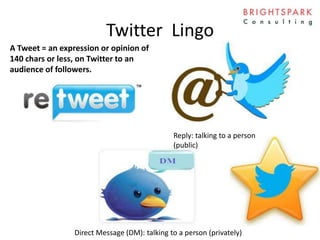
A Tweet = an expression or opinion of
140 chars or less, on Twitter to an
audience of followers.
Twitter Lingo
Reply: talking to a person
(public)
A Tweet = an expression or opinion of
140 chars or less, on Twitter to an
audience of followers.
Twitter Lingo
Reply: talking to a person
(public)
Direct Message (DM): talking to a person (privately)
A Tweet = an expression or opinion of
140 chars or less, on Twitter to an
audience of followers.
Twitter Lingo
Reply: talking to a person
(public)
Direct Message (DM): talking to a person (privately)
Other person must
be following you in
order to DM
A Tweet = an expression or opinion of
140 chars or less, on Twitter to an
audience of followers.
Twitter Lingo
Reply: talking to a person
(public)
Direct Message (DM): talking to a person (privately)
Other person must
be following you in
order to DM
Retweet (RT): republishing a tweet
to your followers. Like Fwd to
Friend
A Tweet = an expression or opinion of
140 chars or less, on Twitter to an
audience of followers.
Twitter Lingo
Reply: talking to a person
(public)
Direct Message (DM): talking to a person (privately)
Other person must
be following you in
order to DM
Retweet (RT): republishing a tweet
to your followers. Like Fwd to
Friend
Favorite/Star:
save stuff
A Tweet = an expression or opinion of
140 chars or less, on Twitter to an
audience of followers.
Twitter Etiquette
• RT = currency of Twitter, show
the love
• ‘via’ good etiquette to not pass
off as your own
• If something’s worth
repeating, do it. If
something’s worth repeating,
do it!
Image credit: casa.ie
# What Is This? #
• A way of spreading information about a
subject, or participating in a discussion
– Used widely at conferences
• Choose something short & simple
• Remind attendees about the hashtag (materials,
screens, speaker mentions, etc.)
– Marks a shift in how people watch TV
• #vinb, #latelate, #apprentice
– #FF
How To RT
• Be shorter than the 140 chars to allow for
RT’s (90)
• Stick the hashtag or @ in the middle
How To Hashtag
• Go easy on the hashtags! DO…
– Use for humour #firstworldproblems
– To follow a cause #clontarfprotest
– To take part in a conversation #glaoch
• Tweets with 1 or 2 # get 21% higher engagement
than those with 3+ (salesforce.com)
How To Hashtag
• DON’T
– #hashtag #every #word #in #a #sentence. It is a
crime.
How To Hashtag
• DON’T
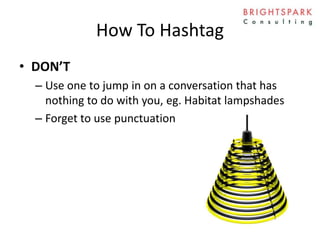
– Use one to jump in on a conversation that has
nothing to do with you, eg. Habitat lampshades
– Forget to use punctuation
Klout
• A number between 1 and 100 that denotes
how influential you are.
• Can download it for Chrome and see people’s
scores online:
https://chrome.google.com/webstore/detail/k
lout-beta/jjaakbhpcbpmojkhpiaacepfcaniglak
Twitter “Levels”
• Level 1:
Broadcast Only
Twitter “Levels”
• Level 2: Chitty
Chat
Twitter “Levels”
• Level 3:
Advanced
Search
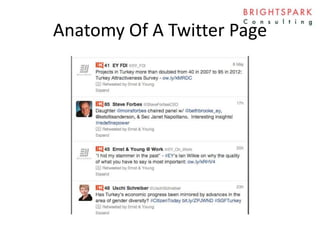
Anatomy Of A Twitter Page
Twitter Basics
1. Decide on a name
2. Fill out the profile
3. Choose a design style
– Twitterbackgrounds, twitpaper
– Bespoke design can include additional info
4. Find some followers - wefollow
5. Go!
Twitter Goals
1. What is our overall goal?
2. How will we achieve that?
3. What kind of things will we post?
4. What will we not post?
5. Who will post?
6. How often?
7. How will we measure success?
Twitter Goals
1. What is our overall goal?
2. How will we achieve that?
3. What kind of things will we post?
– Share, don’t sell
– Be helpful
– Be personal… funny even!
4. What will we not post?
5. Who will post?
6. How often?
– Very important to commit to it
7. How will we measure success?
Let’s Go…
• Tweetdeck is an app that sits on your desktop
Tweetdeck
• Add Twitter accounts
• Remove the black
• Add columns
– Interactions shows all the people who followed
you, favourite your tweets, or RT’ed you.
– Show Mentions, Messages
– Activity if you want to spy on people!
• When someone follows you, choose to follow
them, their mentions, or their favorites…
“There’s An App For That”
• Lists: a way of sorting the people or topics you
follow
• Know what is the best time and day for your
audience
– Paid apps will tell you: http://www.socialbro.com/
• Clean your follower lists:
http://www.friendorfollow.com/
• Track your performance
http://twittercounter.com/ or tweetstats.com
Thank You!

How To "Do" Twitter

  • 1.
    Time To GetStuck Into Twitter (Disclaimer*)
  • 2.
  • 3.
  • 4.
    Social Media List •Blogs • Forums • Wiki’s • Video Sharing (YouTube, Vimeo) • Photo Sharing (Flickr, Instagram) • Link Sharing (Delicio.us) • Location Based (Foursquare) • Social Networks (Facebook, LinkedIn, Orkut)
  • 5.
    Social Media List •Microblogs (Twitter, Tumblr, Posterous) Born on 21 March 2006 Total number of Twitter users: 500 million Monthly active users: 200 million Average number of followers/user: 206 Average time spent per user/month: 170 mins % Users accessing via mobile: 60%
  • 6.
    Twitter Lingo A Tweet= an expression or opinion of 140 chars or less, on Twitter to an audience of followers.
  • 7.
    Twitter Lingo Reply: talkingto a person (public) A Tweet = an expression or opinion of 140 chars or less, on Twitter to an audience of followers.
  • 8.
    Twitter Lingo Reply: talkingto a person (public) Direct Message (DM): talking to a person (privately) A Tweet = an expression or opinion of 140 chars or less, on Twitter to an audience of followers.
  • 9.
    Twitter Lingo Reply: talkingto a person (public) Direct Message (DM): talking to a person (privately) Other person must be following you in order to DM A Tweet = an expression or opinion of 140 chars or less, on Twitter to an audience of followers.
  • 10.
    Twitter Lingo Reply: talkingto a person (public) Direct Message (DM): talking to a person (privately) Other person must be following you in order to DM Retweet (RT): republishing a tweet to your followers. Like Fwd to Friend A Tweet = an expression or opinion of 140 chars or less, on Twitter to an audience of followers.
  • 11.
    Twitter Lingo Reply: talkingto a person (public) Direct Message (DM): talking to a person (privately) Other person must be following you in order to DM Retweet (RT): republishing a tweet to your followers. Like Fwd to Friend Favorite/Star: save stuff A Tweet = an expression or opinion of 140 chars or less, on Twitter to an audience of followers.
  • 12.
    Twitter Etiquette • RT= currency of Twitter, show the love • ‘via’ good etiquette to not pass off as your own • If something’s worth repeating, do it. If something’s worth repeating, do it! Image credit: casa.ie
  • 13.
    # What IsThis? # • A way of spreading information about a subject, or participating in a discussion – Used widely at conferences • Choose something short & simple • Remind attendees about the hashtag (materials, screens, speaker mentions, etc.) – Marks a shift in how people watch TV • #vinb, #latelate, #apprentice – #FF
  • 14.
    How To RT •Be shorter than the 140 chars to allow for RT’s (90) • Stick the hashtag or @ in the middle
  • 15.
    How To Hashtag •Go easy on the hashtags! DO… – Use for humour #firstworldproblems – To follow a cause #clontarfprotest – To take part in a conversation #glaoch • Tweets with 1 or 2 # get 21% higher engagement than those with 3+ (salesforce.com)
  • 16.
    How To Hashtag •DON’T – #hashtag #every #word #in #a #sentence. It is a crime.
  • 17.
    How To Hashtag •DON’T – Use one to jump in on a conversation that has nothing to do with you, eg. Habitat lampshades – Forget to use punctuation
  • 18.
    Klout • A numberbetween 1 and 100 that denotes how influential you are. • Can download it for Chrome and see people’s scores online: https://chrome.google.com/webstore/detail/k lout-beta/jjaakbhpcbpmojkhpiaacepfcaniglak
  • 19.
  • 20.
  • 21.
  • 22.
    Anatomy Of ATwitter Page
  • 23.
    Anatomy Of ATwitter Page
  • 24.
    Anatomy Of ATwitter Page
  • 25.
    Anatomy Of ATwitter Page
  • 26.
    Anatomy Of ATwitter Page
  • 27.
    Anatomy Of ATwitter Page
  • 28.
    Anatomy Of ATwitter Page
  • 29.
    Anatomy Of ATwitter Page
  • 30.
    Twitter Basics 1. Decideon a name 2. Fill out the profile 3. Choose a design style – Twitterbackgrounds, twitpaper – Bespoke design can include additional info 4. Find some followers - wefollow 5. Go!
  • 31.
    Twitter Goals 1. Whatis our overall goal? 2. How will we achieve that? 3. What kind of things will we post? 4. What will we not post? 5. Who will post? 6. How often? 7. How will we measure success?
  • 32.
    Twitter Goals 1. Whatis our overall goal? 2. How will we achieve that? 3. What kind of things will we post? – Share, don’t sell – Be helpful – Be personal… funny even! 4. What will we not post? 5. Who will post? 6. How often? – Very important to commit to it 7. How will we measure success?
  • 33.
    Let’s Go… • Tweetdeckis an app that sits on your desktop
  • 34.
    Tweetdeck • Add Twitteraccounts • Remove the black • Add columns – Interactions shows all the people who followed you, favourite your tweets, or RT’ed you. – Show Mentions, Messages – Activity if you want to spy on people! • When someone follows you, choose to follow them, their mentions, or their favorites…
  • 35.
    “There’s An AppFor That” • Lists: a way of sorting the people or topics you follow • Know what is the best time and day for your audience – Paid apps will tell you: http://www.socialbro.com/ • Clean your follower lists: http://www.friendorfollow.com/ • Track your performance http://twittercounter.com/ or tweetstats.com
  • 36.

Editor's Notes

  • #6 http://expandedramblings.com/index.php/march-2013-by-the-numbers-a-few-amazing-twitter-stats/
  • #13 http://blog.hubspot.com/marketers-guide-proper-social-media-etiquette