Tutorial on Programming with Python: Galois Field

                                          Kishoj Bajracharya
                                      Asian Institute of Technology

                                               June 20, 2011


Contents

1 Galois Field                                                                                               2
   1.1   To import class FField for Galois Field . . . . . . . . . . . . . . . . . . . . . . . . . . . . .   2
   1.2   To Create Galois Field . . . . . . . . . . . . . . . . . . . . . . . . . . . . . . . . . . . . .    2
   1.3   Polynomial Representation . . . . . . . . . . . . . . . . . . . . . . . . . . . . . . . . . . .     2
   1.4   Result of example1.py . . . . . . . . . . . . . . . . . . . . . . . . . . . . . . . . . . . . .     3
   1.5   Co-efficient of Polynomial Representation . . . . . . . . . . . . . . . . . . . . . . . . . . .      3
   1.6   Result of example2.py . . . . . . . . . . . . . . . . . . . . . . . . . . . . . . . . . . . . .     4
   1.7   Conversion from co-efficient of polynomial to element . . . . . . . . . . . . . . . . . . . .        4
   1.8   Result of example3.py . . . . . . . . . . . . . . . . . . . . . . . . . . . . . . . . . . . . .     5

2 Operation Over Galois Field                                                                                5
   2.1   Addition Operation over Galois Field . . . . . . . . . . . . . . . . . . . . . . . . . . . . .      5
   2.2   Result of example4.py . . . . . . . . . . . . . . . . . . . . . . . . . . . . . . . . . . . . .     6
   2.3   Multiplication Operation over Galois Field . . . . . . . . . . . . . . . . . . . . . . . . . . .    6
   2.4   Result of example5.py . . . . . . . . . . . . . . . . . . . . . . . . . . . . . . . . . . . . .     7
   2.5   Operations over Galois Field: Another Approach . . . . . . . . . . . . . . . . . . . . . . .        7
   2.6   Result of example6.py . . . . . . . . . . . . . . . . . . . . . . . . . . . . . . . . . . . . .     8


                                                      1
1 Galois Field

     1.1   To import class FField for Galois Field

        1. Browse the URI http://www.mit.edu/˜emin/source_code/py_ecc and see the latest
           release of the file “py ecc-1-4.tar.gz” and download it.
        2. Extract it and keep all the files in a separate folder named “Field”.
        3. Use the import command to use the class FField from the file name “ffield.py”

                        import sys
                        sys.path.append(‘./Field’)
                        import ffield


     1.2   To Create Galois Field

     To create the Galois field F = GF (2n )

                        F = ffield.FField(n)
                        Create the field GF (23 )
                        F = ffield.FField(3)


     1.3   Polynomial Representation

     The polynomial representation of any number a can be obtained using following codes

                        F.ShowPolynomial(a)
                        Returns: string
                        Note: the value of a lies between 0 to 2n − 1


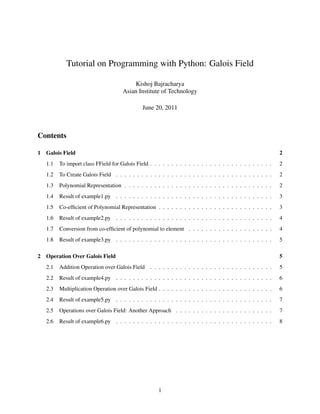
     Following example named “example1.py” shows how do we use python programming language to get poly-
     nomial from galois field.
 1         # example1.py
 2         import sys
 3         sys.path.append(’./Field’)
 4         import ffield
 5
 6         # Create the field GF(2ˆ3)
 7         F = ffield.FField(3)
 8
 9         # Show the   polynomial representation from 0-2ˆ3-1 i.e. 0-7
10         print ’For   0, polynomial: ’ + F.ShowPolynomial(0)
11         print ’For   1, polynomial: ’ + F.ShowPolynomial(1)
12         print ’For   2, polynomial: ’ + F.ShowPolynomial(2)
13         print ’For   3, polynomial: ’ + F.ShowPolynomial(3)
14         print ’For   4, polynomial: ’ + F.ShowPolynomial(4)
15         print ’For   5, polynomial: ’ + F.ShowPolynomial(5)
16         print ’For   6, polynomial: ’ + F.ShowPolynomial(6)
17         print ’For   7, polynomial: ’ + F.ShowPolynomial(7)


                                                           2
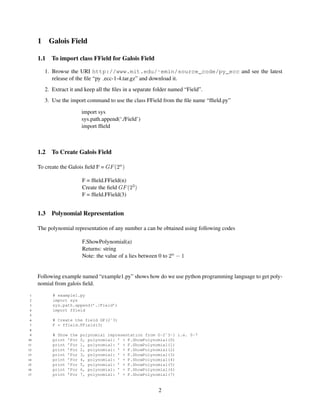
1.4   Result of example1.py


                                            Fig1: Result of example1.py


     1.5   Co-efficient of Polynomial Representation

     The coefficient of the polynomial representation of any number a can be obtained using following codes

                        F.ShowCoefficients(a)
                        Returns: list
                        Note: the value of a lies between 0 to 2n − 1


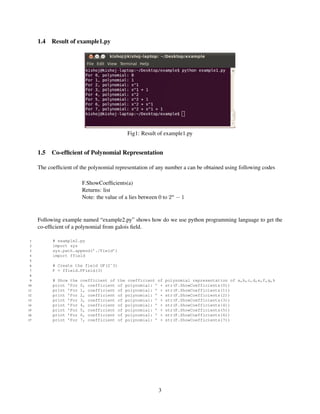
     Following example named “example2.py” shows how do we use python programming language to get the
     co-efficient of a polynomial from galois field.

 1         # example2.py
 2         import sys
 3         sys.path.append(’./Field’)
 4         import ffield
 5
 6         # Create the field GF(2ˆ3)
 7         F = ffield.FField(3)
 8
 9         # Show the   coefficient of   the coefficient of   polynomial representation of a,b,c,d,e,f,g,h
10         print ’For   0, coefficient   of polynomial: ’ +   str(F.ShowCoefficients(0))
11         print ’For   1, coefficient   of polynomial: ’ +   str(F.ShowCoefficients(1))
12         print ’For   2, coefficient   of polynomial: ’ +   str(F.ShowCoefficients(2))
13         print ’For   3, coefficient   of polynomial: ’ +   str(F.ShowCoefficients(3))
14         print ’For   4, coefficient   of polynomial: ’ +   str(F.ShowCoefficients(4))
15         print ’For   5, coefficient   of polynomial: ’ +   str(F.ShowCoefficients(5))
16         print ’For   6, coefficient   of polynomial: ’ +   str(F.ShowCoefficients(6))
17         print ’For   7, coefficient   of polynomial: ’ +   str(F.ShowCoefficients(7))


                                                         3
1.6   Result of example2.py


                                            Fig2: Result of example2.py


     1.7   Conversion from co-efficient of polynomial to element

     The coefficient(list) of the polynomial can be converted to the element(integer)

                        F.ConvertListToElement(list)
                        Returns: integer
                        Note: the value of a lies between 0 to 2n − 1


     Following example named “example3.py” shows how do we use python programming language to convert
     co-efficient of a polynomial to element over a galois field.

 1         # example3.py
 2         import sys
 3         sys.path.append(’./Field’)
 4         import ffield
 5
 6         # Create the field GF(2ˆ3)
 7         F = ffield.FField(3)
 8
 9         # Converting   list into the element
10         print "List:   [0,0,0,0], Element: "   +   str(F.ConvertListToElement([0,0,0,0]))
11         print "List:   [0,0,0,0], Element: "   +   str(F.ConvertListToElement([0,0,0,1]))
12         print "List:   [0,0,0,0], Element: "   +   str(F.ConvertListToElement([0,0,1,0]))
13         print "List:   [0,0,0,0], Element: "   +   str(F.ConvertListToElement([0,0,1,1]))
14         print "List:   [0,0,0,0], Element: "   +   str(F.ConvertListToElement([0,1,0,0]))
15         print "List:   [0,0,0,0], Element: "   +   str(F.ConvertListToElement([0,1,0,1]))
16         print "List:   [0,0,0,0], Element: "   +   str(F.ConvertListToElement([0,1,1,0]))
17         print "List:   [0,0,0,0], Element: "   +   str(F.ConvertListToElement([0,1,1,1]))
18
19         # Next method to convert
20         print F.ConvertListToElement(F.ShowCoefficients(0))
21         print F.ConvertListToElement(F.ShowCoefficients(7))


                                                           4
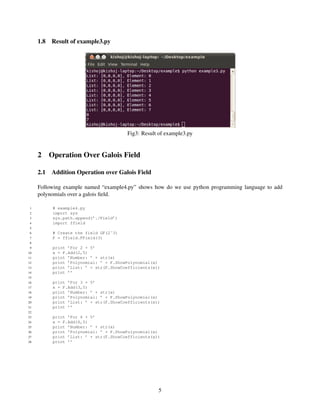
1.8   Result of example3.py


                                        Fig3: Result of example3.py


     2 Operation Over Galois Field

     2.1   Addition Operation over Galois Field

     Following example named “example4.py” shows how do we use python programming language to add
     polynomials over a galois field.

 1         # example4.py
 2         import sys
 3         sys.path.append(’./Field’)
 4         import ffield
 5
 6         # Create the field GF(2ˆ3)
 7         F = ffield.FField(3)
 8
 9         print ’For 2 + 5’
10         x = F.Add(2,5)
11         print ’Number: ’ + str(x)
12         print ’Polynomial: ’ + F.ShowPolynomial(x)
13         print ’List: ’ + str(F.ShowCoefficients(x))
14         print ’’
15
16         print ’For 3 + 5’
17         x = F.Add(3,5)
18         print ’Number: ’ + str(x)
19         print ’Polynomial: ’ + F.ShowPolynomial(x)
20         print ’List: ’ + str(F.ShowCoefficients(x))
21         print ’’
22
23         print ’For 6 + 5’
24         x = F.Add(6,5)
25         print ’Number: ’ + str(x)
26         print ’Polynomial: ’ + F.ShowPolynomial(x)
27         print ’List: ’ + str(F.ShowCoefficients(x))
28         print ’’


                                                     5
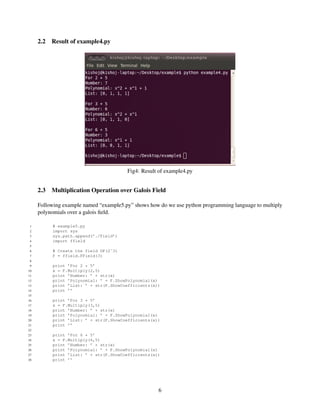
2.2   Result of example4.py


                                        Fig4: Result of example4.py


     2.3   Multiplication Operation over Galois Field

     Following example named “example5.py” shows how do we use python programming language to multiply
     polynomials over a galois field.

 1         # example5.py
 2         import sys
 3         sys.path.append(’./Field’)
 4         import ffield
 5
 6         # Create the field GF(2ˆ3)
 7         F = ffield.FField(3)
 8
 9         print ’For 2 * 5’
10         x = F.Multiply(2,5)
11         print ’Number: ’ + str(x)
12         print ’Polynomial: ’ + F.ShowPolynomial(x)
13         print ’List: ’ + str(F.ShowCoefficients(x))
14         print ’’
15
16         print ’For 3 * 5’
17         x = F.Multiply(3,5)
18         print ’Number: ’ + str(x)
19         print ’Polynomial: ’ + F.ShowPolynomial(x)
20         print ’List: ’ + str(F.ShowCoefficients(x))
21         print ’’
22
23         print ’For 6 * 5’
24         x = F.Multiply(6,5)
25         print ’Number: ’ + str(x)
26         print ’Polynomial: ’ + F.ShowPolynomial(x)
27         print ’List: ’ + str(F.ShowCoefficients(x))
28         print ’’


                                                     6
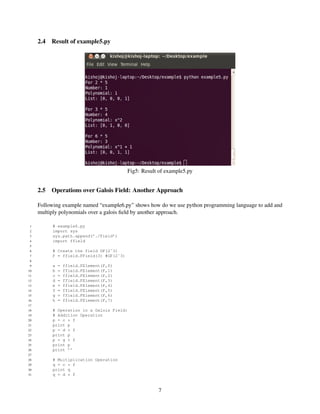
2.4   Result of example5.py


                                           Fig5: Result of example5.py


     2.5   Operations over Galois Field: Another Approach

     Following example named “example6.py” shows how do we use python programming language to add and
     multiply polynomials over a galois field by another approach.

 1         # example6.py
 2         import sys
 3         sys.path.append(’./Field’)
 4         import ffield
 5
 6         # Create the field GF(2ˆ3)
 7         F = ffield.FField(3) #GF(2ˆ3)
 8
 9         a   =   ffield.FElement(F,0)
10         b   =   ffield.FElement(F,1)
11         c   =   ffield.FElement(F,2)
12         d   =   ffield.FElement(F,3)
13         e   =   ffield.FElement(F,4)
14         f   =   ffield.FElement(F,5)
15         g   =   ffield.FElement(F,6)
16         h   =   ffield.FElement(F,7)
17
18         # Operation in a Galois Field:
19         # Addition Operation
20         p = c + f
21         print p
22         p = d + f
23         print p
24         p = g + f
25         print p
26         print ’’
27
28         # Multiplication Operation
29         q = c * f
30         print q
31         q = d * f


                                                       7
32         print q
33         q = g * f
34         print q


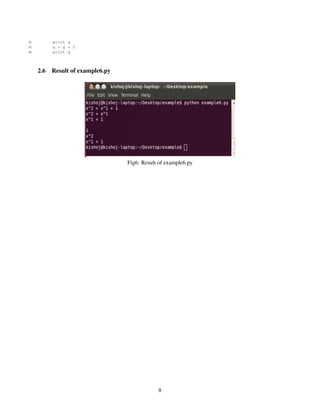
     2.6   Result of example6.py


                                   Fig6: Result of example6.py


                                               8

Galios: Python Programming

  • 1.
    Tutorial on Programmingwith Python: Galois Field Kishoj Bajracharya Asian Institute of Technology June 20, 2011 Contents 1 Galois Field 2 1.1 To import class FField for Galois Field . . . . . . . . . . . . . . . . . . . . . . . . . . . . . 2 1.2 To Create Galois Field . . . . . . . . . . . . . . . . . . . . . . . . . . . . . . . . . . . . . 2 1.3 Polynomial Representation . . . . . . . . . . . . . . . . . . . . . . . . . . . . . . . . . . . 2 1.4 Result of example1.py . . . . . . . . . . . . . . . . . . . . . . . . . . . . . . . . . . . . . 3 1.5 Co-efficient of Polynomial Representation . . . . . . . . . . . . . . . . . . . . . . . . . . . 3 1.6 Result of example2.py . . . . . . . . . . . . . . . . . . . . . . . . . . . . . . . . . . . . . 4 1.7 Conversion from co-efficient of polynomial to element . . . . . . . . . . . . . . . . . . . . 4 1.8 Result of example3.py . . . . . . . . . . . . . . . . . . . . . . . . . . . . . . . . . . . . . 5 2 Operation Over Galois Field 5 2.1 Addition Operation over Galois Field . . . . . . . . . . . . . . . . . . . . . . . . . . . . . 5 2.2 Result of example4.py . . . . . . . . . . . . . . . . . . . . . . . . . . . . . . . . . . . . . 6 2.3 Multiplication Operation over Galois Field . . . . . . . . . . . . . . . . . . . . . . . . . . . 6 2.4 Result of example5.py . . . . . . . . . . . . . . . . . . . . . . . . . . . . . . . . . . . . . 7 2.5 Operations over Galois Field: Another Approach . . . . . . . . . . . . . . . . . . . . . . . 7 2.6 Result of example6.py . . . . . . . . . . . . . . . . . . . . . . . . . . . . . . . . . . . . . 8 1
  • 2.
    1 Galois Field 1.1 To import class FField for Galois Field 1. Browse the URI http://www.mit.edu/˜emin/source_code/py_ecc and see the latest release of the file “py ecc-1-4.tar.gz” and download it. 2. Extract it and keep all the files in a separate folder named “Field”. 3. Use the import command to use the class FField from the file name “ffield.py” import sys sys.path.append(‘./Field’) import ffield 1.2 To Create Galois Field To create the Galois field F = GF (2n ) F = ffield.FField(n) Create the field GF (23 ) F = ffield.FField(3) 1.3 Polynomial Representation The polynomial representation of any number a can be obtained using following codes F.ShowPolynomial(a) Returns: string Note: the value of a lies between 0 to 2n − 1 Following example named “example1.py” shows how do we use python programming language to get poly- nomial from galois field. 1 # example1.py 2 import sys 3 sys.path.append(’./Field’) 4 import ffield 5 6 # Create the field GF(2ˆ3) 7 F = ffield.FField(3) 8 9 # Show the polynomial representation from 0-2ˆ3-1 i.e. 0-7 10 print ’For 0, polynomial: ’ + F.ShowPolynomial(0) 11 print ’For 1, polynomial: ’ + F.ShowPolynomial(1) 12 print ’For 2, polynomial: ’ + F.ShowPolynomial(2) 13 print ’For 3, polynomial: ’ + F.ShowPolynomial(3) 14 print ’For 4, polynomial: ’ + F.ShowPolynomial(4) 15 print ’For 5, polynomial: ’ + F.ShowPolynomial(5) 16 print ’For 6, polynomial: ’ + F.ShowPolynomial(6) 17 print ’For 7, polynomial: ’ + F.ShowPolynomial(7) 2
  • 3.
    1.4 Result of example1.py Fig1: Result of example1.py 1.5 Co-efficient of Polynomial Representation The coefficient of the polynomial representation of any number a can be obtained using following codes F.ShowCoefficients(a) Returns: list Note: the value of a lies between 0 to 2n − 1 Following example named “example2.py” shows how do we use python programming language to get the co-efficient of a polynomial from galois field. 1 # example2.py 2 import sys 3 sys.path.append(’./Field’) 4 import ffield 5 6 # Create the field GF(2ˆ3) 7 F = ffield.FField(3) 8 9 # Show the coefficient of the coefficient of polynomial representation of a,b,c,d,e,f,g,h 10 print ’For 0, coefficient of polynomial: ’ + str(F.ShowCoefficients(0)) 11 print ’For 1, coefficient of polynomial: ’ + str(F.ShowCoefficients(1)) 12 print ’For 2, coefficient of polynomial: ’ + str(F.ShowCoefficients(2)) 13 print ’For 3, coefficient of polynomial: ’ + str(F.ShowCoefficients(3)) 14 print ’For 4, coefficient of polynomial: ’ + str(F.ShowCoefficients(4)) 15 print ’For 5, coefficient of polynomial: ’ + str(F.ShowCoefficients(5)) 16 print ’For 6, coefficient of polynomial: ’ + str(F.ShowCoefficients(6)) 17 print ’For 7, coefficient of polynomial: ’ + str(F.ShowCoefficients(7)) 3
  • 4.
    1.6 Result of example2.py Fig2: Result of example2.py 1.7 Conversion from co-efficient of polynomial to element The coefficient(list) of the polynomial can be converted to the element(integer) F.ConvertListToElement(list) Returns: integer Note: the value of a lies between 0 to 2n − 1 Following example named “example3.py” shows how do we use python programming language to convert co-efficient of a polynomial to element over a galois field. 1 # example3.py 2 import sys 3 sys.path.append(’./Field’) 4 import ffield 5 6 # Create the field GF(2ˆ3) 7 F = ffield.FField(3) 8 9 # Converting list into the element 10 print "List: [0,0,0,0], Element: " + str(F.ConvertListToElement([0,0,0,0])) 11 print "List: [0,0,0,0], Element: " + str(F.ConvertListToElement([0,0,0,1])) 12 print "List: [0,0,0,0], Element: " + str(F.ConvertListToElement([0,0,1,0])) 13 print "List: [0,0,0,0], Element: " + str(F.ConvertListToElement([0,0,1,1])) 14 print "List: [0,0,0,0], Element: " + str(F.ConvertListToElement([0,1,0,0])) 15 print "List: [0,0,0,0], Element: " + str(F.ConvertListToElement([0,1,0,1])) 16 print "List: [0,0,0,0], Element: " + str(F.ConvertListToElement([0,1,1,0])) 17 print "List: [0,0,0,0], Element: " + str(F.ConvertListToElement([0,1,1,1])) 18 19 # Next method to convert 20 print F.ConvertListToElement(F.ShowCoefficients(0)) 21 print F.ConvertListToElement(F.ShowCoefficients(7)) 4
  • 5.
    1.8 Result of example3.py Fig3: Result of example3.py 2 Operation Over Galois Field 2.1 Addition Operation over Galois Field Following example named “example4.py” shows how do we use python programming language to add polynomials over a galois field. 1 # example4.py 2 import sys 3 sys.path.append(’./Field’) 4 import ffield 5 6 # Create the field GF(2ˆ3) 7 F = ffield.FField(3) 8 9 print ’For 2 + 5’ 10 x = F.Add(2,5) 11 print ’Number: ’ + str(x) 12 print ’Polynomial: ’ + F.ShowPolynomial(x) 13 print ’List: ’ + str(F.ShowCoefficients(x)) 14 print ’’ 15 16 print ’For 3 + 5’ 17 x = F.Add(3,5) 18 print ’Number: ’ + str(x) 19 print ’Polynomial: ’ + F.ShowPolynomial(x) 20 print ’List: ’ + str(F.ShowCoefficients(x)) 21 print ’’ 22 23 print ’For 6 + 5’ 24 x = F.Add(6,5) 25 print ’Number: ’ + str(x) 26 print ’Polynomial: ’ + F.ShowPolynomial(x) 27 print ’List: ’ + str(F.ShowCoefficients(x)) 28 print ’’ 5
  • 6.
    2.2 Result of example4.py Fig4: Result of example4.py 2.3 Multiplication Operation over Galois Field Following example named “example5.py” shows how do we use python programming language to multiply polynomials over a galois field. 1 # example5.py 2 import sys 3 sys.path.append(’./Field’) 4 import ffield 5 6 # Create the field GF(2ˆ3) 7 F = ffield.FField(3) 8 9 print ’For 2 * 5’ 10 x = F.Multiply(2,5) 11 print ’Number: ’ + str(x) 12 print ’Polynomial: ’ + F.ShowPolynomial(x) 13 print ’List: ’ + str(F.ShowCoefficients(x)) 14 print ’’ 15 16 print ’For 3 * 5’ 17 x = F.Multiply(3,5) 18 print ’Number: ’ + str(x) 19 print ’Polynomial: ’ + F.ShowPolynomial(x) 20 print ’List: ’ + str(F.ShowCoefficients(x)) 21 print ’’ 22 23 print ’For 6 * 5’ 24 x = F.Multiply(6,5) 25 print ’Number: ’ + str(x) 26 print ’Polynomial: ’ + F.ShowPolynomial(x) 27 print ’List: ’ + str(F.ShowCoefficients(x)) 28 print ’’ 6
  • 7.
    2.4 Result of example5.py Fig5: Result of example5.py 2.5 Operations over Galois Field: Another Approach Following example named “example6.py” shows how do we use python programming language to add and multiply polynomials over a galois field by another approach. 1 # example6.py 2 import sys 3 sys.path.append(’./Field’) 4 import ffield 5 6 # Create the field GF(2ˆ3) 7 F = ffield.FField(3) #GF(2ˆ3) 8 9 a = ffield.FElement(F,0) 10 b = ffield.FElement(F,1) 11 c = ffield.FElement(F,2) 12 d = ffield.FElement(F,3) 13 e = ffield.FElement(F,4) 14 f = ffield.FElement(F,5) 15 g = ffield.FElement(F,6) 16 h = ffield.FElement(F,7) 17 18 # Operation in a Galois Field: 19 # Addition Operation 20 p = c + f 21 print p 22 p = d + f 23 print p 24 p = g + f 25 print p 26 print ’’ 27 28 # Multiplication Operation 29 q = c * f 30 print q 31 q = d * f 7
  • 8.
    32 print q 33 q = g * f 34 print q 2.6 Result of example6.py Fig6: Result of example6.py 8