Tutorial 1.1: Import Data Matrix From IntOGen
Import a data matrix from IntOGen that contains p-values for significantly up-
regulated genes in each tumor morphology type
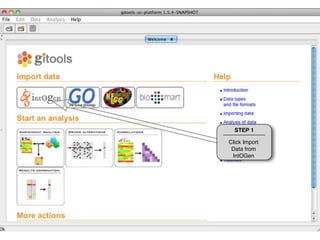
STEP 1

Click Import
 Data from
 IntOGen
STEP 2

                       Select Matrix
                       and click OK.


From IntOGen you can
download Matrices or
Modules.
IntOGen contains results for each
               experiment in the database (Onco
               Experiments) and for combinations
               (Onco Combinations) of experiments
               (i.e. all experiments that analyze the
               same tumor type are combined)


  STEP 3

Select Onco
Combinations
IntOGen contains results for different
                   types of alterations in cancer
                   samples. Gain and Loss of DNA and
                   over (upreg) or under-expression
                   (downreg) of genes/transcripts.


    STEP 4

Select upreg to
 get results for
 upregulation
ALL in Morphology means that samples
                                 are grouped independently of their
                                 morphology type.

                                 In IntOGen samples are grouped by
                                 Topography and Morphology according
                                 to International Classification of
                                 Disease Oncology (ICD). All samples
                                 with same ICD terms and analyzed
                                 together in the same platform form an
                                 experiment unit. Experiment units with
                                 the same ICD terms are combined to
                                 obtain results for Onco Combinations.
  STEP 5           STEP 6
                                 For more information see
Do not select    Select ALL in   http://www.intogen.org
 anything in    Morphology and
Topography      click Download
STEP 7
 Give a name to
 the file that will
 be downloaded
  and indicate a
 Folder where to
place it. Click OK.
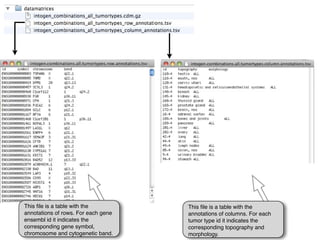
Once the download has been
  completed you will have three new
  files in the directory that you
  indicated.


The file with extension cdm contains
a Continuos Data Matrix with one
row per gene and one column per
tumor type. The values in each cell
are corrected p-values that indicate if
the gene is significantly up-regulated
in this tumor type.
This file is a table with the         This file is a table with the
annotations of rows. For each gene   annotations of columns. For each
ensembl id it indicates the          tumor type id it indicates the
corresponding gene symbol,           corresponding topography and
chromosome and cytogenetic band.     morphology.
THANKS FOR USING GITOOLS


    http://www.gitools.org

Tutorial 1.1 - Import Intogen tumor types

  • 1.
    Tutorial 1.1: ImportData Matrix From IntOGen Import a data matrix from IntOGen that contains p-values for significantly up- regulated genes in each tumor morphology type
  • 2.
    STEP 1 Click Import Data from IntOGen
  • 3.
    STEP 2 Select Matrix and click OK. From IntOGen you can download Matrices or Modules.
  • 4.
    IntOGen contains resultsfor each experiment in the database (Onco Experiments) and for combinations (Onco Combinations) of experiments (i.e. all experiments that analyze the same tumor type are combined) STEP 3 Select Onco Combinations
  • 5.
    IntOGen contains resultsfor different types of alterations in cancer samples. Gain and Loss of DNA and over (upreg) or under-expression (downreg) of genes/transcripts. STEP 4 Select upreg to get results for upregulation
  • 6.
    ALL in Morphologymeans that samples are grouped independently of their morphology type. In IntOGen samples are grouped by Topography and Morphology according to International Classification of Disease Oncology (ICD). All samples with same ICD terms and analyzed together in the same platform form an experiment unit. Experiment units with the same ICD terms are combined to obtain results for Onco Combinations. STEP 5 STEP 6 For more information see Do not select Select ALL in http://www.intogen.org anything in Morphology and Topography click Download
  • 7.
    STEP 7 Givea name to the file that will be downloaded and indicate a Folder where to place it. Click OK.
  • 8.
    Once the downloadhas been completed you will have three new files in the directory that you indicated. The file with extension cdm contains a Continuos Data Matrix with one row per gene and one column per tumor type. The values in each cell are corrected p-values that indicate if the gene is significantly up-regulated in this tumor type.
  • 9.
    This file isa table with the This file is a table with the annotations of rows. For each gene annotations of columns. For each ensembl id it indicates the tumor type id it indicates the corresponding gene symbol, corresponding topography and chromosome and cytogenetic band. morphology.
  • 10.
    THANKS FOR USINGGITOOLS http://www.gitools.org