GROUP 4: #2
Non-digital and Digital Skills and Tools in Delivering
Technology-Enhanced Lessons
Educ 213: Technology for Teaching and Learning I
Professor: Dr. Gerry J. Madriaga
Group Members:
Joanna Dogoldogol
Dianara Romo
Julie Belarmino
Cathelyn Espaῆo
Leslie Sapa
Cha Pinzon
Adrian Keith Bonion
Introduction
Teaching becomes rewarding when learners get the most from
instruction as manifested in their performance. An important element in
engaging learners is when the strategy used in delivering the lesson uses
an instructional material. When properly and appropriately used, it can
spice up a classroom activity.
These instructional materials may come in varied forms. One group
refers to the conventional and non-digital tools. A classroom will always
need a chalkboard or a writing board that may come in varied forms and
shapes. Bulletin boards, flip charts, dioramas, puppets, terrarium, and the
like, will always find their significance in any classroom.
Lesson 1: Development and
Use of Non-Digital or
Conventional Materials
Instructional Materials are defined as print and non-
print items that are rested to impact information to students
in the educational process (Effiong & Igiri, 2015).
According to Brown et al.,2005; Effiong & Igiri, 2015,
Instructional materials have several roles in teaching and
learning which include the following:
1. They promote meaningful communication and effective
learning.
2. They ensure better retention, thus making learning more
permament.
3. They help to overcome the limited classroom by making
the inaccessible accessible.
4. They provide a common experience upon which late
learning can be developed.
5. They encourage participation especially if students are
allowed to manipulate materials used.
Instructional materials are the supplementary
materials, which help the teacher to make his/her
presentation concrete, effective, interesting, meaningful and
inspiring. In any teaching and learning process,
instructional materials play a vital role as they provide
sensory experiences to the learners.
Instructional materials refer to any preexisting
materials that are being incorporated, as well as to those
that will be specifically developed for the objectives
(Haigler, 2014).
There are also several factors to consider in developing
instructional materials:
1. Develop a story board and working outline based on the
subject goals and objectives.
2. Identify existing institutional resources including materials
and teachers’ capability.
3. The teacher may research off the shelf materials that
have been developed by others to determine if their
approach could be useful.
4. Explore the possibility of adapting concepts of other
teachers without infringing on anyone’s copy protected
design.
5. Modify existing materials based on the objectives of the
lesson.
6. If the instructional materials are effective, you can share
them with other teachers.
7. The teacher developer can also sell her/his materials
available.
Instructional materials are a great help in stimulating
and facilitating the learning of the learners. According to
Wright (1976:1) as cited in Cakir (2006) many media and
many styles of visual presentation are useful to the
language learner. All audio-visual materials have positive
contributions to language learning as long as they are used
at the right time, in the right place. In the teaching and
learning process, learners use their eyes as well as their
ears; but their eyes are basic on learning.
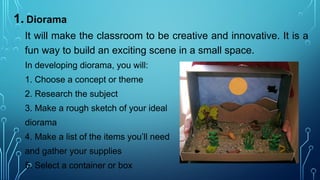
1. Diorama
It will make the classroom to be creative and innovative. It is a
fun way to build an exciting scene in a small space.
In developing diorama, you will:
1. Choose a concept or theme
2. Research the subject
3. Make a rough sketch of your ideal
diorama
4. Make a list of the items you’ll need
and gather your supplies
5. Select a container or box
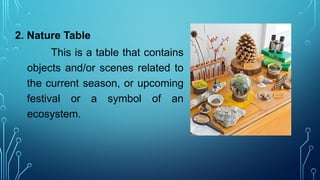
2. Nature Table
This is a table that contains
objects and/or scenes related to
the current season, or upcoming
festival or a symbol of an
ecosystem.
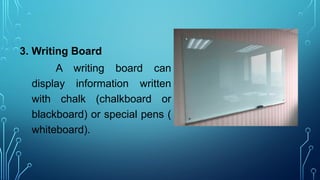
3. Writing Board
A writing board can
display information written
with chalk (chalkboard or
blackboard) or special pens (
whiteboard).
Suggestions on using the Writing Board:
1. Keep the board clean.
2. Use chalk or pens that contrast with the background of the
board so that students can see the information clearly.
3. Make text and drawings large enough to be seen from the
back of the room.
4. Prepare complex drawings in advance ( if very complex,
an overhead transparency or 35mm slide maybe
preferable).
5. Underline headings and important or unfamiliar words for
emphasis.
6. Do not talk while facing the board.
7. Do not block the students’ views of the board; stands
aside when writing or drawing is completed.
8. Allow sufficient time for students to copy the information
from the board.
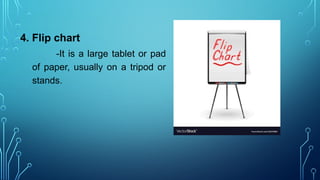
4. Flip chart
-It is a large tablet or pad
of paper, usually on a tripod or
stands.
Suggestions on using Flip chart:
1. Use wide-tipped pens or markers; markers with narrow
tips produce printing that is difficult to read.
2. Print in block letters that are large enough to be read
easily from the back of the room.
3. Use different colored pens to provide contrast; this make
the pages visually attractive and easier to read.
4. Use headings, boxes, cartoon and borders to improve the
appearance of the pages.
5. Use bullets (•) to delineate items on the page.
6. Leave plenty of “white space” and avoid putting too
much information on one page. (Crowded and poorly
arranged information is distracting and difficult to read).
7. When pages are prepared in advance , use every other
page. If every page is used, colors will show through and
make text difficult to read.
8. Have masking tape available to put pages up around the
room during brainstorming and problems-solving activities.
9. To hide a portion of the page, fold up the lower portion of
the page and tape it. When ready to reveal the information,
remove the tape and let the page drop.
10. Face the students, not the flipchart while talking.
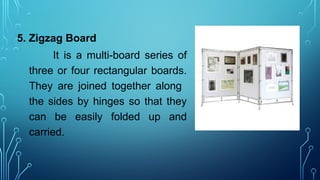
5. Zigzag Board
It is a multi-board series of
three or four rectangular boards.
They are joined together along
the sides by hinges so that they
can be easily folded up and
carried.
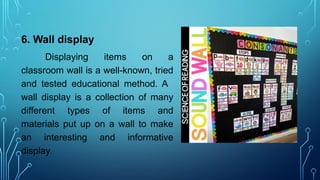
6. Wall display
Displaying items on a
classroom wall is a well-known, tried
and tested educational method. A
wall display is a collection of many
different types of items and
materials put up on a wall to make
an interesting and informative
display.
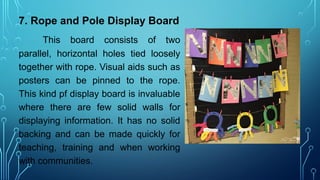
7. Rope and Pole Display Board
This board consists of two
parallel, horizontal holes tied loosely
together with rope. Visual aids such as
posters can be pinned to the rope.
This kind pf display board is invaluable
where there are few solid walls for
displaying information. It has no solid
backing and can be made quickly for
teaching, training and when working
with communities.
Guidelines when designing conventional instructional materials:
1. Unity- Use only one idea for each visual aid and include a headline.
2. Simplicity- Make ideas and relationships simple and easy to recall.
Avoid cluttering a visual with too many words, numbers, or graphics.
The audience should be able to grasp the concept in 10-15 seconds.
3. Legibility- Make letters big and readable for all in the audience.
4. Consistency- Use the same type style and art style.
5. Clarity- Avoid type that is too small to read; avoid all caps.
6. Quality- Make it neat and professional, and remember to proofread.
Lesson 2: Select and Use ICT
Tools for Teaching and
Learning
Introduction
The current systems employ technologies by integrating ICT
tools and applications in education and in instruction. ICT stands
for Information and Communications Technology.
This refers to various tools and devices or gadgets used in
communicating, disseminating, creating, storing and managing
information. It is important that learners understand how to use
these tools in helping them learn
A great part of learning is working on information and
using it to create something that can be useful and
edifying for humanity.
Since the intention of education is to make learners
become useful and productive citizens, the use of ICT
tools can provide a lot of possibilities on how learners can
do something with what they know.
“Technology will never
replace great teachers, but
technology in the hands of
great teachers is
transformational.”
- George Couros
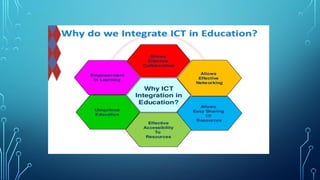
ICT in Education
ICT integration in education allows ease of
processing of information, effective accessibility to
resources, easy sharing of resources, expression of
creativity and effective collaboration.
C. Iphone/Tablet and the Online Bulletin Board
Creativity and collaboration are fun! A dull and boring bulletin
board can be made interesting when done online. Posts when
done with themed backgrounds, stylish fonts and varied colors
become attractive to the learners. An online bulletin board is a way
of presenting ideas with a twist and interest with no cost at all.
Here’s how:
Step 1: Search for https://padlet.com/
Step 2: Sign up or log-in using any of your social media account.
Step 3: If you want to make your own, click MAKE A PADLET.
a. You can choose Start with a Blank or Pick a Template.
b. Start making posts by clicking the + sign.
c. Make your post as creative as you can by clicking Modify
and selecting your choice of color, font, theme, etc.
d. You can now share your Padlet or online bulletin board to
your friends. Click Share and allow others to have access to it or
you can share through the social media account where others can
view it.
Step 4: If you want to join someone’s bulletin board, click JOIN
THE PADLET.
a. Enter in the dialog box the URL of the padlet you want to
join.
b. Start posting on your friend’s/classmate’s padlet by clicking
the + sign.
Types of some educational tools which can be useful in the teaching and
learning process:
1. Quiz Maker – https://testmoz.com/
2. Poll Maker- http://www.proprofs.com
3. Storytelling Online- https://www.storylineonline.net/
4. Rubrics Library http://school.discoveryeducation.com/schrockguide/assess.html
5. Online Journal- http://penzu.com/
6. Mind Map Tool- https://www.edrawsoft.com/freemind.php
7. Interactive Poster- http://www.glogster.com/
8. Graphic Organizers- http://www.educationoasis.com/printables/graphic-organizers/
9. Making a Podcast- https://www.buzzsprout.com/how-to-make-a-podcast
10. Cartoon- http://www.toondoo.com
TTL 1- Group 4 # 2.pptx  for educational

TTL 1- Group 4 # 2.pptx for educational

  • 1.
    GROUP 4: #2 Non-digitaland Digital Skills and Tools in Delivering Technology-Enhanced Lessons Educ 213: Technology for Teaching and Learning I Professor: Dr. Gerry J. Madriaga
  • 2.
    Group Members: Joanna Dogoldogol DianaraRomo Julie Belarmino Cathelyn Espaῆo Leslie Sapa Cha Pinzon Adrian Keith Bonion
  • 3.
    Introduction Teaching becomes rewardingwhen learners get the most from instruction as manifested in their performance. An important element in engaging learners is when the strategy used in delivering the lesson uses an instructional material. When properly and appropriately used, it can spice up a classroom activity. These instructional materials may come in varied forms. One group refers to the conventional and non-digital tools. A classroom will always need a chalkboard or a writing board that may come in varied forms and shapes. Bulletin boards, flip charts, dioramas, puppets, terrarium, and the like, will always find their significance in any classroom.
  • 4.
    Lesson 1: Developmentand Use of Non-Digital or Conventional Materials
  • 5.
    Instructional Materials aredefined as print and non- print items that are rested to impact information to students in the educational process (Effiong & Igiri, 2015). According to Brown et al.,2005; Effiong & Igiri, 2015, Instructional materials have several roles in teaching and learning which include the following: 1. They promote meaningful communication and effective learning. 2. They ensure better retention, thus making learning more permament.
  • 6.
    3. They helpto overcome the limited classroom by making the inaccessible accessible. 4. They provide a common experience upon which late learning can be developed. 5. They encourage participation especially if students are allowed to manipulate materials used.
  • 7.
    Instructional materials arethe supplementary materials, which help the teacher to make his/her presentation concrete, effective, interesting, meaningful and inspiring. In any teaching and learning process, instructional materials play a vital role as they provide sensory experiences to the learners. Instructional materials refer to any preexisting materials that are being incorporated, as well as to those that will be specifically developed for the objectives (Haigler, 2014).
  • 8.
    There are alsoseveral factors to consider in developing instructional materials: 1. Develop a story board and working outline based on the subject goals and objectives. 2. Identify existing institutional resources including materials and teachers’ capability. 3. The teacher may research off the shelf materials that have been developed by others to determine if their approach could be useful.
  • 9.
    4. Explore thepossibility of adapting concepts of other teachers without infringing on anyone’s copy protected design. 5. Modify existing materials based on the objectives of the lesson. 6. If the instructional materials are effective, you can share them with other teachers. 7. The teacher developer can also sell her/his materials available.
  • 10.
    Instructional materials area great help in stimulating and facilitating the learning of the learners. According to Wright (1976:1) as cited in Cakir (2006) many media and many styles of visual presentation are useful to the language learner. All audio-visual materials have positive contributions to language learning as long as they are used at the right time, in the right place. In the teaching and learning process, learners use their eyes as well as their ears; but their eyes are basic on learning.
  • 11.
    1. Diorama It willmake the classroom to be creative and innovative. It is a fun way to build an exciting scene in a small space. In developing diorama, you will: 1. Choose a concept or theme 2. Research the subject 3. Make a rough sketch of your ideal diorama 4. Make a list of the items you’ll need and gather your supplies 5. Select a container or box
  • 12.
    2. Nature Table Thisis a table that contains objects and/or scenes related to the current season, or upcoming festival or a symbol of an ecosystem.
  • 13.
    3. Writing Board Awriting board can display information written with chalk (chalkboard or blackboard) or special pens ( whiteboard).
  • 14.
    Suggestions on usingthe Writing Board: 1. Keep the board clean. 2. Use chalk or pens that contrast with the background of the board so that students can see the information clearly. 3. Make text and drawings large enough to be seen from the back of the room. 4. Prepare complex drawings in advance ( if very complex, an overhead transparency or 35mm slide maybe preferable).

  • 15.
    5. Underline headingsand important or unfamiliar words for emphasis. 6. Do not talk while facing the board. 7. Do not block the students’ views of the board; stands aside when writing or drawing is completed. 8. Allow sufficient time for students to copy the information from the board.
  • 16.
    4. Flip chart -Itis a large tablet or pad of paper, usually on a tripod or stands.
  • 17.
    Suggestions on usingFlip chart: 1. Use wide-tipped pens or markers; markers with narrow tips produce printing that is difficult to read. 2. Print in block letters that are large enough to be read easily from the back of the room. 3. Use different colored pens to provide contrast; this make the pages visually attractive and easier to read. 4. Use headings, boxes, cartoon and borders to improve the appearance of the pages.

  • 18.
    5. Use bullets(•) to delineate items on the page. 6. Leave plenty of “white space” and avoid putting too much information on one page. (Crowded and poorly arranged information is distracting and difficult to read). 7. When pages are prepared in advance , use every other page. If every page is used, colors will show through and make text difficult to read. 8. Have masking tape available to put pages up around the room during brainstorming and problems-solving activities.
  • 19.
    9. To hidea portion of the page, fold up the lower portion of the page and tape it. When ready to reveal the information, remove the tape and let the page drop. 10. Face the students, not the flipchart while talking.
  • 20.
    5. Zigzag Board Itis a multi-board series of three or four rectangular boards. They are joined together along the sides by hinges so that they can be easily folded up and carried.
  • 21.
    6. Wall display Displayingitems on a classroom wall is a well-known, tried and tested educational method. A wall display is a collection of many different types of items and materials put up on a wall to make an interesting and informative display.
  • 22.
    7. Rope andPole Display Board This board consists of two parallel, horizontal holes tied loosely together with rope. Visual aids such as posters can be pinned to the rope. This kind pf display board is invaluable where there are few solid walls for displaying information. It has no solid backing and can be made quickly for teaching, training and when working with communities.
  • 23.
    Guidelines when designingconventional instructional materials: 1. Unity- Use only one idea for each visual aid and include a headline. 2. Simplicity- Make ideas and relationships simple and easy to recall. Avoid cluttering a visual with too many words, numbers, or graphics. The audience should be able to grasp the concept in 10-15 seconds. 3. Legibility- Make letters big and readable for all in the audience. 4. Consistency- Use the same type style and art style. 5. Clarity- Avoid type that is too small to read; avoid all caps. 6. Quality- Make it neat and professional, and remember to proofread.
  • 24.
    Lesson 2: Selectand Use ICT Tools for Teaching and Learning
  • 25.
    Introduction The current systemsemploy technologies by integrating ICT tools and applications in education and in instruction. ICT stands for Information and Communications Technology. This refers to various tools and devices or gadgets used in communicating, disseminating, creating, storing and managing information. It is important that learners understand how to use these tools in helping them learn
  • 26.
    A great partof learning is working on information and using it to create something that can be useful and edifying for humanity. Since the intention of education is to make learners become useful and productive citizens, the use of ICT tools can provide a lot of possibilities on how learners can do something with what they know.
  • 27.
    “Technology will never replacegreat teachers, but technology in the hands of great teachers is transformational.” - George Couros
  • 29.
    ICT in Education ICTintegration in education allows ease of processing of information, effective accessibility to resources, easy sharing of resources, expression of creativity and effective collaboration.
  • 30.
    C. Iphone/Tablet andthe Online Bulletin Board Creativity and collaboration are fun! A dull and boring bulletin board can be made interesting when done online. Posts when done with themed backgrounds, stylish fonts and varied colors become attractive to the learners. An online bulletin board is a way of presenting ideas with a twist and interest with no cost at all. Here’s how: Step 1: Search for https://padlet.com/ Step 2: Sign up or log-in using any of your social media account.
  • 31.
    Step 3: Ifyou want to make your own, click MAKE A PADLET. a. You can choose Start with a Blank or Pick a Template. b. Start making posts by clicking the + sign. c. Make your post as creative as you can by clicking Modify and selecting your choice of color, font, theme, etc. d. You can now share your Padlet or online bulletin board to your friends. Click Share and allow others to have access to it or you can share through the social media account where others can view it.
  • 32.
    Step 4: Ifyou want to join someone’s bulletin board, click JOIN THE PADLET. a. Enter in the dialog box the URL of the padlet you want to join. b. Start posting on your friend’s/classmate’s padlet by clicking the + sign.
  • 33.
    Types of someeducational tools which can be useful in the teaching and learning process: 1. Quiz Maker – https://testmoz.com/ 2. Poll Maker- http://www.proprofs.com 3. Storytelling Online- https://www.storylineonline.net/ 4. Rubrics Library http://school.discoveryeducation.com/schrockguide/assess.html 5. Online Journal- http://penzu.com/ 6. Mind Map Tool- https://www.edrawsoft.com/freemind.php 7. Interactive Poster- http://www.glogster.com/ 8. Graphic Organizers- http://www.educationoasis.com/printables/graphic-organizers/ 9. Making a Podcast- https://www.buzzsprout.com/how-to-make-a-podcast 10. Cartoon- http://www.toondoo.com