Troubleshooting
Android :
The complete Toolkit
Presented by
-Meemansha
145060
BSc(CS)-2nd year
Contents :
 Android
 Problems in Android
 Troubleshooting Android
 Troubleshooting Android toolkit
 ADB
 Fastboot
 TMRP
 Titanium Backup
 Log Collector
 setCPU
 ElemantalX
 Safe Mode
 App Ops
 GSAM Battery Monitor
 Dead Pixel Detect and Fix
 Most common way to Troubleshoot Android
What is Android ??
 A mobile Operating System
 Developed by Google, based on Linux kernel
 Provide User Interface , Direct Manipulation
 Designed for touchscreen mobile devices
 Respond to real world actions
 Android is largest installed
base of all OS
 Provide Google Play
 In-built facilities
Problems in
Android
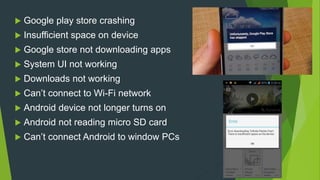
 Google play store crashing
 Insufficient space on device
 Google store not downloading apps
 System UI not working
 Downloads not working
 Can’t connect to Wi-Fi network
 Android device not longer turns on
 Android not reading micro SD card
 Can’t connect Android to window PCs
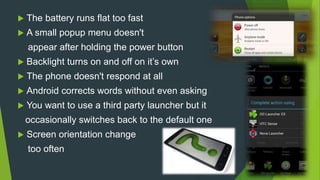
 The battery runs flat too fast
 A small popup menu doesn't
appear after holding the power button
 Backlight turns on and off on it’s own
 The phone doesn't respond at all
 Android corrects words without even asking
 You want to use a third party launcher but it
occasionally switches back to the default one
 Screen orientation change
too often
Troubleshooting Android
What is Troubleshooting ?
 A form of problem solving
 Logical , systematic search for the source of a
problem
 Needed to develop and maintain complex system
where symptoms of a problem have many
possible causes
 Determining most likely cause is a process of
elimination
 Used in Engineering , System Administration ,
Electronic, Automatic repair , etc.
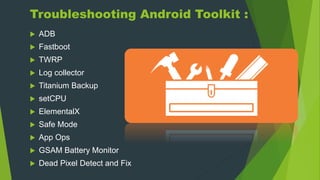
Troubleshooting Android Toolkit :
 ADB
 Fastboot
 TWRP
 Log collector
 Titanium Backup
 setCPU
 ElementalX
 Safe Mode
 App Ops
 GSAM Battery Monitor
 Dead Pixel Detect and Fix
ADB
What is ADB ?
 An Android Development Kit
 Stands for Android Debug Bridge
 It is a ‘Bridge’ for developers to work out bugs in their
Android Applications
 It lets you modify your mobile via a PC command line
 A versatile command line tool that let to communicate with
emulator or connected Android powered device
 It is client servicer program
 Because of XDA Developer , the user no longer need to
download the full Software Development Kit to get ADB
What does ADB do :
Phone rebooting into recovery mode
App side loading
Files push and pull between PC and an
android device
Even more handy commands
Steps to Install ADB into
your PCs
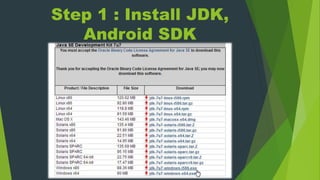
Step 1 : Install JDK,
Android SDK
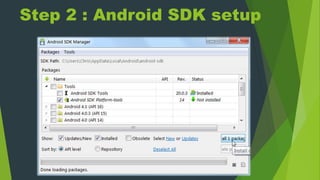
Step 2 : Android SDK setup
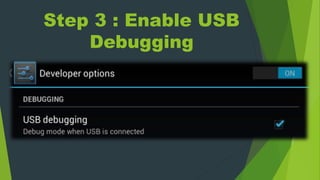
Step 3 : Enable USB
Debugging
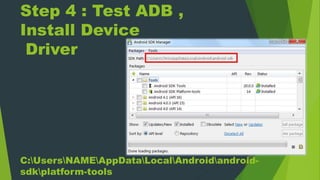
Step 4 : Test ADB ,
Install Device
Driver
C:UsersNAMEAppDataLocalAndroidandroid-
sdkplatform-tools
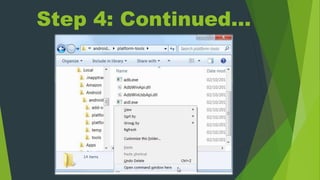
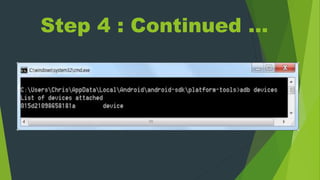
Step 4: Continued…
Step 4 : Continued …
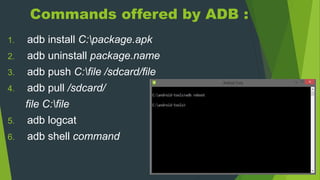
Commands offered by ADB :
1. adb install C:package.apk
2. adb uninstall package.name
3. adb push C:file /sdcard/file
4. adb pull /sdcard/
file C:file
5. adb logcat
6. adb shell command
Continue…
7. adb device
8. adb start-server
9. adb stop-server
10. adb backup
11. adb restore
12. Adb reboot
13. Adb reboot recovery
Warning
ADB make outsiders to operate any
data on phone (like credit card , bank
account ).You really need to be sure
that you trust every app on our device before
you enable it, this including that random game
you tried 6 months ago that’s auto updated since
,etc.
Fastboot
What is fastboot ?
 Fastboot is a part of Android SDK
 It is protocol that update flash file system in android device
 It is alternative to Recovery Mode for installation and updates.
 Fastboot move into the device when device is bricked , to save the day
 It help Flash new recovery and other images
 It can unlock your bootloader
 It has quite a few commands that help revive your device
 It is required when we need to modify our device .
 Useful for updating firmware quickly .
 Helpful for things that ADB can’t do .
 Hack android phone when any problem occur
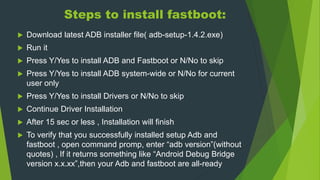
Steps to install fastboot:
 Download latest ADB installer file( adb-setup-1.4.2.exe)
 Run it
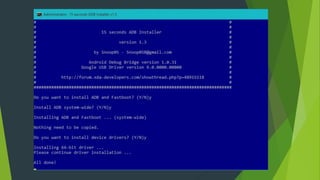
 Press Y/Yes to install ADB and Fastboot or N/No to skip
 Press Y/Yes to install ADB system-wide or N/No for current
user only
 Press Y/Yes to install Drivers or N/No to skip
 Continue Driver Installation
 After 15 sec or less , Installation will finish
 To verify that you successfully installed setup Adb and
fastboot , open command promp, enter “adb version”(without
quotes) , If it returns something like “Android Debug Bridge
version x.x.xx”,then your Adb and fastboot are all-ready
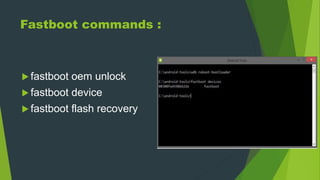
Fastboot commands :
 fastboot oem unlock
 fastboot device
 fastboot flash recovery
Alternative to fastboot :
Heimdall program, usually used
by Samsung
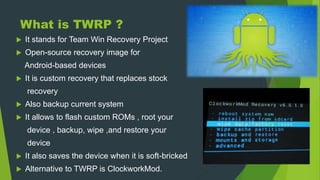
What is TWRP ?
 It stands for Team Win Recovery Project
 Open-source recovery image for
Android-based devices
 It is custom recovery that replaces stock
recovery
 Also backup current system
 It allows to flash custom ROMs , root your
device , backup, wipe ,and restore your
device
 It also saves the device when it is soft-bricked
 Alternative to TWRP is ClockworkMod.
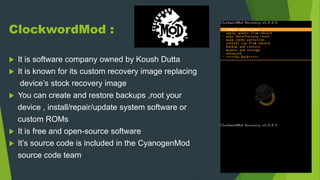
ClockwordMod :
 It is software company owned by Koush Dutta
 It is known for its custom recovery image replacing
device’s stock recovery image
 You can create and restore backups ,root your
device , install/repair/update system software or
custom ROMs
 It is free and open-source software
 It’s source code is included in the CyanogenMod
source code team
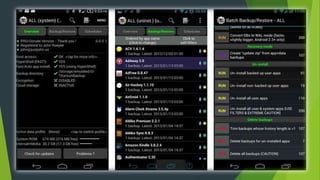
What is Titanium Backup ?
 It is used by the users that regularly flash ROMs or just trying
to be safe
 Its can backup every app and even remember individual
apps preferences
 More reliable than TMRP for apps
 Have features like ability to uninstall system apps , freeze
certain apps
 It clean up your storage , or make your app faster
 Setting->Application->check “Unknown sources debugging”
and “Debug over USB “
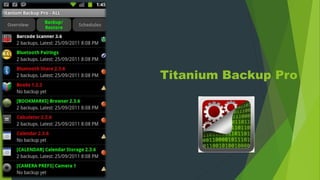
Titanium Backup Pro
Log Collector
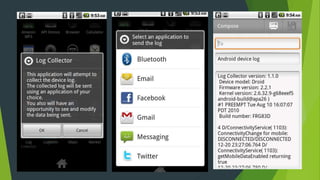
What is log collector ?
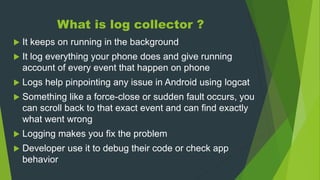
 It keeps on running in the background
 It log everything your phone does and give running
account of every event that happen on phone
 Logs help pinpointing any issue in Android using logcat
 Something like a force-close or sudden fault occurs, you
can scroll back to that exact event and can find exactly
what went wrong
 Logging makes you fix the problem
 Developer use it to debug their code or check app
behavior
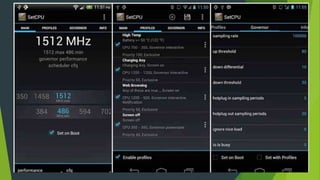
What is setCPU ?
 It is tool for changing CPU settings on rooted
Android phone
 It work with variety devices including HTC One
series , Samsung Galaxy series and Nexus device .
 It improves your phone’s performance or save battery or
both
 It can overclock , underclock
or improve voltage settings
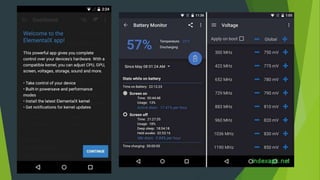
What is ElemetalX ?
 Its is a custom kernel for the device
 It can customize every aspect of your
CPU , from clock speed to voltage
 By undervolt , overvolt or overclock , better battery
life and performance can be achieved
 Batteries degrade and get old , but battery can be
saved by improving some things and getting kernel
with efficient governor
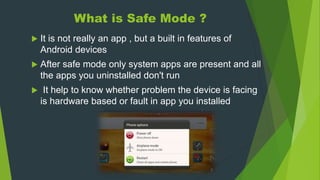
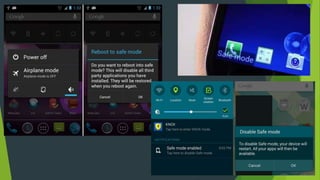
What is Safe Mode ?
 It is not really an app , but a built in features of
Android devices
 After safe mode only system apps are present and all
the apps you uninstalled don't run
 It help to know whether problem the device is facing
is hardware based or fault in app you installed
App Ops
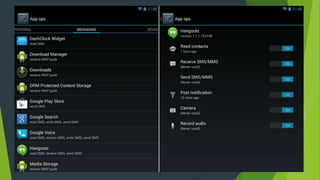
What is app ops ?
 It is required when you experience
unnecessary Wakelocks
 It lets you control what permission on app can
access
 It enable to turn off location and “keep awake”
option for apps that don’t need them
 App ops results in massive improvements in
battery life
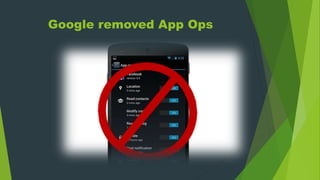
Google removed App Ops
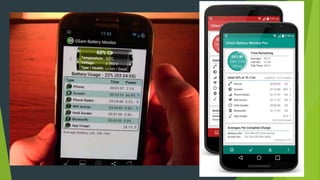
What is GSAM battery Monitor ?
It stands for “Golfmen Sachs Asset
Management “.
Stock Android Battery Monitor don’t help
you much to troubleshoot battery issues
Therefore , Gsam Battery monitor find
out what exactly is draining the battery
Dead Pixel Detect and Fix
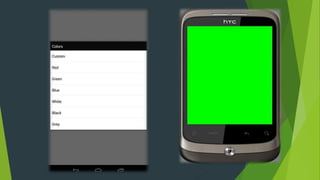
What does it do ?
 It flashes lots of bright colors at once , which
might not be comfortable to see and removes
dead pixels
Most common method
to troubleshoot Android
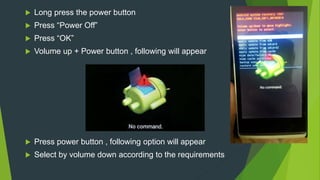
 Long press the power button
 Press “Power Off”
 Press “OK”
 Volume up + Power button , following will appear
 Press power button , following option will appear
 Select by volume down according to the requirements
Any Questions ??

Troubleshooting Android

  • 1.
    Troubleshooting Android : The completeToolkit Presented by -Meemansha 145060 BSc(CS)-2nd year
  • 2.
    Contents :  Android Problems in Android  Troubleshooting Android  Troubleshooting Android toolkit  ADB  Fastboot  TMRP  Titanium Backup  Log Collector  setCPU  ElemantalX  Safe Mode  App Ops  GSAM Battery Monitor  Dead Pixel Detect and Fix  Most common way to Troubleshoot Android
  • 3.
  • 4.
     A mobileOperating System  Developed by Google, based on Linux kernel  Provide User Interface , Direct Manipulation  Designed for touchscreen mobile devices  Respond to real world actions  Android is largest installed base of all OS  Provide Google Play  In-built facilities
  • 5.
  • 6.
     Google playstore crashing  Insufficient space on device  Google store not downloading apps  System UI not working  Downloads not working  Can’t connect to Wi-Fi network  Android device not longer turns on  Android not reading micro SD card  Can’t connect Android to window PCs
  • 7.
     The batteryruns flat too fast  A small popup menu doesn't appear after holding the power button  Backlight turns on and off on it’s own  The phone doesn't respond at all  Android corrects words without even asking  You want to use a third party launcher but it occasionally switches back to the default one  Screen orientation change too often
  • 8.
  • 9.
    What is Troubleshooting?  A form of problem solving  Logical , systematic search for the source of a problem  Needed to develop and maintain complex system where symptoms of a problem have many possible causes  Determining most likely cause is a process of elimination  Used in Engineering , System Administration , Electronic, Automatic repair , etc.
  • 10.
    Troubleshooting Android Toolkit:  ADB  Fastboot  TWRP  Log collector  Titanium Backup  setCPU  ElementalX  Safe Mode  App Ops  GSAM Battery Monitor  Dead Pixel Detect and Fix
  • 11.
  • 12.
    What is ADB?  An Android Development Kit  Stands for Android Debug Bridge  It is a ‘Bridge’ for developers to work out bugs in their Android Applications  It lets you modify your mobile via a PC command line  A versatile command line tool that let to communicate with emulator or connected Android powered device  It is client servicer program  Because of XDA Developer , the user no longer need to download the full Software Development Kit to get ADB
  • 13.
    What does ADBdo : Phone rebooting into recovery mode App side loading Files push and pull between PC and an android device Even more handy commands
  • 14.
    Steps to InstallADB into your PCs
  • 15.
    Step 1 :Install JDK, Android SDK
  • 16.
    Step 2 :Android SDK setup
  • 17.
    Step 3 :Enable USB Debugging
  • 18.
    Step 4 :Test ADB , Install Device Driver C:UsersNAMEAppDataLocalAndroidandroid- sdkplatform-tools
  • 19.
  • 20.
    Step 4 :Continued …
  • 21.
    Commands offered byADB : 1. adb install C:package.apk 2. adb uninstall package.name 3. adb push C:file /sdcard/file 4. adb pull /sdcard/ file C:file 5. adb logcat 6. adb shell command
  • 22.
    Continue… 7. adb device 8.adb start-server 9. adb stop-server 10. adb backup 11. adb restore 12. Adb reboot 13. Adb reboot recovery
  • 23.
    Warning ADB make outsidersto operate any data on phone (like credit card , bank account ).You really need to be sure that you trust every app on our device before you enable it, this including that random game you tried 6 months ago that’s auto updated since ,etc.
  • 24.
  • 25.
    What is fastboot?  Fastboot is a part of Android SDK  It is protocol that update flash file system in android device  It is alternative to Recovery Mode for installation and updates.  Fastboot move into the device when device is bricked , to save the day  It help Flash new recovery and other images  It can unlock your bootloader  It has quite a few commands that help revive your device  It is required when we need to modify our device .  Useful for updating firmware quickly .  Helpful for things that ADB can’t do .  Hack android phone when any problem occur

  • 26.
    Steps to installfastboot:  Download latest ADB installer file( adb-setup-1.4.2.exe)  Run it  Press Y/Yes to install ADB and Fastboot or N/No to skip  Press Y/Yes to install ADB system-wide or N/No for current user only  Press Y/Yes to install Drivers or N/No to skip  Continue Driver Installation  After 15 sec or less , Installation will finish  To verify that you successfully installed setup Adb and fastboot , open command promp, enter “adb version”(without quotes) , If it returns something like “Android Debug Bridge version x.x.xx”,then your Adb and fastboot are all-ready
  • 28.
    Fastboot commands : fastboot oem unlock  fastboot device  fastboot flash recovery
  • 29.
    Alternative to fastboot: Heimdall program, usually used by Samsung
  • 31.
    What is TWRP?  It stands for Team Win Recovery Project  Open-source recovery image for Android-based devices  It is custom recovery that replaces stock recovery  Also backup current system  It allows to flash custom ROMs , root your device , backup, wipe ,and restore your device  It also saves the device when it is soft-bricked  Alternative to TWRP is ClockworkMod.
  • 32.
    ClockwordMod :  Itis software company owned by Koush Dutta  It is known for its custom recovery image replacing device’s stock recovery image  You can create and restore backups ,root your device , install/repair/update system software or custom ROMs  It is free and open-source software  It’s source code is included in the CyanogenMod source code team
  • 34.
    What is TitaniumBackup ?  It is used by the users that regularly flash ROMs or just trying to be safe  Its can backup every app and even remember individual apps preferences  More reliable than TMRP for apps  Have features like ability to uninstall system apps , freeze certain apps  It clean up your storage , or make your app faster  Setting->Application->check “Unknown sources debugging” and “Debug over USB “
  • 35.
  • 37.
  • 38.
    What is logcollector ?  It keeps on running in the background  It log everything your phone does and give running account of every event that happen on phone  Logs help pinpointing any issue in Android using logcat  Something like a force-close or sudden fault occurs, you can scroll back to that exact event and can find exactly what went wrong  Logging makes you fix the problem  Developer use it to debug their code or check app behavior
  • 41.
    What is setCPU?  It is tool for changing CPU settings on rooted Android phone  It work with variety devices including HTC One series , Samsung Galaxy series and Nexus device .  It improves your phone’s performance or save battery or both  It can overclock , underclock or improve voltage settings
  • 44.
    What is ElemetalX?  Its is a custom kernel for the device  It can customize every aspect of your CPU , from clock speed to voltage  By undervolt , overvolt or overclock , better battery life and performance can be achieved  Batteries degrade and get old , but battery can be saved by improving some things and getting kernel with efficient governor
  • 47.
    What is SafeMode ?  It is not really an app , but a built in features of Android devices  After safe mode only system apps are present and all the apps you uninstalled don't run  It help to know whether problem the device is facing is hardware based or fault in app you installed
  • 49.
  • 50.
    What is appops ?  It is required when you experience unnecessary Wakelocks  It lets you control what permission on app can access  It enable to turn off location and “keep awake” option for apps that don’t need them  App ops results in massive improvements in battery life
  • 52.
  • 54.
    What is GSAMbattery Monitor ? It stands for “Golfmen Sachs Asset Management “. Stock Android Battery Monitor don’t help you much to troubleshoot battery issues Therefore , Gsam Battery monitor find out what exactly is draining the battery
  • 56.
  • 57.
    What does itdo ?  It flashes lots of bright colors at once , which might not be comfortable to see and removes dead pixels
  • 59.
    Most common method totroubleshoot Android
  • 60.
     Long pressthe power button  Press “Power Off”  Press “OK”  Volume up + Power button , following will appear  Press power button , following option will appear  Select by volume down according to the requirements
  • 62.