alanseiden.com
Alan Seiden Consulting
Web performance first aid
Web Performance First AidAlan Seiden Consulting
Alan Seiden Consulting
PHP on IBM i Expertise
• Project leader, Zend/IBM Toolkit
• Contributor, Zend Framework DB2/i enhancements
• Developer, Best Web Solution, IBM/Common
• Authority, web performance on IBM i/iSeries
2
Web Performance First AidAlan Seiden Consulting
Contact information
Alan Seiden
alan@alanseiden.com
201-447-2437
alanseiden.com
twitter: @alanseiden
3
Web Performance First AidAlan Seiden Consulting
Agenda for fast user experience
• Fast user experience
‣ Beyond speed of PHP and server
• Performance big picture
• Tools that show issues visually
• Tips and configurations
4
Web Performance First AidAlan Seiden Consulting
Why I started to focus on web front end
• Clients called me in for performance help
• Assumed drag was on the server, PHP/DB2
• BUT many of the problems were in the front end
(HTML, JS, CSS)
• Today’s complex web and mobile applications
require attention to front-end performance
Let’s start with the basics
5
Web Performance First AidAlan Seiden Consulting
HTTP (web) flow
6
Web Performance First AidAlan Seiden Consulting
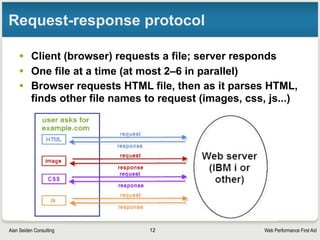
Request-response protocol
• Client (browser) requests a file; server responds
• One file at a time (at most 2–6 in parallel)
• Browser requests HTML file, then as it parses HTML,
finds other file names to request (images, css, js...)
7
Web Performance First AidAlan Seiden Consulting
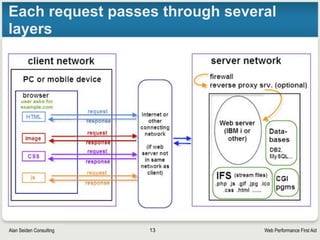
Each request passes through several
layers
8
Web Performance First AidAlan Seiden Consulting
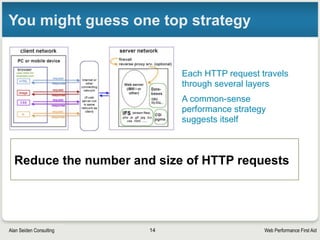
You might guess one top strategy
Reduce the number and size of HTTP requests
Each HTTP request travels
through several layers
A common-sense
performance strategy
suggests itself
9
Web Performance First AidAlan Seiden Consulting
Perceived speed
10
Web Performance First AidAlan Seiden Consulting
When users say app is slow
• Watch them using the application
• Is slow page response the major problem?
• Or does the application not match their workflow?
• Can you help users get their job done with fewer
clicks?
11
Web Performance First AidAlan Seiden Consulting
Tips for perceived speed
• Users want to feel successful in achieving their
tasks. You can:
‣ Provide feedback and status information
‣ Give users a fast path through common tasks
‣ Reduce users’ anxiety by clearly labeling page elements,
buttons, links, etc., using their own terminology
‣ Run slow tasks asynchronously so users can cancel if desired
• Old but interesting study: http://www.uie.com/
events/roadshow/articles/download_time/
‣ “...when people accomplish what they set out to do on a site,
they perceive that site to be fast.”
• Let users know that “something is happening”
‣ The spinning “waiting” graphic still works
12
Web Performance First AidAlan Seiden Consulting
Reduce HTTP
requests
13
Web Performance First AidAlan Seiden Consulting
HTTP requests are costly
• Each request makes a round trip to server
• Each HTTP request consumes bandwidth and CPU
• In-network tests do not measure end-user
performance outside the network
‣ Users could have unpredictable DSL or mobile connections
‣ Firewalls and proxy servers may sit between the web server and
end user
• I’ve seen convoluted network configurations
14
Web Performance First AidAlan Seiden Consulting
Can caching help?
• Browsers can cache most files
• Files won’t have to be downloaded again till server
has updated versions
• BUT browser must check for updates to each file
• Possible successful status codes:
‣ HTTP 200: Server delivered new, fresh version of file
‣ HTTP 304: Server said “not modified.” Use cached copy.
• Faster, but still requres that request to check the file’s timestamp
• More about blocking and caching on next slide
15
Web Performance First AidAlan Seiden Consulting
Requests cause “blocking” in browser
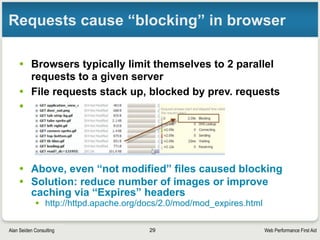
• Browsers typically limit themselves to 2–6 parallel
requests to a given server
• File requests stack up, blocked by prev. requests
•
• Above, even “304 not modified” files caused blocking
• Solution: reduce number of images or improve
caching via “Expires” headers
• http://httpd.apache.org/docs/2.0/mod/mod_expires.html
16
Web Performance First AidAlan Seiden Consulting
Example: “Expires” headers (caching)
• For aggressive caching, place these directives in
Apache config file
• Can specify file types
ExpiresActive On
# A2592000 means expire after a month in the client's cache
ExpiresByType text/css A2592000
ExpiresByType application/x-javascript A2592000
ExpiresByType application/javascript A2592000
ExpiresByType text/html A2592000
ExpiresByType image/png A2592000
ExpiresByType image/gif A2592000
ExpiresByType image/jpeg A2592000
• Many options: http://httpd.apache.org/docs/2.0/mod/mod_expires.html
17
Web Performance First AidAlan Seiden Consulting
More ways to reduce “blocking”
• If many .js or .css files are used:
§ Combine them into fewer files
§ Move contents of smaller .js or .css files inline to your pages,
eliminating those external files
§ Page Speed tool will help you decide
18
Web Performance First AidAlan Seiden Consulting
Create a favicon for your site
• Browsers always look for a file called favicon.ico in
your document root
• Those little icons that appear in the browser
• Once found, will be “remembered” by browser
• If not found, will be requested every time
• How to create a favicon:
§ http://www.alanseiden.com/2007/05/25/brand-your-site-with-a-
favicon/
19
Web Performance First AidAlan Seiden Consulting
Keep connections
open
20
Web Performance First AidAlan Seiden Consulting
Keep HTTP connections alive
‣ Enable “KeepAlive” setting in Apache
‣ The TCP connection will stay open, waiting for you
‣ Good when downloading many images, css, js files
‣ You’ll reduce the number of three-way “handshakes” that
establish a connection
‣ Even more important with longer SSL handshakes
21
Web Performance First AidAlan Seiden Consulting
KeepAlive details
• Configurable by number of seconds, number of files
to be downloaded, before closing connection
• Recommended settings for average site
‣ KeepAlive On
‣ KeepAliveTimeout 15
• Details:
‣ http://httpd.apache.org/docs/2.0/mod/core.html#keepalive
• Don’t overdo it—you are locking out other users
from that HTTP job while it’s dedicated to you
22
Web Performance First AidAlan Seiden Consulting
Connecting takes time
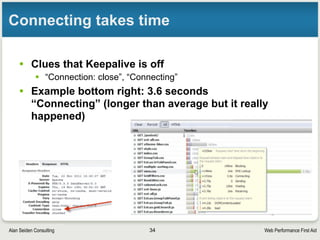
• Clues that Keepalive is off
§ “Connection: close”, “Connecting”
• Example bottom right: 3.6 seconds
“Connecting” (longer than average but it really
happened)
23
Web Performance First AidAlan Seiden Consulting
What you see when Keep-alive is on
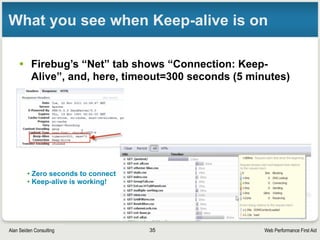
• Firebug’s “Net” tab shows “Connection: Keep-
Alive”, and, here, timeout=300 seconds (5 minutes)
• Zero seconds to connect
• Keep-alive is working!
24
Web Performance First AidAlan Seiden Consulting
Use compression
25
Web Performance First AidAlan Seiden Consulting
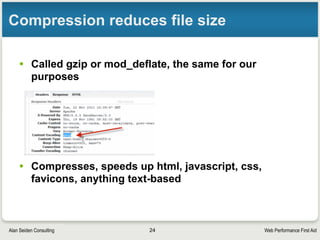
Compression reduces file size
• Called gzip or mod_deflate, the same for our
purposes
• Compresses, speeds up html, javascript, css,
favicons, anything text-based
26
Web Performance First AidAlan Seiden Consulting
Netflix improved with gzip/deflate
• Saw 13-25% performance improvement
• Cut outbound traffic in half
§ That saves money for a busy site such as Netflix
• Details:
§ http://www.slideshare.net/billwscott/improving-netflix-
performance-experience
• It really works!
27
Web Performance First AidAlan Seiden Consulting
My compression test
• http://your-server:10088/Samples/SQL_access/
DB2_SQL_example.php
• Before compression: 31.0kb; loaded in 250ms
• After compression: 4.4kb; loaded in 109ms.
• That’s 14% of the size and 50% of the time!
28
Web Performance First AidAlan Seiden Consulting
Details of deflate/gzip compression
• Apache directives (sample)
# Load IBM i's module that performs compression
LoadModule deflate_module /QSYS.LIB/QHTTPSVR.LIB/QZSRCORE.SRVPGM
# Specify content types to compress
AddOutputFilterByType DEFLATE application/x-httpd-php application/
json text/css application/x-javascript application/javascript
text/html
• Tutorial on my blog:
§ http://www.alanseiden.com/2010/08/13/maximize-zend-server-
performance-with-apache-compression/
• Apache reference:
§ http://httpd.apache.org/docs/2.0/mod/mod_deflate.html
29
Web Performance First AidAlan Seiden Consulting
Ajax: friend or foe?
30
Web Performance First AidAlan Seiden Consulting
AJAX=Asynchronous Javascript And XML
• AJAX updates parts of a page without reloading the
whole page
• Not always XML. These days, JSON too
• Requests and file sizes are generally small
• Meant to bring SPEED to the web
• Potential problems if overused
31
Web Performance First AidAlan Seiden Consulting
AJAX mistake #1
• Too much of a good thing
§ Requiring several AJAX requests to complete before the page
itself can load fully
§ Too many HTTP requests at once
§ I’ve seen a situation where 4 AJAX requests were embedded in
a page load
• The AJAX doesn’t even start till the page loads
• Causes “blocking” as the requests pile up, waiting for the previous
ones to complete
• Sessions may be shared by all AJAX calls, so locks can occur
§ Solution: when page first loads, embed AJAX content in the page
• Re-use logic on the server side when building page
• Subsequent updates can be done with AJAX
32
Web Performance First AidAlan Seiden Consulting
AJAX mistake #2
• Duplicate requests
§ Might go unnoticed with javascript library tools (Dojo, jQuery...)
§ Happens more than you would expect! Common, actually
33
Web Performance First AidAlan Seiden Consulting
AJAX mistake #3
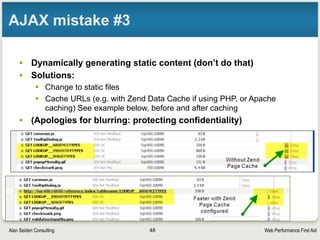
• Dynamically generating static content (don’t do that)
• Especially JSON to feed dropdown widgets
• Solutions:
• Change to static files
• Cache URLs (e.g. with Zend Page Cache if using PHP, or Apache
caching) See example below, before and after caching
• (Apologies for blurring: protecting confidentiality)
34
Web Performance First AidAlan Seiden Consulting
Blocking
from JS/CSS
35
Web Performance First AidAlan Seiden Consulting
Javascript is expensive for speed
• Besides all the HTTP requests, JS must be parsed
and run by your browser
‣ Even worse for mobile. Uses battery, CPU. Blocks UI
• JS libraries (Dojo, jQuery) include dozens of JS
files that you may not need
‣ Take a look with the tools shown later in this presentation.
You may see 100+ JS files
‣ Customize your JS library build to make distribution more
compact
• CSS (style sheets) are another area to examine.
Cut down/consolidate if you can
36
Web Performance First AidAlan Seiden Consulting
More tips for JS/CSS
• “Minify” if you can
‣ Strip out spaces/comments for production code
• http://www.jsmini.com/
• http://www.csscompressor.com/
• Many other tools
‣ Saves bandwidth; browser parses JS/CSS more quickly
• Create a custom build of your JS library
‣ Tutorial to create custom build of jQuery
• http://www.packtpub.com/article/building-a-custom-version-of-
jquery
37
Web Performance First AidAlan Seiden Consulting
Live demos of
front-end tools
38
Web Performance First AidAlan Seiden Consulting
Front-end tools demystify the web
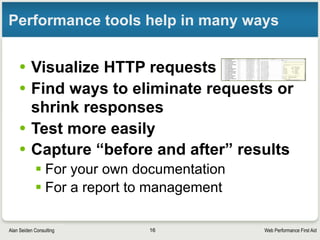
• Visualize HTTP requests
• Find ways to eliminate requests or shrink
responses
• Test more easily
• Capture “before and after” results
‣ For your own documentation
‣ For a report to management
39
Web Performance First AidAlan Seiden Consulting
Favorite front-end performance tools
• REDbot
‣ http://redbot.org
• Firebug
‣ https://addons.mozilla.org/firefox/addon/firebug/
‣ Even better with Page Speed add-on
• http://code.google.com/speed/page-speed/
• Page Speed Insights from Google
‣ https://developers.google.com/speed/pagespeed/insights
• Web Page Test
‣ http://webpagetest.org
40
Web Performance First AidAlan Seiden Consulting
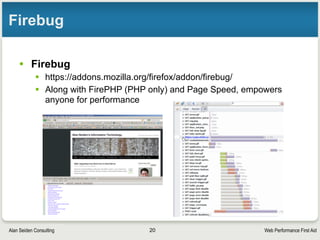
Firebug
• Firebug
• https://addons.mozilla.org/firefox/addon/firebug/
• Along with Page Speed, empowers anyone for performance
41
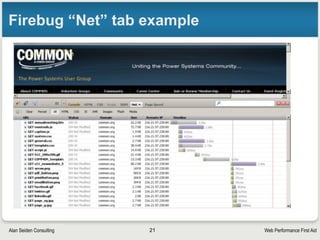
Web Performance First AidAlan Seiden Consulting
Firebug “Net” tab example
42
Web Performance First AidAlan Seiden Consulting
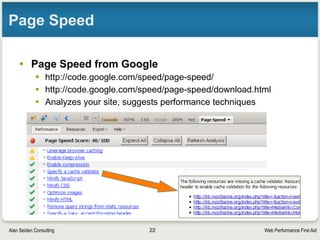
Page Speed add-on
• Page Speed add-on to Firebug, from Google
§ http://code.google.com/speed/page-speed/
§ http://code.google.com/speed/page-speed/download.html
§ Analyzes your site, suggests performance techniques
43
Web Performance First AidAlan Seiden Consulting
REDbot shows HTTP headers, codes
• Visitors to alanseiden.com are redirected to www.alanseiden.com
• Although redirects can harm performance, this one (‘www’) helps search engines
44
Web Performance First AidAlan Seiden Consulting
Page Speed Insights by Google
45
https://developers.google.com/speed/pagespeed/insights
Web Performance First AidAlan Seiden Consulting
A tip from Page Speed Insights
46
A large headshot was scaled to a
small size. Better to use a smaller
photo.
Web Performance First AidAlan Seiden Consulting
Web Page Test (webpagetest.org)
47
Web Performance First AidAlan Seiden Consulting
Webpagetest “Video/filmstrip” view
48
Web Performance First AidAlan Seiden Consulting
Advanced Settings of webpagetest
49
Web Performance First AidAlan Seiden Consulting
Keep front-end
performance in
mind
50
Web Performance First AidAlan Seiden Consulting
Remember...
• To provide an speedy overall user experience, use front-end
performance techniques, such as to:
‣ Reduce or shrink file sizes when you can
‣ Use gzip/deflate
‣ Enable keepalive (in moderation)
‣ Avoid excessive redirects
‣ Use a favicon
‣ Keep an eye on AJAX performance
• Let Firebug, Web Page Test, and Page Speed Insights assist you
• Get help when you need it
• To keep learning, see “Resources” slide, coming right up
51
Web Performance First AidAlan Seiden Consulting
Resources
52
Web Performance First AidAlan Seiden Consulting
Resources for front-end performance
• “Avoid These 7 Web Performance Snags”
‣ Alan’s article from June 2013 (subscription to iProDeveloper required)
• http://iprodeveloper.com/web-amp-mobile-development/avoid-
these-7-web-performance-snags
• Performance Calendar (front-end performance articles)
‣ http://calendar.perfplanet.com/
• Meetup groups and conferences: live and remote
‣ http://web-performance.meetup.com/
‣ http://velocityconf.com/
• Steve Souders (formerly Yahoo!, now Google)
‣ http://stevesouders.com
‣ @souders
‣ Books: High Performance Web Sites, Even Faster Web Sites
53
Web Performance First AidAlan Seiden Consulting
Contact
Alan Seiden
Alan Seiden Consulting
Ho-Ho-Kus, NJ
alanseiden.com
54
alan@alanseiden.com ● 201-447-2437 ● twitter: @alanseiden

Web Performance First Aid

  • 1.
  • 2.
    Web Performance FirstAidAlan Seiden Consulting Alan Seiden Consulting PHP on IBM i Expertise • Project leader, Zend/IBM Toolkit • Contributor, Zend Framework DB2/i enhancements • Developer, Best Web Solution, IBM/Common • Authority, web performance on IBM i/iSeries 2
  • 3.
    Web Performance FirstAidAlan Seiden Consulting Contact information Alan Seiden alan@alanseiden.com 201-447-2437 alanseiden.com twitter: @alanseiden 3
  • 4.
    Web Performance FirstAidAlan Seiden Consulting Agenda for fast user experience • Fast user experience ‣ Beyond speed of PHP and server • Performance big picture • Tools that show issues visually • Tips and configurations 4
  • 5.
    Web Performance FirstAidAlan Seiden Consulting Why I started to focus on web front end • Clients called me in for performance help • Assumed drag was on the server, PHP/DB2 • BUT many of the problems were in the front end (HTML, JS, CSS) • Today’s complex web and mobile applications require attention to front-end performance Let’s start with the basics 5
  • 6.
    Web Performance FirstAidAlan Seiden Consulting HTTP (web) flow 6
  • 7.
    Web Performance FirstAidAlan Seiden Consulting Request-response protocol • Client (browser) requests a file; server responds • One file at a time (at most 2–6 in parallel) • Browser requests HTML file, then as it parses HTML, finds other file names to request (images, css, js...) 7
  • 8.
    Web Performance FirstAidAlan Seiden Consulting Each request passes through several layers 8
  • 9.
    Web Performance FirstAidAlan Seiden Consulting You might guess one top strategy Reduce the number and size of HTTP requests Each HTTP request travels through several layers A common-sense performance strategy suggests itself 9
  • 10.
    Web Performance FirstAidAlan Seiden Consulting Perceived speed 10
  • 11.
    Web Performance FirstAidAlan Seiden Consulting When users say app is slow • Watch them using the application • Is slow page response the major problem? • Or does the application not match their workflow? • Can you help users get their job done with fewer clicks? 11
  • 12.
    Web Performance FirstAidAlan Seiden Consulting Tips for perceived speed • Users want to feel successful in achieving their tasks. You can: ‣ Provide feedback and status information ‣ Give users a fast path through common tasks ‣ Reduce users’ anxiety by clearly labeling page elements, buttons, links, etc., using their own terminology ‣ Run slow tasks asynchronously so users can cancel if desired • Old but interesting study: http://www.uie.com/ events/roadshow/articles/download_time/ ‣ “...when people accomplish what they set out to do on a site, they perceive that site to be fast.” • Let users know that “something is happening” ‣ The spinning “waiting” graphic still works 12
  • 13.
    Web Performance FirstAidAlan Seiden Consulting Reduce HTTP requests 13
  • 14.
    Web Performance FirstAidAlan Seiden Consulting HTTP requests are costly • Each request makes a round trip to server • Each HTTP request consumes bandwidth and CPU • In-network tests do not measure end-user performance outside the network ‣ Users could have unpredictable DSL or mobile connections ‣ Firewalls and proxy servers may sit between the web server and end user • I’ve seen convoluted network configurations 14
  • 15.
    Web Performance FirstAidAlan Seiden Consulting Can caching help? • Browsers can cache most files • Files won’t have to be downloaded again till server has updated versions • BUT browser must check for updates to each file • Possible successful status codes: ‣ HTTP 200: Server delivered new, fresh version of file ‣ HTTP 304: Server said “not modified.” Use cached copy. • Faster, but still requres that request to check the file’s timestamp • More about blocking and caching on next slide 15
  • 16.
    Web Performance FirstAidAlan Seiden Consulting Requests cause “blocking” in browser • Browsers typically limit themselves to 2–6 parallel requests to a given server • File requests stack up, blocked by prev. requests • • Above, even “304 not modified” files caused blocking • Solution: reduce number of images or improve caching via “Expires” headers • http://httpd.apache.org/docs/2.0/mod/mod_expires.html 16
  • 17.
    Web Performance FirstAidAlan Seiden Consulting Example: “Expires” headers (caching) • For aggressive caching, place these directives in Apache config file • Can specify file types ExpiresActive On # A2592000 means expire after a month in the client's cache ExpiresByType text/css A2592000 ExpiresByType application/x-javascript A2592000 ExpiresByType application/javascript A2592000 ExpiresByType text/html A2592000 ExpiresByType image/png A2592000 ExpiresByType image/gif A2592000 ExpiresByType image/jpeg A2592000 • Many options: http://httpd.apache.org/docs/2.0/mod/mod_expires.html 17
  • 18.
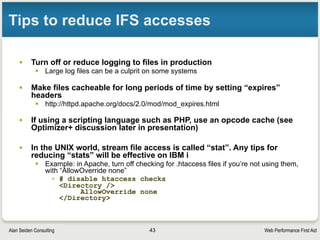
    Web Performance FirstAidAlan Seiden Consulting More ways to reduce “blocking” • If many .js or .css files are used: § Combine them into fewer files § Move contents of smaller .js or .css files inline to your pages, eliminating those external files § Page Speed tool will help you decide 18
  • 19.
    Web Performance FirstAidAlan Seiden Consulting Create a favicon for your site • Browsers always look for a file called favicon.ico in your document root • Those little icons that appear in the browser • Once found, will be “remembered” by browser • If not found, will be requested every time • How to create a favicon: § http://www.alanseiden.com/2007/05/25/brand-your-site-with-a- favicon/ 19
  • 20.
    Web Performance FirstAidAlan Seiden Consulting Keep connections open 20
  • 21.
    Web Performance FirstAidAlan Seiden Consulting Keep HTTP connections alive ‣ Enable “KeepAlive” setting in Apache ‣ The TCP connection will stay open, waiting for you ‣ Good when downloading many images, css, js files ‣ You’ll reduce the number of three-way “handshakes” that establish a connection ‣ Even more important with longer SSL handshakes 21
  • 22.
    Web Performance FirstAidAlan Seiden Consulting KeepAlive details • Configurable by number of seconds, number of files to be downloaded, before closing connection • Recommended settings for average site ‣ KeepAlive On ‣ KeepAliveTimeout 15 • Details: ‣ http://httpd.apache.org/docs/2.0/mod/core.html#keepalive • Don’t overdo it—you are locking out other users from that HTTP job while it’s dedicated to you 22
  • 23.
    Web Performance FirstAidAlan Seiden Consulting Connecting takes time • Clues that Keepalive is off § “Connection: close”, “Connecting” • Example bottom right: 3.6 seconds “Connecting” (longer than average but it really happened) 23
  • 24.
    Web Performance FirstAidAlan Seiden Consulting What you see when Keep-alive is on • Firebug’s “Net” tab shows “Connection: Keep- Alive”, and, here, timeout=300 seconds (5 minutes) • Zero seconds to connect • Keep-alive is working! 24
  • 25.
    Web Performance FirstAidAlan Seiden Consulting Use compression 25
  • 26.
    Web Performance FirstAidAlan Seiden Consulting Compression reduces file size • Called gzip or mod_deflate, the same for our purposes • Compresses, speeds up html, javascript, css, favicons, anything text-based 26
  • 27.
    Web Performance FirstAidAlan Seiden Consulting Netflix improved with gzip/deflate • Saw 13-25% performance improvement • Cut outbound traffic in half § That saves money for a busy site such as Netflix • Details: § http://www.slideshare.net/billwscott/improving-netflix- performance-experience • It really works! 27
  • 28.
    Web Performance FirstAidAlan Seiden Consulting My compression test • http://your-server:10088/Samples/SQL_access/ DB2_SQL_example.php • Before compression: 31.0kb; loaded in 250ms • After compression: 4.4kb; loaded in 109ms. • That’s 14% of the size and 50% of the time! 28
  • 29.
    Web Performance FirstAidAlan Seiden Consulting Details of deflate/gzip compression • Apache directives (sample) # Load IBM i's module that performs compression LoadModule deflate_module /QSYS.LIB/QHTTPSVR.LIB/QZSRCORE.SRVPGM # Specify content types to compress AddOutputFilterByType DEFLATE application/x-httpd-php application/ json text/css application/x-javascript application/javascript text/html • Tutorial on my blog: § http://www.alanseiden.com/2010/08/13/maximize-zend-server- performance-with-apache-compression/ • Apache reference: § http://httpd.apache.org/docs/2.0/mod/mod_deflate.html 29
  • 30.
    Web Performance FirstAidAlan Seiden Consulting Ajax: friend or foe? 30
  • 31.
    Web Performance FirstAidAlan Seiden Consulting AJAX=Asynchronous Javascript And XML • AJAX updates parts of a page without reloading the whole page • Not always XML. These days, JSON too • Requests and file sizes are generally small • Meant to bring SPEED to the web • Potential problems if overused 31
  • 32.
    Web Performance FirstAidAlan Seiden Consulting AJAX mistake #1 • Too much of a good thing § Requiring several AJAX requests to complete before the page itself can load fully § Too many HTTP requests at once § I’ve seen a situation where 4 AJAX requests were embedded in a page load • The AJAX doesn’t even start till the page loads • Causes “blocking” as the requests pile up, waiting for the previous ones to complete • Sessions may be shared by all AJAX calls, so locks can occur § Solution: when page first loads, embed AJAX content in the page • Re-use logic on the server side when building page • Subsequent updates can be done with AJAX 32
  • 33.
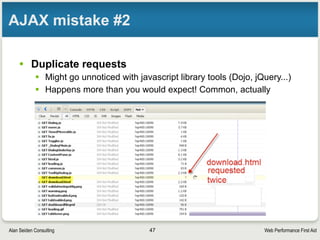
    Web Performance FirstAidAlan Seiden Consulting AJAX mistake #2 • Duplicate requests § Might go unnoticed with javascript library tools (Dojo, jQuery...) § Happens more than you would expect! Common, actually 33
  • 34.
    Web Performance FirstAidAlan Seiden Consulting AJAX mistake #3 • Dynamically generating static content (don’t do that) • Especially JSON to feed dropdown widgets • Solutions: • Change to static files • Cache URLs (e.g. with Zend Page Cache if using PHP, or Apache caching) See example below, before and after caching • (Apologies for blurring: protecting confidentiality) 34
  • 35.
    Web Performance FirstAidAlan Seiden Consulting Blocking from JS/CSS 35
  • 36.
    Web Performance FirstAidAlan Seiden Consulting Javascript is expensive for speed • Besides all the HTTP requests, JS must be parsed and run by your browser ‣ Even worse for mobile. Uses battery, CPU. Blocks UI • JS libraries (Dojo, jQuery) include dozens of JS files that you may not need ‣ Take a look with the tools shown later in this presentation. You may see 100+ JS files ‣ Customize your JS library build to make distribution more compact • CSS (style sheets) are another area to examine. Cut down/consolidate if you can 36
  • 37.
    Web Performance FirstAidAlan Seiden Consulting More tips for JS/CSS • “Minify” if you can ‣ Strip out spaces/comments for production code • http://www.jsmini.com/ • http://www.csscompressor.com/ • Many other tools ‣ Saves bandwidth; browser parses JS/CSS more quickly • Create a custom build of your JS library ‣ Tutorial to create custom build of jQuery • http://www.packtpub.com/article/building-a-custom-version-of- jquery 37
  • 38.
    Web Performance FirstAidAlan Seiden Consulting Live demos of front-end tools 38
  • 39.
    Web Performance FirstAidAlan Seiden Consulting Front-end tools demystify the web • Visualize HTTP requests • Find ways to eliminate requests or shrink responses • Test more easily • Capture “before and after” results ‣ For your own documentation ‣ For a report to management 39
  • 40.
    Web Performance FirstAidAlan Seiden Consulting Favorite front-end performance tools • REDbot ‣ http://redbot.org • Firebug ‣ https://addons.mozilla.org/firefox/addon/firebug/ ‣ Even better with Page Speed add-on • http://code.google.com/speed/page-speed/ • Page Speed Insights from Google ‣ https://developers.google.com/speed/pagespeed/insights • Web Page Test ‣ http://webpagetest.org 40
  • 41.
    Web Performance FirstAidAlan Seiden Consulting Firebug • Firebug • https://addons.mozilla.org/firefox/addon/firebug/ • Along with Page Speed, empowers anyone for performance 41
  • 42.
    Web Performance FirstAidAlan Seiden Consulting Firebug “Net” tab example 42
  • 43.
    Web Performance FirstAidAlan Seiden Consulting Page Speed add-on • Page Speed add-on to Firebug, from Google § http://code.google.com/speed/page-speed/ § http://code.google.com/speed/page-speed/download.html § Analyzes your site, suggests performance techniques 43
  • 44.
    Web Performance FirstAidAlan Seiden Consulting REDbot shows HTTP headers, codes • Visitors to alanseiden.com are redirected to www.alanseiden.com • Although redirects can harm performance, this one (‘www’) helps search engines 44
  • 45.
    Web Performance FirstAidAlan Seiden Consulting Page Speed Insights by Google 45 https://developers.google.com/speed/pagespeed/insights
  • 46.
    Web Performance FirstAidAlan Seiden Consulting A tip from Page Speed Insights 46 A large headshot was scaled to a small size. Better to use a smaller photo.
  • 47.
    Web Performance FirstAidAlan Seiden Consulting Web Page Test (webpagetest.org) 47
  • 48.
    Web Performance FirstAidAlan Seiden Consulting Webpagetest “Video/filmstrip” view 48
  • 49.
    Web Performance FirstAidAlan Seiden Consulting Advanced Settings of webpagetest 49
  • 50.
    Web Performance FirstAidAlan Seiden Consulting Keep front-end performance in mind 50
  • 51.
    Web Performance FirstAidAlan Seiden Consulting Remember... • To provide an speedy overall user experience, use front-end performance techniques, such as to: ‣ Reduce or shrink file sizes when you can ‣ Use gzip/deflate ‣ Enable keepalive (in moderation) ‣ Avoid excessive redirects ‣ Use a favicon ‣ Keep an eye on AJAX performance • Let Firebug, Web Page Test, and Page Speed Insights assist you • Get help when you need it • To keep learning, see “Resources” slide, coming right up 51
  • 52.
    Web Performance FirstAidAlan Seiden Consulting Resources 52
  • 53.
    Web Performance FirstAidAlan Seiden Consulting Resources for front-end performance • “Avoid These 7 Web Performance Snags” ‣ Alan’s article from June 2013 (subscription to iProDeveloper required) • http://iprodeveloper.com/web-amp-mobile-development/avoid- these-7-web-performance-snags • Performance Calendar (front-end performance articles) ‣ http://calendar.perfplanet.com/ • Meetup groups and conferences: live and remote ‣ http://web-performance.meetup.com/ ‣ http://velocityconf.com/ • Steve Souders (formerly Yahoo!, now Google) ‣ http://stevesouders.com ‣ @souders ‣ Books: High Performance Web Sites, Even Faster Web Sites 53
  • 54.
    Web Performance FirstAidAlan Seiden Consulting Contact Alan Seiden Alan Seiden Consulting Ho-Ho-Kus, NJ alanseiden.com 54 alan@alanseiden.com ● 201-447-2437 ● twitter: @alanseiden