The MySQL Availability Company
Tungsten Cluster Master Class
Intermediate: Using the Tungsten Cluster AMI
Chris Parker, Customer Success Director, EMEA & APAC
Topics
In this short course, we will
• Recap Tungsten Cluster Topologies
• Explore the Tungsten Cluster AMI
• Manual deploy and configure
• Cloud Formation Deployment
Tungsten Clustering Topologies
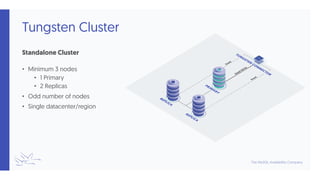
Tungsten Cluster
Standalone Cluster
• Minimum 3 nodes
• 1 Primary
• 2 Replicas
• Odd number of nodes
• Single datacenter/region
Tungsten Cluster+
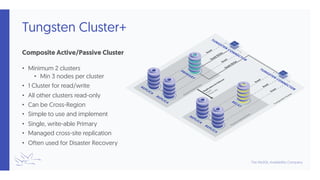
Composite Active/Passive Cluster
• Minimum 2 clusters
• Min 3 nodes per cluster
• 1 Cluster for read/write
• All other clusters read-only
• Can be Cross-Region
• Simple to use and implement
• Single, write-able Primary
• Managed cross-site replication
• Often used for Disaster Recovery
Tungsten Cluster+
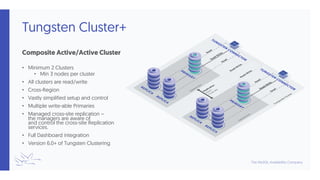
Composite Active/Active Cluster
• Minimum 2 Clusters
• Min 3 nodes per cluster
• All clusters are read/write
• Cross-Region
• Vastly simplified setup and control
• Multiple write-able Primaries
• Managed cross-site replication –
the managers are aware of
and control the cross-site Replication
services.
• Full Dashboard integration
• Version 6.0+ of Tungsten Clustering
The Tungsten Cluster AMI
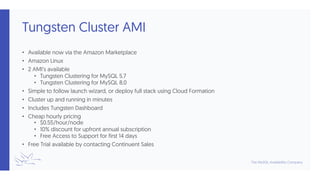
Tungsten Cluster AMI
• Available now via the Amazon Marketplace
• Amazon Linux
• 2 AMI’s available
• Tungsten Clustering for MySQL 5.7
• Tungsten Clustering for MySQL 8.0
• Simple to follow launch wizard, or deploy full stack using Cloud Formation
• Cluster up and running in minutes
• Includes Tungsten Dashboard
• Cheap hourly pricing
• $0.55/hour/node
• 10% discount for upfront annual subscription
• Free Access to Support for first 14 days
• Free Trial available by contacting Continuent Sales
Manual Deployment
• Subscribe to the AMI
• Launch individual instances (Minimum 3 instances per cluster)
• Configure Network according to business requirements
• Ensure security rules correct between nodes
• Connect to each node and follow launch wizard
Cloud Formation Deployment
• Subscribe to AMI
• Launch Cloud Formation from URL based on
required topology
• Complete Template to configure cluster(s)
• Cloud Formation builds full stack
• Cluster Instance
• Configures networking
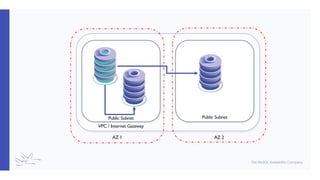
• VPC & Internet Gateways
• Distributes hosts across AZ’s
• Active/Active and Active/Passive can only
be within same region at present
• For multi-region distribution, follow
Manual Launch steps
• https://go.continuent.com/single-cluster
• https://go.continuent.com/active-passive-
cluster
• https://go.continuent.com/active-active-cluster
Public Subnet Public Subnet
VPC / Internet Gateway
AZ 1 AZ 2
Demonstration
Summary
What we have learnt today
• Reviewed Tungsten Cluster Topologies
• Explored the Tungsten Cluster AMI
• Manual deploy and configure
• Cloud Formation Deployment
Congratulations!
• Thank you for following the Tungsten Cluster Master Class!
• Make sure you complete all the tests to receive your digital certificate!
• Re-watch all the training videos as many times as you want!
• How did we do?
• We’d love to hear your feedback (The good and the bad!)
• Email: customer.success@continuent.com
• Any topics we didn’t cover? Let us know!
THANK YOU FOR LISTENING
continuent.com
The MySQL Availability Company
Chris Parker, Customer Success Director, EMEA & APAC

Training Slides: 206 - Using the Tungsten Cluster AMI

  • 1.
    The MySQL AvailabilityCompany Tungsten Cluster Master Class Intermediate: Using the Tungsten Cluster AMI Chris Parker, Customer Success Director, EMEA & APAC
  • 2.
    Topics In this shortcourse, we will • Recap Tungsten Cluster Topologies • Explore the Tungsten Cluster AMI • Manual deploy and configure • Cloud Formation Deployment
  • 3.
  • 4.
    Tungsten Cluster Standalone Cluster •Minimum 3 nodes • 1 Primary • 2 Replicas • Odd number of nodes • Single datacenter/region
  • 5.
    Tungsten Cluster+ Composite Active/PassiveCluster • Minimum 2 clusters • Min 3 nodes per cluster • 1 Cluster for read/write • All other clusters read-only • Can be Cross-Region • Simple to use and implement • Single, write-able Primary • Managed cross-site replication • Often used for Disaster Recovery
  • 6.
    Tungsten Cluster+ Composite Active/ActiveCluster • Minimum 2 Clusters • Min 3 nodes per cluster • All clusters are read/write • Cross-Region • Vastly simplified setup and control • Multiple write-able Primaries • Managed cross-site replication – the managers are aware of and control the cross-site Replication services. • Full Dashboard integration • Version 6.0+ of Tungsten Clustering
  • 7.
  • 8.
    Tungsten Cluster AMI •Available now via the Amazon Marketplace • Amazon Linux • 2 AMI’s available • Tungsten Clustering for MySQL 5.7 • Tungsten Clustering for MySQL 8.0 • Simple to follow launch wizard, or deploy full stack using Cloud Formation • Cluster up and running in minutes • Includes Tungsten Dashboard • Cheap hourly pricing • $0.55/hour/node • 10% discount for upfront annual subscription • Free Access to Support for first 14 days • Free Trial available by contacting Continuent Sales
  • 9.
    Manual Deployment • Subscribeto the AMI • Launch individual instances (Minimum 3 instances per cluster) • Configure Network according to business requirements • Ensure security rules correct between nodes • Connect to each node and follow launch wizard
  • 10.
    Cloud Formation Deployment •Subscribe to AMI • Launch Cloud Formation from URL based on required topology • Complete Template to configure cluster(s) • Cloud Formation builds full stack • Cluster Instance • Configures networking • VPC & Internet Gateways • Distributes hosts across AZ’s • Active/Active and Active/Passive can only be within same region at present • For multi-region distribution, follow Manual Launch steps • https://go.continuent.com/single-cluster • https://go.continuent.com/active-passive- cluster • https://go.continuent.com/active-active-cluster
  • 11.
    Public Subnet PublicSubnet VPC / Internet Gateway AZ 1 AZ 2
  • 12.
  • 13.
    Summary What we havelearnt today • Reviewed Tungsten Cluster Topologies • Explored the Tungsten Cluster AMI • Manual deploy and configure • Cloud Formation Deployment
  • 14.
    Congratulations! • Thank youfor following the Tungsten Cluster Master Class! • Make sure you complete all the tests to receive your digital certificate! • Re-watch all the training videos as many times as you want! • How did we do? • We’d love to hear your feedback (The good and the bad!) • Email: customer.success@continuent.com • Any topics we didn’t cover? Let us know!
  • 15.
    THANK YOU FORLISTENING continuent.com The MySQL Availability Company Chris Parker, Customer Success Director, EMEA & APAC