Download to read offline

![Extractor Config
[defaults]
user=tungsten
install-directory=/opt/continuent
mysql-allow-intensive-checks=true
profile-script=~/.bash_profile
disable-security-controls=true
[alpha]
master=tr-ext-2
members=tr-ext-2
replication-user=tungsten
replication-password=secret
replication-port=3306
enable-heterogeneous-service=true](https://image.slidesharecdn.com/352-tungsten-replicator-for-mongodb-kafka-200910193944/85/Training-Slides-352-Tungsten-Replicator-for-MongoDB-Kafka-9-320.jpg)
![Applier Configs
[defaults]
user=tungsten
install-directory=/opt/continuent
profile-script=~/.bash_profile
disable-security-controls=false
rmi-ssl=false
thl-ssl=false
rmi-authentication=false
[alpha]
master=tr-ext-2
members=tr-app-1
datasource-type=mongodb
replication-user=dbadmin
replication-password=Secret123
replication-port=27017
svc-applier-filters=dropstatementdata
replication-host=atlasendpoint.mongodb.net
property=replicator.applier.dbms.connectString=mongodb+srv://$
{replicator.global.db.user}:${replicator.global.db.password}@$
{replicator.global.db.host}/?retryWrites=true&w=majority
[defaults]
user=tungsten
install-directory=/opt/continuent
profile-script=~/.bash_profile
disable-security-controls=true
[alpha]
master=tr-ext-2
members=tr-app-1
datasource-type=mongodb
replication-user=dbadmin
replication-password=Secret123
replication-port=27017
svc-applier-filters=dropstatementdata
MongoDB AtlasMongoDB](https://image.slidesharecdn.com/352-tungsten-replicator-for-mongodb-kafka-200910193944/85/Training-Slides-352-Tungsten-Replicator-for-MongoDB-Kafka-10-320.jpg)
![Applier Configs
[defaults]
user=tungsten
install-directory=/opt/continuent
profile-script=~/.bash_profile
disable-security-controls=true
[alpha]
master=tr-ext-2
members=tr-app-1
datasource-type=kafka
replication-user=root
replication-password=null
replication-port=9092
property=replicator.applier.dbms.zookeeperString=localhost:2181
property=replicator.applier.dbms.requireacks=1
Kafka](https://image.slidesharecdn.com/352-tungsten-replicator-for-mongodb-kafka-200910193944/85/Training-Slides-352-Tungsten-Replicator-for-MongoDB-Kafka-11-320.jpg)



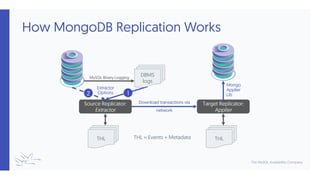
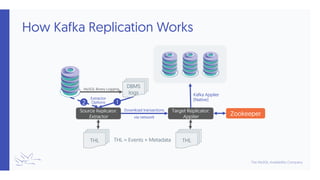
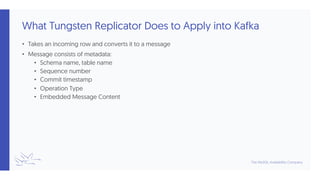
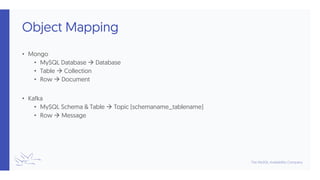
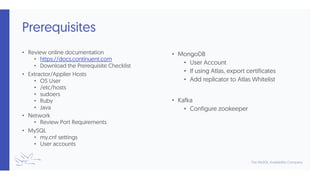
This document provides an overview of replicating data from MySQL to MongoDB and Kafka using Tungsten Replicator. It reviews the replicator workflow, prerequisites for MongoDB and Kafka targets, and sample configurations. The presenter demonstrates Tungsten Replicator's ability to extract data from MySQL, convert rows to messages with metadata, and apply the messages to MongoDB collections or Kafka topics. Requirements like user accounts, ports, and Zookeeper configuration are discussed.


