“What have you learnt
about technologies from
the process of constructing
this product?”
In this presentation I will be demonstrating how I
used certain hardware and software tools to
create my magazine.
Hardware tools
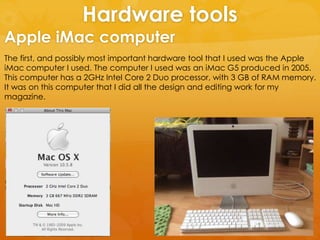
The first, and possibly most important hardware tool that I used was the Apple
iMac computer I used. The computer I used was an iMac G5 produced in 2005.
This computer has a 2GHz Intel Core 2 Duo processor, with 3 GB of RAM memory.
It was on this computer that I did all the design and editing work for my
magazine.
Apple iMac computer
While using the Apple iMac I used a mouse and
keyboard as two interface tools. The keyboard I
have been using was designed by Apple, released
in 2003 and used until 2007, and it uses a USB port to
connect to the iMac computer.
The mouse I have been using was also designed by
Apple and used from 2005 to 2009, and it also uses a
USB port to connect to the iMac computer.
Without these interface tools it would not have been
possible to use the Apple iMac computer.
Apple iMac mouse and keyboard
Through the process of creating my magazine I had to take pictures for the
cover, contents page and article page. Below I will demonstrate the different
tools I used to take these photos.
Camera tools and photography studio
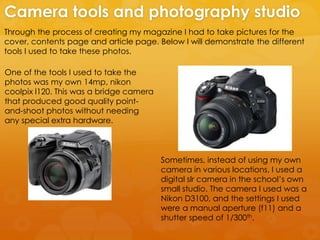
One of the tools I used to take the
photos was my own 14mp, nikon
coolpix l120. This was a bridge camera
that produced good quality point-
and-shoot photos without needing
any special extra hardware.
Sometimes, instead of using my own
camera in various locations, I used a
digital slr camera in the school’s own
small studio. The camera I used was a
Nikon D3100, and the settings I used
were a manual aperture (f11) and a
shutter speed of 1/300th.
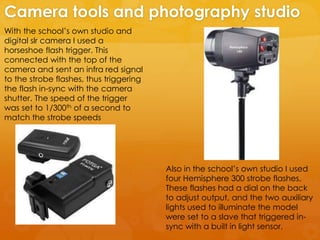
With the school’s own studio and
digital slr camera I used a
horseshoe flash trigger. This
connected with the top of the
camera and sent an infra red signal
to the strobe flashes, thus triggering
the flash in-sync with the camera
shutter. The speed of the trigger
was set to 1/300th of a second to
match the strobe speeds
Camera tools and photography studio
Also in the school’s own studio I used
four Hemisphere 300 strobe flashes.
These flashes had a dial on the back
to adjust output, and the two auxiliary
lights used to illuminate the model
were set to a slave that triggered in-
sync with a built in light sensor.
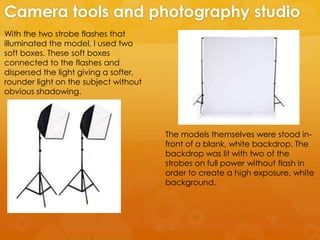
With the two strobe flashes that
illuminated the model, I used two
soft boxes. These soft boxes
connected to the flashes and
dispersed the light giving a softer,
rounder light on the subject without
obvious shadowing.
Camera tools and photography studio
The models themselves were stood in-
front of a blank, white backdrop. The
backdrop was lit with two of the
strobes on full power without flash in
order to create a high exposure, white
background.
Software tools
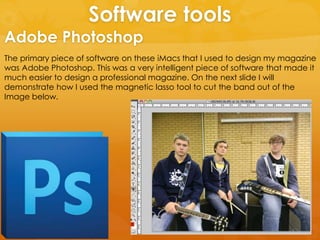
The primary piece of software on these iMacs that I used to design my magazine
was Adobe Photoshop. This was a very intelligent piece of software that made it
much easier to design a professional magazine. On the next slide I will
demonstrate how I used the magnetic lasso tool to cut the band out of the
Image below.
Adobe Photoshop
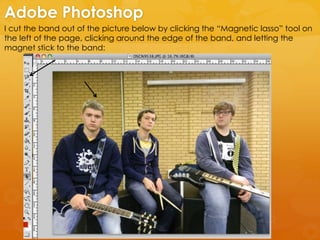
I cut the band out of the picture below by clicking the “Magnetic lasso” tool on
the left of the page, clicking around the edge of the band, and letting the
magnet stick to the band:
Adobe Photoshop
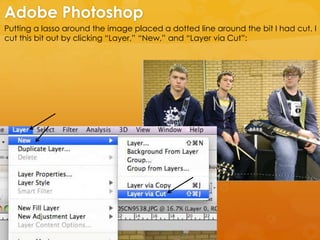
Putting a lasso around the image placed a dotted line around the bit I had cut. I
cut this bit out by clicking “Layer,” “New,” and “Layer via Cut”:
Adobe Photoshop
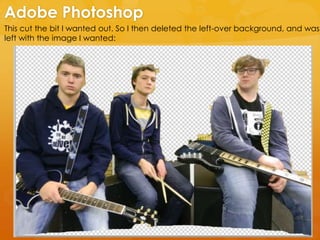
This cut the bit I wanted out. So I then deleted the left-over background, and was
left with the image I wanted:
Adobe Photoshop
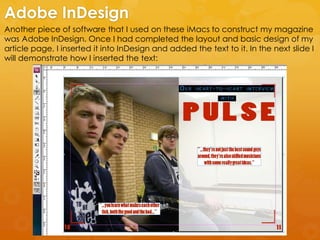
Another piece of software that I used on these iMacs to construct my magazine
was Adobe InDesign. Once I had completed the layout and basic design of my
article page, I inserted it into InDesign and added the text to it. In the next slide I
will demonstrate how I inserted the text:
Adobe InDesign
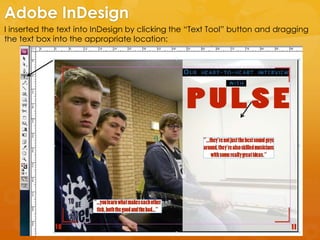
I inserted the text into InDesign by clicking the “Text Tool” button and dragging
the text box into the appropriate location:
Adobe InDesign
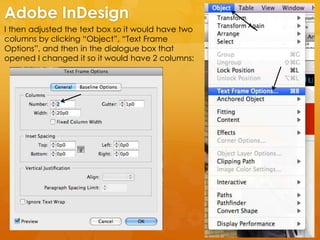
I then adjusted the text box so it would have two
columns by clicking “Object”, “Text Frame
Options”, and then in the dialogue box that
opened I changed it so it would have 2 columns:
Adobe InDesign
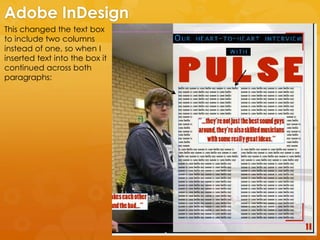
This changed the text box
to include two columns
instead of one, so when I
inserted text into the box it
continued across both
paragraphs:
Adobe InDesign
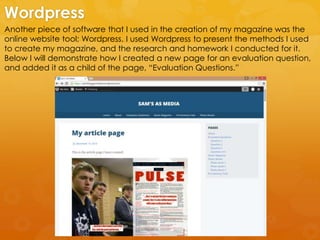
Another piece of software that I used in the creation of my magazine was the
online website tool; Wordpress. I used Wordpress to present the methods I used
to create my magazine, and the research and homework I conducted for it.
Below I will demonstrate how I created a new page for an evaluation question,
and added it as a child of the page, “Evaluation Questions.”
Wordpress
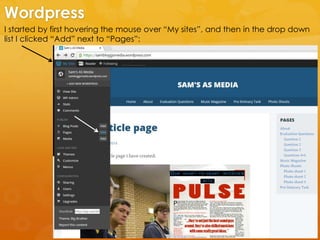
I started by first hovering the mouse over “My sites”, and then in the drop down
list I clicked “Add” next to “Pages”:
Wordpress
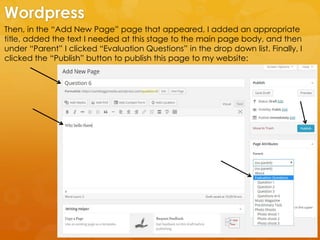
Then, in the “Add New Page” page that appeared, I added an appropriate
title, added the text I needed at this stage to the main page body, and then
under “Parent” I clicked “Evaluation Questions” in the drop down list. Finally, I
clicked the “Publish” button to publish this page to my website:
Wordpress
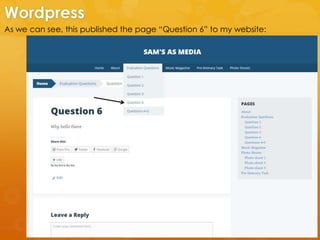
As we can see, this published the page “Question 6” to my website:
Wordpress

Tools

  • 1.
    “What have youlearnt about technologies from the process of constructing this product?” In this presentation I will be demonstrating how I used certain hardware and software tools to create my magazine.
  • 2.
    Hardware tools The first,and possibly most important hardware tool that I used was the Apple iMac computer I used. The computer I used was an iMac G5 produced in 2005. This computer has a 2GHz Intel Core 2 Duo processor, with 3 GB of RAM memory. It was on this computer that I did all the design and editing work for my magazine. Apple iMac computer
  • 3.
    While using theApple iMac I used a mouse and keyboard as two interface tools. The keyboard I have been using was designed by Apple, released in 2003 and used until 2007, and it uses a USB port to connect to the iMac computer. The mouse I have been using was also designed by Apple and used from 2005 to 2009, and it also uses a USB port to connect to the iMac computer. Without these interface tools it would not have been possible to use the Apple iMac computer. Apple iMac mouse and keyboard
  • 4.
    Through the processof creating my magazine I had to take pictures for the cover, contents page and article page. Below I will demonstrate the different tools I used to take these photos. Camera tools and photography studio One of the tools I used to take the photos was my own 14mp, nikon coolpix l120. This was a bridge camera that produced good quality point- and-shoot photos without needing any special extra hardware. Sometimes, instead of using my own camera in various locations, I used a digital slr camera in the school’s own small studio. The camera I used was a Nikon D3100, and the settings I used were a manual aperture (f11) and a shutter speed of 1/300th.
  • 5.
    With the school’sown studio and digital slr camera I used a horseshoe flash trigger. This connected with the top of the camera and sent an infra red signal to the strobe flashes, thus triggering the flash in-sync with the camera shutter. The speed of the trigger was set to 1/300th of a second to match the strobe speeds Camera tools and photography studio Also in the school’s own studio I used four Hemisphere 300 strobe flashes. These flashes had a dial on the back to adjust output, and the two auxiliary lights used to illuminate the model were set to a slave that triggered in- sync with a built in light sensor.
  • 6.
    With the twostrobe flashes that illuminated the model, I used two soft boxes. These soft boxes connected to the flashes and dispersed the light giving a softer, rounder light on the subject without obvious shadowing. Camera tools and photography studio The models themselves were stood in- front of a blank, white backdrop. The backdrop was lit with two of the strobes on full power without flash in order to create a high exposure, white background.
  • 7.
    Software tools The primarypiece of software on these iMacs that I used to design my magazine was Adobe Photoshop. This was a very intelligent piece of software that made it much easier to design a professional magazine. On the next slide I will demonstrate how I used the magnetic lasso tool to cut the band out of the Image below. Adobe Photoshop
  • 8.
    I cut theband out of the picture below by clicking the “Magnetic lasso” tool on the left of the page, clicking around the edge of the band, and letting the magnet stick to the band: Adobe Photoshop
  • 9.
    Putting a lassoaround the image placed a dotted line around the bit I had cut. I cut this bit out by clicking “Layer,” “New,” and “Layer via Cut”: Adobe Photoshop
  • 10.
    This cut thebit I wanted out. So I then deleted the left-over background, and was left with the image I wanted: Adobe Photoshop
  • 11.
    Another piece ofsoftware that I used on these iMacs to construct my magazine was Adobe InDesign. Once I had completed the layout and basic design of my article page, I inserted it into InDesign and added the text to it. In the next slide I will demonstrate how I inserted the text: Adobe InDesign
  • 12.
    I inserted thetext into InDesign by clicking the “Text Tool” button and dragging the text box into the appropriate location: Adobe InDesign
  • 13.
    I then adjustedthe text box so it would have two columns by clicking “Object”, “Text Frame Options”, and then in the dialogue box that opened I changed it so it would have 2 columns: Adobe InDesign
  • 14.
    This changed thetext box to include two columns instead of one, so when I inserted text into the box it continued across both paragraphs: Adobe InDesign
  • 15.
    Another piece ofsoftware that I used in the creation of my magazine was the online website tool; Wordpress. I used Wordpress to present the methods I used to create my magazine, and the research and homework I conducted for it. Below I will demonstrate how I created a new page for an evaluation question, and added it as a child of the page, “Evaluation Questions.” Wordpress
  • 16.
    I started byfirst hovering the mouse over “My sites”, and then in the drop down list I clicked “Add” next to “Pages”: Wordpress
  • 17.
    Then, in the“Add New Page” page that appeared, I added an appropriate title, added the text I needed at this stage to the main page body, and then under “Parent” I clicked “Evaluation Questions” in the drop down list. Finally, I clicked the “Publish” button to publish this page to my website: Wordpress
  • 18.
    As we cansee, this published the page “Question 6” to my website: Wordpress