Thirteen ways of
looking at a turtle
@ScottWlaschin
fsharpforfunandprofit.com/turtle
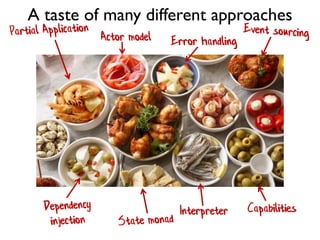
Actor model Error handling
Interpreter Capabilities
A taste of many different approaches
This is a crazy experiment:
~4 mins per topic!
See also fsharpforfunandprofit.com/fppatterns
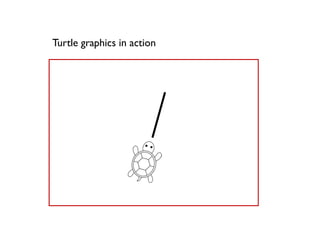
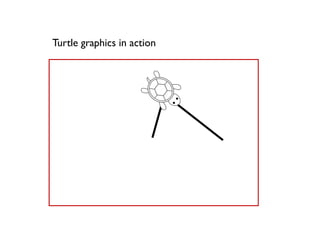
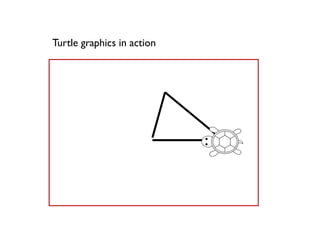
Turtle graphics in action
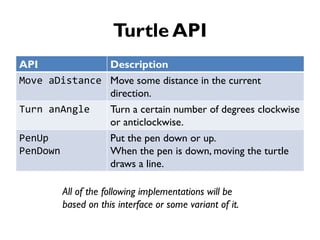
Turtle API
API Description
Move aDistance Move some distance in the current
direction.
Turn anAngle Turn a certain number of degrees clockwise
or anticlockwise.
PenUp
PenDown
Put the pen down or up.
When the pen is down, moving the turtle
draws a line.
All of the following implementations will be
based on this interface or some variant of it.
1. Object OrientedTurtle
Data and behavior are combined
A "Tootle"
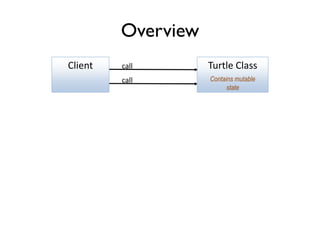
Overview
call
Turtle Classcall
Contains mutable
state
Client
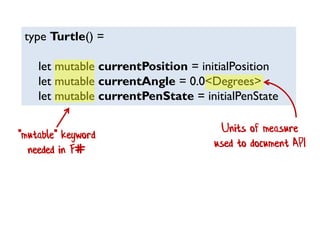
type Turtle() =
let mutable currentPosition = initialPosition
let mutable currentAngle = 0.0<Degrees>
let mutable currentPenState = initialPenState
"mutable" keyword
needed in F#
Units of measure
used to document API
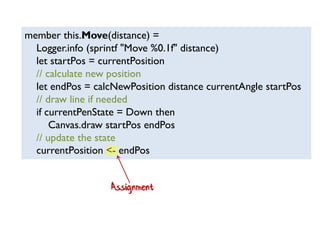
member this.Move(distance) =
Logger.info (sprintf "Move %0.1f" distance)
let startPos = currentPosition
// calculate new position
let endPos = calcNewPosition distance currentAngle startPos
// draw line if needed
if currentPenState = Down then
Canvas.draw startPos endPos
// update the state
currentPosition <- endPos
Assignment
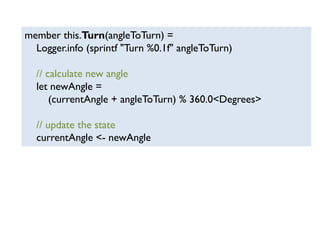
member this.Turn(angleToTurn) =
Logger.info (sprintf "Turn %0.1f" angleToTurn)
// calculate new angle
let newAngle =
(currentAngle + angleToTurn) % 360.0<Degrees>
// update the state
currentAngle <- newAngle
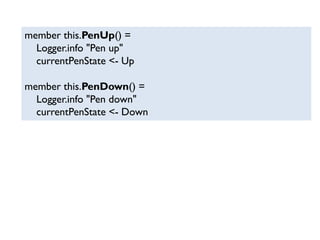
member this.PenUp() =
Logger.info "Pen up"
currentPenState <- Up
member this.PenDown() =
Logger.info "Pen down"
currentPenState <- Down
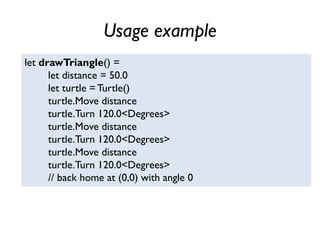
Usage example
let drawTriangle() =
let distance = 50.0
let turtle =Turtle()
turtle.Move distance
turtle.Turn 120.0<Degrees>
turtle.Move distance
turtle.Turn 120.0<Degrees>
turtle.Move distance
turtle.Turn 120.0<Degrees>
// back home at (0,0) with angle 0
OO Turtle demo
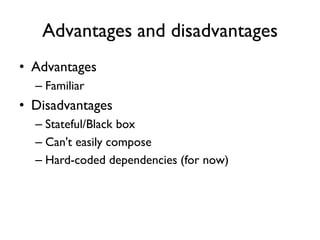
Advantages and disadvantages
• Advantages
– Familiar
• Disadvantages
– Stateful/Black box
– Can't easily compose
– Hard-coded dependencies (for now)
2.Abstract DataTurtle
Data is separated from behavior
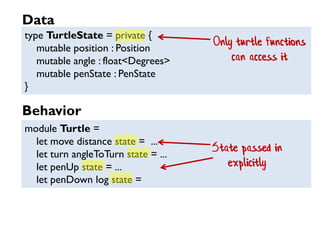
type TurtleState = private {
mutable position : Position
mutable angle : float<Degrees>
mutable penState : PenState
}
module Turtle =
let move distance state = ...
let turn angleToTurn state = ...
let penUp state = ...
let penDown log state =
Only turtle functions
can access it
State passed in
explicitly
Data
Behavior
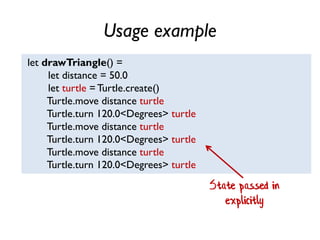
Usage example
let drawTriangle() =
let distance = 50.0
let turtle = Turtle.create()
Turtle.move distance turtle
Turtle.turn 120.0<Degrees> turtle
Turtle.move distance turtle
Turtle.turn 120.0<Degrees> turtle
Turtle.move distance turtle
Turtle.turn 120.0<Degrees> turtle
State passed in
explicitly
Advantages and disadvantages
• Advantages
– Simple
– Forces composition over inheritance!
• Disadvantages
– As with OO: stateful, etc
3. FunctionalTurtle
Data is immutable
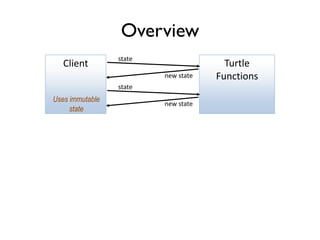
Overview
Client Turtle
Functions
state
new state
Uses immutable
state
state
new state
type TurtleState = {
position : Position
angle : float<Degrees>
penState : PenState
}
module Turtle =
let move distance state = ... // return new state
let turn angleToTurn state = ... // return new state
let penUp state = ... // return new state
let penDown log state = // return new state
Public, immutable
State passed in
explicitly AND
returned
Data
Behavior
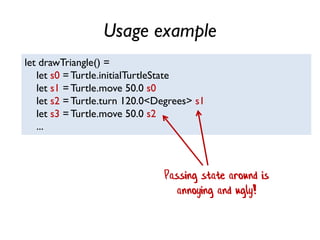
Usage example
let drawTriangle() =
let s0 =Turtle.initialTurtleState
let s1 =Turtle.move 50.0 s0
let s2 =Turtle.turn 120.0<Degrees> s1
let s3 =Turtle.move 50.0 s2
...
Passing state around is
annoying and ugly!
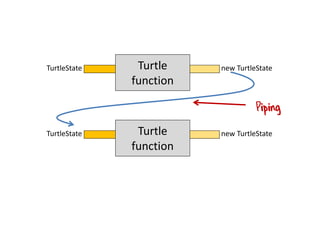
Piping
TurtleState Turtle
function
new TurtleState
TurtleState Turtle
function
new TurtleState
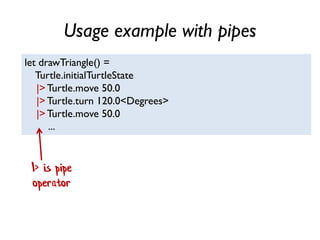
Usage example with pipes
let drawTriangle() =
Turtle.initialTurtleState
|>Turtle.move 50.0
|>Turtle.turn 120.0<Degrees>
|>Turtle.move 50.0
...
|> is pipe
operator
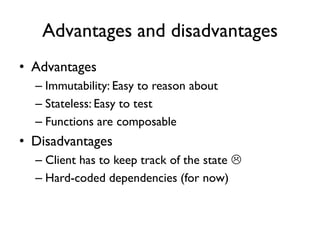
Advantages and disadvantages
• Advantages
– Immutability: Easy to reason about
– Stateless: Easy to test
– Functions are composable
• Disadvantages
– Client has to keep track of the state 
– Hard-coded dependencies (for now)
4. State monad
Threading state behind the scenes
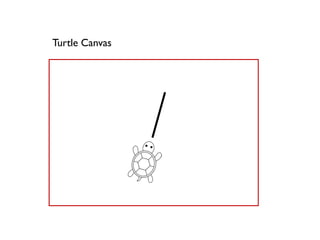
Turtle Canvas
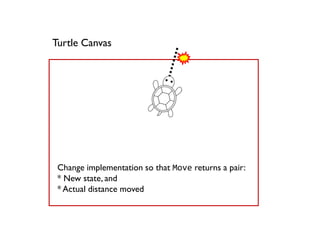
Turtle Canvas
Change implementation so that Move returns a pair:
* New state, and
* Actual distance moved
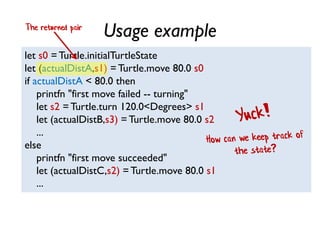
Usage example
let s0 = Turtle.initialTurtleState
let (actualDistA,s1) = Turtle.move 80.0 s0
if actualDistA < 80.0 then
printfn "first move failed -- turning"
let s2 =Turtle.turn 120.0<Degrees> s1
let (actualDistB,s3) = Turtle.move 80.0 s2
...
else
printfn "first move succeeded"
let (actualDistC,s2) = Turtle.move 80.0 s1
...
The returned pair
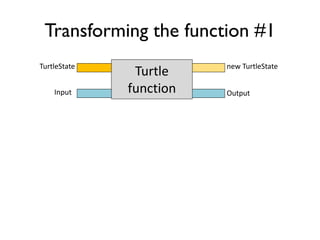
Transforming the function #1
TurtleState
Turtle
function
new TurtleState
Input Output
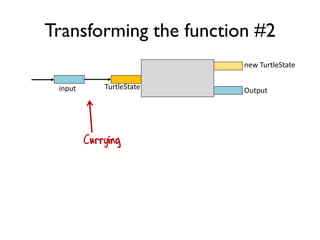
Transforming the function #2
Currying
TurtleStateinput
new TurtleState
Output
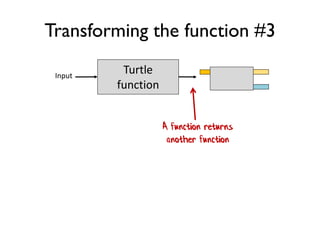
Transforming the function #3
A function returns
another function
Input
Turtle
function
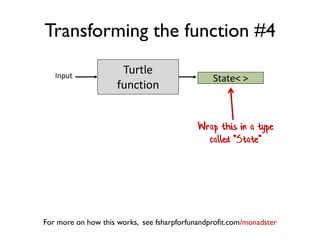
Transforming the function #4
Wrap this in a type
called "State"
For more on how this works, see fsharpforfunandprofit.com/monadster
Input
Turtle
function
State< >
Usage example
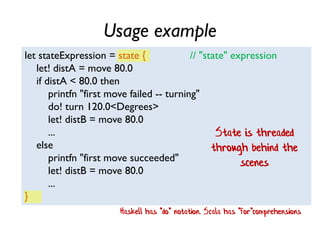
let stateExpression = state { // "state" expression
let! distA = move 80.0
if distA < 80.0 then
printfn "first move failed -- turning"
do! turn 120.0<Degrees>
let! distB = move 80.0
...
else
printfn "first move succeeded"
let! distB = move 80.0
...
}
State is threaded
through behind the
scenes
Haskell has "do" notation. Scala has "for"comprehensions
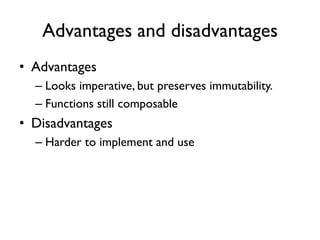
Advantages and disadvantages
• Advantages
– Looks imperative, but preserves immutability.
– Functions still composable
• Disadvantages
– Harder to implement and use
5. Error handling
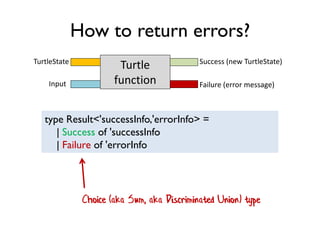
How to return errors?
type Result<'successInfo,'errorInfo> =
| Success of 'successInfo
| Failure of 'errorInfo
TurtleState
Turtle
function
Success (new TurtleState)
Input Failure (error message)
Choice (aka Sum, aka Discriminated Union) type
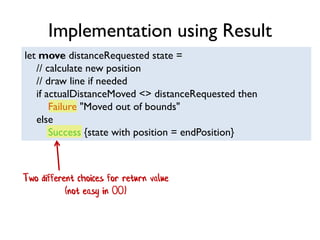
let move distanceRequested state =
// calculate new position
// draw line if needed
if actualDistanceMoved <> distanceRequested then
Failure "Moved out of bounds"
else
Success {state with position = endPosition}
Two different choices for return value
(not easy in OO)
Implementation using Result
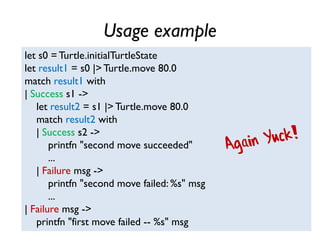
Usage example
let s0 = Turtle.initialTurtleState
let result1 = s0 |> Turtle.move 80.0
match result1 with
| Success s1 ->
let result2 = s1 |> Turtle.move 80.0
match result2 with
| Success s2 ->
printfn "second move succeeded"
...
| Failure msg ->
printfn "second move failed: %s" msg
...
| Failure msg ->
printfn "first move failed -- %s" msg
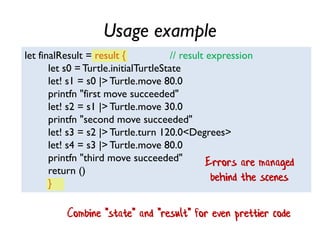
Usage example
let finalResult = result { // result expression
let s0 = Turtle.initialTurtleState
let! s1 = s0 |> Turtle.move 80.0
printfn "first move succeeded"
let! s2 = s1 |> Turtle.move 30.0
printfn "second move succeeded"
let! s3 = s2 |> Turtle.turn 120.0<Degrees>
let! s4 = s3 |> Turtle.move 80.0
printfn "third move succeeded"
return ()
}
Errors are managed
behind the scenes
Combine "state" and "result" for even prettier code
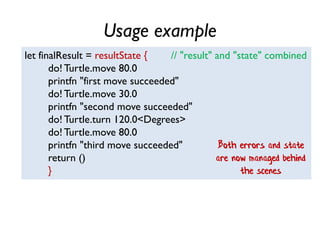
Usage example
let finalResult = resultState { // "result" and "state" combined
do! Turtle.move 80.0
printfn "first move succeeded"
do! Turtle.move 30.0
printfn "second move succeeded"
do! Turtle.turn 120.0<Degrees>
do! Turtle.move 80.0
printfn "third move succeeded"
return ()
}
Both errors and state
are now managed behind
the scenes
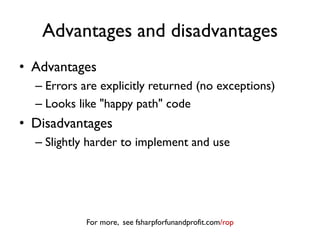
Advantages and disadvantages
• Advantages
– Errors are explicitly returned (no exceptions)
– Looks like "happy path" code
• Disadvantages
– Slightly harder to implement and use
For more, see fsharpforfunandprofit.com/rop
5½. Async turtle
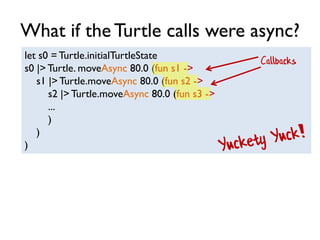
What if the Turtle calls were async?
let s0 = Turtle.initialTurtleState
s0 |> Turtle. moveAsync 80.0 (fun s1 ->
s1 |> Turtle.moveAsync 80.0 (fun s2 ->
s2 |> Turtle.moveAsync 80.0 (fun s3 ->
...
)
)
)
Callbacks
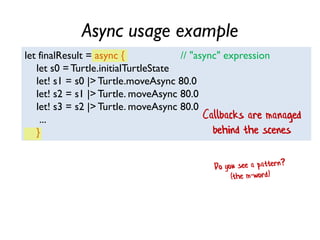
Async usage example
let finalResult = async { // "async" expression
let s0 =Turtle.initialTurtleState
let! s1 = s0 |> Turtle.moveAsync 80.0
let! s2 = s1 |> Turtle. moveAsync 80.0
let! s3 = s2 |> Turtle. moveAsync 80.0
...
}
Callbacks are managed
behind the scenes
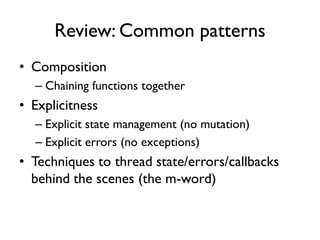
Review: Common patterns
• Composition
– Chaining functions together
• Explicitness
– Explicit state management (no mutation)
– Explicit errors (no exceptions)
• Techniques to thread state/errors/callbacks
behind the scenes (the m-word)
6. Batch commands
How can the caller avoid managing
state?
Overview
Turtle
Functions
Batch
Runner
Client
state
new staterun
[command,
command,
command,
command] Loop over
commands
Overview
Keep track of state here
Turtle
Functions
Batch
Runner
[command,
command,
command,
command]
Client
state
new state
Loop over
commands
run
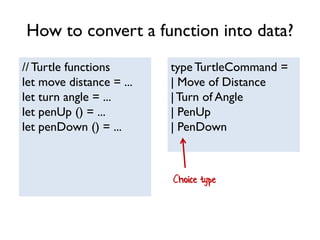
How to convert a function into data?
// Turtle functions
let move distance = ...
let turn angle = ...
let penUp () = ...
let penDown () = ...
typeTurtleCommand =
| Move of Distance
|Turn of Angle
| PenUp
| PenDown
Choice type
Usage example
// create the list of commands
let commands = [
Move 100.0
Turn 120.0<Degrees>
Move 100.0
Turn 120.0<Degrees>
Move 100.0
Turn 120.0<Degrees>
]
// run them
TurtleBatch.run commands
This is *data* not function calls
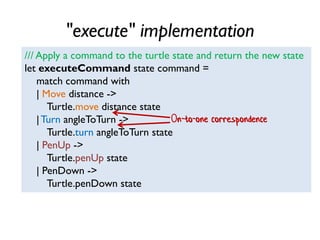
"execute" implementation
/// Apply a command to the turtle state and return the new state
let executeCommand state command =
match command with
| Move distance ->
Turtle.move distance state
|Turn angleToTurn ->
Turtle.turn angleToTurn state
| PenUp ->
Turtle.penUp state
| PenDown ->
Turtle.penDown state
On-to-one correspondence
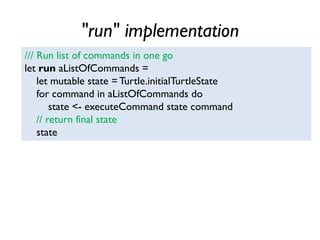
"run" implementation
/// Run list of commands in one go
let run aListOfCommands =
let mutable state = Turtle.initialTurtleState
for command in aListOfCommands do
state <- executeCommand state command
// return final state
state
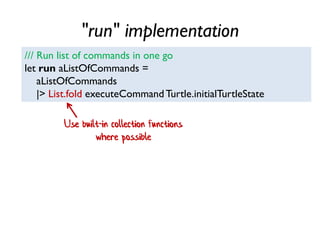
"run" implementation
/// Run list of commands in one go
let run aListOfCommands =
aListOfCommands
|> List.fold executeCommand Turtle.initialTurtleState
Use built-in collection functions
where possible
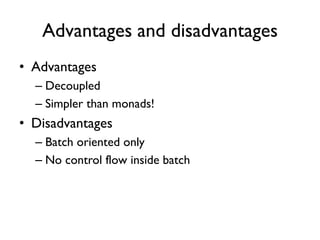
Advantages and disadvantages
• Advantages
– Decoupled
– Simpler than monads!
• Disadvantages
– Batch oriented only
– No control flow inside batch
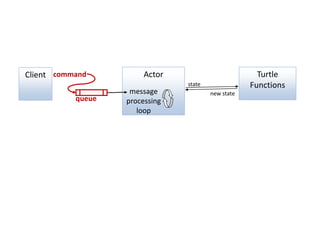
7.Actor model
Turtle
Functions
ActorcommandClient
state
new state
queue
message
processing
loop
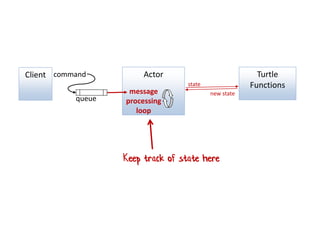
Turtle
Functions
ActorcommandClient
queue
message
processing
loop
Keep track of state here
state
new state
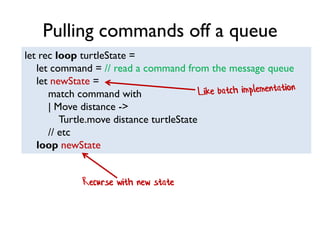
Pulling commands off a queue
let rec loop turtleState =
let command = // read a command from the message queue
let newState =
match command with
| Move distance ->
Turtle.move distance turtleState
// etc
loop newState
Recurse with new state
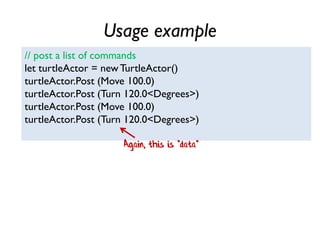
Usage example
// post a list of commands
let turtleActor = newTurtleActor()
turtleActor.Post (Move 100.0)
turtleActor.Post (Turn 120.0<Degrees>)
turtleActor.Post (Move 100.0)
turtleActor.Post (Turn 120.0<Degrees>)
Again, this is *data*
Advantages and disadvantages
• Advantages
– Decoupled
– Simpler than state monad
• Disadvantages
– Extra boilerplate needed
8. Event Sourcing
How should we persist state?
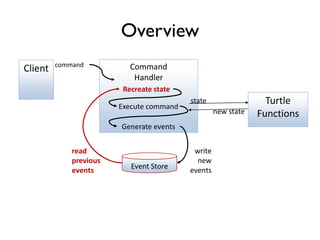
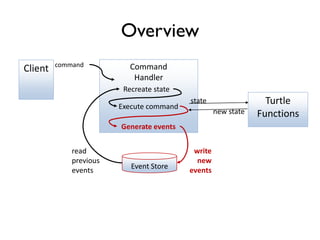
Overview
Turtle
Functions
Command
Handler
command
Client
state
new state
Recreate state
Event Store
Generate events
write
new
events
read
previous
events
Execute command
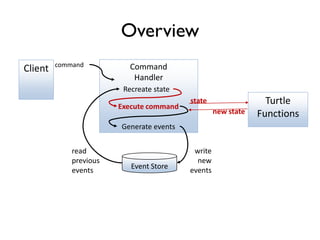
Overview
Turtle
Functions
Command
Handler
command
Client
state
new state
Recreate state
Event Store
Generate events
write
new
events
read
previous
events
Execute command
Overview
Turtle
Functions
Command
Handler
command
Client
state
new state
Recreate state
Event Store
Generate events
write
new
events
read
previous
events
Execute command
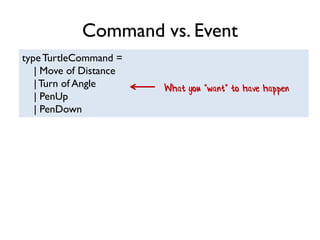
Command vs. Event
typeTurtleCommand =
| Move of Distance
|Turn of Angle
| PenUp
| PenDown
What you *want* to have happen
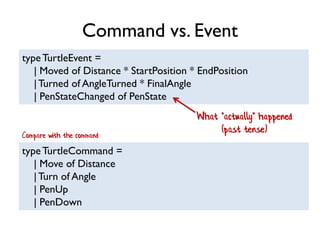
Command vs. Event
typeTurtleEvent =
| Moved of Distance * StartPosition * EndPosition
|Turned of AngleTurned * FinalAngle
| PenStateChanged of PenState
What *actually* happened
(past tense)
typeTurtleCommand =
| Move of Distance
|Turn of Angle
| PenUp
| PenDown
Compare with the command
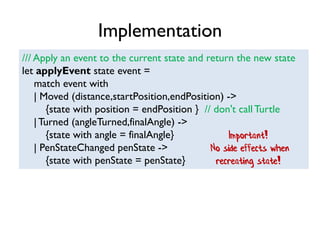
Implementation
/// Apply an event to the current state and return the new state
let applyEvent state event =
match event with
| Moved (distance,startPosition,endPosition) ->
{state with position = endPosition } // don't callTurtle
|Turned (angleTurned,finalAngle) ->
{state with angle = finalAngle}
| PenStateChanged penState ->
{state with penState = penState}
Important!
No side effects when
recreating state!
Implementation
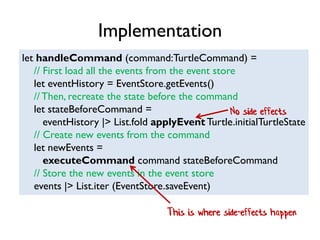
let handleCommand (command:TurtleCommand) =
// First load all the events from the event store
let eventHistory = EventStore.getEvents()
//Then, recreate the state before the command
let stateBeforeCommand =
eventHistory |> List.fold applyEvent Turtle.initialTurtleState
// Create new events from the command
let newEvents =
executeCommand command stateBeforeCommand
// Store the new events in the event store
events |> List.iter (EventStore.saveEvent)
This is where side-effects happen
No side effects
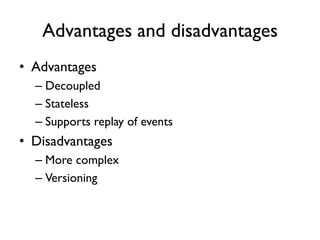
Advantages and disadvantages
• Advantages
– Decoupled
– Stateless
– Supports replay of events
• Disadvantages
– More complex
– Versioning
9. Stream Processing
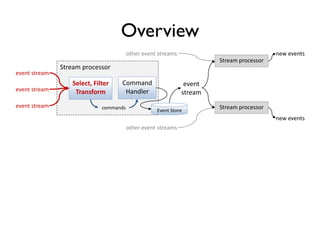
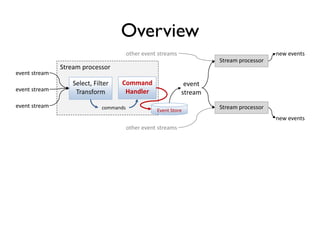
Overview
Stream processor
Stream processor
Command
Handler
commands
event
stream
new events
Select, Filter
Transform
event stream
event stream
event stream
other event streams
Stream processor
new events
other event streams
Event Store
Overview
Stream processor
Stream processor
Command
Handler
commands
event
stream
new events
Select, Filter
Transform
event stream
event stream
event stream
other event streams
Stream processor
new events
other event streams
Event Store
Overview
Stream processor
Stream processor
Command
Handler
commands
event
stream
new events
Select, Filter
Transform
event stream
event stream
event stream
other event streams
Stream processor
new events
other event streams
Event Store
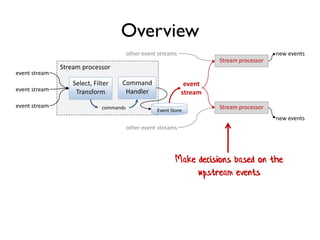
Make decisions based on the
upstream events
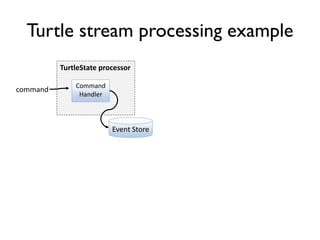
Turtle stream processing example
TurtleState processor
Command
Handler
command
Event Store
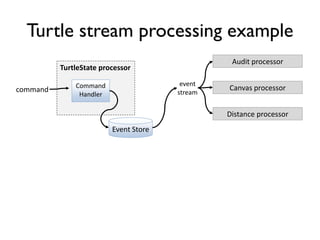
Turtle stream processing example
TurtleState processor
Audit processor
Command
Handler
event
streamcommand Canvas processor
Event Store
Distance processor
Stream processing demo
Auditing Processor
Canvas Processor
DistanceTravelled Processor
Advantages and disadvantages
• Advantages
– Same as Event Sourcing, plus
– Separates state logic from business logic
– Microservice friendly!
• Disadvantages
– Even more complex!
Review
• "Conscious decoupling" with data types
– Passing data instead of calling functions
• Immutable data stores
– Storing event history rather than current state
10. OO style
dependency injection
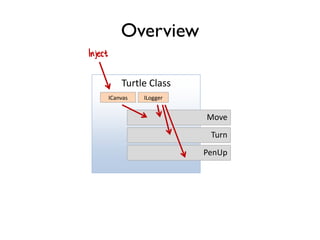
Overview
Turtle Class
Move
ICanvas ILogger
Inject
Turn
PenUp
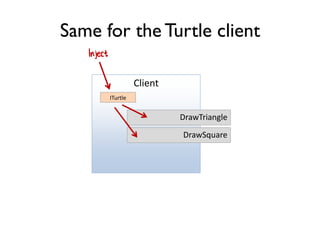
Same for the Turtle client
Client
DrawTriangle
ITurtle
Inject
DrawSquare
OO dependency injection demo
Advantages and disadvantages
• Advantages
– Well understood
• Disadvantages
– Unintentional dependencies
– Interfaces often not fine grained
– Often requires IoC container or similar
11. FP style
dependency injection
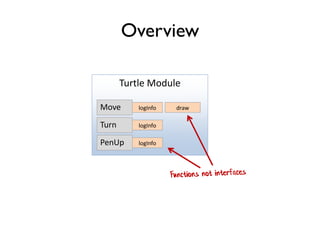
Overview
Turtle Module
Move drawlogInfo
Turn logInfo
PenUp logInfo
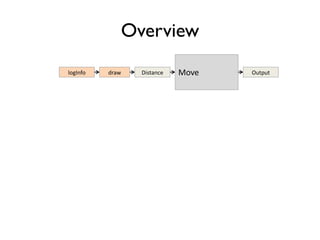
Overview
MovelogInfo draw Distance Output
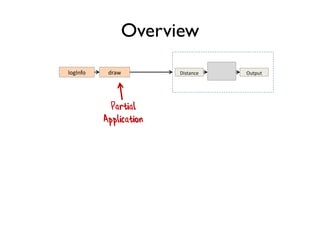
Overview
logInfo draw Distance Output
Partial
Application
Overview
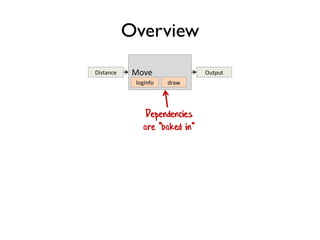
Move
logInfo draw
Distance Output
Dependencies
are "baked in"
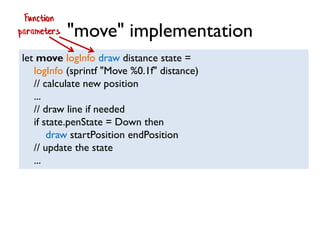
"move" implementation
let move logInfo draw distance state =
logInfo (sprintf "Move %0.1f" distance)
// calculate new position
...
// draw line if needed
if state.penState = Down then
draw startPosition endPosition
// update the state
...
Function
parameters
"turn" implementation
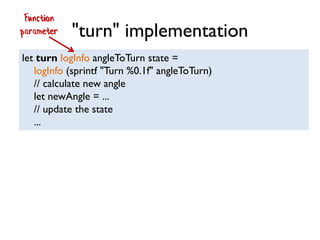
let turn logInfo angleToTurn state =
logInfo (sprintf "Turn %0.1f" angleToTurn)
// calculate new angle
let newAngle = ...
// update the state
...
Function
parameter
Turtle.initialTurtleState
|> move 50.0
|> turn 120.0<Degrees>
Partial application in practice
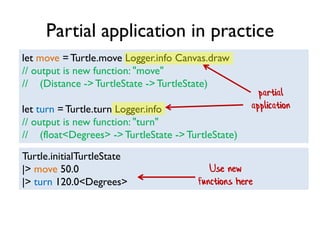
let move =Turtle.move Logger.info Canvas.draw
// output is new function: "move"
// (Distance -> TurtleState ->TurtleState)
let turn = Turtle.turn Logger.info
// output is new function: "turn"
// (float<Degrees> ->TurtleState ->TurtleState)
partial
application
Use new
functions here
FP dependency injection demo
Advantages and disadvantages
• Advantages
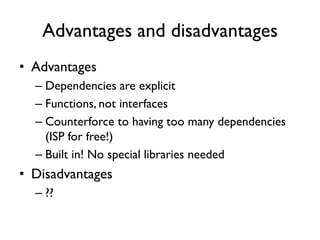
– Dependencies are explicit
– Functions, not interfaces
– Counterforce to having too many dependencies
(ISP for free!)
– Built in! No special libraries needed
• Disadvantages
– ??
12. Interpreter
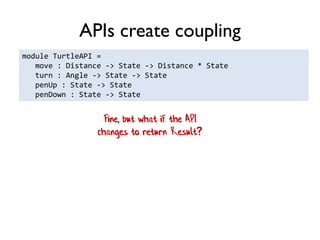
APIs create coupling
module TurtleAPI =
move : Distance -> State -> Distance * State
turn : Angle -> State -> State
penUp : State -> State
penDown : State -> State
Fine, but what if the API
changes to return Result?
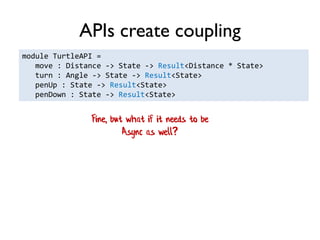
APIs create coupling
module TurtleAPI =
move : Distance -> State -> Result<Distance * State>
turn : Angle -> State -> Result<State>
penUp : State -> Result<State>
penDown : State -> Result<State>
Fine, but what if it needs to be
Async as well?
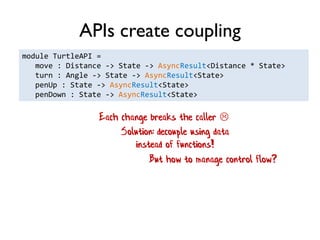
APIs create coupling
module TurtleAPI =
move : Distance -> State -> AsyncResult<Distance * State>
turn : Angle -> State -> AsyncResult<State>
penUp : State -> AsyncResult<State>
penDown : State -> AsyncResult<State>
Each change breaks the caller 
Solution: decouple using data
instead of functions!
But how to manage control flow?
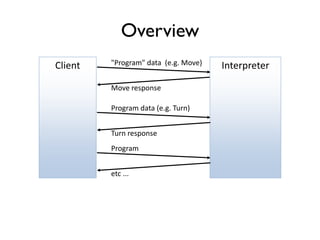
Overview
Move response
Interpreter"Program" data (e.g. Move)Client
Turn response
Program data (e.g. Turn)
Program
etc ...
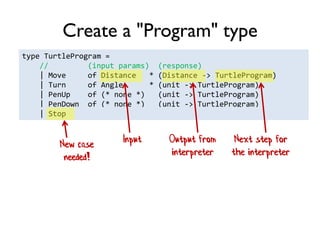
type TurtleProgram =
// (input params) (response)
| Move of Distance * (Distance -> TurtleProgram)
| Turn of Angle * (unit -> TurtleProgram)
| PenUp of (* none *) (unit -> TurtleProgram)
| PenDown of (* none *) (unit -> TurtleProgram)
| Stop
Create a "Program" type
Input Output from
interpreter
Next step for
the interpreter
New case
needed!
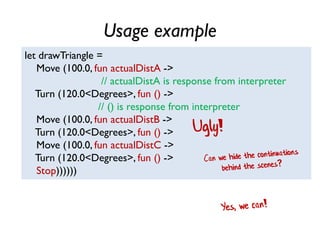
Usage example
let drawTriangle =
Move (100.0, fun actualDistA ->
// actualDistA is response from interpreter
Turn (120.0<Degrees>, fun () ->
// () is response from interpreter
Move (100.0, fun actualDistB ->
Turn (120.0<Degrees>, fun () ->
Move (100.0, fun actualDistC ->
Turn (120.0<Degrees>, fun () ->
Stop))))))
Ugly!
Usage example
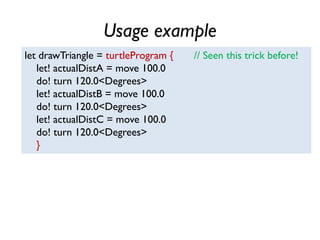
let drawTriangle = turtleProgram { // Seen this trick before!
let! actualDistA = move 100.0
do! turn 120.0<Degrees>
let! actualDistB = move 100.0
do! turn 120.0<Degrees>
let! actualDistC = move 100.0
do! turn 120.0<Degrees>
}
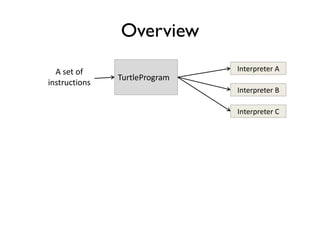
Overview
TurtleProgram
A set of
instructions
Interpreter A
Interpreter B
Interpreter C
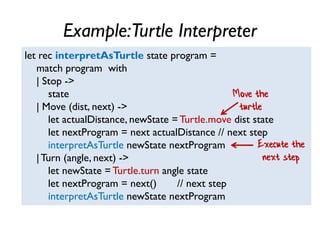
Example:Turtle Interpreter
let rec interpretAsTurtle state program =
match program with
| Stop ->
state
| Move (dist, next) ->
let actualDistance, newState = Turtle.move dist state
let nextProgram = next actualDistance // next step
interpretAsTurtle newState nextProgram
|Turn (angle, next) ->
let newState = Turtle.turn angle state
let nextProgram = next() // next step
interpretAsTurtle newState nextProgram
Move the
turtle
Execute the
next step
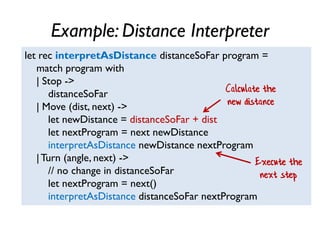
Example: Distance Interpreter
let rec interpretAsDistance distanceSoFar program =
match program with
| Stop ->
distanceSoFar
| Move (dist, next) ->
let newDistance = distanceSoFar + dist
let nextProgram = next newDistance
interpretAsDistance newDistance nextProgram
|Turn (angle, next) ->
// no change in distanceSoFar
let nextProgram = next()
interpretAsDistance distanceSoFar nextProgram
Calculate the
new distance
Execute the
next step
Interpreter demo
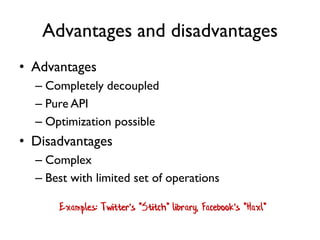
Advantages and disadvantages
• Advantages
– Completely decoupled
– Pure API
– Optimization possible
• Disadvantages
– Complex
– Best with limited set of operations
Examples: Twitter's "Stitch" library, Facebook's "Haxl"
13. Capabilities
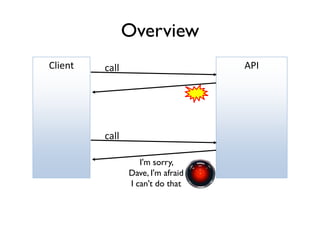
Overview
APIcallClient
call
I'm sorry,
Dave, I'm afraid
I can't do that
Rather than telling me what I can't do,
why not tell me what I can do?
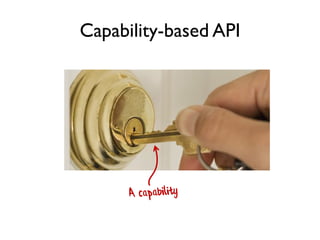
Capability-based API
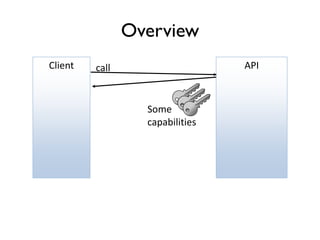
Overview
APIcall
Some
capabilities
Client
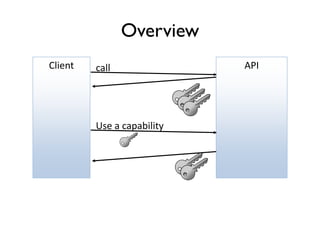
Overview
APIcallClient
Use a capability
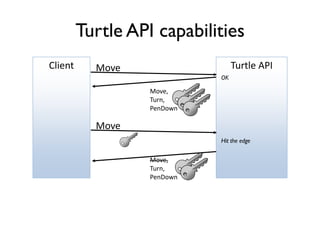
Turtle API capabilities
Turtle APIMoveClient
Move,
Turn,
PenDown
Move
Move,
Turn,
PenDown
OK
Hit the edge
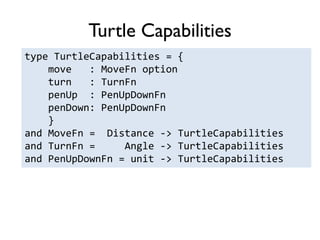
Turtle Capabilities
type TurtleCapabilities = {
move : MoveFn option
turn : TurnFn
penUp : PenUpDownFn
penDown: PenUpDownFn
}
and MoveFn = Distance -> TurtleCapabilities
and TurnFn = Angle -> TurtleCapabilities
and PenUpDownFn = unit -> TurtleCapabilities
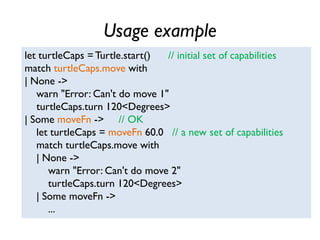
Usage example
let turtleCaps = Turtle.start() // initial set of capabilities
match turtleCaps.move with
| None ->
warn "Error: Can't do move 1"
turtleCaps.turn 120<Degrees>
| Some moveFn -> // OK
let turtleCaps = moveFn 60.0 // a new set of capabilities
match turtleCaps.move with
| None ->
warn "Error: Can't do move 2"
turtleCaps.turn 120<Degrees>
| Some moveFn ->
...
Capabilities demo
Advantages and disadvantages
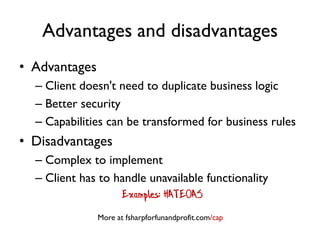
• Advantages
– Client doesn't need to duplicate business logic
– Better security
– Capabilities can be transformed for business rules
• Disadvantages
– Complex to implement
– Client has to handle unavailable functionality
Examples: HATEOAS
More at fsharpforfunandprofit.com/cap
Slides and video here
F# consulting
Phew!
fsharpforfunandprofit.com/turtle

Thirteen ways of looking at a turtle

  • 1.
    Thirteen ways of lookingat a turtle @ScottWlaschin fsharpforfunandprofit.com/turtle
  • 2.
    Actor model Errorhandling Interpreter Capabilities A taste of many different approaches
  • 3.
    A taste ofmany different approaches This is a crazy experiment: ~4 mins per topic! See also fsharpforfunandprofit.com/fppatterns
  • 4.
  • 5.
  • 6.
  • 7.
    Turtle API API Description MoveaDistance Move some distance in the current direction. Turn anAngle Turn a certain number of degrees clockwise or anticlockwise. PenUp PenDown Put the pen down or up. When the pen is down, moving the turtle draws a line. All of the following implementations will be based on this interface or some variant of it.
  • 8.
    1. Object OrientedTurtle Dataand behavior are combined A "Tootle"
  • 9.
  • 10.
    type Turtle() = letmutable currentPosition = initialPosition let mutable currentAngle = 0.0<Degrees> let mutable currentPenState = initialPenState "mutable" keyword needed in F# Units of measure used to document API
  • 11.
    member this.Move(distance) = Logger.info(sprintf "Move %0.1f" distance) let startPos = currentPosition // calculate new position let endPos = calcNewPosition distance currentAngle startPos // draw line if needed if currentPenState = Down then Canvas.draw startPos endPos // update the state currentPosition <- endPos Assignment
  • 12.
    member this.Turn(angleToTurn) = Logger.info(sprintf "Turn %0.1f" angleToTurn) // calculate new angle let newAngle = (currentAngle + angleToTurn) % 360.0<Degrees> // update the state currentAngle <- newAngle
  • 13.
    member this.PenUp() = Logger.info"Pen up" currentPenState <- Up member this.PenDown() = Logger.info "Pen down" currentPenState <- Down
  • 14.
    Usage example let drawTriangle()= let distance = 50.0 let turtle =Turtle() turtle.Move distance turtle.Turn 120.0<Degrees> turtle.Move distance turtle.Turn 120.0<Degrees> turtle.Move distance turtle.Turn 120.0<Degrees> // back home at (0,0) with angle 0
  • 15.
  • 16.
    Advantages and disadvantages •Advantages – Familiar • Disadvantages – Stateful/Black box – Can't easily compose – Hard-coded dependencies (for now)
  • 17.
    2.Abstract DataTurtle Data isseparated from behavior
  • 18.
    type TurtleState =private { mutable position : Position mutable angle : float<Degrees> mutable penState : PenState } module Turtle = let move distance state = ... let turn angleToTurn state = ... let penUp state = ... let penDown log state = Only turtle functions can access it State passed in explicitly Data Behavior
  • 19.
    Usage example let drawTriangle()= let distance = 50.0 let turtle = Turtle.create() Turtle.move distance turtle Turtle.turn 120.0<Degrees> turtle Turtle.move distance turtle Turtle.turn 120.0<Degrees> turtle Turtle.move distance turtle Turtle.turn 120.0<Degrees> turtle State passed in explicitly
  • 20.
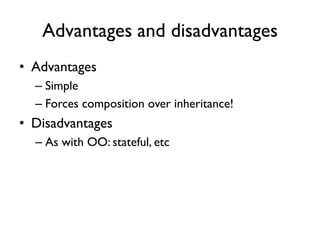
    Advantages and disadvantages •Advantages – Simple – Forces composition over inheritance! • Disadvantages – As with OO: stateful, etc
  • 21.
  • 22.
  • 23.
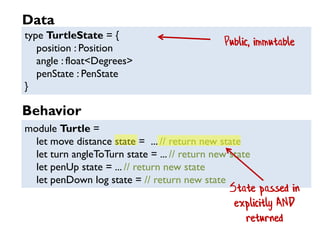
    type TurtleState ={ position : Position angle : float<Degrees> penState : PenState } module Turtle = let move distance state = ... // return new state let turn angleToTurn state = ... // return new state let penUp state = ... // return new state let penDown log state = // return new state Public, immutable State passed in explicitly AND returned Data Behavior
  • 24.
    Usage example let drawTriangle()= let s0 =Turtle.initialTurtleState let s1 =Turtle.move 50.0 s0 let s2 =Turtle.turn 120.0<Degrees> s1 let s3 =Turtle.move 50.0 s2 ... Passing state around is annoying and ugly!
  • 25.
  • 26.
    Usage example withpipes let drawTriangle() = Turtle.initialTurtleState |>Turtle.move 50.0 |>Turtle.turn 120.0<Degrees> |>Turtle.move 50.0 ... |> is pipe operator
  • 27.
    Advantages and disadvantages •Advantages – Immutability: Easy to reason about – Stateless: Easy to test – Functions are composable • Disadvantages – Client has to keep track of the state  – Hard-coded dependencies (for now)
  • 28.
    4. State monad Threadingstate behind the scenes
  • 29.
  • 30.
    Turtle Canvas Change implementationso that Move returns a pair: * New state, and * Actual distance moved
  • 31.
    Usage example let s0= Turtle.initialTurtleState let (actualDistA,s1) = Turtle.move 80.0 s0 if actualDistA < 80.0 then printfn "first move failed -- turning" let s2 =Turtle.turn 120.0<Degrees> s1 let (actualDistB,s3) = Turtle.move 80.0 s2 ... else printfn "first move succeeded" let (actualDistC,s2) = Turtle.move 80.0 s1 ... The returned pair
  • 32.
    Transforming the function#1 TurtleState Turtle function new TurtleState Input Output
  • 33.
    Transforming the function#2 Currying TurtleStateinput new TurtleState Output
  • 34.
    Transforming the function#3 A function returns another function Input Turtle function
  • 35.
    Transforming the function#4 Wrap this in a type called "State" For more on how this works, see fsharpforfunandprofit.com/monadster Input Turtle function State< >
  • 36.
    Usage example let stateExpression= state { // "state" expression let! distA = move 80.0 if distA < 80.0 then printfn "first move failed -- turning" do! turn 120.0<Degrees> let! distB = move 80.0 ... else printfn "first move succeeded" let! distB = move 80.0 ... } State is threaded through behind the scenes Haskell has "do" notation. Scala has "for"comprehensions
  • 37.
    Advantages and disadvantages •Advantages – Looks imperative, but preserves immutability. – Functions still composable • Disadvantages – Harder to implement and use
  • 38.
  • 39.
    How to returnerrors? type Result<'successInfo,'errorInfo> = | Success of 'successInfo | Failure of 'errorInfo TurtleState Turtle function Success (new TurtleState) Input Failure (error message) Choice (aka Sum, aka Discriminated Union) type
  • 40.
    let move distanceRequestedstate = // calculate new position // draw line if needed if actualDistanceMoved <> distanceRequested then Failure "Moved out of bounds" else Success {state with position = endPosition} Two different choices for return value (not easy in OO) Implementation using Result
  • 41.
    Usage example let s0= Turtle.initialTurtleState let result1 = s0 |> Turtle.move 80.0 match result1 with | Success s1 -> let result2 = s1 |> Turtle.move 80.0 match result2 with | Success s2 -> printfn "second move succeeded" ... | Failure msg -> printfn "second move failed: %s" msg ... | Failure msg -> printfn "first move failed -- %s" msg
  • 42.
    Usage example let finalResult= result { // result expression let s0 = Turtle.initialTurtleState let! s1 = s0 |> Turtle.move 80.0 printfn "first move succeeded" let! s2 = s1 |> Turtle.move 30.0 printfn "second move succeeded" let! s3 = s2 |> Turtle.turn 120.0<Degrees> let! s4 = s3 |> Turtle.move 80.0 printfn "third move succeeded" return () } Errors are managed behind the scenes Combine "state" and "result" for even prettier code
  • 43.
    Usage example let finalResult= resultState { // "result" and "state" combined do! Turtle.move 80.0 printfn "first move succeeded" do! Turtle.move 30.0 printfn "second move succeeded" do! Turtle.turn 120.0<Degrees> do! Turtle.move 80.0 printfn "third move succeeded" return () } Both errors and state are now managed behind the scenes
  • 44.
    Advantages and disadvantages •Advantages – Errors are explicitly returned (no exceptions) – Looks like "happy path" code • Disadvantages – Slightly harder to implement and use For more, see fsharpforfunandprofit.com/rop
  • 45.
    5½. Async turtle Whatif the Turtle calls were async?
  • 46.
    What if theTurtle calls were async? let s0 = Turtle.initialTurtleState s0 |> Turtle. moveAsync 80.0 (fun s1 -> s1 |> Turtle.moveAsync 80.0 (fun s2 -> s2 |> Turtle.moveAsync 80.0 (fun s3 -> ... ) ) ) Callbacks
  • 47.
    Async usage example letfinalResult = async { // "async" expression let s0 =Turtle.initialTurtleState let! s1 = s0 |> Turtle.moveAsync 80.0 let! s2 = s1 |> Turtle. moveAsync 80.0 let! s3 = s2 |> Turtle. moveAsync 80.0 ... } Callbacks are managed behind the scenes
  • 48.
    Review: Common patterns •Composition – Chaining functions together • Explicitness – Explicit state management (no mutation) – Explicit errors (no exceptions) • Techniques to thread state/errors/callbacks behind the scenes (the m-word)
  • 49.
    6. Batch commands Howcan the caller avoid managing state?
  • 50.
  • 51.
    Overview Keep track ofstate here Turtle Functions Batch Runner [command, command, command, command] Client state new state Loop over commands run
  • 52.
    How to converta function into data? // Turtle functions let move distance = ... let turn angle = ... let penUp () = ... let penDown () = ... typeTurtleCommand = | Move of Distance |Turn of Angle | PenUp | PenDown Choice type
  • 53.
    Usage example // createthe list of commands let commands = [ Move 100.0 Turn 120.0<Degrees> Move 100.0 Turn 120.0<Degrees> Move 100.0 Turn 120.0<Degrees> ] // run them TurtleBatch.run commands This is *data* not function calls
  • 54.
    "execute" implementation /// Applya command to the turtle state and return the new state let executeCommand state command = match command with | Move distance -> Turtle.move distance state |Turn angleToTurn -> Turtle.turn angleToTurn state | PenUp -> Turtle.penUp state | PenDown -> Turtle.penDown state On-to-one correspondence
  • 55.
    "run" implementation /// Runlist of commands in one go let run aListOfCommands = let mutable state = Turtle.initialTurtleState for command in aListOfCommands do state <- executeCommand state command // return final state state
  • 56.
    "run" implementation /// Runlist of commands in one go let run aListOfCommands = aListOfCommands |> List.fold executeCommand Turtle.initialTurtleState Use built-in collection functions where possible
  • 57.
    Advantages and disadvantages •Advantages – Decoupled – Simpler than monads! • Disadvantages – Batch oriented only – No control flow inside batch
  • 58.
  • 59.
  • 60.
  • 61.
    Pulling commands offa queue let rec loop turtleState = let command = // read a command from the message queue let newState = match command with | Move distance -> Turtle.move distance turtleState // etc loop newState Recurse with new state
  • 62.
    Usage example // posta list of commands let turtleActor = newTurtleActor() turtleActor.Post (Move 100.0) turtleActor.Post (Turn 120.0<Degrees>) turtleActor.Post (Move 100.0) turtleActor.Post (Turn 120.0<Degrees>) Again, this is *data*
  • 63.
    Advantages and disadvantages •Advantages – Decoupled – Simpler than state monad • Disadvantages – Extra boilerplate needed
  • 64.
    8. Event Sourcing Howshould we persist state?
  • 65.
    Overview Turtle Functions Command Handler command Client state new state Recreate state EventStore Generate events write new events read previous events Execute command
  • 66.
    Overview Turtle Functions Command Handler command Client state new state Recreate state EventStore Generate events write new events read previous events Execute command
  • 67.
    Overview Turtle Functions Command Handler command Client state new state Recreate state EventStore Generate events write new events read previous events Execute command
  • 68.
    Command vs. Event typeTurtleCommand= | Move of Distance |Turn of Angle | PenUp | PenDown What you *want* to have happen
  • 69.
    Command vs. Event typeTurtleEvent= | Moved of Distance * StartPosition * EndPosition |Turned of AngleTurned * FinalAngle | PenStateChanged of PenState What *actually* happened (past tense) typeTurtleCommand = | Move of Distance |Turn of Angle | PenUp | PenDown Compare with the command
  • 70.
    Implementation /// Apply anevent to the current state and return the new state let applyEvent state event = match event with | Moved (distance,startPosition,endPosition) -> {state with position = endPosition } // don't callTurtle |Turned (angleTurned,finalAngle) -> {state with angle = finalAngle} | PenStateChanged penState -> {state with penState = penState} Important! No side effects when recreating state!
  • 71.
    Implementation let handleCommand (command:TurtleCommand)= // First load all the events from the event store let eventHistory = EventStore.getEvents() //Then, recreate the state before the command let stateBeforeCommand = eventHistory |> List.fold applyEvent Turtle.initialTurtleState // Create new events from the command let newEvents = executeCommand command stateBeforeCommand // Store the new events in the event store events |> List.iter (EventStore.saveEvent) This is where side-effects happen No side effects
  • 72.
    Advantages and disadvantages •Advantages – Decoupled – Stateless – Supports replay of events • Disadvantages – More complex – Versioning
  • 73.
  • 74.
    Overview Stream processor Stream processor Command Handler commands event stream newevents Select, Filter Transform event stream event stream event stream other event streams Stream processor new events other event streams Event Store
  • 75.
    Overview Stream processor Stream processor Command Handler commands event stream newevents Select, Filter Transform event stream event stream event stream other event streams Stream processor new events other event streams Event Store
  • 76.
    Overview Stream processor Stream processor Command Handler commands event stream newevents Select, Filter Transform event stream event stream event stream other event streams Stream processor new events other event streams Event Store Make decisions based on the upstream events
  • 77.
    Turtle stream processingexample TurtleState processor Command Handler command Event Store
  • 78.
    Turtle stream processingexample TurtleState processor Audit processor Command Handler event streamcommand Canvas processor Event Store Distance processor
  • 79.
    Stream processing demo AuditingProcessor Canvas Processor DistanceTravelled Processor
  • 80.
    Advantages and disadvantages •Advantages – Same as Event Sourcing, plus – Separates state logic from business logic – Microservice friendly! • Disadvantages – Even more complex!
  • 81.
    Review • "Conscious decoupling"with data types – Passing data instead of calling functions • Immutable data stores – Storing event history rather than current state
  • 82.
  • 83.
  • 84.
    Same for theTurtle client Client DrawTriangle ITurtle Inject DrawSquare
  • 85.
  • 86.
    Advantages and disadvantages •Advantages – Well understood • Disadvantages – Unintentional dependencies – Interfaces often not fine grained – Often requires IoC container or similar
  • 87.
  • 88.
  • 89.
  • 90.
    Overview logInfo draw DistanceOutput Partial Application
  • 91.
  • 92.
    "move" implementation let movelogInfo draw distance state = logInfo (sprintf "Move %0.1f" distance) // calculate new position ... // draw line if needed if state.penState = Down then draw startPosition endPosition // update the state ... Function parameters
  • 93.
    "turn" implementation let turnlogInfo angleToTurn state = logInfo (sprintf "Turn %0.1f" angleToTurn) // calculate new angle let newAngle = ... // update the state ... Function parameter
  • 94.
    Turtle.initialTurtleState |> move 50.0 |>turn 120.0<Degrees> Partial application in practice let move =Turtle.move Logger.info Canvas.draw // output is new function: "move" // (Distance -> TurtleState ->TurtleState) let turn = Turtle.turn Logger.info // output is new function: "turn" // (float<Degrees> ->TurtleState ->TurtleState) partial application Use new functions here
  • 95.
  • 96.
    Advantages and disadvantages •Advantages – Dependencies are explicit – Functions, not interfaces – Counterforce to having too many dependencies (ISP for free!) – Built in! No special libraries needed • Disadvantages – ??
  • 97.
  • 98.
    APIs create coupling moduleTurtleAPI = move : Distance -> State -> Distance * State turn : Angle -> State -> State penUp : State -> State penDown : State -> State Fine, but what if the API changes to return Result?
  • 99.
    APIs create coupling moduleTurtleAPI = move : Distance -> State -> Result<Distance * State> turn : Angle -> State -> Result<State> penUp : State -> Result<State> penDown : State -> Result<State> Fine, but what if it needs to be Async as well?
  • 100.
    APIs create coupling moduleTurtleAPI = move : Distance -> State -> AsyncResult<Distance * State> turn : Angle -> State -> AsyncResult<State> penUp : State -> AsyncResult<State> penDown : State -> AsyncResult<State> Each change breaks the caller  Solution: decouple using data instead of functions! But how to manage control flow?
  • 101.
    Overview Move response Interpreter"Program" data(e.g. Move)Client Turn response Program data (e.g. Turn) Program etc ...
  • 102.
    type TurtleProgram = //(input params) (response) | Move of Distance * (Distance -> TurtleProgram) | Turn of Angle * (unit -> TurtleProgram) | PenUp of (* none *) (unit -> TurtleProgram) | PenDown of (* none *) (unit -> TurtleProgram) | Stop Create a "Program" type Input Output from interpreter Next step for the interpreter New case needed!
  • 103.
    Usage example let drawTriangle= Move (100.0, fun actualDistA -> // actualDistA is response from interpreter Turn (120.0<Degrees>, fun () -> // () is response from interpreter Move (100.0, fun actualDistB -> Turn (120.0<Degrees>, fun () -> Move (100.0, fun actualDistC -> Turn (120.0<Degrees>, fun () -> Stop)))))) Ugly!
  • 104.
    Usage example let drawTriangle= turtleProgram { // Seen this trick before! let! actualDistA = move 100.0 do! turn 120.0<Degrees> let! actualDistB = move 100.0 do! turn 120.0<Degrees> let! actualDistC = move 100.0 do! turn 120.0<Degrees> }
  • 105.
  • 106.
    Example:Turtle Interpreter let recinterpretAsTurtle state program = match program with | Stop -> state | Move (dist, next) -> let actualDistance, newState = Turtle.move dist state let nextProgram = next actualDistance // next step interpretAsTurtle newState nextProgram |Turn (angle, next) -> let newState = Turtle.turn angle state let nextProgram = next() // next step interpretAsTurtle newState nextProgram Move the turtle Execute the next step
  • 107.
    Example: Distance Interpreter letrec interpretAsDistance distanceSoFar program = match program with | Stop -> distanceSoFar | Move (dist, next) -> let newDistance = distanceSoFar + dist let nextProgram = next newDistance interpretAsDistance newDistance nextProgram |Turn (angle, next) -> // no change in distanceSoFar let nextProgram = next() interpretAsDistance distanceSoFar nextProgram Calculate the new distance Execute the next step
  • 108.
  • 109.
    Advantages and disadvantages •Advantages – Completely decoupled – Pure API – Optimization possible • Disadvantages – Complex – Best with limited set of operations Examples: Twitter's "Stitch" library, Facebook's "Haxl"
  • 110.
  • 111.
  • 112.
    Rather than tellingme what I can't do, why not tell me what I can do?
  • 113.
  • 114.
  • 115.
  • 116.
    Turtle API capabilities TurtleAPIMoveClient Move, Turn, PenDown Move Move, Turn, PenDown OK Hit the edge
  • 117.
    Turtle Capabilities type TurtleCapabilities= { move : MoveFn option turn : TurnFn penUp : PenUpDownFn penDown: PenUpDownFn } and MoveFn = Distance -> TurtleCapabilities and TurnFn = Angle -> TurtleCapabilities and PenUpDownFn = unit -> TurtleCapabilities
  • 118.
    Usage example let turtleCaps= Turtle.start() // initial set of capabilities match turtleCaps.move with | None -> warn "Error: Can't do move 1" turtleCaps.turn 120<Degrees> | Some moveFn -> // OK let turtleCaps = moveFn 60.0 // a new set of capabilities match turtleCaps.move with | None -> warn "Error: Can't do move 2" turtleCaps.turn 120<Degrees> | Some moveFn -> ...
  • 119.
  • 120.
    Advantages and disadvantages •Advantages – Client doesn't need to duplicate business logic – Better security – Capabilities can be transformed for business rules • Disadvantages – Complex to implement – Client has to handle unavailable functionality Examples: HATEOAS More at fsharpforfunandprofit.com/cap
  • 121.
    Slides and videohere F# consulting Phew! fsharpforfunandprofit.com/turtle