There is No Mobile: An 
Introduction to Responsive Web 
Design 
Chris Love 
http://Love2Dev.com 
@ChrisLove
Who Am I 
• ASP.NET MVP 
• ASP Insider 
• Internet Explorer User Agent 
• Author 
• Speaker 
• Tweaker, Lover of Web, JavaScript, CSS & HTML5 
• @ChrisLove 
• Love2Dev.com
High Performance Single Page Web 
Applications 
• Responsive Design 
• Touch 
• Mobile First 
• SPA 
• Extensible, Scalable Architecture 
• Web Build and Workflow 
• Goes Really Fast! 
• ~395 Pages 
• 20 Chapters 
• $9.99 http://amzn.to/1a55L89
Slide Deck & Source Code 
• Slide Deck – http://slidesha.re/19NZInK 
• Source Code – http://GitHub.com/docluv
Compare Responsive vs Non- Responsive 
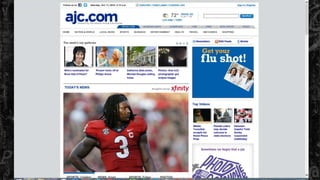
• Atlanta Journal Constitution – http://ajc.com 
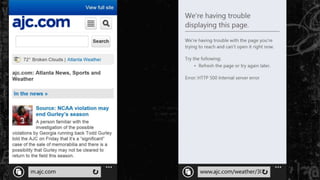
• Adaptive – http://m.ajc.com 
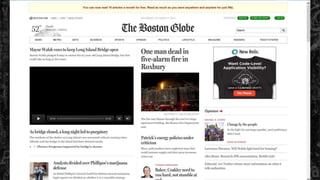
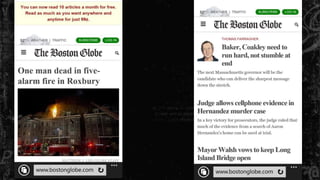
• Boston Globe – http://bostonglobe.com 
• Responsive
What is Adaptive? 
• Uses Server-Side Device Detection 
• WURFL 
• Separate Site 
• Usually m.<domain>.com 
• Requires maintaining 2 Code Bases 
• In Theory You Can Make a ‘mobile’ optimized version 
• In Reality A PITA 
• Often 3rd party solution that scraped full site for content
“this unspoken agreement to pretend that we had a certain size. And 
that size changed over the years. For a while, we all sort of tacitly 
agreed that 640 by 480 was the right size, and then later than changed 
to 800:600, and 1024; we seem to have settled on this 960 pixel as 
being this like, default. It’s still unknown. We still don’t know the size of 
the browser; it’s just like this consensual hallucination that we’ve all 
agreed to participate in: “Let’s assume the browser has a browser 
width of at least 960 pixels.” 
Jeremy Keith 
bit.ly/1bhH6rw
“The emergence of ideas like “responsive design” and “future-friendly 
thinking” are in part a response to the collective realization that 
designing products that solve one problem in one context at a time is 
no longer sustainable. By refocusing our process on systems that are 
explicitly designed to adapt to a changing environment, we have an 
opportunity to develop durable, long-lasting designs that renew their 
usefulness and value over time.” 
Wilson Miner 
bit.ly/1fbq5lB
“Any attempt to draw a line around a particular device class has as 
much permanence as a literal line in the sand. Pause for a moment and 

the line blurs. Look away and it will be gone. 

Let’s take the absolute best case scenario. You’re building a web app for 
internal users for whom you get to specify what computer is purchased 
and used. You can specify the browser, the monitor size, keyboard, etc.” 
Jason Grigsby 
bit.ly/KzJH9G
“How long do you think that hardware will be able to be found? Three years 
from now when a computer dies and has to be replaced, what are the 
chances that the new monitor will be a touchscreen? 
By making a decision to design solely for a “desktop UI”, you are creating 
technical debt and limiting the longevity of the app you’re building. You’re 
designing to a collective hallucination. You don’t have to have a crystal ball 
to see where things are headed. 
And once you start accepting the reality that the lines inside form factors are 
as blurry as the lines between them, then responsiveness becomes a 
necessity.” 
Jason Grigsby 
bit.ly/KzJH9G
Responsive Web Design 
• Introduced by Ethan Marcotte 2010 - bit.ly/178an9e 
• Web Design Approach To Create An Optimal Viewing Experience 
Across All Browser ViewPorts 
• Fluid Layouts 
• Media Queries 
• Minimal if any JavaScript Required
Mobile First 
• Determine The Most Important Information 
• Expand From There 
• Start Responsive Design Mobile First
Fluid Layout 
• Stretch as the Browser ViewPort Changes 
• Browser’s Viewable Area Inside the Chrome 
• Serve as the Foundation for the Web Application Layout 
• Great Way To Create Native Like Experience
Media Queries 
@media (min-width: 600px) { 
/* Selectors & Rules */ 
} 
@media (min-width: 820px) { 
/* Selectors & Rules */ 
} 
@media (min-width: 1080px) { 
/* Selectors & Rules */ 
}
Responsive Navigation 
• Use Media Queries to Optimize Rendering 
• Show and Hide Content Based on ViewPort Dimensions 
• Create A Mobile Friendly View 
• Optimize for Large Screens Without Device Detection
Responsible Web Design 
• Practice of Providing Appropriate Content by Context 
• Primarily to Limit Image and Content Affects over Mobile 
• Can Involve JavaScript 
• Can Also be Used as a Design Technique
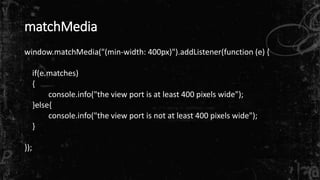
matchMedia 
• Allows You To Bind JavaScript Callbacks to MediaQuery Breakpoints 
• Available in All Modern Browsers (IE 10+) 
• Eliminated Need to Bind to Resize Event
matchMedia 
window.matchMedia("(min-width: 400px)").addListener(function (e) { 
if(e.matches) 
{ 
console.info("the view port is at least 400 pixels wide"); 
}else{ 
console.info("the view port is not at least 400 pixels wide"); 
} 
});
The Image Problem 
• Images Account for Majority of Downloaded Content 
• Screen Diversity Means Variety of Image Sizes & Quality 
• Screen Size 
• Screen Resolution 
• Bandwidth Consideration 
• Art Direction
The Image Problem – Proposed Solutions 
• Picture Element – 
• Already Killed 
• No Wait It is Racing to Standardization Now 
• Srcset – 
• Current Specification Path 
• No It looks Dead Now 
• Src-N – 
• New Comer 
• Yesterday’s News
The Image Problem – Read More 
• http://responsiveimages.org/ 
• http://www.html5rocks.com/en/tutorials/responsive/picture-element/
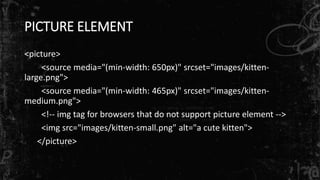
PICTURE ELEMENT 
<picture> 
<source media="(min-width: 650px)" srcset="images/kitten-large. 
png"> 
<source media="(min-width: 465px)" srcset="images/kitten-medium. 
png"> 
<!-- img tag for browsers that do not support picture element --> 
<img src="images/kitten-small.png" alt="a cute kitten"> 
</picture>
The Image Problem –What To Do Now? 
• Use Nested Elements 
• CSS background-image 
• Display: none 
• JavaScript Hacks????? 
• Legacy Browsers Use Core Site
Thank You! 
• Responsive Design 
• Touch 
• Mobile First 
• SPA 
• Extensible, Scalable Architecture 
• Web Build and Workflow 
• Goes Really Fast! 
• ~395 Pages 
• 20 Chapters 
• $9.99 http://amzn.to/1a55L89

There Is No Mobile: An Introduction To Responsive Web Design

  • 1.
    There is NoMobile: An Introduction to Responsive Web Design Chris Love http://Love2Dev.com @ChrisLove
  • 3.
    Who Am I • ASP.NET MVP • ASP Insider • Internet Explorer User Agent • Author • Speaker • Tweaker, Lover of Web, JavaScript, CSS & HTML5 • @ChrisLove • Love2Dev.com
  • 4.
    High Performance SinglePage Web Applications • Responsive Design • Touch • Mobile First • SPA • Extensible, Scalable Architecture • Web Build and Workflow • Goes Really Fast! • ~395 Pages • 20 Chapters • $9.99 http://amzn.to/1a55L89
  • 5.
    Slide Deck &Source Code • Slide Deck – http://slidesha.re/19NZInK • Source Code – http://GitHub.com/docluv
  • 6.
    Compare Responsive vsNon- Responsive • Atlanta Journal Constitution – http://ajc.com • Adaptive – http://m.ajc.com • Boston Globe – http://bostonglobe.com • Responsive
  • 11.
    What is Adaptive? • Uses Server-Side Device Detection • WURFL • Separate Site • Usually m.<domain>.com • Requires maintaining 2 Code Bases • In Theory You Can Make a ‘mobile’ optimized version • In Reality A PITA • Often 3rd party solution that scraped full site for content
  • 12.
    “this unspoken agreementto pretend that we had a certain size. And that size changed over the years. For a while, we all sort of tacitly agreed that 640 by 480 was the right size, and then later than changed to 800:600, and 1024; we seem to have settled on this 960 pixel as being this like, default. It’s still unknown. We still don’t know the size of the browser; it’s just like this consensual hallucination that we’ve all agreed to participate in: “Let’s assume the browser has a browser width of at least 960 pixels.” Jeremy Keith bit.ly/1bhH6rw
  • 13.
    “The emergence ofideas like “responsive design” and “future-friendly thinking” are in part a response to the collective realization that designing products that solve one problem in one context at a time is no longer sustainable. By refocusing our process on systems that are explicitly designed to adapt to a changing environment, we have an opportunity to develop durable, long-lasting designs that renew their usefulness and value over time.” Wilson Miner bit.ly/1fbq5lB
  • 16.
    “Any attempt todraw a line around a particular device class has as much permanence as a literal line in the sand. Pause for a moment and the line blurs. Look away and it will be gone. Let’s take the absolute best case scenario. You’re building a web app for internal users for whom you get to specify what computer is purchased and used. You can specify the browser, the monitor size, keyboard, etc.” Jason Grigsby bit.ly/KzJH9G
  • 17.
    “How long doyou think that hardware will be able to be found? Three years from now when a computer dies and has to be replaced, what are the chances that the new monitor will be a touchscreen? By making a decision to design solely for a “desktop UI”, you are creating technical debt and limiting the longevity of the app you’re building. You’re designing to a collective hallucination. You don’t have to have a crystal ball to see where things are headed. And once you start accepting the reality that the lines inside form factors are as blurry as the lines between them, then responsiveness becomes a necessity.” Jason Grigsby bit.ly/KzJH9G
  • 20.
    Responsive Web Design • Introduced by Ethan Marcotte 2010 - bit.ly/178an9e • Web Design Approach To Create An Optimal Viewing Experience Across All Browser ViewPorts • Fluid Layouts • Media Queries • Minimal if any JavaScript Required
  • 21.
    Mobile First •Determine The Most Important Information • Expand From There • Start Responsive Design Mobile First
  • 22.
    Fluid Layout •Stretch as the Browser ViewPort Changes • Browser’s Viewable Area Inside the Chrome • Serve as the Foundation for the Web Application Layout • Great Way To Create Native Like Experience
  • 24.
    Media Queries @media(min-width: 600px) { /* Selectors & Rules */ } @media (min-width: 820px) { /* Selectors & Rules */ } @media (min-width: 1080px) { /* Selectors & Rules */ }
  • 25.
    Responsive Navigation •Use Media Queries to Optimize Rendering • Show and Hide Content Based on ViewPort Dimensions • Create A Mobile Friendly View • Optimize for Large Screens Without Device Detection
  • 27.
    Responsible Web Design • Practice of Providing Appropriate Content by Context • Primarily to Limit Image and Content Affects over Mobile • Can Involve JavaScript • Can Also be Used as a Design Technique
  • 28.
    matchMedia • AllowsYou To Bind JavaScript Callbacks to MediaQuery Breakpoints • Available in All Modern Browsers (IE 10+) • Eliminated Need to Bind to Resize Event
  • 29.
    matchMedia window.matchMedia("(min-width: 400px)").addListener(function(e) { if(e.matches) { console.info("the view port is at least 400 pixels wide"); }else{ console.info("the view port is not at least 400 pixels wide"); } });
  • 31.
    The Image Problem • Images Account for Majority of Downloaded Content • Screen Diversity Means Variety of Image Sizes & Quality • Screen Size • Screen Resolution • Bandwidth Consideration • Art Direction
  • 32.
    The Image Problem– Proposed Solutions • Picture Element – • Already Killed • No Wait It is Racing to Standardization Now • Srcset – • Current Specification Path • No It looks Dead Now • Src-N – • New Comer • Yesterday’s News
  • 33.
    The Image Problem– Read More • http://responsiveimages.org/ • http://www.html5rocks.com/en/tutorials/responsive/picture-element/
  • 34.
    PICTURE ELEMENT <picture> <source media="(min-width: 650px)" srcset="images/kitten-large. png"> <source media="(min-width: 465px)" srcset="images/kitten-medium. png"> <!-- img tag for browsers that do not support picture element --> <img src="images/kitten-small.png" alt="a cute kitten"> </picture>
  • 35.
    The Image Problem–What To Do Now? • Use Nested Elements • CSS background-image • Display: none • JavaScript Hacks????? • Legacy Browsers Use Core Site
  • 37.
    Thank You! •Responsive Design • Touch • Mobile First • SPA • Extensible, Scalable Architecture • Web Build and Workflow • Goes Really Fast! • ~395 Pages • 20 Chapters • $9.99 http://amzn.to/1a55L89