The World of Blogs Online Book Discussions for Elementary School Teachers and Librarians Session One-Book Discussions and Blogs By Christine Anderson
Pros and Cons of Classroom Book Discussions Increased Vocabulary and comprehension Improved Verbal and Discussion Skills Sharing of Ideas Interaction between students and teacher Limited classroom time Not every student can give input More impulsive answers instead of constructive discussion
Benefits to Blog Format Teacher/Librarian Moderated Allows time for reflection prior to answering Increased student participation Motivation to students who may not normally participate Fosters collaboration and creative expression Inspires self reflection Practice of writing and communication skills Informal evaluation of writing and communication skills Extends the walls of the classroom Learning environment is available 24/7 Helps prepare students for a digital future
Let’s Begin! What is a Blog? Short for weB LOG An online journal Moderator posts topic/comment People respond Security Blog viewing can be restricted Authors and members can be limited Customizing creates safe environment for children
Creating a Blog Many free services available-we will use Blogger Limited technical knowledge required Log in to  www.Blogger.com Click Create A Blog
Creating a Blog  Create an account (use school district e-mail address) Name your Blog
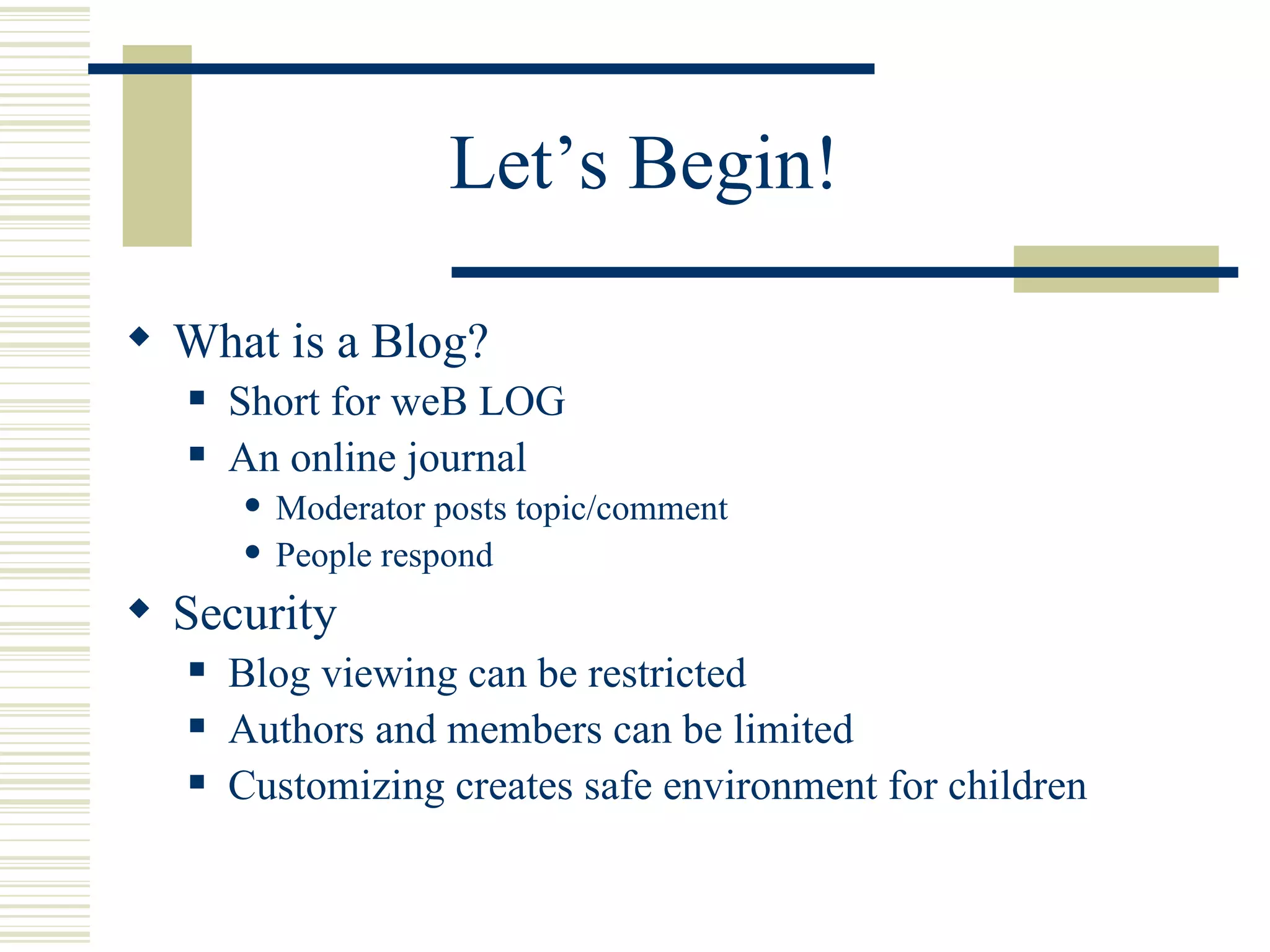
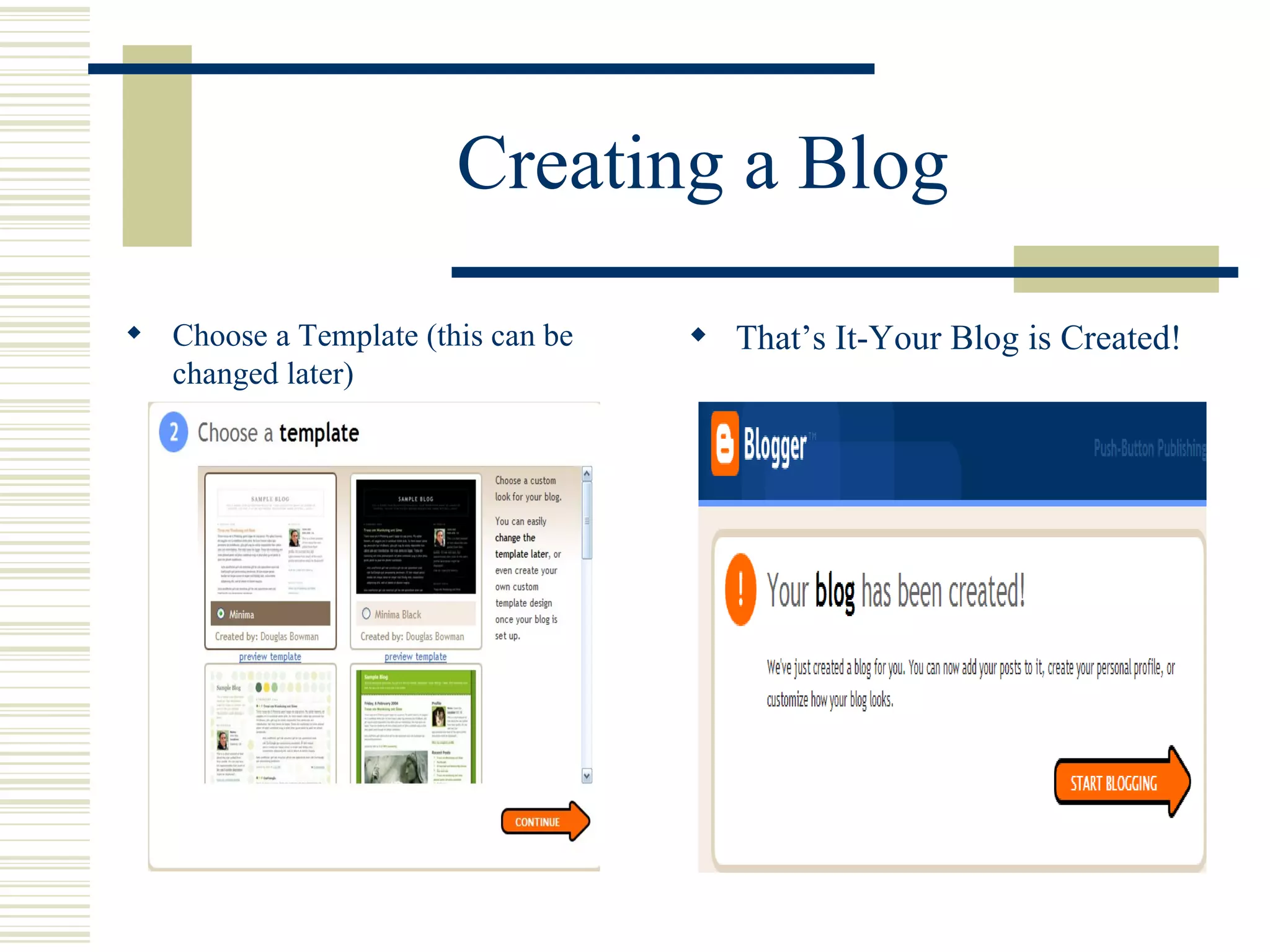
Creating a Blog Choose a Template (this can be changed later) That’s It-Your Blog is Created!
Starting the Discussion Simply enter a title for you post, type your comments or questions and click “Publish Post”
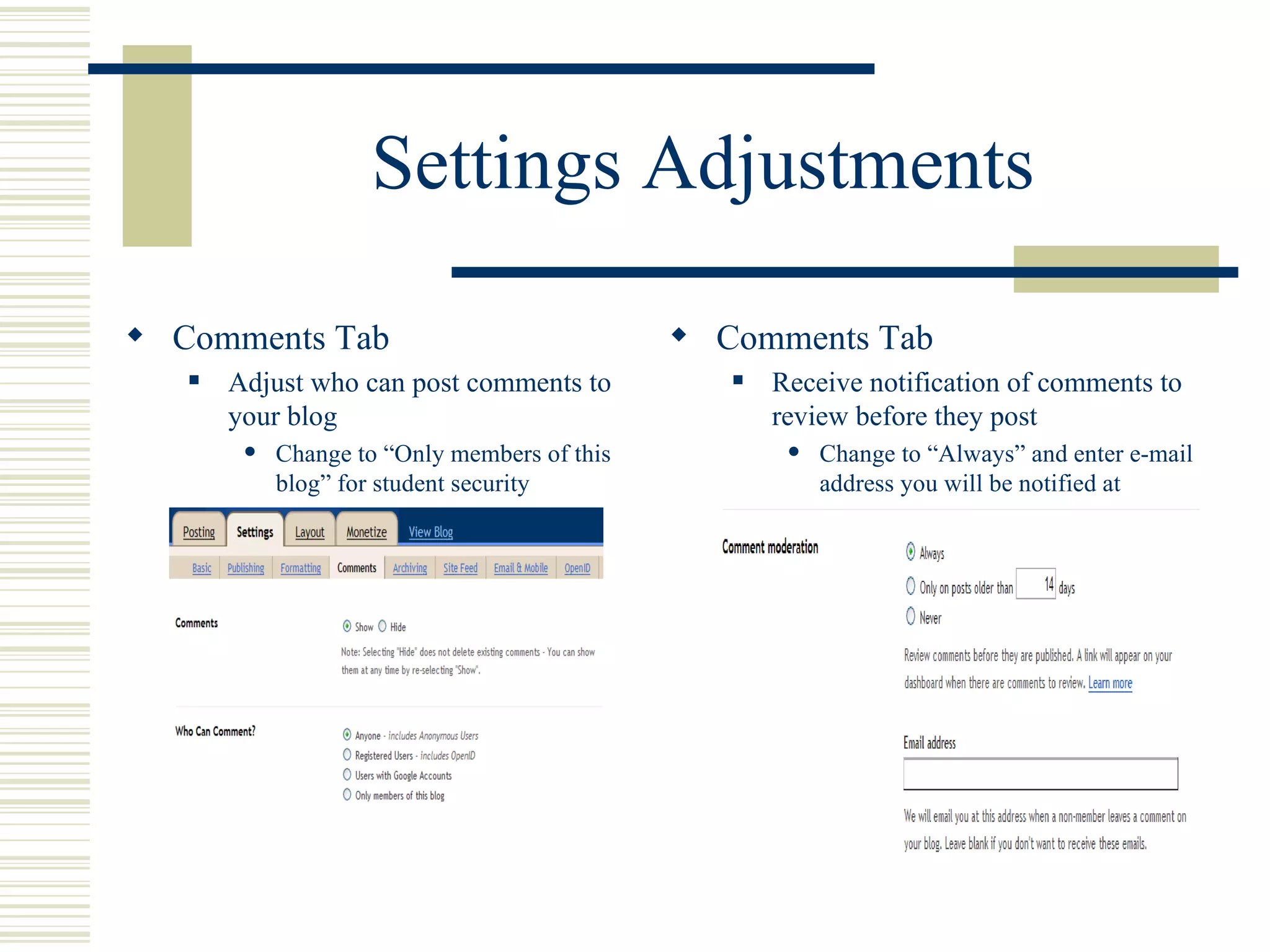
Settings Adjustments Comments Tab Adjust who can post comments to your blog Change to “Only members of this blog” for student security Comments Tab Receive notification of comments to review before they post Change to “Always” and enter e-mail address you will be notified at
Settings Adjustments Permissions These changes allow only the students and teacher to read and post comments Add members (authors) who can post-students e-mail address Adjust Viewers Change to only blog authors
Going Forward Add blog address (URL) to teacher website on school district website. From example  http://mssmithbookblog.blogspot.com Students should access blog from this spot only. Tips for teacher blogs View several blogs and online book clubs for inspiration and to see how they work Keep the purpose of your post clear Be sure students are clear on what is expected of them Give clear guidelines & conduct expectations to students  Provide proper security measures to keep blog available to students and teacher only Allow time in class to practice before students are expected to do at home Have fun!
Additional Information and Resources Blogger help site  http://help.blogger.com/ Blogs in the elementary classroom video  http://www.teachertube.com/viewVideo.php?video_id=99517&title=Blogs_in_the_elementary_classroom Sample blog sites My class blog site Book Chat Online  www.bookchatonline.blogspot.com http://www.roselle.lib.il.us/YouthServices/BookClub/BookClub_FAQ.htm http://booksbypickles.blogspot.com/ http://www.jacketflap.com/
Until Next Time… During the next week play around with your blogs Post a comment or question on your site  Visit each others sites once a week and leave a comment Feel free to e-mail me any questions you may have or… Stop by and visit during “Bloggers Breakfast Break”
The World of Blogs Online Book Discussions for Elementary School Teachers and Librarians Session 2-Customizing your blog and posting added items.
Additional Posting Items Pictures Web Links Video as introductory book talk These are the basics but there is always more to explore……
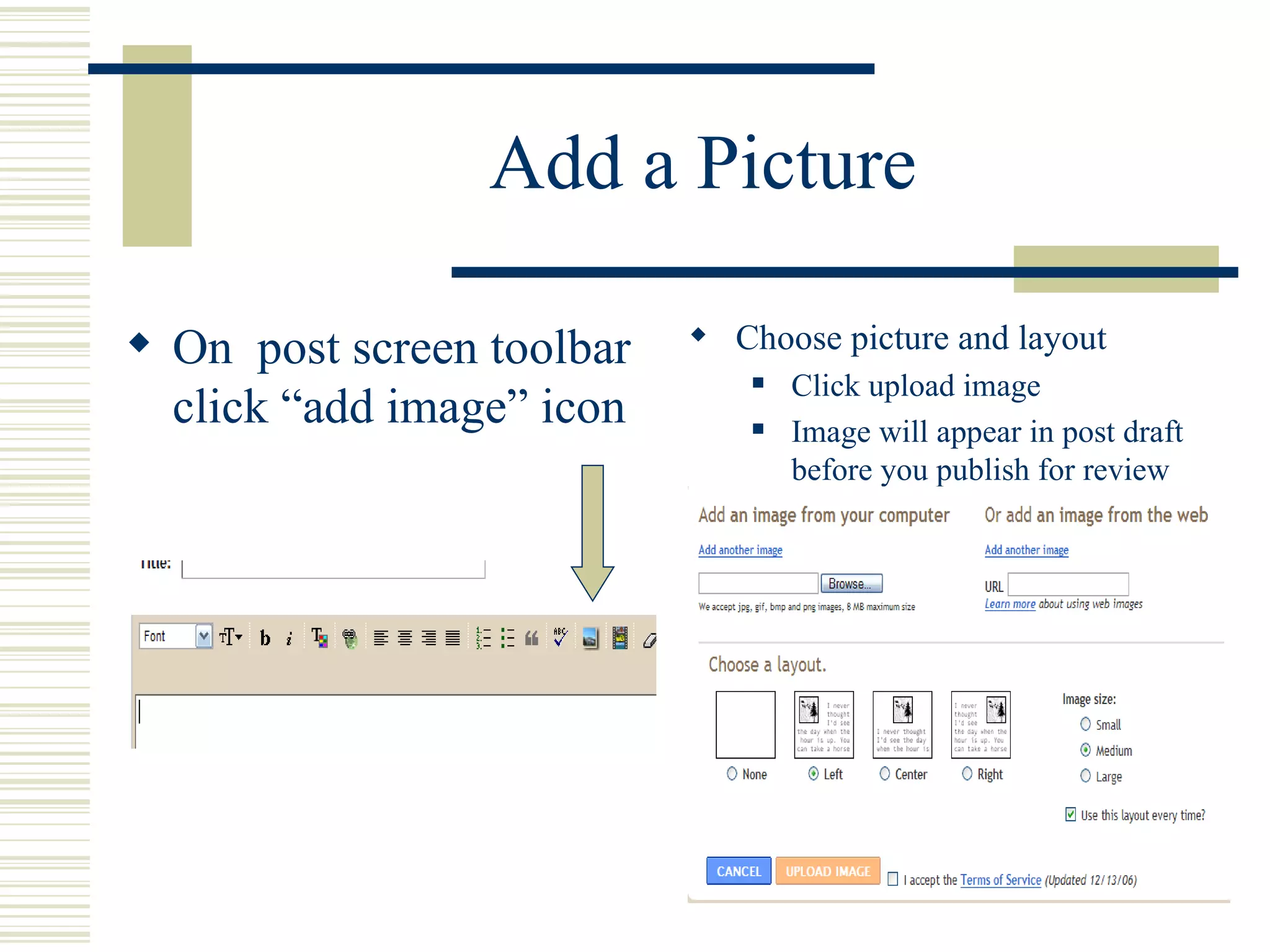
Add a Picture On  post screen toolbar click “add image” icon Choose picture and layout Click upload image Image will appear in post draft before you publish for review
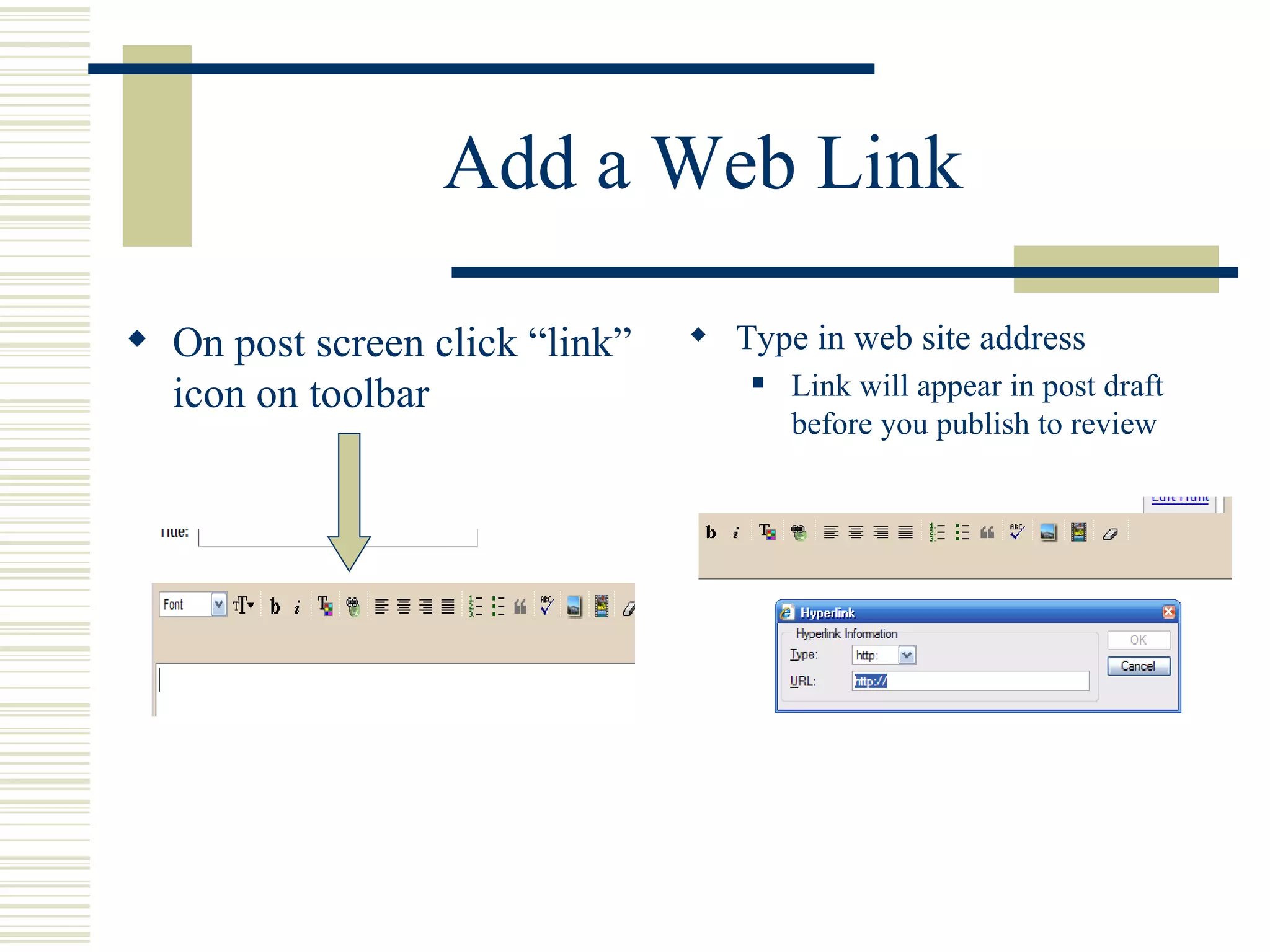
Add a Web Link On post screen click “link” icon on toolbar Type in web site address Link will appear in post draft before you publish to review
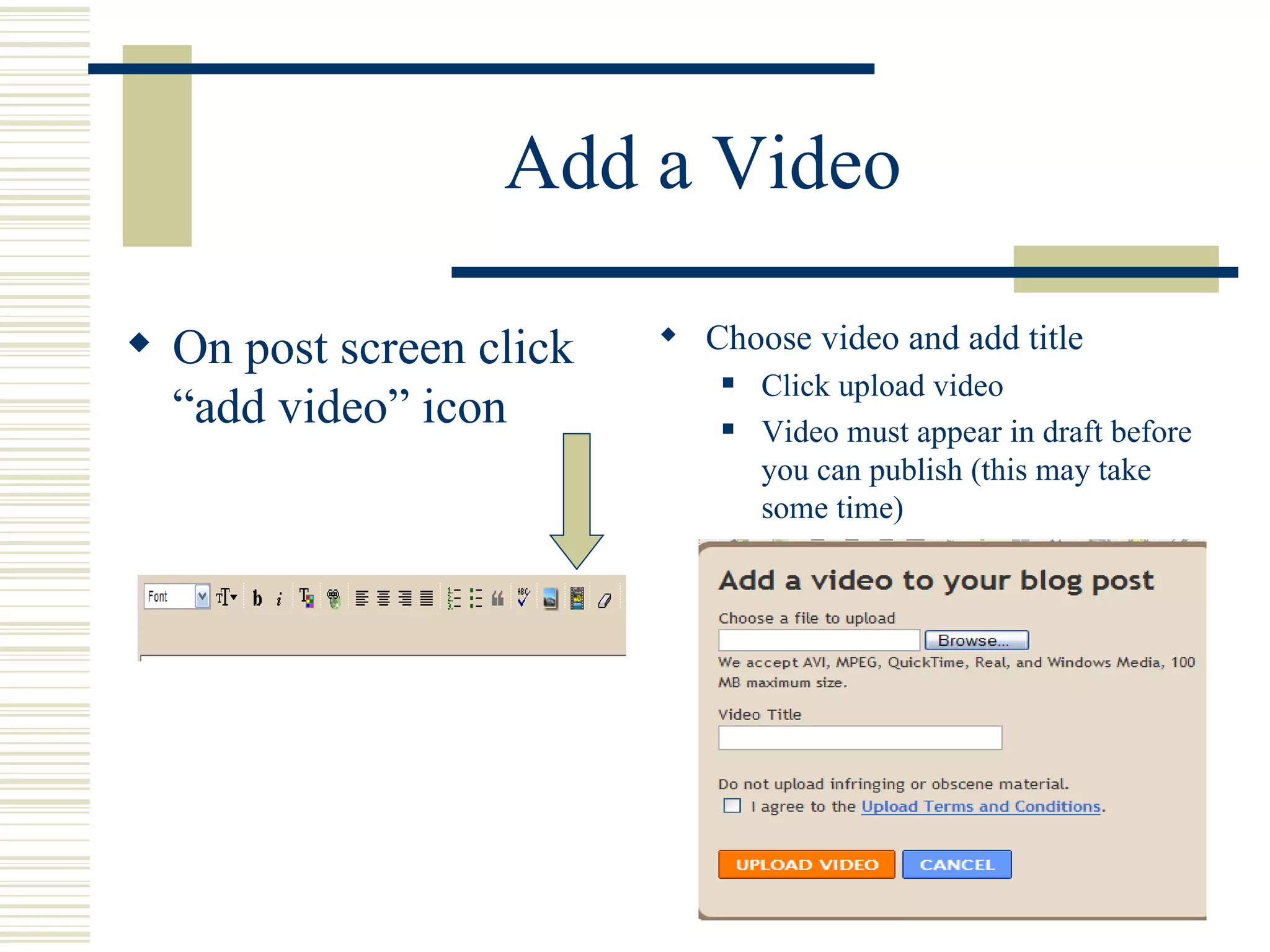
Add a Video On post screen click “add video” icon Choose video and add title Click upload video Video must appear in draft before you can publish (this may take some time)
Creating Book Talk Video  Create Audio File Using Audacity Audacity is a   free, downloadable cross-platform sound recorder and editor Download at  http://audacity.sourceforge.net/  Version 1.2.6 To convert recording to MP3 file download also download LAME MP3 encoder at same site Simple computer microphone is required to record
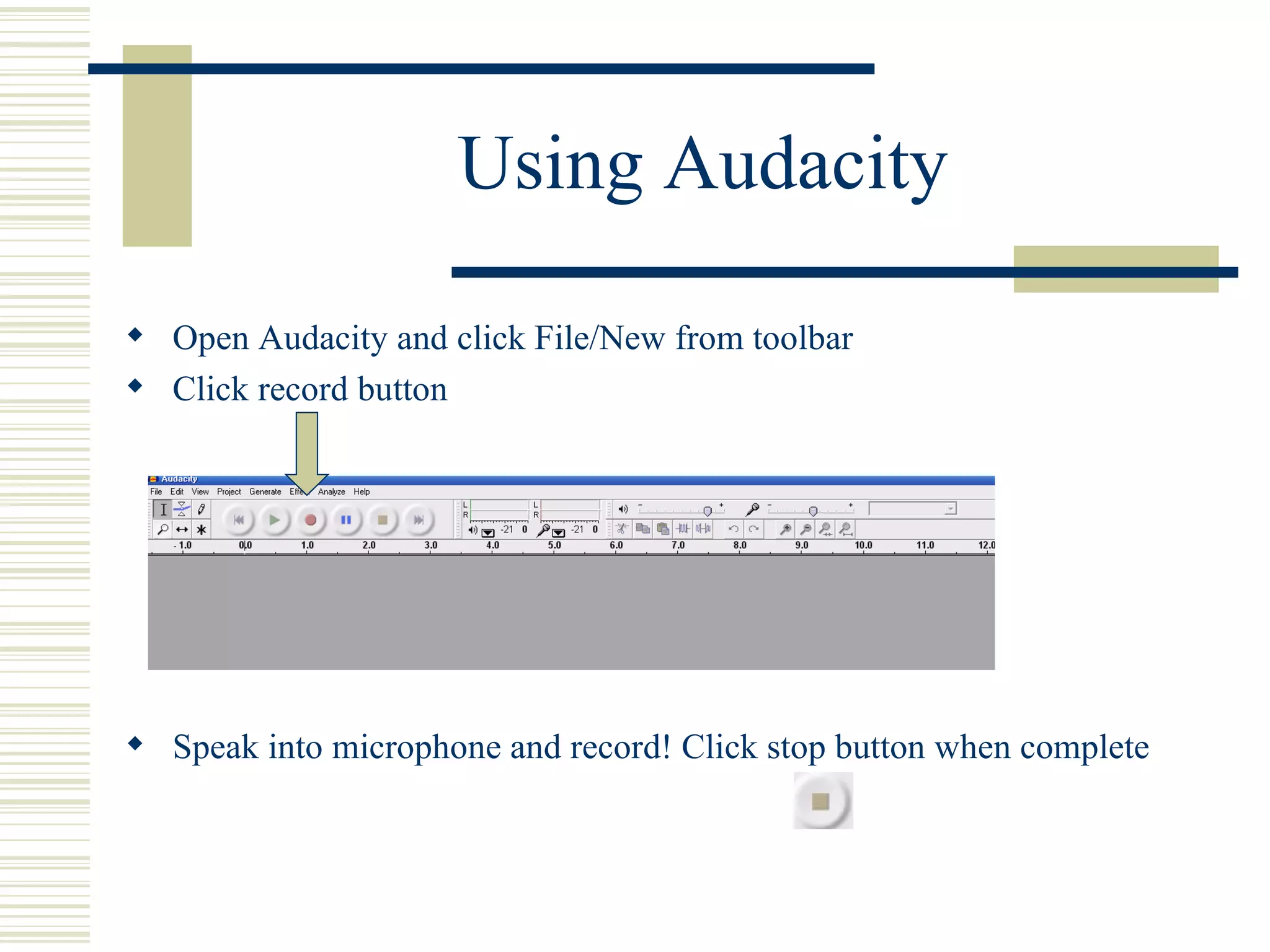
Using Audacity Open Audacity and click File/New from toolbar Click record button  Speak into microphone and record! Click stop button when complete
Using Audacity Additional Audio tracks can be added or music and sounds imported   Click project from toolbar and select option
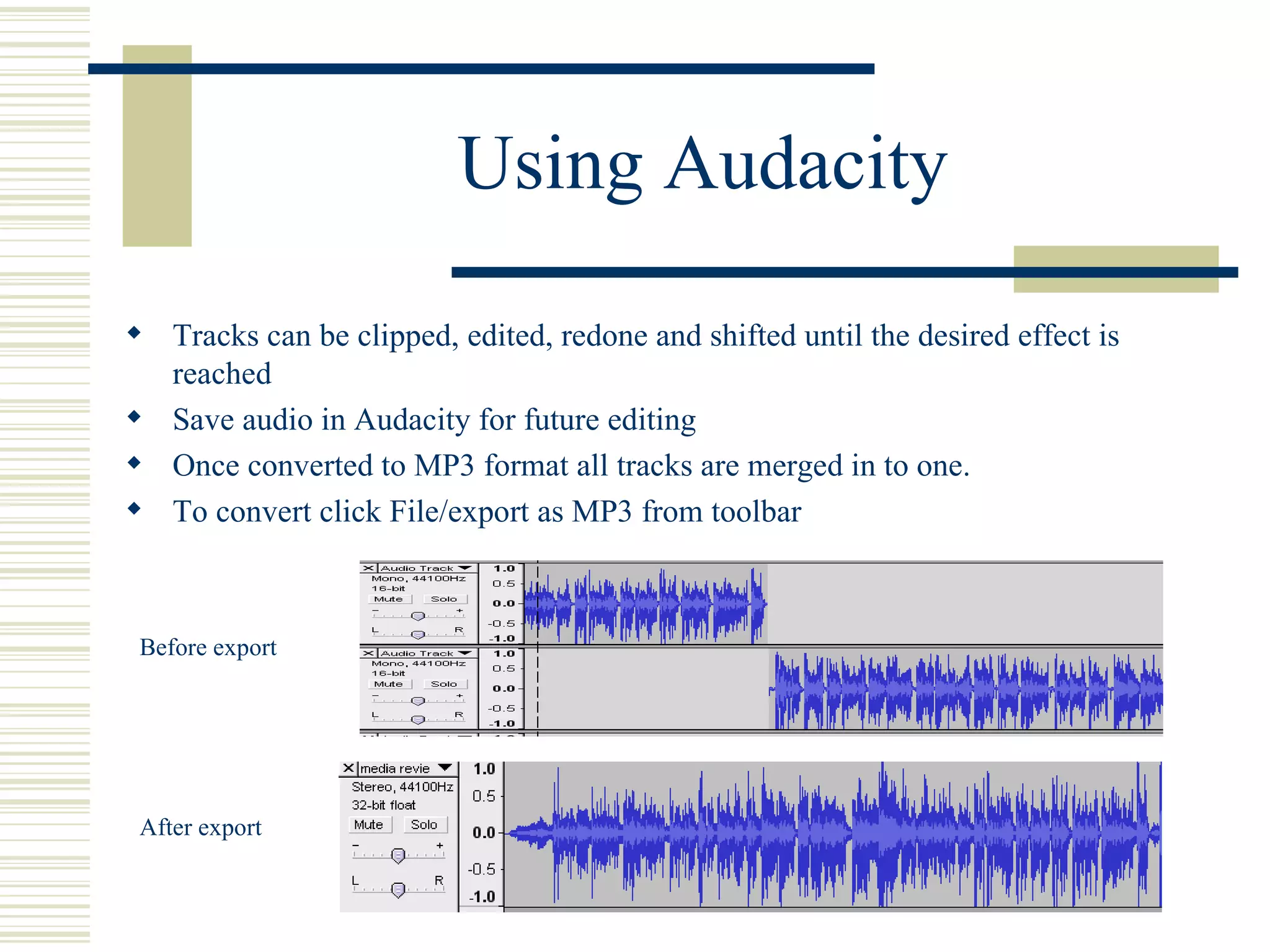
Using Audacity Tracks can be clipped, edited, redone and shifted until the desired effect is reached Save audio in Audacity for future editing Once converted to MP3 format all tracks are merged in to one. To convert click File/export as MP3 from toolbar  Before export After export
Use Audio in Video Software MP3 format can be imported as audio file into Windows Movie Maker Open new project under File/New Project Import MP3 file into your movie collections under File/Import
Use Audio in Video Software Select file and click Import Import any pictures, such as the book cover, the same way See  www.bookchatonline.blogspot.com  for sample
Use Audio in Video Software Simply Drag and Drop the files to the bar at the bottom to create video Picture may need to be copied to cover audio so there is no black space Save your project and then save as movie file for playback on your computer.  This will allow you to add the video to various applications Video file after drag and drop
Additional Information and Resources Audacity Online Manual  http://audacity.sourceforge.net/manual-1.2/index.html Windows Movie Maker online tutorials http://www.microsoft.com/windowsxp/using/moviemaker/default.mspx http://presentationsoft.about.com/od/moviemaker/a/mov_mak_beg.htm Booktalks Quick and Simple  http://nancykeane.com/booktalks/default.htm And don’t forget “Bloggers Breaks” at the media center

The World Of Blogs

  • 1.
    The World ofBlogs Online Book Discussions for Elementary School Teachers and Librarians Session One-Book Discussions and Blogs By Christine Anderson
  • 2.
    Pros and Consof Classroom Book Discussions Increased Vocabulary and comprehension Improved Verbal and Discussion Skills Sharing of Ideas Interaction between students and teacher Limited classroom time Not every student can give input More impulsive answers instead of constructive discussion
  • 3.
    Benefits to BlogFormat Teacher/Librarian Moderated Allows time for reflection prior to answering Increased student participation Motivation to students who may not normally participate Fosters collaboration and creative expression Inspires self reflection Practice of writing and communication skills Informal evaluation of writing and communication skills Extends the walls of the classroom Learning environment is available 24/7 Helps prepare students for a digital future
  • 4.
    Let’s Begin! Whatis a Blog? Short for weB LOG An online journal Moderator posts topic/comment People respond Security Blog viewing can be restricted Authors and members can be limited Customizing creates safe environment for children
  • 5.
    Creating a BlogMany free services available-we will use Blogger Limited technical knowledge required Log in to www.Blogger.com Click Create A Blog
  • 6.
    Creating a Blog Create an account (use school district e-mail address) Name your Blog
  • 7.
    Creating a BlogChoose a Template (this can be changed later) That’s It-Your Blog is Created!
  • 8.
    Starting the DiscussionSimply enter a title for you post, type your comments or questions and click “Publish Post”
  • 9.
    Settings Adjustments CommentsTab Adjust who can post comments to your blog Change to “Only members of this blog” for student security Comments Tab Receive notification of comments to review before they post Change to “Always” and enter e-mail address you will be notified at
  • 10.
    Settings Adjustments PermissionsThese changes allow only the students and teacher to read and post comments Add members (authors) who can post-students e-mail address Adjust Viewers Change to only blog authors
  • 11.
    Going Forward Addblog address (URL) to teacher website on school district website. From example http://mssmithbookblog.blogspot.com Students should access blog from this spot only. Tips for teacher blogs View several blogs and online book clubs for inspiration and to see how they work Keep the purpose of your post clear Be sure students are clear on what is expected of them Give clear guidelines & conduct expectations to students Provide proper security measures to keep blog available to students and teacher only Allow time in class to practice before students are expected to do at home Have fun!
  • 12.
    Additional Information andResources Blogger help site http://help.blogger.com/ Blogs in the elementary classroom video http://www.teachertube.com/viewVideo.php?video_id=99517&title=Blogs_in_the_elementary_classroom Sample blog sites My class blog site Book Chat Online www.bookchatonline.blogspot.com http://www.roselle.lib.il.us/YouthServices/BookClub/BookClub_FAQ.htm http://booksbypickles.blogspot.com/ http://www.jacketflap.com/
  • 13.
    Until Next Time…During the next week play around with your blogs Post a comment or question on your site Visit each others sites once a week and leave a comment Feel free to e-mail me any questions you may have or… Stop by and visit during “Bloggers Breakfast Break”
  • 14.
    The World ofBlogs Online Book Discussions for Elementary School Teachers and Librarians Session 2-Customizing your blog and posting added items.
  • 15.
    Additional Posting ItemsPictures Web Links Video as introductory book talk These are the basics but there is always more to explore……
  • 16.
    Add a PictureOn post screen toolbar click “add image” icon Choose picture and layout Click upload image Image will appear in post draft before you publish for review
  • 17.
    Add a WebLink On post screen click “link” icon on toolbar Type in web site address Link will appear in post draft before you publish to review
  • 18.
    Add a VideoOn post screen click “add video” icon Choose video and add title Click upload video Video must appear in draft before you can publish (this may take some time)
  • 19.
    Creating Book TalkVideo Create Audio File Using Audacity Audacity is a free, downloadable cross-platform sound recorder and editor Download at http://audacity.sourceforge.net/ Version 1.2.6 To convert recording to MP3 file download also download LAME MP3 encoder at same site Simple computer microphone is required to record
  • 20.
    Using Audacity OpenAudacity and click File/New from toolbar Click record button Speak into microphone and record! Click stop button when complete
  • 21.
    Using Audacity AdditionalAudio tracks can be added or music and sounds imported Click project from toolbar and select option
  • 22.
    Using Audacity Trackscan be clipped, edited, redone and shifted until the desired effect is reached Save audio in Audacity for future editing Once converted to MP3 format all tracks are merged in to one. To convert click File/export as MP3 from toolbar Before export After export
  • 23.
    Use Audio inVideo Software MP3 format can be imported as audio file into Windows Movie Maker Open new project under File/New Project Import MP3 file into your movie collections under File/Import
  • 24.
    Use Audio inVideo Software Select file and click Import Import any pictures, such as the book cover, the same way See www.bookchatonline.blogspot.com for sample
  • 25.
    Use Audio inVideo Software Simply Drag and Drop the files to the bar at the bottom to create video Picture may need to be copied to cover audio so there is no black space Save your project and then save as movie file for playback on your computer. This will allow you to add the video to various applications Video file after drag and drop
  • 26.
    Additional Information andResources Audacity Online Manual http://audacity.sourceforge.net/manual-1.2/index.html Windows Movie Maker online tutorials http://www.microsoft.com/windowsxp/using/moviemaker/default.mspx http://presentationsoft.about.com/od/moviemaker/a/mov_mak_beg.htm Booktalks Quick and Simple http://nancykeane.com/booktalks/default.htm And don’t forget “Bloggers Breaks” at the media center