• Build up your economy
• Produce monks, traders or soldiers
• Invest your special settlers to race for victory
Economy Puzzle
•   Establish good chains
•   Decide building composition
•   Arrange for efficient transport
•   Time construction
•   Use food boost
Traders
                          • Generate money
                             – buy instead of produce
Monks                        – Trade expeditions establish
• Research technologies        new trade options
   –   Production         • Buy sectors
   –   Construction       • Questing
   –   Offense
   –   Defense
• Convert sectors         Soldiers
• Strengthen defense      • Conquer and crush
• Questing                • Questing
Settlers 7
•   Free Camera
•   Thousands of animated objects
•   Highly detailed game world
•   Simulation
Iteration
Lesson: Iteration
• Quality of your game is proportional to the
  amount of work you discard

You have to be fast at trying out things and
 throwing them away. Once in a while you
 actually end up with something that is fun.
Game Design and Prototypes
• Game designers write first prototypes
  – Enforces stringency by requiring attention to detail
  – Shortest possible feedback cycle for game design
  – You can go a long way with tools like BlitzBasic
• Tech guys ready engine for production during
  prototyping

Once the concept matures you must be ready
 to prototype in the engine
Turnaround: Build

• Proper coding   • Ram disk
• Blob build      • Incredibuild
Turnaround: Restart
• Dynamic reload
• Preprocessed data
• Low detail mode
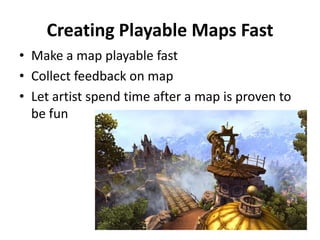
Creating Playable Maps Fast
• Make a map playable fast
• Collect feedback on map
• Let artist spend time after a map is proven to
  be fun
Map Sketch
Planning
Overlay
Map Editor
•   Planning overlays
•   Full undo support
•   Replay support for crash recovery
•   Objects can be freely scaled
    – Non-uniform with automatic texture adaption
• (Almost) zero user interaction for movement blocking
• Copy and paste support for landscapes
    – Copied landscape can be rotated and translated
    – Copied landscape can be mirrored
• Template tool: create landscape with a single brush
  stroke
0
                   1
                       2
                           3
                               4
                                   5
                                           7
                                                                          8


                                       6
 VP @ 10mins


 VP @ 20mins


 VP @ 30mins


 VP @ 40mins
                                               Victory points over time


 VP @ 50mins


 VP @ 60mins


 VP @ 70mins


 VP @ 80mins


 VP @ 90mins


VP @ 100mins
                                                                              Measure Game Behavior


VP @ 110mins


VP @ 120mins


    VP @ win
Measure Game Behavior: AI

   Fancy Food
Lesson: Iteration
• Quality of your game is proportional to the
  amount of work you discard

You have to be fast at trying out things and
 throwing them away. Once in a while you
 actually end up with something that is fun.
More is More
Lesson: More Is More
• Understand your engine
• Beware of cache
• Stay in control of resource usage

Artistic resource hunger is insatiable.
 Technology enables and must enforce limits.
Standard Stuff
•   Keep object representation small
•   Simple and regular scene division
•   Visibility culling
•   Spatial locality of iterated data
•   Stream to stay in memory budget
•   LOD wherever you can
•   Compact/compress vertex/texture/animation data
•   Imposters
•   Sort objects by materials to save pipe state changes
•   Instancing
•   Write efficient shaders
•   …
Introspection
• The better you understand your engine the
  more you can squeeze in.
  –   Cpu usage
  –   Memory usage
  –   Texture and geometry data
  –   Render targets
  –   AI goals
  –   Spatial partitioning structures (quadtree, …)
  –   …


   Trajectories needed
Introspection
2GB Virtual Address Space
• DirectX 9 managed resources add to virtual size
• Differences between XP and Vista
• Address space fragmentation can be critical
    – Rule of thumb: leave at least 1/3 unused


•   Managed textures: 144 MB                 •   Managed geometry: 150 MB
•   Render targets: 121 MB (way too much)    •   Default: 88 MB
•   Default textures: 440 MB                 •   System geometry: 19MB (way too much)
                               •   Animation data
                               •   Streaming buffer
                               •   Quadtree
                               •   …
Processor Memory Gap
Memory Hierarchy
Use the Force
• Where performance matters treat your game
  loop as a series of data transformation steps
  – Exploit multiple cores
  – Exploit SIMD
  – Exploit GPU
Automated Data Preprocessing
• Support multiple platforms
• Prepare parallelization
• Compact data in order to squeeze more into
  the game
• Stay in control of resource usage
• Keep artists happy: they want to work with
  native formats only
• Enforce data consistency
• fully automated: server monitors jobs for changes

• decentralized: runs on every developer machine
      bad data does not block others

• lives in perforce
       data for any version can be rebuild any time

• fast: parallelized, incremental archive update

• extensible: jobs are just command line tools
      programmers do not need to deal with
     framework APIs
Resource Handling
Dynamic Reload
Lesson: More Is More
• Understand your engine
• Beware of cache
• Stay in control of resource usage

Artistic resource hunger is insatiable.
 Technology enables and must enforce limits.
What’s Next?
The Settlers Online
Exploit             Expand            Explore        Exterminate
Act1: Basic Economy       Act2: Advanced Economy    Act 3: Expert Economy
  Supplies basic needs     Mining                   Logistics
  Food                     Metals                   Advanced troops
  building materials       Basic troops             Advanced defense
                            Support chains           Supplies for armies
The Settlers Online
Expanding his social network,
a player will become more
powerful at a faster rate

Buff your friends production
Send gifts to your friends
Trade with your friends
Help defending your friends kingdom
Earn hard currency by inviting new friends
 into the game by Email, Facebook, or Twitter
Q&A
The Settler 7- 포스트모템

The Settler 7- 포스트모템

  • 3.
    • Build upyour economy • Produce monks, traders or soldiers • Invest your special settlers to race for victory
  • 4.
    Economy Puzzle • Establish good chains • Decide building composition • Arrange for efficient transport • Time construction • Use food boost
  • 5.
    Traders • Generate money – buy instead of produce Monks – Trade expeditions establish • Research technologies new trade options – Production • Buy sectors – Construction • Questing – Offense – Defense • Convert sectors Soldiers • Strengthen defense • Conquer and crush • Questing • Questing
  • 6.
    Settlers 7 • Free Camera • Thousands of animated objects • Highly detailed game world • Simulation
  • 7.
  • 8.
    Lesson: Iteration • Qualityof your game is proportional to the amount of work you discard You have to be fast at trying out things and throwing them away. Once in a while you actually end up with something that is fun.
  • 9.
    Game Design andPrototypes • Game designers write first prototypes – Enforces stringency by requiring attention to detail – Shortest possible feedback cycle for game design – You can go a long way with tools like BlitzBasic • Tech guys ready engine for production during prototyping Once the concept matures you must be ready to prototype in the engine
  • 12.
    Turnaround: Build • Propercoding • Ram disk • Blob build • Incredibuild
  • 13.
    Turnaround: Restart • Dynamicreload • Preprocessed data • Low detail mode
  • 14.
    Creating Playable MapsFast • Make a map playable fast • Collect feedback on map • Let artist spend time after a map is proven to be fun
  • 15.
  • 16.
  • 20.
    Map Editor • Planning overlays • Full undo support • Replay support for crash recovery • Objects can be freely scaled – Non-uniform with automatic texture adaption • (Almost) zero user interaction for movement blocking • Copy and paste support for landscapes – Copied landscape can be rotated and translated – Copied landscape can be mirrored • Template tool: create landscape with a single brush stroke
  • 22.
    0 1 2 3 4 5 7 8 6 VP @ 10mins VP @ 20mins VP @ 30mins VP @ 40mins Victory points over time VP @ 50mins VP @ 60mins VP @ 70mins VP @ 80mins VP @ 90mins VP @ 100mins Measure Game Behavior VP @ 110mins VP @ 120mins VP @ win
  • 23.
  • 24.
    Lesson: Iteration • Qualityof your game is proportional to the amount of work you discard You have to be fast at trying out things and throwing them away. Once in a while you actually end up with something that is fun.
  • 25.
  • 26.
    Lesson: More IsMore • Understand your engine • Beware of cache • Stay in control of resource usage Artistic resource hunger is insatiable. Technology enables and must enforce limits.
  • 28.
    Standard Stuff • Keep object representation small • Simple and regular scene division • Visibility culling • Spatial locality of iterated data • Stream to stay in memory budget • LOD wherever you can • Compact/compress vertex/texture/animation data • Imposters • Sort objects by materials to save pipe state changes • Instancing • Write efficient shaders • …
  • 29.
    Introspection • The betteryou understand your engine the more you can squeeze in. – Cpu usage – Memory usage – Texture and geometry data – Render targets – AI goals – Spatial partitioning structures (quadtree, …) – …  Trajectories needed
  • 30.
  • 31.
    2GB Virtual AddressSpace • DirectX 9 managed resources add to virtual size • Differences between XP and Vista • Address space fragmentation can be critical – Rule of thumb: leave at least 1/3 unused • Managed textures: 144 MB • Managed geometry: 150 MB • Render targets: 121 MB (way too much) • Default: 88 MB • Default textures: 440 MB • System geometry: 19MB (way too much) • Animation data • Streaming buffer • Quadtree • …
  • 36.
  • 37.
  • 39.
    Use the Force •Where performance matters treat your game loop as a series of data transformation steps – Exploit multiple cores – Exploit SIMD – Exploit GPU
  • 40.
    Automated Data Preprocessing •Support multiple platforms • Prepare parallelization • Compact data in order to squeeze more into the game • Stay in control of resource usage • Keep artists happy: they want to work with native formats only • Enforce data consistency
  • 41.
    • fully automated:server monitors jobs for changes • decentralized: runs on every developer machine  bad data does not block others • lives in perforce  data for any version can be rebuild any time • fast: parallelized, incremental archive update • extensible: jobs are just command line tools  programmers do not need to deal with framework APIs
  • 42.
  • 43.
  • 44.
    Lesson: More IsMore • Understand your engine • Beware of cache • Stay in control of resource usage Artistic resource hunger is insatiable. Technology enables and must enforce limits.
  • 45.
  • 46.
    The Settlers Online Exploit Expand  Explore  Exterminate Act1: Basic Economy Act2: Advanced Economy Act 3: Expert Economy  Supplies basic needs  Mining  Logistics  Food  Metals  Advanced troops  building materials  Basic troops  Advanced defense  Support chains  Supplies for armies
  • 47.
    The Settlers Online Expandinghis social network, a player will become more powerful at a faster rate Buff your friends production Send gifts to your friends Trade with your friends Help defending your friends kingdom Earn hard currency by inviting new friends into the game by Email, Facebook, or Twitter
  • 48.