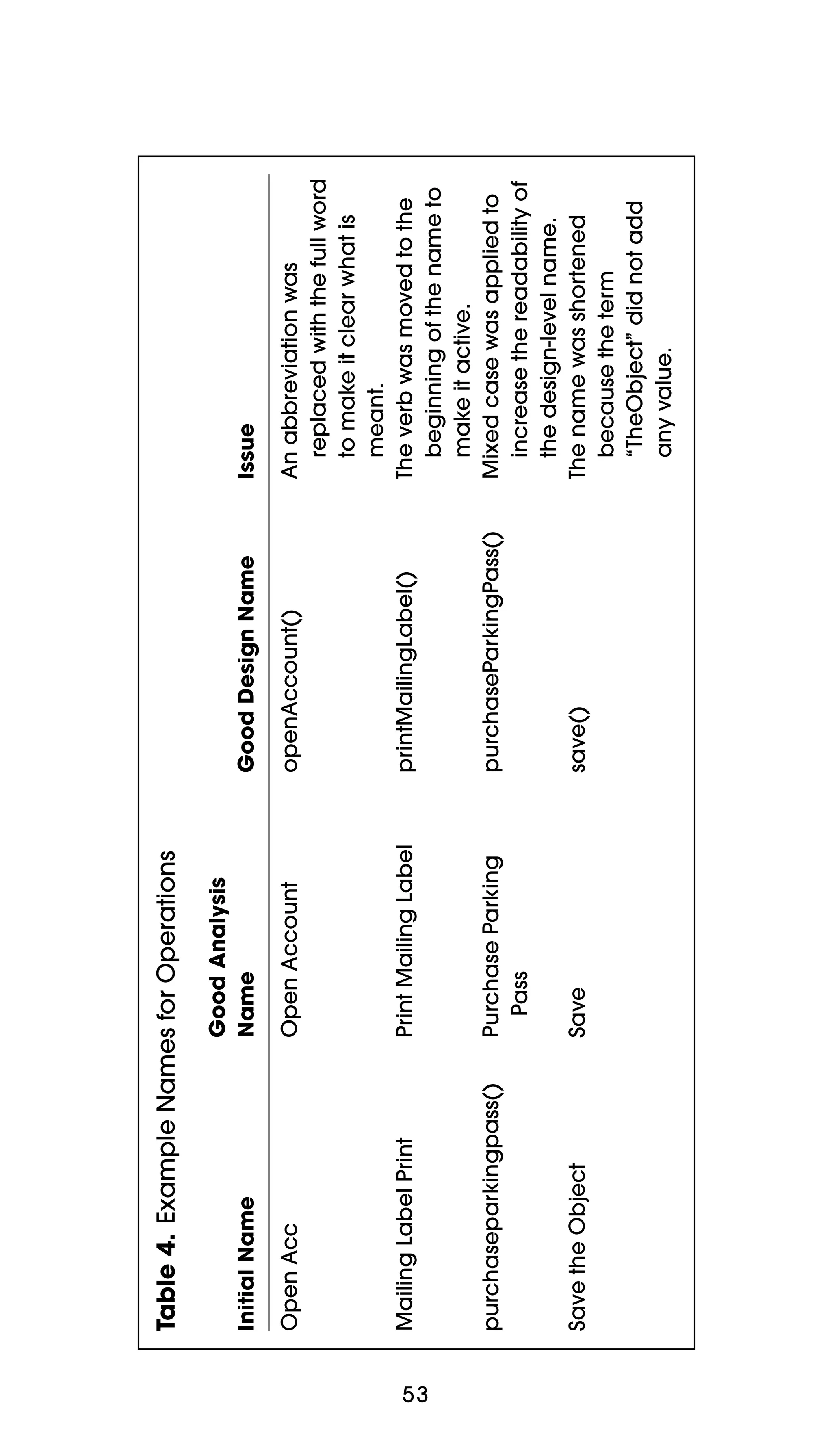
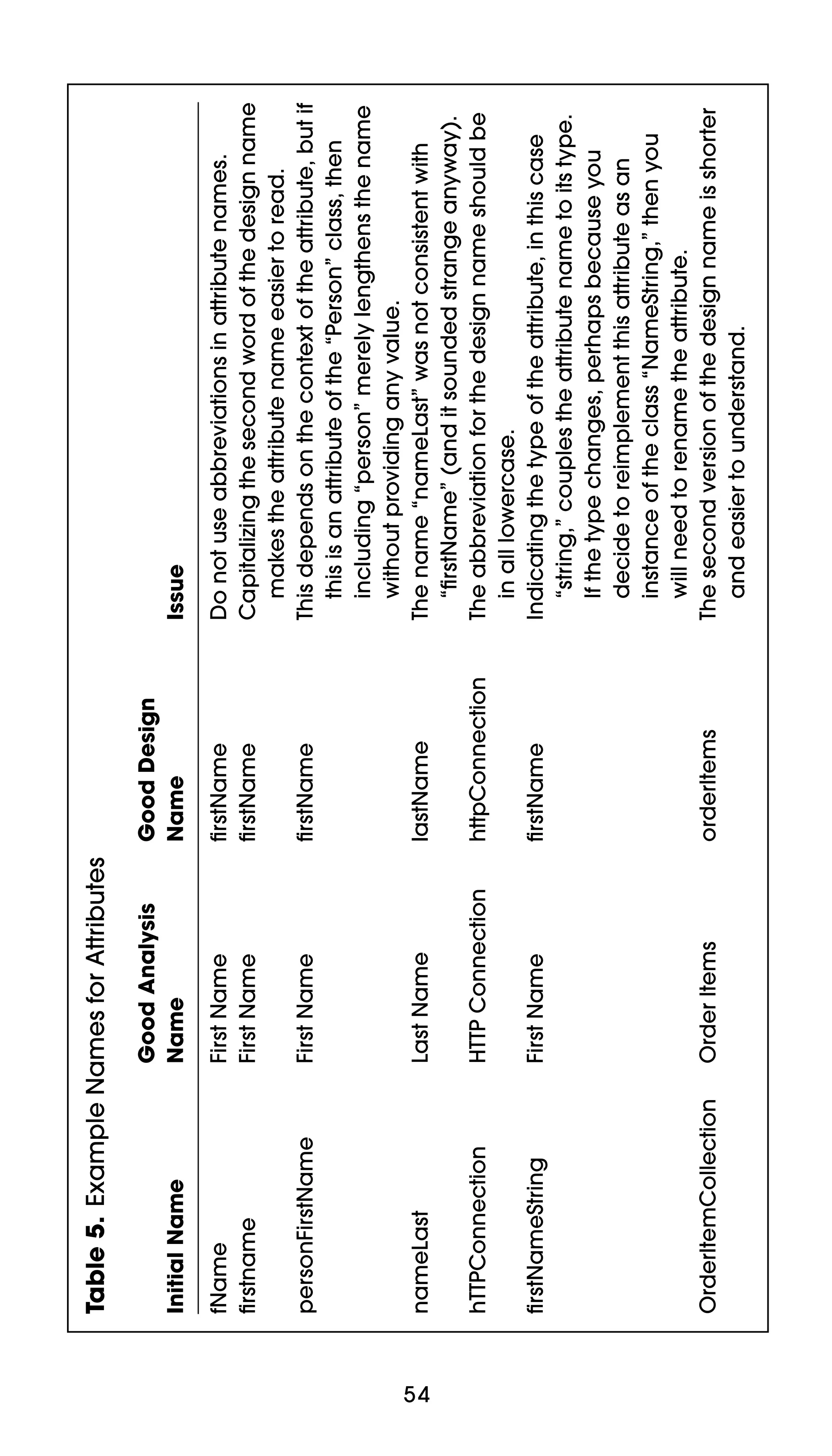
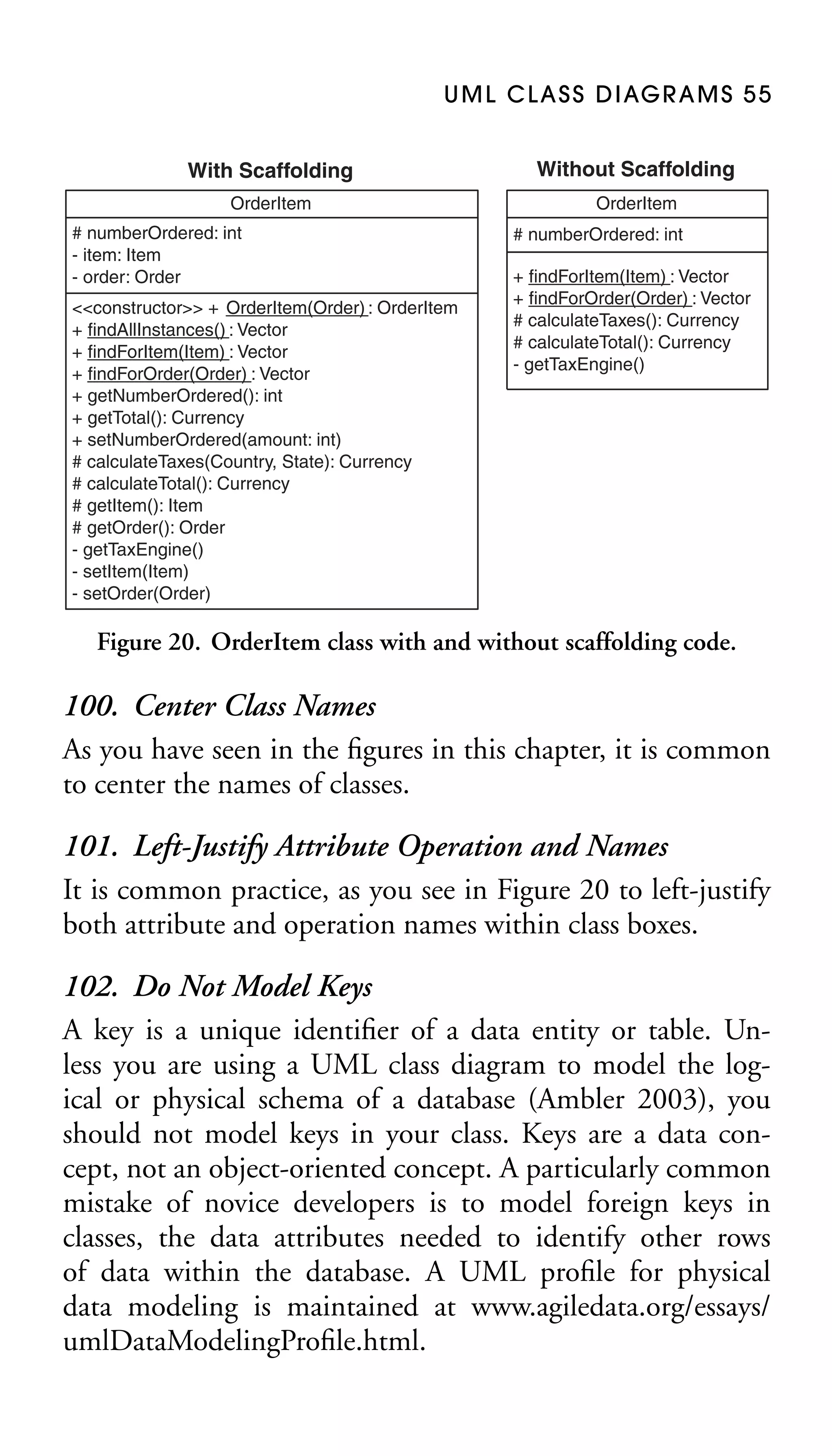
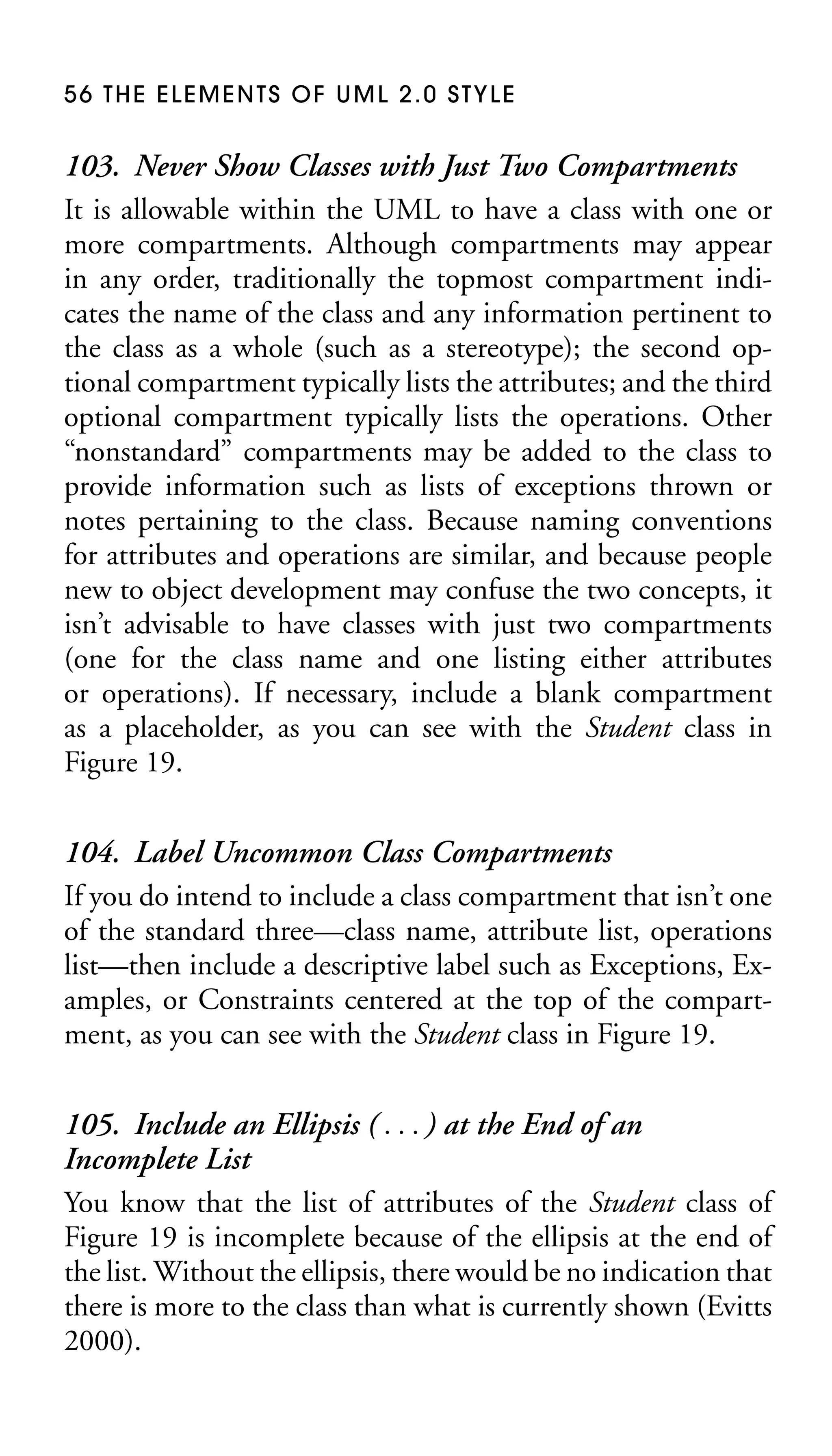
The Elements
of

TM

UML 2.0 Style
For Beverley
The Elements
of

TM

UML 2.0 Style
Scott W. Ambler
  
Cambridge, New York, Melbourne, Madrid, Cape Town, Singapore, São Paulo
Cambridge University Press
The Edinburgh Building, Cambridge  , UK
Published in the United States of America by Cambridge University Press, New York
www.cambridge.org
Information on this title: www.cambridge.org/9780521616782

This publication is in copyright. Subject to statutory exception and to the provision of
relevant collective licensing agreements, no reproduction of any part may take place
without the written permission of Cambridge University Press.
First published in print format 2005

-
-

---- paperback
--- paperback

Cambridge University Press has no responsibility for the persistence or accuracy of s
for external or third-party internet websites referred to in this publication, and does not
guarantee that any content on such websites is, or will remain, accurate or appropriate.
Contents
Preface . . . . . . . . . . . . . . . . . . . . . . . . . . . . . . . . . . . . . . . . . . . . ix
Purpose . . . . . . . . . . . . . . . . . . . . . . . . . . . . . . . . . . . . . . . . . . . . . . ix
Features . . . . . . . . . . . . . . . . . . . . . . . . . . . . . . . . . . . . . . . . . . . . . . . x
Audience . . . . . . . . . . . . . . . . . . . . . . . . . . . . . . . . . . . . . . . . . . . . . . x
Assumptions . . . . . . . . . . . . . . . . . . . . . . . . . . . . . . . . . . . . . . . . . . . x
Acknowledgments . . . . . . . . . . . . . . . . . . . . . . . . . . . . . . . . . . . . . xi
1. Introduction . . . . . . . . . . . . . . . . . . . . . . . . . . . . . . . . . . . . 1
1.1 Organization of This Book . . . . . . . . . . . . . . . . . . . . . . . . . . 2
2. General Diagramming Guidelines . . . . . . . . . . . 4
2.1 Readability Guidelines . . . . . . . . . . . . . . . . . . . . . . . . . . . . . . 4
2.2 Simplicity Guidelines . . . . . . . . . . . . . . . . . . . . . . . . . . . . . . . 8
2.3 Naming Guidelines . . . . . . . . . . . . . . . . . . . . . . . . . . . . . . . . 11
2.4 General Guidelines . . . . . . . . . . . . . . . . . . . . . . . . . . . . . . . . 12
3. Guidelines for Common UML
Modeling Elements . . . . . . . . . . . . . . . . . . . . . . . . . . .
3.1 Guidelines for UML Notes . . . . . . . . . . . . . . . . . . . . . . . . .
3.2 Guidelines for UML Stereotypes . . . . . . . . . . . . . . . . . . . .
3.3 Guidelines for UML Frames . . . . . . . . . . . . . . . . . . . . . . . .
3.4 Guidelines for UML Interfaces . . . . . . . . . . . . . . . . . . . . . .

15
15
18
21
24

4. UML Use-Case Diagrams . . . . . . . . . . . . . . . . . . . . . 33
4.1 Use-Case Guidelines . . . . . . . . . . . . . . . . . . . . . . . . . . . . . . . 33
4.2 Actor Guidelines . . . . . . . . . . . . . . . . . . . . . . . . . . . . . . . . . . 35

v
vi CONTENTS

4.3 Relationship Guidelines . . . . . . . . . . . . . . . . . . . . . . . . . . . . 38
4.4 System Boundary Box Guidelines . . . . . . . . . . . . . . . . . . . 45
5. UML Class Diagrams . . . . . . . . . . . . . . . . . . . . . . . . . 47
5.1 General Guidelines . . . . . . . . . . . . . . . . . . . . . . . . . . . . . . . . 47
5.2 Class Style Guidelines . . . . . . . . . . . . . . . . . . . . . . . . . . . . . . 51
5.3 Relationship Guidelines . . . . . . . . . . . . . . . . . . . . . . . . . . . . 59
5.4 Association Guidelines . . . . . . . . . . . . . . . . . . . . . . . . . . . . . 64
5.5 Inheritance Guidelines . . . . . . . . . . . . . . . . . . . . . . . . . . . . . 68
5.6 Aggregation and Composition Guidelines . . . . . . . . . . . . 70
6. UML Package Diagrams . . . . . . . . . . . . . . . . . . . . . 73
6.1 Class Package Diagram Guidelines . . . . . . . . . . . . . . . . . . . 73
6.2 Use-Case Package Diagram Guidelines . . . . . . . . . . . . . . . 76
6.3 Packages . . . . . . . . . . . . . . . . . . . . . . . . . . . . . . . . . . . . . . . . . 78
7. UML Sequence Diagrams . . . . . . . . . . . . . . . . . . . . 80
7.1 General Guidelines . . . . . . . . . . . . . . . . . . . . . . . . . . . . . . . . 81
7.2 Guidelines for Lifelines . . . . . . . . . . . . . . . . . . . . . . . . . . . . 86
7.3 Message Guidelines . . . . . . . . . . . . . . . . . . . . . . . . . . . . . . . . 89
7.4 Guidelines for Return Values . . . . . . . . . . . . . . . . . . . . . . . 91
8. UML Communication Diagrams . . . . . . . . . . . . . 94
8.1 General Guidelines . . . . . . . . . . . . . . . . . . . . . . . . . . . . . . . . 95
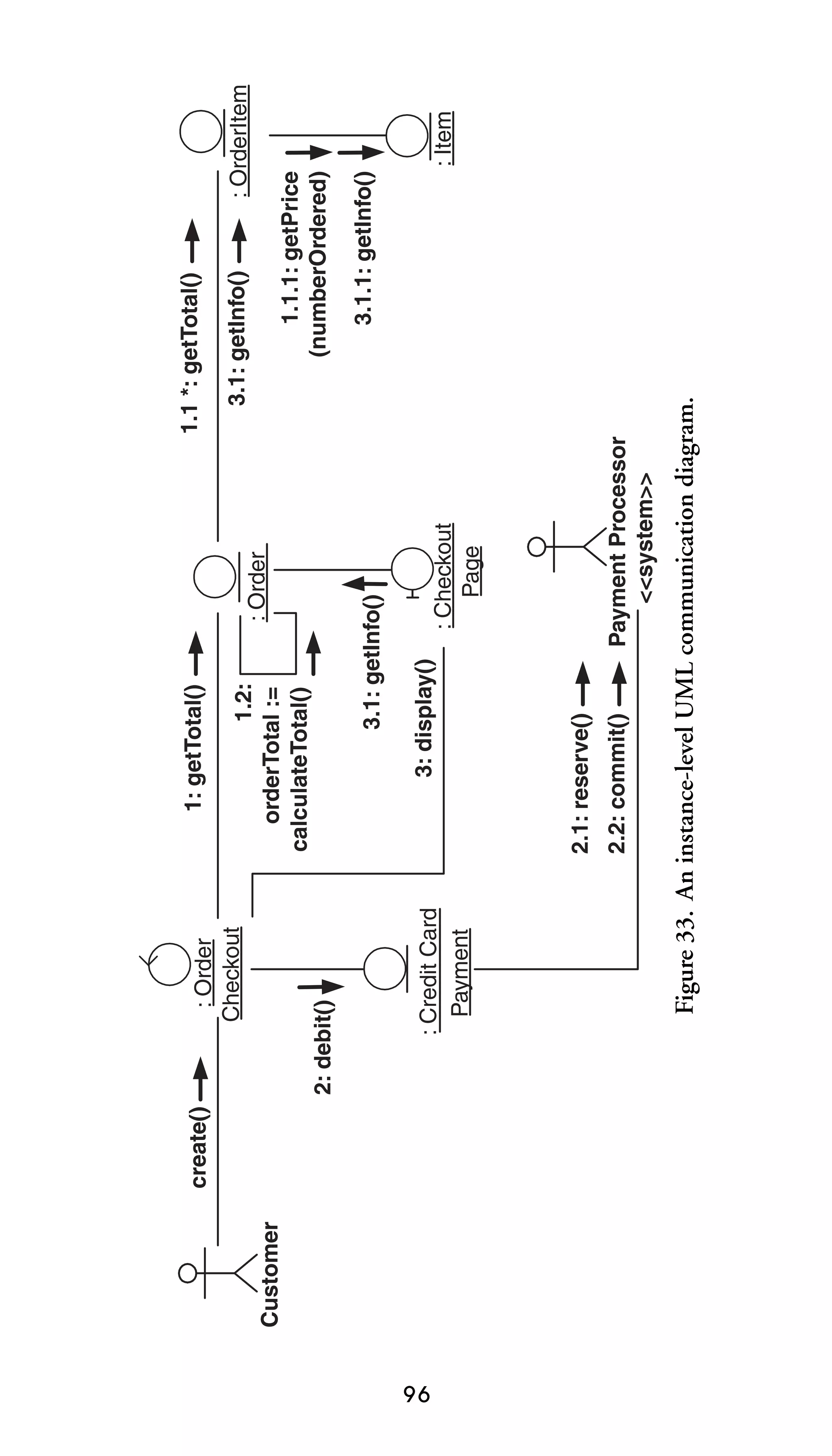
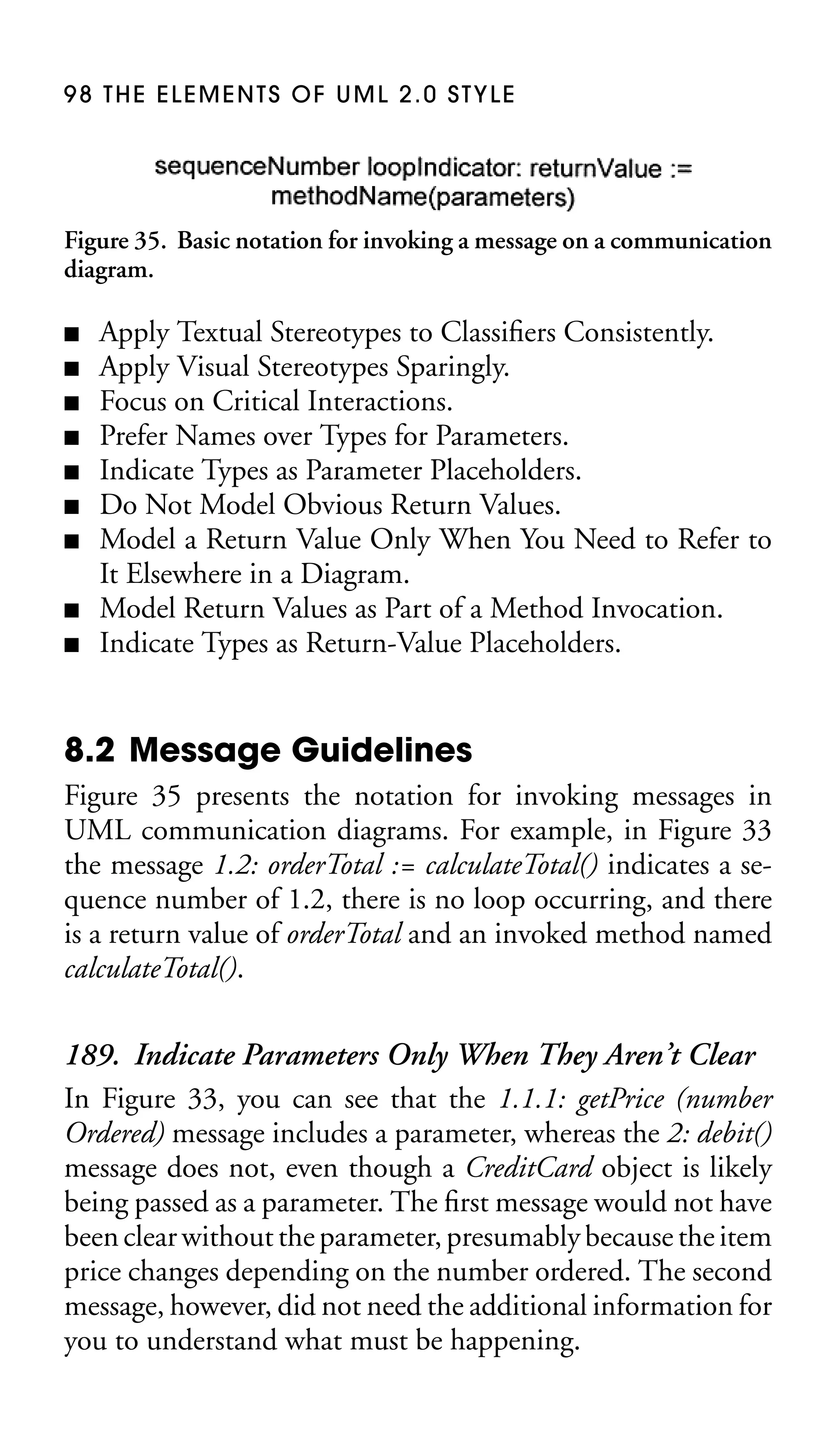
8.2 Message Guidelines . . . . . . . . . . . . . . . . . . . . . . . . . . . . . . . . 98
8.3 Link Guidelines . . . . . . . . . . . . . . . . . . . . . . . . . . . . . . . . . . 100
9. UML State Machine Diagrams . . . . . . . . . . . . . .
9.1 General Guidelines . . . . . . . . . . . . . . . . . . . . . . . . . . . . . . .
9.2 State Guidelines . . . . . . . . . . . . . . . . . . . . . . . . . . . . . . . . .
9.3 Substate Modeling Guidelines . . . . . . . . . . . . . . . . . . . . .
9.4 Transition and Action Guidelines . . . . . . . . . . . . . . . . . .
9.5 Guard Guidelines . . . . . . . . . . . . . . . . . . . . . . . . . . . . . . . .

103
103
105
106
108
111

10. UML Activity Diagrams . . . . . . . . . . . . . . . . . . . . . 113
10.1 General Guidelines . . . . . . . . . . . . . . . . . . . . . . . . . . . . . . 113
10.2 Activity Guidelines . . . . . . . . . . . . . . . . . . . . . . . . . . . . . . 116
CONTENTS vii

10.3
10.4
10.5
10.6

Decision Point and Guard Guidelines . . . . . . . . . . . . . 116
Parallel Flow Guidelines . . . . . . . . . . . . . . . . . . . . . . . . . 121
Activity Partition (Swim Lane) Guidelines . . . . . . . . . . 122
Action-Object Guidelines . . . . . . . . . . . . . . . . . . . . . . . . 128

11. UML Component Diagrams . . . . . . . . . . . . . . . . 132
11.1 Component Guidelines . . . . . . . . . . . . . . . . . . . . . . . . . . 132
11.2 Dependency and Inheritance Guidelines . . . . . . . . . . . 136
12. UML Deployment Diagrams . . . . . . . . . . . . . . . 139
12.1 General Guidelines . . . . . . . . . . . . . . . . . . . . . . . . . . . . . . 140
12.2 Node and Component Guidelines . . . . . . . . . . . . . . . . . 144
12.3 Dependency and Communication-Association
Guidelines . . . . . . . . . . . . . . . . . . . . . . . . . . . . . . . . . . . . . 146
13. UML Object Diagrams . . . . . . . . . . . . . . . . . . . . . . 148
14. UML Composite Structure Diagrams . . . . . . 150
15. UML Interaction Overview Diagrams . . . . . 153
16. UML Timing Diagrams . . . . . . . . . . . . . . . . . . . . . . 157
16.1 General Guidelines . . . . . . . . . . . . . . . . . . . . . . . . . . . . . . 157
16.2 Axis Guidelines . . . . . . . . . . . . . . . . . . . . . . . . . . . . . . . . . 159
16.3 Time Guidelines . . . . . . . . . . . . . . . . . . . . . . . . . . . . . . . . 160
17. Agile Modeling . . . . . . . . . . . . . . . . . . . . . . . . . . . . .
17.1 Values . . . . . . . . . . . . . . . . . . . . . . . . . . . . . . . . . . . . . . . . .
17.2 Principles . . . . . . . . . . . . . . . . . . . . . . . . . . . . . . . . . . . . . .
17.3 Practices . . . . . . . . . . . . . . . . . . . . . . . . . . . . . . . . . . . . . . .

162
162
162
164

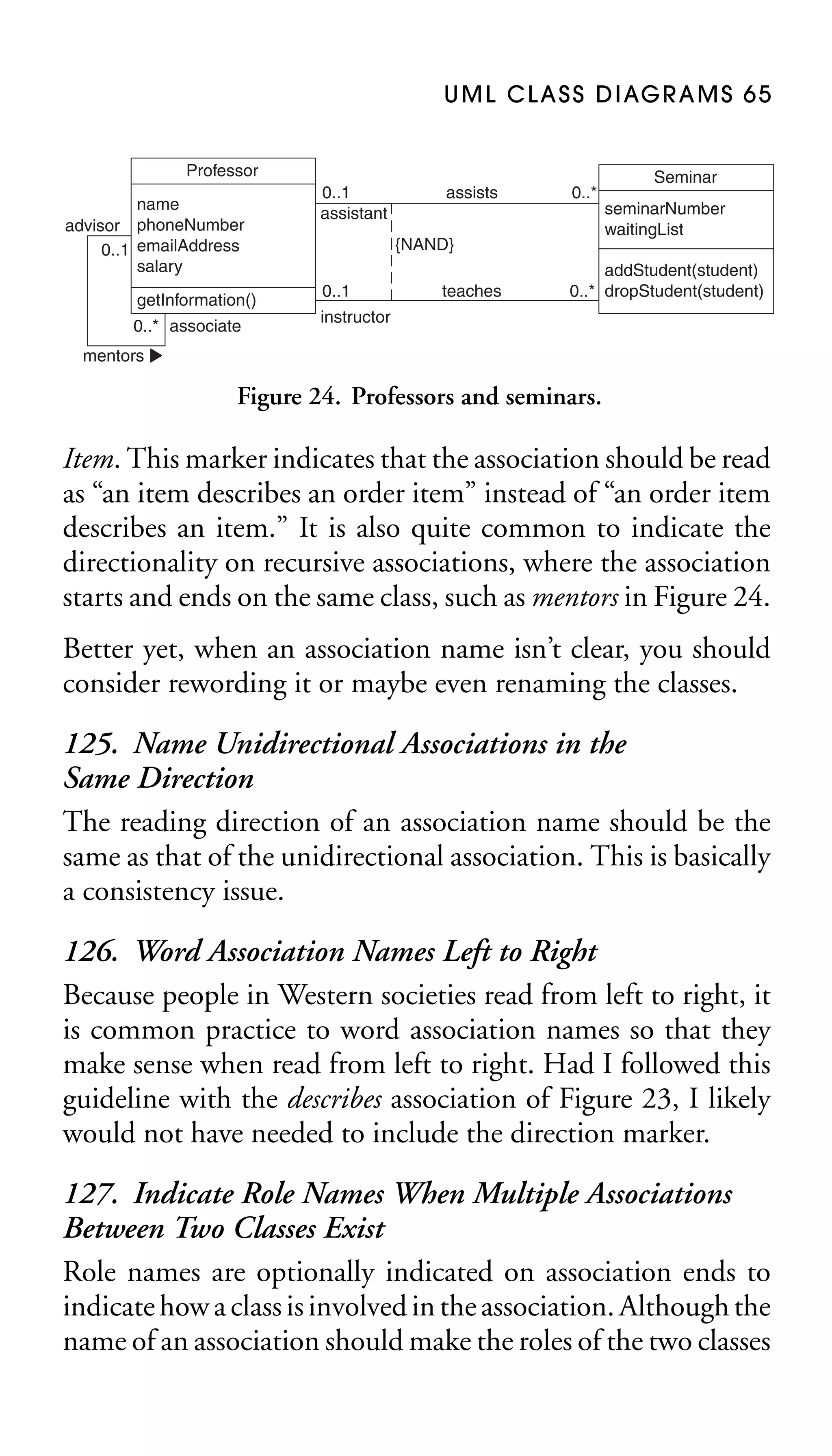
Bibliography. . . . . . . . . . . . . . . . . . . . . . . . . . . . . . . . . . . . . 165
Index . . . . . . . . . . . . . . . . . . . . . . . . . . . . . . . . . . . . . . . . . . . . . 169
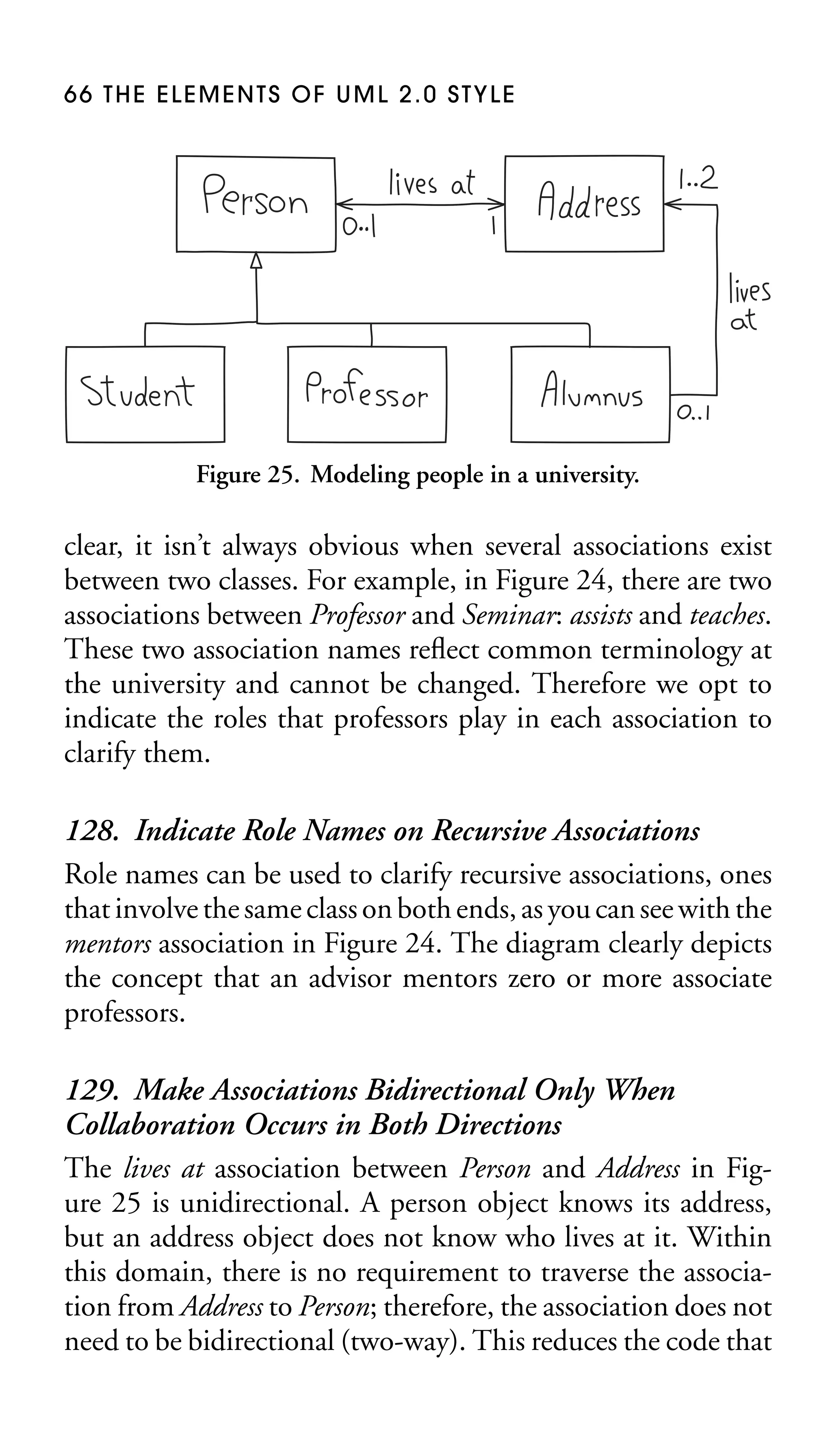
Preface

M

odels are used by professional developers to communicate their work to project stakeholders and to other
developers. The Unified Modeling Language (UML) has been
an important part of the software development landscape since
its introduction in 1997. We’ve seen the UML evolve over the
years and it is now into its 2.x series of releases. Modeling
style, however, has remained constant and will continue to do
so. By understanding and following these common modeling style guidelines, you can improve the effectiveness of your
models.
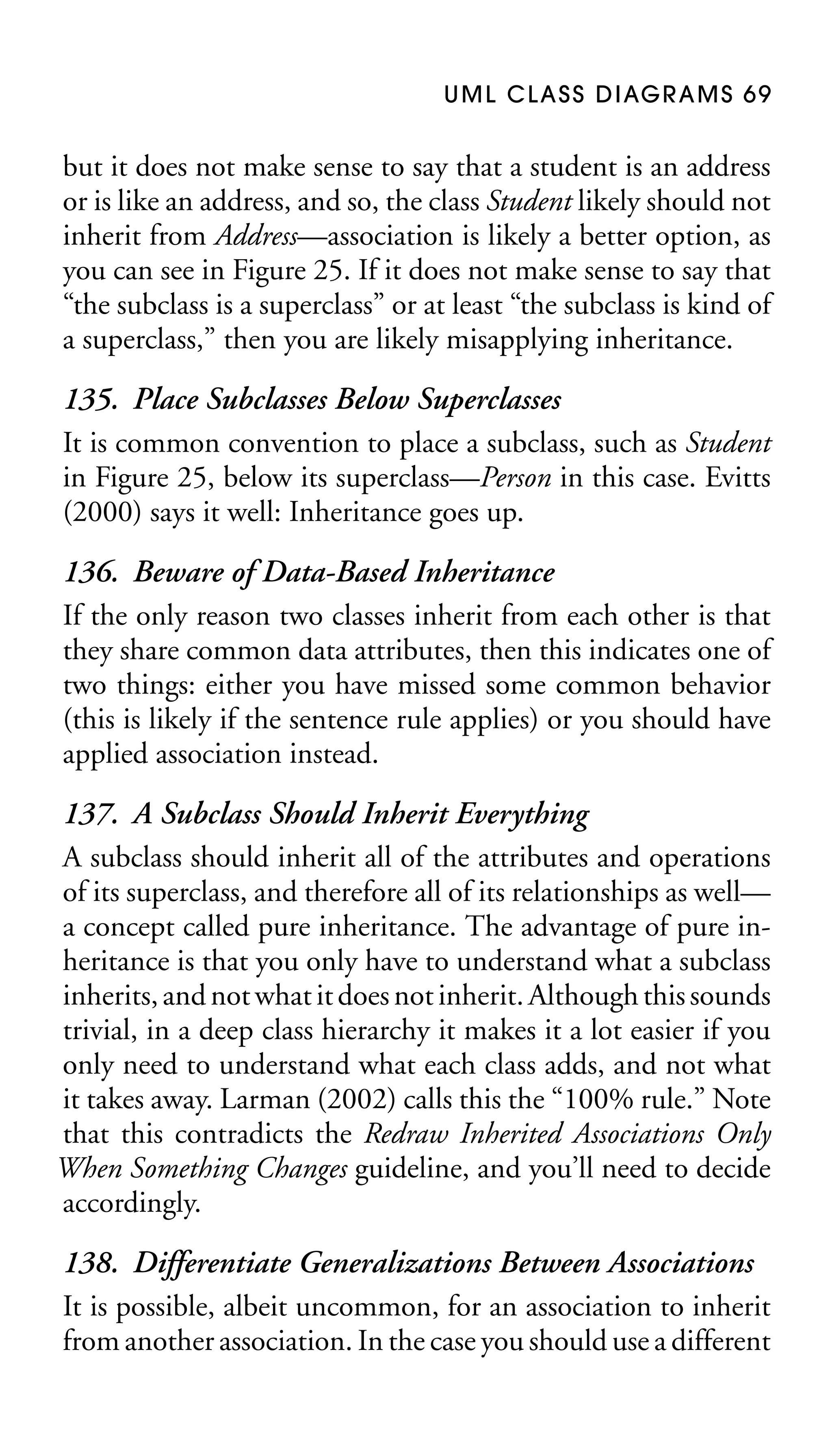
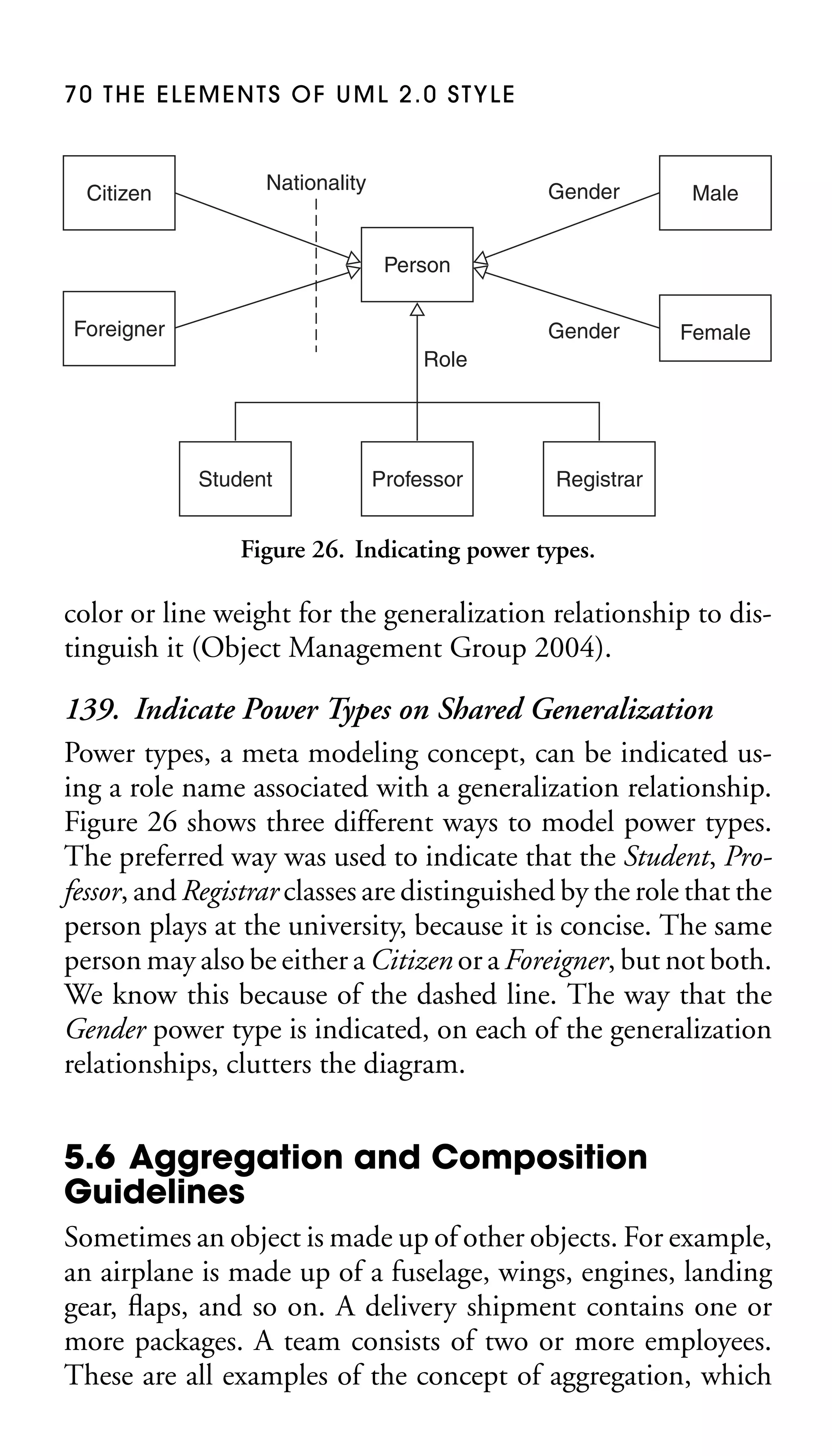
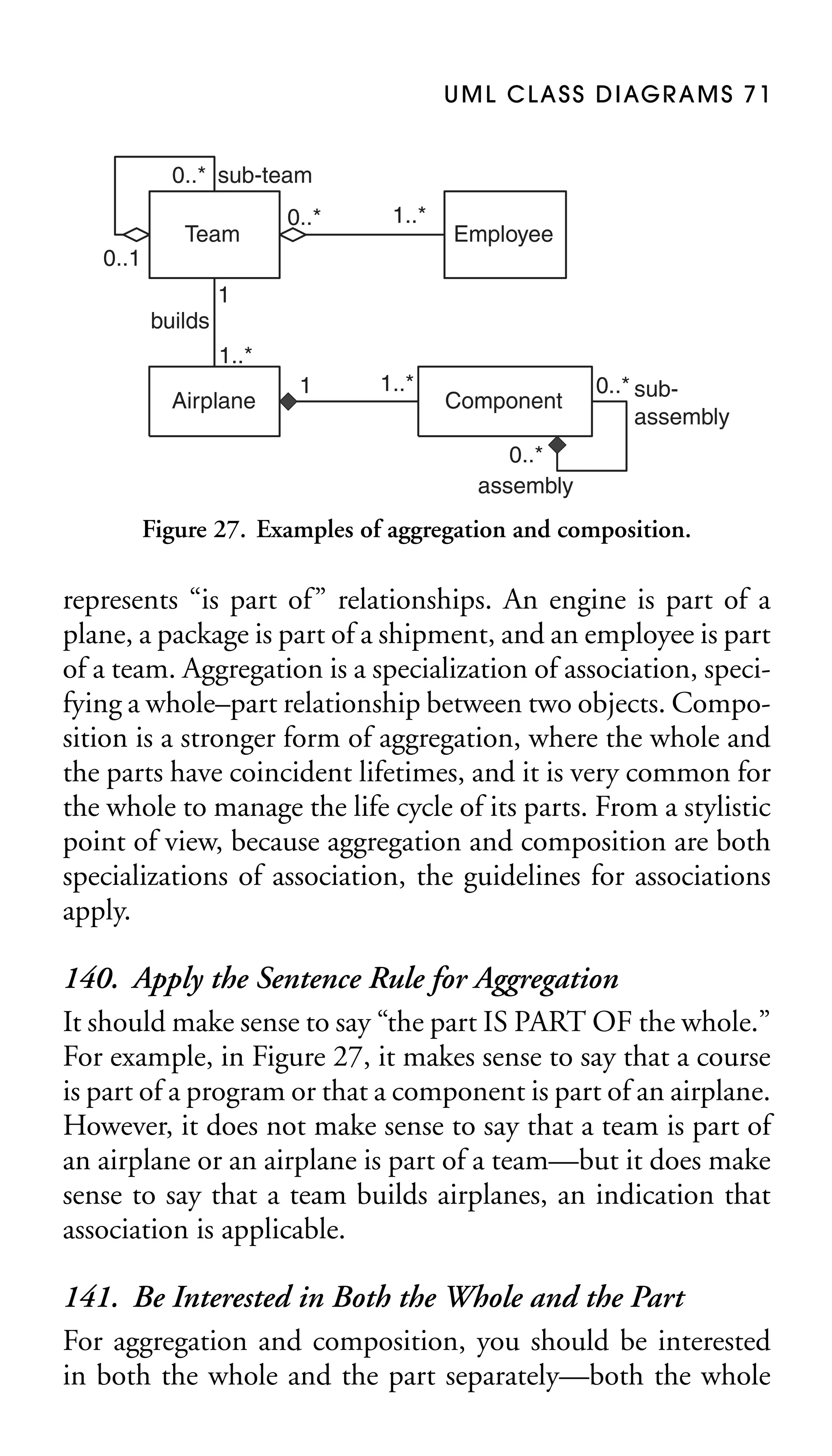
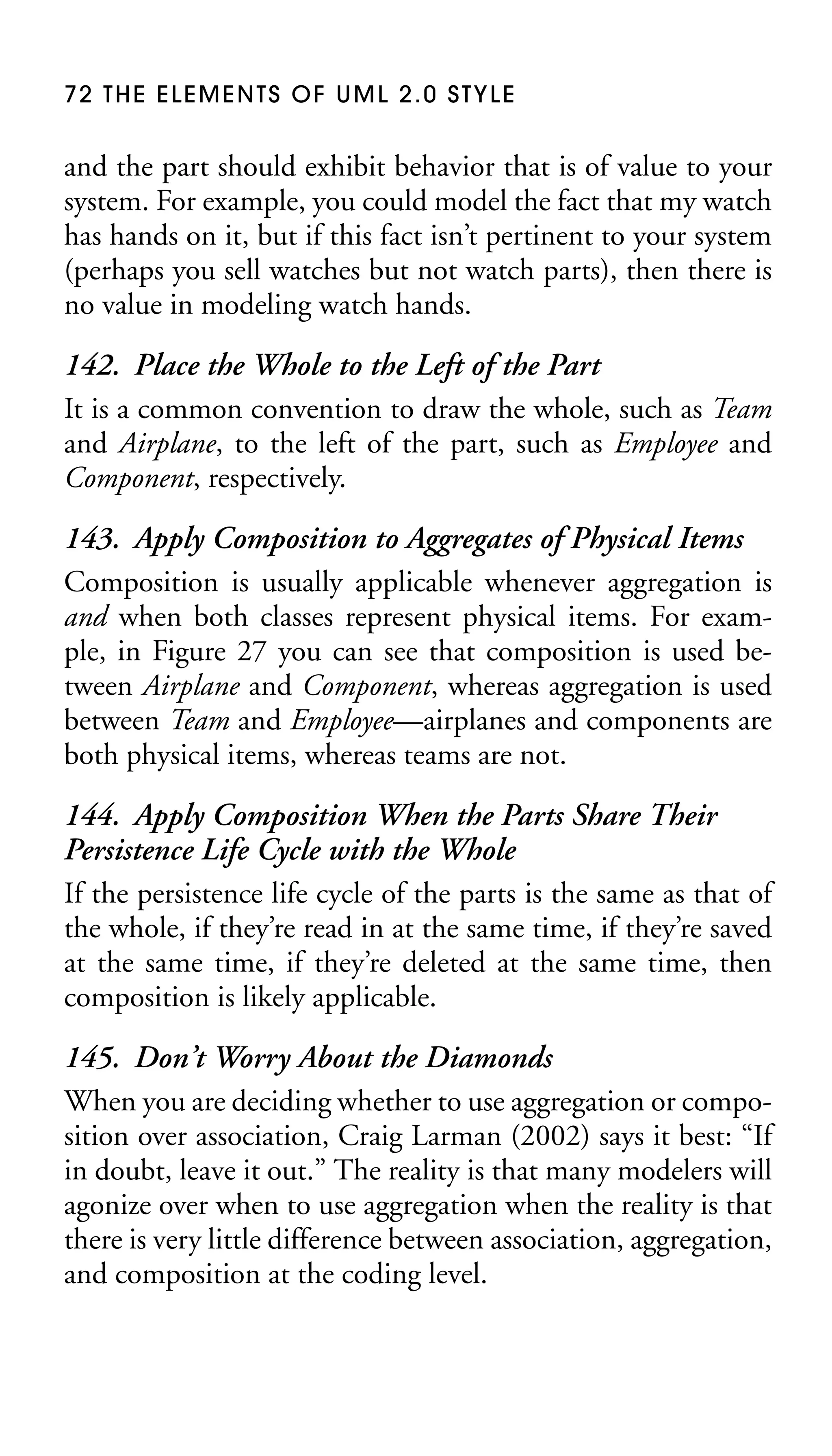
I’ve updated this book to include the new diagrams in UML 2,
to use the terminology of UML 2, and to include hand-drawn
diagrams. The vast majority of models are drawn on whiteboards and I think that it’s time that modeling books, including this one, reflect that reality.

Purpose
This book describes a collection of standards, conventions,
and guidelines for creating effective UML diagrams. They are
based on sound, proven principles that will lead to diagrams
that are easier to understand and work with.
These simple, concise guidelines, if applied consistently, will
be an important first step in increasing your productivity as a
modeler.

ix
x P R E FAC E

Features
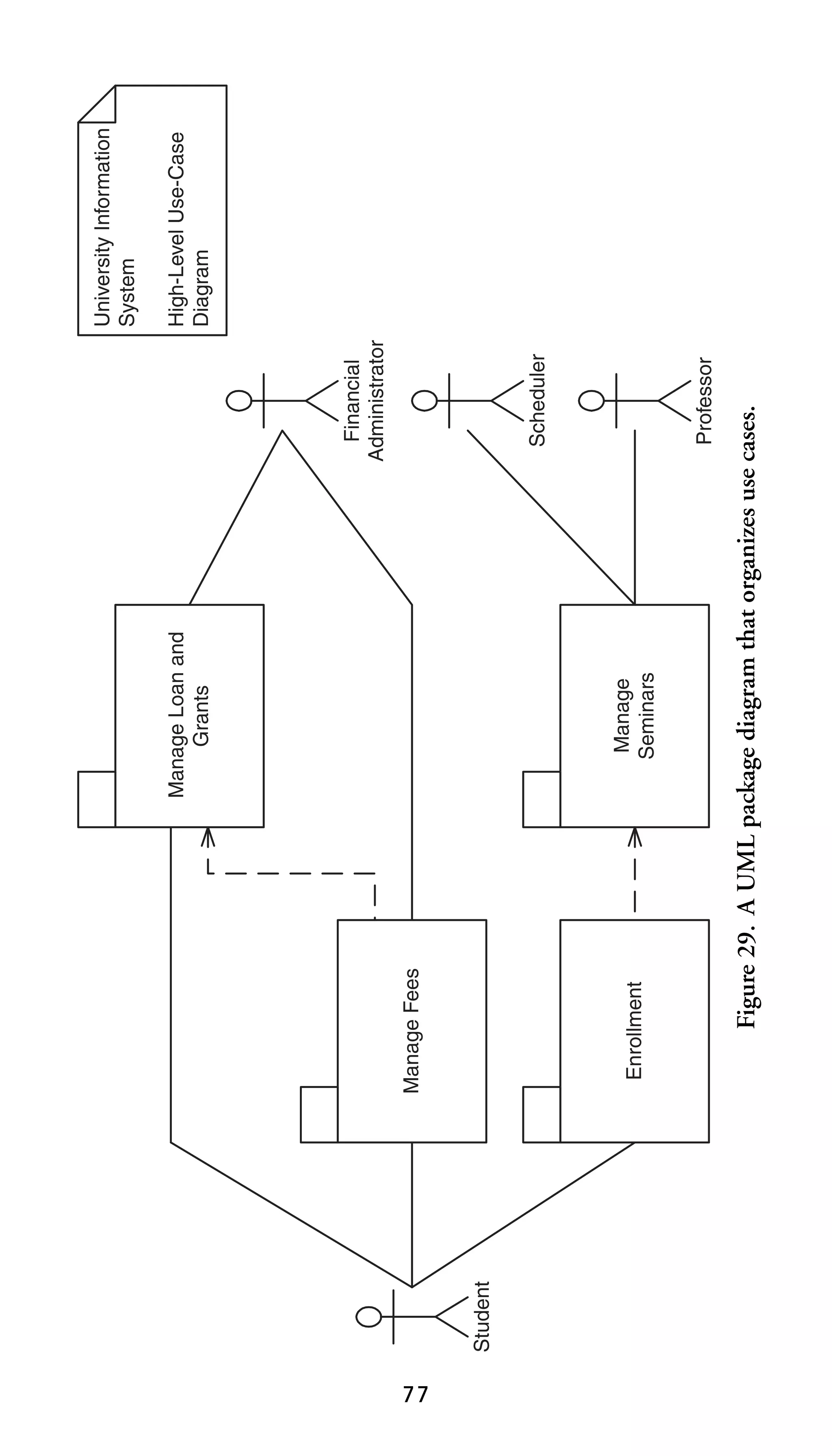
This guide attempts to emulate Strunk and White’s (1979)
seminal text, The Elements of Style, which lists a set of rules
describing the proper application of grammatical and compositional forms in common use within the written English
language.
Using a similar style of presentation, this book defines a set
of rules for developing high-quality UML diagrams. In doing
so, this guide
■
■
■

employs existing standards defined by the Object Management Group (OMG) whenever possible,
provides a justification for each rule, and
presents standards based on real-world experience and
proven principles.

Audience
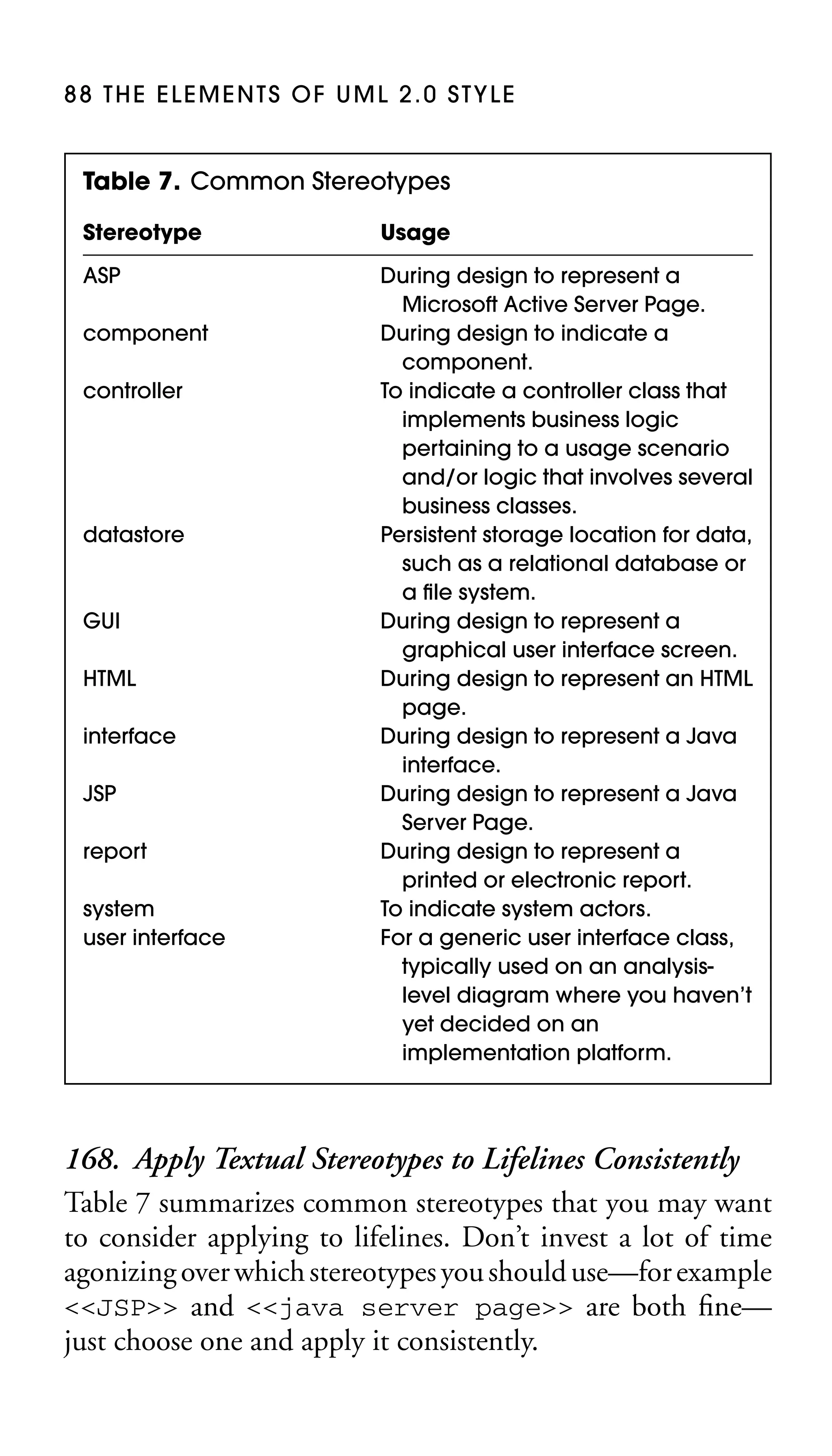
This guide targets information technology (IT) professionals
who are interested in
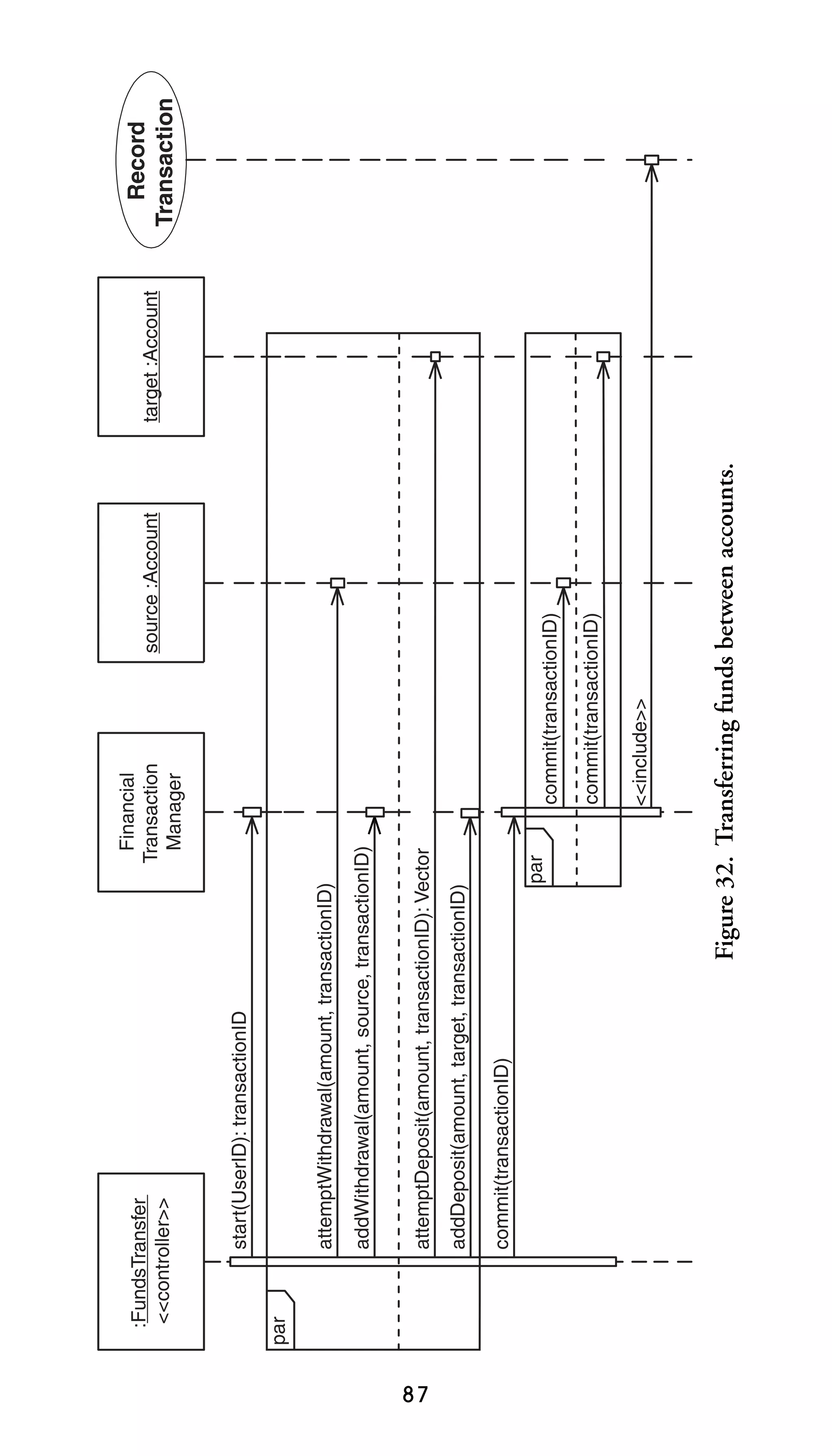
■
■
■

creating effective UML diagrams,
increasing their productivity, and
working as productive members of a software development
team.

Assumptions
In this book I make several assumptions:
■

You understand the basics of the UML and modeling. If
not, then I suggest UML Distilled (Fowler 2004) if you
are looking for a brief overview of the UML, or better
yet The Object Primer, third edition (Ambler 2004) for a
P R E FAC E x i

■

■

■

more comprehensive discussion. UML Distilled is a great
book but is limited to the UML; The Object Primer, third
edition, on the other hand, goes beyond the UML where
needed, for example, to include user interface, Java, and
database development issues. It also covers agile software
development techniques in detail.
You are looking for style guidelines, not design guidelines. If
not, then I suggest the book Object-Oriented Design Heuristics (Riel 1996).
Your focus is on business application development. Although these guidelines also apply to real-time development, all of the examples are business application–oriented,
simplifications of actual systems that I have built in the past.
You belong to a Western culture. Many of the layout guidelines are based on the Western approach to reading—left
to right and top down. People in other cultures will need
to modify these guidelines as appropriate.

Acknowledgments
The following people have provided valuable input into the
development and improvement of this text: James Bielak,
Chris Britton, Larry Brunelle, Lauren Cowles, Beverley Dawe,
Caitlin Doggart, Doug English, Jessica Farris, Scott Fleming,
Mark Graybill, Alvery Grazebrook, Jesper R. Jensen, Jon
Kern, Kirk W. Knoernschild, Hubert Matthews, Les Munday,
Sabine Noack, Paul Oldfield, Marco Peters, Scott W. Preece,
Neil Pitman, Edmund Schweppe, Leo Tohill, Tim Tuxworth,
Michael Vizdos, and Robert White.
1.
Introduction
One of Agile Modeling’s (AM) practices (discussed in Chapter 17) is Apply Modeling Standards, the modeling version of
Extreme Programming (XP)’s Coding Standards (Beck 2000).
Developers should agree to and follow a common set of standards and guidelines on a software project, and some of those
guidelines should apply to modeling. Models depicted with
a common notation and that follow effective style guidelines
are easier to understand and to maintain. These models will
improve communication internally within your team and externally to your partners and customers, thereby reducing the
opportunities for costly misunderstandings. Modeling guidelines will also save you time by limiting the number of stylistic
choices you face, allowing you to focus on your actual job –
to develop software.
A lot of the communication value in a UML diagram
is still due to the layout skill of the modeler.
—Paul Evitts, A UML Pattern Language (Evitts
2000)
When you adopt modeling standards and guidelines within
your organization, your first step is to settle on a common
notation. The Unified Modeling Language (UML) (Object
Management Group 2004) is a good start because it defines the
notation and semantics for common object-oriented models.
Some projects will require more types of models than the UML
describes, as I show in The Object Primer 3/e (Ambler 2004),
but the UML will form the core of any modern modeling
effort.
1
2 THE ELEMENTS OF UML 2.0 STYLE

Your second step is to identify modeling style guidelines to help
you to create consistent and clean-looking diagrams. What is
the difference between a standard and a style guideline? For
source code, a standard would, for example, involve naming
the attributes in the format attributeName, whereas a style
guideline would involve indenting your code within a control
structure by three spaces. For models, a standard would involve
using a squared rectangle to model a class on a class diagram,
whereas a style would involve placing subclasses on diagrams
below their superclass(es). This book describes the style guidelines that are missing from many of the UML-based methodologies that organizations have adopted, guidelines that are
critical to your success in the software development game.
The third step is to enact your modeling standards and guidelines. To do this, you will need to train and mentor your staff in
the modeling techniques appropriate to the projects on which
they are working. You will also need to train and mentor them
in your adopted guidelines, and a good start is to provide them
with a copy of this book. I’ve been amazed at the success of
The Elements of Java Style (Vermeulen et al. 2000) with respect
to this—hundreds of organizations have adopted that book
for their internal Java coding standards because they recognized that it was more cost-effective for them to buy a
pocketbook for each developer than to develop their own
guidelines.

1.1 Organization of This Book
This book is organized in a straightforward manner. Chapter 2
describes general diagramming principles that are applicable
to all types of UML diagrams (and many non-UML diagrams
for that matter). Chapter 3 describes guidelines for common UML elements such as stereotypes, notes, and frames.
INTRODUCTION 3

Chapters 4 through 16 describe techniques pertinent to each
type of UML diagram. Chapter 17 provides an overview of the
values, principles, and practices of AM, with a quick reference
to this popular methodology.
2.
General
Diagramming
Guidelines
The guidelines presented in this chapter are applicable to all
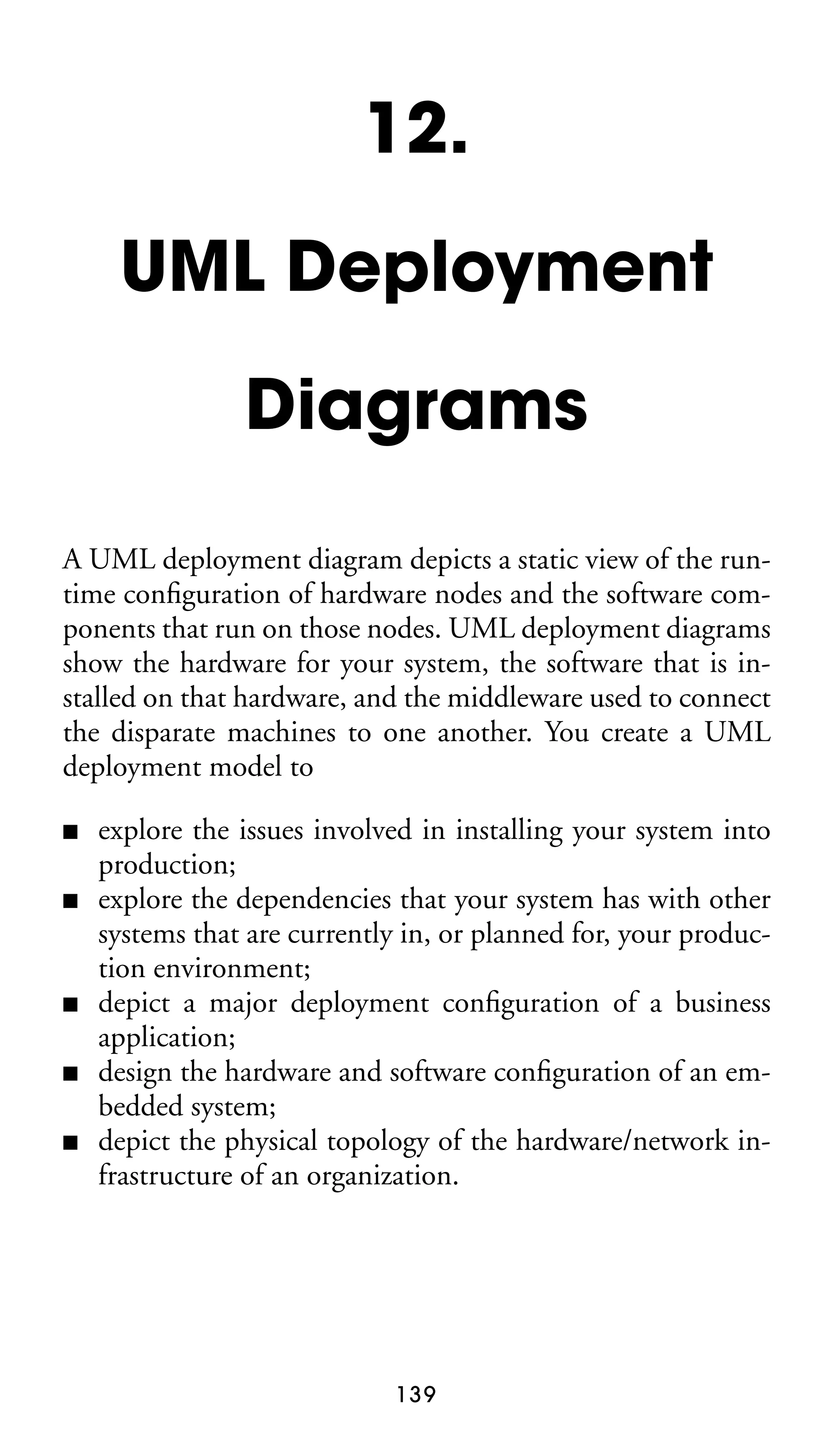
types of diagrams, UML or otherwise. The terms “symbols,”
“lines,” and “labels” are used throughout:
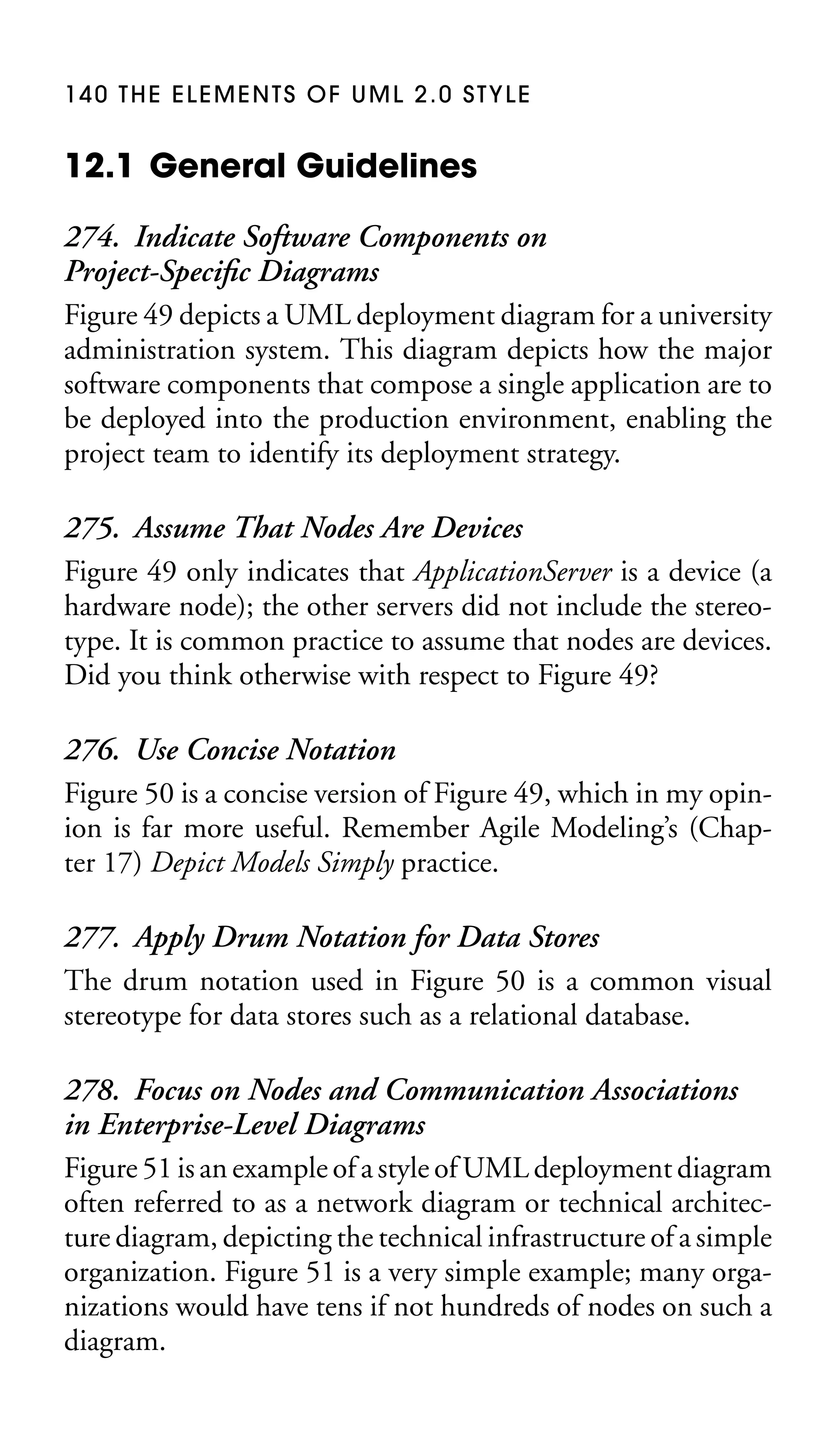
■
■
■

Symbols represent diagram elements such as class boxes,
object boxes, use cases, and actors.
Lines represent diagram elements such as associations, dependencies, and transitions between states.
Labels represent diagram elements such as class names, association roles, and constraints.

2.1 Readability Guidelines
1. Avoid Crossing Lines
When two lines cross on a diagram, such as two associations on
a UML class diagram, the potential for misreading a diagram
exists.

4
G E N E R A L D I AG R A M M I N G G U I D E L I N E S 5

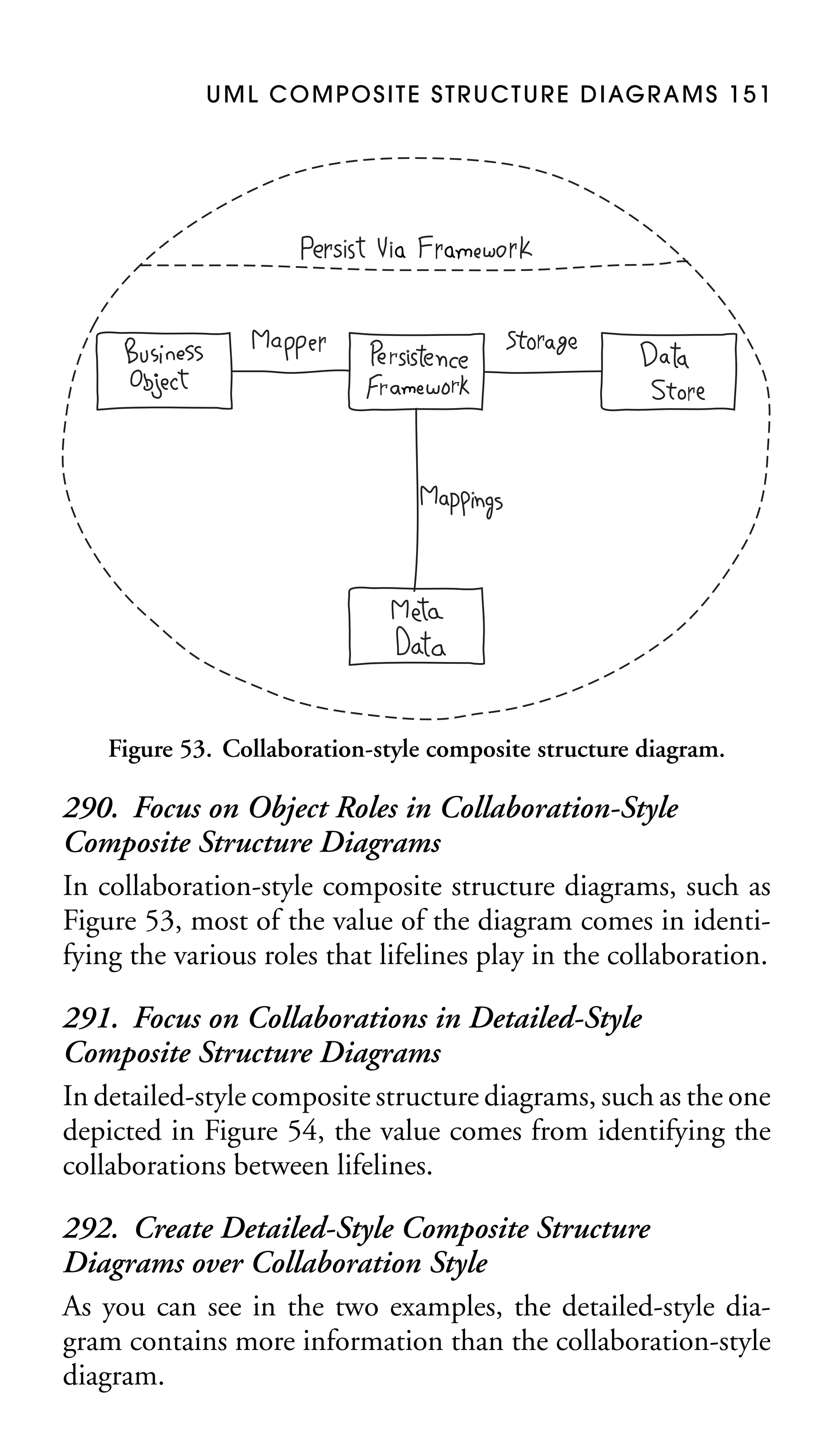
A

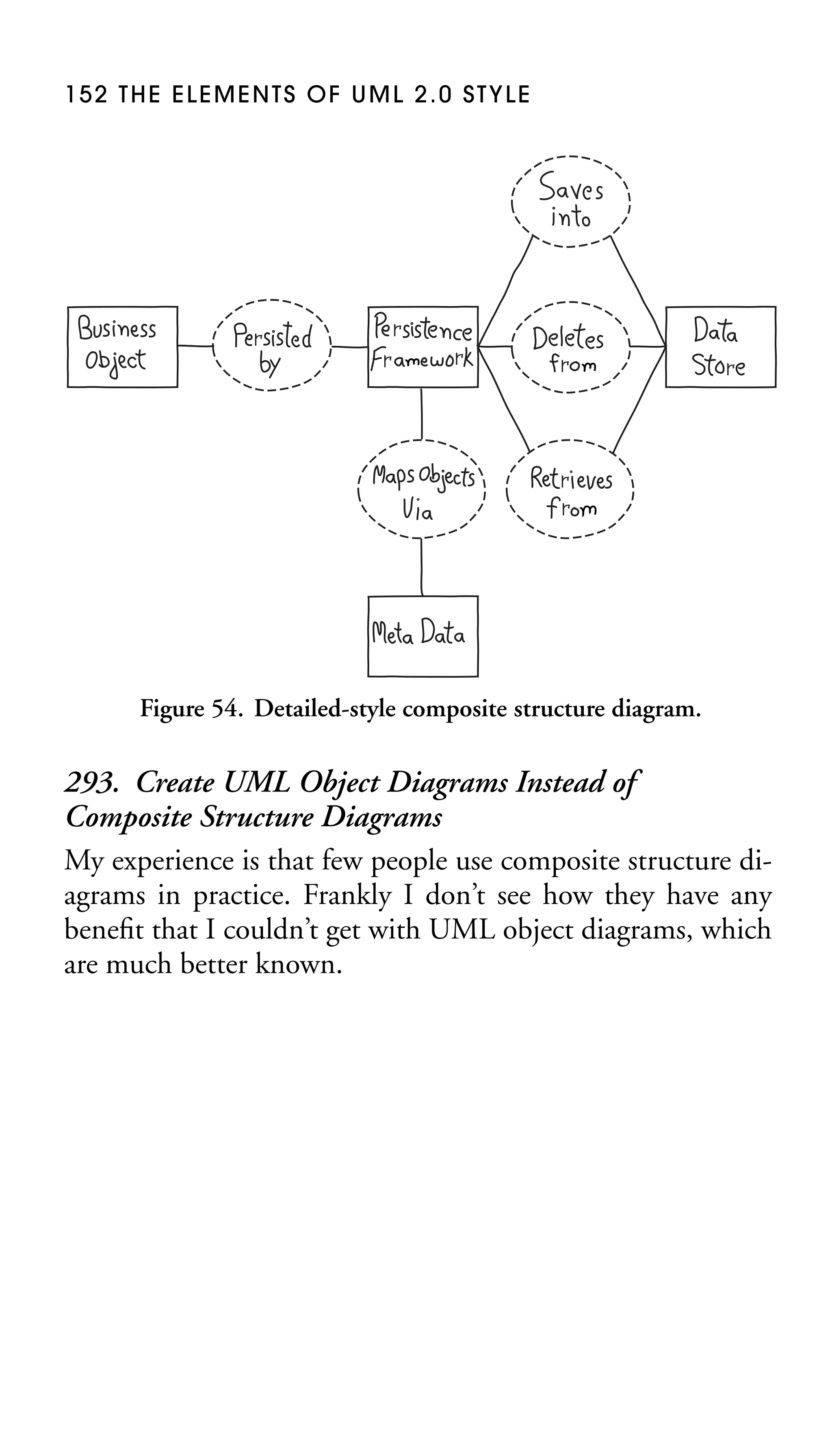
C

A

D

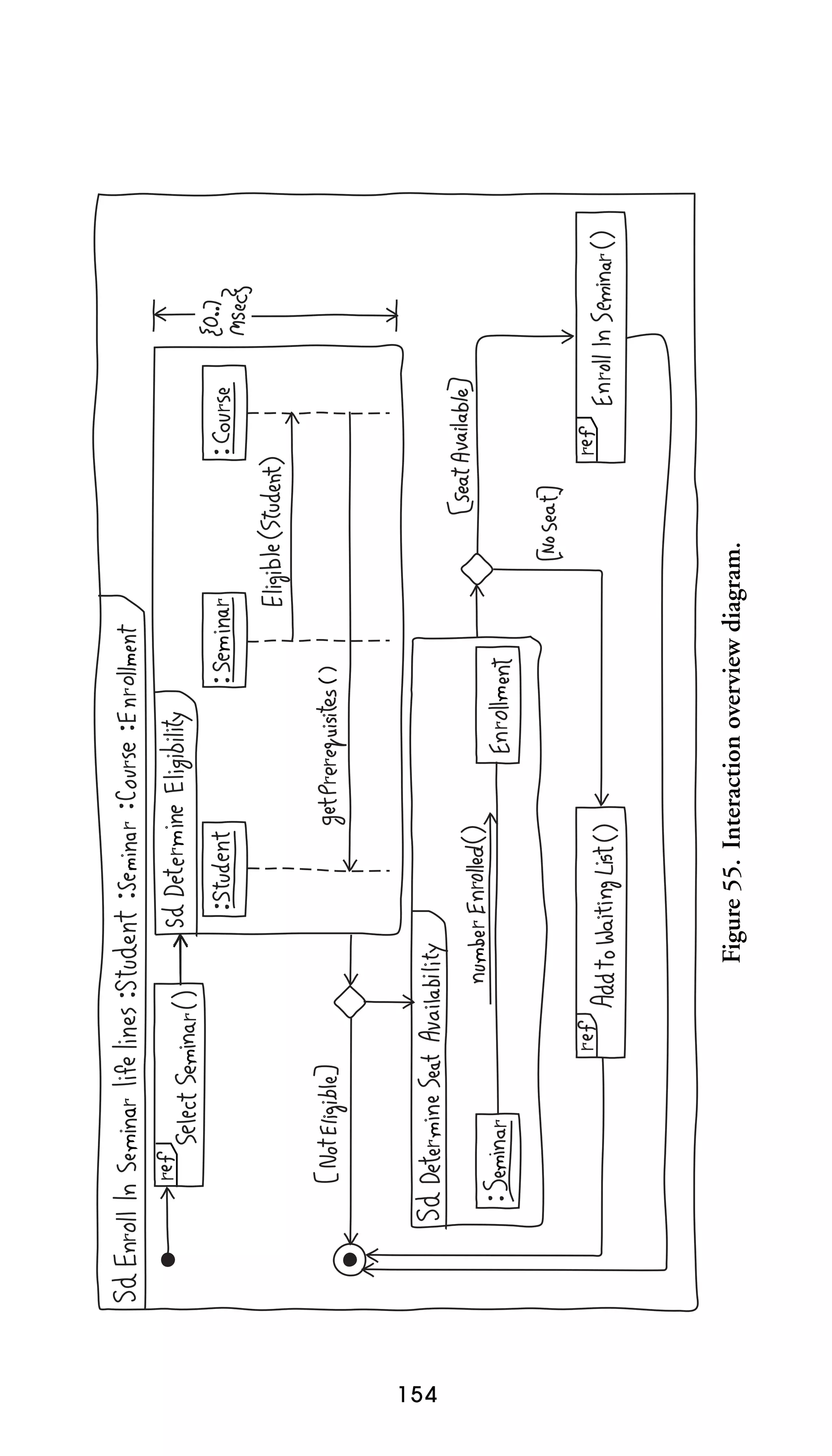
C

B

D

B

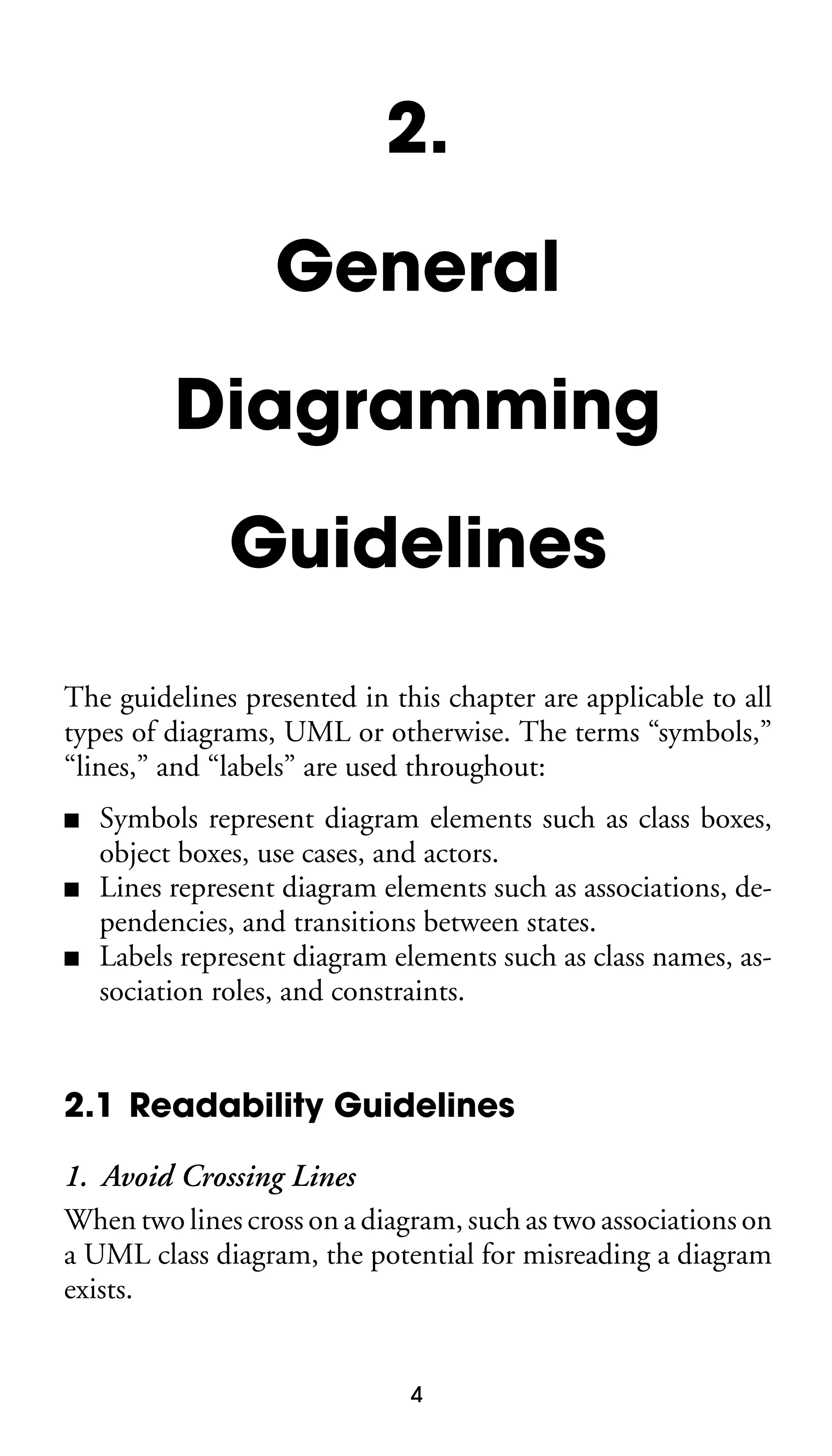
Figure 1. Depiction of crossing lines.

2. Depict Crossing Lines as a Jump
You can’t always avoid crossing lines; for example, you cannot
fully connect five symbols (try it and see). When you need to
have two lines cross, one of them should “hop” over the other
as in Figure 1.
3. Avoid Diagonal or Curved Lines
Straight lines, drawn either vertically or horizontally, are easier for your eyes to follow than diagonal or curved lines. A
good approach is to place symbols on diagrams as if they
are centered on the grid point of a graph, a built-in feature of
many computer-aided system-engineering (CASE) tools. This
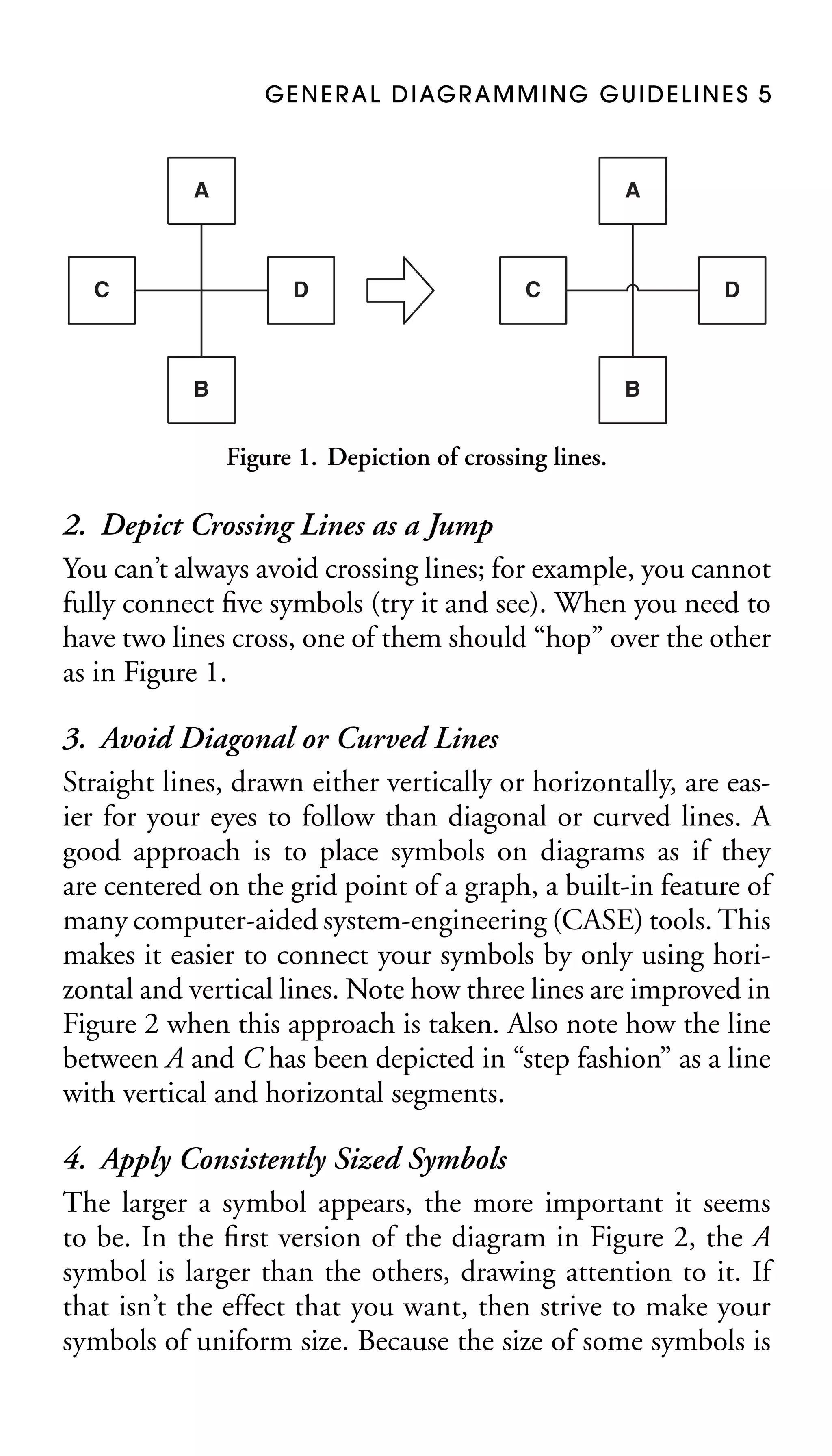
makes it easier to connect your symbols by only using horizontal and vertical lines. Note how three lines are improved in
Figure 2 when this approach is taken. Also note how the line
between A and C has been depicted in “step fashion” as a line
with vertical and horizontal segments.
4. Apply Consistently Sized Symbols
The larger a symbol appears, the more important it seems
to be. In the first version of the diagram in Figure 2, the A
symbol is larger than the others, drawing attention to it. If
that isn’t the effect that you want, then strive to make your
symbols of uniform size. Because the size of some symbols is
6 THE ELEMENTS OF UML 2.0 STYLE

Figure 2. Improving the attractiveness of a diagram.

determined by their contents—for example, a class will vary
in size based on its attributes and operations—this rule is
not universally applicable. Ideally you should only deviate if
you want to accentuate an aspect of your diagram (Koning,
Dormann, and Van Vliet 2002).

5. Attach Lines to the Middle of Bubbles
As you can see in Figure 2, the Label 1 line between A and D
is much more readable in the updated version of the diagram.
6. Align Labels Horizontally
In Figure 2 the two labels are easier to read in the second
version of the diagram. Notice how Label 2 is horizontal even
though the line it is associated with is vertical.
7. Arrange Symbols Symmetrically
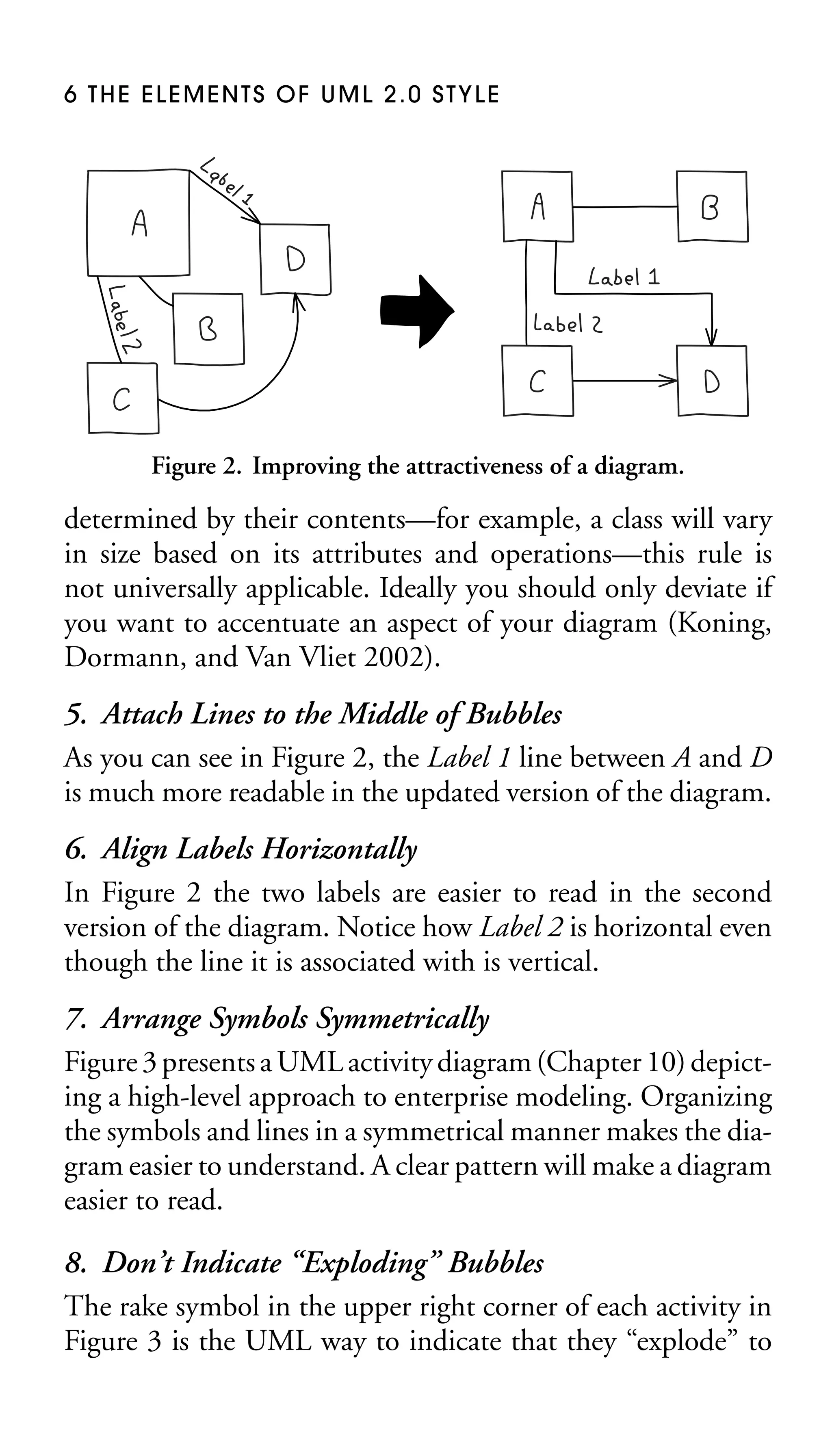
Figure 3 presents a UML activity diagram (Chapter 10) depicting a high-level approach to enterprise modeling. Organizing
the symbols and lines in a symmetrical manner makes the diagram easier to understand. A clear pattern will make a diagram
easier to read.
8. Don’t Indicate “Exploding” Bubbles
The rake symbol in the upper right corner of each activity in
Figure 3 is the UML way to indicate that they “explode” to
G E N E R A L D I AG R A M M I N G G U I D E L I N E S 7

Stakeholder

Requirements
Analyst

Model
Enterprise
Business
Architecture

Prioritize
Enterprise
Requirements

Model
Enterprise
Requirements

Describe
Enterprise
Requirements

Enterprise Architect

Support
Project
Teams

Model
Enterprise
Technical
Architecture

Figure 3. UML activity diagram for a software process.

another diagram showing a greater level of detail. Although
this seems like a good idea, the reality is that people using a
CASE tool know enough to double click on it, or whatever
strategy the tool implements, to get more detail. The rake isn’t
adding any extra value.

9. Minimize the Number of Bubble Types
Koning, Dormann, and Van Vliet (2002) recommend that
you have six or fewer bubbles on a diagram; any more risks
overwhelming the user of the model.
10. Include White Space in Diagrams
White space is the empty areas between modeling elements
on your diagrams. In the first version of Figure 2 the symbols
are crowding each other, whereas in the second version, the
symbols are spread out from one another, thus improving the
8 THE ELEMENTS OF UML 2.0 STYLE

readability of the diagram. Observe that in the second version
there is adequate space to add labels to the lines.

11. Organize Diagrams Left to Right, Top to Bottom
In Western cultures, people read left to right and top to bottom
and therefore this is how they will read your diagrams. If there
is a starting point for reading the diagram, such as the initial
state of a UML state chart diagram or the beginning of the flow
of logic on a UML sequence diagram, then place it toward the
top left corner of your diagram and continue appropriately
from there.
12. Avoid Many Close Lines
Several lines close together are hard to follow.
13. Provide a Notation Legend
If you’re not sure that all of the users of a model understand the notation that you’re using, provide them with a
legend that overviews it. A good legend indicates the notational symbols used, the name of the symbol, and a description
of its usage. Figure 4 provides an example for robustness diagrams (Jacobson, Christerson, Jonsson, and Overgaard 1992;
Rosenberg and Scott 1999), a modification of UML communication diagrams (Chapter 8).

2.2 Simplicity Guidelines
14. Show Only What You Have to Show
Diagrams showing too many details are difficult to read because they are too information-dense. One of the practices
of Agile Modeling (Chapter 17) is to Depict Models Simply:
to include only critical information on your diagrams and to
exclude anything extraneous. A simple model that shows the
key features that you are trying to depict—perhaps a UML
G E N E R A L D I AG R A M M I N G G U I D E L I N E S 9

Actor

Actors represent people, organizations, or other
systems which interact with our system. Examples:
Student, Financial Institution, and Payment Processor.

Process/
Controller
Class

Process/controller classes implement logic which
crosses several business entities. Examples: Print a
student transcript and Drop student from a seminar.

Domain
Class

Domain classes implement fundamental business
entities. Examples: Student, Seminar, Course.

Interface
Class

Interface classes enable actors to interact with our
system, other via a user interface or a system interface.
Examples: Student registration screen and Payment
Processing System Interface.

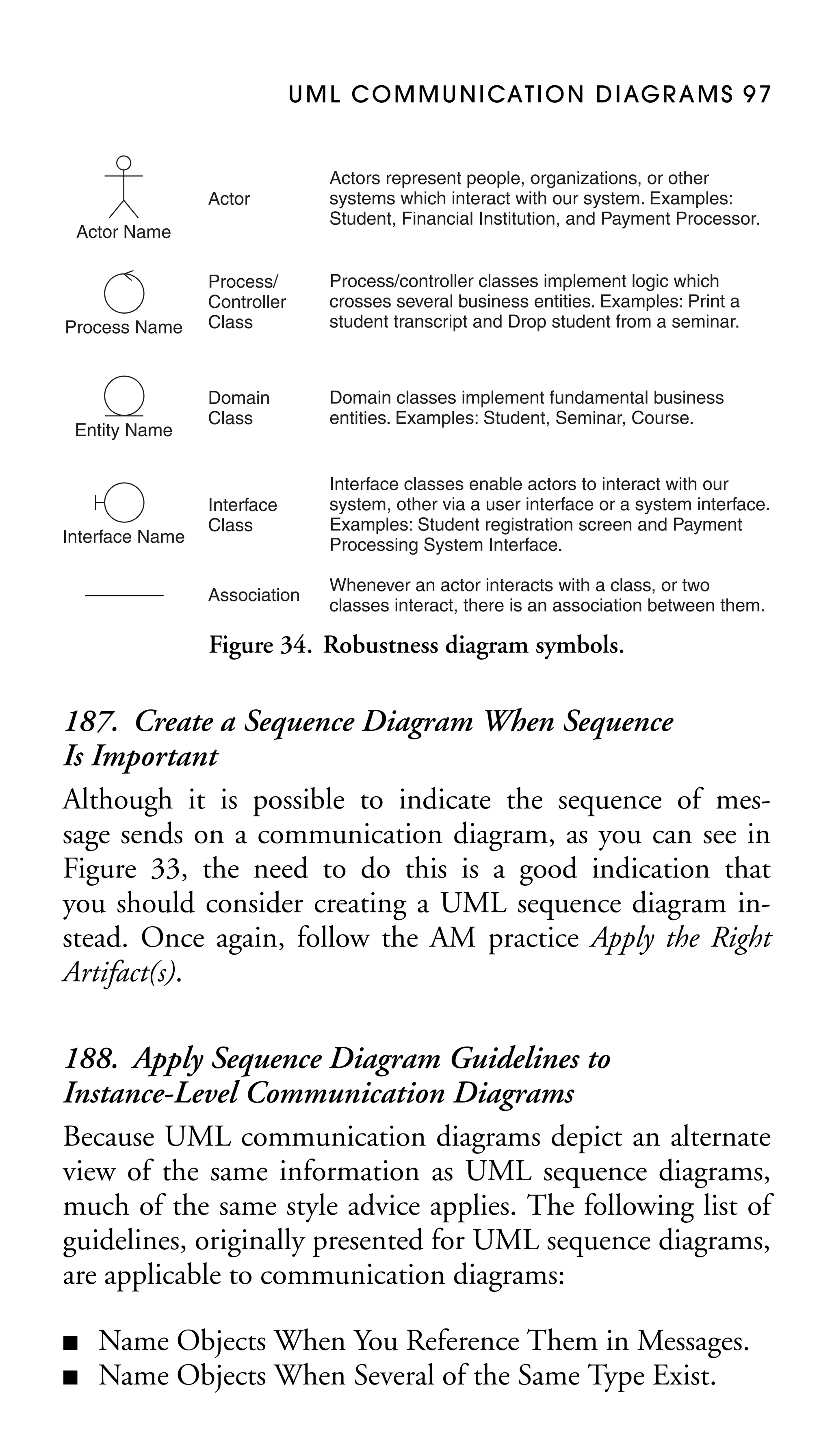
Association

Whenever an actor interacts with a class, or two
classes interact, there is an association between them.

Actor Name

Process Name

Entity Name

Interface Name

Figure 4. A legend for robustness diagrams.

class diagram depicting the primary responsibilities of classes
and the relationships between them—often proves to be sufficient. Yes, you could model all of the scaffolding code that
you will need to implement, but what value would that add?
Very little.

15. Prefer Well-Known Notation over Esoteric Notation
Diagrams that include esoteric notation, instead of just the
20 percent “kernel notation” that does 80 percent of the job,
can be difficult to read. Of course, what is well known in one
organization may not be so well known in another, and so, you
may want to consider supplying people with a brief summary
of the notation that you’re using.
16. Reorganize Large Diagrams into Several
Smaller Ones
It is often better to have several diagrams showing various degrees of detail than one complex diagram that shows
10 THE ELEMENTS OF UML 2.0 STYLE

everything. A good rule of thumb is that a diagram shouldn’t
have more than nine symbols on it, based on the 7 ± 2 rule
(Miller 1957), because there is a limit on the amount of information that someone can deal with at once. “Wallpaper”
diagrams, particularly enterprise data models or enterprise object models, may look interesting but they’re too informationdense to be effective. When you are reorganizing a large diagram into several smaller ones, you may choose to introduce
a high-level UML package diagram (Chapter 6).

17. Prefer Single-Page Diagrams
To reduce complexity, a diagram should be printable on a
single sheet of paper to help reduce its scope as well as to
prevent wasted time cutting and taping several pages together.
Be aware that you will reduce the usability of a diagram if you
need to reduce the font too much or crowd the symbols and
lines.
18. Focus on Content First, Appearance Second
There is always the danger of adding hours onto your CASE
tool modeling efforts by rearranging the layout of your symbols and lines to improve the diagram’s readability. The best
approach is to focus on the content of a diagram at first and
only try to get it looking good in a rough sort of way—it
doesn’t have to be perfect while you’re working on it. Once
you’re satisfied that your diagram is accurate enough, and that
you want to keep it, then invest the appropriate time to make it
look good. An advantage of this approach is that you don’t invest significant effort improving diagrams that you eventually
discard.
19. Apply Consistent, Readable Fonts
Consistent, easy-to-read fonts improve the readability of your
diagrams. Good ideas include fonts in the Courier, Arial,
G E N E R A L D I AG R A M M I N G G U I D E L I N E S 1 1

and Times families. Bad ideas include small fonts (less than
10 point), large fonts (greater than 18 point), and italics.

2.3 Naming Guidelines
20. Set and Follow Effective Naming Conventions
This is one of the easiest things that you can do to ensure consistency within your models, and hence increase their readability.
21. Apply Common Domain Terminology in Names
Apply consistent and recognizable domain terminology, such
as customer and order, whenever possible on your diagrams.
This is particularly true for requirements and analysis-oriented
diagrams with which your project stakeholders are likely to be
working.
22. Apply Language Naming Conventions on
Design Diagrams
Design diagrams should reflect implementation issues, including language naming conventions, such as orderNumber
for an attribute and sendMessage() in Java. Requirements and
analysis-oriented diagrams should not reflect language issues
such as this.
23. Name Common Elements Consistently
Across Diagrams
A single modeling element, such as an actor or a class, will
appear on several of your diagrams. For example, the same
class will appear on several UML class diagrams, several UML
sequence diagrams, several UML communication diagrams,
and several UML activity diagrams. This class should have
the same name on each diagram; otherwise your readers will
become confused.
12 THE ELEMENTS OF UML 2.0 STYLE

2.4 General Guidelines
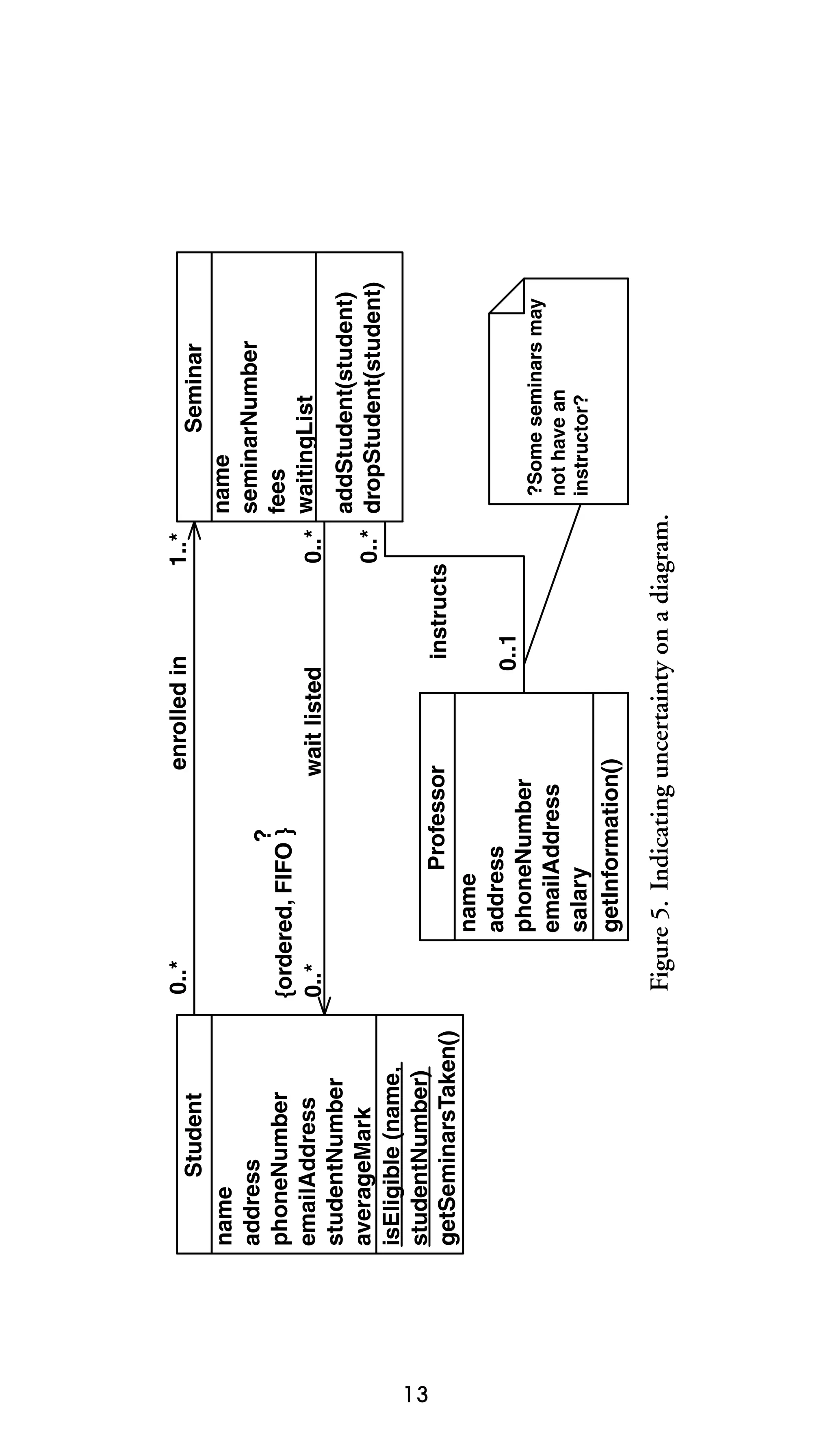
24. Indicate Unknowns with a Question Mark
While you are modeling, you may discover that you do not
have complete information. This is particularly true when you
are analyzing the domain. You should always try to track down
a sufficient answer, but if you cannot do so immediately, then
make a good guess and indicate your uncertainty. Figure 5
depicts a common way to do so with its use of question
marks.1 First, there is a UML note (see Section 3.1) attached
to the association between Professor and Seminar questioning
the multiplicity. Second, there is a question mark above the
constraint on the wait listed association between Student and
Seminar, likely an indication that the modeler isn’t sure that
it really is a first in, first out (FIFO) list.
25. Consider Applying Color to Your Diagrams
Coad, Lefebvre, and DeLuca (1999) provide excellent advice
in their book Java Modeling in Color with UML for improving
the understandability of diagrams by applying color to them,
in addition to UML stereotypes. Perhaps color could indicate
the implementation language of a class (e.g., blue for Java
and red for C++) on a UML class diagram, the development
priority of a use case (e.g., red for phase 1, orange for phase 2,
and yellow for future phases) on a UML use case diagram, or
the target platform (e.g., blue for an application server, green
for a client machine, and pink for a database server) for a
software element on a UML deployment diagram.
26. Apply Color or Different Fonts Sparingly
Evitts (2000) suggests the use of different fonts, line styles,
colors, and shading to emphasize different aspects of your
1

Question marks are not official UML notation.
13

name
address
phoneNumber
emailAddress
studentNumber
averageMark
isEligible (name,
studentNumber)
getSeminarsTaken()

Student

Figure 5. Indicating uncertainty on a diagram.

?Some seminars may
not have an
instructor?

Seminar
name
seminarNumber
fees
0..* waitingList
addStudent(student)
0..* dropStudent(student)

1..*

instructs
0..1

wait listed

enrolled in

Professor
name
address
phoneNumber
emailAddress
salary
getInformation()

?
{ordered, FIFO }
0..*

0..*
14 THE ELEMENTS OF UML 2.0 STYLE

diagrams. The secret is to do this sparingly; otherwise you run
the risk of creating noisy/gaudy diagrams. Sometimes less is
more. Koning, Dormann, and Van Vliet (2002) also suggest
restraint when applying color, suggesting that you not use
more than six colors in a single diagram, that you use vivid
colors only for strong signaling, and that you prefer colors that
are light.
3.
Guidelines for
Common UML
Modeling Elements
An important benefit of the UML is that it is consistent, and
part of that consistency is the application of common modeling elements across different diagrams. This chapter describes
guidelines for
■
■
■
■

Notes
Stereotypes
Frames
Interfaces

3.1 Guidelines for UML Notes
A UML note is a modeling construct for adding textual
information—such as a comment, constraint definition, or
method body—to UML diagrams. As you can see in Figure 6,
notes are depicted as rectangles with the top right corners
folded over.

27. Describe Diagrams with Notes
Ever look at a diagram and not know what it represents? A
simple solution is to include a UML note on each diagram
15
16 THE ELEMENTS OF UML 2.0 STYLE

SWA Online
Common Business
Components
Owner: H. Jordan

Figure 6. A summary note for a diagram.

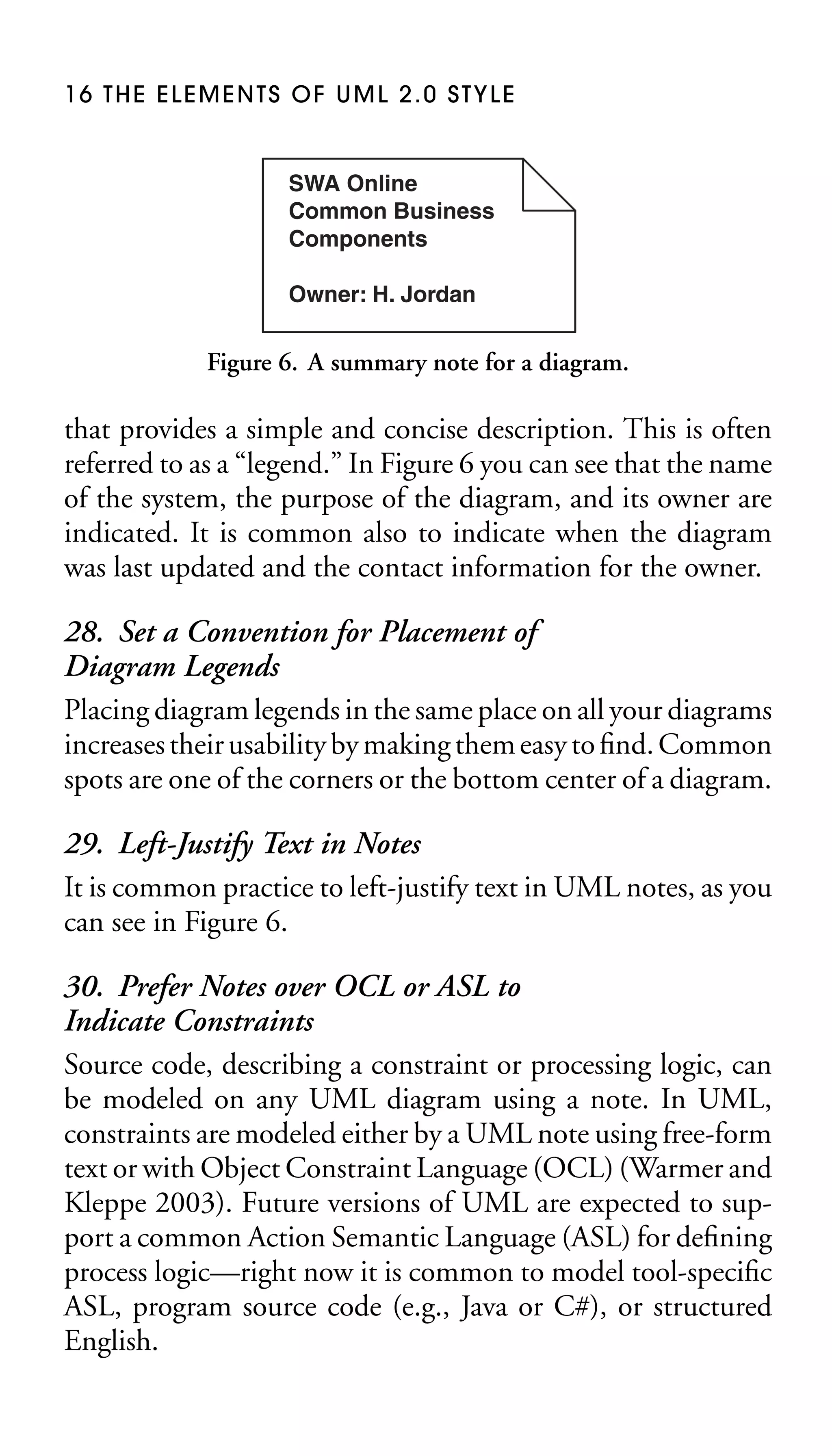
that provides a simple and concise description. This is often
referred to as a “legend.” In Figure 6 you can see that the name
of the system, the purpose of the diagram, and its owner are
indicated. It is common also to indicate when the diagram
was last updated and the contact information for the owner.

28. Set a Convention for Placement of
Diagram Legends
Placing diagram legends in the same place on all your diagrams
increases their usability by making them easy to find. Common
spots are one of the corners or the bottom center of a diagram.
29. Left-Justify Text in Notes
It is common practice to left-justify text in UML notes, as you
can see in Figure 6.
30. Prefer Notes over OCL or ASL to
Indicate Constraints
Source code, describing a constraint or processing logic, can
be modeled on any UML diagram using a note. In UML,
constraints are modeled either by a UML note using free-form
text or with Object Constraint Language (OCL) (Warmer and
Kleppe 2003). Future versions of UML are expected to support a common Action Semantic Language (ASL) for defining
process logic—right now it is common to model tool-specific
ASL, program source code (e.g., Java or C#), or structured
English.
Common UML Modeling Elements 17
{ ordered, FIFO }
wait listed for
0..*
Student

0..*
0..*

takes

1..*

0..*

Seminar

prerequisite
0..* for

{subset}
0..*

0..*
currently enrolled in

context Student::previousCourses
derive: Student.takes – Student.currentlyEnrolledin
inv: Student.currentlyEnrolledin->forAll (
Student.previousCourses.contains (each.prerequisites))

Figure 7. Indicating OCL on a UML diagram.

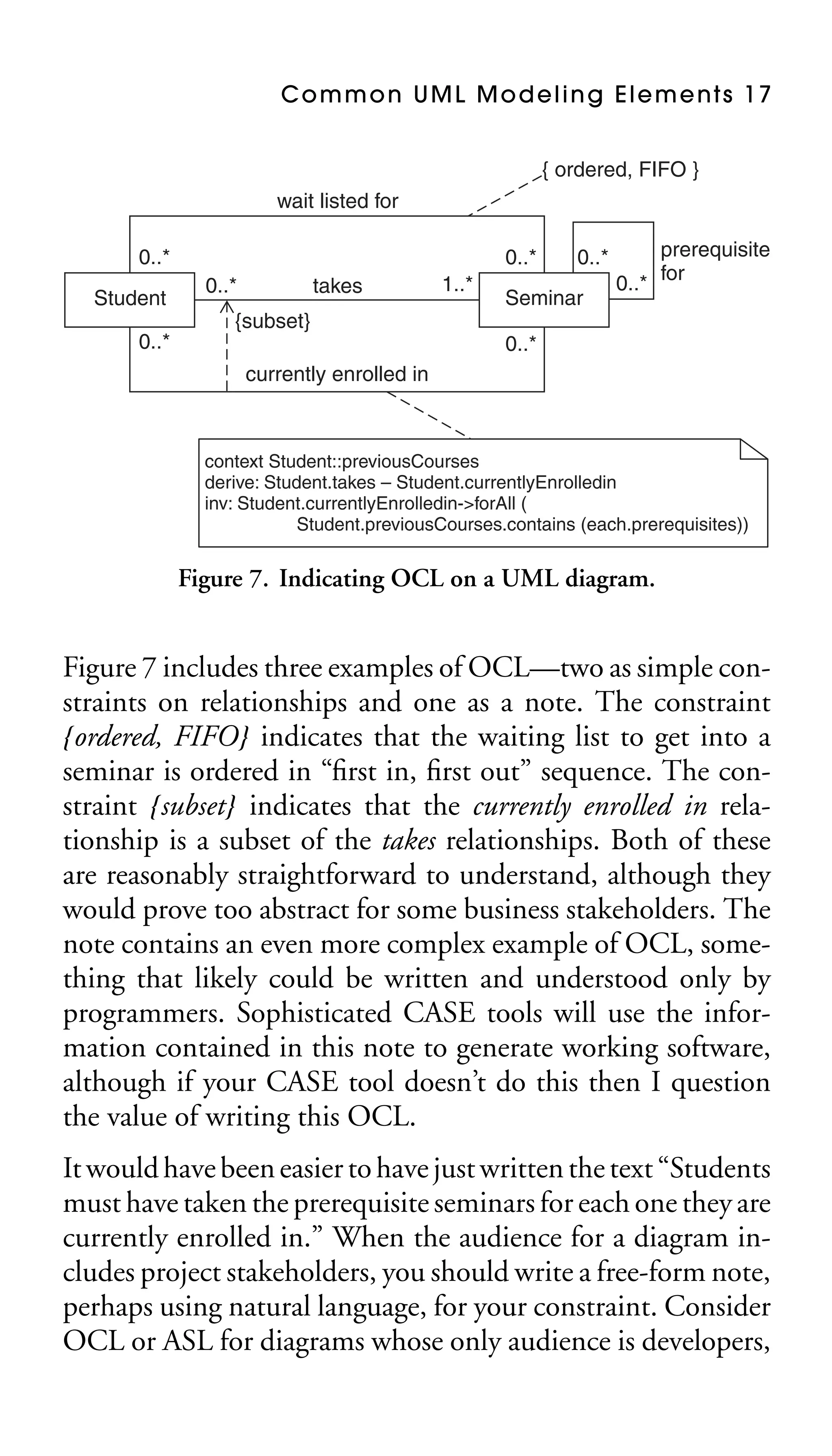
Figure 7 includes three examples of OCL—two as simple constraints on relationships and one as a note. The constraint
{ordered, FIFO} indicates that the waiting list to get into a
seminar is ordered in “first in, first out” sequence. The constraint {subset} indicates that the currently enrolled in relationship is a subset of the takes relationships. Both of these
are reasonably straightforward to understand, although they
would prove too abstract for some business stakeholders. The
note contains an even more complex example of OCL, something that likely could be written and understood only by
programmers. Sophisticated CASE tools will use the information contained in this note to generate working software,
although if your CASE tool doesn’t do this then I question
the value of writing this OCL.
It would have been easier to have just written the text “Students
must have taken the prerequisite seminars for each one they are
currently enrolled in.” When the audience for a diagram includes project stakeholders, you should write a free-form note,
perhaps using natural language, for your constraint. Consider
OCL or ASL for diagrams whose only audience is developers,
18 THE ELEMENTS OF UML 2.0 STYLE

but recognize that this is only appropriate if everyone involved
understands OCL or ASL.

31. Follow Common Coding Conventions
for OCL and ASL
The book The Elements of Java Style (Vermeulen et al. 2000)
provides Java coding guidance that you can modify for OCL
and ASL.

3.2 Guidelines for UML Stereotypes
A stereotype denotes a variation on an existing modeling
element with the same form but with a modified intent
(Rumbaugh, Jacobson, and Booch 2004). Stereotypes are used
to extend the UML in a consistent manner.

32. Name Stereotypes in <<user interface>>
and <<UI>> Format
It is common UML convention to use lowercase for stereotypes
that are spelled out fully, such as <<include>> instead of
<<Include>>, and to use all uppercase for stereotypes that
are abbreviations, such as <<HTTP>> instead of <<Http>>.
33. List Stereotypes Last
The most important information should always come first,
followed by the next most important information, and so on.
The stereotypes applicable to a model element should be listed
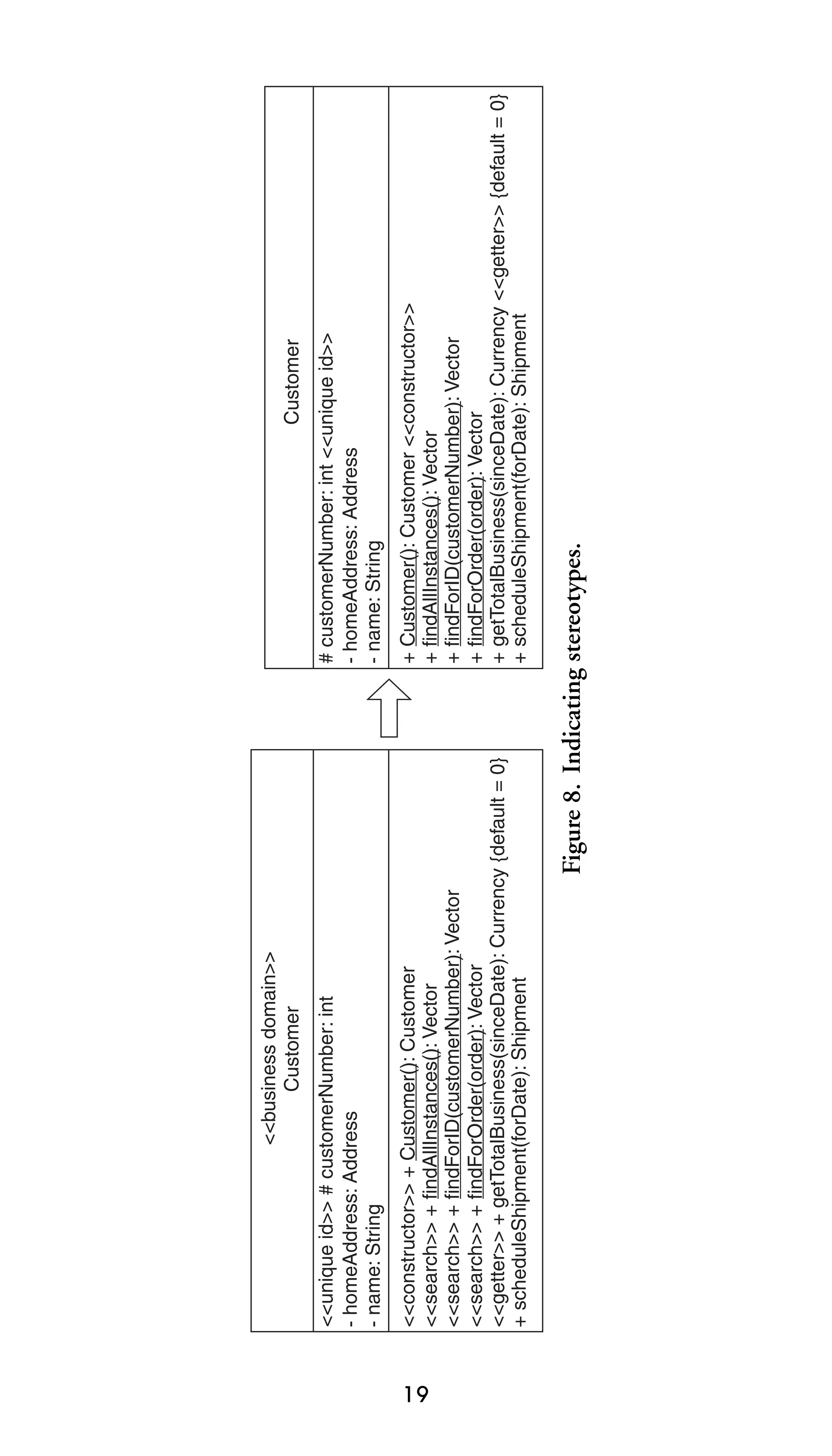
to the right of or below the primary information. In Figure 8
the second version of the Customer class lists the stereotypes
for its operations after the operation signature, not before it.
34. Don’t Indicate Assumed Stereotypes
In Figure 8 I dropped the <<business domain>> stereotype because it is common practice to assume that a class is a
business domain one unless marked otherwise.
19

Figure 8. Indicating stereotypes.

+ Customer(): Customer <<constructor>>
+ findAllInstances(): Vector
+ findForID(customerNumber): Vector
+ findForOrder(order): Vector
+ getTotalBusiness(sinceDate): Currency <<getter>> {default = 0}
+ scheduleShipment(forDate): Shipment

<<constructor>> + Customer(): Customer
<<search>> + findAllInstances(): Vector
<<search>> + findForID(customerNumber): Vector
<<search>> + findForOrder(order): Vector
<<getter>> + getTotalBusiness(sinceDate): Currency {default = 0}
+ scheduleShipment(forDate): Shipment

Customer
# customerNumber: int <<unique id>>
- homeAddress: Address
- name: String

<<unique id>> # customerNumber: int
- homeAddress: Address
- name: String

<<business domain>>
Customer
20 THE ELEMENTS OF UML 2.0 STYLE

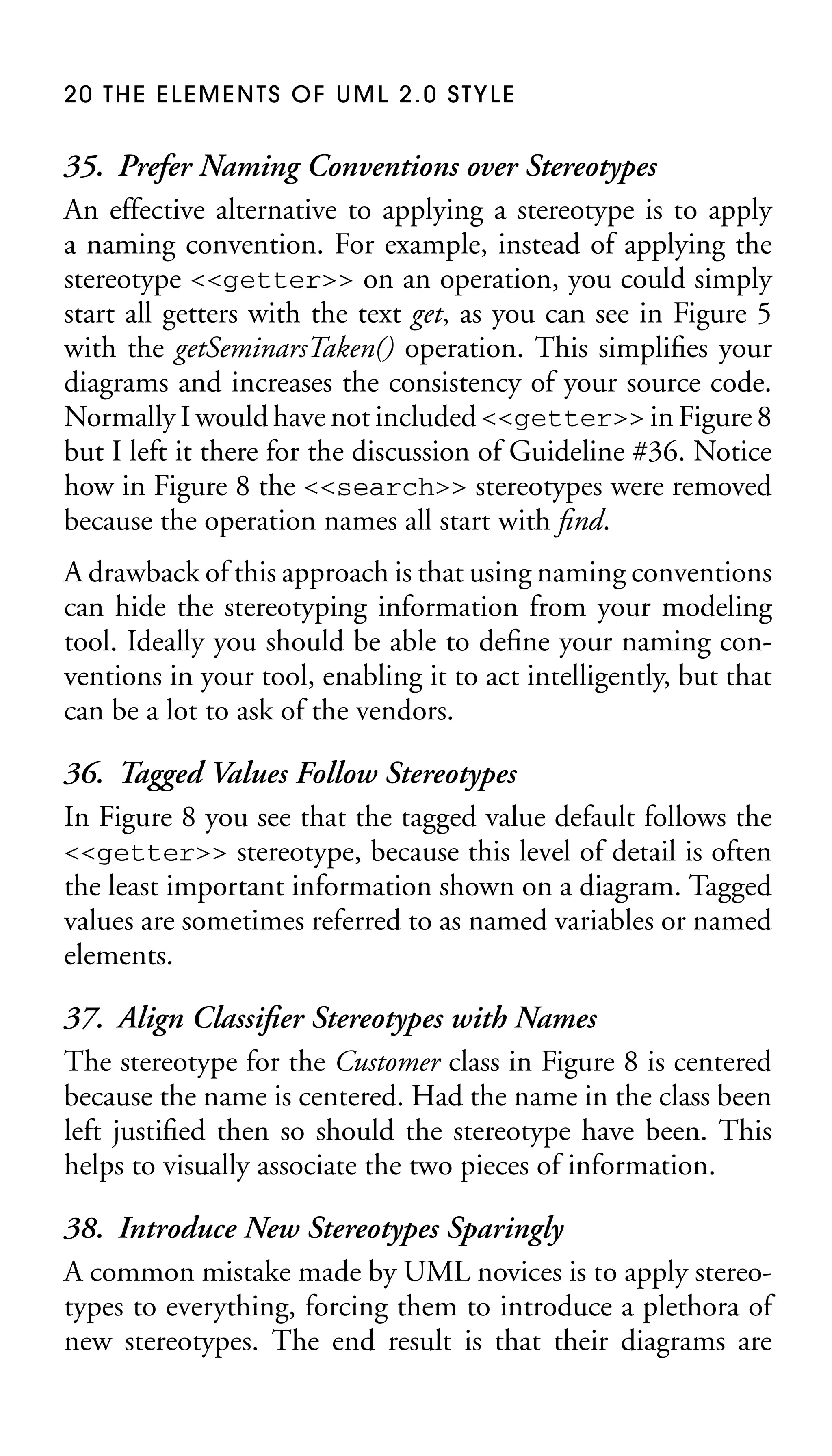
35. Prefer Naming Conventions over Stereotypes
An effective alternative to applying a stereotype is to apply
a naming convention. For example, instead of applying the
stereotype <<getter>> on an operation, you could simply
start all getters with the text get, as you can see in Figure 5
with the getSeminarsTaken() operation. This simplifies your
diagrams and increases the consistency of your source code.
Normally I would have not included <<getter>> in Figure 8
but I left it there for the discussion of Guideline #36. Notice
how in Figure 8 the <<search>> stereotypes were removed
because the operation names all start with find.
A drawback of this approach is that using naming conventions
can hide the stereotyping information from your modeling
tool. Ideally you should be able to define your naming conventions in your tool, enabling it to act intelligently, but that
can be a lot to ask of the vendors.

36. Tagged Values Follow Stereotypes
In Figure 8 you see that the tagged value default follows the
<<getter>> stereotype, because this level of detail is often
the least important information shown on a diagram. Tagged
values are sometimes referred to as named variables or named
elements.
37. Align Classifier Stereotypes with Names
The stereotype for the Customer class in Figure 8 is centered
because the name is centered. Had the name in the class been
left justified then so should the stereotype have been. This
helps to visually associate the two pieces of information.
38. Introduce New Stereotypes Sparingly
A common mistake made by UML novices is to apply stereotypes to everything, forcing them to introduce a plethora of
new stereotypes. The end result is that their diagrams are
Common UML Modeling Elements 21

cluttered with stereotypes. Introduce a new stereotype to clarify an aspect of a model, but don’t introduce one simply to
“complete” your model.

39. Apply Stereotypes Consistently
You will find that you need to document your common stereotypes, above and beyond those defined by the UML standard,
to ensure that they are applied consistently. For example,
you need to decide whether you are going to use <<user
interface>> or <<UI>> as your preferred stereotype. Both
are good choices; choose one and move forward.
40. Apply Visual Stereotypes Sparingly
Figure 9 depicts a sequence diagram (Chapter 7), which includes the standard robustness diagram symbols (Jacobson,
Christerson, Jonsson, and Overgaard 1992; Rosenberg and
Scott 1999) that are commonly applied to UML communication diagrams (Chapter 8). The visual stereotypes—a stick figure for an actor, a circle with an arrowhead for a process class,
and a circle on top of a line for business domain classes—
are applied instead of text stereotypes such as <<actor>>.
Apply visual stereotypes only when they are well known to the
user(s) of your diagrams. It should be safe to assume that users
can read a text stereotype, but it’s not as safe to assume they
understand the visual representations.

3.3 Guidelines for UML Frames
A frame in the UML encapsulates a collection of collaborating
instances or refers to another representation of such. Frames
are depicted as rectangles with notched descriptor boxes in
the top left corners. Frames come in two flavors, diagram
frames such as Batch Transcript Printing and combined
fragment frames such as the loop frame, both in Figure 9.
Diagram frames explicitly define the boundary of a diagram,
22

ref PrintRun

: TranscriptBatch

[for each seminar]

printer: SharedServices
<<system>>

ref SharedServices.print()

calculateMark()

print(studentTranscript)

getMark()

: Seminar

Figure 9. A frame encompassing a sequence diagram.

loop

student:
Student

getSeminars()

: TranscriptBuilder

new(student)

sd Batch Transcript Printing
Common UML Modeling Elements 23

whereas combined fragment frames encompass portions of a
diagram or provide references to other diagrams or method
definitions.

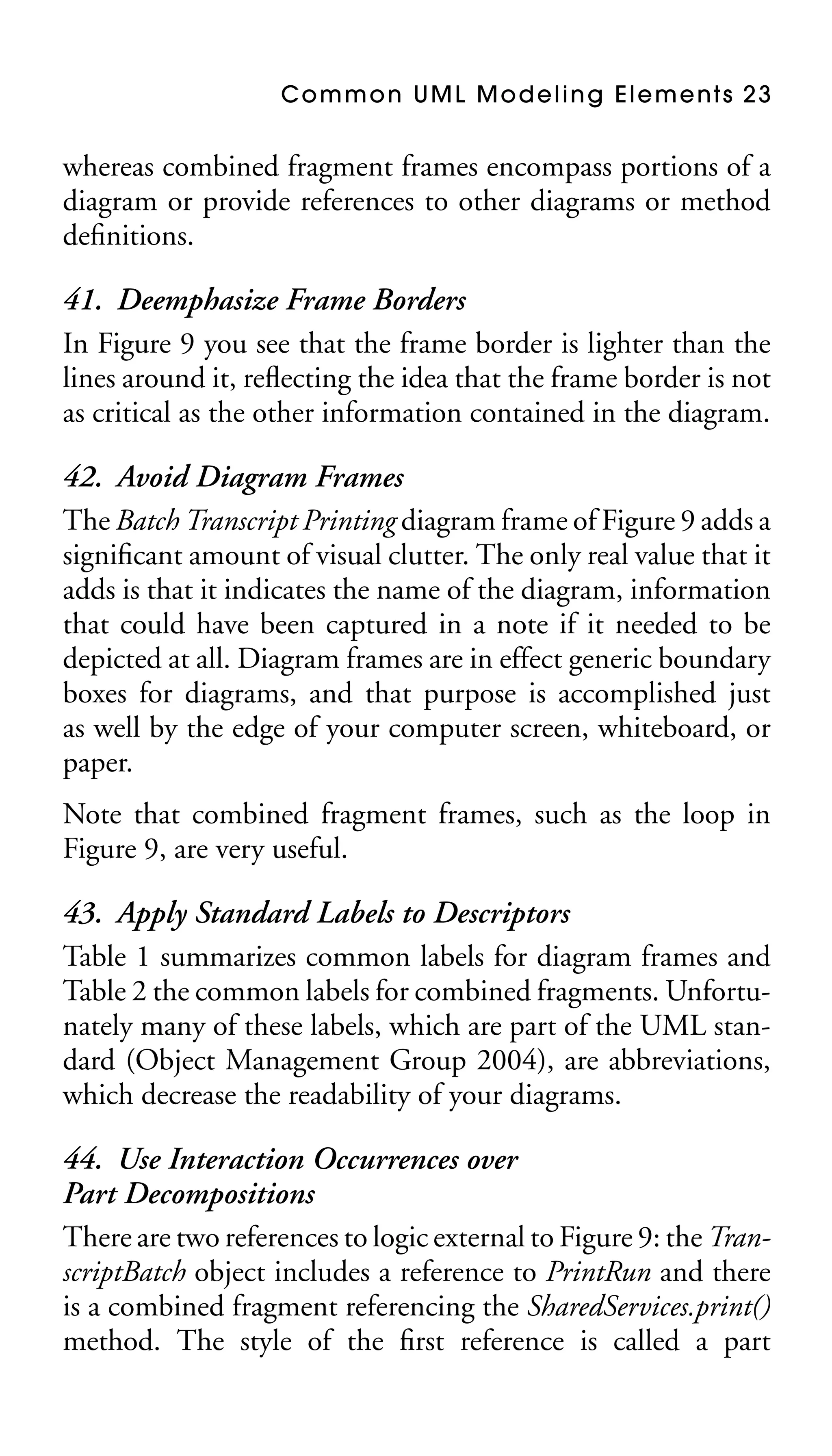
41. Deemphasize Frame Borders
In Figure 9 you see that the frame border is lighter than the
lines around it, reflecting the idea that the frame border is not
as critical as the other information contained in the diagram.
42. Avoid Diagram Frames
The Batch Transcript Printing diagram frame of Figure 9 adds a
significant amount of visual clutter. The only real value that it
adds is that it indicates the name of the diagram, information
that could have been captured in a note if it needed to be
depicted at all. Diagram frames are in effect generic boundary
boxes for diagrams, and that purpose is accomplished just
as well by the edge of your computer screen, whiteboard, or
paper.
Note that combined fragment frames, such as the loop in
Figure 9, are very useful.

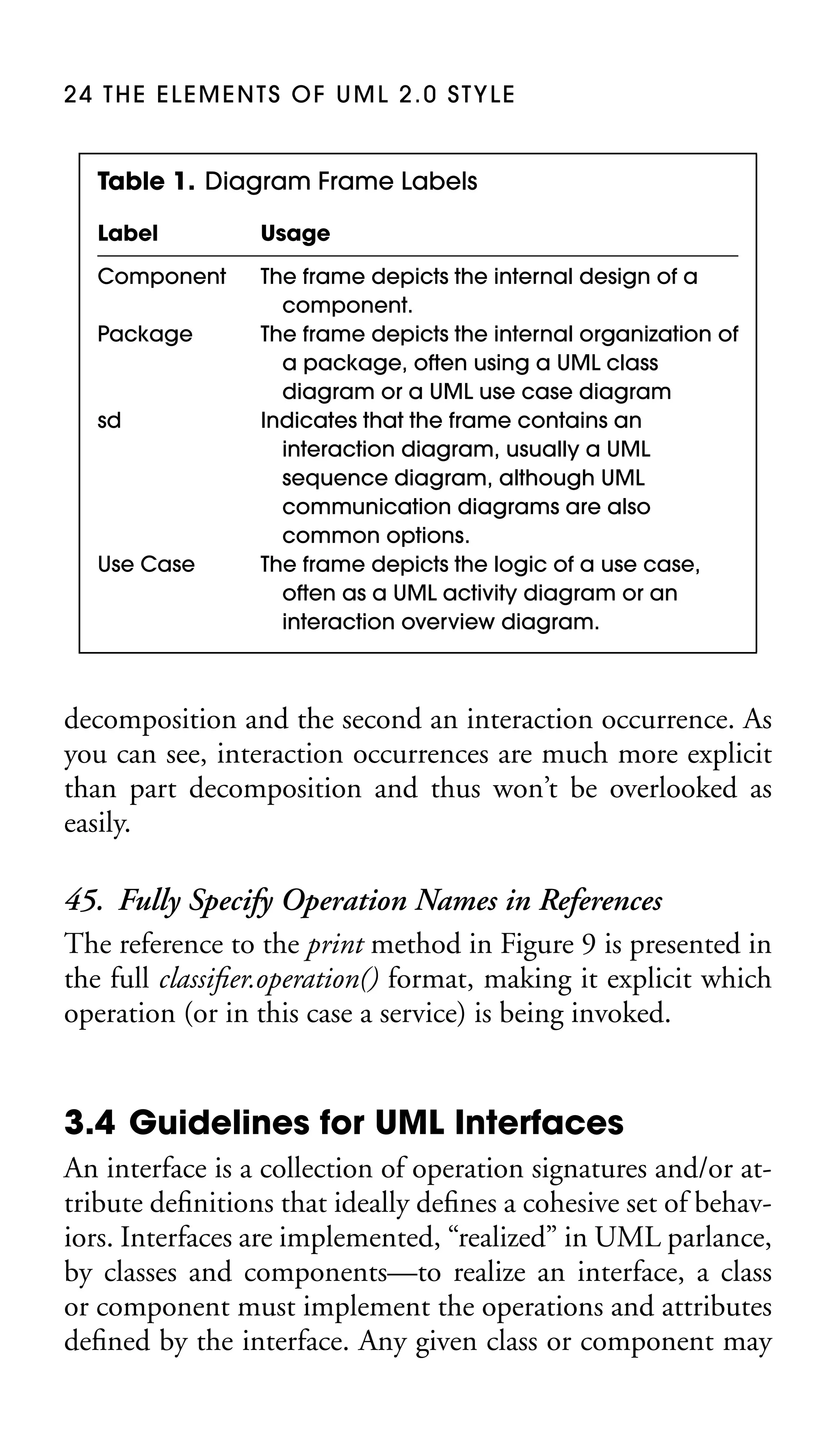
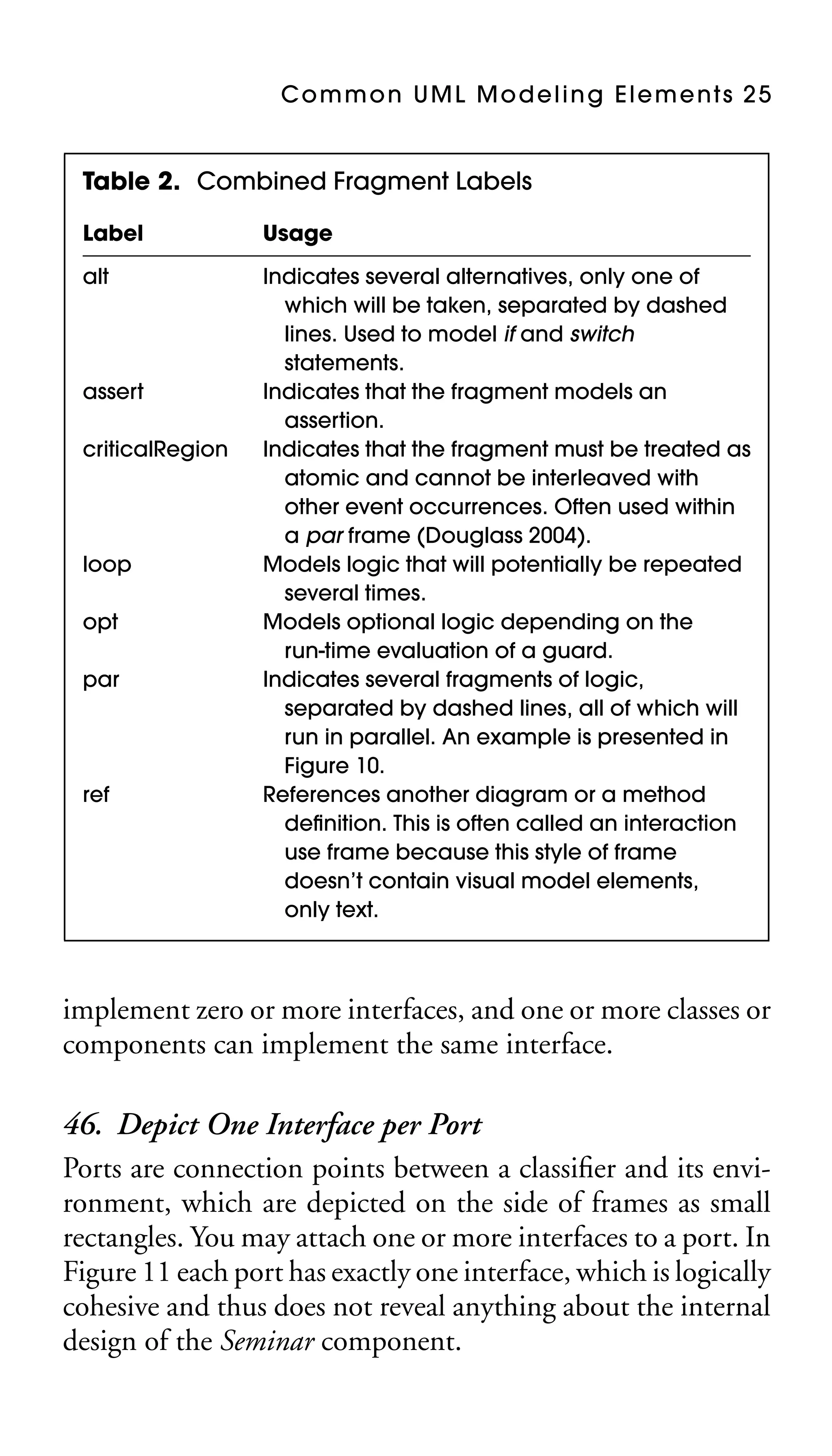
43. Apply Standard Labels to Descriptors
Table 1 summarizes common labels for diagram frames and
Table 2 the common labels for combined fragments. Unfortunately many of these labels, which are part of the UML standard (Object Management Group 2004), are abbreviations,
which decrease the readability of your diagrams.
44. Use Interaction Occurrences over
Part Decompositions
There are two references to logic external to Figure 9: the TranscriptBatch object includes a reference to PrintRun and there
is a combined fragment referencing the SharedServices.print()
method. The style of the first reference is called a part
24 THE ELEMENTS OF UML 2.0 STYLE

Table 1. Diagram Frame Labels
Label

Usage

Component

The frame depicts the internal design of a
component.
The frame depicts the internal organization of
a package, often using a UML class
diagram or a UML use case diagram
Indicates that the frame contains an
interaction diagram, usually a UML
sequence diagram, although UML
communication diagrams are also
common options.
The frame depicts the logic of a use case,
often as a UML activity diagram or an
interaction overview diagram.

Package

sd

Use Case

decomposition and the second an interaction occurrence. As
you can see, interaction occurrences are much more explicit
than part decomposition and thus won’t be overlooked as
easily.

45. Fully Specify Operation Names in References
The reference to the print method in Figure 9 is presented in
the full classifier.operation() format, making it explicit which
operation (or in this case a service) is being invoked.

3.4 Guidelines for UML Interfaces
An interface is a collection of operation signatures and/or attribute definitions that ideally defines a cohesive set of behaviors. Interfaces are implemented, “realized” in UML parlance,
by classes and components—to realize an interface, a class
or component must implement the operations and attributes
defined by the interface. Any given class or component may
Common UML Modeling Elements 25

Table 2. Combined Fragment Labels
Label

Usage

alt

Indicates several alternatives, only one of
which will be taken, separated by dashed
lines. Used to model if and switch
statements.
Indicates that the fragment models an
assertion.
Indicates that the fragment must be treated as
atomic and cannot be interleaved with
other event occurrences. Often used within
a par frame (Douglass 2004).
Models logic that will potentially be repeated
several times.
Models optional logic depending on the
run-time evaluation of a guard.
Indicates several fragments of logic,
separated by dashed lines, all of which will
run in parallel. An example is presented in
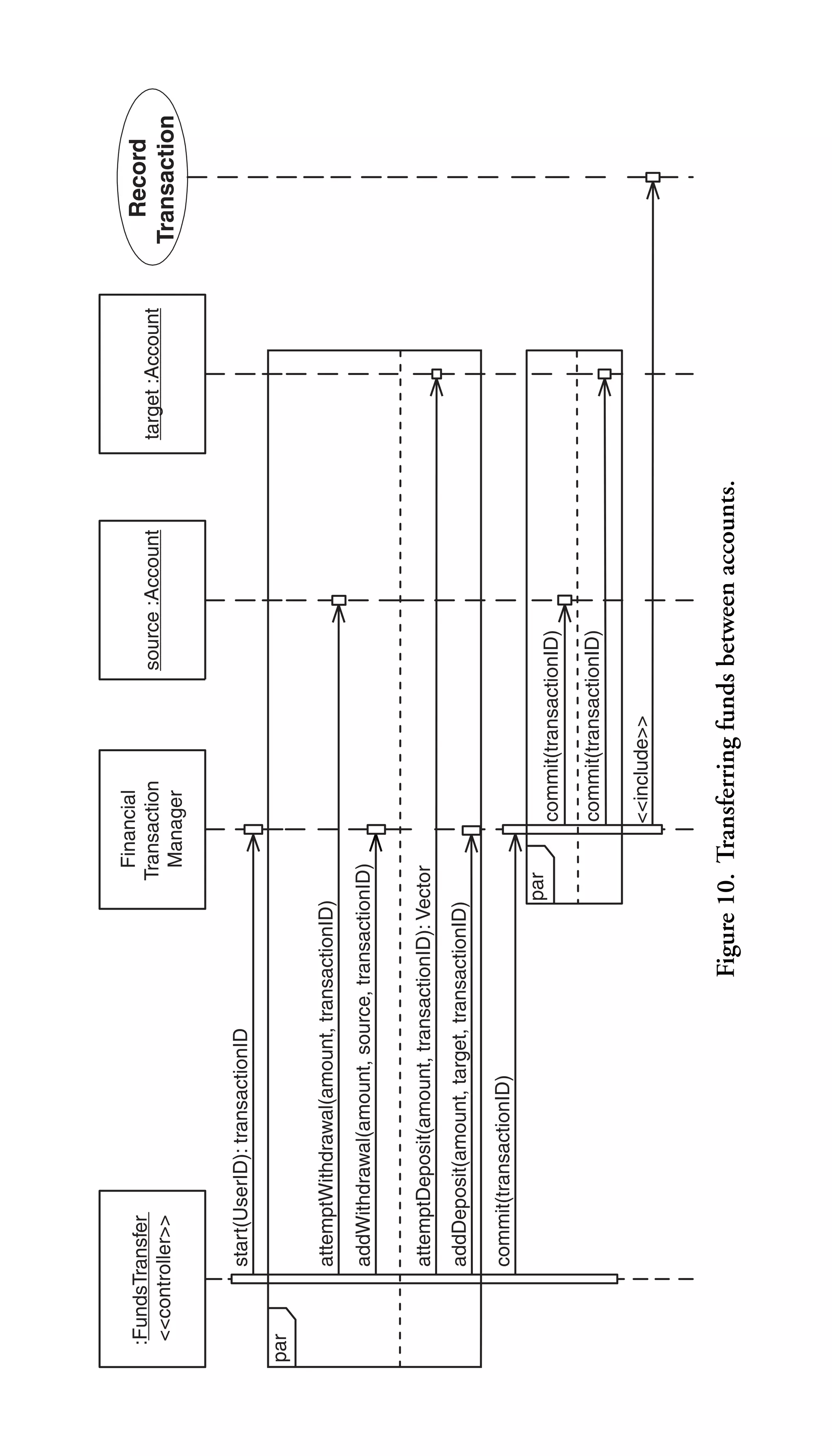
Figure 10.
References another diagram or a method
definition. This is often called an interaction
use frame because this style of frame
doesn’t contain visual model elements,
only text.

assert
criticalRegion

loop
opt
par

ref

implement zero or more interfaces, and one or more classes or
components can implement the same interface.

46. Depict One Interface per Port
Ports are connection points between a classifier and its environment, which are depicted on the side of frames as small
rectangles. You may attach one or more interfaces to a port. In
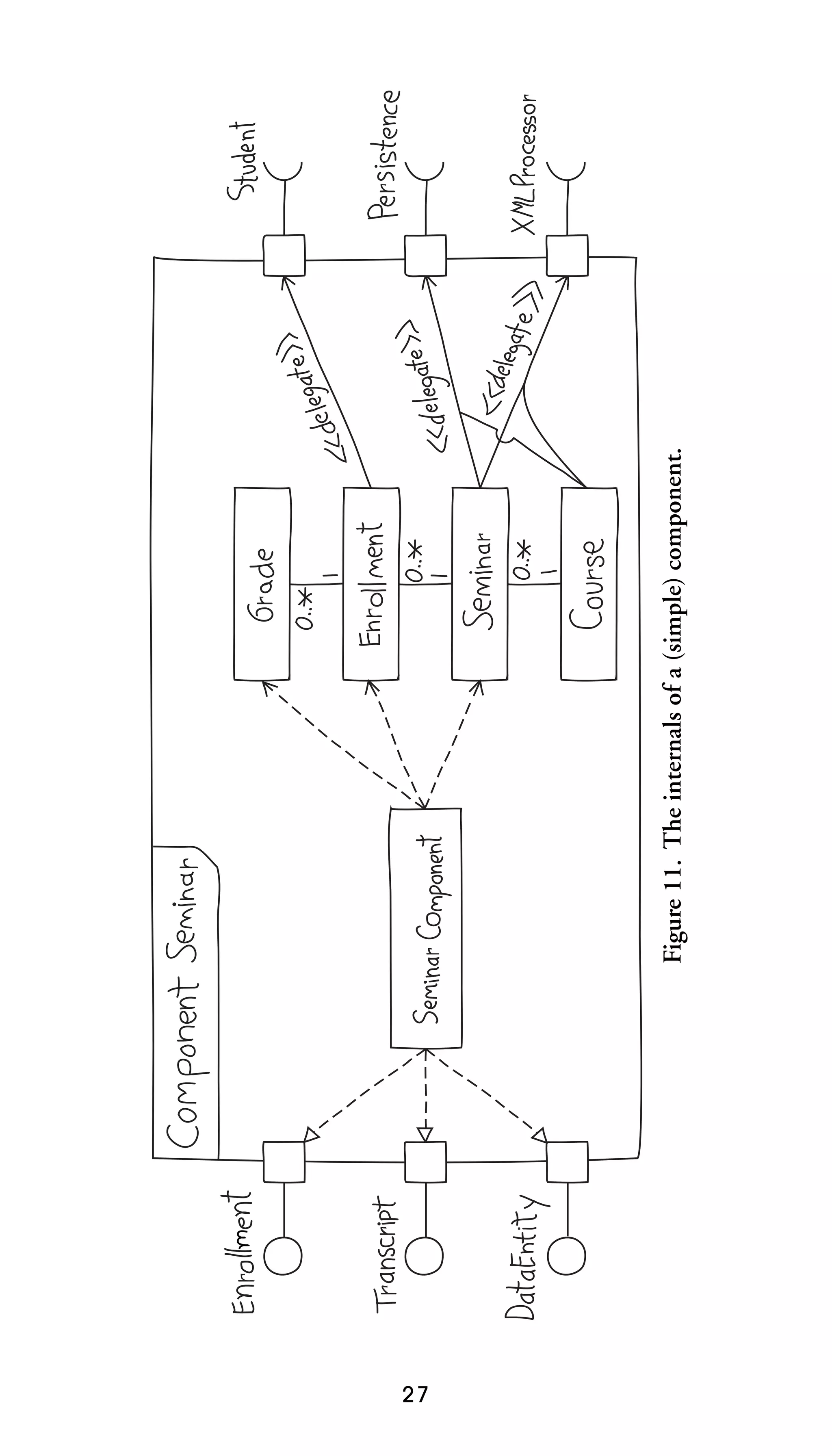
Figure 11 each port has exactly one interface, which is logically
cohesive and thus does not reveal anything about the internal
design of the Seminar component.
par

commit(transactionID)

par

<<include>>

commit(transactionID)

Figure 10. Transferring funds between accounts.

addDeposit(amount, target, transactionID)

attemptDeposit(amount, transactionID): Vector

source :Account

commit(transactionID)

Financial
Transaction
Manager

addWithdrawal(amount, source, transactionID)

attemptWithdrawal(amount, transactionID)

start(UserID): transactionID

:FundsTransfer
<<controller>>
target :Account

Record
Transaction
27

Figure 11. The internals of a (simple) component.
28 THE ELEMENTS OF UML 2.0 STYLE

47. Depict One Port per Realizing Class
Another approach to organizing the interfaces for SeminarComponent of Figure 11 would be to have a single port offering the Enrollment, Transcript, and DataEntity interfaces.
This would make for a more compact diagram, although it
can contradict Guideline #46.
48. Provided Interfaces on the Left
Provided interfaces, those that a classifier implements, should
be placed on the left of the box if possible. In Figure 11 the
provided interfaces are depicted using “lollipop” notation. If
you cannot fit a provided interface on the left side your next
best option is the top of the box.
49. Required Interfaces on the Right
Required interfaces are those that a classifier must have provided for it to work. Required interfaces, such as Student,
Persistence, and XMLProcessor in Figure 11 are depicted in
UML 2 as “sockets.” The next best option is to place them on
the bottom of the classifier. This rule, in combination with
Guideline #48, makes it easier to create wiring-diagram style
component diagrams (Chapter 11).
50. Apply Realizes Relationships for Ports
There are several ways to indicate that a classifier implements
or requires the interfaces of a port. In Figure 11 SeminarComponent realizes the three ports on the left of the frame and the
Enrollment class delegates to the Student port. It would have
also been accurate to model the Transcript port as delegating
to SeminarComponent or the Student port as realizing the required interface for the Enrollment class. We could also have
used dependencies to model these relationships (dashed lines
with arrowheads).
Common UML Modeling Elements 29

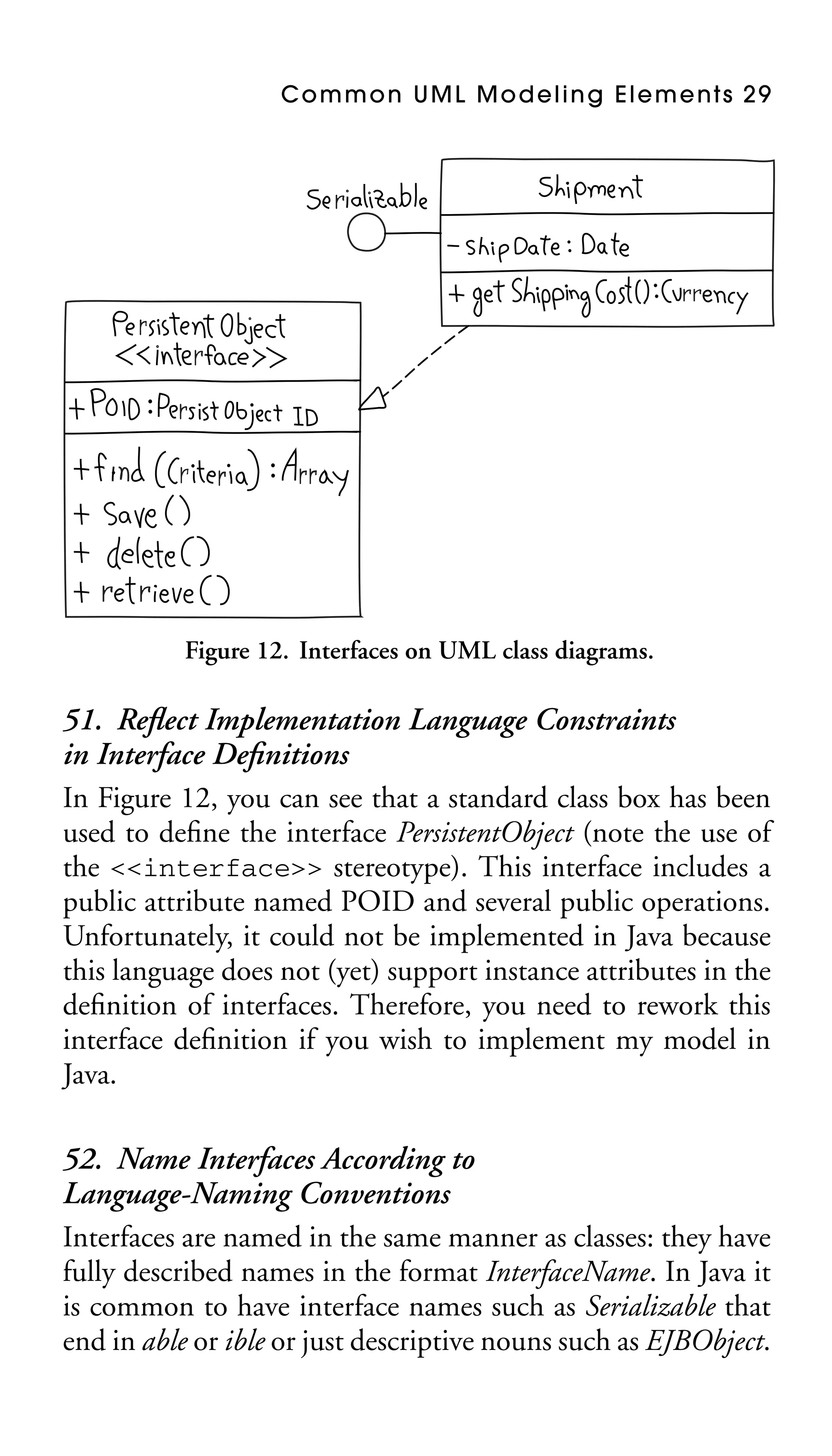
Figure 12. Interfaces on UML class diagrams.

51. Reflect Implementation Language Constraints
in Interface Definitions
In Figure 12, you can see that a standard class box has been
used to define the interface PersistentObject (note the use of
the <<interface>> stereotype). This interface includes a
public attribute named POID and several public operations.
Unfortunately, it could not be implemented in Java because
this language does not (yet) support instance attributes in the
definition of interfaces. Therefore, you need to rework this
interface definition if you wish to implement my model in
Java.
52. Name Interfaces According to
Language-Naming Conventions
Interfaces are named in the same manner as classes: they have
fully described names in the format InterfaceName. In Java it
is common to have interface names such as Serializable that
end in able or ible or just descriptive nouns such as EJBObject.
30 THE ELEMENTS OF UML 2.0 STYLE

In Microsoft environments, it is common practice to prefix
interface names with a capital I, resulting in names such as
IComponent.

53. Prefer “Lollipop” Notation to Indicate Realization
of an Interface
As you can see in Figure 12, there are two ways to indicate
that a class or component implements an interface: the lollipop
notation used with the Serializable interface and the realization
line (the dashed line with a closed arrowhead) used with the
PersistentObject interface. The lollipop notation is preferred
because it is visually compact; the class box and realization
line approach tend to clutter your diagrams. Note that you’ll
still need to model the specifics of the interface somewhere
else.
54. Define Interfaces Separately from Your Classifiers
To reduce clutter, you can define interfaces separately from
classifiers, either in another diagram specifically for interface
definitions or simply on one edge of your class/component
diagram.
55. Do Not Depict the Operations and Attributes
of Interfaces in Your Classes
In Figure 12, you’ll notice that the Shipment class does not include the attributes or operations defined by the two interfaces
that it realizes. That information would be redundant because
it is already contained within the interface definitions. Note
that a CASE tool should still include these elements in the
definition of your classes, but that it shouldn’t display it.
56. One Label per Interface Connection
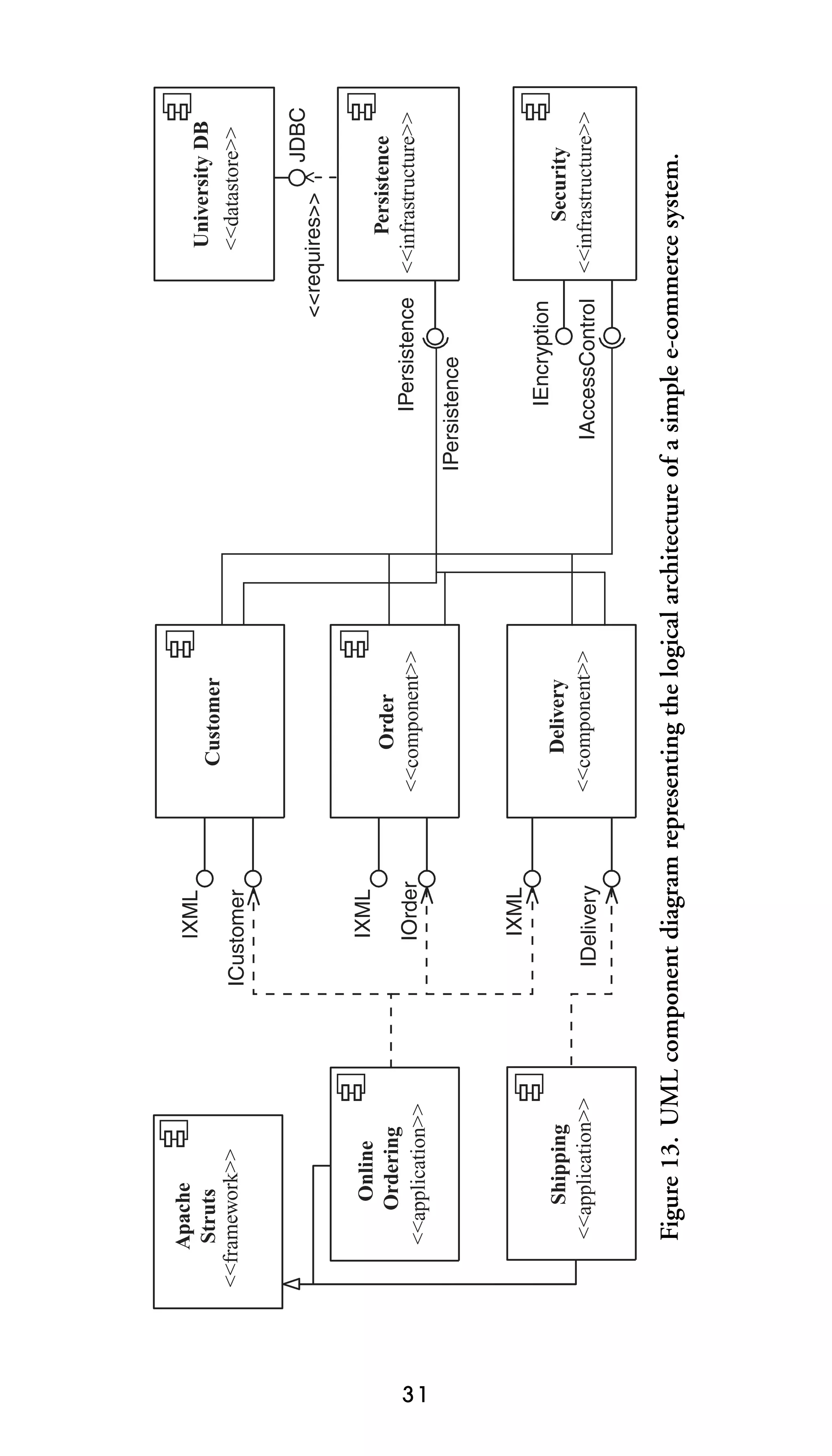
In Figure 13 you see that the IPersistence interface is indicated
twice, once for the lollipop and once for the socket. When you
31

IDelivery

IXML

IOrder

IXML

ICustomer

IXML

Delivery
<<component>>

Order
<<component>>

Customer

IAccessControl

IEncryption

IPersistence

IPersistence

JDBC

Security
<<infrastructure>>

Persistence
<<infrastructure>>

<<requires>>

University DB
<<datastore>>

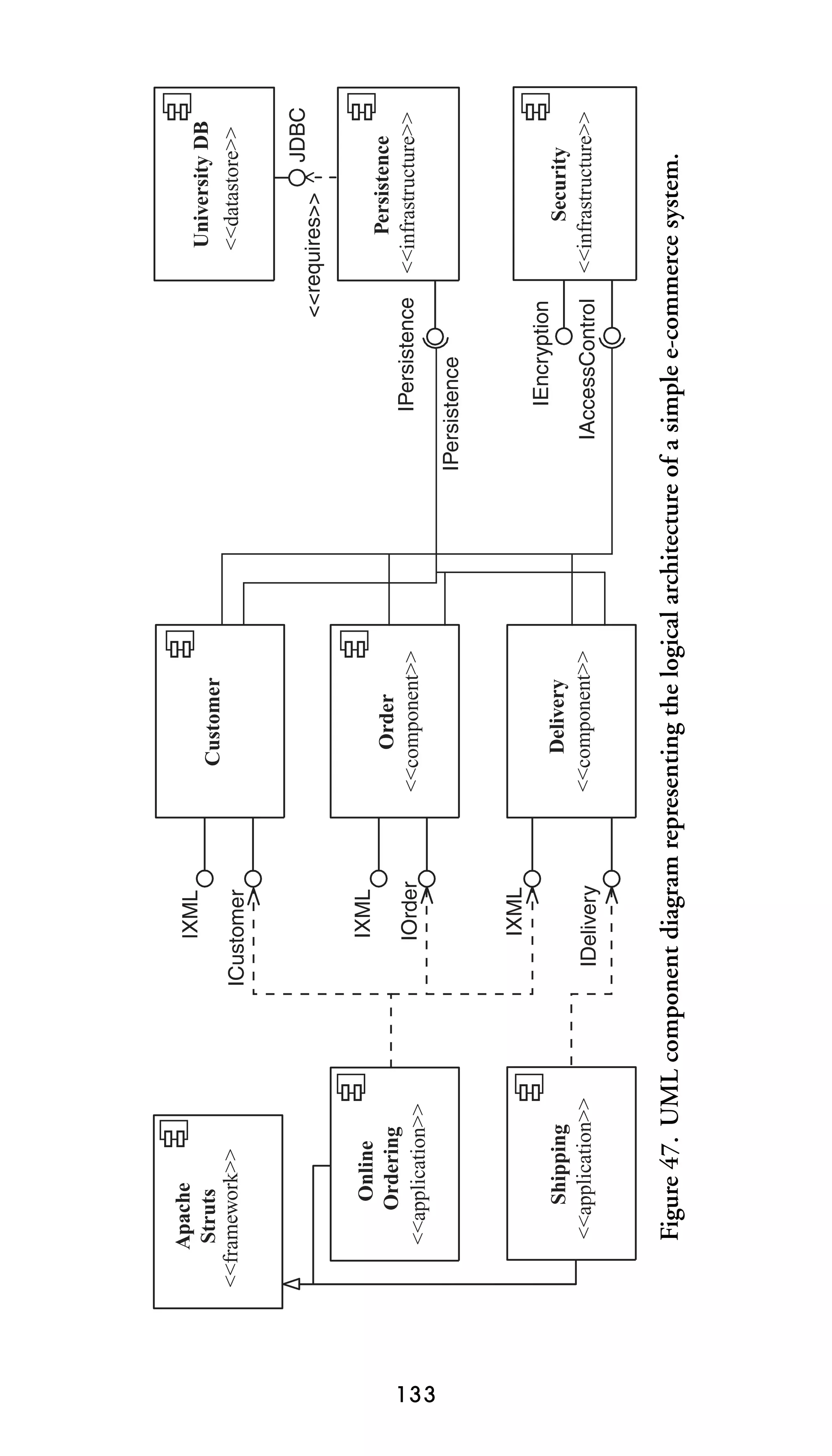
Figure 13. UML component diagram representing the logical architecture of a simple e-commerce system.

Shipping
<<application>>

Online
Ordering
<<application>>

Apache
Struts
<<framework>>
32 THE ELEMENTS OF UML 2.0 STYLE

compare this with how the other interface names are modeled
you see that listing it twice is unnecessary clutter.

57. Place Interface Labels Above the Interface
Whenever possible, interface labels should be placed above the
interface lollipop/socket symbols.
4.
UML Use-Case
Diagrams
A UML use-case diagram shows the relationships among actors and use cases within a system. They are often used to
■

■
■

provide an overview of all or part of the usage requirements
for a system or organization in the form of an essential
model (Constantine and Lockwood 1999, Ambler 2004)
or a business model (Rational Corporation 2002);
communicate the scope of a development project;
model the analysis of usage requirements in the form of a
system use-case model (Cockburn 2001).

A use-case model comprises one or more use-case diagrams
and any supporting documentation such as use-case specifications and actor definitions. Within most use-case models, the
use-case specifications tend to be the primary artifact, with
UML use-case diagrams filling a supporting role as the “glue”
that keeps your requirements model together. Use-case models
should be developed from the point of view of your project
stakeholders and not from the (often technical) point of view
of developers.

4.1 Use-Case Guidelines
A use case describes a sequence of actions that provide a
measurable value to an actor. A use case is drawn as a
33
34 THE ELEMENTS OF UML 2.0 STYLE

horizontal ellipse on a UML use case diagram, as you can see in
Figure 14.

58. Begin Use-Case Names with a Strong Verb
Good use-case names include Withdraw Funds, Register Student in Seminar, and Deliver Shipment because it is clear what
each use case does. Use-case names beginning with weak verbs
such as “process,” “perform,” and “do” are often problematic. Such names often result in communication difficulties
with your project stakeholders, people who are far more likely
to say that they withdraw funds from accounts instead of
process withdrawal transactions. These communication difficulties are likely to decrease your ability to understand their
requirements. Furthermore, names such as Process Withdrawal
Transaction or Perform Student Enrollment Request often indicate that the use case was written with a technically oriented
view, instead of a user-oriented view, and therefore may be at
risk of not reflecting the actual needs of your project stakeholders.
59. Name Use Cases Using Domain Terminology
The name of a use case should immediately convey meaning
to your project stakeholders. For example, Convey Package Via
Vehicular Transportation is a generic name for a use case but
Deliver Shipment reflects common domain terminology and
therefore is far more understandable.
60. Imply Timing Considerations by Stacking Use Cases
Although diagrams should not reflect timing considerations,
such as the need to work through use case A before proceeding
to use case B, the fact is that you can increase the readability
of your diagrams by arranging use cases to imply timing. One
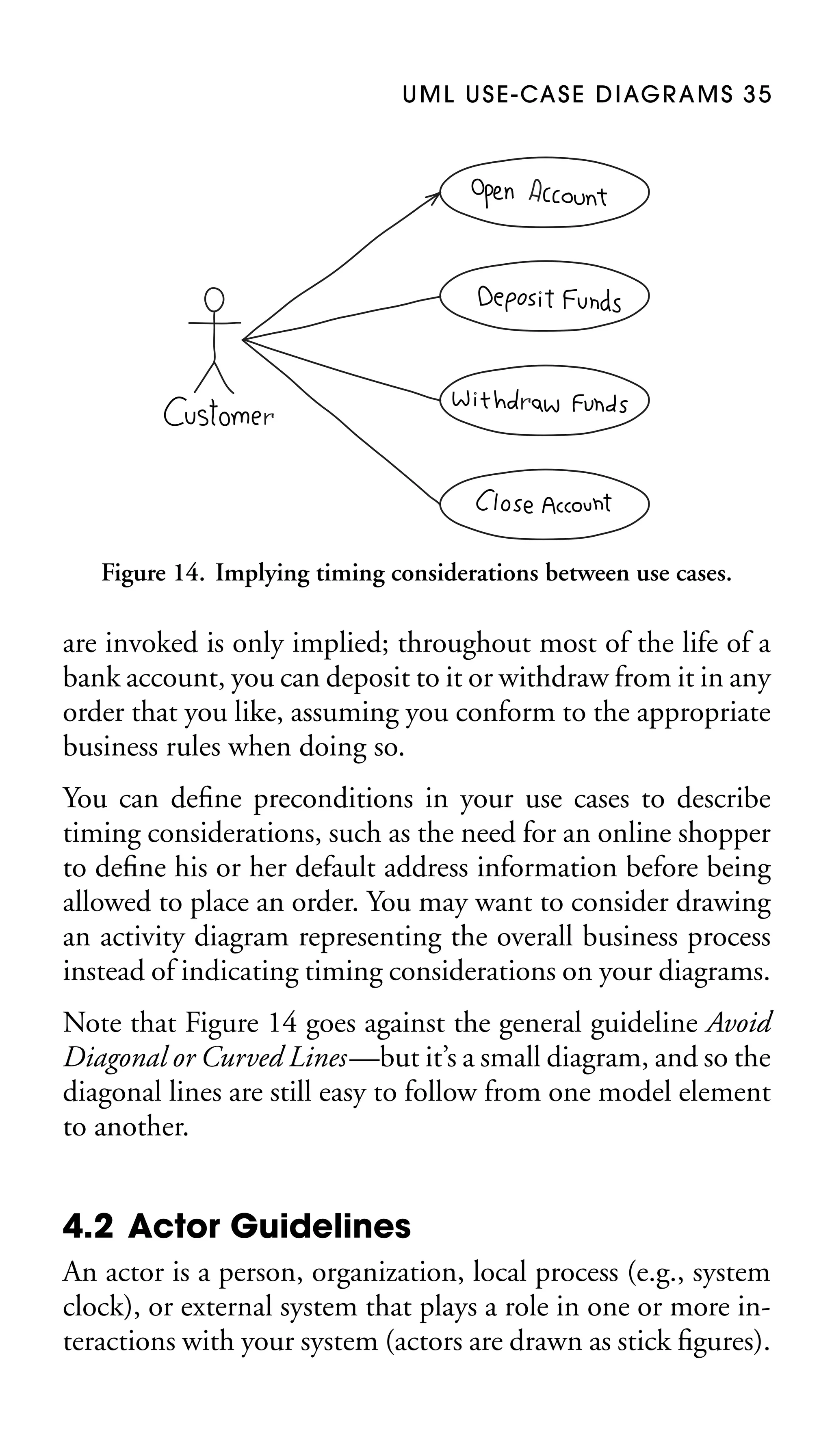
such way is to stack them, as you can see in Figure 14, so that
the use cases that typically occur first are shown above those
that appear later. Note that the order in which these use cases
U M L U S E - CA S E D I AG R A M S 3 5

Figure 14. Implying timing considerations between use cases.

are invoked is only implied; throughout most of the life of a
bank account, you can deposit to it or withdraw from it in any
order that you like, assuming you conform to the appropriate
business rules when doing so.
You can define preconditions in your use cases to describe
timing considerations, such as the need for an online shopper
to define his or her default address information before being
allowed to place an order. You may want to consider drawing
an activity diagram representing the overall business process
instead of indicating timing considerations on your diagrams.
Note that Figure 14 goes against the general guideline Avoid
Diagonal or Curved Lines—but it’s a small diagram, and so the
diagonal lines are still easy to follow from one model element
to another.

4.2 Actor Guidelines
An actor is a person, organization, local process (e.g., system
clock), or external system that plays a role in one or more interactions with your system (actors are drawn as stick figures).
36 THE ELEMENTS OF UML 2.0 STYLE

Search For
Items

Payment Processor
<<system>>

Place Order
Release 1

Customer
Obtain Help
Release 2

Customer Support

Release 3

Tax Authority

Submit Taxes
Time

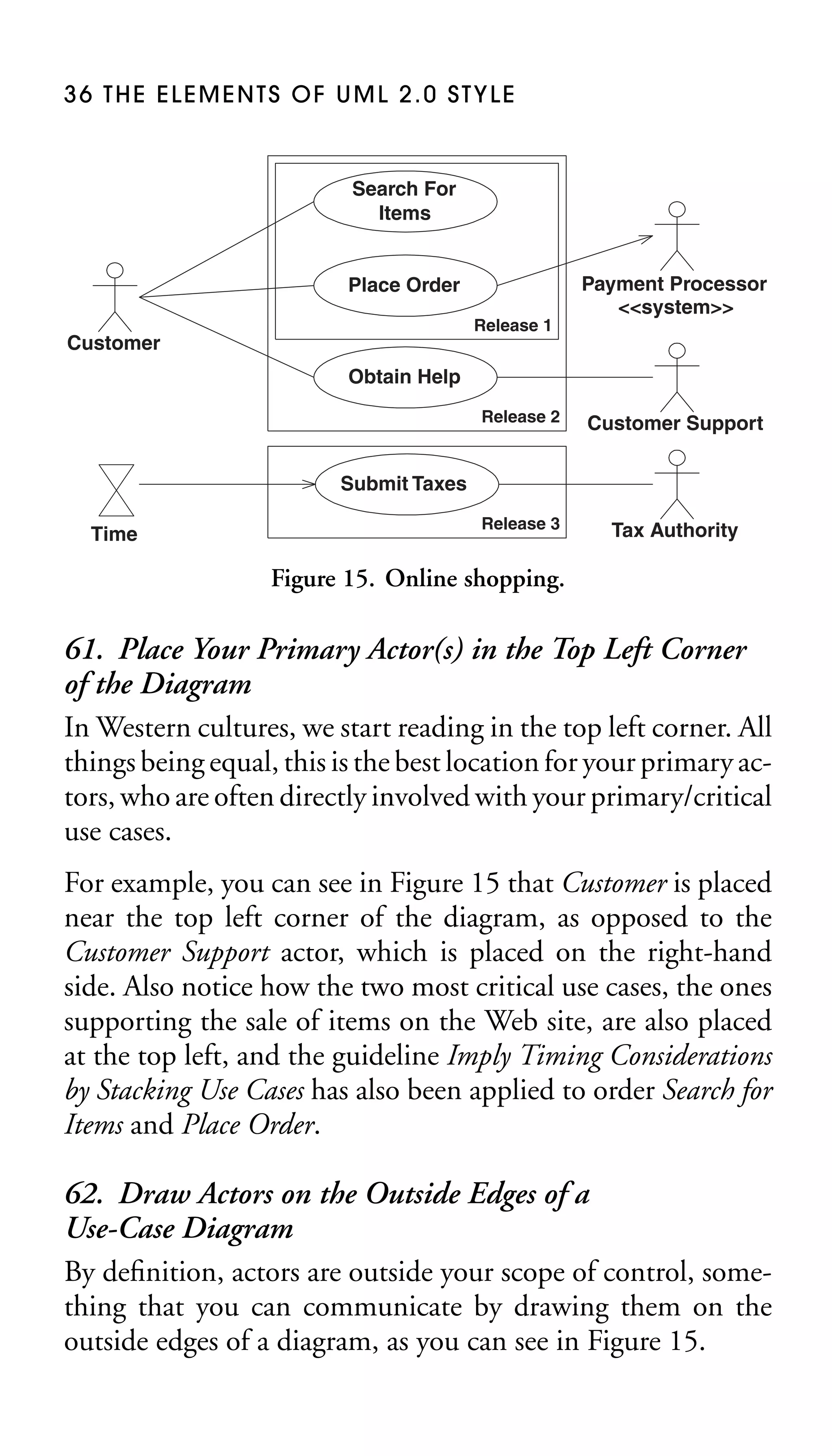
Figure 15. Online shopping.

61. Place Your Primary Actor(s) in the Top Left Corner
of the Diagram
In Western cultures, we start reading in the top left corner. All
things being equal, this is the best location for your primary actors, who are often directly involved with your primary/critical
use cases.
For example, you can see in Figure 15 that Customer is placed
near the top left corner of the diagram, as opposed to the
Customer Support actor, which is placed on the right-hand
side. Also notice how the two most critical use cases, the ones
supporting the sale of items on the Web site, are also placed
at the top left, and the guideline Imply Timing Considerations
by Stacking Use Cases has also been applied to order Search for
Items and Place Order.

62. Draw Actors on the Outside Edges of a
Use-Case Diagram
By definition, actors are outside your scope of control, something that you can communicate by drawing them on the
outside edges of a diagram, as you can see in Figure 15.
U M L U S E - CA S E D I AG R A M S 3 7

63. Name Actors with Singular, Domain-Relevant
Nouns
An actor should have a name that accurately reflects its
role within your model. Actor names are usually singular
nouns such as Grade Administrator, Customer, and Payment
Processor.
64. Associate Each Actor with One or More Use Cases
Every actor is involved with at least one use case, and every use
case is involved with at least one actor. Note that there isn’t
necessarily a one-to-one relationship between actors and use
cases. For example, in Figure 15 you can see that Customer is
involved with several use cases and that the use case Obtain
Help has two actors interacting with it.
65. Name Actors to Model Roles, Not Job Titles
A common mistake when naming actors is to use the names of
job titles that people hold instead of the roles that the people
fulfill. This results in actors with names such as Junior CSR,2
Lead CSR, and CSR Manager instead of Customer Support,
which you can see in Figure 15. A good indication that you
are modeling job titles instead of roles in a diagram depicting
several actors with similar names that have associations to the
same use case(s). Modeling roles instead of job titles will simplify your diagrams and will avoid the problem of coupling
your use-case diagram to the current position hierarchy within
your organization: you wouldn’t want to have to update your
models simply because your human resources department replaced the term CSR with Support Engineer. However, if you
are working in a politically charged environment where it is
advantageous for you to show certain positions on a use-case
diagram, feel free to do so at your own discretion.
2

CSR = Customer Service Representative.
38 THE ELEMENTS OF UML 2.0 STYLE

66. Use <<system>> to Indicate System Actors
In Figure 15, you immediately know that Payment Processor is a
system and not a person or organization because of the stereotype applied to it. The <<system>> stereotype is applicable
to system/concrete diagrams that reflect architectural decisions made for your system as opposed to essential diagrams
(Constantine and Lockwood 1999) or business diagrams (Rational Corporation 2002), which are technology-independent.
67. Don’t Allow Actors to Interact with One Another
The nature of the interaction between two actors will be
captured in the text of the use case, not pictorially on your
diagram.
68. Introduce an Actor Called “Time” to Initiate
Scheduled Events
Certain events happen on a regular basis—payroll is fulfilled
every two weeks, bills are paid once a month, and staff evaluations are held annually. In Figure 15, you can see that the
Time actor initiates the Submit Taxes use case because it is
something that occurs on a periodic basis (typically monthly).
You can also see that I’ve applied a visual stereotype to the actor,
using the hourglass symbol used on UML activity diagrams
(Chapter 10) for time events.

4.3 Relationship Guidelines
There are several types of relationships that may appear on a
use-case diagram:
■
■
■
■

an association between an actor and a use case,
an association between two use cases,
a generalization between two actors,
a generalization between two use cases.
U M L U S E - CA S E D I AG R A M S 3 9

Figure 16. Enrolling students in a university.

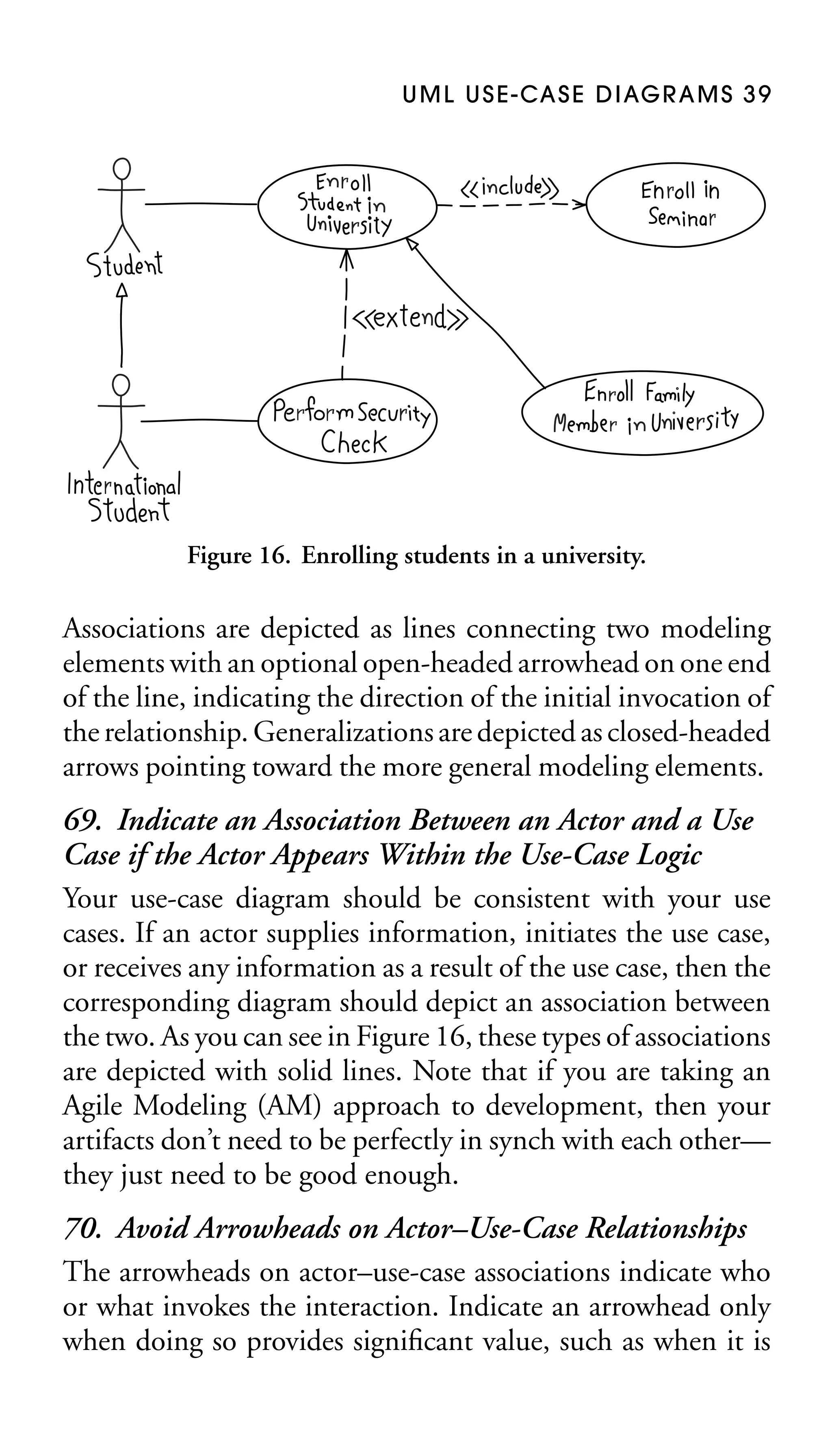
Associations are depicted as lines connecting two modeling
elements with an optional open-headed arrowhead on one end
of the line, indicating the direction of the initial invocation of
the relationship. Generalizations are depicted as closed-headed
arrows pointing toward the more general modeling elements.

69. Indicate an Association Between an Actor and a Use
Case if the Actor Appears Within the Use-Case Logic
Your use-case diagram should be consistent with your use
cases. If an actor supplies information, initiates the use case,
or receives any information as a result of the use case, then the
corresponding diagram should depict an association between
the two. As you can see in Figure 16, these types of associations
are depicted with solid lines. Note that if you are taking an
Agile Modeling (AM) approach to development, then your
artifacts don’t need to be perfectly in synch with each other—
they just need to be good enough.
70. Avoid Arrowheads on Actor–Use-Case Relationships
The arrowheads on actor–use-case associations indicate who
or what invokes the interaction. Indicate an arrowhead only
when doing so provides significant value, such as when it is
40 THE ELEMENTS OF UML 2.0 STYLE

important to indicate that an actor is passive regarding its
interaction with your system, or when your audience for the
model understands the implications of the arrowhead.
In Figure 16, Student invokes the Enroll Student use case,
whereas in Figure 15, the Place Order use case initiates the
interaction with the Payment Processor actor. Although this
is perfectly fine, the problem is that many people think that
these arrowheads imply information or data flow, such as you
would see in a data flow diagram (Gane and Sarson 1979;
Ambler 2004), instead of initial invocation. Associations do
not represent information; they merely indicate that an actor
is somehow involved with a use case. Yes, there is information
flowing back and forth between the actor and the use case; for
example, students would need to indicate in which seminars
they wished to enroll and the system would need to indicate
to the students whether or not they have been enrolled.

71. Apply <<include>> When You Know Exactly
When to Invoke the Use Case
In Figure 16 the Enroll Student use case includes the use case
Enroll in Seminar. It is modeled like this because, at a specific
point in Enroll Student, the logic encapsulated by the included
use case is required. In this example, part of the task of enrolling a student in the university is also initially to enroll that
student in one or more seminars, something that is done at a
specific step in the use case.
The best way to think of an <<include>> association is as the
invocation of one use case by another one, just like calling a
function or invoking an operation within source code. It is
quite common to introduce a use case that encapsulates common logic required by several use cases and to have that use
case included by the ones that require it. It is also common
for one use case to include another when the logic of the included use case is invoked in a synchronous manner. Include
U M L U S E - CA S E D I AG R A M S 4 1

associations, as well as extend associations, are modeled as
dependencies between use cases and therefore a dashed line is
used, as you can see in Figure 16.

72. Apply <<extend>> When a Use Case May Be
Invoked Across Several Use Case Steps
In Figure 16, you can see that the Perform Security Check use
case extends the Enroll Student use case. It is modeled this
way because the extending use case defines logic that may be
required during a given set of steps in the parent use case. In
this example, international students are subject to additional
scrutiny during the enrollment task, something that will occur
sometime after their basic name and address information has
been taken but before they are given their student information
packages—anywhere within a range of use case steps.
An extend association is a generalization relationship where
the extending use case continues the behavior of the base use
case by conceptually inserting additional action sequences into
the base use case, steps that may work in parallel to the existing use-case steps (asynchronously). One way to think of
extension is to consider it the use-case equivalent of a hardware interrupt—you’re not sure when or if the interrupt will
occur. It is quite common to introduce an extending use case
whenever the logic for an alternate course of action is at a
complexity level similar to that of your basic course of action
or when you require an alternate course for an alternate course
(in this case the extending use case would encapsulate both
alternate courses).

73. Apply Extend Associations Sparingly
Many use-case modelers avoid the use of extend associations because they have a tendency to make use case diagrams
difficult to understand.
42 THE ELEMENTS OF UML 2.0 STYLE

74. Generalize Use Cases When a Single Condition
Results in Significantly New Business Logic
In Figure 16, you can see that the Enroll Family Member use
case inherits from the Enroll Student use case. It is modeled
this way because the inheriting use case describes business
logic similar to yet different from the base use case and therefore either the basic course of action or one or more alternate
courses of action within the use case are completely rewritten.
In this example, you enroll family members of university professors in a manner similar to that for “normal students,” the
main differences being that several enrollment requirements
are reduced or removed completely and the university fees are
calculated differently (residence and seminar fees are charged
at a reduced rate and all incidental fees are waived).
Inheritance between use cases is not as common as either
the use of extend or include associations, but it is still
possible.

75. Do Not Apply <<uses>>, <<includes>>,
or <<extends>>
All three of these stereotypes were supported by earlier versions of the UML but over time they have been
replaced—<<uses>> and <<includes>> were both replaced by <<include>>, and <<extends>> was reworked
into <<extend>> and generalization. You will likely find
these stereotypes applied on older use-case diagrams because
experienced use-case modelers may not yet have transitioned
to the newer stereotypes for use-case associations.
76. Avoid More Than Two Levels of Use-Case
Associations
Whenever your use-case diagram shows that a use case includes
another use case, which includes another use case, which in
turn includes yet another use case, it is a very good indication
U M L U S E - CA S E D I AG R A M S 4 3

that you are taking a functional decomposition approach to
your usage requirements. Functional decomposition is a design activity, and you should avoid reflecting design decisions
within your requirements artifacts.

77. Place an Included Use Case to the Right of the
Invoking Use Case
It is common convention to draw include associations horizontally, with the included use case to the right of the invoking
use case, as you can see in Figure 16 with Enroll Student and
Enroll in Seminar.
78. Place an Extending Use Case Below the Parent
Use Case
It is common convention to draw extend associations vertically, with the extending use case placed lower on your diagram than the base use case, as you can see in Figure 16
with Perform Security Check and Enroll Student.
79. Apply the “Is Like” Rule to Use-Case Generalization
The sentence “the [inheriting use-case name] is like the [parent
use-case name]” should make sense. In Figure 16, it makes
sense to say that enrolling a family member is like enrolling
a student; therefore, it’s a good indication that generalization
makes sense. It doesn’t make sense to say that enrolling a
student is like enrolling in a seminar. The logic for each activity
is different—although the two use cases may be related it isn’t
by generalization.
80. Place an Inheriting Use Case Below the Base
Use Case
It is a common convention to draw generalization relationships vertically, with the inheriting use case placed lower on
your diagram than the parent use case, as you can see in
Figure 16 with Enroll Family Member and Enroll Student.
44 THE ELEMENTS OF UML 2.0 STYLE

Enroll in University
Extension points
Verify Citizenship
Validate Payment

Condition: {student born outside of country}
Extension point: Verify Citizenship

<<extend>>

Perform Security Check

Figure 17. Enrolling students in a university.

81. Apply the “Is Like” Rule to Actor Inheritance
The sentence “the [inheriting actor name] is like the [parent
actor name]” should make sense. In Figure 16, it makes sense
to say that an international student is like a student; therefore
it’s a good indication that generalization makes sense. It doesn’t
make sense in Figure 15 to say that customer support is like a
payment processor because the two roles are clearly different.
82. Place an Inheriting Actor Below the Parent Actor
It is a common convention to draw generalization relationships vertically, with the inheriting actor placed lower on your
diagram than the parent actor, as you can see in Figure 16 with
International Student and Student.
83. Avoid Modeling Extension Points
Figure 17 shows the notation for indicating extension points
within a use-case bubble. In my experience this information
is extraneous in diagrams. If you want it you can simply read
the use-case text.
U M L U S E - CA S E D I AG R A M S 4 5

84. Model Extension Conditions Only When They
Aren’t Clear
Figure 17 depicts how to define the condition(s) under which
the extending use case will be invoked. Once again this information clutters the diagram and can be documented better
within the use case itself.

4.4 System Boundary Box Guidelines
The rectangle around the use cases is called the system boundary box and, as the name suggests, it indicates the scope of
your system—the use cases inside the rectangle represent the
functionality that you intend to implement.

85. Indicate Release Scope with a System Boundary Box
In Figure 15, you can see that three system boundary boxes
are included, each of which has a label indicating the release to
which the various use cases have been assigned. This project
team is taking an incremental approach to software development and therefore needs to communicate to the project
stakeholders what will be delivered in each release, and it has
done so using system boundary boxes.
Notice how the nature of each release is indicated by the placement of each system boundary box. You can see that release 2
includes release 1, whereas release 3 is separate. The team may
be trying to indicate that, during release 2, they expect to enhance the functionality initially provided by release 1, whereas
they don’t expect to do so during release 3. Or perhaps they
intend to develop release 3 in parallel to release 1 and/or 2.
The exact details aren’t readily apparent from the diagram.
You could add a note, if appropriate, but the diagram would
support information contained in another project artifact such
as your project plan.
46 THE ELEMENTS OF UML 2.0 STYLE

Figure 15 should have included another system boundary box,
one encompassing all three releases to specify the exact boundary of the overall system, but it doesn’t. I did this in accordance
with AM’s (Chapter 17) Depict Models Simply practice, making the assumption that the readers of the diagram would read
between the lines.

86. Avoid Meaningless System Boundary Boxes
System boundary boxes are optional—neither Figure 14 nor
Figure 16 includes one because it wouldn’t add to the communication value of the diagram.
5.
UML Class
Diagrams
UML class diagrams show the classes of a system, their interrelationships, and the operations and attributes of the classes.
They are used to
■
■
■

explore domain concepts in the form of a domain model,
analyze requirements in the form of a conceptual/analysis
model,
depict the detailed design of object-oriented or objectbased software.

A class model comprises one or more class diagrams and the
supporting specifications that describe model elements, including classes, relationships between classes, and interfaces.

5.1 General Guidelines
Because UML class diagrams are used for a variety of
purposes—from understanding your requirements to describing your detailed design—you will need to apply a different
style in each circumstance. This section describes style guidelines pertaining to different types of class diagrams.

87. Identify Responsibilities on Domain Class Models
When creating a domain class diagram, often as part of
your requirements modeling efforts, focus on identifying
47
48 THE ELEMENTS OF UML 2.0 STYLE

Table 3. Visibility Options on UML Class Diagrams
Visibility

Symbol

Accessible to

Public
Protected

+
#

Private
Package

∼

All objects within your system
Instances of the implementing class and
its subclasses
Instances of the implementing class
Instances of classes within the same
package

responsibilities for classes instead of on specific attributes or
operations. For example, the Invoice class is responsible for providing its total, but whether it maintains this as an attribute
or simply calculates it at request time is a design decision that
you’ll make later.
There is some disagreement about this guideline because it
implies that you should be taking a responsibility-driven approach to development. Craig Larman (2002) suggests a datadriven approach, where you start domain models by identifying only data attributes, resulting in a model that is little
different from a logical data model. If you need to create a
logical data model, then do so, following AM’s practice, Apply the Right Artifact(s) (Chapter 17). However, if you want
to create a UML class diagram, then you should consider the
whole picture and identify responsibilities.

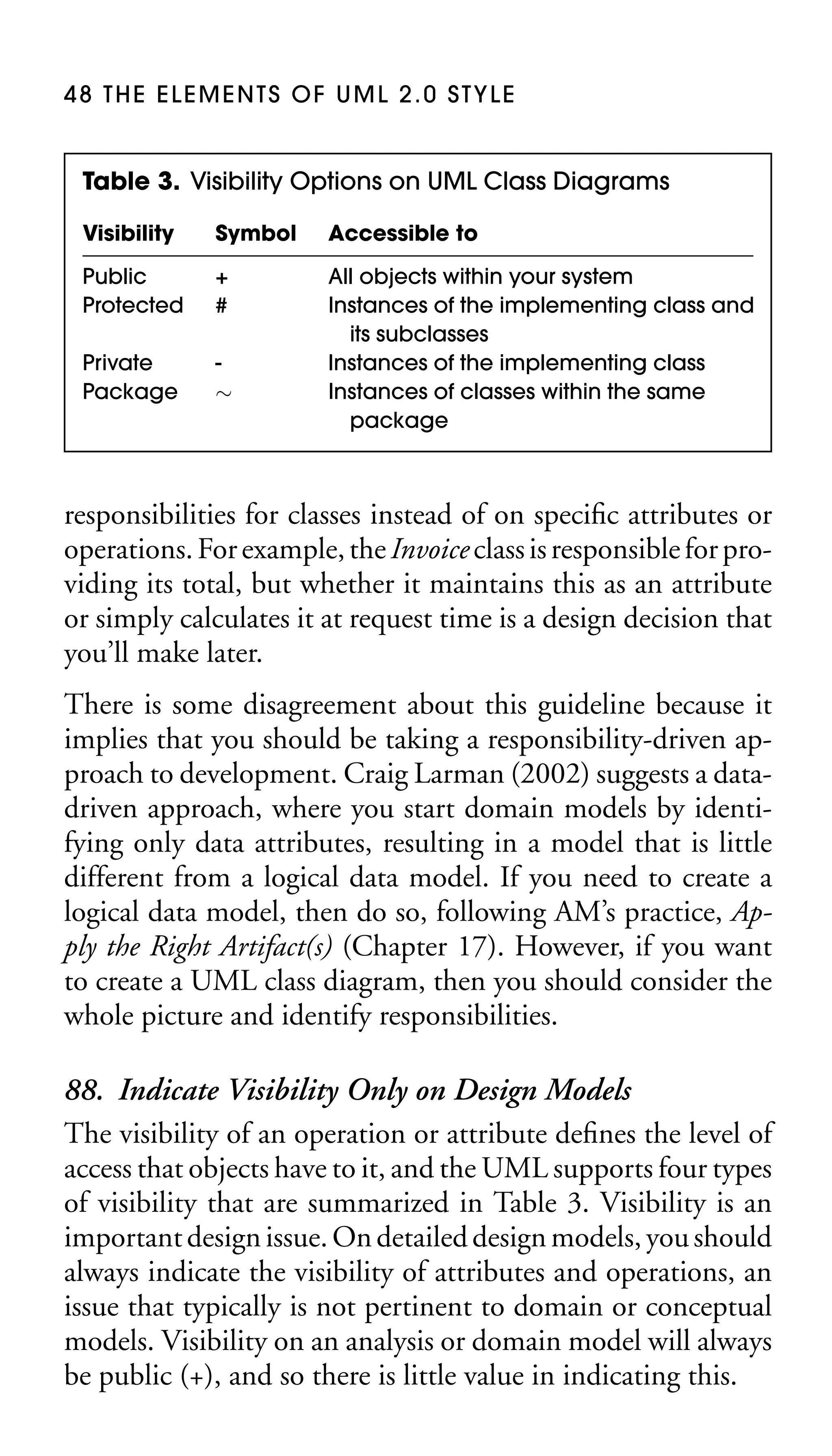
88. Indicate Visibility Only on Design Models
The visibility of an operation or attribute defines the level of
access that objects have to it, and the UML supports four types
of visibility that are summarized in Table 3. Visibility is an
important design issue. On detailed design models, you should
always indicate the visibility of attributes and operations, an
issue that typically is not pertinent to domain or conceptual
models. Visibility on an analysis or domain model will always
be public (+), and so there is little value in indicating this.
U M L C L A S S D I AG R A M S 4 9

Analysis
Order
Placement Date
Delivery Date
Order Number
Calculate Total
Calculate Taxes

Design
Order
- deliveryDate: Date
- orderNumber: int
- placementDate: Date
- taxes: Currency
- total: Currency
# calculateTaxes(Country, State): Currency
# calculateTotal(): Currency
getTaxEngine() {visibility=implementation}

Figure 18. Analysis and design versions of a class.

89. Indicate Language-Dependent Visibility with
Property Strings
If your implementation language includes non-UMLsupported visibilities, such as C++’s implementation visibility, then a property string should be used, as you can see in
Figure 18.
90. Indicate Types on Analysis Models Only When the
Type Is an Actual Requirement
Sometimes the specific type of an attribute is a requirement.
For example, your organization may have a standard definition
for customer numbers that requires that they be nine-digit
numbers. Perhaps existing systems, such as a legacy database
or a predefined data feed, constrain some data elements to a
specific type or size. If this is the case, you should indicate this
information on your domain class model(s).
91. Be Consistent with Attribute Names and Types
It would not be consistent for an attribute named customerNumber to be a string, although it would make sense for it to
be an integer. However, it would be consistent for the name
customerID to be a string or an integer.
50 THE ELEMENTS OF UML 2.0 STYLE

Student
Name
Student #
...
Constraints
{must be 18 years
of age or older}

0..*

1..*

Course

Enrollment
Enrollment Date
Enroll
Drop
Cancel

Figure 19. Modeling association classes.

92. Model Association Classes on Analysis Diagrams
Association classes, also called link classes, are used to model
associations that have methods and attributes. Figure 19 shows
that association classes are depicted as classes attached via
dashed lines to associations—the association line, the class,
and the dashed line are considered to be one symbol in the
UML. Association classes typically are modeled during analysis and then refactored during design (either by hand or
automatically by your CASE tool) because mainstream programming languages do not (yet) have native support for this
concept.
93. Do Not Name Associations That Have
Association Classes
The name of the association class should adequately describe
it. Therefore, as you can see in Figure 19, the association does
not need an additional adornment indicating its name.
94. Center the Dashed Line of an Association Class
The dashed line connecting the class to the association path
should be clearly connected to the path and not to either
class or to any adornments of the association, so that your
U M L C L A S S D I AG R A M S 5 1

meaning is clear. As you can see in Figure 19, the easiest way to
accomplish this is to center the dashed line on the association
path.

5.2 Class Style Guidelines
A class is effectively a template from which objects are created (instantiated). Classes define attributes, information that
is pertinent to their instances, and operations—functionality
that the objects support. Classes also realize interfaces (more
on this later). Note that you may need to soften some of these
naming guidelines to reflect your implementation language or
any purchased or adopted software.

95. Use Common Terminology for Class Names
Class names should be based on commonly accepted terminology to make them easier for others to understand. For
business classes, this would include names based on domain
terminology such as Customer, OrderItem, and Shipment and,
for technical classes, names based on technical terminology
such as MessageQueue, ErrorLogger, and PersistenceBroker.
96. Prefer Complete Singular Nouns for Class Names
Names such as Customer and PersistenceBroker are preferable to
Cust and PBroker, respectively, because they are more descriptive and thus easier to understand. Furthermore, it is common
practice to name classes as singular nouns such as Customer instead of Customers. Even if you have a class that does represent
several objects, such as an iterator (Gamma, Helm, Johnson,
and Vlissides 1995) over a collection of customer objects, a
name such as CustomerIterator would be appropriate.
97. Name Operations with Strong Verbs
Operations implement the functionality of an object; therefore, they should be named in a manner that effectively
52 THE ELEMENTS OF UML 2.0 STYLE

communicates that functionality. Table 4 lists operation names
for analysis class diagrams as well as for design class diagrams—
the assumption being that your implementation language
follows Java naming conventions (Vermeulen et al. 2000)—
indicating how the operation name has been improved in each
case.

98. Name Attributes with Domain-Based Nouns
As with classes and operations, you should use full descriptions
to name your attribute so that it is obvious what the attribute
represents. Table 5 suggests a Java-based naming convention
for analysis names that are in the Attribute Name format, although attribute name and Attribute name formats are also fine
if applied consistently. Table 5 also suggests design names that
take an attributeName format, although the attribute name
format is just as popular depending on your implementation
language.
99. Do Not Model Scaffolding Code
Scaffolding code includes the attributes and operations required to implement basic functionality within your classes,
such as the code required to implement relationships with
other classes. Scaffolding code also includes getters and setters, also known as accessors and mutators, such as getItem()
and setItem() in Figure 20, which get and set the value of attributes. You can simplify your class diagrams by assuming
that scaffolding code will be created (many CASE tools can
generate it for you automatically) and not model it. Figure 20
depicts the difference between the OrderItem class without
scaffolding code and with it—including the constructor, the
common static operation findAllInstances() that all business
classes implement (in this system), and the attributes item
and order and their corresponding getters and setters to maintain its relationships with the Order class and Item class,
respectively.
53

Good Analysis
Name

Open Account

Print Mailing Label

Purchase Parking
Pass

Save

Initial Name

Open Acc

Mailing Label Print

purchaseparkingpass()

Save the Object

Table 4. Example Names for Operations

save()

purchaseParkingPass()

printMailingLabel()

openAccount()

Good Design Name

An abbreviation was
replaced with the full word
to make it clear what is
meant.
The verb was moved to the
beginning of the name to
make it active.
Mixed case was applied to
increase the readability of
the design-level name.
The name was shortened
because the term
“TheObject” did not add
any value.

Issue
54

First Name

personFirstName

Last Name

First Name
First Name

fName
firstname

HTTP Connection

First Name

Order Items

nameLast

Good Analysis
Name

Initial Name

Table 5. Example Names for Attributes

hTTPConnection

firstNameString

OrderItemCollection

orderItems

firstName

httpConnection

lastName

firstName

firstName
firstName

Good Design
Name

Do not use abbreviations in attribute names.
Capitalizing the second word of the design name
makes the attribute name easier to read.
This depends on the context of the attribute, but if
this is an attribute of the “Person” class, then
including “person” merely lengthens the name
without providing any value.
The name “nameLast” was not consistent with
“firstName” (and it sounded strange anyway).
The abbreviation for the design name should be
in all lowercase.
Indicating the type of the attribute, in this case
“string,” couples the attribute name to its type.
If the type changes, perhaps because you
decide to reimplement this attribute as an
instance of the class “NameString,” then you
will need to rename the attribute.
The second version of the design name is shorter
and easier to understand.

Issue
U M L C L A S S D I AG R A M S 5 5
With Scaffolding
OrderItem
# numberOrdered: int
- item: Item
- order: Order
<<constructor>> + OrderItem(Order) : OrderItem
+ findAllInstances() : Vector
+ findForItem(Item) : Vector
+ findForOrder(Order) : Vector
+ getNumberOrdered(): int
+ getTotal(): Currency
+ setNumberOrdered(amount: int)
# calculateTaxes(Country, State): Currency
# calculateTotal(): Currency
# getItem(): Item
# getOrder(): Order
- getTaxEngine()
- setItem(Item)
- setOrder(Order)

Without Scaffolding
OrderItem
# numberOrdered: int
+ findForItem(Item) : Vector
+ findForOrder(Order) : Vector
# calculateTaxes(): Currency
# calculateTotal(): Currency
- getTaxEngine()

Figure 20. OrderItem class with and without scaffolding code.

100. Center Class Names
As you have seen in the figures in this chapter, it is common
to center the names of classes.
101. Left-Justify Attribute Operation and Names
It is common practice, as you see in Figure 20 to left-justify
both attribute and operation names within class boxes.
102. Do Not Model Keys
A key is a unique identifier of a data entity or table. Unless you are using a UML class diagram to model the logical or physical schema of a database (Ambler 2003), you
should not model keys in your class. Keys are a data concept, not an object-oriented concept. A particularly common
mistake of novice developers is to model foreign keys in
classes, the data attributes needed to identify other rows
of data within the database. A UML profile for physical
data modeling is maintained at www.agiledata.org/essays/
umlDataModelingProfile.html.
56 THE ELEMENTS OF UML 2.0 STYLE

103. Never Show Classes with Just Two Compartments
It is allowable within the UML to have a class with one or
more compartments. Although compartments may appear
in any order, traditionally the topmost compartment indicates the name of the class and any information pertinent to
the class as a whole (such as a stereotype); the second optional compartment typically lists the attributes; and the third
optional compartment typically lists the operations. Other
“nonstandard” compartments may be added to the class to
provide information such as lists of exceptions thrown or
notes pertaining to the class. Because naming conventions
for attributes and operations are similar, and because people
new to object development may confuse the two concepts, it
isn’t advisable to have classes with just two compartments
(one for the class name and one listing either attributes
or operations). If necessary, include a blank compartment
as a placeholder, as you can see with the Student class in
Figure 19.
104. Label Uncommon Class Compartments
If you do intend to include a class compartment that isn’t one
of the standard three—class name, attribute list, operations
list—then include a descriptive label such as Exceptions, Examples, or Constraints centered at the top of the compartment, as you can see with the Student class in Figure 19.
105. Include an Ellipsis ( . . . ) at the End of an
Incomplete List
You know that the list of attributes of the Student class of
Figure 19 is incomplete because of the ellipsis at the end of
the list. Without the ellipsis, there would be no indication that
there is more to the class than what is currently shown (Evitts
2000).
U M L C L A S S D I AG R A M S 5 7

106. List Static Operations/Attributes Before Instance
Operations/Attributes
Static operations and attributes typically deal with early aspects
of a class’s life cycle, such as the creation of objects or finding
existing instances of the classes. In other words, when you are
working with a class you often start with statics. Therefore it
makes sense to list them first in their appropriate compartments, as you can see in Figure 20 (statics are underlined).
107. List Operations/Attributes in Order of
Decreasing Visibility
The greater the visibility of an operation or attribute, the
greater the chance that someone else will be interested in it. For
example, because public operations are accessible to a greater
audience than protected operations, there is a likelihood that
greater interest exists in public operations. Therefore, list your
attributes and operations in order of decreasing visibility so
that they appear in order of importance. As you can see in
Figure 20, the operations and attributes of the OrderItem class
are then listed alphabetically for each level of visibility.
108. For Parameters That Are Objects, List Only
Their Types
As you can see in Figure 20, operation signatures can become
quite long, extending the size of the class symbol. To save
space, you can forgo listing the types of objects that are passed
as parameters to operations. For example, Figure 20 lists calculateTaxes(Country, State) instead of calculateTaxes(country:
Country, state: State), thus saving space.
109. Develop Consistent Operation and
Attribute Signatures
Operation names should be consistent with one another. For
example, in Figure 20, all finder operations start with the
58 THE ELEMENTS OF UML 2.0 STYLE

text find. Parameter names should also be consistent with one
another. For example, parameter names such as theFirstName,
firstName, and firstNm are not consistent with one another, nor
are firstName, aPhoneNumber, and theStudentNumber. Pick
one naming style for your parameters and stick to it. Similarly,
be consistent also in the order of parameters. For example, the
methods doSomething(securityToken, startDate) and doSomethingElse(studentNumber, securityToken) could be made more
consistent by always passing securityToken as either the first or
the last parameter.

110. Avoid Stereotypes Implied by Language
Naming Conventions
The UML allows for stereotypes to be applied to operations.
In Figure 20. I applied the stereotype <<constructor>> to
the operation OrderItem(Order), but that information is redundant because the name of the operation implies that it’s
a constructor, at least if the implementation language is Java
or C++. Furthermore, you should avoid stereotypes such as
<<getter>> and <<setter>> for similar reasons—the names
getAttributeName() and setAttributeName() indicate the type
of operations you’re dealing with.
111. Indicate Exceptions in an Operation’s
Property String
Some languages, such as Java, allow operations to throw exceptions to indicate that an error condition has occurred. Exceptions can be indicated with UML property strings, an example
of which is shown in Figure 21.

Figure 21. Indicating the exceptions thrown by an operation.
U M L C L A S S D I AG R A M S 5 9

5.3 Relationship Guidelines
For ease of discussion the term relationships will include all
UML concepts such as associations, aggregation, composition,
dependencies, inheritance, and realizations. In other words,
if it’s a line on a UML class diagram, we’ll consider it a
relationship.

112. Model Relationships Horizontally
With the exception of inheritance, the common convention
is to depict relationships horizontally. The more consistent
you are in the manner in which you render your diagrams,
the easier it will be to read them. In Figure 22, you can see
that the dependencies are modeled horizontally, although the
fulfilled via association is not. This sometimes happens.
113. Draw Qualifier Rectangles Smaller than Classes
Qualifiers, in this case itemNumber in Figure 22, are considered part of the association and not the classifier itself in the
UML (even though itemNumber would likely be an attribute
of Item). If possible the qualifier rectangle should be smaller
than the class it is attached to (Object Management Group
2004).

Figure 22. Shipping an order.
60 THE ELEMENTS OF UML 2.0 STYLE

114. Model Collaboration Between Two Elements Only
When They Have a Relationship
You need to have some sort of relationship between two model
elements to enable them to collaborate. Furthermore, if two
model elements do not collaborate with one another, then
there is no need for a relationship between them.
115. Model a Dependency When the
Relationship Is Transitory
Transitory relationships—relationships that are not persistent—occur when one or more of the items involved in a
relationship is either itself transitory or a class. In Figure 22,
you can see that there is a dependency between DeliveryScheduler and Order. DeliveryScheduler is a transitory class, one that
does not need to persist in your database, and therefore, there
is no need for any relationship between the scheduler and the
order objects with which it interacts to persist. For the same
reason, the relationship between DeliveryScheduler and Delivery is also a dependency, even though DeliveryScheduler creates
Delivery objects.
In Figure 22, instances of Delivery interact with OIDGenerator to obtain a new integer value that acts as an object identifier (OID) to be used as a primary key value in a relational
database. You know that Delivery objects are interacting with
OIDGenerator and are not an instance of it because the operation is static. Therefore, there is no permanent relationship
to be recorded, and so, a dependency is sufficient.

116. Tree-Route Similar Relationships to a
Common Class
In Figure 22, you can see that both Delivery and Order have
a dependency on OIDGenerator. Note how the two dependencies are drawn in combination in “tree configuration,” instead of as two separate lines, to reduce clutter in the diagram
U M L C L A S S D I AG R A M S 6 1

(Evitts 2000). You can take this approach with any type of
relationship. It is quite common with inheritance hierarchies
(as you can see in Figure 25), as long as the relationship ends
that you are combining are identical. For example, in Figure 23, you can see that OrderItem is involved in two separate
relationships. Unfortunately, the multiplicities are different for
each: one is 1..∗ and the other 0..∗ , so you can’t combine the
two into a tree structure. Had they been the same, you could
have combined them, even though one relationship is aggregation and the other is association.
Note that there is a danger that you may be motivated to retain
a relationship in order to preserve the tree arrangement, when
you really should change it.

117. Always Indicate the Multiplicity
For each class involved in a relationship, there will always be a
multiplicity. When the multiplicity is one and one only—for
example, with aggregation and composition, it is often common for the part to be involved only with one whole—many
modelers will not model the “1” beside the diamond. I believe
that this is a mistake, and as you can see in Figure 23, I indicate the multiplicity in this case. If the multiplicity is “1,” then
indicate it as such so that your readers know that you’ve considered the multiplicity. Table 6 summarizes the multiplicity
indicators that you will see on UML class diagrams.
118. Avoid a Multiplicity of “ *”
You should avoid the use of “∗ ” to indicate multiplicity on a
UML class diagram because your reader can never be sure if
you really mean “0..∗ ” or “1..∗ ” Although the UML specification (Object Management Group 2004) clearly states that
“∗ ” implies “0..∗ ,” the reality is that you simply can’t trust that
everyone has read and memorized the several-hundred-page
specification.
62

1..*

Order

places

1

OrderItem
0..*

describes
1

itemNumber

Figure 23. Modeling an order.

Customer
1 - shippingAddress: Address
...

1..*
Item
U M L C L A S S D I AG R A M S 6 3

Table 6. UML Multiplicity Indicators
Indicator

Meaning

0..1
1
0..∗
1..∗
n
*
0..n
1..n
n..m
n..∗

Zero or one
One only
Zero or more
One or more
Only n (where n > 1)
Many
Zero to n (where n > 1)
One to n (where n > 1)
Where n and m both > 1
n or more, where n > 1

119. Replace Relationship Lines with Attribute Types
In Figure 23, you can see that Customer has a shippingAddress attribute of type Address—part of the scaffolding code
to maintain the association between customer objects and address objects. This simplifies the diagram because it visually
replaces a class box and association, although it contradicts the
Do Not Model Scaffolding Code guideline. You will need to
judge which guideline to follow, the critical issue being which
one will best improve your diagram given your situation.
A good rule of thumb is that if your audience is familiar with
the class, then show it as a type. For example, if Address is a new
concept within your domain then show it as a class; if it’s been
around for a while then showing it as a type should work well.

120. Do Not Model Implied Relationships
In Figure 23 there is an implied association between Item and
Order—items appear on orders—but it was not modeled. A
mistake? No; the association is implied through OrderItem.
Orders are made up of order items, which in turn are described by items. If you model this implied association, not
only do you clutter your diagram, but also you run the risk
that somebody will develop the additional code to maintain
64 THE ELEMENTS OF UML 2.0 STYLE

it. If you don’t intend to maintain the actual relationship—for
example, you aren’t going to write the scaffolding code—then
don’t model it.

121. Do Not Model Every Dependency
Model a dependency between classes only if doing so adds
to the communication value of your diagram. As always, you
should strive to follow AM’s (Chapter 17) practice, Depict
Models Simply.

5.4 Association Guidelines
122. Center Names on Associations
It is common convention to center the name of an association
above an association path, as you can see in Figure 23 with
the describes association between Order and Item, or beside the
path, as with the fulfilled via association between Order and
Delivery in Figure 22.
123. Write Concise Association Names in Active Voice
The name of an association, which is optional although highly
recommended, is typically one or two descriptive words. If you
find that an association name is wordy, think about it from
the other direction; for example, the places name of Figure 23
is concise when read from right to left but would be wordy if
written from the left-to-right perspective (e.g., “is placed by”).
Furthermore, places is written in active voice instead of passive
voice, making it clearer to the reader
124. Indicate Directionality to Clarify an
Association Name
When it isn’t clear in which direction the name of an association should be read, you can indicate the direction with a filled
triangle, as you can see in Figure 23 between OrderItem and
U M L C L A S S D I AG R A M S 6 5
Professor
name
advisor phoneNumber
0..1 emailAddress
salary
getInformation()
0..* associate

0..1
assistant

assists

0..*

{NAND}
0..1

teaches

Seminar
seminarNumber
waitingList

addStudent(student)
0..* dropStudent(student)

instructor

mentors

Figure 24. Professors and seminars.

Item. This marker indicates that the association should be read
as “an item describes an order item” instead of “an order item
describes an item.” It is also quite common to indicate the
directionality on recursive associations, where the association
starts and ends on the same class, such as mentors in Figure 24.
Better yet, when an association name isn’t clear, you should
consider rewording it or maybe even renaming the classes.

125. Name Unidirectional Associations in the
Same Direction
The reading direction of an association name should be the
same as that of the unidirectional association. This is basically
a consistency issue.
126. Word Association Names Left to Right
Because people in Western societies read from left to right, it
is common practice to word association names so that they
make sense when read from left to right. Had I followed this
guideline with the describes association of Figure 23, I likely
would not have needed to include the direction marker.
127. Indicate Role Names When Multiple Associations
Between Two Classes Exist
Role names are optionally indicated on association ends to
indicate how a class is involved in the association. Although the
name of an association should make the roles of the two classes
66 THE ELEMENTS OF UML 2.0 STYLE

Figure 25. Modeling people in a university.

clear, it isn’t always obvious when several associations exist
between two classes. For example, in Figure 24, there are two
associations between Professor and Seminar: assists and teaches.
These two association names reflect common terminology at
the university and cannot be changed. Therefore we opt to
indicate the roles that professors play in each association to
clarify them.

128. Indicate Role Names on Recursive Associations
Role names can be used to clarify recursive associations, ones
that involve the same class on both ends, as you can see with the
mentors association in Figure 24. The diagram clearly depicts
the concept that an advisor mentors zero or more associate
professors.
129. Make Associations Bidirectional Only When
Collaboration Occurs in Both Directions
The lives at association between Person and Address in Figure 25 is unidirectional. A person object knows its address,
but an address object does not know who lives at it. Within
this domain, there is no requirement to traverse the association from Address to Person; therefore, the association does not
need to be bidirectional (two-way). This reduces the code that
U M L C L A S S D I AG R A M S 6 7

needs to be written and tested within the address class because
the scaffolding to maintain the association to Person isn’t
required.

130. Indicate Direction Only on
Unidirectional Associations
In Figure 25 the lives at association between Person and Address
is unidirectional; it can be traversed from Person to Address but
not in the other direction. The arrowhead on the line indicates the direction in which the association can be traversed.
In Figure 24 all of the associations are bidirectional, yet the
associations do not include direction indicators—when an
association does not indicate direction it is assumed that it is
bidirectional. I could have indicated an arrow on each end but
didn’t because this information would have been superfluous.
131. Avoid Indicating Non-Navigability
The X on the lives at association in Figure 25 indicates that
you cannot navigate the association from Address to Person.
However, because the association indicates that you can navigate from Person to Address (that’s what the arrowhead means)
the assumption would have been that you cannot navigate in
the other direction. Therefore the X is superfluous.
132. Redraw Inherited Associations Only When
Something Changes
An interesting aspect of Figure 25 is the association between
Person and Address. First, this association was pushed up to Person because Professor, Student, and Alumnus all had a lives at association with Address. Because associations are implemented
by the combination of attributes and operations, both of which
are inherited, the implication is that associations are inherited.
If the nature of the association doesn’t change—for example,
both students and professors live at only one address—then
68 THE ELEMENTS OF UML 2.0 STYLE

we don’t have any reason to redraw the association. However,
because the association between Alumnus and Address is different, we have a requirement to track one or two addresses,
and so we needed to redraw the association to reflect this.

133. Question Multiplicities Involving Minimums
and Maximums
The problem with minimums and maximums is that they
change over time. For example, today you may have a business rule that states that an alumnus has either one or two
addresses that the university tracks, motivating you to model
the multiplicity as 1..2, as depicted in Figure 25. However,
if you build your system to reflect this rule, then when the
rule changes you may find that you have significant rework to
perform. In most object languages, it is easier to implement a
1..∗ multiplicity or, better yet, a 0..∗ multiplicity, because you
don’t have to check the size of the collection maintaining the
association. Providing greater flexibility with less code seems
good to me.

5.5 Inheritance Guidelines
Inheritance, also called generalization, models “is a” and “is
like” relationships, enabling you to easily reuse existing data
and code. When A inherits from B, we say that A is the subclass
of B and that B is the superclass of A. Furthermore, we say
that we have “pure inheritance” when A inherits all of the
attributes and methods of B. The UML modeling notation
for inheritance is a line with a closed arrowhead pointing from
the subclass to the superclass.

134. Apply the Sentence Rule for Inheritance
One of the following sentences should make sense: “A subclass
IS A superclass” or “A subclass IS KIND OF A superclass.”
For example, it makes sense to say that a student is a person,
U M L C L A S S D I AG R A M S 6 9

but it does not make sense to say that a student is an address
or is like an address, and so, the class Student likely should not
inherit from Address—association is likely a better option, as
you can see in Figure 25. If it does not make sense to say that
“the subclass is a superclass” or at least “the subclass is kind of
a superclass,” then you are likely misapplying inheritance.

135. Place Subclasses Below Superclasses
It is common convention to place a subclass, such as Student
in Figure 25, below its superclass—Person in this case. Evitts
(2000) says it well: Inheritance goes up.
136. Beware of Data-Based Inheritance
If the only reason two classes inherit from each other is that
they share common data attributes, then this indicates one of
two things: either you have missed some common behavior
(this is likely if the sentence rule applies) or you should have
applied association instead.
137. A Subclass Should Inherit Everything
A subclass should inherit all of the attributes and operations
of its superclass, and therefore all of its relationships as well—
a concept called pure inheritance. The advantage of pure inheritance is that you only have to understand what a subclass
inherits, and not what it does not inherit. Although this sounds
trivial, in a deep class hierarchy it makes it a lot easier if you
only need to understand what each class adds, and not what
it takes away. Larman (2002) calls this the “100% rule.” Note
that this contradicts the Redraw Inherited Associations Only
When Something Changes guideline, and you’ll need to decide
accordingly.
138. Differentiate Generalizations Between Associations
It is possible, albeit uncommon, for an association to inherit
from another association. In the case you should use a different
70 THE ELEMENTS OF UML 2.0 STYLE

Citizen

Nationality

Gender

Male

Gender

Female

Person
Foreigner
Role

Student

Professor

Registrar

Figure 26. Indicating power types.

color or line weight for the generalization relationship to distinguish it (Object Management Group 2004).

139. Indicate Power Types on Shared Generalization
Power types, a meta modeling concept, can be indicated using a role name associated with a generalization relationship.
Figure 26 shows three different ways to model power types.
The preferred way was used to indicate that the Student, Professor, and Registrar classes are distinguished by the role that the
person plays at the university, because it is concise. The same
person may also be either a Citizen or a Foreigner, but not both.
We know this because of the dashed line. The way that the
Gender power type is indicated, on each of the generalization
relationships, clutters the diagram.

5.6 Aggregation and Composition
Guidelines
Sometimes an object is made up of other objects. For example,
an airplane is made up of a fuselage, wings, engines, landing
gear, flaps, and so on. A delivery shipment contains one or
more packages. A team consists of two or more employees.
These are all examples of the concept of aggregation, which
U M L C L A S S D I AG R A M S 7 1

0..* sub-team
Team

0..*

1..*

Employee

0..1
1
builds
1..*
Airplane

1

1..*

Component

0..* subassembly

0..*
assembly

Figure 27. Examples of aggregation and composition.

represents “is part of” relationships. An engine is part of a
plane, a package is part of a shipment, and an employee is part
of a team. Aggregation is a specialization of association, specifying a whole–part relationship between two objects. Composition is a stronger form of aggregation, where the whole and
the parts have coincident lifetimes, and it is very common for
the whole to manage the life cycle of its parts. From a stylistic
point of view, because aggregation and composition are both
specializations of association, the guidelines for associations
apply.

140. Apply the Sentence Rule for Aggregation
It should make sense to say “the part IS PART OF the whole.”
For example, in Figure 27, it makes sense to say that a course
is part of a program or that a component is part of an airplane.
However, it does not make sense to say that a team is part of
an airplane or an airplane is part of a team—but it does make
sense to say that a team builds airplanes, an indication that
association is applicable.
141. Be Interested in Both the Whole and the Part
For aggregation and composition, you should be interested
in both the whole and the part separately—both the whole
72 THE ELEMENTS OF UML 2.0 STYLE

and the part should exhibit behavior that is of value to your
system. For example, you could model the fact that my watch
has hands on it, but if this fact isn’t pertinent to your system
(perhaps you sell watches but not watch parts), then there is
no value in modeling watch hands.

142. Place the Whole to the Left of the Part
It is a common convention to draw the whole, such as Team
and Airplane, to the left of the part, such as Employee and
Component, respectively.
143. Apply Composition to Aggregates of Physical Items
Composition is usually applicable whenever aggregation is
and when both classes represent physical items. For example, in Figure 27 you can see that composition is used between Airplane and Component, whereas aggregation is used
between Team and Employee—airplanes and components are
both physical items, whereas teams are not.
144. Apply Composition When the Parts Share Their
Persistence Life Cycle with the Whole
If the persistence life cycle of the parts is the same as that of
the whole, if they’re read in at the same time, if they’re saved
at the same time, if they’re deleted at the same time, then
composition is likely applicable.
145. Don’t Worry About the Diamonds
When you are deciding whether to use aggregation or composition over association, Craig Larman (2002) says it best: “If
in doubt, leave it out.” The reality is that many modelers will
agonize over when to use aggregation when the reality is that
there is very little difference between association, aggregation,
and composition at the coding level.
6.
UML Package
Diagrams
A UML package diagram depicts two or more packages and the
dependencies between them. A package is a UML construct
that enables you to organize model elements, such as use cases
or classes, into groups. Packages are depicted as file folders and
can be applied on any UML diagram, although any diagram
that depicts only packages (and their interdependencies) is
considered a package diagram. UML package diagrams are in
fact new to UML 2, although they were informally part of
UML 1—what we called package diagrams in the past were in
fact UML class diagrams or UML use-case diagrams consisting
only of packages. Create a package diagram to
■
■
■
■
■

depict a high-level overview of your requirements,
depict a high-level overview of your design,
logically modularize a complex diagram,
organize source code,
model a framework (Evitts 2000).

6.1 Class Package Diagram Guidelines
146. Create Class Package Diagrams to Logically
Organize Your Design
Figure 28 depicts a UML package diagram that organizes a collection of related classes. In addition to the package guidelines
73
74 THE ELEMENTS OF UML 2.0 STYLE

presented later in this chapter, apply the following heuristics
to organize classes into packages:
■
■
■
■

Classes of a framework belong in the same package.
Classes in the same inheritance hierarchy typically belong
in the same package.
Classes related to one another via aggregation or composition often belong in the same package.
Classes that collaborate with each other a lot often belong
in the same package.

147. Create UML Component Diagrams to Physically
Organize Your Design
If you have decided on a component-based approach to design, such as that promoted by Enterprise Java Beans (EJB) or
Visual Basic, you should prefer a UML component diagram
over a UML package diagram to depict your physical design.
A version of Figure 28 as a UML component diagram is presented in Chapter 11 and, as you can see, that diagram is better
suited to a physical design. Always remember to follow Agile
Modeling’s (Chapter 17) Apply the Right Artifact(s) practice.
148. Place Inheriting Packages Below Base Packages
Inheritance between packages is depicted in Figure 28 and, as
you can see, the inheriting package is shown below the base
package. This approach is consistent with other inheritance
guidelines.
149. Vertically Layer Class Package Diagrams
Dependencies between packages indicate that the contents
of the dependent package depend on, or have structural
knowledge of, the contents of the other package. In Figure 28,
the packages are placed on the diagram to reflect the logical
layering of your architecture. The user interface interacts with
U M L PAC K AG E D I AG R A M S 7 5

Apache Struts
<<user interface
framework>>

Online Ordering
<<user interface>>

Shipping
<<user interface>>

Customer
<<domain>>

Order
<<domain>>

Security
<<infrastructure>>

Persistence
<<infrastructure>>

Corporate DB
<<database>>

Figure 28. A package diagram organizing classes.
76 THE ELEMENTS OF UML 2.0 STYLE

domain classes, which in turn use infrastructure classes, some
of which access the database—which is traditionally depicted
in a top-down manner.

6.2 Use-Case Package Diagram
Guidelines
Use cases are a primary requirement artifact in many objectoriented development methodologies. This is particularly true
of instantiations of the Unified Process (Rational Corporation
2002; Ambler, Nalbone, and Vizdos 2005). For larger projects,
UML package diagrams are often created to organize these
usage requirements.

150. Create Use-Case Package Diagrams to Organize
Your Requirements
In addition to the package guidelines presented below, apply
the following heuristics to organize UML use-case diagrams
into package diagrams:
■

■

Keep associated use cases together: included, extending,
and inheriting use cases belong in the same package as the
base/parent use case.
Group use cases on the basis of the needs of the main actors.
For example, in Figure 29, the Enrollment package contains
use cases pertinent to enrolling students in seminars, a vital
collection of services provided by the university.

151. Include Actors on Use-Case Package Diagrams
Including actors on UML package diagrams helps to put the
packages in context, making diagrams easier to understand.
152. Arrange Use-Case Package Diagrams Horizontally
The primary audience of use-case package diagrams is project
stakeholders; therefore, the organization of these diagrams
77

Student

Manage
Seminars
Professor

Scheduler

Financial
Administrator

Figure 29. A UML package diagram that organizes use cases.

Enrollment

Manage Fees

Manage Loan and
Grants

High-Level Use-Case
Diagram

University Information
System
78 THE ELEMENTS OF UML 2.0 STYLE

should reflect their needs. The packages in Figure 29 are arranged horizontally, with dependencies drawn from left to
right to reflect the direction that people in Western cultures
read.

6.3 Packages
The advice presented in this section is applicable to packages
in any UML diagram, not just UML package diagrams.

153. Give Packages Simple, Descriptive Names
In both Figure 28 and Figure 29, the packages have simple,
descriptive names, such as Shipping, Customer, Enrollment, and
Manage Student Loans and Grants, which make it very clear
what the package encapsulates.
154. Make Packages Cohesive
Anything that you put into a package should make sense when
considered with the rest of the package contents. A good test
to determine whether a package is cohesive is whether you can
give your package a short, descriptive name. If you can’t, then
you likely have put several unrelated things into the package.
155. Indicate Architectural Layers with
Stereotypes on Packages
It is very common to organize your design into architectural
layers such as user interface, business/domain, persistence/
data, and infrastructure/system. In Figure 28 you see that
stereotypes such as <<user interface>>, <<domain>>,
<<infrastructure>>, and <<database>> have been
applied to packages.
156. Avoid Cyclic Dependencies Between Packages
Knoernschild (2002) advises that you avoid the situation
in which package A is dependent on package B which is
U M L PAC K AG E D I AG R A M S 7 9

dependent on package C which in turn is dependent on package A—in this case, A → B → C → A forms a cycle. Because
these packages are coupled to one another, they will be harder
to test, maintain, and enhance over time. Cyclic dependencies
are a good indicator that you need to refactor one or more
packages, removing the elements from them that are causing
the cyclic dependency.

157. Reflect Internal Relationships in
Package Dependencies
When one package depends on another, it implies that there
are one or more relationships between the contents of the two
packages. For example, if it’s a use-case package diagram, then
there is likely an include, extend, or inheritance relationship
between a use case in one package and one in the other package.
7.
UML Sequence
Diagrams
UML sequence diagrams are a dynamic modeling technique,
as are UML communication diagrams. UML sequence diagrams are typically used to
■

■

■

■

Validate and flesh out the logic and completeness of a usage scenario. A usage scenario is exactly what its name
indicates—the description of a way that your system could
be used. The logic of a usage scenario may be part of a use
case, perhaps an alternate course; one entire pass through
a use case, such as the logic described by the basic course
of action or a portion of the basic course of action plus
one or more alternate scenarios; or a pass through the logic
contained in several use cases, such as when a student enrolls in the university and then immediately enrolls in three
seminars.
Explore your design because they provide a way for you to
visually step through invocation of the operations defined
by your classes.
Give you a feel for which classes in your application are
going to be complex, which in turn is an indication that
you may need to draw state machine diagrams for those
classes.
Detect bottlenecks within an object-oriented design. By
looking at what messages are being sent to an object, and
80
U M L S E Q U E N C E D I AG R A M S 8 1

by looking at roughly how long it takes to run the invoked
method, you quickly get an understanding of where you
need to change your design to distribute the load within
your system. Naturally, you will still want to gather telemetry data from a profiling tool to detect the exact locations
of your bottlenecks.

7.1 General Guidelines
158. Strive for Left-to-Right Ordering of Messages
You start the message flow of a sequence diagram in the top
left corner; a message that appears lower in the diagram is sent
after one that appears above it. Because people in Western
cultures read from left to right, you should strive to arrange
the classifiers (actors, classes, objects, and use cases) across the
top of your diagram in such a way as to depict message flow
from left to right. In Figure 30, you can see that the classifiers
have been arranged in exactly this way; had the Seminar object
been to the left of the controller, this would not have been the
case. Sometimes it isn’t possible for all messages to flow from
left to right; for example, it is common for pairs of objects to
invoke operations on each other.
159. Layer Object Lifelines
Layering is a common approach to object-oriented design. It
is quite common for systems to be organized into user interface, process/controller, business, persistence, and system layers (Ambler 2004). When systems are designed in this fashion,
the lifelines (either classifiers or instances of classifiers) within
each layer usually collaborate closely with one another and are
relatively decoupled from the other layers. It makes sense to
layer your sequence diagrams in a similar manner. One such
layering approach is to start with the upper layers, such as your
user interface, on the left-hand side and work through to the
82

Student
<<actor>>

wish to enroll

provides name

<<create>>

X

<<destroy>>

yes

theStudent
:Student

Seminar

getAvailableSeminars(): Vector

Figure 30. Enrolling a student in a seminar.

theStudent

isValid(name, number)

:SecurityLogon
<<UI>>

provides student number

:EnrollInSeminar
<<controller>>
U M L S E Q U E N C E D I AG R A M S 8 3

lower layers as you move to the right. Layering your sequence
diagrams in this manner will often make them easier to read
and will also make it easier to find layering logic problems.
Figure 30 takes such an approach.

160. Give an Actor the Same Name as a Class,
If Necessary
In Figure 30, you can see that there are an actor named Student
and a class named Student. This is perfectly fine because the
two classifiers represent two different concepts: the actor represents the student in the real world, whereas the class represents the student within the business application that you are
building.
161. Include a Prose Description of the Logic
Figure 30 can be hard to follow, particularly for people not
familiar with reading sequence diagrams, because it is very
close to actual source code. It is quite common to include
a business description of the logic you are modeling, particularly when the sequence diagram depicts a usage scenario, in the left-hand margin, as you can see in Figure 31.
This increases the understandability of your diagram, and as
Rosenberg and Scott (1999) point out, it also provides valuable
traceability information between your use cases and sequence
diagrams.
162. Place Proactive System Actors on the Leftmost Side
of Your Diagram
Proactive system actors—actors that initiate interaction with
yours—are often the focus of what you are modeling. For business applications the primary actor for most usage scenarios
is a person or organization that initiates the scenario being
modeled.
84

Customer

14. The system displays
the checkout summary
page.

...

12. The system processes
the credit card payment.

...

5. The system calculates
the order total.

1. The customer decides
to checkout.
...

Checkout an
online order.

order

: Order
Checkout

display()

: CreditCard
Payment

debit()

getPrice()

: Item
Payment Processor
<<system>>

commit(): AuthorizationCode

authorizationCode := reserve()

calculateTotal()

: OrderItem

*: getTotal()

: Order

getTotal()

: Checkout
Page

Figure 31. Checking out an online order.

<<create>>

: Order
Page
U M L S E Q U E N C E D I AG R A M S 8 5

163. Place Reactive System Actors on the Rightmost Side
of Your Diagram
Reactive system actors—systems that initiates interaction with
yours—should be placed on the rightmost side of your diagram because, for many business applications, these actors are
treated as “back-end entities,” that is, things that your system interacts with through access techniques such as C APIs,
CORBA IDL, message queues, or Web services. In other
words, put back-end systems at the back ends of your diagrams.
164. Avoid Modeling Object Destruction
Although memory management issues are important, in particular the removal of an object from memory at the right
time, many modelers choose not to bother modeling object
destruction on sequence diagrams (via an X at the bottom of
an activation box or via a message with the <<destroy>>
stereotype). Compare Figure 30 with Figure 31. Notice how
object destruction introduces clutter into Figure 30 without
any apparent benefit, yet Figure 31 gets along without indicating object destruction. Remember to follow Agile Modeling’s
(AM) (Chapter 17) practice Depict Models Simply.
Note that, in real-time systems, memory management is often
such a critical issue that you may in fact decide to model object
destruction.

165. Avoid Activation Boxes
Activation boxes are the little rectangles on the dashed lines
hanging down from classifiers on UML sequence diagrams.
Activation boxes are optional and are used to indicate focus
of control, implying where and how much processing occurs.
However, activation boxes are little better than visual noise because memory management issues are better left in the hands
of programmers. Some modelers prefer the “continuous style”
used in Figure 30, where the activation boxes remain until
86 THE ELEMENTS OF UML 2.0 STYLE

processing ends. Others prefer the “broken style” used in Figure 31. Both styles are fine. Choose one and move forward.

7.2 Guidelines for Lifelines
Lifelines are the classifiers or instances of classifiers that are
depicted across the top of a sequence diagram. Actors, classes,
components, objects, use cases, and so on are all considered
lifelines. Note that naming conventions for classifiers are described elsewhere: in Chapter 4 for use cases, in Chapter 5 for
classes and interfaces, and in Chapter 11 for components.

166. Name Objects Only When You Reference
Them in Messages
Objects on sequence diagrams have labels in the standard
UML format “name: ClassName,” where “name” is optional
(objects that have names are called named objects, whereas
those without names are called anonymous objects). In Figure 30, the instance of Student was given the name theStudent
because it is referred to as a return value to a message, whereas
the instance of the SecurityLogon class did not need to be
referenced anywhere else in the diagram and thus could be
anonymous.
One tradeoff with this approach is that you will have some
named objects on your diagrams and some anonymous ones,
which some people will find confusing.

167. Name Objects When Several of the Same
Type Exist
Whenever a sequence diagram includes several objects of the
same type—for example, in Figure 32, you can see that there
are two instances of the class Account—you should give all objects of that type a name to make your diagram unambiguous.
87

par

commit(transactionID)

par

<<include>>

commit(transactionID)

Figure 32. Transferring funds between accounts.

addDeposit(amount, target, transactionID)

attemptDeposit(amount, transactionID): Vector

source :Account

commit(transactionID)

Financial
Transaction
Manager

addWithdrawal(amount, source, transactionID)

attemptWithdrawal(amount, transactionID)

start(UserID): transactionID

:FundsTransfer
<<controller>>
target :Account

Record
Transaction
88 THE ELEMENTS OF UML 2.0 STYLE

Table 7. Common Stereotypes
Stereotype

Usage

ASP

During design to represent a
Microsoft Active Server Page.
During design to indicate a
component.
To indicate a controller class that
implements business logic
pertaining to a usage scenario
and/or logic that involves several
business classes.
Persistent storage location for data,
such as a relational database or
a file system.
During design to represent a
graphical user interface screen.
During design to represent an HTML
page.
During design to represent a Java
interface.
During design to represent a Java
Server Page.
During design to represent a
printed or electronic report.
To indicate system actors.
For a generic user interface class,
typically used on an analysislevel diagram where you haven’t
yet decided on an
implementation platform.

component
controller

datastore

GUI
HTML
interface
JSP
report
system
user interface

168. Apply Textual Stereotypes to Lifelines Consistently
Table 7 summarizes common stereotypes that you may want
to consider applying to lifelines. Don’t invest a lot of time
agonizing over which stereotypes you should use—for example
<<JSP>> and <<java server page>> are both fine—
just choose one and apply it consistently.
U M L S E Q U E N C E D I AG R A M S 8 9

169. Focus on Critical Interactions
The AM practice Create Simple Content advises you to focus
on the critical aspects of your system when you are creating a
model and not to include extraneous details. Therefore, if your
sequence diagram is exploring business logic, then you don’t
need to include the detailed interactions that your objects
have with your database. Messages such as save() and delete()
may be sufficient or, better yet, you could simply assume that
persistence will happen appropriately and not even go to that
level of detail. In Figure 31, there isn’t any logic for reading orders and order items from the database or object cache. Nor do
you see logic for the CreditCardPayment class to connect to the
payment processor, but that surely must be happening in the
background. By focusing only on the critical interactions—
those that are pertinent to what you are modeling—you keep
your diagrams as simple as possible but still get the job done,
thus increasing your productivity as a modeler and very likely
increasing the readability of your diagrams.

7.3 Message Guidelines
Note that naming conventions for operation signatures—
guidelines that are pertinent to naming messages, parameters,
and return values—are described in detail in Chapter 5.

170. Justify Message Names Beside the Arrowhead
Most modelers will justify message names, such as calculate
Total() in Figure 31, so that they are aligned with the arrowheads. The general idea is that the receiver of the message will
implement the corresponding operation, and so it makes sense
that the message name is close to that classifier.
Notice that in Figure 32 this guideline was not followed. All of
the message names are aligned so that they are beside the ends
of the arrows, putting them close to the senders. The advantage
90 THE ELEMENTS OF UML 2.0 STYLE

of this approach is that it is very easy to see the logic of the
scenario being modeled. The disadvantage is that it can be
difficult to determine which operation is being invoked on
the classifiers on the right-hand side of the diagram because
you need to follow the lines across to the invocation boxes. As
usual, pick one approach and apply it consistently.

171. Create Objects Directly
There are two common ways to indicate object creation on
a sequence diagram: send a message with the <<create>>
stereotype, as shown in Figure 31 with OrderCheckout, or directly show creation by dropping the classifier down in your
diagram and invoking a message into its side, as you can see
with theStudent in Figure 30 and CreditCardPayment in Figure 31. The primary advantage of the direct approach is that it
visually communicates that the object doesn’t exist until part
way through the logic being modeled.
172. Apply Operation Signatures for Software Messages
Whenever a message is sent to a software-based classifier—
such as a class, an interface, or a component—it is common
convention to depict the message name using the syntax of
your implementation language. For example, in Figure 32 the
message commit(transactionID) is sent to the source account
object.
173. Apply Prose to Messages Involving Human and
Organization Actors
Whenever the source or target of a message is an actor representing a person or organization, the message is labeled with
brief prose describing the information being communicated.
For example, in Figure 30 the “messages” sent by the student
actor are provides name and provides student number, descriptions of what the actual person is doing.
U M L S E Q U E N C E D I AG R A M S 9 1

174. Prefer Names over Types for Parameters
Notice that, in Figure 32, for most message parameters the
names of parameters and not their types3 are shown, the only
exception being the UserID parameter being passed in the
start() message. The enables you to identify exactly what value
is being passed in the message, sometimes type information is
not enough. For example, the message addDeposit(amount,
target, transactionID) conveys more information than add
Deposit(Currency, Account, int). Type information for operations is better captured in UML class diagrams.
175. Indicate Types as Parameter Placeholders
Sometimes the exact information that is being passed as a
parameter isn’t pertinent to what you are modeling, although
the fact that something is being passed is pertinent. In this
case, indicate the type of the parameter, as you can see in
start(UserID) in Figure 32.
176. Apply the <<include>> Stereotype for Use
Case Invocations
Figure 32 shows how a use case may be invoked in a sequence
diagram, via a message with the <<include>> stereotype,
a handy trick when you’re modeling a usage scenario that
includes a step in which a use case is directly invoked.

7.4 Guidelines for Return Values
177. Do Not Model Obvious Return Values
Return values are optionally indicated using dashed arrows
with labels indicating the return values. For example, in
3

This diagram follows Java naming conventions, where the names of types
(classes and interfaces) start with uppercase letters, whereas the names of parameters start with lowercase letters.
92 THE ELEMENTS OF UML 2.0 STYLE

Figure 30 the return value theStudent is indicated coming back
from the SecurityLogon class as the result of invoking a message, whereas in Figure 31 no return value is indicated as the
result of sending the message getTotal() to the order. In the first
case, it isn’t obvious that the act of creating a security logon
object will result in the generation of a student object, whereas
the return value of asking an order for its total is obvious.

178. Model a Return Value Only When You Need
to Refer to It Elsewhere in a Diagram
If you need to refer to a return value elsewhere in your sequence
diagram, often as a parameter passed in another message, indicate the return value in your diagram to explicitly show where
it comes from.
179. Justify Return Values Beside the Arrowheads
Most modelers will justify return values, such as yes and theStudent in Figure 30, so that they are aligned with the arrowhead.
The general idea is that the receiver of the return value will use
it for something, and so it makes sense that the return value
is close to the receiver.
180. Model Return Values as Part
of a Method Invocation
Instead of cluttering your diagram with dashed lines, consider
indicating the return value in the message name instead, using
the notation returnValue := message(parameters) that you can
see applied in Figure 31 with the authorizationCode := reserve()
message. With this approach, you have only the single message
line instead of a message line and a return-value line.
181. Indicate Types as Return-Value Placeholders
Sometimes the exact information that is being returned isn’t
pertinent to what you are modeling, although the fact that
something is being returned is important. In this case, indicate
U M L S E Q U E N C E D I AG R A M S 9 3

the type of the return value, as you can see in commit(): AuthorizationCode in Figure 31.

182. Indicate the Actual Value for Simple
Return Values
In Figure 30 the value yes is returned in response to the isValid()
message, making it very clear that the student name and number combination was valid. Had the return value been named
Boolean, thus indicating the type of answer, or eligibilityIndicator, thus indicating the name of the return value, it would
not have been as clear.
8.
UML
Communication
Diagrams
UML communication diagrams, formerly known as collaboration diagrams, are used to explore the dynamic nature of your
software. Communication diagrams show the message flow
between objects in an object-oriented application, and also
imply the basic associations (relationships) between classes.
Communication diagrams are often used to
■
■
■
■

■

provide a bird’s-eye view of a collection of collaborating
objects, particularly within a real-time environment;
provide an alternate view to UML sequence diagrams;
allocate functionality to classes by exploring the behavioral
aspects of a system;
model the logic of the implementation of a complex operation, particularly one that interacts with a large number
of other objects;
explore the roles that objects take within a system, as well as
the different relationships in which they are involved when
in those roles.

94
U M L C O M M U N I CAT I O N D I AG R A M S 9 5

8.1 General Guidelines
183. Create Instance-Level Diagrams to Explore Object
Design Issues
Instance-level UML communication diagrams, such as the
one shown in Figure 33, depict interactions between objects
(instances). Instance-level diagrams are typically created to
explore the internal design of object-oriented software. This
by far is the most common style of UML communication
diagram.
184. Create Specification-Level Diagrams to
Explore Roles
Specification-level UML communication diagrams, such as
the one shown in Figure 37, are used to analyze and explore
the roles taken by domain classes within a system. This style of
UML communication diagram is not common because most
modelers identify roles via UML class diagrams.
185. Apply Robustness Diagram Visual Stereotypes
Figure 33 is effectively a detailed robustness diagram (Jacobson, Christerson, Jonsson, and Overgaard 1992; Rosenberg
and Scott 1999). Use these symbols, summarized in Figure 34,
to improve the readability of your diagrams.
186. Do Not Use Communication Diagrams to Model
Process Flow
UML communication diagrams model interactions between
objects, and objects interact by invoking messages on each
other. If you want to model process or data flow, then you
should consider drawing a UML activity diagram. In other
words, follow the Agile Modeling (AM) (Chapter 17) practice
Apply the Right Artifact(s).
96

Customer

create()

2.2: commit()

2.1: reserve()

3: display()

Payment Processor
<<system>>

: Checkout
Page

3.1: getInfo()

3.1.1: getInfo()

: Item

: OrderItem

1.1.1: getPrice
(numberOrdered)

3.1: getInfo()

1.2:
orderTotal :=
calculateTotal()
: Order

1.1 *: getTotal()

1: getTotal()

Figure 33. An instance-level UML communication diagram.

: Credit Card
Payment

2: debit()

: Order
Checkout
U M L C O M M U N I CAT I O N D I AG R A M S 9 7

Actor

Actors represent people, organizations, or other
systems which interact with our system. Examples:
Student, Financial Institution, and Payment Processor.

Process/
Controller
Class

Process/controller classes implement logic which
crosses several business entities. Examples: Print a
student transcript and Drop student from a seminar.

Domain
Class

Domain classes implement fundamental business
entities. Examples: Student, Seminar, Course.

Interface
Class

Interface classes enable actors to interact with our
system, other via a user interface or a system interface.
Examples: Student registration screen and Payment
Processing System Interface.

Association

Whenever an actor interacts with a class, or two
classes interact, there is an association between them.

Actor Name

Process Name

Entity Name

Interface Name

Figure 34. Robustness diagram symbols.

187. Create a Sequence Diagram When Sequence
Is Important
Although it is possible to indicate the sequence of message sends on a communication diagram, as you can see in
Figure 33, the need to do this is a good indication that
you should consider creating a UML sequence diagram instead. Once again, follow the AM practice Apply the Right
Artifact(s).
188. Apply Sequence Diagram Guidelines to
Instance-Level Communication Diagrams
Because UML communication diagrams depict an alternate
view of the same information as UML sequence diagrams,
much of the same style advice applies. The following list of
guidelines, originally presented for UML sequence diagrams,
are applicable to communication diagrams:
■
■

Name Objects When You Reference Them in Messages.
Name Objects When Several of the Same Type Exist.
98 THE ELEMENTS OF UML 2.0 STYLE

Figure 35. Basic notation for invoking a message on a communication
diagram.
■
■
■
■
■
■
■
■
■

Apply Textual Stereotypes to Classifiers Consistently.
Apply Visual Stereotypes Sparingly.
Focus on Critical Interactions.
Prefer Names over Types for Parameters.
Indicate Types as Parameter Placeholders.
Do Not Model Obvious Return Values.
Model a Return Value Only When You Need to Refer to
It Elsewhere in a Diagram.
Model Return Values as Part of a Method Invocation.
Indicate Types as Return-Value Placeholders.

8.2 Message Guidelines
Figure 35 presents the notation for invoking messages in
UML communication diagrams. For example, in Figure 33
the message 1.2: orderTotal := calculateTotal() indicates a sequence number of 1.2, there is no loop occurring, and there
is a return value of orderTotal and an invoked method named
calculateTotal().

189. Indicate Parameters Only When They Aren’t Clear
In Figure 33, you can see that the 1.1.1: getPrice (number
Ordered) message includes a parameter, whereas the 2: debit()
message does not, even though a CreditCard object is likely
being passed as a parameter. The first message would not have
been clear without the parameter, presumably because the item
price changes depending on the number ordered. The second
message, however, did not need the additional information for
you to understand what must be happening.
U M L C O M M U N I CAT I O N D I AG R A M S 9 9

190. Depict an Arrow for Each Message
In Figure 33 two messages are sent to OrderItem objects—
getTotal() and getInfo()—and as you can see, two arrows are
modeled, one for each message. This makes it easy to visually determine the amount of message flow to a given object, and thus to judge the potential coupling with which it
is involved, often an important consideration for refactoring
(Fowler 1999) your design.
191. Consolidate Getter Invocations
It is good design practice to make your attributes private and
require other objects to obtain and modify their values by
invoking getter and setter operations, respectively—for
example, getFirstName() and setFirstName() on a person object.
Showing these sorts of interactions on a UML communication diagram can be tedious, and so you should do it only
if it is absolutely necessary. When you have to invoke several
getters in a row, a good shortcut is to model a single message, such as getInfo() in Figure 33, to act as a placeholder.
Similarly, you should consider doing the same for setters with
setInfo(). This guideline is appropriate when you are hand
sketching on a whiteboard, although if you are using a CASE
tool you are likely to model each interaction better but not
show it.
If you discover that it is very common to get or set several
attributes at once on an object, you may want to consider
introducing a single operation to do so. These operations are
called “bulk getters” and “bulk setters.”

192. Indicate Concurrent Threads with Letters
Indicate concurrent threads of execution in a UML communication diagram by having letters precede the sequence numbers
on messages (Douglass 2004). For example, in Figure 36 you
100 THE ELEMENTS OF UML 2.0 STYLE

1: carArrival()
: Controller

C3: cycle()
C3.1: done()

nsSignals:
WalkSignals

Sensor
D3: cycle()
A2: cycle()
nsLights:
TrafficLights

B2: cycle()
ewLights:
TrafficLights

D3.1: done()
ewSignals:
WalkSignals

Figure 36. UML communication diagram depicting concurrent message invocations.

can see that some messages are preceded by the letters A, B,
C, and D, indicating that those messages are being processed
concurrently. Two concurrent threads are depicted, the AB
thread and the CD thread. You know this because the A and
B messages share the sequence number 2 and the C and D
messages share the sequence number 3.

8.3 Link Guidelines
The lines between the classifiers depicted on a UML communication diagram represent instances of the relationships—
including associations, aggregations, compositions, and dependencies—between classifiers.

193. Model “Bare” Links on Instance-Level
Communication Diagrams
As you can see in Figure 33, relationship details—such
as the multiplicities, the association roles, or the name of
the relationship—typically are not modeled on links within
instance-level UML communication diagrams. Instead, this
information is depicted on UML class diagrams.
U M L C O M M U N I CAT I O N D I AG R A M S 1 0 1

/Borrower: borrower
Person
payer
*
: Payment

*

: Loan

*
co-signer

: Person

*
manager
/LoanOfficer :
Person

Figure 37. A specification-level UML communication diagram.

194. Show Role-Pertinent Information in
Specification-Level Diagrams
In Figure 37 you can see that the roles taken by classes as well
as the high-level multiplicities (either a blank or an asterisk to
represent many) are depicted. This is the minimal information required to explore the nature of the roles taken by the
domain objects. Anything more, such as the exact details of
the multiplicities, is better modeled on a UML class diagram.
Follow the Agile Modeling practice Depict Models Simply.
195. Prefer Roles on Links Instead of Within Classes
In Figure 37, you can see that roles are indicated using two
styles, on links and within classes. The link-based approach
(e.g., payer in the Person class) is more common than the classbased role notation (e.g., /Borrower on Person). Although you
will need to take both approaches—for example, the use of the
/LoanOfficer role on Person is a great way to provide traceability
to a diagram containing an actor of the same name—your
preference should be to model roles on links because that is
consistent with how roles are modeled in UML class diagrams.
There is little value in modeling them in both places, as you can
see with borrower and /Borrower and arguably with manager
and /LoanOfficer.
102 THE ELEMENTS OF UML 2.0 STYLE

196. Indicate Navigability Sparingly
Although it is possible to model navigation, as you can see
between OrderItem and Item in Figure 33, it isn’t common
because it is too easily confused with message flow and it is
better depicted in UML class diagrams. Indicate navigability
in UML communication diagrams to help clarify what you
are modeling.
197. Use Links to Reflect Consistent Static Relationships
The links in a UML communication diagram must reflect the
relationships between classes within your UML class diagrams.
The only way for one object to collaborate with another is for
it to know about that other object. This implies that there
must be an association, aggregation, or composition relationship between the two classes—a dependency relationship or
an implied relationship. Sometimes it is difficult to validate
the consistency between your diagrams, particularly if your
UML class diagrams do not model all of the dependencies or
implied relationships. For example, if an Item object is passed
as a parameter to a TaxCalculator object, then there is now a
dependency between these two classes, even though it might
not be explicitly modeled.
9.
UML State Machine
Diagrams
UML state machine diagrams depict the dynamic behavior
of an entity based on its response to events, showing how the
entity reacts to various events based on its current state. Create
a UML state machine diagram to
■
■

explore the complex behavior of a class, actor, subsystem,
or component;
model real-time systems.

9.1 General Guidelines
198. Create a State Machine Diagram When Behavior
Differs Based on State
If an entity, such as a class or a component, exhibits the same
sort of behavior regardless of its current state, then drawing a
UML state machine diagram will be of little use. For example, a
SurfaceAddress class is fairly simple, representing data that you
will display and manipulate in your system. Therefore, a UML
state machine diagram would not reveal anything of interest.
On the other hand, a Seminar object is fairly complex, reacting
to events such a enrolling a student differently depending on
its current state, as you can see in Figure 38.
103
104

cancelled

Proposed

cancelled

Scheduled

open

student dropped
[no seat available]

seminar split

cancelled

closed

cancelled

Closed to Enrollment
entry/ notifyInstructor()
student dropped
cancelled
[seat available] /
enrollFromWaitingList()

closed

seat available

Full
enroll student /
addToWaitingList();
considerSplit()

student enrolled
[no seat available] /
addToWaitingList()

entry/ logSize()

Open For Enrollment

Figure 38. A UML state machine diagram for a seminar during enrollment.

scheduled

student enrolled
[seat available]/
addStudent()
U M L S TAT E M AC H I N E D I AG R A M S 1 0 5

199. Place the Initial State in the Top Left Corner
An initial state is modeled with a filled in circle, as you can
see in Figure 38. Placing an initial state in the top left corner
reflects the way that people in Western cultures read. Another
good option is to place the initial state at the top of your
diagram in the center.
200. Place the Final State in the Bottom Right Corner
A final state is modeled with a filled in circle with a border
around it, as you can see in Figure 38. Placing the final state
in the bottom right corner reflects the left-to-right, top-tobottom approach to reading.

9.2 State Guidelines
A state is a stage in the behavior pattern of an entity. States
are represented by the values of the attributes of an entity. For
example, in Figure 38 a seminar is in the Open For Enrollment
state when it has been flagged as open and there are seats
available to be filled.

201. State Names Should Be Simple but Descriptive
State names such as Open For Enrollment and Proposed are
easy to understand, thus increasing the communication value
of Figure 38. Ideally, state names should also be written in
present tense, although names such as Proposed (past tense)
are better than Is Proposed (present tense).
202. Question “Black-Hole” States
A black-hole state is one that has transitions into it but none
out of it, something that should be true only of final states. This
is an indication that you have missed one or more transitions.
203. Question “Miracle” States
A miracle state is one that has transitions out of it but none
into it, something that should be true only of start points.
106 THE ELEMENTS OF UML 2.0 STYLE

This is also an indication that you have missed one or more
transitions.

9.3 Substate Modeling Guidelines
204. Model Substates for Targeted Complexity
The UML state machine diagram presented in Figure 38 is
not complete because it does not model any postenrollment
states of a Seminar. Figure 39 models the entire life cycle of a
Seminar, depicting Figure 38 as a collection of substates of a
new Enrollment composite state, also called a superstate. Normally, you would include labels on the transitions, as they are
modeled in Figure 38, but they were omitted from Figure 39
for the sake of simplicity. Modeling substates makes sense
when an existing state exhibits complex behavior, thereby motivating you to explore its substates. Introducing a superstate
makes sense when several existing states share a common entry
or exit condition (Douglass 2004). In Figure 38 you can see
that all of the states share a common closed transtion to the
final state.
205. Aggregate Common Substate Transitions
In Figure 39, you can see that the cancelled transition is depicted as leaving the Enrollment superstate, but, to simplify the
diagram, not every single substate is depicted as in Figure 38.
Had the substates all shared an entry transition, or another
exit transition, the same approach would have been taken for
those transitions, too. The guards and actions, if any, on the
transitions being aggregated must be identical.
206. Create a Hierarchy of State Machine Diagrams
for Very Complex Entities
Although showing substates in this manner works well, the
resulting diagrams can become quite complex—just imagine
107

Scheduled

Proposed

Enrollment

cancelled

Closed to
Enrollment
term
started

Figure 39. Complete life cycle of a seminar.

Full

Open For
Enrollment

classes
end

student dropped
[seminar size = 0]

Being
Taught

student dropped
[seminar size > 0]

closed

Final
Exams
108 THE ELEMENTS OF UML 2.0 STYLE

Figure 40. Top-level state machine diagram for seminar.

what would happen to Figure 39 if the Being Taught state
also had substates. An alternative approach would be to
create a hierarchy of UML state machine diagrams; for example, Figure 40 represents the top-level view and Figure 38
depicts a more detailed view. The advantage of this approach
is that another detailed diagram could be developed to explore
the Being Taught state as required.

207. Always Include Initial and Final States
in Top-Level State Machine Diagrams
A top-level UML state machine diagram, such as the one
depicted in Figure 39, should represent the entire life cycle of
an entity, including its “birth” and eventual “death.” Lowerlevel diagrams may not always include initial and final states,
particularly diagrams that model the “middle states” of an
entity’s life cycle.

9.4 Transition and Action Guidelines
A transition is a progression from one state to another and will
be triggered by an event that is either internal or external to
the entity being modeled. For a class, transitions are typically
the result of the invocation of an operation that causes an important change in state, although not all method invocations
will result in transitions. An action is something—in the case
U M L S TAT E M AC H I N E D I AG R A M S 1 0 9

of a class, it is an operation—that is invoked by/on the entity
being modeled.

208. Name Software Actions Using
Implementation-Language Naming Conventions
The actions in Figure 38 follow the Java naming convention
for operations (Vermeulen et al. 2000) because the intention
is to implement this system using Java. Had another language
been our target, we would have followed the appropriate naming conventions.
209. Name Actor Actions Using Prose
UML state machine diagrams can be used to model the life
cycle of nonsoftware entities, in particular, actors on UML
diagrams. For example, the Student actor likely has states such
as Accepted, Full Time, Part Time, Graduated, Masters, Doctoral,
and Postdoctoral, exhibiting different behaviors in each one.
When you are modeling the real-world actor, as opposed to
the software class Student, the transitions between these states
would be better worded using prose such as drop seminar and
pay fees instead of dropSeminar() and payFees(), because people
in the real world do things—they don’t execute operations.
210. Indicate Entry Actions Only When Applicable
to All Entry Transitions
In Figure 38, you can see that, upon entry into the Closed To
Enrollment state, the operation notifyInstructor() is invoked via
the entry/ action label. The implication is that this operation
will be invoked every single time that this state is entered. If you
don’t want this to occur, then associate actions with specific
entry transitions. For example, the addStudent() action is taken
on the student enrolled transition to Open For Enrollment but
not to the opened transition. This is because you don’t always
add a student each time you enter this state.
110 THE ELEMENTS OF UML 2.0 STYLE

211. Indicate Exit Actions Only When Applicable to All
Exit Transitions
Exit actions, indicated with the exit/ label, work in a manner
similar to entry actions.
212. Model Recursive Transitions Only When You Want
to Exit and Reenter the State
A recursive transition, also called a “mouse-ear” transition, is
one that has the same state for both of its end points. An
important implication is that the entity is exiting and then
reentering the state. Therefore, any operations that would be
invoked because of entry/ or exit/ action labels would be automatically invoked. This would be the case with the recursive
transitions of the Open For Enrollment state of Figure 38, where
the current seminar size is logged on entry.
213. Name Transition Events in Past Tense
The transition events in Figure 38, such as seminar split and
cancelled, are written in past tense to reflect the fact that the
transitions are the results of events. That is, an event occurs before a transition, and thus it should be referred to in past tense.
214. Place Transition Labels Near the Source States
Although Figure 38 is complex, wherever possible the transition labels, such as seminar split and student enrolled, were
placed as close to the sources as possible. Furthermore, the
labels were justified (left and right, respectively) so that they
were visually close to the source states.
215. Place Transition Labels on the Basis
of Transition Direction
To make it easier to identify which label goes with a
transition, place transition labels according to the following
heuristics:
U M L S TAT E M AC H I N E D I AG R A M S 1 1 1
■
■
■
■

above transition lines going left to right,
below transition lines going right to left,
right of transition lines going down,
left of transition lines going up.

9.5 Guard Guidelines
A guard is a condition that must be true in order for a transition
to be traversed.

216. Do Not Overlap Guards
The guards on similar transitions leaving a state must be consistent with one another. For example, guards such as x < 0,
x = 0, and x > 0 are consistent, whereas guards such as x <= 0
and x >= 0 are not consistent because they overlap. (It isn’t clear
what should happen when x is 0.) In Figure 39, the guards on
the student dropped transitions from the Being Taught state do
not overlap.
217. Introduce Junctions to Visually Localize Guards
In Figure 39, there are two transitions from Being Taught as the
result of the student dropped event, whereas there is only one in
Figure 40—the transitions are combined into a single one that
leads to a junction point (the filled circle). The advantage of
this approach is that the two guards are now depicted close
to one another on the diagram, making it easier to determine
that the guards don’t overlap.
218. Use Guards Even If They Do Not Form
a Complete Set
It is possible that the guards on the transitions from a state
will not form a complete set. For example, a bank account
object might transition from the Open state to the Needs
Authorization state when a large deposit is made to it. However, a deposit transition with a “small deposit” guard may not
112 THE ELEMENTS OF UML 2.0 STYLE

be modeled—you’re following the AM Depict Models Simply
practice and only including pertinent information—although
it would be implied.

219. Never Place a Guard on an Initial Transition
Douglass (2004) says it best: What does the object do when
the guard evaluates to false?
220. Use Consistent Language for Naming Guards
Figure 38 includes guards such as seat available and no seat
available, which are consistently worded. However, had the
various guards been worded seats left, no seat left, no seats
left, no seats available, seat unavailable, they would have been
inconsistent and harder to understand.
10.
UML Activity
Diagrams
UML activity diagrams are the object-oriented equivalent of
flow charts and data-flow diagrams from structured development (Gane and Sarson 1979). In UML 1.x, UML activity
diagrams were a specialization of UML state machine diagrams, although in UML 2.x they are full-fledged artifacts.
UML activity diagrams are used to explore the logic of
■
■
■
■
■
■
■

a complex operation,
a complex business rule,
a single use case,
several use cases,
a business process,
concurrent processes,
software processes.

10.1 General Guidelines
221. Place the Starting Point in the Top Left Corner
A starting point is modeled with a filled circle, using the same
notation that UML state chart diagrams use. Every UML
activity diagram should have a starting point, and placing it at
the top left corner reflects the way that people in Western cultures begin reading. Figure 41, depicting the business process
113
114

Enroll in University

[correct]

Fill Out Enrollment
Forms

1

[help available]

Enroll In
Seminar(s)

1

AD #: 007

Enrolling in the
University for the first
time

Make Initial Tuition
Payment

Attend University
Overview
Presentation

Obtain Help to Fill
Out Forms

Figure 41. Modeling a business process with a UML activity diagram.

[trivial
problems]

[incorrect]

[otherwise]
U M L AC T I V I T Y D I AG R A M S 1 1 5

of enrolling in a university, takes this approach. Another good
option is to place it at the top center of the diagram.

222. Include an Ending Point
An ending point is modeled with a filled circle with a border around it. Some people’s style is to make ending points
optional—sometimes an activity is simply a dead end—but if
this is the case, then there is no harm in indicating that the
only activity edge (formerly known as a transition) is to an
ending point. That way, when someone else reads your diagram, they know that you have considered how to exit these
activities.
Sometimes, however, the guidelines don’t apply. Figure 42
does not include an ending point because it describes a continuous process.

223. Simplify Operations Requiring Flow Charts
If an operation is so complex that you need to develop a UML
activity diagram to understand it, then you should consider
refactoring it.
224. Apply Connectors to Avoid Unwieldy Activity Edges
Sometimes it becomes unwieldy to directly draw an activity
edge between two activities, perhaps because the activities are
far apart and/or drawing the edge will result in too many
crossing lines. The solution is to use a connector, a circle with
a unique label in it, as you see in Figure 41.
225. Connectors Should Match
Connectors come in pairs, one that an activity edge enters and
one that an activity edge exits.
116 THE ELEMENTS OF UML 2.0 STYLE

226. Label Connectors with Numbers
Although the UML specification (Object Management Group
2004) uses letters in all of its connector examples, there is
nothing stopping you from using numbers. The letter H is
used on state machine diagrams to represent history, choice
points have the letter c in them, and a flow final node looks
like a connector with a big X in it. Therefore, label connectors
with numbers to avoid potential confusion.

10.2 Activity Guidelines
An activity on a UML activity diagram typically represents the
invocation of an operation, a step in a business process, or an
entire business process.

227. Question “Black-Hole” Activities
A black-hole activity is one that has activity edges into it but
none out of it, typically indicating that you have missed one
or more activity edges.
228. Question “Miracle” Activities
A miracle activity is one that has activity edges out of it but
none into it, something that should be true only of starting
points. Once again, this is an indication that you have missed
one or more activity edges.

10.3 Decision Point and Guard
Guidelines
A decision point is modeled as a diamond on a UML activity
diagram. A guard is a condition that must be true in order for
an activity edge to be traversed.
U M L AC T I V I T Y D I AG R A M S 1 1 7

229. Reflect the Previous Activity by Using
Decision Points
In Figure 41, you can see that there is no label on the decision
point, unlike traditional flow charts, which would include text
describing the actual decision being made. You need to imply
that the decision concerns whether the person was enrolled
in the university based on the activity that the decision point
follows. The guards on the activity edges leaving the decision
point, depicted using the format [description], also help to
describe the decision point.
230. Avoid Superfluous Decision Points
The Fill Out Enrollment Forms activity in Figure 41 includes
an implied decision point, a check to see that the forms are
filled out properly. This simplifies the diagram by avoiding an
additional diamond.
231. Ensure That Each Activity Edge Leaving
a Decision Point Has a Guard
This ensures that you have thought through all possibilities
for that decision point.
232. Do Not Overlap Guards
The guards on the activity edges leaving a decision point, or
an activity, must be consistent with one another. For example,
guards such as x < 0, x = 0, and x > 0 are consistent, whereas
guards such as x < or 0 and x – 0 are not consistent because
>
–
they overlap. (It isn’t clear what should happen when x is 0.)
In Figure 41, the guards on the exit activity edges from the
Fill Out Enrollment Forms activity do not overlap, nor do the
guards on the decision point.
118 THE ELEMENTS OF UML 2.0 STYLE

233. Ensure That Guards on Decision Points Form
a Complete Set
It must always be possible to leave a decision point. Therefore,
the guards on its exit activity edges must be complete. For
example, guards such as x < 0 and x > 0 are not complete
because it isn’t clear what happens when x is 0.
234. Ensure That Exit Guards and Activity Invariants
Form a Complete Set
An activity invariant is a condition that is always true when
your system is processing an activity. For example, in Figure 41
an invariant of the Enroll In University activity is that the person is not yet officially a student. Clearly, the conditions that
are true while an activity is being processed must not overlap
with its exit conditions. Furthermore, the invariants and exit
conditions must form a complete set. In other words, the conditions that define when you are in an activity plus the conditions that define when you leave the activity must add up.
235. Apply an [Otherwise] Guard for
“Fall-Through” Logic
In Figure 41, you can see that one of the activity edges on the
decision point is labeled Otherwise, a catchall condition for
the situation in which problems with the forms are not trivial
and help is not available. This avoided a very wordy guard,
thus simplifying the diagram.
236. Model Guards Only If They Add Value
An activity edge will not necessarily include a guard, even when
an activity includes several exit activity edges. When a UML
activity diagram is used to model a software process (Figure 42)
or a business process (Figure 46), the activity edges often
represent sharing or movement of information and objects
U M L AC T I V I T Y D I AG R A M S 1 1 9

Stakeholder

Requirements
Analyst

Model
Enterprise
Business
Architecture

Prioritize
Enterprise
Requirements

Model
Enterprise
Requirements

Describe
Enterprise
Requirements

Enterprise Architect

Support
Project
Teams

Model
Enterprise
Technical
Architecture

Figure 42. UML activity diagram for the enterprise architectural
modeling (simplified).

between activities, a situation in which guards often make less
sense. Follow Agile Modeling’s (AM) (Chapter 17) principle of
Depict Models Simply and only indicate a guard on an activity
edge if it adds value.

237. Indicate Decision Logic over Complex Guards
Figure 43 shows three different ways to depict decision points.
The first way has fully defined, and relatively complex, guards
on each activity edge. The second approach associates a note
containing object constraint language (OCL) code defining
the comparison logic. The advantage of this is that the logic is
defined once within the note, not twice, reducing the chance
of a mistake.
120 THE ELEMENTS OF UML 2.0 STYLE

[account.balance >=
withdraw.amount]
[account.balance <
withdraw.amount]

<<decisionInput>>
account.balance >=
withdraw.amount
[true]
[false]

Sufficient
Balance?

[true]

[false]

Figure 43. Options for depicting decisions.

238. Simplify Guards By Indicating Decisions
Within Diamonds
The third approach to indicating decision logic in Figure 43
is to simply describe the logic within the decision point diamond. This is constrained by the size of the diamond itself,
diamonds should be smaller than activity bubbles, and your
modeling tool may not support it. This approach reflects traditional flow-charting techniques and is arguably more humanfriendly than the other two approaches.
U M L AC T I V I T Y D I AG R A M S 1 2 1

10.4 Parallel Flow Guidelines
It is possible to show that activities can occur in parallel, depicted in Figure 41 by two parallel bars. The first bar is called
a fork: it has one activity edge entering it and two or more
activity edges leaving it. The second bar is a join, with two or
more activity edges entering it and only one leaving it.

239. Ensure That Forks Have Corresponding Joins
In Figure 41, you can see that the business process forks
into two parallel streams, one where the person attends a
presentation and another where he or she signs up and pays
for courses. The process forks—the person performs these
activities—and when both streams are complete, the process
continues from there (in this case it simply ends). In general,
for every start (fork), there is an end (join).
240. Ensure That a Fork Has Only One Entry
When you find that you want to have several activity edges
into the same fork, you should first merge them by having
them enter a merge (a single diamond which looks the same
as a decision point) and then have a single activity edge from
the merge into the fork. However, this situation is also a good
indication either that you’ve missed an activity, likely where
the merge occurs, or that you really don’t have parallel activities
at this point.
241. Ensure That a Join Has Only One Exit
The desire to have several exit activity edges is a good indication that you still have parallel activities occurring; therefore,
move your join further along in the overall process.
242. Avoid Superfluous Forks
Figure 42 depicts a simplified description of the software
process of enterprise architectural modeling, a part of the
122 THE ELEMENTS OF UML 2.0 STYLE

Enterprise Architecture discipline of the Enterprise Unified Process (EUP) (Ambler, Nalbone, and Vizdos 2005). There is a
significant opportunity for parallelism in this process. In fact,
all of these activities could happen in parallel, but forks were
not introduced because they would only have cluttered the
diagram.

243. Activity Edges Should Enter Joins and Forks
from the Same Side
Figure 44 includes a join where one edge enters from the
left and another from the right, something that is clearly
confusing.
244. Model Joinspecs Only When the Join Isn’t Clear
Figure 44 depicts a joinspec, a definition of the guard for
moving forward from the join. In this case the joinspec is superfluous because it simply reiterates the information depicted
by the time event and the incoming signal event.
245. Align Fork and Join Bars
The fork and join bars in Figure 41 are directly across from
one another and are the same length, making it easy to tell
that they match up.

10.5 Activity Partition (Swim Lane)
Guidelines
Activity partitions, commonly called swim lanes, are a way to
group activities performed by the same actor on an activity
diagram or to group activities in a single thread (Douglass
2004).
123

Mailing
List

Address

<<transformation>>
Sort by zip;
list.each

Ready For
Mail
Pick-up

Print
Mailing
Label

Figure 44. Distributing university schedules.

{joinSpec = The schedule is
printed and the date is on or
after April 1st }

April 1st

Determine
Mailing List

Schedule
Printed

Package
Schedules
For Mailing

Labeled
Schedules

Attach Labels
to Schedules

Schedules

Schedules
<<datastore>>
124 THE ELEMENTS OF UML 2.0 STYLE

246. Order Swim Lanes in a Logical Manner
Although there is no semantics behind the ordering of swim
lanes, there often is a natural ordering for them. For example,
in Figure 42 you can see that the swim lanes are listed left to
right in the relative order in which the activities would occur
in a serial process (even though this process is iterative)—
stakeholders will start by identifying and prioritizing requirements, the analyst will model them, and then the architects
will act on them.
247. Apply Swim Lanes to Linear Processes
Swim lanes are best applied to linear processes, unlike the
one depicted in Figure 42, where the logic proceeds from one
activity to another. The steps that customers take to check an
order out of a grocery store are a perfect example of a relatively
linear process. A diagram for that activity would likely include
three swim lanes, one for the customer, one for the checkout
clerk, and one for the bagger.
248. Have Fewer than Five Swim Lanes
A disadvantage of swim lanes is that they reduce your freedom
to arrange activities in a space-effective manner, often increasing the size of your diagrams. When a diagram has a small
number of swim lanes, there is less chance that this problem
will occur.
249. Replace Swim Lanes with Swim Areas
in Complex Diagrams
With swim lanes you often discover that you are forced to
arrange the activities in a nonoptimal way. An alternative is
to use swim areas, sections of related activities, as you see in
U M L AC T I V I T Y D I AG R A M S 1 2 5

Figure 45. This diagram, modified from The Object Primer
3rd Edition (Ambler 2004), models the logic flows described
by the Enroll in University use case.

250. Reorganize into Smaller Activity Diagrams
When Swim Areas Include Several Activities
When a swim area includes several activities you may instead
decide to introduce a UML package, or simply a higher-level
activity, which is then described by a detailed UML activity
diagram.
251. Consider Horizontal Swim Lanes
for Business Processes
In Figure 46 the swim lanes are drawn horizontally, going
against the common convention of drawing them vertically.
Because project stakeholders in Western cultures typically read
from left to right, this helps to increase the understandability
of a UML activity diagram used to depict business processes.
Also notice how the outside borders of the swim lanes have
been dropped to simplify the diagram.
252. Model the Key Activities in the Primary
Swim Lane
The primary swim lane is the leftmost swim lane on vertical activity diagrams and the top swim lane on horizontal
diagrams, and this is where Evitts (2000) suggests that you
put the key activities of UML activity diagrams. For example,
when using a UML activity diagram to model the logic of a
use case, an effective approach is to depict the basic course of
action, also known as the happy path, in the primary swim
lane.
126

Figure 45. Modeling all logic flows within a use case.
127

Payroll
Service

Accountant

Consultant

:Expense
Form
[Initial]

Fill Out
Expense
Form

[valid]

Payroll
File

Expense Form Enter Expenses
In Payroll

Figure 46. Submitting expenses.

Validate
Expenses

[invalid]

:Expense
Form
[Error]

Pay Employees
128 THE ELEMENTS OF UML 2.0 STYLE

10.6 Action-Object Guidelines
Activities act on objects. In the strict object-oriented sense of the term, an action object is a system object, a software construct. In the looser sense, and much more usefully
for business application modeling, an action object is any sort
of item. For example, in Figure 46 the ExpenseForm action
object is likely a paper form.

253. Model Action Objects as Names on Activity Edges
The official way to model action objects is with rectangles,
as you can see with ExpenseForm exiting the Fill Out Expense
Form activity in Figure 46. Unfortunately, it is easy to confuse
action objects with activities because the bubbles are similar
and action-object rectangles quickly clutter your diagrams.
A better approach is to simply label activity edges with the
information flowing across them, as you see with Expense Form
entering the Enter Expenses In Payroll activity.
UML 2.0 includes the concept of an information flow, indicated by a solid arrowhead in the middle of a relationship line between entities on class diagrams but not between
activities.
There is clearly a need to simplify object/data flow between
activities, and this might be one way to do it in a future version
of the specification.

254. Depict Input Pins on the Left
Pins are depicted as small rectangles on the side of activities.
Whenever possible place input pins on the left-hand side of
an activity; otherwise your next best option is on the top of
an activity.
U M L AC T I V I T Y D I AG R A M S 1 2 9

255. Depict Output Pins on the Right
Whenever possible place output pins on the right-hand side of
an activity; otherwise your next best option is on the bottom
of an activity.
256. Pins Should Have Names Describing
the Parameter(s)
In Figure 46 the input pin to Pay Employees is named Payroll
File, indicating the input into the activity. This rule has the
nice side effect that you don’t need to label the activity edge
with the information flowing across it.
257. Avoid Superfluous Pins
With the exception of the Pay Employees pin, none of the other
pins in Figure 46 add any value to the diagram.
258. Model Action Objects Only When
They’re Not Obvious
The activity names should imply the information being produced by them. For example, in Figure 46 it is very clear that
the Fill Out Expense Form activity results in an expense form,
so why bother modeling it? The only time I would model this
sort of thing is when I was using a sophisticated CASE tool
that would actually do something of value, such as generate
code, with the information.
259. Place Shared Action Objects on Swim
Lane Separators
In Figure 46, you can see that the ExpenseForm action object is placed on the line separator between the Consultant
130 THE ELEMENTS OF UML 2.0 STYLE

and Accountant swim lanes. This was done because the
ExpenseForm is critical to both swim lanes and because it is
manipulated in both, very likely being something on which
the two people will work together (at least when there is a
problem).

260. Apply State Names When an Object Appears
Several Times
The ExpenseForm object appears twice on the diagram—an
initial version of it and one with errors. To distinguish between
them, their state names—in this case Initial and Error—are
indicated using the same notation as for guards on activity
edges. This notation may be applied to any object on any
UML diagram, including UML sequence diagrams and UML
communication diagrams.
261. Reflect the Life-Cycle Stage of an Action Object
in Its State Name
You depict the same action object on a UML activity diagram
in several places because it is pertinent to what is being modeled and because the object itself has changed (it has progressed
through one or more stages of its life cycle).
262. Show Only Critical Inputs and Outputs
Figure 46 shows ExpenseForm as an output of the Fill Out
Expense Form activity. However, there isn’t a lot of value in
showing this because it’s clear that an expense form would
be the output of that activity. Remember AM’s practice Depict Models Simply and only model something if it adds
value.
U M L AC T I V I T Y D I AG R A M S 1 3 1

263. Depict Action Objects as Smaller than Activities
The focus of a UML activity diagram is activities, not the
actions implementing or being produced by those activities.
Therefore, you can show this focus by having larger activity
symbols.
11.
UML Component
Diagrams
UML component diagrams show the dependencies among
software components, including the classifiers that specify
them, such as implementation classes, and the artifacts that
implement them, such as source-code files, binary-code files,
executable files, scripts, and tables. Create them to
■
■
■

model the low-level design configuration of your system,
model the technical infrastructure (Ambler 1998),
model the business/domain architecture for your organization (Ambler 1998).

11.1 Component Guidelines
In Figure 47, components are modeled as rectangles with either the text stereotype of <<component>> or the visual
stereotype of a bandage box, as you can see in Figure 47.
Components realize one or more interfaces, modeled using
the lollipop notation in Figure 47, and may have dependencies on other components or interfaces. As you can see, the
Persistence component has a dependency on the Corporate DB
component.

132
133

IDelivery

IXML

IOrder

IXML

ICustomer

IXML

Delivery
<<component>>

Order
<<component>>

Customer

IAccessControl

IEncryption

IPersistence

IPersistence

JDBC

Security
<<infrastructure>>

Persistence
<<infrastructure>>

<<requires>>

University DB
<<datastore>>

Figure 47. UML component diagram representing the logical architecture of a simple e-commerce system.

Shipping
<<application>>

Online
Ordering
<<application>>

Apache
Struts
<<framework>>
134 THE ELEMENTS OF UML 2.0 STYLE

264. Apply Descriptive Names to
Architectural Components
Architectural diagrams are often viewed by a wide range of
people who may not be familiar with your project. Therefore, component names need to be understandable. For example, most of the components in Figure 47, with the exception of Corporate DB, are named using full words such as
Customer and Persistence. The name Corporate DB was used
over Corporate Database because that is what it is known as
within the company—abbreviations are preferable only when
they are in common use.
265. Apply Environment-Specific Naming Conventions
to Detailed Design Components
When you are creating a detailed component model, perhaps to understand the physical configuration of your system, then name your components using environment-specific
names. For example, a Java source-code file would be named
Customer.java, a Windows library would be named auditLogger.dll, and a document would be named User Manual.doc.
266. Apply Consistent Textual Stereotypes
Table 8 summarizes common stereotypes that you may want
to consider applying to components on UML component
diagrams.
267. Avoid Modeling Data and User
Interface Components
UML component diagrams can be used to model various aspects of your detailed design. Because the UML does not yet
address user interface or database modeling, many developers will often try to model these aspects of their system using
component diagrams. Don’t do this. Component diagrams
U M L C O M P O N E N T D I AG R A M S 1 3 5

Table 8. Common Stereotypes
Stereotype

Indicates

application

A “front end” of your system,
such as the collection of HTML
pages and ASP/JSPs that work
with them for a browser-based
system or the collection of
screens and controller classes
for a GUI-based system.
A persistent storage location for
data.
A printed or electronic
document.
A software component that can
be executed on a node.
A data file.
A technical component within
your system, such as a
persistence service or an audit
logger.
An object or function library.
A source-code file, such as a
*.java file or a *.cpp file.
A data table within a database.
One or more Web services.
An XML DTD.

datastore
document
executable
file
infrastructure

library
source code
table
web service
XML DTD

really aren’t well suited to these tasks. I personally suggest
using modified communication diagrams for user interface
modeling (Ambler 2004), other methodologists suggest modifications of state machine diagrams (Larman 2002) or activity diagrams (Schneider and Winters 2001), and most prefer
modified class diagrams for data modeling. My advice is to follow AM’s (Chapter 17) practice of Apply the Right Artifact(s)
and pick the right artifact for the job. In these cases, a UML
component diagram isn’t it.
136 THE ELEMENTS OF UML 2.0 STYLE

268. Apply One Component Stereotype Consistently
Choose either the <<component>> or the bandage-box symbol and apply it consistently. Figure 47 uses both, and the
UML specification (Object Management Group 2004) often
applies both, as you see with the Order component.
269. Show Only Relevant Interfaces
AM’s practice Depict Models Simply advises that you keep your
diagrams as simple as possible. One way to do that is to depict
only the interfaces that are applicable to the goals of your
diagram. For example, in Figure 47 you can see that the XML
interface is modeled for the Order component but it is not
being used, indicating that you might not want to depict it at
this time. However, if one of the goals of your model is to show
that all of your business/domain components implement this
common interface, presumably so that every component has
a standard way to get at the data structures that it supports,
then it makes sense to show it. In short, don’t clutter your
diagrams with extraneous information.
More interface-related guidelines are presented in Chapter 3.

11.2 Dependency and Inheritance
Guidelines
Components will have dependencies either on other components or, better yet, on the interfaces of other components.
As you can see in Figure 47 and Figure 48, dependencies are
modeled using dashed lines with open arrowheads.

270. Model Dependencies from Left to Right
You should strive to arrange your components so that you can
draw dependencies from left to right. This increases the consistency of your diagrams and helps you to identify potential
circular dependencies in your design. For example, a circular
137

Student.java
<<source code>>

TStudent
<<table>>

updateStudent
<<stored
procedure>>

Figure 48. UML component diagram for some student aspects of a university system.

+ update(XML)
+ getSchedule(): Vector
+ graduate()

<<interface>>
IStudent

Student
Registration
<<application>>

SQL
138 THE ELEMENTS OF UML 2.0 STYLE

dependency exists in Figure 48: Student.Java depends on updateStudent, which depends on TStudent, which in turn depends on Student.Java. This was easy to detect because the
dependence from TStudent to Student.Java went from right to
left, whereas all others went in the opposite direction.
Note that if your diagram is layered vertically, then you will
want to model dependencies top to bottom.

271. Place Inheriting Components Below
Base Components
Inheritance between components is possible—in this case between Shipping and Apache Struts in Figure 47—and, as you
can see, the inheriting component is shown below the parent
component.
272. Make Components Dependent Only on Interfaces
By making components dependent on the interfaces of other
components, instead of on the other components themselves,
you make it possible to replace the component without having
to rewrite the components that depend on it.
273. Avoid Modeling Compilation Dependencies
Although it is possible to model compilation dependencies in
UML component diagrams, there are better ways to record
this information, such as in the build/compile scripts for your
application. A good rule of thumb is that, if you’re showing
compilation dependencies on your component diagrams, then
you’ve likely over-modeled your system. Step back and ask
yourself if this information is actually adding value to your
diagram(s).
12.
UML Deployment
Diagrams
A UML deployment diagram depicts a static view of the runtime configuration of hardware nodes and the software components that run on those nodes. UML deployment diagrams
show the hardware for your system, the software that is installed on that hardware, and the middleware used to connect
the disparate machines to one another. You create a UML
deployment model to
■
■

■
■
■

explore the issues involved in installing your system into
production;
explore the dependencies that your system has with other
systems that are currently in, or planned for, your production environment;
depict a major deployment configuration of a business
application;
design the hardware and software configuration of an embedded system;
depict the physical topology of the hardware/network infrastructure of an organization.

139
140 THE ELEMENTS OF UML 2.0 STYLE

12.1 General Guidelines
274. Indicate Software Components on
Project-Specific Diagrams
Figure 49 depicts a UML deployment diagram for a university
administration system. This diagram depicts how the major
software components that compose a single application are to
be deployed into the production environment, enabling the
project team to identify its deployment strategy.
275. Assume That Nodes Are Devices
Figure 49 only indicates that ApplicationServer is a device (a
hardware node); the other servers did not include the stereotype. It is common practice to assume that nodes are devices.
Did you think otherwise with respect to Figure 49?
276. Use Concise Notation
Figure 50 is a concise version of Figure 49, which in my opinion is far more useful. Remember Agile Modeling’s (Chapter 17) Depict Models Simply practice.
277. Apply Drum Notation for Data Stores
The drum notation used in Figure 50 is a common visual
stereotype for data stores such as a relational database.
278. Focus on Nodes and Communication Associations
in Enterprise-Level Diagrams
Figure 51 is an example of a style of UML deployment diagram
often referred to as a network diagram or technical architecture diagram, depicting the technical infrastructure of a simple
organization. Figure 51 is a very simple example; many organizations would have tens if not hundreds of nodes on such a
diagram.
141

Student
Administration
<<JSPs>>

:WebServer

Persistence
<<infrastructure>>
{vendor=Ambysoft}

execution: thread
nestedTransaction: true

<<deployment spec>>
Registration

Schedule

Seminar

Student

:EJBContainer
<<execution environment>>

<<message bus>>

<<JDBC>>

Figure 49. Project-specific UML deployment diagram.

<<RMI>>

:ApplicationServer
<<device>>
{OS=Solaris}

Course
Management
<<legacy system>>

Mainframe
{OS=MVS}

University DB
<<datastore>>
{vendor=Oracle}

:DBServer
{OS=Linux}
142

studentAdministration.War

:WebServer

<<RMI>>

<<JDBC>>

<<message bus>>

Figure 50. Concise UML deployment diagram.

student.ear
seminar.ear
schedule.ear
registration.xml <<deployment spec>>
persistenceFramework.ear

:EJBContainer
<<execution environment>>

:ApplicationServer
{OS=Solaris}

Course Management
<<legacy system>>

Mainframe
{OS=MVS}

University DB
{OS=Linux
vendor=Oracle
version=9i}
143

Figure 51. UML deployment diagram for an organization.
144 THE ELEMENTS OF UML 2.0 STYLE

Although indicating the deployment of components can be
useful on diagrams of limited scope, such as Figure 49, it can
quickly become cumbersome. The focus of Figure 51 is highlevel, that of the enterprise, and therefore, the minute details of
which software components are deployed to which hardware
nodes do not need to be shown. You may choose to capture
this information in your CASE tool, but that doesn’t imply
that you need to show it in your diagram.

279. Group Common Nodes
Evitts (2000) suggests that you group nodes that share common responsibilities, or that share a common location, to visually associate them.
280. Put Detail into Installation Scripts
The standard approach to UML deployment diagrams, as
shown in Figure 49, contains far too much detail. This detail will change often and is therefore better captured by installation scripts. Capture high-level architectural information
within your UML deployment diagrams and leave the details
out. Figure 51 is a much better example of a deployment
diagram.

12.2 Node and Component Guidelines
A node, depicted as a three-dimensional box, represents a computational device or a software-based executable environment.
Components, depicted as rectangles (the same notation used
on UML component diagrams), represent software artifacts
such as files, frameworks, or reusable domain functionality.

281. Use Descriptive Terms to Name Nodes
In Figure 49, you can see that the nodes have names such as
Client, Application Server, Database Server, and Mainframe.
U M L D E P L OY M E N T D I AG R A M S 1 4 5

All of these terms would be instantly recognizable to the
developers within this organization because those are the terms
they use on a daily basis. Keep it simple.

282. Model Only Vital Software Components
Although Figure 49 includes software components, it does
not depict every single one. For example, the client machine
very likely has other software components installed on it, such
as the operating system and application software, but those
components are not shown because they are not relevant. The
reality is that each node may have tens if not hundreds of
software components deployed to it. Your goal isn’t to depict
all of them; it is merely to depict those components that are
vital to the understanding of your system, if any. If you need to
explore the relationships between software components, you
should create a UML component diagram instead, effectively
following the Agile Modeling (AM) (Chapter 17) practice of
Apply the Right Artifact(s).
283. Apply Consistent Stereotypes to Components
Apply the same stereotypes to components on UML deployment diagrams that you would apply on UML component
diagrams.
284. Apply Visual Stereotypes to Nodes
Figure 51 depicts nodes using visual stereotypes. For example,
the mobile PC is shown as a laptop and the databases are
shown using traditional database drum notation. There are few
standards for applying visual stereotypes on UML deployment
diagrams, but the general rule of thumb is to use the most
appropriate clip art that you can find. Figure 51 was drawn
using Microsoft Visio, a drawing package that comes with a
large selection of network diagramming stencils that are ideal
for UML deployment models.
146 THE ELEMENTS OF UML 2.0 STYLE

Table 9. Common Stereotypes for Communication
Associations
Stereotype

Implication

asynchronous

An asynchronous connection, perhaps via a
message bus or message queue.
HyperText Transport Protocol, an Internet
protocol.
Java Database Connectivity, a Java API for
database access.
Open Database Connectivity, a Microsoft API
for database access.
Remote Method Invocation, a Java
communication protocol.
Communication via remote procedure calls.
A synchronous connect where the sender waits
for a response from the receiver.
Communication is via Web services protocols
such as SOAP and UDDI.

HTTP
JDBC
ODBC
RMI
RPC
synchronous
web services

12.3 Dependency and
Communication-Association Guidelines
Communication associations, often called connections, are
depicted as lines connecting nodes. Dependencies between
components are modeled as dashed arrows, the same notation
used on other UML diagrams.

285. Indicate Communication Protocols via Stereotypes
Communication associations support one or more communication protocols, each of which should be indicated by a UML
stereotype. In Figure 49, you can see that the HTTP, JDBC,
and Web services protocols are indicated using this approach.
Table 9 provides a representative list of stereotypes for communication associations, but your organization will want to
develop its own specific standards.
U M L D E P L OY M E N T D I AG R A M S 1 4 7

286. Model Only Critical Dependencies
Between Components
In Figure 49 the dependencies between the domain components deployed to the application server are not modeled because they weren’t pertinent to the diagram (and they would
be better modeled in greater detail on a UML component diagram). However, the dependency between the components
on the database server was modeled because it helped to show
that database access by domain components isn’t direct; they
instead need to go through the persistence framework a common architecture best practice (Ambler 2004).
13.
UML Object
Diagrams
UML object diagrams depict instances and their relationships
at a point in time. You create a UML object diagram to
■
■
■

explore “real-world” examples of objects and the relationships between them;
explain complex relationships between classes to people
who find class diagrams too abstract;
become input into creating a UML class diagram.

287. Indicate Attribute Values to Clarify Instances
Figure 52 depicts a UML object diagram, taken from The
Object Primer 3rd Edition (Ambler 2004), which explores the
relationships between students and seminars. The student objects have been given understandable names, such as John
Smith and Sally Jones, which immediately identify them. The
seminar objects also have understandable names, such as CSC
100a, but also have attribute values such as Term = “Fall” to
clarify which seminar is truly meant.
288. Prefer Object Names over Attribute Values
Whenever possible try to find a good, understandable name
for an object without resorting to indicating attribute values.
This makes your object diagrams concise.
148
U M L O B J E C T D I AG R A M S 1 4 9

Figure 52. UML object diagram.

289. Indicate Roles to Distinguish Different
Relationships
In Figure 52 you see that it is possible for students to be both
teaching assistants and simply students of a seminar; for example, Sarah McGrath is a teaching assistant in CSC 100b,
whereas Scott Ambler is a student of that seminar. Identifying roles in this manner can help you to identify different
associations between the same classes.
14.
UML Composite
Structure Diagrams
Composite structure diagrams are an addition to UML 2,
although one style used to be referred to as an instance
collaboration diagram. Composite structure diagrams are
used to
■

■
■

depict the internal structure of a classifier (such as a class,
component, or use case), including the interaction points
of the classifier to other parts of the system;
explore how a collection of cooperating instances achieves
a specific task or set of tasks;
describe a design or architectural pattern or strategy.

There are two basic styles of UML composite structure diagram, the “collaboration style” depicted in Figure 53 from
UML 1 and the new “detailed style” of Figure 54. Both diagrams model the same concept, the Persist Object Via Framework architectural strategy (Ambler 2003). Each box represents a lifeline and the dashed oval a collaboration. In the case
of Figure 53 the focus is on the overall collaboration required
to persist business objects, whereas in Figure 54 the focus is on
the individual collaborations required to do so. The diagrams
could in fact be combined—the detailed style of diagram could
be encircled by a collaboration bubble.

150
U M L C O M P O S I T E S T R U C T U R E D I AG R A M S 1 5 1

Figure 53. Collaboration-style composite structure diagram.

290. Focus on Object Roles in Collaboration-Style
Composite Structure Diagrams
In collaboration-style composite structure diagrams, such as
Figure 53, most of the value of the diagram comes in identifying the various roles that lifelines play in the collaboration.
291. Focus on Collaborations in Detailed-Style
Composite Structure Diagrams
In detailed-style composite structure diagrams, such as the one
depicted in Figure 54, the value comes from identifying the
collaborations between lifelines.
292. Create Detailed-Style Composite Structure
Diagrams over Collaboration Style
As you can see in the two examples, the detailed-style diagram contains more information than the collaboration-style
diagram.
152 THE ELEMENTS OF UML 2.0 STYLE

Figure 54. Detailed-style composite structure diagram.

293. Create UML Object Diagrams Instead of
Composite Structure Diagrams
My experience is that few people use composite structure diagrams in practice. Frankly I don’t see how they have any
benefit that I couldn’t get with UML object diagrams, which
are much better known.
15.
UML Interaction
Overview Diagrams
Interaction overview diagrams are new to UML 2. They are
a variant of an activity diagram where each bubble on the
diagram represents another interaction diagram. UML interaction overview diagrams are used to
■
■
■

overview the flow of control within a business process;
overview the detailed logic of a software process;
connect several diagrams together.

Figure 55 depicts an interaction overview diagram that models
how the logic for enrolling in a seminar could be implemented.

294. Reference Other Diagrams, Don’t Depict Them
Although it is very interesting to depict a diagram within
another diagram, as you see with the two diagram frames in
Figure 55, the reality is that you rarely have the drawing space
to do such a thing. A more realistic version of the diagram is
presented in Figure 56 that uses just interaction use frames to
refer to operations implemented by various objects.

153
154

Figure 55. Interaction overview diagram.
155

{0..7
msec}

ref

ref

ref

ref

ref

seminar.addToWaitingList(student)

[Seat available]

[No seat]

[Eligible]

[Ineligible]

Figure 56. Concise interaction overview diagram.

seminar.enrollStudent(student)

seminar.determineSeatAvailability()

seminar.determineEligibility(student)

student.selectSeminar()

sd Enroll in Seminar lifelines student: Student, seminar: Seminar
156 THE ELEMENTS OF UML 2.0 STYLE

295. Don’t List Lifelines
Both Figure 55 and Figure 56 list the lifelines that appear
within the frame—Figure 56 lists only two because it doesn’t
depict as much detail as Figure 55. In either case the information is superfluous; you can gain it from looking at the
diagram.
16.
UML Timing
Diagrams
Timing diagrams, which electrical engineers have been using
for years, are a new addition to the UML. They depict the
change in state or condition of a classifier instance or role over
time, often in response to external events. Timing diagrams
are often used in the design of embedded software, such as
control software for a fuel injection system in an automobile,
although they occasionally have their uses for business software
too. A UML timing diagram should be created when timing,
not sequence, is of critical importance.

16.1 General Guidelines
Figure 57 depicts a typical UML timing diagram, showing how
a project team progresses through the various high-level stages
of a project’s life cycle. In this case the team shifts back and
forth between four discrete activities/states—Implement, Deploy, Support, and Wait. Several time observations are marked
using the format “t=XXXX,” where XXXX is an event or actual time value. A time constraint, {t==0..4 weeks}, indicates
the potential length of time that the initial implementation
efforts may take.
It is interesting to note that Figure 57 could actually be considered a value stream map (Poppendieck and Poppendieck
157
158 THE ELEMENTS OF UML 2.0 STYLE
{t=0..4 weeks}

Activity

t=Baselined release

Implement
Deploy
Support
t=Production
release

Wait
t=Project kickoff t=Initial acceptance
meeting
Time

Figure 57. A discrete timing diagram.

2003) because it indicates the amount of time that the team
spends adding value (working in the first three states) in comparison to the time wasted waiting.

296. Draw a Continuous Timing Diagram
for Analog Values
Figure 58 shows how you would model a continuous stream
of analog values, in this case the changing percentage over
time of decided voters in an election. The timing marks along
the X axis indicate the progression of time, in this case in
days.
Decided
Voters (%)
100
80
60
40
20
1 2 3 4 5

10

15

20

Day

Figure 58. A continuous timing diagram.

25
U M L T I M I N G D I AG R A M S 1 5 9

:Seminar Proposed

Scheduled

{Nov 1..
{Jan 1.. July 31}
Dec 31}

Enrolling
Students
{August}

Being
Taught

Final
Exams

Closed

{Sep 1.. Dec 15} {Dec 16.. Dec 31}

Figure 59. A value chain timing diagram.

297. Draw a Value Change Timing Diagram to Explore
High-Level Life Cycles
Figure 59 shows how a lifeline, in this case a Seminar instance,
proceeds throughout its life cycle. Time durations are modeled
along the bottom of the diagram, indicating how long the
seminar exists in each state.
298. Draw State Machine Diagrams to Explore
Detailed Life Cycles
If you need to explore the life cycle of a lifeline in detail then
use a state machine diagram (Chapter 9) instead.
299. Order the States Intelligently
You can see in all three figures that the states are listed in
an intelligent manner: in Figure 57 the activities are ordered
serially, in Figure 58 they are ordered linearly to reflect the
actual life cycle, and in Figure 59 they are ordered numerically.

16.2 Axis Guidelines
300. Model Time Along the X Axis
As you can see in all three figures, the X axis depicts time and
the Y axis the various states or values that the object(s) may
experience during the given period.
301. Don’t Label the Time Axis “Time”
In Figure 57 I have labeled the X axis Time, something you
would have gathered with or without this label because of
160 THE ELEMENTS OF UML 2.0 STYLE

Guideline #300. Figure 58 indicates the unit of measure along
the X axis, valuable information, and Figure 59 hasn’t marked
the X axis at all.

302. Center the X Axis Heading
If you have an X axis it should be centered along the bottom
line, as you see in Figure 58.
303. Place the Y Axis Heading at the Top Left
If you have a heading for the Y axis it should be placed at the
top left corner of your diagram so that it is clearly associated
with the axis yet does not take up too much room. For example,
Figure 58 includes the heading Decided Voters (%)—had it
been centered on the Y axis it would have increased the width
of the diagram, space that should be used to model the values
within the diagram.

16.3 Time Guidelines
304. Use Time Observations to Depict Specific Times
Time observations, such as t=Project kickoff meeting in Figure
57 or t=5:00:03, are useful for indicating exact points in time.
305. Use Timing Marks to Depict a Time Series
Timing marks, such as the days along the X axis of Figure 58,
are very good at modeling a series of times but not very useful
for modeling exact points in time.
306. You Don’t Need to Label All Timing Marks
As you can see in Figure 58, I did not mark all of the numbers
along the X axis. Normally I would not have indicated numbers 1 through 4; indicating every fifth day is sufficient to get
the idea across.
U M L T I M I N G D I AG R A M S 1 6 1

307. Use Time Durations to Depict a Specific
Period of Time
Time durations, such as {January 1..July 31} in Figure 59, are
very useful for denoting a known range of times.
308. Use Time Constraints to Bound a Specific Period
of Time
Time constraints, such as {t=0..4 weeks} in Figure 57, are
used to bound a period of time. The implication is that this
period takes no more than 4 weeks in total, although it would
be perfectly fine if it took less. It is quite common to see time
constraints such as {t..t+5} in diagrams, which indicate that
the time is up to 5 units in length (the unit being defined
elsewhere in the diagram).
17.
Agile Modeling
Agile Modeling (AM) (Ambler 2002) is a chaordic (Hock
2000), practice-based methodology for effective modeling of
software-based systems. The AM methodology is a collection
of practices guided by principles and values that can be applied
by software professionals on a day-to-day basis. AM is not a
prescriptive process. It does not define detailed procedures for
creating a given type of model, but it does provide advice on
how to be effective as a modeler. It’s not hard and fast—think
of AM as an art, not a science.
17.1 Values
The foundation of AM is its five values, the first four adopted
from eXtreme Programming (XP) (Beck 2000):
■
■
■
■
■

communication,
courage,
feedback,
simplicity,
humility.

17.2 Principles
The principles of AM, which are based on its values, define
the basis for its practices. The principles are organized into
two collections: the core principles, which you must fully
adopt to be able to claim you are “agile modeling,” and the
162
AG I L E M O D E L I N G 1 6 3

Table 10. Principles of AM
Core

Supplementary

■

■

■
■

■
■
■
■
■
■
■
■

Assume Simplicity
Embrace Change
Enabling the Next Effort
Is Your Secondary
Goal
Incremental
change
Maximize Stakeholder
Investment
Model with a Purpose
Multiple Models
Quality Work
Rapid Feedback
Software Is Your Primary
Goal
Travel Light

Content Is More Important
Than Representation
■ Open and Honest
Communication
■ Work with People’s Instincts

Table 11. Practices of AM
Core

Supplementary

■

■

■
■
■
■
■
■
■
■
■
■
■
■
■

Active Stakeholder
Participation
Apply the Right Artifact(s)
Collective Ownership
Consider Testability
Create Several Models in
Parallel
Create Simple Content
Depict Models Simply
Display Models Publicly
Iterate to Another Artifact
Model in Small Increments
Model with Others
Prove It with Code
Single Source Information
Use the Simplest Tools

Apply Modeling Standards
Apply Patterns Gently
■ Discard Temporary Models
■ Formalize Contract Models
■ Update Only When It Hurts
■
164 THE ELEMENTS OF UML 2.0 STYLE

supplementary principles, which support the core. Table 10
lists the principles of AM.

17.3 Practices
The practices of AM define effective techniques for modeling.
As with the principles, the practices are organized into two
groups, core and supplementary. Table 11 lists the practices
of AM.
Bibliography
Ambler, S. W. (1997). Building Object Applications That Work:
Your Step-by-Step Handbook for Developing Robust Systems with
Object Technology. New York: Cambridge University Press.
www.ambysoft.com/buildingObjectApplications.html.

Accessed on November 29 2004.
Ambler, S. W. (1998). Process Patterns—Building Large-Scale Systems Using Object Technology. New York: Cambridge University
Press.
www.ambysoft.com/processPatterns.html.

Accessed on November 29 2004.
Ambler, S. W. (2002). Agile Modeling: Best Practices for the Unified
Process and Extreme Programming. New York: Wiley.
www.ambysoft.com/agileModeling.html.

Accessed on November 29 2004.
Ambler, S. W. (2003). Agile Database Techniques: Effective Strategies for the Agile Software Developer. New York: Wiley.
www.ambysoft.com/agileDatabaseTechniques.html.

Accessed on November 29 2004.
Ambler, S. W. (2004). The Object Primer 3rd Edition: Agile Model
Driven Development With UML 2. New York: Cambridge University Press.
www.ambysoft.com/theObjectPrimer.html.

Accessed on November 29 2004.
Ambler, S. W., Nalbone, J., and Vizdos, M. (2005). The Enterprise Unified Process: Extending the Rational Unified Process. Upper
Saddle River, NJ: Prentice-Hall.

165
1 6 6 B i b l i o g r a p hy

Beck, K. (2000). Extreme Programming Explained—Embrace
Change. Reading, MA: Addison-Wesley Longman.
Coad, P., Lefebvre, E., and DeLuca, J. (1999). Java Modeling
in Color with UML: Enterprise Components and Process. Upper
Saddle River, NJ: Prentice-Hall.
Cockburn, A. (2001). Writing Effective Use Cases. Boston:
Addison-Wesley.
Constantine, L. L., and Lockwood, L. A. D. (1999). Software for
Use: A Practical Guide to the Models and Methods of Usage-Centered
Design. New York: ACM Press.
Douglass, B. P. (2004). Real Time UML 3rd Edition: Advances in
the UML for Real-Time Systems. Reading, MA: Addison-Wesley
Longman.
Evitts, P. (2000). A UML Pattern Language. Indianapolis:
Macmillan Technical Publishing.
Fowler, M. (1999). Refactoring: Improving the Design of Existing
Code. Menlo Park, CA: Addison-Wesley Longman.
Fowler, M. (2004). UML Distilled 3rd Edition. Reading, MA:
Addison Wesley Longman.
Gamma, E., Helm, R., Johnson, R., and Vlissides, J. (1995).
Design Patterns: Elements of Reusable Object-Oriented Software.
Reading, MA: Addison-Wesley.
Gane, C., and Sarson, T. (1979). Structured Systems Analysis: Tools
and Techniques. Englewood Cliffs, NJ: Prentice-Hall.
Hock, D. W. (2000). Birth of the Chaordic Age. San Francisco:
Berrett-Koehler Publishers.
Jacobson, I., Christerson, M., Jonsson, P., and Overgaard, G.
(1992). Object-Oriented Software Engineering—A Use Case Driven
Approach. Wokingham, UK: ACM Press.
Knoernschild, K. (2002). Java Design: Objects, UML, and Process.
Boston: Addison-Wesley Longman.
B i b l i o g r a p hy 1 6 7

Koning, H., Dormann, C., and Van Vliet, H. (2002). Practical Guidelines for the Readability of IT-Architecture Diagrams.
Available at
http://www.cs.vu.nl/∼hans/publications/y2002/SIGDOC2002.pdf.

Accessed on November 29 2004.
Larman, C. (2002). Applying UML and Patterns: An Introduction
to Object-Oriented Analysis and Design and the Unified Process.
Upper Saddle River, NJ: Prentice-Hall.
Miller, G. A. (1957). The magical number seven, plus or minus
two: Some limits on our capacity for processing information.
Psychological Review, vol. 63, pp. 81–97.
http://www.well.com/user/smalin/miller.html.

Object Management Group (2004). UML 2.0 Superstructure
Specification. Available at
www.uml.org.

Accessed on November 29 2004.
Poppendieck, M., and Poppendieck T. (2003). Lean Software
Development: An Agile Toolkit. Upper Saddle River, NJ: AddisonWesley.
Rational Corporation (2002). Rational Unified Process 2002.
Available at
http://www-306.ibm.com/software/awdtools/rup/.

Accessed on November 29 2004.
Riel, A. J. (1996). Object-Oriented Design Heuristics. Reading,
MA: Addison-Wesley Longman.
Roman, E., Ambler, S. W., and Jewell, T. (2002). Mastering Enterprise Java Beans2nd Edition. New York: Wiley.
Rosenberg, D., and Scott, K.. (1999). Use Case Driven Object Modeling with UML: A Practical Approach. Reading, MA:
Addison-Wesley Longman.
Rumbaugh, J., Jacobson, I., and Booch, G. (2004). The Unified
Modeling Language Reference Manual Second Edition. Reading,
MA: Addison-Wesley Longman.
1 6 8 B i b l i o g r a p hy

Schneider, G., and Winters, J. P. (2001). Applying Use Cases:
A Practical Guide 2nd Edition. Reading, MA: Addison-Wesley
Longman.
Strunk, W., Jr., and White, E. B. (1979). The Elements of Style.
New York: Macmillan.
Tufte, E. R. (1992). The Visual Display of Quantitative Information Second Edition. Cheshire, CT: Graphics Press.
Vermeulen, A., Ambler, S. W., Bumgardner, G., Metz, E.,
Misfeldt, T., Shur, J., and Thompson, P. (2000). The Elements
of Java Style. New York: Cambridge University Press.
Warmer, J., and Kleppe, A. (2003). The Object Constraint
Language: Getting Your Models Ready for MDA, Second Edition.
Reading, MA: Addison-Wesley Longman.
Index
Symbols and Numbers

guidelines for . . . . . 128–131
life-cycle stage of . . . . . . . 130
modeling . . . . . . . . . . . . . 128,
129
placing shared . . . . . . . . . 129
Action Semantic Language
(ASL) . . . . . . . . . . . 16, 18
actions . . . . . . . . . . . . . . . . . . . 108
associating with specific entry
transitions . . . . . . . . . . 109
indicating exit . . . . . . . . . 110
naming actor . . . . . . . . . . 109
naming software . . . . . . . 109
activation boxes . . . . . . . . . . . . 85
Active Server Page (ASP) . . . . 88
active voice, association names
in . . . . . . . . . . . . . . . . . . 64
activities
black-hole . . . . . . . . . . . . . 116
confusing with action
objects . . . . . . . . . . . . . 128
depicting . . . . . . . . . . . . . . 131
guidelines for . . . . . . . . . . 116
miracle . . . . . . . . . . . . . . . 116
in parallel . . . . . . . . . . . . . 121
activity diagrams . . . . . . 113–131
including an ending
point . . . . . . . . . . . . . . 115

* (many) multiplicity
indicator . . . . . . . . . 62, 63
∼ (package) visibility . . . . . . . 48
- (private) visibility . . . . . . . . . 48
# (protected) visibility . . . . . . . 48
+ (public) visibility . . . . . . . . . 48
? (question mark), indicating
unknowns . . . . . . . . . . . 12
0..* (zero or more) multiplicity
indicator . . . . . . . . . 63, 68
0..1 (zero or one) multiplicity
indicator . . . . . . . . . . . . 63
0..n (zero to n) multiplicity
indicator . . . . . . . . . . . . 63
1 (one only) multiplicity
indicator . . . . . . . . . . . . 63
1..* (one or more) multiplicity
indicator . . . . . . . . . 63, 68
1..n (one to n) multiplicity
indicator . . . . . . . . . . . . 63
7 +/- 2 rule . . . . . . . . . . . . . . . . 10
100% rule . . . . . . . . . . . . . . . . . 69
A
accessors . . . . . . . . . . . . . . . . . . 52
action objects . . . . . . . . . . . . . 128
depicting . . . . . . . . . . . . . . 131
169
170 THE ELEMENTS OF UML 2.0 STYLE

activity diagrams (continued )
modeling process or data
flow . . . . . . . . . . . . . . . . 95
modifying for user interface
modeling. . . . . . . . . . .135
placing the start point . . 113
representing the overall
business process . . . . . . 35
activity edges, 115. See also
transitions
applying connectors . . . . 115
entering joins and
forks . . . . . . . . . . . . . . 122
guards for . . . . . . . . . . . . . 117
labeling . . . . . . . . . . . . . . . 128
from a merge into a
fork . . . . . . . . . . . . . . . 121
modeling action objects as
names on . . . . . . . . . . 128
not overlapping guards
on. . . . . . . . . . . . . . . . .117
activity invariants . . . . . . . . . 118
activity partitions, 122–125. See
also swim lanes
actors . . . . . . . . . . . . . . . . . . . . . 35
guidelines for . . . . . . . . 35–38
indicating associations with
use cases . . . . . . . . . . . . 39
indicating system . . . . 38, 88
inheritance . . . . . . . . . . . . . 44
introducing a Time
actor . . . . . . . . . . . . . . . . 38
messages involving human
and organization . . . . . 90
naming . . . . . . . . . . . . . 37, 83
naming actions using
prose . . . . . . . . . . . . . . 109

on the outside edges of use
case diagrams . . . . . . . . 36
placing inheriting . . . . . . . 44
placing primary in the top left
corner . . . . . . . . . . . . . . 36
placing pro-active
system . . . . . . . . . . . . . . 83
placing reactive system . . . 85
with use cases . . . . . . . . . . . 37
on use-case package
diagrams . . . . . . . . . . . . 76
actor–use-case relationship . . . 39
aggregation, 59, 70. See also
relationships
applying the sentence rule
for . . . . . . . . . . . . . . . . . 71
guidelines for . . . . . . . . 70–72
using over association . . . . 72
alt label . . . . . . . . . . . . . . . . . . . 25
AM (Agile Modeling) . . . . . . . . .
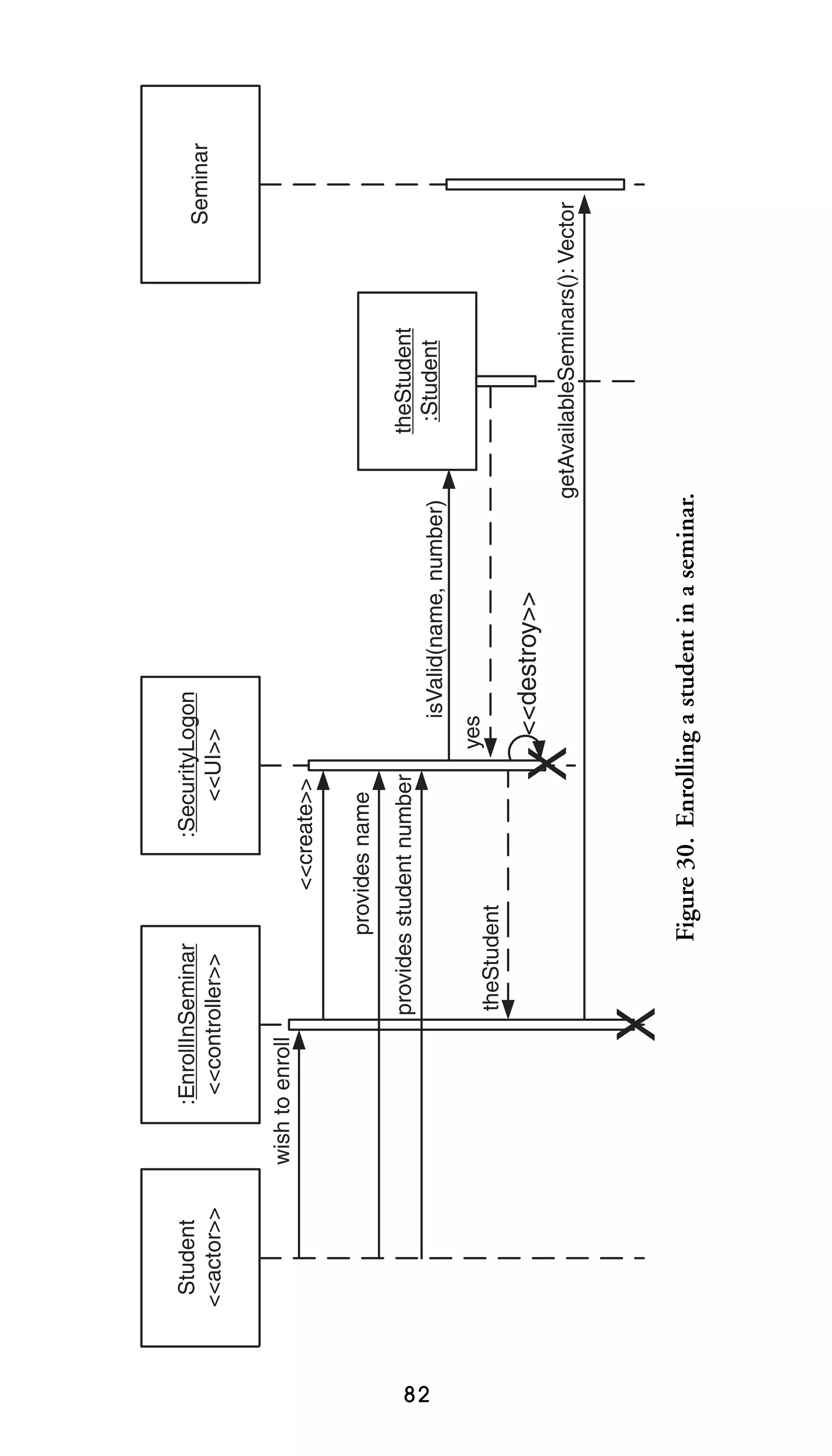
162–163
practices of . . . . . . . . . . . . 164
principles of . . . . . . . . . . . 162
values of . . . . . . . . . . . . . . 162
analog values, timing diagram
for . . . . . . . . . . . . . . . . 158
analysis diagrams . . . . . . . . . . . 50
analysis models . . . . . . . . . . . . . 49
analysis names . . . . . . . . . . . . . 52
AND aggregation . . . . . . . . . . 72
anonymous objects . . . . . . . . . 86
appearance versus content . . . 10
<<application>>
stereotype . . . . . . . . . . 135
architectural components . . . 134
architectural layers . . . . . . . . . . 78
INDEX 171

arrow for each communication
design message . . . . . . . 98
arrowheads
avoiding on actor–use-case
relationships . . . . . . . . . 39
indicating an association’s
direction . . . . . . . . . . . . 67
justifying message names to
align with . . . . . . . . . . . 89
justifying return values
beside . . . . . . . . . . . . . . 92
ASL (Action Semantic
Language) . . . . . . . 16, 18
<<ASP>> stereotype . . . . . . . . 88
assert label . . . . . . . . . . . . . . . . . 25
association classes . . . . . . . . . . 50
associations, 59. See also
relationships
between an actor and a use
case . . . . . . . . . . . . . . . . 39
between actors and classes
with association
classes . . . . . . . . . . . . . . 50
bi-directional . . . . . . . . . . . 66
centering names of . . . . . . 64
clarifying names . . . . . . . . . 64
depicting in use case
diagrams . . . . . . . . . . . . 39
differentiating generalizations
between . . . . . . . . . . . . . 69
guidelines for . . . . . . . . 64–68
implementing . . . . . . . . . . . 67
making bi-directional . . . . 66
naming unidirectional . . . 65
not representing
information . . . . . . . . . 40
redrawing inherited . . . . . . 67

using aggregation or
composition over . . . . . 72
wording names left to
right . . . . . . . . . . . . . . . . 65
writing concise names in
active voice . . . . . . . . . . 64
assumed stereotypes. . . . . . . . .18
asynchronous stereotype . . . . 146
attribute names
abbreviations not used
in . . . . . . . . . . . . . . . . . . 54
left justifying . . . . . . . . . . . 55
preferring object names
over . . . . . . . . . . . . . . . 148
attributes
consistent with names and
types . . . . . . . . . . . . . . . 49
defined by classes . . . . . . . . 51
indicating values . . . . . . . 148
listing in decreasing
visibility. . . . . . . . . . . . .57
making private . . . . . . . . . . 99
naming . . . . . . . . . . . . . . . . 52
replacing relationship lines
with types . . . . . . . . . . . 63
required types of . . . . . . . . 49
static . . . . . . . . . . . . . . . . . . 57
attributes list . . . . . . . . . . . . . . . 56
axis guidelines for timing
diagrams . . . . . . 159–160
B
back-end entities . . . . . . . . . . . 85
bandage box symbol . . . . . . . 136
bandage box visual
stereotype . . . . . . . . . . 132
172 THE ELEMENTS OF UML 2.0 STYLE

“bare” links . . . . . . . . . . . . . . . 100
base components, placing . . 138
base packages, placing . . . . . . . 74
behavior, differing based on
state . . . . . . . . . . . . . . . 103
bi-directional associations . . . 66,
67
black-hole activities . . . . . . . . 116
black-hole states . . . . . . . . . . . 105
borders of frames . . . . . . . . . . . 23
boundary boxes for
diagrams . . . . . . . . . . . . 23
broken style . . . . . . . . . . . . . . . 86
bubbles . . . . . . . . . . . . . . . . . . 6, 7
bulk getters . . . . . . . . . . . . . . . . 99
bulk setters . . . . . . . . . . . . . . . . 99
business classes, naming . . . . . 51
business description . . . . . . . . 83
business processes
forking into parallel
streams . . . . . . . . . . . . 121
horizontal swim lanes
for . . . . . . . . . . . . . . . . 125
modeling with an activity
diagram . . . . . . . . . . . 114
C
C++ implementation
visibility. . . . . . . . . . . . .49
CASE tools . . . . . . . . . . . . . . . . 17
circle, filled . . . . . . . . . . 113, 115
circular dependency,
detecting . . . . . . . . . . . 136
class compartments . . . . . . . . . 56
class diagrams . . . . . . . . . . 47–72
color on . . . . . . . . . . . . . . . . 12

modeling navigation
on. . . . . . . . . . . . . . . . .102
modeling relationship
details . . . . . . . . . . . . . 100
modifying for data
modeling. . . . . . . . . . .135
relationships between classes
within . . . . . . . . . . . . . 102
style guidelines pertaining
to . . . . . . . . . . . . . . . 47–51
visibility options on . . . . . . 48
class model . . . . . . . . . . . . . . . . 47
class package diagrams . . . 73–76
class-based role notation. . . .101
classes . . . . . . . . . . . . . . . . . . . . .51
allocating functionality
to . . . . . . . . . . . . . . . . . . 94
centering the names of . . . 55
foreign keys in . . . . . . . . . . 55
giving actors the same name
as . . . . . . . . . . . . . . . . . . 83
implementing interfaces . . 25
modeling a dependency
between . . . . . . . . . . . . . 64
naming . . . . . . . . . . . . . . . . 51
never showing with two
compartments . . . . . . . 56
not depicting . . . . . . . . . . . 30
one port per realizing . . . . 28
organizing into
packages . . . . . . . . . . . . 74
qualifier rectangles smaller
than . . . . . . . . . . . . . . . . 59
roles taken by . . . . . . . . . . 101
transitory. . . . . . . . . . . . . . .60
tree-routing similar
relationships to. . . . . . .60
INDEX 173

classifier stereotypes . . . . . . . . . 20
classifiers
arranging . . . . . . . . . . . . . . . 81
defining interfaces
separately . . . . . . . . . . . 30
depicting . . . . . . . . . . . . . . 150
relationships between . . . 100
close lines, avoiding . . . . . . . . . . 8
collaboration diagrams. See
communication diagrams
collaboration style for composite
structure diagrams . . . 150
collaborations
between lifelines . . . . . . . 151
modeling between two
elements . . . . . . . . . . . . 60
collections of AM
principles . . . . . . . . . . 162
color . . . . . . . . . . . . . . . . . . . . . . 12
combined fragment frames . . 21
comments, adding to UML
diagrams . . . . . . . . . . . . 15
communication associations,
146. See also connections
communication diagrams . . . 80,
94–102
indicating parameters in
messages . . . . . . . . . . . . 98
invoking messages
on . . . . . . . . . . . . . 98–100
modifying for user interface
modeling. . . . . . . . . . .135
not using to model process
flow . . . . . . . . . . . . . . . . 95
sequence diagram guidelines
applicable to . . . . . . . . 97
communication protocols . . 146

comparison logic . . . . . . . . . . 119
compartments . . . . . . . . . . . . . 56
compilation dependencies . . 138
component diagrams . . . . . . . 74,
132–138, 145
Component label . . . . . . . . . . . 24
<<component>>
stereotype . . 88, 132, 136
components . . . . . . . . . . . . . . 144
data . . . . . . . . . . . . . . . . . . 134
dependencies of . . . . . . . . 136
guidelines for
modeling . . . . . . 132–136
implementing interfaces . . 25
indicating the deployment
of . . . . . . . . . . . . . . . . . 144
inheritance between . . . . 138
making dependent only on
interfaces . . . . . . . . . . . 138
modeling . . . . . . . . . 132, 144
modeling critical
dependencies
between . . . . . . . . . . . . 147
naming . . . . . . . . . . . . . . . 134
placing inheriting . . . . . . 138
composite structure
diagrams . . . . . . . . . . . 150
composition, 59, 71. See also
relationships
applying to aggregates of
physical items . . . . . . . . 72
applying when parts share
persistent life cycle. . . .72
guidelines for . . . . . . . . 70–72
using over association . . . . 72
concurrent threads,
indicating . . . . . . . . . . . 99
174 THE ELEMENTS OF UML 2.0 STYLE

connections, 146. See also
communication
associations
connectors . . . . . . . . . . . 115, 116
consistent guards . . . . . 111, 117
consistent language, using to
name guards . . . . . . . . 112
consistently sized symbols . . . . 5
constraint definitions . . . . . . . 15
constraints, modeling . . . . . . . 16
content versus appearance . . . 10
continuous process . . . . . . . . 115
continuous style . . . . . . . . . . . . 85
continuous timing
diagram . . . . . . . . . . . . 158
<<controller>>
stereotype . . . . . . . . . . . 88
core practices of AM . . . . . . . 164
core principles of AM . . . . . . 162
<<create>> stereotype . . . . 90
critical interactions . . . . . . . . . 89
criticalRegion label . . . . . . . . . 25
crossing lines . . . . . . . . . . . . . 4, 5
curved lines . . . . . . . . . . . . . . . . . 5
cyclic dependencies,
avoiding . . . . . . . . . . . . 78
D
dashed arrows . . . . . . . . . . . . . 146
dashed lines . . . . . . . . . . . 50, 136
data components, avoiding the
modeling of . . . . . . . . 134
data flow diagram . . . . . . . . . . 40
data stores . . . . . . . . . . . . . . . . 140
data table, indicating . . . . . . 135
database modeling . . . . . . . . . 134

data-based inheritance . . . . . . 69
data-driven approach to
development . . . . . . . . . 48
data-flow diagrams . . . . . . . . 113
<<datastore>>
stereotype . . . . . . . 88, 135
decision logic guards . . . . . . . 119
decision point diamond . . . . 120
decision points . . . . . . . . . . . . 116
avoiding superfluous . . . . 117
depicting . . . . . . . . . . . . . . 119
guards forming a complete set
on. . . . . . . . . . . . . . . . .118
implied . . . . . . . . . . . . . . . 117
reflecting previous
activities . . . . . . . . . . . 117
dependencies, 28, 59. See also
relationships
avoiding modeling
compilation . . . . . . . . 138
of components . . . . . . . . . 136
modeling between
components . . . 146, 147
modeling for transitory
relationships . . . . . . . . . 60
modeling in component
diagrams . . . . . . . . . . . 136
not modeling every . . . . . . 64
between packages . . . . . . . 73,
74
dependency relationship. . . .102
deployment
diagrams . . . . . . 12, 139–147
strategy . . . . . . . . . . . . . . . 140
descriptors, applying labels
to . . . . . . . . . . . . . . . 23–26
INDEX 175

design diagrams . . . . . . . . . . . . 11
design embedded software . . 157
design models, indicating
visibility on . . . . . . . . . . 48
designs, organizing . . . . . . . . . 73
<<destroy>> stereotype . . . 85
detailed design
components, naming 134
detailed style
compared to collaboration
style . . . . . . . . . . . . . . . 151
for composite structure
diagrams . . . . . . . . . . 150
development, approaches
to . . . . . . . . . . . . . . . . . . 48
devices, assuming to be
nodes . . . . . . . . . . . . . . 140
diagonal lines . . . . . . . . . . . . 5, 35
diagram frames . . . . . . . . . 21, 23
diagramming, general guidelines
for . . . . . . . . . . . . . . . 4–14
diagrams
applying color to . . . . . . . . 12
content before
appearance . . . . . . . . . . 10
creating noisy/gaudy . . . . . 14
depicting within
diagrams . . . . . . . . . . . 153
describing with a note . . . . 15
guidelines applicable to
all . . . . . . . . . . . . . . . . 4–14
naming guidelines for . . . . 11
organizing in Western
culture . . . . . . . . . . . . . . . 8
placing symbols on . . . . . . . 5
readability guidelines
for . . . . . . . . . . . . . . . . 4–8

referencing other . . . . . . . 153
reorganizing large into
smaller . . . . . . . . . . . . . . . 9
simplicity guidelines
for . . . . . . . . . . . . . . . 8–11
single-page . . . . . . . . . . . . . 10
diamonds
describing logic
within . . . . . . . . . . . . . 120
modeling a decision
point . . . . . . . . . . . . . . 116
directionality, indicating . . . . . 64
discrete timing diagram . . . . 158
<<document>>
stereotype . . . . . . . . . . 135
domain class diagrams . . . . . . 47
domain class robustness diagram
symbol
domain classes . . . . . . . . . . . . . 95
domain objects. . . . . . . . . . . .101
domain terminology . . . . . . . 11,
34
drum notation for data
stores . . . . . . . . . . . . . . 140
E
e-commerce system, logical
architecture of . . . 31, 133
elements. See modeling elements
ellipses ( . . . ) at the end of
lists . . . . . . . . . . . . . . . . . 56
embedded system,
designing . . . . . . . . . . 139
ending point . . . . . . . . . . . . . . 115
enterprise architectural
modeling. . . . . . . . . . .119
enterprise-level diagrams . . . 140
176 THE ELEMENTS OF UML 2.0 STYLE

entities
behavior pattern of . . . . . 105
life cycle of . . . . . . . . . . . 108
entry actions . . . . . . . . . . . . . . 109
environment-specific
names . . . . . . . . . . . . . 134
esoteric notation. . . . . . . . . . . . .9
events, depicting reaction
to . . . . . . . . . . . . . . . . . 103
exceptions, indicating . . . . . . . 58
<<executable>>
stereotype . . . . . . . . . . 135
exit actions . . . . . . . . . . . . . . . 110
exit guards . . . . . . . . . . . . . . . 118
exploding bubbles . . . . . . . . . . . 6
<<extend>> associations . . . 41
avoiding the use of . . . . . . 41
drawing vertically . . . . . . . 43
modeling as
dependencies . . . . . . . . 41
<<extends>> stereotype . . . 42
extension conditions,
modeling . . . . . . . . . . . . 45
extension points, avoiding
modeling . . . . . . . . . . . . 44
F
fall-through logic . . . . . . . . . . 118
file folders, packages as . . . . . . 73
<<file>> stereotype . . . . . . 135
filled circle . . . . . . . . . . . 113, 115
filled triangle . . . . . . . . . . . . . . 64
final state, placing . . . . . . . . . 105
flow charts . . . . . . . . . . . 113, 115
fonts, applying. . . . . . . . . .10, 12
foreign keys . . . . . . . . . . . . . . . . 55

fork bar . . . . . . . . . . . . . . . . . . 122
forks . . . . . . . . . . . . . . . . . . . . . 121
frames . . . . . . . . . . . . . . . . . 21–24
free-form notes . . . . . . . . . . . . . 17
front end, indicating . . . . . . . 135
functional decomposition
approach . . . . . . . . . . . . 43
G
generalizations, 39, 69. See also
inheritance
getter and setter operations . . 99
getter invocations . . . . . . . . . . 99
getters . . . . . . . . . . . . . . . . . . . . 52,
99
groups, organizing . . . . . . . . . . 73
guards . . . . . . . . . . . . . . . . . . . 111,
116
for activity edges . . . . . . . 117
consistent . . . . . . . . . . . . . 111,
117
describing a decision
point . . . . . . . . . . . . . . 117
forming a complete set . . 118
guidelines for . . . . . . . . . . 111
indicating decision logic over
complex . . . . . . . . . . . 119
introducing junctions to
visually localize . . . . . 111
modeling only if adding
value . . . . . . . . . . . . . . 118
for moving forward from
joins . . . . . . . . . . . . . . . 122
naming . . . . . . . . . . . . . . . 112
never placing on initial
transitions . . . . . . . . . . 112
INDEX 177

not forming a complete
set . . . . . . . . . . . . . . . . 111
not overlapping . . . 111, 117
simplifying . . . . . . . . . . . . 120
<<GUI>> stereotype . . . . . . . . 88

H
happy path . . . . . . . . . . . . . . . 125
hardware interrupt, use-case
equivalent of . . . . . . . . . 41
hardware nodes . . . . . . . . . . . 139
hierarchy of state machine
diagrams . . . . . . . . . . . 106
horizontal alignment of
labels . . . . . . . . . . . . . . . . 6
hour-glass symbol . . . . . . . . . . 38
<<HTML>> stereotype . . . . . . . 88
HTTP stereotype . . . . . . . . . 146

I
implementation language
constraints . . . . . . . . . . 29
implementation visibility of
C++ . . . . . . . . . . . . . . . . 49
implied decision point . . . . . 117
implied relationships . . . 63, 102
<<include>> associations
applying . . . . . . . . . . . . 40, 91
drawing horizontally . . . . . 43
modeling as
dependencies . . . . . . . . 40
<<includes>> stereotype . . 42
<<infrastructure>>
stereotype . . . . . . . . . . 135

inheritance, 59, 68. See also
generalizations;
relationships
applying the sentence rule for
68
data-based . . . . . . . . . . . . . . 69
guidelines for . . . . . . . . 68–70
hierarchies . . . . . . . . . . . . . . 61
between packages . . . . . . . . 74
pure . . . . . . . . . . . . . . . . . . 68,
69
between use cases . . . . . . . 42
inherited associations, redrawing
67
inheriting actor . . . . . . . . . . . . 44
inheriting components . . . . . 138
inheriting packages . . . . . . . . . 74
inheriting use case . . . . . . . . . . 43
initial state . . . . . . . . . . . . . . . 105
initial transitions . . . . . . . . . . 112
input pins . . . . . . . . . . . . . . . . 128
inputs, showing . . . . . . . . . . . 130
installation scripts . . . . . . . . . 144
instance attributes . . . . . . . . . . 29
instance collaboration diagrams.
See composite structure
diagrams
instance-level communication
diagrams . . . . . . . 95, 100
instances . . . . . . . . . . . . . . . . . 148
interactions
focusing on critical . . . . . . 89
occurences . . . . . . . . . . . . . 23,
24
overview diagrams . . . . . . 153
between two actors . . . . . . 38
178 THE ELEMENTS OF UML 2.0 STYLE

interface class robustness diagram
symbol
interface classes
<<interface>> stereotype 88
interfaces . . . . . . . . . . . . . . . . . . 24
attaching to ports . . . . . . . 25
in classes . . . . . . . . . . . . . . . 30
in component
diagrams . . . . . . . . . . . 136
components realizing . . . 132
defining . . . . . . . . . . . . 29, 30
guidelines for . . . . . . . . 24–32
lollipop notation . . . . . . . . 30
making components
dependent on . . . . . . . 138
naming . . . . . . . . . . . . . . . . 29
one label per
connection . . . . . . . . . . 30
placing . . . . . . . . . . . . . . . . . 28
placing labels . . . . . . . . . . . 32
prefixing names with a
capital I . . . . . . . . . . . . . 30
realizing . . . . . . . . . . . . . . . . 25
reflecting implementation
language
constraints . . . . . . . . . . 29
internal relationships,
reflecting . . . . . . . . . . . . 79
“is a” relationship . . . . . . . . . . 68
“is like” relationship . . . . . . . . 68
“is like” rule . . . . . . . . . . . . 43, 44
“is part of ” relationships . . . . . 71
J
Java interface . . . . . . . . . . . . . . 88
Java Server Page . . . . . . . . . . . . 88

JDBC stereotype . . . . . . . . . . 146
job titles, modeling . . . . . . . . . 37
join bar, aligning . . . . . . . . . . 122
joins . . . . . . . . . . . . . . . . . . . . . 121
joinspecs, modeling . . . . . . . . 122
<<JSP>> stereotype . . . . . . . . 88
jump . . . . . . . . . . . . . . . . . . . . . . 5
junction point . . . . . . . . . . . . 111
junctions . . . . . . . . . . . . . . . . . 111
K
key activities . . . . . . . . . . . . . . 125
keys . . . . . . . . . . . . . . . . . . . . . . 55
L
labels . . . . . . . . . . . . . . . . . . . . . . 4
aligning horizontally . . . . . . 6
applying to
descriptors . . . . . . . 23–26
for objects on sequence
diagrams . . . . . . . . . . . . 86
one per interface
connection . . . . . . . . . . 30
placing . . . . . . . . . . . . . . . . . 32
language naming conventions.
See also naming
conventions
applying on design
diagrams . . . . . . . . . . . . 11
avoiding stereotypes implied
by . . . . . . . . . . . . . . . . . . 58
naming interfaces according
to . . . . . . . . . . . . . . . . . . 29
software actions using . . . 109
language-dependent
visibility. . . . . . . . . . . . .49
INDEX 179

large diagrams,
reorganizing . . . . . . . . . . 9
layering . . . . . . . . . . . . . . . . . . . 81
left justification of text in
notes . . . . . . . . . . . . . . . 16
left to right
ordering of messages . . . . . 81
organization for
diagrams . . . . . . . . . . . . . 8
legends, 8, 16. See also notes
letters in a communication
diagram . . . . . . . . . . . . . 99
<<library>>
stereotype . . . . . . . . . . 135
life-cycle stage of an action
object . . . . . . . . . . . . . 130
lifelines . . . . . . . . . . . . . . . . . . . 86
applying textual stereotypes
to . . . . . . . . . . . . . . . . . . 88
detailing with a state machine
diagram . . . . . . . . . . . . 159
guidelines for . . . . . . . . 86–89
layering . . . . . . . . . . . . . . . . 81
not listing in interaction
overview diagrams . . . 156
roles in collaboration . . . 151
linear processes . . . . . . . . . . . 124
lines . . . . . . . . . . . . . . . . . . . . . . . 4
attaching to the middle of
bubbles . . . . . . . . . . . . . . 6
avoiding crossing . . . . . . . . . 4
avoiding diagonal or
curved . . . . . . . . . . . . . . . 5
avoiding too many close . . . 8
depicting crossing . . . . . . . . 5
link classes. See association
classes

links
on a communication
diagram . . . . . . . . . . . . 102
consistent static
relationships . . . . . . . . 102
indicating roles on . . . . . . 101
lists, incomplete . . . . . . . . . . . . 56
logic
flows . . . . . . . . . . . . . . . . . 126
prose description of . . . . . . 83
of a usage scenario . . . . . . . 80
logical architecture of an
e-commerce system . . . 31
“lollipop” notation . . . . . . . . . 28,
30
loop label . . . . . . . . . . . . . . . . . 25
lowercase for stereotypes . . . . . 18
M
maximums, multiplicities
involving . . . . . . . . . . . . 68
merge. . . . . . . . . . . . . . . . . . . .121
message flow . . . . . . . . . . . . . . 94,
99
messages
applying prose for . . . . . . . 90
guidelines for . . . . . . . 89–91,
98–101
justifying names . . . . . . . . . 89
left-to-right ordering of . . 81
naming . . . . . . . . . . . . . . . . 92
naming objects referenced
in . . . . . . . . . . . . . . . . . . 86
parameters . . . . . . . . . . . . . 91
sending to a software-based
classifier . . . . . . . . . . . . 90
180 THE ELEMENTS OF UML 2.0 STYLE

method body, adding to UML
diagrams . . . . . . . . . . . . 15
middleware . . . . . . . . . . . . . . . 139
minimums, multiplicities
involving . . . . . . . . . . . . 68
miracle activities . . . . . . . . . . 116
miracle states . . . . . . . . . . . . . 105
mixed case, applying . . . . . . . . 53
modeling elements . . . . . . 11, 15
modeling notation for
inheritance . . . . . . . . . . 68
models . . . . . . . . . . . . . . . . . . ix, 8
mouse-ear transitions. See
recursive transitions
multiple associations . . . . . . . . 65
multiplicities. . . . . . . . . . . . . . .61
depicting high-level . . . . . 101
involving minimums and
maximums . . . . . . . . . . 68
for a relationship . . . . . . . . 61
multiplicity indicators . . . . . . . 61
mutators . . . . . . . . . . . . . . . . . . 52
N
named elements . . . . . . . . . . . . 20
named objects . . . . . . . . . . . . . 86
named variables . . . . . . . . . . . . 20
names
for actors . . . . . . . . . . . . . . . 37
centering association . . . . . 64
domain terminology in . . . 11
for message parameters . . . 91
naming conventions. See also
language naming
conventions

for models . . . . . . . . . . . . . . 11
preferred over
stereotypes . . . . . . . . . . 20
naming guidelines for
diagrams . . . . . . . . . . . . 11
navigability on communication
diagrams . . . . . . . . . . . 102
network diagram . . . . . . . . . . 140
new stereotypes . . . . . . . . . . . . 20
nodes . . . . . . . . . . . . . . . . . . . . 144
applying visual stereotypes
to . . . . . . . . . . . . . . . . . 145
in deployment
diagrams . . . . . . 140, 144
naming . . . . . . . . . . . . . . . 144
non-navigability,
avoiding . . . . . . . . . . . . 67
nonsoftware entities, life cycle
of . . . . . . . . . . . . . . . . . 109
notation
for deployment
diagrams . . . . . . . . . . . 140
for modeling standards and
guidelines . . . . . . . . . . . . 1
well-known over esoteric . . 9
notation legend . . . . . . . . . . . . . 8
notes
free-form . . . . . . . . . . . . . . . 17
generating software
from . . . . . . . . . . . . . . . . 17
guidelines for . . . . . . . . 15–18
left-justifying text in . . . . . 16
placement of . . . . . . . . . . . . 16
nouns
naming attributes . . . . . . . 52
naming classes . . . . . . . . . . 51
INDEX 181

numbers, labeling
connectors . . . . . . . . . 116
O
object diagrams . . . . . . 148–149,
152
object identifier (OID) . . . . . . 60
object-oriented design . . . . . . .80
objects
creating directly . . . . . . . . . 90
destruction of . . . . . . . . . . . 85
message flow between . . . . 94
naming . . . . . . . . . . . . 86, 148
on sequence diagrams . . . 86
OCL (Object Constraint
Language) . . . . . . . . . . . 16
coding conventions for . . . 18
defining comparison
logic . . . . . . . . . . . . . . . 119
examples of . . . . . . . . . . . . . 17
indicating on a diagram . . 17
ODBC stereotype . . . . . . . . . 146
OID (object identifier) . . . . . . 60
operation names
within class boxes . . . . . . . 55
specifying in references . . . 24
operation signatures . . . . . 57, 90
operations . . . . . . . . . . . . . . . . . 51
applying stereotypes to . . . 58
capturing type information
for . . . . . . . . . . . . . . . . . 91
defined by classes . . . . . . . . 51
listing in decreasing
visibility. . . . . . . . . . . . .57
naming . . . . . . . . . . . . . 51, 57

protected . . . . . . . . . . . . . . . 57
simplifying . . . . . . . . . . . . 115
static . . . . . . . . . . . . . . . . . . 57
stepping through invocation
of . . . . . . . . . . . . . . . . . . 80
operations list . . . . . . . . . . . . . . 56
opt label . . . . . . . . . . . . . . . . . . 25
[Otherwise] guard . . . . . . . . . 118
output pins, depicting . . . . . 129
outputs, showing . . . . . . . . . 130
P
package (∼) visibility . . . . . . . 48
package dependencies . . . . . . . 79
package diagrams . . . . . . . 73–79
Package label . . . . . . . . . . . . . . 24
packages . . . . . . . . . . . . . . . . . . 73
on any UML diagram . . . . 78
avoiding cyclic dependencies
between . . . . . . . . . . . . . 78
inheritance between . . . . . 74
making cohesive . . . . . . . . . 78
naming . . . . . . . . . . . . . . . . 78
par label . . . . . . . . . . . . . . . . . . . 25
parallel bars . . . . . . . . . . . . . . 121
parallel flow . . . . . . . . . . 121–122
parameters
in communication diagram
messages . . . . . . . . . . . . 98
listing only types . . . . . . . . 57
naming . . . . . . . . . . . . . 57, 91
ordering . . . . . . . . . . . . . . . 58
parent actor, placing . . . . . . . . 44
part, placing . . . . . . . . . . . . . . . 72
182 THE ELEMENTS OF UML 2.0 STYLE

part decompositions . . . . . . . . 23
passive actors . . . . . . . . . . . . . . 40
past tense, naming transition
events in . . . . . . . . . . . 110
period of time, bounding . . . 161
persistence life cycle . . . . . . . . 72
physical design, depicting. . . .74
physical items . . . . . . . . . . . . . . 72
pins . . . . . . . . . . . . . . . . . . . . . 128,
129
ports . . . . . . . . . . . . . . . . . . 25, 28
power types . . . . . . . . . . . . . . . . 70
practices of AM . . . . . . . . . . . 164
preconditions, defining in use
cases . . . . . . . . . . . . . . . . 35
primary actors, placing . . . . . . 36
principles of AM . . . . . . . . . . 162
private (-) visibility . . . . . . . . . 48
proactive system actors . . . . . . 83
process logic . . . . . . . . . . . . . . . 16
process/controller classes
project stakeholders, use-case
models and . . . . . . . . . . 33
project-specific deployment
diagrams . . . . . . . . . . . 140
property strings . . . . . . . . . . . . 49,
58
prose
applying for actors . . . . . . . 90
describing logic . . . . . . . . . 83
naming actors’ actions . . 109
protected (#) visibility . . . . . . . 48
protected operations . . . . . . . . 57
provided interfaces . . . . . . . . . 28
public (+) visibility . . . . . . . . . 48

public operations . . . . . . . . . . . 57
pure inheritance . . . . . . . . 68, 69
Q
qualifier rectangles,
drawing . . . . . . . . . . . . . 59
question mark (?), indicating
unknowns . . . . . . . . . . 12
R
rake symbol . . . . . . . . . . . . . . . . . 6
reactive system actors . . . . . . . 85
readability guidelines for
diagrams . . . . . . . . . . . 4–8
readable fonts . . . . . . . . . . . . . . 10
realization line . . . . . . . . . . . . . 30
realizations, 59. See also
relationships
realizing class, depicting . . . . . 28
real-time systems, memory
management in . . . . . . 85
rectangles
modeling action
objects . . . . . . . . . . . . . 128
modeling components
as . . . . . . . . . . . . 132, 144
recursive associations . . . . 65, 66
recursive transitions . . . . . . . 110
ref label . . . . . . . . . . . . . . . . . . . 25
references, specifying operation
names . . . . . . . . . . . . . . 24
relationship lines, replacing . . 63
relationships . . . . . . . . . . . . . . . 59
distinguishing by indicating
roles . . . . . . . . . . . . . . . 149
INDEX 183

guidelines for . . . . . . . . . . . 59
modeling . . . . . . . . . . . 28, 59
not modeling implied . . . . 63
representing instances
of . . . . . . . . . . . . . . . . . 100
required for element
collaboration . . . . . . . . 60
transitory. . . . . . . . . . . . . . .60
tree-routing similar . . . . . . 60
in use-case
diagrams . . . . . . . . 38–45
release scope . . . . . . . . . . . . . . . 45
Remote Method
Invocation . . . . . . . . . 146
remote procedure calls . . . . . 146
<<report>> stereotype . . . . 88
required interfaces . . . . . . . . . . 28
requirements, organizing . . . . 76
return values
guidelines for . . . . . . . . 91–93
indicating . . . . . . . . . . . 91, 93
justifying . . . . . . . . . . . . . . . 92
modeling . . . . . . . . . . . 91, 92
return-value placeholders, types
as . . . . . . . . . . . . . . . . . . 92
RMI stereotype . . . . . . . . . . . 146
robustness diagram
symbols . . . . . . . . . 21, 97
robustness diagram visual
stereotypes . . . . . . . . . . 95
role names
with multiple associations 65
on recursive
associations . . . . . . . . . 66
role-pertinent information . . 101

roles
indicating to distinguish
relationships . . . . . . . . 149
naming actors to model . . 37
preferring on links . . . . . . 101
styles for indicating . . . . . 101
RPC stereotype . . . . . . . . . . . 146

S
scaffolding code . . . . . . . . 52–55
scripts, installation . . . . . . . . 144
sd label . . . . . . . . . . . . . . . . . . . 24
seminar registration, diagram
for . . . . . . . . . . . . . . . . 104
sentence rule
for aggregation . . . . . . . . . . 71
for inheritance . . . . . . . . . . 68
sequence diagrams . . . . . . 80–93
activation boxes in . . . . . . . 85
applying guidelines to
communication
diagrams . . . . . . . . . . . . 97
creating . . . . . . . . . . . . . . . . 97
including a prose description
of the logic of . . . . . . . . 83
including objects of the same
type . . . . . . . . . . . . . . . . 86
indicating object creation
on . . . . . . . . . . . . . . . . . . 90
layering . . . . . . . . . . . . . . . . 81
message flow of . . . . . . . . . 81
not modeling object
destruction on . . . . . . . 85
objects on . . . . . . . . . . . . . 86
184 THE ELEMENTS OF UML 2.0 STYLE

sequence diagrams (continued )
referring to return values
elsewhere . . . . . . . . . . . 92
setter operations, invoking . . . 99
setters . . . . . . . . . . . . . . . . . 52, 99
shared action objects,
placing . . . . . . . . . . . . 129
simple models . . . . . . . . . . . . . . . 8
simplicity guidelines for
diagrams . . . . . . . . . . 8–11
single-page diagrams . . . . . . . . 10
singular nouns, naming
classes . . . . . . . . . . . . . . 51
SOAP protocol . . . . . . . . . . . 146
sockets, required interfaces
depicted as . . . . . . . . . . 28
software actions, naming . . . 109
software components
dependencies among . . . . 132
indicating . . . . . . . . . . . . . 140
modeling . . . . . . . . . . . . . . 145
solid arrowhead in a relationship
line . . . . . . . . . . . . . . . . 128
<<source code>>
stereotype . . . . . . . . . . 135
specification-level
communication
diagrams . . . . . . . . . . . . 95
stacking use cases . . . . . . . . . . . 34
standards, compared to style
guidelines . . . . . . . . . . . . 2
starting point
placing an activity
diagram’s . . . . . . . . . . . 113
for reading a diagram . . . . . 8
state machine
diagrams . . . . . . 103–112
creating a hierarchy of . . 106

drawing to explore detailed
life cycles . . . . . . . . . . . 159
modifying for user interface
modeling. . . . . . . . . . .135
needing to draw . . . . . . . . 80
states . . . . . . . . . . . . . . . . . . . . 105
applying names . . . . . . . . 130
black-hole . . . . . . . . . . . . . 105
guidelines for . . . . . 105–106
miracle . . . . . . . . . . . . . . . 105
naming . . . . . . . . . . . . . . . 105
ordering in timing
diagrams . . . . . . . . . . . 159
placing. . . . . . . . . . . . . . . .105
static attributes . . . . . . . . . . . . . 57
static operations . . . . . . . . . . . . 57
stereotypes . . . . . . . . . . . . . . . . 18
aligning classifier . . . . . . . . 20
applying consistently . . . . . 21
applying on component
diagrams . . . . . . . . . . . 134
applying on deployment
diagrams . . . . . . . . . . . 145
applying visual . . . . . 21, 145
assumed . . . . . . . . . . . . . . . . 18
asynchronous . . . . . . . . . . 146
avoiding implied . . . . . . . . 58
common for sequence
diagrams . . . . . . . . . . . . 88
for communication
associations . . . . . . . . . 146
documenting
common . . . . . . . . . . . . 21
format for naming . . . . . . . 18
guidelines for . . . . . . . . 18–22
indicating architectural
layers . . . . . . . . . . . . . . . 78
INDEX 185

indicating communication
protocols . . . . . . . . . . . 146
introducing sparingly . . . . 20
listing last . . . . . . . . . . . . . . 18
naming conventions
preferred over . . . . . . . . 20
not indicating assumed . . . 18
tagged values following . . . 20
stick figures . . . . . . . . . . . . . . . . 35
straight lines . . . . . . . . . . . . . . . . 5
style guidelines . . . . . . . . . . . . . . 2
subclasses . . . . . . . . . . . . . . 68, 69
substates . . . . . . . . . . . . . 106–108
superclasses . . . . . . . . . . . . 68, 69
superstate . . . . . . . . . . . . . . . . 106
supplementary practices of
AM . . . . . . . . . . . . . . . 164
supplementary principles of
AM . . . . . . . . . . . . . . . 164
swim areas . . . . . . . . . . . 124, 125
swim lanes, 122. See also activity
partitions
applying to linear
processes . . . . . . . . . . . 124
considering horizontal for
business processes . . . 125
having less than five . . . . 124
modeling key activities in
primary . . . . . . . . . . . . 125
ordering in a logical
manner . . . . . . . . . . . . 124
replacing with swim
areas . . . . . . . . . . . . . . . 124
symbols . . . . . . . . . . . . . . . . . . . . 4
applying consistently
sized . . . . . . . . . . . . . . . . . 5
arranging symmetrically . . . 6
number on a diagram . . . . 10

placing centered on the grid
point . . . . . . . . . . . . . . . . 5
synchronous stereotype . . . . 146
system actors . . . . . . . . . . . . . . 38
system boundary
boxes . . . . . . . . . . . . 45–46
system use-case model . . . . . . . 33
<<system>>
stereotype . . . . . . . . . . . 38,
88
systems, organizing . . . . . . . . . 81
T
<<table>> stereotype. . . . .135
tagged values. . . . . . . . . . . . . . .20
targeted complexity . . . . . . . . 106
technical architecture
diagram . . . . . . . . . . . . 140
text in notes . . . . . . . . . . . . . . . 16
textual stereotypes . . . . . 88, 134
three-dimensional box, depicting
nodes as. . . . . . . . . . . .144
Time actor . . . . . . . . . . . . . . . . 38
time constraints . . . . . . 157, 161
time durations . . . . . . . . . . . . 161
time guidelines . . . . . . . 160–161
time series . . . . . . . . . . . . . . . . 160
times, depicting specific . . . . 160
timing considerations,
implying . . . . . . . . . . . . 34
timing diagrams . . . . . . 157–161
timing marks . . . . . . . . . . . . . 160
top to bottom organization for
diagrams . . . . . . . . . . . . . 8
top-left corner
placing primary actors
in . . . . . . . . . . . . . . . . . . 36
186 THE ELEMENTS OF UML 2.0 STYLE

top-left corner (continued )
placing the start point
in . . . . . . . . . . . . . . . . 113
top-level state machine
diagrams . . . . . . . . . . . 108
traceability information . . . . . 83
transition events,
naming . . . . . . . . . . . . 110
transition labels,
placing . . . . . . . . . . . . 110
transitions, 108. See also activity
edges
aggregating common
substate . . . . . . . . . . . . 106
conditions that must be there
to traverse . . . . . . . . . . 111
modeling recursive . . . . . 110
never placing guards on
initial . . . . . . . . . . . . . 112
transitory class . . . . . . . . . . . . . 60
transitory relationships . . . . . . 60
tree configuration . . . . . . . . . . 60
triangle, filled . . . . . . . . . . . . . . 64
types
on analysis models . . . . . . . 49
indicating return-value
placeholders . . . . . . . . . 92
names of . . . . . . . . . . . . . . . 91
as parameter
placeholders . . . . . . . . . 91
U
UDDI protocol . . . . . . . . . . 146
UML (Unified Modeling
Language) . . . . . . . . . ix, 1
activity diagrams . . 113–131

class diagrams . . . . . . . 47–72
common modeling
elements . . . . . . . . . . . . 15
communication
diagrams . . . . . . . . 94–102
component
diagrams . . . . . . 132–138
composite structure
diagrams . . . . . . 150–152
deployment
diagrams . . . . . . 139–147
extending in a consistent
manner . . . . . . . . . . . . . 18
interaction overview
diagrams . . . . . . 153–156
object diagrams . . . . 148–149
package diagrams . . . . 73–79
sequence diagrams . . . 80–93
state machine
diagrams . . . . . . 103–112
timing diagrams . . . 157–161
use case diagrams . . . . 33–46
UML (Unified Modeling
Language)
composite structure diagrams
added to . . . . . . . . . . . 150
information flow
concept . . . . . . . . . . . . 128
interaction overview diagrams
new to . . . . . . . . . . . . . 153
package diagrams new
to . . . . . . . . . . . . . . . . . . 73
timing diagrams new
to . . . . . . . . . . . . . . . . 157
UML frames. See frames
UML interfaces. See interfaces
UML notes. See notes
INDEX 187

UML stereotypes. See stereotypes
unidirectional assocs . . . . . 65–67
Unified Process. . . . . . . . . . . . .76
uniform size for symbols . . . . . . 5
unknowns, indicating . . . . . . . 12
uppercase for abbreviation
stereotypes . . . . . . . . . . 18
usage scenarios . . . . . . . . . . . . 80,
83
use-case bubble . . . . . . . . . . . . 44
use-case diagrams . . . . . . . . . . . 33
actors on the outside edges
of . . . . . . . . . . . . . . . . . . 36
color on . . . . . . . . . . . . . . . . 12
relationships appearing
on . . . . . . . . . . . . . . 38–45
Use-Case label . . . . . . . . . . . . . 24
use-cases . . . . . . . . . . . . . . . . . . 33,
76
generalizing. . . . . . . . . . . . .42
grouping . . . . . . . . . . . . . . . 76
guidelines for . . . . . . . . 33–35
indicating associations with
actors . . . . . . . . . . . . . . . 39
invoking . . . . . . . . 40, 41, 91
keeping associated
together . . . . . . . . . . . . . 76
modeling logic flows . . . . 126
naming using domain
terminology . . . . . . . . . 34
placing . . . . . . . . . . . . . . . . . 43
rectangle around . . . . . 45–46
stacking . . . . . . . . . . . . . . . 34
use-case associations . . . . . . . . 42
use-case generalization . . . . . . 43
use-case models . . . . . . . . . . . . 33

use-case names . . . . . . . . . . . . . 34
use-case package diagrams
creating to organize
requirements. . . . . . . . .76
guidelines for . . . . . . . . 76–78
horizontally arranging . . . 76
user interface components . . 134
<<user interface>>
stereotype . . . . . . . . . . . 88
<<uses>> stereotype . . . . . . . 42
V
value chain timing
diagram . . . . . . . . . . . . 159
value change timing
diagram . . . . . . . . . . . . 159
value stream map . . . . . . . . . . 157
values of AM . . . . . . . . . . . . . 162
verbs
beginning use-case
names . . . . . . . . . . . . . . 34
naming operations . . . . . . . 51
weak . . . . . . . . . . . . . . . . . . . 34
visibility
language-dependent . . . . . 49
listing operations/
attributes . . . . . . . . . . . . 57
of an operation or an
attribute . . . . . . . . . . . . 48
options on class
diagrams. . . . . . . . . . . .48
Visio . . . . . . . . . . . . . . . . . . . . 145
visual stereotypes . . . . . . . . . . 21,
145
vivid colors for strong
signaling . . . . . . . . . . . . 14
188 THE ELEMENTS OF UML 2.0 STYLE

W
“wallpaper” diagrams . . . . . . . 10
weak verbs . . . . . . . . . . . . . . . . . 34
<<web service>> stereotype
135
web services
stereotype . . . . . . . . . . 146
Western culture, organizing
diagrams in . . . . . . . . . . . 8
white space in diagrams . . . . . . 7
whole and the part . . . . . . . . . 71

wiring-diagram style component
diagrams. . . . . . . . . . . .28
X
X axis in timing diagrams . . 159,
160
<<XML DTD>> stereotype . 135
Y
Y axis in timing diagrams . . 159,
160

the elements of uml 2 style

  • 2.
  • 3.
  • 4.
    The Elements of TM UML 2.0Style Scott W. Ambler
  • 5.
       Cambridge,New York, Melbourne, Madrid, Cape Town, Singapore, São Paulo Cambridge University Press The Edinburgh Building, Cambridge  , UK Published in the United States of America by Cambridge University Press, New York www.cambridge.org Information on this title: www.cambridge.org/9780521616782 This publication is in copyright. Subject to statutory exception and to the provision of relevant collective licensing agreements, no reproduction of any part may take place without the written permission of Cambridge University Press. First published in print format 2005 - - ---- paperback --- paperback Cambridge University Press has no responsibility for the persistence or accuracy of s for external or third-party internet websites referred to in this publication, and does not guarantee that any content on such websites is, or will remain, accurate or appropriate.
  • 6.
    Contents Preface . .. . . . . . . . . . . . . . . . . . . . . . . . . . . . . . . . . . . . . . . . . . ix Purpose . . . . . . . . . . . . . . . . . . . . . . . . . . . . . . . . . . . . . . . . . . . . . . ix Features . . . . . . . . . . . . . . . . . . . . . . . . . . . . . . . . . . . . . . . . . . . . . . . x Audience . . . . . . . . . . . . . . . . . . . . . . . . . . . . . . . . . . . . . . . . . . . . . . x Assumptions . . . . . . . . . . . . . . . . . . . . . . . . . . . . . . . . . . . . . . . . . . . x Acknowledgments . . . . . . . . . . . . . . . . . . . . . . . . . . . . . . . . . . . . . xi 1. Introduction . . . . . . . . . . . . . . . . . . . . . . . . . . . . . . . . . . . . 1 1.1 Organization of This Book . . . . . . . . . . . . . . . . . . . . . . . . . . 2 2. General Diagramming Guidelines . . . . . . . . . . . 4 2.1 Readability Guidelines . . . . . . . . . . . . . . . . . . . . . . . . . . . . . . 4 2.2 Simplicity Guidelines . . . . . . . . . . . . . . . . . . . . . . . . . . . . . . . 8 2.3 Naming Guidelines . . . . . . . . . . . . . . . . . . . . . . . . . . . . . . . . 11 2.4 General Guidelines . . . . . . . . . . . . . . . . . . . . . . . . . . . . . . . . 12 3. Guidelines for Common UML Modeling Elements . . . . . . . . . . . . . . . . . . . . . . . . . . . 3.1 Guidelines for UML Notes . . . . . . . . . . . . . . . . . . . . . . . . . 3.2 Guidelines for UML Stereotypes . . . . . . . . . . . . . . . . . . . . 3.3 Guidelines for UML Frames . . . . . . . . . . . . . . . . . . . . . . . . 3.4 Guidelines for UML Interfaces . . . . . . . . . . . . . . . . . . . . . . 15 15 18 21 24 4. UML Use-Case Diagrams . . . . . . . . . . . . . . . . . . . . . 33 4.1 Use-Case Guidelines . . . . . . . . . . . . . . . . . . . . . . . . . . . . . . . 33 4.2 Actor Guidelines . . . . . . . . . . . . . . . . . . . . . . . . . . . . . . . . . . 35 v
  • 7.
    vi CONTENTS 4.3 RelationshipGuidelines . . . . . . . . . . . . . . . . . . . . . . . . . . . . 38 4.4 System Boundary Box Guidelines . . . . . . . . . . . . . . . . . . . 45 5. UML Class Diagrams . . . . . . . . . . . . . . . . . . . . . . . . . 47 5.1 General Guidelines . . . . . . . . . . . . . . . . . . . . . . . . . . . . . . . . 47 5.2 Class Style Guidelines . . . . . . . . . . . . . . . . . . . . . . . . . . . . . . 51 5.3 Relationship Guidelines . . . . . . . . . . . . . . . . . . . . . . . . . . . . 59 5.4 Association Guidelines . . . . . . . . . . . . . . . . . . . . . . . . . . . . . 64 5.5 Inheritance Guidelines . . . . . . . . . . . . . . . . . . . . . . . . . . . . . 68 5.6 Aggregation and Composition Guidelines . . . . . . . . . . . . 70 6. UML Package Diagrams . . . . . . . . . . . . . . . . . . . . . 73 6.1 Class Package Diagram Guidelines . . . . . . . . . . . . . . . . . . . 73 6.2 Use-Case Package Diagram Guidelines . . . . . . . . . . . . . . . 76 6.3 Packages . . . . . . . . . . . . . . . . . . . . . . . . . . . . . . . . . . . . . . . . . 78 7. UML Sequence Diagrams . . . . . . . . . . . . . . . . . . . . 80 7.1 General Guidelines . . . . . . . . . . . . . . . . . . . . . . . . . . . . . . . . 81 7.2 Guidelines for Lifelines . . . . . . . . . . . . . . . . . . . . . . . . . . . . 86 7.3 Message Guidelines . . . . . . . . . . . . . . . . . . . . . . . . . . . . . . . . 89 7.4 Guidelines for Return Values . . . . . . . . . . . . . . . . . . . . . . . 91 8. UML Communication Diagrams . . . . . . . . . . . . . 94 8.1 General Guidelines . . . . . . . . . . . . . . . . . . . . . . . . . . . . . . . . 95 8.2 Message Guidelines . . . . . . . . . . . . . . . . . . . . . . . . . . . . . . . . 98 8.3 Link Guidelines . . . . . . . . . . . . . . . . . . . . . . . . . . . . . . . . . . 100 9. UML State Machine Diagrams . . . . . . . . . . . . . . 9.1 General Guidelines . . . . . . . . . . . . . . . . . . . . . . . . . . . . . . . 9.2 State Guidelines . . . . . . . . . . . . . . . . . . . . . . . . . . . . . . . . . 9.3 Substate Modeling Guidelines . . . . . . . . . . . . . . . . . . . . . 9.4 Transition and Action Guidelines . . . . . . . . . . . . . . . . . . 9.5 Guard Guidelines . . . . . . . . . . . . . . . . . . . . . . . . . . . . . . . . 103 103 105 106 108 111 10. UML Activity Diagrams . . . . . . . . . . . . . . . . . . . . . 113 10.1 General Guidelines . . . . . . . . . . . . . . . . . . . . . . . . . . . . . . 113 10.2 Activity Guidelines . . . . . . . . . . . . . . . . . . . . . . . . . . . . . . 116
  • 8.
    CONTENTS vii 10.3 10.4 10.5 10.6 Decision Pointand Guard Guidelines . . . . . . . . . . . . . 116 Parallel Flow Guidelines . . . . . . . . . . . . . . . . . . . . . . . . . 121 Activity Partition (Swim Lane) Guidelines . . . . . . . . . . 122 Action-Object Guidelines . . . . . . . . . . . . . . . . . . . . . . . . 128 11. UML Component Diagrams . . . . . . . . . . . . . . . . 132 11.1 Component Guidelines . . . . . . . . . . . . . . . . . . . . . . . . . . 132 11.2 Dependency and Inheritance Guidelines . . . . . . . . . . . 136 12. UML Deployment Diagrams . . . . . . . . . . . . . . . 139 12.1 General Guidelines . . . . . . . . . . . . . . . . . . . . . . . . . . . . . . 140 12.2 Node and Component Guidelines . . . . . . . . . . . . . . . . . 144 12.3 Dependency and Communication-Association Guidelines . . . . . . . . . . . . . . . . . . . . . . . . . . . . . . . . . . . . . 146 13. UML Object Diagrams . . . . . . . . . . . . . . . . . . . . . . 148 14. UML Composite Structure Diagrams . . . . . . 150 15. UML Interaction Overview Diagrams . . . . . 153 16. UML Timing Diagrams . . . . . . . . . . . . . . . . . . . . . . 157 16.1 General Guidelines . . . . . . . . . . . . . . . . . . . . . . . . . . . . . . 157 16.2 Axis Guidelines . . . . . . . . . . . . . . . . . . . . . . . . . . . . . . . . . 159 16.3 Time Guidelines . . . . . . . . . . . . . . . . . . . . . . . . . . . . . . . . 160 17. Agile Modeling . . . . . . . . . . . . . . . . . . . . . . . . . . . . . 17.1 Values . . . . . . . . . . . . . . . . . . . . . . . . . . . . . . . . . . . . . . . . . 17.2 Principles . . . . . . . . . . . . . . . . . . . . . . . . . . . . . . . . . . . . . . 17.3 Practices . . . . . . . . . . . . . . . . . . . . . . . . . . . . . . . . . . . . . . . 162 162 162 164 Bibliography. . . . . . . . . . . . . . . . . . . . . . . . . . . . . . . . . . . . . 165 Index . . . . . . . . . . . . . . . . . . . . . . . . . . . . . . . . . . . . . . . . . . . . . 169
  • 10.
    Preface M odels are usedby professional developers to communicate their work to project stakeholders and to other developers. The Unified Modeling Language (UML) has been an important part of the software development landscape since its introduction in 1997. We’ve seen the UML evolve over the years and it is now into its 2.x series of releases. Modeling style, however, has remained constant and will continue to do so. By understanding and following these common modeling style guidelines, you can improve the effectiveness of your models. I’ve updated this book to include the new diagrams in UML 2, to use the terminology of UML 2, and to include hand-drawn diagrams. The vast majority of models are drawn on whiteboards and I think that it’s time that modeling books, including this one, reflect that reality. Purpose This book describes a collection of standards, conventions, and guidelines for creating effective UML diagrams. They are based on sound, proven principles that will lead to diagrams that are easier to understand and work with. These simple, concise guidelines, if applied consistently, will be an important first step in increasing your productivity as a modeler. ix
  • 11.
    x P RE FAC E Features This guide attempts to emulate Strunk and White’s (1979) seminal text, The Elements of Style, which lists a set of rules describing the proper application of grammatical and compositional forms in common use within the written English language. Using a similar style of presentation, this book defines a set of rules for developing high-quality UML diagrams. In doing so, this guide ■ ■ ■ employs existing standards defined by the Object Management Group (OMG) whenever possible, provides a justification for each rule, and presents standards based on real-world experience and proven principles. Audience This guide targets information technology (IT) professionals who are interested in ■ ■ ■ creating effective UML diagrams, increasing their productivity, and working as productive members of a software development team. Assumptions In this book I make several assumptions: ■ You understand the basics of the UML and modeling. If not, then I suggest UML Distilled (Fowler 2004) if you are looking for a brief overview of the UML, or better yet The Object Primer, third edition (Ambler 2004) for a
  • 12.
    P R EFAC E x i ■ ■ ■ more comprehensive discussion. UML Distilled is a great book but is limited to the UML; The Object Primer, third edition, on the other hand, goes beyond the UML where needed, for example, to include user interface, Java, and database development issues. It also covers agile software development techniques in detail. You are looking for style guidelines, not design guidelines. If not, then I suggest the book Object-Oriented Design Heuristics (Riel 1996). Your focus is on business application development. Although these guidelines also apply to real-time development, all of the examples are business application–oriented, simplifications of actual systems that I have built in the past. You belong to a Western culture. Many of the layout guidelines are based on the Western approach to reading—left to right and top down. People in other cultures will need to modify these guidelines as appropriate. Acknowledgments The following people have provided valuable input into the development and improvement of this text: James Bielak, Chris Britton, Larry Brunelle, Lauren Cowles, Beverley Dawe, Caitlin Doggart, Doug English, Jessica Farris, Scott Fleming, Mark Graybill, Alvery Grazebrook, Jesper R. Jensen, Jon Kern, Kirk W. Knoernschild, Hubert Matthews, Les Munday, Sabine Noack, Paul Oldfield, Marco Peters, Scott W. Preece, Neil Pitman, Edmund Schweppe, Leo Tohill, Tim Tuxworth, Michael Vizdos, and Robert White.
  • 14.
    1. Introduction One of AgileModeling’s (AM) practices (discussed in Chapter 17) is Apply Modeling Standards, the modeling version of Extreme Programming (XP)’s Coding Standards (Beck 2000). Developers should agree to and follow a common set of standards and guidelines on a software project, and some of those guidelines should apply to modeling. Models depicted with a common notation and that follow effective style guidelines are easier to understand and to maintain. These models will improve communication internally within your team and externally to your partners and customers, thereby reducing the opportunities for costly misunderstandings. Modeling guidelines will also save you time by limiting the number of stylistic choices you face, allowing you to focus on your actual job – to develop software. A lot of the communication value in a UML diagram is still due to the layout skill of the modeler. —Paul Evitts, A UML Pattern Language (Evitts 2000) When you adopt modeling standards and guidelines within your organization, your first step is to settle on a common notation. The Unified Modeling Language (UML) (Object Management Group 2004) is a good start because it defines the notation and semantics for common object-oriented models. Some projects will require more types of models than the UML describes, as I show in The Object Primer 3/e (Ambler 2004), but the UML will form the core of any modern modeling effort. 1
  • 15.
    2 THE ELEMENTSOF UML 2.0 STYLE Your second step is to identify modeling style guidelines to help you to create consistent and clean-looking diagrams. What is the difference between a standard and a style guideline? For source code, a standard would, for example, involve naming the attributes in the format attributeName, whereas a style guideline would involve indenting your code within a control structure by three spaces. For models, a standard would involve using a squared rectangle to model a class on a class diagram, whereas a style would involve placing subclasses on diagrams below their superclass(es). This book describes the style guidelines that are missing from many of the UML-based methodologies that organizations have adopted, guidelines that are critical to your success in the software development game. The third step is to enact your modeling standards and guidelines. To do this, you will need to train and mentor your staff in the modeling techniques appropriate to the projects on which they are working. You will also need to train and mentor them in your adopted guidelines, and a good start is to provide them with a copy of this book. I’ve been amazed at the success of The Elements of Java Style (Vermeulen et al. 2000) with respect to this—hundreds of organizations have adopted that book for their internal Java coding standards because they recognized that it was more cost-effective for them to buy a pocketbook for each developer than to develop their own guidelines. 1.1 Organization of This Book This book is organized in a straightforward manner. Chapter 2 describes general diagramming principles that are applicable to all types of UML diagrams (and many non-UML diagrams for that matter). Chapter 3 describes guidelines for common UML elements such as stereotypes, notes, and frames.
  • 16.
    INTRODUCTION 3 Chapters 4through 16 describe techniques pertinent to each type of UML diagram. Chapter 17 provides an overview of the values, principles, and practices of AM, with a quick reference to this popular methodology.
  • 17.
    2. General Diagramming Guidelines The guidelines presentedin this chapter are applicable to all types of diagrams, UML or otherwise. The terms “symbols,” “lines,” and “labels” are used throughout: ■ ■ ■ Symbols represent diagram elements such as class boxes, object boxes, use cases, and actors. Lines represent diagram elements such as associations, dependencies, and transitions between states. Labels represent diagram elements such as class names, association roles, and constraints. 2.1 Readability Guidelines 1. Avoid Crossing Lines When two lines cross on a diagram, such as two associations on a UML class diagram, the potential for misreading a diagram exists. 4
  • 18.
    G E NE R A L D I AG R A M M I N G G U I D E L I N E S 5 A C A D C B D B Figure 1. Depiction of crossing lines. 2. Depict Crossing Lines as a Jump You can’t always avoid crossing lines; for example, you cannot fully connect five symbols (try it and see). When you need to have two lines cross, one of them should “hop” over the other as in Figure 1. 3. Avoid Diagonal or Curved Lines Straight lines, drawn either vertically or horizontally, are easier for your eyes to follow than diagonal or curved lines. A good approach is to place symbols on diagrams as if they are centered on the grid point of a graph, a built-in feature of many computer-aided system-engineering (CASE) tools. This makes it easier to connect your symbols by only using horizontal and vertical lines. Note how three lines are improved in Figure 2 when this approach is taken. Also note how the line between A and C has been depicted in “step fashion” as a line with vertical and horizontal segments. 4. Apply Consistently Sized Symbols The larger a symbol appears, the more important it seems to be. In the first version of the diagram in Figure 2, the A symbol is larger than the others, drawing attention to it. If that isn’t the effect that you want, then strive to make your symbols of uniform size. Because the size of some symbols is
  • 19.
    6 THE ELEMENTSOF UML 2.0 STYLE Figure 2. Improving the attractiveness of a diagram. determined by their contents—for example, a class will vary in size based on its attributes and operations—this rule is not universally applicable. Ideally you should only deviate if you want to accentuate an aspect of your diagram (Koning, Dormann, and Van Vliet 2002). 5. Attach Lines to the Middle of Bubbles As you can see in Figure 2, the Label 1 line between A and D is much more readable in the updated version of the diagram. 6. Align Labels Horizontally In Figure 2 the two labels are easier to read in the second version of the diagram. Notice how Label 2 is horizontal even though the line it is associated with is vertical. 7. Arrange Symbols Symmetrically Figure 3 presents a UML activity diagram (Chapter 10) depicting a high-level approach to enterprise modeling. Organizing the symbols and lines in a symmetrical manner makes the diagram easier to understand. A clear pattern will make a diagram easier to read. 8. Don’t Indicate “Exploding” Bubbles The rake symbol in the upper right corner of each activity in Figure 3 is the UML way to indicate that they “explode” to
  • 20.
    G E NE R A L D I AG R A M M I N G G U I D E L I N E S 7 Stakeholder Requirements Analyst Model Enterprise Business Architecture Prioritize Enterprise Requirements Model Enterprise Requirements Describe Enterprise Requirements Enterprise Architect Support Project Teams Model Enterprise Technical Architecture Figure 3. UML activity diagram for a software process. another diagram showing a greater level of detail. Although this seems like a good idea, the reality is that people using a CASE tool know enough to double click on it, or whatever strategy the tool implements, to get more detail. The rake isn’t adding any extra value. 9. Minimize the Number of Bubble Types Koning, Dormann, and Van Vliet (2002) recommend that you have six or fewer bubbles on a diagram; any more risks overwhelming the user of the model. 10. Include White Space in Diagrams White space is the empty areas between modeling elements on your diagrams. In the first version of Figure 2 the symbols are crowding each other, whereas in the second version, the symbols are spread out from one another, thus improving the
  • 21.
    8 THE ELEMENTSOF UML 2.0 STYLE readability of the diagram. Observe that in the second version there is adequate space to add labels to the lines. 11. Organize Diagrams Left to Right, Top to Bottom In Western cultures, people read left to right and top to bottom and therefore this is how they will read your diagrams. If there is a starting point for reading the diagram, such as the initial state of a UML state chart diagram or the beginning of the flow of logic on a UML sequence diagram, then place it toward the top left corner of your diagram and continue appropriately from there. 12. Avoid Many Close Lines Several lines close together are hard to follow. 13. Provide a Notation Legend If you’re not sure that all of the users of a model understand the notation that you’re using, provide them with a legend that overviews it. A good legend indicates the notational symbols used, the name of the symbol, and a description of its usage. Figure 4 provides an example for robustness diagrams (Jacobson, Christerson, Jonsson, and Overgaard 1992; Rosenberg and Scott 1999), a modification of UML communication diagrams (Chapter 8). 2.2 Simplicity Guidelines 14. Show Only What You Have to Show Diagrams showing too many details are difficult to read because they are too information-dense. One of the practices of Agile Modeling (Chapter 17) is to Depict Models Simply: to include only critical information on your diagrams and to exclude anything extraneous. A simple model that shows the key features that you are trying to depict—perhaps a UML
  • 22.
    G E NE R A L D I AG R A M M I N G G U I D E L I N E S 9 Actor Actors represent people, organizations, or other systems which interact with our system. Examples: Student, Financial Institution, and Payment Processor. Process/ Controller Class Process/controller classes implement logic which crosses several business entities. Examples: Print a student transcript and Drop student from a seminar. Domain Class Domain classes implement fundamental business entities. Examples: Student, Seminar, Course. Interface Class Interface classes enable actors to interact with our system, other via a user interface or a system interface. Examples: Student registration screen and Payment Processing System Interface. Association Whenever an actor interacts with a class, or two classes interact, there is an association between them. Actor Name Process Name Entity Name Interface Name Figure 4. A legend for robustness diagrams. class diagram depicting the primary responsibilities of classes and the relationships between them—often proves to be sufficient. Yes, you could model all of the scaffolding code that you will need to implement, but what value would that add? Very little. 15. Prefer Well-Known Notation over Esoteric Notation Diagrams that include esoteric notation, instead of just the 20 percent “kernel notation” that does 80 percent of the job, can be difficult to read. Of course, what is well known in one organization may not be so well known in another, and so, you may want to consider supplying people with a brief summary of the notation that you’re using. 16. Reorganize Large Diagrams into Several Smaller Ones It is often better to have several diagrams showing various degrees of detail than one complex diagram that shows
  • 23.
    10 THE ELEMENTSOF UML 2.0 STYLE everything. A good rule of thumb is that a diagram shouldn’t have more than nine symbols on it, based on the 7 ± 2 rule (Miller 1957), because there is a limit on the amount of information that someone can deal with at once. “Wallpaper” diagrams, particularly enterprise data models or enterprise object models, may look interesting but they’re too informationdense to be effective. When you are reorganizing a large diagram into several smaller ones, you may choose to introduce a high-level UML package diagram (Chapter 6). 17. Prefer Single-Page Diagrams To reduce complexity, a diagram should be printable on a single sheet of paper to help reduce its scope as well as to prevent wasted time cutting and taping several pages together. Be aware that you will reduce the usability of a diagram if you need to reduce the font too much or crowd the symbols and lines. 18. Focus on Content First, Appearance Second There is always the danger of adding hours onto your CASE tool modeling efforts by rearranging the layout of your symbols and lines to improve the diagram’s readability. The best approach is to focus on the content of a diagram at first and only try to get it looking good in a rough sort of way—it doesn’t have to be perfect while you’re working on it. Once you’re satisfied that your diagram is accurate enough, and that you want to keep it, then invest the appropriate time to make it look good. An advantage of this approach is that you don’t invest significant effort improving diagrams that you eventually discard. 19. Apply Consistent, Readable Fonts Consistent, easy-to-read fonts improve the readability of your diagrams. Good ideas include fonts in the Courier, Arial,
  • 24.
    G E NE R A L D I AG R A M M I N G G U I D E L I N E S 1 1 and Times families. Bad ideas include small fonts (less than 10 point), large fonts (greater than 18 point), and italics. 2.3 Naming Guidelines 20. Set and Follow Effective Naming Conventions This is one of the easiest things that you can do to ensure consistency within your models, and hence increase their readability. 21. Apply Common Domain Terminology in Names Apply consistent and recognizable domain terminology, such as customer and order, whenever possible on your diagrams. This is particularly true for requirements and analysis-oriented diagrams with which your project stakeholders are likely to be working. 22. Apply Language Naming Conventions on Design Diagrams Design diagrams should reflect implementation issues, including language naming conventions, such as orderNumber for an attribute and sendMessage() in Java. Requirements and analysis-oriented diagrams should not reflect language issues such as this. 23. Name Common Elements Consistently Across Diagrams A single modeling element, such as an actor or a class, will appear on several of your diagrams. For example, the same class will appear on several UML class diagrams, several UML sequence diagrams, several UML communication diagrams, and several UML activity diagrams. This class should have the same name on each diagram; otherwise your readers will become confused.
  • 25.
    12 THE ELEMENTSOF UML 2.0 STYLE 2.4 General Guidelines 24. Indicate Unknowns with a Question Mark While you are modeling, you may discover that you do not have complete information. This is particularly true when you are analyzing the domain. You should always try to track down a sufficient answer, but if you cannot do so immediately, then make a good guess and indicate your uncertainty. Figure 5 depicts a common way to do so with its use of question marks.1 First, there is a UML note (see Section 3.1) attached to the association between Professor and Seminar questioning the multiplicity. Second, there is a question mark above the constraint on the wait listed association between Student and Seminar, likely an indication that the modeler isn’t sure that it really is a first in, first out (FIFO) list. 25. Consider Applying Color to Your Diagrams Coad, Lefebvre, and DeLuca (1999) provide excellent advice in their book Java Modeling in Color with UML for improving the understandability of diagrams by applying color to them, in addition to UML stereotypes. Perhaps color could indicate the implementation language of a class (e.g., blue for Java and red for C++) on a UML class diagram, the development priority of a use case (e.g., red for phase 1, orange for phase 2, and yellow for future phases) on a UML use case diagram, or the target platform (e.g., blue for an application server, green for a client machine, and pink for a database server) for a software element on a UML deployment diagram. 26. Apply Color or Different Fonts Sparingly Evitts (2000) suggests the use of different fonts, line styles, colors, and shading to emphasize different aspects of your 1 Question marks are not official UML notation.
  • 26.
    13 name address phoneNumber emailAddress studentNumber averageMark isEligible (name, studentNumber) getSeminarsTaken() Student Figure 5.Indicating uncertainty on a diagram. ?Some seminars may not have an instructor? Seminar name seminarNumber fees 0..* waitingList addStudent(student) 0..* dropStudent(student) 1..* instructs 0..1 wait listed enrolled in Professor name address phoneNumber emailAddress salary getInformation() ? {ordered, FIFO } 0..* 0..*
  • 27.
    14 THE ELEMENTSOF UML 2.0 STYLE diagrams. The secret is to do this sparingly; otherwise you run the risk of creating noisy/gaudy diagrams. Sometimes less is more. Koning, Dormann, and Van Vliet (2002) also suggest restraint when applying color, suggesting that you not use more than six colors in a single diagram, that you use vivid colors only for strong signaling, and that you prefer colors that are light.
  • 28.
    3. Guidelines for Common UML ModelingElements An important benefit of the UML is that it is consistent, and part of that consistency is the application of common modeling elements across different diagrams. This chapter describes guidelines for ■ ■ ■ ■ Notes Stereotypes Frames Interfaces 3.1 Guidelines for UML Notes A UML note is a modeling construct for adding textual information—such as a comment, constraint definition, or method body—to UML diagrams. As you can see in Figure 6, notes are depicted as rectangles with the top right corners folded over. 27. Describe Diagrams with Notes Ever look at a diagram and not know what it represents? A simple solution is to include a UML note on each diagram 15
  • 29.
    16 THE ELEMENTSOF UML 2.0 STYLE SWA Online Common Business Components Owner: H. Jordan Figure 6. A summary note for a diagram. that provides a simple and concise description. This is often referred to as a “legend.” In Figure 6 you can see that the name of the system, the purpose of the diagram, and its owner are indicated. It is common also to indicate when the diagram was last updated and the contact information for the owner. 28. Set a Convention for Placement of Diagram Legends Placing diagram legends in the same place on all your diagrams increases their usability by making them easy to find. Common spots are one of the corners or the bottom center of a diagram. 29. Left-Justify Text in Notes It is common practice to left-justify text in UML notes, as you can see in Figure 6. 30. Prefer Notes over OCL or ASL to Indicate Constraints Source code, describing a constraint or processing logic, can be modeled on any UML diagram using a note. In UML, constraints are modeled either by a UML note using free-form text or with Object Constraint Language (OCL) (Warmer and Kleppe 2003). Future versions of UML are expected to support a common Action Semantic Language (ASL) for defining process logic—right now it is common to model tool-specific ASL, program source code (e.g., Java or C#), or structured English.
  • 30.
    Common UML ModelingElements 17 { ordered, FIFO } wait listed for 0..* Student 0..* 0..* takes 1..* 0..* Seminar prerequisite 0..* for {subset} 0..* 0..* currently enrolled in context Student::previousCourses derive: Student.takes – Student.currentlyEnrolledin inv: Student.currentlyEnrolledin->forAll ( Student.previousCourses.contains (each.prerequisites)) Figure 7. Indicating OCL on a UML diagram. Figure 7 includes three examples of OCL—two as simple constraints on relationships and one as a note. The constraint {ordered, FIFO} indicates that the waiting list to get into a seminar is ordered in “first in, first out” sequence. The constraint {subset} indicates that the currently enrolled in relationship is a subset of the takes relationships. Both of these are reasonably straightforward to understand, although they would prove too abstract for some business stakeholders. The note contains an even more complex example of OCL, something that likely could be written and understood only by programmers. Sophisticated CASE tools will use the information contained in this note to generate working software, although if your CASE tool doesn’t do this then I question the value of writing this OCL. It would have been easier to have just written the text “Students must have taken the prerequisite seminars for each one they are currently enrolled in.” When the audience for a diagram includes project stakeholders, you should write a free-form note, perhaps using natural language, for your constraint. Consider OCL or ASL for diagrams whose only audience is developers,
  • 31.
    18 THE ELEMENTSOF UML 2.0 STYLE but recognize that this is only appropriate if everyone involved understands OCL or ASL. 31. Follow Common Coding Conventions for OCL and ASL The book The Elements of Java Style (Vermeulen et al. 2000) provides Java coding guidance that you can modify for OCL and ASL. 3.2 Guidelines for UML Stereotypes A stereotype denotes a variation on an existing modeling element with the same form but with a modified intent (Rumbaugh, Jacobson, and Booch 2004). Stereotypes are used to extend the UML in a consistent manner. 32. Name Stereotypes in <<user interface>> and <<UI>> Format It is common UML convention to use lowercase for stereotypes that are spelled out fully, such as <<include>> instead of <<Include>>, and to use all uppercase for stereotypes that are abbreviations, such as <<HTTP>> instead of <<Http>>. 33. List Stereotypes Last The most important information should always come first, followed by the next most important information, and so on. The stereotypes applicable to a model element should be listed to the right of or below the primary information. In Figure 8 the second version of the Customer class lists the stereotypes for its operations after the operation signature, not before it. 34. Don’t Indicate Assumed Stereotypes In Figure 8 I dropped the <<business domain>> stereotype because it is common practice to assume that a class is a business domain one unless marked otherwise.
  • 32.
    19 Figure 8. Indicatingstereotypes. + Customer(): Customer <<constructor>> + findAllInstances(): Vector + findForID(customerNumber): Vector + findForOrder(order): Vector + getTotalBusiness(sinceDate): Currency <<getter>> {default = 0} + scheduleShipment(forDate): Shipment <<constructor>> + Customer(): Customer <<search>> + findAllInstances(): Vector <<search>> + findForID(customerNumber): Vector <<search>> + findForOrder(order): Vector <<getter>> + getTotalBusiness(sinceDate): Currency {default = 0} + scheduleShipment(forDate): Shipment Customer # customerNumber: int <<unique id>> - homeAddress: Address - name: String <<unique id>> # customerNumber: int - homeAddress: Address - name: String <<business domain>> Customer
  • 33.
    20 THE ELEMENTSOF UML 2.0 STYLE 35. Prefer Naming Conventions over Stereotypes An effective alternative to applying a stereotype is to apply a naming convention. For example, instead of applying the stereotype <<getter>> on an operation, you could simply start all getters with the text get, as you can see in Figure 5 with the getSeminarsTaken() operation. This simplifies your diagrams and increases the consistency of your source code. Normally I would have not included <<getter>> in Figure 8 but I left it there for the discussion of Guideline #36. Notice how in Figure 8 the <<search>> stereotypes were removed because the operation names all start with find. A drawback of this approach is that using naming conventions can hide the stereotyping information from your modeling tool. Ideally you should be able to define your naming conventions in your tool, enabling it to act intelligently, but that can be a lot to ask of the vendors. 36. Tagged Values Follow Stereotypes In Figure 8 you see that the tagged value default follows the <<getter>> stereotype, because this level of detail is often the least important information shown on a diagram. Tagged values are sometimes referred to as named variables or named elements. 37. Align Classifier Stereotypes with Names The stereotype for the Customer class in Figure 8 is centered because the name is centered. Had the name in the class been left justified then so should the stereotype have been. This helps to visually associate the two pieces of information. 38. Introduce New Stereotypes Sparingly A common mistake made by UML novices is to apply stereotypes to everything, forcing them to introduce a plethora of new stereotypes. The end result is that their diagrams are
  • 34.
    Common UML ModelingElements 21 cluttered with stereotypes. Introduce a new stereotype to clarify an aspect of a model, but don’t introduce one simply to “complete” your model. 39. Apply Stereotypes Consistently You will find that you need to document your common stereotypes, above and beyond those defined by the UML standard, to ensure that they are applied consistently. For example, you need to decide whether you are going to use <<user interface>> or <<UI>> as your preferred stereotype. Both are good choices; choose one and move forward. 40. Apply Visual Stereotypes Sparingly Figure 9 depicts a sequence diagram (Chapter 7), which includes the standard robustness diagram symbols (Jacobson, Christerson, Jonsson, and Overgaard 1992; Rosenberg and Scott 1999) that are commonly applied to UML communication diagrams (Chapter 8). The visual stereotypes—a stick figure for an actor, a circle with an arrowhead for a process class, and a circle on top of a line for business domain classes— are applied instead of text stereotypes such as <<actor>>. Apply visual stereotypes only when they are well known to the user(s) of your diagrams. It should be safe to assume that users can read a text stereotype, but it’s not as safe to assume they understand the visual representations. 3.3 Guidelines for UML Frames A frame in the UML encapsulates a collection of collaborating instances or refers to another representation of such. Frames are depicted as rectangles with notched descriptor boxes in the top left corners. Frames come in two flavors, diagram frames such as Batch Transcript Printing and combined fragment frames such as the loop frame, both in Figure 9. Diagram frames explicitly define the boundary of a diagram,
  • 35.
    22 ref PrintRun : TranscriptBatch [foreach seminar] printer: SharedServices <<system>> ref SharedServices.print() calculateMark() print(studentTranscript) getMark() : Seminar Figure 9. A frame encompassing a sequence diagram. loop student: Student getSeminars() : TranscriptBuilder new(student) sd Batch Transcript Printing
  • 36.
    Common UML ModelingElements 23 whereas combined fragment frames encompass portions of a diagram or provide references to other diagrams or method definitions. 41. Deemphasize Frame Borders In Figure 9 you see that the frame border is lighter than the lines around it, reflecting the idea that the frame border is not as critical as the other information contained in the diagram. 42. Avoid Diagram Frames The Batch Transcript Printing diagram frame of Figure 9 adds a significant amount of visual clutter. The only real value that it adds is that it indicates the name of the diagram, information that could have been captured in a note if it needed to be depicted at all. Diagram frames are in effect generic boundary boxes for diagrams, and that purpose is accomplished just as well by the edge of your computer screen, whiteboard, or paper. Note that combined fragment frames, such as the loop in Figure 9, are very useful. 43. Apply Standard Labels to Descriptors Table 1 summarizes common labels for diagram frames and Table 2 the common labels for combined fragments. Unfortunately many of these labels, which are part of the UML standard (Object Management Group 2004), are abbreviations, which decrease the readability of your diagrams. 44. Use Interaction Occurrences over Part Decompositions There are two references to logic external to Figure 9: the TranscriptBatch object includes a reference to PrintRun and there is a combined fragment referencing the SharedServices.print() method. The style of the first reference is called a part
  • 37.
    24 THE ELEMENTSOF UML 2.0 STYLE Table 1. Diagram Frame Labels Label Usage Component The frame depicts the internal design of a component. The frame depicts the internal organization of a package, often using a UML class diagram or a UML use case diagram Indicates that the frame contains an interaction diagram, usually a UML sequence diagram, although UML communication diagrams are also common options. The frame depicts the logic of a use case, often as a UML activity diagram or an interaction overview diagram. Package sd Use Case decomposition and the second an interaction occurrence. As you can see, interaction occurrences are much more explicit than part decomposition and thus won’t be overlooked as easily. 45. Fully Specify Operation Names in References The reference to the print method in Figure 9 is presented in the full classifier.operation() format, making it explicit which operation (or in this case a service) is being invoked. 3.4 Guidelines for UML Interfaces An interface is a collection of operation signatures and/or attribute definitions that ideally defines a cohesive set of behaviors. Interfaces are implemented, “realized” in UML parlance, by classes and components—to realize an interface, a class or component must implement the operations and attributes defined by the interface. Any given class or component may
  • 38.
    Common UML ModelingElements 25 Table 2. Combined Fragment Labels Label Usage alt Indicates several alternatives, only one of which will be taken, separated by dashed lines. Used to model if and switch statements. Indicates that the fragment models an assertion. Indicates that the fragment must be treated as atomic and cannot be interleaved with other event occurrences. Often used within a par frame (Douglass 2004). Models logic that will potentially be repeated several times. Models optional logic depending on the run-time evaluation of a guard. Indicates several fragments of logic, separated by dashed lines, all of which will run in parallel. An example is presented in Figure 10. References another diagram or a method definition. This is often called an interaction use frame because this style of frame doesn’t contain visual model elements, only text. assert criticalRegion loop opt par ref implement zero or more interfaces, and one or more classes or components can implement the same interface. 46. Depict One Interface per Port Ports are connection points between a classifier and its environment, which are depicted on the side of frames as small rectangles. You may attach one or more interfaces to a port. In Figure 11 each port has exactly one interface, which is logically cohesive and thus does not reveal anything about the internal design of the Seminar component.
  • 39.
    par commit(transactionID) par <<include>> commit(transactionID) Figure 10. Transferringfunds between accounts. addDeposit(amount, target, transactionID) attemptDeposit(amount, transactionID): Vector source :Account commit(transactionID) Financial Transaction Manager addWithdrawal(amount, source, transactionID) attemptWithdrawal(amount, transactionID) start(UserID): transactionID :FundsTransfer <<controller>> target :Account Record Transaction
  • 40.
    27 Figure 11. Theinternals of a (simple) component.
  • 41.
    28 THE ELEMENTSOF UML 2.0 STYLE 47. Depict One Port per Realizing Class Another approach to organizing the interfaces for SeminarComponent of Figure 11 would be to have a single port offering the Enrollment, Transcript, and DataEntity interfaces. This would make for a more compact diagram, although it can contradict Guideline #46. 48. Provided Interfaces on the Left Provided interfaces, those that a classifier implements, should be placed on the left of the box if possible. In Figure 11 the provided interfaces are depicted using “lollipop” notation. If you cannot fit a provided interface on the left side your next best option is the top of the box. 49. Required Interfaces on the Right Required interfaces are those that a classifier must have provided for it to work. Required interfaces, such as Student, Persistence, and XMLProcessor in Figure 11 are depicted in UML 2 as “sockets.” The next best option is to place them on the bottom of the classifier. This rule, in combination with Guideline #48, makes it easier to create wiring-diagram style component diagrams (Chapter 11). 50. Apply Realizes Relationships for Ports There are several ways to indicate that a classifier implements or requires the interfaces of a port. In Figure 11 SeminarComponent realizes the three ports on the left of the frame and the Enrollment class delegates to the Student port. It would have also been accurate to model the Transcript port as delegating to SeminarComponent or the Student port as realizing the required interface for the Enrollment class. We could also have used dependencies to model these relationships (dashed lines with arrowheads).
  • 42.
    Common UML ModelingElements 29 Figure 12. Interfaces on UML class diagrams. 51. Reflect Implementation Language Constraints in Interface Definitions In Figure 12, you can see that a standard class box has been used to define the interface PersistentObject (note the use of the <<interface>> stereotype). This interface includes a public attribute named POID and several public operations. Unfortunately, it could not be implemented in Java because this language does not (yet) support instance attributes in the definition of interfaces. Therefore, you need to rework this interface definition if you wish to implement my model in Java. 52. Name Interfaces According to Language-Naming Conventions Interfaces are named in the same manner as classes: they have fully described names in the format InterfaceName. In Java it is common to have interface names such as Serializable that end in able or ible or just descriptive nouns such as EJBObject.
  • 43.
    30 THE ELEMENTSOF UML 2.0 STYLE In Microsoft environments, it is common practice to prefix interface names with a capital I, resulting in names such as IComponent. 53. Prefer “Lollipop” Notation to Indicate Realization of an Interface As you can see in Figure 12, there are two ways to indicate that a class or component implements an interface: the lollipop notation used with the Serializable interface and the realization line (the dashed line with a closed arrowhead) used with the PersistentObject interface. The lollipop notation is preferred because it is visually compact; the class box and realization line approach tend to clutter your diagrams. Note that you’ll still need to model the specifics of the interface somewhere else. 54. Define Interfaces Separately from Your Classifiers To reduce clutter, you can define interfaces separately from classifiers, either in another diagram specifically for interface definitions or simply on one edge of your class/component diagram. 55. Do Not Depict the Operations and Attributes of Interfaces in Your Classes In Figure 12, you’ll notice that the Shipment class does not include the attributes or operations defined by the two interfaces that it realizes. That information would be redundant because it is already contained within the interface definitions. Note that a CASE tool should still include these elements in the definition of your classes, but that it shouldn’t display it. 56. One Label per Interface Connection In Figure 13 you see that the IPersistence interface is indicated twice, once for the lollipop and once for the socket. When you
  • 44.
  • 45.
    32 THE ELEMENTSOF UML 2.0 STYLE compare this with how the other interface names are modeled you see that listing it twice is unnecessary clutter. 57. Place Interface Labels Above the Interface Whenever possible, interface labels should be placed above the interface lollipop/socket symbols.
  • 46.
    4. UML Use-Case Diagrams A UMLuse-case diagram shows the relationships among actors and use cases within a system. They are often used to ■ ■ ■ provide an overview of all or part of the usage requirements for a system or organization in the form of an essential model (Constantine and Lockwood 1999, Ambler 2004) or a business model (Rational Corporation 2002); communicate the scope of a development project; model the analysis of usage requirements in the form of a system use-case model (Cockburn 2001). A use-case model comprises one or more use-case diagrams and any supporting documentation such as use-case specifications and actor definitions. Within most use-case models, the use-case specifications tend to be the primary artifact, with UML use-case diagrams filling a supporting role as the “glue” that keeps your requirements model together. Use-case models should be developed from the point of view of your project stakeholders and not from the (often technical) point of view of developers. 4.1 Use-Case Guidelines A use case describes a sequence of actions that provide a measurable value to an actor. A use case is drawn as a 33
  • 47.
    34 THE ELEMENTSOF UML 2.0 STYLE horizontal ellipse on a UML use case diagram, as you can see in Figure 14. 58. Begin Use-Case Names with a Strong Verb Good use-case names include Withdraw Funds, Register Student in Seminar, and Deliver Shipment because it is clear what each use case does. Use-case names beginning with weak verbs such as “process,” “perform,” and “do” are often problematic. Such names often result in communication difficulties with your project stakeholders, people who are far more likely to say that they withdraw funds from accounts instead of process withdrawal transactions. These communication difficulties are likely to decrease your ability to understand their requirements. Furthermore, names such as Process Withdrawal Transaction or Perform Student Enrollment Request often indicate that the use case was written with a technically oriented view, instead of a user-oriented view, and therefore may be at risk of not reflecting the actual needs of your project stakeholders. 59. Name Use Cases Using Domain Terminology The name of a use case should immediately convey meaning to your project stakeholders. For example, Convey Package Via Vehicular Transportation is a generic name for a use case but Deliver Shipment reflects common domain terminology and therefore is far more understandable. 60. Imply Timing Considerations by Stacking Use Cases Although diagrams should not reflect timing considerations, such as the need to work through use case A before proceeding to use case B, the fact is that you can increase the readability of your diagrams by arranging use cases to imply timing. One such way is to stack them, as you can see in Figure 14, so that the use cases that typically occur first are shown above those that appear later. Note that the order in which these use cases
  • 48.
    U M LU S E - CA S E D I AG R A M S 3 5 Figure 14. Implying timing considerations between use cases. are invoked is only implied; throughout most of the life of a bank account, you can deposit to it or withdraw from it in any order that you like, assuming you conform to the appropriate business rules when doing so. You can define preconditions in your use cases to describe timing considerations, such as the need for an online shopper to define his or her default address information before being allowed to place an order. You may want to consider drawing an activity diagram representing the overall business process instead of indicating timing considerations on your diagrams. Note that Figure 14 goes against the general guideline Avoid Diagonal or Curved Lines—but it’s a small diagram, and so the diagonal lines are still easy to follow from one model element to another. 4.2 Actor Guidelines An actor is a person, organization, local process (e.g., system clock), or external system that plays a role in one or more interactions with your system (actors are drawn as stick figures).
  • 49.
    36 THE ELEMENTSOF UML 2.0 STYLE Search For Items Payment Processor <<system>> Place Order Release 1 Customer Obtain Help Release 2 Customer Support Release 3 Tax Authority Submit Taxes Time Figure 15. Online shopping. 61. Place Your Primary Actor(s) in the Top Left Corner of the Diagram In Western cultures, we start reading in the top left corner. All things being equal, this is the best location for your primary actors, who are often directly involved with your primary/critical use cases. For example, you can see in Figure 15 that Customer is placed near the top left corner of the diagram, as opposed to the Customer Support actor, which is placed on the right-hand side. Also notice how the two most critical use cases, the ones supporting the sale of items on the Web site, are also placed at the top left, and the guideline Imply Timing Considerations by Stacking Use Cases has also been applied to order Search for Items and Place Order. 62. Draw Actors on the Outside Edges of a Use-Case Diagram By definition, actors are outside your scope of control, something that you can communicate by drawing them on the outside edges of a diagram, as you can see in Figure 15.
  • 50.
    U M LU S E - CA S E D I AG R A M S 3 7 63. Name Actors with Singular, Domain-Relevant Nouns An actor should have a name that accurately reflects its role within your model. Actor names are usually singular nouns such as Grade Administrator, Customer, and Payment Processor. 64. Associate Each Actor with One or More Use Cases Every actor is involved with at least one use case, and every use case is involved with at least one actor. Note that there isn’t necessarily a one-to-one relationship between actors and use cases. For example, in Figure 15 you can see that Customer is involved with several use cases and that the use case Obtain Help has two actors interacting with it. 65. Name Actors to Model Roles, Not Job Titles A common mistake when naming actors is to use the names of job titles that people hold instead of the roles that the people fulfill. This results in actors with names such as Junior CSR,2 Lead CSR, and CSR Manager instead of Customer Support, which you can see in Figure 15. A good indication that you are modeling job titles instead of roles in a diagram depicting several actors with similar names that have associations to the same use case(s). Modeling roles instead of job titles will simplify your diagrams and will avoid the problem of coupling your use-case diagram to the current position hierarchy within your organization: you wouldn’t want to have to update your models simply because your human resources department replaced the term CSR with Support Engineer. However, if you are working in a politically charged environment where it is advantageous for you to show certain positions on a use-case diagram, feel free to do so at your own discretion. 2 CSR = Customer Service Representative.
  • 51.
    38 THE ELEMENTSOF UML 2.0 STYLE 66. Use <<system>> to Indicate System Actors In Figure 15, you immediately know that Payment Processor is a system and not a person or organization because of the stereotype applied to it. The <<system>> stereotype is applicable to system/concrete diagrams that reflect architectural decisions made for your system as opposed to essential diagrams (Constantine and Lockwood 1999) or business diagrams (Rational Corporation 2002), which are technology-independent. 67. Don’t Allow Actors to Interact with One Another The nature of the interaction between two actors will be captured in the text of the use case, not pictorially on your diagram. 68. Introduce an Actor Called “Time” to Initiate Scheduled Events Certain events happen on a regular basis—payroll is fulfilled every two weeks, bills are paid once a month, and staff evaluations are held annually. In Figure 15, you can see that the Time actor initiates the Submit Taxes use case because it is something that occurs on a periodic basis (typically monthly). You can also see that I’ve applied a visual stereotype to the actor, using the hourglass symbol used on UML activity diagrams (Chapter 10) for time events. 4.3 Relationship Guidelines There are several types of relationships that may appear on a use-case diagram: ■ ■ ■ ■ an association between an actor and a use case, an association between two use cases, a generalization between two actors, a generalization between two use cases.
  • 52.
    U M LU S E - CA S E D I AG R A M S 3 9 Figure 16. Enrolling students in a university. Associations are depicted as lines connecting two modeling elements with an optional open-headed arrowhead on one end of the line, indicating the direction of the initial invocation of the relationship. Generalizations are depicted as closed-headed arrows pointing toward the more general modeling elements. 69. Indicate an Association Between an Actor and a Use Case if the Actor Appears Within the Use-Case Logic Your use-case diagram should be consistent with your use cases. If an actor supplies information, initiates the use case, or receives any information as a result of the use case, then the corresponding diagram should depict an association between the two. As you can see in Figure 16, these types of associations are depicted with solid lines. Note that if you are taking an Agile Modeling (AM) approach to development, then your artifacts don’t need to be perfectly in synch with each other— they just need to be good enough. 70. Avoid Arrowheads on Actor–Use-Case Relationships The arrowheads on actor–use-case associations indicate who or what invokes the interaction. Indicate an arrowhead only when doing so provides significant value, such as when it is
  • 53.
    40 THE ELEMENTSOF UML 2.0 STYLE important to indicate that an actor is passive regarding its interaction with your system, or when your audience for the model understands the implications of the arrowhead. In Figure 16, Student invokes the Enroll Student use case, whereas in Figure 15, the Place Order use case initiates the interaction with the Payment Processor actor. Although this is perfectly fine, the problem is that many people think that these arrowheads imply information or data flow, such as you would see in a data flow diagram (Gane and Sarson 1979; Ambler 2004), instead of initial invocation. Associations do not represent information; they merely indicate that an actor is somehow involved with a use case. Yes, there is information flowing back and forth between the actor and the use case; for example, students would need to indicate in which seminars they wished to enroll and the system would need to indicate to the students whether or not they have been enrolled. 71. Apply <<include>> When You Know Exactly When to Invoke the Use Case In Figure 16 the Enroll Student use case includes the use case Enroll in Seminar. It is modeled like this because, at a specific point in Enroll Student, the logic encapsulated by the included use case is required. In this example, part of the task of enrolling a student in the university is also initially to enroll that student in one or more seminars, something that is done at a specific step in the use case. The best way to think of an <<include>> association is as the invocation of one use case by another one, just like calling a function or invoking an operation within source code. It is quite common to introduce a use case that encapsulates common logic required by several use cases and to have that use case included by the ones that require it. It is also common for one use case to include another when the logic of the included use case is invoked in a synchronous manner. Include
  • 54.
    U M LU S E - CA S E D I AG R A M S 4 1 associations, as well as extend associations, are modeled as dependencies between use cases and therefore a dashed line is used, as you can see in Figure 16. 72. Apply <<extend>> When a Use Case May Be Invoked Across Several Use Case Steps In Figure 16, you can see that the Perform Security Check use case extends the Enroll Student use case. It is modeled this way because the extending use case defines logic that may be required during a given set of steps in the parent use case. In this example, international students are subject to additional scrutiny during the enrollment task, something that will occur sometime after their basic name and address information has been taken but before they are given their student information packages—anywhere within a range of use case steps. An extend association is a generalization relationship where the extending use case continues the behavior of the base use case by conceptually inserting additional action sequences into the base use case, steps that may work in parallel to the existing use-case steps (asynchronously). One way to think of extension is to consider it the use-case equivalent of a hardware interrupt—you’re not sure when or if the interrupt will occur. It is quite common to introduce an extending use case whenever the logic for an alternate course of action is at a complexity level similar to that of your basic course of action or when you require an alternate course for an alternate course (in this case the extending use case would encapsulate both alternate courses). 73. Apply Extend Associations Sparingly Many use-case modelers avoid the use of extend associations because they have a tendency to make use case diagrams difficult to understand.
  • 55.
    42 THE ELEMENTSOF UML 2.0 STYLE 74. Generalize Use Cases When a Single Condition Results in Significantly New Business Logic In Figure 16, you can see that the Enroll Family Member use case inherits from the Enroll Student use case. It is modeled this way because the inheriting use case describes business logic similar to yet different from the base use case and therefore either the basic course of action or one or more alternate courses of action within the use case are completely rewritten. In this example, you enroll family members of university professors in a manner similar to that for “normal students,” the main differences being that several enrollment requirements are reduced or removed completely and the university fees are calculated differently (residence and seminar fees are charged at a reduced rate and all incidental fees are waived). Inheritance between use cases is not as common as either the use of extend or include associations, but it is still possible. 75. Do Not Apply <<uses>>, <<includes>>, or <<extends>> All three of these stereotypes were supported by earlier versions of the UML but over time they have been replaced—<<uses>> and <<includes>> were both replaced by <<include>>, and <<extends>> was reworked into <<extend>> and generalization. You will likely find these stereotypes applied on older use-case diagrams because experienced use-case modelers may not yet have transitioned to the newer stereotypes for use-case associations. 76. Avoid More Than Two Levels of Use-Case Associations Whenever your use-case diagram shows that a use case includes another use case, which includes another use case, which in turn includes yet another use case, it is a very good indication
  • 56.
    U M LU S E - CA S E D I AG R A M S 4 3 that you are taking a functional decomposition approach to your usage requirements. Functional decomposition is a design activity, and you should avoid reflecting design decisions within your requirements artifacts. 77. Place an Included Use Case to the Right of the Invoking Use Case It is common convention to draw include associations horizontally, with the included use case to the right of the invoking use case, as you can see in Figure 16 with Enroll Student and Enroll in Seminar. 78. Place an Extending Use Case Below the Parent Use Case It is common convention to draw extend associations vertically, with the extending use case placed lower on your diagram than the base use case, as you can see in Figure 16 with Perform Security Check and Enroll Student. 79. Apply the “Is Like” Rule to Use-Case Generalization The sentence “the [inheriting use-case name] is like the [parent use-case name]” should make sense. In Figure 16, it makes sense to say that enrolling a family member is like enrolling a student; therefore, it’s a good indication that generalization makes sense. It doesn’t make sense to say that enrolling a student is like enrolling in a seminar. The logic for each activity is different—although the two use cases may be related it isn’t by generalization. 80. Place an Inheriting Use Case Below the Base Use Case It is a common convention to draw generalization relationships vertically, with the inheriting use case placed lower on your diagram than the parent use case, as you can see in Figure 16 with Enroll Family Member and Enroll Student.
  • 57.
    44 THE ELEMENTSOF UML 2.0 STYLE Enroll in University Extension points Verify Citizenship Validate Payment Condition: {student born outside of country} Extension point: Verify Citizenship <<extend>> Perform Security Check Figure 17. Enrolling students in a university. 81. Apply the “Is Like” Rule to Actor Inheritance The sentence “the [inheriting actor name] is like the [parent actor name]” should make sense. In Figure 16, it makes sense to say that an international student is like a student; therefore it’s a good indication that generalization makes sense. It doesn’t make sense in Figure 15 to say that customer support is like a payment processor because the two roles are clearly different. 82. Place an Inheriting Actor Below the Parent Actor It is a common convention to draw generalization relationships vertically, with the inheriting actor placed lower on your diagram than the parent actor, as you can see in Figure 16 with International Student and Student. 83. Avoid Modeling Extension Points Figure 17 shows the notation for indicating extension points within a use-case bubble. In my experience this information is extraneous in diagrams. If you want it you can simply read the use-case text.
  • 58.
    U M LU S E - CA S E D I AG R A M S 4 5 84. Model Extension Conditions Only When They Aren’t Clear Figure 17 depicts how to define the condition(s) under which the extending use case will be invoked. Once again this information clutters the diagram and can be documented better within the use case itself. 4.4 System Boundary Box Guidelines The rectangle around the use cases is called the system boundary box and, as the name suggests, it indicates the scope of your system—the use cases inside the rectangle represent the functionality that you intend to implement. 85. Indicate Release Scope with a System Boundary Box In Figure 15, you can see that three system boundary boxes are included, each of which has a label indicating the release to which the various use cases have been assigned. This project team is taking an incremental approach to software development and therefore needs to communicate to the project stakeholders what will be delivered in each release, and it has done so using system boundary boxes. Notice how the nature of each release is indicated by the placement of each system boundary box. You can see that release 2 includes release 1, whereas release 3 is separate. The team may be trying to indicate that, during release 2, they expect to enhance the functionality initially provided by release 1, whereas they don’t expect to do so during release 3. Or perhaps they intend to develop release 3 in parallel to release 1 and/or 2. The exact details aren’t readily apparent from the diagram. You could add a note, if appropriate, but the diagram would support information contained in another project artifact such as your project plan.
  • 59.
    46 THE ELEMENTSOF UML 2.0 STYLE Figure 15 should have included another system boundary box, one encompassing all three releases to specify the exact boundary of the overall system, but it doesn’t. I did this in accordance with AM’s (Chapter 17) Depict Models Simply practice, making the assumption that the readers of the diagram would read between the lines. 86. Avoid Meaningless System Boundary Boxes System boundary boxes are optional—neither Figure 14 nor Figure 16 includes one because it wouldn’t add to the communication value of the diagram.
  • 60.
    5. UML Class Diagrams UML classdiagrams show the classes of a system, their interrelationships, and the operations and attributes of the classes. They are used to ■ ■ ■ explore domain concepts in the form of a domain model, analyze requirements in the form of a conceptual/analysis model, depict the detailed design of object-oriented or objectbased software. A class model comprises one or more class diagrams and the supporting specifications that describe model elements, including classes, relationships between classes, and interfaces. 5.1 General Guidelines Because UML class diagrams are used for a variety of purposes—from understanding your requirements to describing your detailed design—you will need to apply a different style in each circumstance. This section describes style guidelines pertaining to different types of class diagrams. 87. Identify Responsibilities on Domain Class Models When creating a domain class diagram, often as part of your requirements modeling efforts, focus on identifying 47
  • 61.
    48 THE ELEMENTSOF UML 2.0 STYLE Table 3. Visibility Options on UML Class Diagrams Visibility Symbol Accessible to Public Protected + # Private Package ∼ All objects within your system Instances of the implementing class and its subclasses Instances of the implementing class Instances of classes within the same package responsibilities for classes instead of on specific attributes or operations. For example, the Invoice class is responsible for providing its total, but whether it maintains this as an attribute or simply calculates it at request time is a design decision that you’ll make later. There is some disagreement about this guideline because it implies that you should be taking a responsibility-driven approach to development. Craig Larman (2002) suggests a datadriven approach, where you start domain models by identifying only data attributes, resulting in a model that is little different from a logical data model. If you need to create a logical data model, then do so, following AM’s practice, Apply the Right Artifact(s) (Chapter 17). However, if you want to create a UML class diagram, then you should consider the whole picture and identify responsibilities. 88. Indicate Visibility Only on Design Models The visibility of an operation or attribute defines the level of access that objects have to it, and the UML supports four types of visibility that are summarized in Table 3. Visibility is an important design issue. On detailed design models, you should always indicate the visibility of attributes and operations, an issue that typically is not pertinent to domain or conceptual models. Visibility on an analysis or domain model will always be public (+), and so there is little value in indicating this.
  • 62.
    U M LC L A S S D I AG R A M S 4 9 Analysis Order Placement Date Delivery Date Order Number Calculate Total Calculate Taxes Design Order - deliveryDate: Date - orderNumber: int - placementDate: Date - taxes: Currency - total: Currency # calculateTaxes(Country, State): Currency # calculateTotal(): Currency getTaxEngine() {visibility=implementation} Figure 18. Analysis and design versions of a class. 89. Indicate Language-Dependent Visibility with Property Strings If your implementation language includes non-UMLsupported visibilities, such as C++’s implementation visibility, then a property string should be used, as you can see in Figure 18. 90. Indicate Types on Analysis Models Only When the Type Is an Actual Requirement Sometimes the specific type of an attribute is a requirement. For example, your organization may have a standard definition for customer numbers that requires that they be nine-digit numbers. Perhaps existing systems, such as a legacy database or a predefined data feed, constrain some data elements to a specific type or size. If this is the case, you should indicate this information on your domain class model(s). 91. Be Consistent with Attribute Names and Types It would not be consistent for an attribute named customerNumber to be a string, although it would make sense for it to be an integer. However, it would be consistent for the name customerID to be a string or an integer.
  • 63.
    50 THE ELEMENTSOF UML 2.0 STYLE Student Name Student # ... Constraints {must be 18 years of age or older} 0..* 1..* Course Enrollment Enrollment Date Enroll Drop Cancel Figure 19. Modeling association classes. 92. Model Association Classes on Analysis Diagrams Association classes, also called link classes, are used to model associations that have methods and attributes. Figure 19 shows that association classes are depicted as classes attached via dashed lines to associations—the association line, the class, and the dashed line are considered to be one symbol in the UML. Association classes typically are modeled during analysis and then refactored during design (either by hand or automatically by your CASE tool) because mainstream programming languages do not (yet) have native support for this concept. 93. Do Not Name Associations That Have Association Classes The name of the association class should adequately describe it. Therefore, as you can see in Figure 19, the association does not need an additional adornment indicating its name. 94. Center the Dashed Line of an Association Class The dashed line connecting the class to the association path should be clearly connected to the path and not to either class or to any adornments of the association, so that your
  • 64.
    U M LC L A S S D I AG R A M S 5 1 meaning is clear. As you can see in Figure 19, the easiest way to accomplish this is to center the dashed line on the association path. 5.2 Class Style Guidelines A class is effectively a template from which objects are created (instantiated). Classes define attributes, information that is pertinent to their instances, and operations—functionality that the objects support. Classes also realize interfaces (more on this later). Note that you may need to soften some of these naming guidelines to reflect your implementation language or any purchased or adopted software. 95. Use Common Terminology for Class Names Class names should be based on commonly accepted terminology to make them easier for others to understand. For business classes, this would include names based on domain terminology such as Customer, OrderItem, and Shipment and, for technical classes, names based on technical terminology such as MessageQueue, ErrorLogger, and PersistenceBroker. 96. Prefer Complete Singular Nouns for Class Names Names such as Customer and PersistenceBroker are preferable to Cust and PBroker, respectively, because they are more descriptive and thus easier to understand. Furthermore, it is common practice to name classes as singular nouns such as Customer instead of Customers. Even if you have a class that does represent several objects, such as an iterator (Gamma, Helm, Johnson, and Vlissides 1995) over a collection of customer objects, a name such as CustomerIterator would be appropriate. 97. Name Operations with Strong Verbs Operations implement the functionality of an object; therefore, they should be named in a manner that effectively
  • 65.
    52 THE ELEMENTSOF UML 2.0 STYLE communicates that functionality. Table 4 lists operation names for analysis class diagrams as well as for design class diagrams— the assumption being that your implementation language follows Java naming conventions (Vermeulen et al. 2000)— indicating how the operation name has been improved in each case. 98. Name Attributes with Domain-Based Nouns As with classes and operations, you should use full descriptions to name your attribute so that it is obvious what the attribute represents. Table 5 suggests a Java-based naming convention for analysis names that are in the Attribute Name format, although attribute name and Attribute name formats are also fine if applied consistently. Table 5 also suggests design names that take an attributeName format, although the attribute name format is just as popular depending on your implementation language. 99. Do Not Model Scaffolding Code Scaffolding code includes the attributes and operations required to implement basic functionality within your classes, such as the code required to implement relationships with other classes. Scaffolding code also includes getters and setters, also known as accessors and mutators, such as getItem() and setItem() in Figure 20, which get and set the value of attributes. You can simplify your class diagrams by assuming that scaffolding code will be created (many CASE tools can generate it for you automatically) and not model it. Figure 20 depicts the difference between the OrderItem class without scaffolding code and with it—including the constructor, the common static operation findAllInstances() that all business classes implement (in this system), and the attributes item and order and their corresponding getters and setters to maintain its relationships with the Order class and Item class, respectively.
  • 66.
    53 Good Analysis Name Open Account PrintMailing Label Purchase Parking Pass Save Initial Name Open Acc Mailing Label Print purchaseparkingpass() Save the Object Table 4. Example Names for Operations save() purchaseParkingPass() printMailingLabel() openAccount() Good Design Name An abbreviation was replaced with the full word to make it clear what is meant. The verb was moved to the beginning of the name to make it active. Mixed case was applied to increase the readability of the design-level name. The name was shortened because the term “TheObject” did not add any value. Issue
  • 67.
    54 First Name personFirstName Last Name FirstName First Name fName firstname HTTP Connection First Name Order Items nameLast Good Analysis Name Initial Name Table 5. Example Names for Attributes hTTPConnection firstNameString OrderItemCollection orderItems firstName httpConnection lastName firstName firstName firstName Good Design Name Do not use abbreviations in attribute names. Capitalizing the second word of the design name makes the attribute name easier to read. This depends on the context of the attribute, but if this is an attribute of the “Person” class, then including “person” merely lengthens the name without providing any value. The name “nameLast” was not consistent with “firstName” (and it sounded strange anyway). The abbreviation for the design name should be in all lowercase. Indicating the type of the attribute, in this case “string,” couples the attribute name to its type. If the type changes, perhaps because you decide to reimplement this attribute as an instance of the class “NameString,” then you will need to rename the attribute. The second version of the design name is shorter and easier to understand. Issue
  • 68.
    U M LC L A S S D I AG R A M S 5 5 With Scaffolding OrderItem # numberOrdered: int - item: Item - order: Order <<constructor>> + OrderItem(Order) : OrderItem + findAllInstances() : Vector + findForItem(Item) : Vector + findForOrder(Order) : Vector + getNumberOrdered(): int + getTotal(): Currency + setNumberOrdered(amount: int) # calculateTaxes(Country, State): Currency # calculateTotal(): Currency # getItem(): Item # getOrder(): Order - getTaxEngine() - setItem(Item) - setOrder(Order) Without Scaffolding OrderItem # numberOrdered: int + findForItem(Item) : Vector + findForOrder(Order) : Vector # calculateTaxes(): Currency # calculateTotal(): Currency - getTaxEngine() Figure 20. OrderItem class with and without scaffolding code. 100. Center Class Names As you have seen in the figures in this chapter, it is common to center the names of classes. 101. Left-Justify Attribute Operation and Names It is common practice, as you see in Figure 20 to left-justify both attribute and operation names within class boxes. 102. Do Not Model Keys A key is a unique identifier of a data entity or table. Unless you are using a UML class diagram to model the logical or physical schema of a database (Ambler 2003), you should not model keys in your class. Keys are a data concept, not an object-oriented concept. A particularly common mistake of novice developers is to model foreign keys in classes, the data attributes needed to identify other rows of data within the database. A UML profile for physical data modeling is maintained at www.agiledata.org/essays/ umlDataModelingProfile.html.
  • 69.
    56 THE ELEMENTSOF UML 2.0 STYLE 103. Never Show Classes with Just Two Compartments It is allowable within the UML to have a class with one or more compartments. Although compartments may appear in any order, traditionally the topmost compartment indicates the name of the class and any information pertinent to the class as a whole (such as a stereotype); the second optional compartment typically lists the attributes; and the third optional compartment typically lists the operations. Other “nonstandard” compartments may be added to the class to provide information such as lists of exceptions thrown or notes pertaining to the class. Because naming conventions for attributes and operations are similar, and because people new to object development may confuse the two concepts, it isn’t advisable to have classes with just two compartments (one for the class name and one listing either attributes or operations). If necessary, include a blank compartment as a placeholder, as you can see with the Student class in Figure 19. 104. Label Uncommon Class Compartments If you do intend to include a class compartment that isn’t one of the standard three—class name, attribute list, operations list—then include a descriptive label such as Exceptions, Examples, or Constraints centered at the top of the compartment, as you can see with the Student class in Figure 19. 105. Include an Ellipsis ( . . . ) at the End of an Incomplete List You know that the list of attributes of the Student class of Figure 19 is incomplete because of the ellipsis at the end of the list. Without the ellipsis, there would be no indication that there is more to the class than what is currently shown (Evitts 2000).
  • 70.
    U M LC L A S S D I AG R A M S 5 7 106. List Static Operations/Attributes Before Instance Operations/Attributes Static operations and attributes typically deal with early aspects of a class’s life cycle, such as the creation of objects or finding existing instances of the classes. In other words, when you are working with a class you often start with statics. Therefore it makes sense to list them first in their appropriate compartments, as you can see in Figure 20 (statics are underlined). 107. List Operations/Attributes in Order of Decreasing Visibility The greater the visibility of an operation or attribute, the greater the chance that someone else will be interested in it. For example, because public operations are accessible to a greater audience than protected operations, there is a likelihood that greater interest exists in public operations. Therefore, list your attributes and operations in order of decreasing visibility so that they appear in order of importance. As you can see in Figure 20, the operations and attributes of the OrderItem class are then listed alphabetically for each level of visibility. 108. For Parameters That Are Objects, List Only Their Types As you can see in Figure 20, operation signatures can become quite long, extending the size of the class symbol. To save space, you can forgo listing the types of objects that are passed as parameters to operations. For example, Figure 20 lists calculateTaxes(Country, State) instead of calculateTaxes(country: Country, state: State), thus saving space. 109. Develop Consistent Operation and Attribute Signatures Operation names should be consistent with one another. For example, in Figure 20, all finder operations start with the
  • 71.
    58 THE ELEMENTSOF UML 2.0 STYLE text find. Parameter names should also be consistent with one another. For example, parameter names such as theFirstName, firstName, and firstNm are not consistent with one another, nor are firstName, aPhoneNumber, and theStudentNumber. Pick one naming style for your parameters and stick to it. Similarly, be consistent also in the order of parameters. For example, the methods doSomething(securityToken, startDate) and doSomethingElse(studentNumber, securityToken) could be made more consistent by always passing securityToken as either the first or the last parameter. 110. Avoid Stereotypes Implied by Language Naming Conventions The UML allows for stereotypes to be applied to operations. In Figure 20. I applied the stereotype <<constructor>> to the operation OrderItem(Order), but that information is redundant because the name of the operation implies that it’s a constructor, at least if the implementation language is Java or C++. Furthermore, you should avoid stereotypes such as <<getter>> and <<setter>> for similar reasons—the names getAttributeName() and setAttributeName() indicate the type of operations you’re dealing with. 111. Indicate Exceptions in an Operation’s Property String Some languages, such as Java, allow operations to throw exceptions to indicate that an error condition has occurred. Exceptions can be indicated with UML property strings, an example of which is shown in Figure 21. Figure 21. Indicating the exceptions thrown by an operation.
  • 72.
    U M LC L A S S D I AG R A M S 5 9 5.3 Relationship Guidelines For ease of discussion the term relationships will include all UML concepts such as associations, aggregation, composition, dependencies, inheritance, and realizations. In other words, if it’s a line on a UML class diagram, we’ll consider it a relationship. 112. Model Relationships Horizontally With the exception of inheritance, the common convention is to depict relationships horizontally. The more consistent you are in the manner in which you render your diagrams, the easier it will be to read them. In Figure 22, you can see that the dependencies are modeled horizontally, although the fulfilled via association is not. This sometimes happens. 113. Draw Qualifier Rectangles Smaller than Classes Qualifiers, in this case itemNumber in Figure 22, are considered part of the association and not the classifier itself in the UML (even though itemNumber would likely be an attribute of Item). If possible the qualifier rectangle should be smaller than the class it is attached to (Object Management Group 2004). Figure 22. Shipping an order.
  • 73.
    60 THE ELEMENTSOF UML 2.0 STYLE 114. Model Collaboration Between Two Elements Only When They Have a Relationship You need to have some sort of relationship between two model elements to enable them to collaborate. Furthermore, if two model elements do not collaborate with one another, then there is no need for a relationship between them. 115. Model a Dependency When the Relationship Is Transitory Transitory relationships—relationships that are not persistent—occur when one or more of the items involved in a relationship is either itself transitory or a class. In Figure 22, you can see that there is a dependency between DeliveryScheduler and Order. DeliveryScheduler is a transitory class, one that does not need to persist in your database, and therefore, there is no need for any relationship between the scheduler and the order objects with which it interacts to persist. For the same reason, the relationship between DeliveryScheduler and Delivery is also a dependency, even though DeliveryScheduler creates Delivery objects. In Figure 22, instances of Delivery interact with OIDGenerator to obtain a new integer value that acts as an object identifier (OID) to be used as a primary key value in a relational database. You know that Delivery objects are interacting with OIDGenerator and are not an instance of it because the operation is static. Therefore, there is no permanent relationship to be recorded, and so, a dependency is sufficient. 116. Tree-Route Similar Relationships to a Common Class In Figure 22, you can see that both Delivery and Order have a dependency on OIDGenerator. Note how the two dependencies are drawn in combination in “tree configuration,” instead of as two separate lines, to reduce clutter in the diagram
  • 74.
    U M LC L A S S D I AG R A M S 6 1 (Evitts 2000). You can take this approach with any type of relationship. It is quite common with inheritance hierarchies (as you can see in Figure 25), as long as the relationship ends that you are combining are identical. For example, in Figure 23, you can see that OrderItem is involved in two separate relationships. Unfortunately, the multiplicities are different for each: one is 1..∗ and the other 0..∗ , so you can’t combine the two into a tree structure. Had they been the same, you could have combined them, even though one relationship is aggregation and the other is association. Note that there is a danger that you may be motivated to retain a relationship in order to preserve the tree arrangement, when you really should change it. 117. Always Indicate the Multiplicity For each class involved in a relationship, there will always be a multiplicity. When the multiplicity is one and one only—for example, with aggregation and composition, it is often common for the part to be involved only with one whole—many modelers will not model the “1” beside the diamond. I believe that this is a mistake, and as you can see in Figure 23, I indicate the multiplicity in this case. If the multiplicity is “1,” then indicate it as such so that your readers know that you’ve considered the multiplicity. Table 6 summarizes the multiplicity indicators that you will see on UML class diagrams. 118. Avoid a Multiplicity of “ *” You should avoid the use of “∗ ” to indicate multiplicity on a UML class diagram because your reader can never be sure if you really mean “0..∗ ” or “1..∗ ” Although the UML specification (Object Management Group 2004) clearly states that “∗ ” implies “0..∗ ,” the reality is that you simply can’t trust that everyone has read and memorized the several-hundred-page specification.
  • 75.
    62 1..* Order places 1 OrderItem 0..* describes 1 itemNumber Figure 23. Modelingan order. Customer 1 - shippingAddress: Address ... 1..* Item
  • 76.
    U M LC L A S S D I AG R A M S 6 3 Table 6. UML Multiplicity Indicators Indicator Meaning 0..1 1 0..∗ 1..∗ n * 0..n 1..n n..m n..∗ Zero or one One only Zero or more One or more Only n (where n > 1) Many Zero to n (where n > 1) One to n (where n > 1) Where n and m both > 1 n or more, where n > 1 119. Replace Relationship Lines with Attribute Types In Figure 23, you can see that Customer has a shippingAddress attribute of type Address—part of the scaffolding code to maintain the association between customer objects and address objects. This simplifies the diagram because it visually replaces a class box and association, although it contradicts the Do Not Model Scaffolding Code guideline. You will need to judge which guideline to follow, the critical issue being which one will best improve your diagram given your situation. A good rule of thumb is that if your audience is familiar with the class, then show it as a type. For example, if Address is a new concept within your domain then show it as a class; if it’s been around for a while then showing it as a type should work well. 120. Do Not Model Implied Relationships In Figure 23 there is an implied association between Item and Order—items appear on orders—but it was not modeled. A mistake? No; the association is implied through OrderItem. Orders are made up of order items, which in turn are described by items. If you model this implied association, not only do you clutter your diagram, but also you run the risk that somebody will develop the additional code to maintain
  • 77.
    64 THE ELEMENTSOF UML 2.0 STYLE it. If you don’t intend to maintain the actual relationship—for example, you aren’t going to write the scaffolding code—then don’t model it. 121. Do Not Model Every Dependency Model a dependency between classes only if doing so adds to the communication value of your diagram. As always, you should strive to follow AM’s (Chapter 17) practice, Depict Models Simply. 5.4 Association Guidelines 122. Center Names on Associations It is common convention to center the name of an association above an association path, as you can see in Figure 23 with the describes association between Order and Item, or beside the path, as with the fulfilled via association between Order and Delivery in Figure 22. 123. Write Concise Association Names in Active Voice The name of an association, which is optional although highly recommended, is typically one or two descriptive words. If you find that an association name is wordy, think about it from the other direction; for example, the places name of Figure 23 is concise when read from right to left but would be wordy if written from the left-to-right perspective (e.g., “is placed by”). Furthermore, places is written in active voice instead of passive voice, making it clearer to the reader 124. Indicate Directionality to Clarify an Association Name When it isn’t clear in which direction the name of an association should be read, you can indicate the direction with a filled triangle, as you can see in Figure 23 between OrderItem and
  • 78.
    U M LC L A S S D I AG R A M S 6 5 Professor name advisor phoneNumber 0..1 emailAddress salary getInformation() 0..* associate 0..1 assistant assists 0..* {NAND} 0..1 teaches Seminar seminarNumber waitingList addStudent(student) 0..* dropStudent(student) instructor mentors Figure 24. Professors and seminars. Item. This marker indicates that the association should be read as “an item describes an order item” instead of “an order item describes an item.” It is also quite common to indicate the directionality on recursive associations, where the association starts and ends on the same class, such as mentors in Figure 24. Better yet, when an association name isn’t clear, you should consider rewording it or maybe even renaming the classes. 125. Name Unidirectional Associations in the Same Direction The reading direction of an association name should be the same as that of the unidirectional association. This is basically a consistency issue. 126. Word Association Names Left to Right Because people in Western societies read from left to right, it is common practice to word association names so that they make sense when read from left to right. Had I followed this guideline with the describes association of Figure 23, I likely would not have needed to include the direction marker. 127. Indicate Role Names When Multiple Associations Between Two Classes Exist Role names are optionally indicated on association ends to indicate how a class is involved in the association. Although the name of an association should make the roles of the two classes
  • 79.
    66 THE ELEMENTSOF UML 2.0 STYLE Figure 25. Modeling people in a university. clear, it isn’t always obvious when several associations exist between two classes. For example, in Figure 24, there are two associations between Professor and Seminar: assists and teaches. These two association names reflect common terminology at the university and cannot be changed. Therefore we opt to indicate the roles that professors play in each association to clarify them. 128. Indicate Role Names on Recursive Associations Role names can be used to clarify recursive associations, ones that involve the same class on both ends, as you can see with the mentors association in Figure 24. The diagram clearly depicts the concept that an advisor mentors zero or more associate professors. 129. Make Associations Bidirectional Only When Collaboration Occurs in Both Directions The lives at association between Person and Address in Figure 25 is unidirectional. A person object knows its address, but an address object does not know who lives at it. Within this domain, there is no requirement to traverse the association from Address to Person; therefore, the association does not need to be bidirectional (two-way). This reduces the code that
  • 80.
    U M LC L A S S D I AG R A M S 6 7 needs to be written and tested within the address class because the scaffolding to maintain the association to Person isn’t required. 130. Indicate Direction Only on Unidirectional Associations In Figure 25 the lives at association between Person and Address is unidirectional; it can be traversed from Person to Address but not in the other direction. The arrowhead on the line indicates the direction in which the association can be traversed. In Figure 24 all of the associations are bidirectional, yet the associations do not include direction indicators—when an association does not indicate direction it is assumed that it is bidirectional. I could have indicated an arrow on each end but didn’t because this information would have been superfluous. 131. Avoid Indicating Non-Navigability The X on the lives at association in Figure 25 indicates that you cannot navigate the association from Address to Person. However, because the association indicates that you can navigate from Person to Address (that’s what the arrowhead means) the assumption would have been that you cannot navigate in the other direction. Therefore the X is superfluous. 132. Redraw Inherited Associations Only When Something Changes An interesting aspect of Figure 25 is the association between Person and Address. First, this association was pushed up to Person because Professor, Student, and Alumnus all had a lives at association with Address. Because associations are implemented by the combination of attributes and operations, both of which are inherited, the implication is that associations are inherited. If the nature of the association doesn’t change—for example, both students and professors live at only one address—then
  • 81.
    68 THE ELEMENTSOF UML 2.0 STYLE we don’t have any reason to redraw the association. However, because the association between Alumnus and Address is different, we have a requirement to track one or two addresses, and so we needed to redraw the association to reflect this. 133. Question Multiplicities Involving Minimums and Maximums The problem with minimums and maximums is that they change over time. For example, today you may have a business rule that states that an alumnus has either one or two addresses that the university tracks, motivating you to model the multiplicity as 1..2, as depicted in Figure 25. However, if you build your system to reflect this rule, then when the rule changes you may find that you have significant rework to perform. In most object languages, it is easier to implement a 1..∗ multiplicity or, better yet, a 0..∗ multiplicity, because you don’t have to check the size of the collection maintaining the association. Providing greater flexibility with less code seems good to me. 5.5 Inheritance Guidelines Inheritance, also called generalization, models “is a” and “is like” relationships, enabling you to easily reuse existing data and code. When A inherits from B, we say that A is the subclass of B and that B is the superclass of A. Furthermore, we say that we have “pure inheritance” when A inherits all of the attributes and methods of B. The UML modeling notation for inheritance is a line with a closed arrowhead pointing from the subclass to the superclass. 134. Apply the Sentence Rule for Inheritance One of the following sentences should make sense: “A subclass IS A superclass” or “A subclass IS KIND OF A superclass.” For example, it makes sense to say that a student is a person,
  • 82.
    U M LC L A S S D I AG R A M S 6 9 but it does not make sense to say that a student is an address or is like an address, and so, the class Student likely should not inherit from Address—association is likely a better option, as you can see in Figure 25. If it does not make sense to say that “the subclass is a superclass” or at least “the subclass is kind of a superclass,” then you are likely misapplying inheritance. 135. Place Subclasses Below Superclasses It is common convention to place a subclass, such as Student in Figure 25, below its superclass—Person in this case. Evitts (2000) says it well: Inheritance goes up. 136. Beware of Data-Based Inheritance If the only reason two classes inherit from each other is that they share common data attributes, then this indicates one of two things: either you have missed some common behavior (this is likely if the sentence rule applies) or you should have applied association instead. 137. A Subclass Should Inherit Everything A subclass should inherit all of the attributes and operations of its superclass, and therefore all of its relationships as well— a concept called pure inheritance. The advantage of pure inheritance is that you only have to understand what a subclass inherits, and not what it does not inherit. Although this sounds trivial, in a deep class hierarchy it makes it a lot easier if you only need to understand what each class adds, and not what it takes away. Larman (2002) calls this the “100% rule.” Note that this contradicts the Redraw Inherited Associations Only When Something Changes guideline, and you’ll need to decide accordingly. 138. Differentiate Generalizations Between Associations It is possible, albeit uncommon, for an association to inherit from another association. In the case you should use a different
  • 83.
    70 THE ELEMENTSOF UML 2.0 STYLE Citizen Nationality Gender Male Gender Female Person Foreigner Role Student Professor Registrar Figure 26. Indicating power types. color or line weight for the generalization relationship to distinguish it (Object Management Group 2004). 139. Indicate Power Types on Shared Generalization Power types, a meta modeling concept, can be indicated using a role name associated with a generalization relationship. Figure 26 shows three different ways to model power types. The preferred way was used to indicate that the Student, Professor, and Registrar classes are distinguished by the role that the person plays at the university, because it is concise. The same person may also be either a Citizen or a Foreigner, but not both. We know this because of the dashed line. The way that the Gender power type is indicated, on each of the generalization relationships, clutters the diagram. 5.6 Aggregation and Composition Guidelines Sometimes an object is made up of other objects. For example, an airplane is made up of a fuselage, wings, engines, landing gear, flaps, and so on. A delivery shipment contains one or more packages. A team consists of two or more employees. These are all examples of the concept of aggregation, which
  • 84.
    U M LC L A S S D I AG R A M S 7 1 0..* sub-team Team 0..* 1..* Employee 0..1 1 builds 1..* Airplane 1 1..* Component 0..* subassembly 0..* assembly Figure 27. Examples of aggregation and composition. represents “is part of” relationships. An engine is part of a plane, a package is part of a shipment, and an employee is part of a team. Aggregation is a specialization of association, specifying a whole–part relationship between two objects. Composition is a stronger form of aggregation, where the whole and the parts have coincident lifetimes, and it is very common for the whole to manage the life cycle of its parts. From a stylistic point of view, because aggregation and composition are both specializations of association, the guidelines for associations apply. 140. Apply the Sentence Rule for Aggregation It should make sense to say “the part IS PART OF the whole.” For example, in Figure 27, it makes sense to say that a course is part of a program or that a component is part of an airplane. However, it does not make sense to say that a team is part of an airplane or an airplane is part of a team—but it does make sense to say that a team builds airplanes, an indication that association is applicable. 141. Be Interested in Both the Whole and the Part For aggregation and composition, you should be interested in both the whole and the part separately—both the whole
  • 85.
    72 THE ELEMENTSOF UML 2.0 STYLE and the part should exhibit behavior that is of value to your system. For example, you could model the fact that my watch has hands on it, but if this fact isn’t pertinent to your system (perhaps you sell watches but not watch parts), then there is no value in modeling watch hands. 142. Place the Whole to the Left of the Part It is a common convention to draw the whole, such as Team and Airplane, to the left of the part, such as Employee and Component, respectively. 143. Apply Composition to Aggregates of Physical Items Composition is usually applicable whenever aggregation is and when both classes represent physical items. For example, in Figure 27 you can see that composition is used between Airplane and Component, whereas aggregation is used between Team and Employee—airplanes and components are both physical items, whereas teams are not. 144. Apply Composition When the Parts Share Their Persistence Life Cycle with the Whole If the persistence life cycle of the parts is the same as that of the whole, if they’re read in at the same time, if they’re saved at the same time, if they’re deleted at the same time, then composition is likely applicable. 145. Don’t Worry About the Diamonds When you are deciding whether to use aggregation or composition over association, Craig Larman (2002) says it best: “If in doubt, leave it out.” The reality is that many modelers will agonize over when to use aggregation when the reality is that there is very little difference between association, aggregation, and composition at the coding level.
  • 86.
    6. UML Package Diagrams A UMLpackage diagram depicts two or more packages and the dependencies between them. A package is a UML construct that enables you to organize model elements, such as use cases or classes, into groups. Packages are depicted as file folders and can be applied on any UML diagram, although any diagram that depicts only packages (and their interdependencies) is considered a package diagram. UML package diagrams are in fact new to UML 2, although they were informally part of UML 1—what we called package diagrams in the past were in fact UML class diagrams or UML use-case diagrams consisting only of packages. Create a package diagram to ■ ■ ■ ■ ■ depict a high-level overview of your requirements, depict a high-level overview of your design, logically modularize a complex diagram, organize source code, model a framework (Evitts 2000). 6.1 Class Package Diagram Guidelines 146. Create Class Package Diagrams to Logically Organize Your Design Figure 28 depicts a UML package diagram that organizes a collection of related classes. In addition to the package guidelines 73
  • 87.
    74 THE ELEMENTSOF UML 2.0 STYLE presented later in this chapter, apply the following heuristics to organize classes into packages: ■ ■ ■ ■ Classes of a framework belong in the same package. Classes in the same inheritance hierarchy typically belong in the same package. Classes related to one another via aggregation or composition often belong in the same package. Classes that collaborate with each other a lot often belong in the same package. 147. Create UML Component Diagrams to Physically Organize Your Design If you have decided on a component-based approach to design, such as that promoted by Enterprise Java Beans (EJB) or Visual Basic, you should prefer a UML component diagram over a UML package diagram to depict your physical design. A version of Figure 28 as a UML component diagram is presented in Chapter 11 and, as you can see, that diagram is better suited to a physical design. Always remember to follow Agile Modeling’s (Chapter 17) Apply the Right Artifact(s) practice. 148. Place Inheriting Packages Below Base Packages Inheritance between packages is depicted in Figure 28 and, as you can see, the inheriting package is shown below the base package. This approach is consistent with other inheritance guidelines. 149. Vertically Layer Class Package Diagrams Dependencies between packages indicate that the contents of the dependent package depend on, or have structural knowledge of, the contents of the other package. In Figure 28, the packages are placed on the diagram to reflect the logical layering of your architecture. The user interface interacts with
  • 88.
    U M LPAC K AG E D I AG R A M S 7 5 Apache Struts <<user interface framework>> Online Ordering <<user interface>> Shipping <<user interface>> Customer <<domain>> Order <<domain>> Security <<infrastructure>> Persistence <<infrastructure>> Corporate DB <<database>> Figure 28. A package diagram organizing classes.
  • 89.
    76 THE ELEMENTSOF UML 2.0 STYLE domain classes, which in turn use infrastructure classes, some of which access the database—which is traditionally depicted in a top-down manner. 6.2 Use-Case Package Diagram Guidelines Use cases are a primary requirement artifact in many objectoriented development methodologies. This is particularly true of instantiations of the Unified Process (Rational Corporation 2002; Ambler, Nalbone, and Vizdos 2005). For larger projects, UML package diagrams are often created to organize these usage requirements. 150. Create Use-Case Package Diagrams to Organize Your Requirements In addition to the package guidelines presented below, apply the following heuristics to organize UML use-case diagrams into package diagrams: ■ ■ Keep associated use cases together: included, extending, and inheriting use cases belong in the same package as the base/parent use case. Group use cases on the basis of the needs of the main actors. For example, in Figure 29, the Enrollment package contains use cases pertinent to enrolling students in seminars, a vital collection of services provided by the university. 151. Include Actors on Use-Case Package Diagrams Including actors on UML package diagrams helps to put the packages in context, making diagrams easier to understand. 152. Arrange Use-Case Package Diagrams Horizontally The primary audience of use-case package diagrams is project stakeholders; therefore, the organization of these diagrams
  • 90.
    77 Student Manage Seminars Professor Scheduler Financial Administrator Figure 29. AUML package diagram that organizes use cases. Enrollment Manage Fees Manage Loan and Grants High-Level Use-Case Diagram University Information System
  • 91.
    78 THE ELEMENTSOF UML 2.0 STYLE should reflect their needs. The packages in Figure 29 are arranged horizontally, with dependencies drawn from left to right to reflect the direction that people in Western cultures read. 6.3 Packages The advice presented in this section is applicable to packages in any UML diagram, not just UML package diagrams. 153. Give Packages Simple, Descriptive Names In both Figure 28 and Figure 29, the packages have simple, descriptive names, such as Shipping, Customer, Enrollment, and Manage Student Loans and Grants, which make it very clear what the package encapsulates. 154. Make Packages Cohesive Anything that you put into a package should make sense when considered with the rest of the package contents. A good test to determine whether a package is cohesive is whether you can give your package a short, descriptive name. If you can’t, then you likely have put several unrelated things into the package. 155. Indicate Architectural Layers with Stereotypes on Packages It is very common to organize your design into architectural layers such as user interface, business/domain, persistence/ data, and infrastructure/system. In Figure 28 you see that stereotypes such as <<user interface>>, <<domain>>, <<infrastructure>>, and <<database>> have been applied to packages. 156. Avoid Cyclic Dependencies Between Packages Knoernschild (2002) advises that you avoid the situation in which package A is dependent on package B which is
  • 92.
    U M LPAC K AG E D I AG R A M S 7 9 dependent on package C which in turn is dependent on package A—in this case, A → B → C → A forms a cycle. Because these packages are coupled to one another, they will be harder to test, maintain, and enhance over time. Cyclic dependencies are a good indicator that you need to refactor one or more packages, removing the elements from them that are causing the cyclic dependency. 157. Reflect Internal Relationships in Package Dependencies When one package depends on another, it implies that there are one or more relationships between the contents of the two packages. For example, if it’s a use-case package diagram, then there is likely an include, extend, or inheritance relationship between a use case in one package and one in the other package.
  • 93.
    7. UML Sequence Diagrams UML sequencediagrams are a dynamic modeling technique, as are UML communication diagrams. UML sequence diagrams are typically used to ■ ■ ■ ■ Validate and flesh out the logic and completeness of a usage scenario. A usage scenario is exactly what its name indicates—the description of a way that your system could be used. The logic of a usage scenario may be part of a use case, perhaps an alternate course; one entire pass through a use case, such as the logic described by the basic course of action or a portion of the basic course of action plus one or more alternate scenarios; or a pass through the logic contained in several use cases, such as when a student enrolls in the university and then immediately enrolls in three seminars. Explore your design because they provide a way for you to visually step through invocation of the operations defined by your classes. Give you a feel for which classes in your application are going to be complex, which in turn is an indication that you may need to draw state machine diagrams for those classes. Detect bottlenecks within an object-oriented design. By looking at what messages are being sent to an object, and 80
  • 94.
    U M LS E Q U E N C E D I AG R A M S 8 1 by looking at roughly how long it takes to run the invoked method, you quickly get an understanding of where you need to change your design to distribute the load within your system. Naturally, you will still want to gather telemetry data from a profiling tool to detect the exact locations of your bottlenecks. 7.1 General Guidelines 158. Strive for Left-to-Right Ordering of Messages You start the message flow of a sequence diagram in the top left corner; a message that appears lower in the diagram is sent after one that appears above it. Because people in Western cultures read from left to right, you should strive to arrange the classifiers (actors, classes, objects, and use cases) across the top of your diagram in such a way as to depict message flow from left to right. In Figure 30, you can see that the classifiers have been arranged in exactly this way; had the Seminar object been to the left of the controller, this would not have been the case. Sometimes it isn’t possible for all messages to flow from left to right; for example, it is common for pairs of objects to invoke operations on each other. 159. Layer Object Lifelines Layering is a common approach to object-oriented design. It is quite common for systems to be organized into user interface, process/controller, business, persistence, and system layers (Ambler 2004). When systems are designed in this fashion, the lifelines (either classifiers or instances of classifiers) within each layer usually collaborate closely with one another and are relatively decoupled from the other layers. It makes sense to layer your sequence diagrams in a similar manner. One such layering approach is to start with the upper layers, such as your user interface, on the left-hand side and work through to the
  • 95.
    82 Student <<actor>> wish to enroll providesname <<create>> X <<destroy>> yes theStudent :Student Seminar getAvailableSeminars(): Vector Figure 30. Enrolling a student in a seminar. theStudent isValid(name, number) :SecurityLogon <<UI>> provides student number :EnrollInSeminar <<controller>>
  • 96.
    U M LS E Q U E N C E D I AG R A M S 8 3 lower layers as you move to the right. Layering your sequence diagrams in this manner will often make them easier to read and will also make it easier to find layering logic problems. Figure 30 takes such an approach. 160. Give an Actor the Same Name as a Class, If Necessary In Figure 30, you can see that there are an actor named Student and a class named Student. This is perfectly fine because the two classifiers represent two different concepts: the actor represents the student in the real world, whereas the class represents the student within the business application that you are building. 161. Include a Prose Description of the Logic Figure 30 can be hard to follow, particularly for people not familiar with reading sequence diagrams, because it is very close to actual source code. It is quite common to include a business description of the logic you are modeling, particularly when the sequence diagram depicts a usage scenario, in the left-hand margin, as you can see in Figure 31. This increases the understandability of your diagram, and as Rosenberg and Scott (1999) point out, it also provides valuable traceability information between your use cases and sequence diagrams. 162. Place Proactive System Actors on the Leftmost Side of Your Diagram Proactive system actors—actors that initiate interaction with yours—are often the focus of what you are modeling. For business applications the primary actor for most usage scenarios is a person or organization that initiates the scenario being modeled.
  • 97.
    84 Customer 14. The systemdisplays the checkout summary page. ... 12. The system processes the credit card payment. ... 5. The system calculates the order total. 1. The customer decides to checkout. ... Checkout an online order. order : Order Checkout display() : CreditCard Payment debit() getPrice() : Item Payment Processor <<system>> commit(): AuthorizationCode authorizationCode := reserve() calculateTotal() : OrderItem *: getTotal() : Order getTotal() : Checkout Page Figure 31. Checking out an online order. <<create>> : Order Page
  • 98.
    U M LS E Q U E N C E D I AG R A M S 8 5 163. Place Reactive System Actors on the Rightmost Side of Your Diagram Reactive system actors—systems that initiates interaction with yours—should be placed on the rightmost side of your diagram because, for many business applications, these actors are treated as “back-end entities,” that is, things that your system interacts with through access techniques such as C APIs, CORBA IDL, message queues, or Web services. In other words, put back-end systems at the back ends of your diagrams. 164. Avoid Modeling Object Destruction Although memory management issues are important, in particular the removal of an object from memory at the right time, many modelers choose not to bother modeling object destruction on sequence diagrams (via an X at the bottom of an activation box or via a message with the <<destroy>> stereotype). Compare Figure 30 with Figure 31. Notice how object destruction introduces clutter into Figure 30 without any apparent benefit, yet Figure 31 gets along without indicating object destruction. Remember to follow Agile Modeling’s (AM) (Chapter 17) practice Depict Models Simply. Note that, in real-time systems, memory management is often such a critical issue that you may in fact decide to model object destruction. 165. Avoid Activation Boxes Activation boxes are the little rectangles on the dashed lines hanging down from classifiers on UML sequence diagrams. Activation boxes are optional and are used to indicate focus of control, implying where and how much processing occurs. However, activation boxes are little better than visual noise because memory management issues are better left in the hands of programmers. Some modelers prefer the “continuous style” used in Figure 30, where the activation boxes remain until
  • 99.
    86 THE ELEMENTSOF UML 2.0 STYLE processing ends. Others prefer the “broken style” used in Figure 31. Both styles are fine. Choose one and move forward. 7.2 Guidelines for Lifelines Lifelines are the classifiers or instances of classifiers that are depicted across the top of a sequence diagram. Actors, classes, components, objects, use cases, and so on are all considered lifelines. Note that naming conventions for classifiers are described elsewhere: in Chapter 4 for use cases, in Chapter 5 for classes and interfaces, and in Chapter 11 for components. 166. Name Objects Only When You Reference Them in Messages Objects on sequence diagrams have labels in the standard UML format “name: ClassName,” where “name” is optional (objects that have names are called named objects, whereas those without names are called anonymous objects). In Figure 30, the instance of Student was given the name theStudent because it is referred to as a return value to a message, whereas the instance of the SecurityLogon class did not need to be referenced anywhere else in the diagram and thus could be anonymous. One tradeoff with this approach is that you will have some named objects on your diagrams and some anonymous ones, which some people will find confusing. 167. Name Objects When Several of the Same Type Exist Whenever a sequence diagram includes several objects of the same type—for example, in Figure 32, you can see that there are two instances of the class Account—you should give all objects of that type a name to make your diagram unambiguous.
  • 100.
    87 par commit(transactionID) par <<include>> commit(transactionID) Figure 32. Transferringfunds between accounts. addDeposit(amount, target, transactionID) attemptDeposit(amount, transactionID): Vector source :Account commit(transactionID) Financial Transaction Manager addWithdrawal(amount, source, transactionID) attemptWithdrawal(amount, transactionID) start(UserID): transactionID :FundsTransfer <<controller>> target :Account Record Transaction
  • 101.
    88 THE ELEMENTSOF UML 2.0 STYLE Table 7. Common Stereotypes Stereotype Usage ASP During design to represent a Microsoft Active Server Page. During design to indicate a component. To indicate a controller class that implements business logic pertaining to a usage scenario and/or logic that involves several business classes. Persistent storage location for data, such as a relational database or a file system. During design to represent a graphical user interface screen. During design to represent an HTML page. During design to represent a Java interface. During design to represent a Java Server Page. During design to represent a printed or electronic report. To indicate system actors. For a generic user interface class, typically used on an analysislevel diagram where you haven’t yet decided on an implementation platform. component controller datastore GUI HTML interface JSP report system user interface 168. Apply Textual Stereotypes to Lifelines Consistently Table 7 summarizes common stereotypes that you may want to consider applying to lifelines. Don’t invest a lot of time agonizing over which stereotypes you should use—for example <<JSP>> and <<java server page>> are both fine— just choose one and apply it consistently.
  • 102.
    U M LS E Q U E N C E D I AG R A M S 8 9 169. Focus on Critical Interactions The AM practice Create Simple Content advises you to focus on the critical aspects of your system when you are creating a model and not to include extraneous details. Therefore, if your sequence diagram is exploring business logic, then you don’t need to include the detailed interactions that your objects have with your database. Messages such as save() and delete() may be sufficient or, better yet, you could simply assume that persistence will happen appropriately and not even go to that level of detail. In Figure 31, there isn’t any logic for reading orders and order items from the database or object cache. Nor do you see logic for the CreditCardPayment class to connect to the payment processor, but that surely must be happening in the background. By focusing only on the critical interactions— those that are pertinent to what you are modeling—you keep your diagrams as simple as possible but still get the job done, thus increasing your productivity as a modeler and very likely increasing the readability of your diagrams. 7.3 Message Guidelines Note that naming conventions for operation signatures— guidelines that are pertinent to naming messages, parameters, and return values—are described in detail in Chapter 5. 170. Justify Message Names Beside the Arrowhead Most modelers will justify message names, such as calculate Total() in Figure 31, so that they are aligned with the arrowheads. The general idea is that the receiver of the message will implement the corresponding operation, and so it makes sense that the message name is close to that classifier. Notice that in Figure 32 this guideline was not followed. All of the message names are aligned so that they are beside the ends of the arrows, putting them close to the senders. The advantage
  • 103.
    90 THE ELEMENTSOF UML 2.0 STYLE of this approach is that it is very easy to see the logic of the scenario being modeled. The disadvantage is that it can be difficult to determine which operation is being invoked on the classifiers on the right-hand side of the diagram because you need to follow the lines across to the invocation boxes. As usual, pick one approach and apply it consistently. 171. Create Objects Directly There are two common ways to indicate object creation on a sequence diagram: send a message with the <<create>> stereotype, as shown in Figure 31 with OrderCheckout, or directly show creation by dropping the classifier down in your diagram and invoking a message into its side, as you can see with theStudent in Figure 30 and CreditCardPayment in Figure 31. The primary advantage of the direct approach is that it visually communicates that the object doesn’t exist until part way through the logic being modeled. 172. Apply Operation Signatures for Software Messages Whenever a message is sent to a software-based classifier— such as a class, an interface, or a component—it is common convention to depict the message name using the syntax of your implementation language. For example, in Figure 32 the message commit(transactionID) is sent to the source account object. 173. Apply Prose to Messages Involving Human and Organization Actors Whenever the source or target of a message is an actor representing a person or organization, the message is labeled with brief prose describing the information being communicated. For example, in Figure 30 the “messages” sent by the student actor are provides name and provides student number, descriptions of what the actual person is doing.
  • 104.
    U M LS E Q U E N C E D I AG R A M S 9 1 174. Prefer Names over Types for Parameters Notice that, in Figure 32, for most message parameters the names of parameters and not their types3 are shown, the only exception being the UserID parameter being passed in the start() message. The enables you to identify exactly what value is being passed in the message, sometimes type information is not enough. For example, the message addDeposit(amount, target, transactionID) conveys more information than add Deposit(Currency, Account, int). Type information for operations is better captured in UML class diagrams. 175. Indicate Types as Parameter Placeholders Sometimes the exact information that is being passed as a parameter isn’t pertinent to what you are modeling, although the fact that something is being passed is pertinent. In this case, indicate the type of the parameter, as you can see in start(UserID) in Figure 32. 176. Apply the <<include>> Stereotype for Use Case Invocations Figure 32 shows how a use case may be invoked in a sequence diagram, via a message with the <<include>> stereotype, a handy trick when you’re modeling a usage scenario that includes a step in which a use case is directly invoked. 7.4 Guidelines for Return Values 177. Do Not Model Obvious Return Values Return values are optionally indicated using dashed arrows with labels indicating the return values. For example, in 3 This diagram follows Java naming conventions, where the names of types (classes and interfaces) start with uppercase letters, whereas the names of parameters start with lowercase letters.
  • 105.
    92 THE ELEMENTSOF UML 2.0 STYLE Figure 30 the return value theStudent is indicated coming back from the SecurityLogon class as the result of invoking a message, whereas in Figure 31 no return value is indicated as the result of sending the message getTotal() to the order. In the first case, it isn’t obvious that the act of creating a security logon object will result in the generation of a student object, whereas the return value of asking an order for its total is obvious. 178. Model a Return Value Only When You Need to Refer to It Elsewhere in a Diagram If you need to refer to a return value elsewhere in your sequence diagram, often as a parameter passed in another message, indicate the return value in your diagram to explicitly show where it comes from. 179. Justify Return Values Beside the Arrowheads Most modelers will justify return values, such as yes and theStudent in Figure 30, so that they are aligned with the arrowhead. The general idea is that the receiver of the return value will use it for something, and so it makes sense that the return value is close to the receiver. 180. Model Return Values as Part of a Method Invocation Instead of cluttering your diagram with dashed lines, consider indicating the return value in the message name instead, using the notation returnValue := message(parameters) that you can see applied in Figure 31 with the authorizationCode := reserve() message. With this approach, you have only the single message line instead of a message line and a return-value line. 181. Indicate Types as Return-Value Placeholders Sometimes the exact information that is being returned isn’t pertinent to what you are modeling, although the fact that something is being returned is important. In this case, indicate
  • 106.
    U M LS E Q U E N C E D I AG R A M S 9 3 the type of the return value, as you can see in commit(): AuthorizationCode in Figure 31. 182. Indicate the Actual Value for Simple Return Values In Figure 30 the value yes is returned in response to the isValid() message, making it very clear that the student name and number combination was valid. Had the return value been named Boolean, thus indicating the type of answer, or eligibilityIndicator, thus indicating the name of the return value, it would not have been as clear.
  • 107.
    8. UML Communication Diagrams UML communication diagrams,formerly known as collaboration diagrams, are used to explore the dynamic nature of your software. Communication diagrams show the message flow between objects in an object-oriented application, and also imply the basic associations (relationships) between classes. Communication diagrams are often used to ■ ■ ■ ■ ■ provide a bird’s-eye view of a collection of collaborating objects, particularly within a real-time environment; provide an alternate view to UML sequence diagrams; allocate functionality to classes by exploring the behavioral aspects of a system; model the logic of the implementation of a complex operation, particularly one that interacts with a large number of other objects; explore the roles that objects take within a system, as well as the different relationships in which they are involved when in those roles. 94
  • 108.
    U M LC O M M U N I CAT I O N D I AG R A M S 9 5 8.1 General Guidelines 183. Create Instance-Level Diagrams to Explore Object Design Issues Instance-level UML communication diagrams, such as the one shown in Figure 33, depict interactions between objects (instances). Instance-level diagrams are typically created to explore the internal design of object-oriented software. This by far is the most common style of UML communication diagram. 184. Create Specification-Level Diagrams to Explore Roles Specification-level UML communication diagrams, such as the one shown in Figure 37, are used to analyze and explore the roles taken by domain classes within a system. This style of UML communication diagram is not common because most modelers identify roles via UML class diagrams. 185. Apply Robustness Diagram Visual Stereotypes Figure 33 is effectively a detailed robustness diagram (Jacobson, Christerson, Jonsson, and Overgaard 1992; Rosenberg and Scott 1999). Use these symbols, summarized in Figure 34, to improve the readability of your diagrams. 186. Do Not Use Communication Diagrams to Model Process Flow UML communication diagrams model interactions between objects, and objects interact by invoking messages on each other. If you want to model process or data flow, then you should consider drawing a UML activity diagram. In other words, follow the Agile Modeling (AM) (Chapter 17) practice Apply the Right Artifact(s).
  • 109.
    96 Customer create() 2.2: commit() 2.1: reserve() 3:display() Payment Processor <<system>> : Checkout Page 3.1: getInfo() 3.1.1: getInfo() : Item : OrderItem 1.1.1: getPrice (numberOrdered) 3.1: getInfo() 1.2: orderTotal := calculateTotal() : Order 1.1 *: getTotal() 1: getTotal() Figure 33. An instance-level UML communication diagram. : Credit Card Payment 2: debit() : Order Checkout
  • 110.
    U M LC O M M U N I CAT I O N D I AG R A M S 9 7 Actor Actors represent people, organizations, or other systems which interact with our system. Examples: Student, Financial Institution, and Payment Processor. Process/ Controller Class Process/controller classes implement logic which crosses several business entities. Examples: Print a student transcript and Drop student from a seminar. Domain Class Domain classes implement fundamental business entities. Examples: Student, Seminar, Course. Interface Class Interface classes enable actors to interact with our system, other via a user interface or a system interface. Examples: Student registration screen and Payment Processing System Interface. Association Whenever an actor interacts with a class, or two classes interact, there is an association between them. Actor Name Process Name Entity Name Interface Name Figure 34. Robustness diagram symbols. 187. Create a Sequence Diagram When Sequence Is Important Although it is possible to indicate the sequence of message sends on a communication diagram, as you can see in Figure 33, the need to do this is a good indication that you should consider creating a UML sequence diagram instead. Once again, follow the AM practice Apply the Right Artifact(s). 188. Apply Sequence Diagram Guidelines to Instance-Level Communication Diagrams Because UML communication diagrams depict an alternate view of the same information as UML sequence diagrams, much of the same style advice applies. The following list of guidelines, originally presented for UML sequence diagrams, are applicable to communication diagrams: ■ ■ Name Objects When You Reference Them in Messages. Name Objects When Several of the Same Type Exist.
  • 111.
    98 THE ELEMENTSOF UML 2.0 STYLE Figure 35. Basic notation for invoking a message on a communication diagram. ■ ■ ■ ■ ■ ■ ■ ■ ■ Apply Textual Stereotypes to Classifiers Consistently. Apply Visual Stereotypes Sparingly. Focus on Critical Interactions. Prefer Names over Types for Parameters. Indicate Types as Parameter Placeholders. Do Not Model Obvious Return Values. Model a Return Value Only When You Need to Refer to It Elsewhere in a Diagram. Model Return Values as Part of a Method Invocation. Indicate Types as Return-Value Placeholders. 8.2 Message Guidelines Figure 35 presents the notation for invoking messages in UML communication diagrams. For example, in Figure 33 the message 1.2: orderTotal := calculateTotal() indicates a sequence number of 1.2, there is no loop occurring, and there is a return value of orderTotal and an invoked method named calculateTotal(). 189. Indicate Parameters Only When They Aren’t Clear In Figure 33, you can see that the 1.1.1: getPrice (number Ordered) message includes a parameter, whereas the 2: debit() message does not, even though a CreditCard object is likely being passed as a parameter. The first message would not have been clear without the parameter, presumably because the item price changes depending on the number ordered. The second message, however, did not need the additional information for you to understand what must be happening.
  • 112.
    U M LC O M M U N I CAT I O N D I AG R A M S 9 9 190. Depict an Arrow for Each Message In Figure 33 two messages are sent to OrderItem objects— getTotal() and getInfo()—and as you can see, two arrows are modeled, one for each message. This makes it easy to visually determine the amount of message flow to a given object, and thus to judge the potential coupling with which it is involved, often an important consideration for refactoring (Fowler 1999) your design. 191. Consolidate Getter Invocations It is good design practice to make your attributes private and require other objects to obtain and modify their values by invoking getter and setter operations, respectively—for example, getFirstName() and setFirstName() on a person object. Showing these sorts of interactions on a UML communication diagram can be tedious, and so you should do it only if it is absolutely necessary. When you have to invoke several getters in a row, a good shortcut is to model a single message, such as getInfo() in Figure 33, to act as a placeholder. Similarly, you should consider doing the same for setters with setInfo(). This guideline is appropriate when you are hand sketching on a whiteboard, although if you are using a CASE tool you are likely to model each interaction better but not show it. If you discover that it is very common to get or set several attributes at once on an object, you may want to consider introducing a single operation to do so. These operations are called “bulk getters” and “bulk setters.” 192. Indicate Concurrent Threads with Letters Indicate concurrent threads of execution in a UML communication diagram by having letters precede the sequence numbers on messages (Douglass 2004). For example, in Figure 36 you
  • 113.
    100 THE ELEMENTSOF UML 2.0 STYLE 1: carArrival() : Controller C3: cycle() C3.1: done() nsSignals: WalkSignals Sensor D3: cycle() A2: cycle() nsLights: TrafficLights B2: cycle() ewLights: TrafficLights D3.1: done() ewSignals: WalkSignals Figure 36. UML communication diagram depicting concurrent message invocations. can see that some messages are preceded by the letters A, B, C, and D, indicating that those messages are being processed concurrently. Two concurrent threads are depicted, the AB thread and the CD thread. You know this because the A and B messages share the sequence number 2 and the C and D messages share the sequence number 3. 8.3 Link Guidelines The lines between the classifiers depicted on a UML communication diagram represent instances of the relationships— including associations, aggregations, compositions, and dependencies—between classifiers. 193. Model “Bare” Links on Instance-Level Communication Diagrams As you can see in Figure 33, relationship details—such as the multiplicities, the association roles, or the name of the relationship—typically are not modeled on links within instance-level UML communication diagrams. Instead, this information is depicted on UML class diagrams.
  • 114.
    U M LC O M M U N I CAT I O N D I AG R A M S 1 0 1 /Borrower: borrower Person payer * : Payment * : Loan * co-signer : Person * manager /LoanOfficer : Person Figure 37. A specification-level UML communication diagram. 194. Show Role-Pertinent Information in Specification-Level Diagrams In Figure 37 you can see that the roles taken by classes as well as the high-level multiplicities (either a blank or an asterisk to represent many) are depicted. This is the minimal information required to explore the nature of the roles taken by the domain objects. Anything more, such as the exact details of the multiplicities, is better modeled on a UML class diagram. Follow the Agile Modeling practice Depict Models Simply. 195. Prefer Roles on Links Instead of Within Classes In Figure 37, you can see that roles are indicated using two styles, on links and within classes. The link-based approach (e.g., payer in the Person class) is more common than the classbased role notation (e.g., /Borrower on Person). Although you will need to take both approaches—for example, the use of the /LoanOfficer role on Person is a great way to provide traceability to a diagram containing an actor of the same name—your preference should be to model roles on links because that is consistent with how roles are modeled in UML class diagrams. There is little value in modeling them in both places, as you can see with borrower and /Borrower and arguably with manager and /LoanOfficer.
  • 115.
    102 THE ELEMENTSOF UML 2.0 STYLE 196. Indicate Navigability Sparingly Although it is possible to model navigation, as you can see between OrderItem and Item in Figure 33, it isn’t common because it is too easily confused with message flow and it is better depicted in UML class diagrams. Indicate navigability in UML communication diagrams to help clarify what you are modeling. 197. Use Links to Reflect Consistent Static Relationships The links in a UML communication diagram must reflect the relationships between classes within your UML class diagrams. The only way for one object to collaborate with another is for it to know about that other object. This implies that there must be an association, aggregation, or composition relationship between the two classes—a dependency relationship or an implied relationship. Sometimes it is difficult to validate the consistency between your diagrams, particularly if your UML class diagrams do not model all of the dependencies or implied relationships. For example, if an Item object is passed as a parameter to a TaxCalculator object, then there is now a dependency between these two classes, even though it might not be explicitly modeled.
  • 116.
    9. UML State Machine Diagrams UMLstate machine diagrams depict the dynamic behavior of an entity based on its response to events, showing how the entity reacts to various events based on its current state. Create a UML state machine diagram to ■ ■ explore the complex behavior of a class, actor, subsystem, or component; model real-time systems. 9.1 General Guidelines 198. Create a State Machine Diagram When Behavior Differs Based on State If an entity, such as a class or a component, exhibits the same sort of behavior regardless of its current state, then drawing a UML state machine diagram will be of little use. For example, a SurfaceAddress class is fairly simple, representing data that you will display and manipulate in your system. Therefore, a UML state machine diagram would not reveal anything of interest. On the other hand, a Seminar object is fairly complex, reacting to events such a enrolling a student differently depending on its current state, as you can see in Figure 38. 103
  • 117.
    104 cancelled Proposed cancelled Scheduled open student dropped [no seatavailable] seminar split cancelled closed cancelled Closed to Enrollment entry/ notifyInstructor() student dropped cancelled [seat available] / enrollFromWaitingList() closed seat available Full enroll student / addToWaitingList(); considerSplit() student enrolled [no seat available] / addToWaitingList() entry/ logSize() Open For Enrollment Figure 38. A UML state machine diagram for a seminar during enrollment. scheduled student enrolled [seat available]/ addStudent()
  • 118.
    U M LS TAT E M AC H I N E D I AG R A M S 1 0 5 199. Place the Initial State in the Top Left Corner An initial state is modeled with a filled in circle, as you can see in Figure 38. Placing an initial state in the top left corner reflects the way that people in Western cultures read. Another good option is to place the initial state at the top of your diagram in the center. 200. Place the Final State in the Bottom Right Corner A final state is modeled with a filled in circle with a border around it, as you can see in Figure 38. Placing the final state in the bottom right corner reflects the left-to-right, top-tobottom approach to reading. 9.2 State Guidelines A state is a stage in the behavior pattern of an entity. States are represented by the values of the attributes of an entity. For example, in Figure 38 a seminar is in the Open For Enrollment state when it has been flagged as open and there are seats available to be filled. 201. State Names Should Be Simple but Descriptive State names such as Open For Enrollment and Proposed are easy to understand, thus increasing the communication value of Figure 38. Ideally, state names should also be written in present tense, although names such as Proposed (past tense) are better than Is Proposed (present tense). 202. Question “Black-Hole” States A black-hole state is one that has transitions into it but none out of it, something that should be true only of final states. This is an indication that you have missed one or more transitions. 203. Question “Miracle” States A miracle state is one that has transitions out of it but none into it, something that should be true only of start points.
  • 119.
    106 THE ELEMENTSOF UML 2.0 STYLE This is also an indication that you have missed one or more transitions. 9.3 Substate Modeling Guidelines 204. Model Substates for Targeted Complexity The UML state machine diagram presented in Figure 38 is not complete because it does not model any postenrollment states of a Seminar. Figure 39 models the entire life cycle of a Seminar, depicting Figure 38 as a collection of substates of a new Enrollment composite state, also called a superstate. Normally, you would include labels on the transitions, as they are modeled in Figure 38, but they were omitted from Figure 39 for the sake of simplicity. Modeling substates makes sense when an existing state exhibits complex behavior, thereby motivating you to explore its substates. Introducing a superstate makes sense when several existing states share a common entry or exit condition (Douglass 2004). In Figure 38 you can see that all of the states share a common closed transtion to the final state. 205. Aggregate Common Substate Transitions In Figure 39, you can see that the cancelled transition is depicted as leaving the Enrollment superstate, but, to simplify the diagram, not every single substate is depicted as in Figure 38. Had the substates all shared an entry transition, or another exit transition, the same approach would have been taken for those transitions, too. The guards and actions, if any, on the transitions being aggregated must be identical. 206. Create a Hierarchy of State Machine Diagrams for Very Complex Entities Although showing substates in this manner works well, the resulting diagrams can become quite complex—just imagine
  • 120.
    107 Scheduled Proposed Enrollment cancelled Closed to Enrollment term started Figure 39.Complete life cycle of a seminar. Full Open For Enrollment classes end student dropped [seminar size = 0] Being Taught student dropped [seminar size > 0] closed Final Exams
  • 121.
    108 THE ELEMENTSOF UML 2.0 STYLE Figure 40. Top-level state machine diagram for seminar. what would happen to Figure 39 if the Being Taught state also had substates. An alternative approach would be to create a hierarchy of UML state machine diagrams; for example, Figure 40 represents the top-level view and Figure 38 depicts a more detailed view. The advantage of this approach is that another detailed diagram could be developed to explore the Being Taught state as required. 207. Always Include Initial and Final States in Top-Level State Machine Diagrams A top-level UML state machine diagram, such as the one depicted in Figure 39, should represent the entire life cycle of an entity, including its “birth” and eventual “death.” Lowerlevel diagrams may not always include initial and final states, particularly diagrams that model the “middle states” of an entity’s life cycle. 9.4 Transition and Action Guidelines A transition is a progression from one state to another and will be triggered by an event that is either internal or external to the entity being modeled. For a class, transitions are typically the result of the invocation of an operation that causes an important change in state, although not all method invocations will result in transitions. An action is something—in the case
  • 122.
    U M LS TAT E M AC H I N E D I AG R A M S 1 0 9 of a class, it is an operation—that is invoked by/on the entity being modeled. 208. Name Software Actions Using Implementation-Language Naming Conventions The actions in Figure 38 follow the Java naming convention for operations (Vermeulen et al. 2000) because the intention is to implement this system using Java. Had another language been our target, we would have followed the appropriate naming conventions. 209. Name Actor Actions Using Prose UML state machine diagrams can be used to model the life cycle of nonsoftware entities, in particular, actors on UML diagrams. For example, the Student actor likely has states such as Accepted, Full Time, Part Time, Graduated, Masters, Doctoral, and Postdoctoral, exhibiting different behaviors in each one. When you are modeling the real-world actor, as opposed to the software class Student, the transitions between these states would be better worded using prose such as drop seminar and pay fees instead of dropSeminar() and payFees(), because people in the real world do things—they don’t execute operations. 210. Indicate Entry Actions Only When Applicable to All Entry Transitions In Figure 38, you can see that, upon entry into the Closed To Enrollment state, the operation notifyInstructor() is invoked via the entry/ action label. The implication is that this operation will be invoked every single time that this state is entered. If you don’t want this to occur, then associate actions with specific entry transitions. For example, the addStudent() action is taken on the student enrolled transition to Open For Enrollment but not to the opened transition. This is because you don’t always add a student each time you enter this state.
  • 123.
    110 THE ELEMENTSOF UML 2.0 STYLE 211. Indicate Exit Actions Only When Applicable to All Exit Transitions Exit actions, indicated with the exit/ label, work in a manner similar to entry actions. 212. Model Recursive Transitions Only When You Want to Exit and Reenter the State A recursive transition, also called a “mouse-ear” transition, is one that has the same state for both of its end points. An important implication is that the entity is exiting and then reentering the state. Therefore, any operations that would be invoked because of entry/ or exit/ action labels would be automatically invoked. This would be the case with the recursive transitions of the Open For Enrollment state of Figure 38, where the current seminar size is logged on entry. 213. Name Transition Events in Past Tense The transition events in Figure 38, such as seminar split and cancelled, are written in past tense to reflect the fact that the transitions are the results of events. That is, an event occurs before a transition, and thus it should be referred to in past tense. 214. Place Transition Labels Near the Source States Although Figure 38 is complex, wherever possible the transition labels, such as seminar split and student enrolled, were placed as close to the sources as possible. Furthermore, the labels were justified (left and right, respectively) so that they were visually close to the source states. 215. Place Transition Labels on the Basis of Transition Direction To make it easier to identify which label goes with a transition, place transition labels according to the following heuristics:
  • 124.
    U M LS TAT E M AC H I N E D I AG R A M S 1 1 1 ■ ■ ■ ■ above transition lines going left to right, below transition lines going right to left, right of transition lines going down, left of transition lines going up. 9.5 Guard Guidelines A guard is a condition that must be true in order for a transition to be traversed. 216. Do Not Overlap Guards The guards on similar transitions leaving a state must be consistent with one another. For example, guards such as x < 0, x = 0, and x > 0 are consistent, whereas guards such as x <= 0 and x >= 0 are not consistent because they overlap. (It isn’t clear what should happen when x is 0.) In Figure 39, the guards on the student dropped transitions from the Being Taught state do not overlap. 217. Introduce Junctions to Visually Localize Guards In Figure 39, there are two transitions from Being Taught as the result of the student dropped event, whereas there is only one in Figure 40—the transitions are combined into a single one that leads to a junction point (the filled circle). The advantage of this approach is that the two guards are now depicted close to one another on the diagram, making it easier to determine that the guards don’t overlap. 218. Use Guards Even If They Do Not Form a Complete Set It is possible that the guards on the transitions from a state will not form a complete set. For example, a bank account object might transition from the Open state to the Needs Authorization state when a large deposit is made to it. However, a deposit transition with a “small deposit” guard may not
  • 125.
    112 THE ELEMENTSOF UML 2.0 STYLE be modeled—you’re following the AM Depict Models Simply practice and only including pertinent information—although it would be implied. 219. Never Place a Guard on an Initial Transition Douglass (2004) says it best: What does the object do when the guard evaluates to false? 220. Use Consistent Language for Naming Guards Figure 38 includes guards such as seat available and no seat available, which are consistently worded. However, had the various guards been worded seats left, no seat left, no seats left, no seats available, seat unavailable, they would have been inconsistent and harder to understand.
  • 126.
    10. UML Activity Diagrams UML activitydiagrams are the object-oriented equivalent of flow charts and data-flow diagrams from structured development (Gane and Sarson 1979). In UML 1.x, UML activity diagrams were a specialization of UML state machine diagrams, although in UML 2.x they are full-fledged artifacts. UML activity diagrams are used to explore the logic of ■ ■ ■ ■ ■ ■ ■ a complex operation, a complex business rule, a single use case, several use cases, a business process, concurrent processes, software processes. 10.1 General Guidelines 221. Place the Starting Point in the Top Left Corner A starting point is modeled with a filled circle, using the same notation that UML state chart diagrams use. Every UML activity diagram should have a starting point, and placing it at the top left corner reflects the way that people in Western cultures begin reading. Figure 41, depicting the business process 113
  • 127.
    114 Enroll in University [correct] FillOut Enrollment Forms 1 [help available] Enroll In Seminar(s) 1 AD #: 007 Enrolling in the University for the first time Make Initial Tuition Payment Attend University Overview Presentation Obtain Help to Fill Out Forms Figure 41. Modeling a business process with a UML activity diagram. [trivial problems] [incorrect] [otherwise]
  • 128.
    U M LAC T I V I T Y D I AG R A M S 1 1 5 of enrolling in a university, takes this approach. Another good option is to place it at the top center of the diagram. 222. Include an Ending Point An ending point is modeled with a filled circle with a border around it. Some people’s style is to make ending points optional—sometimes an activity is simply a dead end—but if this is the case, then there is no harm in indicating that the only activity edge (formerly known as a transition) is to an ending point. That way, when someone else reads your diagram, they know that you have considered how to exit these activities. Sometimes, however, the guidelines don’t apply. Figure 42 does not include an ending point because it describes a continuous process. 223. Simplify Operations Requiring Flow Charts If an operation is so complex that you need to develop a UML activity diagram to understand it, then you should consider refactoring it. 224. Apply Connectors to Avoid Unwieldy Activity Edges Sometimes it becomes unwieldy to directly draw an activity edge between two activities, perhaps because the activities are far apart and/or drawing the edge will result in too many crossing lines. The solution is to use a connector, a circle with a unique label in it, as you see in Figure 41. 225. Connectors Should Match Connectors come in pairs, one that an activity edge enters and one that an activity edge exits.
  • 129.
    116 THE ELEMENTSOF UML 2.0 STYLE 226. Label Connectors with Numbers Although the UML specification (Object Management Group 2004) uses letters in all of its connector examples, there is nothing stopping you from using numbers. The letter H is used on state machine diagrams to represent history, choice points have the letter c in them, and a flow final node looks like a connector with a big X in it. Therefore, label connectors with numbers to avoid potential confusion. 10.2 Activity Guidelines An activity on a UML activity diagram typically represents the invocation of an operation, a step in a business process, or an entire business process. 227. Question “Black-Hole” Activities A black-hole activity is one that has activity edges into it but none out of it, typically indicating that you have missed one or more activity edges. 228. Question “Miracle” Activities A miracle activity is one that has activity edges out of it but none into it, something that should be true only of starting points. Once again, this is an indication that you have missed one or more activity edges. 10.3 Decision Point and Guard Guidelines A decision point is modeled as a diamond on a UML activity diagram. A guard is a condition that must be true in order for an activity edge to be traversed.
  • 130.
    U M LAC T I V I T Y D I AG R A M S 1 1 7 229. Reflect the Previous Activity by Using Decision Points In Figure 41, you can see that there is no label on the decision point, unlike traditional flow charts, which would include text describing the actual decision being made. You need to imply that the decision concerns whether the person was enrolled in the university based on the activity that the decision point follows. The guards on the activity edges leaving the decision point, depicted using the format [description], also help to describe the decision point. 230. Avoid Superfluous Decision Points The Fill Out Enrollment Forms activity in Figure 41 includes an implied decision point, a check to see that the forms are filled out properly. This simplifies the diagram by avoiding an additional diamond. 231. Ensure That Each Activity Edge Leaving a Decision Point Has a Guard This ensures that you have thought through all possibilities for that decision point. 232. Do Not Overlap Guards The guards on the activity edges leaving a decision point, or an activity, must be consistent with one another. For example, guards such as x < 0, x = 0, and x > 0 are consistent, whereas guards such as x < or 0 and x – 0 are not consistent because > – they overlap. (It isn’t clear what should happen when x is 0.) In Figure 41, the guards on the exit activity edges from the Fill Out Enrollment Forms activity do not overlap, nor do the guards on the decision point.
  • 131.
    118 THE ELEMENTSOF UML 2.0 STYLE 233. Ensure That Guards on Decision Points Form a Complete Set It must always be possible to leave a decision point. Therefore, the guards on its exit activity edges must be complete. For example, guards such as x < 0 and x > 0 are not complete because it isn’t clear what happens when x is 0. 234. Ensure That Exit Guards and Activity Invariants Form a Complete Set An activity invariant is a condition that is always true when your system is processing an activity. For example, in Figure 41 an invariant of the Enroll In University activity is that the person is not yet officially a student. Clearly, the conditions that are true while an activity is being processed must not overlap with its exit conditions. Furthermore, the invariants and exit conditions must form a complete set. In other words, the conditions that define when you are in an activity plus the conditions that define when you leave the activity must add up. 235. Apply an [Otherwise] Guard for “Fall-Through” Logic In Figure 41, you can see that one of the activity edges on the decision point is labeled Otherwise, a catchall condition for the situation in which problems with the forms are not trivial and help is not available. This avoided a very wordy guard, thus simplifying the diagram. 236. Model Guards Only If They Add Value An activity edge will not necessarily include a guard, even when an activity includes several exit activity edges. When a UML activity diagram is used to model a software process (Figure 42) or a business process (Figure 46), the activity edges often represent sharing or movement of information and objects
  • 132.
    U M LAC T I V I T Y D I AG R A M S 1 1 9 Stakeholder Requirements Analyst Model Enterprise Business Architecture Prioritize Enterprise Requirements Model Enterprise Requirements Describe Enterprise Requirements Enterprise Architect Support Project Teams Model Enterprise Technical Architecture Figure 42. UML activity diagram for the enterprise architectural modeling (simplified). between activities, a situation in which guards often make less sense. Follow Agile Modeling’s (AM) (Chapter 17) principle of Depict Models Simply and only indicate a guard on an activity edge if it adds value. 237. Indicate Decision Logic over Complex Guards Figure 43 shows three different ways to depict decision points. The first way has fully defined, and relatively complex, guards on each activity edge. The second approach associates a note containing object constraint language (OCL) code defining the comparison logic. The advantage of this is that the logic is defined once within the note, not twice, reducing the chance of a mistake.
  • 133.
    120 THE ELEMENTSOF UML 2.0 STYLE [account.balance >= withdraw.amount] [account.balance < withdraw.amount] <<decisionInput>> account.balance >= withdraw.amount [true] [false] Sufficient Balance? [true] [false] Figure 43. Options for depicting decisions. 238. Simplify Guards By Indicating Decisions Within Diamonds The third approach to indicating decision logic in Figure 43 is to simply describe the logic within the decision point diamond. This is constrained by the size of the diamond itself, diamonds should be smaller than activity bubbles, and your modeling tool may not support it. This approach reflects traditional flow-charting techniques and is arguably more humanfriendly than the other two approaches.
  • 134.
    U M LAC T I V I T Y D I AG R A M S 1 2 1 10.4 Parallel Flow Guidelines It is possible to show that activities can occur in parallel, depicted in Figure 41 by two parallel bars. The first bar is called a fork: it has one activity edge entering it and two or more activity edges leaving it. The second bar is a join, with two or more activity edges entering it and only one leaving it. 239. Ensure That Forks Have Corresponding Joins In Figure 41, you can see that the business process forks into two parallel streams, one where the person attends a presentation and another where he or she signs up and pays for courses. The process forks—the person performs these activities—and when both streams are complete, the process continues from there (in this case it simply ends). In general, for every start (fork), there is an end (join). 240. Ensure That a Fork Has Only One Entry When you find that you want to have several activity edges into the same fork, you should first merge them by having them enter a merge (a single diamond which looks the same as a decision point) and then have a single activity edge from the merge into the fork. However, this situation is also a good indication either that you’ve missed an activity, likely where the merge occurs, or that you really don’t have parallel activities at this point. 241. Ensure That a Join Has Only One Exit The desire to have several exit activity edges is a good indication that you still have parallel activities occurring; therefore, move your join further along in the overall process. 242. Avoid Superfluous Forks Figure 42 depicts a simplified description of the software process of enterprise architectural modeling, a part of the
  • 135.
    122 THE ELEMENTSOF UML 2.0 STYLE Enterprise Architecture discipline of the Enterprise Unified Process (EUP) (Ambler, Nalbone, and Vizdos 2005). There is a significant opportunity for parallelism in this process. In fact, all of these activities could happen in parallel, but forks were not introduced because they would only have cluttered the diagram. 243. Activity Edges Should Enter Joins and Forks from the Same Side Figure 44 includes a join where one edge enters from the left and another from the right, something that is clearly confusing. 244. Model Joinspecs Only When the Join Isn’t Clear Figure 44 depicts a joinspec, a definition of the guard for moving forward from the join. In this case the joinspec is superfluous because it simply reiterates the information depicted by the time event and the incoming signal event. 245. Align Fork and Join Bars The fork and join bars in Figure 41 are directly across from one another and are the same length, making it easy to tell that they match up. 10.5 Activity Partition (Swim Lane) Guidelines Activity partitions, commonly called swim lanes, are a way to group activities performed by the same actor on an activity diagram or to group activities in a single thread (Douglass 2004).
  • 136.
    123 Mailing List Address <<transformation>> Sort by zip; list.each ReadyFor Mail Pick-up Print Mailing Label Figure 44. Distributing university schedules. {joinSpec = The schedule is printed and the date is on or after April 1st } April 1st Determine Mailing List Schedule Printed Package Schedules For Mailing Labeled Schedules Attach Labels to Schedules Schedules Schedules <<datastore>>
  • 137.
    124 THE ELEMENTSOF UML 2.0 STYLE 246. Order Swim Lanes in a Logical Manner Although there is no semantics behind the ordering of swim lanes, there often is a natural ordering for them. For example, in Figure 42 you can see that the swim lanes are listed left to right in the relative order in which the activities would occur in a serial process (even though this process is iterative)— stakeholders will start by identifying and prioritizing requirements, the analyst will model them, and then the architects will act on them. 247. Apply Swim Lanes to Linear Processes Swim lanes are best applied to linear processes, unlike the one depicted in Figure 42, where the logic proceeds from one activity to another. The steps that customers take to check an order out of a grocery store are a perfect example of a relatively linear process. A diagram for that activity would likely include three swim lanes, one for the customer, one for the checkout clerk, and one for the bagger. 248. Have Fewer than Five Swim Lanes A disadvantage of swim lanes is that they reduce your freedom to arrange activities in a space-effective manner, often increasing the size of your diagrams. When a diagram has a small number of swim lanes, there is less chance that this problem will occur. 249. Replace Swim Lanes with Swim Areas in Complex Diagrams With swim lanes you often discover that you are forced to arrange the activities in a nonoptimal way. An alternative is to use swim areas, sections of related activities, as you see in
  • 138.
    U M LAC T I V I T Y D I AG R A M S 1 2 5 Figure 45. This diagram, modified from The Object Primer 3rd Edition (Ambler 2004), models the logic flows described by the Enroll in University use case. 250. Reorganize into Smaller Activity Diagrams When Swim Areas Include Several Activities When a swim area includes several activities you may instead decide to introduce a UML package, or simply a higher-level activity, which is then described by a detailed UML activity diagram. 251. Consider Horizontal Swim Lanes for Business Processes In Figure 46 the swim lanes are drawn horizontally, going against the common convention of drawing them vertically. Because project stakeholders in Western cultures typically read from left to right, this helps to increase the understandability of a UML activity diagram used to depict business processes. Also notice how the outside borders of the swim lanes have been dropped to simplify the diagram. 252. Model the Key Activities in the Primary Swim Lane The primary swim lane is the leftmost swim lane on vertical activity diagrams and the top swim lane on horizontal diagrams, and this is where Evitts (2000) suggests that you put the key activities of UML activity diagrams. For example, when using a UML activity diagram to model the logic of a use case, an effective approach is to depict the basic course of action, also known as the happy path, in the primary swim lane.
  • 139.
    126 Figure 45. Modelingall logic flows within a use case.
  • 140.
    127 Payroll Service Accountant Consultant :Expense Form [Initial] Fill Out Expense Form [valid] Payroll File Expense FormEnter Expenses In Payroll Figure 46. Submitting expenses. Validate Expenses [invalid] :Expense Form [Error] Pay Employees
  • 141.
    128 THE ELEMENTSOF UML 2.0 STYLE 10.6 Action-Object Guidelines Activities act on objects. In the strict object-oriented sense of the term, an action object is a system object, a software construct. In the looser sense, and much more usefully for business application modeling, an action object is any sort of item. For example, in Figure 46 the ExpenseForm action object is likely a paper form. 253. Model Action Objects as Names on Activity Edges The official way to model action objects is with rectangles, as you can see with ExpenseForm exiting the Fill Out Expense Form activity in Figure 46. Unfortunately, it is easy to confuse action objects with activities because the bubbles are similar and action-object rectangles quickly clutter your diagrams. A better approach is to simply label activity edges with the information flowing across them, as you see with Expense Form entering the Enter Expenses In Payroll activity. UML 2.0 includes the concept of an information flow, indicated by a solid arrowhead in the middle of a relationship line between entities on class diagrams but not between activities. There is clearly a need to simplify object/data flow between activities, and this might be one way to do it in a future version of the specification. 254. Depict Input Pins on the Left Pins are depicted as small rectangles on the side of activities. Whenever possible place input pins on the left-hand side of an activity; otherwise your next best option is on the top of an activity.
  • 142.
    U M LAC T I V I T Y D I AG R A M S 1 2 9 255. Depict Output Pins on the Right Whenever possible place output pins on the right-hand side of an activity; otherwise your next best option is on the bottom of an activity. 256. Pins Should Have Names Describing the Parameter(s) In Figure 46 the input pin to Pay Employees is named Payroll File, indicating the input into the activity. This rule has the nice side effect that you don’t need to label the activity edge with the information flowing across it. 257. Avoid Superfluous Pins With the exception of the Pay Employees pin, none of the other pins in Figure 46 add any value to the diagram. 258. Model Action Objects Only When They’re Not Obvious The activity names should imply the information being produced by them. For example, in Figure 46 it is very clear that the Fill Out Expense Form activity results in an expense form, so why bother modeling it? The only time I would model this sort of thing is when I was using a sophisticated CASE tool that would actually do something of value, such as generate code, with the information. 259. Place Shared Action Objects on Swim Lane Separators In Figure 46, you can see that the ExpenseForm action object is placed on the line separator between the Consultant
  • 143.
    130 THE ELEMENTSOF UML 2.0 STYLE and Accountant swim lanes. This was done because the ExpenseForm is critical to both swim lanes and because it is manipulated in both, very likely being something on which the two people will work together (at least when there is a problem). 260. Apply State Names When an Object Appears Several Times The ExpenseForm object appears twice on the diagram—an initial version of it and one with errors. To distinguish between them, their state names—in this case Initial and Error—are indicated using the same notation as for guards on activity edges. This notation may be applied to any object on any UML diagram, including UML sequence diagrams and UML communication diagrams. 261. Reflect the Life-Cycle Stage of an Action Object in Its State Name You depict the same action object on a UML activity diagram in several places because it is pertinent to what is being modeled and because the object itself has changed (it has progressed through one or more stages of its life cycle). 262. Show Only Critical Inputs and Outputs Figure 46 shows ExpenseForm as an output of the Fill Out Expense Form activity. However, there isn’t a lot of value in showing this because it’s clear that an expense form would be the output of that activity. Remember AM’s practice Depict Models Simply and only model something if it adds value.
  • 144.
    U M LAC T I V I T Y D I AG R A M S 1 3 1 263. Depict Action Objects as Smaller than Activities The focus of a UML activity diagram is activities, not the actions implementing or being produced by those activities. Therefore, you can show this focus by having larger activity symbols.
  • 145.
    11. UML Component Diagrams UML componentdiagrams show the dependencies among software components, including the classifiers that specify them, such as implementation classes, and the artifacts that implement them, such as source-code files, binary-code files, executable files, scripts, and tables. Create them to ■ ■ ■ model the low-level design configuration of your system, model the technical infrastructure (Ambler 1998), model the business/domain architecture for your organization (Ambler 1998). 11.1 Component Guidelines In Figure 47, components are modeled as rectangles with either the text stereotype of <<component>> or the visual stereotype of a bandage box, as you can see in Figure 47. Components realize one or more interfaces, modeled using the lollipop notation in Figure 47, and may have dependencies on other components or interfaces. As you can see, the Persistence component has a dependency on the Corporate DB component. 132
  • 146.
  • 147.
    134 THE ELEMENTSOF UML 2.0 STYLE 264. Apply Descriptive Names to Architectural Components Architectural diagrams are often viewed by a wide range of people who may not be familiar with your project. Therefore, component names need to be understandable. For example, most of the components in Figure 47, with the exception of Corporate DB, are named using full words such as Customer and Persistence. The name Corporate DB was used over Corporate Database because that is what it is known as within the company—abbreviations are preferable only when they are in common use. 265. Apply Environment-Specific Naming Conventions to Detailed Design Components When you are creating a detailed component model, perhaps to understand the physical configuration of your system, then name your components using environment-specific names. For example, a Java source-code file would be named Customer.java, a Windows library would be named auditLogger.dll, and a document would be named User Manual.doc. 266. Apply Consistent Textual Stereotypes Table 8 summarizes common stereotypes that you may want to consider applying to components on UML component diagrams. 267. Avoid Modeling Data and User Interface Components UML component diagrams can be used to model various aspects of your detailed design. Because the UML does not yet address user interface or database modeling, many developers will often try to model these aspects of their system using component diagrams. Don’t do this. Component diagrams
  • 148.
    U M LC O M P O N E N T D I AG R A M S 1 3 5 Table 8. Common Stereotypes Stereotype Indicates application A “front end” of your system, such as the collection of HTML pages and ASP/JSPs that work with them for a browser-based system or the collection of screens and controller classes for a GUI-based system. A persistent storage location for data. A printed or electronic document. A software component that can be executed on a node. A data file. A technical component within your system, such as a persistence service or an audit logger. An object or function library. A source-code file, such as a *.java file or a *.cpp file. A data table within a database. One or more Web services. An XML DTD. datastore document executable file infrastructure library source code table web service XML DTD really aren’t well suited to these tasks. I personally suggest using modified communication diagrams for user interface modeling (Ambler 2004), other methodologists suggest modifications of state machine diagrams (Larman 2002) or activity diagrams (Schneider and Winters 2001), and most prefer modified class diagrams for data modeling. My advice is to follow AM’s (Chapter 17) practice of Apply the Right Artifact(s) and pick the right artifact for the job. In these cases, a UML component diagram isn’t it.
  • 149.
    136 THE ELEMENTSOF UML 2.0 STYLE 268. Apply One Component Stereotype Consistently Choose either the <<component>> or the bandage-box symbol and apply it consistently. Figure 47 uses both, and the UML specification (Object Management Group 2004) often applies both, as you see with the Order component. 269. Show Only Relevant Interfaces AM’s practice Depict Models Simply advises that you keep your diagrams as simple as possible. One way to do that is to depict only the interfaces that are applicable to the goals of your diagram. For example, in Figure 47 you can see that the XML interface is modeled for the Order component but it is not being used, indicating that you might not want to depict it at this time. However, if one of the goals of your model is to show that all of your business/domain components implement this common interface, presumably so that every component has a standard way to get at the data structures that it supports, then it makes sense to show it. In short, don’t clutter your diagrams with extraneous information. More interface-related guidelines are presented in Chapter 3. 11.2 Dependency and Inheritance Guidelines Components will have dependencies either on other components or, better yet, on the interfaces of other components. As you can see in Figure 47 and Figure 48, dependencies are modeled using dashed lines with open arrowheads. 270. Model Dependencies from Left to Right You should strive to arrange your components so that you can draw dependencies from left to right. This increases the consistency of your diagrams and helps you to identify potential circular dependencies in your design. For example, a circular
  • 150.
    137 Student.java <<source code>> TStudent <<table>> updateStudent <<stored procedure>> Figure 48.UML component diagram for some student aspects of a university system. + update(XML) + getSchedule(): Vector + graduate() <<interface>> IStudent Student Registration <<application>> SQL
  • 151.
    138 THE ELEMENTSOF UML 2.0 STYLE dependency exists in Figure 48: Student.Java depends on updateStudent, which depends on TStudent, which in turn depends on Student.Java. This was easy to detect because the dependence from TStudent to Student.Java went from right to left, whereas all others went in the opposite direction. Note that if your diagram is layered vertically, then you will want to model dependencies top to bottom. 271. Place Inheriting Components Below Base Components Inheritance between components is possible—in this case between Shipping and Apache Struts in Figure 47—and, as you can see, the inheriting component is shown below the parent component. 272. Make Components Dependent Only on Interfaces By making components dependent on the interfaces of other components, instead of on the other components themselves, you make it possible to replace the component without having to rewrite the components that depend on it. 273. Avoid Modeling Compilation Dependencies Although it is possible to model compilation dependencies in UML component diagrams, there are better ways to record this information, such as in the build/compile scripts for your application. A good rule of thumb is that, if you’re showing compilation dependencies on your component diagrams, then you’ve likely over-modeled your system. Step back and ask yourself if this information is actually adding value to your diagram(s).
  • 152.
    12. UML Deployment Diagrams A UMLdeployment diagram depicts a static view of the runtime configuration of hardware nodes and the software components that run on those nodes. UML deployment diagrams show the hardware for your system, the software that is installed on that hardware, and the middleware used to connect the disparate machines to one another. You create a UML deployment model to ■ ■ ■ ■ ■ explore the issues involved in installing your system into production; explore the dependencies that your system has with other systems that are currently in, or planned for, your production environment; depict a major deployment configuration of a business application; design the hardware and software configuration of an embedded system; depict the physical topology of the hardware/network infrastructure of an organization. 139
  • 153.
    140 THE ELEMENTSOF UML 2.0 STYLE 12.1 General Guidelines 274. Indicate Software Components on Project-Specific Diagrams Figure 49 depicts a UML deployment diagram for a university administration system. This diagram depicts how the major software components that compose a single application are to be deployed into the production environment, enabling the project team to identify its deployment strategy. 275. Assume That Nodes Are Devices Figure 49 only indicates that ApplicationServer is a device (a hardware node); the other servers did not include the stereotype. It is common practice to assume that nodes are devices. Did you think otherwise with respect to Figure 49? 276. Use Concise Notation Figure 50 is a concise version of Figure 49, which in my opinion is far more useful. Remember Agile Modeling’s (Chapter 17) Depict Models Simply practice. 277. Apply Drum Notation for Data Stores The drum notation used in Figure 50 is a common visual stereotype for data stores such as a relational database. 278. Focus on Nodes and Communication Associations in Enterprise-Level Diagrams Figure 51 is an example of a style of UML deployment diagram often referred to as a network diagram or technical architecture diagram, depicting the technical infrastructure of a simple organization. Figure 51 is a very simple example; many organizations would have tens if not hundreds of nodes on such a diagram.
  • 154.
    141 Student Administration <<JSPs>> :WebServer Persistence <<infrastructure>> {vendor=Ambysoft} execution: thread nestedTransaction: true <<deploymentspec>> Registration Schedule Seminar Student :EJBContainer <<execution environment>> <<message bus>> <<JDBC>> Figure 49. Project-specific UML deployment diagram. <<RMI>> :ApplicationServer <<device>> {OS=Solaris} Course Management <<legacy system>> Mainframe {OS=MVS} University DB <<datastore>> {vendor=Oracle} :DBServer {OS=Linux}
  • 155.
    142 studentAdministration.War :WebServer <<RMI>> <<JDBC>> <<message bus>> Figure 50.Concise UML deployment diagram. student.ear seminar.ear schedule.ear registration.xml <<deployment spec>> persistenceFramework.ear :EJBContainer <<execution environment>> :ApplicationServer {OS=Solaris} Course Management <<legacy system>> Mainframe {OS=MVS} University DB {OS=Linux vendor=Oracle version=9i}
  • 156.
    143 Figure 51. UMLdeployment diagram for an organization.
  • 157.
    144 THE ELEMENTSOF UML 2.0 STYLE Although indicating the deployment of components can be useful on diagrams of limited scope, such as Figure 49, it can quickly become cumbersome. The focus of Figure 51 is highlevel, that of the enterprise, and therefore, the minute details of which software components are deployed to which hardware nodes do not need to be shown. You may choose to capture this information in your CASE tool, but that doesn’t imply that you need to show it in your diagram. 279. Group Common Nodes Evitts (2000) suggests that you group nodes that share common responsibilities, or that share a common location, to visually associate them. 280. Put Detail into Installation Scripts The standard approach to UML deployment diagrams, as shown in Figure 49, contains far too much detail. This detail will change often and is therefore better captured by installation scripts. Capture high-level architectural information within your UML deployment diagrams and leave the details out. Figure 51 is a much better example of a deployment diagram. 12.2 Node and Component Guidelines A node, depicted as a three-dimensional box, represents a computational device or a software-based executable environment. Components, depicted as rectangles (the same notation used on UML component diagrams), represent software artifacts such as files, frameworks, or reusable domain functionality. 281. Use Descriptive Terms to Name Nodes In Figure 49, you can see that the nodes have names such as Client, Application Server, Database Server, and Mainframe.
  • 158.
    U M LD E P L OY M E N T D I AG R A M S 1 4 5 All of these terms would be instantly recognizable to the developers within this organization because those are the terms they use on a daily basis. Keep it simple. 282. Model Only Vital Software Components Although Figure 49 includes software components, it does not depict every single one. For example, the client machine very likely has other software components installed on it, such as the operating system and application software, but those components are not shown because they are not relevant. The reality is that each node may have tens if not hundreds of software components deployed to it. Your goal isn’t to depict all of them; it is merely to depict those components that are vital to the understanding of your system, if any. If you need to explore the relationships between software components, you should create a UML component diagram instead, effectively following the Agile Modeling (AM) (Chapter 17) practice of Apply the Right Artifact(s). 283. Apply Consistent Stereotypes to Components Apply the same stereotypes to components on UML deployment diagrams that you would apply on UML component diagrams. 284. Apply Visual Stereotypes to Nodes Figure 51 depicts nodes using visual stereotypes. For example, the mobile PC is shown as a laptop and the databases are shown using traditional database drum notation. There are few standards for applying visual stereotypes on UML deployment diagrams, but the general rule of thumb is to use the most appropriate clip art that you can find. Figure 51 was drawn using Microsoft Visio, a drawing package that comes with a large selection of network diagramming stencils that are ideal for UML deployment models.
  • 159.
    146 THE ELEMENTSOF UML 2.0 STYLE Table 9. Common Stereotypes for Communication Associations Stereotype Implication asynchronous An asynchronous connection, perhaps via a message bus or message queue. HyperText Transport Protocol, an Internet protocol. Java Database Connectivity, a Java API for database access. Open Database Connectivity, a Microsoft API for database access. Remote Method Invocation, a Java communication protocol. Communication via remote procedure calls. A synchronous connect where the sender waits for a response from the receiver. Communication is via Web services protocols such as SOAP and UDDI. HTTP JDBC ODBC RMI RPC synchronous web services 12.3 Dependency and Communication-Association Guidelines Communication associations, often called connections, are depicted as lines connecting nodes. Dependencies between components are modeled as dashed arrows, the same notation used on other UML diagrams. 285. Indicate Communication Protocols via Stereotypes Communication associations support one or more communication protocols, each of which should be indicated by a UML stereotype. In Figure 49, you can see that the HTTP, JDBC, and Web services protocols are indicated using this approach. Table 9 provides a representative list of stereotypes for communication associations, but your organization will want to develop its own specific standards.
  • 160.
    U M LD E P L OY M E N T D I AG R A M S 1 4 7 286. Model Only Critical Dependencies Between Components In Figure 49 the dependencies between the domain components deployed to the application server are not modeled because they weren’t pertinent to the diagram (and they would be better modeled in greater detail on a UML component diagram). However, the dependency between the components on the database server was modeled because it helped to show that database access by domain components isn’t direct; they instead need to go through the persistence framework a common architecture best practice (Ambler 2004).
  • 161.
    13. UML Object Diagrams UML objectdiagrams depict instances and their relationships at a point in time. You create a UML object diagram to ■ ■ ■ explore “real-world” examples of objects and the relationships between them; explain complex relationships between classes to people who find class diagrams too abstract; become input into creating a UML class diagram. 287. Indicate Attribute Values to Clarify Instances Figure 52 depicts a UML object diagram, taken from The Object Primer 3rd Edition (Ambler 2004), which explores the relationships between students and seminars. The student objects have been given understandable names, such as John Smith and Sally Jones, which immediately identify them. The seminar objects also have understandable names, such as CSC 100a, but also have attribute values such as Term = “Fall” to clarify which seminar is truly meant. 288. Prefer Object Names over Attribute Values Whenever possible try to find a good, understandable name for an object without resorting to indicating attribute values. This makes your object diagrams concise. 148
  • 162.
    U M LO B J E C T D I AG R A M S 1 4 9 Figure 52. UML object diagram. 289. Indicate Roles to Distinguish Different Relationships In Figure 52 you see that it is possible for students to be both teaching assistants and simply students of a seminar; for example, Sarah McGrath is a teaching assistant in CSC 100b, whereas Scott Ambler is a student of that seminar. Identifying roles in this manner can help you to identify different associations between the same classes.
  • 163.
    14. UML Composite Structure Diagrams Compositestructure diagrams are an addition to UML 2, although one style used to be referred to as an instance collaboration diagram. Composite structure diagrams are used to ■ ■ ■ depict the internal structure of a classifier (such as a class, component, or use case), including the interaction points of the classifier to other parts of the system; explore how a collection of cooperating instances achieves a specific task or set of tasks; describe a design or architectural pattern or strategy. There are two basic styles of UML composite structure diagram, the “collaboration style” depicted in Figure 53 from UML 1 and the new “detailed style” of Figure 54. Both diagrams model the same concept, the Persist Object Via Framework architectural strategy (Ambler 2003). Each box represents a lifeline and the dashed oval a collaboration. In the case of Figure 53 the focus is on the overall collaboration required to persist business objects, whereas in Figure 54 the focus is on the individual collaborations required to do so. The diagrams could in fact be combined—the detailed style of diagram could be encircled by a collaboration bubble. 150
  • 164.
    U M LC O M P O S I T E S T R U C T U R E D I AG R A M S 1 5 1 Figure 53. Collaboration-style composite structure diagram. 290. Focus on Object Roles in Collaboration-Style Composite Structure Diagrams In collaboration-style composite structure diagrams, such as Figure 53, most of the value of the diagram comes in identifying the various roles that lifelines play in the collaboration. 291. Focus on Collaborations in Detailed-Style Composite Structure Diagrams In detailed-style composite structure diagrams, such as the one depicted in Figure 54, the value comes from identifying the collaborations between lifelines. 292. Create Detailed-Style Composite Structure Diagrams over Collaboration Style As you can see in the two examples, the detailed-style diagram contains more information than the collaboration-style diagram.
  • 165.
    152 THE ELEMENTSOF UML 2.0 STYLE Figure 54. Detailed-style composite structure diagram. 293. Create UML Object Diagrams Instead of Composite Structure Diagrams My experience is that few people use composite structure diagrams in practice. Frankly I don’t see how they have any benefit that I couldn’t get with UML object diagrams, which are much better known.
  • 166.
    15. UML Interaction Overview Diagrams Interactionoverview diagrams are new to UML 2. They are a variant of an activity diagram where each bubble on the diagram represents another interaction diagram. UML interaction overview diagrams are used to ■ ■ ■ overview the flow of control within a business process; overview the detailed logic of a software process; connect several diagrams together. Figure 55 depicts an interaction overview diagram that models how the logic for enrolling in a seminar could be implemented. 294. Reference Other Diagrams, Don’t Depict Them Although it is very interesting to depict a diagram within another diagram, as you see with the two diagram frames in Figure 55, the reality is that you rarely have the drawing space to do such a thing. A more realistic version of the diagram is presented in Figure 56 that uses just interaction use frames to refer to operations implemented by various objects. 153
  • 167.
    154 Figure 55. Interactionoverview diagram.
  • 168.
    155 {0..7 msec} ref ref ref ref ref seminar.addToWaitingList(student) [Seat available] [No seat] [Eligible] [Ineligible] Figure56. Concise interaction overview diagram. seminar.enrollStudent(student) seminar.determineSeatAvailability() seminar.determineEligibility(student) student.selectSeminar() sd Enroll in Seminar lifelines student: Student, seminar: Seminar
  • 169.
    156 THE ELEMENTSOF UML 2.0 STYLE 295. Don’t List Lifelines Both Figure 55 and Figure 56 list the lifelines that appear within the frame—Figure 56 lists only two because it doesn’t depict as much detail as Figure 55. In either case the information is superfluous; you can gain it from looking at the diagram.
  • 170.
    16. UML Timing Diagrams Timing diagrams,which electrical engineers have been using for years, are a new addition to the UML. They depict the change in state or condition of a classifier instance or role over time, often in response to external events. Timing diagrams are often used in the design of embedded software, such as control software for a fuel injection system in an automobile, although they occasionally have their uses for business software too. A UML timing diagram should be created when timing, not sequence, is of critical importance. 16.1 General Guidelines Figure 57 depicts a typical UML timing diagram, showing how a project team progresses through the various high-level stages of a project’s life cycle. In this case the team shifts back and forth between four discrete activities/states—Implement, Deploy, Support, and Wait. Several time observations are marked using the format “t=XXXX,” where XXXX is an event or actual time value. A time constraint, {t==0..4 weeks}, indicates the potential length of time that the initial implementation efforts may take. It is interesting to note that Figure 57 could actually be considered a value stream map (Poppendieck and Poppendieck 157
  • 171.
    158 THE ELEMENTSOF UML 2.0 STYLE {t=0..4 weeks} Activity t=Baselined release Implement Deploy Support t=Production release Wait t=Project kickoff t=Initial acceptance meeting Time Figure 57. A discrete timing diagram. 2003) because it indicates the amount of time that the team spends adding value (working in the first three states) in comparison to the time wasted waiting. 296. Draw a Continuous Timing Diagram for Analog Values Figure 58 shows how you would model a continuous stream of analog values, in this case the changing percentage over time of decided voters in an election. The timing marks along the X axis indicate the progression of time, in this case in days. Decided Voters (%) 100 80 60 40 20 1 2 3 4 5 10 15 20 Day Figure 58. A continuous timing diagram. 25
  • 172.
    U M LT I M I N G D I AG R A M S 1 5 9 :Seminar Proposed Scheduled {Nov 1.. {Jan 1.. July 31} Dec 31} Enrolling Students {August} Being Taught Final Exams Closed {Sep 1.. Dec 15} {Dec 16.. Dec 31} Figure 59. A value chain timing diagram. 297. Draw a Value Change Timing Diagram to Explore High-Level Life Cycles Figure 59 shows how a lifeline, in this case a Seminar instance, proceeds throughout its life cycle. Time durations are modeled along the bottom of the diagram, indicating how long the seminar exists in each state. 298. Draw State Machine Diagrams to Explore Detailed Life Cycles If you need to explore the life cycle of a lifeline in detail then use a state machine diagram (Chapter 9) instead. 299. Order the States Intelligently You can see in all three figures that the states are listed in an intelligent manner: in Figure 57 the activities are ordered serially, in Figure 58 they are ordered linearly to reflect the actual life cycle, and in Figure 59 they are ordered numerically. 16.2 Axis Guidelines 300. Model Time Along the X Axis As you can see in all three figures, the X axis depicts time and the Y axis the various states or values that the object(s) may experience during the given period. 301. Don’t Label the Time Axis “Time” In Figure 57 I have labeled the X axis Time, something you would have gathered with or without this label because of
  • 173.
    160 THE ELEMENTSOF UML 2.0 STYLE Guideline #300. Figure 58 indicates the unit of measure along the X axis, valuable information, and Figure 59 hasn’t marked the X axis at all. 302. Center the X Axis Heading If you have an X axis it should be centered along the bottom line, as you see in Figure 58. 303. Place the Y Axis Heading at the Top Left If you have a heading for the Y axis it should be placed at the top left corner of your diagram so that it is clearly associated with the axis yet does not take up too much room. For example, Figure 58 includes the heading Decided Voters (%)—had it been centered on the Y axis it would have increased the width of the diagram, space that should be used to model the values within the diagram. 16.3 Time Guidelines 304. Use Time Observations to Depict Specific Times Time observations, such as t=Project kickoff meeting in Figure 57 or t=5:00:03, are useful for indicating exact points in time. 305. Use Timing Marks to Depict a Time Series Timing marks, such as the days along the X axis of Figure 58, are very good at modeling a series of times but not very useful for modeling exact points in time. 306. You Don’t Need to Label All Timing Marks As you can see in Figure 58, I did not mark all of the numbers along the X axis. Normally I would not have indicated numbers 1 through 4; indicating every fifth day is sufficient to get the idea across.
  • 174.
    U M LT I M I N G D I AG R A M S 1 6 1 307. Use Time Durations to Depict a Specific Period of Time Time durations, such as {January 1..July 31} in Figure 59, are very useful for denoting a known range of times. 308. Use Time Constraints to Bound a Specific Period of Time Time constraints, such as {t=0..4 weeks} in Figure 57, are used to bound a period of time. The implication is that this period takes no more than 4 weeks in total, although it would be perfectly fine if it took less. It is quite common to see time constraints such as {t..t+5} in diagrams, which indicate that the time is up to 5 units in length (the unit being defined elsewhere in the diagram).
  • 175.
    17. Agile Modeling Agile Modeling(AM) (Ambler 2002) is a chaordic (Hock 2000), practice-based methodology for effective modeling of software-based systems. The AM methodology is a collection of practices guided by principles and values that can be applied by software professionals on a day-to-day basis. AM is not a prescriptive process. It does not define detailed procedures for creating a given type of model, but it does provide advice on how to be effective as a modeler. It’s not hard and fast—think of AM as an art, not a science. 17.1 Values The foundation of AM is its five values, the first four adopted from eXtreme Programming (XP) (Beck 2000): ■ ■ ■ ■ ■ communication, courage, feedback, simplicity, humility. 17.2 Principles The principles of AM, which are based on its values, define the basis for its practices. The principles are organized into two collections: the core principles, which you must fully adopt to be able to claim you are “agile modeling,” and the 162
  • 176.
    AG I LE M O D E L I N G 1 6 3 Table 10. Principles of AM Core Supplementary ■ ■ ■ ■ ■ ■ ■ ■ ■ ■ ■ ■ Assume Simplicity Embrace Change Enabling the Next Effort Is Your Secondary Goal Incremental change Maximize Stakeholder Investment Model with a Purpose Multiple Models Quality Work Rapid Feedback Software Is Your Primary Goal Travel Light Content Is More Important Than Representation ■ Open and Honest Communication ■ Work with People’s Instincts Table 11. Practices of AM Core Supplementary ■ ■ ■ ■ ■ ■ ■ ■ ■ ■ ■ ■ ■ ■ ■ Active Stakeholder Participation Apply the Right Artifact(s) Collective Ownership Consider Testability Create Several Models in Parallel Create Simple Content Depict Models Simply Display Models Publicly Iterate to Another Artifact Model in Small Increments Model with Others Prove It with Code Single Source Information Use the Simplest Tools Apply Modeling Standards Apply Patterns Gently ■ Discard Temporary Models ■ Formalize Contract Models ■ Update Only When It Hurts ■
  • 177.
    164 THE ELEMENTSOF UML 2.0 STYLE supplementary principles, which support the core. Table 10 lists the principles of AM. 17.3 Practices The practices of AM define effective techniques for modeling. As with the principles, the practices are organized into two groups, core and supplementary. Table 11 lists the practices of AM.
  • 178.
    Bibliography Ambler, S. W.(1997). Building Object Applications That Work: Your Step-by-Step Handbook for Developing Robust Systems with Object Technology. New York: Cambridge University Press. www.ambysoft.com/buildingObjectApplications.html. Accessed on November 29 2004. Ambler, S. W. (1998). Process Patterns—Building Large-Scale Systems Using Object Technology. New York: Cambridge University Press. www.ambysoft.com/processPatterns.html. Accessed on November 29 2004. Ambler, S. W. (2002). Agile Modeling: Best Practices for the Unified Process and Extreme Programming. New York: Wiley. www.ambysoft.com/agileModeling.html. Accessed on November 29 2004. Ambler, S. W. (2003). Agile Database Techniques: Effective Strategies for the Agile Software Developer. New York: Wiley. www.ambysoft.com/agileDatabaseTechniques.html. Accessed on November 29 2004. Ambler, S. W. (2004). The Object Primer 3rd Edition: Agile Model Driven Development With UML 2. New York: Cambridge University Press. www.ambysoft.com/theObjectPrimer.html. Accessed on November 29 2004. Ambler, S. W., Nalbone, J., and Vizdos, M. (2005). The Enterprise Unified Process: Extending the Rational Unified Process. Upper Saddle River, NJ: Prentice-Hall. 165
  • 179.
    1 6 6B i b l i o g r a p hy Beck, K. (2000). Extreme Programming Explained—Embrace Change. Reading, MA: Addison-Wesley Longman. Coad, P., Lefebvre, E., and DeLuca, J. (1999). Java Modeling in Color with UML: Enterprise Components and Process. Upper Saddle River, NJ: Prentice-Hall. Cockburn, A. (2001). Writing Effective Use Cases. Boston: Addison-Wesley. Constantine, L. L., and Lockwood, L. A. D. (1999). Software for Use: A Practical Guide to the Models and Methods of Usage-Centered Design. New York: ACM Press. Douglass, B. P. (2004). Real Time UML 3rd Edition: Advances in the UML for Real-Time Systems. Reading, MA: Addison-Wesley Longman. Evitts, P. (2000). A UML Pattern Language. Indianapolis: Macmillan Technical Publishing. Fowler, M. (1999). Refactoring: Improving the Design of Existing Code. Menlo Park, CA: Addison-Wesley Longman. Fowler, M. (2004). UML Distilled 3rd Edition. Reading, MA: Addison Wesley Longman. Gamma, E., Helm, R., Johnson, R., and Vlissides, J. (1995). Design Patterns: Elements of Reusable Object-Oriented Software. Reading, MA: Addison-Wesley. Gane, C., and Sarson, T. (1979). Structured Systems Analysis: Tools and Techniques. Englewood Cliffs, NJ: Prentice-Hall. Hock, D. W. (2000). Birth of the Chaordic Age. San Francisco: Berrett-Koehler Publishers. Jacobson, I., Christerson, M., Jonsson, P., and Overgaard, G. (1992). Object-Oriented Software Engineering—A Use Case Driven Approach. Wokingham, UK: ACM Press. Knoernschild, K. (2002). Java Design: Objects, UML, and Process. Boston: Addison-Wesley Longman.
  • 180.
    B i bl i o g r a p hy 1 6 7 Koning, H., Dormann, C., and Van Vliet, H. (2002). Practical Guidelines for the Readability of IT-Architecture Diagrams. Available at http://www.cs.vu.nl/∼hans/publications/y2002/SIGDOC2002.pdf. Accessed on November 29 2004. Larman, C. (2002). Applying UML and Patterns: An Introduction to Object-Oriented Analysis and Design and the Unified Process. Upper Saddle River, NJ: Prentice-Hall. Miller, G. A. (1957). The magical number seven, plus or minus two: Some limits on our capacity for processing information. Psychological Review, vol. 63, pp. 81–97. http://www.well.com/user/smalin/miller.html. Object Management Group (2004). UML 2.0 Superstructure Specification. Available at www.uml.org. Accessed on November 29 2004. Poppendieck, M., and Poppendieck T. (2003). Lean Software Development: An Agile Toolkit. Upper Saddle River, NJ: AddisonWesley. Rational Corporation (2002). Rational Unified Process 2002. Available at http://www-306.ibm.com/software/awdtools/rup/. Accessed on November 29 2004. Riel, A. J. (1996). Object-Oriented Design Heuristics. Reading, MA: Addison-Wesley Longman. Roman, E., Ambler, S. W., and Jewell, T. (2002). Mastering Enterprise Java Beans2nd Edition. New York: Wiley. Rosenberg, D., and Scott, K.. (1999). Use Case Driven Object Modeling with UML: A Practical Approach. Reading, MA: Addison-Wesley Longman. Rumbaugh, J., Jacobson, I., and Booch, G. (2004). The Unified Modeling Language Reference Manual Second Edition. Reading, MA: Addison-Wesley Longman.
  • 181.
    1 6 8B i b l i o g r a p hy Schneider, G., and Winters, J. P. (2001). Applying Use Cases: A Practical Guide 2nd Edition. Reading, MA: Addison-Wesley Longman. Strunk, W., Jr., and White, E. B. (1979). The Elements of Style. New York: Macmillan. Tufte, E. R. (1992). The Visual Display of Quantitative Information Second Edition. Cheshire, CT: Graphics Press. Vermeulen, A., Ambler, S. W., Bumgardner, G., Metz, E., Misfeldt, T., Shur, J., and Thompson, P. (2000). The Elements of Java Style. New York: Cambridge University Press. Warmer, J., and Kleppe, A. (2003). The Object Constraint Language: Getting Your Models Ready for MDA, Second Edition. Reading, MA: Addison-Wesley Longman.
  • 182.
    Index Symbols and Numbers guidelinesfor . . . . . 128–131 life-cycle stage of . . . . . . . 130 modeling . . . . . . . . . . . . . 128, 129 placing shared . . . . . . . . . 129 Action Semantic Language (ASL) . . . . . . . . . . . 16, 18 actions . . . . . . . . . . . . . . . . . . . 108 associating with specific entry transitions . . . . . . . . . . 109 indicating exit . . . . . . . . . 110 naming actor . . . . . . . . . . 109 naming software . . . . . . . 109 activation boxes . . . . . . . . . . . . 85 Active Server Page (ASP) . . . . 88 active voice, association names in . . . . . . . . . . . . . . . . . . 64 activities black-hole . . . . . . . . . . . . . 116 confusing with action objects . . . . . . . . . . . . . 128 depicting . . . . . . . . . . . . . . 131 guidelines for . . . . . . . . . . 116 miracle . . . . . . . . . . . . . . . 116 in parallel . . . . . . . . . . . . . 121 activity diagrams . . . . . . 113–131 including an ending point . . . . . . . . . . . . . . 115 * (many) multiplicity indicator . . . . . . . . . 62, 63 ∼ (package) visibility . . . . . . . 48 - (private) visibility . . . . . . . . . 48 # (protected) visibility . . . . . . . 48 + (public) visibility . . . . . . . . . 48 ? (question mark), indicating unknowns . . . . . . . . . . . 12 0..* (zero or more) multiplicity indicator . . . . . . . . . 63, 68 0..1 (zero or one) multiplicity indicator . . . . . . . . . . . . 63 0..n (zero to n) multiplicity indicator . . . . . . . . . . . . 63 1 (one only) multiplicity indicator . . . . . . . . . . . . 63 1..* (one or more) multiplicity indicator . . . . . . . . . 63, 68 1..n (one to n) multiplicity indicator . . . . . . . . . . . . 63 7 +/- 2 rule . . . . . . . . . . . . . . . . 10 100% rule . . . . . . . . . . . . . . . . . 69 A accessors . . . . . . . . . . . . . . . . . . 52 action objects . . . . . . . . . . . . . 128 depicting . . . . . . . . . . . . . . 131 169
  • 183.
    170 THE ELEMENTSOF UML 2.0 STYLE activity diagrams (continued ) modeling process or data flow . . . . . . . . . . . . . . . . 95 modifying for user interface modeling. . . . . . . . . . .135 placing the start point . . 113 representing the overall business process . . . . . . 35 activity edges, 115. See also transitions applying connectors . . . . 115 entering joins and forks . . . . . . . . . . . . . . 122 guards for . . . . . . . . . . . . . 117 labeling . . . . . . . . . . . . . . . 128 from a merge into a fork . . . . . . . . . . . . . . . 121 modeling action objects as names on . . . . . . . . . . 128 not overlapping guards on. . . . . . . . . . . . . . . . .117 activity invariants . . . . . . . . . 118 activity partitions, 122–125. See also swim lanes actors . . . . . . . . . . . . . . . . . . . . . 35 guidelines for . . . . . . . . 35–38 indicating associations with use cases . . . . . . . . . . . . 39 indicating system . . . . 38, 88 inheritance . . . . . . . . . . . . . 44 introducing a Time actor . . . . . . . . . . . . . . . . 38 messages involving human and organization . . . . . 90 naming . . . . . . . . . . . . . 37, 83 naming actions using prose . . . . . . . . . . . . . . 109 on the outside edges of use case diagrams . . . . . . . . 36 placing inheriting . . . . . . . 44 placing primary in the top left corner . . . . . . . . . . . . . . 36 placing pro-active system . . . . . . . . . . . . . . 83 placing reactive system . . . 85 with use cases . . . . . . . . . . . 37 on use-case package diagrams . . . . . . . . . . . . 76 actor–use-case relationship . . . 39 aggregation, 59, 70. See also relationships applying the sentence rule for . . . . . . . . . . . . . . . . . 71 guidelines for . . . . . . . . 70–72 using over association . . . . 72 alt label . . . . . . . . . . . . . . . . . . . 25 AM (Agile Modeling) . . . . . . . . . 162–163 practices of . . . . . . . . . . . . 164 principles of . . . . . . . . . . . 162 values of . . . . . . . . . . . . . . 162 analog values, timing diagram for . . . . . . . . . . . . . . . . 158 analysis diagrams . . . . . . . . . . . 50 analysis models . . . . . . . . . . . . . 49 analysis names . . . . . . . . . . . . . 52 AND aggregation . . . . . . . . . . 72 anonymous objects . . . . . . . . . 86 appearance versus content . . . 10 <<application>> stereotype . . . . . . . . . . 135 architectural components . . . 134 architectural layers . . . . . . . . . . 78
  • 184.
    INDEX 171 arrow foreach communication design message . . . . . . . 98 arrowheads avoiding on actor–use-case relationships . . . . . . . . . 39 indicating an association’s direction . . . . . . . . . . . . 67 justifying message names to align with . . . . . . . . . . . 89 justifying return values beside . . . . . . . . . . . . . . 92 ASL (Action Semantic Language) . . . . . . . 16, 18 <<ASP>> stereotype . . . . . . . . 88 assert label . . . . . . . . . . . . . . . . . 25 association classes . . . . . . . . . . 50 associations, 59. See also relationships between an actor and a use case . . . . . . . . . . . . . . . . 39 between actors and classes with association classes . . . . . . . . . . . . . . 50 bi-directional . . . . . . . . . . . 66 centering names of . . . . . . 64 clarifying names . . . . . . . . . 64 depicting in use case diagrams . . . . . . . . . . . . 39 differentiating generalizations between . . . . . . . . . . . . . 69 guidelines for . . . . . . . . 64–68 implementing . . . . . . . . . . . 67 making bi-directional . . . . 66 naming unidirectional . . . 65 not representing information . . . . . . . . . 40 redrawing inherited . . . . . . 67 using aggregation or composition over . . . . . 72 wording names left to right . . . . . . . . . . . . . . . . 65 writing concise names in active voice . . . . . . . . . . 64 assumed stereotypes. . . . . . . . .18 asynchronous stereotype . . . . 146 attribute names abbreviations not used in . . . . . . . . . . . . . . . . . . 54 left justifying . . . . . . . . . . . 55 preferring object names over . . . . . . . . . . . . . . . 148 attributes consistent with names and types . . . . . . . . . . . . . . . 49 defined by classes . . . . . . . . 51 indicating values . . . . . . . 148 listing in decreasing visibility. . . . . . . . . . . . .57 making private . . . . . . . . . . 99 naming . . . . . . . . . . . . . . . . 52 replacing relationship lines with types . . . . . . . . . . . 63 required types of . . . . . . . . 49 static . . . . . . . . . . . . . . . . . . 57 attributes list . . . . . . . . . . . . . . . 56 axis guidelines for timing diagrams . . . . . . 159–160 B back-end entities . . . . . . . . . . . 85 bandage box symbol . . . . . . . 136 bandage box visual stereotype . . . . . . . . . . 132
  • 185.
    172 THE ELEMENTSOF UML 2.0 STYLE “bare” links . . . . . . . . . . . . . . . 100 base components, placing . . 138 base packages, placing . . . . . . . 74 behavior, differing based on state . . . . . . . . . . . . . . . 103 bi-directional associations . . . 66, 67 black-hole activities . . . . . . . . 116 black-hole states . . . . . . . . . . . 105 borders of frames . . . . . . . . . . . 23 boundary boxes for diagrams . . . . . . . . . . . . 23 broken style . . . . . . . . . . . . . . . 86 bubbles . . . . . . . . . . . . . . . . . . 6, 7 bulk getters . . . . . . . . . . . . . . . . 99 bulk setters . . . . . . . . . . . . . . . . 99 business classes, naming . . . . . 51 business description . . . . . . . . 83 business processes forking into parallel streams . . . . . . . . . . . . 121 horizontal swim lanes for . . . . . . . . . . . . . . . . 125 modeling with an activity diagram . . . . . . . . . . . 114 C C++ implementation visibility. . . . . . . . . . . . .49 CASE tools . . . . . . . . . . . . . . . . 17 circle, filled . . . . . . . . . . 113, 115 circular dependency, detecting . . . . . . . . . . . 136 class compartments . . . . . . . . . 56 class diagrams . . . . . . . . . . 47–72 color on . . . . . . . . . . . . . . . . 12 modeling navigation on. . . . . . . . . . . . . . . . .102 modeling relationship details . . . . . . . . . . . . . 100 modifying for data modeling. . . . . . . . . . .135 relationships between classes within . . . . . . . . . . . . . 102 style guidelines pertaining to . . . . . . . . . . . . . . . 47–51 visibility options on . . . . . . 48 class model . . . . . . . . . . . . . . . . 47 class package diagrams . . . 73–76 class-based role notation. . . .101 classes . . . . . . . . . . . . . . . . . . . . .51 allocating functionality to . . . . . . . . . . . . . . . . . . 94 centering the names of . . . 55 foreign keys in . . . . . . . . . . 55 giving actors the same name as . . . . . . . . . . . . . . . . . . 83 implementing interfaces . . 25 modeling a dependency between . . . . . . . . . . . . . 64 naming . . . . . . . . . . . . . . . . 51 never showing with two compartments . . . . . . . 56 not depicting . . . . . . . . . . . 30 one port per realizing . . . . 28 organizing into packages . . . . . . . . . . . . 74 qualifier rectangles smaller than . . . . . . . . . . . . . . . . 59 roles taken by . . . . . . . . . . 101 transitory. . . . . . . . . . . . . . .60 tree-routing similar relationships to. . . . . . .60
  • 186.
    INDEX 173 classifier stereotypes. . . . . . . . . 20 classifiers arranging . . . . . . . . . . . . . . . 81 defining interfaces separately . . . . . . . . . . . 30 depicting . . . . . . . . . . . . . . 150 relationships between . . . 100 close lines, avoiding . . . . . . . . . . 8 collaboration diagrams. See communication diagrams collaboration style for composite structure diagrams . . . 150 collaborations between lifelines . . . . . . . 151 modeling between two elements . . . . . . . . . . . . 60 collections of AM principles . . . . . . . . . . 162 color . . . . . . . . . . . . . . . . . . . . . . 12 combined fragment frames . . 21 comments, adding to UML diagrams . . . . . . . . . . . . 15 communication associations, 146. See also connections communication diagrams . . . 80, 94–102 indicating parameters in messages . . . . . . . . . . . . 98 invoking messages on . . . . . . . . . . . . . 98–100 modifying for user interface modeling. . . . . . . . . . .135 not using to model process flow . . . . . . . . . . . . . . . . 95 sequence diagram guidelines applicable to . . . . . . . . 97 communication protocols . . 146 comparison logic . . . . . . . . . . 119 compartments . . . . . . . . . . . . . 56 compilation dependencies . . 138 component diagrams . . . . . . . 74, 132–138, 145 Component label . . . . . . . . . . . 24 <<component>> stereotype . . 88, 132, 136 components . . . . . . . . . . . . . . 144 data . . . . . . . . . . . . . . . . . . 134 dependencies of . . . . . . . . 136 guidelines for modeling . . . . . . 132–136 implementing interfaces . . 25 indicating the deployment of . . . . . . . . . . . . . . . . . 144 inheritance between . . . . 138 making dependent only on interfaces . . . . . . . . . . . 138 modeling . . . . . . . . . 132, 144 modeling critical dependencies between . . . . . . . . . . . . 147 naming . . . . . . . . . . . . . . . 134 placing inheriting . . . . . . 138 composite structure diagrams . . . . . . . . . . . 150 composition, 59, 71. See also relationships applying to aggregates of physical items . . . . . . . . 72 applying when parts share persistent life cycle. . . .72 guidelines for . . . . . . . . 70–72 using over association . . . . 72 concurrent threads, indicating . . . . . . . . . . . 99
  • 187.
    174 THE ELEMENTSOF UML 2.0 STYLE connections, 146. See also communication associations connectors . . . . . . . . . . . 115, 116 consistent guards . . . . . 111, 117 consistent language, using to name guards . . . . . . . . 112 consistently sized symbols . . . . 5 constraint definitions . . . . . . . 15 constraints, modeling . . . . . . . 16 content versus appearance . . . 10 continuous process . . . . . . . . 115 continuous style . . . . . . . . . . . . 85 continuous timing diagram . . . . . . . . . . . . 158 <<controller>> stereotype . . . . . . . . . . . 88 core practices of AM . . . . . . . 164 core principles of AM . . . . . . 162 <<create>> stereotype . . . . 90 critical interactions . . . . . . . . . 89 criticalRegion label . . . . . . . . . 25 crossing lines . . . . . . . . . . . . . 4, 5 curved lines . . . . . . . . . . . . . . . . . 5 cyclic dependencies, avoiding . . . . . . . . . . . . 78 D dashed arrows . . . . . . . . . . . . . 146 dashed lines . . . . . . . . . . . 50, 136 data components, avoiding the modeling of . . . . . . . . 134 data flow diagram . . . . . . . . . . 40 data stores . . . . . . . . . . . . . . . . 140 data table, indicating . . . . . . 135 database modeling . . . . . . . . . 134 data-based inheritance . . . . . . 69 data-driven approach to development . . . . . . . . . 48 data-flow diagrams . . . . . . . . 113 <<datastore>> stereotype . . . . . . . 88, 135 decision logic guards . . . . . . . 119 decision point diamond . . . . 120 decision points . . . . . . . . . . . . 116 avoiding superfluous . . . . 117 depicting . . . . . . . . . . . . . . 119 guards forming a complete set on. . . . . . . . . . . . . . . . .118 implied . . . . . . . . . . . . . . . 117 reflecting previous activities . . . . . . . . . . . 117 dependencies, 28, 59. See also relationships avoiding modeling compilation . . . . . . . . 138 of components . . . . . . . . . 136 modeling between components . . . 146, 147 modeling for transitory relationships . . . . . . . . . 60 modeling in component diagrams . . . . . . . . . . . 136 not modeling every . . . . . . 64 between packages . . . . . . . 73, 74 dependency relationship. . . .102 deployment diagrams . . . . . . 12, 139–147 strategy . . . . . . . . . . . . . . . 140 descriptors, applying labels to . . . . . . . . . . . . . . . 23–26
  • 188.
    INDEX 175 design diagrams. . . . . . . . . . . . 11 design embedded software . . 157 design models, indicating visibility on . . . . . . . . . . 48 designs, organizing . . . . . . . . . 73 <<destroy>> stereotype . . . 85 detailed design components, naming 134 detailed style compared to collaboration style . . . . . . . . . . . . . . . 151 for composite structure diagrams . . . . . . . . . . 150 development, approaches to . . . . . . . . . . . . . . . . . . 48 devices, assuming to be nodes . . . . . . . . . . . . . . 140 diagonal lines . . . . . . . . . . . . 5, 35 diagram frames . . . . . . . . . 21, 23 diagramming, general guidelines for . . . . . . . . . . . . . . . 4–14 diagrams applying color to . . . . . . . . 12 content before appearance . . . . . . . . . . 10 creating noisy/gaudy . . . . . 14 depicting within diagrams . . . . . . . . . . . 153 describing with a note . . . . 15 guidelines applicable to all . . . . . . . . . . . . . . . . 4–14 naming guidelines for . . . . 11 organizing in Western culture . . . . . . . . . . . . . . . 8 placing symbols on . . . . . . . 5 readability guidelines for . . . . . . . . . . . . . . . . 4–8 referencing other . . . . . . . 153 reorganizing large into smaller . . . . . . . . . . . . . . . 9 simplicity guidelines for . . . . . . . . . . . . . . . 8–11 single-page . . . . . . . . . . . . . 10 diamonds describing logic within . . . . . . . . . . . . . 120 modeling a decision point . . . . . . . . . . . . . . 116 directionality, indicating . . . . . 64 discrete timing diagram . . . . 158 <<document>> stereotype . . . . . . . . . . 135 domain class diagrams . . . . . . 47 domain class robustness diagram symbol domain classes . . . . . . . . . . . . . 95 domain objects. . . . . . . . . . . .101 domain terminology . . . . . . . 11, 34 drum notation for data stores . . . . . . . . . . . . . . 140 E e-commerce system, logical architecture of . . . 31, 133 elements. See modeling elements ellipses ( . . . ) at the end of lists . . . . . . . . . . . . . . . . . 56 embedded system, designing . . . . . . . . . . 139 ending point . . . . . . . . . . . . . . 115 enterprise architectural modeling. . . . . . . . . . .119 enterprise-level diagrams . . . 140
  • 189.
    176 THE ELEMENTSOF UML 2.0 STYLE entities behavior pattern of . . . . . 105 life cycle of . . . . . . . . . . . 108 entry actions . . . . . . . . . . . . . . 109 environment-specific names . . . . . . . . . . . . . 134 esoteric notation. . . . . . . . . . . . .9 events, depicting reaction to . . . . . . . . . . . . . . . . . 103 exceptions, indicating . . . . . . . 58 <<executable>> stereotype . . . . . . . . . . 135 exit actions . . . . . . . . . . . . . . . 110 exit guards . . . . . . . . . . . . . . . 118 exploding bubbles . . . . . . . . . . . 6 <<extend>> associations . . . 41 avoiding the use of . . . . . . 41 drawing vertically . . . . . . . 43 modeling as dependencies . . . . . . . . 41 <<extends>> stereotype . . . 42 extension conditions, modeling . . . . . . . . . . . . 45 extension points, avoiding modeling . . . . . . . . . . . . 44 F fall-through logic . . . . . . . . . . 118 file folders, packages as . . . . . . 73 <<file>> stereotype . . . . . . 135 filled circle . . . . . . . . . . . 113, 115 filled triangle . . . . . . . . . . . . . . 64 final state, placing . . . . . . . . . 105 flow charts . . . . . . . . . . . 113, 115 fonts, applying. . . . . . . . . .10, 12 foreign keys . . . . . . . . . . . . . . . . 55 fork bar . . . . . . . . . . . . . . . . . . 122 forks . . . . . . . . . . . . . . . . . . . . . 121 frames . . . . . . . . . . . . . . . . . 21–24 free-form notes . . . . . . . . . . . . . 17 front end, indicating . . . . . . . 135 functional decomposition approach . . . . . . . . . . . . 43 G generalizations, 39, 69. See also inheritance getter and setter operations . . 99 getter invocations . . . . . . . . . . 99 getters . . . . . . . . . . . . . . . . . . . . 52, 99 groups, organizing . . . . . . . . . . 73 guards . . . . . . . . . . . . . . . . . . . 111, 116 for activity edges . . . . . . . 117 consistent . . . . . . . . . . . . . 111, 117 describing a decision point . . . . . . . . . . . . . . 117 forming a complete set . . 118 guidelines for . . . . . . . . . . 111 indicating decision logic over complex . . . . . . . . . . . 119 introducing junctions to visually localize . . . . . 111 modeling only if adding value . . . . . . . . . . . . . . 118 for moving forward from joins . . . . . . . . . . . . . . . 122 naming . . . . . . . . . . . . . . . 112 never placing on initial transitions . . . . . . . . . . 112
  • 190.
    INDEX 177 not forminga complete set . . . . . . . . . . . . . . . . 111 not overlapping . . . 111, 117 simplifying . . . . . . . . . . . . 120 <<GUI>> stereotype . . . . . . . . 88 H happy path . . . . . . . . . . . . . . . 125 hardware interrupt, use-case equivalent of . . . . . . . . . 41 hardware nodes . . . . . . . . . . . 139 hierarchy of state machine diagrams . . . . . . . . . . . 106 horizontal alignment of labels . . . . . . . . . . . . . . . . 6 hour-glass symbol . . . . . . . . . . 38 <<HTML>> stereotype . . . . . . . 88 HTTP stereotype . . . . . . . . . 146 I implementation language constraints . . . . . . . . . . 29 implementation visibility of C++ . . . . . . . . . . . . . . . . 49 implied decision point . . . . . 117 implied relationships . . . 63, 102 <<include>> associations applying . . . . . . . . . . . . 40, 91 drawing horizontally . . . . . 43 modeling as dependencies . . . . . . . . 40 <<includes>> stereotype . . 42 <<infrastructure>> stereotype . . . . . . . . . . 135 inheritance, 59, 68. See also generalizations; relationships applying the sentence rule for 68 data-based . . . . . . . . . . . . . . 69 guidelines for . . . . . . . . 68–70 hierarchies . . . . . . . . . . . . . . 61 between packages . . . . . . . . 74 pure . . . . . . . . . . . . . . . . . . 68, 69 between use cases . . . . . . . 42 inherited associations, redrawing 67 inheriting actor . . . . . . . . . . . . 44 inheriting components . . . . . 138 inheriting packages . . . . . . . . . 74 inheriting use case . . . . . . . . . . 43 initial state . . . . . . . . . . . . . . . 105 initial transitions . . . . . . . . . . 112 input pins . . . . . . . . . . . . . . . . 128 inputs, showing . . . . . . . . . . . 130 installation scripts . . . . . . . . . 144 instance attributes . . . . . . . . . . 29 instance collaboration diagrams. See composite structure diagrams instance-level communication diagrams . . . . . . . 95, 100 instances . . . . . . . . . . . . . . . . . 148 interactions focusing on critical . . . . . . 89 occurences . . . . . . . . . . . . . 23, 24 overview diagrams . . . . . . 153 between two actors . . . . . . 38
  • 191.
    178 THE ELEMENTSOF UML 2.0 STYLE interface class robustness diagram symbol interface classes <<interface>> stereotype 88 interfaces . . . . . . . . . . . . . . . . . . 24 attaching to ports . . . . . . . 25 in classes . . . . . . . . . . . . . . . 30 in component diagrams . . . . . . . . . . . 136 components realizing . . . 132 defining . . . . . . . . . . . . 29, 30 guidelines for . . . . . . . . 24–32 lollipop notation . . . . . . . . 30 making components dependent on . . . . . . . 138 naming . . . . . . . . . . . . . . . . 29 one label per connection . . . . . . . . . . 30 placing . . . . . . . . . . . . . . . . . 28 placing labels . . . . . . . . . . . 32 prefixing names with a capital I . . . . . . . . . . . . . 30 realizing . . . . . . . . . . . . . . . . 25 reflecting implementation language constraints . . . . . . . . . . 29 internal relationships, reflecting . . . . . . . . . . . . 79 “is a” relationship . . . . . . . . . . 68 “is like” relationship . . . . . . . . 68 “is like” rule . . . . . . . . . . . . 43, 44 “is part of ” relationships . . . . . 71 J Java interface . . . . . . . . . . . . . . 88 Java Server Page . . . . . . . . . . . . 88 JDBC stereotype . . . . . . . . . . 146 job titles, modeling . . . . . . . . . 37 join bar, aligning . . . . . . . . . . 122 joins . . . . . . . . . . . . . . . . . . . . . 121 joinspecs, modeling . . . . . . . . 122 <<JSP>> stereotype . . . . . . . . 88 jump . . . . . . . . . . . . . . . . . . . . . . 5 junction point . . . . . . . . . . . . 111 junctions . . . . . . . . . . . . . . . . . 111 K key activities . . . . . . . . . . . . . . 125 keys . . . . . . . . . . . . . . . . . . . . . . 55 L labels . . . . . . . . . . . . . . . . . . . . . . 4 aligning horizontally . . . . . . 6 applying to descriptors . . . . . . . 23–26 for objects on sequence diagrams . . . . . . . . . . . . 86 one per interface connection . . . . . . . . . . 30 placing . . . . . . . . . . . . . . . . . 32 language naming conventions. See also naming conventions applying on design diagrams . . . . . . . . . . . . 11 avoiding stereotypes implied by . . . . . . . . . . . . . . . . . . 58 naming interfaces according to . . . . . . . . . . . . . . . . . . 29 software actions using . . . 109 language-dependent visibility. . . . . . . . . . . . .49
  • 192.
    INDEX 179 large diagrams, reorganizing. . . . . . . . . . 9 layering . . . . . . . . . . . . . . . . . . . 81 left justification of text in notes . . . . . . . . . . . . . . . 16 left to right ordering of messages . . . . . 81 organization for diagrams . . . . . . . . . . . . . 8 legends, 8, 16. See also notes letters in a communication diagram . . . . . . . . . . . . . 99 <<library>> stereotype . . . . . . . . . . 135 life-cycle stage of an action object . . . . . . . . . . . . . 130 lifelines . . . . . . . . . . . . . . . . . . . 86 applying textual stereotypes to . . . . . . . . . . . . . . . . . . 88 detailing with a state machine diagram . . . . . . . . . . . . 159 guidelines for . . . . . . . . 86–89 layering . . . . . . . . . . . . . . . . 81 not listing in interaction overview diagrams . . . 156 roles in collaboration . . . 151 linear processes . . . . . . . . . . . 124 lines . . . . . . . . . . . . . . . . . . . . . . . 4 attaching to the middle of bubbles . . . . . . . . . . . . . . 6 avoiding crossing . . . . . . . . . 4 avoiding diagonal or curved . . . . . . . . . . . . . . . 5 avoiding too many close . . . 8 depicting crossing . . . . . . . . 5 link classes. See association classes links on a communication diagram . . . . . . . . . . . . 102 consistent static relationships . . . . . . . . 102 indicating roles on . . . . . . 101 lists, incomplete . . . . . . . . . . . . 56 logic flows . . . . . . . . . . . . . . . . . 126 prose description of . . . . . . 83 of a usage scenario . . . . . . . 80 logical architecture of an e-commerce system . . . 31 “lollipop” notation . . . . . . . . . 28, 30 loop label . . . . . . . . . . . . . . . . . 25 lowercase for stereotypes . . . . . 18 M maximums, multiplicities involving . . . . . . . . . . . . 68 merge. . . . . . . . . . . . . . . . . . . .121 message flow . . . . . . . . . . . . . . 94, 99 messages applying prose for . . . . . . . 90 guidelines for . . . . . . . 89–91, 98–101 justifying names . . . . . . . . . 89 left-to-right ordering of . . 81 naming . . . . . . . . . . . . . . . . 92 naming objects referenced in . . . . . . . . . . . . . . . . . . 86 parameters . . . . . . . . . . . . . 91 sending to a software-based classifier . . . . . . . . . . . . 90
  • 193.
    180 THE ELEMENTSOF UML 2.0 STYLE method body, adding to UML diagrams . . . . . . . . . . . . 15 middleware . . . . . . . . . . . . . . . 139 minimums, multiplicities involving . . . . . . . . . . . . 68 miracle activities . . . . . . . . . . 116 miracle states . . . . . . . . . . . . . 105 mixed case, applying . . . . . . . . 53 modeling elements . . . . . . 11, 15 modeling notation for inheritance . . . . . . . . . . 68 models . . . . . . . . . . . . . . . . . . ix, 8 mouse-ear transitions. See recursive transitions multiple associations . . . . . . . . 65 multiplicities. . . . . . . . . . . . . . .61 depicting high-level . . . . . 101 involving minimums and maximums . . . . . . . . . . 68 for a relationship . . . . . . . . 61 multiplicity indicators . . . . . . . 61 mutators . . . . . . . . . . . . . . . . . . 52 N named elements . . . . . . . . . . . . 20 named objects . . . . . . . . . . . . . 86 named variables . . . . . . . . . . . . 20 names for actors . . . . . . . . . . . . . . . 37 centering association . . . . . 64 domain terminology in . . . 11 for message parameters . . . 91 naming conventions. See also language naming conventions for models . . . . . . . . . . . . . . 11 preferred over stereotypes . . . . . . . . . . 20 naming guidelines for diagrams . . . . . . . . . . . . 11 navigability on communication diagrams . . . . . . . . . . . 102 network diagram . . . . . . . . . . 140 new stereotypes . . . . . . . . . . . . 20 nodes . . . . . . . . . . . . . . . . . . . . 144 applying visual stereotypes to . . . . . . . . . . . . . . . . . 145 in deployment diagrams . . . . . . 140, 144 naming . . . . . . . . . . . . . . . 144 non-navigability, avoiding . . . . . . . . . . . . 67 nonsoftware entities, life cycle of . . . . . . . . . . . . . . . . . 109 notation for deployment diagrams . . . . . . . . . . . 140 for modeling standards and guidelines . . . . . . . . . . . . 1 well-known over esoteric . . 9 notation legend . . . . . . . . . . . . . 8 notes free-form . . . . . . . . . . . . . . . 17 generating software from . . . . . . . . . . . . . . . . 17 guidelines for . . . . . . . . 15–18 left-justifying text in . . . . . 16 placement of . . . . . . . . . . . . 16 nouns naming attributes . . . . . . . 52 naming classes . . . . . . . . . . 51
  • 194.
    INDEX 181 numbers, labeling connectors. . . . . . . . . 116 O object diagrams . . . . . . 148–149, 152 object identifier (OID) . . . . . . 60 object-oriented design . . . . . . .80 objects creating directly . . . . . . . . . 90 destruction of . . . . . . . . . . . 85 message flow between . . . . 94 naming . . . . . . . . . . . . 86, 148 on sequence diagrams . . . 86 OCL (Object Constraint Language) . . . . . . . . . . . 16 coding conventions for . . . 18 defining comparison logic . . . . . . . . . . . . . . . 119 examples of . . . . . . . . . . . . . 17 indicating on a diagram . . 17 ODBC stereotype . . . . . . . . . 146 OID (object identifier) . . . . . . 60 operation names within class boxes . . . . . . . 55 specifying in references . . . 24 operation signatures . . . . . 57, 90 operations . . . . . . . . . . . . . . . . . 51 applying stereotypes to . . . 58 capturing type information for . . . . . . . . . . . . . . . . . 91 defined by classes . . . . . . . . 51 listing in decreasing visibility. . . . . . . . . . . . .57 naming . . . . . . . . . . . . . 51, 57 protected . . . . . . . . . . . . . . . 57 simplifying . . . . . . . . . . . . 115 static . . . . . . . . . . . . . . . . . . 57 stepping through invocation of . . . . . . . . . . . . . . . . . . 80 operations list . . . . . . . . . . . . . . 56 opt label . . . . . . . . . . . . . . . . . . 25 [Otherwise] guard . . . . . . . . . 118 output pins, depicting . . . . . 129 outputs, showing . . . . . . . . . 130 P package (∼) visibility . . . . . . . 48 package dependencies . . . . . . . 79 package diagrams . . . . . . . 73–79 Package label . . . . . . . . . . . . . . 24 packages . . . . . . . . . . . . . . . . . . 73 on any UML diagram . . . . 78 avoiding cyclic dependencies between . . . . . . . . . . . . . 78 inheritance between . . . . . 74 making cohesive . . . . . . . . . 78 naming . . . . . . . . . . . . . . . . 78 par label . . . . . . . . . . . . . . . . . . . 25 parallel bars . . . . . . . . . . . . . . 121 parallel flow . . . . . . . . . . 121–122 parameters in communication diagram messages . . . . . . . . . . . . 98 listing only types . . . . . . . . 57 naming . . . . . . . . . . . . . 57, 91 ordering . . . . . . . . . . . . . . . 58 parent actor, placing . . . . . . . . 44 part, placing . . . . . . . . . . . . . . . 72
  • 195.
    182 THE ELEMENTSOF UML 2.0 STYLE part decompositions . . . . . . . . 23 passive actors . . . . . . . . . . . . . . 40 past tense, naming transition events in . . . . . . . . . . . 110 period of time, bounding . . . 161 persistence life cycle . . . . . . . . 72 physical design, depicting. . . .74 physical items . . . . . . . . . . . . . . 72 pins . . . . . . . . . . . . . . . . . . . . . 128, 129 ports . . . . . . . . . . . . . . . . . . 25, 28 power types . . . . . . . . . . . . . . . . 70 practices of AM . . . . . . . . . . . 164 preconditions, defining in use cases . . . . . . . . . . . . . . . . 35 primary actors, placing . . . . . . 36 principles of AM . . . . . . . . . . 162 private (-) visibility . . . . . . . . . 48 proactive system actors . . . . . . 83 process logic . . . . . . . . . . . . . . . 16 process/controller classes project stakeholders, use-case models and . . . . . . . . . . 33 project-specific deployment diagrams . . . . . . . . . . . 140 property strings . . . . . . . . . . . . 49, 58 prose applying for actors . . . . . . . 90 describing logic . . . . . . . . . 83 naming actors’ actions . . 109 protected (#) visibility . . . . . . . 48 protected operations . . . . . . . . 57 provided interfaces . . . . . . . . . 28 public (+) visibility . . . . . . . . . 48 public operations . . . . . . . . . . . 57 pure inheritance . . . . . . . . 68, 69 Q qualifier rectangles, drawing . . . . . . . . . . . . . 59 question mark (?), indicating unknowns . . . . . . . . . . 12 R rake symbol . . . . . . . . . . . . . . . . . 6 reactive system actors . . . . . . . 85 readability guidelines for diagrams . . . . . . . . . . . 4–8 readable fonts . . . . . . . . . . . . . . 10 realization line . . . . . . . . . . . . . 30 realizations, 59. See also relationships realizing class, depicting . . . . . 28 real-time systems, memory management in . . . . . . 85 rectangles modeling action objects . . . . . . . . . . . . . 128 modeling components as . . . . . . . . . . . . 132, 144 recursive associations . . . . 65, 66 recursive transitions . . . . . . . 110 ref label . . . . . . . . . . . . . . . . . . . 25 references, specifying operation names . . . . . . . . . . . . . . 24 relationship lines, replacing . . 63 relationships . . . . . . . . . . . . . . . 59 distinguishing by indicating roles . . . . . . . . . . . . . . . 149
  • 196.
    INDEX 183 guidelines for. . . . . . . . . . . 59 modeling . . . . . . . . . . . 28, 59 not modeling implied . . . . 63 representing instances of . . . . . . . . . . . . . . . . . 100 required for element collaboration . . . . . . . . 60 transitory. . . . . . . . . . . . . . .60 tree-routing similar . . . . . . 60 in use-case diagrams . . . . . . . . 38–45 release scope . . . . . . . . . . . . . . . 45 Remote Method Invocation . . . . . . . . . 146 remote procedure calls . . . . . 146 <<report>> stereotype . . . . 88 required interfaces . . . . . . . . . . 28 requirements, organizing . . . . 76 return values guidelines for . . . . . . . . 91–93 indicating . . . . . . . . . . . 91, 93 justifying . . . . . . . . . . . . . . . 92 modeling . . . . . . . . . . . 91, 92 return-value placeholders, types as . . . . . . . . . . . . . . . . . . 92 RMI stereotype . . . . . . . . . . . 146 robustness diagram symbols . . . . . . . . . 21, 97 robustness diagram visual stereotypes . . . . . . . . . . 95 role names with multiple associations 65 on recursive associations . . . . . . . . . 66 role-pertinent information . . 101 roles indicating to distinguish relationships . . . . . . . . 149 naming actors to model . . 37 preferring on links . . . . . . 101 styles for indicating . . . . . 101 RPC stereotype . . . . . . . . . . . 146 S scaffolding code . . . . . . . . 52–55 scripts, installation . . . . . . . . 144 sd label . . . . . . . . . . . . . . . . . . . 24 seminar registration, diagram for . . . . . . . . . . . . . . . . 104 sentence rule for aggregation . . . . . . . . . . 71 for inheritance . . . . . . . . . . 68 sequence diagrams . . . . . . 80–93 activation boxes in . . . . . . . 85 applying guidelines to communication diagrams . . . . . . . . . . . . 97 creating . . . . . . . . . . . . . . . . 97 including a prose description of the logic of . . . . . . . . 83 including objects of the same type . . . . . . . . . . . . . . . . 86 indicating object creation on . . . . . . . . . . . . . . . . . . 90 layering . . . . . . . . . . . . . . . . 81 message flow of . . . . . . . . . 81 not modeling object destruction on . . . . . . . 85 objects on . . . . . . . . . . . . . 86
  • 197.
    184 THE ELEMENTSOF UML 2.0 STYLE sequence diagrams (continued ) referring to return values elsewhere . . . . . . . . . . . 92 setter operations, invoking . . . 99 setters . . . . . . . . . . . . . . . . . 52, 99 shared action objects, placing . . . . . . . . . . . . 129 simple models . . . . . . . . . . . . . . . 8 simplicity guidelines for diagrams . . . . . . . . . . 8–11 single-page diagrams . . . . . . . . 10 singular nouns, naming classes . . . . . . . . . . . . . . 51 SOAP protocol . . . . . . . . . . . 146 sockets, required interfaces depicted as . . . . . . . . . . 28 software actions, naming . . . 109 software components dependencies among . . . . 132 indicating . . . . . . . . . . . . . 140 modeling . . . . . . . . . . . . . . 145 solid arrowhead in a relationship line . . . . . . . . . . . . . . . . 128 <<source code>> stereotype . . . . . . . . . . 135 specification-level communication diagrams . . . . . . . . . . . . 95 stacking use cases . . . . . . . . . . . 34 standards, compared to style guidelines . . . . . . . . . . . . 2 starting point placing an activity diagram’s . . . . . . . . . . . 113 for reading a diagram . . . . . 8 state machine diagrams . . . . . . 103–112 creating a hierarchy of . . 106 drawing to explore detailed life cycles . . . . . . . . . . . 159 modifying for user interface modeling. . . . . . . . . . .135 needing to draw . . . . . . . . 80 states . . . . . . . . . . . . . . . . . . . . 105 applying names . . . . . . . . 130 black-hole . . . . . . . . . . . . . 105 guidelines for . . . . . 105–106 miracle . . . . . . . . . . . . . . . 105 naming . . . . . . . . . . . . . . . 105 ordering in timing diagrams . . . . . . . . . . . 159 placing. . . . . . . . . . . . . . . .105 static attributes . . . . . . . . . . . . . 57 static operations . . . . . . . . . . . . 57 stereotypes . . . . . . . . . . . . . . . . 18 aligning classifier . . . . . . . . 20 applying consistently . . . . . 21 applying on component diagrams . . . . . . . . . . . 134 applying on deployment diagrams . . . . . . . . . . . 145 applying visual . . . . . 21, 145 assumed . . . . . . . . . . . . . . . . 18 asynchronous . . . . . . . . . . 146 avoiding implied . . . . . . . . 58 common for sequence diagrams . . . . . . . . . . . . 88 for communication associations . . . . . . . . . 146 documenting common . . . . . . . . . . . . 21 format for naming . . . . . . . 18 guidelines for . . . . . . . . 18–22 indicating architectural layers . . . . . . . . . . . . . . . 78
  • 198.
    INDEX 185 indicating communication protocols. . . . . . . . . . . 146 introducing sparingly . . . . 20 listing last . . . . . . . . . . . . . . 18 naming conventions preferred over . . . . . . . . 20 not indicating assumed . . . 18 tagged values following . . . 20 stick figures . . . . . . . . . . . . . . . . 35 straight lines . . . . . . . . . . . . . . . . 5 style guidelines . . . . . . . . . . . . . . 2 subclasses . . . . . . . . . . . . . . 68, 69 substates . . . . . . . . . . . . . 106–108 superclasses . . . . . . . . . . . . 68, 69 superstate . . . . . . . . . . . . . . . . 106 supplementary practices of AM . . . . . . . . . . . . . . . 164 supplementary principles of AM . . . . . . . . . . . . . . . 164 swim areas . . . . . . . . . . . 124, 125 swim lanes, 122. See also activity partitions applying to linear processes . . . . . . . . . . . 124 considering horizontal for business processes . . . 125 having less than five . . . . 124 modeling key activities in primary . . . . . . . . . . . . 125 ordering in a logical manner . . . . . . . . . . . . 124 replacing with swim areas . . . . . . . . . . . . . . . 124 symbols . . . . . . . . . . . . . . . . . . . . 4 applying consistently sized . . . . . . . . . . . . . . . . . 5 arranging symmetrically . . . 6 number on a diagram . . . . 10 placing centered on the grid point . . . . . . . . . . . . . . . . 5 synchronous stereotype . . . . 146 system actors . . . . . . . . . . . . . . 38 system boundary boxes . . . . . . . . . . . . 45–46 system use-case model . . . . . . . 33 <<system>> stereotype . . . . . . . . . . . 38, 88 systems, organizing . . . . . . . . . 81 T <<table>> stereotype. . . . .135 tagged values. . . . . . . . . . . . . . .20 targeted complexity . . . . . . . . 106 technical architecture diagram . . . . . . . . . . . . 140 text in notes . . . . . . . . . . . . . . . 16 textual stereotypes . . . . . 88, 134 three-dimensional box, depicting nodes as. . . . . . . . . . . .144 Time actor . . . . . . . . . . . . . . . . 38 time constraints . . . . . . 157, 161 time durations . . . . . . . . . . . . 161 time guidelines . . . . . . . 160–161 time series . . . . . . . . . . . . . . . . 160 times, depicting specific . . . . 160 timing considerations, implying . . . . . . . . . . . . 34 timing diagrams . . . . . . 157–161 timing marks . . . . . . . . . . . . . 160 top to bottom organization for diagrams . . . . . . . . . . . . . 8 top-left corner placing primary actors in . . . . . . . . . . . . . . . . . . 36
  • 199.
    186 THE ELEMENTSOF UML 2.0 STYLE top-left corner (continued ) placing the start point in . . . . . . . . . . . . . . . . 113 top-level state machine diagrams . . . . . . . . . . . 108 traceability information . . . . . 83 transition events, naming . . . . . . . . . . . . 110 transition labels, placing . . . . . . . . . . . . 110 transitions, 108. See also activity edges aggregating common substate . . . . . . . . . . . . 106 conditions that must be there to traverse . . . . . . . . . . 111 modeling recursive . . . . . 110 never placing guards on initial . . . . . . . . . . . . . 112 transitory class . . . . . . . . . . . . . 60 transitory relationships . . . . . . 60 tree configuration . . . . . . . . . . 60 triangle, filled . . . . . . . . . . . . . . 64 types on analysis models . . . . . . . 49 indicating return-value placeholders . . . . . . . . . 92 names of . . . . . . . . . . . . . . . 91 as parameter placeholders . . . . . . . . . 91 U UDDI protocol . . . . . . . . . . 146 UML (Unified Modeling Language) . . . . . . . . . ix, 1 activity diagrams . . 113–131 class diagrams . . . . . . . 47–72 common modeling elements . . . . . . . . . . . . 15 communication diagrams . . . . . . . . 94–102 component diagrams . . . . . . 132–138 composite structure diagrams . . . . . . 150–152 deployment diagrams . . . . . . 139–147 extending in a consistent manner . . . . . . . . . . . . . 18 interaction overview diagrams . . . . . . 153–156 object diagrams . . . . 148–149 package diagrams . . . . 73–79 sequence diagrams . . . 80–93 state machine diagrams . . . . . . 103–112 timing diagrams . . . 157–161 use case diagrams . . . . 33–46 UML (Unified Modeling Language) composite structure diagrams added to . . . . . . . . . . . 150 information flow concept . . . . . . . . . . . . 128 interaction overview diagrams new to . . . . . . . . . . . . . 153 package diagrams new to . . . . . . . . . . . . . . . . . . 73 timing diagrams new to . . . . . . . . . . . . . . . . 157 UML frames. See frames UML interfaces. See interfaces UML notes. See notes
  • 200.
    INDEX 187 UML stereotypes.See stereotypes unidirectional assocs . . . . . 65–67 Unified Process. . . . . . . . . . . . .76 uniform size for symbols . . . . . . 5 unknowns, indicating . . . . . . . 12 uppercase for abbreviation stereotypes . . . . . . . . . . 18 usage scenarios . . . . . . . . . . . . 80, 83 use-case bubble . . . . . . . . . . . . 44 use-case diagrams . . . . . . . . . . . 33 actors on the outside edges of . . . . . . . . . . . . . . . . . . 36 color on . . . . . . . . . . . . . . . . 12 relationships appearing on . . . . . . . . . . . . . . 38–45 Use-Case label . . . . . . . . . . . . . 24 use-cases . . . . . . . . . . . . . . . . . . 33, 76 generalizing. . . . . . . . . . . . .42 grouping . . . . . . . . . . . . . . . 76 guidelines for . . . . . . . . 33–35 indicating associations with actors . . . . . . . . . . . . . . . 39 invoking . . . . . . . . 40, 41, 91 keeping associated together . . . . . . . . . . . . . 76 modeling logic flows . . . . 126 naming using domain terminology . . . . . . . . . 34 placing . . . . . . . . . . . . . . . . . 43 rectangle around . . . . . 45–46 stacking . . . . . . . . . . . . . . . 34 use-case associations . . . . . . . . 42 use-case generalization . . . . . . 43 use-case models . . . . . . . . . . . . 33 use-case names . . . . . . . . . . . . . 34 use-case package diagrams creating to organize requirements. . . . . . . . .76 guidelines for . . . . . . . . 76–78 horizontally arranging . . . 76 user interface components . . 134 <<user interface>> stereotype . . . . . . . . . . . 88 <<uses>> stereotype . . . . . . . 42 V value chain timing diagram . . . . . . . . . . . . 159 value change timing diagram . . . . . . . . . . . . 159 value stream map . . . . . . . . . . 157 values of AM . . . . . . . . . . . . . 162 verbs beginning use-case names . . . . . . . . . . . . . . 34 naming operations . . . . . . . 51 weak . . . . . . . . . . . . . . . . . . . 34 visibility language-dependent . . . . . 49 listing operations/ attributes . . . . . . . . . . . . 57 of an operation or an attribute . . . . . . . . . . . . 48 options on class diagrams. . . . . . . . . . . .48 Visio . . . . . . . . . . . . . . . . . . . . 145 visual stereotypes . . . . . . . . . . 21, 145 vivid colors for strong signaling . . . . . . . . . . . . 14
  • 201.
    188 THE ELEMENTSOF UML 2.0 STYLE W “wallpaper” diagrams . . . . . . . 10 weak verbs . . . . . . . . . . . . . . . . . 34 <<web service>> stereotype 135 web services stereotype . . . . . . . . . . 146 Western culture, organizing diagrams in . . . . . . . . . . . 8 white space in diagrams . . . . . . 7 whole and the part . . . . . . . . . 71 wiring-diagram style component diagrams. . . . . . . . . . . .28 X X axis in timing diagrams . . 159, 160 <<XML DTD>> stereotype . 135 Y Y axis in timing diagrams . . 159, 160