The Eisenhower
Matrix
(Tutorial)
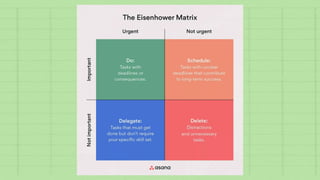
The Eisenhower Matrix
The Eisenhower Matrix is a way to organize
tasks by urgency and importance, so you can
effectively prioritize your most important
work.
Dwight D. Eisenhower—the 34th President of
the United States presented the idea that
would later lead to the Eisenhower Matrix.
In a 1954 speech, Eisenhower said, “I have
two kinds of problems, the urgent and the
important. The urgent are not important,
and the important are never urgent.”
The Eisenhower
Matrix
How to
distinguish
between urgent
and important
tasks?
Urgent tasks require your immediate
attention. When something is urgent, it
must be done now, and there are BIG
CONSEQUENCES if you don’t complete these
tasks within a certain timeline.
Examples of urgent tasks may include:
• Finishing a project with a last-minute due
date.
• Handling an urgent client request.
• Fixing a busted pipe in your apartment.
Urgent Task
Important tasks may not require immediate
attention, but these tasks help you achieve
your long-term goals.
Just because these tasks are less urgent
doesn’t mean they don’t matter. You’ll need to
thoughtfully plan for these tasks so you can
use your resources efficiently.
Examples of important tasks may include:
• Planning a long-term project
• Professional networking to build a client
base
• Regular chores and maintenance projects
Important Task
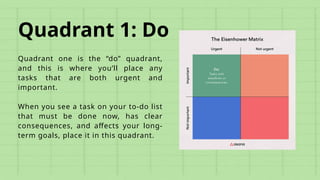
Quadrant 1: Do
Quadrant one is the “do” quadrant,
and this is where you’ll place any
tasks that are both urgent and
important.
When you see a task on your to-do list
that must be done now, has clear
consequences, and affects your long-
term goals, place it in this quadrant.
Quadrant 2: Schedule
Quadrant two is the “schedule”
quadrant, and this is where you’ll
place any tasks that are not urgent
but are still important.
You’ll tackle these tasks right after
you tackle the tasks in quadrant one.
These tasks will affect your long-term
goals BUT don’t need to be done right
away, you can schedule these tasks
for later.
Quadrant 3: Delegate
Quadrant three is the “delegate”
quadrant, and this is where you’ll
place any tasks that are urgent but
not important. These tasks must be
completed now, but they don’t affect
your long-term goals.
Also, you don’t have a personal
attachment to these tasks and they
likely don’t require your specific skill
set to complete, you can delegate
these tasks to other members of
your team.
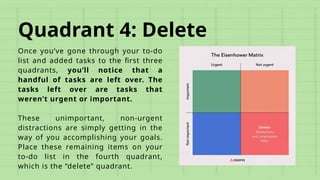
Quadrant 4: Delete
Once you’ve gone through your to-do
list and added tasks to the first three
quadrants, you’ll notice that a
handful of tasks are left over. The
tasks left over are tasks that
weren’t urgent or important.
These unimportant, non-urgent
distractions are simply getting in the
way of you accomplishing your goals.
Place these remaining items on your
to-do list in the fourth quadrant,
which is the “delete” quadrant.
By the end of this tutorial, students will be able to
apply the Eisenhower Matrix to prioritize tasks and
manage time effectively in online business settings
across different industries.
Objetive
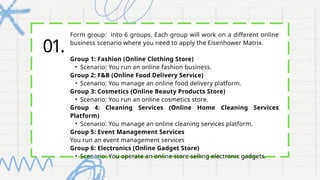
01.
Form group: into 6 groups. Each group will work on a different online
business scenario where you need to apply the Eisenhower Matrix.
Group 1: Fashion (Online Clothing Store)
• Scenario: You run an online fashion business.
Group 2: F&B (Online Food Delivery Service)
• Scenario: You manage an online food delivery platform.
Group 3: Cosmetics (Online Beauty Products Store)
• Scenario: You run an online cosmetics store.
Group 4: Cleaning Services (Online Home Cleaning Services
Platform)
• Scenario: You manage an online cleaning services platform.
Group 5: Event Management Services
You run an event management services
Group 6: Electronics (Online Gadget Store)
• Scenario: You operate an online store selling electronic gadgets.
02. Each group will present all the scenarios and
demonstrate how you would apply the Eisenhower
Matrix to categorize and prioritize tasks.
• Prepare At-least 3 task in each Quadrons.
• Prepare your presentation in PowerPoint
• Share it with MGT2301 Group WhatsApp.
• You will then present it in class.
Let’s get
started!
Thank you.

The Eisenhower Matrix (Tutorial) Slides.pptx

  • 1.
  • 2.
    The Eisenhower Matrix TheEisenhower Matrix is a way to organize tasks by urgency and importance, so you can effectively prioritize your most important work. Dwight D. Eisenhower—the 34th President of the United States presented the idea that would later lead to the Eisenhower Matrix. In a 1954 speech, Eisenhower said, “I have two kinds of problems, the urgent and the important. The urgent are not important, and the important are never urgent.”
  • 3.
  • 4.
    Urgent tasks requireyour immediate attention. When something is urgent, it must be done now, and there are BIG CONSEQUENCES if you don’t complete these tasks within a certain timeline. Examples of urgent tasks may include: • Finishing a project with a last-minute due date. • Handling an urgent client request. • Fixing a busted pipe in your apartment. Urgent Task
  • 5.
    Important tasks maynot require immediate attention, but these tasks help you achieve your long-term goals. Just because these tasks are less urgent doesn’t mean they don’t matter. You’ll need to thoughtfully plan for these tasks so you can use your resources efficiently. Examples of important tasks may include: • Planning a long-term project • Professional networking to build a client base • Regular chores and maintenance projects Important Task
  • 7.
    Quadrant 1: Do Quadrantone is the “do” quadrant, and this is where you’ll place any tasks that are both urgent and important. When you see a task on your to-do list that must be done now, has clear consequences, and affects your long- term goals, place it in this quadrant.
  • 8.
    Quadrant 2: Schedule Quadranttwo is the “schedule” quadrant, and this is where you’ll place any tasks that are not urgent but are still important. You’ll tackle these tasks right after you tackle the tasks in quadrant one. These tasks will affect your long-term goals BUT don’t need to be done right away, you can schedule these tasks for later.
  • 9.
    Quadrant 3: Delegate Quadrantthree is the “delegate” quadrant, and this is where you’ll place any tasks that are urgent but not important. These tasks must be completed now, but they don’t affect your long-term goals. Also, you don’t have a personal attachment to these tasks and they likely don’t require your specific skill set to complete, you can delegate these tasks to other members of your team.
  • 10.
    Quadrant 4: Delete Onceyou’ve gone through your to-do list and added tasks to the first three quadrants, you’ll notice that a handful of tasks are left over. The tasks left over are tasks that weren’t urgent or important. These unimportant, non-urgent distractions are simply getting in the way of you accomplishing your goals. Place these remaining items on your to-do list in the fourth quadrant, which is the “delete” quadrant.
  • 13.
    By the endof this tutorial, students will be able to apply the Eisenhower Matrix to prioritize tasks and manage time effectively in online business settings across different industries. Objetive
  • 14.
    01. Form group: into6 groups. Each group will work on a different online business scenario where you need to apply the Eisenhower Matrix. Group 1: Fashion (Online Clothing Store) • Scenario: You run an online fashion business. Group 2: F&B (Online Food Delivery Service) • Scenario: You manage an online food delivery platform. Group 3: Cosmetics (Online Beauty Products Store) • Scenario: You run an online cosmetics store. Group 4: Cleaning Services (Online Home Cleaning Services Platform) • Scenario: You manage an online cleaning services platform. Group 5: Event Management Services You run an event management services Group 6: Electronics (Online Gadget Store) • Scenario: You operate an online store selling electronic gadgets.
  • 15.
    02. Each groupwill present all the scenarios and demonstrate how you would apply the Eisenhower Matrix to categorize and prioritize tasks. • Prepare At-least 3 task in each Quadrons. • Prepare your presentation in PowerPoint • Share it with MGT2301 Group WhatsApp. • You will then present it in class.
  • 16.
  • 17.

Editor's Notes

  • #2 The Eisenhower Matrix is a task management tool that helps you organize and prioritize tasks by urgency and importance.
  • #6 A long to-do list of tasks can feel overwhelming, but the goal of the Eisenhower Matrix is to go through these tasks one by one and separate them by quadrant. Once you can see your tasks in their designated categories, you’ll be able to schedule them and accomplish your most important work.
  • #7 Quadrant 1: Do These are the tasks that are at the front of your mind and are likely stressing you out the most. Addressing complaint’s from a customer.
  • #8 Building relations with your clients
  • #9 These tasks needs to be done, but don’t require much energy from it. You can appoint someone else to do it for you.
  • #10 Something unimportant, that don’t add value to your goals. Such, clearing spam/junks emails and removing unwanted/expired products.
  • #11 1. Color-code your tasks Color-coding your tasks is a tactic that can help you visualize high-priority items. As you go through your to-do list tool, try giving yourself four colors based on level of priority. Use the code as follows: Green = Highest priority items Yellow = Second-highest priority Blue = Third-highest priority Red = Not a priority Once you’ve labeled your tasks by color, these colors will directly translate to your Eisenhower Matrix. Your green tasks are your “do” tasks for quadrant one. Your yellow tasks are your “schedule” tasks for quadrant two. Your blue tasks are your “delegate” tasks for quadrant three, and your red tasks are your “delete” tasks for quadrant four. 2. Limit tasks to 10 per quadrant Even if you have a lot of tasks on your to-do list, try to limit your tasks to 10 items per quadrant. This will keep your Eisenhower Matrix from becoming cluttered and overwhelming. You can make multiple matrices, but limiting your task list to necessary action items will ensure you’re beginning the prioritization process with no time to waste. 3. Make personal and professional to-do lists Another way to limit the number of items on your Eisenhower Matrix is to create separate matrices for your personal and professional to-do lists. Your work and personal tasks require different timelines, resources, and methods, and they’ll likely require different thought processes as well. In order to effectively manage your personal and professional goals, you’ll need to divide and conquer. 4. Eliminate, then prioritize Eliminate unnecessary tasks first to effectively prioritize. With this strategy, you’ll address quadrant four before moving on to quadrants one, two, and three. As you skim through your to-do list, assess what items you’ve written down that don’t need to be there. In fact, 60% of our time at work is spent on work about work—things like sharing status approvals or following up on information. If you can quickly scratch off items, go ahead and do so. This will speed up the prioritization process, and you’ll likely go through a second round of elimination on the back end.