September 2012
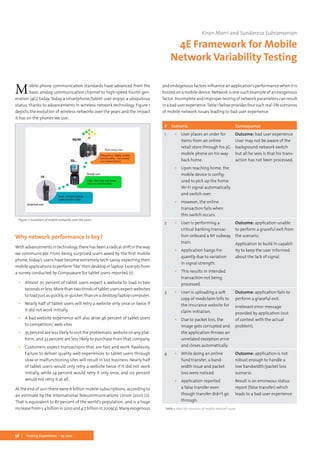
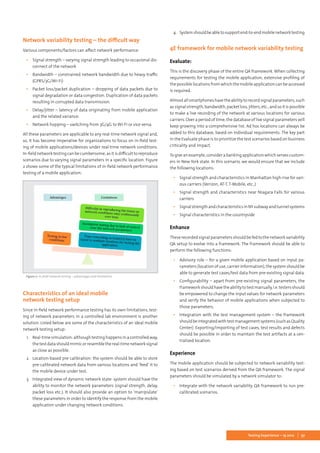
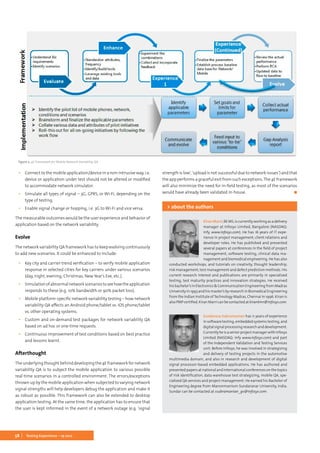
ISSN1866-5705		www.testingexperience.com		freedigitalversion		printversion8,00€	printedinGermany
19
Mobile App Testing
The Magazine for Professional Testers
202
80% 60% 40% 20%
Pantone 173
100% 80% 60% 40% 20%
c:0
m:80
y:52
k:37
c:0
m:60
y:39
k:28
c:0
m:40
y:26
k:19
c:0
m:20
y:13
k:10
cmyk
c:0
m:69
y:100
k:6
c:0
m:55
y:80
k:5
c:0
m:41
y:60
k:4
c:0
m:28
y:40
k:3
c:0
m:14
y:20
k:0
1From the editor
It is not only that the app just crashes and you have to start it again. It is
more than that. I had some funny situations when I uploaded pictures
via an app, and they were doubly displayed, or now seemed to belong to
my friends. More interesting is when you do online banking via the app,
that’s where the fun stops. Mobile app testing has a lot of different facets.
We have a lot of very good articles discussing many different aspects of
it. I want to thank all the authors for the great articles, and of course all
the sponsors that make the magazine possible.
I think that “mobile” app development and testing will become more and
moreimportant.Microsoftisnowbringing“Surface”tothetabletmarket,
and after seeing the promotion videos – looking very promising – I guess
that this will provide the impetus for the whole world to move in a new
direction. I wish this for Microsoft, but I also wish it for us, the users. We
are moving forward, and this is always positive. Take a second to think
back 10 years. How was your mobile and what could you do with it? Stop
now for a second and try to imagine what could be possible in 10 years.
Knowledge and imagination will take the teams to a new level.
Most of the companies that I know develop mobile apps using agile tech-
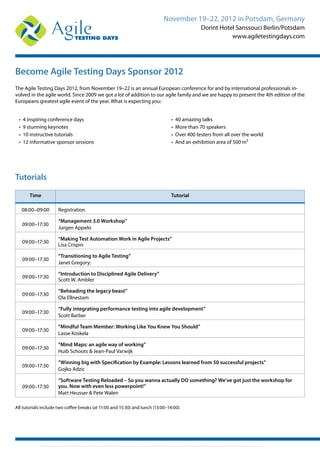
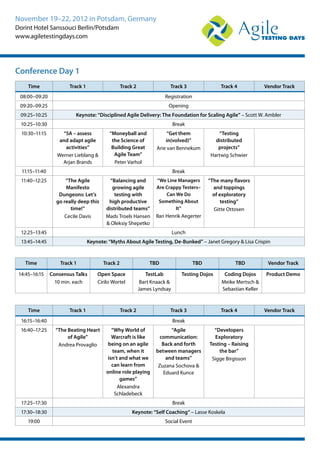
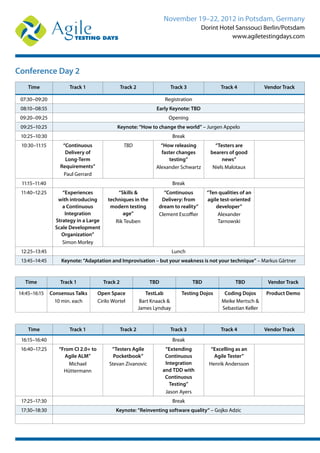
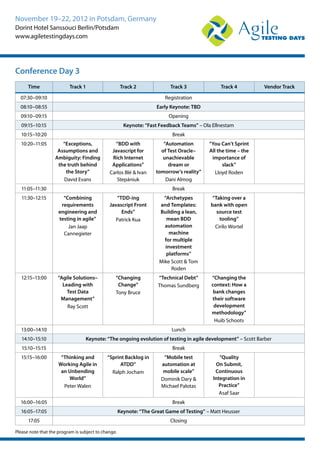
niques.The AgileTesting Days in November will cover interesting aspects
that can be used in your daily work. Don’t miss it. For more information
please go to www.agiletestingdays.com.
Based on the great success of the AgileTesting Days, we decided to set up
the Agile Dev Practices as the conference that also allows agile developers
and those who want to a career in agile developing to meet and discuss it.
We have set up a great line-up of keynote speakers, tutorials, workshops,
etc. Don’t miss the conference. Have a look at www.agiledevpractices.com.
Last but not least, I want to thank Katrin Schülke for the great job she
did over the past years to develop Testing Experience. It was a pleasure to
work with her, and I wish her the best for her new career path. Our door
is always open for her.
Enjoy reading and have a pleasant time.
José	
We all did make the
experience that some
mobile apps did not
work according to our
expectations.
2 Testing Experience – 19 2012
From the editor..............................................................................................................................1
What Makes a Good Tester?....................................................................................................2
Context-Dependent Testing of Apps...................................................................................2
Mobile App Performance – How to Ensure High-Quality Experiences.............. 6
Roadblocks and their workaround while testing Mobile Applications...............8
Main issues in mobile app testing....................................................................................18
Beyond the Smartphone – Testing for the Developing World...............................22
Best Practices in Mobile App Testing...............................................................................26
Mobile Test Strategy................................................................................................................30
Driven Development for the Android platform.......................................................... 34
There’s a test for that!............................................................................................................40
Testing on a Real Handset vs. Testing on a Simulator – the big battle.............42
What Makes a Good Tester?..................................................................................................52
4E Framework for Mobile Network Variability Testing............................................56
Enterprise Mobile Testing for Success............................................................................ 60
Mobile App Testing..................................................................................................................64
Context-Dependent Testing of Apps................................................................................66
Column: Testing Maturity – Where Are We Today? .......................................... 72
Mobile Business Application Testing Automation: A Novel Approach............76
Masthead.....................................................................................................................................80
contents 19/2012
What Makes a Good Tester?
This article discusses the common personality traits
displayed by experienced, successful professional
testers to help you understand what makes a good
tester, to help you structure your testing team, and
for evaluating new possible recruits.
Context-Dependent Testing of Apps
ApplicationspropeltheversatilityofsmartphonesandtabletPCs.How-
ever, testing apps is a cumbersome task. It is particularly complicated
since apps have to cope with frequent changes of the context they
run in. Mobile devices move, which leads to changes in the available
network connection and varying environmental parameters, such as
coordinates derived from a geolocation service. Moreover, patterns
of usage change. We propose a novel concept to deal with context
changeswhentestingapps.Itisbasedonbasicblocksofcodebetween
whichcontextchangesarepossibleandhelpstesterstomanagecom-
plexity. Moreover, it supports the maintenance of a suite of test cases
that would become much larger if test cases were simply duplicated
to deal with different contexts. In addition to the introduction of our
concept, we highlight its application and benefits.
Mobile Business Application Testing
Automation: A Novel Approach
In this document, we will present the approach of
automating mobile business applications testing
using emulators and real time devices.
3Testing Experience – 19 2012
4 Testing Experience – 19 2012
Graham’s experience in testing spans more than
30 years and has covered a wide range of domains
and technologies. As a test manager he has been
responsible for the testing of mission-critical sys-
tems in spaceflight, telecommunications and police
incident-control. Graham has designed tests to the
highest levels of rigour within real-time aerospace
systems. As a principal consultant forT-Systems, the
systems division of Germany’s leading telecommunications company
Deutsche Telekom, he has mastered the Quality Improvement Programs
of major companies, primarily in the financial and government sectors.
In his current position Graham is responsible for the test consulting
group. He has built up a training program to include all levels of the ISTQB
certification scheme, including the new Expert Level, for the company‘s
large staff of testing professionals. Graham is the chairman of the ISTQB
Expert Level Working Party and co-author of both Advanced Level and
Expert Level syllabi.
Graham Bath
Gualtiero has been working in the IT and testing
domain for the last 20 years; he is author of more
than 50 publications on the topics of sw quality and
testing; he currently holds the following positions:
Managing Director of Alten Italia, Chairman of ITA-
STQB,theItalianBoardofISTQB®ofISTQB®Marketing
Working Group, Chairman of STF – SoftwareTesting
Forum, the most important event on testing held
annually in Italy.
Gualtiero Bazzana
Andreas leads the Agile Software Factory (ASF) at
codecentric.Formorethanfouryears,heisacertified
Scrum Master. Since then he could contribute his
competencies in small and large (> 300 persons),
internal and external, or local and global projects
as developer, scrum master or product owner. Me-
anwhile, he’s also a Professional Developer Scrum
Trainer, conducting a hands-on training for Scrum
team members, which codecentric has developed together with scrum.
org and in which he shares with joy the knowledge gained in the ASF.
More than 15 years ago, his interest in JavaSE/EE awakened, and it never
vanished since then. His focus at codecentric is the continuous improve-
ment of the development process in the Agile Software Factory, where
technical, organizational and social possibilities are the challenging,
external determining factors.
Andreas Ebbert-Karroum
5Editorial Board
Paulisaconsultant,teacher,author,webmaster,pro-
grammer, tester, conference speaker, rowing coach
andmostrecentlyapublisher.Hehasconductedcon-
sultingassignmentsinallaspectsofsoftwaretesting
andqualityassurance,specialisingintestassurance.
He has presented keynote talks and tutorials at tes-
ting conferences across Europe, the USA, Australia,
South Africa and occasionally won awards for them.
Educated at the universities of Oxford and Imperial College London, he
is a Principal of Gerrard Consulting Limited and is the host of the UK Test
Management Forum.
Paul Gerrard
In the IT industry for more than twenty years, Mie-
ke Gevers has developed a special interest in the
techniques and processes relating to performance
management and automated testing. Mieke is a
regular speaker at conferences and organizations
worldwide. She served on the Program Committee
for the EuroSTAR conference in 2007 and 2009 and
was Program Chair of the BelgiumTesting Days 2011
and 2012. A co-founder of the Belgian Testers Organization, Mieke has
been a board member of KVIV and the ISTQB-affiliate Belgian Software
Testing Qualifications Board.
Mieke Gevers
Yaron has been working in software since 1990, and
has more than 20 years in testing field as a Test En-
gineer,TestingTL, andTesting Manager. His original
profession was Systems Analyst.
Yaron Tsubery is the current CEO and founder of
SmartestTechnologiesLtdandhasbeenaDirectorof
QA &Testing Manager at Comverse since 2000 until
2010. Yaron was in charge of a large and distributed
group that includes Testing Team Leaders and Test Engineers. The group
dealswithFunctional,Non-functional,Load&Performancetests,someof
whicharedoneoff-shore.Thegrouphasmuchexperienceinmanagingand
controlling acceptance tests. Yaron is also known as a manager who has
built testing groups in his past and also acted as a consultant to testing
managers while they were building their testing groups.
Yaron worked in Product Management, Project Management and Deve-
lopment for at least 3 years before becoming a Director of QA & Testing.
Yaron has wide experience in banking business processes. For the last 10
years he has implemented best practices in a field where he is in charge
ofproducingcomplexsystemsfortelecommunicationcompaniessuchas
Vodafone, T-Mobile, NTT DoCoMo, Verizon Wireless etc.; Main systems in
Mobile technology: i-mode, Mobile GateWay and Billing Proxy; in System
Integration projects: Content Data Management solutions including OSS
& BSS sub-systems, Video Solutions, IPTV and IMS.
Yaron is the current President of ISTQB® (International Software Testing
Qualifications Board – www.istqb.org) and is also the President and foun-
der of the ITCB (Israeli Testing Certification Board – www.itcb.org.il). He
is a member of IQAMF (Israeli QA Managers Forum) and in SIGiST Israel.
Yaron has been invited as a speaker to some important international
conferences to lecture on subjects related to testing, as well as he wrote
articles that were published in professional magazines.
Yaron Tsubery
Erik is a leading international consultant and trai-
ner, and a widely recognized expert in the area of
software testing and quality management with
over 20 years of practical testing experiences. He is
the founder of Improve Quality Services BV (www.
improveqs.nl) and one of the core developers of the
TMap testing methodology and the TMMi test im-
provement model. Erik is a regular speaker both at
national and international testing conferences and holds the EuroSTAR
record winning the best tutorial award three times! In 2007 he received
the European Testing Excellence Award for his outstanding contribution
to the testing profession over the years. He has been working as a test
manager and consultant in various domains, including finance, govern-
ment and embedded software. He has written numerous papers and a
number of books, including “Risk-based Testing: The PRISMA Approach”,
“ISTQBFoundationsofSoftwareTesting”and“TheLittleTMMi”.Erikisalsoa
formerpart-timeseniorlecturerattheEindhovenUniversityofTechnology,
vice-president of the International SoftwareTesting Qualifications Board
(2005–2009) and currently vice chair of the TMMi Foundation.
www.erikvanveenendaal.nl
Erik van Veenendaal
57 years old. Specialist in software testing. Inde-
pendent consultant in software testing and testing
improvementmatters.Guestlecturesatseveraluni-
versities in Norway about Quality Assurance and
Software Testing. Public and inhouse seminars in
SoftwareReviewandTestinginScandinavianandEu-
ropeancountries.Regularlyspeakingatconferences.
Several best paper awards (Best presentation award
at CONQUEST 2003, best paper in 2004). Test coordinator, ISEB Certified
Tester (Foundation Level), ISTQB Certified Tester (Foundation and Advan-
ced Levels) Chairman of Norwegian Testing Board. Active participant in
running museum trains in Norway, certified for safety critical services on
steam locomotives. M. Eng. from Technical University of Braunschweig,
Germany. Computer science, railway signaling. Development of real time
process control software at the Fraunhofer-Institute in Karlsruhe, Ger-
many. Work with Center for Industrial Research in Oslo, Norway. Deve-
lopment of parts of an IDE-tool (Systemator). Later developing test tools
and leader of quality improvement program. Consulting and lecturing
about software quality.
Hans Schaefer
6 Testing Experience – 19 2012
The Need for Speed
No matter the technology, one thing’s for certain – people always seem to
want it faster. According to various surveys three seconds or less is now
the threshold most end-users are willing to wait for a web application
to load before growing frustrated and going to a competitor. These high
expectations have increasingly carried over to the mobile web; and now,
mobile apps.
Like the web, today’s mobile apps have had their share of performance
problems and need some fine-tuning. Recent research shows that 47
percent of mobile users had a problem in the past year when accessing
an app on their mobile phone, with slowness and unresponsiveness be-
ing the biggest complaint. It’s not uncommon for apps to be decried on
Apple’sAppStoreas“horriblyslow.”ForFacebook’siPhoneapplication,out
of38,000reviews,morethan21,000customershavegiventheapplication
only a single star. Users repeatedly describe the app as slow, crashes and
“is always loading.”
“Mobileappsliveanddiebytheirratingsinanappstore…whentherating
suffers, customer adoption suffers,” says Margo Visitacion at Forrester.
This may be the reason why 80 percent of branded iPhone, Android and
Blackberry applications fail to achieve 1,000 downloads. Poor mobile ap-
plication performance directly impacts customer acquisition and reten-
tion. So what can you do to ensure your mobile app performance is as
strong as it can possibly be?
“Get Real” by Capturing Real World
Mobile Application Performance
First and foremost, to truly understand mobile application performance,
you must measure the performance that your real end-users are experi-
encing out in the field. Testing on simulators in datacenters can help but
it often has little to do with the actual experiences of your real end-users.
There are so many performance-impacting variables standing between
your data center and your end-users, including the cloud, third-party ser-
vices/integrations, CDNs, mobile browsers and devices. Measuring what
real-users experience is the only way to accurately assess performance
across this vast complexity at the edge, and determine a baseline for
performance improvements. Measuring the performance that your real
users experience allows you to report on mobile application performance
across key parameters such as all the geographies, devices and networks
that your customers use.
Today, mobile application testing and monitoring using SDKs to instru-
ment native apps is available to give you a quick and easy bird’s eye view
into mobile application performance across all your customers. Load
testing from the end-user perspective is also important, especially before
launching an app, and synthetic testing networks allow you to gauge
performance levels under various traffic conditions.
Understand the Business Impact of Poor Perfor-
mance
It is important to identify mobile application performance issues and
their impact on conversions: for example, you will notice that an increase
in mobile app response times often closely correlates to a decrease in
conversions. From there you can conduct triage, i.e., prioritize problem-
solving efforts based on considerations such as, which of my customers
are impacted and how many of them are there? If a particular geography
has a very high traffic share and is having issues, and another has a low
traffic share, you know which performance problem you need to address
first on your list.
Make Sure that Third-Party Integrations Work
Like web applications, many mobile apps incorporate content from a
variety of third-party services with the goal of delivering a richer, more
satisfying experience to end-users. An example of this is social media
integration, such as Twitter being integrated into Olympics mobile ap-
plications. Unfortunately, if you rely on third-party services, you are at
the mercy of their performance excellence. Before going live with an app
featuring third-party integration, you need to make sure the integration
worksseamlesslyandsmoothly,andcandelivertheperformancethatyou
expect. In addition you need to make sure that you keep an eye on third-
party performance and that your app is designed to degrade gracefully
in case of third-party problems.
Make Your Mobile App Fast
In the fast-moving world of mobile apps one maxim holds true more than
ever – fast is better than slow. There are certain tools and techniques
you can apply to make your mobile apps faster, including the following:
▪▪ Optimize caching – Keep your application’s data off the network
altogether. For apps that are content intensive, caching content on
thedevicecanboostperformancebyavoidingexcessivetripsthrough
the mobile network and your content infrastructure.
▪▪ Minimize round-trip times – Consider using a CDN which can pro-
vide numerous services that can speed up your app including edge
Klaus Enzenhofer
Mobile App Performance –
How to Ensure High-Quality
Experiences
7Testing Experience – 19 2012
caching to reduce network latency, network routing optimization,
content pre-fetching, and more.
▪▪ Minimize payload size – Focus on compression and reduce the size
of your data by using whatever compression techniques are avail-
able for your content. Be sure that images are sized properly for
your most important device segments. Also, make sure you leverage
compression. If you have a large piece of content that takes too long
to load, then you can load it little by little. Your app can start using
the content while it loads rather than waiting for the whole thing
to load. Retail apps often use this technique.
▪▪ Optimize your native code. Poorly written or bug-filled code can also
cause performance problems. Run a profiler on your code or do code
reviews to identify potential issues.
▪▪ Optimizeyourback-endservicesperformance–If,afterperformance
testing your app, you identified back-end services as a performance
sapping culprit, then you have to conduct an assessment to deter-
mine how to speed up those services.
Conclusion
Smartphone users are no exception to the “faster is better” rule, and they
expect their apps to be blazingly quick. Every so often, mobile carriers
and smartphone manufacturers announce faster networks and faster
devices which helps, but unfortunately, the speed of mobile apps has
just not kept pace.
A primary reason for this is the set of diametrically opposed goals that
makeachievinglightning-fastperformancedifficult.Mobileappdevelop-
ers are consistently expected to provide richer experiences, while increas-
ing speed all the while. This demand for more content and features can
quickly gobble up any increases in bandwidth, memory, and computing
power.
This article provides just a short sample of performance best-practices
for native mobile apps. The room for performance tweaks is large, but so
is the room for mistakes. Thus, if there’s one important takeaway, it’s to
always test your apps early and never leave performance to chance. And
remember – fast is always better than slow.	 ◼
KlausEnzenhoferhasseveralyearsofexperienceand
expertise in the field ofWeb Performance Optimiza-
tion and User Experience Management. He works as
TechnicalStrategistintheCenterofExcellenceTeam
at dynaTrace Software. In this role he influences the
development of the dynaTrace Application Perfor-
mance Management Solution and the Web Perfor-
manceOptimizationTooldynaTraceAJAXEdition.He
mainly gathered his experience in web and performance by developing
and running large-scale web portals at Tiscover GmbH.
> about the author
8 Testing Experience – 19 2012
Jeesmon Jacob & Mary Tharakan
Roadblocks and their workaround
while testing Mobile Applications
9Testing Experience – 19 2012
Where are we today?
It is estimated that six billion people are already using mobile phones.
A graphical analysis given below on this growth trend actually shows us
the alarming speed at which mobile users grew over the last five years.
The world is moving faster than ever towards minimized gadgets. Smart-
phone user statistics are rewritten almost every week. No one is able to
effectively predict the total number of Smartphones flooding into the
market. All expectations and predictions are broken when it comes to
Smartphone users and Smartphone applications. Every day, millions of
users depend on their mobile browser to update themselves with cur-
rent happenings, mail services, social networks, etc. This major turn of
events, in which people are slowly stepping away from their laptops or
computers and getting more addicted to their handheld devices, leaves
us with a large window of opportunity to explore. Everyone is exploring
the option to drive their world from their fingertips. Applications are
being loaded into the app stores of leading mobile operating providers
at a speed which is beyond our imagination. Every day, each user wakes
up to the war between the Smartphone companies trying to deliver the
best to the end user.
Quarter one sales of leading mobile manufacturers show that users have
a number of options to choose the best. Many leading manufacturers
who enjoyed the top position on sales of their handsets are seeing rock
bottom due to their failure to keep the users attracted with new features
or additions.
The sales details below give us a very clear picture of this:
Surprisingly we see that many written-off manufacturers have bounced
back with the support of open source operating systems like Android and
have gone on to lead the pack. This trend clearly gives us the idea that
users are no longer just looking at having a device to make calls or send
messages. They have all started to look beyond all the basic facilities and
are becoming closer to their handheld devices than any other gadgets.
And this quest by the users for better facilities leaves us with the freedom
to imagine, create and be successful in mobile application development.
These days, we very often hear the term “There is an app for that…”. Not
just individual users, but also companies, are accepting these changing
trends and are already allotting a major chunk of their budget to mobile
applicationsthathelptheiremployeestoachievetargetsfasterandbetter.
Applications are flooding onto the market and studies shows that there
are more than two billion applications just for the Apple and Android
markets alone. So what are we waiting for? It’s high time we turned
our attention to tapping this potential market and reaping the benefits
as early as possible. Hence it is very much necessary to do an in-depth
analysis on how we, as quality analysts, should approach this situation
and train ourselves to tackle potential roadblocks to bring the best out
of the application under quality analysis.
While approaching a mobile application from the QA perspective, one
must be very clear that things are no longer the same as they used to be.
Anyone with vast experience in desktop application QA or web-based
application QA may not find it as easy as it used to be when given a
mobile application for QA. A lot of preparation and training in modern
day tastes, styles and look are very much necessary for a QA resource to
ensuresuccessfulreleaseofamobileapplication.Itshouldbekeptinmind
that we deliver the best because even a single crash in the functioning
of the application can irritate the user and may even force them to look
for other, better applications for the same purpose. The QA team always
needs to be on its toes when it comes to delivering mobile applications
because it is satisfied customers who make an application a big success.
Every day we are faced with challenges from all corners and it is a must
when it comes to mobile applications that we tackle all these challenges
effectively to deliver the best to the end customer. In this paper we will
be sharing with you some of the most widely faced challenges and some
practical tips that we have applied to overcome them. Listed below are
some of the most discussed/faced challenges when working with a mo-
bile application:
▪▪ Environment
▪▪ Application
▪▪ Users
▪▪ Device
▪▪ Network
▪▪ Automation
1. Challenges from the environment perspective
Whatexactlydoes“environment”meanfromamobileapplicationtesting
perspective? It is nothing but the collection of all the components associ-
ated with a mobile application’s development. It is very much necessary
to understand and prioritize these components and ensure their avail-
ability when needed, to avoid undue delay. Set out below are the major
components that contribute to this environment:
I. Targeted Devices
This should be the first thing on the check list when an application is
discussed with QA. Ground work to prepare the list of targeted devices
should begin as soon as we plan for the QA. It been a major challenge for
10 Testing Experience – 19 2012
an application to determine the device in which it will be used and every
day we see many new devices loaded with latest OS introduced onto
the market. So, while going for the release of an application, we should
ensure that the application is created so it will cover the entire intended
user group. And QA should do a detailed study and ensure test cases are
built to incorporate these parameters.
II. Adapting to frequent OS changes
The devices have different versions of Operating Systems (OS) and they
get updated very frequently. The QA team should ensure that our appli-
cations work smoothly after the OS updates. The tests for the same may
not be possible at the time of the application’s final QA but should be a
continuous process which will come into play as and when the device OS
is updated.We should have a common test case repository created to deal
withOSupdates.Duringthisphaseweshouldalsoensurewecoverallthe
major functionalities so that, if there are any inconsistencies we should
have updated the team on the failed points and should work out a fix at
the earliest window possible to release the updated version.
III. Domain constraints
When approaching an application from the QA perspective, it is very
important to understand the domain for which it is being developed.
User controls that are used for applications in a gaming domain cannot
be reused as is possible for an application from some other domain. A
stock index updating application should ensure continuous and error-
free updates of rates for each of the stocks selected by the user. Movie
streaming should ensure continuity and for an application that records
and updates the same to a designated folder, should ensure that the
device is not “killed” when performing these actions. Hence, behavior of
the application and its effects on the device must be closely scrutinized
and studied to make sure that domain requirements are matched.
How do we get over this?
 Target devices that are most used by end users
The QA should have a clear understanding of what the app is and who
uses the app. So, before analyzing and testing the app, a QA should first
do a survey and make a list of the devices used by the users. It is very
important that we have the target devices listed out so we can tune our
QA-related activities to the application accordingly. In most cases this
also helps the whole team decide on the design points, which ultimately
may even end up giving the end user additional functionalities which
will add to the success rates.
 Check the application on different OS versions
Asmentionedearlier,therearesomeofthesamedeviceswithdifferentOS
versions.SotheQAshouldundertakeathoroughstudyoftheavailableOS
versions and test the app in the different OS versions. The QA should first
consult with the user on the OS requirement of the app. Let us consider
an example of Android phones.There are different OS versions in Android
like Cupcake, Donut, Eclair, Froyo, Gingerbread, Honeycomb, Ice Cream,
etc. For instance, in the requirement the user has specifically mentioned
that his app should work from Gingerbread OS version. In this case he is
least bothered about the app working on the lower OS versions. So when
the app is not compatible with the lower versions, the QA should make
sure that the user gets an alert: “The app is not compatible with ‘x’ OS
version“.Heshouldalsomakesurethattheuserisalertedwhenanupdate
of the app is available.
 Efficient use of gestures and device controls
Each device available in the market has some peculiar characteristics. QA
shouldbeawareofthesebeforehestartsanalyzingtheapp.Letustakethe
example of comparing two devices. An Android phone (say Samsung) will
have a physical “Back” button built into the device whereas an iPhone, on
the other hand, has a single “Home” button. So, while using an app, when
the user has to navigate from the present page to the previous page, he
makes use of the “Back” button. In the case of the iPhone, he searches for
the “Back” option inside the app. The app should have uniformity across
all the devices. Factors like landscape view and portrait view (when the
device is device is kept horizontally and vertically respectively), zooming-
in of the page (zoomed when doubled tapped) and switching between
desktopviewandmobileview(iftheapphasbothdesktopsideandmobile
side) must all be checked by the QA.
TheQAteamshouldalsolookoutforopportunitieswheregesturesliketap,
pinch, rotate and shake, which can be converted into meaningful actions
within Smartphones, are used wisely wherever possible.
2. Challenges from the application perspective
Basically, this should be the primary point of discussion when it comes
to developing a mobile application. The team should consider the most
suitable method for the development of the application right from the
design phase. We should analyze the intended audience, devices to be
deployed, etc. Some major points that should be considered from the
application perspective are detailed below:
I. Native/web/hybrid-based applications
This should be the first decision the team should decide on when going
into application details. Basically, as you know, all mobile applications
are classified into three types: native, web-based and hybrid. Native ap-
plications are those which are built to work on specific operating systems
and which can be adapted to different devices running on the same
operating system. Web applications are those applications which, when
run, download fully or partially from the web. A hybrid application is a
mobile web application (HTML/CSS/JavaScript) that has been wrapped in
a native shell. These applications typically work with the mobile device’s
web browser. So, depending on the end users and the devices used, we
must choose wisely between the two. The QA team should then adapt
to this selection and prepare test cases specific to these. There are many
pros and cons for both these types. But one major advantage of native
application development is the freedom to implement many OS-specific
functions into the application, which can help the end user a lot. As for
web application, we say the major advantage is the fact that same appli-
cation can be used in most of the devices that are available in the market
withoutanymodifications.Inthecaseofhybridapplicationdevelopment,
the end user will get the best of both web and native blended in the best
way possible to produce the best output.
II. Behavior on different devices
Another major roadblock we face while developing these applications is
their behavior pattern on different devices. We especially need to keep a
keen eye on the way native application behaves on multiple devices with
different versions of operating systems. Even though, theoretically, it is
believed that these applications will perform the same way on different
OS versions, since we have different development platforms for these ap-
plications, QA must ensure that the same application performs the same
11Testing Experience – 19 2012
way on different devices like iPhone, BlackBerry or Android phones. It is
alsoadvisedthattheQAteamtriestocapturelookandfeeldifferences.We
shouldalwaystrytokeepthesameuserinterfaceacrossdifferentOSs.This
willhelptheuseralotwhileworkingwiththesameapplicationondevices
that have different OSs. In short, this saves the organization time and
money for training individually for this application on separate devices.
III.DifferentdevelopmentprocessesformultipledeviceOSs
As most of you know, iPhone and iPad applications are created using ob-
jective C, whereas BlackBerry and Android applications are created using
JAVA but different SDK (Standard Development Kit). So this leaves the QA
team with the very tedious task of ensuring the same application works
flawlesslyonalltheseplatforms.TheprimaryfocusoftheQAteaminsuch
cases should be to ensure that all the devices have the same functionality
implemented and working perfectly.
IV. Constant comparison of the mobile application with
existing desktop/web application
Another major hurdle we face most of the time is the constant com-
parison made between the mobile application and its existing web or
desktop application counterpart. This can be a major point that the end
user would like to check out as soon as the application is made live. So, in
order to ensure the success of the application, the QA team should think
from the user’s point of view and should point out differences in the early
stages. 	
How do we get over this?
 Keep the application as similar as possible to the existing one
It is always advised that, when working with mobile applications which
already have existing web or desktop applications, the QA team gets
familiar with this first, makes a checklist of major functionalities and
compares this with the application under development. This check list
should be the basis on which the QA team approaches the mobile ap-
plication and looks for missing points, mismatches, etc. Early detection
and updating of such cases to the development team can always help in
saving a lot of time in the later stages.
 List out the targeted devices initially
It is also good practice to understand the end user base. An analysis of the
devicesintendedwouldalsohelpinpreparingthetestcasestocoverthem
effectively. For example, if an organization offers its employees Blackberry
devicesonly,thenthereisnopointincreatingaweboriPhoneapplication
for the organization. So we have the freedom to build a native Blackberry
application straight away. This will ensure that the application is useful
to all the employees within the organization and we can also assist them
by providing extra features that are device-dependent.
 Check the behavior of the application on different targeted
devices
If we are targeting multiple devices, the QA team should ensure it has at
least one actual device of these and carries out all the test cases on each
of these devices at least once for every build released. This would ensure
defect-freedeliveryacrossmultipledevices.ThiswillalsogivetheQAteam
a clear idea of how the application is going to behave on different devices
and what the changes are that need to be made to make it work smoothly
on each of them. Hence, actual device testing is a very important factor
in mobile application success.
 Ensure application works across these devices
in a similar manner
Most of the time when different devices are targeted by an application,
theQAteamneedstoensurethatthelookandfeel,usability,actions,links,
etc are placed and organized as similarly as possible for each of them.The
QA team should ensure that the user experience is the same for the ap-
plication,nomatterwhichdevicetheenduseruses.Anydeviationnoticed
should be immediately put forward to the design and development team
so they can work out a solution for this.
 Always Carry out a Certification Test
If the application created is to be published to application stores such as
Apple’s Apps store, Google’s Play or RIM’s App world, then the QA team
should ensure it carries out the certification tests. Certification tests are
merelycross-checkingwiththeguidelinestheseSmartphoneownershave
set and which our application should meet if they are to be published
through their application stores. These guidelines are easily available on
their respective sites and the QA team should mould their test cases to
accommodatethemtoensurethattheapplicationpassesthecertification
tests when submitted for publishing.
3. Challenges from the user’s perspective
Mobile phones have become increasingly popular these days and people
are now totally dependent on them. For instance, taking into account the
minor items we use in our daily lives... like alarm clocks or simple calcula-
tors. Where are they now? The usage of all those is considered outdated
nowadays. It is due to the simplicity the user feels when they get all these
in their mobile phones. So, when a person develops an application for a
mobile phone, the first thing taken into consideration is the ease of use
felt by the user.
Hundreds and thousands of mobile applications are added to the stores
daily and these are available to the public. So, getting a mobile app rec-
ognized in the market has a lot to do with “What your application has
the others don’t”. So, the team needs to build an app that is more user
friendly, an app which a user can navigate through easily, an app which
is easily accessible and has more functionality and an app which requires
less input from the user to ensure success.
The challenges while developing a mobile app from the user’s perspec-
tive are:
I. Keeping it simple and easy for navigation
Making it simple and easy for navigation means the application should
not have long forms which force the user to scroll down to the bottom.
Instead,theQAshouldensurethatsimilarkindsofdatainputsaregrouped
and are tabbed properly so that the user has access to each of them from
avisibleareaofthescreen.TheQAshouldalsomakesurethattherearen’t
any long forms used in the app, as it may lead to time-out issues. Even
if time-out happens, the application should load the same module with
all the inputs that the user entered, once the user enters the credentials
correctly.
12 Testing Experience – 19 2012
II. Accommodating maximum functionality in the mobile
application
Most of the time, mobile applications are developed from some existing
desktop/web application that allows the user to perform ‘n’ number of
functions. But when it comes to the mobile application, diligent decisions
should be taken to choose the right functionality to be accommodated,
bearinginmindthememory,input,networkconstraints,etc.TheQAteam
should ensure that the application serves the main purpose for which it
has been created and should also make sure that they are in sync with the
web/desktop application from which it originated. The QA team should
also make sure that the look and feel matches the existing app, so the
user feels comfortable working with it.
How do we get over this?
 Try to reduce the key inputs to the fewest possible
A user won’t be happy to fill in details and do so many things to get things
done.Thelessworkhehas,thehappiertheuserwillbe.So,aQAmakessure
thattheapphasmadewiseuseofdrop-downmenus,checklistsandradio
buttons wherever necessary to minimize the effort from the user’s side.
 Ensure quick access to the application
To make the app more user-friendly, a QA ensures that the app is easily
accessible. For instance, let’s take a situation where the user is using an
application in the device. Suddenly he remembers that he needs to make
a call or text someone. So he needs to come out of the application.
In such a case, he should be able to minimize the application. Then after
his call when he opens the app, he should be navigated to the same page
where he stopped, unless the app is sessioned-out (a pre-defined time
when the app shuts down automatically if kept idle). Or else the user
should log in with his credentials each time he opens the app, which is
more time-consuming and makes an impatient user irritated. Also, if
possible, we should provide OTA (Over the Air) if requirement permits, so
thattheusercandownloadtheapptothedevicedirectlyfromthewebsite
where it is hosted.This is nothing but “installation testing”, where we test
if the application installs correctly on the intended device. Installation
testing should be part of every release.
 Keep the menus simple and easy to access
Use of simple menus that are easily accessible would please the users
to an extent. Common menus like Home, Log Out, and Help, About, etc
should be present on the different pages inside the application. If the app
is complicated, the Help should provide the necessary instructions and
guidelines. The QA has to make sure that the user can navigate through
the app easily.
4. Challenges from the device perspective
Mobile devices have evolved from a brick to a notepad within a decade.
This growth has been tremendous and shocking. Hence, even though we
are discussing devices in terms of many challenges within this paper, we
have a number of specific points that need to be mentioned under this
heading so the QA team understands the importance of tuning the test-
ing to cover these roadblocks.
I. Browser limitations of the devices
The world has a totally different outlook when accessed through mobile
browsers. Every day we see them growing and making lives better. There
are many advantages that are available nowhere else when we use a mo-
bile browser; some of them are hand gestures which can be converted to
meaningfulactions.But,atthesametime,theyhavemanyconstraints,too.
Some of the common constraints are space, clarity and loading time, etc.
II. Touch and non-touch devices
Another major roadblock that we have in terms of the device perspective
is the touch and non-touch device outputs. Touch devices recognize the
pressure a user puts on the visible area of the screen and work on this
basis, whereas non-touch devices are those which have physical keypads.
Even though most of the Smartphones that come onto the market these
days are touch phones, we still have some major players, like Research In
Motion which produces BlackBerry, who prefer non-touch devices and
also have mass acceptance.
III. Memory constraints
Most of the devices have different memory limits. Hence the application
being created should be tested with the lowest memory-holding device
to ensure that it works well under these conditions. Any crashes that oc-
cur should be marked as critical issues and should be passed on to the
development team with detailed steps to reproduce. It will also be good
if we can capture the logs and share them with the development team
for further analysis.
IV. Battery Drainage
Thisisaveryimportantpointofconsiderationfromthemobiledevicepoint
of view. End users should in no way be crucified for using our application
because it eats away their device’s battery life. Some of the common areas
wherebatterydrainagecanbecheckedareGPSanddatamanagement.In
the case of GPS in applications that do not need the exact location to be
shown,alwaysensurethatloweraccuracyratesarementionedsothatthe
battery won’t need to work so rigorously. The QA team should assess the
need for accurate location tracking in the application and should discuss
its priority with the team. Another important point where we can save
data transfer rate and mobile battery is image processing. On average,
the size of a normal photo taken with a 5 MP camera in an iPhone 4 is
somewhere between 1.5 MB and 2.7 MB. In most cases we may not need
such a high definition picture for processing within our application. So,
we should ensure that the application processes the image and reduces
its size so the upload time is brought down considerably.This again helps
in saving a lot of battery drainage. The QA team should always be on the
lookout for such instances and work on reducing the effect on the mobile
battery. A good example of image processing can be seen in the default
mail client available in iPhone which is shown on the right.
How do we get over this?
 Ensure memory usage tracking from initial QA levels
QA should also be concerned about the memory constraints of the app.
Testcasesshouldbecreatedtocheckforthetotalmemoryusedbytheapp
and try to keep it to the minimum possible.Wise use of image processing,
video, audio size restrictions and data uploads should always be checked
and it should be ensured that everything falls within the limits. In no way
should we let the application crash on a device due to memory overload.
13Testing Experience – 19 2012
These days, many applications are available which are easy to use for
checking memory leakages. IPhone or iPad development platform Xcode
has a built-in tool which is called “Instrument” – a very simple tool that
helps the user check for memory variations in the code of the application
under development. QA teams should get familiar with such easy-to-use
tools and should use them as often as possible to ensure that the code
does not cause any high memory usage.
 QAacrossallmobilebrowsersandensureuniformityofoutput
Each device has different browsers. An application that is compatible and
aligned in Safari (an in-built browser in iPhone) may not be compatible
with the other browsers used in BlackBerry, Nokia or any Android phones.
So QA has to check the application in various browsers and make sure the
app fits correctly into the browsers used by the user in the case of a web
application.The output should look similar on both touch and non-touch
devices, too. As we all know, the non-touch device’s screen area is smaller
than the touch device’s; hence, we should ensure that the application
under test behaves exactly the same on both these devices.
 Check on all possible device simulators and actual devices if
possible
Thousands of devices come into market on a regular basis. So, it is im-
possible for a QA to check the app functionality on each and every device
available on market. For this, they make use of simulators. Simulators are
nothing more than a virtual platform or an imitation of the real world
process/device. Testing to a level of almost 70–75% accuracy can be done
using these simulators. Factors like network modes, involvement of inter-
ruptions like incoming calls, alerts, messages, etc. can all be tested using
the different simulators. But not all these facilities are available in the
simulators, hence it is very important that we test our application on the
actual device. These actual devices have different versions of operating
systems (OS). And they get updated almost every month. So, to make the
appmoreaccurate,theQAshoulddoathoroughtestingusingasimulator
and again test it on one or more actual devices with different OS versions.
5. Challenges from the network perspective
One of the most important aspects to be considered when testing a mo-
bile application is the network factor. Unlike any other application that
works on the desktop or any other platforms that solely depend on wired
connections,mobiledependsmostofthetimeontheInternetconnection
provided by the service provider whose SIM we use in the device or the
WIFI connection to which the device is connected. So, ensuring that our
application works fine under different network conditions is a must for
the success of the application.
I. How does our application behave in poor/no network
situations?
One of the primary points that needs to be ensured is the smooth func-
tioning of the application in different network situations.The application
should be tested under different network conditions and we must also
ensure that the application does not crash or hang because of the vary-
ing signal conditions. Data updates and communication to the server for
fetching data, etc. should be smoothly carried out under these changing
circumstances. If there is any unsuccessful attempt to fetch or update
data, the user should be informed at the very next instance using an alert.
BlackBerry simulators have built-in options which mean we can vary the
network signal strength and test the application’s behavior on our own
systems. You can access this on the simulator from the “Simulate” menu
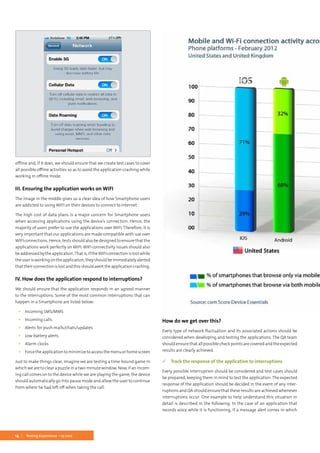
under “Network Properties”.
But iPhone or iPad simulators do not have this facility, hence we will have
to carry out these tests on actual devices. In such cases, we will have to
turn on the airport option, which in fact kills the network availability on
the device, and then work with the application to see how it reacts to this.
AnothermethodistoturnofftheNetworkoptionsprovidedundersettings.
Shown on next page is the screen shot of the iPhone Network settings.
Once the cellular data option is turned off, the device will have no access
to the Internet (assuming that WIFI has been turned off) and this should
be a mandatory test case when we work with mobile applications. We
should also ensure that we check the application’s behavior when we
change from 3G to normal GPRS connection, which, in fact, is a point to
be considered for applications that are developed for countries like India
where 3G connections are available only at selected locations. Our appli-
cation should be able to handle these connectivity changes and should
adapt to these accordingly without crashing.
II. Ensuring off-line support
Some of the applications allow the user to store data in offline mode.
That is, even when the user does not have access to any network, they
are allowed to access the application, fill in the details and save it on the
hand-held device itself.We should check to see if the application supports
14 Testing Experience – 19 2012
offline and, if it does, we should ensure that we create test cases to cover
all possible offline activities so as to avoid the application crashing while
working in offline mode.
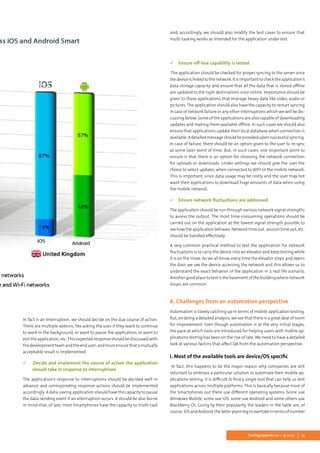
III. Ensuring the application works on WIFI
The image in the middle gives us a clear idea of how Smartphone users
are addicted to using WIFI on their devices to connect to Internet.
The high cost of data plans is a major concern for Smartphone users
when accessing applications using the device’s connection. Hence, the
majority of users prefer to use the applications over WIFI. Therefore, it is
very important that our applications are made compatible with use over
WIFI connections. Hence, tests should also be designed to ensure that the
applications work perfectly on WIFI. WIFI connectivity issues should also
beaddressedbytheapplication.Thatis,iftheWIFIconnectionislostwhile
theuserisworkingontheapplication,theyshouldbeimmediatelyalerted
thattheirconnectionislostandthisshouldaverttheapplicationcrashing.
IV. How does the application respond to interruptions?
We should ensure that the application responds in an agreed manner
to the interruptions. Some of the most common interruptions that can
happen in a Smartphone are listed below:
▪▪ Incoming SMS/MMS
▪▪ Incoming calls
▪▪ Alerts for push mails/chats/updates
▪▪ Low battery alerts
▪▪ Alarm clocks
▪▪ Forcetheapplicationtominimizetoaccessthemenuorhomescreen
Just to make things clear, imagine we are testing a time-bound game in
which we are to clear a puzzle in a two-minute window. Now, if an incom-
ing call comes on to the device while we are playing the game, the device
should automatically go into pause mode and allow the user to continue
from where he had left off when taking the call.
How do we get over this?
Every type of network fluctuation and its associated actions should be
considered when developing and testing the applications. The QA team
should ensure that all possible check points are covered and the expected
results are clearly achieved.
 Track the response of the application to interruptions
Every possible interruption should be considered and test cases should
be prepared, keeping them in mind to test the application. The expected
response of the application should be decided in the event of any inter-
ruptions and QA should ensure that these results are achieved whenever
interruptions occur. One example to help understand this situation in
detail is described in the following. In the case of an application that
records voice while it is functioning, if a message alert comes in which
15Testing Experience – 19 2012
in fact is an interruption, we should decide on the due course of action.
There are multiple options, like asking the user if they want to continue
to work in the background, or want to pause the application, or want to
exit the application, etc.This expected response should be discussed with
thedevelopmentteamandtheenduser,andmustensurethatamutually
acceptable result is implemented.
 Decide and implement the course of action the application
should take in response to interruptions
The application’s response to interruptions should be decided well in
advance and corresponding response actions should be implemented
accordingly. A data-saving application should have the capacity to pause
the data-sending event if an interruption occurs. It should be also borne
in mind that, of late, most Smartphones have the capacity to multi-task
and, accordingly, we should also modify the test cases to ensure that
multi-tasking works as intended for the application under test.
 Ensure off-line capability is tested
The application should be checked for proper syncing to the server once
thedeviceislinkedtothenetwork.Itisimportanttochecktheapplication’s
data storage capacity and ensure that all the data that is stored offline
are updated to the right destinations once online. Importance should be
given to those applications that manage heavy data like video, audio or
pictures. The application should also have the capacity to restart syncing
in case of network failure or any other interruptions which we will be dis-
cussing below. Some of the applications are also capable of downloading
updates and making them available offline. In such cases we should also
ensure that applications update their local database when connection is
available.Adetailedmessageshouldbeprovideduponsuccessfulsyncing.
In case of failure, there should be an option given to the user to re-sync
at some later point of time. But, in such cases, one important point to
ensure is that there is an option for choosing the network connection
for uploads or downloads. Under settings we should give the user the
choice to select updates when connected to WIFI or the mobile network.
This is important, since data usage may be costly and the user may not
want their applications to download huge amounts of data when using
the mobile network.
 Ensure network fluctuations are addressed
The application should be run through various network signal strengths
to assess the output. The most time-consuming operations should be
carried out on the application at the lowest signal strength possible to
see how the application behaves. Network time out, session time out, etc.
should be handled effectively.
A very common practical method to test the application for network
fluctuations is to carry the device into an elevator and keep testing while
it is on the move. As we all know, every time the elevator stops and opens
the door we see the device accessing the network and this allows us to
understand the exact behavior of the application in a real life scenario.
Anothergoodplacetotestisthebasementofthebuildingwherenetwork
issues are common.
6. Challenges from an automation perspective
Automation is slowly catching up in terms of mobile application testing.
But, on doing a detailed analysis, we see that there is a great deal of room
for improvement. Even though automation is at the very initial stages,
the pace at which tools are introduced for helping users with mobile ap-
plications testing has been on the rise of late. We need to have a detailed
look at various factors that affect QA from the automation perspective.
I. Most of the available tools are device/OS specific
In fact, this happens to be the major reason why companies are still
reluctant to embrace a particular solution to automate their mobile ap-
plications testing. It is difficult to find a single tool that can help us test
applications across multiple platforms. This is basically because most of
the Smartphones out there use different operating systems. Some use
Windows Mobile, some use iOS, some use Android and some others use
BlackBerry OS. Going by their popularity, the leaders in the table are, of
course,iOSandAndroid,thelatterplanningtoovertakeintermsofnumber
16 Testing Experience – 19 2012
at any time as we write this paper. The reason we are mentioning this
here is that all these operating systems use applications that are specific
to them. That is, in the case of the iOS system the extension of the ap-
plication should .ipa, for Android .apk, for BlackBerry .jad, etc. Now, from
this it is very clear that it is almost impossible to create an application
which can create automated tests for applications intended for all these
devices. So, if we are to create an application that is for both BlackBerry
and iPhone users within the company, we have to create automation test
scripts for both these applications individually. This, as you may all know,
will lead to doubling your testing time.
There are a couple of applications which ensure that single script can be
run for both the code bases, but the end results are yet to be assessed in
depth.However,thereisalwaysanelementofskepticismabouttheresults,
as we all know that each Smartphone has its own unique functionality
base and that the same test approach may not work for all of them.
II. Most of the tools’ capabilities are limited to web applica-
tion testing
There are many tools available on the market that help us test web-based
applications for mobiles. But, as we know, most of the traditional ap-
plications are still native which intensively use the special features that
are built into the development tool used for native application building.
Web mobile applications limit the user from performing many regular
actions that could have easily been carried out had there been a similar
native application. Because of this limitation, most companies try to
assess their user group and, based on the statistics, build native applica-
tions for the most commonly-used Smartphone, which gives them the
advantage of incorporating the maximum number of features into the
application under development. Hence, most people still have an ap-
petite for native applications. This, in fact, stops most of the companies
from investing in automation tools that are just intended for web-based
mobile applications.
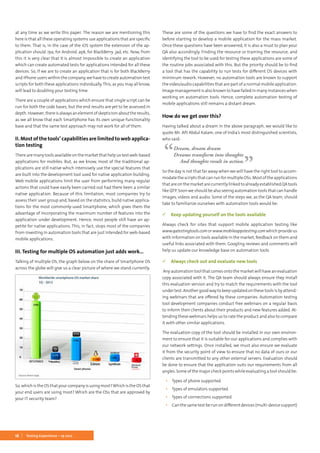
III. Testing for multiple OS automation just adds work...
Talking of multiple OS, the graph below on the share of Smartphone OS
across the globe will give us a clear picture of where we stand currently.
So, which is the OS that your company is using most?Which is the OS that
your end users are using most? Which are the OSs that are approved by
your IT security team?
These are some of the questions we have to find the exact answers to
before starting to develop a mobile application for the mass market.
Once these questions have been answered, it is also a must to plan your
QA also accordingly. Finding the resource or training the resource, and
identifying the tool to be used for testing these applications are some of
the routine jobs associated with this. But the priority should be to find
a tool that has the capability to run tests for different OS devices with
minimum rework. However, no automation tools are known to support
the video/audio capabilities that are part of a normal mobile application.
Image management is also known to have failed in many instances when
working on automation tools. Hence, complete automation testing of
mobile applications still remains a distant dream.
How do we get over this?
Having talked about a dream in the above paragraph, we would like to
quote Mr. APJ Abdul Kalam, one of India’s most distinguished scientists,
who said:
Dream, dream dream
Dreams transform into thoughts
And thoughts result in action.
So the day is not that far away when we will have the right tool to accom-
modate the scripts that can run for multiple OSs. Most of the applications
thatareonthemarketarecurrentlylinkedtoalreadyestablishedQAtools
like QTP. Soon we should be also seeing automation tools that can handle
images, videos and audio. Some of the steps we, as the QA team, should
take to familiarize ourselves with automation tools would be:
 Keep updating yourself on the tools available
Always check for sites that support mobile application testing like
www.qatestingtools.comorwww.mobileappstesting.comwhichprovideus
with information on tools available in the market, feedback on them and
useful links associated with them. Googling reviews and comments will
help us update our knowledge base on automation tools.
 Always check out and evaluate new tools
Any automation tool that comes onto the market will have an evaluation
copy associated with it. The QA team should always ensure they install
this evaluation version and try to match the requirements with the tool
under test. Another good way to keep updated on these tools is by attend-
ing webinars that are offered by these companies. Automation testing
tool development companies conduct free webinars on a regular basis
to inform their clients about their products and new features added. At-
tending these webinars helps us to rate the product and also to compare
it with other similar applications.
The evaluation copy of the tool should be installed in our own environ-
ment to ensure that it is suitable for our applications and complies with
our network settings. Once installed, we must also ensure we evaluate
it from the security point of view to ensure that no data of ours or our
clients are transmitted to any other external servers. Evaluation should
be done to ensure that the application suits our requirements from all
angles. Some of the major check points while evaluating a tool should be:
▪▪ Types of phone supported
▪▪ Types of emulators supported
▪▪ Types of connections supported
▪▪ Can the same test be run on different devices (multi-device support)
17Testing Experience – 19 2012
▪▪ Is the tool compatible with existing automation tools?
▪▪ Security – VPN connections, data sharing, etc.
▪▪ Functionalities supported – swipe, drag & drop, zoom, scrolling,
pinching, rotating, shaking etc
▪▪ Image/text recognition
It would be possible to write another paper on tool evaluation, but the
major points to be taken into account are the ones mentioned above.
 Get familiar with Device Anywhere, Perfecto Mobile, etc. for
real device testing experience
Currently these are the most trending mobile applications testing plat-
forms. These are merely mobile device providers who allow us access to
their real devices via remote connections. So, no matter where you are
located, all you need to have is an account with any of these sites which
allows access to most of the currently trending Smartphone devices. All
actions can be carried out remotely over the web and more accurately,
since these tests are happening on the actual devices. Most of these sites
provide us with regular updates on devices and they keep adding new
models, as and when they are available in the market.
Device Anywhere – www.keynotedeviceanywhere.com
Perfecto Mobile – www.perfectomobile.com	 ◼
Jeesmon Jacob is an electronics and telecommuni-
cations engineer with a MBA in IT & Systems. He is
a certified professional in CSTE & ISTQB with over 6
years of experience in the field of quality assurance.
Currently he is working as the QA lead for a mobility
team at UST Global® who are a leading provider of
end-to-end IT services and solutions for Global 1000
companies. He has also written a number of white
papers on mobile application testing. In his free time, he loves spending
time with his eight-month-old angel, Rose, who is trying to learn from her
mom how to master the art of getting things done effortlessly.
Mary Tharakan who holds an Engineering degree
in Instrumentation and a diploma in Embedded
Systems, has been with UST Global for a year now.
Currently she is working for a Fortune 100 client as
a quality engineer. She is an avid follower of the
new technologies and has a weakness for the latest
gadgets. Sheis alsopartofthemobilitytestingteam
of UST Global. In her free time she likes shadowing
her mom to learn some of the culinary arts in which she claims she is the
best, but most of her friends disagree unanimously.
> about the authors
18 Testing Experience – 19 2012
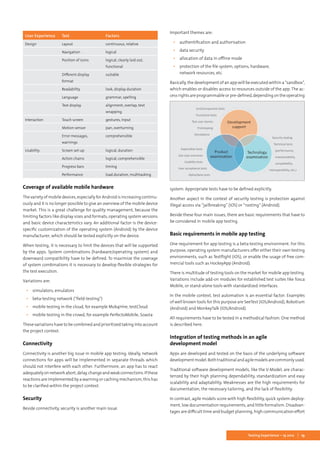
Foreverybodywhousesasmartphoneortabletappsareindispensible.
An app is an application that is developed for a specific environment.
Within the mobile context, the commonly used name is mobile app.
App technology has been well known since the commercial launch of the
iPhonein2007.WiththereleaseoftheAppleAppStore,anewsaleschannel
for software applications was opened. Comparable app stores for other
operating systems, such as Android Market, Nokia Store, BlackBerry App
World, Mac App Store, Samsung Apps, and Windows Phone Marketplace
were launched soon afterwards.
For a long time, only apps for personal use were in the spotlight, but now
this has changed. The usage of apps for business purposes is increasing
significantly. Companies are using apps for banking, sales, marketing,
or internal communication. In addition, B2B or enterprise apps, which
facilitate interaction with back end tools and mobile devices by means
of web services or cloud platforms, are capturing market share. In the
course of this development, the demand for methodical quality manage-
ment is increasing.
Thisarticlewillshowfourmainissuesthathavetobedealtwithbymobile
app testing and the basic requirements needed. Furthermore, it will de-
scribe the integration of testing methods in an agile development model.
The main issues that have to be covered in mobile app testing are:
▪▪ User experience
▪▪ Coverage of available mobile hardware
▪▪ Connectivity
▪▪ Security
User experience
The user experience is critical for the success or failure of an app.The user
experience will be mirrored by the rating of the app in the app store and
negative ratings can be the source of significant sales losses. So, the user
experienceisakeyissueinmobileapptesting.Itcannotactuallybetested
directly, because of the subjective nature of the experience. But you need
to be aware that you can and should cover the critical success factors for
a positive user experience through the test.
Success factors for a positive user experience are appealing design, posi-
tiveinteractionandusability.Basedonthesethreethemes,youcanderive
the following test criteria:
Kerstin Knab
Main issues in mobile
app testing
19Testing Experience – 19 2012
Coverage of available mobile hardware
The variety of mobile devices, especially for Android is increasing continu-
ously and it is no longer possible to give an overview of the mobile device
market. This is a great challenge for quality management, because the
limiting factors like display sizes and formats, operating system versions
and basic device characteristics vary. An additional factor is the device-
specific customization of the operating system (Android) by the device
manufacturer, which should be tested explicitly on the device.
When testing, it is necessary to limit the devices that will be supported
by the apps. System combinations (hardware/operating system) and
downward compatibility have to be defined. To maximize the coverage
of system combinations it is necessary to develop flexible strategies for
the test execution.
Variations are:
▪▪ simulators, emulators
▪▪ beta-testing network (“field-testing”)
▪▪ mobile testing in the cloud, for example Mob4Hire, testCloud
▪▪ mobile testing in the crowd, for example PerfectoMobile, Soasta
These variations have to be combined and prioritized taking into account
the project context.
Connectivity
Connectivity is another big issue in mobile app testing. Ideally, network
connections for apps will be implemented in separate threads which
should not interfere with each other. Furthermore, an app has to react
adequatelyonnetworkabort,delay,changeandweakconnections.Ifthese
reactions are implemented by a warning or caching mechanism, this has
to be clarified within the project context.
Security
Beside connectivity, security is another main issue.
Important themes are:
▪▪ authentification and authorisation
▪▪ data security
▪▪ allocation of data in offline mode
▪▪ protection of the file system, options, hardware,
network resources, etc.
Basically, the development of an app will be executed within a “sandbox”,
which enables or disables access to resources outside of the app. The ac-
cessrightsareprogrammableorpre-defined,dependingontheoperating
system. Appropriate tests have to be defined explicitly.
Another aspect in the context of security testing is protection against
illegal access via “jailbreaking” (iOS) or “rooting” (Android).
Beside these four main issues, there are basic requirements that have to
be considered in mobile app testing.
Basic requirements in mobile app testing
One requirement for app testing is a beta-testing environment. For this
purpose, operating system manufacturers offer either their own testing
environments, such as Testflight (iOS), or enable the usage of free com-
mercial tools such as HockeyApp (Android).
There is multitude of testing tools on the market for mobile app testing.
Variations include add-on modules for established test suites like Tosca
Mobile, or stand-alone tools with standardized interfaces.
In the mobile context, test automation is an essential factor. Examples
of well known tools for this purpose are SeeTest (iOS/Android), Robotium
(Android) and MonkeyTalk (iOS/Android).
All requirements have to be tested in a methodical fashion. One method
is described here.
Integration of testing methods in an agile
development model
Apps are developed and tested on the basis of the underlying software
developmentmodel.Bothtraditionalandagilemodelsarecommonlyused.
Traditional software development models, like the V-Model, are charac-
terized by their high planning dependability, standardization and easy
scalability and adaptability. Weaknesses are the high requirements for
documentation, the necessary tailoring, and the lack of flexibility.
In contrast, agile models score with high flexibility, quick system deploy-
ment, low documentation requirements, and little formalism. Disadvan-
tages are difficult time and budget planning, high communication effort
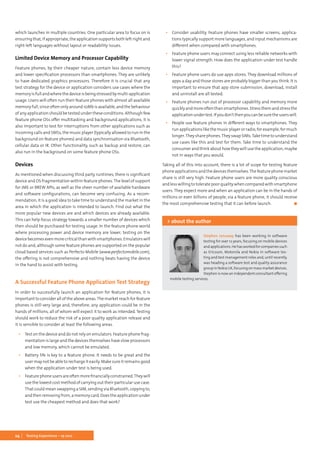
Unit/component tests
Functional tests
Test user stories
Prototyping
Simulations
Explorative tests
Use case scenarios
Usability tests
User acceptance tests
Alpha/beta tests
Security testing
Technical tests
(performance,
maintainability,
compatibility,
interoperability, etc.)
User Experience Test Factors
Design Layout continuous, relative
Navigation logical
Position of icons logical, clearly laid out,
functional
Different display
format
suitable
Readability look, display duration
Language grammar, spelling
Text display alignment, overlap, text
wrapping
Interaction Touch screen gestures, input
Motion sensor pan, overturning
Error messages,
warnings
comprehensible
Usability Screen set-up logical, duration
Action chains logical, comprehensible
Progress bars timing
Performance load duration, multitasking
within the agile teams, and a distinctive dependency on the individual
abilities of the team members.
Generally, apps are developed within tight “time-to-market” cycles. Cus-
tomizing is performed via continuous updates, which are mostly a result
of feedback from the app users.
Subject to these circumstances, an agile development model delivers
more pros compared with a traditional model and so will be described
here in brief.
The testing tasks in the agile model can be split into three main concerns:
Each concern will be underpinned with suitable testing methods which
have to be brought in line with the timeline of the sprints (Scrum).
When using agile models, it is necessary to ensure that
▪▪ definition of what has been done is consistent,
▪▪ automation is planned in detail within the sprints and mock-up
services are established,
▪▪ the regression needs are monitored throughout the sprints,
▪▪ externalserviceproviders(crowd,beta-testernetwork)areintegrated
wisely and
▪▪ testing experience gained flows back into the process.
Caution: Agile models are not the best solution in every project context.
A traditional model is often the better way, especially in projects where
there are company-specific issues with clear-cut and detailed require-
ments or narrow budget and time specifications. However, if an agile
model is used it is essential to consistently monitor the product backlog
and the baseline adapted to this.
Conclusion
There are many aspects in mobile app testing which have to be consid-
ered. Important issues are user experience, coverage of available mobile
hardware, connectivity, and security. The quality criteria of a mobile app
testing project are individual to each project, i.e. the weighting of the
testing criteria varies significantly.
Integrating the test into the underlying software development model
is critical for a successful mobile app testing project. Due to the narrow
timeline of mobile app projects, it is necessary to customize the testing
methods, adapt the test scope, and define the test coverage.
It is essential to adapt approved methods to the determining factors of
the app development in a quick and flexible way.	 ◼
Kerstin Knab is Senior IT Consultant at Maiborn
Wolff et al GmbH, Munich, Germany. She has more
than 10 years of experience in complex software
development and testing projects. She acquired
her profound knowledge, especially in the areas
of mobile app testing, quality management, fault
management and test automation through project
assignments in the telecommunications, banking
and road charging industries. Feedback regarding the article would be
appreciated by email: Kerstin.Knab@mwea.de
> about the author
karriere@corporatequality.de
Sven Jacob (Human Resources) +49 2241 250 21-13
www.corporatequality.de
Ambitionierte
Testmanager (m/w) gesucht
Wir suchen…
Testmanager für Teamleitung, konzeptionelle Arbeit sowie zur
Strategieentwicklung und Umsetzung
Spezialisten im Bereich Testautomatisierung (Konzepterstellung
und Aufbau) mit mehrjähriger Berufserfahrung
Jeweils mit Kenntnissen der gängigen Testmethoden und Testtools
Wir bieten…
Spannende Projekte bei unseren langjährigen Kunden
Möglichkeit zur Mitgestaltung
Offene und faire Diskussionskultur
Austausch mit Kollegen und internes Networking
Kontinuierliche Weiterbildungsmöglichkeiten
Individuelle Aufstiegsmöglichkeiten und Karrierepfade
Innovative Test-Services
©iStockphoto.com/numbeos
Prof van Testing recommends
Description
The training is aimed at personnel mainly invol-
ved in the tasks of software requirements engi-
neering. The tutorial is designed to transfer the
knowledge needed to pass the examination
to become an IREB CPRE-FL.
After earning a CPRE-FL certificate, a certifica-
te holder can assess whether a given situation
calls for requirements engineering. He under-
stands the fundamental characteristics of the
discipline and the interplay of methodological
approaches, e.g. interview techniques, de-
scription tools or forms of documentation.
More information regarding the required
knowledge can be found in the IREB Syllabus,
which can be downloaded from the IREB web
site: http://www.certified-re.com
*subject to modifications
Dates* 3 days
25.–27.09.12 Mödling/Austria (de)
16.–18.10.12 Berlin (de)
16.–18.10.12 Stockholm/Sweden
27.–29.11.12 Berlin (de)
27.–29.11.12 Oslo/Norway (en)
27.–29.11.12 Helsinki/Finland (en)
18.–20.12.12 Berlin (de)
IREB –
Certified Professional for Requirements Engineering – Foundation Level
©iStockphoto.com/davidnay
Website:
http://training.diazhilterscheid.com
Follow me @vanTesting
22 Testing Experience – 19 2012
In Western Europe and the US, the mobile device industry is focused
heavily towards smartphones and their associated ecosystems. How-
ever, for a majority of device consumers in the world, the feature phone
still rules and it is estimated that 70% of mobile devices currently in use
in the world are feature phones. Feature phones, although still basic in
comparison with smartphones, are becoming increasingly feature rich
and represent a real challenge for those who test them. Some of these
challenges are common with testing in other disciplines, whereas some
are unique to the mobile device area and feature phones themselves.
Before we look into these unique testing challenges, it is important to
first explain why feature phones and feature phone consumers are in
some ways different and in others the same as those who purchase and
use smartphones.
It is true to say that there is no official definition that distinguishes fea-
ture phones from smartphones; the most commonly used distinction
is price. Given the lengths to which manufacturers discount devices in
the extremely competitive mobile device market, this is not the best
distinction to use. For the purposes of this article, we shall assume that
a feature phone is a mobile device which runs an OS which is typically
manufacturer-specific, unlikely to allow true multi-tasking or third party
native applications, and has a small screen. It will be cheaper than a
smartphone, in terms of both the cost to the consumer and the cost of
manufactureandparts.Itmayhaveacameraormaynot,andwillcertainly
havealower-speedprocessorandlessmemorythanasmartphone.Touch
screens are available at feature phone price points, but more traditional
device styles, such as ITU-T keypads, are also still available – in fact the
range of different mechanical styles and phone capabilities is greater in
the feature phone space than within smartphones, where the monoblock
touch screen device dominates.
The way consumers use feature phones is also very important to under-
stand, especially when considering feature phones from a testing point
of view. Whilst the more expensive feature phones, retailing at between
€60 and €120 may be on sale in Western Europe and the US, often on
pre-paid plans, the feature phone segment extends all the way down to
the lowest price points of €20 and below.This may not appear to be much
to the affluent Westerner, but to consumers in developing countries this
can represent a significant financial purchase, often necessitating many
months of saving.This in itself has a real effect on the perceived quality of
the device and, therefore, the level of testing required to give confidence
in quality prior to launch. Feature phone consumers feel a greater pride
in their devices, since they may well have saved for a significant time to
afford them, and do not expect their pride to be dented by poor quality.
They are more likely to return devices for repair and they have a higher
expectation that those devices will not fail. A reasonable analogy would
be that of TV, or even car ownership, in developed countries.
Feature phone consumers in developing countries also have high aspira-
tions. A majority would buy smartphones if they could afford them and
they expect their feature phone to offer an experience which is approach-
ingthatofasmartphone.Asaresult,weseeincreasingattemptsbymobile
device manufacturers to make their feature phones increasingly feature
rich, in particular Nokia’s S40 platform and Samsung’s SGH platforms,
and allthe whiledeliveringthese features onplatforms with low memory
andprocessorcapability.Thismeanssqueezingthemaximumoutofeach
platform and makes effective testing extremely important.
Typical use cases for feature phone consumers are also different when
compared with smartphone users. In developing countries, and particu-
larly in Africa, a village may share a phone; in fact, businesses have been
formed(forexampletheVillagePhoneProgram: www.grameenfoundation.
org/what-we-do/empowering-poor) around sharing and using a single
mobile device to ensure communication outside of the village. Some
featurephonesofferfunctionalitysuchasmultipleaddressbooksandcall
logs, enabling multiple users. Saving costs by using multiple SIM cards is
particularlypopularindevelopingcountrieswhereonenetworkmayoffer
lowcostlocalvoicecalls,whereasanotherofferslowercostcallsoutsideof
thelocalarea.ConsumerstypicallyswapSIMcardsfrequentlyanddevices
are available which support more than one SIM card. Nokia offers devices
whereoneSIMcardcanbeswappedaseasilyasamemorycard,withboth
cardsactiveatthesametime,andothermanufacturersofferdeviceswhich
can support up to four different SIM cards in the same device.
Whilst feature phones do not, typically, offer the third party developer the
ability to deploy native applications to the devices, they typically do come
with some sort of third party runtime environment. The most prevalent
is the Java Mobile Edition (JME, formally known as J2ME) environment
whereby third party developers can write small programs called MIDlets
which run on the device. JME is the most widely available mobile applica-
tionenvironmentintheworldandcontainsstandardAPIs,althoughmost
manufacturers have extended them or even added their own. Through
these APIs, third party developers can assess an increasing amount of
native phone functionality, such as the address book, GPS, touch screens
and messaging.The market reach for developers focusing on JME is huge,
given the estimated 70% market share for feature phones worldwide.
Some devices also support the Binary Runtime Environment for Wire-
less (BREW) platform from Qualcomm. While this is not a true virtual
environment like JME, it does offer APIs, and applications can be coded
in C, C++ or Java.
Currently the most significant challenge facing testers of third party ap-
plications is that of platform fragmentation. Given the large number of
mechanicalstyles,screensizesandplatformhardwareusedinthefeature
phone segment, together with the fact that device manufacturers often
support less than the full set of defined APIs, and often add their own
proprietary ones, testing across a wide range of devices is necessary to
ensure sufficient test coverage.
Applications can be deployed to devices in a variety of ways. The most
popular are apps stores, such as GetJar and the Nokia Store. Applications
canbedownloadedandinstalledinasimilarwayasforsmartphones,and
usage of these stores is large – there are over 100,000 applications in the
Nokia Store for devices running S40, whereas GetJar has over 3 million
downloads a day and can claim to be the second biggest App Store in the
Stephen Janaway
Beyond the Smartphone –
Testing for the Developing World
23Testing Experience – 19 2012
world. It is important to ensure that app store submission, download,
install and uninstall are all tested.
So, as a tester, what in particular should you look out for when testing
for feature phones and feature phone applications? A useful checklist of
areas should contain:
Areas That Would Be Tested on a
Smartphone Application
In some ways, a feature phone is not really that different to a smartphone
and the gap between the two, particularly at the top end of the feature
phonepricepoints,isbecomingincreasinglyblurred.Thereforeitisimpor-
tant that a successful test strategy focuses on areas such as application
functionality,networkinteraction,stressandloading,andlocationwhere
appropriate. A good starting point would be to take a look at the recent
mind map from Ministry ofTesting.Top end feature phones now support
maps, push email and games such as Angry Birds. However, some areas
become more important when considering the feature phone space.
Network Interactions
Feature phones are used, particularly in the developing world, in areas
where the mobile network is not as reliable, nor the signal as strong, as in
developed countries. Infrastructure in cities is typically more overloaded
withusersandnetworkcellsaretypicallylargerinthecountryside,mean-
ingthatthedistancefromcelltowertomobilephoneisgreater.Thismeans
thatanymobileapplicationneedstobehighlyresilienttonetwork,ordata
carrier, loss or degradation. Considering cases where network interaction
is abruptly lost, and the effect that has on the application under test, is
critical. Use cases, such as going into and out of network coverage whilst
using an application, are also highly relevant.
Battery Life
The effect of an application on battery life should be well understood
whentesting mobile devices,irrespectiveof the platform. However,in the
feature phone case, battery life can become even more important when
oneconsidersatypicaldevelopingworldusecaserelatedtobatterylife.In
countries where the electricity supply can be erratic and homes may not
have their own supply at all, necessitating charging at ‘charging shops’,
then good battery life becomes crucial. A well written application should
notuseexcessivebattery,anditisimportanttotestforbatterylifeimpact,
either by using an off-device monitor, or by executing typical cases and
monitoring the battery life via the device’s battery level indicator. It is
also important to consider the performance of the device or application
when the battery runs out; does it crash or does it exit gracefully when
power becomes low?
Device Use Time
Feature phones typically have much better battery life than smartphones
and, as a result, are often left for longer before either being power cycled
or rebooted. Some typical use cases also lead to longer device use times.
A good example would be music player usage – in developing countries
the mobile device is often used as the primary music player and radio,
and therefore the music player applications can be left running for 10
hours or more. Ensuring that the applications themselves continue to
function, and that bugs such as memory leaks are not present, requires
a different approach to testing. Long use case tests are more important
in the feature phone space than the smartphone one and can reveal bugs
than otherwise would not be found by shorter functional testing.
SIM Cards
If the application under test uses data stored on a SIM card or memory
card, then it is very important to ensure a relevant number of cards are
obtained and used for testing. Not all SIM cards are created the same and
some are considerably slower than others; this seems to be a particular
problem in developing countries, such as India. Some brands of memory
card can also be slower and this can have an effect on the functionality
of the device or application. Obtaining, and testing with, cards that are
relevant to the intendedlaunch country/area for the applicationor device
will help to reduce the risk of early field returns due to incompatible or
slow cards.
Significant numbers of feature phones support multiple SIMs and may
also support the swapping of these SIMs without a need to power down
the device.There are a number of related use cases to consider including:
▪▪ What happens to the application when removing the battery with-
out shutting down the application? This is a typical use case when
swapping SIMs.
▪▪ What happens to an application which uses SIM data when the SIM
is swapped? Is the data still available or is it removed?
Data Sharing
Although data usage and its cost are becoming highly prevalent and in-
creasingly cheap in the West, this is less so in developing markets where
consumers are extremely cost conscious. As a result, usage of applica-
tions such as cloud based proxy browsers, which reduce data usage by
compressing webpages prior to delivery to the mobile device, are very
popular. Users are also most likely to share content via free channels such
as Bluetooth and Infrared. It is important to consider all sharing methods
when testing and also to consider whether the application under test
offers the lowest cost methods.
Usability
Feature phones typically have smaller screens and different input mech-
anisms when compared with smartphones. Feature phones can have
screensassmallas128 × 128pixelsandensuringthatanapplicationmakes
the most of the limited screen estate is an important consideration when
testing. Issues such as text size, the level of information detail to present
per page, and the amount of scrolling required in order to view the most
important information, become more important when the screen is so
small. Since an application may need to support a large range of screen
sizes, it is important to test that the UI scales well.
Although a significant number of feature phones have mechanical key-
pads, typically in an ITU-T (i.e. numbers only) or QWERTY configuration,
and this makes selecting options on the screen easier, more and more are
now being produced with touch screens. These are typically the cheaper
resistive panels which require a harder and more accurate press in order
to select options and it is important to ensure that the usability of the
application or device does not suffer too much as a result. Consideration
should be given to how the user will scroll and pan around the screen,
and how they will select areas using either finger or stylus.
It is also relevant to consider, and test for, multiple language support. In
countrieswheremorethanonelanguageisspoken,applicationsmayneed
to support multiple languages and this is equally true for an application
24 Testing Experience – 19 2012
which launches in multiple countries. One particular area to focus on is
ensuringthat,ifappropriate, theapplicationsupportsbothleft-rightand
right-left languages without layout or readability issues.
Limited Device Memory and Processor Capability
Feature phones, by their cheaper nature, contain less device memory
and lower specification processors than smartphones. They are unlikely
to have dedicated graphics processors. Therefore it is crucial that any
test strategy for the device or application considers use cases where the
memoryisfullandwherethedeviceisbeingstressedbymulti-application
usage. Users will often run their feature phones with almost all available
memoryfull,sinceoftenonlyaround10Mbisavailable,andthebehaviour
of any application should be tested under these conditions. Although few
feature phone OSs offer multitasking and background applications, it is
also important to test for interruptions from other applications such as
incoming calls and SMSs, the music player (typically allowed to run in the
background on feature phones) and data synchronisation via Bluetooth,
cellular data or IR. Other functionality, such as backup and restore, can
also run in the background on some feature phone OSs.
Devices
As mentioned when discussing third party runtimes, there is significant
device and OS fragmentation within feature phones.The level of support
for JME or BREW APIs, as well as the sheer number of available hardware
and software configurations, can become very confusing. As a recom-
mendation, it is a good idea to take time to understand the market in the
area in which the application is intended to launch. Find out what the
more popular new devices are and which devices are already available.
This can help focus strategy towards a smaller number of devices which
then should be purchased for testing usage. In the feature phone world
where processing power and device memory are lower, testing on the
devicebecomesevenmorecriticalthanwithsmartphones.Emulatorswill
not do and, although some feature phones are supported on the popular
cloud based services such as Perfecto Mobile (www.perfectomobile.com),
the offering is not comprehensive and nothing beats having the device
in the hand to assist with testing.
A Successful Feature Phone Application Test Strategy
In order to successfully launch an application for feature phones, it is
important to consider all of the above areas.The market reach for feature
phones is still very large and, therefore, any application could be in the
hands of millions, all of whom will expect it to work as intended. Testing
should work to reduce the risk of a poor quality application release and
it is sensible to consider at least the following areas.
▪▪ Test on the device and do not rely on emulators. Feature phone frag-
mentation is large and the devices themselves have slow processors
and low memory, which cannot be emulated.
▪▪ Battery life is key to a feature phone. It needs to be great and the
user may not be able to recharge it easily. Make sure it remains good
when the application under test is being used.
▪▪ Featurephoneusersareoftenmorefinanciallyconstrained.Theywill
use the lowest cost method of carrying out their particular use case.
That could mean swapping a SIM, sending via Bluetooth, copying to,
andthenremovingfrom,amemorycard.Doestheapplicationunder
test use the cheapest method and does that work?
▪▪ Consider usability. Feature phones have smaller screens, applica-
tions typically support more languages, and input mechanisms are
different when compared with smartphones.
▪▪ Feature phone users may connect using less reliable networks with
lower signal strength. How does the application under test handle
this?
▪▪ Feature phone users do use apps stores. They download millions of
apps a day and those stores are probably bigger than you think. It is
important to ensure that app store submission, download, install
and uninstall are all tested.
▪▪ Feature phones run out of processor capability and memory more
quicklyandmoreoftenthansmartphones.Stressthemandstressthe
applicationundertest.Ifyoudon’tthenyoucanbesuretheuserswill.
▪▪ People use feature phones in different ways to smartphones. They
runapplicationslikethemusicplayerorradio,forexample,formuch
longer.They share phones.They swap SIMs.Take time to understand
use cases like this and test for them. Take time to understand the
consumer and think about how they will use the application, maybe
not in ways that you would.
Taking all of this into account, there is a lot of scope for testing feature
phoneapplicationsandthedevicesthemselves.Thefeaturephonemarket
share is still very high. Feature phone users are more quality conscious
andlesswillingtotoleratepoorqualitywhencomparedwithsmartphone
users. They expect more and when an application can be in the hands of
millions or even billions of people, via a feature phone, it should receive
the most comprehensive testing that it can before launch.	 ◼
Stephen Janaway has been working in software
testing for over 12 years, focusing on mobile devices
andapplications.Hehasworkedforcompaniessuch
as Ericsson, Motorola and Nokia in software tes-
ting and test management roles and, until recently,
was heading a software test and quality assurance
groupinNokiaUK,focusingonmassmarketdevices.
Stephen is now an independent consultant offering
mobile testing services.
> about the author
25Testing Experience – 19 2012
Training with a View
Kurfürstendamm,Berlin©KatrinSchülke
more dates and onsite training worldwide in de, en, Spanish, French on our website:
http://training.diazhilterscheid.com
26 Testing Experience – 19 2012
W
hentestersthinkaboutsoftwaretesting,theywillmostlikely
check the documentation, functionality, API, performance,
and make sure the software is secure, along with the many
other things that depend on that particular piece of software. When it
comes to mobile testing, testers have to think about mobile-related func-
tions based on the user’s mobile usage patterns.
This article is based on my work experience as a software quality assur-
ancemanagerinanagilesoftwaredevelopmentteam,focusingonmobile
appsforiPhone,Android,WindowsPhone7,andmobilewebapps.During
my daily work within the XING mobile team and exchanges with other
mobile test experts, I have gained a lot of insights into the challenging
job of mobile testing. Over time, I have defined mobile best practices that
helped my colleagues and I to improve test activities and to provide our
customers with a higher quality app. Some of these best practices will
be covered in this article.
Functional Testing
Every new feature that is developed needs to be tested. Functional testing
is an important aspect when it comes to mobile app testing. Based on the
developed test cases, mobile testers should do manual and automated
testing. At the beginning of the test phase, a tester must test the mobile
app manually as a “black box” to see if the functions provided are correct
and work as designed.
Besides textbook software testing, like clicking a button to see what hap-
pens,mobiletestersmustperformmorefunctional,mobile-device-specific
testing.Today,modernmobiledeviceshaveatouchscreenrequiringmulti-
touch gesturing to interact with them. Devices can be used in portrait or
landscape mode. They provide motion, tilt and gyroscope sensors. They
have different interfaces to communicate with other devices or services
like GPS, NFC, cameras, LEDs and many more.
A mobile software tester must be sure that the app will work with all
these specific device functions if they are used within the app. The sheer
number of different mobile devices means that it is not possible to cover
all of them during testing, so testers need to focus on key areas of their
app during functional testing.
What has proven to be very useful, yet simple, is device rotation. During
my testing activities, I found so many bugs just by rotating the device
from portrait to landscape mode and back again.
Besides the entire manual testing process, it is really important to have
good test automation in place for mobile applications. Every code change
or new feature could affect existing features and their behavior. Usually
there is not enough time for manual regression testing, so testers have
to find a tool to perform automated regression testing.
Currently, there are a lot of mobile test automation tools on the market,
bothcommercialandopensource,foreachdifferentplatformlikeAndroid,
iPhone,WindowsPhone7,BlackBerry,andmobilewebapps.Dependingon
the development strategy and infrastructure, quality assurance experts
need to find the test automation tool that best fits their environment.
From an Android perspective, there are open source tools like Robotium
[ROB01], Robolectric [ROB02], Roboguice [ROB03], MonkeyTalk [MON01],
Monkeyrunner [MON02], NativeDriver [NAT01] and Calabash for Android
[CAL01]. The Android test automation tool Robotium has become the de
facto standard in the open source world, as it is able to simulate real user
interaction on real devices. It is really easy to use and is based on Android
test instrumentation.
iPhone test automation tools include KIF (Keep It Functional) [KIF01],
UIAutomation [UIA01], MonkeyTalk [MON01], Calabash for iOS [CAL02],
Frank [FRA01], Zucchini [Zuc01], and many more. All of these tools are also
able to simulate real user interaction on a device or on the iOS simulator
Choosingatoolfortestautomationisnoteasy,butonefactshouldalways
be kept in mind when making a decision, as it is crucial – the test automa-
tion tool should use the same programming language as the production
code. If the test and production code are written in the same language,
it provides a number of benefits for both testers and developers, as it
makes it easy for them to do pair programming. Testers can exchange
with developers on the same level, they can ask questions related to the
programming language, and they can perform code reviews of the test
and production code. When it comes to test automation, developers can
write their own scripts in the language they are used to.
Summary:
▪▪ Test the app as a “black box” and try to break it.
▪▪ Open every screen of the mobile app and change the device from
portrait to landscape mode and back again.
▪▪ Don’t forget to test device-specific functions, like sensors and com-
munication interfaces.
▪▪ Write test automation scripts for mobile apps.
▪▪ Choose a test automation tool that fits into the company strategy
and infrastructure.
▪▪ The test and production code should be in the same language.
Non-Functional Testing
Anotherimportantareaofmobileapptestingistestingthenon-functional
requirementsofamobileapp.Thereareseveralissuesthatmobiletesters
need to test before a release or further development.
Thefirstteststobeperformedduringtheearlydevelopmentphaseshould
be usability tests. These should be carried out by alpha users or work col-
leagues. Go to a café or restaurant and ask people questions about their
app usage. Show them a first version of the current development state
and collect their feedback. See if the users are able to work with the new
features to get a first impression.
Inspecttheperformanceoftheapp.Comparethereleasedversionwiththe
current version to see if the performance is the same, better or perhaps
even worse. Install the app on older devices to see if the app still runs on
them, despite poor hardware specifications. Do the same with state-of-
the-art devices as well.
Daniel Knott
Best Practices in Mobile App Testing
27Testing Experience – 19 2012
Test how the app reacts to incoming phone calls, SMS, MMS, tweets or
other notifications. Check the battery drain while using the app. Be sure
thatthetestdeviceisfullychargedfortestingandverifythebatteryusage
every 10 minutes to see if the app is consuming too much power. Install
the app on devices with a very low battery level and check what happens.
Validate the app’s memory usage. If the app is storing data on the local
file system, test the usage of different memory cards. Consider what will
happen when the local storage is nearly full – will the app crash or notify
the user with a proper error message?
Test the app’s installation and deletion process. Even more importantly,
test the update process from an older to a newer version. Maybe the
local database has changed, which in turn could cause some serious
migration problems.
Is the app localized? Testers need to test the app in different languages.
Make sure that every string has been translated into the required lan-
guage.
Don’t forget to test on different network carriers and at different network
speeds. Make sure the app works with GPRS, EDGE, UMTS, LTE and WiFi.
Don’t forget to check how the app reacts if the network connection is
sketchy or drops completely. Use the app in flight mode and see what
happens if a request fails.
Connect the test device to a computer and validate the development
log files to see if there are any exceptions, warnings or other strange
abnormalities there.
These are just a few of the non-functional requirements mobile testers
and developers should think about when developing and testing an app.
It is simply not possible to check everything, and the whole team should
support QA members in covering most of the above scenarios in order to
prevent the user from receiving a bad experience.
Summary:
▪▪ Do usability testing.
▪▪ Compare performance levels between the released and the new
version of the app.
▪▪ Check how the app reacts to incoming calls, SMS, MMS, or tweets.
▪▪ Validate the battery drain of the test device.
▪▪ Test the app’s memory usage.
▪▪ Install and delete the app.
▪▪ Test updating from an old to the latest version.
▪▪ Verify the translation into other languages.
▪▪ Use the app on different carriers and network connections like GPRS,
WiFi, or LTE.
▪▪ Check the log files for errors or exceptions.
Test Devices – Fragmentation
The key question regarding mobile test devices for a mobile quality assur-
ancepersonis,“Whichdevicesarerightfortesting?”Thisquestionneedsto
beansweredbecauseitissimplynotpossibletodotestingoneverydevice!
As things stand, there are two big players on the mobile device market:
Android and iOS! But there are several other platforms that are used
fairly often, depending on the geographical region. These are Windows,
BlackBerry, webOS, SymbianOS, and feature phones. The chart (Figure 1)
showssmartphoneoperatingsystemusagebyvendorinChina,Germany,
and the USA.
Figure 1: Smartphone operating systems by vendor.
Data from www.thinkwithgoogle.com/mobileplanet/en
Nearly every platform has different device vendors who sell smartphones
withdifferenthardwareandsoftwarespecifications,aswellascustomized
user interfaces. For example, in the Android world there are vendors like
Samsung, HTC, ASUS, LG, Motorola, Sony, Huawei, and many more. This
is a serious case of device fragmentation and it is really difficult to find
the right devices for testing.
Thinking about mobile websites is another challenge that can be really
painful, due to the various mobile browsers such as Safari, Opera Mini,
Dolphin,AndroidandRIMnative,GoogleChrome,Firefox,InternetExplorer
9, and some other feature phone browsers!
So what is the right choice for testing? Just use the latest devices and
browser versions? Buy every device on the market? Or use simulators or
emulators?
A little side note about simulators and emulators: don’t use them for
testing! They may be useful for basic testing, but the results are not the
same as on real devices.
In my opinion, a really good approach to solving the test device problem
is to group the devices and browsers. For example, mobile testers can
group devices depending on their hardware and software specifications.
Each group is assigned a priority, like A = highest, B = average, and C =
lowest. Each group contains devices that are assigned to that category,
depending on the platform and vendor.
Overview of possible group categories:
▪▪ Group 1, priority C: Small devices with a small CPU, RAM and low
resolution. Older software versions and older browsers.
▪▪ Group 2, priority B: Mid-range devices with an avg. CPU, RAM (<512
MB), good screen size and resolution. The software is not the latest.
▪▪ Group 3, priority A: High-end devices with a dual/quad-core CPU,
RAM(>512MB)andahighscreenresolution.Latestsoftwareversions.
28 Testing Experience – 19 2012
These three groups cover most of the users on a specific platform and also
represent other phones on the market that fit into the same group. This
willdownsizetheamountofeffortrequiredduringdevelopingandtesting.
Summary:
▪▪ Group and prioritize test devices and browser versions.
▪▪ Do not use simulators and emulators for testing.
Combine Tools
As mentioned before, mobile testers must do test automation for mobile
apps in order to make sure that code changes do not affect current func-
tionality. Another best practice is to combine testing tools and integrate
themintoacontinuousintegrationserverinordertoexecutethemfroma
central place. Developers need to write unit tests for their code to be sure
that each small component is safe and works as expected. In addition, it is
very useful to use tools like Robotium or Keep It Functional to implement
end-to-end integration tests, which behave in the same way as a user.
Summary:
▪▪ Combine testing tools and integrate them into a continuous inte-
gration system.
Internal Beta Releases
If a mobile team wants to get early beta testers of the mobile app, they
can set up their own internal app store, e.g. for Android and iPhone. With
the hockeykit [HOC01] tool, the team is able to distribute new versions of
the app to colleagues via the company WiFi. This is an extremely helpful
way of getting initial feedback from colleagues, especially if the team or
tester doesn’t have an opportunity to show the app to the outside world.
Hockeykit also provides useful statistics about how well the app has been
tested and which OS versions and devices are used by colleagues. It also
includes a crash reporter to see what causes errors and crashes in the
current development version.
Summary:
▪▪ Use internal beta releases to get early feedback.
Know the Customer
Mobile testing is far more effective if the developer and testing team
knowsthecustomerswhowillusetheapplateron.Agoodplacetogather
informationaboutcustomersistheappstoreofthespecificvendor(Apple
App Store, Google Play Store, Windows Marketplace, and so on).
If a team already has an app in one of the stores, they will receive infor-
mation about devices, software versions, languages, and carriers used by
the customers. Figure 2 below is an example from the Google Play Store
which shows statistics about a released Android app.
When it comes to mobile web pages, there is no app store to provide
such user data. It therefore makes sense to collect information about
the ‘user_agents’ (devices, browsers) used within the mobile website.
With that knowledge, the team can optimize and decrease the amount
of development and testing effort required for the various devices and
software versions.
Figure 2: Statistics from Google Play Store about used Android devices and OS versions.
Besides user statistics, customer reviews in the app store should be care-
fully digested in order to collect vital feedback and feature wishes, and
react to reported bugs.
Summary:
▪▪ Know the devices and software versions your customers use.
▪▪ Use statistics from vendor market places.
▪▪ Take app store reviews seriously.
Be Active in Communities
This is one last best practice that is not directly relevant to daily mobile
testing activities, but may help you to think differently and get new ideas.
Be an active software tester in communities like:
▪▪ utest (www.utest.com)
▪▪ mobileqazone (www.mobileqazone.com)
▪▪ softwaretestingclub (www.softwaretestingclub.com)
▪▪ etc.
In such communities, software testers can exchange views with other
(mobile)qualityassuranceexpertsonvarioustestingtopics.Theycanshare
their knowledge and help other people to solve problems they encounter.
Testers can receive great new ideas when it comes to writing test cases,
on how to write good bug reports, and improve their own testing and test
automation skills.	 ◼
Daniel Knott has a technical background invol-
ving various different programming languages
and software quality assurance tools. He has been
working in the field of software development and
testing for seven years, and has been working at
XING AG in Hamburg, Germany, since 2010. During
the course of several projects, e.g. XING search and
XING recommendations, he was responsible for test
management, test automation and test execution. Daniel’s currently
position is Team Lead Quality Assurance for the XING mobile and XING
API teams. Within the XING mobile team, he is also responsible for the
test management and test automation of the XING Android and iPhone
apps. Daniel has a broad range of experience in software test automation
involving tools like Robotium, KIF (Keep It Functional), Selenium and Java.
He has also held presentations at various agile conferences and regular-
ly posts on his blog (www.adventuresinqa.com) and the XING devblog
(devblog.xing.com).
XING profile: www.xing.com/profile/Daniel_Knott
Twitter: @dnlkntt
> about the author
www.learntesting.com
A Global
Virtualized Learning Environment
enquiry@learntesting.com
Tel: +44 (0)20 3475 3330
Learntesting brings you a new service,
providing software testers around the
world with 24x7 access to an up to
date knowledgebase
in the field of
software testing that
is second to none.
• 50 Testing and Related e-books
• Testing Innovation
• Testing Templates
• ISTQB Updates
• Regular Newsletter & Library Updates
• Special Offers
The Testing Knowledge Library
Testing Experience is delighted to offer
readers of the magazine a 50% discount
on the annual subscription to the
Learntesting ‘Testing Knowledge Library’
Visit www.shop-learntesting.com and use
coupon code TL50EUR (or replace EUR
with GBP, USD, AUD or NZD)
Access to over €2,500 Value Books for just €25!
30 Testing Experience – 19 2012
Ihave been in the IT industry for more than a decade and spent most
of my time in quality assurance, covering wide range of testing types
including manual, automation, performance and mobile testing and
also in setting up TCoE. Out of all these, I can see mobile testing presents
a completely different range of challenges and learning that one has to
adopt to implement it successfully. Below is my experience for testing
mobile applications end to end, which includes all kinds of testing with
various tools.
Enterprise applications delivered on mobile devices are extending across
the workplace like never before. Many applications that were deployed as
desktop applications are now being ported to mobile devices, and mobile
applications are being built to be as agile and reliable as PC-based ap-
plications. In order to meet the challenge, mobile application testing has
evolved as a separate stream of testing.
In this paper, I outline the unique challenges in mobile business applica-
tions testing and briefly explain the critical success factors, mobile tools,
and approach for manual, functional, automation and performance test-
ing of mobile applications.
Mobile Environment Growth
Tosaythattheuseofmobileapplicationsisboomingwouldbeanobvious
understatement.In2010,mobileapplicationstoresrecordedanestimated
$6.2billioninoverallsales,including$4.5billioninapplicationdownloads.
By 2013, some analysts expect mobile application revenues to exceed $21
billion. As Figure 1 indicates, mobile devices are already the most com-
monly owned technological devices in the world. There are 3.3 billion
mobile subscribers in the world, as opposed to 1.5 billion televisions, 1.4
billion credit cards, 1.3 billion landline telephones, 0.9 billion personal
computers, and 0.8 billion cars.
Figure 1. Mobile Device Ownership (Compared to Ownership of Other Technological Devices)
There are currently 3.75 billion unique mobile subscriptions worldwide,
and1.45billionmobilesubscribershaveasecondorthirdmobilesubscrip-
tion. This makes for a total of 5.2 billion mobile subscriptions worldwide.
In 2010, mobile voice calls grew by about 2% (to $625 billion), while mobile
data accounts grew by about 17% (to $295 billion).
The Mobile Application Landscape
The mobile application landscape consists of the mobile web and mobile
apps. The mobile web is typically a general website, adapted for use on
a small-screen mobile device. Its functionality tends to be more limited
thanthatofmobileapps.Mobileapps,ontheotherhand,areapplications
that are actually downloaded and run on the mobile device. Mobile apps
tend to have much faster speed and performance than the mobile web;
they also tend to offer a much wider range of features and capabilities
than the mobile web. For example, with the Amazon mobile web you can
shop online from your mobile device; with the Facebook mobile app you
can post a message on someone’s wall from your mobile device.
Figure 2 shows an example of a mobile website (for Amazon) on the left
and some examples of mobile apps shortcuts (for Facebook, Bank of
America, Skype, etc.) on the right.
Figure 2. A Mobile Website and Some Mobile App Shortcuts
Key Challenges in Mobile Testing
Unlike the PC-based environment, the mobile environment consists of a
plethora of devices with diverse hardware and software configurations
andcommunicationintricacies.Thismakesthetestingofmobileweband
mobile apps a much more complex matter than the testing of websites
and applications for personal computers; testing on many different de-
vices and models can become very expensive and time-consuming. Other
challenges in mobile testing include the following:
▪▪ Duetothewidevarietyofdisplaysizesandresolutionsacrossmobile
devices and models, the rendering and positioning of images can
vary widely.
▪▪ The network latency will be unpredictable when applications com-
municate over network boundaries.
▪▪ Testing with real devices allows testers to verify that what is shown
on the device’s LCD “looks cosmetically correct”, but provides very
Kiran Rayachoti
Mobile Test Strategy
31Testing Experience – 19 2012
little access to any type of diagnostic information other than what
is shown on the LCD of the real device.
▪▪ For most performance problems (e.g. slow page loads) testing with
a real device does not provide the detailed root-cause analysis that
is needed to solve the problem.
▪▪ With an actual device, it is not possible for the tester to know the
URL redirect/page inner text context.
▪▪ Test automation is not feasible in a seamless manner on an actual
device.
Mobile Testing Approaches and Tools
To conduct effective testing for mobile web and apps, a combination of
emulators, simulators and real devices is needed.This has to be a blended
approach of emulators, simulators, tools and real devices.
Let’s take a look at the kind of testing that we should target for mobile
web and apps.
▪▪ Usability testing
▪▪ Functional testing – manual
▪▪ UE testing
▪▪ Regression testing – automation
▪▪ Accessibility and security testing
▪▪ Performance testing
All mobile testing centers around the emulators, tools and devices.
So, let’s understand what an emulator and a simulator are!
Emulators
Anemulatorisahardwarereplicaofanactualmobiledevice.Theemulator
simulates the mobile device and enables the tester to test a mobile app
on a PC without having to test it on an actual mobile device.
There are three types of emulator:
▪▪ Deviceemulatorsaregenerallyprovidedbythedevicemanufacturer.
The device emulator is specific to a particular model of a device.
▪▪ Operating System (OS) emulators are provided by Microsoft and
Googlefortheirrespectiveoperatingsystems.AnOSemulatormim-
ics the specific operating system for a device and runs on a PC. OS
emulators typically have a dependency on the build tool that is used
toemulatethemobileenvironment;forexample,Xcodeisabuildtool
fortheiPhoneandtheEclipseEmulatorisabuildtoolfortheAndroid.
▪▪ Browser emulators are generally available on the respective device
web sites; they run on a browser that is not necessarily on a mobile
device (i.e. they can run on a PC browser). There are a great many
opensourceemulatorsonbrowsers,suchasMobiOnefortheiPhone
and Android Emulator 1.5 PC for the Android.
One of the greatest advantages of testing with emulators is that an
emulator will let you know exactly what is happening “behind” the device
LCD, allowing a tester to do a debug and actually open up a screen to see
what is happening. This provides the tester with a great deal of insight
into problems and makes it easier for the developer to fix the defects.
The tester can also provide the developer with screenshots, high-level
information, and data messages. This reduces the level of effort that will
be required on the part of the development team to solve the problem.
Other advantages of using emulators are the following:
▪▪ Emulators tend to be cost-effective because most of them are free-
ware.
▪▪ Becausethevirtualdevice(emulator)isincontrolofitsownsoftware
stack,testerscancollectimportantinformationon“eachcomponent”
of a content page. Some examples of this information include inner
text and page redirect URLs.
▪▪ Many types of content compatibility tests – such as verifying image
sizes or identifying broken links – can be accurately and quickly
performed.
Simulators
Whereasdeviceemulatorsarehardwarereplicasofspecificdevices,simu-
lators mimic the software of the device for testing purposes. Testers typi-
cally use the native browser of a PC for mobile browser simulation. (Note
that simulators are used for testing the mobile web, not mobile apps.)
To get a native browser to simulate a mobile browser, testers change the
“User Agent” settings in the native browsers. This approach is typically
used for automated functional testing.
With simulators, testing can be done quickly and easily without the use
of emulators. In addition, simulators are cost-effective because they can
be used without purchasing any new software.
For Firefox browsers simulating iPhone and Android, automation is pos-
sible with tools like QuickTest Professional.
Butthisismainlyfromthefunctionalratherthanlookandfeelperspective
andisprimarilyusedforfunctionalautomationtesting.Toreducemanual
effort/cost, one of the popular ways is to go for functional automation.
For mobile web, this is the way automation can be successfully done and
can greatly reduce effort.
Test Automation
Because mobile testing must be performed on many different combina-
tions of devices, browsers, and operating systems, it is time-consuming –
and costly – to do all of the testing manually.Test automation can be used
to reduce the time and costs associated with testing. In addition, test
automation can be used to increase the productivity of the test team. But
keycallout,automationtestingisnotintendedtoreplacemanualtesting
it is to reduce the effort/time to market for the product.
Testing tools stack will be different for automating mobile web compared
with mobile apps. For mobile web, my experience is with HP QTP and it
works to the optimum usage of functional regression testing. The test
automation frameworks (key word/data driven/hybrid) are supported
in the QTP testing tool. By simulating the native PC browser as a mobile
browser, we can run the QTP scripts on the mobile web.This gives us good
coverage of the functional areas of the mobile web regression test cases
that has to be repeated.
For mobile apps testing, the recommended test tool depends on the
device platform:
I have been involved in doing POCs and also some implementation of
automation for mobile apps, leveraging QTP (with Muex), FoneMonkey
(open source), and DeviceAnywhere tools.There are also a few other tools
on the market for mobile apps testing.
32 Testing Experience – 19 2012
But there has to be a clear goal/objective defined before investing in
mobile apps testing. Because it has its own challenge like tools support,
personnellearningcurveandinfrastructuresupportaswell.Iftheproject
team is serious about leveraging automation benefits, they can look at
the available tool options for apps automation.This will mainly be useful
for the e-commerce/retail apps, as the app’s stability is key in generating
revenue for the companies.
Load and Performance Testing
The performance of the mobile web, or mobile app, is the most significant
factor affecting conversion rates for mobile device users. (If the perfor-
mance is too slow, the user will leave the site.) Load and performance
testing is critical in spotting load and performance issues that can have
a negative effect on user conversion.
For the mobile web, HP Load Runner/Performance Center can be used for
load and performance testing. This product tests mobile web browser
performance by getting a native browser to simulate a mobile browser.
For mobile apps, it depends on the platform and architecture of the
mobile apps. Most mobile apps get their data through the service layer.
One way we can do performance testing is by stressing the service layer
of the mobile app while manual users simultaneously access the apps.
For example, if the data layer is through web services or a REST services
call, the performance of these services is tested while manual testers
simultaneously access the mobile app. With this approach, something
close to real metrics can be achieved.
Using the “Prioritized Platform Matrix” for Testing
Actual Devices
When doing testing of actual devices, it is necessary to test the applica-
tion on every possible device platform. For example, if you are testing an
Androidapplication,youcouldenduphavingtoprocure20ormoredevices
(e.g.Samsung,Motorola,etc.)andtestonallofthem.Toavoidthisscenario,
youcanutilizeaPrioritizedPlatformMatrixinyourtesting.Thisapproach
can actually reduce the number of combinations that you have to test.
This testing approach consists of two steps:
1.	 Defineparametersofimportance.Theparametersofimportanceare
the factors that influence the importance of specific hardware and
softwarecombinations.Wecanassigntherelativeprioritiesbasedon
the scope of the project. For example, if the scope is only iPhone and
Android, there will not be any relative rating for Blackberry andWin-
dows;ifwearebuildingamobilewebapplication,theOSwillnothave
much weightage, as we will deal primarily with the browser version.
You need to get this information from the business requirements.
Some of the factors that influence the importance of this combina-
tion are:
▪▪ Manufacturer
▪▪ Resolution
▪▪ Aspect ratio
▪▪ Recommendation of business to conduct test or get statistics
for a particular device or OS
2.	 Prepare a matrix for all possible combinations. A matrix is prepared
which represents the score for each combination.The score is calcu-
lated as per the relative scores of the combinations. A higher score
indicates the higher criticality of the combination.
User Experience Testing
It is a good idea to start user experience (UE) testing very early in the test
cycle. Most people tend to make it the very last test they perform, but UE
testing can uncover lots of problems with such elements as appearance,
fonts, text colors, background colors, content, layout, etc. It is a good idea
to catch these things and fix them as early in the cycle as possible. The
scope of this testing is based on the style guides, copy documents and
content from the business requirements.
For mobile applications, this testing plays an important role, as even a
small discrepancy is highly visible to the end customer. So, this has to be
prioritized at the beginning of the project, rather than waiting until the
tail end of the project.
Accessibility and Security Testing
For accessibility testing, the W3C guidelines ‘A’, ‘AA’, and ‘AAA’ apply for
mobile devices depending on the organization’s standards (i.e. organiza-
tion standards can override priority of any one of these criteria but not
the content in this selection). Some web tools that can be leveraged for
accessibility testing include WAT, WAVE, JAWS, and Outspoken.
For mobile apps, there are in-built tools for some of the devices which can
beleveragedtotesttheaccessibilitytesting.Forexample,iPhoneappscan
be tested with the help of the in-built tool it has.
For security testing, 10 OWASP rules apply and regular security checks –
such as authentication checks, input validation checks, session man-
agement checks, encryption checks, application checks, and injection
checks – should be performed. Some web tools that can be leveraged for
security testing include HP WebInspect and Web Proxy Editor, and there
are few other tools as well which can be leveraged for the security testing.
For effective mobile testing, the following would be the critical success
factors.
▪▪ Usage of emulators and simulators
▪▪ Testing on selected actual devices, at least one round of testing for
look and feel validations
▪▪ Effective implementation of test automation
Figure 3. An Example of a Prioritized Platform Matrix
Kiran Rayachoti is a Senior Manager Program Ma-
nagement at Sapient. He has 10+ years’ of rich expe-
rience in QA engagements, process, methodologies,
test automation, performance testing and business
UATs. He initially started the career in development
and then moved to different domains like Pre-Sales,
Program Management and QA. He deals with defi-
ning architecture of test systems, converging sys-
temsafteracquisitions,managepeople,implementprocessimprovement
and change management, project management, data driven decision
making and setting up the best practices for TCoE.
Kiran has successfully executed QA functions with large teams across
geographiesformajorClients,QAprocess/automationtestingendtoend
working for transport, e-commerce, CMS and CRM & ERP clients. He was
part of the small startup and initiated the TCoE earlier.
Kiran is currently managing the entire QA program function for a large
multi-million$retailprojectwhichspansacrossmulti-channelincluding
mobile web and apps as well. He is an active member of QA forums and
has presented white papers, webinars on QA Strategies and Automation
methodologies.
> about the author
▪▪ Thorough user experience testing for styles, fonts, content, images,
layouts
▪▪ Performance testing
▪▪ Usage of various tools to support different kinds of testing
▪▪ Testingonmultiplenetworks(dependingonscope).Therearecompa-
nieswhoprovidethisserviceontheSaaSmodel,likeDeviceAnyWhere
▪▪ ChoosingtherightOS,browser,anddeviceversionsusing‘Prioritized
Platform Matrix’ to have good coverage of devices
Guidelines for Mobile Application Testing
Observe the following guidelines when doing mobile testing:
▪▪ Have an understanding of the network and device landscape before
you begin the actual testing.
▪▪ Simulate the real-world mobile web and mobile app environment
to the greatest possible extent.
▪▪ Select the right automation tool. The following are things that you
should look for in an automation tool:
1.	 It should support multiple platforms.
2.	 It should support various testing types.
3.	 It should support end-to-end testing, even if it is necessary to
connect to third party applications.
4.	 The learning curve for the tool should be easy.
5.	 Test script maintenance should be simple.
▪▪ Use the Prioritized Platform Matrix for testing different combina-
tions on actual devices.
▪▪ UE testing – and some high-priority test scripts for performance
testing – should be done on the actual device.
▪▪ The agile project’s general staffing ratio of 1:3 (tester:developer) may
not work for mobile testing projects. As the combination of devices
will be greater, and due to some automation challenges, the general
ratioshouldbe1:2.(Theeffortsactuallydependontheproject/testing
scope and may differ from the 1:2 ratio). But for large mobile testing
projects, we cannot manage the entire testing with a lower number
of testers without leveraging tools.	 ◼
34 Testing Experience – 19 2012
Introduction
BehaviourDrivenDevelopmentisapopularagilemethodologydeveloped
by Dan North. The main goal of BDD is to support the cooperation be-
tween programmers, QA engineers and non-technical people in software
projects. Dan North gives us the following description: “BDD is a second-
generation,outside–in,pull-based,multiple-stakeholder,multiple-scale,
high-automation, agile methodology. It describes a cycle of interactions
with well-defined outputs, resulting in the delivery of working, tested
software that matters.” BDD focuses on writing test cases in natural
language in the Given-When-Then pattern. It is clear to understand and
easy to discuss current test cases with project managers or stakeholders.
Nowadays, there are a lot of tools which help implement user stories ac-
cording to BDD methodology. In this article I would like to describe how
BDD best practices can be used in Android web applications.
In this article I will show you how to build advanced automated tests for
Android mobile browsers. I will use Eclipse, Maven, Cucumber, Jenkins,
Android SDK and Selenium Webdriver. The BDD tool which will be pre-
sented is Cucumber JVM. This is a framework which executes plain-text
functional descriptions as automated tests. Furthermore, it is created in
pureJavaimplementationandsupportsJUnitframework.Cucumberuses
featurefileswhichcontaintestscenariosandrunsJUnittestswhenitfinds
Given, When or Then annotation. Here is an example of the feature file:
#author: Pawel Oczadly
Feature: Login page
	 This feature contains test scenarios connected
	 with login into user account
	 It tests logging in with correct and incorrect
	credentials
Scenario: Logging in with correct credentials
	 When the user types correct login
		 And the user types correct password
	 Then the User Account page is displayed
Scenario: Logging in with incorrect credentials
	 When the user types incorrect password
		 And the user types incorrect password
	 Then the Login page is displayed
Environment
Now, it is time to set up the project and apply BDD in Android. The first
things which are needed are JDK, Android SDK and Eclipse environments.
After running Eclipse, it is necessary to install Maven within the applica-
tion. Apache Maven is a software project management and comprehen-
sion tool. It is based on the concept of the project object model (POM).
Maven can manage a project’s build, report and prepare documentation.
After this process, it is time to configure Android SDK. Firstly, it is neces-
sary to download SDK from the official Android website, then run SDK
Manager and install the following packages.
Android SDK contains modular packages that can be downloaded sepa-
rately using the Android SDK Manager. For example, when SDK Tools is
updated, SDK Manager can be used to download it quickly to the envi-
ronment.
The next thing which is needed is to create the Android emulator. Run
AVD Manager and create the new Android emulator as shown in the
screenshot below.
Pawel Oczadly
Driven Development
for the Android platform
35Testing Experience – 19 2012
The AVD Manager is an easy-to-use user interface for managing your
emulator configurations. An Android Virtual Device (AVD) allows the
modeling of different configurations of Android-powered devices.	
Then start the emulator and install the Selenium Android Webdriver on
it.SeleniumAndroidWebdriverallowstherunningofautomatedtestson
Android devices to make sure that web applications work properly on the
mobile web browser. It simulates some user interactions, such as clicks,
flicks, finger scrolls or long presses. To run Webdriver on emulator it is
necessary to download the “apk” file from the Google Code website .Then
install this “apk” file from the command line and set up port forwarding
from the machine to the emulator as shown below:
As a result, the Android server is available at http://localhost:8080/wd/
hub. The emulator is ready to perform the tests.
Now, it is time to configure Jenkins. Jenkins is a Continuous Integration
(CI) tool which enables the executions of repeating jobs to be monitored.
It supports more than 300 plugins of all kinds of software development.
In this article I would like to show how to run and build a set of functional
tests using this tool.
First of all, it is necessary to download Jenkins from the official website
and install it using the command line by typing:
java –jar jenkins.war --httpPort=9090
This should take a while and then Jenkins will be available at the
http://localhost:9090/address.Themainpageshouldlooklikethescreen-
shot below.
Next it is recommended to add Jenkins Cucumber plugin. This is useful
as it generates pretty reports which can be shown to stakeholders or
othernon-technicalteammembers.Pleaserefertothefollowingwebsite:
https://github.com/masterthought/jenkins-cucumber-jvm-reports-plugin-
java/wiki/Detailed-Configuration. At this address, there are detailed in-
stall and configuration instructions. The environment configuration is
complete now.
Sample project
Finally, I will briefly show you the example project. It contains some BDD
scenarios and automated tests for the jQuery Mobile website using An-
droid Webdriver. JQuery Mobile is a lightweight library which enables
the creation of web user interfaces for all popular mobile devices. I have
applied Page Object pattern for easy future maintenance of test scripts.
Let us begin with creating the project. Firstly, run Eclipse and create a
newMavenproject.Inthe“pom.xml”fileaddthefollowingdependencies:
<dependencies>
	 <dependency>
		 <groupId>info.cukes</groupId>
		 <artifactId>cucumber-java</artifactId>
		 <version>1.0.11</version>
		 <scope>test</scope>
		 </dependency>
		 <dependency>
			 <groupId>info.cukes</groupId>
			 <artifactId>cucumber-junit</artifactId>
			 <version>1.0.11</version>
			 <scope>test</scope>
		 </dependency>
		 <dependency>
			 <groupId>org.seleniumhq.selenium</groupId>
			 <artifactId>selenium-java</artifactId>
36 Testing Experience – 19 2012
		<version>2.24.1</version>
		<scope>test</scope>
	 </dependency>
	<dependency>
		<groupId>junit</groupId>
		<artifactId>junit</artifactId>
		<version>4.10</version>
		<scope>test</scope>
	 </dependency>
</dependencies>
This process adds required Java libraries to the project classpath.
Then make an src/test/resources source folder inside the project. This
catalog stores packages and Cucumber feature files (hereafter referred
to as “features”). Create a package for these files within the source folder.
The following text shows an example of a feature:
Feature: Home
	 Testing Demos and Documentation page.
	 author: Pawel Oczadly
	Background:
	 Given I have http://jquerymobile.com/demos/1.1.1/
	@done
	 Scenario: Navigating to Introduction page
	 When I click Intro to jQuery Mobile
	 Then the Introduction page is displayed
Next step is to make a test package in the src/test/java source folder and
to create the Cucumber runner class within it. RunCukesTest class will
launch the JUnit tests. It is shown below:
@RunWith(Cucumber.class)
@Cucumber.Options(
format = {"pretty",
"html:target/cucumber",
"json:target/cucumber.json"},
tags = "@done"
)
public class RunCukesTest {}
The“Format”optionenablesCucumberoutputtobepresentedindifferent
ways, whereas the “Tags” option indicates which scenarios should be run.
Finally, create a test package and example JUnit test class within the src/
test/java source folder. Please note that the test package name in the src/
test/java folder must be the same as the features package in the src/test/
resources folder. The example test class is presented below:
public class HomeTest {
	 private static final String HUB_ADDRESS =
		 "http://localhost:8080/wd/hub";
	 private WebDriver webDriver;
	
	 private DemosAndDocumentation homePage;
	@Before
	public void before() throws MalformedURLException {
		 if (webDriver == null) {
			 webDriver = new 	
		 RemoteWebDriver(new URL(HUB_ADDRESS),
			 DesiredCapabilities.android());
		 }
		
		 homePage = new DemosAndDocumentation(webDriver);
	}
	
	@Given("^I have http://jquerymobile.com/demos/1.1.1/$")
	public void I_have_http_jquerymobile_com_demos_() throws
Throwable {
		 webDriver.navigate().
to(BddAndroidSeleniumTestCase.JQUERY_MOBILE_URL);
	}
	
	// Scenario: Navigating to Introduction page
	@When("^I click Intro to jQuery Mobile$")
	public void I_click_Intro_to_jQuery_Mobile() throws Throw-
able {
	 homePage.clickIntroToJQueryMobile();
	}
	@Then("^the Introduction page is displayed$")
	public void the_Introduction_page_is_displayed() throws
Throwable {
		 String introductionUrl = BddAndroidSeleniumTest-
Case.JQUERY_MOBILE_URL
+ "docs/about/intro.html";
		 assertCurrentUrl(introductionUrl);
	}
	
Figure 1: Created Job for a Project in Jenkins
37Testing Experience – 19 2012
	
private void assertCurrentUrl(String expectedUrl) {
		 WebDriverHelper.sleep();
		 String currentUrl = webDriver.getCurrentUrl();
		
		 Assert.assertEquals(expectedUrl, currentUrl);
	}
	
	 @After
	 public void after(ScenarioResult result) {
		 webDriver.close();
	}
}
As mentioned earlier, I have used the Page Object pattern in my example
test.TheDemosAndDocumentationclasswhichdescribedmyPageObject
class is shown below:
public class BddAndroidSeleniumPageObject {
	 protected WebDriver webDriver;
	
	 public BddAndroidSeleniumPageObject(WebDriver webDriver) {
		 this.webDriver = webDriver;
	}
	
	 public BddAndroidSeleniumPageObject() {}
	
	 public void setWebDriver(WebDriver webDriver) {
		 this.webDriver = webDriver;
	}
}
public class DemosAndDocumentation extends BddAndroidSeleniumPa-
geObject {
	
	public DemosAndDocumentation(WebDriver webDriver) {
		 super(webDriver);
	}
	
	public DemosAndDocumentation() {
		 super();
	}
	
	public BddAndroidSeleniumPageObject clickIntroToJQueryMo-
bile() {
		 return clickMainMenuItem(Content.INTRO_TO_J_QUE-
RY_MOBILE);
	}
	
	public BddAndroidSeleniumPageObject clickQuickStartGuide()
{
		 return clickMainMenuItem(Content.QUICK_START_
GUIDE);
	}
	
	public BddAndroidSeleniumPageObject clickFeatures() {
		 return clickMainMenuItem(Content.FEATURES);
	}
	
	public BddAndroidSeleniumPageObject clickAccessibility() {
		 return clickMainMenuItem(Content.ACCESSIBILITY);
	}
	
	public BddAndroidSeleniumPageObject clickSupportedPlat-
forms() {
		 return clickMainMenuItem(Content.SUPPORTED_PLAT-
FORMS);
	}
	
	private BddAndroidSeleniumPageObject
clickMainMenuItem(String itemName) {
		 WebElement mainMenuItem = WebDriverHelper.
getFromTheList(webDriver,
By.xpath(Xpaths.LIST_ITEM_XPATH), itemName);
	
	mainMenuItem.click();
	
	
	return new BddAndroidSeleniumPageObject(webDriver);
	}
	
}
The feature and the example test using Cucumber JVM and Android
WebDriver are ready. The whole project is available on github .
Now, it is time to use Jenkins. In the main page, click “New Job”, type the
“Job” name, select “Build a free-style software project” and press the “OK”
button. In the configuration page in the “Build” section, click “Add build
step” and then select “Invoke top-level Maven targets”. In the “Goals”
field, type “clean integration-test”. Finally, in the “Post-build Actions”
pick “Add post-build action” then select “Publish cucumber results as a
38 Testing Experience – 19 2012
report” and press the “Save” button. Jenkins will create the job for this
project (see Figure 1).
The last thing required to run the build is to copy the project content to
the .jenkins/jobs/BddAndroidSelenium/workspace directory. Now, the
project is ready to run. Press “Build Now” and wait until Jenkins builds the
job.Afterthat,the“BuildHistory”tableshould display thefirstentry.If the
JenkinsCucumberplugininstallationhasbeensuccessful,click“Cucumber
Reports” to see the outcome of the test, as shown in the picture on top.
Conclusion
To sum up, BDD is an interesting agile methodology. It enables effective
cooperation between QAs, developers, and stakeholders or other non-
technical people. Furthermore, it may be applied in mobile platforms.
I have focused the article on mobile web applications for the Android
platform; however, it can be also used for the iOS one. The environment
architectureshownallowsitsdistributionandfacilitatesworkonsoftware
development in international companies.	 ◼
Pawel Oczadly – QA engineer at Future Processing,
a company in Gliwice (Poland), and fourth-year
student at the University of Silesia in Katowice. His
everyday work includes testing mobile and web ap-
plications, especially test automation, creating test
cases, and configuring environment for mobile and
web applications. He is keen on java and mobile
technologies as well as test automation. In his free
time he is interested in music, movies and sport.
> about the author
CaseMaker SaaS supports systematically the test cases design by covering the tech-
niques taught in the “ISTQB®
Certified Tester program” and standardized within the
British Standard BS 7925. The implemented techniques are: Equivalence Partitioning,
Boundary Check, Error Guessing, Decision Tables and Pairwise Testing. Furthermore
Risk Based Testing is supported.
CaseMaker SaaS fits between
Requirement Management and
Test Management/Test Automation.
Subscribe and try for free!
Decide afterwards.
One license starts at
75€/month (+ VAT)
http://saas.casemaker.eu
Enjoy Test Case Design in the Cloud
© Pitopia / Klaus-Peter Adler, 2007
40 Testing Experience – 19 2012
The mobile app market is big and still growing. How big? The two
most popular mobile platforms, iOS and Android, show the follow-
ing figures:
▪▪ 1,250,000 apps for download (85% growth in the last year)
▪▪ 63,000 new submitted apps (not all approved)
▪▪ 2 billion downloads each month
▪▪ 765,000,000 active iOS and Android users
▪▪ 70,000 specialized app developers
These are pretty impressive figures. And where software development
takes place, testing (should) take place! In this article I try to answer the
followingquestion:doesthetestingofmobileappsrequireanyspecialized
testing knowledge, or is it just a matter of using your common sense?
In the following sections, I will analyze the differences between testing
mobile apps and “regular” software and try to find the answer.
Changes in test strategy
Of course, a good test strategy is based on a product risk analysis. In
“regular” test strategies, it often turns out that 80% of the test effort is
expended on the functionality of software. Let us use our common sense
and see if this also holds true for the test strategy of mobile apps:
Usability
Why are mobile apps so popular? Because they are fast and easy to use.
In fact, to benefit usability, redundant functions are often even removed
from apps. This is in contrast to desktop software which often seems to
have an excess of (unused) functionality. Hence, usability prevails over
functionality. Therefore it is logical to make usability testing part of the
test strategy.
Portability
Most of the apps are deployed on multiple platforms (iOS, Android, Win-
dows, RIM). Different OS versions of these platforms are used on different
devices from different manufacturers. By performing portability tests,
the test team can confirm if the app will function correctly in all these
different configurations.
Security
In contrast to desktop applications, mobile data is sent over unsecured
wireless networks (3G, WiFi spots). Hence, there a much greater security
risk, e.g. with mobile banking. Therefore security testing is an absolute
must-have in the test strategy.
Efficiency, performance and continuity
Using a mobile data connection costs the user money. Users will benefit
from an app that is light on data usage. Besides that, the 3G network is
often the weakest link in the performance of an app. Therefore testing
for efficient use of data is important. Users are also often confronted with
interruptionsandlossoftheirdataconnection.Whathappenstothedata
in these moments? Depending on the risks, testing the continuity of the
data processing should be part of the test strategy.
Inanutshell,besidesfunctionality,anumberofdifferentqualityattributes
are important when testing mobile apps. This brings us a step closer to
answering the question: does a test engineer need special knowledge
for this?
The app tester
When testing the performance or security of an application, we are used
toinvolvingexpertsintheseareas.Thereisnodifferencewhenitcomesto
testingapps.Lesscommonistheinvolvementofausabilitytestexpert.But
thisspecializedknowledgeandtheuseof,e.g.,usabilitylabswilladdmuch
value to the testing process, since usability is such an important factor.
Portability is not a new concept in the test world. It is common for web
applications to be tested in the most popular browsers. Performing such
testsforanappisawholedifferentstory.Howdoesatestengineerperform
the same tests on such a rich variety of platforms and devices? Emulating
deviceslooksinteresting,butoftenleadstounreliableresults.Fortunately,
new initiatives are popping up. For example, the Testdroid Cloud (Bitbar)
enables a test engineer to automatically execute physical tests on many
devices at once.
Knowledge about these kinds of solutions makes it possible to efficiently
test the portability of an app. In addition, a test engineer must have the
knowledge to execute test cases regarding interruptions to the data con-
nection. This is also not a typical daily activity for a normal test engineer
Jasper Sens
There’s a test for that!
To answer the question
Withthehelpofagoodproductriskanalysis,thetestmanagerwillbeable
to define a solid test strategy just by using his common sense. However,
executing this test strategy will be a whole different story. Hence my
answer to the above mentioned question: yes, a test engineer will need
specialized knowledge for testing mobile apps!
Is there a tester for that?	 ◼
Jasper Sens – After studying Cognitive Artificial In-
telligence and receiving his master’s degree at the
University of Utrecht, Jasper stepped into the world
oftesting.Startingasatestengineer,hesoonstarted
to coordinate and manage test projects at different
companies and organizations. Parallel to that, he
has expanded his knowledge of usability testing
and accessibility.
> about the author
License ISTQB and IREB Training Materials!
For pricing information and other product licensing re-
quests, please contact us either by phone or e-mail.
Phone: +49 (0)30 74 76 28-0
E-mail: training@diazhilterscheid.com
Díaz & Hilterscheid creates and shares ISTQB and IREB train-
ing material that provides the resources you need to quickly
and successfully offer a comprehensive training program
preparing students for certification.
Save money, and save time by quickly and easily incorpo-
rating our best practices and training experience into your
own training.
Our material consists of PowerPoint presentations and
exercises in the latest versions available.
Our special plus: we offer our material in 4 different
languages (English, German, Spanish and French)!
42 Testing Experience – 19 2012
Introduction
The mobile software industry is booming. Everybody has a mobile phone
andbrowsingtheweborinstallingsoftwareonphonesisbecomingmore
and more commonplace. At the moment, the number of mobile phones
in the world is approximately twice the number of personal computers.
Knowing this, we can imagine why the development of mobile applica-
tions is now considered a very profitable business in which consumers
are constantly in need of more functional applications.
This new global situation means that companies can not afford to go to
marketwithanapplicationthatmighthaveacriticalbugorusabilityissue.
If users do not have an excellent experience with the application, they will
switch to a rival product. For this reason, dealing with the necessary QA
on mobile platforms has become an important task. But sometimes, this
task can be tricky because today there is a wide range of handsets with a
variety of features. Due to this, the simulator has become an important
tool for development and QA teams to use.
On the one hand, simulators are very powerful tools for developing mo-
bile applications because they have unique features which enable them
to provide a debugging environment. However, by definition, they are
simulators and lack the real target environment. Learning to fly a fighter
plane using a simulator is much safer and less expensive than learning
on a real fighter plane.
Ontheotherhand,sincemobileapplicationsareusedonrealhandsetsand
not simulators, testing on real devices during the QA process is required
to ensure the highest level of application quality.
Real handsets or simulators? The eternal question. The pros and cons of
each of these approaches must be carefully considered by enterprises
when formulating a mobile testing strategy. Here are some of the main
advantages and disadvantages of each approach:
Handset Simulators
Ahandsetsimulatorisasoftwareapplicationwhichmimicsallofthetypi-
cal hardware and software features of a typical mobile device in its real
environment. Put simply, simulation is a representation of a real system.
I’m going to test it on the simulation
system, it’s better than a real handset.
Simulator gives us some feature to help us to perform testing activities.
These are the biggest advantages performing testing on a simulator.
Time&Money
The big advantage is money. Designing, building, testing,
redesigning,rebuilding and retesting, can be an expensive project in
any event. Simulations take the building/rebuilding phase out of the
Rubén Fernández Álvarez
Testing on a Real Handset vs.
Testing on a Simulator –
the big battle
loop by using the model already created in the design phase. Most of the
time, simulation testing is cheaper and faster than performing multiple
tests on the design each time.
Moreover, simulation systems are easier. Most of the current simulators
are free and mobile phone manufacturers have made enormous efforts
to ensure their platforms are easy to test and that there is a wide range
of solutions available. The quality of these tools is also very high, they are
very reliable and there is a lot of variety.
Level of Detail
Another big advantage of a simulation is the level of detail that you can
get from a simulation. A simulation can give you results that are not
experimentally measurable with the current level of technology. We can
set the simulation to run for as many time steps as we wish and at any
levelofdetail,theonlyrestrictionsareourimagination,ourprogramming
skills, and our CPU.
Hardware connections
Simulation systems are sometimes used with specialized hardware. But
when emulators are simply client software that runs locally on your PC,
they have less latency than real devices connected to the local network or
in the cloud. Depends on the application, this latency should be carefully
considered when the application runs on a real devices to avoid negatives
effects in our application.
All that glisters
is not gold
Simulators are great friends for development and QA teams. They saves
a lot of money and time, but obviously there are some disadvantages
performing testing on a simulator. These are the main disadvantages.
43Testing Experience – 19 2012
Simulation errors
The first of these disadvantages is simulation errors. Any incorrect key
stroke has the potential to alter the results of the simulation and give us
wrongresults.Also,weareusuallyprogrammingusingtheoriesoftheway
things work not laws and theories are not often 100% correct. Provided
that we can get your simulation to give us accurate results we must first
run a base line to prove that it works. In order for the simulation to be
accepted in the general community we have to take experimental results
and simulate them. If the two data sets compare, then any simulation we
do of your own design will have some credibility.
Hardware-Software differences
Another aspect of testing on a simulator is the differences between soft-
ware and hardware. Simulators do not reflect the specific hardware and
software features of each supported device.
Performance
The last important aspect of simulators is where the PC is running. De-
pending on the processing power of the PC running the emulator and
the type of handset or smartphone, with limited CPU and memory, being
used for testing, performance on the emulator may be unrealistically
good or bad.
Real Handsets
Bydefinition, handsets arephysicalresourceswhichneedto bemanaged.
Unlike simulators, where additional “handsets” can be either additional
software installed or simple configuration, real handsets are something
physical to own.
Testing on simulators will never
replace testing on real handsets
For one, it is important to note that testing on real handsets is not an
optional task, it is always a given task. As the simulators, there are some
advantages with testing on real handsets.
User Experience
Mainly, the application will be run by different kind of users and on dif-
ferent devices, and testing on real handsets always gives us a true user
experience, because is the only way to truly understand the user experi-
ence. In addition, working with real handsets always gives us accurate
results and we will find actual application issues.
Performance Testing
Performance testing is always an important task when testing. This task
is difficult to perform with a simulator, but, when using real handsets, it
is easier to expose performance defects, as well as defects which are the
result of the handset itself or its environment. In addition, we will find
crashes, and memory leak issues which can not found on an emulator
Interoperability Testing
Some of our mobile applications will work through mobile communica-
tions networks. It is important to perform Interoperability testing in a
live network with real device, because if we perform this kind of testing
runningonsimulator,thenetworkconnectionwillbedifferent.Withtest-
ing on real handsets we can find jitters, due to interference and crosstalk
with other signals which can affect the performance of processors in our
application,introduceclicksorotherundesiredeffectsinaudiosignals,and
loss of transmitted data between network devices. It is important to note
that the amount of tolerable jitter depends on the affected application.
Security
A common concern amongst mobile users is security. People are sensitive
to data, such as bank account numbers that remain on handsets, or if
passwords are displayed on the screen.Testing for these types of security
concerns in a simulated environment is not a good use of time because
is the behavior of the actual handset that needs to be tested. Adding to
the challenge, not all handsets have the same security designs, so each
device must be individually tested.
Testing activities on real handset
take a lot of effort
Real handsets have not been designed with testing in mind. It means
there are some disadvantages to consider when the testing activities are
performed with real handset.
Time & Money
Firstly, if you have an application that targets a multiplicity of handsets,
all with different form factors, technical specifications, and service pro-
viders, how can you go about testing your applications? It is simply not
feasible to acquire all the phones you need to test on. But if our company
could acquire all the phones we need, it will take a lot of effort perform
the testing activities in all the phones.
IDE
It is only money that is important. In the early stages of development, real
handsets are difficult to connect to an Integrated Development Environ-
ment which can delay development and testing tasks. This delay could
affect the delivery time of our application.
Interoperability Testing
Ascommentedabove,interoperabilitytestingisperformedinarealhand-
set. But sometimes advantages become disadvantages. Interoperability
testing requires, not only handset costs, personal costs and time; this
kind of testing is hard (although there are some expensive simulators
for telecommunications networks) and takes too long.
Conclusion
We have seen both advantages and disadvantages between testing on
simulatorandtestingonrealhandsets.Takingalook,simulatorsaregreat,
but we should not assume that just because our software works perfectly
on an simulator, it will work in the same way on the real device. However,
sometimes there is just no substitute for the real thing. For this reason,
simulatorsareaveryusefulstepinanytestingprogram,butshouldnever
be used to replace real handset testing, because it gives you always a real
state of your application.
A good approach is to use simulator in the early stages of testing, when
the maturity level of the application is low and simulators accelerates the
resolution of problems, and the use of real handsets in the late stages.
However, the decision at what stage should be use a simulator or a real
handset depends on the organization. A lot of factors should be carefully
44 Testing Experience – 19 2012
considered, as deadlines, costs, personal involved in QA activities and
customer demands.
Using the combination a simulator and real handset, along with a solid
test plan, brings us to the point where our software is stable and appears
to be working correctly on a large number of devices.	 ◼
RubénFernándezÁlvarezhasfiveyearsofexperience
as a QA – test engineer in medical and industrial
environments in different companies, including
Sogeti, Ingenico and Grifols. He presently holds the
role of QA Engineer at Aurigae – Telefonica R+D. He
is a qualified telecommunications and electronics
Engineer and is a certified ScrumManager.
> about the author
November 19–22, 2012 in Potsdam, Germany
Dorint Hotel Sanssouci Berlin/Potsdam
www.agiletestingdays.com
November 19–22, 2012 in Potsdam, Germany
Dorint Hotel Sanssouci Berlin/Potsdam
www.agiletestingdays.com
Become Agile Testing Days Sponsor 2012
The Agile Testing Days 2012, from November 19–22 is an annual European conference for and by international professionals in-
volved in the agile world. Since 2009 we got a lot of addition to our agile family and we are happy to present the 4th edition of the
Europeans greatest agile event of the year. What is expecting you:
• 4 inspiring conference days
• 9 stunning keynotes
• 10 instructive tutorials
• 12 informative sponsor sessions
• 40 amazing talks
• More than 70 speakers
• Over 400 testers from all over the world
• And an exhibition area of 500 m²
Time Tutorial
08:00–09:00 Registration
09:00–17:30
“Management 3.0 Workshop”
Jurgen Appelo
09:00–17:30
“Making Test Automation Work in Agile Projects”
Lisa Crispin
09:00–17:30
“Transitioning to Agile Testing”
Janet Gregory:
09:00–17:30
“Introduction to Disciplined Agile Delivery”
Scott W. Ambler
09:00–17:30
“Beheading the legacy beast”
Ola Ellnestam
09:00–17:30
“Fully integrating performance testing into agile development”
Scott Barber
09:00–17:30
“Mindful Team Member: Working Like You Knew You Should”
Lasse Koskela
09:00–17:30
“Mind Maps: an agile way of working”
Huib Schoots & Jean-Paul Varwijk
09:00–17:30
“Winning big with Specification by Example: Lessons learned from 50 successful projects”
Gojko Adzic
09:00–17:30
“Software Testing Reloaded – So you wanna actually DO something? We’ve got just the workshop for
you. Now with even less powerpoint!”
Matt Heusser & Pete Walen
All tutorials include two coffee breaks (at 11:00 and 15:30) and lunch (13:00–14:00).
Tutorials
November 19–22, 2012 in Potsdam, Germany
Dorint Hotel Sanssouci Berlin/Potsdam
www.agiletestingdays.com
Time Track 1 Track 2 Track 3 Track 4 Vendor Track
08:00–09:20 Registration
09:20–09:25 Opening
09:25–10:25 Keynote: “Disciplined Agile Delivery: The Foundation for Scaling Agile” – Scott W. Ambler
10:25–10:30 Break
10:30–11:15 “5A – assess
and adapt agile
activities”
Werner Lieblang &
Arjan Brands
“Moneyball and
the Science of
Building Great
Agile Team”
Peter Varhol
“Get them
in(volved)”
Arie van Bennekum
“Testing
distributed
projects”
Hartwig Schwier
11:15–11:40 Break
11:40–12:25 “The Agile
Manifesto
Dungeons: Let’s
go really deep this
time!”
Cecile Davis
“Balancing and
growing agile
testing with
high productive
distributed teams”
Mads Troels Hansen
& Oleksiy Shepetko
“We Line Managers
Are Crappy Testers–
Can We Do
Something About
It”
Ilari Henrik Aegerter
“The many flavors
and toppings
of exploratory
testing”
Gitte Ottosen
12:25–13:45 Lunch
13:45–14:45 Keynote: “Myths About Agile Testing, De-Bunked” – Janet Gregory & Lisa Crispin
Time Track 1 Track 2 TBD TBD TBD Vendor Track
14:45–16:15 Consensus Talks
10 min. each
Open Space
Cirilo Wortel
TestLab
Bart Knaack &
James Lyndsay
Testing Dojos Coding Dojos
Meike Mertsch &
Sebastian Keller
Product Demo
Time Track 1 Track 2 Track 3 Track 4 Vendor Track
16:15–16:40 Break
16:40–17:25 “The Beating Heart
of Agile”
Andrea Provaglio
“Why World of
Warcraft is like
being on an agile
team, when it
isn’t and what we
can learn from
online role playing
games”
Alexandra
Schladebeck
“Agile
communication:
Back and forth
between managers
and teams”
Zuzana Sochova &
Eduard Kunce
“Developers
Exploratory
Testing – Raising
the bar”
Sigge Birgisson
17:25–17:30 Break
17:30–18:30 Keynote: “Self Coaching“ – Lasse Koskela
19:00 Social Event
Conference Day 1
November 19–22, 2012 in Potsdam, Germany
Dorint Hotel Sanssouci Berlin/Potsdam
www.agiletestingdays.com
Time Track 1 Track 2 Track 3 Track 4 Vendor Track
07:30–09:20 Registration
08:10–08:55 Early Keynote: TBD
09:20–09:25 Opening
09:25–10:25 Keynote: “How to change the world” – Jurgen Appelo
10:25–10:30 Break
10:30–11:15 “Continuous
Delivery of
Long-Term
Requirements”
Paul Gerrard
TBD “How releasing
faster changes
testing”
Alexander Schwartz
“Testers are
bearers of good
news”
Niels Malotaux
11:15–11:40 Break
11:40–12:25 “Experiences
with introducing
a Continuous
Integration
Strategy in a Large
Scale Development
Organization”
Simon Morley
“Skills &
techniques in the
modern testing
age”
Rik Teuben
“Continuous
Delivery: from
dream to reality”
Clement Escoffier
“Ten qualities of an
agile test-oriented
developer”
Alexander
Tarnowski
12:25–13:45 Lunch
13:45–14:45 Keynote: “Adaptation and Improvisation – but your weakness is not your technique” – Markus Gärtner
Time Track 1 Track 2 TBD TBD TBD Vendor Track
14:45–16:15 Consensus Talks
10 min. each
Open Space
Cirilo Wortel
TestLab
Bart Knaack &
James Lyndsay
Testing Dojos Coding Dojos
Meike Mertsch &
Sebastian Keller
Product Demo
Time Track 1 Track 2 Track 3 Track 4 Vendor Track
16:15–16:40 Break
16:40–17:25 “From CI 2.0+ to
Agile ALM”
Michael
Hüttermann
“Testers Agile
Pocketbook”
Stevan Zivanovic
“Extending
Continuous
Integration
and TDD with
Continuous
Testing”
Jason Ayers
“Excelling as an
Agile Tester”
Henrik Andersson
17:25–17:30 Break
17:30–18:30 Keynote: “Reinventing software quality“ – Gojko Adzic
Conference Day 2
November 19–22, 2012 in Potsdam, Germany
Dorint Hotel Sanssouci Berlin/Potsdam
www.agiletestingdays.com
Time Track 1 Track 2 Track 3 Track 4 Vendor Track
07:30–09:10 Registration
08:10–08:55 Early Keynote: TBD
09:10–09:15 Opening
09:15–10:15 Keynote: “Fast Feedback Teams” – Ola Ellnestam
10:15–10:20 Break
10:20–11:05 “Exceptions,
Assumptions and
Ambiguity: Finding
the truth behind
the Story”
David Evans
“BDD with
Javascript for
Rich Internet
Applications”
Carlos Blé & Ivan
Stepániuk
“Automation
of Test Oracle–
unachievable
dream or
tomorrow’s reality”
Dani Almog
“You Can’t Sprint
All the time – the
importance of
slack”
Lloyd Roden
11:05–11:30 Break
11:30–12:15 “Combining
requirements
engineering and
testing in agile”
Jan Jaap
Cannegieter
“TDD-ing
Javascript Front
Ends”
Patrick Kua
“Archetypes
and Templates:
Building a lean,
mean BDD
automation
machine
for multiple
investment
platforms”
Mike Scott & Tom
Roden
“Taking over a
bank with open
source test
tooling”
Cirilo Wortel
12:15–13:00 “Agile Solutions–
Leading with
Test Data
Management”
Ray Scott
“Changing
Change”
Tony Bruce
“Technical Debt”
Thomas Sundberg
“Changing the
context: How a
bank changes
their software
development
methodology”
Huib Schoots
13:00–14:10 Lunch
14:10–15:10 Keynote: “The ongoing evolution of testing in agile development” – Scott Barber
15:10–15:15 Break
15:15–16:00 “Thinking and
Working Agile in
an Unbending
World”
Peter Walen
“Sprint Backlog in
ATDD”
Ralph Jocham
“Mobile test
automation at
mobile scale”
Dominik Dary &
Michael Palotas
“Quality
On Submit,
Continuous
Integration in
Practice”
Asaf Saar
16:00–16:05 Break
16:05–17:05 Keynote: “The Great Game of Testing” – Matt Heusser
17:05 Closing
Please note that the program is subject to change.
Conference Day 3
November 19–22, 2012 in Potsdam, Germany
Dorint Hotel Sanssouci Berlin/Potsdam
www.agiletestingdays.com
Become Agile Testing Days Sponsor 2012
For this phenomenal event, we are looking for supporters.
Please have a look at our portfolio and create your own sponsorship package:
Exhibitor
Diamond Exhibitor: 16,200.00 €*
Platinum Exhibitor: 10,800.00 €*
Gold Exhibitor: 5,400.00 €*
Silver Exhibitor: 3,600.00 €*
Media Sponsor
Program First Page Advert: 990.00 €*
Program Full Page Advert: 495.00 €*
Program Half page Advert: 249.00 €*
Conference Sponsor
MIATPP Award Trophy Sponsor: 2,970.00 €*
Conference Bag Insert: 495.00 €*
Coffee Break Cup Sponsor: 1,530.00 €*
Social Event Sponsor: 8,990.00 €*
Session Sponsor
90 Minutes Product Demo: 2,250.00 €*
45 Minutes Early Keynote: 2,250.00 €*
Exhibitors & Supporters 2011:
TheAustrian Software Test Experts!
* Early Bird price – valid until July 31, 2012.
Please find details on packages online at www.agiletestingdays.com
A Díaz & Hilterscheid Conference
Díaz & Hilterscheid Unternehmensberatung GmbH
Kurfürstendamm 179
10707 Berlin
Germany
Phone: +49 (0)30 74 76 28-0
Fax: +49 (0)30 74 76 28-99
info@agiletestingdays.com
www.agiletestingdays.com
www.xing.com/net/agiletesting
www.twitter.com/AgileTD
51Testing Experience – 19 2012
52 Testing Experience – 19 2012
Introduction
Professional software testing has changed dramatically over the last
number of years, and changed for the better. The days of ‘anyone can
do testing’ are, thankfully, long gone. Businesses no longer entrust the
quality of their product to someone without the relevant testing skills set
or personality type. This does, however, mean that not everyone is or can
become a high quality professional tester.
Test professionals who consistently work to a high level of excellence all
demonstrate a similar set of traits, and these personality traits are what
makes them good at their job.Therefore, identifying these characteristics
is key to evaluating a person’s testing ability and their potential to be a
test professional.
High-level skills of a professional tester
Before getting into more detailed personality traits, there are a number
of generic skills and characteristics that a professional tester should have.
Many of these are not specific to a professional tester, but are required in
many professions. These include, but are certainly not limited to:
▪▪ Strong analytical skills. A professional tester needs to be able to
logically break down a problem into its constituent parts and cre-
ate a test plan around them. To put it simply, a professional tester
needs to be smart.
▪▪ The ability to communicate effectively to a wide audience. Whereas
software coding is sometimes seem as an isolated role (a guy in a
darkened room hacking away at his keyboard – an old and incorrect
stereotype), a professional tester must to be able to communicate,
verbally and in the written form, with technical staff such as devel-
opers, with business stakeholders to discuss requirements, with
end users to ensure the system is fit for purpose, and with Project
Managers. The list is endless. A high-level, expert tester must have
the ability to communicate at all levels of the business.
▪▪ To understand the bigger picture. It is all well and good being able to
test a certain area of code/system, but to be an expert in the testing
field, a tester needs to thoroughly understand the company’s overall
business strategy. This enables an expert professional tester to un-
derstand where the particular part of the system under test fits into
theoverallsystem.Itiscommonsensethatatesterwhounderstands
the business at multiple levels is going to be better placed to assess
the quality than someone who can only operate at one level.
▪▪ A passion for analysis and testing. The key to success in any job is
having a true passion for what you do.The quote “Do what you love,
the money will follow” may be overused, but it still holds true. A pas-
sion for analysis is innate – something you are born with. According
tobehaviourists,behaviour,forexamplehowonedealswithconflict,
is notinnatebut can belearned.Being passionate about something,
such as analysis, is a different matter; this seems to be something
that you are born with rather than something you can learn.
▪▪ The final characteristic listed here, Technical Skill, is up for debate.
The initial school of thought is that a great tester must have sig-
nificant coding skills in order to understand the system under test,
This article discusses the common personality
traits displayed by experienced, successful profes-
sional testers to help you understand what makes
a good tester, to help you structure your testing
team, and for evaluating new possible recruits.
Adam Osburn
What Makes a
Good Tester?
53Testing Experience – 19 2012
communicate with developers, and write test scripts. However, I
disagree with this. Software development and software testing are
two different skill sets. A tester needs to have the analytical skills to
understand what should happen to a particular system and what
could happen to that system. The coding logic is not so important
to a tester, the business and functional requirements are.This is not
to say that a person of one discipline cannot move over to the other
discipline, but one is not a pre-requisite of the other.
This details at quite a high level some of the desirable characteristics of
a professional tester – being analytical, passionate, and strategic with
good communication. The following section goes into more scientific
detail regarding the personality traits required for a professional tester.
Definition of the big five personality traits
In1990,LewisR.Goldberg(Ph.D.)proposedthataperson’scharactercanbe
broken down into five personality traits. Since then, these five traits have
become widely accepted by the scientific community as the personality
benchmark and have come to be known as ‘the Big Five personality traits’.
The big five are Agreeableness, Conscientiousness, Extraversion, Neuroti-
cismandOpennesstoexperience.Goldbergstatesthatwealldisplayeach
of these five personality traits, but to a different degree.
Astudyin2007(“AnImprovedAssessmentofPersonalityTraitsinSoftware
Engineering”byA.S.Sodiya,H.O.D.Longe,S.A.Onashoga,O.Awodele,and
L.O.Omotosho)theorisedthatforsomeonetodoacertainjobwell,certain
personalitytraitsarerequired.Thestudyfocusedonsoftwareengineering
to include project managers, developers, business analysts and testers.
As part of the study, the level (high, medium, low) of each of the five
personality traits to be a successfully, professional tester was calculated.
Thefollowingsectiondetailseachofthepersonalitytraits,whatisrequired
to be a good tester, and how to spot this in someone. Hopefully this will
give you an idea of whether that person is, or could become, a high qual-
ity professional tester.
Agreeableness
Definition: This is the tendency to be compassionate towards others and
notantagonistic.Itscomponentsincludebeingpleasant,tolerant,tactful,
helpful, trusting, respectful, sympathetic and modest.
Rating for being a good test professional: High
As a professional tester, being able to discuss and communicate with
the whole project team and business is vitally important. A good tester
needs to be able create professional relationships at all levels of business,
based on sound skills and a mutual respect. Agreeableness is a tendency
to be pleasant and accommodating in professional and social situations.
How to spot someone with a high agreeableness rating:
▪▪ Someone who is interested in other people’s problems. A person
with a high agreeableness rating is a good listener as well as talker.
In an interview, such as person will listen intently to a situation or
problem and then offer an answer or solution. Someone who makes
an interview flow like a professional conversation could have a high
agreeableness level.
▪▪ Apersonwhohasanequalamountoftimeandrespectforsomeone,
irrespective of the position they hold within the business.
Conscientiousness
Definition: This is the tendency to show self-discipline, to be dutiful, and
to strive for achievement and competence. Its components also include
self-discipline, a consultative approach, competence, order, dutifulness
and thoroughness.
Rating for being a good test professional: Medium
This medium level surprises a few people. A tester certainly does need
to be thorough, ordered and disciplined, but they also need to be able to
thinkcreatively,unimpededbyorthodoxconstraints.Eachsystemorpiece
of software is different; each project’s budget and timeframe is different.
Therefore, although a standard test methodology can be used, testing of-
tenrequiresthetestertothinkdifferently,fromanewperspective.Howcan
I test for something unexpected? A tester has to foresee the unforeseen.
How to spot someone with a medium conscientiousness rating:
▪▪ Someone who is able to talk through the various different testing
methodologies but also give examples of creative thinking to solve
unexpected problems.
▪▪ Someone who understands the need for processes, timelines and
structure, but also has the flexibility to deal with project issues such
as delays, budget constraints and resource issues.
Extraversion
Definition:Thisisthetendencytoseeksimulationandenjoythecompany
ofotherpeople.Itscomponentsincludewarmth,sociability,assertiveness,
energy, adventurousness, and enthusiasm.
Rating for being a good test professional: Medium
A professional tester needs to be able to communicate with a number of
differentprofessionalstoensureaqualityoutcome,butdoesnotneedtobe
thecentreofattention(wecanleavethattotheprojectmanagers!).People
who are at a medium level in extraversion are often called ambivert – a
personwhoishalfwaybetweenanextrovertandanintrovert.Fortunately
for our search for high quality testers, about 68% of the population fall in
to this ambivert mid-range.
How to spot someone with a medium extraversion rating:
▪▪ Someone who comes across as personable but not as if the world
revolves around them.
▪▪ Someonewhoisnormallycomfortablewithgroupsandenjoyssocial
interaction, but also relishes time alone and away from the crowd.
▪▪ According to one study, extraverts tend to wear more decorative
clothing, whereas introverts prefer practical, comfortable clothes.
An ambivert will be somewhere in between.
Neuroticism
Definition: This is the tendency to experience unpleasant emotions
relatively easily. Its components are anxiety, hostility, depression, self-
consciousness, and impulsiveness.
Rating for being a good test professional: Low
I am sure this result is not a surprise, although I am not sure which jobs
require someone to have high levels of neuroticism to perform well!
How to spot someone with a low neuroticism rating:
▪▪ Essentially, someone with a sunny disposition!
54 Testing Experience – 19 2012
▪▪ Someone who sees the shades of grey. This is someone who can
see the possibilities in the middle of two extremes. Someone who
understandsthebiggerpicture.All-or-nothingthinking,orblack-or-
white thinking with no middle ground, is a sign of high neuroticism.
▪▪ Someone who doesn’t over-generalise, who understands the impor-
tance of past experiences but doesn’t extrapolate a poor outcome as
ablanketrule.Someonewiththetendencytoinaccuratelygeneralise
a single negative event, such as “I gave a poor speech, therefore I am
a bad public speaker”, could have a high neuroticism rating.
Openness to experience
This is the tendency to enjoy new intellectual experiences and ideas. Its
components include being imaginative, curious, unconventional, broad-
minded and cultured.
Rating for being a good test professional: High
A tester must be capable across numerous methodologies, experiences,
companies and problems.The world of testing is constantly changing, so
to be an expert test professional requires keeping up with the times by
being open to new experiences. A tester must be able to welcome new
ideas and enjoy a new intellectual challenge.
How to spot someone with a high openness to experience rating:
▪▪ Someone who has a number of varied interests outside of testing.
▪▪ Someonewhohasworkedasatesterinanumberofdifferentprofes-
sional domains. This is not someone who has repeatedly changed
careers or jobs, though.
▪▪ Someone who has worked in a number of different locations.
An expert test professional is a balanced individual, both professionally
and personally. To summarise the five personality traits discussed, an
expert, professional, effective tester should have the following:
Agreeableness: High
Conscientiousness: Medium
Extraversion: Medium
Neuroticism: Low
Openness to experience: High
Conclusion
In conclusion, a test professional requires a complex set of skills and
personality traits. It may be difficult to find someone with all the desired
skills and traits, but that does not mean that the person would not make
a good tester. Skills can be learnt. And, although personality traits cannot
be fundamentally changed, they can be modified.
Assessing someone’s suitability to be a test professional is not an easy
task, and trying to judge where someone fits on the Big Five personality
traits spectrum is a skill in itself. By engaging that person in conversation,
armed with the personality traits to look out for, you should be able to
ascertainthelevelofeachofthefivepersonalitytraitsandmakeadecision
as to whether they would make a good test professional.
If you can find someone who wants to become a test professional, is
enthusiastic and open, and disciplined, but not inflexible or dogmatic,
they would certainly seem to have to the required foundation to be-
come a successful tester. If that person is also analytical and has an
understanding of test processes and methodologies, you could well be
on to a winner.	 ◼
Adam Osburn is a principal consultant at PlanitTest
Management Solutions. He is an expert in the field
of testing, has extensive experience in developing
business-widetestprocessimprovementstrategies,
has advanced knowledge of testing best practices,
and a record of success in building and uplifting
test divisions. As a principal consultant, Adam is
responsible for identifying and critically evaluating
new sales opportunities, in conjunction with negotiating and preparing
tenders of service, and for initiating, maintaining and developing client
relationships to ensure client accounts mature and grow. He has over 14
years of industry and commercial experience.
> about the author
55Testing Experience – 19 2012
The ASQF
Career Center
We‘ve got
the right job
for you.
©olly-Fotolia.com
www.asqf.de/stellenangebote.htmlDetailed information on all job offers on (German only)
A Service of ASQF - Association for Software Quality and Further Education
Assistant Association Managment (m/f)
ASQF e.V., Erlangen
Software Developer (m/f)
GFB EDV Consulting und Services GmbH, Oberursel
Software-Tester (m/f) Quality Management
GFB Softwareentwicklungsgesellschaft mbH - Q-up, Oberursel
Consultant Test Data Management (m/f)
GFB Softwareentwicklungsgesellschaft mbH - Q-up, Oberursel
Software Engineer (m/f) .NET
GFB Softwareentwicklungsgesellschaft mbH - Q-up, Oberursel
Tester/Testdesigner (m/f)
T-Systems Multimedia Solutions GmbH, Dresden oder Rostock
Software Consultant (m/f)
F+S Fleckner und Simon Informationstechnik GmbH, Limburg
Software Developer (m/f)
F+S Fleckner und Simon Informationstechnik GmbH, Limburg
Web Application Engineer (m/f)
ReliaTec GmbH,Garching
Software Tester - Test Automation (m/f)
DEMIRTAG Consulting GmbH, München
Software-Tester – ISTQB Certified Tester (m/f)
DEMIRTAG Consulting GmbH, München
Trainer (m/f)
DEMIRTAG Consulting GmbH, Augsburg
Consultant/System Engineer Infrastructure Services (m/f)
SOGETI Deutschland GmbH, Hamburg
Software Tester - Test Automation (m/f) SOGETI Deutschland GmbH,
Hamburg, Düsseldorf, Frankfurt, Stuttgart und München
Software Tester - Testmanager (m/f) SOGETI Deutschland GmbH,
Hamburg, Düsseldorf, Frankfurt, Stuttgart und München
Software Tester (m/f) SOGETI Deutschland GmbH,
Hamburg, Düsseldorf, Frankfurt, Stuttgart und München
Software Tester - Last & Performance (m/f) SOGETI Deutschland GmbH,
Hamburg, Düsseldorf, Frankfurt, Stuttgart und München
Software Tester - Mobile Applicationen (m/f) SOGETI Deutschland GmbH,
Hamburg, Düsseldorf, Frankfurt, Stuttgart und München
Software / System Tester – Automotive (m/f) SOGETI Deutschland GmbH,
Hamburg, Düsseldorf, Frankfurt, Stuttgart und München
Heros of C# - Development (m/f)
CLEAR IT GmbH, Erlangen
Good Nose in Software Debugging (m/f)
CLEAR IT GmbH, Erlangen
Barista for a perfect in Form Java Code (m/f)
CLEAR IT GmbH, Erlangen
Assistant (m/f) Division functional Systemtest
Accenture GmbH, Kronberg im Taunus
Software Quality Engineer (w/m)
CAS Software AG, Karlsruhe
Test Engineer (m/f)
Stryker Leibinger GmbH & Co. KG, Freiburg
Software Testanalyst (m/f)
Océ Printing Systems GmbH, Poing
Software Tester Embedded-Developments (m/f)
OMICRON electronics GmbH, Klaus /Österreich
Software Tester (m/f)
OMICRON electronics GmbH, Klaus /Österreich
Software / System Test Engineer (m/f)
Valyue Consulting GmbH, Stuttgart
IT-Consultant (m/f)
modulo3 GmbH, Nürnberg/Region Oberfranken
Consultants
KUGLER MAAG CIE GmbH, Kornwestheim
Consultant & Trainer (m/f)
SOPHIST GmbH, Nürnberg
Microsoft TFS Specialist (m/f)
CMCS GmbH, Erlangen/Nürnberg
Consultant SW-Quality Management (m/f)
Software Quality Lab GmbH, München, Wien oder Linz
Manager Tool Evaluation Center (m/f)
Software Quality Lab GmbH, München, Wien oder Linz
Software Test Engineer (m/f)
Software Quality Lab GmbH, München, Wien oder Linz
Testmanager (w/f) with Banking Know How ISMC Information System
Management & Consulting GmbH, München, Frankfurt oder Karlsruhe
Software Tester (w/f) with Banking Know How
ISMC Information System Management & Consulting GmbH, Waldbronn
Testmanager (m/f)
R+V Allgemeine Versicherung AG, Wiesbaden
Departmental Manager for Telecommunikations (m/f)
IABG mbH, Ottobrunn
Consultant Digital BOS Radiocommunication (m/f)
IABG mbH, Ottobrunn und Berlin
Senior Consultants IT Management & Quality Services
Díaz & Hilterscheid Unternehmensberatung GmbH, Berlin
Consultant - Specialist SCM, ALM und Test Automation
elego Software Solutions GmbH, Berlin und Dresden
Basic-Software Developer LIN (m/f)
Brose Fahrzeugteile GmbH & Co. KG, Coburg
Software Engineer (m/f) AUTOSAR
Brose Fahrzeugteile GmbH & Co. KG, Coburg
Examination Assessor (m/f) (Certified Agile Tester ®
)
iSQI GmbH, global
Software Architect (m/f)
infoteam Software AG, Dortmund, Erlangen und Zürich
Software Developer (m/f) - Java
infoteam Software AG, Dortmund, Erlangen und Zürich
Software Developer (m/f) - C#, .NET
infoteam Software AG, Dortmund, Erlangen und Zürich
Software Tester (m/w)
ckc ag, Braunschweig
Trainee Testspezialist / Junior Consultant Test (m/w)
ckc ag, Braunschweig
Lead Test Manager (m/f) bei Healthcare Syngo
Siemens AG, Erlangen
56 Testing Experience – 19 2012
Mobile phone communication standards have advanced from the
basic analog communication channel to high-speed fourth gen-
eration (4G) today. Today a smartphone/tablet user enjoys a ubiquitous
status, thanks to advancements in wireless network technology. Figure 1
depicts the evolution of wireless networks over the years and the impact
it has on the phones we use:
Figure 1: Evolution of mobile networks over the years
Why network performance is key?
Withadvancementsintechnology,therehasbeenaradicalshiftintheway
we communicate. From being surprised users awed by the first mobile
phone, today’s users have become extremely tech-savvy, expecting their
mobileapplicationstoperform‘like’theirdesktoporlaptop.Excerptsfrom
a survey conducted by Compuware for tablet users reported (1):
▪▪ Almost 70 percent of tablet users expect a website to load in two
seconds or less. More than two thirds of tablet users expect websites
toloadjustasquickly,orquicker,thanonadesktop/laptopcomputer.
▪▪ Nearly half of tablet users will retry a website only once or twice if
it did not work initially.
▪▪ A bad website experience will also drive 46 percent of tablet users
to competitors’ web sites
▪▪ 35 percent are less likely to visit the problematic website on any plat-
form, and 33 percent are less likely to purchase from that company.
▪▪ Customers expect transactions that are fast and work flawlessly.
Failure to deliver quality web experiences to tablet users through
slow or malfunctioning sites will result in lost business. Nearly half
of tablet users would only retry a website twice if it did not work
initially, while 24 percent would retry it only once, and six percent
would not retry it at all.
At the end of 2011 there were 6 billion mobile subscriptions, according to
an estimate by the International Telecommunications Union (2011) (2).
That is equivalent to 87 percent of the world’s population, and is a huge
increasefrom5.4billionin2010and4.7billionin2009(3).Manyexogenous
andendogenousfactorsinfluenceanapplication’sperformancewhenitis
hosted on a mobile device. Network is one such example of an exogenous
factor.Incompleteandimpropertestingofnetworkparameterscanresult
inabaduserexperience.Table1belowprovidesfoursuchreal-lifescenarios
of mobile network issues leading to bad user experience:
# Scenario Consequence
1 ▪▪ User places an order for
items from an online
retail store through his 3G
mobile phone on his way
back home.
▪▪ Upon reaching home, the
mobile device is config-
ured to pick up the home
Wi-Fi signal automatically
and switch over.
▪▪ However, the online
transaction fails when
this switch occurs.
Outcome: bad user experience
User may not be aware of the
background network switch
but all he sees is that his trans-
action has not been processed.
2 ▪▪ User is performing a
critical banking transac-
tion onboard a NY subway
train.
▪▪ Application hangs fre-
quently due to variation
in signal strength.
▪▪ This results in intended
transaction not being
processed.
Outcome: application unable
to perform a graceful exit from
the scenario.
Application to build in capabil-
ity to keep the user informed
about the lack of signal.
3 ▪▪ User is uploading a soft
copy of mediclaim bills to
the insurance website for
claim initiation.
▪▪ Due to packet loss, the
image gets corrupted and
the application throws an
unrelated exception error
and closes automatically.
Outcome: application fails to
perform a graceful exit.
Irrelevant error message
provided by application (out
of context with the actual
problem).
4 ▪▪ While doing an online
fund transfer, a band-
width issue and packet
loss were noticed.
▪▪ Application reported
a false transfer even
though transfer didn’t go
through.
Outcome: application is not
robust enough to handle a
low bandwidth/packet loss
scenario.
Result is an erroneous status
report (false transfer) which
leads to a bad user experience
Kiran Marri and Sundaresa Subramanian
4E Framework for Mobile
Network Variability Testing
Table 1: Real-life scenarios of mobile network issues
57Testing Experience – 19 2012
Network variability testing – the difficult way
Various components/factors can affect network performance:
▪▪ Signal strength – varying signal strength leading to occasional dis-
connect of the network
▪▪ Bandwidth – constrained network bandwidth due to heavy traffic
(GPRS/3G/Wi-Fi)
▪▪ Packet loss/packet duplication – dropping of data packets due to
signal degradation or data congestion. Duplication of data packets
resulting in corrupted data transmission.
▪▪ Delay/jitter – latency of data originating from mobile application
and the related variance.
▪▪ Network hopping – switching from 3G/4G to Wi-Fi or vice versa
All these parameters are applicable to any real-time network signal and,
so, it has become imperative for organizations to focus on in-field test-
ing of mobile applications/devices under real-time network conditions.
In-field network testing can be cumbersome, as it is difficult to reproduce
scenarios due to varying signal parameters in a specific location. Figure
2 shows some of the typical limitations of in-field network performance
testing of a mobile application:
Figure 2: In-field network testing – advantages and limitations
Characteristics of an ideal mobile
network testing setup
Since in-field network performance testing has its own limitations, test-
ing of network parameters in a controlled lab environment is another
solution. Listed below are some of the characteristics of an ideal mobile
network testing setup:
1.	 Real-time simulation: although testing happens in a controlled way,
thetestdatashouldmimicorresemblethereal-timenetworksignal
as close as possible.
2.	 Location-based pre-calibration: the system should be able to store
pre-calibrated network data from various locations and ‘feed’ it to
the mobile device under test.
3.	 Integrated view of dynamic network state: system should have the
ability to monitor the network parameters (signal strength, delay,
packet loss etc.). It should also provide an option to ‘manipulate’
these parameters in order to identify the response from the mobile
application under changing network conditions.
4.	 Systemshouldbeabletosupportend-to-endmobilenetworktesting
4E framework for mobile network variability testing
Evaluate:
This is the discovery phase of the entire QA framework. When collecting
requirements for testing the mobile application, extensive profiling of
the possible locations from which the mobile application can be accessed
is required.
Almostallsmartphoneshavetheabilitytorecordsignalparameters,such
as signal strength, bandwidth, packet loss, jitters, etc., and so it is possible
to make a live recording of the network at various locations for various
carriers. Over a period of time, the database of live signal parameters will
keep growing into a comprehensive list. Ad hoc locations can always be
added to this database, based on individual requirements. The key part
in the Evaluate phase is to prioritize the test scenarios based on business
criticality and impact.
To give an example, consider a banking application which serves custom-
ers in New York state. In this scenario, we would ensure that we include
the following locations:
▪▪ Signal strength and characteristics in Manhattan high-rise for vari-
ous carriers (Verizon, AT-T, T-Mobile, etc.,)
▪▪ Signal strength and characteristics near Niagara Falls for various
carriers
▪▪ SignalstrengthandcharacteristicsinNYsubwayandtunnelsystems
▪▪ Signal characteristics in the countryside
Enhance
Theserecordedsignalparametersshouldbefedtothenetworkvariability
QA setup to evolve into a framework. The framework should be able to
perform the following functions:
▪▪ Advisory role – for a given mobile application based on input pa-
rameters(locationof use,carrierinformation),thesystemshouldbe
able to generate test cases/test data from pre-existing signal data.
▪▪ Configurability – apart from pre-existing signal parameters, the
frameworkshouldhavetheabilitytotestmanually,i.e.testersshould
be empowered to change the input values for network parameters
and verify the behavior of mobile applications when subjected to
those parameters.
▪▪ Integration with the test management system – the framework
shouldbeintegratedwithtestmanagementsystems(suchasQuality
Center). Exporting/importing of test cases, test results and defects
should be possible in order to maintain the test artifacts at a cen-
tralized location.
Experience
The mobile application should be subjected to network variability test-
ing based on test scenarios derived from the QA framework. The signal
parameters should be simulated by a network simulator to:
▪▪ Integrate with the network variability QA framework to run pre-
calibrated scenarios.
58 Testing Experience – 19 2012
▪▪ Connect to the mobile application/device in a non-intrusive way, i.e.
device or application under test should not be altered or modified
to accommodate network simulator.
▪▪ Simulate all types of signal – 3G, GPRS, or Wi-Fi, depending on the
type of testing.
▪▪ Enable signal change or hopping, i.e. 3G to Wi-Fi and vice versa.
The measurable outcomes would be the user experience and behavior of
application based on the network variability.
Evolve
The network variability QA framework has to keep evolving continuously
to add new scenarios. It could be enhanced to include:
▪▪ Key city and carrier trend verification – to verify mobile application
response in selected cities for key carriers under various scenarios
(day, night, evening, Christmas, New Year’s Eve, etc.).
▪▪ Simulationofabnormalnetworkscenariostoseehowtheapplication
responds to these (e.g. 10% bandwidth or 90% packet loss).
▪▪ Mobile platform-specific network variability testing – how network
variability QA affects an Android phone/tablet vs. iOS phone/tablet
vs. other operating systems.
▪▪ Custom and on-demand test packages for network variability QA
based on ad hoc or one-time requests.
▪▪ Continuous improvement of test conditions based on best practice
and lessons learnt.
Afterthought
Theunderlyingthoughtbehinddevelopingthe4Eframeworkfornetwork
variability QA is to subject the mobile application to various possible
real-time scenarios in a controlled environment. The errors/exceptions
thrown up by the mobile application when subjected to varying network
signal strengths will help developers debug the application and make it
as robust as possible. This framework can also be extended to desktop
application testing. At the same time, the application has to ensure that
the user is kept informed in the event of a network outage (e.g. ‘signal
strength is low’, ‘upload is not successful due to network issues’) and that
the app performs a graceful exit from such exceptions.The 4E framework
will also minimize the need for in-field testing, as most of the scenarios
would have already been validated in-house.	 ◼
Figure 3: 4E Framework for Mobile Network Variability QA
KiranMarri,BEMS,iscurrentlyworkingasadelivery
manager at Infosys Limited, Bangalore (NASDAQ:
Infy, www.infosys.com). He has 16 years of IT expe-
rience in project management, client relations and
developer roles. He has published and presented
several papers at conferences in the field of project
management, software testing, clinical data ma-
nagement and biomedical engineering. He has also
conducted workshops, and tutorials on creativity, thought leadership,
risk management, test management and defect prediction methods. His
current research interest and publications are primarily in specialized
testing, test maturity practices and innovation strategies. He received
his bachelor’s in Electronics & Communication Engineering from Madras
University in 1993 and his master’s by research in Biomedical Engineering
from the Indian Institute ofTechnology Madras, Chennai in 1996. Kiran is
alsoPMPcertified.KiranMarricanbecontactedatkirankmr@infosys.com.
> about the authors
Sundaresa Subramanian has 11 years of experience
in software testing, embedded systems testing, and
digitalsignalprocessingresearchanddevelopment.
CurrentlyheisaseniorprojectmanagerwithInfosys
Limited (NASDAQ: Infy www.infosys.com) and part
of the Independent Validation and Testing Services
unit. Before Infosys, he was involved in strategizing
and delivery of testing projects in the automotive
multimedia domain, and also in research and development of digital
signal processor-based embedded applications. He has authored and
presented papers at national and international conferences on the topics
of risk identification, data warehouse test strategizing, mobile QA, spe-
cialized QA services and project management. He earned his Bachelor of
Engineering degree from Manonmanium Sundaranar University, India.
Sundar can be contacted at ssubramanian_gv@infosys.com.
59Testing Experience – 19 2012
Díaz & Hilterscheid Unternehmensberatung GmbH
Bereich Personal
Kurfürstendamm 179
10707 Berlin
Telefon: +49 (0)30 74 76 28-0
Telefax: +49 (0)30 74 76 28-99
E-Mail: info@diazhilterscheid.de
Webseite: www.diazhilterscheid.de
Wachsen Sie mit uns – wir stellen ein!
Zur Verstärkung unseres Teams IT Management & Quality
Services suchen wir engagierte und qualifizierte Kolleginnen
und Kollegen.
Wir sind eine marktorientierte und innovative Berliner Unter-
nehmensberatung mit 40 Mitarbeiterinnen und Mitarbeitern.
Neben unseren hochwertigen Beratungsleistungen in den
Bereichen Financial Services, IT Management & Quality Ser-
vices, Training Services und IT Law schätzen unsere Kunden
ebenso die durch den Unternehmensbereich Events & Me-
dia verantworteten internationalen Konferenzen und Publi-
kationen rund um die IT-Qualität.
Profitieren Sie von unserer Erfahrung. Wir bieten
• interessante und anspruchsvolle IT-Projekte in den Be-
reichen IT-Prozesse und Projekte, MA-Qualifikation und
Coaching, Softwaretest und Testmanagement sowie
Architektur und Sicherheit
• eine direkte Zusammenarbeit mit der Bereichsleitung IT
Management & Quality Services sowie den Teamleitern
• die Weiterentwicklung in einem flexiblen Unternehmen
Sie suchen das Besondere? Wir auch!
Lassen Sie sich anstecken von der kollegialen Arbeitsatmo-
sphäre in einem starken und motivierten Team.
Sie haben
• eine fundierte Ausbildung oder ein Studium absolviert (z.
B. Informatik, BWL, Mathematik) sowie mehrjährige Be-
rufserfahrung als IT-Consultant in einem Fachbereich bzw.
in der Organisation eines Unternehmens oder bei einer
Beratung in entsprechenden Projekten
• Erfahrung mit agilen Entwicklungsmodellen und -metho-
den sowie mit in diesem Umfeld bewährten Testverfahren
und Tools
• Erfahrung mit Change-Prozessen von einer traditionellen
Entwicklung hin zu Agilen Methoden
• Erfahrung als ScrumMaster, Product Owner oder in ähnli-
cher Funktion
• Kenntnisse in der praktischen Anwendung von Methoden
und Standards, wie CMMI®, SPICE, ITIL®, TPI®, TMMI®, IEEE,
ISO 9126
• Vertriebserfahrung und Sie erkennen innovative Ver-
triebsansätze
Sie verfügen über
• Eigeninitiative und repräsentatives Auftreten
• eine hohe Reisebereitschaft
• gute Englischkenntnisse in Wort und Schrift
Senior Consultants IT Management & Quality Services (m/w)
für Agile Softwareentwicklung und Agilen Softwaretest
Bewerbung
Bitte senden Sie Ihre vollständigen und aussagekräftigen Bewerbungsunterlagen
einschließlich Ihrer Gehaltsvorstellungen ausschließlich per E-Mail an:
hr@diazhilterscheid.de
60 Testing Experience – 19 2012
How important is mobile testing?
The adoption of smartphones and other mobile devices is rapidly increas-
ing.Intheshortterm,mobileInternetusagewilltakeoverdesktopInternet
usage and the world’s population will be outnumbered by the quantity
of active mobile devices.
Traditional websites started to have an optimized version for mobile de-
vices, as a complement. However, nowadays the focus is on the apps that
are downloaded and installed on the device. In some cases they are not
a complement to a main product, but are the main product themselves.
Unlike mobile websites, apps can take advantage of all the features of the
mobile device and increase customer loyalty.
Bearinginmindthatdevicesandoperatingsystems(OS)areevolvingcon-
tinuouslyandtheappmarketishighlycompetitive,wenoticethattimeto
market tends to be reduced in order to deliver before the competition. In
thiscontext,aneffectivetestingstrategybecomesacriticalsuccessfactor.
The testing scope
The mobile world is highly diverse. Are you aware of all the variables that
should be considered when designing a test plan for mobile testing? The
following is a list of most of them:
▪▪ One app per operating system. There will be a different app per
supported platform and each one should be tested. The main ones
are Android and iOS, followed by Symbian (Nokia), BlackBerry OS
and Windows Mobile. You will also need devices for each platform.
▪▪ Operating system version – different versions of the same OS may
havedifferentsupportedfeatures.Forinstance,asofiOS5,TwitterAPI
integrationissupportedbytheOSwhileformerversionsrequiredan
externallibrary.Theappshouldhavebothimplementationsinorder
to work properly on all OS versions. That is something that should
be checked. It will be important to have a device with the last OS
and one or two more with previous versions. Take into account that
Apple doesn’t allow you to downgrade the OS version of the device.
▪▪ Support for previous versions of the app – when a new version of
the app is released you should make sure that previous versions,
where users have not updated it yet, will not face bugs because of
the changes introduced.
▪▪ Device capabilities – smartphones can make calls, but iPod Touch
and some tablets cannot. The iPad version 1 has no camera. How
well does your app adapt to the available features?
▪▪ User settings – the user may have no email account set up on the
device. Some features like geolocation, push notification alerts, and
sound can be disabled by the user.
▪▪ Interruptions – mobiles are all about multitasking. How does your
app do if the device receives an incoming call, SMS, application alert,
low battery alert, or application switch?
▪▪ Featuresofyourapp –ifyourappadaptstheinterfacetotheorienta-
tion (landscape or portrait), or supports multilingual or other local
configuration, these should be considered in the testing scope. The
languageswiththelongestwordsorspecialcharactersarethemore
error prone in the visual presentation.
▪▪ Real connection – if the app is supposed to be used through a slow
connection (like 2G, 3G, Edge, GPRS, etc.) it should be tested with
that connection speed.
▪▪ Policies and guidelines – your app must comply with the policies
and guidelines of the distributor (Android Play Market, Apple App
Store, etc.). It is worth checking them. If the app gets rejected, you
may lose valuable time in the process.
In addition to the apps, you may want to have a mobile website or an
application based on web (Webapp) for those users who do not want to
download and install an app just yet. You will need to check a wide range
of screen sizes and web browsers. Finally, you may have one version for
each device generation – WAP for non-smartphones, HTML 4 for most
smartphones, HTML5 Webapps for the new ones and tablet versions.
If you want to see an example of all this diversity, try accessingTwitter and
Facebookwithadesktopcomputer,atablet,asmartphone,aWAP-capable
mobile phone, and also download their apps for Android, iOS, Symbian,
BlackBerry OS and Windows Phone. You will find different products for
each platform.
Handling complexity
Complexity should be addressed by using a solid architecture. Most apps
needtostoredatainadatabaseandundertakesomedataprocessing.This
dataissharedbetweenappsand,maybe,websites.Thedifferentplatform
versions of the app follow the same goal and business logic.
The best approach is a multi-layered architecture, where the app has the
presentationlayer(i.e.front-end).Nobusinessruleshouldbeimplemented
in the app. The app should have only the logic to show and collect data to
and from the user. The data is sent and received from a back end where
it is processed and, eventually, stored. It is a good idea to implement this
communication as an API RESTful. The API is served by the back end and
the apps are thin clients.
The advantages of this approach are:
▪▪ No duplicate code, all the logic is in one place.
▪▪ A new app does not need to be released after a change to a busi-
ness rule.
▪▪ The separation between layers is clean; apps are agnostic of back-
end implementation.
▪▪ Back end and app can be easily maintained by different teams.
▪▪ APIs are easily extensible, so new functions can be added without
harming the existing ones. Different API versions can be supported
so functionality of new applications can be separated from that of
older ones, if necessary.
▪▪ It is easy to identify whether a bug is in the back-end or on the app.
▪▪ Can be easily tested!
Damian Buonamico
Enterprise Mobile Testing for Success
61Testing Experience – 19 2012
The use of caching allows a reduction in response time and resources,
and this might need special treatment on testing. The caching itself can
be tested also.
Back-end testing
In order to test the back end, we can write an automated test that ex-
ecutes all the API calls and checks the results. We can interact with the
API, emulating a client.
If the app is part of a bigger system, for instance the mobile banking
module of a home banking system, the back end is likely to have shared
code or dependencies with the main system. In that case, it will be criti-
cal to have a self-executed automated test suite which ensures that any
functionality has not been broken.
Front-end testing
Since there is no business logic in the front end, you are more likely to find
bugsrelatedtouserexperience(namelystability,responsetime,usability,
etc.) or issues with graphic design, visual presentation of the elements in
the user interface, transitions between screens, logic for the navigation
between screens, logic for the presentation of data and behavior of the
forms that collect data.
All the items described previously under “The testing scope” should be
considered.Eventhoughthereareautomatedtoolsforapptesting,manual
testing cannot be avoided.
Mobile website testing
This testing is quite similar to traditional website testing. It is important
to test the website in each version, with several combinations of device,
browser, language, and device orientation (landscape and portrait).
By convention, websites for desktop computers can be found under the
subdomain “www”, while mobile Websites use others like “wap”, “mo-
bile” or just “m”. For instance, www.facebook.com is the desktop version,
touch.facebook.comistheWebappversion(fortouchscreensmartphones)
and m.facebook.com is the version for older mobile devices.
Since users may not know the address for the mobile version, they might
access “www” and the server should then redirect the user to the right
version. The server identifies a mobile device client, browser, and OS by
checking a special header that the device sends in each HTTP request,
known as a User-Agent string. It is possible to set the header in a normal
browser to test from a desktop computer. There are plenty of plugins for
Firefox and Chrome to set any User-Agent.
The redirection logic should be in the testing scope.
Testing environment for mobile devices
It iscommon tohave a development environmentand atleastone testing
environment to test new features and changes before deploying code to
the production environment. It is necessary to address the mobile device
to those environments. This could be a bit tricky, depending on network
configuration. Here are a few options to achieve it:
▪▪ If there are DNS servers available to reach the testing server, it may
be possible to set them in the device under network configuration
options. If not, is not hard to set up your own DNS server. On iOS
devices it is straightforward to use your chosen DNS servers, while
in Android devices it can be done easily only in newer versions.
Older versions might need root user access level and an external
application (you can search for “Set DNS” in Google Play Market,
free options are available).
▪▪ If you are not able to use DNS servers, you can still set up a reverse
proxyonawebserverthatresolvesthetestingserveraddress.Youcan
set the proxy address in the device network configuration options.
▪▪ Alterthefile“/etc/hosts”.Thetestingserveraddresscanbesetinthat
file. This requires jailbreak on iOS and root access level on Android.
▪▪ Add a secret feature to the app that allows you to set the address of
the API. This is only valid for apps.
▪▪ Use a private URL resolving the testing environment. Only valid for
websites and Webapps.
Device simulators
All mobile app development platforms have simulators that allow devel-
opers to test their apps on a simulated device on the desktop computer.
This is great, because developers do not need to deploy on the real device
each time they need to run the app to check the latest changes. It is handy
to deploy and debug the app on a simulator. Simulators let you set up
any combination of device models and OS versions in just a few seconds.
Nonetheless, it is critical to bear in mind that simulators are not the real
device. They do not replace on-device testing and they can present issues
that do not exist in the real device and vice versa.
Simulators are helpful in the development phase and when a bug is
reported for a device that we do not have.
Feedback from final users
“Abugreportedforadevicethatwedonothave”isaveryimportantphrase,
becausetherewillalwaysbemorevariedtestingoutsidethecompanythan
inside, with real traffic, connections at real speeds and in real situations.
This is why it is very important to pay attention to bugs reported by users.
Tothisend,weshouldalwaysreadthereviewsthatusersleaveinthestore
62 Testing Experience – 19 2012
distribution market. It is good practice to ask users to rate the app and
leave comments after a certain period of use. Finally, we can add a special
section in the app with a form for suggestions and issue reporting or an
email address they can write to.
Another way to receive feedback from the users, albeit unintentionally,
is to include tracking codes (e.g. Google Analytics) in different screens of
the app. Using this tool, we will be able to see users’ behavior and detect
if there is a problem.
Testing Tools
Even though some tools have been described before, here are some other
useful tools to try. All of them are free.
▪▪ Selenium 2: a very powerful tool to automate testing for websites
and mobile apps.
▪▪ User-AgentSwitcher:aFirefoxpluginthatletsyousettheUser-Agent
header easily. It comes with a collection of User-Agent headers to
choose from.
▪▪ RESTfulClient:aFirefoxandChromeplugintointeractandtestanAPI.
▪▪ GPS Mocker: a mobile app to alter the GPS coordinates and test
geolocations through simulating being in different locations.
▪▪ Wireshark: a powerful tool to capture data packages from the net-
work. It is useful to analyze which information is sent and received
between the mobile app and the back end, as a way to debug.
▪▪ WebPageTest.org: an online tool that loads a prompted URL. It sup-
ports mobile websites and can record a video showing how the
landing page loads.
▪▪ ThisMachine.info: this website informs you of the User-Agent string
of the device you are using. This can be handy in some cases.
Conclusion
Mobile apps and mobile websites follow the same principles as desktop
applications and websites, but add inherent complexity and increase the
diversity of scenarios.
The critical success factors in this context are:
▪▪ Count on a solid and properly designed architecture that lets the
system be tested.
▪▪ Identify where the critical points are and write automated self-
executed tests for them.
▪▪ Do not just rely on automated test or device simulators.
▪▪ Consider all the important scenarios.
▪▪ Pay attention to feedback from users.
▪▪ Know and use properly the available tools.
If you have been considering the above items you are likely to succeed.	◼
Damian Buonamico is completing his degree on
Information Systems Engineering at Universidad
TecnológicaNacionalbasedinBuenosAires,Argenti-
na. He works at an international company in charge
of quality assurance and quality control for mobile
applications and mobile websites.The company has
a presence in more than 90 countries and 40 lan-
guages. He also performs the Scrum Master role in
an agile environment. He is a Certified Scrum Developer (CSD), Certified
Scrum Master (CSM) and has experience as a software developer and
systems analyst. He has worked in several companies and as an inde-
pendent professional.
> about the author
63Testing Experience – 19 2012
March 4–7, 2013
in Berlin/Potsdam, Germany
The Conference for Agile Developers
www.agiledevpratices.com
64 Testing Experience – 19 2012
The world of mobile applications has evolved to the point where it is
nowoneofthebasiclevelsofcommunicationservices,becominges-
sentialtotheeverydayneedsofthecommonmobileuser.Asthenumberof
usersgrowsexponentially,itisofutmostimportancetoensurethatmobile
application requirements are met and that systems meet their purpose.
Whatmakesmobileapplicationsunique?Whyisitnotpossibleforstand-
ard test cases and running procedures to be employed to meet require-
ments?
Complexity is the key to understanding the challenges we face when we
want to develop, or in my case to test, mobile applications. We have so
many operational systems, and different manufacturers and models, so
what should we test? How many devices should we cover? Twenty or one
hundred? What are the trends and tools available in the market to solve
these questions?
In order to develop a testing strategy for device applications, we should
first understand what we want to test, or what the scope of testing is, as
device testing includes a variety of testing streams:
a.	 Functional testing
These are traditional testing methods used to validate compliance
of the application/web with the functional requirements and
business needs.
b.	 Compatibility testing
This kind of testing assesses the application/web using a wide
variety of browsers, operating systems, device types, device sizes,
variations in connection speeds, changing technologies, and mul-
tiple standards and protocols.
c.	 Usability testing
Usability testing ensures that the end user’s experience is ef-
ficient, effective and satisfactory for user application.
d.	 Performance testing
This type of testing assesses memory/CPU usage, battery
consumption, and load on servers under various conditions. It
determines what kind of performance is expected under such
loads, and tests the speed of application response under different
network conditions (Wi-Fi speed, 3G connection etc.)
e.	 Security testing
Authentication, authorization, privilege, data protection and
hacking attempts are some of the items examined in this kind of
testing.
f.	 Operability testing
This modality tests traditional mobile usage such as calls, SMS
and data via several types of network.
Once we identified the scope, and since there are numerous types of OS
in the market, the next question we should ask is – what is the available
coverage?
▪▪ Apple iOS
▪▪ Google Android
▪▪ Windows Mobile
▪▪ Rim BlackBerry OS
▪▪ Nokia Symbian
▪▪ Other
Each OS has multiple versions, sub versions and releases, requiring mul-
tiple testing to ensure a proper functionality of the application on all
versions and sub versions.
The market comprises multiple device manufacturers and models:
▪▪ Apple
▪▪ Samsung
▪▪ LG
▪▪ HTC
▪▪ Motorola
▪▪ and many others
Eachmanufacturerproducesvariousmodels,submodelsandscreensizes.
As the variety of hardware and software is so vast, there is a need to know
how to combine the right mix of devices with the right mix of operating
systems in order to build the best coverage.
Another challenge is the location-based applications and services that
need to be taken into consideration when building an offshore team.
Automation
Automation is a solution that improves testing efficiency, which is even
more important in mobile testing for the following reasons:
1.	 The virtually endless combination of devices, OS models, and device
sizes mean that, in order to cover as much as possible, the same
functionality needs to be run on different devices.
2.	 Theindustryisconstantlychanging,withOSupdates,upgrades,new
devices, and new manufacturers, etc. In order to ensure that your
application is up-to-date and supported by new trends, you need
the ability to test it fast.
3.	 Applications are regularly and rapidly updated with new features in
order to keep up with demand. In order to introduce upgrades into
themarketquickly,fasttestingcapabilityusingautomationiscrucial.
Solution
The following solutions are currently available in the industry and for
each solution there are several top providers. I will not elaborate on the
providers them self, but will focus on the concept instead.
Simulator/emulator – tests the functionality of the software regardless
of the device type and can test all OS and sub versions using automation
or manual modes, without running the test on the device itself.This solu-
tion is most suitable during early development and testing stages as a
prerequisite for testing the devices.
Assaf Ben David
Mobile App Testing
65Testing Experience – 19 2012
Remote connection – there are several types of software on the market
that can operate the system using a USB connection to the device itself.
Using this approach, you can build a remote lab using multiple PCs con-
nectedtodevicesandoperatethedevicesfromoffshoreusingautomation
script or manual testers.
Cloud – real devices located in a remote lab. The benefit of this solution
is that, instead of operating the system from an SW using USB, you are
“really” clicking on the device itself and can see the device’s screen in real
time. The device sits on a cradle connected to the server in the lab with a
cameraontop,recordingthedevice’sscreen.Youcanrentaspecificdevice
and operate it using manual or automation scripts.
So which method is best?
As always, it depends...
When starting a device application testing project, it is crucial to un-
derstand the potential coverage in terms of devices and OSs. Once the
coverage is defined, the next step is to decide which would be the lead
devices. Lead devices are not necessarily the most updated devices, but
the most popular ones within the population which intends to use the
tested application.
In early stages, and when moving from phase to phase during the testing
life cycle, simulators/emulators are the best choice, using manual and
automation scripts.
Thenextstageistotestthefunctionalityoftheutilitiesonthedeviceitself.
In order to cover more devices and OSs, the remote connection method
can be used again with manual testing, but mostly with automation.
To complete the testing and make sure testing works properly on the
device itself, I recommend using cloud testing for lead devices combined
with manual testers testing real devices onshore.
This combination of testing methods assures better quality on the device
application and the most appropriate combination should be decided
according to budget constraints, and on a case-by-case basis.	 ◼
AssafBenDavidisaseniorconsultantinthedomain
of software testing with over 10 years of practical
experience in testing as a test engineer, testing
team leader, and testing manager. Assaf is part of
the Amdocs Technology Integration Services (TIS)
unit, one of the several SI Services units within the
AmdocsConsultingDivision.TISprovidesafullrange
of system integration services that deliver a quality
assured customer experience, specializing in the communications verti-
cal. The scope of TIS’ services covers business processes, operational and
non-functional processes, as well as end-to-end, end user testing and
customer experience testing. In Assaf’s current role, he is responsible
for testing the methodology and quality of UAT projects in the EMEA
and APAC regions, including project initiation, escorting projects, and
training. In addition, he is also responsible for providing test assessments
tocommunicationprovidersaroundtheglobe,withafocusonidentifying
strengths and weaknesses in their testing organization and providing
suggested improvement plans.
> about the author
66 Testing Experience – 19 2012
Matthias Schulte and Tim A. Majchrzak
Context-Dependent Testing of Apps
Applications propel the versatility of smartphones
and tablet PCs. However, testing apps is a cumber-
some task. It is particularly complicated since apps
have to cope with frequent changes of the context
they run in. Mobile devices move, which leads to
changes in the available network connection and
varying environmental parameters, such as coordi-
nates derived from a geolocation service. Moreover,
patternsofusagechange.Weproposeanovelconcept
to deal with context changes when testing apps. It is
based on basic blocks of code between which context
changes are possible and helps testers to manage
complexity.Moreover,itsupportsthemaintenanceof
a suite of test cases that would become much larger
if test cases were simply duplicated to deal with dif-
ferentcontexts.Inadditiontotheintroductionofour
concept, we highlight its application and benefits.
67Testing Experience – 19 2012
Introduction
Since the advent of the first iPhone in 2007, smartphones have dramati-
callygainedinpopularity.SmartphonesandtabletPCs(Pads),whichwere
introduced shortly after, have become everyday devices used by millions
of people. Mobile phones were mostly limited to the functionality they
were shipped with – partly for technological reasons despite being able
to e.g. run JavaME programs, partly for sociotechnical reasons, e.g. having
low-resolutiondisplaysthatarenotfuntouseforanythingbutbasicfunc-
tionality. Mobile applications (apps) propel the success of today’s devices.
They enable the versatility of the PC on a mobile device, combined with
its inherent abilities such as using geolocation services.
App development is a new practice and there is little experience with it.
Some of the techniques of software engineering can be transferred and
used but, both for reasons of technology and scope, a set of own practices
is needed. In particular, testing of apps is a problematic endeavor. After
decades of research and industrial practice, software testing remains a
laborious activity [1]. Effective and efficient testing strongly contributes
to an application’s value but, in any case, is a task that requires much
time and care.
There are a number of problems with testing apps in contrast to testing
applications written for PCs or servers. These are partly caused by the
platforms. Apps are not usually developed on a mobile device. Testing
them on a PC in an emulator might not yield the same results as testing
on devices and can be frustratingly inefficient. Testing them on mobile
devices is extremely laborious and hard to automate. Moreover, apps can
use a variety of technologies, e.g. a mixture of classical programming and
Web languages. The most profound difference to PC software, however,
is context. Apps on mobile devices need not only be tested as they are,
but need to be checked regarding their robustness to context changes.
Such changes for example are dynamic and potentially unstable network
conditions or device orientation changes.
In this article we present a concept to deal with context in the domain
of app testing. The application of our concept will help to improve the
overallsuccessoftestingapps.Wefirsthighlightwhycontextisimportant
before introducing our concept of block-based context-sensitive testing.
Influencing Contextual Factors of
Smartphone Applications
The paradigm of apps is inherently different from applications in tradi-
tional computing, as it includes the concept of mobility. Apps are used
by means of a smartphone or a tablet in many different situations and
environments. Therefore apps are influenced by the context, but are
also able to make use of contextual factors. For example, they can utilize
information about the current location or are influenced by the current
Internet connectivity status.
There are a lot of different types of contexts an app resides in. Context can
be physical context and communication context as well as social context.
Physicalcontextmeansthephysicalexecutionenvironment,whichiscon-
stantlychangingwhiletheuserismoving.Thus,themostcommonaspect
is the current location of the user. This can be acquired through several
techniques, each varying in their availability and accuracy. Moreover, the
quality of data that is available to apps changes. For example, GPS does
not work in buildings and other sources of information with different
accuracy need to be used. Other environmental conditions, like nearby
devices contactable via Bluetooth or data gained by the various sensors
embedded in devices, also increase the complexity of testing. Apps can
react differently in certain situations, depending on the physical context;
consequently,theyhavetobetestedinavarietyofphysicalcontexts.Includ-
ingthesecontextsinapptestingis,ofitself,achallengebecausesimulating
some of them is hard, or even impossible, using today’s emulators. Even if
actual devices are used, it might not be possible to simulate all contexts.
Closely related to the user’s location is the communication context. The
parameters of network connections vary, depending on the current loca-
tion.Theseareprincipallyavailability,latency,andbandwidth.Thequality
of the mobile Internet connection, for example, depends heavily on the
network provider and the current location. In rural areas, often only “slow
technologies” like GPRS or EDGE are available, while in densely settled
regions technologies like UMTS, HSPA or LTE are available. Moreover, local
accesstechnologieslikeWLANareonlyavailableincertainareas.Addition-
ally, there can be unpredictable environmental impact, e.g. due to rain or
heavy utilization of cells. While an application is being used, the differ-
ent access technologies with their diverse characteristics are constantly
changing.Therefore,appshavetobedesignedtocopewiththesedynamic
network circumstances. Furthermore, they have to be tested in different
communication contexts that are changing during test execution. Key
factors to test are how the app is dealing with slow transmission rates,
low bandwidth, or changes between technologies with disconnections
in between. To complicate testing further, there is no unique answer to
which delay, duration of disconnecting, throttling of bandwidth, etc. is
acceptable. In fact, this depends on the kind of app and on how it is used.
The social context in which an app is used comprises a number of per-
sonal usage particularities. Firstly, many mobile devices are used both
for professional and personal purposes. Some apps might be used for
both –butnotnecessarilyinthesamewayoneachoccasion.Secondly,the
user’s attention span will not be the same in all situations. For example,
it is shorter if an app is used while conversing with others. Thirdly, time
and date of usage might be relevant. A study showed that some types of
apps are “more likely to be used during specific time periods” [2, p. 228].
Testing whether apps behave as desired can be even more cumbersome
when dealing with changes in social contexts, compared with technical
context changes.
Besides the main contexts, additional contexts can be defined. Examples
are software contexts and hardware contexts. It might be possible to
run an app on different versions of a mobile operating system and on
a variety of devices. However, it is not clear that they behave equally on
each platform and device. To name just a few, there might be differences
in APIs and data formats as well as in device performance and available
sensors. An elaborate discussion of further contexts is out of scope of
this article, though.
To sum up, apps for mobile devices have to deal with the possibility of
frequent changes to the context they run in. Context changes have to be
tested on top of, and in combination with, “normal” testing of the adher-
ence to functional and non-functional requirements. This can become
extremely complex and exhausting.Thus, methods for effectively testing
contextchangesareneeded.Ideally,thereshouldbemeansofautomation.
Block-Based Context-Sensitive Testing
Totackletheaforementionedcontextualproblemsfacedbyapps,thecon-
cept of block-based context-sensitive testing is introduced. In particular,
its goal is to make it possible to automatically change the context of an
68 Testing Experience – 19 2012
applicationundertest.Ultimately,thiswilleasetheprocessofuncovering
context-related issues when testing smartphone applications.
Status Quo and Basics
Studying the current market for mobile testing support, we found that
there is little support in the field of (semi) automatic testing for the
varying network parameters available during the use of smartphone ap-
plications. However, this tends to be the most essential factor influencing
smartphone applications because nearly every application – at least to a
certainextent –isusingnetworkconnectionswhosepropertiesarechang-
ing while being on the move.Therefore, the concept is particularly suited
to changes of network parameters, but also applicable to other context
changes such as flipping the device or changing localization information.
Thequestionsthatarisewhentryingtoapproachcontextualissueswithin
app testing are:
What level of support for context changes is needed
and feasible?
How is it possible to achieve an automated solution
that supports development teams?
The most simple and naïve approach would be to specify a context in that
each test case should be executed a priori. Technically, this could be done
by means of annotations or within the JUnit [3] setUp() fixture that is
executed before each test case. In any case, independent of the technical
solutionforspecifyingagivencontext,usingsuchanapproachmeansthat
testcaseswouldbeexecutedinagivencontextonlyasawhole.Fortesting
of single (i.e. atomic) code units that react differently in certain contexts,
this approach would be beneficial as it allows automatic running of test
cases in different contexts. Manual interaction with emulation tools to
establish certain contexts is no longer needed and automated unit tests
taking into account different contexts would be possible.
However, many influencing contextual factors are not stable, but change
dynamically while an application is being used. For example, network
connection parameters, such as latency, are constantly changing while
the device is mobile. Thus, the static approach mentioned above is less
beneficial for uncovering context-related failures by means of test cases
mimicking business processes. Of course, providing the possibility (e.g.
by means of an API) of specifying context changes also within a given test
case would permit the simulation of changing contexts while test cases
are executed. Nevertheless, this is also a static approach. By using an
API-approach, the changes of context have to be explicitly stated within
test cases. This means that when testing scenarios that include different
variations of context, many test cases are required with equal test code
but varying statements of context changes. This multiplication of test
cases is not desirable, nor is it a dynamic solution. Such test cases would
be costly to develop and execute and hard to maintain. Therefore, a way
to automate context changes within test cases has to be investigated.
In order to develop a concept that offers the possibility of testing apps
withindynamicallychangingcontexts,weusetheconceptofmodulariza-
tion. Test cases are separated into blocks; between each block a change
of context is possible. Consequently, by repeating test cases which only
differ in context, changes are avoided. Blocks are reused and combined
with different contexts. As blocks are the foundation of our concept, we
call it block-based context-sensitive testing.
Using Blocks, Assertions and Context Changes
A block is a logical part of a test structure. It contains operations as well
as assertions. The former are needed to simulate user interaction or use
cases of an application. These could be, for example, clickSomewehre(),
enterText() or clickButton(). Assertions are used to verify expected
behavior. Both of them are typically included in JUnit or other unit testing
frameworksliketheAndroidtestingframework.Ourideaistoderiveblocks
from existing test cases (e.g. the happy path – a basic test case without
context changes) and, thereby, transform a test case into a structure that
canbeusedtogeneratemanycontext-dependenttestcases.Consequently,
blocks have to be ordered (e.g. saved in form of a list) and later executed
consecutively, preserving their intention. One given test case can result
in a number of blocks that form the structure of a block-based context-
dependenttest.Insomecasestherewillbeonlyoneblock,butthenumber
can be much larger.
Blocks realize functionality that is atomic from the viewpoint of changing
contexts. Between two blocks, changes of context are possible. To realize
different scenarios, the test code does not need to be repeated but only
the injected context changes have to be altered. In other words, blocks
are reusable or modular. In combination with a generator that automati-
cally creates test cases from these blocks with varying context changes,
this solution is expected to be most beneficial. Manual effort is reduced
and redundant test code is minimized. Moreover, there is a separation
of concerns. Test cases address an app’s functionality and are reused to
assess the behavior under changing contexts.
The approach sketched above is only useful for testing applications that
behave the same in various contexts.When applications include context-
dependent behavior and the context is changed during test execution,
assertions that are statically included in blocks are no longer able to
uncover unexpected behavior.
Consequently, the blocks introduced above have to be defined in a more
fine-grained way. In particular, the parts, including assertions, have to be
separated due to their potential dependency on a context. In addition to
the ordered list of blocks with context changes in between, for each block
at least one assertion part has to be added. Moreover, if a block should
Figure 1: Concept of Block-Based Context-Sensitive Testing
69Testing Experience – 19 2012
verify different behavior in a certain context, an assertion has to be added
for context-dependent verification.
The building-blocks of our concept are shown in Figure 1.The structure of
a test case is depicted by a list of blocks. For each block, many assertions
(represented by octagons) can exist due to their potential dependency on
a context. At least one “default assertion” has to be registered. Test cases
can be generated automatically taking various context changes into ac-
count. Which assertions are used for each block depends on the context
the block is executed in.
Sample Context-Dependent Test Case Execution
An example that can be generated from the elements above is depicted in
Figure 2.The execution start point is denoted by the empty set. Before any
blockisexecuted,thecontextischangedtoaninitialstate,namelyContext
1. After the operations of Block 1 have been executed, an assertion fitting
to the current context is searched for. The specific assertion for Context
1 as shown in Figure 1 is used. As the assertion holds (i.e. the application
under test behaved as expected), the test execution is continued.
Between the execution of Block 1 and Block 2, the context is changed.This
time, Context 2 is established and resides for the rest of the test execu-
tion as shown in Figure 2. Similar to the first block, Block 2 is executed
together with a context-specific assertion. This changes moving to the
third block: as shown in Figure 1, this block does not have any specific
assertions defined and the expected behavior does not change between
the various contexts. Therefore, the default assertion that verifies this
unchanging behavior is used. Finally, Block 4 is executed together with a
context-specific assertion, like Block 1 and Block 2.
As the matrix in Figure 1 shows, there are many different execution paths,
taking into consideration that, prior to each block, the context is change-
able and alternative assertions can be defined. The matrix grows, taking
into account more contexts and this growth can become exponential.
Nevertheless, the matrix can (and in most cases will) be sparse when not
defining specific assertion parts for all blocks. Using the concept of block-
based context-sensitive testing, the structure of a test remains static as
the list of blocks in the sample shows. However, the context in between
is changing and also the used assertions can vary.
Practical Benefit and Application
Based on the idea of block-based context-sensitive testing, we designed
a proof-of-concept implementation. Its foundation is the Android Test-
ing Framework, together with JUnit and Robotium [5], a (convenience)
framework for testing Android applications that is inspired by Selenium.
Applying our test tool to sample applications showed that it is possible
to automatically derive many context-dependent test cases from one test
structure and, thereby, ease the testing of apps. Our solution uses various
generators to automatically create test cases from a given list of blocks.
A specific test runner is able to establish certain contexts and, therefore,
execute context-dependent test cases. We chose to implement only the
communication context and focused on Android. However, implement-
ing our concept with other unit testing frameworks and for other mobile
operating systems should be possible without too much effort.
The approach of generating many test cases from a static test structure,
togetherwiththemodularapproachofusingblocks,reducesmanualeffort
forcreatingandexecutingcontext-dependenttestcases.Duetotheauto-
mated injection of context changes, failures may be found in application
parts where they normally would not be expected. Applying block-based
context-sensitivetestingsupportstestteamsinfindingcontext-dependent
failures that otherwise might remain undiscovered because extensive
field testing in various contexts tends to be very expensive in terms of
time and budget. However, this concept will not cure all context-related
issues that test teams encounter when testing mobile apps. In fact, it is
meant to support testing of program parts that are highly influenced
by frequent context changes. Moreover, it can be seen as a supportive
method of testing the robustness of an application towards changes of
context that can be simulated.
A concept such as ours is limited by the ability to simulate certain con-
texts while executing test cases. Simulating network connectivity, sensor
data, or location information is much easier than, e.g., the social context.
However, this is not a conceptual boundary but calls for improvements
in the testing infrastructure for mobile devices. One further limitation
arises from the linear processing of blocks. This does not cover the fact
that changes of context may induce alternative business processes to be
executed. For example, consider a location-based app that behaves dif-
ferently depending on the availability of localization information. If GPS
localization is not available, it could require the user to manually enter
localization information. Changing the context to a situation where no
localization information is available induces a change in how the applica-
tion’sbusinessprocessisexecuted.Anotherexampleisanappthatcaches
data at times of network disconnection and offers different screens and
application functionality to the user while being disconnected. In our
proof-of-concept implementation it is possible to specify that in certain
contexts that induce alternative business processes, test case execution
is aborted and treated as successful if all assertions hold true so far.
Figure 2: Sample Test Execution Using Block-Based Context-Sensitive Testing
To tackle the previously described limitation, a solution is conceivable in
which test cases are not automatically generated but created by testers
individually. This could be done by means of a supporting graphical user
interface that allows blocks to be connected to each other and offers the
possibility of specifying in which context they are executed. Different
instances of the business process reflected by the list of blocks could then
be created. This would also tackle the issue of having different execution
paths when some code unit is executed in a specific context. Having a
repository of blocks available and configuring their execution in a similar
way to modeling business processes could be beneficial. As a result, it is
possible to branch the execution process when some blocks are executed
in a certain context.
Conclusion
In this article we introduced the concept of block-based context-sensitive
testing.Itisatheoreticalfoundationofhowtosupportautomatedtesting
of apps in various contexts. We first sketched the importance of context
when testing apps for mobile devices, before explaining our concept in
detail. By applying a tool that implements the concept – like our proof-of-
concept implementation – test teams are able to efficiently find context-
dependent failures in mobile applications.
Whilst our prototypical implementation is available as open source soft-
ware [6], we hope to see other projects implementing the concept in the
future. For practical use, the implementation has to be further developed
and, for example, enriched by the ability to support additional context
changes. Eventually progress in this field should yield much more pow-
erful testing tools for mobile devices. As a result, some of the concept’s
limitations described might be overcome either through refinements or
additions.This should include ways of coping with the device fragmenta-
tion that can be currently observed. Adapting to differing patterns of user
behavior is another important challenge.
In general, much has to be done regarding app testing – particularly
bearing in mind how much society nowadays relies on mobile devices.
Nevertheless, we are optimistic that we will see swift progress in the very
near future.	 ◼
Matthias Schulte is an IT Consultant at viadee
Unternehmensberatung GmbH. He was awarded
BSc and MSc degrees in Information Systems by
the University of Münster. During his studies, he
focused on software engineering and, in particular,
on concepts for software testing as well as business
process management. His professional work also
focuses on the area of quality management and
softwareengineering.Mobileapplicationdevelopmentrecentlyattracted
Matthias’ attention.
> about the authors
Tim A. Majchrzak is a research fellow and lecturer
at the Department of Information Systems of the
University of Münster, Germany, and the European
Research Center for Information Systems (ERCIS). He
was awarded BSc and MSc degrees in Information
Systems and a PhD in Economics (Dr. rer. pol.) by the
University of Münster. His research comprises both
technical and organizational aspects of software
engineering. Tim has authored a variety of articles on software testing
and was a speaker at Belgium Testing Days 2011. He has also published
works on several interdisciplinary information systems topics. Recently,
Tim extended his research to include app development.
72 Testing Experience – 19 2012
With the full TMMi model (release 1.0) having become available
recently and the rapid growth in TMMi interest and recognition
world-wide, my contribution to Testing Experiences this time had to be
on the Testing Maturity Model integration (TMMi). As the first version
of the TMMi was already published four years ago, many organizations
have since used the TMMi to evaluate and improve their test processes.
Together with Jan Jaap Cannegieter, also my co-author for the “The Little
TMMi”, I analyzed the results of almost fifty (50) TMMi assessments. The
results provide an indication of testing maturity today.
TMMi: the model
TMMi is a non-commercial, organization-independent test maturity
model. With TMMi, organizations can have their test processes objec-
tively evaluated by certified assessors, improve their test processes, and
even have their test process and test organization formally accredited if
it complies with the requirements. TMMi uses the concept of maturity
levels for process evaluation and improvement. Furthermore, process
areas,goals,andpracticesareidentified.AnoverviewoftheTMMimaturity
levels is provided in Figure 1. Practical experiences have already shown
that applying the TMMi maturity criteria will improve the test process
and is likely to have a positive impact on product quality, test productiv-
ity, and test lead time.
With the fullTMMi model (release 1.0) having become avail-
able recently and the rapid growth in TMMi interest and
recognition world-wide, my contribution to Testing Expe-
riences this time had to be on the Testing Maturity Model
integration (TMMi). As the first version of the TMMi was
alreadypublishedfouryearsago,manyorganizationshave
since used the TMMi to evaluate and improve their test
processes. Together with Jan Jaap Cannegieter, also my co-
author for the “The Little TMMi”, I analyzed the results of
almost fifty (50) TMMi assessments. The results provide an
indication of testing maturity today.
Testing Maturity –
Where Are We Today?
Results of the first TMMi benchmark
Figure 1: TMMi maturity levels and process areas.
Jan Jaap CannegieterErik van Veenendaal
73Testing Experience – 19 2012
TMMi assessments
A TMMi assessment measures the maturity of test processes. An assess-
mentcanalsobeusedtodeterminewhetheranorganizationhasachieved
a certain maturity level or not. The results of the assessment will be used
to formulate recommendations for improvement.TheTMMi Assessment
Method Application Requirements (TAMAR) describe the requirements
thatTMMiassessmentsmustcomplywith.TAMARdistinguishestwotypes
of assessments: formal and informal. A formal assessment has enough
depthtoofficiallydeterminetheextenttowhichanorganizationcomplies
with the requirements as defined in TMMi. An informal assessment does
not lead to an official statement regarding test process maturity – it only
provides an indication. From the analyzed TMMi assessments, 14% were
classifiedasbeingformalTMMiassessmentsandtheother86%,therefore,
were informal assessments. Based on both authors’ experiences, these
numbers are representative of the TMMi assessment market.
Figure 2: TMMi assessments by type.
Maturity levels
Based on the benchmark results, no less than 84% of the test organiza-
tions assessed are still at TMMi maturity level 1, a mere 10% are at TMMi
maturity level 2, and only 6% of the organizations are at level 3. None of
the organizations that were assessed fulfilled the requirements of TMMi
levels 4 or 5.
Figure 3: Maturity of the organizations.
Thus, today most of the organizations are still at TMMi maturity level 1.
Of course, many differences in maturity can be observed within level 1
organizations. In some organizations, testing is highly chaotic with no
defined process, while others are almost at TMMi maturity level 2. Even
at level 1 a test project can be successful. However, this is achieved by the
dedication and effort of the ‘test heroes’, not by means of a managed and
repeatable test process.
TMMi maturity level 2
Organizations at TMMi maturity level 2 can be perceived as being in the
testing “premier league”. They are still a rare breed. The main objective
of testing in a TMMi level 2 organization is to verify that the product sat-
isfies the specified requirements. At TMMi level 2, testing is a managed
process. At component level it is clearly separated from debugging and
a company-wide or program-wide test strategy is established. Test plans
are written which include a concrete test approach based on the result of
a product risk assessment.The test plan defines what testing is required,
when, how and by whom.Testing is monitored and controlled to ensure it
is proceeding according to plan and appropriate actions are taken when
deviations from plan occur.Test design techniques are applied to identify
and define test cases from requirements. However, testing may still start
relatively late in the development lifecycle, e.g. during the design or even
at the beginning of the implementation phase.
TMMi maturity level 3
Organizations at TMMi maturity level 3 can be perceived as being in the
testing “champions league”. At TMMi level 3, testing is no longer con-
fined to a lifecycle phase after implementation. It is fully integrated into
the development lifecycle and its associated milestones. Test planning
is done at an early stage of the project, e.g. during the requirements
phase, and is documented by means of a master test plan. Master test
planning builds on the test planning skills and commitments acquired
at TMMi level 2. The organization’s set of standard test processes, which
form the basis for maturity level 3, has been established and improved
over time. Both a dedicated test organization and a specific test training
program exist, and testing is now perceived as being a profession with
career paths. Organizations at TMMi level 3 understand the importance
of reviews in developing a quality product. A review program has been
implemented, but not yet linked to the dynamic testing process at this
level.Test process improvement is fully institutionalized and is one of the
test organization’s practices.
Process areas
Figure 4 lists the maturity scores per TMMi level 2 process area.
Figure 4: Scores (incl. standard deviation) per TMMi level 2 process area.
One can observe in Figure 4 that the operational testing process areas,
Test Design and Execution, and Test Environment, are typically the pro-
cess areas with the highest maturity scores. The managerial process
areas (Test Policy and Strategy, Test Planning, and Test Monitoring and
Control) have a large distribution in their maturity score. Although the
mean maturity score for these process areas is lower compared with
the operational process areas, there are many organizations that have
already implemented these process areas quite well. However, there are
74 Testing Experience – 19 2012
also many organizations that have a very low maturity score for these
managerial process areas. In these organizations, typically testing is not
well integrated and linked to the business drivers and quality policies,
and lacks management commitment.
CMMI and TMMi
Practical experiences have shown thatTMMi can also be applied success-
fully in organizations which are not at all familiar with CMMI. However,
implementing TMMi is perhaps slightly easier in organizations that are
alreadyfamiliarwithCMMI.Analyzingtheassessmentdata,asignificantly
higher maturity score was observed on especially the managerial TMMi
process areas for organizations that are also using CMMI (in blue) com-
pared with those that are not also using CMMI (in red).
Figure 5: TMMi maturity score – CMMI organizations vs. non-CMMI organizations.
The authors believe that the reason for this could be that organizations
also using CMMI already have experience in defining, implementing, and
usingpolicies,aswellasplanningandmonitoringprocesses.Thisprobably
appliestohavingexperienceinanyothersoftwareimprovementmodel.It
is the experience with process improvement in general that is important
and helps here, rather than the specific experiences with CMMI.
Sector results
An analysis was also done on the maturity scores per domain. Is testing
maturity on average higher in some areas compared with others? Based
on the assessed organizations, three areas were distinguished that had
enough data points to be analyzed: industrial organizations, financial
institutions, and government bodies. From Figure 6 it can be seen that
industry(e.g.medical,automotive,embeddedsoftware)hasasignificantly
higher maturity score compared with finance and government.The aver-
age maturity score for industry is even higher for all TMMi level 2 process
areas, but especially for Test Policy and Strategy, and Test Planning.
Probably due to the risk level of the systems being developed, industry is
more mature in terms of testing compared with the other areas analyzed.
Test practices
Although it was hard to draw conclusions for specific practices based on
theavailableassessmentdata,itwasobservedthatsomespecificpractices
within the TMMi process areas were much more commonly applied that
others. Incident management and test environment control are typically
strongpracticesandfullyimplemented.However,reliabletestestimation,
Figure 6: TMMi level 2 maturity scores per area.
the application of test design techniques, and documenting test environ-
ment requirements are typical problem areas for many organizations.
Theseobservationsaremuchinlinewiththepracticalexperiencesofboth
authors. Providing a reliable and well-founded test estimate is a problem
for most test managers, test design techniques are often not explicitly
used, and, in practice, we rarely see requirements for test environments
being obtained and specified.
Closing comments
In recent years, much effort has been invested in improving the testing
processes. In some organizations this has lead to remarkable results, but
not in every organization for many reasons. With TMMi now being fully
available, it is expected that it will become even more popular and be
used as the standard test maturity framework against which to assess
and improve one’s test processes. Based on the benchmark results, the
testing industry still has many steps to take towards maturity. There is
long but rewarding road ahead of us.	 ◼
Erik van Veenendaal (www.erikvanveenendaal.nl) is
a leading international consultant and trainer, and
a widely recognized expert in the area of software
testing and quality management with over 20 years
of practical testing experience. He is the founder of
Improve Quality Services BV (www.improveqs.nl). He
holdstheEuroSTARrecord,winningthebesttutorial
awardthreetimes!In2007hereceivedtheEuropean
TestingExcellenceAwardforhiscontributiontothetestingprofessionover
theyears.Hehasbeenworkingasatestmanagerandconsultantinvarious
domains for more than 20 years. He has written numerous papers and a
numberofbooks,including“TheTestingPractitioner”,“ISTQBFoundations
of Software Testing” and “The Little TMMi”. Erik is also a former part-time
senior lecturer at the Eindhoven University of Technology, vice-president
of the International Software Testing Qualifications Board (2005–2009)
and currently vice chair of the TMMi Foundation.
> about the authors
Jan Jaap Cannegieter isVice President of SYSQA B.V.,
an independent Dutch consultancy. Jan Jaap has 20
years of experience in requirements, quality assu-
rance and testing, is author of nine books, including
‘The little TMMi’.
Erik van Veenendaal and Brian Wells
Test Maturity Model integration TMMi –
Guidelines for Test Process Improvement
TMMi is a not-for-profit independent test maturity
model developed by the TMMi Foundation. The most
important differences between TMMi and other test
improvement models are independence, compliance
with international testing standards, the business-
driven (objective-driven) orientation and the
complementary relationship with the CMMI framework.
This book provides:
• a comprehensive overview of the TMMi model
• the TMMi specific goals and specific practices
• many examples
• detailed insight into the relationship between TMMi
and CMMI.
ISBN 978-94-90986-10-0
pages: 352, price € 39.90
Order at www.utn.nl
NEW PUBLICATION
If you want to participate in the next issue please
follow the steps:
▪▪ Download the MS Word template and complete it including a short
biography of the author.
▪▪ Submit your finished article.
▪▪ Our editorial board rates your article.
▪▪ Our editor José Díaz accepts or rejects your article.
▪▪ If your article is accepted, you send the figures and pictures to be
included in the article in the highest resolution you can provide (72
dpi for screenshots, at least 300 dpi for all other image files) and
the photo(s) of the author(s) to editorial@testingexperience.com.
▪▪ Download and sign the consent form, scan it and send it to
editorial@testingexperience.com.
▪▪ Our lecturer reviews your article (grammar and spelling).
▪▪ You get your article back with the marked changes.
▪▪ You accept or reject the changes.
▪▪ When the magazine is published, you will receive your article sepa-
rately in PDF format.
For any questions please write to
editorial@testingexperience.com.
Testing Experience calendar
Issue Article Topic
December 2012 November 1st Testing in the Cloud
www.testingexperience.com
Do you want to write an article for the next “Testing Experience”?
Note
▪▪ Please take care of copyrights and registered trademarks.
▪▪ We do not accept sales pitches, where a product or company is
being advertised.
▪▪ Your article must not have been published before.
▪▪ There will be no remuneration.
100%
Pantone 202
80% 60% 40% 20%
Pantone 173
100% 80% 60% 40% 20%
c:0
m:100
y:65
k:47
cmyk
c:0
m:80
y:52
k:37
c:0
m:60
y:39
k:28
c:0
m:40
y:26
k:19
c:0
m:20
y:13
k:10
cmyk
c:0
m:69
y:100
k:6
c:0
m:55
y:80
k:5
c:0
m:41
y:60
k:4
c:0
m:28
y:40
k:3
c:0
m:14
y:20
k:0
76 Testing Experience – 19 2012
Mobile Test Automation – Why?
▪▪ “Create Test Once, Run on Multiple Devices”
In the mobile environment, the four market leaders in mobile OS
are Android, iOS, BlackBerry and Windows Phone 8. They imply
uniformity in the way an application looks across all devices that
run the same OS. So, for example, an Android application would
look practically identical on any Android mobile phone. Therefore
an application vendor can create a test on one android device and
run the very same test on all Android devices (phone, tablet etc.).
▪▪ Device and Platform Diversity
Android has around ten different OS versions. iOS, too, has 4, 5,
5.xx; Windows has 7 and 8 and they are being frequently updated.
As a result, application vendors needs to be on their toes to keep
their apps in sync with mobile OS providers and this demands a
quick and easy way to run the same test on the different OS ver-
sions.
▪▪ MTTR: Mean Time To Market
The mobile application market is highly competitive and the
ability to quickly release an app is of the utmost importance (the
average life span of mobile apps in app stores is around 60 days
maximum). This requires short development time and, most
importantly, short testing cycles that can release a high quality
product on time.
▪▪ Requirement of a Singleton Automation Tool
Most application vendors launch the same application on all or
most of the mobile OSs (Android, iPhone, BlackBerry, Windows
Phone 7). Therefore, it is of the utmost importance that one auto-
mation tool can handle testing on all mobile OSs.
▪▪ Mobile Test Automation Support for Latest Technologies
In the mobile world, business apps are either native or web-based.
As a result, the testing of applications needs to support the exist-
ing testing tools/technologies like QTP, C#, Java, Perl and Python.
▪▪ Performance
How to test performance of mobile business apps? What to test –
device or network or server? We need the clear and correct picture
in order to test the performance bottlenecks.
Best Practice in Mobile Business Application Testing
Today,mostofthefunctionalautomatedtestingofwebanddesktop-based
applicationsisdoneusingtoolssuchasQuickTestProfessional®(QTP)from
HP and Visual Studio Team® System from Microsoft. To successfully use
these tool capabilities for mobile applications, extensive customization
is required. The automation engineer must extend the tool’s capabilities
by writing an advanced set of functions to replicate the current testing
functionality available for web and Windows applications for mobile ap-
plications. Many people know how to use automated testing tools, but,
until now, organizations have lacked the extremely specialized skills and
depthofexperienceneededtocustomizethetoolsformobileapplications.
Recent breakthroughs are changing that paradigm by providing a best
practiceapproachfortestingautomationformobilebusinessapplications.
Thisarticledescribesthecomponentsofthatapproach,providesyouwith
the tools you need to reduce testing cycle times, and frees testers to focus
on other critical tasks that require manual intervention.
Best Practice Components
There are seven components to developing a best practice approach in
mobile business application testing automation:
Feasibility Analysis of Test Cases
Before any automation is attempted, careful evaluation and analysis of
the existing test cases should be performed. Test cases that are highly
complex, full of technological hurdles or run infrequently are probably
poor candidates for test automation. Based on the returns that testing
automationtypicallygenerates,thesetypesoftestcasesdonotjustifythe
investment. Realistically, only 50-60 percent of manual test cases should
be automated, according to the following criteria:
▪▪ Automate repeatable test cases. The more likely a script is to be
reused, the greater the justification (and ROI) for automation.
Sathyanarayanareddy Gaddam and Nimmagadda Nivedita
Mobile Business Application
Testing Automation:
A Novel Approach
77Testing Experience – 19 2012
▪▪ Apply the 20-80-20 rule. Automate 20 percent of scripts that take
80 percent of the execution time and 20 percent of the test engi-
neer’s skills.
▪▪ Automate test cases that require comparisons of numbers and
strings.
Proof of Concept
To confirm the feasibility of test automation, a proof of concept should be
completedaspartofanytestautomationeffortforamobileapplication.A
limited number of the mobile application’s manual test scripts should be
automated. To prove the value of automation, the initiative should also:
▪▪ Test the application in its environment using the physical mobile
device.
▪▪ Define the expected ROI.
▪▪ Demonstrate the scalability of the process and the likelihood that
test scripts can be reused on an ongoing basis.
If performed by experts who specialize in mobile test automation, the
proof of concept can be delivered within 5-10 days. A proof of concept
recently completed for a global retailer involved two of its most complex
scripts which take half an hour to run manually. Automation reduced the
testing time to two minutes and the scripts were available for immediate
reuse in subsequent testing cycles. The analysis results from the proof of
concept were continuously applied as the number of scripts increased in
the testing phase that followed.
Test Automation Framework
Serving as guidelines for best practice, frameworks define the rules for
implementing and testing software. Before automation begins, a test
framework specific to the mobile platform and tailored to the organiza-
tion’s application suite should be developed.The test automation frame-
work enables the maintenance of high levels of consistency and quality
across testing processes.
The proof of concept example cited previously was followed with the
development of a 50+-page framework document that addressed the
uniqueness and differences of mobile device application testing.
Customized Testing Tools
Mobiletestautomationdemandsprofoundknowledgethatencompasses
analysis, the application itself, and the testing tools used by the IT or-
ganization. The tools must be customized to accommodate the unique
characteristics of mobile platforms. In addition, an intimate knowledge
of the application under test is essential.
Real Time Testing
Apopularmobileautomationmethodnowadaysistouseemulationtech-
nology,whichisnotvalidbecauseitusesasimulatedversionofthemobile
application on the desktop. Test integrity is breached, critical defects are
missed, and efficiency is lost due to the reporting of false-positive defects.
Rather, testing should be performed on the actual devices that the appli-
cation will run on and in the actual environment in which it will be used.
Furthermore, the architecture created for the automation process should
provide maximum flexibility and cost efficiency.
Rapid Defect Resolution
In addition to automating the mobile application test, it is also possible
to accelerate the resolution workflow by automating the submission of
defects uncovered by the test engineers. Supplementary documentation,
such as available screenshots or recorded video, is passed along to the
developer as part of the submission. By eliminating the time it takes test
engineers to manually compile and submit performance discrepancies,
this additional automation capability allows test engineers to focus on
other critical tasks. Developers can also address the defects earlier, speed-
ing up both the resolution cycle and time to market.
Re-Usability
The ideal architecture for a mobile test automation solution is not built
around an automation tool. Instead, it is one that separates interfaces
and logic. Actions that involve interfaces are wrapped in reusable func-
tions. The IT operation gains the ability to minimize the time required to
accommodate changes in the tool version and even in the tool itself. The
ideal architecture solution is designed with built-in flexibility, so it can
be easily applied to new mobile devices. Thorough documentation of the
testing scripts greatly facilitates any ongoing changes.
Benefits of the Best Practice Approach
Mobile technology has its own unique development nuances and chal-
lenges. It can be extremely difficult, if not impossible, to take standard
techniques used to automate testing of web and Windows applications
and directly apply those techniques to test automation in the mobile
device arena. Adjustments are required, and the crossover involves a
significant learning curve.
By relying on highly skilled automation specialists who understand the
complexities of mobility, who are experienced in implementing mobile
automationsolutionsandwhoconsistentlyadheretobestpractices,your
organization can expect to achieve an exceptional return on investment
from automating the testing of mobile applications. This approach:
▪▪ Produces dramatic savings in time, effort, and cost by reducing
testing cycles.
▪▪ Establishesabest-practiceframeworkforfutureprojects,ultimately
reducing onshore or offshore development costs.
▪▪ Increases testing team efficiency, allowing releases to get to produc-
tion ahead of schedule.
▪▪ Accelerates the ability to accurately identify and report defects so
that corrections and implementation can proceed quickly.
▪▪ Establishes a repeatable process that can be duplicated throughout
the organization to deliver ongoing time and cost savings.
Checklist for Selecting a Mobile
Testing Automation Tool
Presently there are a number of tools on the market for mobile automa-
tion. Some of the popular automation tools use mobile cloud, while some
consider using a simulator or real devices for this. Before considering any
tool for automation there are a few key features to be considered.
▪▪ Supports all device functionality such as gestures, security alerts,
wake and reboot.
78 Testing Experience – 19 2012
▪▪ Support for identification of all objects – most of the tools provide
image comparison, text comparison. Few tools even provide identi-
fication based on Native id and Web HTML5 (DOM).
▪▪ Must be able to test the leading mobile devices, OSs and platforms.
Flexibility to interchange devices, platforms, and operating systems
within a reasonable timeframe.
▪▪ Inbuiltintelligentmobile-specificfunctionsshouldemulaterealuser
operations for easy and maintainable scripting.
▪▪ Data-driven and keyword-driven scripting capabilities.
▪▪ Secured solution – the tool implementation must meet the same
security level as the enterprise in which it is implemented.
▪▪ Same test running on different devices and different mobile OSs.
▪▪ Should support simulators and real devices, as well devices on the
mobile cloud.
▪▪ In the case of cloud automation, devices should exactly mimic the
actual user. They should not have Jailbreak or Rooting.
▪▪ Easy integration with the functional, performance and load auto-
mation tools already being used. Perfecto is the best example for
integration with HP QTP.
▪▪ Tool should provide APIs to integrate with third party tools.
▪▪ Good reporting and debugging capabilities. Debugging solution for
scripts that includes the ability to review log files.
▪▪ Other non-technical factors, like documentation and support, also
need to be considered.
▪▪ Cost effective.
Tools for Mobile Automation
Here are some automation tools which are well recognized for mobile
app automation:
▪▪ Perfecto Mobile’s MobileCloud™Platform (plugs into QTP, supports
Selenium)
▪▪ SeeTest Mobile Cloud (plugs into QTP, TestComplete, C#, RFT, Java,
Perl, and Python).
▪▪ Keynote DeviceAnywhere
▪▪ Testdroid Cloud
▪▪ Jamo Solutions (plugs into QTP)
▪▪ SILK for Mobile
▪▪ FoneMonkey
and for many more, please visit
www.qatestingtools.com/mobile-testing-tools-table
Comparison of Mobile Automation Tools
A brief comparison of some mobile automation tools is shown below:
Perfecto Mobile
Tool in Focus is Perfecto Mobile’s MobileCloud platform, since it provides
a strong add-in with HP QTP, a widely used functional automation tool.
▪▪ Perfecto MobileCloud is a web-based platform enabling testers and
developers to easily access a multitude of REAL mobile handsets and
tablets connected to LIVE mobile networks spread across different
geolocations.
▪▪ Users can rely on Perfecto Mobile handsets to develop, test, deploy
and monitor their mobile applications and services without having
to physically obtain them.
▪▪ Perfecto REST API provides users with integration into third party
tools like Selenium.
MobileCloud For QTP
▪▪ Single, fully integrated user interface uses QTP feature set and
familiar scripting environment.
▪▪ Secure private cloud access.
▪▪ Intelligent mobile-specific functions emulate real user operations
for easy and maintainable scripting.
▪▪ Full back-end integration with HP Quality Center enables central-
ized test management of your mobile apps.
▪▪ Rich media reporting embeds active screenshots and video
recording into QTP reports.
▪▪ Enhanced reusability of QTP Framework with HTML API.
▪▪ Varietyofhandsettoolsenablesefficientscripts(OCRtextrecognition
tool, smart text/image selection and simple text typing methods,
etc.).
Selenium WebDriver
Selenium WebDriver is an open source function automation tool and
itsability to run automation scripts written using Java by integrating
with Selenium WebDriver Android SDK and iOS SDK on their respective
emulators is quite well recognized.This tool has been used in most of the
organizations where budget constraints do not permit tools with costly
licenses to be procured, as mentioned above.
Perfecto Mobile SeeTest Device Anywhere
Cloud-based
solution, easy access
via the Web
Cloud-based
solution, onsite
internal hosting,
offsite external
hosting
Cloud-based
solution, built for
on-demand use in
our enterprise cloud
environment as well
as for private cloud
deployments
Plugs into QTP Plugs into QTP, RFT,
JUnit, TestComplete,
Python, Perl, Visual
Studio and C#
Supports
IBM-Rational QM
Keyword-based
scripts, uses VBScript,
easy to understand
Command-based
language, exports
into VBScript, Java,
C#, RFT, Python, Perl
Visual scripting
language, can be
created in Java, and
exported to Perl, PHP
and VBScript
Cannot plug and play
local devices into
their desktop
computers for
manual and
automated testing
Can plug and play
local devices into
their desktop
computers for
manual and
automated testing
Can plug and play
local devices into
their desktop
computers for
manual and
automated testing
Integrated with test
management system
Not integrated with
QC
Integrated with test
management system
79Testing Experience – 19 2012
▪▪ Android WebDriver supports all core WebDriver APIs.
▪▪ Android WebDriver supports mobile-specific and HTML5 APIs.
▪▪ Android WebDriver models many user interactions, such as finger
taps, flicks, finger scrolls and long presses.
▪▪ Android WebDriver can rotate the display and interact with HTML5
features,suchaslocalstorage,sessionstorageandapplicationcache.
▪▪ iPhoneWebDriverenablestestingonaUIWebView(aWebKitbrowser
accessibleforthirdpartyapplications)ontheiPhone.Itworksthrough
the use of an iPhone application running on your iPhone, iPod touch
or iPhone simulator.
Sample Framework of Mobile Automation
Challenges
Sowhatmakesmobilebusinessapptestingmorechallengingthantesting
traditional web- and PC-based applications?
▪▪ Device variety – In theory, there are many devices available that run
on the same platform. However, if an application is created for one
device or handset, there is no guarantee that the application will
run with 100 percent integrity on another device, even in the same
product family. This is due to differences in the screen resolution,
handset, memory level, battery, operating system, and differences
in how manufacturers customize the OS for their device.
▪▪ Industry standards – Because mobile applications are at the be-
ginning of the adoption phase, no industry standards have been
established for mobile application testing.
▪▪ Mobiletestingtoolavailability –Currenttoolsforrecognizingscreen
objects for web and PC applications do not work for applications on
mobile devices. In the absence of this object recognition, complex
scripting techniques are required.
▪▪ Skilled QA automation specialists – With few available tools to con-
duct automated testing for mobile applications, there is a lack of
trained specialists available to develop the automation scripts.
These are key challenges because automated testing of mobile applica-
tions, when done accurately and precisely, can potentially reduce test
development and execution time dramatically and speed up the time to
release the mobile app into the market.	 ◼
Nimmagadda Nivedita works as a test lead with
Thomson Reuters and has 8+ years of experience
in automation, security and mobile testing. She as-
sesses various mobile automation tools to cater for
Thomson Reuters’ requirements. She has evaluated
Mobile automation tools like Perfecto, Device Any-
where and See-Test Mobile Cloud and has trained
andguidedteamstobuiltrobustmobileautomation
frameworks.Shehasextensiveknowledgeofdesigningcomplexautomati-
onframeworksandhasworkedwithnumberofautomationtoolslikeQTP,
Win runner, telerik test studio, Rational robot, and Selenium. She is keen
to manage projects with the utmost emphasis on process and has made
a major contribution to the integration of different project management
and test management tools.
> about the authors
Sathyanarayanareddy Gaddam is a senior QA engi-
neerwithfiveyearsofexperience,specializingindif-
ferent types of testing techniques, test automation
and testability in different domains, such as invest-
ment banking, retail banking, and tax and accoun-
ting. He has developed test automation strategies,
architecturesandframeworksusingtopautomation
toolslikeQTP,Selenium,andWinRunner.HeisanHP
certifiedautomationtestengineerandhascontributedextensivelytothe
evaluation of mobile automation tools with the emphasis on security. He
hasamaster’sdegreeinBusinessAdministration.Heiscurrentlyworking
with Thomson Reuters India.
80 Testing Experience – 19 2012
Masthead
Editor
Díaz & Hilterscheid
Unternehmensberatung GmbH
Kurfürstendamm 179
10707 Berlin
Germany
Díaz & Hilterscheid is a member of “Verband der Zeitschriftenverleger Berlin-Brandenburg e.V.”.
Editorial
José Díaz
Layout & Design
Lucas Jahn
Website
www.testingexperience.com
Articles & Authors
editorial@testingexperience.com
Advertisements
sales@testingexperience.com
Subscribe
www.testingexperience.com/subscribe.php
Price
online version: 	 free of charge 		 www.testingexperience.com
print version:	 8,00 € (plus shipping) 	 www.testingexperience-shop.com
In all publications Díaz & Hilterscheid Unternehmensberatung GmbH makes every
effort to respect the copyright of graphics and texts used, to make use of its own
graphics and texts and to utilise public domain graphics and texts.
All brands and trademarks mentioned, where applicable, registered by third-parties
are subject without restriction to the provisions of ruling labelling legislation and
the rights of ownership of the registered owners.The mere mention of a trademark
in no way allows the conclusion to be drawn that it is not protected by the rights
of third parties.
The copyright for published material created by Díaz & Hilterscheid Unterneh-
mensberatung GmbH remains the author’s property.The duplication or use of such
graphics or texts in other electronic or printed media is not permitted without the
express consent of Díaz & Hilterscheid Unternehmensberatung GmbH.
The opinions expressed within the articles and contents herein do not necessarily
express those of the publisher. Only the authors are responsible for the content of
their articles.
No material in this publication may be reproduced in any form without permission.
Reprints of individual articles available.
Index of Advertisers
Agile Dev Practices 63
Agile Testing Days 6
Agile Testing Days 45–50
Agile Record 70
ASQF55
CaseMaker SaaS 39
CAT – Certified Agile Tester back
coporate quality 20
Díaz  Hilterscheid 21
Díaz  Hilterscheid 25
Díaz  Hilterscheid 41
Díaz  Hilterscheid 59
Improve QS 757
Learntesting29
Ranorex3
SWE Guild 71
Testing Experience – Knowledge Transfer 17
Testing IT 75
Wirtschaftsförderung Potsdam 51
Picture Credits
© Fudzo – Fotolia.com front
© Guido Vrola – Fotolia.com 2
© iStockphoto.com/laflor 2
© Maksym Dykha – Fotolia.com 2
© alphaspirit – Fotolia.com 8
© iStockphoto.com/Inok 18
© iStockphoto.com/small_frog 34
© iStockphoto.comRBFried 40
© 15469299 – Fotolia.com 42
© iStockphoto.com/laflor 52
© Guido Vrola – Fotolia.com 66
© Maksym Dykha – Fotolia.com 76
Phone: +49 (0)30 74 76 28-0
Fax: +49 (0)30 74 76 28-99
E-Mail: info@diazhilterscheid.de
Website: www.diazhilterscheid.de
ISSN 1866-5705
©SergejyGalushko–Fotolia.com
Pragmatic, Soft Skills Focused, Industry Supported
Díaz  Hilterscheid GmbH / Kurfürstendamm 179 / 10707 Berlin / Germany
Tel: +49 30 747628-0 / Fax: +49 30 747628-99
www.diazhilterscheid.de training@diazhilterscheid.de
Book your training with Díaz  Hilterscheid!
Open seminars:
CAT is no ordinary certification, but a professional jour-
ney into the world of Agile. As with any voyage you have
to take the first step. You may have some experience
with Agile from your current or previous employment or
you may be venturing out into the unknown. Either way
CAT has been specifically designed to partner and guide
you through all aspects of your tour.
The focus of the course is to look at how you the tes-
ter can make a valuable contribution to these activities
even if they are not currently your core abilities. This
course assumes that you already know how to be a tes-
ter, understand the fundamental testing techniques and
testing practices, leading you to transition into an Agile
team.
The certification does not simply promote absorption
of the theory through academic mediums but encour-
ages you to experiment, in the safe environment of the
classroom, through the extensive discussion forums
and daily practicals. Over 50% of the initial course is
based around practical application of the techniques
and methods that you learn, focused on building the
skills you already have as a tester. This then prepares
you, on returning to your employer, to be Agile.
The transition into a Professional Agile Tester team
member culminates with on the job assessments, dem-
onstrated abilities in Agile expertise through such fo-
rums as presentations at conferences or Special Interest
groups and interviews.
Did this CATch your eye? If so, please contact us for
more details!
24.–28.09.12 in Stuttgart, Germany
29.10.–02.11.12 in Berlin, Germany
03.–07.12.12 in Cologne/Düsseldorf, Germany
(German tutor and German exam)
03.–07.09.12 in Helsinki, Finland
15.–19.10.12 in Oslo, Norway
26.–30.11.12 in Amsterdam, Netherlands

testingexperience19_09_12

  • 1.
    September 2012 ISSN1866-5705 www.testingexperience.com freedigitalversion printversion8,00€ printedinGermany 19 Mobile AppTesting The Magazine for Professional Testers 202 80% 60% 40% 20% Pantone 173 100% 80% 60% 40% 20% c:0 m:80 y:52 k:37 c:0 m:60 y:39 k:28 c:0 m:40 y:26 k:19 c:0 m:20 y:13 k:10 cmyk c:0 m:69 y:100 k:6 c:0 m:55 y:80 k:5 c:0 m:41 y:60 k:4 c:0 m:28 y:40 k:3 c:0 m:14 y:20 k:0
  • 3.
    1From the editor Itis not only that the app just crashes and you have to start it again. It is more than that. I had some funny situations when I uploaded pictures via an app, and they were doubly displayed, or now seemed to belong to my friends. More interesting is when you do online banking via the app, that’s where the fun stops. Mobile app testing has a lot of different facets. We have a lot of very good articles discussing many different aspects of it. I want to thank all the authors for the great articles, and of course all the sponsors that make the magazine possible. I think that “mobile” app development and testing will become more and moreimportant.Microsoftisnowbringing“Surface”tothetabletmarket, and after seeing the promotion videos – looking very promising – I guess that this will provide the impetus for the whole world to move in a new direction. I wish this for Microsoft, but I also wish it for us, the users. We are moving forward, and this is always positive. Take a second to think back 10 years. How was your mobile and what could you do with it? Stop now for a second and try to imagine what could be possible in 10 years. Knowledge and imagination will take the teams to a new level. Most of the companies that I know develop mobile apps using agile tech- niques.The AgileTesting Days in November will cover interesting aspects that can be used in your daily work. Don’t miss it. For more information please go to www.agiletestingdays.com. Based on the great success of the AgileTesting Days, we decided to set up the Agile Dev Practices as the conference that also allows agile developers and those who want to a career in agile developing to meet and discuss it. We have set up a great line-up of keynote speakers, tutorials, workshops, etc. Don’t miss the conference. Have a look at www.agiledevpractices.com. Last but not least, I want to thank Katrin Schülke for the great job she did over the past years to develop Testing Experience. It was a pleasure to work with her, and I wish her the best for her new career path. Our door is always open for her. Enjoy reading and have a pleasant time. José We all did make the experience that some mobile apps did not work according to our expectations.
  • 4.
    2 Testing Experience– 19 2012 From the editor..............................................................................................................................1 What Makes a Good Tester?....................................................................................................2 Context-Dependent Testing of Apps...................................................................................2 Mobile App Performance – How to Ensure High-Quality Experiences.............. 6 Roadblocks and their workaround while testing Mobile Applications...............8 Main issues in mobile app testing....................................................................................18 Beyond the Smartphone – Testing for the Developing World...............................22 Best Practices in Mobile App Testing...............................................................................26 Mobile Test Strategy................................................................................................................30 Driven Development for the Android platform.......................................................... 34 There’s a test for that!............................................................................................................40 Testing on a Real Handset vs. Testing on a Simulator – the big battle.............42 What Makes a Good Tester?..................................................................................................52 4E Framework for Mobile Network Variability Testing............................................56 Enterprise Mobile Testing for Success............................................................................ 60 Mobile App Testing..................................................................................................................64 Context-Dependent Testing of Apps................................................................................66 Column: Testing Maturity – Where Are We Today? .......................................... 72 Mobile Business Application Testing Automation: A Novel Approach............76 Masthead.....................................................................................................................................80 contents 19/2012 What Makes a Good Tester? This article discusses the common personality traits displayed by experienced, successful professional testers to help you understand what makes a good tester, to help you structure your testing team, and for evaluating new possible recruits. Context-Dependent Testing of Apps ApplicationspropeltheversatilityofsmartphonesandtabletPCs.How- ever, testing apps is a cumbersome task. It is particularly complicated since apps have to cope with frequent changes of the context they run in. Mobile devices move, which leads to changes in the available network connection and varying environmental parameters, such as coordinates derived from a geolocation service. Moreover, patterns of usage change. We propose a novel concept to deal with context changeswhentestingapps.Itisbasedonbasicblocksofcodebetween whichcontextchangesarepossibleandhelpstesterstomanagecom- plexity. Moreover, it supports the maintenance of a suite of test cases that would become much larger if test cases were simply duplicated to deal with different contexts. In addition to the introduction of our concept, we highlight its application and benefits. Mobile Business Application Testing Automation: A Novel Approach In this document, we will present the approach of automating mobile business applications testing using emulators and real time devices.
  • 5.
  • 6.
    4 Testing Experience– 19 2012 Graham’s experience in testing spans more than 30 years and has covered a wide range of domains and technologies. As a test manager he has been responsible for the testing of mission-critical sys- tems in spaceflight, telecommunications and police incident-control. Graham has designed tests to the highest levels of rigour within real-time aerospace systems. As a principal consultant forT-Systems, the systems division of Germany’s leading telecommunications company Deutsche Telekom, he has mastered the Quality Improvement Programs of major companies, primarily in the financial and government sectors. In his current position Graham is responsible for the test consulting group. He has built up a training program to include all levels of the ISTQB certification scheme, including the new Expert Level, for the company‘s large staff of testing professionals. Graham is the chairman of the ISTQB Expert Level Working Party and co-author of both Advanced Level and Expert Level syllabi. Graham Bath Gualtiero has been working in the IT and testing domain for the last 20 years; he is author of more than 50 publications on the topics of sw quality and testing; he currently holds the following positions: Managing Director of Alten Italia, Chairman of ITA- STQB,theItalianBoardofISTQB®ofISTQB®Marketing Working Group, Chairman of STF – SoftwareTesting Forum, the most important event on testing held annually in Italy. Gualtiero Bazzana Andreas leads the Agile Software Factory (ASF) at codecentric.Formorethanfouryears,heisacertified Scrum Master. Since then he could contribute his competencies in small and large (> 300 persons), internal and external, or local and global projects as developer, scrum master or product owner. Me- anwhile, he’s also a Professional Developer Scrum Trainer, conducting a hands-on training for Scrum team members, which codecentric has developed together with scrum. org and in which he shares with joy the knowledge gained in the ASF. More than 15 years ago, his interest in JavaSE/EE awakened, and it never vanished since then. His focus at codecentric is the continuous improve- ment of the development process in the Agile Software Factory, where technical, organizational and social possibilities are the challenging, external determining factors. Andreas Ebbert-Karroum
  • 7.
    5Editorial Board Paulisaconsultant,teacher,author,webmaster,pro- grammer, tester,conference speaker, rowing coach andmostrecentlyapublisher.Hehasconductedcon- sultingassignmentsinallaspectsofsoftwaretesting andqualityassurance,specialisingintestassurance. He has presented keynote talks and tutorials at tes- ting conferences across Europe, the USA, Australia, South Africa and occasionally won awards for them. Educated at the universities of Oxford and Imperial College London, he is a Principal of Gerrard Consulting Limited and is the host of the UK Test Management Forum. Paul Gerrard In the IT industry for more than twenty years, Mie- ke Gevers has developed a special interest in the techniques and processes relating to performance management and automated testing. Mieke is a regular speaker at conferences and organizations worldwide. She served on the Program Committee for the EuroSTAR conference in 2007 and 2009 and was Program Chair of the BelgiumTesting Days 2011 and 2012. A co-founder of the Belgian Testers Organization, Mieke has been a board member of KVIV and the ISTQB-affiliate Belgian Software Testing Qualifications Board. Mieke Gevers Yaron has been working in software since 1990, and has more than 20 years in testing field as a Test En- gineer,TestingTL, andTesting Manager. His original profession was Systems Analyst. Yaron Tsubery is the current CEO and founder of SmartestTechnologiesLtdandhasbeenaDirectorof QA &Testing Manager at Comverse since 2000 until 2010. Yaron was in charge of a large and distributed group that includes Testing Team Leaders and Test Engineers. The group dealswithFunctional,Non-functional,Load&Performancetests,someof whicharedoneoff-shore.Thegrouphasmuchexperienceinmanagingand controlling acceptance tests. Yaron is also known as a manager who has built testing groups in his past and also acted as a consultant to testing managers while they were building their testing groups. Yaron worked in Product Management, Project Management and Deve- lopment for at least 3 years before becoming a Director of QA & Testing. Yaron has wide experience in banking business processes. For the last 10 years he has implemented best practices in a field where he is in charge ofproducingcomplexsystemsfortelecommunicationcompaniessuchas Vodafone, T-Mobile, NTT DoCoMo, Verizon Wireless etc.; Main systems in Mobile technology: i-mode, Mobile GateWay and Billing Proxy; in System Integration projects: Content Data Management solutions including OSS & BSS sub-systems, Video Solutions, IPTV and IMS. Yaron is the current President of ISTQB® (International Software Testing Qualifications Board – www.istqb.org) and is also the President and foun- der of the ITCB (Israeli Testing Certification Board – www.itcb.org.il). He is a member of IQAMF (Israeli QA Managers Forum) and in SIGiST Israel. Yaron has been invited as a speaker to some important international conferences to lecture on subjects related to testing, as well as he wrote articles that were published in professional magazines. Yaron Tsubery Erik is a leading international consultant and trai- ner, and a widely recognized expert in the area of software testing and quality management with over 20 years of practical testing experiences. He is the founder of Improve Quality Services BV (www. improveqs.nl) and one of the core developers of the TMap testing methodology and the TMMi test im- provement model. Erik is a regular speaker both at national and international testing conferences and holds the EuroSTAR record winning the best tutorial award three times! In 2007 he received the European Testing Excellence Award for his outstanding contribution to the testing profession over the years. He has been working as a test manager and consultant in various domains, including finance, govern- ment and embedded software. He has written numerous papers and a number of books, including “Risk-based Testing: The PRISMA Approach”, “ISTQBFoundationsofSoftwareTesting”and“TheLittleTMMi”.Erikisalsoa formerpart-timeseniorlecturerattheEindhovenUniversityofTechnology, vice-president of the International SoftwareTesting Qualifications Board (2005–2009) and currently vice chair of the TMMi Foundation. www.erikvanveenendaal.nl Erik van Veenendaal 57 years old. Specialist in software testing. Inde- pendent consultant in software testing and testing improvementmatters.Guestlecturesatseveraluni- versities in Norway about Quality Assurance and Software Testing. Public and inhouse seminars in SoftwareReviewandTestinginScandinavianandEu- ropeancountries.Regularlyspeakingatconferences. Several best paper awards (Best presentation award at CONQUEST 2003, best paper in 2004). Test coordinator, ISEB Certified Tester (Foundation Level), ISTQB Certified Tester (Foundation and Advan- ced Levels) Chairman of Norwegian Testing Board. Active participant in running museum trains in Norway, certified for safety critical services on steam locomotives. M. Eng. from Technical University of Braunschweig, Germany. Computer science, railway signaling. Development of real time process control software at the Fraunhofer-Institute in Karlsruhe, Ger- many. Work with Center for Industrial Research in Oslo, Norway. Deve- lopment of parts of an IDE-tool (Systemator). Later developing test tools and leader of quality improvement program. Consulting and lecturing about software quality. Hans Schaefer
  • 8.
    6 Testing Experience– 19 2012 The Need for Speed No matter the technology, one thing’s for certain – people always seem to want it faster. According to various surveys three seconds or less is now the threshold most end-users are willing to wait for a web application to load before growing frustrated and going to a competitor. These high expectations have increasingly carried over to the mobile web; and now, mobile apps. Like the web, today’s mobile apps have had their share of performance problems and need some fine-tuning. Recent research shows that 47 percent of mobile users had a problem in the past year when accessing an app on their mobile phone, with slowness and unresponsiveness be- ing the biggest complaint. It’s not uncommon for apps to be decried on Apple’sAppStoreas“horriblyslow.”ForFacebook’siPhoneapplication,out of38,000reviews,morethan21,000customershavegiventheapplication only a single star. Users repeatedly describe the app as slow, crashes and “is always loading.” “Mobileappsliveanddiebytheirratingsinanappstore…whentherating suffers, customer adoption suffers,” says Margo Visitacion at Forrester. This may be the reason why 80 percent of branded iPhone, Android and Blackberry applications fail to achieve 1,000 downloads. Poor mobile ap- plication performance directly impacts customer acquisition and reten- tion. So what can you do to ensure your mobile app performance is as strong as it can possibly be? “Get Real” by Capturing Real World Mobile Application Performance First and foremost, to truly understand mobile application performance, you must measure the performance that your real end-users are experi- encing out in the field. Testing on simulators in datacenters can help but it often has little to do with the actual experiences of your real end-users. There are so many performance-impacting variables standing between your data center and your end-users, including the cloud, third-party ser- vices/integrations, CDNs, mobile browsers and devices. Measuring what real-users experience is the only way to accurately assess performance across this vast complexity at the edge, and determine a baseline for performance improvements. Measuring the performance that your real users experience allows you to report on mobile application performance across key parameters such as all the geographies, devices and networks that your customers use. Today, mobile application testing and monitoring using SDKs to instru- ment native apps is available to give you a quick and easy bird’s eye view into mobile application performance across all your customers. Load testing from the end-user perspective is also important, especially before launching an app, and synthetic testing networks allow you to gauge performance levels under various traffic conditions. Understand the Business Impact of Poor Perfor- mance It is important to identify mobile application performance issues and their impact on conversions: for example, you will notice that an increase in mobile app response times often closely correlates to a decrease in conversions. From there you can conduct triage, i.e., prioritize problem- solving efforts based on considerations such as, which of my customers are impacted and how many of them are there? If a particular geography has a very high traffic share and is having issues, and another has a low traffic share, you know which performance problem you need to address first on your list. Make Sure that Third-Party Integrations Work Like web applications, many mobile apps incorporate content from a variety of third-party services with the goal of delivering a richer, more satisfying experience to end-users. An example of this is social media integration, such as Twitter being integrated into Olympics mobile ap- plications. Unfortunately, if you rely on third-party services, you are at the mercy of their performance excellence. Before going live with an app featuring third-party integration, you need to make sure the integration worksseamlesslyandsmoothly,andcandelivertheperformancethatyou expect. In addition you need to make sure that you keep an eye on third- party performance and that your app is designed to degrade gracefully in case of third-party problems. Make Your Mobile App Fast In the fast-moving world of mobile apps one maxim holds true more than ever – fast is better than slow. There are certain tools and techniques you can apply to make your mobile apps faster, including the following: ▪▪ Optimize caching – Keep your application’s data off the network altogether. For apps that are content intensive, caching content on thedevicecanboostperformancebyavoidingexcessivetripsthrough the mobile network and your content infrastructure. ▪▪ Minimize round-trip times – Consider using a CDN which can pro- vide numerous services that can speed up your app including edge Klaus Enzenhofer Mobile App Performance – How to Ensure High-Quality Experiences
  • 9.
    7Testing Experience –19 2012 caching to reduce network latency, network routing optimization, content pre-fetching, and more. ▪▪ Minimize payload size – Focus on compression and reduce the size of your data by using whatever compression techniques are avail- able for your content. Be sure that images are sized properly for your most important device segments. Also, make sure you leverage compression. If you have a large piece of content that takes too long to load, then you can load it little by little. Your app can start using the content while it loads rather than waiting for the whole thing to load. Retail apps often use this technique. ▪▪ Optimize your native code. Poorly written or bug-filled code can also cause performance problems. Run a profiler on your code or do code reviews to identify potential issues. ▪▪ Optimizeyourback-endservicesperformance–If,afterperformance testing your app, you identified back-end services as a performance sapping culprit, then you have to conduct an assessment to deter- mine how to speed up those services. Conclusion Smartphone users are no exception to the “faster is better” rule, and they expect their apps to be blazingly quick. Every so often, mobile carriers and smartphone manufacturers announce faster networks and faster devices which helps, but unfortunately, the speed of mobile apps has just not kept pace. A primary reason for this is the set of diametrically opposed goals that makeachievinglightning-fastperformancedifficult.Mobileappdevelop- ers are consistently expected to provide richer experiences, while increas- ing speed all the while. This demand for more content and features can quickly gobble up any increases in bandwidth, memory, and computing power. This article provides just a short sample of performance best-practices for native mobile apps. The room for performance tweaks is large, but so is the room for mistakes. Thus, if there’s one important takeaway, it’s to always test your apps early and never leave performance to chance. And remember – fast is always better than slow. ◼ KlausEnzenhoferhasseveralyearsofexperienceand expertise in the field ofWeb Performance Optimiza- tion and User Experience Management. He works as TechnicalStrategistintheCenterofExcellenceTeam at dynaTrace Software. In this role he influences the development of the dynaTrace Application Perfor- mance Management Solution and the Web Perfor- manceOptimizationTooldynaTraceAJAXEdition.He mainly gathered his experience in web and performance by developing and running large-scale web portals at Tiscover GmbH. > about the author
  • 10.
    8 Testing Experience– 19 2012 Jeesmon Jacob & Mary Tharakan Roadblocks and their workaround while testing Mobile Applications
  • 11.
    9Testing Experience –19 2012 Where are we today? It is estimated that six billion people are already using mobile phones. A graphical analysis given below on this growth trend actually shows us the alarming speed at which mobile users grew over the last five years. The world is moving faster than ever towards minimized gadgets. Smart- phone user statistics are rewritten almost every week. No one is able to effectively predict the total number of Smartphones flooding into the market. All expectations and predictions are broken when it comes to Smartphone users and Smartphone applications. Every day, millions of users depend on their mobile browser to update themselves with cur- rent happenings, mail services, social networks, etc. This major turn of events, in which people are slowly stepping away from their laptops or computers and getting more addicted to their handheld devices, leaves us with a large window of opportunity to explore. Everyone is exploring the option to drive their world from their fingertips. Applications are being loaded into the app stores of leading mobile operating providers at a speed which is beyond our imagination. Every day, each user wakes up to the war between the Smartphone companies trying to deliver the best to the end user. Quarter one sales of leading mobile manufacturers show that users have a number of options to choose the best. Many leading manufacturers who enjoyed the top position on sales of their handsets are seeing rock bottom due to their failure to keep the users attracted with new features or additions. The sales details below give us a very clear picture of this: Surprisingly we see that many written-off manufacturers have bounced back with the support of open source operating systems like Android and have gone on to lead the pack. This trend clearly gives us the idea that users are no longer just looking at having a device to make calls or send messages. They have all started to look beyond all the basic facilities and are becoming closer to their handheld devices than any other gadgets. And this quest by the users for better facilities leaves us with the freedom to imagine, create and be successful in mobile application development. These days, we very often hear the term “There is an app for that…”. Not just individual users, but also companies, are accepting these changing trends and are already allotting a major chunk of their budget to mobile applicationsthathelptheiremployeestoachievetargetsfasterandbetter. Applications are flooding onto the market and studies shows that there are more than two billion applications just for the Apple and Android markets alone. So what are we waiting for? It’s high time we turned our attention to tapping this potential market and reaping the benefits as early as possible. Hence it is very much necessary to do an in-depth analysis on how we, as quality analysts, should approach this situation and train ourselves to tackle potential roadblocks to bring the best out of the application under quality analysis. While approaching a mobile application from the QA perspective, one must be very clear that things are no longer the same as they used to be. Anyone with vast experience in desktop application QA or web-based application QA may not find it as easy as it used to be when given a mobile application for QA. A lot of preparation and training in modern day tastes, styles and look are very much necessary for a QA resource to ensuresuccessfulreleaseofamobileapplication.Itshouldbekeptinmind that we deliver the best because even a single crash in the functioning of the application can irritate the user and may even force them to look for other, better applications for the same purpose. The QA team always needs to be on its toes when it comes to delivering mobile applications because it is satisfied customers who make an application a big success. Every day we are faced with challenges from all corners and it is a must when it comes to mobile applications that we tackle all these challenges effectively to deliver the best to the end customer. In this paper we will be sharing with you some of the most widely faced challenges and some practical tips that we have applied to overcome them. Listed below are some of the most discussed/faced challenges when working with a mo- bile application: ▪▪ Environment ▪▪ Application ▪▪ Users ▪▪ Device ▪▪ Network ▪▪ Automation 1. Challenges from the environment perspective Whatexactlydoes“environment”meanfromamobileapplicationtesting perspective? It is nothing but the collection of all the components associ- ated with a mobile application’s development. It is very much necessary to understand and prioritize these components and ensure their avail- ability when needed, to avoid undue delay. Set out below are the major components that contribute to this environment: I. Targeted Devices This should be the first thing on the check list when an application is discussed with QA. Ground work to prepare the list of targeted devices should begin as soon as we plan for the QA. It been a major challenge for
  • 12.
    10 Testing Experience– 19 2012 an application to determine the device in which it will be used and every day we see many new devices loaded with latest OS introduced onto the market. So, while going for the release of an application, we should ensure that the application is created so it will cover the entire intended user group. And QA should do a detailed study and ensure test cases are built to incorporate these parameters. II. Adapting to frequent OS changes The devices have different versions of Operating Systems (OS) and they get updated very frequently. The QA team should ensure that our appli- cations work smoothly after the OS updates. The tests for the same may not be possible at the time of the application’s final QA but should be a continuous process which will come into play as and when the device OS is updated.We should have a common test case repository created to deal withOSupdates.Duringthisphaseweshouldalsoensurewecoverallthe major functionalities so that, if there are any inconsistencies we should have updated the team on the failed points and should work out a fix at the earliest window possible to release the updated version. III. Domain constraints When approaching an application from the QA perspective, it is very important to understand the domain for which it is being developed. User controls that are used for applications in a gaming domain cannot be reused as is possible for an application from some other domain. A stock index updating application should ensure continuous and error- free updates of rates for each of the stocks selected by the user. Movie streaming should ensure continuity and for an application that records and updates the same to a designated folder, should ensure that the device is not “killed” when performing these actions. Hence, behavior of the application and its effects on the device must be closely scrutinized and studied to make sure that domain requirements are matched. How do we get over this?  Target devices that are most used by end users The QA should have a clear understanding of what the app is and who uses the app. So, before analyzing and testing the app, a QA should first do a survey and make a list of the devices used by the users. It is very important that we have the target devices listed out so we can tune our QA-related activities to the application accordingly. In most cases this also helps the whole team decide on the design points, which ultimately may even end up giving the end user additional functionalities which will add to the success rates.  Check the application on different OS versions Asmentionedearlier,therearesomeofthesamedeviceswithdifferentOS versions.SotheQAshouldundertakeathoroughstudyoftheavailableOS versions and test the app in the different OS versions. The QA should first consult with the user on the OS requirement of the app. Let us consider an example of Android phones.There are different OS versions in Android like Cupcake, Donut, Eclair, Froyo, Gingerbread, Honeycomb, Ice Cream, etc. For instance, in the requirement the user has specifically mentioned that his app should work from Gingerbread OS version. In this case he is least bothered about the app working on the lower OS versions. So when the app is not compatible with the lower versions, the QA should make sure that the user gets an alert: “The app is not compatible with ‘x’ OS version“.Heshouldalsomakesurethattheuserisalertedwhenanupdate of the app is available.  Efficient use of gestures and device controls Each device available in the market has some peculiar characteristics. QA shouldbeawareofthesebeforehestartsanalyzingtheapp.Letustakethe example of comparing two devices. An Android phone (say Samsung) will have a physical “Back” button built into the device whereas an iPhone, on the other hand, has a single “Home” button. So, while using an app, when the user has to navigate from the present page to the previous page, he makes use of the “Back” button. In the case of the iPhone, he searches for the “Back” option inside the app. The app should have uniformity across all the devices. Factors like landscape view and portrait view (when the device is device is kept horizontally and vertically respectively), zooming- in of the page (zoomed when doubled tapped) and switching between desktopviewandmobileview(iftheapphasbothdesktopsideandmobile side) must all be checked by the QA. TheQAteamshouldalsolookoutforopportunitieswheregesturesliketap, pinch, rotate and shake, which can be converted into meaningful actions within Smartphones, are used wisely wherever possible. 2. Challenges from the application perspective Basically, this should be the primary point of discussion when it comes to developing a mobile application. The team should consider the most suitable method for the development of the application right from the design phase. We should analyze the intended audience, devices to be deployed, etc. Some major points that should be considered from the application perspective are detailed below: I. Native/web/hybrid-based applications This should be the first decision the team should decide on when going into application details. Basically, as you know, all mobile applications are classified into three types: native, web-based and hybrid. Native ap- plications are those which are built to work on specific operating systems and which can be adapted to different devices running on the same operating system. Web applications are those applications which, when run, download fully or partially from the web. A hybrid application is a mobile web application (HTML/CSS/JavaScript) that has been wrapped in a native shell. These applications typically work with the mobile device’s web browser. So, depending on the end users and the devices used, we must choose wisely between the two. The QA team should then adapt to this selection and prepare test cases specific to these. There are many pros and cons for both these types. But one major advantage of native application development is the freedom to implement many OS-specific functions into the application, which can help the end user a lot. As for web application, we say the major advantage is the fact that same appli- cation can be used in most of the devices that are available in the market withoutanymodifications.Inthecaseofhybridapplicationdevelopment, the end user will get the best of both web and native blended in the best way possible to produce the best output. II. Behavior on different devices Another major roadblock we face while developing these applications is their behavior pattern on different devices. We especially need to keep a keen eye on the way native application behaves on multiple devices with different versions of operating systems. Even though, theoretically, it is believed that these applications will perform the same way on different OS versions, since we have different development platforms for these ap- plications, QA must ensure that the same application performs the same
  • 13.
    11Testing Experience –19 2012 way on different devices like iPhone, BlackBerry or Android phones. It is alsoadvisedthattheQAteamtriestocapturelookandfeeldifferences.We shouldalwaystrytokeepthesameuserinterfaceacrossdifferentOSs.This willhelptheuseralotwhileworkingwiththesameapplicationondevices that have different OSs. In short, this saves the organization time and money for training individually for this application on separate devices. III.DifferentdevelopmentprocessesformultipledeviceOSs As most of you know, iPhone and iPad applications are created using ob- jective C, whereas BlackBerry and Android applications are created using JAVA but different SDK (Standard Development Kit). So this leaves the QA team with the very tedious task of ensuring the same application works flawlesslyonalltheseplatforms.TheprimaryfocusoftheQAteaminsuch cases should be to ensure that all the devices have the same functionality implemented and working perfectly. IV. Constant comparison of the mobile application with existing desktop/web application Another major hurdle we face most of the time is the constant com- parison made between the mobile application and its existing web or desktop application counterpart. This can be a major point that the end user would like to check out as soon as the application is made live. So, in order to ensure the success of the application, the QA team should think from the user’s point of view and should point out differences in the early stages. How do we get over this?  Keep the application as similar as possible to the existing one It is always advised that, when working with mobile applications which already have existing web or desktop applications, the QA team gets familiar with this first, makes a checklist of major functionalities and compares this with the application under development. This check list should be the basis on which the QA team approaches the mobile ap- plication and looks for missing points, mismatches, etc. Early detection and updating of such cases to the development team can always help in saving a lot of time in the later stages.  List out the targeted devices initially It is also good practice to understand the end user base. An analysis of the devicesintendedwouldalsohelpinpreparingthetestcasestocoverthem effectively. For example, if an organization offers its employees Blackberry devicesonly,thenthereisnopointincreatingaweboriPhoneapplication for the organization. So we have the freedom to build a native Blackberry application straight away. This will ensure that the application is useful to all the employees within the organization and we can also assist them by providing extra features that are device-dependent.  Check the behavior of the application on different targeted devices If we are targeting multiple devices, the QA team should ensure it has at least one actual device of these and carries out all the test cases on each of these devices at least once for every build released. This would ensure defect-freedeliveryacrossmultipledevices.ThiswillalsogivetheQAteam a clear idea of how the application is going to behave on different devices and what the changes are that need to be made to make it work smoothly on each of them. Hence, actual device testing is a very important factor in mobile application success.  Ensure application works across these devices in a similar manner Most of the time when different devices are targeted by an application, theQAteamneedstoensurethatthelookandfeel,usability,actions,links, etc are placed and organized as similarly as possible for each of them.The QA team should ensure that the user experience is the same for the ap- plication,nomatterwhichdevicetheenduseruses.Anydeviationnoticed should be immediately put forward to the design and development team so they can work out a solution for this.  Always Carry out a Certification Test If the application created is to be published to application stores such as Apple’s Apps store, Google’s Play or RIM’s App world, then the QA team should ensure it carries out the certification tests. Certification tests are merelycross-checkingwiththeguidelinestheseSmartphoneownershave set and which our application should meet if they are to be published through their application stores. These guidelines are easily available on their respective sites and the QA team should mould their test cases to accommodatethemtoensurethattheapplicationpassesthecertification tests when submitted for publishing. 3. Challenges from the user’s perspective Mobile phones have become increasingly popular these days and people are now totally dependent on them. For instance, taking into account the minor items we use in our daily lives... like alarm clocks or simple calcula- tors. Where are they now? The usage of all those is considered outdated nowadays. It is due to the simplicity the user feels when they get all these in their mobile phones. So, when a person develops an application for a mobile phone, the first thing taken into consideration is the ease of use felt by the user. Hundreds and thousands of mobile applications are added to the stores daily and these are available to the public. So, getting a mobile app rec- ognized in the market has a lot to do with “What your application has the others don’t”. So, the team needs to build an app that is more user friendly, an app which a user can navigate through easily, an app which is easily accessible and has more functionality and an app which requires less input from the user to ensure success. The challenges while developing a mobile app from the user’s perspec- tive are: I. Keeping it simple and easy for navigation Making it simple and easy for navigation means the application should not have long forms which force the user to scroll down to the bottom. Instead,theQAshouldensurethatsimilarkindsofdatainputsaregrouped and are tabbed properly so that the user has access to each of them from avisibleareaofthescreen.TheQAshouldalsomakesurethattherearen’t any long forms used in the app, as it may lead to time-out issues. Even if time-out happens, the application should load the same module with all the inputs that the user entered, once the user enters the credentials correctly.
  • 14.
    12 Testing Experience– 19 2012 II. Accommodating maximum functionality in the mobile application Most of the time, mobile applications are developed from some existing desktop/web application that allows the user to perform ‘n’ number of functions. But when it comes to the mobile application, diligent decisions should be taken to choose the right functionality to be accommodated, bearinginmindthememory,input,networkconstraints,etc.TheQAteam should ensure that the application serves the main purpose for which it has been created and should also make sure that they are in sync with the web/desktop application from which it originated. The QA team should also make sure that the look and feel matches the existing app, so the user feels comfortable working with it. How do we get over this?  Try to reduce the key inputs to the fewest possible A user won’t be happy to fill in details and do so many things to get things done.Thelessworkhehas,thehappiertheuserwillbe.So,aQAmakessure thattheapphasmadewiseuseofdrop-downmenus,checklistsandradio buttons wherever necessary to minimize the effort from the user’s side.  Ensure quick access to the application To make the app more user-friendly, a QA ensures that the app is easily accessible. For instance, let’s take a situation where the user is using an application in the device. Suddenly he remembers that he needs to make a call or text someone. So he needs to come out of the application. In such a case, he should be able to minimize the application. Then after his call when he opens the app, he should be navigated to the same page where he stopped, unless the app is sessioned-out (a pre-defined time when the app shuts down automatically if kept idle). Or else the user should log in with his credentials each time he opens the app, which is more time-consuming and makes an impatient user irritated. Also, if possible, we should provide OTA (Over the Air) if requirement permits, so thattheusercandownloadtheapptothedevicedirectlyfromthewebsite where it is hosted.This is nothing but “installation testing”, where we test if the application installs correctly on the intended device. Installation testing should be part of every release.  Keep the menus simple and easy to access Use of simple menus that are easily accessible would please the users to an extent. Common menus like Home, Log Out, and Help, About, etc should be present on the different pages inside the application. If the app is complicated, the Help should provide the necessary instructions and guidelines. The QA has to make sure that the user can navigate through the app easily. 4. Challenges from the device perspective Mobile devices have evolved from a brick to a notepad within a decade. This growth has been tremendous and shocking. Hence, even though we are discussing devices in terms of many challenges within this paper, we have a number of specific points that need to be mentioned under this heading so the QA team understands the importance of tuning the test- ing to cover these roadblocks. I. Browser limitations of the devices The world has a totally different outlook when accessed through mobile browsers. Every day we see them growing and making lives better. There are many advantages that are available nowhere else when we use a mo- bile browser; some of them are hand gestures which can be converted to meaningfulactions.But,atthesametime,theyhavemanyconstraints,too. Some of the common constraints are space, clarity and loading time, etc. II. Touch and non-touch devices Another major roadblock that we have in terms of the device perspective is the touch and non-touch device outputs. Touch devices recognize the pressure a user puts on the visible area of the screen and work on this basis, whereas non-touch devices are those which have physical keypads. Even though most of the Smartphones that come onto the market these days are touch phones, we still have some major players, like Research In Motion which produces BlackBerry, who prefer non-touch devices and also have mass acceptance. III. Memory constraints Most of the devices have different memory limits. Hence the application being created should be tested with the lowest memory-holding device to ensure that it works well under these conditions. Any crashes that oc- cur should be marked as critical issues and should be passed on to the development team with detailed steps to reproduce. It will also be good if we can capture the logs and share them with the development team for further analysis. IV. Battery Drainage Thisisaveryimportantpointofconsiderationfromthemobiledevicepoint of view. End users should in no way be crucified for using our application because it eats away their device’s battery life. Some of the common areas wherebatterydrainagecanbecheckedareGPSanddatamanagement.In the case of GPS in applications that do not need the exact location to be shown,alwaysensurethatloweraccuracyratesarementionedsothatthe battery won’t need to work so rigorously. The QA team should assess the need for accurate location tracking in the application and should discuss its priority with the team. Another important point where we can save data transfer rate and mobile battery is image processing. On average, the size of a normal photo taken with a 5 MP camera in an iPhone 4 is somewhere between 1.5 MB and 2.7 MB. In most cases we may not need such a high definition picture for processing within our application. So, we should ensure that the application processes the image and reduces its size so the upload time is brought down considerably.This again helps in saving a lot of battery drainage. The QA team should always be on the lookout for such instances and work on reducing the effect on the mobile battery. A good example of image processing can be seen in the default mail client available in iPhone which is shown on the right. How do we get over this?  Ensure memory usage tracking from initial QA levels QA should also be concerned about the memory constraints of the app. Testcasesshouldbecreatedtocheckforthetotalmemoryusedbytheapp and try to keep it to the minimum possible.Wise use of image processing, video, audio size restrictions and data uploads should always be checked and it should be ensured that everything falls within the limits. In no way should we let the application crash on a device due to memory overload.
  • 15.
    13Testing Experience –19 2012 These days, many applications are available which are easy to use for checking memory leakages. IPhone or iPad development platform Xcode has a built-in tool which is called “Instrument” – a very simple tool that helps the user check for memory variations in the code of the application under development. QA teams should get familiar with such easy-to-use tools and should use them as often as possible to ensure that the code does not cause any high memory usage.  QAacrossallmobilebrowsersandensureuniformityofoutput Each device has different browsers. An application that is compatible and aligned in Safari (an in-built browser in iPhone) may not be compatible with the other browsers used in BlackBerry, Nokia or any Android phones. So QA has to check the application in various browsers and make sure the app fits correctly into the browsers used by the user in the case of a web application.The output should look similar on both touch and non-touch devices, too. As we all know, the non-touch device’s screen area is smaller than the touch device’s; hence, we should ensure that the application under test behaves exactly the same on both these devices.  Check on all possible device simulators and actual devices if possible Thousands of devices come into market on a regular basis. So, it is im- possible for a QA to check the app functionality on each and every device available on market. For this, they make use of simulators. Simulators are nothing more than a virtual platform or an imitation of the real world process/device. Testing to a level of almost 70–75% accuracy can be done using these simulators. Factors like network modes, involvement of inter- ruptions like incoming calls, alerts, messages, etc. can all be tested using the different simulators. But not all these facilities are available in the simulators, hence it is very important that we test our application on the actual device. These actual devices have different versions of operating systems (OS). And they get updated almost every month. So, to make the appmoreaccurate,theQAshoulddoathoroughtestingusingasimulator and again test it on one or more actual devices with different OS versions. 5. Challenges from the network perspective One of the most important aspects to be considered when testing a mo- bile application is the network factor. Unlike any other application that works on the desktop or any other platforms that solely depend on wired connections,mobiledependsmostofthetimeontheInternetconnection provided by the service provider whose SIM we use in the device or the WIFI connection to which the device is connected. So, ensuring that our application works fine under different network conditions is a must for the success of the application. I. How does our application behave in poor/no network situations? One of the primary points that needs to be ensured is the smooth func- tioning of the application in different network situations.The application should be tested under different network conditions and we must also ensure that the application does not crash or hang because of the vary- ing signal conditions. Data updates and communication to the server for fetching data, etc. should be smoothly carried out under these changing circumstances. If there is any unsuccessful attempt to fetch or update data, the user should be informed at the very next instance using an alert. BlackBerry simulators have built-in options which mean we can vary the network signal strength and test the application’s behavior on our own systems. You can access this on the simulator from the “Simulate” menu under “Network Properties”. But iPhone or iPad simulators do not have this facility, hence we will have to carry out these tests on actual devices. In such cases, we will have to turn on the airport option, which in fact kills the network availability on the device, and then work with the application to see how it reacts to this. AnothermethodistoturnofftheNetworkoptionsprovidedundersettings. Shown on next page is the screen shot of the iPhone Network settings. Once the cellular data option is turned off, the device will have no access to the Internet (assuming that WIFI has been turned off) and this should be a mandatory test case when we work with mobile applications. We should also ensure that we check the application’s behavior when we change from 3G to normal GPRS connection, which, in fact, is a point to be considered for applications that are developed for countries like India where 3G connections are available only at selected locations. Our appli- cation should be able to handle these connectivity changes and should adapt to these accordingly without crashing. II. Ensuring off-line support Some of the applications allow the user to store data in offline mode. That is, even when the user does not have access to any network, they are allowed to access the application, fill in the details and save it on the hand-held device itself.We should check to see if the application supports
  • 16.
    14 Testing Experience– 19 2012 offline and, if it does, we should ensure that we create test cases to cover all possible offline activities so as to avoid the application crashing while working in offline mode. III. Ensuring the application works on WIFI The image in the middle gives us a clear idea of how Smartphone users are addicted to using WIFI on their devices to connect to Internet. The high cost of data plans is a major concern for Smartphone users when accessing applications using the device’s connection. Hence, the majority of users prefer to use the applications over WIFI. Therefore, it is very important that our applications are made compatible with use over WIFI connections. Hence, tests should also be designed to ensure that the applications work perfectly on WIFI. WIFI connectivity issues should also beaddressedbytheapplication.Thatis,iftheWIFIconnectionislostwhile theuserisworkingontheapplication,theyshouldbeimmediatelyalerted thattheirconnectionislostandthisshouldaverttheapplicationcrashing. IV. How does the application respond to interruptions? We should ensure that the application responds in an agreed manner to the interruptions. Some of the most common interruptions that can happen in a Smartphone are listed below: ▪▪ Incoming SMS/MMS ▪▪ Incoming calls ▪▪ Alerts for push mails/chats/updates ▪▪ Low battery alerts ▪▪ Alarm clocks ▪▪ Forcetheapplicationtominimizetoaccessthemenuorhomescreen Just to make things clear, imagine we are testing a time-bound game in which we are to clear a puzzle in a two-minute window. Now, if an incom- ing call comes on to the device while we are playing the game, the device should automatically go into pause mode and allow the user to continue from where he had left off when taking the call. How do we get over this? Every type of network fluctuation and its associated actions should be considered when developing and testing the applications. The QA team should ensure that all possible check points are covered and the expected results are clearly achieved.  Track the response of the application to interruptions Every possible interruption should be considered and test cases should be prepared, keeping them in mind to test the application. The expected response of the application should be decided in the event of any inter- ruptions and QA should ensure that these results are achieved whenever interruptions occur. One example to help understand this situation in detail is described in the following. In the case of an application that records voice while it is functioning, if a message alert comes in which
  • 17.
    15Testing Experience –19 2012 in fact is an interruption, we should decide on the due course of action. There are multiple options, like asking the user if they want to continue to work in the background, or want to pause the application, or want to exit the application, etc.This expected response should be discussed with thedevelopmentteamandtheenduser,andmustensurethatamutually acceptable result is implemented.  Decide and implement the course of action the application should take in response to interruptions The application’s response to interruptions should be decided well in advance and corresponding response actions should be implemented accordingly. A data-saving application should have the capacity to pause the data-sending event if an interruption occurs. It should be also borne in mind that, of late, most Smartphones have the capacity to multi-task and, accordingly, we should also modify the test cases to ensure that multi-tasking works as intended for the application under test.  Ensure off-line capability is tested The application should be checked for proper syncing to the server once thedeviceislinkedtothenetwork.Itisimportanttochecktheapplication’s data storage capacity and ensure that all the data that is stored offline are updated to the right destinations once online. Importance should be given to those applications that manage heavy data like video, audio or pictures. The application should also have the capacity to restart syncing in case of network failure or any other interruptions which we will be dis- cussing below. Some of the applications are also capable of downloading updates and making them available offline. In such cases we should also ensure that applications update their local database when connection is available.Adetailedmessageshouldbeprovideduponsuccessfulsyncing. In case of failure, there should be an option given to the user to re-sync at some later point of time. But, in such cases, one important point to ensure is that there is an option for choosing the network connection for uploads or downloads. Under settings we should give the user the choice to select updates when connected to WIFI or the mobile network. This is important, since data usage may be costly and the user may not want their applications to download huge amounts of data when using the mobile network.  Ensure network fluctuations are addressed The application should be run through various network signal strengths to assess the output. The most time-consuming operations should be carried out on the application at the lowest signal strength possible to see how the application behaves. Network time out, session time out, etc. should be handled effectively. A very common practical method to test the application for network fluctuations is to carry the device into an elevator and keep testing while it is on the move. As we all know, every time the elevator stops and opens the door we see the device accessing the network and this allows us to understand the exact behavior of the application in a real life scenario. Anothergoodplacetotestisthebasementofthebuildingwherenetwork issues are common. 6. Challenges from an automation perspective Automation is slowly catching up in terms of mobile application testing. But, on doing a detailed analysis, we see that there is a great deal of room for improvement. Even though automation is at the very initial stages, the pace at which tools are introduced for helping users with mobile ap- plications testing has been on the rise of late. We need to have a detailed look at various factors that affect QA from the automation perspective. I. Most of the available tools are device/OS specific In fact, this happens to be the major reason why companies are still reluctant to embrace a particular solution to automate their mobile ap- plications testing. It is difficult to find a single tool that can help us test applications across multiple platforms. This is basically because most of the Smartphones out there use different operating systems. Some use Windows Mobile, some use iOS, some use Android and some others use BlackBerry OS. Going by their popularity, the leaders in the table are, of course,iOSandAndroid,thelatterplanningtoovertakeintermsofnumber
  • 18.
    16 Testing Experience– 19 2012 at any time as we write this paper. The reason we are mentioning this here is that all these operating systems use applications that are specific to them. That is, in the case of the iOS system the extension of the ap- plication should .ipa, for Android .apk, for BlackBerry .jad, etc. Now, from this it is very clear that it is almost impossible to create an application which can create automated tests for applications intended for all these devices. So, if we are to create an application that is for both BlackBerry and iPhone users within the company, we have to create automation test scripts for both these applications individually. This, as you may all know, will lead to doubling your testing time. There are a couple of applications which ensure that single script can be run for both the code bases, but the end results are yet to be assessed in depth.However,thereisalwaysanelementofskepticismabouttheresults, as we all know that each Smartphone has its own unique functionality base and that the same test approach may not work for all of them. II. Most of the tools’ capabilities are limited to web applica- tion testing There are many tools available on the market that help us test web-based applications for mobiles. But, as we know, most of the traditional ap- plications are still native which intensively use the special features that are built into the development tool used for native application building. Web mobile applications limit the user from performing many regular actions that could have easily been carried out had there been a similar native application. Because of this limitation, most companies try to assess their user group and, based on the statistics, build native applica- tions for the most commonly-used Smartphone, which gives them the advantage of incorporating the maximum number of features into the application under development. Hence, most people still have an ap- petite for native applications. This, in fact, stops most of the companies from investing in automation tools that are just intended for web-based mobile applications. III. Testing for multiple OS automation just adds work... Talking of multiple OS, the graph below on the share of Smartphone OS across the globe will give us a clear picture of where we stand currently. So, which is the OS that your company is using most?Which is the OS that your end users are using most? Which are the OSs that are approved by your IT security team? These are some of the questions we have to find the exact answers to before starting to develop a mobile application for the mass market. Once these questions have been answered, it is also a must to plan your QA also accordingly. Finding the resource or training the resource, and identifying the tool to be used for testing these applications are some of the routine jobs associated with this. But the priority should be to find a tool that has the capability to run tests for different OS devices with minimum rework. However, no automation tools are known to support the video/audio capabilities that are part of a normal mobile application. Image management is also known to have failed in many instances when working on automation tools. Hence, complete automation testing of mobile applications still remains a distant dream. How do we get over this? Having talked about a dream in the above paragraph, we would like to quote Mr. APJ Abdul Kalam, one of India’s most distinguished scientists, who said: Dream, dream dream Dreams transform into thoughts And thoughts result in action. So the day is not that far away when we will have the right tool to accom- modate the scripts that can run for multiple OSs. Most of the applications thatareonthemarketarecurrentlylinkedtoalreadyestablishedQAtools like QTP. Soon we should be also seeing automation tools that can handle images, videos and audio. Some of the steps we, as the QA team, should take to familiarize ourselves with automation tools would be:  Keep updating yourself on the tools available Always check for sites that support mobile application testing like www.qatestingtools.comorwww.mobileappstesting.comwhichprovideus with information on tools available in the market, feedback on them and useful links associated with them. Googling reviews and comments will help us update our knowledge base on automation tools.  Always check out and evaluate new tools Any automation tool that comes onto the market will have an evaluation copy associated with it. The QA team should always ensure they install this evaluation version and try to match the requirements with the tool under test. Another good way to keep updated on these tools is by attend- ing webinars that are offered by these companies. Automation testing tool development companies conduct free webinars on a regular basis to inform their clients about their products and new features added. At- tending these webinars helps us to rate the product and also to compare it with other similar applications. The evaluation copy of the tool should be installed in our own environ- ment to ensure that it is suitable for our applications and complies with our network settings. Once installed, we must also ensure we evaluate it from the security point of view to ensure that no data of ours or our clients are transmitted to any other external servers. Evaluation should be done to ensure that the application suits our requirements from all angles. Some of the major check points while evaluating a tool should be: ▪▪ Types of phone supported ▪▪ Types of emulators supported ▪▪ Types of connections supported ▪▪ Can the same test be run on different devices (multi-device support)
  • 19.
    17Testing Experience –19 2012 ▪▪ Is the tool compatible with existing automation tools? ▪▪ Security – VPN connections, data sharing, etc. ▪▪ Functionalities supported – swipe, drag & drop, zoom, scrolling, pinching, rotating, shaking etc ▪▪ Image/text recognition It would be possible to write another paper on tool evaluation, but the major points to be taken into account are the ones mentioned above.  Get familiar with Device Anywhere, Perfecto Mobile, etc. for real device testing experience Currently these are the most trending mobile applications testing plat- forms. These are merely mobile device providers who allow us access to their real devices via remote connections. So, no matter where you are located, all you need to have is an account with any of these sites which allows access to most of the currently trending Smartphone devices. All actions can be carried out remotely over the web and more accurately, since these tests are happening on the actual devices. Most of these sites provide us with regular updates on devices and they keep adding new models, as and when they are available in the market. Device Anywhere – www.keynotedeviceanywhere.com Perfecto Mobile – www.perfectomobile.com ◼ Jeesmon Jacob is an electronics and telecommuni- cations engineer with a MBA in IT & Systems. He is a certified professional in CSTE & ISTQB with over 6 years of experience in the field of quality assurance. Currently he is working as the QA lead for a mobility team at UST Global® who are a leading provider of end-to-end IT services and solutions for Global 1000 companies. He has also written a number of white papers on mobile application testing. In his free time, he loves spending time with his eight-month-old angel, Rose, who is trying to learn from her mom how to master the art of getting things done effortlessly. Mary Tharakan who holds an Engineering degree in Instrumentation and a diploma in Embedded Systems, has been with UST Global for a year now. Currently she is working for a Fortune 100 client as a quality engineer. She is an avid follower of the new technologies and has a weakness for the latest gadgets. Sheis alsopartofthemobilitytestingteam of UST Global. In her free time she likes shadowing her mom to learn some of the culinary arts in which she claims she is the best, but most of her friends disagree unanimously. > about the authors
  • 20.
    18 Testing Experience– 19 2012 Foreverybodywhousesasmartphoneortabletappsareindispensible. An app is an application that is developed for a specific environment. Within the mobile context, the commonly used name is mobile app. App technology has been well known since the commercial launch of the iPhonein2007.WiththereleaseoftheAppleAppStore,anewsaleschannel for software applications was opened. Comparable app stores for other operating systems, such as Android Market, Nokia Store, BlackBerry App World, Mac App Store, Samsung Apps, and Windows Phone Marketplace were launched soon afterwards. For a long time, only apps for personal use were in the spotlight, but now this has changed. The usage of apps for business purposes is increasing significantly. Companies are using apps for banking, sales, marketing, or internal communication. In addition, B2B or enterprise apps, which facilitate interaction with back end tools and mobile devices by means of web services or cloud platforms, are capturing market share. In the course of this development, the demand for methodical quality manage- ment is increasing. Thisarticlewillshowfourmainissuesthathavetobedealtwithbymobile app testing and the basic requirements needed. Furthermore, it will de- scribe the integration of testing methods in an agile development model. The main issues that have to be covered in mobile app testing are: ▪▪ User experience ▪▪ Coverage of available mobile hardware ▪▪ Connectivity ▪▪ Security User experience The user experience is critical for the success or failure of an app.The user experience will be mirrored by the rating of the app in the app store and negative ratings can be the source of significant sales losses. So, the user experienceisakeyissueinmobileapptesting.Itcannotactuallybetested directly, because of the subjective nature of the experience. But you need to be aware that you can and should cover the critical success factors for a positive user experience through the test. Success factors for a positive user experience are appealing design, posi- tiveinteractionandusability.Basedonthesethreethemes,youcanderive the following test criteria: Kerstin Knab Main issues in mobile app testing
  • 21.
    19Testing Experience –19 2012 Coverage of available mobile hardware The variety of mobile devices, especially for Android is increasing continu- ously and it is no longer possible to give an overview of the mobile device market. This is a great challenge for quality management, because the limiting factors like display sizes and formats, operating system versions and basic device characteristics vary. An additional factor is the device- specific customization of the operating system (Android) by the device manufacturer, which should be tested explicitly on the device. When testing, it is necessary to limit the devices that will be supported by the apps. System combinations (hardware/operating system) and downward compatibility have to be defined. To maximize the coverage of system combinations it is necessary to develop flexible strategies for the test execution. Variations are: ▪▪ simulators, emulators ▪▪ beta-testing network (“field-testing”) ▪▪ mobile testing in the cloud, for example Mob4Hire, testCloud ▪▪ mobile testing in the crowd, for example PerfectoMobile, Soasta These variations have to be combined and prioritized taking into account the project context. Connectivity Connectivity is another big issue in mobile app testing. Ideally, network connections for apps will be implemented in separate threads which should not interfere with each other. Furthermore, an app has to react adequatelyonnetworkabort,delay,changeandweakconnections.Ifthese reactions are implemented by a warning or caching mechanism, this has to be clarified within the project context. Security Beside connectivity, security is another main issue. Important themes are: ▪▪ authentification and authorisation ▪▪ data security ▪▪ allocation of data in offline mode ▪▪ protection of the file system, options, hardware, network resources, etc. Basically, the development of an app will be executed within a “sandbox”, which enables or disables access to resources outside of the app. The ac- cessrightsareprogrammableorpre-defined,dependingontheoperating system. Appropriate tests have to be defined explicitly. Another aspect in the context of security testing is protection against illegal access via “jailbreaking” (iOS) or “rooting” (Android). Beside these four main issues, there are basic requirements that have to be considered in mobile app testing. Basic requirements in mobile app testing One requirement for app testing is a beta-testing environment. For this purpose, operating system manufacturers offer either their own testing environments, such as Testflight (iOS), or enable the usage of free com- mercial tools such as HockeyApp (Android). There is multitude of testing tools on the market for mobile app testing. Variations include add-on modules for established test suites like Tosca Mobile, or stand-alone tools with standardized interfaces. In the mobile context, test automation is an essential factor. Examples of well known tools for this purpose are SeeTest (iOS/Android), Robotium (Android) and MonkeyTalk (iOS/Android). All requirements have to be tested in a methodical fashion. One method is described here. Integration of testing methods in an agile development model Apps are developed and tested on the basis of the underlying software developmentmodel.Bothtraditionalandagilemodelsarecommonlyused. Traditional software development models, like the V-Model, are charac- terized by their high planning dependability, standardization and easy scalability and adaptability. Weaknesses are the high requirements for documentation, the necessary tailoring, and the lack of flexibility. In contrast, agile models score with high flexibility, quick system deploy- ment, low documentation requirements, and little formalism. Disadvan- tages are difficult time and budget planning, high communication effort Unit/component tests Functional tests Test user stories Prototyping Simulations Explorative tests Use case scenarios Usability tests User acceptance tests Alpha/beta tests Security testing Technical tests (performance, maintainability, compatibility, interoperability, etc.) User Experience Test Factors Design Layout continuous, relative Navigation logical Position of icons logical, clearly laid out, functional Different display format suitable Readability look, display duration Language grammar, spelling Text display alignment, overlap, text wrapping Interaction Touch screen gestures, input Motion sensor pan, overturning Error messages, warnings comprehensible Usability Screen set-up logical, duration Action chains logical, comprehensible Progress bars timing Performance load duration, multitasking
  • 22.
    within the agileteams, and a distinctive dependency on the individual abilities of the team members. Generally, apps are developed within tight “time-to-market” cycles. Cus- tomizing is performed via continuous updates, which are mostly a result of feedback from the app users. Subject to these circumstances, an agile development model delivers more pros compared with a traditional model and so will be described here in brief. The testing tasks in the agile model can be split into three main concerns: Each concern will be underpinned with suitable testing methods which have to be brought in line with the timeline of the sprints (Scrum). When using agile models, it is necessary to ensure that ▪▪ definition of what has been done is consistent, ▪▪ automation is planned in detail within the sprints and mock-up services are established, ▪▪ the regression needs are monitored throughout the sprints, ▪▪ externalserviceproviders(crowd,beta-testernetwork)areintegrated wisely and ▪▪ testing experience gained flows back into the process. Caution: Agile models are not the best solution in every project context. A traditional model is often the better way, especially in projects where there are company-specific issues with clear-cut and detailed require- ments or narrow budget and time specifications. However, if an agile model is used it is essential to consistently monitor the product backlog and the baseline adapted to this. Conclusion There are many aspects in mobile app testing which have to be consid- ered. Important issues are user experience, coverage of available mobile hardware, connectivity, and security. The quality criteria of a mobile app testing project are individual to each project, i.e. the weighting of the testing criteria varies significantly. Integrating the test into the underlying software development model is critical for a successful mobile app testing project. Due to the narrow timeline of mobile app projects, it is necessary to customize the testing methods, adapt the test scope, and define the test coverage. It is essential to adapt approved methods to the determining factors of the app development in a quick and flexible way. ◼ Kerstin Knab is Senior IT Consultant at Maiborn Wolff et al GmbH, Munich, Germany. She has more than 10 years of experience in complex software development and testing projects. She acquired her profound knowledge, especially in the areas of mobile app testing, quality management, fault management and test automation through project assignments in the telecommunications, banking and road charging industries. Feedback regarding the article would be appreciated by email: Kerstin.Knab@mwea.de > about the author karriere@corporatequality.de Sven Jacob (Human Resources) +49 2241 250 21-13 www.corporatequality.de Ambitionierte Testmanager (m/w) gesucht Wir suchen… Testmanager für Teamleitung, konzeptionelle Arbeit sowie zur Strategieentwicklung und Umsetzung Spezialisten im Bereich Testautomatisierung (Konzepterstellung und Aufbau) mit mehrjähriger Berufserfahrung Jeweils mit Kenntnissen der gängigen Testmethoden und Testtools Wir bieten… Spannende Projekte bei unseren langjährigen Kunden Möglichkeit zur Mitgestaltung Offene und faire Diskussionskultur Austausch mit Kollegen und internes Networking Kontinuierliche Weiterbildungsmöglichkeiten Individuelle Aufstiegsmöglichkeiten und Karrierepfade Innovative Test-Services
  • 23.
    ©iStockphoto.com/numbeos Prof van Testingrecommends Description The training is aimed at personnel mainly invol- ved in the tasks of software requirements engi- neering. The tutorial is designed to transfer the knowledge needed to pass the examination to become an IREB CPRE-FL. After earning a CPRE-FL certificate, a certifica- te holder can assess whether a given situation calls for requirements engineering. He under- stands the fundamental characteristics of the discipline and the interplay of methodological approaches, e.g. interview techniques, de- scription tools or forms of documentation. More information regarding the required knowledge can be found in the IREB Syllabus, which can be downloaded from the IREB web site: http://www.certified-re.com *subject to modifications Dates* 3 days 25.–27.09.12 Mödling/Austria (de) 16.–18.10.12 Berlin (de) 16.–18.10.12 Stockholm/Sweden 27.–29.11.12 Berlin (de) 27.–29.11.12 Oslo/Norway (en) 27.–29.11.12 Helsinki/Finland (en) 18.–20.12.12 Berlin (de) IREB – Certified Professional for Requirements Engineering – Foundation Level ©iStockphoto.com/davidnay Website: http://training.diazhilterscheid.com Follow me @vanTesting
  • 24.
    22 Testing Experience– 19 2012 In Western Europe and the US, the mobile device industry is focused heavily towards smartphones and their associated ecosystems. How- ever, for a majority of device consumers in the world, the feature phone still rules and it is estimated that 70% of mobile devices currently in use in the world are feature phones. Feature phones, although still basic in comparison with smartphones, are becoming increasingly feature rich and represent a real challenge for those who test them. Some of these challenges are common with testing in other disciplines, whereas some are unique to the mobile device area and feature phones themselves. Before we look into these unique testing challenges, it is important to first explain why feature phones and feature phone consumers are in some ways different and in others the same as those who purchase and use smartphones. It is true to say that there is no official definition that distinguishes fea- ture phones from smartphones; the most commonly used distinction is price. Given the lengths to which manufacturers discount devices in the extremely competitive mobile device market, this is not the best distinction to use. For the purposes of this article, we shall assume that a feature phone is a mobile device which runs an OS which is typically manufacturer-specific, unlikely to allow true multi-tasking or third party native applications, and has a small screen. It will be cheaper than a smartphone, in terms of both the cost to the consumer and the cost of manufactureandparts.Itmayhaveacameraormaynot,andwillcertainly havealower-speedprocessorandlessmemorythanasmartphone.Touch screens are available at feature phone price points, but more traditional device styles, such as ITU-T keypads, are also still available – in fact the range of different mechanical styles and phone capabilities is greater in the feature phone space than within smartphones, where the monoblock touch screen device dominates. The way consumers use feature phones is also very important to under- stand, especially when considering feature phones from a testing point of view. Whilst the more expensive feature phones, retailing at between €60 and €120 may be on sale in Western Europe and the US, often on pre-paid plans, the feature phone segment extends all the way down to the lowest price points of €20 and below.This may not appear to be much to the affluent Westerner, but to consumers in developing countries this can represent a significant financial purchase, often necessitating many months of saving.This in itself has a real effect on the perceived quality of the device and, therefore, the level of testing required to give confidence in quality prior to launch. Feature phone consumers feel a greater pride in their devices, since they may well have saved for a significant time to afford them, and do not expect their pride to be dented by poor quality. They are more likely to return devices for repair and they have a higher expectation that those devices will not fail. A reasonable analogy would be that of TV, or even car ownership, in developed countries. Feature phone consumers in developing countries also have high aspira- tions. A majority would buy smartphones if they could afford them and they expect their feature phone to offer an experience which is approach- ingthatofasmartphone.Asaresult,weseeincreasingattemptsbymobile device manufacturers to make their feature phones increasingly feature rich, in particular Nokia’s S40 platform and Samsung’s SGH platforms, and allthe whiledeliveringthese features onplatforms with low memory andprocessorcapability.Thismeanssqueezingthemaximumoutofeach platform and makes effective testing extremely important. Typical use cases for feature phone consumers are also different when compared with smartphone users. In developing countries, and particu- larly in Africa, a village may share a phone; in fact, businesses have been formed(forexampletheVillagePhoneProgram: www.grameenfoundation. org/what-we-do/empowering-poor) around sharing and using a single mobile device to ensure communication outside of the village. Some featurephonesofferfunctionalitysuchasmultipleaddressbooksandcall logs, enabling multiple users. Saving costs by using multiple SIM cards is particularlypopularindevelopingcountrieswhereonenetworkmayoffer lowcostlocalvoicecalls,whereasanotherofferslowercostcallsoutsideof thelocalarea.ConsumerstypicallyswapSIMcardsfrequentlyanddevices are available which support more than one SIM card. Nokia offers devices whereoneSIMcardcanbeswappedaseasilyasamemorycard,withboth cardsactiveatthesametime,andothermanufacturersofferdeviceswhich can support up to four different SIM cards in the same device. Whilst feature phones do not, typically, offer the third party developer the ability to deploy native applications to the devices, they typically do come with some sort of third party runtime environment. The most prevalent is the Java Mobile Edition (JME, formally known as J2ME) environment whereby third party developers can write small programs called MIDlets which run on the device. JME is the most widely available mobile applica- tionenvironmentintheworldandcontainsstandardAPIs,althoughmost manufacturers have extended them or even added their own. Through these APIs, third party developers can assess an increasing amount of native phone functionality, such as the address book, GPS, touch screens and messaging.The market reach for developers focusing on JME is huge, given the estimated 70% market share for feature phones worldwide. Some devices also support the Binary Runtime Environment for Wire- less (BREW) platform from Qualcomm. While this is not a true virtual environment like JME, it does offer APIs, and applications can be coded in C, C++ or Java. Currently the most significant challenge facing testers of third party ap- plications is that of platform fragmentation. Given the large number of mechanicalstyles,screensizesandplatformhardwareusedinthefeature phone segment, together with the fact that device manufacturers often support less than the full set of defined APIs, and often add their own proprietary ones, testing across a wide range of devices is necessary to ensure sufficient test coverage. Applications can be deployed to devices in a variety of ways. The most popular are apps stores, such as GetJar and the Nokia Store. Applications canbedownloadedandinstalledinasimilarwayasforsmartphones,and usage of these stores is large – there are over 100,000 applications in the Nokia Store for devices running S40, whereas GetJar has over 3 million downloads a day and can claim to be the second biggest App Store in the Stephen Janaway Beyond the Smartphone – Testing for the Developing World
  • 25.
    23Testing Experience –19 2012 world. It is important to ensure that app store submission, download, install and uninstall are all tested. So, as a tester, what in particular should you look out for when testing for feature phones and feature phone applications? A useful checklist of areas should contain: Areas That Would Be Tested on a Smartphone Application In some ways, a feature phone is not really that different to a smartphone and the gap between the two, particularly at the top end of the feature phonepricepoints,isbecomingincreasinglyblurred.Thereforeitisimpor- tant that a successful test strategy focuses on areas such as application functionality,networkinteraction,stressandloading,andlocationwhere appropriate. A good starting point would be to take a look at the recent mind map from Ministry ofTesting.Top end feature phones now support maps, push email and games such as Angry Birds. However, some areas become more important when considering the feature phone space. Network Interactions Feature phones are used, particularly in the developing world, in areas where the mobile network is not as reliable, nor the signal as strong, as in developed countries. Infrastructure in cities is typically more overloaded withusersandnetworkcellsaretypicallylargerinthecountryside,mean- ingthatthedistancefromcelltowertomobilephoneisgreater.Thismeans thatanymobileapplicationneedstobehighlyresilienttonetwork,ordata carrier, loss or degradation. Considering cases where network interaction is abruptly lost, and the effect that has on the application under test, is critical. Use cases, such as going into and out of network coverage whilst using an application, are also highly relevant. Battery Life The effect of an application on battery life should be well understood whentesting mobile devices,irrespectiveof the platform. However,in the feature phone case, battery life can become even more important when oneconsidersatypicaldevelopingworldusecaserelatedtobatterylife.In countries where the electricity supply can be erratic and homes may not have their own supply at all, necessitating charging at ‘charging shops’, then good battery life becomes crucial. A well written application should notuseexcessivebattery,anditisimportanttotestforbatterylifeimpact, either by using an off-device monitor, or by executing typical cases and monitoring the battery life via the device’s battery level indicator. It is also important to consider the performance of the device or application when the battery runs out; does it crash or does it exit gracefully when power becomes low? Device Use Time Feature phones typically have much better battery life than smartphones and, as a result, are often left for longer before either being power cycled or rebooted. Some typical use cases also lead to longer device use times. A good example would be music player usage – in developing countries the mobile device is often used as the primary music player and radio, and therefore the music player applications can be left running for 10 hours or more. Ensuring that the applications themselves continue to function, and that bugs such as memory leaks are not present, requires a different approach to testing. Long use case tests are more important in the feature phone space than the smartphone one and can reveal bugs than otherwise would not be found by shorter functional testing. SIM Cards If the application under test uses data stored on a SIM card or memory card, then it is very important to ensure a relevant number of cards are obtained and used for testing. Not all SIM cards are created the same and some are considerably slower than others; this seems to be a particular problem in developing countries, such as India. Some brands of memory card can also be slower and this can have an effect on the functionality of the device or application. Obtaining, and testing with, cards that are relevant to the intendedlaunch country/area for the applicationor device will help to reduce the risk of early field returns due to incompatible or slow cards. Significant numbers of feature phones support multiple SIMs and may also support the swapping of these SIMs without a need to power down the device.There are a number of related use cases to consider including: ▪▪ What happens to the application when removing the battery with- out shutting down the application? This is a typical use case when swapping SIMs. ▪▪ What happens to an application which uses SIM data when the SIM is swapped? Is the data still available or is it removed? Data Sharing Although data usage and its cost are becoming highly prevalent and in- creasingly cheap in the West, this is less so in developing markets where consumers are extremely cost conscious. As a result, usage of applica- tions such as cloud based proxy browsers, which reduce data usage by compressing webpages prior to delivery to the mobile device, are very popular. Users are also most likely to share content via free channels such as Bluetooth and Infrared. It is important to consider all sharing methods when testing and also to consider whether the application under test offers the lowest cost methods. Usability Feature phones typically have smaller screens and different input mech- anisms when compared with smartphones. Feature phones can have screensassmallas128 × 128pixelsandensuringthatanapplicationmakes the most of the limited screen estate is an important consideration when testing. Issues such as text size, the level of information detail to present per page, and the amount of scrolling required in order to view the most important information, become more important when the screen is so small. Since an application may need to support a large range of screen sizes, it is important to test that the UI scales well. Although a significant number of feature phones have mechanical key- pads, typically in an ITU-T (i.e. numbers only) or QWERTY configuration, and this makes selecting options on the screen easier, more and more are now being produced with touch screens. These are typically the cheaper resistive panels which require a harder and more accurate press in order to select options and it is important to ensure that the usability of the application or device does not suffer too much as a result. Consideration should be given to how the user will scroll and pan around the screen, and how they will select areas using either finger or stylus. It is also relevant to consider, and test for, multiple language support. In countrieswheremorethanonelanguageisspoken,applicationsmayneed to support multiple languages and this is equally true for an application
  • 26.
    24 Testing Experience– 19 2012 which launches in multiple countries. One particular area to focus on is ensuringthat,ifappropriate, theapplicationsupportsbothleft-rightand right-left languages without layout or readability issues. Limited Device Memory and Processor Capability Feature phones, by their cheaper nature, contain less device memory and lower specification processors than smartphones. They are unlikely to have dedicated graphics processors. Therefore it is crucial that any test strategy for the device or application considers use cases where the memoryisfullandwherethedeviceisbeingstressedbymulti-application usage. Users will often run their feature phones with almost all available memoryfull,sinceoftenonlyaround10Mbisavailable,andthebehaviour of any application should be tested under these conditions. Although few feature phone OSs offer multitasking and background applications, it is also important to test for interruptions from other applications such as incoming calls and SMSs, the music player (typically allowed to run in the background on feature phones) and data synchronisation via Bluetooth, cellular data or IR. Other functionality, such as backup and restore, can also run in the background on some feature phone OSs. Devices As mentioned when discussing third party runtimes, there is significant device and OS fragmentation within feature phones.The level of support for JME or BREW APIs, as well as the sheer number of available hardware and software configurations, can become very confusing. As a recom- mendation, it is a good idea to take time to understand the market in the area in which the application is intended to launch. Find out what the more popular new devices are and which devices are already available. This can help focus strategy towards a smaller number of devices which then should be purchased for testing usage. In the feature phone world where processing power and device memory are lower, testing on the devicebecomesevenmorecriticalthanwithsmartphones.Emulatorswill not do and, although some feature phones are supported on the popular cloud based services such as Perfecto Mobile (www.perfectomobile.com), the offering is not comprehensive and nothing beats having the device in the hand to assist with testing. A Successful Feature Phone Application Test Strategy In order to successfully launch an application for feature phones, it is important to consider all of the above areas.The market reach for feature phones is still very large and, therefore, any application could be in the hands of millions, all of whom will expect it to work as intended. Testing should work to reduce the risk of a poor quality application release and it is sensible to consider at least the following areas. ▪▪ Test on the device and do not rely on emulators. Feature phone frag- mentation is large and the devices themselves have slow processors and low memory, which cannot be emulated. ▪▪ Battery life is key to a feature phone. It needs to be great and the user may not be able to recharge it easily. Make sure it remains good when the application under test is being used. ▪▪ Featurephoneusersareoftenmorefinanciallyconstrained.Theywill use the lowest cost method of carrying out their particular use case. That could mean swapping a SIM, sending via Bluetooth, copying to, andthenremovingfrom,amemorycard.Doestheapplicationunder test use the cheapest method and does that work? ▪▪ Consider usability. Feature phones have smaller screens, applica- tions typically support more languages, and input mechanisms are different when compared with smartphones. ▪▪ Feature phone users may connect using less reliable networks with lower signal strength. How does the application under test handle this? ▪▪ Feature phone users do use apps stores. They download millions of apps a day and those stores are probably bigger than you think. It is important to ensure that app store submission, download, install and uninstall are all tested. ▪▪ Feature phones run out of processor capability and memory more quicklyandmoreoftenthansmartphones.Stressthemandstressthe applicationundertest.Ifyoudon’tthenyoucanbesuretheuserswill. ▪▪ People use feature phones in different ways to smartphones. They runapplicationslikethemusicplayerorradio,forexample,formuch longer.They share phones.They swap SIMs.Take time to understand use cases like this and test for them. Take time to understand the consumer and think about how they will use the application, maybe not in ways that you would. Taking all of this into account, there is a lot of scope for testing feature phoneapplicationsandthedevicesthemselves.Thefeaturephonemarket share is still very high. Feature phone users are more quality conscious andlesswillingtotoleratepoorqualitywhencomparedwithsmartphone users. They expect more and when an application can be in the hands of millions or even billions of people, via a feature phone, it should receive the most comprehensive testing that it can before launch. ◼ Stephen Janaway has been working in software testing for over 12 years, focusing on mobile devices andapplications.Hehasworkedforcompaniessuch as Ericsson, Motorola and Nokia in software tes- ting and test management roles and, until recently, was heading a software test and quality assurance groupinNokiaUK,focusingonmassmarketdevices. Stephen is now an independent consultant offering mobile testing services. > about the author
  • 27.
    25Testing Experience –19 2012 Training with a View Kurfürstendamm,Berlin©KatrinSchülke more dates and onsite training worldwide in de, en, Spanish, French on our website: http://training.diazhilterscheid.com
  • 28.
    26 Testing Experience– 19 2012 W hentestersthinkaboutsoftwaretesting,theywillmostlikely check the documentation, functionality, API, performance, and make sure the software is secure, along with the many other things that depend on that particular piece of software. When it comes to mobile testing, testers have to think about mobile-related func- tions based on the user’s mobile usage patterns. This article is based on my work experience as a software quality assur- ancemanagerinanagilesoftwaredevelopmentteam,focusingonmobile appsforiPhone,Android,WindowsPhone7,andmobilewebapps.During my daily work within the XING mobile team and exchanges with other mobile test experts, I have gained a lot of insights into the challenging job of mobile testing. Over time, I have defined mobile best practices that helped my colleagues and I to improve test activities and to provide our customers with a higher quality app. Some of these best practices will be covered in this article. Functional Testing Every new feature that is developed needs to be tested. Functional testing is an important aspect when it comes to mobile app testing. Based on the developed test cases, mobile testers should do manual and automated testing. At the beginning of the test phase, a tester must test the mobile app manually as a “black box” to see if the functions provided are correct and work as designed. Besides textbook software testing, like clicking a button to see what hap- pens,mobiletestersmustperformmorefunctional,mobile-device-specific testing.Today,modernmobiledeviceshaveatouchscreenrequiringmulti- touch gesturing to interact with them. Devices can be used in portrait or landscape mode. They provide motion, tilt and gyroscope sensors. They have different interfaces to communicate with other devices or services like GPS, NFC, cameras, LEDs and many more. A mobile software tester must be sure that the app will work with all these specific device functions if they are used within the app. The sheer number of different mobile devices means that it is not possible to cover all of them during testing, so testers need to focus on key areas of their app during functional testing. What has proven to be very useful, yet simple, is device rotation. During my testing activities, I found so many bugs just by rotating the device from portrait to landscape mode and back again. Besides the entire manual testing process, it is really important to have good test automation in place for mobile applications. Every code change or new feature could affect existing features and their behavior. Usually there is not enough time for manual regression testing, so testers have to find a tool to perform automated regression testing. Currently, there are a lot of mobile test automation tools on the market, bothcommercialandopensource,foreachdifferentplatformlikeAndroid, iPhone,WindowsPhone7,BlackBerry,andmobilewebapps.Dependingon the development strategy and infrastructure, quality assurance experts need to find the test automation tool that best fits their environment. From an Android perspective, there are open source tools like Robotium [ROB01], Robolectric [ROB02], Roboguice [ROB03], MonkeyTalk [MON01], Monkeyrunner [MON02], NativeDriver [NAT01] and Calabash for Android [CAL01]. The Android test automation tool Robotium has become the de facto standard in the open source world, as it is able to simulate real user interaction on real devices. It is really easy to use and is based on Android test instrumentation. iPhone test automation tools include KIF (Keep It Functional) [KIF01], UIAutomation [UIA01], MonkeyTalk [MON01], Calabash for iOS [CAL02], Frank [FRA01], Zucchini [Zuc01], and many more. All of these tools are also able to simulate real user interaction on a device or on the iOS simulator Choosingatoolfortestautomationisnoteasy,butonefactshouldalways be kept in mind when making a decision, as it is crucial – the test automa- tion tool should use the same programming language as the production code. If the test and production code are written in the same language, it provides a number of benefits for both testers and developers, as it makes it easy for them to do pair programming. Testers can exchange with developers on the same level, they can ask questions related to the programming language, and they can perform code reviews of the test and production code. When it comes to test automation, developers can write their own scripts in the language they are used to. Summary: ▪▪ Test the app as a “black box” and try to break it. ▪▪ Open every screen of the mobile app and change the device from portrait to landscape mode and back again. ▪▪ Don’t forget to test device-specific functions, like sensors and com- munication interfaces. ▪▪ Write test automation scripts for mobile apps. ▪▪ Choose a test automation tool that fits into the company strategy and infrastructure. ▪▪ The test and production code should be in the same language. Non-Functional Testing Anotherimportantareaofmobileapptestingistestingthenon-functional requirementsofamobileapp.Thereareseveralissuesthatmobiletesters need to test before a release or further development. Thefirstteststobeperformedduringtheearlydevelopmentphaseshould be usability tests. These should be carried out by alpha users or work col- leagues. Go to a café or restaurant and ask people questions about their app usage. Show them a first version of the current development state and collect their feedback. See if the users are able to work with the new features to get a first impression. Inspecttheperformanceoftheapp.Comparethereleasedversionwiththe current version to see if the performance is the same, better or perhaps even worse. Install the app on older devices to see if the app still runs on them, despite poor hardware specifications. Do the same with state-of- the-art devices as well. Daniel Knott Best Practices in Mobile App Testing
  • 29.
    27Testing Experience –19 2012 Test how the app reacts to incoming phone calls, SMS, MMS, tweets or other notifications. Check the battery drain while using the app. Be sure thatthetestdeviceisfullychargedfortestingandverifythebatteryusage every 10 minutes to see if the app is consuming too much power. Install the app on devices with a very low battery level and check what happens. Validate the app’s memory usage. If the app is storing data on the local file system, test the usage of different memory cards. Consider what will happen when the local storage is nearly full – will the app crash or notify the user with a proper error message? Test the app’s installation and deletion process. Even more importantly, test the update process from an older to a newer version. Maybe the local database has changed, which in turn could cause some serious migration problems. Is the app localized? Testers need to test the app in different languages. Make sure that every string has been translated into the required lan- guage. Don’t forget to test on different network carriers and at different network speeds. Make sure the app works with GPRS, EDGE, UMTS, LTE and WiFi. Don’t forget to check how the app reacts if the network connection is sketchy or drops completely. Use the app in flight mode and see what happens if a request fails. Connect the test device to a computer and validate the development log files to see if there are any exceptions, warnings or other strange abnormalities there. These are just a few of the non-functional requirements mobile testers and developers should think about when developing and testing an app. It is simply not possible to check everything, and the whole team should support QA members in covering most of the above scenarios in order to prevent the user from receiving a bad experience. Summary: ▪▪ Do usability testing. ▪▪ Compare performance levels between the released and the new version of the app. ▪▪ Check how the app reacts to incoming calls, SMS, MMS, or tweets. ▪▪ Validate the battery drain of the test device. ▪▪ Test the app’s memory usage. ▪▪ Install and delete the app. ▪▪ Test updating from an old to the latest version. ▪▪ Verify the translation into other languages. ▪▪ Use the app on different carriers and network connections like GPRS, WiFi, or LTE. ▪▪ Check the log files for errors or exceptions. Test Devices – Fragmentation The key question regarding mobile test devices for a mobile quality assur- ancepersonis,“Whichdevicesarerightfortesting?”Thisquestionneedsto beansweredbecauseitissimplynotpossibletodotestingoneverydevice! As things stand, there are two big players on the mobile device market: Android and iOS! But there are several other platforms that are used fairly often, depending on the geographical region. These are Windows, BlackBerry, webOS, SymbianOS, and feature phones. The chart (Figure 1) showssmartphoneoperatingsystemusagebyvendorinChina,Germany, and the USA. Figure 1: Smartphone operating systems by vendor. Data from www.thinkwithgoogle.com/mobileplanet/en Nearly every platform has different device vendors who sell smartphones withdifferenthardwareandsoftwarespecifications,aswellascustomized user interfaces. For example, in the Android world there are vendors like Samsung, HTC, ASUS, LG, Motorola, Sony, Huawei, and many more. This is a serious case of device fragmentation and it is really difficult to find the right devices for testing. Thinking about mobile websites is another challenge that can be really painful, due to the various mobile browsers such as Safari, Opera Mini, Dolphin,AndroidandRIMnative,GoogleChrome,Firefox,InternetExplorer 9, and some other feature phone browsers! So what is the right choice for testing? Just use the latest devices and browser versions? Buy every device on the market? Or use simulators or emulators? A little side note about simulators and emulators: don’t use them for testing! They may be useful for basic testing, but the results are not the same as on real devices. In my opinion, a really good approach to solving the test device problem is to group the devices and browsers. For example, mobile testers can group devices depending on their hardware and software specifications. Each group is assigned a priority, like A = highest, B = average, and C = lowest. Each group contains devices that are assigned to that category, depending on the platform and vendor. Overview of possible group categories: ▪▪ Group 1, priority C: Small devices with a small CPU, RAM and low resolution. Older software versions and older browsers. ▪▪ Group 2, priority B: Mid-range devices with an avg. CPU, RAM (<512 MB), good screen size and resolution. The software is not the latest. ▪▪ Group 3, priority A: High-end devices with a dual/quad-core CPU, RAM(>512MB)andahighscreenresolution.Latestsoftwareversions.
  • 30.
    28 Testing Experience– 19 2012 These three groups cover most of the users on a specific platform and also represent other phones on the market that fit into the same group. This willdownsizetheamountofeffortrequiredduringdevelopingandtesting. Summary: ▪▪ Group and prioritize test devices and browser versions. ▪▪ Do not use simulators and emulators for testing. Combine Tools As mentioned before, mobile testers must do test automation for mobile apps in order to make sure that code changes do not affect current func- tionality. Another best practice is to combine testing tools and integrate themintoacontinuousintegrationserverinordertoexecutethemfroma central place. Developers need to write unit tests for their code to be sure that each small component is safe and works as expected. In addition, it is very useful to use tools like Robotium or Keep It Functional to implement end-to-end integration tests, which behave in the same way as a user. Summary: ▪▪ Combine testing tools and integrate them into a continuous inte- gration system. Internal Beta Releases If a mobile team wants to get early beta testers of the mobile app, they can set up their own internal app store, e.g. for Android and iPhone. With the hockeykit [HOC01] tool, the team is able to distribute new versions of the app to colleagues via the company WiFi. This is an extremely helpful way of getting initial feedback from colleagues, especially if the team or tester doesn’t have an opportunity to show the app to the outside world. Hockeykit also provides useful statistics about how well the app has been tested and which OS versions and devices are used by colleagues. It also includes a crash reporter to see what causes errors and crashes in the current development version. Summary: ▪▪ Use internal beta releases to get early feedback. Know the Customer Mobile testing is far more effective if the developer and testing team knowsthecustomerswhowillusetheapplateron.Agoodplacetogather informationaboutcustomersistheappstoreofthespecificvendor(Apple App Store, Google Play Store, Windows Marketplace, and so on). If a team already has an app in one of the stores, they will receive infor- mation about devices, software versions, languages, and carriers used by the customers. Figure 2 below is an example from the Google Play Store which shows statistics about a released Android app. When it comes to mobile web pages, there is no app store to provide such user data. It therefore makes sense to collect information about the ‘user_agents’ (devices, browsers) used within the mobile website. With that knowledge, the team can optimize and decrease the amount of development and testing effort required for the various devices and software versions. Figure 2: Statistics from Google Play Store about used Android devices and OS versions. Besides user statistics, customer reviews in the app store should be care- fully digested in order to collect vital feedback and feature wishes, and react to reported bugs. Summary: ▪▪ Know the devices and software versions your customers use. ▪▪ Use statistics from vendor market places. ▪▪ Take app store reviews seriously. Be Active in Communities This is one last best practice that is not directly relevant to daily mobile testing activities, but may help you to think differently and get new ideas. Be an active software tester in communities like: ▪▪ utest (www.utest.com) ▪▪ mobileqazone (www.mobileqazone.com) ▪▪ softwaretestingclub (www.softwaretestingclub.com) ▪▪ etc. In such communities, software testers can exchange views with other (mobile)qualityassuranceexpertsonvarioustestingtopics.Theycanshare their knowledge and help other people to solve problems they encounter. Testers can receive great new ideas when it comes to writing test cases, on how to write good bug reports, and improve their own testing and test automation skills. ◼ Daniel Knott has a technical background invol- ving various different programming languages and software quality assurance tools. He has been working in the field of software development and testing for seven years, and has been working at XING AG in Hamburg, Germany, since 2010. During the course of several projects, e.g. XING search and XING recommendations, he was responsible for test management, test automation and test execution. Daniel’s currently position is Team Lead Quality Assurance for the XING mobile and XING API teams. Within the XING mobile team, he is also responsible for the test management and test automation of the XING Android and iPhone apps. Daniel has a broad range of experience in software test automation involving tools like Robotium, KIF (Keep It Functional), Selenium and Java. He has also held presentations at various agile conferences and regular- ly posts on his blog (www.adventuresinqa.com) and the XING devblog (devblog.xing.com). XING profile: www.xing.com/profile/Daniel_Knott Twitter: @dnlkntt > about the author
  • 31.
    www.learntesting.com A Global Virtualized LearningEnvironment enquiry@learntesting.com Tel: +44 (0)20 3475 3330 Learntesting brings you a new service, providing software testers around the world with 24x7 access to an up to date knowledgebase in the field of software testing that is second to none. • 50 Testing and Related e-books • Testing Innovation • Testing Templates • ISTQB Updates • Regular Newsletter & Library Updates • Special Offers The Testing Knowledge Library Testing Experience is delighted to offer readers of the magazine a 50% discount on the annual subscription to the Learntesting ‘Testing Knowledge Library’ Visit www.shop-learntesting.com and use coupon code TL50EUR (or replace EUR with GBP, USD, AUD or NZD) Access to over €2,500 Value Books for just €25!
  • 32.
    30 Testing Experience– 19 2012 Ihave been in the IT industry for more than a decade and spent most of my time in quality assurance, covering wide range of testing types including manual, automation, performance and mobile testing and also in setting up TCoE. Out of all these, I can see mobile testing presents a completely different range of challenges and learning that one has to adopt to implement it successfully. Below is my experience for testing mobile applications end to end, which includes all kinds of testing with various tools. Enterprise applications delivered on mobile devices are extending across the workplace like never before. Many applications that were deployed as desktop applications are now being ported to mobile devices, and mobile applications are being built to be as agile and reliable as PC-based ap- plications. In order to meet the challenge, mobile application testing has evolved as a separate stream of testing. In this paper, I outline the unique challenges in mobile business applica- tions testing and briefly explain the critical success factors, mobile tools, and approach for manual, functional, automation and performance test- ing of mobile applications. Mobile Environment Growth Tosaythattheuseofmobileapplicationsisboomingwouldbeanobvious understatement.In2010,mobileapplicationstoresrecordedanestimated $6.2billioninoverallsales,including$4.5billioninapplicationdownloads. By 2013, some analysts expect mobile application revenues to exceed $21 billion. As Figure 1 indicates, mobile devices are already the most com- monly owned technological devices in the world. There are 3.3 billion mobile subscribers in the world, as opposed to 1.5 billion televisions, 1.4 billion credit cards, 1.3 billion landline telephones, 0.9 billion personal computers, and 0.8 billion cars. Figure 1. Mobile Device Ownership (Compared to Ownership of Other Technological Devices) There are currently 3.75 billion unique mobile subscriptions worldwide, and1.45billionmobilesubscribershaveasecondorthirdmobilesubscrip- tion. This makes for a total of 5.2 billion mobile subscriptions worldwide. In 2010, mobile voice calls grew by about 2% (to $625 billion), while mobile data accounts grew by about 17% (to $295 billion). The Mobile Application Landscape The mobile application landscape consists of the mobile web and mobile apps. The mobile web is typically a general website, adapted for use on a small-screen mobile device. Its functionality tends to be more limited thanthatofmobileapps.Mobileapps,ontheotherhand,areapplications that are actually downloaded and run on the mobile device. Mobile apps tend to have much faster speed and performance than the mobile web; they also tend to offer a much wider range of features and capabilities than the mobile web. For example, with the Amazon mobile web you can shop online from your mobile device; with the Facebook mobile app you can post a message on someone’s wall from your mobile device. Figure 2 shows an example of a mobile website (for Amazon) on the left and some examples of mobile apps shortcuts (for Facebook, Bank of America, Skype, etc.) on the right. Figure 2. A Mobile Website and Some Mobile App Shortcuts Key Challenges in Mobile Testing Unlike the PC-based environment, the mobile environment consists of a plethora of devices with diverse hardware and software configurations andcommunicationintricacies.Thismakesthetestingofmobileweband mobile apps a much more complex matter than the testing of websites and applications for personal computers; testing on many different de- vices and models can become very expensive and time-consuming. Other challenges in mobile testing include the following: ▪▪ Duetothewidevarietyofdisplaysizesandresolutionsacrossmobile devices and models, the rendering and positioning of images can vary widely. ▪▪ The network latency will be unpredictable when applications com- municate over network boundaries. ▪▪ Testing with real devices allows testers to verify that what is shown on the device’s LCD “looks cosmetically correct”, but provides very Kiran Rayachoti Mobile Test Strategy
  • 33.
    31Testing Experience –19 2012 little access to any type of diagnostic information other than what is shown on the LCD of the real device. ▪▪ For most performance problems (e.g. slow page loads) testing with a real device does not provide the detailed root-cause analysis that is needed to solve the problem. ▪▪ With an actual device, it is not possible for the tester to know the URL redirect/page inner text context. ▪▪ Test automation is not feasible in a seamless manner on an actual device. Mobile Testing Approaches and Tools To conduct effective testing for mobile web and apps, a combination of emulators, simulators and real devices is needed.This has to be a blended approach of emulators, simulators, tools and real devices. Let’s take a look at the kind of testing that we should target for mobile web and apps. ▪▪ Usability testing ▪▪ Functional testing – manual ▪▪ UE testing ▪▪ Regression testing – automation ▪▪ Accessibility and security testing ▪▪ Performance testing All mobile testing centers around the emulators, tools and devices. So, let’s understand what an emulator and a simulator are! Emulators Anemulatorisahardwarereplicaofanactualmobiledevice.Theemulator simulates the mobile device and enables the tester to test a mobile app on a PC without having to test it on an actual mobile device. There are three types of emulator: ▪▪ Deviceemulatorsaregenerallyprovidedbythedevicemanufacturer. The device emulator is specific to a particular model of a device. ▪▪ Operating System (OS) emulators are provided by Microsoft and Googlefortheirrespectiveoperatingsystems.AnOSemulatormim- ics the specific operating system for a device and runs on a PC. OS emulators typically have a dependency on the build tool that is used toemulatethemobileenvironment;forexample,Xcodeisabuildtool fortheiPhoneandtheEclipseEmulatorisabuildtoolfortheAndroid. ▪▪ Browser emulators are generally available on the respective device web sites; they run on a browser that is not necessarily on a mobile device (i.e. they can run on a PC browser). There are a great many opensourceemulatorsonbrowsers,suchasMobiOnefortheiPhone and Android Emulator 1.5 PC for the Android. One of the greatest advantages of testing with emulators is that an emulator will let you know exactly what is happening “behind” the device LCD, allowing a tester to do a debug and actually open up a screen to see what is happening. This provides the tester with a great deal of insight into problems and makes it easier for the developer to fix the defects. The tester can also provide the developer with screenshots, high-level information, and data messages. This reduces the level of effort that will be required on the part of the development team to solve the problem. Other advantages of using emulators are the following: ▪▪ Emulators tend to be cost-effective because most of them are free- ware. ▪▪ Becausethevirtualdevice(emulator)isincontrolofitsownsoftware stack,testerscancollectimportantinformationon“eachcomponent” of a content page. Some examples of this information include inner text and page redirect URLs. ▪▪ Many types of content compatibility tests – such as verifying image sizes or identifying broken links – can be accurately and quickly performed. Simulators Whereasdeviceemulatorsarehardwarereplicasofspecificdevices,simu- lators mimic the software of the device for testing purposes. Testers typi- cally use the native browser of a PC for mobile browser simulation. (Note that simulators are used for testing the mobile web, not mobile apps.) To get a native browser to simulate a mobile browser, testers change the “User Agent” settings in the native browsers. This approach is typically used for automated functional testing. With simulators, testing can be done quickly and easily without the use of emulators. In addition, simulators are cost-effective because they can be used without purchasing any new software. For Firefox browsers simulating iPhone and Android, automation is pos- sible with tools like QuickTest Professional. Butthisismainlyfromthefunctionalratherthanlookandfeelperspective andisprimarilyusedforfunctionalautomationtesting.Toreducemanual effort/cost, one of the popular ways is to go for functional automation. For mobile web, this is the way automation can be successfully done and can greatly reduce effort. Test Automation Because mobile testing must be performed on many different combina- tions of devices, browsers, and operating systems, it is time-consuming – and costly – to do all of the testing manually.Test automation can be used to reduce the time and costs associated with testing. In addition, test automation can be used to increase the productivity of the test team. But keycallout,automationtestingisnotintendedtoreplacemanualtesting it is to reduce the effort/time to market for the product. Testing tools stack will be different for automating mobile web compared with mobile apps. For mobile web, my experience is with HP QTP and it works to the optimum usage of functional regression testing. The test automation frameworks (key word/data driven/hybrid) are supported in the QTP testing tool. By simulating the native PC browser as a mobile browser, we can run the QTP scripts on the mobile web.This gives us good coverage of the functional areas of the mobile web regression test cases that has to be repeated. For mobile apps testing, the recommended test tool depends on the device platform: I have been involved in doing POCs and also some implementation of automation for mobile apps, leveraging QTP (with Muex), FoneMonkey (open source), and DeviceAnywhere tools.There are also a few other tools on the market for mobile apps testing.
  • 34.
    32 Testing Experience– 19 2012 But there has to be a clear goal/objective defined before investing in mobile apps testing. Because it has its own challenge like tools support, personnellearningcurveandinfrastructuresupportaswell.Iftheproject team is serious about leveraging automation benefits, they can look at the available tool options for apps automation.This will mainly be useful for the e-commerce/retail apps, as the app’s stability is key in generating revenue for the companies. Load and Performance Testing The performance of the mobile web, or mobile app, is the most significant factor affecting conversion rates for mobile device users. (If the perfor- mance is too slow, the user will leave the site.) Load and performance testing is critical in spotting load and performance issues that can have a negative effect on user conversion. For the mobile web, HP Load Runner/Performance Center can be used for load and performance testing. This product tests mobile web browser performance by getting a native browser to simulate a mobile browser. For mobile apps, it depends on the platform and architecture of the mobile apps. Most mobile apps get their data through the service layer. One way we can do performance testing is by stressing the service layer of the mobile app while manual users simultaneously access the apps. For example, if the data layer is through web services or a REST services call, the performance of these services is tested while manual testers simultaneously access the mobile app. With this approach, something close to real metrics can be achieved. Using the “Prioritized Platform Matrix” for Testing Actual Devices When doing testing of actual devices, it is necessary to test the applica- tion on every possible device platform. For example, if you are testing an Androidapplication,youcouldenduphavingtoprocure20ormoredevices (e.g.Samsung,Motorola,etc.)andtestonallofthem.Toavoidthisscenario, youcanutilizeaPrioritizedPlatformMatrixinyourtesting.Thisapproach can actually reduce the number of combinations that you have to test. This testing approach consists of two steps: 1. Defineparametersofimportance.Theparametersofimportanceare the factors that influence the importance of specific hardware and softwarecombinations.Wecanassigntherelativeprioritiesbasedon the scope of the project. For example, if the scope is only iPhone and Android, there will not be any relative rating for Blackberry andWin- dows;ifwearebuildingamobilewebapplication,theOSwillnothave much weightage, as we will deal primarily with the browser version. You need to get this information from the business requirements. Some of the factors that influence the importance of this combina- tion are: ▪▪ Manufacturer ▪▪ Resolution ▪▪ Aspect ratio ▪▪ Recommendation of business to conduct test or get statistics for a particular device or OS 2. Prepare a matrix for all possible combinations. A matrix is prepared which represents the score for each combination.The score is calcu- lated as per the relative scores of the combinations. A higher score indicates the higher criticality of the combination. User Experience Testing It is a good idea to start user experience (UE) testing very early in the test cycle. Most people tend to make it the very last test they perform, but UE testing can uncover lots of problems with such elements as appearance, fonts, text colors, background colors, content, layout, etc. It is a good idea to catch these things and fix them as early in the cycle as possible. The scope of this testing is based on the style guides, copy documents and content from the business requirements. For mobile applications, this testing plays an important role, as even a small discrepancy is highly visible to the end customer. So, this has to be prioritized at the beginning of the project, rather than waiting until the tail end of the project. Accessibility and Security Testing For accessibility testing, the W3C guidelines ‘A’, ‘AA’, and ‘AAA’ apply for mobile devices depending on the organization’s standards (i.e. organiza- tion standards can override priority of any one of these criteria but not the content in this selection). Some web tools that can be leveraged for accessibility testing include WAT, WAVE, JAWS, and Outspoken. For mobile apps, there are in-built tools for some of the devices which can beleveragedtotesttheaccessibilitytesting.Forexample,iPhoneappscan be tested with the help of the in-built tool it has. For security testing, 10 OWASP rules apply and regular security checks – such as authentication checks, input validation checks, session man- agement checks, encryption checks, application checks, and injection checks – should be performed. Some web tools that can be leveraged for security testing include HP WebInspect and Web Proxy Editor, and there are few other tools as well which can be leveraged for the security testing. For effective mobile testing, the following would be the critical success factors. ▪▪ Usage of emulators and simulators ▪▪ Testing on selected actual devices, at least one round of testing for look and feel validations ▪▪ Effective implementation of test automation Figure 3. An Example of a Prioritized Platform Matrix
  • 35.
    Kiran Rayachoti isa Senior Manager Program Ma- nagement at Sapient. He has 10+ years’ of rich expe- rience in QA engagements, process, methodologies, test automation, performance testing and business UATs. He initially started the career in development and then moved to different domains like Pre-Sales, Program Management and QA. He deals with defi- ning architecture of test systems, converging sys- temsafteracquisitions,managepeople,implementprocessimprovement and change management, project management, data driven decision making and setting up the best practices for TCoE. Kiran has successfully executed QA functions with large teams across geographiesformajorClients,QAprocess/automationtestingendtoend working for transport, e-commerce, CMS and CRM & ERP clients. He was part of the small startup and initiated the TCoE earlier. Kiran is currently managing the entire QA program function for a large multi-million$retailprojectwhichspansacrossmulti-channelincluding mobile web and apps as well. He is an active member of QA forums and has presented white papers, webinars on QA Strategies and Automation methodologies. > about the author ▪▪ Thorough user experience testing for styles, fonts, content, images, layouts ▪▪ Performance testing ▪▪ Usage of various tools to support different kinds of testing ▪▪ Testingonmultiplenetworks(dependingonscope).Therearecompa- nieswhoprovidethisserviceontheSaaSmodel,likeDeviceAnyWhere ▪▪ ChoosingtherightOS,browser,anddeviceversionsusing‘Prioritized Platform Matrix’ to have good coverage of devices Guidelines for Mobile Application Testing Observe the following guidelines when doing mobile testing: ▪▪ Have an understanding of the network and device landscape before you begin the actual testing. ▪▪ Simulate the real-world mobile web and mobile app environment to the greatest possible extent. ▪▪ Select the right automation tool. The following are things that you should look for in an automation tool: 1. It should support multiple platforms. 2. It should support various testing types. 3. It should support end-to-end testing, even if it is necessary to connect to third party applications. 4. The learning curve for the tool should be easy. 5. Test script maintenance should be simple. ▪▪ Use the Prioritized Platform Matrix for testing different combina- tions on actual devices. ▪▪ UE testing – and some high-priority test scripts for performance testing – should be done on the actual device. ▪▪ The agile project’s general staffing ratio of 1:3 (tester:developer) may not work for mobile testing projects. As the combination of devices will be greater, and due to some automation challenges, the general ratioshouldbe1:2.(Theeffortsactuallydependontheproject/testing scope and may differ from the 1:2 ratio). But for large mobile testing projects, we cannot manage the entire testing with a lower number of testers without leveraging tools. ◼
  • 36.
    34 Testing Experience– 19 2012 Introduction BehaviourDrivenDevelopmentisapopularagilemethodologydeveloped by Dan North. The main goal of BDD is to support the cooperation be- tween programmers, QA engineers and non-technical people in software projects. Dan North gives us the following description: “BDD is a second- generation,outside–in,pull-based,multiple-stakeholder,multiple-scale, high-automation, agile methodology. It describes a cycle of interactions with well-defined outputs, resulting in the delivery of working, tested software that matters.” BDD focuses on writing test cases in natural language in the Given-When-Then pattern. It is clear to understand and easy to discuss current test cases with project managers or stakeholders. Nowadays, there are a lot of tools which help implement user stories ac- cording to BDD methodology. In this article I would like to describe how BDD best practices can be used in Android web applications. In this article I will show you how to build advanced automated tests for Android mobile browsers. I will use Eclipse, Maven, Cucumber, Jenkins, Android SDK and Selenium Webdriver. The BDD tool which will be pre- sented is Cucumber JVM. This is a framework which executes plain-text functional descriptions as automated tests. Furthermore, it is created in pureJavaimplementationandsupportsJUnitframework.Cucumberuses featurefileswhichcontaintestscenariosandrunsJUnittestswhenitfinds Given, When or Then annotation. Here is an example of the feature file: #author: Pawel Oczadly Feature: Login page This feature contains test scenarios connected with login into user account It tests logging in with correct and incorrect credentials Scenario: Logging in with correct credentials When the user types correct login And the user types correct password Then the User Account page is displayed Scenario: Logging in with incorrect credentials When the user types incorrect password And the user types incorrect password Then the Login page is displayed Environment Now, it is time to set up the project and apply BDD in Android. The first things which are needed are JDK, Android SDK and Eclipse environments. After running Eclipse, it is necessary to install Maven within the applica- tion. Apache Maven is a software project management and comprehen- sion tool. It is based on the concept of the project object model (POM). Maven can manage a project’s build, report and prepare documentation. After this process, it is time to configure Android SDK. Firstly, it is neces- sary to download SDK from the official Android website, then run SDK Manager and install the following packages. Android SDK contains modular packages that can be downloaded sepa- rately using the Android SDK Manager. For example, when SDK Tools is updated, SDK Manager can be used to download it quickly to the envi- ronment. The next thing which is needed is to create the Android emulator. Run AVD Manager and create the new Android emulator as shown in the screenshot below. Pawel Oczadly Driven Development for the Android platform
  • 37.
    35Testing Experience –19 2012 The AVD Manager is an easy-to-use user interface for managing your emulator configurations. An Android Virtual Device (AVD) allows the modeling of different configurations of Android-powered devices. Then start the emulator and install the Selenium Android Webdriver on it.SeleniumAndroidWebdriverallowstherunningofautomatedtestson Android devices to make sure that web applications work properly on the mobile web browser. It simulates some user interactions, such as clicks, flicks, finger scrolls or long presses. To run Webdriver on emulator it is necessary to download the “apk” file from the Google Code website .Then install this “apk” file from the command line and set up port forwarding from the machine to the emulator as shown below: As a result, the Android server is available at http://localhost:8080/wd/ hub. The emulator is ready to perform the tests. Now, it is time to configure Jenkins. Jenkins is a Continuous Integration (CI) tool which enables the executions of repeating jobs to be monitored. It supports more than 300 plugins of all kinds of software development. In this article I would like to show how to run and build a set of functional tests using this tool. First of all, it is necessary to download Jenkins from the official website and install it using the command line by typing: java –jar jenkins.war --httpPort=9090 This should take a while and then Jenkins will be available at the http://localhost:9090/address.Themainpageshouldlooklikethescreen- shot below. Next it is recommended to add Jenkins Cucumber plugin. This is useful as it generates pretty reports which can be shown to stakeholders or othernon-technicalteammembers.Pleaserefertothefollowingwebsite: https://github.com/masterthought/jenkins-cucumber-jvm-reports-plugin- java/wiki/Detailed-Configuration. At this address, there are detailed in- stall and configuration instructions. The environment configuration is complete now. Sample project Finally, I will briefly show you the example project. It contains some BDD scenarios and automated tests for the jQuery Mobile website using An- droid Webdriver. JQuery Mobile is a lightweight library which enables the creation of web user interfaces for all popular mobile devices. I have applied Page Object pattern for easy future maintenance of test scripts. Let us begin with creating the project. Firstly, run Eclipse and create a newMavenproject.Inthe“pom.xml”fileaddthefollowingdependencies: <dependencies> <dependency> <groupId>info.cukes</groupId> <artifactId>cucumber-java</artifactId> <version>1.0.11</version> <scope>test</scope> </dependency> <dependency> <groupId>info.cukes</groupId> <artifactId>cucumber-junit</artifactId> <version>1.0.11</version> <scope>test</scope> </dependency> <dependency> <groupId>org.seleniumhq.selenium</groupId> <artifactId>selenium-java</artifactId>
  • 38.
    36 Testing Experience– 19 2012 <version>2.24.1</version> <scope>test</scope> </dependency> <dependency> <groupId>junit</groupId> <artifactId>junit</artifactId> <version>4.10</version> <scope>test</scope> </dependency> </dependencies> This process adds required Java libraries to the project classpath. Then make an src/test/resources source folder inside the project. This catalog stores packages and Cucumber feature files (hereafter referred to as “features”). Create a package for these files within the source folder. The following text shows an example of a feature: Feature: Home Testing Demos and Documentation page. author: Pawel Oczadly Background: Given I have http://jquerymobile.com/demos/1.1.1/ @done Scenario: Navigating to Introduction page When I click Intro to jQuery Mobile Then the Introduction page is displayed Next step is to make a test package in the src/test/java source folder and to create the Cucumber runner class within it. RunCukesTest class will launch the JUnit tests. It is shown below: @RunWith(Cucumber.class) @Cucumber.Options( format = {"pretty", "html:target/cucumber", "json:target/cucumber.json"}, tags = "@done" ) public class RunCukesTest {} The“Format”optionenablesCucumberoutputtobepresentedindifferent ways, whereas the “Tags” option indicates which scenarios should be run. Finally, create a test package and example JUnit test class within the src/ test/java source folder. Please note that the test package name in the src/ test/java folder must be the same as the features package in the src/test/ resources folder. The example test class is presented below: public class HomeTest { private static final String HUB_ADDRESS = "http://localhost:8080/wd/hub"; private WebDriver webDriver; private DemosAndDocumentation homePage; @Before public void before() throws MalformedURLException { if (webDriver == null) { webDriver = new RemoteWebDriver(new URL(HUB_ADDRESS), DesiredCapabilities.android()); } homePage = new DemosAndDocumentation(webDriver); } @Given("^I have http://jquerymobile.com/demos/1.1.1/$") public void I_have_http_jquerymobile_com_demos_() throws Throwable { webDriver.navigate(). to(BddAndroidSeleniumTestCase.JQUERY_MOBILE_URL); } // Scenario: Navigating to Introduction page @When("^I click Intro to jQuery Mobile$") public void I_click_Intro_to_jQuery_Mobile() throws Throw- able { homePage.clickIntroToJQueryMobile(); } @Then("^the Introduction page is displayed$") public void the_Introduction_page_is_displayed() throws Throwable { String introductionUrl = BddAndroidSeleniumTest- Case.JQUERY_MOBILE_URL + "docs/about/intro.html"; assertCurrentUrl(introductionUrl); } Figure 1: Created Job for a Project in Jenkins
  • 39.
    37Testing Experience –19 2012 private void assertCurrentUrl(String expectedUrl) { WebDriverHelper.sleep(); String currentUrl = webDriver.getCurrentUrl(); Assert.assertEquals(expectedUrl, currentUrl); } @After public void after(ScenarioResult result) { webDriver.close(); } } As mentioned earlier, I have used the Page Object pattern in my example test.TheDemosAndDocumentationclasswhichdescribedmyPageObject class is shown below: public class BddAndroidSeleniumPageObject { protected WebDriver webDriver; public BddAndroidSeleniumPageObject(WebDriver webDriver) { this.webDriver = webDriver; } public BddAndroidSeleniumPageObject() {} public void setWebDriver(WebDriver webDriver) { this.webDriver = webDriver; } } public class DemosAndDocumentation extends BddAndroidSeleniumPa- geObject { public DemosAndDocumentation(WebDriver webDriver) { super(webDriver); } public DemosAndDocumentation() { super(); } public BddAndroidSeleniumPageObject clickIntroToJQueryMo- bile() { return clickMainMenuItem(Content.INTRO_TO_J_QUE- RY_MOBILE); } public BddAndroidSeleniumPageObject clickQuickStartGuide() { return clickMainMenuItem(Content.QUICK_START_ GUIDE); } public BddAndroidSeleniumPageObject clickFeatures() { return clickMainMenuItem(Content.FEATURES); } public BddAndroidSeleniumPageObject clickAccessibility() { return clickMainMenuItem(Content.ACCESSIBILITY); } public BddAndroidSeleniumPageObject clickSupportedPlat- forms() { return clickMainMenuItem(Content.SUPPORTED_PLAT- FORMS); } private BddAndroidSeleniumPageObject clickMainMenuItem(String itemName) { WebElement mainMenuItem = WebDriverHelper. getFromTheList(webDriver, By.xpath(Xpaths.LIST_ITEM_XPATH), itemName); mainMenuItem.click(); return new BddAndroidSeleniumPageObject(webDriver); } } The feature and the example test using Cucumber JVM and Android WebDriver are ready. The whole project is available on github . Now, it is time to use Jenkins. In the main page, click “New Job”, type the “Job” name, select “Build a free-style software project” and press the “OK” button. In the configuration page in the “Build” section, click “Add build step” and then select “Invoke top-level Maven targets”. In the “Goals” field, type “clean integration-test”. Finally, in the “Post-build Actions” pick “Add post-build action” then select “Publish cucumber results as a
  • 40.
    38 Testing Experience– 19 2012 report” and press the “Save” button. Jenkins will create the job for this project (see Figure 1). The last thing required to run the build is to copy the project content to the .jenkins/jobs/BddAndroidSelenium/workspace directory. Now, the project is ready to run. Press “Build Now” and wait until Jenkins builds the job.Afterthat,the“BuildHistory”tableshould display thefirstentry.If the JenkinsCucumberplugininstallationhasbeensuccessful,click“Cucumber Reports” to see the outcome of the test, as shown in the picture on top. Conclusion To sum up, BDD is an interesting agile methodology. It enables effective cooperation between QAs, developers, and stakeholders or other non- technical people. Furthermore, it may be applied in mobile platforms. I have focused the article on mobile web applications for the Android platform; however, it can be also used for the iOS one. The environment architectureshownallowsitsdistributionandfacilitatesworkonsoftware development in international companies. ◼ Pawel Oczadly – QA engineer at Future Processing, a company in Gliwice (Poland), and fourth-year student at the University of Silesia in Katowice. His everyday work includes testing mobile and web ap- plications, especially test automation, creating test cases, and configuring environment for mobile and web applications. He is keen on java and mobile technologies as well as test automation. In his free time he is interested in music, movies and sport. > about the author
  • 41.
    CaseMaker SaaS supportssystematically the test cases design by covering the tech- niques taught in the “ISTQB® Certified Tester program” and standardized within the British Standard BS 7925. The implemented techniques are: Equivalence Partitioning, Boundary Check, Error Guessing, Decision Tables and Pairwise Testing. Furthermore Risk Based Testing is supported. CaseMaker SaaS fits between Requirement Management and Test Management/Test Automation. Subscribe and try for free! Decide afterwards. One license starts at 75€/month (+ VAT) http://saas.casemaker.eu Enjoy Test Case Design in the Cloud © Pitopia / Klaus-Peter Adler, 2007
  • 42.
    40 Testing Experience– 19 2012 The mobile app market is big and still growing. How big? The two most popular mobile platforms, iOS and Android, show the follow- ing figures: ▪▪ 1,250,000 apps for download (85% growth in the last year) ▪▪ 63,000 new submitted apps (not all approved) ▪▪ 2 billion downloads each month ▪▪ 765,000,000 active iOS and Android users ▪▪ 70,000 specialized app developers These are pretty impressive figures. And where software development takes place, testing (should) take place! In this article I try to answer the followingquestion:doesthetestingofmobileappsrequireanyspecialized testing knowledge, or is it just a matter of using your common sense? In the following sections, I will analyze the differences between testing mobile apps and “regular” software and try to find the answer. Changes in test strategy Of course, a good test strategy is based on a product risk analysis. In “regular” test strategies, it often turns out that 80% of the test effort is expended on the functionality of software. Let us use our common sense and see if this also holds true for the test strategy of mobile apps: Usability Why are mobile apps so popular? Because they are fast and easy to use. In fact, to benefit usability, redundant functions are often even removed from apps. This is in contrast to desktop software which often seems to have an excess of (unused) functionality. Hence, usability prevails over functionality. Therefore it is logical to make usability testing part of the test strategy. Portability Most of the apps are deployed on multiple platforms (iOS, Android, Win- dows, RIM). Different OS versions of these platforms are used on different devices from different manufacturers. By performing portability tests, the test team can confirm if the app will function correctly in all these different configurations. Security In contrast to desktop applications, mobile data is sent over unsecured wireless networks (3G, WiFi spots). Hence, there a much greater security risk, e.g. with mobile banking. Therefore security testing is an absolute must-have in the test strategy. Efficiency, performance and continuity Using a mobile data connection costs the user money. Users will benefit from an app that is light on data usage. Besides that, the 3G network is often the weakest link in the performance of an app. Therefore testing for efficient use of data is important. Users are also often confronted with interruptionsandlossoftheirdataconnection.Whathappenstothedata in these moments? Depending on the risks, testing the continuity of the data processing should be part of the test strategy. Inanutshell,besidesfunctionality,anumberofdifferentqualityattributes are important when testing mobile apps. This brings us a step closer to answering the question: does a test engineer need special knowledge for this? The app tester When testing the performance or security of an application, we are used toinvolvingexpertsintheseareas.Thereisnodifferencewhenitcomesto testingapps.Lesscommonistheinvolvementofausabilitytestexpert.But thisspecializedknowledgeandtheuseof,e.g.,usabilitylabswilladdmuch value to the testing process, since usability is such an important factor. Portability is not a new concept in the test world. It is common for web applications to be tested in the most popular browsers. Performing such testsforanappisawholedifferentstory.Howdoesatestengineerperform the same tests on such a rich variety of platforms and devices? Emulating deviceslooksinteresting,butoftenleadstounreliableresults.Fortunately, new initiatives are popping up. For example, the Testdroid Cloud (Bitbar) enables a test engineer to automatically execute physical tests on many devices at once. Knowledge about these kinds of solutions makes it possible to efficiently test the portability of an app. In addition, a test engineer must have the knowledge to execute test cases regarding interruptions to the data con- nection. This is also not a typical daily activity for a normal test engineer Jasper Sens There’s a test for that!
  • 43.
    To answer thequestion Withthehelpofagoodproductriskanalysis,thetestmanagerwillbeable to define a solid test strategy just by using his common sense. However, executing this test strategy will be a whole different story. Hence my answer to the above mentioned question: yes, a test engineer will need specialized knowledge for testing mobile apps! Is there a tester for that? ◼ Jasper Sens – After studying Cognitive Artificial In- telligence and receiving his master’s degree at the University of Utrecht, Jasper stepped into the world oftesting.Startingasatestengineer,hesoonstarted to coordinate and manage test projects at different companies and organizations. Parallel to that, he has expanded his knowledge of usability testing and accessibility. > about the author License ISTQB and IREB Training Materials! For pricing information and other product licensing re- quests, please contact us either by phone or e-mail. Phone: +49 (0)30 74 76 28-0 E-mail: training@diazhilterscheid.com Díaz & Hilterscheid creates and shares ISTQB and IREB train- ing material that provides the resources you need to quickly and successfully offer a comprehensive training program preparing students for certification. Save money, and save time by quickly and easily incorpo- rating our best practices and training experience into your own training. Our material consists of PowerPoint presentations and exercises in the latest versions available. Our special plus: we offer our material in 4 different languages (English, German, Spanish and French)!
  • 44.
    42 Testing Experience– 19 2012 Introduction The mobile software industry is booming. Everybody has a mobile phone andbrowsingtheweborinstallingsoftwareonphonesisbecomingmore and more commonplace. At the moment, the number of mobile phones in the world is approximately twice the number of personal computers. Knowing this, we can imagine why the development of mobile applica- tions is now considered a very profitable business in which consumers are constantly in need of more functional applications. This new global situation means that companies can not afford to go to marketwithanapplicationthatmighthaveacriticalbugorusabilityissue. If users do not have an excellent experience with the application, they will switch to a rival product. For this reason, dealing with the necessary QA on mobile platforms has become an important task. But sometimes, this task can be tricky because today there is a wide range of handsets with a variety of features. Due to this, the simulator has become an important tool for development and QA teams to use. On the one hand, simulators are very powerful tools for developing mo- bile applications because they have unique features which enable them to provide a debugging environment. However, by definition, they are simulators and lack the real target environment. Learning to fly a fighter plane using a simulator is much safer and less expensive than learning on a real fighter plane. Ontheotherhand,sincemobileapplicationsareusedonrealhandsetsand not simulators, testing on real devices during the QA process is required to ensure the highest level of application quality. Real handsets or simulators? The eternal question. The pros and cons of each of these approaches must be carefully considered by enterprises when formulating a mobile testing strategy. Here are some of the main advantages and disadvantages of each approach: Handset Simulators Ahandsetsimulatorisasoftwareapplicationwhichmimicsallofthetypi- cal hardware and software features of a typical mobile device in its real environment. Put simply, simulation is a representation of a real system. I’m going to test it on the simulation system, it’s better than a real handset. Simulator gives us some feature to help us to perform testing activities. These are the biggest advantages performing testing on a simulator. Time&Money The big advantage is money. Designing, building, testing, redesigning,rebuilding and retesting, can be an expensive project in any event. Simulations take the building/rebuilding phase out of the Rubén Fernández Álvarez Testing on a Real Handset vs. Testing on a Simulator – the big battle loop by using the model already created in the design phase. Most of the time, simulation testing is cheaper and faster than performing multiple tests on the design each time. Moreover, simulation systems are easier. Most of the current simulators are free and mobile phone manufacturers have made enormous efforts to ensure their platforms are easy to test and that there is a wide range of solutions available. The quality of these tools is also very high, they are very reliable and there is a lot of variety. Level of Detail Another big advantage of a simulation is the level of detail that you can get from a simulation. A simulation can give you results that are not experimentally measurable with the current level of technology. We can set the simulation to run for as many time steps as we wish and at any levelofdetail,theonlyrestrictionsareourimagination,ourprogramming skills, and our CPU. Hardware connections Simulation systems are sometimes used with specialized hardware. But when emulators are simply client software that runs locally on your PC, they have less latency than real devices connected to the local network or in the cloud. Depends on the application, this latency should be carefully considered when the application runs on a real devices to avoid negatives effects in our application. All that glisters is not gold Simulators are great friends for development and QA teams. They saves a lot of money and time, but obviously there are some disadvantages performing testing on a simulator. These are the main disadvantages.
  • 45.
    43Testing Experience –19 2012 Simulation errors The first of these disadvantages is simulation errors. Any incorrect key stroke has the potential to alter the results of the simulation and give us wrongresults.Also,weareusuallyprogrammingusingtheoriesoftheway things work not laws and theories are not often 100% correct. Provided that we can get your simulation to give us accurate results we must first run a base line to prove that it works. In order for the simulation to be accepted in the general community we have to take experimental results and simulate them. If the two data sets compare, then any simulation we do of your own design will have some credibility. Hardware-Software differences Another aspect of testing on a simulator is the differences between soft- ware and hardware. Simulators do not reflect the specific hardware and software features of each supported device. Performance The last important aspect of simulators is where the PC is running. De- pending on the processing power of the PC running the emulator and the type of handset or smartphone, with limited CPU and memory, being used for testing, performance on the emulator may be unrealistically good or bad. Real Handsets Bydefinition, handsets arephysicalresourceswhichneedto bemanaged. Unlike simulators, where additional “handsets” can be either additional software installed or simple configuration, real handsets are something physical to own. Testing on simulators will never replace testing on real handsets For one, it is important to note that testing on real handsets is not an optional task, it is always a given task. As the simulators, there are some advantages with testing on real handsets. User Experience Mainly, the application will be run by different kind of users and on dif- ferent devices, and testing on real handsets always gives us a true user experience, because is the only way to truly understand the user experi- ence. In addition, working with real handsets always gives us accurate results and we will find actual application issues. Performance Testing Performance testing is always an important task when testing. This task is difficult to perform with a simulator, but, when using real handsets, it is easier to expose performance defects, as well as defects which are the result of the handset itself or its environment. In addition, we will find crashes, and memory leak issues which can not found on an emulator Interoperability Testing Some of our mobile applications will work through mobile communica- tions networks. It is important to perform Interoperability testing in a live network with real device, because if we perform this kind of testing runningonsimulator,thenetworkconnectionwillbedifferent.Withtest- ing on real handsets we can find jitters, due to interference and crosstalk with other signals which can affect the performance of processors in our application,introduceclicksorotherundesiredeffectsinaudiosignals,and loss of transmitted data between network devices. It is important to note that the amount of tolerable jitter depends on the affected application. Security A common concern amongst mobile users is security. People are sensitive to data, such as bank account numbers that remain on handsets, or if passwords are displayed on the screen.Testing for these types of security concerns in a simulated environment is not a good use of time because is the behavior of the actual handset that needs to be tested. Adding to the challenge, not all handsets have the same security designs, so each device must be individually tested. Testing activities on real handset take a lot of effort Real handsets have not been designed with testing in mind. It means there are some disadvantages to consider when the testing activities are performed with real handset. Time & Money Firstly, if you have an application that targets a multiplicity of handsets, all with different form factors, technical specifications, and service pro- viders, how can you go about testing your applications? It is simply not feasible to acquire all the phones you need to test on. But if our company could acquire all the phones we need, it will take a lot of effort perform the testing activities in all the phones. IDE It is only money that is important. In the early stages of development, real handsets are difficult to connect to an Integrated Development Environ- ment which can delay development and testing tasks. This delay could affect the delivery time of our application. Interoperability Testing Ascommentedabove,interoperabilitytestingisperformedinarealhand- set. But sometimes advantages become disadvantages. Interoperability testing requires, not only handset costs, personal costs and time; this kind of testing is hard (although there are some expensive simulators for telecommunications networks) and takes too long. Conclusion We have seen both advantages and disadvantages between testing on simulatorandtestingonrealhandsets.Takingalook,simulatorsaregreat, but we should not assume that just because our software works perfectly on an simulator, it will work in the same way on the real device. However, sometimes there is just no substitute for the real thing. For this reason, simulatorsareaveryusefulstepinanytestingprogram,butshouldnever be used to replace real handset testing, because it gives you always a real state of your application. A good approach is to use simulator in the early stages of testing, when the maturity level of the application is low and simulators accelerates the resolution of problems, and the use of real handsets in the late stages. However, the decision at what stage should be use a simulator or a real handset depends on the organization. A lot of factors should be carefully
  • 46.
    44 Testing Experience– 19 2012 considered, as deadlines, costs, personal involved in QA activities and customer demands. Using the combination a simulator and real handset, along with a solid test plan, brings us to the point where our software is stable and appears to be working correctly on a large number of devices. ◼ RubénFernándezÁlvarezhasfiveyearsofexperience as a QA – test engineer in medical and industrial environments in different companies, including Sogeti, Ingenico and Grifols. He presently holds the role of QA Engineer at Aurigae – Telefonica R+D. He is a qualified telecommunications and electronics Engineer and is a certified ScrumManager. > about the author
  • 47.
    November 19–22, 2012in Potsdam, Germany Dorint Hotel Sanssouci Berlin/Potsdam www.agiletestingdays.com
  • 48.
    November 19–22, 2012in Potsdam, Germany Dorint Hotel Sanssouci Berlin/Potsdam www.agiletestingdays.com Become Agile Testing Days Sponsor 2012 The Agile Testing Days 2012, from November 19–22 is an annual European conference for and by international professionals in- volved in the agile world. Since 2009 we got a lot of addition to our agile family and we are happy to present the 4th edition of the Europeans greatest agile event of the year. What is expecting you: • 4 inspiring conference days • 9 stunning keynotes • 10 instructive tutorials • 12 informative sponsor sessions • 40 amazing talks • More than 70 speakers • Over 400 testers from all over the world • And an exhibition area of 500 m² Time Tutorial 08:00–09:00 Registration 09:00–17:30 “Management 3.0 Workshop” Jurgen Appelo 09:00–17:30 “Making Test Automation Work in Agile Projects” Lisa Crispin 09:00–17:30 “Transitioning to Agile Testing” Janet Gregory: 09:00–17:30 “Introduction to Disciplined Agile Delivery” Scott W. Ambler 09:00–17:30 “Beheading the legacy beast” Ola Ellnestam 09:00–17:30 “Fully integrating performance testing into agile development” Scott Barber 09:00–17:30 “Mindful Team Member: Working Like You Knew You Should” Lasse Koskela 09:00–17:30 “Mind Maps: an agile way of working” Huib Schoots & Jean-Paul Varwijk 09:00–17:30 “Winning big with Specification by Example: Lessons learned from 50 successful projects” Gojko Adzic 09:00–17:30 “Software Testing Reloaded – So you wanna actually DO something? We’ve got just the workshop for you. Now with even less powerpoint!” Matt Heusser & Pete Walen All tutorials include two coffee breaks (at 11:00 and 15:30) and lunch (13:00–14:00). Tutorials
  • 49.
    November 19–22, 2012in Potsdam, Germany Dorint Hotel Sanssouci Berlin/Potsdam www.agiletestingdays.com Time Track 1 Track 2 Track 3 Track 4 Vendor Track 08:00–09:20 Registration 09:20–09:25 Opening 09:25–10:25 Keynote: “Disciplined Agile Delivery: The Foundation for Scaling Agile” – Scott W. Ambler 10:25–10:30 Break 10:30–11:15 “5A – assess and adapt agile activities” Werner Lieblang & Arjan Brands “Moneyball and the Science of Building Great Agile Team” Peter Varhol “Get them in(volved)” Arie van Bennekum “Testing distributed projects” Hartwig Schwier 11:15–11:40 Break 11:40–12:25 “The Agile Manifesto Dungeons: Let’s go really deep this time!” Cecile Davis “Balancing and growing agile testing with high productive distributed teams” Mads Troels Hansen & Oleksiy Shepetko “We Line Managers Are Crappy Testers– Can We Do Something About It” Ilari Henrik Aegerter “The many flavors and toppings of exploratory testing” Gitte Ottosen 12:25–13:45 Lunch 13:45–14:45 Keynote: “Myths About Agile Testing, De-Bunked” – Janet Gregory & Lisa Crispin Time Track 1 Track 2 TBD TBD TBD Vendor Track 14:45–16:15 Consensus Talks 10 min. each Open Space Cirilo Wortel TestLab Bart Knaack & James Lyndsay Testing Dojos Coding Dojos Meike Mertsch & Sebastian Keller Product Demo Time Track 1 Track 2 Track 3 Track 4 Vendor Track 16:15–16:40 Break 16:40–17:25 “The Beating Heart of Agile” Andrea Provaglio “Why World of Warcraft is like being on an agile team, when it isn’t and what we can learn from online role playing games” Alexandra Schladebeck “Agile communication: Back and forth between managers and teams” Zuzana Sochova & Eduard Kunce “Developers Exploratory Testing – Raising the bar” Sigge Birgisson 17:25–17:30 Break 17:30–18:30 Keynote: “Self Coaching“ – Lasse Koskela 19:00 Social Event Conference Day 1
  • 50.
    November 19–22, 2012in Potsdam, Germany Dorint Hotel Sanssouci Berlin/Potsdam www.agiletestingdays.com Time Track 1 Track 2 Track 3 Track 4 Vendor Track 07:30–09:20 Registration 08:10–08:55 Early Keynote: TBD 09:20–09:25 Opening 09:25–10:25 Keynote: “How to change the world” – Jurgen Appelo 10:25–10:30 Break 10:30–11:15 “Continuous Delivery of Long-Term Requirements” Paul Gerrard TBD “How releasing faster changes testing” Alexander Schwartz “Testers are bearers of good news” Niels Malotaux 11:15–11:40 Break 11:40–12:25 “Experiences with introducing a Continuous Integration Strategy in a Large Scale Development Organization” Simon Morley “Skills & techniques in the modern testing age” Rik Teuben “Continuous Delivery: from dream to reality” Clement Escoffier “Ten qualities of an agile test-oriented developer” Alexander Tarnowski 12:25–13:45 Lunch 13:45–14:45 Keynote: “Adaptation and Improvisation – but your weakness is not your technique” – Markus Gärtner Time Track 1 Track 2 TBD TBD TBD Vendor Track 14:45–16:15 Consensus Talks 10 min. each Open Space Cirilo Wortel TestLab Bart Knaack & James Lyndsay Testing Dojos Coding Dojos Meike Mertsch & Sebastian Keller Product Demo Time Track 1 Track 2 Track 3 Track 4 Vendor Track 16:15–16:40 Break 16:40–17:25 “From CI 2.0+ to Agile ALM” Michael Hüttermann “Testers Agile Pocketbook” Stevan Zivanovic “Extending Continuous Integration and TDD with Continuous Testing” Jason Ayers “Excelling as an Agile Tester” Henrik Andersson 17:25–17:30 Break 17:30–18:30 Keynote: “Reinventing software quality“ – Gojko Adzic Conference Day 2
  • 51.
    November 19–22, 2012in Potsdam, Germany Dorint Hotel Sanssouci Berlin/Potsdam www.agiletestingdays.com Time Track 1 Track 2 Track 3 Track 4 Vendor Track 07:30–09:10 Registration 08:10–08:55 Early Keynote: TBD 09:10–09:15 Opening 09:15–10:15 Keynote: “Fast Feedback Teams” – Ola Ellnestam 10:15–10:20 Break 10:20–11:05 “Exceptions, Assumptions and Ambiguity: Finding the truth behind the Story” David Evans “BDD with Javascript for Rich Internet Applications” Carlos Blé & Ivan Stepániuk “Automation of Test Oracle– unachievable dream or tomorrow’s reality” Dani Almog “You Can’t Sprint All the time – the importance of slack” Lloyd Roden 11:05–11:30 Break 11:30–12:15 “Combining requirements engineering and testing in agile” Jan Jaap Cannegieter “TDD-ing Javascript Front Ends” Patrick Kua “Archetypes and Templates: Building a lean, mean BDD automation machine for multiple investment platforms” Mike Scott & Tom Roden “Taking over a bank with open source test tooling” Cirilo Wortel 12:15–13:00 “Agile Solutions– Leading with Test Data Management” Ray Scott “Changing Change” Tony Bruce “Technical Debt” Thomas Sundberg “Changing the context: How a bank changes their software development methodology” Huib Schoots 13:00–14:10 Lunch 14:10–15:10 Keynote: “The ongoing evolution of testing in agile development” – Scott Barber 15:10–15:15 Break 15:15–16:00 “Thinking and Working Agile in an Unbending World” Peter Walen “Sprint Backlog in ATDD” Ralph Jocham “Mobile test automation at mobile scale” Dominik Dary & Michael Palotas “Quality On Submit, Continuous Integration in Practice” Asaf Saar 16:00–16:05 Break 16:05–17:05 Keynote: “The Great Game of Testing” – Matt Heusser 17:05 Closing Please note that the program is subject to change. Conference Day 3
  • 52.
    November 19–22, 2012in Potsdam, Germany Dorint Hotel Sanssouci Berlin/Potsdam www.agiletestingdays.com Become Agile Testing Days Sponsor 2012 For this phenomenal event, we are looking for supporters. Please have a look at our portfolio and create your own sponsorship package: Exhibitor Diamond Exhibitor: 16,200.00 €* Platinum Exhibitor: 10,800.00 €* Gold Exhibitor: 5,400.00 €* Silver Exhibitor: 3,600.00 €* Media Sponsor Program First Page Advert: 990.00 €* Program Full Page Advert: 495.00 €* Program Half page Advert: 249.00 €* Conference Sponsor MIATPP Award Trophy Sponsor: 2,970.00 €* Conference Bag Insert: 495.00 €* Coffee Break Cup Sponsor: 1,530.00 €* Social Event Sponsor: 8,990.00 €* Session Sponsor 90 Minutes Product Demo: 2,250.00 €* 45 Minutes Early Keynote: 2,250.00 €* Exhibitors & Supporters 2011: TheAustrian Software Test Experts! * Early Bird price – valid until July 31, 2012. Please find details on packages online at www.agiletestingdays.com A Díaz & Hilterscheid Conference Díaz & Hilterscheid Unternehmensberatung GmbH Kurfürstendamm 179 10707 Berlin Germany Phone: +49 (0)30 74 76 28-0 Fax: +49 (0)30 74 76 28-99 info@agiletestingdays.com www.agiletestingdays.com www.xing.com/net/agiletesting www.twitter.com/AgileTD
  • 53.
  • 54.
    52 Testing Experience– 19 2012 Introduction Professional software testing has changed dramatically over the last number of years, and changed for the better. The days of ‘anyone can do testing’ are, thankfully, long gone. Businesses no longer entrust the quality of their product to someone without the relevant testing skills set or personality type. This does, however, mean that not everyone is or can become a high quality professional tester. Test professionals who consistently work to a high level of excellence all demonstrate a similar set of traits, and these personality traits are what makes them good at their job.Therefore, identifying these characteristics is key to evaluating a person’s testing ability and their potential to be a test professional. High-level skills of a professional tester Before getting into more detailed personality traits, there are a number of generic skills and characteristics that a professional tester should have. Many of these are not specific to a professional tester, but are required in many professions. These include, but are certainly not limited to: ▪▪ Strong analytical skills. A professional tester needs to be able to logically break down a problem into its constituent parts and cre- ate a test plan around them. To put it simply, a professional tester needs to be smart. ▪▪ The ability to communicate effectively to a wide audience. Whereas software coding is sometimes seem as an isolated role (a guy in a darkened room hacking away at his keyboard – an old and incorrect stereotype), a professional tester must to be able to communicate, verbally and in the written form, with technical staff such as devel- opers, with business stakeholders to discuss requirements, with end users to ensure the system is fit for purpose, and with Project Managers. The list is endless. A high-level, expert tester must have the ability to communicate at all levels of the business. ▪▪ To understand the bigger picture. It is all well and good being able to test a certain area of code/system, but to be an expert in the testing field, a tester needs to thoroughly understand the company’s overall business strategy. This enables an expert professional tester to un- derstand where the particular part of the system under test fits into theoverallsystem.Itiscommonsensethatatesterwhounderstands the business at multiple levels is going to be better placed to assess the quality than someone who can only operate at one level. ▪▪ A passion for analysis and testing. The key to success in any job is having a true passion for what you do.The quote “Do what you love, the money will follow” may be overused, but it still holds true. A pas- sion for analysis is innate – something you are born with. According tobehaviourists,behaviour,forexamplehowonedealswithconflict, is notinnatebut can belearned.Being passionate about something, such as analysis, is a different matter; this seems to be something that you are born with rather than something you can learn. ▪▪ The final characteristic listed here, Technical Skill, is up for debate. The initial school of thought is that a great tester must have sig- nificant coding skills in order to understand the system under test, This article discusses the common personality traits displayed by experienced, successful profes- sional testers to help you understand what makes a good tester, to help you structure your testing team, and for evaluating new possible recruits. Adam Osburn What Makes a Good Tester?
  • 55.
    53Testing Experience –19 2012 communicate with developers, and write test scripts. However, I disagree with this. Software development and software testing are two different skill sets. A tester needs to have the analytical skills to understand what should happen to a particular system and what could happen to that system. The coding logic is not so important to a tester, the business and functional requirements are.This is not to say that a person of one discipline cannot move over to the other discipline, but one is not a pre-requisite of the other. This details at quite a high level some of the desirable characteristics of a professional tester – being analytical, passionate, and strategic with good communication. The following section goes into more scientific detail regarding the personality traits required for a professional tester. Definition of the big five personality traits In1990,LewisR.Goldberg(Ph.D.)proposedthataperson’scharactercanbe broken down into five personality traits. Since then, these five traits have become widely accepted by the scientific community as the personality benchmark and have come to be known as ‘the Big Five personality traits’. The big five are Agreeableness, Conscientiousness, Extraversion, Neuroti- cismandOpennesstoexperience.Goldbergstatesthatwealldisplayeach of these five personality traits, but to a different degree. Astudyin2007(“AnImprovedAssessmentofPersonalityTraitsinSoftware Engineering”byA.S.Sodiya,H.O.D.Longe,S.A.Onashoga,O.Awodele,and L.O.Omotosho)theorisedthatforsomeonetodoacertainjobwell,certain personalitytraitsarerequired.Thestudyfocusedonsoftwareengineering to include project managers, developers, business analysts and testers. As part of the study, the level (high, medium, low) of each of the five personality traits to be a successfully, professional tester was calculated. Thefollowingsectiondetailseachofthepersonalitytraits,whatisrequired to be a good tester, and how to spot this in someone. Hopefully this will give you an idea of whether that person is, or could become, a high qual- ity professional tester. Agreeableness Definition: This is the tendency to be compassionate towards others and notantagonistic.Itscomponentsincludebeingpleasant,tolerant,tactful, helpful, trusting, respectful, sympathetic and modest. Rating for being a good test professional: High As a professional tester, being able to discuss and communicate with the whole project team and business is vitally important. A good tester needs to be able create professional relationships at all levels of business, based on sound skills and a mutual respect. Agreeableness is a tendency to be pleasant and accommodating in professional and social situations. How to spot someone with a high agreeableness rating: ▪▪ Someone who is interested in other people’s problems. A person with a high agreeableness rating is a good listener as well as talker. In an interview, such as person will listen intently to a situation or problem and then offer an answer or solution. Someone who makes an interview flow like a professional conversation could have a high agreeableness level. ▪▪ Apersonwhohasanequalamountoftimeandrespectforsomeone, irrespective of the position they hold within the business. Conscientiousness Definition: This is the tendency to show self-discipline, to be dutiful, and to strive for achievement and competence. Its components also include self-discipline, a consultative approach, competence, order, dutifulness and thoroughness. Rating for being a good test professional: Medium This medium level surprises a few people. A tester certainly does need to be thorough, ordered and disciplined, but they also need to be able to thinkcreatively,unimpededbyorthodoxconstraints.Eachsystemorpiece of software is different; each project’s budget and timeframe is different. Therefore, although a standard test methodology can be used, testing of- tenrequiresthetestertothinkdifferently,fromanewperspective.Howcan I test for something unexpected? A tester has to foresee the unforeseen. How to spot someone with a medium conscientiousness rating: ▪▪ Someone who is able to talk through the various different testing methodologies but also give examples of creative thinking to solve unexpected problems. ▪▪ Someone who understands the need for processes, timelines and structure, but also has the flexibility to deal with project issues such as delays, budget constraints and resource issues. Extraversion Definition:Thisisthetendencytoseeksimulationandenjoythecompany ofotherpeople.Itscomponentsincludewarmth,sociability,assertiveness, energy, adventurousness, and enthusiasm. Rating for being a good test professional: Medium A professional tester needs to be able to communicate with a number of differentprofessionalstoensureaqualityoutcome,butdoesnotneedtobe thecentreofattention(wecanleavethattotheprojectmanagers!).People who are at a medium level in extraversion are often called ambivert – a personwhoishalfwaybetweenanextrovertandanintrovert.Fortunately for our search for high quality testers, about 68% of the population fall in to this ambivert mid-range. How to spot someone with a medium extraversion rating: ▪▪ Someone who comes across as personable but not as if the world revolves around them. ▪▪ Someonewhoisnormallycomfortablewithgroupsandenjoyssocial interaction, but also relishes time alone and away from the crowd. ▪▪ According to one study, extraverts tend to wear more decorative clothing, whereas introverts prefer practical, comfortable clothes. An ambivert will be somewhere in between. Neuroticism Definition: This is the tendency to experience unpleasant emotions relatively easily. Its components are anxiety, hostility, depression, self- consciousness, and impulsiveness. Rating for being a good test professional: Low I am sure this result is not a surprise, although I am not sure which jobs require someone to have high levels of neuroticism to perform well! How to spot someone with a low neuroticism rating: ▪▪ Essentially, someone with a sunny disposition!
  • 56.
    54 Testing Experience– 19 2012 ▪▪ Someone who sees the shades of grey. This is someone who can see the possibilities in the middle of two extremes. Someone who understandsthebiggerpicture.All-or-nothingthinking,orblack-or- white thinking with no middle ground, is a sign of high neuroticism. ▪▪ Someone who doesn’t over-generalise, who understands the impor- tance of past experiences but doesn’t extrapolate a poor outcome as ablanketrule.Someonewiththetendencytoinaccuratelygeneralise a single negative event, such as “I gave a poor speech, therefore I am a bad public speaker”, could have a high neuroticism rating. Openness to experience This is the tendency to enjoy new intellectual experiences and ideas. Its components include being imaginative, curious, unconventional, broad- minded and cultured. Rating for being a good test professional: High A tester must be capable across numerous methodologies, experiences, companies and problems.The world of testing is constantly changing, so to be an expert test professional requires keeping up with the times by being open to new experiences. A tester must be able to welcome new ideas and enjoy a new intellectual challenge. How to spot someone with a high openness to experience rating: ▪▪ Someone who has a number of varied interests outside of testing. ▪▪ Someonewhohasworkedasatesterinanumberofdifferentprofes- sional domains. This is not someone who has repeatedly changed careers or jobs, though. ▪▪ Someone who has worked in a number of different locations. An expert test professional is a balanced individual, both professionally and personally. To summarise the five personality traits discussed, an expert, professional, effective tester should have the following: Agreeableness: High Conscientiousness: Medium Extraversion: Medium Neuroticism: Low Openness to experience: High Conclusion In conclusion, a test professional requires a complex set of skills and personality traits. It may be difficult to find someone with all the desired skills and traits, but that does not mean that the person would not make a good tester. Skills can be learnt. And, although personality traits cannot be fundamentally changed, they can be modified. Assessing someone’s suitability to be a test professional is not an easy task, and trying to judge where someone fits on the Big Five personality traits spectrum is a skill in itself. By engaging that person in conversation, armed with the personality traits to look out for, you should be able to ascertainthelevelofeachofthefivepersonalitytraitsandmakeadecision as to whether they would make a good test professional. If you can find someone who wants to become a test professional, is enthusiastic and open, and disciplined, but not inflexible or dogmatic, they would certainly seem to have to the required foundation to be- come a successful tester. If that person is also analytical and has an understanding of test processes and methodologies, you could well be on to a winner. ◼ Adam Osburn is a principal consultant at PlanitTest Management Solutions. He is an expert in the field of testing, has extensive experience in developing business-widetestprocessimprovementstrategies, has advanced knowledge of testing best practices, and a record of success in building and uplifting test divisions. As a principal consultant, Adam is responsible for identifying and critically evaluating new sales opportunities, in conjunction with negotiating and preparing tenders of service, and for initiating, maintaining and developing client relationships to ensure client accounts mature and grow. He has over 14 years of industry and commercial experience. > about the author
  • 57.
    55Testing Experience –19 2012 The ASQF Career Center We‘ve got the right job for you. ©olly-Fotolia.com www.asqf.de/stellenangebote.htmlDetailed information on all job offers on (German only) A Service of ASQF - Association for Software Quality and Further Education Assistant Association Managment (m/f) ASQF e.V., Erlangen Software Developer (m/f) GFB EDV Consulting und Services GmbH, Oberursel Software-Tester (m/f) Quality Management GFB Softwareentwicklungsgesellschaft mbH - Q-up, Oberursel Consultant Test Data Management (m/f) GFB Softwareentwicklungsgesellschaft mbH - Q-up, Oberursel Software Engineer (m/f) .NET GFB Softwareentwicklungsgesellschaft mbH - Q-up, Oberursel Tester/Testdesigner (m/f) T-Systems Multimedia Solutions GmbH, Dresden oder Rostock Software Consultant (m/f) F+S Fleckner und Simon Informationstechnik GmbH, Limburg Software Developer (m/f) F+S Fleckner und Simon Informationstechnik GmbH, Limburg Web Application Engineer (m/f) ReliaTec GmbH,Garching Software Tester - Test Automation (m/f) DEMIRTAG Consulting GmbH, München Software-Tester – ISTQB Certified Tester (m/f) DEMIRTAG Consulting GmbH, München Trainer (m/f) DEMIRTAG Consulting GmbH, Augsburg Consultant/System Engineer Infrastructure Services (m/f) SOGETI Deutschland GmbH, Hamburg Software Tester - Test Automation (m/f) SOGETI Deutschland GmbH, Hamburg, Düsseldorf, Frankfurt, Stuttgart und München Software Tester - Testmanager (m/f) SOGETI Deutschland GmbH, Hamburg, Düsseldorf, Frankfurt, Stuttgart und München Software Tester (m/f) SOGETI Deutschland GmbH, Hamburg, Düsseldorf, Frankfurt, Stuttgart und München Software Tester - Last & Performance (m/f) SOGETI Deutschland GmbH, Hamburg, Düsseldorf, Frankfurt, Stuttgart und München Software Tester - Mobile Applicationen (m/f) SOGETI Deutschland GmbH, Hamburg, Düsseldorf, Frankfurt, Stuttgart und München Software / System Tester – Automotive (m/f) SOGETI Deutschland GmbH, Hamburg, Düsseldorf, Frankfurt, Stuttgart und München Heros of C# - Development (m/f) CLEAR IT GmbH, Erlangen Good Nose in Software Debugging (m/f) CLEAR IT GmbH, Erlangen Barista for a perfect in Form Java Code (m/f) CLEAR IT GmbH, Erlangen Assistant (m/f) Division functional Systemtest Accenture GmbH, Kronberg im Taunus Software Quality Engineer (w/m) CAS Software AG, Karlsruhe Test Engineer (m/f) Stryker Leibinger GmbH & Co. KG, Freiburg Software Testanalyst (m/f) Océ Printing Systems GmbH, Poing Software Tester Embedded-Developments (m/f) OMICRON electronics GmbH, Klaus /Österreich Software Tester (m/f) OMICRON electronics GmbH, Klaus /Österreich Software / System Test Engineer (m/f) Valyue Consulting GmbH, Stuttgart IT-Consultant (m/f) modulo3 GmbH, Nürnberg/Region Oberfranken Consultants KUGLER MAAG CIE GmbH, Kornwestheim Consultant & Trainer (m/f) SOPHIST GmbH, Nürnberg Microsoft TFS Specialist (m/f) CMCS GmbH, Erlangen/Nürnberg Consultant SW-Quality Management (m/f) Software Quality Lab GmbH, München, Wien oder Linz Manager Tool Evaluation Center (m/f) Software Quality Lab GmbH, München, Wien oder Linz Software Test Engineer (m/f) Software Quality Lab GmbH, München, Wien oder Linz Testmanager (w/f) with Banking Know How ISMC Information System Management & Consulting GmbH, München, Frankfurt oder Karlsruhe Software Tester (w/f) with Banking Know How ISMC Information System Management & Consulting GmbH, Waldbronn Testmanager (m/f) R+V Allgemeine Versicherung AG, Wiesbaden Departmental Manager for Telecommunikations (m/f) IABG mbH, Ottobrunn Consultant Digital BOS Radiocommunication (m/f) IABG mbH, Ottobrunn und Berlin Senior Consultants IT Management & Quality Services Díaz & Hilterscheid Unternehmensberatung GmbH, Berlin Consultant - Specialist SCM, ALM und Test Automation elego Software Solutions GmbH, Berlin und Dresden Basic-Software Developer LIN (m/f) Brose Fahrzeugteile GmbH & Co. KG, Coburg Software Engineer (m/f) AUTOSAR Brose Fahrzeugteile GmbH & Co. KG, Coburg Examination Assessor (m/f) (Certified Agile Tester ® ) iSQI GmbH, global Software Architect (m/f) infoteam Software AG, Dortmund, Erlangen und Zürich Software Developer (m/f) - Java infoteam Software AG, Dortmund, Erlangen und Zürich Software Developer (m/f) - C#, .NET infoteam Software AG, Dortmund, Erlangen und Zürich Software Tester (m/w) ckc ag, Braunschweig Trainee Testspezialist / Junior Consultant Test (m/w) ckc ag, Braunschweig Lead Test Manager (m/f) bei Healthcare Syngo Siemens AG, Erlangen
  • 58.
    56 Testing Experience– 19 2012 Mobile phone communication standards have advanced from the basic analog communication channel to high-speed fourth gen- eration (4G) today. Today a smartphone/tablet user enjoys a ubiquitous status, thanks to advancements in wireless network technology. Figure 1 depicts the evolution of wireless networks over the years and the impact it has on the phones we use: Figure 1: Evolution of mobile networks over the years Why network performance is key? Withadvancementsintechnology,therehasbeenaradicalshiftintheway we communicate. From being surprised users awed by the first mobile phone, today’s users have become extremely tech-savvy, expecting their mobileapplicationstoperform‘like’theirdesktoporlaptop.Excerptsfrom a survey conducted by Compuware for tablet users reported (1): ▪▪ Almost 70 percent of tablet users expect a website to load in two seconds or less. More than two thirds of tablet users expect websites toloadjustasquickly,orquicker,thanonadesktop/laptopcomputer. ▪▪ Nearly half of tablet users will retry a website only once or twice if it did not work initially. ▪▪ A bad website experience will also drive 46 percent of tablet users to competitors’ web sites ▪▪ 35 percent are less likely to visit the problematic website on any plat- form, and 33 percent are less likely to purchase from that company. ▪▪ Customers expect transactions that are fast and work flawlessly. Failure to deliver quality web experiences to tablet users through slow or malfunctioning sites will result in lost business. Nearly half of tablet users would only retry a website twice if it did not work initially, while 24 percent would retry it only once, and six percent would not retry it at all. At the end of 2011 there were 6 billion mobile subscriptions, according to an estimate by the International Telecommunications Union (2011) (2). That is equivalent to 87 percent of the world’s population, and is a huge increasefrom5.4billionin2010and4.7billionin2009(3).Manyexogenous andendogenousfactorsinfluenceanapplication’sperformancewhenitis hosted on a mobile device. Network is one such example of an exogenous factor.Incompleteandimpropertestingofnetworkparameterscanresult inabaduserexperience.Table1belowprovidesfoursuchreal-lifescenarios of mobile network issues leading to bad user experience: # Scenario Consequence 1 ▪▪ User places an order for items from an online retail store through his 3G mobile phone on his way back home. ▪▪ Upon reaching home, the mobile device is config- ured to pick up the home Wi-Fi signal automatically and switch over. ▪▪ However, the online transaction fails when this switch occurs. Outcome: bad user experience User may not be aware of the background network switch but all he sees is that his trans- action has not been processed. 2 ▪▪ User is performing a critical banking transac- tion onboard a NY subway train. ▪▪ Application hangs fre- quently due to variation in signal strength. ▪▪ This results in intended transaction not being processed. Outcome: application unable to perform a graceful exit from the scenario. Application to build in capabil- ity to keep the user informed about the lack of signal. 3 ▪▪ User is uploading a soft copy of mediclaim bills to the insurance website for claim initiation. ▪▪ Due to packet loss, the image gets corrupted and the application throws an unrelated exception error and closes automatically. Outcome: application fails to perform a graceful exit. Irrelevant error message provided by application (out of context with the actual problem). 4 ▪▪ While doing an online fund transfer, a band- width issue and packet loss were noticed. ▪▪ Application reported a false transfer even though transfer didn’t go through. Outcome: application is not robust enough to handle a low bandwidth/packet loss scenario. Result is an erroneous status report (false transfer) which leads to a bad user experience Kiran Marri and Sundaresa Subramanian 4E Framework for Mobile Network Variability Testing Table 1: Real-life scenarios of mobile network issues
  • 59.
    57Testing Experience –19 2012 Network variability testing – the difficult way Various components/factors can affect network performance: ▪▪ Signal strength – varying signal strength leading to occasional dis- connect of the network ▪▪ Bandwidth – constrained network bandwidth due to heavy traffic (GPRS/3G/Wi-Fi) ▪▪ Packet loss/packet duplication – dropping of data packets due to signal degradation or data congestion. Duplication of data packets resulting in corrupted data transmission. ▪▪ Delay/jitter – latency of data originating from mobile application and the related variance. ▪▪ Network hopping – switching from 3G/4G to Wi-Fi or vice versa All these parameters are applicable to any real-time network signal and, so, it has become imperative for organizations to focus on in-field test- ing of mobile applications/devices under real-time network conditions. In-field network testing can be cumbersome, as it is difficult to reproduce scenarios due to varying signal parameters in a specific location. Figure 2 shows some of the typical limitations of in-field network performance testing of a mobile application: Figure 2: In-field network testing – advantages and limitations Characteristics of an ideal mobile network testing setup Since in-field network performance testing has its own limitations, test- ing of network parameters in a controlled lab environment is another solution. Listed below are some of the characteristics of an ideal mobile network testing setup: 1. Real-time simulation: although testing happens in a controlled way, thetestdatashouldmimicorresemblethereal-timenetworksignal as close as possible. 2. Location-based pre-calibration: the system should be able to store pre-calibrated network data from various locations and ‘feed’ it to the mobile device under test. 3. Integrated view of dynamic network state: system should have the ability to monitor the network parameters (signal strength, delay, packet loss etc.). It should also provide an option to ‘manipulate’ these parameters in order to identify the response from the mobile application under changing network conditions. 4. Systemshouldbeabletosupportend-to-endmobilenetworktesting 4E framework for mobile network variability testing Evaluate: This is the discovery phase of the entire QA framework. When collecting requirements for testing the mobile application, extensive profiling of the possible locations from which the mobile application can be accessed is required. Almostallsmartphoneshavetheabilitytorecordsignalparameters,such as signal strength, bandwidth, packet loss, jitters, etc., and so it is possible to make a live recording of the network at various locations for various carriers. Over a period of time, the database of live signal parameters will keep growing into a comprehensive list. Ad hoc locations can always be added to this database, based on individual requirements. The key part in the Evaluate phase is to prioritize the test scenarios based on business criticality and impact. To give an example, consider a banking application which serves custom- ers in New York state. In this scenario, we would ensure that we include the following locations: ▪▪ Signal strength and characteristics in Manhattan high-rise for vari- ous carriers (Verizon, AT-T, T-Mobile, etc.,) ▪▪ Signal strength and characteristics near Niagara Falls for various carriers ▪▪ SignalstrengthandcharacteristicsinNYsubwayandtunnelsystems ▪▪ Signal characteristics in the countryside Enhance Theserecordedsignalparametersshouldbefedtothenetworkvariability QA setup to evolve into a framework. The framework should be able to perform the following functions: ▪▪ Advisory role – for a given mobile application based on input pa- rameters(locationof use,carrierinformation),thesystemshouldbe able to generate test cases/test data from pre-existing signal data. ▪▪ Configurability – apart from pre-existing signal parameters, the frameworkshouldhavetheabilitytotestmanually,i.e.testersshould be empowered to change the input values for network parameters and verify the behavior of mobile applications when subjected to those parameters. ▪▪ Integration with the test management system – the framework shouldbeintegratedwithtestmanagementsystems(suchasQuality Center). Exporting/importing of test cases, test results and defects should be possible in order to maintain the test artifacts at a cen- tralized location. Experience The mobile application should be subjected to network variability test- ing based on test scenarios derived from the QA framework. The signal parameters should be simulated by a network simulator to: ▪▪ Integrate with the network variability QA framework to run pre- calibrated scenarios.
  • 60.
    58 Testing Experience– 19 2012 ▪▪ Connect to the mobile application/device in a non-intrusive way, i.e. device or application under test should not be altered or modified to accommodate network simulator. ▪▪ Simulate all types of signal – 3G, GPRS, or Wi-Fi, depending on the type of testing. ▪▪ Enable signal change or hopping, i.e. 3G to Wi-Fi and vice versa. The measurable outcomes would be the user experience and behavior of application based on the network variability. Evolve The network variability QA framework has to keep evolving continuously to add new scenarios. It could be enhanced to include: ▪▪ Key city and carrier trend verification – to verify mobile application response in selected cities for key carriers under various scenarios (day, night, evening, Christmas, New Year’s Eve, etc.). ▪▪ Simulationofabnormalnetworkscenariostoseehowtheapplication responds to these (e.g. 10% bandwidth or 90% packet loss). ▪▪ Mobile platform-specific network variability testing – how network variability QA affects an Android phone/tablet vs. iOS phone/tablet vs. other operating systems. ▪▪ Custom and on-demand test packages for network variability QA based on ad hoc or one-time requests. ▪▪ Continuous improvement of test conditions based on best practice and lessons learnt. Afterthought Theunderlyingthoughtbehinddevelopingthe4Eframeworkfornetwork variability QA is to subject the mobile application to various possible real-time scenarios in a controlled environment. The errors/exceptions thrown up by the mobile application when subjected to varying network signal strengths will help developers debug the application and make it as robust as possible. This framework can also be extended to desktop application testing. At the same time, the application has to ensure that the user is kept informed in the event of a network outage (e.g. ‘signal strength is low’, ‘upload is not successful due to network issues’) and that the app performs a graceful exit from such exceptions.The 4E framework will also minimize the need for in-field testing, as most of the scenarios would have already been validated in-house. ◼ Figure 3: 4E Framework for Mobile Network Variability QA KiranMarri,BEMS,iscurrentlyworkingasadelivery manager at Infosys Limited, Bangalore (NASDAQ: Infy, www.infosys.com). He has 16 years of IT expe- rience in project management, client relations and developer roles. He has published and presented several papers at conferences in the field of project management, software testing, clinical data ma- nagement and biomedical engineering. He has also conducted workshops, and tutorials on creativity, thought leadership, risk management, test management and defect prediction methods. His current research interest and publications are primarily in specialized testing, test maturity practices and innovation strategies. He received his bachelor’s in Electronics & Communication Engineering from Madras University in 1993 and his master’s by research in Biomedical Engineering from the Indian Institute ofTechnology Madras, Chennai in 1996. Kiran is alsoPMPcertified.KiranMarricanbecontactedatkirankmr@infosys.com. > about the authors Sundaresa Subramanian has 11 years of experience in software testing, embedded systems testing, and digitalsignalprocessingresearchanddevelopment. CurrentlyheisaseniorprojectmanagerwithInfosys Limited (NASDAQ: Infy www.infosys.com) and part of the Independent Validation and Testing Services unit. Before Infosys, he was involved in strategizing and delivery of testing projects in the automotive multimedia domain, and also in research and development of digital signal processor-based embedded applications. He has authored and presented papers at national and international conferences on the topics of risk identification, data warehouse test strategizing, mobile QA, spe- cialized QA services and project management. He earned his Bachelor of Engineering degree from Manonmanium Sundaranar University, India. Sundar can be contacted at ssubramanian_gv@infosys.com.
  • 61.
    59Testing Experience –19 2012 Díaz & Hilterscheid Unternehmensberatung GmbH Bereich Personal Kurfürstendamm 179 10707 Berlin Telefon: +49 (0)30 74 76 28-0 Telefax: +49 (0)30 74 76 28-99 E-Mail: info@diazhilterscheid.de Webseite: www.diazhilterscheid.de Wachsen Sie mit uns – wir stellen ein! Zur Verstärkung unseres Teams IT Management & Quality Services suchen wir engagierte und qualifizierte Kolleginnen und Kollegen. Wir sind eine marktorientierte und innovative Berliner Unter- nehmensberatung mit 40 Mitarbeiterinnen und Mitarbeitern. Neben unseren hochwertigen Beratungsleistungen in den Bereichen Financial Services, IT Management & Quality Ser- vices, Training Services und IT Law schätzen unsere Kunden ebenso die durch den Unternehmensbereich Events & Me- dia verantworteten internationalen Konferenzen und Publi- kationen rund um die IT-Qualität. Profitieren Sie von unserer Erfahrung. Wir bieten • interessante und anspruchsvolle IT-Projekte in den Be- reichen IT-Prozesse und Projekte, MA-Qualifikation und Coaching, Softwaretest und Testmanagement sowie Architektur und Sicherheit • eine direkte Zusammenarbeit mit der Bereichsleitung IT Management & Quality Services sowie den Teamleitern • die Weiterentwicklung in einem flexiblen Unternehmen Sie suchen das Besondere? Wir auch! Lassen Sie sich anstecken von der kollegialen Arbeitsatmo- sphäre in einem starken und motivierten Team. Sie haben • eine fundierte Ausbildung oder ein Studium absolviert (z. B. Informatik, BWL, Mathematik) sowie mehrjährige Be- rufserfahrung als IT-Consultant in einem Fachbereich bzw. in der Organisation eines Unternehmens oder bei einer Beratung in entsprechenden Projekten • Erfahrung mit agilen Entwicklungsmodellen und -metho- den sowie mit in diesem Umfeld bewährten Testverfahren und Tools • Erfahrung mit Change-Prozessen von einer traditionellen Entwicklung hin zu Agilen Methoden • Erfahrung als ScrumMaster, Product Owner oder in ähnli- cher Funktion • Kenntnisse in der praktischen Anwendung von Methoden und Standards, wie CMMI®, SPICE, ITIL®, TPI®, TMMI®, IEEE, ISO 9126 • Vertriebserfahrung und Sie erkennen innovative Ver- triebsansätze Sie verfügen über • Eigeninitiative und repräsentatives Auftreten • eine hohe Reisebereitschaft • gute Englischkenntnisse in Wort und Schrift Senior Consultants IT Management & Quality Services (m/w) für Agile Softwareentwicklung und Agilen Softwaretest Bewerbung Bitte senden Sie Ihre vollständigen und aussagekräftigen Bewerbungsunterlagen einschließlich Ihrer Gehaltsvorstellungen ausschließlich per E-Mail an: hr@diazhilterscheid.de
  • 62.
    60 Testing Experience– 19 2012 How important is mobile testing? The adoption of smartphones and other mobile devices is rapidly increas- ing.Intheshortterm,mobileInternetusagewilltakeoverdesktopInternet usage and the world’s population will be outnumbered by the quantity of active mobile devices. Traditional websites started to have an optimized version for mobile de- vices, as a complement. However, nowadays the focus is on the apps that are downloaded and installed on the device. In some cases they are not a complement to a main product, but are the main product themselves. Unlike mobile websites, apps can take advantage of all the features of the mobile device and increase customer loyalty. Bearinginmindthatdevicesandoperatingsystems(OS)areevolvingcon- tinuouslyandtheappmarketishighlycompetitive,wenoticethattimeto market tends to be reduced in order to deliver before the competition. In thiscontext,aneffectivetestingstrategybecomesacriticalsuccessfactor. The testing scope The mobile world is highly diverse. Are you aware of all the variables that should be considered when designing a test plan for mobile testing? The following is a list of most of them: ▪▪ One app per operating system. There will be a different app per supported platform and each one should be tested. The main ones are Android and iOS, followed by Symbian (Nokia), BlackBerry OS and Windows Mobile. You will also need devices for each platform. ▪▪ Operating system version – different versions of the same OS may havedifferentsupportedfeatures.Forinstance,asofiOS5,TwitterAPI integrationissupportedbytheOSwhileformerversionsrequiredan externallibrary.Theappshouldhavebothimplementationsinorder to work properly on all OS versions. That is something that should be checked. It will be important to have a device with the last OS and one or two more with previous versions. Take into account that Apple doesn’t allow you to downgrade the OS version of the device. ▪▪ Support for previous versions of the app – when a new version of the app is released you should make sure that previous versions, where users have not updated it yet, will not face bugs because of the changes introduced. ▪▪ Device capabilities – smartphones can make calls, but iPod Touch and some tablets cannot. The iPad version 1 has no camera. How well does your app adapt to the available features? ▪▪ User settings – the user may have no email account set up on the device. Some features like geolocation, push notification alerts, and sound can be disabled by the user. ▪▪ Interruptions – mobiles are all about multitasking. How does your app do if the device receives an incoming call, SMS, application alert, low battery alert, or application switch? ▪▪ Featuresofyourapp –ifyourappadaptstheinterfacetotheorienta- tion (landscape or portrait), or supports multilingual or other local configuration, these should be considered in the testing scope. The languageswiththelongestwordsorspecialcharactersarethemore error prone in the visual presentation. ▪▪ Real connection – if the app is supposed to be used through a slow connection (like 2G, 3G, Edge, GPRS, etc.) it should be tested with that connection speed. ▪▪ Policies and guidelines – your app must comply with the policies and guidelines of the distributor (Android Play Market, Apple App Store, etc.). It is worth checking them. If the app gets rejected, you may lose valuable time in the process. In addition to the apps, you may want to have a mobile website or an application based on web (Webapp) for those users who do not want to download and install an app just yet. You will need to check a wide range of screen sizes and web browsers. Finally, you may have one version for each device generation – WAP for non-smartphones, HTML 4 for most smartphones, HTML5 Webapps for the new ones and tablet versions. If you want to see an example of all this diversity, try accessingTwitter and Facebookwithadesktopcomputer,atablet,asmartphone,aWAP-capable mobile phone, and also download their apps for Android, iOS, Symbian, BlackBerry OS and Windows Phone. You will find different products for each platform. Handling complexity Complexity should be addressed by using a solid architecture. Most apps needtostoredatainadatabaseandundertakesomedataprocessing.This dataissharedbetweenappsand,maybe,websites.Thedifferentplatform versions of the app follow the same goal and business logic. The best approach is a multi-layered architecture, where the app has the presentationlayer(i.e.front-end).Nobusinessruleshouldbeimplemented in the app. The app should have only the logic to show and collect data to and from the user. The data is sent and received from a back end where it is processed and, eventually, stored. It is a good idea to implement this communication as an API RESTful. The API is served by the back end and the apps are thin clients. The advantages of this approach are: ▪▪ No duplicate code, all the logic is in one place. ▪▪ A new app does not need to be released after a change to a busi- ness rule. ▪▪ The separation between layers is clean; apps are agnostic of back- end implementation. ▪▪ Back end and app can be easily maintained by different teams. ▪▪ APIs are easily extensible, so new functions can be added without harming the existing ones. Different API versions can be supported so functionality of new applications can be separated from that of older ones, if necessary. ▪▪ It is easy to identify whether a bug is in the back-end or on the app. ▪▪ Can be easily tested! Damian Buonamico Enterprise Mobile Testing for Success
  • 63.
    61Testing Experience –19 2012 The use of caching allows a reduction in response time and resources, and this might need special treatment on testing. The caching itself can be tested also. Back-end testing In order to test the back end, we can write an automated test that ex- ecutes all the API calls and checks the results. We can interact with the API, emulating a client. If the app is part of a bigger system, for instance the mobile banking module of a home banking system, the back end is likely to have shared code or dependencies with the main system. In that case, it will be criti- cal to have a self-executed automated test suite which ensures that any functionality has not been broken. Front-end testing Since there is no business logic in the front end, you are more likely to find bugsrelatedtouserexperience(namelystability,responsetime,usability, etc.) or issues with graphic design, visual presentation of the elements in the user interface, transitions between screens, logic for the navigation between screens, logic for the presentation of data and behavior of the forms that collect data. All the items described previously under “The testing scope” should be considered.Eventhoughthereareautomatedtoolsforapptesting,manual testing cannot be avoided. Mobile website testing This testing is quite similar to traditional website testing. It is important to test the website in each version, with several combinations of device, browser, language, and device orientation (landscape and portrait). By convention, websites for desktop computers can be found under the subdomain “www”, while mobile Websites use others like “wap”, “mo- bile” or just “m”. For instance, www.facebook.com is the desktop version, touch.facebook.comistheWebappversion(fortouchscreensmartphones) and m.facebook.com is the version for older mobile devices. Since users may not know the address for the mobile version, they might access “www” and the server should then redirect the user to the right version. The server identifies a mobile device client, browser, and OS by checking a special header that the device sends in each HTTP request, known as a User-Agent string. It is possible to set the header in a normal browser to test from a desktop computer. There are plenty of plugins for Firefox and Chrome to set any User-Agent. The redirection logic should be in the testing scope. Testing environment for mobile devices It iscommon tohave a development environmentand atleastone testing environment to test new features and changes before deploying code to the production environment. It is necessary to address the mobile device to those environments. This could be a bit tricky, depending on network configuration. Here are a few options to achieve it: ▪▪ If there are DNS servers available to reach the testing server, it may be possible to set them in the device under network configuration options. If not, is not hard to set up your own DNS server. On iOS devices it is straightforward to use your chosen DNS servers, while in Android devices it can be done easily only in newer versions. Older versions might need root user access level and an external application (you can search for “Set DNS” in Google Play Market, free options are available). ▪▪ If you are not able to use DNS servers, you can still set up a reverse proxyonawebserverthatresolvesthetestingserveraddress.Youcan set the proxy address in the device network configuration options. ▪▪ Alterthefile“/etc/hosts”.Thetestingserveraddresscanbesetinthat file. This requires jailbreak on iOS and root access level on Android. ▪▪ Add a secret feature to the app that allows you to set the address of the API. This is only valid for apps. ▪▪ Use a private URL resolving the testing environment. Only valid for websites and Webapps. Device simulators All mobile app development platforms have simulators that allow devel- opers to test their apps on a simulated device on the desktop computer. This is great, because developers do not need to deploy on the real device each time they need to run the app to check the latest changes. It is handy to deploy and debug the app on a simulator. Simulators let you set up any combination of device models and OS versions in just a few seconds. Nonetheless, it is critical to bear in mind that simulators are not the real device. They do not replace on-device testing and they can present issues that do not exist in the real device and vice versa. Simulators are helpful in the development phase and when a bug is reported for a device that we do not have. Feedback from final users “Abugreportedforadevicethatwedonothave”isaveryimportantphrase, becausetherewillalwaysbemorevariedtestingoutsidethecompanythan inside, with real traffic, connections at real speeds and in real situations. This is why it is very important to pay attention to bugs reported by users. Tothisend,weshouldalwaysreadthereviewsthatusersleaveinthestore
  • 64.
    62 Testing Experience– 19 2012 distribution market. It is good practice to ask users to rate the app and leave comments after a certain period of use. Finally, we can add a special section in the app with a form for suggestions and issue reporting or an email address they can write to. Another way to receive feedback from the users, albeit unintentionally, is to include tracking codes (e.g. Google Analytics) in different screens of the app. Using this tool, we will be able to see users’ behavior and detect if there is a problem. Testing Tools Even though some tools have been described before, here are some other useful tools to try. All of them are free. ▪▪ Selenium 2: a very powerful tool to automate testing for websites and mobile apps. ▪▪ User-AgentSwitcher:aFirefoxpluginthatletsyousettheUser-Agent header easily. It comes with a collection of User-Agent headers to choose from. ▪▪ RESTfulClient:aFirefoxandChromeplugintointeractandtestanAPI. ▪▪ GPS Mocker: a mobile app to alter the GPS coordinates and test geolocations through simulating being in different locations. ▪▪ Wireshark: a powerful tool to capture data packages from the net- work. It is useful to analyze which information is sent and received between the mobile app and the back end, as a way to debug. ▪▪ WebPageTest.org: an online tool that loads a prompted URL. It sup- ports mobile websites and can record a video showing how the landing page loads. ▪▪ ThisMachine.info: this website informs you of the User-Agent string of the device you are using. This can be handy in some cases. Conclusion Mobile apps and mobile websites follow the same principles as desktop applications and websites, but add inherent complexity and increase the diversity of scenarios. The critical success factors in this context are: ▪▪ Count on a solid and properly designed architecture that lets the system be tested. ▪▪ Identify where the critical points are and write automated self- executed tests for them. ▪▪ Do not just rely on automated test or device simulators. ▪▪ Consider all the important scenarios. ▪▪ Pay attention to feedback from users. ▪▪ Know and use properly the available tools. If you have been considering the above items you are likely to succeed. ◼ Damian Buonamico is completing his degree on Information Systems Engineering at Universidad TecnológicaNacionalbasedinBuenosAires,Argenti- na. He works at an international company in charge of quality assurance and quality control for mobile applications and mobile websites.The company has a presence in more than 90 countries and 40 lan- guages. He also performs the Scrum Master role in an agile environment. He is a Certified Scrum Developer (CSD), Certified Scrum Master (CSM) and has experience as a software developer and systems analyst. He has worked in several companies and as an inde- pendent professional. > about the author
  • 65.
    63Testing Experience –19 2012 March 4–7, 2013 in Berlin/Potsdam, Germany The Conference for Agile Developers www.agiledevpratices.com
  • 66.
    64 Testing Experience– 19 2012 The world of mobile applications has evolved to the point where it is nowoneofthebasiclevelsofcommunicationservices,becominges- sentialtotheeverydayneedsofthecommonmobileuser.Asthenumberof usersgrowsexponentially,itisofutmostimportancetoensurethatmobile application requirements are met and that systems meet their purpose. Whatmakesmobileapplicationsunique?Whyisitnotpossibleforstand- ard test cases and running procedures to be employed to meet require- ments? Complexity is the key to understanding the challenges we face when we want to develop, or in my case to test, mobile applications. We have so many operational systems, and different manufacturers and models, so what should we test? How many devices should we cover? Twenty or one hundred? What are the trends and tools available in the market to solve these questions? In order to develop a testing strategy for device applications, we should first understand what we want to test, or what the scope of testing is, as device testing includes a variety of testing streams: a. Functional testing These are traditional testing methods used to validate compliance of the application/web with the functional requirements and business needs. b. Compatibility testing This kind of testing assesses the application/web using a wide variety of browsers, operating systems, device types, device sizes, variations in connection speeds, changing technologies, and mul- tiple standards and protocols. c. Usability testing Usability testing ensures that the end user’s experience is ef- ficient, effective and satisfactory for user application. d. Performance testing This type of testing assesses memory/CPU usage, battery consumption, and load on servers under various conditions. It determines what kind of performance is expected under such loads, and tests the speed of application response under different network conditions (Wi-Fi speed, 3G connection etc.) e. Security testing Authentication, authorization, privilege, data protection and hacking attempts are some of the items examined in this kind of testing. f. Operability testing This modality tests traditional mobile usage such as calls, SMS and data via several types of network. Once we identified the scope, and since there are numerous types of OS in the market, the next question we should ask is – what is the available coverage? ▪▪ Apple iOS ▪▪ Google Android ▪▪ Windows Mobile ▪▪ Rim BlackBerry OS ▪▪ Nokia Symbian ▪▪ Other Each OS has multiple versions, sub versions and releases, requiring mul- tiple testing to ensure a proper functionality of the application on all versions and sub versions. The market comprises multiple device manufacturers and models: ▪▪ Apple ▪▪ Samsung ▪▪ LG ▪▪ HTC ▪▪ Motorola ▪▪ and many others Eachmanufacturerproducesvariousmodels,submodelsandscreensizes. As the variety of hardware and software is so vast, there is a need to know how to combine the right mix of devices with the right mix of operating systems in order to build the best coverage. Another challenge is the location-based applications and services that need to be taken into consideration when building an offshore team. Automation Automation is a solution that improves testing efficiency, which is even more important in mobile testing for the following reasons: 1. The virtually endless combination of devices, OS models, and device sizes mean that, in order to cover as much as possible, the same functionality needs to be run on different devices. 2. Theindustryisconstantlychanging,withOSupdates,upgrades,new devices, and new manufacturers, etc. In order to ensure that your application is up-to-date and supported by new trends, you need the ability to test it fast. 3. Applications are regularly and rapidly updated with new features in order to keep up with demand. In order to introduce upgrades into themarketquickly,fasttestingcapabilityusingautomationiscrucial. Solution The following solutions are currently available in the industry and for each solution there are several top providers. I will not elaborate on the providers them self, but will focus on the concept instead. Simulator/emulator – tests the functionality of the software regardless of the device type and can test all OS and sub versions using automation or manual modes, without running the test on the device itself.This solu- tion is most suitable during early development and testing stages as a prerequisite for testing the devices. Assaf Ben David Mobile App Testing
  • 67.
    65Testing Experience –19 2012 Remote connection – there are several types of software on the market that can operate the system using a USB connection to the device itself. Using this approach, you can build a remote lab using multiple PCs con- nectedtodevicesandoperatethedevicesfromoffshoreusingautomation script or manual testers. Cloud – real devices located in a remote lab. The benefit of this solution is that, instead of operating the system from an SW using USB, you are “really” clicking on the device itself and can see the device’s screen in real time. The device sits on a cradle connected to the server in the lab with a cameraontop,recordingthedevice’sscreen.Youcanrentaspecificdevice and operate it using manual or automation scripts. So which method is best? As always, it depends... When starting a device application testing project, it is crucial to un- derstand the potential coverage in terms of devices and OSs. Once the coverage is defined, the next step is to decide which would be the lead devices. Lead devices are not necessarily the most updated devices, but the most popular ones within the population which intends to use the tested application. In early stages, and when moving from phase to phase during the testing life cycle, simulators/emulators are the best choice, using manual and automation scripts. Thenextstageistotestthefunctionalityoftheutilitiesonthedeviceitself. In order to cover more devices and OSs, the remote connection method can be used again with manual testing, but mostly with automation. To complete the testing and make sure testing works properly on the device itself, I recommend using cloud testing for lead devices combined with manual testers testing real devices onshore. This combination of testing methods assures better quality on the device application and the most appropriate combination should be decided according to budget constraints, and on a case-by-case basis. ◼ AssafBenDavidisaseniorconsultantinthedomain of software testing with over 10 years of practical experience in testing as a test engineer, testing team leader, and testing manager. Assaf is part of the Amdocs Technology Integration Services (TIS) unit, one of the several SI Services units within the AmdocsConsultingDivision.TISprovidesafullrange of system integration services that deliver a quality assured customer experience, specializing in the communications verti- cal. The scope of TIS’ services covers business processes, operational and non-functional processes, as well as end-to-end, end user testing and customer experience testing. In Assaf’s current role, he is responsible for testing the methodology and quality of UAT projects in the EMEA and APAC regions, including project initiation, escorting projects, and training. In addition, he is also responsible for providing test assessments tocommunicationprovidersaroundtheglobe,withafocusonidentifying strengths and weaknesses in their testing organization and providing suggested improvement plans. > about the author
  • 68.
    66 Testing Experience– 19 2012 Matthias Schulte and Tim A. Majchrzak Context-Dependent Testing of Apps Applications propel the versatility of smartphones and tablet PCs. However, testing apps is a cumber- some task. It is particularly complicated since apps have to cope with frequent changes of the context they run in. Mobile devices move, which leads to changes in the available network connection and varying environmental parameters, such as coordi- nates derived from a geolocation service. Moreover, patternsofusagechange.Weproposeanovelconcept to deal with context changes when testing apps. It is based on basic blocks of code between which context changes are possible and helps testers to manage complexity.Moreover,itsupportsthemaintenanceof a suite of test cases that would become much larger if test cases were simply duplicated to deal with dif- ferentcontexts.Inadditiontotheintroductionofour concept, we highlight its application and benefits.
  • 69.
    67Testing Experience –19 2012 Introduction Since the advent of the first iPhone in 2007, smartphones have dramati- callygainedinpopularity.SmartphonesandtabletPCs(Pads),whichwere introduced shortly after, have become everyday devices used by millions of people. Mobile phones were mostly limited to the functionality they were shipped with – partly for technological reasons despite being able to e.g. run JavaME programs, partly for sociotechnical reasons, e.g. having low-resolutiondisplaysthatarenotfuntouseforanythingbutbasicfunc- tionality. Mobile applications (apps) propel the success of today’s devices. They enable the versatility of the PC on a mobile device, combined with its inherent abilities such as using geolocation services. App development is a new practice and there is little experience with it. Some of the techniques of software engineering can be transferred and used but, both for reasons of technology and scope, a set of own practices is needed. In particular, testing of apps is a problematic endeavor. After decades of research and industrial practice, software testing remains a laborious activity [1]. Effective and efficient testing strongly contributes to an application’s value but, in any case, is a task that requires much time and care. There are a number of problems with testing apps in contrast to testing applications written for PCs or servers. These are partly caused by the platforms. Apps are not usually developed on a mobile device. Testing them on a PC in an emulator might not yield the same results as testing on devices and can be frustratingly inefficient. Testing them on mobile devices is extremely laborious and hard to automate. Moreover, apps can use a variety of technologies, e.g. a mixture of classical programming and Web languages. The most profound difference to PC software, however, is context. Apps on mobile devices need not only be tested as they are, but need to be checked regarding their robustness to context changes. Such changes for example are dynamic and potentially unstable network conditions or device orientation changes. In this article we present a concept to deal with context in the domain of app testing. The application of our concept will help to improve the overallsuccessoftestingapps.Wefirsthighlightwhycontextisimportant before introducing our concept of block-based context-sensitive testing. Influencing Contextual Factors of Smartphone Applications The paradigm of apps is inherently different from applications in tradi- tional computing, as it includes the concept of mobility. Apps are used by means of a smartphone or a tablet in many different situations and environments. Therefore apps are influenced by the context, but are also able to make use of contextual factors. For example, they can utilize information about the current location or are influenced by the current Internet connectivity status. There are a lot of different types of contexts an app resides in. Context can be physical context and communication context as well as social context. Physicalcontextmeansthephysicalexecutionenvironment,whichiscon- stantlychangingwhiletheuserismoving.Thus,themostcommonaspect is the current location of the user. This can be acquired through several techniques, each varying in their availability and accuracy. Moreover, the quality of data that is available to apps changes. For example, GPS does not work in buildings and other sources of information with different accuracy need to be used. Other environmental conditions, like nearby devices contactable via Bluetooth or data gained by the various sensors embedded in devices, also increase the complexity of testing. Apps can react differently in certain situations, depending on the physical context; consequently,theyhavetobetestedinavarietyofphysicalcontexts.Includ- ingthesecontextsinapptestingis,ofitself,achallengebecausesimulating some of them is hard, or even impossible, using today’s emulators. Even if actual devices are used, it might not be possible to simulate all contexts. Closely related to the user’s location is the communication context. The parameters of network connections vary, depending on the current loca- tion.Theseareprincipallyavailability,latency,andbandwidth.Thequality of the mobile Internet connection, for example, depends heavily on the network provider and the current location. In rural areas, often only “slow technologies” like GPRS or EDGE are available, while in densely settled regions technologies like UMTS, HSPA or LTE are available. Moreover, local accesstechnologieslikeWLANareonlyavailableincertainareas.Addition- ally, there can be unpredictable environmental impact, e.g. due to rain or heavy utilization of cells. While an application is being used, the differ- ent access technologies with their diverse characteristics are constantly changing.Therefore,appshavetobedesignedtocopewiththesedynamic network circumstances. Furthermore, they have to be tested in different communication contexts that are changing during test execution. Key factors to test are how the app is dealing with slow transmission rates, low bandwidth, or changes between technologies with disconnections in between. To complicate testing further, there is no unique answer to which delay, duration of disconnecting, throttling of bandwidth, etc. is acceptable. In fact, this depends on the kind of app and on how it is used. The social context in which an app is used comprises a number of per- sonal usage particularities. Firstly, many mobile devices are used both for professional and personal purposes. Some apps might be used for both –butnotnecessarilyinthesamewayoneachoccasion.Secondly,the user’s attention span will not be the same in all situations. For example, it is shorter if an app is used while conversing with others. Thirdly, time and date of usage might be relevant. A study showed that some types of apps are “more likely to be used during specific time periods” [2, p. 228]. Testing whether apps behave as desired can be even more cumbersome when dealing with changes in social contexts, compared with technical context changes. Besides the main contexts, additional contexts can be defined. Examples are software contexts and hardware contexts. It might be possible to run an app on different versions of a mobile operating system and on a variety of devices. However, it is not clear that they behave equally on each platform and device. To name just a few, there might be differences in APIs and data formats as well as in device performance and available sensors. An elaborate discussion of further contexts is out of scope of this article, though. To sum up, apps for mobile devices have to deal with the possibility of frequent changes to the context they run in. Context changes have to be tested on top of, and in combination with, “normal” testing of the adher- ence to functional and non-functional requirements. This can become extremely complex and exhausting.Thus, methods for effectively testing contextchangesareneeded.Ideally,thereshouldbemeansofautomation. Block-Based Context-Sensitive Testing Totackletheaforementionedcontextualproblemsfacedbyapps,thecon- cept of block-based context-sensitive testing is introduced. In particular, its goal is to make it possible to automatically change the context of an
  • 70.
    68 Testing Experience– 19 2012 applicationundertest.Ultimately,thiswilleasetheprocessofuncovering context-related issues when testing smartphone applications. Status Quo and Basics Studying the current market for mobile testing support, we found that there is little support in the field of (semi) automatic testing for the varying network parameters available during the use of smartphone ap- plications. However, this tends to be the most essential factor influencing smartphone applications because nearly every application – at least to a certainextent –isusingnetworkconnectionswhosepropertiesarechang- ing while being on the move.Therefore, the concept is particularly suited to changes of network parameters, but also applicable to other context changes such as flipping the device or changing localization information. Thequestionsthatarisewhentryingtoapproachcontextualissueswithin app testing are: What level of support for context changes is needed and feasible? How is it possible to achieve an automated solution that supports development teams? The most simple and naïve approach would be to specify a context in that each test case should be executed a priori. Technically, this could be done by means of annotations or within the JUnit [3] setUp() fixture that is executed before each test case. In any case, independent of the technical solutionforspecifyingagivencontext,usingsuchanapproachmeansthat testcaseswouldbeexecutedinagivencontextonlyasawhole.Fortesting of single (i.e. atomic) code units that react differently in certain contexts, this approach would be beneficial as it allows automatic running of test cases in different contexts. Manual interaction with emulation tools to establish certain contexts is no longer needed and automated unit tests taking into account different contexts would be possible. However, many influencing contextual factors are not stable, but change dynamically while an application is being used. For example, network connection parameters, such as latency, are constantly changing while the device is mobile. Thus, the static approach mentioned above is less beneficial for uncovering context-related failures by means of test cases mimicking business processes. Of course, providing the possibility (e.g. by means of an API) of specifying context changes also within a given test case would permit the simulation of changing contexts while test cases are executed. Nevertheless, this is also a static approach. By using an API-approach, the changes of context have to be explicitly stated within test cases. This means that when testing scenarios that include different variations of context, many test cases are required with equal test code but varying statements of context changes. This multiplication of test cases is not desirable, nor is it a dynamic solution. Such test cases would be costly to develop and execute and hard to maintain. Therefore, a way to automate context changes within test cases has to be investigated. In order to develop a concept that offers the possibility of testing apps withindynamicallychangingcontexts,weusetheconceptofmodulariza- tion. Test cases are separated into blocks; between each block a change of context is possible. Consequently, by repeating test cases which only differ in context, changes are avoided. Blocks are reused and combined with different contexts. As blocks are the foundation of our concept, we call it block-based context-sensitive testing. Using Blocks, Assertions and Context Changes A block is a logical part of a test structure. It contains operations as well as assertions. The former are needed to simulate user interaction or use cases of an application. These could be, for example, clickSomewehre(), enterText() or clickButton(). Assertions are used to verify expected behavior. Both of them are typically included in JUnit or other unit testing frameworksliketheAndroidtestingframework.Ourideaistoderiveblocks from existing test cases (e.g. the happy path – a basic test case without context changes) and, thereby, transform a test case into a structure that canbeusedtogeneratemanycontext-dependenttestcases.Consequently, blocks have to be ordered (e.g. saved in form of a list) and later executed consecutively, preserving their intention. One given test case can result in a number of blocks that form the structure of a block-based context- dependenttest.Insomecasestherewillbeonlyoneblock,butthenumber can be much larger. Blocks realize functionality that is atomic from the viewpoint of changing contexts. Between two blocks, changes of context are possible. To realize different scenarios, the test code does not need to be repeated but only the injected context changes have to be altered. In other words, blocks are reusable or modular. In combination with a generator that automati- cally creates test cases from these blocks with varying context changes, this solution is expected to be most beneficial. Manual effort is reduced and redundant test code is minimized. Moreover, there is a separation of concerns. Test cases address an app’s functionality and are reused to assess the behavior under changing contexts. The approach sketched above is only useful for testing applications that behave the same in various contexts.When applications include context- dependent behavior and the context is changed during test execution, assertions that are statically included in blocks are no longer able to uncover unexpected behavior. Consequently, the blocks introduced above have to be defined in a more fine-grained way. In particular, the parts, including assertions, have to be separated due to their potential dependency on a context. In addition to the ordered list of blocks with context changes in between, for each block at least one assertion part has to be added. Moreover, if a block should Figure 1: Concept of Block-Based Context-Sensitive Testing
  • 71.
    69Testing Experience –19 2012 verify different behavior in a certain context, an assertion has to be added for context-dependent verification. The building-blocks of our concept are shown in Figure 1.The structure of a test case is depicted by a list of blocks. For each block, many assertions (represented by octagons) can exist due to their potential dependency on a context. At least one “default assertion” has to be registered. Test cases can be generated automatically taking various context changes into ac- count. Which assertions are used for each block depends on the context the block is executed in. Sample Context-Dependent Test Case Execution An example that can be generated from the elements above is depicted in Figure 2.The execution start point is denoted by the empty set. Before any blockisexecuted,thecontextischangedtoaninitialstate,namelyContext 1. After the operations of Block 1 have been executed, an assertion fitting to the current context is searched for. The specific assertion for Context 1 as shown in Figure 1 is used. As the assertion holds (i.e. the application under test behaved as expected), the test execution is continued. Between the execution of Block 1 and Block 2, the context is changed.This time, Context 2 is established and resides for the rest of the test execu- tion as shown in Figure 2. Similar to the first block, Block 2 is executed together with a context-specific assertion. This changes moving to the third block: as shown in Figure 1, this block does not have any specific assertions defined and the expected behavior does not change between the various contexts. Therefore, the default assertion that verifies this unchanging behavior is used. Finally, Block 4 is executed together with a context-specific assertion, like Block 1 and Block 2. As the matrix in Figure 1 shows, there are many different execution paths, taking into consideration that, prior to each block, the context is change- able and alternative assertions can be defined. The matrix grows, taking into account more contexts and this growth can become exponential. Nevertheless, the matrix can (and in most cases will) be sparse when not defining specific assertion parts for all blocks. Using the concept of block- based context-sensitive testing, the structure of a test remains static as the list of blocks in the sample shows. However, the context in between is changing and also the used assertions can vary. Practical Benefit and Application Based on the idea of block-based context-sensitive testing, we designed a proof-of-concept implementation. Its foundation is the Android Test- ing Framework, together with JUnit and Robotium [5], a (convenience) framework for testing Android applications that is inspired by Selenium. Applying our test tool to sample applications showed that it is possible to automatically derive many context-dependent test cases from one test structure and, thereby, ease the testing of apps. Our solution uses various generators to automatically create test cases from a given list of blocks. A specific test runner is able to establish certain contexts and, therefore, execute context-dependent test cases. We chose to implement only the communication context and focused on Android. However, implement- ing our concept with other unit testing frameworks and for other mobile operating systems should be possible without too much effort. The approach of generating many test cases from a static test structure, togetherwiththemodularapproachofusingblocks,reducesmanualeffort forcreatingandexecutingcontext-dependenttestcases.Duetotheauto- mated injection of context changes, failures may be found in application parts where they normally would not be expected. Applying block-based context-sensitivetestingsupportstestteamsinfindingcontext-dependent failures that otherwise might remain undiscovered because extensive field testing in various contexts tends to be very expensive in terms of time and budget. However, this concept will not cure all context-related issues that test teams encounter when testing mobile apps. In fact, it is meant to support testing of program parts that are highly influenced by frequent context changes. Moreover, it can be seen as a supportive method of testing the robustness of an application towards changes of context that can be simulated. A concept such as ours is limited by the ability to simulate certain con- texts while executing test cases. Simulating network connectivity, sensor data, or location information is much easier than, e.g., the social context. However, this is not a conceptual boundary but calls for improvements in the testing infrastructure for mobile devices. One further limitation arises from the linear processing of blocks. This does not cover the fact that changes of context may induce alternative business processes to be executed. For example, consider a location-based app that behaves dif- ferently depending on the availability of localization information. If GPS localization is not available, it could require the user to manually enter localization information. Changing the context to a situation where no localization information is available induces a change in how the applica- tion’sbusinessprocessisexecuted.Anotherexampleisanappthatcaches data at times of network disconnection and offers different screens and application functionality to the user while being disconnected. In our proof-of-concept implementation it is possible to specify that in certain contexts that induce alternative business processes, test case execution is aborted and treated as successful if all assertions hold true so far. Figure 2: Sample Test Execution Using Block-Based Context-Sensitive Testing
  • 72.
    To tackle thepreviously described limitation, a solution is conceivable in which test cases are not automatically generated but created by testers individually. This could be done by means of a supporting graphical user interface that allows blocks to be connected to each other and offers the possibility of specifying in which context they are executed. Different instances of the business process reflected by the list of blocks could then be created. This would also tackle the issue of having different execution paths when some code unit is executed in a specific context. Having a repository of blocks available and configuring their execution in a similar way to modeling business processes could be beneficial. As a result, it is possible to branch the execution process when some blocks are executed in a certain context. Conclusion In this article we introduced the concept of block-based context-sensitive testing.Itisatheoreticalfoundationofhowtosupportautomatedtesting of apps in various contexts. We first sketched the importance of context when testing apps for mobile devices, before explaining our concept in detail. By applying a tool that implements the concept – like our proof-of- concept implementation – test teams are able to efficiently find context- dependent failures in mobile applications. Whilst our prototypical implementation is available as open source soft- ware [6], we hope to see other projects implementing the concept in the future. For practical use, the implementation has to be further developed and, for example, enriched by the ability to support additional context changes. Eventually progress in this field should yield much more pow- erful testing tools for mobile devices. As a result, some of the concept’s limitations described might be overcome either through refinements or additions.This should include ways of coping with the device fragmenta- tion that can be currently observed. Adapting to differing patterns of user behavior is another important challenge. In general, much has to be done regarding app testing – particularly bearing in mind how much society nowadays relies on mobile devices. Nevertheless, we are optimistic that we will see swift progress in the very near future. ◼ Matthias Schulte is an IT Consultant at viadee Unternehmensberatung GmbH. He was awarded BSc and MSc degrees in Information Systems by the University of Münster. During his studies, he focused on software engineering and, in particular, on concepts for software testing as well as business process management. His professional work also focuses on the area of quality management and softwareengineering.Mobileapplicationdevelopmentrecentlyattracted Matthias’ attention. > about the authors Tim A. Majchrzak is a research fellow and lecturer at the Department of Information Systems of the University of Münster, Germany, and the European Research Center for Information Systems (ERCIS). He was awarded BSc and MSc degrees in Information Systems and a PhD in Economics (Dr. rer. pol.) by the University of Münster. His research comprises both technical and organizational aspects of software engineering. Tim has authored a variety of articles on software testing and was a speaker at Belgium Testing Days 2011. He has also published works on several interdisciplinary information systems topics. Recently, Tim extended his research to include app development.
  • 74.
    72 Testing Experience– 19 2012 With the full TMMi model (release 1.0) having become available recently and the rapid growth in TMMi interest and recognition world-wide, my contribution to Testing Experiences this time had to be on the Testing Maturity Model integration (TMMi). As the first version of the TMMi was already published four years ago, many organizations have since used the TMMi to evaluate and improve their test processes. Together with Jan Jaap Cannegieter, also my co-author for the “The Little TMMi”, I analyzed the results of almost fifty (50) TMMi assessments. The results provide an indication of testing maturity today. TMMi: the model TMMi is a non-commercial, organization-independent test maturity model. With TMMi, organizations can have their test processes objec- tively evaluated by certified assessors, improve their test processes, and even have their test process and test organization formally accredited if it complies with the requirements. TMMi uses the concept of maturity levels for process evaluation and improvement. Furthermore, process areas,goals,andpracticesareidentified.AnoverviewoftheTMMimaturity levels is provided in Figure 1. Practical experiences have already shown that applying the TMMi maturity criteria will improve the test process and is likely to have a positive impact on product quality, test productiv- ity, and test lead time. With the fullTMMi model (release 1.0) having become avail- able recently and the rapid growth in TMMi interest and recognition world-wide, my contribution to Testing Expe- riences this time had to be on the Testing Maturity Model integration (TMMi). As the first version of the TMMi was alreadypublishedfouryearsago,manyorganizationshave since used the TMMi to evaluate and improve their test processes. Together with Jan Jaap Cannegieter, also my co- author for the “The Little TMMi”, I analyzed the results of almost fifty (50) TMMi assessments. The results provide an indication of testing maturity today. Testing Maturity – Where Are We Today? Results of the first TMMi benchmark Figure 1: TMMi maturity levels and process areas. Jan Jaap CannegieterErik van Veenendaal
  • 75.
    73Testing Experience –19 2012 TMMi assessments A TMMi assessment measures the maturity of test processes. An assess- mentcanalsobeusedtodeterminewhetheranorganizationhasachieved a certain maturity level or not. The results of the assessment will be used to formulate recommendations for improvement.TheTMMi Assessment Method Application Requirements (TAMAR) describe the requirements thatTMMiassessmentsmustcomplywith.TAMARdistinguishestwotypes of assessments: formal and informal. A formal assessment has enough depthtoofficiallydeterminetheextenttowhichanorganizationcomplies with the requirements as defined in TMMi. An informal assessment does not lead to an official statement regarding test process maturity – it only provides an indication. From the analyzed TMMi assessments, 14% were classifiedasbeingformalTMMiassessmentsandtheother86%,therefore, were informal assessments. Based on both authors’ experiences, these numbers are representative of the TMMi assessment market. Figure 2: TMMi assessments by type. Maturity levels Based on the benchmark results, no less than 84% of the test organiza- tions assessed are still at TMMi maturity level 1, a mere 10% are at TMMi maturity level 2, and only 6% of the organizations are at level 3. None of the organizations that were assessed fulfilled the requirements of TMMi levels 4 or 5. Figure 3: Maturity of the organizations. Thus, today most of the organizations are still at TMMi maturity level 1. Of course, many differences in maturity can be observed within level 1 organizations. In some organizations, testing is highly chaotic with no defined process, while others are almost at TMMi maturity level 2. Even at level 1 a test project can be successful. However, this is achieved by the dedication and effort of the ‘test heroes’, not by means of a managed and repeatable test process. TMMi maturity level 2 Organizations at TMMi maturity level 2 can be perceived as being in the testing “premier league”. They are still a rare breed. The main objective of testing in a TMMi level 2 organization is to verify that the product sat- isfies the specified requirements. At TMMi level 2, testing is a managed process. At component level it is clearly separated from debugging and a company-wide or program-wide test strategy is established. Test plans are written which include a concrete test approach based on the result of a product risk assessment.The test plan defines what testing is required, when, how and by whom.Testing is monitored and controlled to ensure it is proceeding according to plan and appropriate actions are taken when deviations from plan occur.Test design techniques are applied to identify and define test cases from requirements. However, testing may still start relatively late in the development lifecycle, e.g. during the design or even at the beginning of the implementation phase. TMMi maturity level 3 Organizations at TMMi maturity level 3 can be perceived as being in the testing “champions league”. At TMMi level 3, testing is no longer con- fined to a lifecycle phase after implementation. It is fully integrated into the development lifecycle and its associated milestones. Test planning is done at an early stage of the project, e.g. during the requirements phase, and is documented by means of a master test plan. Master test planning builds on the test planning skills and commitments acquired at TMMi level 2. The organization’s set of standard test processes, which form the basis for maturity level 3, has been established and improved over time. Both a dedicated test organization and a specific test training program exist, and testing is now perceived as being a profession with career paths. Organizations at TMMi level 3 understand the importance of reviews in developing a quality product. A review program has been implemented, but not yet linked to the dynamic testing process at this level.Test process improvement is fully institutionalized and is one of the test organization’s practices. Process areas Figure 4 lists the maturity scores per TMMi level 2 process area. Figure 4: Scores (incl. standard deviation) per TMMi level 2 process area. One can observe in Figure 4 that the operational testing process areas, Test Design and Execution, and Test Environment, are typically the pro- cess areas with the highest maturity scores. The managerial process areas (Test Policy and Strategy, Test Planning, and Test Monitoring and Control) have a large distribution in their maturity score. Although the mean maturity score for these process areas is lower compared with the operational process areas, there are many organizations that have already implemented these process areas quite well. However, there are
  • 76.
    74 Testing Experience– 19 2012 also many organizations that have a very low maturity score for these managerial process areas. In these organizations, typically testing is not well integrated and linked to the business drivers and quality policies, and lacks management commitment. CMMI and TMMi Practical experiences have shown thatTMMi can also be applied success- fully in organizations which are not at all familiar with CMMI. However, implementing TMMi is perhaps slightly easier in organizations that are alreadyfamiliarwithCMMI.Analyzingtheassessmentdata,asignificantly higher maturity score was observed on especially the managerial TMMi process areas for organizations that are also using CMMI (in blue) com- pared with those that are not also using CMMI (in red). Figure 5: TMMi maturity score – CMMI organizations vs. non-CMMI organizations. The authors believe that the reason for this could be that organizations also using CMMI already have experience in defining, implementing, and usingpolicies,aswellasplanningandmonitoringprocesses.Thisprobably appliestohavingexperienceinanyothersoftwareimprovementmodel.It is the experience with process improvement in general that is important and helps here, rather than the specific experiences with CMMI. Sector results An analysis was also done on the maturity scores per domain. Is testing maturity on average higher in some areas compared with others? Based on the assessed organizations, three areas were distinguished that had enough data points to be analyzed: industrial organizations, financial institutions, and government bodies. From Figure 6 it can be seen that industry(e.g.medical,automotive,embeddedsoftware)hasasignificantly higher maturity score compared with finance and government.The aver- age maturity score for industry is even higher for all TMMi level 2 process areas, but especially for Test Policy and Strategy, and Test Planning. Probably due to the risk level of the systems being developed, industry is more mature in terms of testing compared with the other areas analyzed. Test practices Although it was hard to draw conclusions for specific practices based on theavailableassessmentdata,itwasobservedthatsomespecificpractices within the TMMi process areas were much more commonly applied that others. Incident management and test environment control are typically strongpracticesandfullyimplemented.However,reliabletestestimation, Figure 6: TMMi level 2 maturity scores per area. the application of test design techniques, and documenting test environ- ment requirements are typical problem areas for many organizations. Theseobservationsaremuchinlinewiththepracticalexperiencesofboth authors. Providing a reliable and well-founded test estimate is a problem for most test managers, test design techniques are often not explicitly used, and, in practice, we rarely see requirements for test environments being obtained and specified. Closing comments In recent years, much effort has been invested in improving the testing processes. In some organizations this has lead to remarkable results, but not in every organization for many reasons. With TMMi now being fully available, it is expected that it will become even more popular and be used as the standard test maturity framework against which to assess and improve one’s test processes. Based on the benchmark results, the testing industry still has many steps to take towards maturity. There is long but rewarding road ahead of us. ◼ Erik van Veenendaal (www.erikvanveenendaal.nl) is a leading international consultant and trainer, and a widely recognized expert in the area of software testing and quality management with over 20 years of practical testing experience. He is the founder of Improve Quality Services BV (www.improveqs.nl). He holdstheEuroSTARrecord,winningthebesttutorial awardthreetimes!In2007hereceivedtheEuropean TestingExcellenceAwardforhiscontributiontothetestingprofessionover theyears.Hehasbeenworkingasatestmanagerandconsultantinvarious domains for more than 20 years. He has written numerous papers and a numberofbooks,including“TheTestingPractitioner”,“ISTQBFoundations of Software Testing” and “The Little TMMi”. Erik is also a former part-time senior lecturer at the Eindhoven University of Technology, vice-president of the International Software Testing Qualifications Board (2005–2009) and currently vice chair of the TMMi Foundation. > about the authors Jan Jaap Cannegieter isVice President of SYSQA B.V., an independent Dutch consultancy. Jan Jaap has 20 years of experience in requirements, quality assu- rance and testing, is author of nine books, including ‘The little TMMi’.
  • 77.
    Erik van Veenendaaland Brian Wells Test Maturity Model integration TMMi – Guidelines for Test Process Improvement TMMi is a not-for-profit independent test maturity model developed by the TMMi Foundation. The most important differences between TMMi and other test improvement models are independence, compliance with international testing standards, the business- driven (objective-driven) orientation and the complementary relationship with the CMMI framework. This book provides: • a comprehensive overview of the TMMi model • the TMMi specific goals and specific practices • many examples • detailed insight into the relationship between TMMi and CMMI. ISBN 978-94-90986-10-0 pages: 352, price € 39.90 Order at www.utn.nl NEW PUBLICATION If you want to participate in the next issue please follow the steps: ▪▪ Download the MS Word template and complete it including a short biography of the author. ▪▪ Submit your finished article. ▪▪ Our editorial board rates your article. ▪▪ Our editor José Díaz accepts or rejects your article. ▪▪ If your article is accepted, you send the figures and pictures to be included in the article in the highest resolution you can provide (72 dpi for screenshots, at least 300 dpi for all other image files) and the photo(s) of the author(s) to editorial@testingexperience.com. ▪▪ Download and sign the consent form, scan it and send it to editorial@testingexperience.com. ▪▪ Our lecturer reviews your article (grammar and spelling). ▪▪ You get your article back with the marked changes. ▪▪ You accept or reject the changes. ▪▪ When the magazine is published, you will receive your article sepa- rately in PDF format. For any questions please write to editorial@testingexperience.com. Testing Experience calendar Issue Article Topic December 2012 November 1st Testing in the Cloud www.testingexperience.com Do you want to write an article for the next “Testing Experience”? Note ▪▪ Please take care of copyrights and registered trademarks. ▪▪ We do not accept sales pitches, where a product or company is being advertised. ▪▪ Your article must not have been published before. ▪▪ There will be no remuneration. 100% Pantone 202 80% 60% 40% 20% Pantone 173 100% 80% 60% 40% 20% c:0 m:100 y:65 k:47 cmyk c:0 m:80 y:52 k:37 c:0 m:60 y:39 k:28 c:0 m:40 y:26 k:19 c:0 m:20 y:13 k:10 cmyk c:0 m:69 y:100 k:6 c:0 m:55 y:80 k:5 c:0 m:41 y:60 k:4 c:0 m:28 y:40 k:3 c:0 m:14 y:20 k:0
  • 78.
    76 Testing Experience– 19 2012 Mobile Test Automation – Why? ▪▪ “Create Test Once, Run on Multiple Devices” In the mobile environment, the four market leaders in mobile OS are Android, iOS, BlackBerry and Windows Phone 8. They imply uniformity in the way an application looks across all devices that run the same OS. So, for example, an Android application would look practically identical on any Android mobile phone. Therefore an application vendor can create a test on one android device and run the very same test on all Android devices (phone, tablet etc.). ▪▪ Device and Platform Diversity Android has around ten different OS versions. iOS, too, has 4, 5, 5.xx; Windows has 7 and 8 and they are being frequently updated. As a result, application vendors needs to be on their toes to keep their apps in sync with mobile OS providers and this demands a quick and easy way to run the same test on the different OS ver- sions. ▪▪ MTTR: Mean Time To Market The mobile application market is highly competitive and the ability to quickly release an app is of the utmost importance (the average life span of mobile apps in app stores is around 60 days maximum). This requires short development time and, most importantly, short testing cycles that can release a high quality product on time. ▪▪ Requirement of a Singleton Automation Tool Most application vendors launch the same application on all or most of the mobile OSs (Android, iPhone, BlackBerry, Windows Phone 7). Therefore, it is of the utmost importance that one auto- mation tool can handle testing on all mobile OSs. ▪▪ Mobile Test Automation Support for Latest Technologies In the mobile world, business apps are either native or web-based. As a result, the testing of applications needs to support the exist- ing testing tools/technologies like QTP, C#, Java, Perl and Python. ▪▪ Performance How to test performance of mobile business apps? What to test – device or network or server? We need the clear and correct picture in order to test the performance bottlenecks. Best Practice in Mobile Business Application Testing Today,mostofthefunctionalautomatedtestingofwebanddesktop-based applicationsisdoneusingtoolssuchasQuickTestProfessional®(QTP)from HP and Visual Studio Team® System from Microsoft. To successfully use these tool capabilities for mobile applications, extensive customization is required. The automation engineer must extend the tool’s capabilities by writing an advanced set of functions to replicate the current testing functionality available for web and Windows applications for mobile ap- plications. Many people know how to use automated testing tools, but, until now, organizations have lacked the extremely specialized skills and depthofexperienceneededtocustomizethetoolsformobileapplications. Recent breakthroughs are changing that paradigm by providing a best practiceapproachfortestingautomationformobilebusinessapplications. Thisarticledescribesthecomponentsofthatapproach,providesyouwith the tools you need to reduce testing cycle times, and frees testers to focus on other critical tasks that require manual intervention. Best Practice Components There are seven components to developing a best practice approach in mobile business application testing automation: Feasibility Analysis of Test Cases Before any automation is attempted, careful evaluation and analysis of the existing test cases should be performed. Test cases that are highly complex, full of technological hurdles or run infrequently are probably poor candidates for test automation. Based on the returns that testing automationtypicallygenerates,thesetypesoftestcasesdonotjustifythe investment. Realistically, only 50-60 percent of manual test cases should be automated, according to the following criteria: ▪▪ Automate repeatable test cases. The more likely a script is to be reused, the greater the justification (and ROI) for automation. Sathyanarayanareddy Gaddam and Nimmagadda Nivedita Mobile Business Application Testing Automation: A Novel Approach
  • 79.
    77Testing Experience –19 2012 ▪▪ Apply the 20-80-20 rule. Automate 20 percent of scripts that take 80 percent of the execution time and 20 percent of the test engi- neer’s skills. ▪▪ Automate test cases that require comparisons of numbers and strings. Proof of Concept To confirm the feasibility of test automation, a proof of concept should be completedaspartofanytestautomationeffortforamobileapplication.A limited number of the mobile application’s manual test scripts should be automated. To prove the value of automation, the initiative should also: ▪▪ Test the application in its environment using the physical mobile device. ▪▪ Define the expected ROI. ▪▪ Demonstrate the scalability of the process and the likelihood that test scripts can be reused on an ongoing basis. If performed by experts who specialize in mobile test automation, the proof of concept can be delivered within 5-10 days. A proof of concept recently completed for a global retailer involved two of its most complex scripts which take half an hour to run manually. Automation reduced the testing time to two minutes and the scripts were available for immediate reuse in subsequent testing cycles. The analysis results from the proof of concept were continuously applied as the number of scripts increased in the testing phase that followed. Test Automation Framework Serving as guidelines for best practice, frameworks define the rules for implementing and testing software. Before automation begins, a test framework specific to the mobile platform and tailored to the organiza- tion’s application suite should be developed.The test automation frame- work enables the maintenance of high levels of consistency and quality across testing processes. The proof of concept example cited previously was followed with the development of a 50+-page framework document that addressed the uniqueness and differences of mobile device application testing. Customized Testing Tools Mobiletestautomationdemandsprofoundknowledgethatencompasses analysis, the application itself, and the testing tools used by the IT or- ganization. The tools must be customized to accommodate the unique characteristics of mobile platforms. In addition, an intimate knowledge of the application under test is essential. Real Time Testing Apopularmobileautomationmethodnowadaysistouseemulationtech- nology,whichisnotvalidbecauseitusesasimulatedversionofthemobile application on the desktop. Test integrity is breached, critical defects are missed, and efficiency is lost due to the reporting of false-positive defects. Rather, testing should be performed on the actual devices that the appli- cation will run on and in the actual environment in which it will be used. Furthermore, the architecture created for the automation process should provide maximum flexibility and cost efficiency. Rapid Defect Resolution In addition to automating the mobile application test, it is also possible to accelerate the resolution workflow by automating the submission of defects uncovered by the test engineers. Supplementary documentation, such as available screenshots or recorded video, is passed along to the developer as part of the submission. By eliminating the time it takes test engineers to manually compile and submit performance discrepancies, this additional automation capability allows test engineers to focus on other critical tasks. Developers can also address the defects earlier, speed- ing up both the resolution cycle and time to market. Re-Usability The ideal architecture for a mobile test automation solution is not built around an automation tool. Instead, it is one that separates interfaces and logic. Actions that involve interfaces are wrapped in reusable func- tions. The IT operation gains the ability to minimize the time required to accommodate changes in the tool version and even in the tool itself. The ideal architecture solution is designed with built-in flexibility, so it can be easily applied to new mobile devices. Thorough documentation of the testing scripts greatly facilitates any ongoing changes. Benefits of the Best Practice Approach Mobile technology has its own unique development nuances and chal- lenges. It can be extremely difficult, if not impossible, to take standard techniques used to automate testing of web and Windows applications and directly apply those techniques to test automation in the mobile device arena. Adjustments are required, and the crossover involves a significant learning curve. By relying on highly skilled automation specialists who understand the complexities of mobility, who are experienced in implementing mobile automationsolutionsandwhoconsistentlyadheretobestpractices,your organization can expect to achieve an exceptional return on investment from automating the testing of mobile applications. This approach: ▪▪ Produces dramatic savings in time, effort, and cost by reducing testing cycles. ▪▪ Establishesabest-practiceframeworkforfutureprojects,ultimately reducing onshore or offshore development costs. ▪▪ Increases testing team efficiency, allowing releases to get to produc- tion ahead of schedule. ▪▪ Accelerates the ability to accurately identify and report defects so that corrections and implementation can proceed quickly. ▪▪ Establishes a repeatable process that can be duplicated throughout the organization to deliver ongoing time and cost savings. Checklist for Selecting a Mobile Testing Automation Tool Presently there are a number of tools on the market for mobile automa- tion. Some of the popular automation tools use mobile cloud, while some consider using a simulator or real devices for this. Before considering any tool for automation there are a few key features to be considered. ▪▪ Supports all device functionality such as gestures, security alerts, wake and reboot.
  • 80.
    78 Testing Experience– 19 2012 ▪▪ Support for identification of all objects – most of the tools provide image comparison, text comparison. Few tools even provide identi- fication based on Native id and Web HTML5 (DOM). ▪▪ Must be able to test the leading mobile devices, OSs and platforms. Flexibility to interchange devices, platforms, and operating systems within a reasonable timeframe. ▪▪ Inbuiltintelligentmobile-specificfunctionsshouldemulaterealuser operations for easy and maintainable scripting. ▪▪ Data-driven and keyword-driven scripting capabilities. ▪▪ Secured solution – the tool implementation must meet the same security level as the enterprise in which it is implemented. ▪▪ Same test running on different devices and different mobile OSs. ▪▪ Should support simulators and real devices, as well devices on the mobile cloud. ▪▪ In the case of cloud automation, devices should exactly mimic the actual user. They should not have Jailbreak or Rooting. ▪▪ Easy integration with the functional, performance and load auto- mation tools already being used. Perfecto is the best example for integration with HP QTP. ▪▪ Tool should provide APIs to integrate with third party tools. ▪▪ Good reporting and debugging capabilities. Debugging solution for scripts that includes the ability to review log files. ▪▪ Other non-technical factors, like documentation and support, also need to be considered. ▪▪ Cost effective. Tools for Mobile Automation Here are some automation tools which are well recognized for mobile app automation: ▪▪ Perfecto Mobile’s MobileCloud™Platform (plugs into QTP, supports Selenium) ▪▪ SeeTest Mobile Cloud (plugs into QTP, TestComplete, C#, RFT, Java, Perl, and Python). ▪▪ Keynote DeviceAnywhere ▪▪ Testdroid Cloud ▪▪ Jamo Solutions (plugs into QTP) ▪▪ SILK for Mobile ▪▪ FoneMonkey and for many more, please visit www.qatestingtools.com/mobile-testing-tools-table Comparison of Mobile Automation Tools A brief comparison of some mobile automation tools is shown below: Perfecto Mobile Tool in Focus is Perfecto Mobile’s MobileCloud platform, since it provides a strong add-in with HP QTP, a widely used functional automation tool. ▪▪ Perfecto MobileCloud is a web-based platform enabling testers and developers to easily access a multitude of REAL mobile handsets and tablets connected to LIVE mobile networks spread across different geolocations. ▪▪ Users can rely on Perfecto Mobile handsets to develop, test, deploy and monitor their mobile applications and services without having to physically obtain them. ▪▪ Perfecto REST API provides users with integration into third party tools like Selenium. MobileCloud For QTP ▪▪ Single, fully integrated user interface uses QTP feature set and familiar scripting environment. ▪▪ Secure private cloud access. ▪▪ Intelligent mobile-specific functions emulate real user operations for easy and maintainable scripting. ▪▪ Full back-end integration with HP Quality Center enables central- ized test management of your mobile apps. ▪▪ Rich media reporting embeds active screenshots and video recording into QTP reports. ▪▪ Enhanced reusability of QTP Framework with HTML API. ▪▪ Varietyofhandsettoolsenablesefficientscripts(OCRtextrecognition tool, smart text/image selection and simple text typing methods, etc.). Selenium WebDriver Selenium WebDriver is an open source function automation tool and itsability to run automation scripts written using Java by integrating with Selenium WebDriver Android SDK and iOS SDK on their respective emulators is quite well recognized.This tool has been used in most of the organizations where budget constraints do not permit tools with costly licenses to be procured, as mentioned above. Perfecto Mobile SeeTest Device Anywhere Cloud-based solution, easy access via the Web Cloud-based solution, onsite internal hosting, offsite external hosting Cloud-based solution, built for on-demand use in our enterprise cloud environment as well as for private cloud deployments Plugs into QTP Plugs into QTP, RFT, JUnit, TestComplete, Python, Perl, Visual Studio and C# Supports IBM-Rational QM Keyword-based scripts, uses VBScript, easy to understand Command-based language, exports into VBScript, Java, C#, RFT, Python, Perl Visual scripting language, can be created in Java, and exported to Perl, PHP and VBScript Cannot plug and play local devices into their desktop computers for manual and automated testing Can plug and play local devices into their desktop computers for manual and automated testing Can plug and play local devices into their desktop computers for manual and automated testing Integrated with test management system Not integrated with QC Integrated with test management system
  • 81.
    79Testing Experience –19 2012 ▪▪ Android WebDriver supports all core WebDriver APIs. ▪▪ Android WebDriver supports mobile-specific and HTML5 APIs. ▪▪ Android WebDriver models many user interactions, such as finger taps, flicks, finger scrolls and long presses. ▪▪ Android WebDriver can rotate the display and interact with HTML5 features,suchaslocalstorage,sessionstorageandapplicationcache. ▪▪ iPhoneWebDriverenablestestingonaUIWebView(aWebKitbrowser accessibleforthirdpartyapplications)ontheiPhone.Itworksthrough the use of an iPhone application running on your iPhone, iPod touch or iPhone simulator. Sample Framework of Mobile Automation Challenges Sowhatmakesmobilebusinessapptestingmorechallengingthantesting traditional web- and PC-based applications? ▪▪ Device variety – In theory, there are many devices available that run on the same platform. However, if an application is created for one device or handset, there is no guarantee that the application will run with 100 percent integrity on another device, even in the same product family. This is due to differences in the screen resolution, handset, memory level, battery, operating system, and differences in how manufacturers customize the OS for their device. ▪▪ Industry standards – Because mobile applications are at the be- ginning of the adoption phase, no industry standards have been established for mobile application testing. ▪▪ Mobiletestingtoolavailability –Currenttoolsforrecognizingscreen objects for web and PC applications do not work for applications on mobile devices. In the absence of this object recognition, complex scripting techniques are required. ▪▪ Skilled QA automation specialists – With few available tools to con- duct automated testing for mobile applications, there is a lack of trained specialists available to develop the automation scripts. These are key challenges because automated testing of mobile applica- tions, when done accurately and precisely, can potentially reduce test development and execution time dramatically and speed up the time to release the mobile app into the market. ◼ Nimmagadda Nivedita works as a test lead with Thomson Reuters and has 8+ years of experience in automation, security and mobile testing. She as- sesses various mobile automation tools to cater for Thomson Reuters’ requirements. She has evaluated Mobile automation tools like Perfecto, Device Any- where and See-Test Mobile Cloud and has trained andguidedteamstobuiltrobustmobileautomation frameworks.Shehasextensiveknowledgeofdesigningcomplexautomati- onframeworksandhasworkedwithnumberofautomationtoolslikeQTP, Win runner, telerik test studio, Rational robot, and Selenium. She is keen to manage projects with the utmost emphasis on process and has made a major contribution to the integration of different project management and test management tools. > about the authors Sathyanarayanareddy Gaddam is a senior QA engi- neerwithfiveyearsofexperience,specializingindif- ferent types of testing techniques, test automation and testability in different domains, such as invest- ment banking, retail banking, and tax and accoun- ting. He has developed test automation strategies, architecturesandframeworksusingtopautomation toolslikeQTP,Selenium,andWinRunner.HeisanHP certifiedautomationtestengineerandhascontributedextensivelytothe evaluation of mobile automation tools with the emphasis on security. He hasamaster’sdegreeinBusinessAdministration.Heiscurrentlyworking with Thomson Reuters India.
  • 82.
    80 Testing Experience– 19 2012 Masthead Editor Díaz & Hilterscheid Unternehmensberatung GmbH Kurfürstendamm 179 10707 Berlin Germany Díaz & Hilterscheid is a member of “Verband der Zeitschriftenverleger Berlin-Brandenburg e.V.”. Editorial José Díaz Layout & Design Lucas Jahn Website www.testingexperience.com Articles & Authors editorial@testingexperience.com Advertisements sales@testingexperience.com Subscribe www.testingexperience.com/subscribe.php Price online version: free of charge www.testingexperience.com print version: 8,00 € (plus shipping) www.testingexperience-shop.com In all publications Díaz & Hilterscheid Unternehmensberatung GmbH makes every effort to respect the copyright of graphics and texts used, to make use of its own graphics and texts and to utilise public domain graphics and texts. All brands and trademarks mentioned, where applicable, registered by third-parties are subject without restriction to the provisions of ruling labelling legislation and the rights of ownership of the registered owners.The mere mention of a trademark in no way allows the conclusion to be drawn that it is not protected by the rights of third parties. The copyright for published material created by Díaz & Hilterscheid Unterneh- mensberatung GmbH remains the author’s property.The duplication or use of such graphics or texts in other electronic or printed media is not permitted without the express consent of Díaz & Hilterscheid Unternehmensberatung GmbH. The opinions expressed within the articles and contents herein do not necessarily express those of the publisher. Only the authors are responsible for the content of their articles. No material in this publication may be reproduced in any form without permission. Reprints of individual articles available. Index of Advertisers Agile Dev Practices 63 Agile Testing Days 6 Agile Testing Days 45–50 Agile Record 70 ASQF55 CaseMaker SaaS 39 CAT – Certified Agile Tester back coporate quality 20 Díaz Hilterscheid 21 Díaz Hilterscheid 25 Díaz Hilterscheid 41 Díaz Hilterscheid 59 Improve QS 757 Learntesting29 Ranorex3 SWE Guild 71 Testing Experience – Knowledge Transfer 17 Testing IT 75 Wirtschaftsförderung Potsdam 51 Picture Credits © Fudzo – Fotolia.com front © Guido Vrola – Fotolia.com 2 © iStockphoto.com/laflor 2 © Maksym Dykha – Fotolia.com 2 © alphaspirit – Fotolia.com 8 © iStockphoto.com/Inok 18 © iStockphoto.com/small_frog 34 © iStockphoto.comRBFried 40 © 15469299 – Fotolia.com 42 © iStockphoto.com/laflor 52 © Guido Vrola – Fotolia.com 66 © Maksym Dykha – Fotolia.com 76 Phone: +49 (0)30 74 76 28-0 Fax: +49 (0)30 74 76 28-99 E-Mail: info@diazhilterscheid.de Website: www.diazhilterscheid.de ISSN 1866-5705
  • 84.
    ©SergejyGalushko–Fotolia.com Pragmatic, Soft SkillsFocused, Industry Supported Díaz Hilterscheid GmbH / Kurfürstendamm 179 / 10707 Berlin / Germany Tel: +49 30 747628-0 / Fax: +49 30 747628-99 www.diazhilterscheid.de training@diazhilterscheid.de Book your training with Díaz Hilterscheid! Open seminars: CAT is no ordinary certification, but a professional jour- ney into the world of Agile. As with any voyage you have to take the first step. You may have some experience with Agile from your current or previous employment or you may be venturing out into the unknown. Either way CAT has been specifically designed to partner and guide you through all aspects of your tour. The focus of the course is to look at how you the tes- ter can make a valuable contribution to these activities even if they are not currently your core abilities. This course assumes that you already know how to be a tes- ter, understand the fundamental testing techniques and testing practices, leading you to transition into an Agile team. The certification does not simply promote absorption of the theory through academic mediums but encour- ages you to experiment, in the safe environment of the classroom, through the extensive discussion forums and daily practicals. Over 50% of the initial course is based around practical application of the techniques and methods that you learn, focused on building the skills you already have as a tester. This then prepares you, on returning to your employer, to be Agile. The transition into a Professional Agile Tester team member culminates with on the job assessments, dem- onstrated abilities in Agile expertise through such fo- rums as presentations at conferences or Special Interest groups and interviews. Did this CATch your eye? If so, please contact us for more details! 24.–28.09.12 in Stuttgart, Germany 29.10.–02.11.12 in Berlin, Germany 03.–07.12.12 in Cologne/Düsseldorf, Germany (German tutor and German exam) 03.–07.09.12 in Helsinki, Finland 15.–19.10.12 in Oslo, Norway 26.–30.11.12 in Amsterdam, Netherlands