
University of South Australia
            Computer Systems Engineering Project

    Speaker Verification for Smart Cards


                 SDD - Software Design Description


                              Version 2.000005


                               July 28th, 1998


Project Group:           Cecilia Berry           9506009u
                         Glen Olafsen            9505995d
                         Peter Smith             9506003n

Project Supervisors:     Arek Dadej (PES)
                         Chris Steketee (CIS)
Software Design Description


Preface
The Software Design Description documentation encapsulates all of the designs at both system level
and sub-system level, which produces a system, which meets all of the requirements identified in the
SRS. As such the SRS is the most important piece of reference material used in the production of the
SDD. The designs contained in this document enable the project team to build the system quickly, with
lower rates of error and with higher quality.


Speaker Verification for Smart Cards                                                               2
Software Design Description


Table of Contents
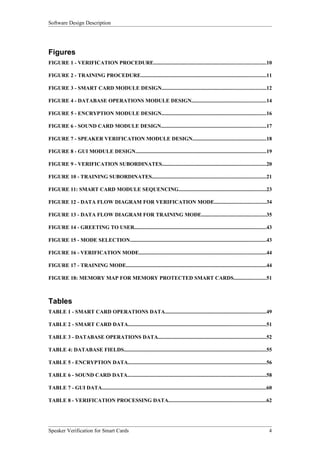
1 INTRODUCTION.................................................................................................................................6
   1.1 PURPOSE.............................................................................................................................................6
   1.2 SCOPE.................................................................................................................................................6
   1.3 DEFINITIONS AND ACRONYMS.................................................................................................................7
   1.4 REFERENCES........................................................................................................................................8
2 DECOMPOSITION DESCRIPTION...............................................................................................9
   2.1 SYSTEM ENTITIES...............................................................................................................................12
      2.1.1 Smart Card Operations...........................................................................................................12
      2.1.2 Smart Card Data.....................................................................................................................13
      2.1.3 Database Operations..............................................................................................................14
      2.1.4 Database Data........................................................................................................................15
      2.1.5 Encryption...............................................................................................................................16
      2.1.6 Sound Card.............................................................................................................................17
      2.1.7 Speaker Verification...............................................................................................................18
      2.1.8 GUI.........................................................................................................................................19
      2.1.9 Verification Processing..........................................................................................................20
      2.1.10 Training Processing..............................................................................................................21
3 DEPENDENCY DESCRIPTION......................................................................................................22
   3.1 SYSTEM ENTITIES...............................................................................................................................23
      3.1.1 Smart Card Operations...........................................................................................................23
      3.1.2 Smart Card Data.....................................................................................................................24
      3.1.3 Database Operations..............................................................................................................25
      3.1.4 Database Data........................................................................................................................26
      3.1.5 Encryption...............................................................................................................................27
      3.1.6 Sound Card.............................................................................................................................28
      3.1.7 Speaker Verification...............................................................................................................29
      3.1.8 GUI.........................................................................................................................................30
      3.1.9 Verification Processing..........................................................................................................31
      3.1.10 Training Processing .............................................................................................................32
4 INTERFACE DESCRIPTION..........................................................................................................33
   4.1 SYSTEM ENTITIES ..............................................................................................................................36
      4.1.1 Smart Card Data.....................................................................................................................36
      4.1.2 Smart Card Operations...........................................................................................................36
      4.1.3 Database Data........................................................................................................................38
      4.1.4 Database Operations..............................................................................................................38
      4.1.5 Encryption...............................................................................................................................41
      4.1.6 Sound card..............................................................................................................................42
      4.1.7 Graphical User Interface........................................................................................................43
      4.1.8 Speaker Verification...............................................................................................................46
      4.1.9 Verification Processing .......................................................................................................47
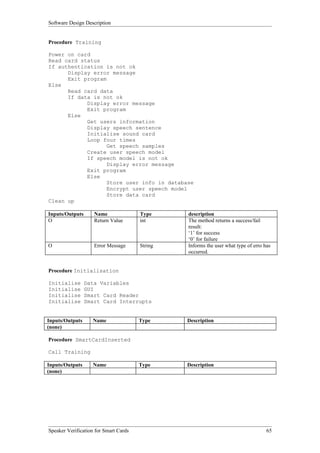
      4.1.10 Training Processing..............................................................................................................48
5 DETAILED DESIGN DESCRIPTION.............................................................................................49
   5.1 SYSTEM ENTITIES...............................................................................................................................49
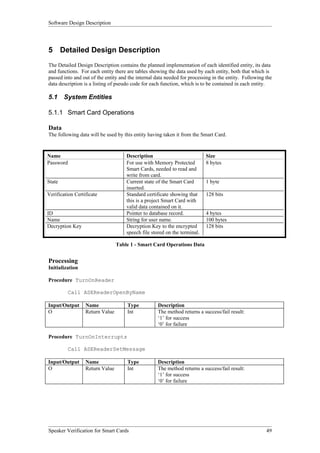
      5.1.1 Smart Card Operations...........................................................................................................49
      5.1.2 Smart Card Data.....................................................................................................................51
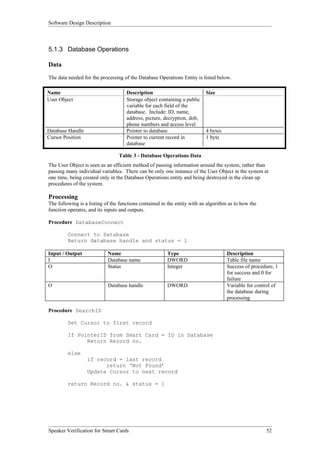
      5.1.3 Database Operations..............................................................................................................52
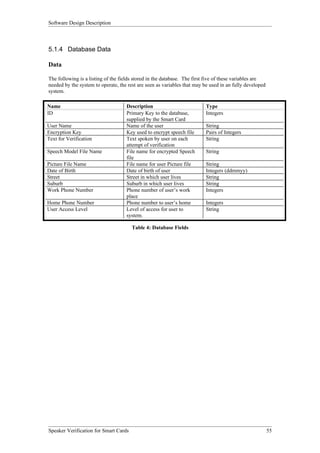
      5.1.4 Database Data........................................................................................................................55
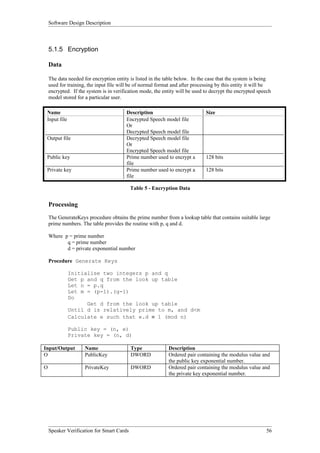
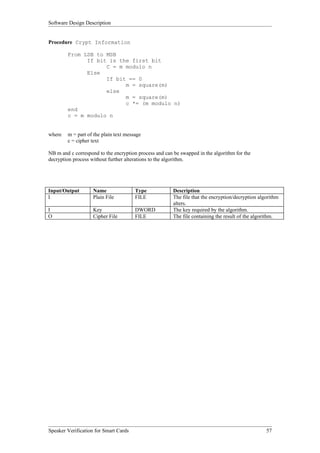
      5.1.5 Encryption...............................................................................................................................56
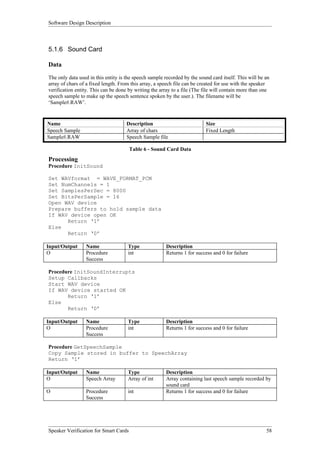
      5.1.6 Sound Card.............................................................................................................................58
      5.1.7 Speaker Verification...............................................................................................................59
      5.1.8 GUI.........................................................................................................................................60
      5.1.9 Verification Processing..........................................................................................................62
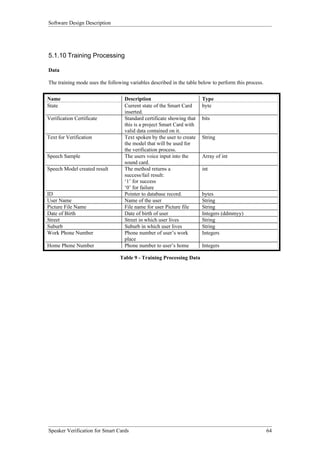
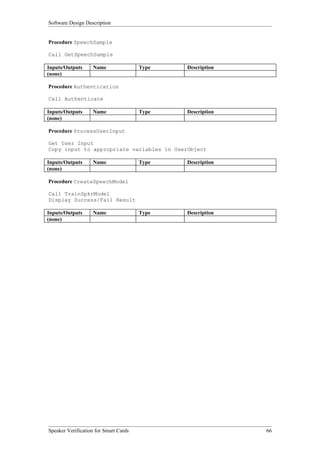
      5.1.10 Training Processing .............................................................................................................64


Speaker Verification for Smart Cards                                                                                                                        3
Software Design Description


Figures
FIGURE 1 - VERIFICATION PROCEDURE...................................................................................10

FIGURE 2 - TRAINING PROCEDURE.............................................................................................11

FIGURE 3 - SMART CARD MODULE DESIGN.............................................................................12

FIGURE 4 - DATABASE OPERATIONS MODULE DESIGN.......................................................14

FIGURE 5 - ENCRYPTION MODULE DESIGN..............................................................................16

FIGURE 6 - SOUND CARD MODULE DESIGN..............................................................................17

FIGURE 7 - SPEAKER VERIFICATION MODULE DESIGN.......................................................18

FIGURE 8 - GUI MODULE DESIGN.................................................................................................19

FIGURE 9 - VERIFICATION SUBORDINATES.............................................................................20

FIGURE 10 - TRAINING SUBORDINATES.....................................................................................21

FIGURE 11: SMART CARD MODULE SEQUENCING.................................................................23

FIGURE 12 - DATA FLOW DIAGRAM FOR VERIFICATION MODE......................................34

FIGURE 13 - DATA FLOW DIAGRAM FOR TRAINING MODE................................................35

FIGURE 14 - GREETING TO USER..................................................................................................43

FIGURE 15 - MODE SELECTION.....................................................................................................43

FIGURE 16 - VERIFICATION MODE..............................................................................................44

FIGURE 17 - TRAINING MODE........................................................................................................44

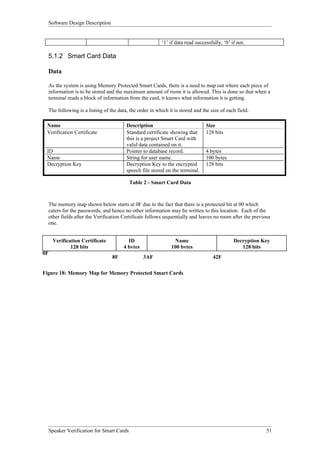
FIGURE 18: MEMORY MAP FOR MEMORY PROTECTED SMART CARDS........................51


Tables
TABLE 1 - SMART CARD OPERATIONS DATA...........................................................................49

TABLE 2 - SMART CARD DATA......................................................................................................51

TABLE 3 - DATABASE OPERATIONS DATA................................................................................52

TABLE 4: DATABASE FIELDS..........................................................................................................55

TABLE 5 - ENCRYPTION DATA.......................................................................................................56

TABLE 6 - SOUND CARD DATA.......................................................................................................58

TABLE 7 - GUI DATA..........................................................................................................................60

TABLE 8 - VERIFICATION PROCESSING DATA........................................................................62


Speaker Verification for Smart Cards                                                                                                        4
Software Design Description


TABLE 9 - TRAINING PROCESSING DATA..................................................................................64


Speaker Verification for Smart Cards                                                                                5
Software Design Description


1 Introduction
This is the Software Description Specification for the Speaker Verification for Smart Cards project

1.1     Purpose

The Software Design Description (SDD) for this project has been developed in order to give the project
a clear direction and understanding of the project during the implementation stages. In this design the
project group has tried to identify all of the working components of the system that needs to be
developed to satisfy the Software Requirements Specification (SRS), previously developed. Once
identified these components are fully described in their structure, function and relationships with other
components. The method in which the system operates is also described, the proposed way in which
the system is to be tested, and the way in which the SRS is satisfied (traceability). It is the intention of
the Project group that in producing this document an independent developer could produce the required
model from this design description.


1.2     Scope

This Software Design Description has been written from the top-level, down to algorithms for each
individual function that is needed in the system. From this document the system can be developed by
project group members, individually taking entities, developing each of these through the algorithms
and knowing the interactions needed with other entities by referring to the SDD.

The SDD is divided into four sections:

•     Decomposition Description
•     Dependency Description
•     Interface Description
•     Detail Description

Decomposition Description:
Describes how the system is broken down into distinct entities.

Dependency Description:
Shows the relationship between the entities and identifies the dependent entities by defining the shared
resources.

Interface Description:
Details of external and internal interfaces not provided in the software requirements specification.

Detail Description:
Contains the internal details for each entity, including attribute descriptions for identification,
processing and data.

The entities identified in the Decomposition Description are carried through each of the other sections
to show the structure of the system as a whole.


Speaker Verification for Smart Cards                                                                      6
Software Design Description


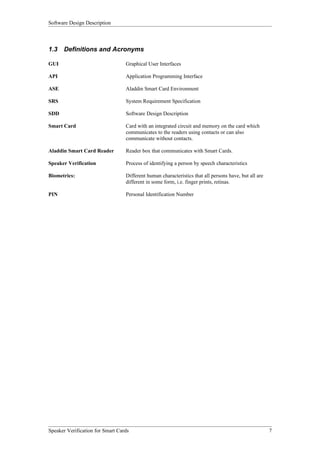
1.3   Definitions and Acronyms

GUI                               Graphical User Interfaces

API                               Application Programming Interface

ASE                               Aladdin Smart Card Environment

SRS                               System Requirement Specification

SDD                               Software Design Description

Smart Card                        Card with an integrated circuit and memory on the card which
                                  communicates to the readers using contacts or can also
                                  communicate without contacts.

Aladdin Smart Card Reader         Reader box that communicates with Smart Cards.

Speaker Verification              Process of identifying a person by speech characteristics

Biometrics:                       Different human characteristics that all persons have, but all are
                                  different in some form, i.e. finger prints, retinas.

PIN                               Personal Identification Number


Speaker Verification for Smart Cards                                                                   7
Software Design Description


1.4    References


EMV ‘96, Integrated Circuit Card Specification for Payment Systems

International Standard ISO/IEC 7816-4

Article: ‘Continuous Speech Verification’, IEEE Signal Processing Magazine, May 1995 Vol 12, No.3

Joseph P. Campbell Jr, ‘Speaker Verification: A Tutorial’

Sadaoki Furui, ‘An Overview of Speaker Verification Technology’

Douglas O’Shaughnessy, ‘Speaker Verification’

W. Rankl and W. Effing; Smart Card Handbook; John Wiley & Sons Ltd, Baffins Lane, Chichester,

West Sussex PO19 1UD, England, Second Edition 1997

ANSI/IEEE Std 1016 – 1987, IEEE Recommended Practice for Software Design Description.

Zoreda, J. L. & Oton, j. M.; Smart Cards; 1994 Artech House Inc., USA

Gurewich, N, & Gurewich, O,; Teach Yourself Visual C++ in Twenty One Days; fourth edition; 1997
Sams Publishing, USA

Sedgewick, R., Algorithms in C++; 1992 Addison and Wesley Publishing Company Inc., USA

Contemporary Cryptology, The Science of Information Integrity; edited by Simmons, G. J.; 1992 IEEE
Inc., US

Meyer, C. H. & Matyas, S. M.; Cryptography: A new dimension in computer data security; 1982 John
Wiley & Sons Inc., USA


Speaker Verification for Smart Cards                                                                8
Software Design Description


2       Decomposition Description
After analysing the SRS, there were two modes of operation identified in section 2.2 of the SRS,
System Modes and States. These modes are to be programmed into the system as two controlling
processing modules and are User Verification and User Training. From this, separate flow diagrams of
system operations needed to complete these processes were developed, which in turn assisted in the
process of identifying the components/entities needed in the system. It is important to note that the
separate processes both use the same decomposition of components: their data and functionality.

Verification Procedure:
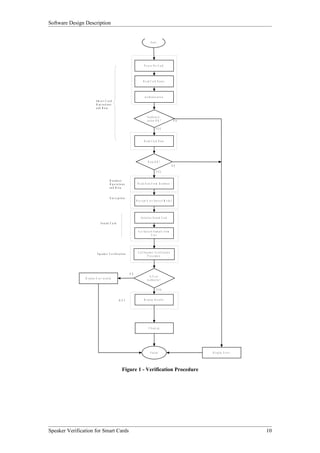
The project group, see the Verification procedure as the most used function of the system. The process
involves a Smart Card being inserted into the reader by a user, the user’s information being taken from
the card, the system prompting the user for some speech, the system matching the user’s speech against
speech models and displaying the results of the procedure.

Training Procedure:
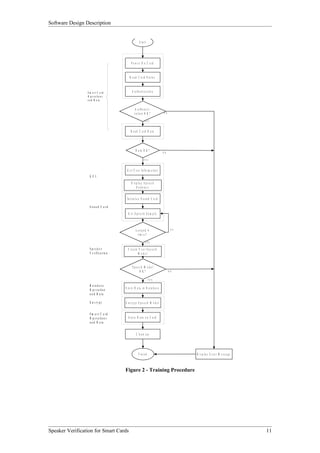
The second function of the system is to initially train the cards for users and to have the ability to
update information, for example speech models or user details. To achieve this the process will be;
The user entering a Smart Card, empty or needing a update, obtaining the new user details and speech
samples, creating a speech model, and storing the appropriate data on the Smart Card and in the
database.

The system is using the following technologies to achieve the required processes:
• Sound Card for Recording Speech
• Encryption for Security
• Database for Storage of User Data
• Speaker Verification Algorithm for Matching Recorded Speech Against Speech Models
• Graphical User Interface for Displaying Results and Communication with User

The logical decomposition of the system from the use of these different technologies follows:

1.    Smart Card Operations
2.    Smart Card Data
3.    Database Operations
4.    Database Data
5.    Encryption
6.    Sound Card
7.    Speaker Verification
8.    GUI
9.    Verification Processing
10.   Training Processing

The two identified processes, Verification and Training, can be seen in Figure 1 and 2 below in
addition to the entities that compose the processes and hence system.


Speaker Verification for Smart Cards                                                                     9
Software Design Description


                                                                                        S tart


                                                                                 P o w er O n C ard


                                                                                R e ad C a rd S tatu s


                                                                                  A u th e n tic atio n
                           Sm art C ard
                           O p e ratio n s
                           an d D a ta

                                                                                     A u th e n c ti-
                                                                                    c atio n O K ?               N O

                                                                                               YES


                                                                                 R e ad C ard D a ta


                                                                                     D ata O K ?
                                                                                                                N O
                                                                                               YES

                                            D atab ase
                                            O p e r a tio n s             R e ad D ata F ro m D atab as e
                                            an d D a ta


                                            E n c ryp tio n
                                                                         D e crypt U se r S pe ec h M o de l


                                                                             In itia lis e S o u n d C a rd
                                 Sound C ard

                                                                           G e t S p e e c h S am p le fro m
                                                                                           U ser


                             S p e a k e r V e r i fi c a ti o n          C all S p e ak e r V e rific atio n
                                                                                     P ro c e du re


                                                                   N O
                                                                                      Is U s e r
                D is p lay U s e r in valid
                                                                                    A u th e n tic ?


                                                                                                 YES


                                                        G U I                    D is p lay R e s u lts


                                                                                      C le an u p


                                                                                        F in is h                      D is p lay E rro r


                                                           Figure 1 - Verification Procedure


Speaker Verification for Smart Cards                                                                                                        10
Software Design Description


                                                     S ta rt


                                             P o w e r O n C a rd


                                            R e a d C a rd S ta tu s


                 S m a rt C a rd              A u th e n tic a tio n
                 O p e r a t io n s
                 a n d D a ta

                                                 A u th e n c ti-
                                                c a tio n O K ?               N O


                                                           YES


                                             R e a d C a rd D a ta


                                                 D a ta O K ?
                                                                             N O

                                                          YES


                                         G e t U s e r In f o r m a tio n
                   G U I
                                             D is p la y S p e e c h
                                                  S e n te n c e


                                         In itia lis e S o u n d C a r d

                   S ou n d C ard
                                          G e t S p e e c h S a m p le


                                                  Looped 4                            N O
                                                   tim e s ?

                                                            YES

                   Speaker                C re a te U s e r S p e e c h
                   V e r ific a tio n               M odel


                                              Speech M odel
                                                  O K?                              N O

                                                                 YES

                   D a ta b a s e
                   O p e r a tio n      S to re D a ta in D a ta b a s e
                   a n d D a ta

                   E n cryp t           E n c ry p t S p e e c h M o d e l


                   S m art C a rd
                   O p e r a tio n s      S to re D a ta o n C a rd
                   a n d D a ta


                                                  C le a n u p


                                                     F in is h                              D is p la y E rro r M e s s a g e


                                        Figure 2 - Training Procedure


Speaker Verification for Smart Cards                                                                                            11
Software Design Description


2.1    System Entities


2.1.1 Smart Card Operations

Type:
The entity “Smart Card Operations” is of the type Interface to External Hardware

Purpose:
As part of the project, it is a requirement that Smart Cards be used to contain information about a user
(SRS 1.2). That is, a user must have a Smart Card to be able to use the system. The entity “Smart Card
Operations” exists because the Smart Card reader and the Smart Cards themselves have to be interfaced
with to read and write data. This entity provides the functionality to be able to do that.

Function:
This entity provides the functionality to read from, write to and authenticate Smart Cards. The entity
“Smart Card Data” describes what data is to be read from and written to the Smart Cards.


Subordinates:
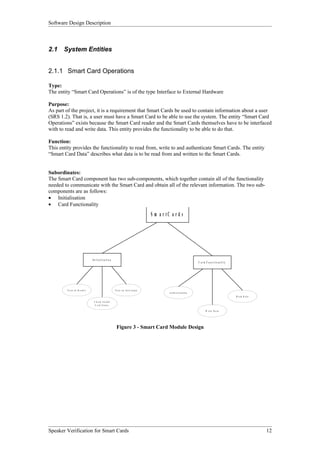
The Smart Card component has two sub-components, which together contain all of the functionality
needed to communicate with the Smart Card and obtain all of the relevant information. The two sub-
components are as follows:
• Initialisation
• Card Functionality
                                                                                   S m a r tC a r d s


                               In itia lisa tio n
                                                                                                                     C ar d F u n c tio n ality


         Tu rn o n R e ade r                            T u rn o n In te rru pts
                                                                                             A u th e n tica tio n
                                                                                                                                                  R e a d D a ta

                                C h e c k I n it ia l
                                 C a rd S ta tu s

                                                                                                                            W r it e D a t a


                                                         Figure 3 - Smart Card Module Design


Speaker Verification for Smart Cards                                                                                                                               12
Software Design Description


2.1.2 Smart Card Data

Type:
This entity is a data storage element.

Purpose:
This entity describes the data storage method on the Smart Cards and hence is a ‘File Structure’ for the
Smart Card. This entity is required due to the constraint of limited memory available, as identified in
SRS 2.4.

Function:
With a specific structure of data on each card, processing of the data held on the card is made easier.
This identification of the file structure is also responsible for identifying what information needs to be
stored on the Smart Cards. Additional fields may be added if thought to be an addition to the
functionality of the system but those identified in this entity are seen as the necessary fields for the
system to work.

Subordinates:
The data elements that make up this entity are as follows:
Verification Certificate, ID, Name, Decryption Key


Speaker Verification for Smart Cards                                                                     13
Software Design Description


2.1.3 Database Operations

Type:
This entity is an interface to external software.

Purpose:
This entity is needed to open and manage an external database by providing routines to return or store
data used in the system. The functions contained in this entity are all public, which means that the
entity itself can be considered a library object to some central processing program. The need for the
database was identified in SRS 3.4 due to the multiple fields needed for each user.

Function:
The Database operations entity provides all of the functionality to be able to interface with an Access
Database. It will initially connect to the database itself, read data, write data and then disconnect from
the database.

Subordinates:
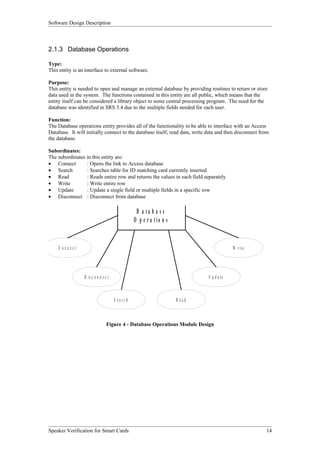
The subordinates in this entity are:
• Connect        : Opens the link to Access database
• Search         : Searches table for ID matching card currently inserted
• Read           : Reads entire row and returns the values in each field separately
• Write          : Write entire row
• Update         : Update a single field or multiple fields in a specific row
• Disconnect : Disconnect from database

                                                  D a ta b a s e
                                                 O p e r a tio n s


     C onnect                                                                             W r it e


                 D is c o n n e c t                                          U p d a te


                                      S earc h                       R ead


                                 Figure 4 - Database Operations Module Design


Speaker Verification for Smart Cards                                                                    14
Software Design Description


2.1.4 Database Data

Type:
External Access database used for data storage.

Purpose:
The use of a database to store large amounts of data simplifies the data storage since the methods
needed have already been designed, implemented and tested. This also adds to the robustness of the
system. The purpose of having this as an entity is so that all elements in the database can be described
formally

Function:
The external database is used in this system for storage of application data, which is related to each
user. In some fields there are pointers/file names, to where files which are used by the system for a
particular user, for example user picture.

Subordinates:
The data elements that make up this entity are as follows:
ID, Username, Encryption Key, Text for Verification, Speech Model Filename, Picture Filename, Date
of Birth, Address, Work/Home Phone numbers, User Access Level.


Speaker Verification for Smart Cards                                                                     15
Software Design Description


2.1.5 Encryption

Type:
The entity is of the type Data Processing Element

Purpose:
Security is a large part of the project as identified in SRS 3.3. Encryption is seen as one of the key
elements in the security strategy for the system.

Function:
The encryption module generates a public and private key for each new card, the same keys is used for
the life of the card and the public key and private key is a distinct pair. This information is stored on the
card. The public key is released to the terminal when information related to the cardholder, needs to be
stored in the database.

This module also provides the means to encrypt and decrypt information.

Subordinates:
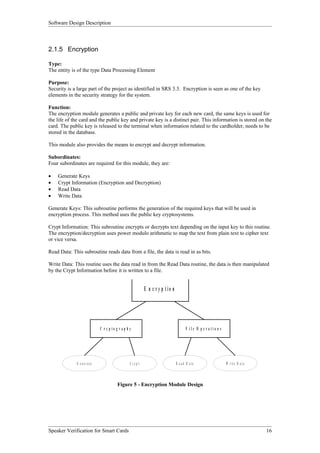
Four subordinates are required for this module, they are:

•   Generate Keys
•   Crypt Information (Encryption and Decryption)
•   Read Data
•   Write Data

Generate Keys: This subroutine performs the generation of the required keys that will be used in
encryption process. This method uses the public key cryptosystems.

Crypt Information: This subroutine encrypts or decrypts text depending on the input key to this routine.
The encryption/decryption uses power modulo arithmetic to map the text from plain text to cipher text
or vice versa.

Read Data: This subroutine reads data from a file, the data is read in as bits.

Write Data: This routine uses the data read in from the Read Data routine, the data is then manipulated
by the Crypt Information before it is written to a file.


                                                            E n c r y p tio n


                              C r yp to g r ap h y                                     F ile O p e r atio n s


             G e n e r a te                      C ry p t                       R e a d D a ta                  W r it e D a t a


                                         Figure 5 - Encryption Module Design


Speaker Verification for Smart Cards                                                                                               16
Software Design Description


2.1.6 Sound Card

Type:
This entity is of the type Hardware Interfacing Element.

Purpose:
Since the project requires the use of speaker verification as the security biometric (SRS 1.2), a sound
card and microphone is required to capture the speech of the user. This entity exists so that the program
can interface with the sound card and microphone

Function:
The functions of this entity include:
• Initialising the sound card
• Retrieving data samples from the sound card

Initialisation of the sound card involves telling the sound card that we require its services. We then
specify the following recording parameters:
• Samples rate ( The number of samples to be taken from the microphone per second )
• Sampling accuracy
• Stereo/Mono recording
• Number of buffers

Subordinates:
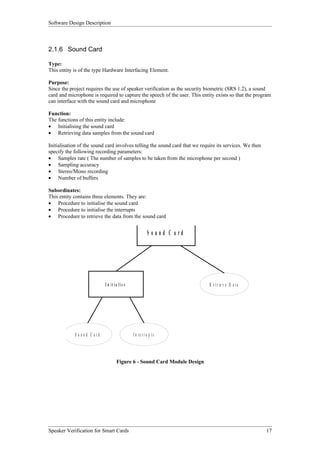
This entity contains three elements. They are:
• Procedure to initialise the sound card
• Procedure to initialise the interrupts
• Procedure to retrieve the data from the sound card


                                                         S o und C a rd


                              I n it ia lis e                                R e t r ie v e D a t a


            S o u n d C ard                     In te rru p ts


                                      Figure 6 - Sound Card Module Design


Speaker Verification for Smart Cards                                                                     17
Software Design Description


2.1.7 Speaker Verification

Type:
The type of this entity is Data Processing Element.

Purpose:
This entity exists because as required in the project (SRS 1.2), the form of security biometric to be used
is “Speaker Verification”.

Function:
This entity implements the speaker verification procedures/algorithms by comparing a user speech
model with a speech sample. It then returns a success/fail result.
This entity also has the ability to create user speech models. It does this by analysing a number of
speech samples recorded by the user, and extracting features from these speech samples. It then creates
a speech model of that user to be used in the verification process.

Subordinates:
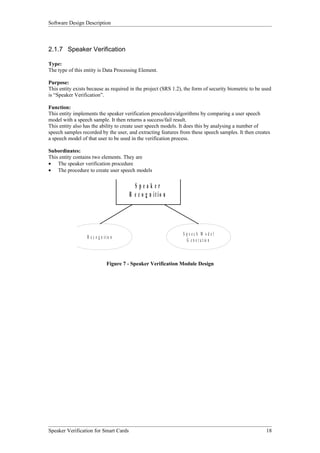
This entity contains two elements. They are
• The speaker verification procedure
• The procedure to create user speech models


                                            Speaker
                                          R e c o g n itio n


                                                                 S peech M odel
                  R e c o g n i t io n
                                                                   G e n e r a t io n


                                 Figure 7 - Speaker Verification Module Design


Speaker Verification for Smart Cards                                                                   18
Software Design Description


2.1.8 GUI

Type:
The entity “GUI” is of the type I/O Device.

Purpose:
The Graphical user interface provides an interface where the user can interact with the system. The
GUI allows for the user to enter input into the system and also to receive output from the system.

The user input will be their card and a sample of their speech pattern. The GUI will provide a real time
view of their sample wave given, and also all the users personal details, if the result from the speech
algorithm is successful.

Function:
The GUI displays the interaction between the user and the system. It is able to display the following
information that is passed to it:

•   That a card is present in the system
•   The speech sample
•   The outcome of the verification process.
•   The users personal details

Subordinates:
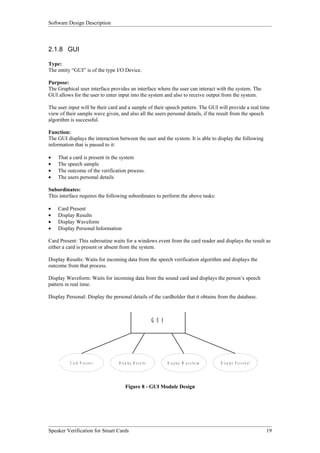
This interface requires the following subordinates to perform the above tasks:

•   Card Present
•   Display Results
•   Display Waveform
•   Display Personal Information

Card Present: This subroutine waits for a windows event from the card reader and displays the result as
either a card is present or absent from the system.

Display Results: Waits for incoming data from the speech verification algorithm and displays the
outcome from that process.

Display Waveform: Waits for incoming data from the sound card and displays the person’s speech
pattern in real time.

Display Personal: Display the personal details of the cardholder that it obtains from the database.


                                                             G U I


          C ard P res en t       D i s p la y R e s u lt s           D is p l a y W a v e f o r m   D is p la y P e r s o n a l


                                      Figure 8 - GUI Module Design


Speaker Verification for Smart Cards                                                                                              19
Software Design Description


2.1.9 Verification Processing

Type:
The entity “Verification Processing” is a Processing Element.

Purpose:
The entity “Verification Processing” is one of the two possible modes of operation in the project (SRS
2.2). This entity exists to control the flow of the verification procedure that is the main requirement of
the project.

Function:
The function of this entity is to implement the verification procedure outlined in Figure 1 using all of
the entities. This entity will also handle events produced by the Sound Card, the Smart Card and the
GUI entities.

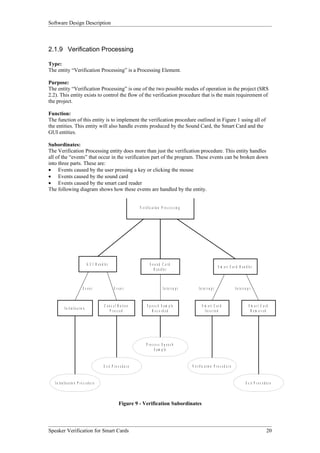
Subordinates:
The Verification Processing entity does more than just the verification procedure. This entity handles
all of the “events” that occur in the verification part of the program. These events can be broken down
into three parts. These are:
• Events caused by the user pressing a key or clicking the mouse
• Events caused by the sound card
• Events caused by the smart card reader
The following diagram shows how these events are handled by the entity.


                                                                                 V e r if ic a t io n P r o c e s s in g


                                        G U I H a n d le r                                S ou nd C ard
                                                                                                                                                     S m a r t C a r d H a n d le r
                                                                                             H a n d le r


                                   E vent                      Event                                   I n te r ru p t           I n te r ru p t                     In te rr u p t


                                                       C a n c e l B u tto n            S p e e c h S a m p le                      S m art C ard                                S m art C ard
             I n it i a l is a t io n
                                                            P ressed                        R ec ord ed                               I n s e r te d                               R em oved


                                                                                       P ro c ess S p eec h
                                                                                             S a m p le


                                                      E x it P r o c e d u r e                                             V e r if i c a t io n P r o c e d u r e


   I n it i a l is a t io n P r o c e d u r e                                                                                                                                 E x it P r o c e d u r e


                                                                    Figure 9 - Verification Subordinates


Speaker Verification for Smart Cards                                                                                                                                                             20
Software Design Description


2.1.10 Training Processing

Type:
The entity “Training Processing” is a Processing Element

Purpose:
The entity “Training Processing” is the other of the two possible modes of operation in the project
(SRS 2.2). This entity exists to control the flow of the speech training procedure that is required before
the verification procedure can take place.

Function:
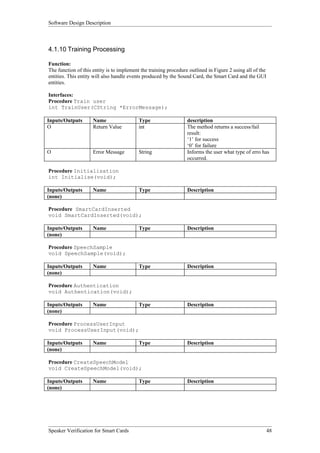
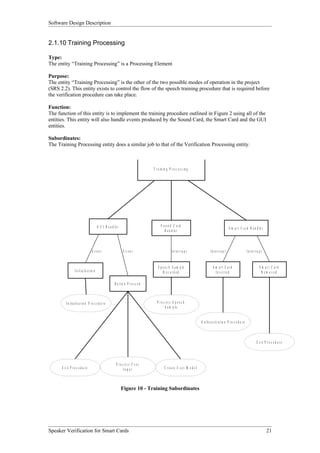
The function of this entity is to implement the training procedure outlined in Figure 2 using all of the
entities. This entity will also handle events produced by the Sound Card, the Smart Card and the GUI
entities.

Subordinates:
The Training Processing entity does a similar job to that of the Verification Processing entity.


                                                                                       T r a in in g P r o c e s s in g


                                              G U I H a n d le r                             S o und C ard
                                                                                                                                                            S m a r t C a r d H a n d le r
                                                                                                H a n d le r


                                       Event                        Event                               I n te rr u p t                  I n te r r u p t                      In te r r u p t


                                                                                           S p e e c h S a m p le                          S m art C ard                                   S m art C ard
                   I n i t ia l is a t io n                                                    R ec o rd ed                                  In s e r te d                                   R em oved

                                                             B u tto n P r e s s e d


          I n it i a l is a t io n P r o c e d u r e                                      P roc ess S p eec h
                                                                                               S a m p le


                                                                                                                                A u t h e n t i c a t io n P r o c e d u r e


                                                                                                                                                                                         E x it P r o c e d u r e


                                                              P roc ess U ser
      E x it P r o c e d u r e                                     In p u t                      C r e a te U s e r M o d e l


                                                                   Figure 10 - Training Subordinates


Speaker Verification for Smart Cards                                                                                                                                                              21
Software Design Description


3 Dependency Description
After breaking down the system in entities and identifying each of these entities, it is necessary to
identify the entities that rely on other entities to do their work. That is, identify which entities each
entity is dependent on. Describing the dependencies of each entity helps identify what functionality
each of the entities needs to provide to maintain a coherent system. The two diagrams in the previous
section (Figure 1and Figure 2) provide an insight into the dependencies of the entities “Verification
Processing” and “Training Processing”. These diagrams provide a starting point to describing the
dependencies of each entity.


Speaker Verification for Smart Cards                                                                        22
Software Design Description


3.1        System Entities

3.1.1 Smart Card Operations

Type:
The entity “Smart Card Operations” is of the type Interface to External Hardware

Purpose:
As part of the project, it is a requirement that Smart Cards be used to contain information about a user
(SRS 1.2). That is, a user must have a Smart Card to be able to use the system. The entity “Smart Card
Operations” exists because the Smart Card reader and the Smart Cards themselves have to be interfaced
with to read and write data. This entity provides the functionality to be able to do that.

Dependencies:
The entity “Smart Card Operations” is used by other entities as a ‘tool’. The initialisation of the Smart
Card reader is done at the start of the program. The read and authentication operations are called
whenever a Smart Card is inserted into the reader. The write operation is used only in “Training Mode”
when a new user is created and the data is transferred onto the card.

Timing and Sequencing:
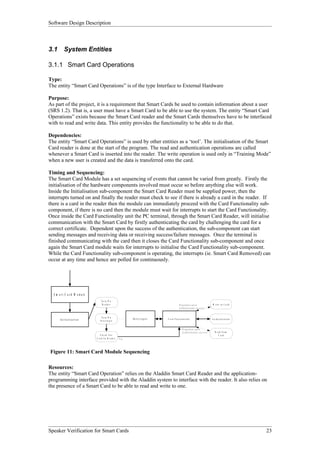
The Smart Card Module has a set sequencing of events that cannot be varied from greatly. Firstly the
initialisation of the hardware components involved must occur so before anything else will work.
Inside the Initialisation sub-component the Smart Card Reader must be supplied power, then the
interrupts turned on and finally the reader must check to see if there is already a card in the reader. If
there is a card in the reader then the module can immediately proceed with the Card Functionality sub-
component, if there is no card then the module must wait for interrupts to start the Card Functionality.
Once inside the Card Functionality unit the PC terminal, through the Smart Card Reader, will initialise
communication with the Smart Card by firstly authenticating the card by challenging the card for a
correct certificate. Dependent upon the success of the authentication, the sub-component can start
sending messages and receiving data or receiving success/failure messages. Once the terminal is
finished communicating with the card then it closes the Card Functionality sub-component and once
again the Smart Card module waits for interrupts to initialise the Card Functionality sub-component.
While the Card Functionality sub-component is operating, the interrupts (ie. Smart Card Removed) can
occur at any time and hence are polled for continuously.


  S m a r t C a r d M o d u le
                                     Tu rn O n
                                      R eader                                                   D ependent upon                                 W r ite to C a rd
                                                                                                A u t h e n t ic a t io n s u c c e s s


                                     Tu rn O n
       In iti a li za ti o n                                  In te r r u p ts   C a r d F u n c t io n a lit y                                 A u t h e n t ic a t io n
                                    In te rru pts


                                                                                                     D ep en dent upo n
                                                                                                     A u t h e n t ic a t i o n s u c c e s s      R e a d fro m
                                     C h e ck F or                                                                                                     C ard
                                 C a rd In R e ade r   Y es


Figure 11: Smart Card Module Sequencing

Resources:
The entity “Smart Card Operation” relies on the Aladdin Smart Card Reader and the application-
programming interface provided with the Aladdin system to interface with the reader. It also relies on
the presence of a Smart Card to be able to read and write to one.


Speaker Verification for Smart Cards                                                                                                                                        23
Software Design Description


3.1.2 Smart Card Data

Type:
This entity is a data storage element.

Purpose:
This entity describes the data storage method on the Smart Cards and hence is a ‘File Structure’ for the
Smart Card. This entity is required due to the constraint of limited memory available, as identified in
SRS 2.4.

Dependencies:
The Smart Card is dependent upon the Smart Card Operations entity and to communicate with this
entity it uses the ASE API. This entity is also restricted in the amount of storage it can have due to the
memory storage capabilities of the Smart Cards, approx. 8kb. Also identified in SRS 2.6.2.1 is the
assumption that the Smart Cards will not be corrupted.

Resources:
This Smart Card entity uses ASE Smart Cards and the ASE API.


Speaker Verification for Smart Cards                                                                     24
Software Design Description


3.1.3 Database Operations

Type:
This entity is an interface to external software.

Purpose:
This entity is needed to open and manage an external database by providing routines to return or store
data used in the system. The functions contained in this entity are all public, which means that the
entity itself can be considered a library object to some central processing program. The need for the
database was identified in SRS 3.4 due to the multiple fields needed for each user.

Dependencies:
The Database Operations entity only interacts with two external entities, that of the central processing
entity and the Database entity. The dependencies arising from interaction with these two entities are
listed below.

Database entity
    • Microsoft Access Table being used.
    • Table with correct fields

Processing entity:
    • Send appropriate data when writing to database
    • Prompting for initialisation of database.

Resources:
The external database used by the system is to be Microsoft Access, which is now readily available and
installed on most computers, due to the fact that it comes together with Microsoft Office which is the
preferred choice of most users in regards to word processing.
This entity has the following external resources:
     • SQL
     • Access Database


Speaker Verification for Smart Cards                                                                   25
Software Design Description


3.1.4 Database Data

Type:
External Access database used for data storage.

Purpose:
The use of a database to store large amounts of data simplifies the data storage since the methods
needed have already been designed, implemented and tested. This also adds to the robustness of the
system. The purpose of having this as an entity is so that all elements in the database can be described
formally.

Dependencies:
The entity is reliant on the ID variable being unique, as this will be used as the primary key to the
database.

Resources:
The database that is used in this Database entity is Microsoft Access.


Speaker Verification for Smart Cards                                                                    26
Software Design Description


3.1.5 Encryption

Type:
The entity is of the type Data Processing Element

Purpose:
Security is a large part of the project as identified in SRS 3.3. Encryption is seen as one of the key
elements in the security strategy for the system.

Dependencies:
The encryption module relies on the input from the database and the Smart Card. It then supplies the
decrypted information about the user to the GUI and the decrypted speech model to the speech
verification module.

Resources:
This module requires the input from the database for the speech model. Using the decryption key that is
stored on the card the model is decrypted so that it can be used by the speech verification module.


Speaker Verification for Smart Cards                                                                     27
Software Design Description


3.1.6 Sound Card

Type:
This entity is of the type Hardware Interfacing Element.

Purpose:
Since the project requires the use of speaker verification as the security biometric, a sound card and
microphone is required to capture the speech of the user. This entity exists so that the program can
interface with the sound card and microphone

Dependencies:
The entity “Sound Card” is a relatively independent one. It takes no inputs.
The entity “Speaker Verification” is dependent on it for the speech samples from the user.

Resources:
Obviously, this entity uses the following external resources:
• Sound Card
• Microphone


Speaker Verification for Smart Cards                                                                     28
Software Design Description


3.1.7 Speaker Verification

Type:
The type of this entity is Data Processing Element.

Purpose:
This entity exists because as required in the project (SRS 1.2), the form of security biometric to be used
is “Speaker Verification”.

Dependencies:
The Speaker Verification entity has two sources of input. These are speech samples, received from the
entity “Sound Card” and the decrypted speech model, received from the entity “Encryption”.

On creation of the user speech model, the model is sent to the entity “Encryption” to be encrypted. It is
then sent to the entity “Database”.

The Speaker Verification module makes some allowances in its processing due to the assumptions and
dependencies stated in the SRS. These being:

SRS 2.6.1.2 The speech sample from the user will have the text spoken correctly, not repeated or
stopped half way through and hence need to be repeated.

SRS 2.6.3.2 The microphone and sound card used is able to record the user speech to a quality good
enough for the voice verification software.

Resources:
At this stage in the project, the speaker verification methods are contained within a library file that is
included when compiling the program. This is the only external resource used by the Speaker
Verification entity.


Speaker Verification for Smart Cards                                                                         29
Software Design Description


3.1.8 GUI

Type:
The entity “GUI” is of the type I/O Device.

Purpose:
The Graphical user interface provides an interface where the user can interact with the system. The
GUI allows for the user to enter input into the system and also to receive output from the system.

The user input will be their card and a sample of their speech pattern. The GUI will provide a real time
view of their sample wave given, and also all the users personal details, if the result from the speech
algorithm is successful.

Dependencies:
The GUI module requires information to be sent to it from the sound card, the speech verification and
the database modules.

The only output the GUI provides to the internal system is to inform the Smart Card module that a card
has been entered into the system or that one has been removed. The GUI is not directly concerned with
the other modules of the system.

The GUI component is also reliant upon the assumption that users of the system have enough skill that
they are able to operate the GUI. This assumption was stated in the SRS 2.6.3.1.

Resources:
Visual C++ graphical tools were used to create the graphical user interface. This interface uses the
Window’s API to determine if there is a card in the reader.


Speaker Verification for Smart Cards                                                                   30
Software Design Description


3.1.9 Verification Processing

Type:
The entity “Verification Processing” is a Processing Element.

Purpose:
The entity “Verification Processing” is one of the two possible modes of operation in the project (SRS
2.2). This entity exists to control the flow of the verification procedure that is the main requirement of
the project.

Dependencies:
As the Verification Processing entity is a controlling entity, it is dependent upon the other entities to
provide it with the resources it needs. The entity is not in direct control over any pieces of hardware,
but it uses the other entities as library files to control the hardware attached to, and used but the system.
This entity also uses other entities for storage of application data and processing of information.

The entities used by the Verification Processing entity include:
Smart Card Operations, Smart Card Data, Database Operations, Database Data, Encryption, Sound
card, Speaker Verification and GUI.

Resources:
The Verification Processing entity, when being used is in control of the system, not directly in control
of the hardware or external software being used by the system, but using the entities that do control
these things. As such this entity has no need of resources other than processing and memory storage
capabilities and the ability to control the other entities.


Speaker Verification for Smart Cards                                                                      31
Software Design Description


3.1.10 Training Processing

Type:
The entity “Training Processing” is a Processing Element

Purpose:
The entity “Training Processing” is the other of the two possible modes of operation in the project
(SRS 2.2). This entity exists to control the flow of the speech training procedure that is required before
the verification procedure can take place.

Dependencies:
As the Verification Processing entity is a controlling entity, it is dependent upon the other entities to
provide it with the resources it needs. The entity is not in direct control over any pieces of hardware,
but it uses the other entities as library files to control the hardware attached to, and used but the system.
This entity also uses other entities for storage of application data and processing of information.

The entities used by the Verification Processing entity include:
Smart Card Operations, Smart Card Data, Database Operations, Database Data, Encryption, Sound
card, Speaker Verification and GUI.

Resources:
The Training Processing entity, when being used is in control of the system, not directly in control of
the hardware or external software being used by the system, but using the entities that do control these
things. As such this entity has no need of resources other than processing and memory storage
capabilities and the ability to control the other entities.


Speaker Verification for Smart Cards                                                                      32
Software Design Description


4 Interface Description
The decomposition description shows know how the system should behave, from here we can identify
the entities that are needed, the functions they perform and how they interact within the system.

The system has been designed with six entities they are:

•   Smart Card
•   Database
•   Encryption
•   Sound card
•   Graphical user interface
•   Speaker verification

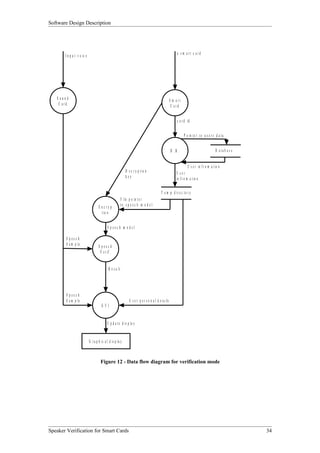
For the two different modes of operations the data flow between the entities varies.

Verification Mode

For the verification mode the system requires two external data inputs, these are the users card and a
sample of their voice. Once the system has this information it will begin to process this information
along with the data it has access to it from the database. The speech verification entity uses the
decrypted speech model and the speech sample to determine if they are the same people. If the result
from this test is successful in the view of the cardholder then restricted information is allowed to be
display by the GUI, otherwise this information is withheld.

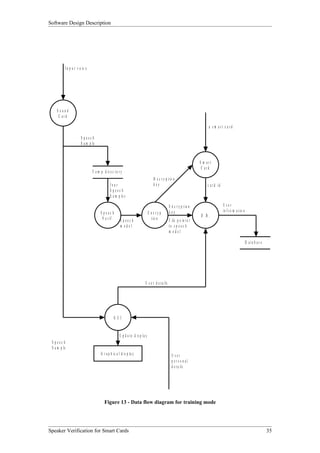
Training Mode

The training mode’s flow of data is similar to the verification mode, however it handles more speech
samples. Once four speech samples have been entered into the system the speech verification module
creates the speech module from the average of the four inputs samples. Using the encryption entity it
then encrypts this model. A reference to this model is stored in the database corresponding to the card
id. Also stored in the database is information about the cardholder.


Speaker Verification for Smart Cards                                                                      33
Software Design Description


                                                                                                            a sm art c ard
       I n p u t v o ic e


   Sound                                                                                               S m art
    C ard                                                                                               C ard


                                                                                                            c a r d id


                                                                                                                 P o in t e r t o u s e r s d a t a


                                                                                                       D .B .                               D a ta b a s e


                                                                                                                     U s e r in f r o m a t io n
                                                             D e c r y p t io n                            U ser
                                                             key                                           in f r o m a t io n

                                                                                             T e m p d ir e c t o r y
                                                          F i le p o in t e r
                                    E n c ry p            to s p e e c h m o d e l
                                       t io n


                                            S peec h m odel

        S peech
        S a m p le                  S peech
                                     V e r if .


                                             R e s u lt


        S peech
        S a m p le                                              U s e r p e r s o n a l d e t a i ls
                                       G UI


                                            U p d a t e d i s p la y


                            G r a p h ic a l d i s p la y


                                      Figure 12 - Data flow diagram for verification mode


Speaker Verification for Smart Cards                                                                                                                         34
Software Design Description


              I n p u t v o ic e


    Sound
     C ard

                                                                                                                                    a sm art c ard

                           S peech
                           S a m p le


                                                                                                                               S m art
                                                                                                                                C ard
                                   T e m p d ir e c t o r y
                                                                                         D e c r y p t io n
                                                  four                                   key                                        c a r d id
                                                  S peec h
                                                  S a m p le s

                                                                                                         E n c r y p t io n                      U ser
                                         S peec h                                     E nc ryp           key                                     in f r o m a t io n
                                                                                                                               D .B .
                                          V e r if .       S peec h                     t io n           F il e p o in t e r
                                                           m odel                                        to s p e e c h
                                                                                                         m odel

                                                                                                                                                                       D a ta b a s e


                                                                                  U s e r d e t a i ls


                                                       G UI


                                                           U p d a t e d is p l a y
 S peec h
 S a m p le
                                          G r a p h i c a l d i s p la y                                   U ser
                                                                                                           personal
                                                                                                           d e t a i ls


                                             Figure 13 - Data flow diagram for training mode


Speaker Verification for Smart Cards                                                                                                                                                    35
Software Design Description


 4.1    System Entities


 4.1.1 Smart Card Data

 Function
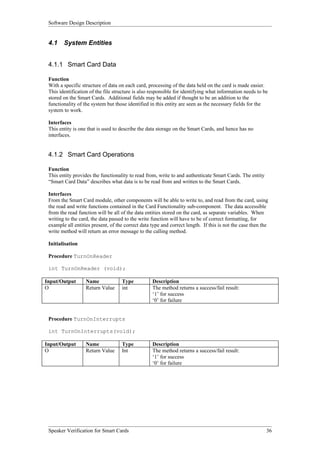
 With a specific structure of data on each card, processing of the data held on the card is made easier.
 This identification of the file structure is also responsible for identifying what information needs to be
 stored on the Smart Cards. Additional fields may be added if thought to be an addition to the
 functionality of the system but those identified in this entity are seen as the necessary fields for the
 system to work.

 Interfaces
 This entity is one that is used to describe the data storage on the Smart Cards, and hence has no
 interfaces.


 4.1.2 Smart Card Operations

 Function
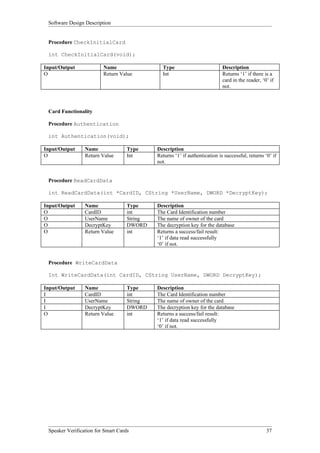
 This entity provides the functionality to read from, write to and authenticate Smart Cards. The entity
 “Smart Card Data” describes what data is to be read from and written to the Smart Cards.

 Interfaces
 From the Smart Card module, other components will be able to write to, and read from the card, using
 the read and write functions contained in the Card Functionality sub-component. The data accessible
 from the read function will be all of the data entities stored on the card, as separate variables. When
 writing to the card, the data passed to the write function will have to be of correct formatting, for
 example all entities present, of the correct data type and correct length. If this is not the case then the
 write method will return an error message to the calling method.

 Initialisation

 Procedure TurnOnReader

 int TurnOnReader (void);

Input/Output       Name             Type           Description
O                  Return Value     int            The method returns a success/fail result:
                                                   ‘1’ for success
                                                   ‘0’ for failure


 Procedure TurnOnInterrupts

 int TurnOnInterrupts(void);

Input/Output       Name             Type           Description
O                  Return Value     Int            The method returns a success/fail result:
                                                   ‘1’ for success
                                                   ‘0’ for failure


 Speaker Verification for Smart Cards                                                                      36
Software Design Description


 Procedure CheckInitialCard

 int CheckInitialCard(void);

Input/Output             Name                  Type                          Description
O                        Return Value          Int                           Returns ‘1’ if there is a
                                                                             card in the reader, ‘0’ if
                                                                             not.


 Card Functionality

 Procedure Authentication

 int Authentication(void);

Input/Output     Name               Type     Description
O                Return Value       Int      Returns ‘1’ if authentication is successful, returns ‘0’ if
                                             not.


 Procedure ReadCardData

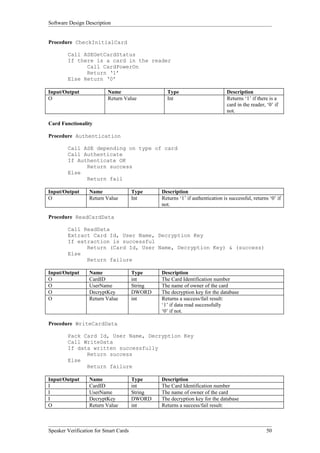
 int ReadCardData(int *CardID, CString *UserName, DWORD *DecryptKey);

Input/Output     Name               Type     Description
O                CardID             int      The Card Identification number
O                UserName           String   The name of owner of the card
O                DecryptKey         DWORD    The decryption key for the database
O                Return Value       int      Returns a success/fail result:
                                             ‘1’ if data read successfully
                                             ‘0’ if not.


 Procedure WriteCardData

 Int WriteCardData(int CardID, CString UserName, DWORD DecryptKey);

Input/Output     Name               Type     Description
I                CardID             int      The Card Identification number
I                UserName           String   The name of owner of the card
I                DecryptKey         DWORD    The decryption key for the database
O                Return Value       int      Returns a success/fail result:
                                             ‘1’ if data read successfully
                                             ‘0’ if not.


 Speaker Verification for Smart Cards                                                              37
Software Design Description


    4.1.3 Database Data

    Function
    The external database is used in this system for storage of application data, which is related to each
    user. In some fields there are pointers/file names, to where files which are used by the system for a
    particular user, for example user picture.

    Interfaces
    The Access database communicates with the system through the Windows API. The Database entity is
    directly controlled by the Database Operations entity, hence it needs no functionality other than data
    storage.


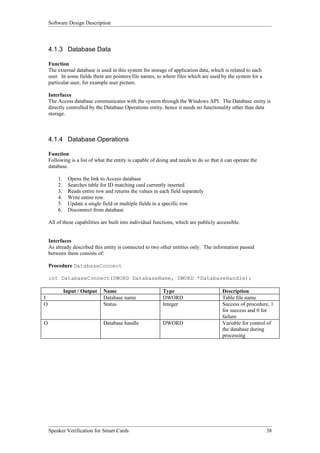
    4.1.4 Database Operations

    Function
    Following is a list of what the entity is capable of doing and needs to do so that it can operate the
    database.

        1.    Opens the link to Access database
        2.    Searches table for ID matching card currently inserted
        3.    Reads entire row and returns the values in each field separately
        4.    Write entire row.
        5.    Update a single field or multiple fields in a specific row
        6.    Disconnect from database

    All of these capabilities are built into individual functions, which are publicly accessible.


    Interfaces
    As already described this entity is connected to two other entities only. The information passed
    between them consists of:

    Procedure DatabaseConnect

    int DatabaseConnect(DWORD DatabaseName, DWORD *DatabaseHandle);

             Input / Output   Name                         Type                         Description
I                             Database name                DWORD                        Table file name
O                             Status                       Integer                      Success of procedure, 1
                                                                                        for success and 0 for
                                                                                        failure
O                             Database handle              DWORD                        Variable for control of
                                                                                        the database during
                                                                                        processing


    Speaker Verification for Smart Cards                                                                     38
Software Design Description


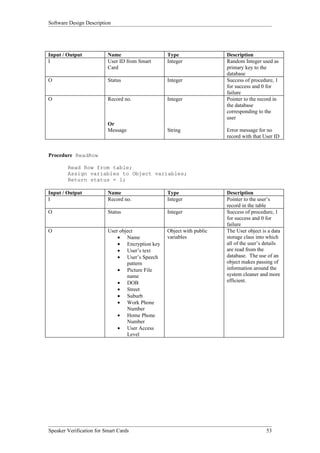
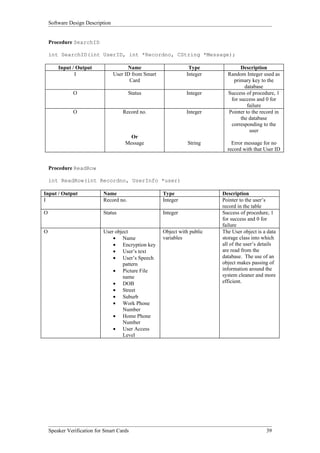
    Procedure SearchID

    int SearchID(int UserID, int *Recordno, CString *Message);

        Input / Output                  Name                      Type              Description
               I                  User ID from Smart             Integer      Random Integer used as
                                         Card                                   primary key to the
                                                                                      database
               O                         Status                  Integer      Success of procedure, 1
                                                                               for success and 0 for
                                                                                       failure
               O                      Record no.                 Integer      Pointer to the record in
                                                                                    the database
                                                                               corresponding to the
                                                                                        user
                                         Or
                                       Message                    String        Error message for no
                                                                              record with that User ID


    Procedure ReadRow

    int ReadRow(int Recordno, UserInfo *user)

Input / Output              Name                       Type                 Description
I                           Record no.                 Integer              Pointer to the user’s
                                                                            record in the table
O                           Status                     Integer              Success of procedure, 1
                                                                            for success and 0 for
                                                                            failure
O                           User object                Object with public   The User object is a data
                                • Name                 variables            storage class into which
                                • Encryption key                            all of the user’s details
                                • User’s text                               are read from the
                                • User’s Speech                             database. The use of an
                                    pattern                                 object makes passing of
                                • Picture File                              information around the
                                    name                                    system cleaner and more
                                • DOB                                       efficient.
                                • Street
                                • Suburb
                                • Work Phone
                                    Number
                                • Home Phone
                                    Number
                                • User Access
                                    Level


    Speaker Verification for Smart Cards                                                        39
Software Design Description


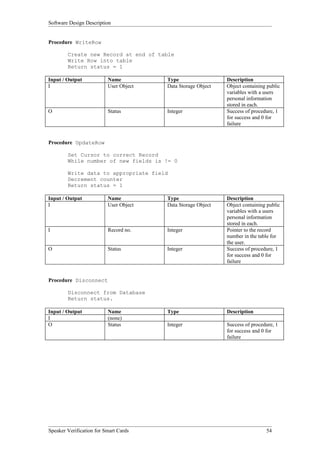
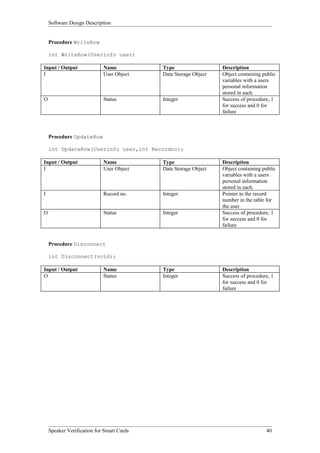
    Procedure WriteRow

    int WriteRow(Userinfo user)

Input / Output              Name           Type                  Description
I                           User Object    Data Storage Object   Object containing public
                                                                 variables with a users
                                                                 personal information
                                                                 stored in each.
O                           Status         Integer               Success of procedure, 1
                                                                 for success and 0 for
                                                                 failure


    Procedure UpdateRow

    int UpdateRow(Userinfo user,int Recordno);

Input / Output              Name           Type                  Description
I                           User Object    Data Storage Object   Object containing public
                                                                 variables with a users
                                                                 personal information
                                                                 stored in each.
I                           Record no.     Integer               Pointer to the record
                                                                 number in the table for
                                                                 the user.
O                           Status         Integer               Success of procedure, 1
                                                                 for success and 0 for
                                                                 failure


    Procedure Disconnect

    int Disconnect(void);

Input / Output              Name           Type                  Description
O                           Status         Integer               Success of procedure, 1
                                                                 for success and 0 for
                                                                 failure


    Speaker Verification for Smart Cards                                            40
Software Design Description


    4.1.5 Encryption

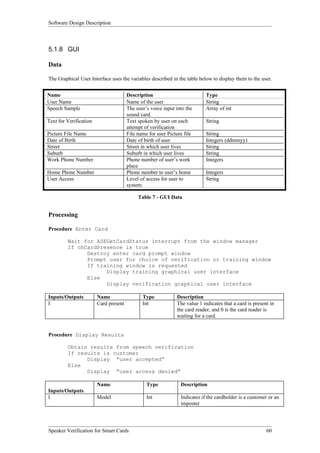
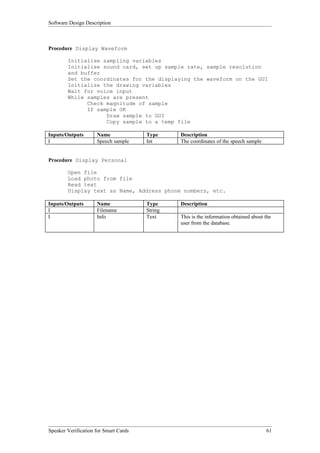
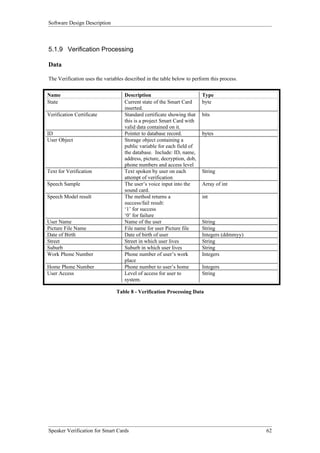
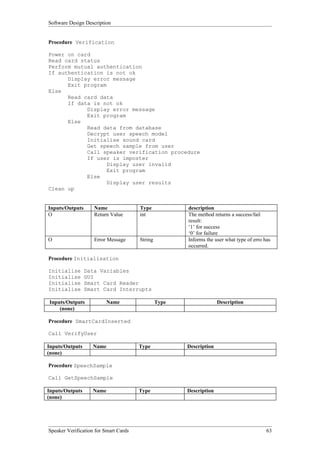
    Function
    The encryption module generates a public and private key for each new card, the same keys is used for
    the life of the card and the public key and private key is a distinct pair. This information is stored on the
    card. The public key is released to the terminal when information related to the cardholder needs to be
    stored in the database.

    This module also provides the means to encrypt and decrypt information

    Interfaces
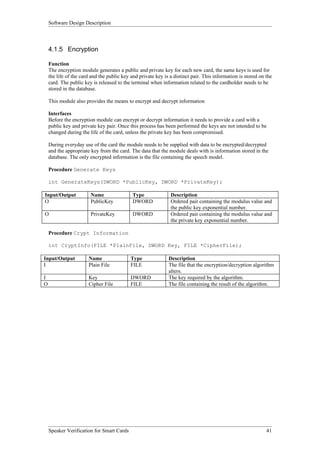
    Before the encryption module can encrypt or decrypt information it needs to provide a card with a
    public key and private key pair. Once this process has been performed the keys are not intended to be
    changed during the life of the card, unless the private key has been compromised.

    During everyday use of the card the module needs to be supplied with data to be encrypted/decrypted
    and the appropriate key from the card. The data that the module deals with is information stored in the
    database. The only encrypted information is the file containing the speech model.

    Procedure Generate Keys

    int GenerateKeys(DWORD *PublicKey, DWORD *PrivateKey);

Input/Output            Name                 Type              Description
O                       PublicKey            DWORD             Ordered pair containing the modulus value and
                                                               the public key exponential number.
O                       PrivateKey           DWORD             Ordered pair containing the modulus value and
                                                               the private key exponential number.

    Procedure Crypt Information

    int CryptInfo(FILE *PlainFile, DWORD Key, FILE *CipherFile);

Input/Output           Name                 Type              Description
I                      Plain File           FILE              The file that the encryption/decryption algorithm
                                                              alters.
I                      Key                  DWORD             The key required by the algorithm.
O                      Cipher File          FILE              The file containing the result of the algorithm.


    Speaker Verification for Smart Cards                                                                      41
Software Design Description


    4.1.6 Sound card

    Function
    The functions of this entity include:
    • Initialising the sound card
    • Retrieving data samples from the sound card

    Initialisation of the sound card involves telling the sound card that we require its services. We then
    specify the following recording parameters:
    • Samples rate ( The number of samples to be taken from the microphone per second )
    • Sampling accuracy
    • Stereo/Mono recording
    • Number of buffers

    Interfaces
    The entity “Sound Card” and its methods will be encapsulated within a class in the program.

    This entity interacts with other entities through the three methods:
    • InitSound
    • InitSoundInterrupts
    • GetSpeechSample

    The method InitSound has no parameters, it simply returns a success/fail result. This will be ‘1’ for
    success and ‘0’ for failure.

    The InitSoundInterrupts method also has no parameters and it also returns a success/fail result. It
    returns ‘1’ for success and ‘0’ for failure.

    The method GetSpeechSample has one parameter. This will be an array of fixed length and on
    completion of the method it will contain the last speech sample recorded by the sound card. The
    method will also return a success/fail result. This will be ‘1’ for success and ‘0’ for failure.

    Procedure InitSound

    int InitSound(void);

Input/Output           Name                Type              Description
O                      Procedure           int               Returns 1 for success and 0 for failure
                       Success

    Procedure InitSoundInterrupts

    int InitSoundInterrupts(void);

Input/Output           Name                Type              Description
O                      Procedure           int               Returns 1 for success and 0 for failure
                       Success

    Procedure GetSpeechSample

    int GetSpeechSample(int Speech[]);

Input/Output           Name                Type              Description
O                      Speech Array        Array of int      Array containing last speech sample recorded by
                                                             sound card
O                      Procedure           int               Returns 1 for success and 0 for failure
                       Success


    Speaker Verification for Smart Cards                                                                     42
Software Design Description


4.1.7 Graphical User Interface

Function
The GUI displays the interaction between the user and the system. It is able to display the following
information that is passed to it:

•   That a card is present in the system
•   The speech sample
•   The outcome of the verification process.
•   The users personal details

The following are screenshots of the GUI in its different modes of operation.


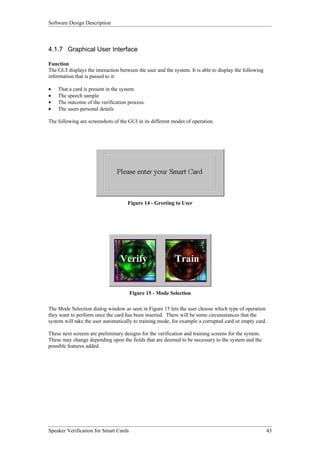
                                     Figure 14 - Greeting to User


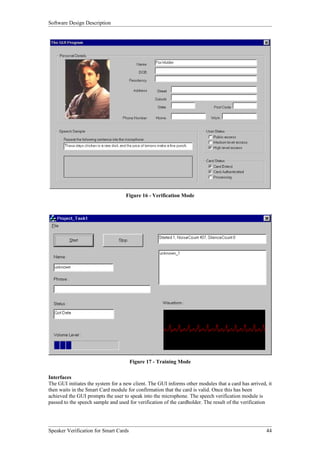
                                       Figure 15 - Mode Selection

The Mode Selection dialog window as seen in Figure 15 lets the user choose which type of operation
they want to perform once the card has been inserted. There will be some circumstances that the
system will take the user automatically to training mode, for example a corrupted card or empty card.

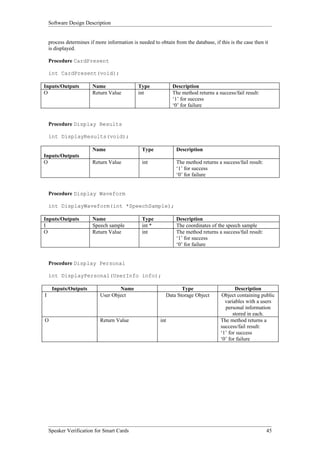
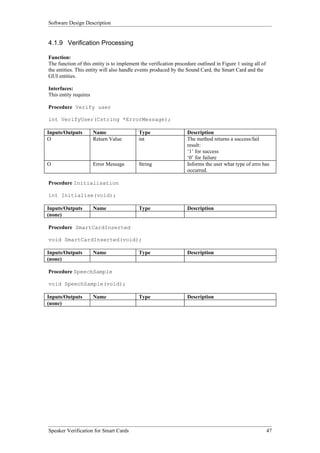
These next screens are preliminary designs for the verification and training screens for the system.
These may change depending upon the fields that are deemed to be necessary to the system and the
possible features added.


Speaker Verification for Smart Cards                                                                    43
Software Design Description


                                    Figure 16 - Verification Mode


                                       Figure 17 - Training Mode

Interfaces
The GUI initiates the system for a new client. The GUI informs other modules that a card has arrived, it
then waits in the Smart Card module for confirmation that the card is valid. Once this has been
achieved the GUI prompts the user to speak into the microphone. The speech verification module is
passed to the speech sample and used for verification of the cardholder. The result of the verification


Speaker Verification for Smart Cards                                                                 44
Software Design Description


    process determines if more information is needed to obtain from the database, if this is the case then it
    is displayed.

    Procedure CardPresent

    int CardPresent(void);

Inputs/Outputs           Name                 Type             Description
O                        Return Value         int              The method returns a success/fail result:
                                                               ‘1’ for success
                                                               ‘0’ for failure


    Procedure Display Results

    int DisplayResults(void);

                         Name                   Type             Description
Inputs/Outputs
O                        Return Value           int              The method returns a success/fail result:
                                                                 ‘1’ for success
                                                                 ‘0’ for failure


    Procedure Display Waveform

    int DisplayWaveform(int *SpeechSample);

Inputs/Outputs           Name                   Type             Description
I                        Speech sample          int *            The coordinates of the speech sample
O                        Return Value           int              The method returns a success/fail result:
                                                                 ‘1’ for success
                                                                 ‘0’ for failure


    Procedure Display Personal

    int DisplayPersonal(UserInfo info);

     Inputs/Outputs                 Name                           Type                      Description
I                           User Object                     Data Storage Object       Object containing public
                                                                                        variables with a users
                                                                                        personal information
                                                                                            stored in each.
O                           Return Value                 int                          The method returns a
                                                                                      success/fail result:
                                                                                      ‘1’ for success
                                                                                      ‘0’ for failure


    Speaker Verification for Smart Cards                                                                     45
Software Design Description


    4.1.8 Speaker Verification

    Function
    This entity implements the speaker verification procedures/algorithms by comparing a user speech
    model with a speech sample. It then returns a success/fail result.
    This entity also has the ability to create user speech models. It does this by analysing a number of
    speech samples recorded by the user, and extracting features from these speech samples. It then creates
    a speech model of that user to be used in the verification process.

    Interfaces
    The entity “Speaker Verification” and its methods will be encapsulated within a class in the program.

    This entity interacts with other entities through the two methods:
    • TrainSpkrModel

        Procedure TrainSpkrModel

    int TrainSpkrModel(char *spkrID, char *allFileNames[],
                       int numFiles );

    Input/Output                  Variable Name             Type                Description
    I                             spkrID                    char *              The name of the user
    I                             allFileNames              char * []           Array of filenames
                                                                                containing the speech
                                                                                samples
    I                             numFiles                  int                 The number of filenames
                                                                                listed in the above array
    O                             Return Value              int                 The method returns a
                                                                                success/fail result:
                                                                                ‘1’ for success
                                                                                ‘0’ for failure


    Upon success, this method creates a user speech model. The speech model is stored in a file called
    “UserName.HMM”

    •     SpkrVerif

    The function prototype for this method is as follows:

    Procedure SpkrVerif

    int SpkrVerif( char *fileName, char *spkrID );

Input/Output                  Variable Name                 Type                    Description
I                             fileName                      char *                  The name of the file
                                                                                    containing the speech
                                                                                    sample
I                             spkrID                        char *                  The name of the user
O                             Return Value                  int                     The method returns a
                                                                                    success/fail result:
                                                                                    ‘1’ for success
                                                                                    ‘0’ for failure


    Speaker Verification for Smart Cards                                                                 46
Software Design Description


4.1.9 Verification Processing

Function:
The function of this entity is to implement the verification procedure outlined in Figure 1 using all of
the entities. This entity will also handle events produced by the Sound Card, the Smart Card and the
GUI entities.

Interfaces:
This entity requires

Procedure Verify user

int VerifyUser(Cstring *ErrorMessage);

Inputs/Outputs         Name                Type                   Description
O                      Return Value        int                    The method returns a success/fail
                                                                  result:
                                                                  ‘1’ for success
                                                                  ‘0’ for failure
O                      Error Message       String                 Informs the user what type of erro has
                                                                  occurred.

Procedure Initialisation

int Initialise(void);

Inputs/Outputs         Name                Type                   Description
(none)

Procedure SmartCardInserted

void SmartCardInserted(void);

Inputs/Outputs         Name                Type                   Description
(none)

Procedure SpeechSample

void SpeechSample(void);

Inputs/Outputs         Name                Type                   Description
(none)


Speaker Verification for Smart Cards                                                                       47
Software Design Description


4.1.10 Training Processing

Function:
The function of this entity is to implement the training procedure outlined in Figure 2 using all of the
entities. This entity will also handle events produced by the Sound Card, the Smart Card and the GUI
entities.

Interfaces:
Procedure Train user
int TrainUser(CString *ErrorMessage);

Inputs/Outputs       Name                  Type                   description
O                    Return Value          int                    The method returns a success/fail
                                                                  result:
                                                                  ‘1’ for success
                                                                  ‘0’ for failure
O                    Error Message         String                 Informs the user what type of erro has
                                                                  occurred.

Procedure Initialisation
int Initialise(void);

Inputs/Outputs       Name                  Type                   Description
(none)

Procedure SmartCardInserted
void SmartCardInserted(void);

Inputs/Outputs       Name                  Type                   Description
(none)

Procedure SpeechSample
void SpeechSample(void);

Inputs/Outputs       Name                  Type                   Description
(none)

Procedure Authentication
void Authentication(void);

Inputs/Outputs       Name                  Type                   Description
(none)

Procedure ProcessUserInput
void ProcessUserInput(void);

Inputs/Outputs       Name                  Type                   Description
(none)

Procedure CreateSpeechModel
void CreateSpeechModel(void);

Inputs/Outputs       Name                  Type                   Description
(none)


Speaker Verification for Smart Cards                                                                       48
Software Design Description


5 Detailed Design Description
The Detailed Design Description contains the planned implementation of each identified entity, its data
and functions. For each entity there are tables showing the data used by each entity, both that which is
passed into and out of the entity and the internal data needed for processing in the entity. Following the
data description is a listing of pseudo code for each function, which is to be contained in each entity.

5.1     System Entities

5.1.1 Smart Card Operations

Data
The following data will be used by this entity having taken it from the Smart Card.


Name                                 Description                           Size
Password                             For use with Memory Protected         8 bytes
                                     Smart Cards, needed to read and
                                     write from card.
State                                Current state of the Smart Card       1 byte
                                     inserted.
Verification Certificate             Standard certificate showing that     128 bits
                                     this is a project Smart Card with
                                     valid data contained on it.
ID                                   Pointer to database record.           4 bytes
Name                                 String for user name.                 100 bytes
Decryption Key                       Decryption Key to the encrypted       128 bits
                                     speech file stored on the terminal.

                                 Table 1 - Smart Card Operations Data


Processing
Initialization

Procedure TurnOnReader

         Call ASEReaderOpenByName

Input/Output      Name               Type           Description
O                 Return Value       Int            The method returns a success/fail result:
                                                    ‘1’ for success
                                                    ‘0’ for failure

Procedure TurnOnInterrupts

         Call ASEReaderSetMessage

Input/Output      Name               Type           Description
O                 Return Value       Int            The method returns a success/fail result:
                                                    ‘1’ for success
                                                    ‘0’ for failure


Speaker Verification for Smart Cards                                                                   49
Software Design Description


Procedure CheckInitialCard

        Call ASEGetCardStatus
        If there is a card in the reader
              Call CardPowerOn
              Return ‘1’
        Else Return ‘0’

Input/Output              Name                    Type                          Description
O                         Return Value            Int                           Returns ‘1’ if there is a
                                                                                card in the reader, ‘0’ if
                                                                                not.

Card Functionality

Procedure Authentication

        Call ASE depending on type of card
        Call Authenticate
        If Authenticate OK
              Return success
        Else
              Return fail

Input/Output      Name                 Type     Description
O                 Return Value         Int      Returns ‘1’ if authentication is successful, returns ‘0’ if
                                                not.

Procedure ReadCardData

        Call ReadData
        Extract Card Id, User Name, Decryption Key
        If extraction is successful
              Return (Card Id, User Name, Decryption Key) & (success)
        Else
              Return failure

Input/Output      Name                 Type     Description
O                 CardID               int      The Card Identification number
O                 UserName             String   The name of owner of the card
O                 DecryptKey           DWORD    The decryption key for the database
O                 Return Value         int      Returns a success/fail result:
                                                ‘1’ if data read successfully
                                                ‘0’ if not.

Procedure WriteCardData

        Pack Card Id, User Name, Decryption Key
        Call WriteData
        If data written successfully
              Return success
        Else
              Return failure

Input/Output      Name                 Type     Description
I                 CardID               int      The Card Identification number
I                 UserName             String   The name of owner of the card
I                 DecryptKey           DWORD    The decryption key for the database
O                 Return Value         int      Returns a success/fail result:


Speaker Verification for Smart Cards                                                                50
Software Design Description


                                                          ‘1’ if data read successfully, ‘0’ if not.

  5.1.2 Smart Card Data

  Data

  As the system is using Memory Protected Smart Cards, there is a need to map out where each piece of
  information is to be stored and the maximum amount of room it is allowed. This is done so that when a
  terminal reads a block of information from the card, it knows what information it is getting.

  The following is a listing of the data, the order in which it is stored and the size of each field.

 Name                                   Description                             Size
 Verification Certificate               Standard certificate showing that       128 bits
                                        this is a project Smart Card with
                                        valid data contained on it.
 ID                                     Pointer to database record.             4 bytes
 Name                                   String for user name.                   100 bytes
 Decryption Key                         Decryption Key to the encrypted         128 bits
                                        speech file stored on the terminal.

                                          Table 2 - Smart Card Data


  The memory map shown below starts at 0F due to the fact that there is a protected bit at 00 which
  caters for the passwords, and hence no other information may be written to this location. Each of the
  other fields after the Verification Certificate follows sequentially and leaves no room after the previous
  one.


     Verification Certificate            ID                    Name                           Decryption Key
             128 bits                  4 bytes                100 bytes                          128 bits
0F
                                 8F              3AF                                42F

Figure 18: Memory Map for Memory Protected Smart Cards


  Speaker Verification for Smart Cards                                                                    51
Software Design Description


5.1.3 Database Operations

Data
The data needed for the processing of the Database Operations Entity is listed below.

Name                                 Description                           Size
User Object                          Storage object containing a public
                                     variable for each field of the
                                     database. Include: ID, name,
                                     address, picture, decryption, dob,
                                     phone numbers and access level
Database Handle                      Pointer to database                   4 bytes
Cursor Position                      Pointer to current record in          1 byte
                                     database

                                 Table 3 - Database Operations Data
The User Object is seen as an efficient method of passing information around the system, rather than
passing many individual variables. There can be only one instance of the User Object in the system at
one time, being created only in the Database Operations entity and being destroyed in the clean up
procedures of the system.

Processing
The following is a listing of the functions contained in the entity with an algorithm as to how the
function operates, and its inputs and outputs.

Procedure DatabaseConnect

         Connect to Database
         Return database handle and status = 1

Input / Output              Name                        Type                         Description
I                           Database name               DWORD                        Table file name
O                           Status                      Integer                      Success of procedure, 1
                                                                                     for success and 0 for
                                                                                     failure
O                           Database handle             DWORD                        Variable for control of
                                                                                     the database during
                                                                                     processing

Procedure SearchID

         Set Cursor to first record

         If PointerID from Smart Card = ID in Database
               Return Record no.

         else
                  if record = last record
                        return ‘Not Found’
                  Update Cursor to next record

         return Record no. & status = 1


Speaker Verification for Smart Cards                                                                  52
Software Design Description


Input / Output            Name                   Type                 Description
I                         User ID from Smart     Integer              Random Integer used as
                          Card                                        primary key to the
                                                                      database
O                         Status                 Integer              Success of procedure, 1
                                                                      for success and 0 for
                                                                      failure
O                         Record no.             Integer              Pointer to the record in
                                                                      the database
                                                                      corresponding to the
                                                                      user
                          Or
                          Message                String               Error message for no
                                                                      record with that User ID


Procedure ReadRow

        Read Row from table;
        Assign variables to Object variables;
        Return status = 1;

Input / Output            Name                   Type                 Description
I                         Record no.             Integer              Pointer to the user’s
                                                                      record in the table
O                         Status                 Integer              Success of procedure, 1
                                                                      for success and 0 for
                                                                      failure
O                         User object            Object with public   The User object is a data
                              • Name             variables            storage class into which
                              • Encryption key                        all of the user’s details
                              • User’s text                           are read from the
                              • User’s Speech                         database. The use of an
                                  pattern                             object makes passing of
                              • Picture File                          information around the
                                  name                                system cleaner and more
                              • DOB                                   efficient.
                              • Street
                              • Suburb
                              • Work Phone
                                  Number
                              • Home Phone
                                  Number
                              • User Access
                                  Level


Speaker Verification for Smart Cards                                                    53
Software Design Description


Procedure WriteRow

        Create new Record at end of table
        Write Row into table
        Return status = 1

Input / Output            Name          Type                  Description
I                         User Object   Data Storage Object   Object containing public
                                                              variables with a users
                                                              personal information
                                                              stored in each.
O                         Status        Integer               Success of procedure, 1
                                                              for success and 0 for
                                                              failure


Procedure UpdateRow

        Set Cursor to correct Record
        While number of new fields is != 0

        Write data to appropriate field
        Decrement counter
        Return status = 1

Input / Output            Name          Type                  Description
I                         User Object   Data Storage Object   Object containing public
                                                              variables with a users
                                                              personal information
                                                              stored in each.
I                         Record no.    Integer               Pointer to the record
                                                              number in the table for
                                                              the user.
O                         Status        Integer               Success of procedure, 1
                                                              for success and 0 for
                                                              failure


Procedure Disconnect

        Disconnect from Database
        Return status.

Input / Output            Name          Type                  Description
I                         (none)
O                         Status        Integer               Success of procedure, 1
                                                              for success and 0 for
                                                              failure


Speaker Verification for Smart Cards                                           54
Software Design Description


5.1.4 Database Data

Data

The following is a listing of the fields stored in the database. The first five of these variables are
needed by the system to operate, the rest are seen as variables that may be used in an fully developed
system.

Name                                Description                           Type
ID                                  Primary Key to the database,          Integers
                                    supplied by the Smart Card
User Name                           Name of the user                      String
Encryption Key                      Key used to encrypt speech file       Pairs of Integers
Text for Verification               Text spoken by user on each           String
                                    attempt of verification
Speech Model File Name              File name for encrypted Speech        String
                                    file
Picture File Name                   File name for user Picture file       String
Date of Birth                       Date of birth of user                 Integers (ddmmyy)
Street                              Street in which user lives            String
Suburb                              Suburb in which user lives            String
Work Phone Number                   Phone number of user’s work           Integers
                                    place
Home Phone Number                   Phone number to user’s home           Integers
User Access Level                   Level of access for user to           String
                                    system.

                                       Table 4: Database Fields


Speaker Verification for Smart Cards                                                                     55
Software Design Description


    5.1.5 Encryption

    Data

    The data needed for encryption entity is listed in the table below. In the case that the system is being
    used for training, the input file will be of normal format and after processing by this entity it will be
    encrypted. If the system is in verification mode, the entity will be used to decrypt the encrypted speech
    model stored for a particular user.

 Name                                   Description                           Size
 Input file                             Encrypted Speech model file
                                        Or
                                        Decrypted Speech model file
 Output file                            Decrypted Speech model file
                                        Or
                                        Encrypted Speech model file
 Public key                             Prime number used to encrypt a        128 bits
                                        file
 Private key                            Prime number used to encrypt a        128 bits
                                        file

                                           Table 5 - Encryption Data


    Processing
    The GenerateKeys procedure obtains the prime number from a lookup table that contains suitable large
    prime numbers. The table provides the routine with p, q and d.

    Where p = prime number
           q = prime number
           d = private exponential number

    Procedure Generate Keys

              Initialise two integers p and q
              Get p and q from the look up table
              Let n = p.q
              Let m = (p-1).(g-1)
              Do
                    Get d from the look up table
              Until d is relatively prime to m, and d<m
              Calculate e such that e.d ≡ 1 (mod n)

              Public key = (n, e)
              Private key = (n, d)

Input/Output         Name                  Type             Description
O                    PublicKey             DWORD            Ordered pair containing the modulus value and
                                                            the public key exponential number.
O                    PrivateKey            DWORD            Ordered pair containing the modulus value and
                                                            the private key exponential number.


    Speaker Verification for Smart Cards                                                                  56
Software Design Description


Procedure Crypt Information

        From LSB to MSB
              If bit is the first bit
                    C = m modulo n
              Else
                    If bit == 0
                          m = square(m)
                    else
                          m = square(m)
                          c *= (m modulo n)
        end
        c = m modulo n


where   m = part of the plain text message
        c = cipher text

NB m and c correspond to the encryption process and can be swapped in the algorithm for the
decryption process without further alterations to the algorithm.


Input/Output        Name               Type             Description
I                   Plain File         FILE             The file that the encryption/decryption algorithm
                                                        alters.
I                   Key                DWORD            The key required by the algorithm.
O                   Cipher File        FILE             The file containing the result of the algorithm.


Speaker Verification for Smart Cards                                                               57
Software Design Description


5.1.6 Sound Card

Data
The only data used in this entity is the speech sample recorded by the sound card itself. This will be an
array of chars of a fixed length. From this array, a speech file can be created for use with the speaker
verification entity. This can be done by writing the array to a file (The file will contain more than one
speech sample to make up the speech sentence spoken by the user.). The filename will be
‘Sample#.RAW’.


Name                                 Description                          Size
Speech Sample                        Array of chars                       Fixed Length
Sample#.RAW                          Speech Sample file

                                       Table 6 - Sound Card Data
Processing
Procedure InitSound

Set WAVformat = WAVE_FORMAT_PCM
Set NumChannels = 1
Set SamplesPerSec = 8000
Set BitsPerSample = 16
Open WAV device
Prepare buffers to hold sample data
If WAV device open OK
      Return ‘1’
Else
      Return ‘0’

Input/Output     Name                Type              Description
O                Procedure           int               Returns 1 for success and 0 for failure
                 Success

Procedure InitSoundInterrupts
Setup Callbacks
Start WAV device
If WAV device started OK
       Return ‘1’
Else
       Return ‘0’

Input/Output     Name                Type              Description
O                Procedure           int               Returns 1 for success and 0 for failure
                 Success

Procedure GetSpeechSample
Copy Sample stored in buffer to SpeechArray
Return ‘1’

Input/Output     Name                Type              Description
O                Speech Array        Array of int      Array containing last speech sample recorded by
                                                       sound card
O                Procedure           int               Returns 1 for success and 0 for failure
                 Success


Speaker Verification for Smart Cards                                                                   58
Software Design Description


5.1.7 Speaker Verification

Data

Processing
As mentioned in the previous section, the code for the speaker verification methods is contained within
a library file. Since we have no access to actual algorithm for these methods there are no algorithms for
this section.


Speaker Verification for Smart Cards                                                                  59
Software Design Description


5.1.8 GUI

Data

The Graphical User Interface uses the variables described in the table below to display them to the user.


Name                                   Description                          Type
User Name                              Name of the user                     String
Speech Sample                          The user’s voice input into the      Array of int
                                       sound card.
Text for Verification                  Text spoken by user on each          String
                                       attempt of verification
Picture File Name                      File name for user Picture file      String
Date of Birth                          Date of birth of user                Integers (ddmmyy)
Street                                 Street in which user lives           String
Suburb                                 Suburb in which user lives           String
Work Phone Number                      Phone number of user’s work          Integers
                                       place
Home Phone Number                      Phone number to user’s home          Integers
User Access                            Level of access for user to          String
                                       system.

                                            Table 7 - GUI Data


Processing

Procedure Enter Card

         Wait for ASEGetCardStatus interrupt from the window manager
         If chCardPresence is true
               Destroy enter card prompt window
               Prompt user for choice of verification or training window
               If training window is requested
                     Display training graphical user interface
               Else
                     Display verification graphical user interface

Inputs/Outputs          Name                  Type            Description
I                       Card present          Int             The value 1 indicates that a card is present in
                                                              the card reader, and 0 is the card reader is
                                                              waiting for a card.


Procedure Display Results

         Obtain results from speech verification
         If results is customer
               Display “user accepted”
         Else
               Display “user access denied”

                        Name                    Type            Description
Inputs/Outputs
I                       Model                   Int             Indicates if the cardholder is a customer or an
                                                                imposter


Speaker Verification for Smart Cards                                                                     60
Software Design Description


Procedure Display Waveform

        Initialise sampling variables
        Initialise sound card, set up sample rate, sample resolution
        and buffer
        Set the coordinates for the displaying the waveform on the GUI
        Initialize the drawing variables
        Wait for voice input
        While samples are present
              Check magnitude of sample
              If sample OK
                    Draw sample to GUI
                    Copy sample to a temp file

Inputs/Outputs       Name              Type     Description
I                    Speech sample     Int      The coordinates of the speech sample


Procedure Display Personal

        Open file
        Load photo from file
        Read text
        Display text as Name, Address phone numbers, etc.

Inputs/Outputs       Name              Type     Description
I                    Filename          String
I                    Info              Text     This is the information obtained about the
                                                user from the database.


Speaker Verification for Smart Cards                                                   61
Software Design Description


5.1.9 Verification Processing

Data

The Verification uses the variables described in the table below to perform this process.


Name                               Description                          Type
State                              Current state of the Smart Card      byte
                                   inserted.
Verification Certificate           Standard certificate showing that    bits
                                   this is a project Smart Card with
                                   valid data contained on it.
ID                                 Pointer to database record.          bytes
User Object                        Storage object containing a
                                   public variable for each field of
                                   the database. Include: ID, name,
                                   address, picture, decryption, dob,
                                   phone numbers and access level
Text for Verification              Text spoken by user on each          String
                                   attempt of verification
Speech Sample                      The user’s voice input into the      Array of int
                                   sound card.
Speech Model result                The method returns a                 int
                                   success/fail result:
                                   ‘1’ for success
                                   ‘0’ for failure
User Name                          Name of the user                     String
Picture File Name                  File name for user Picture file      String
Date of Birth                      Date of birth of user                Integers (ddmmyy)
Street                             Street in which user lives           String
Suburb                             Suburb in which user lives           String
Work Phone Number                  Phone number of user’s work          Integers
                                   place
Home Phone Number                  Phone number to user’s home          Integers
User Access                        Level of access for user to          String
                                   system.

                                Table 8 - Verification Processing Data


Speaker Verification for Smart Cards                                                        62
Software Design Description


Procedure Verification

Power on card
Read card status
Perform mutual authentication
If authentication is not ok
      Display error message
      Exit program
Else
      Read card data
      If data is not ok
            Display error message
            Exit program
      Else
            Read data from database
            Decrypt user speech model
            Initialise sound card
            Get speech sample from user
            Call speaker verification procedure
            If user is imposter
                   Display user invalid
                   Exit program
            Else
                   Display user results
Clean up


Inputs/Outputs      Name               Type            description
O                   Return Value       int             The method returns a success/fail
                                                       result:
                                                       ‘1’ for success
                                                       ‘0’ for failure
O                   Error Message      String          Informs the user what type of erro has
                                                       occurred.

Procedure Initialisation

Initialise       Data Variables
Initialise       GUI
Initialise       Smart Card Reader
Initialise       Smart Card Interrupts

Inputs/Outputs           Name                   Type                 Description
    (none)

Procedure SmartCardInserted

Call VerifyUser

Inputs/Outputs     Name                Type            Description
(none)

Procedure SpeechSample

Call GetSpeechSample

Inputs/Outputs     Name                Type            Description
(none)


Speaker Verification for Smart Cards                                                       63
Software Design Description


5.1.10 Training Processing

Data

The training mode uses the following variables described in the table below to perform this process.


Name                               Description                         Type
State                              Current state of the Smart Card     byte
                                   inserted.
Verification Certificate           Standard certificate showing that   bits
                                   this is a project Smart Card with
                                   valid data contained on it.
Text for Verification              Text spoken by the user to create   String
                                   the model that will be used for
                                   the verification process.
Speech Sample                      The users voice input into the      Array of int
                                   sound card.
Speech Model created result        The method returns a                int
                                   success/fail result:
                                   ‘1’ for success
                                   ‘0’ for failure
ID                                 Pointer to database record.         bytes
User Name                          Name of the user                    String
Picture File Name                  File name for user Picture file     String
Date of Birth                      Date of birth of user               Integers (ddmmyy)
Street                             Street in which user lives          String
Suburb                             Suburb in which user lives          String
Work Phone Number                  Phone number of user’s work         Integers
                                   place
Home Phone Number                  Phone number to user’s home         Integers

                                 Table 9 - Training Processing Data


Speaker Verification for Smart Cards                                                                   64
Software Design Description


Procedure Training

Power on card
Read card status
If authentication is not ok
      Display error message
      Exit program
Else
      Read card data
      If data is not ok
            Display error message
            Exit program
      Else
            Get users information
            Display speech sentence
            Initialise sound card
            Loop four times
                   Get speech samples
            Create user speech model
            If speech model is not ok
                   Display error message
            Exit program
            Else
                   Store user info in database
                   Encrypt user speech model
                   Store data card
Clean up

Inputs/Outputs      Name               Type     description
O                   Return Value       int      The method returns a success/fail
                                                result:
                                                ‘1’ for success
                                                ‘0’ for failure
O                   Error Message      String   Informs the user what type of erro has
                                                occurred.


Procedure Initialisation

Initialise       Data Variables
Initialise       GUI
Initialise       Smart Card Reader
Initialise       Smart Card Interrupts


Inputs/Outputs     Name                Type     Description
(none)

Procedure SmartCardInserted

Call Training

Inputs/Outputs     Name                Type     Description
(none)


Speaker Verification for Smart Cards                                                65
Software Design Description


Procedure SpeechSample

Call GetSpeechSample

Inputs/Outputs     Name                Type   Description
(none)

Procedure Authentication

Call Authenticate

Inputs/Outputs     Name                Type   Description
(none)

Procedure ProcessUserInput

Get User Input
Copy input to appropriate variables in UserObject

Inputs/Outputs     Name                Type   Description
(none)

Procedure CreateSpeechModel

Call TrainSpkrModel
Display Success/Fail Result

Inputs/Outputs     Name                Type   Description
(none)


Speaker Verification for Smart Cards                        66
Software Design Description


History of SDD:

Date                             Version No.       Changes
              th
         July 7 1998                    1.000000   Did a skeleton outline of SDD
                                                   with Smart Card entity described
                                                   and included introduction
        July 10th 1998                  1.000001   Completed entries for all entities
                                                   having done one entity originally
                                                   for approval by supervisors
        July 13th 1998                  1.000002   Updated interfaces section to
                                                   have tables reflecting inputs and
                                                   outputs for all functions instead
                                                   of casual description
        July 15th 1998                  1.000003   Updated detailed description
                                                   section to have consistent
                                                   formatting on all function
                                                   algorithms
        July 20th 1998                  2.000000   Added picture of GUI for
                                                   verification
        July 24th 1998                  2.000001   Added diagrams for module
                                                   description
        July 25th 1998                  2.000002   Changed the name of the project
                                                   and all other references to
                                                   Speaker Verification for Smart
                                                   Cards instead of Speaker
                                                   Recognition for Smart Cards
        July 26th 1998                  2.000003   Added extra screen shots to show
                                                   all processes of the GUI
        July 28th 1998                  2.000004   Updated document to show how
                                                   the SDD satisfies the SRS.
        July 28th 1998                  2.000005   Final checked and approved copy


Speaker Verification for Smart Cards                                              67

test2

  • 1.
    University of SouthAustralia Computer Systems Engineering Project Speaker Verification for Smart Cards SDD - Software Design Description Version 2.000005 July 28th, 1998 Project Group: Cecilia Berry 9506009u Glen Olafsen 9505995d Peter Smith 9506003n Project Supervisors: Arek Dadej (PES) Chris Steketee (CIS)
  • 2.
    Software Design Description Preface TheSoftware Design Description documentation encapsulates all of the designs at both system level and sub-system level, which produces a system, which meets all of the requirements identified in the SRS. As such the SRS is the most important piece of reference material used in the production of the SDD. The designs contained in this document enable the project team to build the system quickly, with lower rates of error and with higher quality. Speaker Verification for Smart Cards 2
  • 3.
    Software Design Description Tableof Contents 1 INTRODUCTION.................................................................................................................................6 1.1 PURPOSE.............................................................................................................................................6 1.2 SCOPE.................................................................................................................................................6 1.3 DEFINITIONS AND ACRONYMS.................................................................................................................7 1.4 REFERENCES........................................................................................................................................8 2 DECOMPOSITION DESCRIPTION...............................................................................................9 2.1 SYSTEM ENTITIES...............................................................................................................................12 2.1.1 Smart Card Operations...........................................................................................................12 2.1.2 Smart Card Data.....................................................................................................................13 2.1.3 Database Operations..............................................................................................................14 2.1.4 Database Data........................................................................................................................15 2.1.5 Encryption...............................................................................................................................16 2.1.6 Sound Card.............................................................................................................................17 2.1.7 Speaker Verification...............................................................................................................18 2.1.8 GUI.........................................................................................................................................19 2.1.9 Verification Processing..........................................................................................................20 2.1.10 Training Processing..............................................................................................................21 3 DEPENDENCY DESCRIPTION......................................................................................................22 3.1 SYSTEM ENTITIES...............................................................................................................................23 3.1.1 Smart Card Operations...........................................................................................................23 3.1.2 Smart Card Data.....................................................................................................................24 3.1.3 Database Operations..............................................................................................................25 3.1.4 Database Data........................................................................................................................26 3.1.5 Encryption...............................................................................................................................27 3.1.6 Sound Card.............................................................................................................................28 3.1.7 Speaker Verification...............................................................................................................29 3.1.8 GUI.........................................................................................................................................30 3.1.9 Verification Processing..........................................................................................................31 3.1.10 Training Processing .............................................................................................................32 4 INTERFACE DESCRIPTION..........................................................................................................33 4.1 SYSTEM ENTITIES ..............................................................................................................................36 4.1.1 Smart Card Data.....................................................................................................................36 4.1.2 Smart Card Operations...........................................................................................................36 4.1.3 Database Data........................................................................................................................38 4.1.4 Database Operations..............................................................................................................38 4.1.5 Encryption...............................................................................................................................41 4.1.6 Sound card..............................................................................................................................42 4.1.7 Graphical User Interface........................................................................................................43 4.1.8 Speaker Verification...............................................................................................................46 4.1.9 Verification Processing .......................................................................................................47 4.1.10 Training Processing..............................................................................................................48 5 DETAILED DESIGN DESCRIPTION.............................................................................................49 5.1 SYSTEM ENTITIES...............................................................................................................................49 5.1.1 Smart Card Operations...........................................................................................................49 5.1.2 Smart Card Data.....................................................................................................................51 5.1.3 Database Operations..............................................................................................................52 5.1.4 Database Data........................................................................................................................55 5.1.5 Encryption...............................................................................................................................56 5.1.6 Sound Card.............................................................................................................................58 5.1.7 Speaker Verification...............................................................................................................59 5.1.8 GUI.........................................................................................................................................60 5.1.9 Verification Processing..........................................................................................................62 5.1.10 Training Processing .............................................................................................................64 Speaker Verification for Smart Cards 3
  • 4.
    Software Design Description Figures FIGURE1 - VERIFICATION PROCEDURE...................................................................................10 FIGURE 2 - TRAINING PROCEDURE.............................................................................................11 FIGURE 3 - SMART CARD MODULE DESIGN.............................................................................12 FIGURE 4 - DATABASE OPERATIONS MODULE DESIGN.......................................................14 FIGURE 5 - ENCRYPTION MODULE DESIGN..............................................................................16 FIGURE 6 - SOUND CARD MODULE DESIGN..............................................................................17 FIGURE 7 - SPEAKER VERIFICATION MODULE DESIGN.......................................................18 FIGURE 8 - GUI MODULE DESIGN.................................................................................................19 FIGURE 9 - VERIFICATION SUBORDINATES.............................................................................20 FIGURE 10 - TRAINING SUBORDINATES.....................................................................................21 FIGURE 11: SMART CARD MODULE SEQUENCING.................................................................23 FIGURE 12 - DATA FLOW DIAGRAM FOR VERIFICATION MODE......................................34 FIGURE 13 - DATA FLOW DIAGRAM FOR TRAINING MODE................................................35 FIGURE 14 - GREETING TO USER..................................................................................................43 FIGURE 15 - MODE SELECTION.....................................................................................................43 FIGURE 16 - VERIFICATION MODE..............................................................................................44 FIGURE 17 - TRAINING MODE........................................................................................................44 FIGURE 18: MEMORY MAP FOR MEMORY PROTECTED SMART CARDS........................51 Tables TABLE 1 - SMART CARD OPERATIONS DATA...........................................................................49 TABLE 2 - SMART CARD DATA......................................................................................................51 TABLE 3 - DATABASE OPERATIONS DATA................................................................................52 TABLE 4: DATABASE FIELDS..........................................................................................................55 TABLE 5 - ENCRYPTION DATA.......................................................................................................56 TABLE 6 - SOUND CARD DATA.......................................................................................................58 TABLE 7 - GUI DATA..........................................................................................................................60 TABLE 8 - VERIFICATION PROCESSING DATA........................................................................62 Speaker Verification for Smart Cards 4
  • 5.
    Software Design Description TABLE9 - TRAINING PROCESSING DATA..................................................................................64 Speaker Verification for Smart Cards 5
  • 6.
    Software Design Description 1Introduction This is the Software Description Specification for the Speaker Verification for Smart Cards project 1.1 Purpose The Software Design Description (SDD) for this project has been developed in order to give the project a clear direction and understanding of the project during the implementation stages. In this design the project group has tried to identify all of the working components of the system that needs to be developed to satisfy the Software Requirements Specification (SRS), previously developed. Once identified these components are fully described in their structure, function and relationships with other components. The method in which the system operates is also described, the proposed way in which the system is to be tested, and the way in which the SRS is satisfied (traceability). It is the intention of the Project group that in producing this document an independent developer could produce the required model from this design description. 1.2 Scope This Software Design Description has been written from the top-level, down to algorithms for each individual function that is needed in the system. From this document the system can be developed by project group members, individually taking entities, developing each of these through the algorithms and knowing the interactions needed with other entities by referring to the SDD. The SDD is divided into four sections: • Decomposition Description • Dependency Description • Interface Description • Detail Description Decomposition Description: Describes how the system is broken down into distinct entities. Dependency Description: Shows the relationship between the entities and identifies the dependent entities by defining the shared resources. Interface Description: Details of external and internal interfaces not provided in the software requirements specification. Detail Description: Contains the internal details for each entity, including attribute descriptions for identification, processing and data. The entities identified in the Decomposition Description are carried through each of the other sections to show the structure of the system as a whole. Speaker Verification for Smart Cards 6
  • 7.
    Software Design Description 1.3 Definitions and Acronyms GUI Graphical User Interfaces API Application Programming Interface ASE Aladdin Smart Card Environment SRS System Requirement Specification SDD Software Design Description Smart Card Card with an integrated circuit and memory on the card which communicates to the readers using contacts or can also communicate without contacts. Aladdin Smart Card Reader Reader box that communicates with Smart Cards. Speaker Verification Process of identifying a person by speech characteristics Biometrics: Different human characteristics that all persons have, but all are different in some form, i.e. finger prints, retinas. PIN Personal Identification Number Speaker Verification for Smart Cards 7
  • 8.
    Software Design Description 1.4 References EMV ‘96, Integrated Circuit Card Specification for Payment Systems International Standard ISO/IEC 7816-4 Article: ‘Continuous Speech Verification’, IEEE Signal Processing Magazine, May 1995 Vol 12, No.3 Joseph P. Campbell Jr, ‘Speaker Verification: A Tutorial’ Sadaoki Furui, ‘An Overview of Speaker Verification Technology’ Douglas O’Shaughnessy, ‘Speaker Verification’ W. Rankl and W. Effing; Smart Card Handbook; John Wiley & Sons Ltd, Baffins Lane, Chichester, West Sussex PO19 1UD, England, Second Edition 1997 ANSI/IEEE Std 1016 – 1987, IEEE Recommended Practice for Software Design Description. Zoreda, J. L. & Oton, j. M.; Smart Cards; 1994 Artech House Inc., USA Gurewich, N, & Gurewich, O,; Teach Yourself Visual C++ in Twenty One Days; fourth edition; 1997 Sams Publishing, USA Sedgewick, R., Algorithms in C++; 1992 Addison and Wesley Publishing Company Inc., USA Contemporary Cryptology, The Science of Information Integrity; edited by Simmons, G. J.; 1992 IEEE Inc., US Meyer, C. H. & Matyas, S. M.; Cryptography: A new dimension in computer data security; 1982 John Wiley & Sons Inc., USA Speaker Verification for Smart Cards 8
  • 9.
    Software Design Description 2 Decomposition Description After analysing the SRS, there were two modes of operation identified in section 2.2 of the SRS, System Modes and States. These modes are to be programmed into the system as two controlling processing modules and are User Verification and User Training. From this, separate flow diagrams of system operations needed to complete these processes were developed, which in turn assisted in the process of identifying the components/entities needed in the system. It is important to note that the separate processes both use the same decomposition of components: their data and functionality. Verification Procedure: The project group, see the Verification procedure as the most used function of the system. The process involves a Smart Card being inserted into the reader by a user, the user’s information being taken from the card, the system prompting the user for some speech, the system matching the user’s speech against speech models and displaying the results of the procedure. Training Procedure: The second function of the system is to initially train the cards for users and to have the ability to update information, for example speech models or user details. To achieve this the process will be; The user entering a Smart Card, empty or needing a update, obtaining the new user details and speech samples, creating a speech model, and storing the appropriate data on the Smart Card and in the database. The system is using the following technologies to achieve the required processes: • Sound Card for Recording Speech • Encryption for Security • Database for Storage of User Data • Speaker Verification Algorithm for Matching Recorded Speech Against Speech Models • Graphical User Interface for Displaying Results and Communication with User The logical decomposition of the system from the use of these different technologies follows: 1. Smart Card Operations 2. Smart Card Data 3. Database Operations 4. Database Data 5. Encryption 6. Sound Card 7. Speaker Verification 8. GUI 9. Verification Processing 10. Training Processing The two identified processes, Verification and Training, can be seen in Figure 1 and 2 below in addition to the entities that compose the processes and hence system. Speaker Verification for Smart Cards 9
  • 10.
    Software Design Description S tart P o w er O n C ard R e ad C a rd S tatu s A u th e n tic atio n Sm art C ard O p e ratio n s an d D a ta A u th e n c ti- c atio n O K ? N O YES R e ad C ard D a ta D ata O K ? N O YES D atab ase O p e r a tio n s R e ad D ata F ro m D atab as e an d D a ta E n c ryp tio n D e crypt U se r S pe ec h M o de l In itia lis e S o u n d C a rd Sound C ard G e t S p e e c h S am p le fro m U ser S p e a k e r V e r i fi c a ti o n C all S p e ak e r V e rific atio n P ro c e du re N O Is U s e r D is p lay U s e r in valid A u th e n tic ? YES G U I D is p lay R e s u lts C le an u p F in is h D is p lay E rro r Figure 1 - Verification Procedure Speaker Verification for Smart Cards 10
  • 11.
    Software Design Description S ta rt P o w e r O n C a rd R e a d C a rd S ta tu s S m a rt C a rd A u th e n tic a tio n O p e r a t io n s a n d D a ta A u th e n c ti- c a tio n O K ? N O YES R e a d C a rd D a ta D a ta O K ? N O YES G e t U s e r In f o r m a tio n G U I D is p la y S p e e c h S e n te n c e In itia lis e S o u n d C a r d S ou n d C ard G e t S p e e c h S a m p le Looped 4 N O tim e s ? YES Speaker C re a te U s e r S p e e c h V e r ific a tio n M odel Speech M odel O K? N O YES D a ta b a s e O p e r a tio n S to re D a ta in D a ta b a s e a n d D a ta E n cryp t E n c ry p t S p e e c h M o d e l S m art C a rd O p e r a tio n s S to re D a ta o n C a rd a n d D a ta C le a n u p F in is h D is p la y E rro r M e s s a g e Figure 2 - Training Procedure Speaker Verification for Smart Cards 11
  • 12.
    Software Design Description 2.1 System Entities 2.1.1 Smart Card Operations Type: The entity “Smart Card Operations” is of the type Interface to External Hardware Purpose: As part of the project, it is a requirement that Smart Cards be used to contain information about a user (SRS 1.2). That is, a user must have a Smart Card to be able to use the system. The entity “Smart Card Operations” exists because the Smart Card reader and the Smart Cards themselves have to be interfaced with to read and write data. This entity provides the functionality to be able to do that. Function: This entity provides the functionality to read from, write to and authenticate Smart Cards. The entity “Smart Card Data” describes what data is to be read from and written to the Smart Cards. Subordinates: The Smart Card component has two sub-components, which together contain all of the functionality needed to communicate with the Smart Card and obtain all of the relevant information. The two sub- components are as follows: • Initialisation • Card Functionality S m a r tC a r d s In itia lisa tio n C ar d F u n c tio n ality Tu rn o n R e ade r T u rn o n In te rru pts A u th e n tica tio n R e a d D a ta C h e c k I n it ia l C a rd S ta tu s W r it e D a t a Figure 3 - Smart Card Module Design Speaker Verification for Smart Cards 12
  • 13.
    Software Design Description 2.1.2Smart Card Data Type: This entity is a data storage element. Purpose: This entity describes the data storage method on the Smart Cards and hence is a ‘File Structure’ for the Smart Card. This entity is required due to the constraint of limited memory available, as identified in SRS 2.4. Function: With a specific structure of data on each card, processing of the data held on the card is made easier. This identification of the file structure is also responsible for identifying what information needs to be stored on the Smart Cards. Additional fields may be added if thought to be an addition to the functionality of the system but those identified in this entity are seen as the necessary fields for the system to work. Subordinates: The data elements that make up this entity are as follows: Verification Certificate, ID, Name, Decryption Key Speaker Verification for Smart Cards 13
  • 14.
    Software Design Description 2.1.3Database Operations Type: This entity is an interface to external software. Purpose: This entity is needed to open and manage an external database by providing routines to return or store data used in the system. The functions contained in this entity are all public, which means that the entity itself can be considered a library object to some central processing program. The need for the database was identified in SRS 3.4 due to the multiple fields needed for each user. Function: The Database operations entity provides all of the functionality to be able to interface with an Access Database. It will initially connect to the database itself, read data, write data and then disconnect from the database. Subordinates: The subordinates in this entity are: • Connect : Opens the link to Access database • Search : Searches table for ID matching card currently inserted • Read : Reads entire row and returns the values in each field separately • Write : Write entire row • Update : Update a single field or multiple fields in a specific row • Disconnect : Disconnect from database D a ta b a s e O p e r a tio n s C onnect W r it e D is c o n n e c t U p d a te S earc h R ead Figure 4 - Database Operations Module Design Speaker Verification for Smart Cards 14
  • 15.
    Software Design Description 2.1.4Database Data Type: External Access database used for data storage. Purpose: The use of a database to store large amounts of data simplifies the data storage since the methods needed have already been designed, implemented and tested. This also adds to the robustness of the system. The purpose of having this as an entity is so that all elements in the database can be described formally Function: The external database is used in this system for storage of application data, which is related to each user. In some fields there are pointers/file names, to where files which are used by the system for a particular user, for example user picture. Subordinates: The data elements that make up this entity are as follows: ID, Username, Encryption Key, Text for Verification, Speech Model Filename, Picture Filename, Date of Birth, Address, Work/Home Phone numbers, User Access Level. Speaker Verification for Smart Cards 15
  • 16.
    Software Design Description 2.1.5Encryption Type: The entity is of the type Data Processing Element Purpose: Security is a large part of the project as identified in SRS 3.3. Encryption is seen as one of the key elements in the security strategy for the system. Function: The encryption module generates a public and private key for each new card, the same keys is used for the life of the card and the public key and private key is a distinct pair. This information is stored on the card. The public key is released to the terminal when information related to the cardholder, needs to be stored in the database. This module also provides the means to encrypt and decrypt information. Subordinates: Four subordinates are required for this module, they are: • Generate Keys • Crypt Information (Encryption and Decryption) • Read Data • Write Data Generate Keys: This subroutine performs the generation of the required keys that will be used in encryption process. This method uses the public key cryptosystems. Crypt Information: This subroutine encrypts or decrypts text depending on the input key to this routine. The encryption/decryption uses power modulo arithmetic to map the text from plain text to cipher text or vice versa. Read Data: This subroutine reads data from a file, the data is read in as bits. Write Data: This routine uses the data read in from the Read Data routine, the data is then manipulated by the Crypt Information before it is written to a file. E n c r y p tio n C r yp to g r ap h y F ile O p e r atio n s G e n e r a te C ry p t R e a d D a ta W r it e D a t a Figure 5 - Encryption Module Design Speaker Verification for Smart Cards 16
  • 17.
    Software Design Description 2.1.6Sound Card Type: This entity is of the type Hardware Interfacing Element. Purpose: Since the project requires the use of speaker verification as the security biometric (SRS 1.2), a sound card and microphone is required to capture the speech of the user. This entity exists so that the program can interface with the sound card and microphone Function: The functions of this entity include: • Initialising the sound card • Retrieving data samples from the sound card Initialisation of the sound card involves telling the sound card that we require its services. We then specify the following recording parameters: • Samples rate ( The number of samples to be taken from the microphone per second ) • Sampling accuracy • Stereo/Mono recording • Number of buffers Subordinates: This entity contains three elements. They are: • Procedure to initialise the sound card • Procedure to initialise the interrupts • Procedure to retrieve the data from the sound card S o und C a rd I n it ia lis e R e t r ie v e D a t a S o u n d C ard In te rru p ts Figure 6 - Sound Card Module Design Speaker Verification for Smart Cards 17
  • 18.
    Software Design Description 2.1.7Speaker Verification Type: The type of this entity is Data Processing Element. Purpose: This entity exists because as required in the project (SRS 1.2), the form of security biometric to be used is “Speaker Verification”. Function: This entity implements the speaker verification procedures/algorithms by comparing a user speech model with a speech sample. It then returns a success/fail result. This entity also has the ability to create user speech models. It does this by analysing a number of speech samples recorded by the user, and extracting features from these speech samples. It then creates a speech model of that user to be used in the verification process. Subordinates: This entity contains two elements. They are • The speaker verification procedure • The procedure to create user speech models Speaker R e c o g n itio n S peech M odel R e c o g n i t io n G e n e r a t io n Figure 7 - Speaker Verification Module Design Speaker Verification for Smart Cards 18
  • 19.
    Software Design Description 2.1.8GUI Type: The entity “GUI” is of the type I/O Device. Purpose: The Graphical user interface provides an interface where the user can interact with the system. The GUI allows for the user to enter input into the system and also to receive output from the system. The user input will be their card and a sample of their speech pattern. The GUI will provide a real time view of their sample wave given, and also all the users personal details, if the result from the speech algorithm is successful. Function: The GUI displays the interaction between the user and the system. It is able to display the following information that is passed to it: • That a card is present in the system • The speech sample • The outcome of the verification process. • The users personal details Subordinates: This interface requires the following subordinates to perform the above tasks: • Card Present • Display Results • Display Waveform • Display Personal Information Card Present: This subroutine waits for a windows event from the card reader and displays the result as either a card is present or absent from the system. Display Results: Waits for incoming data from the speech verification algorithm and displays the outcome from that process. Display Waveform: Waits for incoming data from the sound card and displays the person’s speech pattern in real time. Display Personal: Display the personal details of the cardholder that it obtains from the database. G U I C ard P res en t D i s p la y R e s u lt s D is p l a y W a v e f o r m D is p la y P e r s o n a l Figure 8 - GUI Module Design Speaker Verification for Smart Cards 19
  • 20.
    Software Design Description 2.1.9Verification Processing Type: The entity “Verification Processing” is a Processing Element. Purpose: The entity “Verification Processing” is one of the two possible modes of operation in the project (SRS 2.2). This entity exists to control the flow of the verification procedure that is the main requirement of the project. Function: The function of this entity is to implement the verification procedure outlined in Figure 1 using all of the entities. This entity will also handle events produced by the Sound Card, the Smart Card and the GUI entities. Subordinates: The Verification Processing entity does more than just the verification procedure. This entity handles all of the “events” that occur in the verification part of the program. These events can be broken down into three parts. These are: • Events caused by the user pressing a key or clicking the mouse • Events caused by the sound card • Events caused by the smart card reader The following diagram shows how these events are handled by the entity. V e r if ic a t io n P r o c e s s in g G U I H a n d le r S ou nd C ard S m a r t C a r d H a n d le r H a n d le r E vent Event I n te r ru p t I n te r ru p t In te rr u p t C a n c e l B u tto n S p e e c h S a m p le S m art C ard S m art C ard I n it i a l is a t io n P ressed R ec ord ed I n s e r te d R em oved P ro c ess S p eec h S a m p le E x it P r o c e d u r e V e r if i c a t io n P r o c e d u r e I n it i a l is a t io n P r o c e d u r e E x it P r o c e d u r e Figure 9 - Verification Subordinates Speaker Verification for Smart Cards 20
  • 21.
    Software Design Description 2.1.10Training Processing Type: The entity “Training Processing” is a Processing Element Purpose: The entity “Training Processing” is the other of the two possible modes of operation in the project (SRS 2.2). This entity exists to control the flow of the speech training procedure that is required before the verification procedure can take place. Function: The function of this entity is to implement the training procedure outlined in Figure 2 using all of the entities. This entity will also handle events produced by the Sound Card, the Smart Card and the GUI entities. Subordinates: The Training Processing entity does a similar job to that of the Verification Processing entity. T r a in in g P r o c e s s in g G U I H a n d le r S o und C ard S m a r t C a r d H a n d le r H a n d le r Event Event I n te rr u p t I n te r r u p t In te r r u p t S p e e c h S a m p le S m art C ard S m art C ard I n i t ia l is a t io n R ec o rd ed In s e r te d R em oved B u tto n P r e s s e d I n it i a l is a t io n P r o c e d u r e P roc ess S p eec h S a m p le A u t h e n t i c a t io n P r o c e d u r e E x it P r o c e d u r e P roc ess U ser E x it P r o c e d u r e In p u t C r e a te U s e r M o d e l Figure 10 - Training Subordinates Speaker Verification for Smart Cards 21
  • 22.
    Software Design Description 3Dependency Description After breaking down the system in entities and identifying each of these entities, it is necessary to identify the entities that rely on other entities to do their work. That is, identify which entities each entity is dependent on. Describing the dependencies of each entity helps identify what functionality each of the entities needs to provide to maintain a coherent system. The two diagrams in the previous section (Figure 1and Figure 2) provide an insight into the dependencies of the entities “Verification Processing” and “Training Processing”. These diagrams provide a starting point to describing the dependencies of each entity. Speaker Verification for Smart Cards 22
  • 23.
    Software Design Description 3.1 System Entities 3.1.1 Smart Card Operations Type: The entity “Smart Card Operations” is of the type Interface to External Hardware Purpose: As part of the project, it is a requirement that Smart Cards be used to contain information about a user (SRS 1.2). That is, a user must have a Smart Card to be able to use the system. The entity “Smart Card Operations” exists because the Smart Card reader and the Smart Cards themselves have to be interfaced with to read and write data. This entity provides the functionality to be able to do that. Dependencies: The entity “Smart Card Operations” is used by other entities as a ‘tool’. The initialisation of the Smart Card reader is done at the start of the program. The read and authentication operations are called whenever a Smart Card is inserted into the reader. The write operation is used only in “Training Mode” when a new user is created and the data is transferred onto the card. Timing and Sequencing: The Smart Card Module has a set sequencing of events that cannot be varied from greatly. Firstly the initialisation of the hardware components involved must occur so before anything else will work. Inside the Initialisation sub-component the Smart Card Reader must be supplied power, then the interrupts turned on and finally the reader must check to see if there is already a card in the reader. If there is a card in the reader then the module can immediately proceed with the Card Functionality sub- component, if there is no card then the module must wait for interrupts to start the Card Functionality. Once inside the Card Functionality unit the PC terminal, through the Smart Card Reader, will initialise communication with the Smart Card by firstly authenticating the card by challenging the card for a correct certificate. Dependent upon the success of the authentication, the sub-component can start sending messages and receiving data or receiving success/failure messages. Once the terminal is finished communicating with the card then it closes the Card Functionality sub-component and once again the Smart Card module waits for interrupts to initialise the Card Functionality sub-component. While the Card Functionality sub-component is operating, the interrupts (ie. Smart Card Removed) can occur at any time and hence are polled for continuously. S m a r t C a r d M o d u le Tu rn O n R eader D ependent upon W r ite to C a rd A u t h e n t ic a t io n s u c c e s s Tu rn O n In iti a li za ti o n In te r r u p ts C a r d F u n c t io n a lit y A u t h e n t ic a t io n In te rru pts D ep en dent upo n A u t h e n t ic a t i o n s u c c e s s R e a d fro m C h e ck F or C ard C a rd In R e ade r Y es Figure 11: Smart Card Module Sequencing Resources: The entity “Smart Card Operation” relies on the Aladdin Smart Card Reader and the application- programming interface provided with the Aladdin system to interface with the reader. It also relies on the presence of a Smart Card to be able to read and write to one. Speaker Verification for Smart Cards 23
  • 24.
    Software Design Description 3.1.2Smart Card Data Type: This entity is a data storage element. Purpose: This entity describes the data storage method on the Smart Cards and hence is a ‘File Structure’ for the Smart Card. This entity is required due to the constraint of limited memory available, as identified in SRS 2.4. Dependencies: The Smart Card is dependent upon the Smart Card Operations entity and to communicate with this entity it uses the ASE API. This entity is also restricted in the amount of storage it can have due to the memory storage capabilities of the Smart Cards, approx. 8kb. Also identified in SRS 2.6.2.1 is the assumption that the Smart Cards will not be corrupted. Resources: This Smart Card entity uses ASE Smart Cards and the ASE API. Speaker Verification for Smart Cards 24
  • 25.
    Software Design Description 3.1.3Database Operations Type: This entity is an interface to external software. Purpose: This entity is needed to open and manage an external database by providing routines to return or store data used in the system. The functions contained in this entity are all public, which means that the entity itself can be considered a library object to some central processing program. The need for the database was identified in SRS 3.4 due to the multiple fields needed for each user. Dependencies: The Database Operations entity only interacts with two external entities, that of the central processing entity and the Database entity. The dependencies arising from interaction with these two entities are listed below. Database entity • Microsoft Access Table being used. • Table with correct fields Processing entity: • Send appropriate data when writing to database • Prompting for initialisation of database. Resources: The external database used by the system is to be Microsoft Access, which is now readily available and installed on most computers, due to the fact that it comes together with Microsoft Office which is the preferred choice of most users in regards to word processing. This entity has the following external resources: • SQL • Access Database Speaker Verification for Smart Cards 25
  • 26.
    Software Design Description 3.1.4Database Data Type: External Access database used for data storage. Purpose: The use of a database to store large amounts of data simplifies the data storage since the methods needed have already been designed, implemented and tested. This also adds to the robustness of the system. The purpose of having this as an entity is so that all elements in the database can be described formally. Dependencies: The entity is reliant on the ID variable being unique, as this will be used as the primary key to the database. Resources: The database that is used in this Database entity is Microsoft Access. Speaker Verification for Smart Cards 26
  • 27.
    Software Design Description 3.1.5Encryption Type: The entity is of the type Data Processing Element Purpose: Security is a large part of the project as identified in SRS 3.3. Encryption is seen as one of the key elements in the security strategy for the system. Dependencies: The encryption module relies on the input from the database and the Smart Card. It then supplies the decrypted information about the user to the GUI and the decrypted speech model to the speech verification module. Resources: This module requires the input from the database for the speech model. Using the decryption key that is stored on the card the model is decrypted so that it can be used by the speech verification module. Speaker Verification for Smart Cards 27
  • 28.
    Software Design Description 3.1.6Sound Card Type: This entity is of the type Hardware Interfacing Element. Purpose: Since the project requires the use of speaker verification as the security biometric, a sound card and microphone is required to capture the speech of the user. This entity exists so that the program can interface with the sound card and microphone Dependencies: The entity “Sound Card” is a relatively independent one. It takes no inputs. The entity “Speaker Verification” is dependent on it for the speech samples from the user. Resources: Obviously, this entity uses the following external resources: • Sound Card • Microphone Speaker Verification for Smart Cards 28
  • 29.
    Software Design Description 3.1.7Speaker Verification Type: The type of this entity is Data Processing Element. Purpose: This entity exists because as required in the project (SRS 1.2), the form of security biometric to be used is “Speaker Verification”. Dependencies: The Speaker Verification entity has two sources of input. These are speech samples, received from the entity “Sound Card” and the decrypted speech model, received from the entity “Encryption”. On creation of the user speech model, the model is sent to the entity “Encryption” to be encrypted. It is then sent to the entity “Database”. The Speaker Verification module makes some allowances in its processing due to the assumptions and dependencies stated in the SRS. These being: SRS 2.6.1.2 The speech sample from the user will have the text spoken correctly, not repeated or stopped half way through and hence need to be repeated. SRS 2.6.3.2 The microphone and sound card used is able to record the user speech to a quality good enough for the voice verification software. Resources: At this stage in the project, the speaker verification methods are contained within a library file that is included when compiling the program. This is the only external resource used by the Speaker Verification entity. Speaker Verification for Smart Cards 29
  • 30.
    Software Design Description 3.1.8GUI Type: The entity “GUI” is of the type I/O Device. Purpose: The Graphical user interface provides an interface where the user can interact with the system. The GUI allows for the user to enter input into the system and also to receive output from the system. The user input will be their card and a sample of their speech pattern. The GUI will provide a real time view of their sample wave given, and also all the users personal details, if the result from the speech algorithm is successful. Dependencies: The GUI module requires information to be sent to it from the sound card, the speech verification and the database modules. The only output the GUI provides to the internal system is to inform the Smart Card module that a card has been entered into the system or that one has been removed. The GUI is not directly concerned with the other modules of the system. The GUI component is also reliant upon the assumption that users of the system have enough skill that they are able to operate the GUI. This assumption was stated in the SRS 2.6.3.1. Resources: Visual C++ graphical tools were used to create the graphical user interface. This interface uses the Window’s API to determine if there is a card in the reader. Speaker Verification for Smart Cards 30
  • 31.
    Software Design Description 3.1.9Verification Processing Type: The entity “Verification Processing” is a Processing Element. Purpose: The entity “Verification Processing” is one of the two possible modes of operation in the project (SRS 2.2). This entity exists to control the flow of the verification procedure that is the main requirement of the project. Dependencies: As the Verification Processing entity is a controlling entity, it is dependent upon the other entities to provide it with the resources it needs. The entity is not in direct control over any pieces of hardware, but it uses the other entities as library files to control the hardware attached to, and used but the system. This entity also uses other entities for storage of application data and processing of information. The entities used by the Verification Processing entity include: Smart Card Operations, Smart Card Data, Database Operations, Database Data, Encryption, Sound card, Speaker Verification and GUI. Resources: The Verification Processing entity, when being used is in control of the system, not directly in control of the hardware or external software being used by the system, but using the entities that do control these things. As such this entity has no need of resources other than processing and memory storage capabilities and the ability to control the other entities. Speaker Verification for Smart Cards 31
  • 32.
    Software Design Description 3.1.10Training Processing Type: The entity “Training Processing” is a Processing Element Purpose: The entity “Training Processing” is the other of the two possible modes of operation in the project (SRS 2.2). This entity exists to control the flow of the speech training procedure that is required before the verification procedure can take place. Dependencies: As the Verification Processing entity is a controlling entity, it is dependent upon the other entities to provide it with the resources it needs. The entity is not in direct control over any pieces of hardware, but it uses the other entities as library files to control the hardware attached to, and used but the system. This entity also uses other entities for storage of application data and processing of information. The entities used by the Verification Processing entity include: Smart Card Operations, Smart Card Data, Database Operations, Database Data, Encryption, Sound card, Speaker Verification and GUI. Resources: The Training Processing entity, when being used is in control of the system, not directly in control of the hardware or external software being used by the system, but using the entities that do control these things. As such this entity has no need of resources other than processing and memory storage capabilities and the ability to control the other entities. Speaker Verification for Smart Cards 32
  • 33.
    Software Design Description 4Interface Description The decomposition description shows know how the system should behave, from here we can identify the entities that are needed, the functions they perform and how they interact within the system. The system has been designed with six entities they are: • Smart Card • Database • Encryption • Sound card • Graphical user interface • Speaker verification For the two different modes of operations the data flow between the entities varies. Verification Mode For the verification mode the system requires two external data inputs, these are the users card and a sample of their voice. Once the system has this information it will begin to process this information along with the data it has access to it from the database. The speech verification entity uses the decrypted speech model and the speech sample to determine if they are the same people. If the result from this test is successful in the view of the cardholder then restricted information is allowed to be display by the GUI, otherwise this information is withheld. Training Mode The training mode’s flow of data is similar to the verification mode, however it handles more speech samples. Once four speech samples have been entered into the system the speech verification module creates the speech module from the average of the four inputs samples. Using the encryption entity it then encrypts this model. A reference to this model is stored in the database corresponding to the card id. Also stored in the database is information about the cardholder. Speaker Verification for Smart Cards 33
  • 34.
    Software Design Description a sm art c ard I n p u t v o ic e Sound S m art C ard C ard c a r d id P o in t e r t o u s e r s d a t a D .B . D a ta b a s e U s e r in f r o m a t io n D e c r y p t io n U ser key in f r o m a t io n T e m p d ir e c t o r y F i le p o in t e r E n c ry p to s p e e c h m o d e l t io n S peec h m odel S peech S a m p le S peech V e r if . R e s u lt S peech S a m p le U s e r p e r s o n a l d e t a i ls G UI U p d a t e d i s p la y G r a p h ic a l d i s p la y Figure 12 - Data flow diagram for verification mode Speaker Verification for Smart Cards 34
  • 35.
    Software Design Description I n p u t v o ic e Sound C ard a sm art c ard S peech S a m p le S m art C ard T e m p d ir e c t o r y D e c r y p t io n four key c a r d id S peec h S a m p le s E n c r y p t io n U ser S peec h E nc ryp key in f r o m a t io n D .B . V e r if . S peec h t io n F il e p o in t e r m odel to s p e e c h m odel D a ta b a s e U s e r d e t a i ls G UI U p d a t e d is p l a y S peec h S a m p le G r a p h i c a l d i s p la y U ser personal d e t a i ls Figure 13 - Data flow diagram for training mode Speaker Verification for Smart Cards 35
  • 36.
    Software Design Description 4.1 System Entities 4.1.1 Smart Card Data Function With a specific structure of data on each card, processing of the data held on the card is made easier. This identification of the file structure is also responsible for identifying what information needs to be stored on the Smart Cards. Additional fields may be added if thought to be an addition to the functionality of the system but those identified in this entity are seen as the necessary fields for the system to work. Interfaces This entity is one that is used to describe the data storage on the Smart Cards, and hence has no interfaces. 4.1.2 Smart Card Operations Function This entity provides the functionality to read from, write to and authenticate Smart Cards. The entity “Smart Card Data” describes what data is to be read from and written to the Smart Cards. Interfaces From the Smart Card module, other components will be able to write to, and read from the card, using the read and write functions contained in the Card Functionality sub-component. The data accessible from the read function will be all of the data entities stored on the card, as separate variables. When writing to the card, the data passed to the write function will have to be of correct formatting, for example all entities present, of the correct data type and correct length. If this is not the case then the write method will return an error message to the calling method. Initialisation Procedure TurnOnReader int TurnOnReader (void); Input/Output Name Type Description O Return Value int The method returns a success/fail result: ‘1’ for success ‘0’ for failure Procedure TurnOnInterrupts int TurnOnInterrupts(void); Input/Output Name Type Description O Return Value Int The method returns a success/fail result: ‘1’ for success ‘0’ for failure Speaker Verification for Smart Cards 36
  • 37.
    Software Design Description Procedure CheckInitialCard int CheckInitialCard(void); Input/Output Name Type Description O Return Value Int Returns ‘1’ if there is a card in the reader, ‘0’ if not. Card Functionality Procedure Authentication int Authentication(void); Input/Output Name Type Description O Return Value Int Returns ‘1’ if authentication is successful, returns ‘0’ if not. Procedure ReadCardData int ReadCardData(int *CardID, CString *UserName, DWORD *DecryptKey); Input/Output Name Type Description O CardID int The Card Identification number O UserName String The name of owner of the card O DecryptKey DWORD The decryption key for the database O Return Value int Returns a success/fail result: ‘1’ if data read successfully ‘0’ if not. Procedure WriteCardData Int WriteCardData(int CardID, CString UserName, DWORD DecryptKey); Input/Output Name Type Description I CardID int The Card Identification number I UserName String The name of owner of the card I DecryptKey DWORD The decryption key for the database O Return Value int Returns a success/fail result: ‘1’ if data read successfully ‘0’ if not. Speaker Verification for Smart Cards 37
  • 38.
    Software Design Description 4.1.3 Database Data Function The external database is used in this system for storage of application data, which is related to each user. In some fields there are pointers/file names, to where files which are used by the system for a particular user, for example user picture. Interfaces The Access database communicates with the system through the Windows API. The Database entity is directly controlled by the Database Operations entity, hence it needs no functionality other than data storage. 4.1.4 Database Operations Function Following is a list of what the entity is capable of doing and needs to do so that it can operate the database. 1. Opens the link to Access database 2. Searches table for ID matching card currently inserted 3. Reads entire row and returns the values in each field separately 4. Write entire row. 5. Update a single field or multiple fields in a specific row 6. Disconnect from database All of these capabilities are built into individual functions, which are publicly accessible. Interfaces As already described this entity is connected to two other entities only. The information passed between them consists of: Procedure DatabaseConnect int DatabaseConnect(DWORD DatabaseName, DWORD *DatabaseHandle); Input / Output Name Type Description I Database name DWORD Table file name O Status Integer Success of procedure, 1 for success and 0 for failure O Database handle DWORD Variable for control of the database during processing Speaker Verification for Smart Cards 38
  • 39.
    Software Design Description Procedure SearchID int SearchID(int UserID, int *Recordno, CString *Message); Input / Output Name Type Description I User ID from Smart Integer Random Integer used as Card primary key to the database O Status Integer Success of procedure, 1 for success and 0 for failure O Record no. Integer Pointer to the record in the database corresponding to the user Or Message String Error message for no record with that User ID Procedure ReadRow int ReadRow(int Recordno, UserInfo *user) Input / Output Name Type Description I Record no. Integer Pointer to the user’s record in the table O Status Integer Success of procedure, 1 for success and 0 for failure O User object Object with public The User object is a data • Name variables storage class into which • Encryption key all of the user’s details • User’s text are read from the • User’s Speech database. The use of an pattern object makes passing of • Picture File information around the name system cleaner and more • DOB efficient. • Street • Suburb • Work Phone Number • Home Phone Number • User Access Level Speaker Verification for Smart Cards 39
  • 40.
    Software Design Description Procedure WriteRow int WriteRow(Userinfo user) Input / Output Name Type Description I User Object Data Storage Object Object containing public variables with a users personal information stored in each. O Status Integer Success of procedure, 1 for success and 0 for failure Procedure UpdateRow int UpdateRow(Userinfo user,int Recordno); Input / Output Name Type Description I User Object Data Storage Object Object containing public variables with a users personal information stored in each. I Record no. Integer Pointer to the record number in the table for the user. O Status Integer Success of procedure, 1 for success and 0 for failure Procedure Disconnect int Disconnect(void); Input / Output Name Type Description O Status Integer Success of procedure, 1 for success and 0 for failure Speaker Verification for Smart Cards 40
  • 41.
    Software Design Description 4.1.5 Encryption Function The encryption module generates a public and private key for each new card, the same keys is used for the life of the card and the public key and private key is a distinct pair. This information is stored on the card. The public key is released to the terminal when information related to the cardholder needs to be stored in the database. This module also provides the means to encrypt and decrypt information Interfaces Before the encryption module can encrypt or decrypt information it needs to provide a card with a public key and private key pair. Once this process has been performed the keys are not intended to be changed during the life of the card, unless the private key has been compromised. During everyday use of the card the module needs to be supplied with data to be encrypted/decrypted and the appropriate key from the card. The data that the module deals with is information stored in the database. The only encrypted information is the file containing the speech model. Procedure Generate Keys int GenerateKeys(DWORD *PublicKey, DWORD *PrivateKey); Input/Output Name Type Description O PublicKey DWORD Ordered pair containing the modulus value and the public key exponential number. O PrivateKey DWORD Ordered pair containing the modulus value and the private key exponential number. Procedure Crypt Information int CryptInfo(FILE *PlainFile, DWORD Key, FILE *CipherFile); Input/Output Name Type Description I Plain File FILE The file that the encryption/decryption algorithm alters. I Key DWORD The key required by the algorithm. O Cipher File FILE The file containing the result of the algorithm. Speaker Verification for Smart Cards 41
  • 42.
    Software Design Description 4.1.6 Sound card Function The functions of this entity include: • Initialising the sound card • Retrieving data samples from the sound card Initialisation of the sound card involves telling the sound card that we require its services. We then specify the following recording parameters: • Samples rate ( The number of samples to be taken from the microphone per second ) • Sampling accuracy • Stereo/Mono recording • Number of buffers Interfaces The entity “Sound Card” and its methods will be encapsulated within a class in the program. This entity interacts with other entities through the three methods: • InitSound • InitSoundInterrupts • GetSpeechSample The method InitSound has no parameters, it simply returns a success/fail result. This will be ‘1’ for success and ‘0’ for failure. The InitSoundInterrupts method also has no parameters and it also returns a success/fail result. It returns ‘1’ for success and ‘0’ for failure. The method GetSpeechSample has one parameter. This will be an array of fixed length and on completion of the method it will contain the last speech sample recorded by the sound card. The method will also return a success/fail result. This will be ‘1’ for success and ‘0’ for failure. Procedure InitSound int InitSound(void); Input/Output Name Type Description O Procedure int Returns 1 for success and 0 for failure Success Procedure InitSoundInterrupts int InitSoundInterrupts(void); Input/Output Name Type Description O Procedure int Returns 1 for success and 0 for failure Success Procedure GetSpeechSample int GetSpeechSample(int Speech[]); Input/Output Name Type Description O Speech Array Array of int Array containing last speech sample recorded by sound card O Procedure int Returns 1 for success and 0 for failure Success Speaker Verification for Smart Cards 42
  • 43.
    Software Design Description 4.1.7Graphical User Interface Function The GUI displays the interaction between the user and the system. It is able to display the following information that is passed to it: • That a card is present in the system • The speech sample • The outcome of the verification process. • The users personal details The following are screenshots of the GUI in its different modes of operation. Figure 14 - Greeting to User Figure 15 - Mode Selection The Mode Selection dialog window as seen in Figure 15 lets the user choose which type of operation they want to perform once the card has been inserted. There will be some circumstances that the system will take the user automatically to training mode, for example a corrupted card or empty card. These next screens are preliminary designs for the verification and training screens for the system. These may change depending upon the fields that are deemed to be necessary to the system and the possible features added. Speaker Verification for Smart Cards 43
  • 44.
    Software Design Description Figure 16 - Verification Mode Figure 17 - Training Mode Interfaces The GUI initiates the system for a new client. The GUI informs other modules that a card has arrived, it then waits in the Smart Card module for confirmation that the card is valid. Once this has been achieved the GUI prompts the user to speak into the microphone. The speech verification module is passed to the speech sample and used for verification of the cardholder. The result of the verification Speaker Verification for Smart Cards 44
  • 45.
    Software Design Description process determines if more information is needed to obtain from the database, if this is the case then it is displayed. Procedure CardPresent int CardPresent(void); Inputs/Outputs Name Type Description O Return Value int The method returns a success/fail result: ‘1’ for success ‘0’ for failure Procedure Display Results int DisplayResults(void); Name Type Description Inputs/Outputs O Return Value int The method returns a success/fail result: ‘1’ for success ‘0’ for failure Procedure Display Waveform int DisplayWaveform(int *SpeechSample); Inputs/Outputs Name Type Description I Speech sample int * The coordinates of the speech sample O Return Value int The method returns a success/fail result: ‘1’ for success ‘0’ for failure Procedure Display Personal int DisplayPersonal(UserInfo info); Inputs/Outputs Name Type Description I User Object Data Storage Object Object containing public variables with a users personal information stored in each. O Return Value int The method returns a success/fail result: ‘1’ for success ‘0’ for failure Speaker Verification for Smart Cards 45
  • 46.
    Software Design Description 4.1.8 Speaker Verification Function This entity implements the speaker verification procedures/algorithms by comparing a user speech model with a speech sample. It then returns a success/fail result. This entity also has the ability to create user speech models. It does this by analysing a number of speech samples recorded by the user, and extracting features from these speech samples. It then creates a speech model of that user to be used in the verification process. Interfaces The entity “Speaker Verification” and its methods will be encapsulated within a class in the program. This entity interacts with other entities through the two methods: • TrainSpkrModel Procedure TrainSpkrModel int TrainSpkrModel(char *spkrID, char *allFileNames[], int numFiles ); Input/Output Variable Name Type Description I spkrID char * The name of the user I allFileNames char * [] Array of filenames containing the speech samples I numFiles int The number of filenames listed in the above array O Return Value int The method returns a success/fail result: ‘1’ for success ‘0’ for failure Upon success, this method creates a user speech model. The speech model is stored in a file called “UserName.HMM” • SpkrVerif The function prototype for this method is as follows: Procedure SpkrVerif int SpkrVerif( char *fileName, char *spkrID ); Input/Output Variable Name Type Description I fileName char * The name of the file containing the speech sample I spkrID char * The name of the user O Return Value int The method returns a success/fail result: ‘1’ for success ‘0’ for failure Speaker Verification for Smart Cards 46
  • 47.
    Software Design Description 4.1.9Verification Processing Function: The function of this entity is to implement the verification procedure outlined in Figure 1 using all of the entities. This entity will also handle events produced by the Sound Card, the Smart Card and the GUI entities. Interfaces: This entity requires Procedure Verify user int VerifyUser(Cstring *ErrorMessage); Inputs/Outputs Name Type Description O Return Value int The method returns a success/fail result: ‘1’ for success ‘0’ for failure O Error Message String Informs the user what type of erro has occurred. Procedure Initialisation int Initialise(void); Inputs/Outputs Name Type Description (none) Procedure SmartCardInserted void SmartCardInserted(void); Inputs/Outputs Name Type Description (none) Procedure SpeechSample void SpeechSample(void); Inputs/Outputs Name Type Description (none) Speaker Verification for Smart Cards 47
  • 48.
    Software Design Description 4.1.10Training Processing Function: The function of this entity is to implement the training procedure outlined in Figure 2 using all of the entities. This entity will also handle events produced by the Sound Card, the Smart Card and the GUI entities. Interfaces: Procedure Train user int TrainUser(CString *ErrorMessage); Inputs/Outputs Name Type description O Return Value int The method returns a success/fail result: ‘1’ for success ‘0’ for failure O Error Message String Informs the user what type of erro has occurred. Procedure Initialisation int Initialise(void); Inputs/Outputs Name Type Description (none) Procedure SmartCardInserted void SmartCardInserted(void); Inputs/Outputs Name Type Description (none) Procedure SpeechSample void SpeechSample(void); Inputs/Outputs Name Type Description (none) Procedure Authentication void Authentication(void); Inputs/Outputs Name Type Description (none) Procedure ProcessUserInput void ProcessUserInput(void); Inputs/Outputs Name Type Description (none) Procedure CreateSpeechModel void CreateSpeechModel(void); Inputs/Outputs Name Type Description (none) Speaker Verification for Smart Cards 48
  • 49.
    Software Design Description 5Detailed Design Description The Detailed Design Description contains the planned implementation of each identified entity, its data and functions. For each entity there are tables showing the data used by each entity, both that which is passed into and out of the entity and the internal data needed for processing in the entity. Following the data description is a listing of pseudo code for each function, which is to be contained in each entity. 5.1 System Entities 5.1.1 Smart Card Operations Data The following data will be used by this entity having taken it from the Smart Card. Name Description Size Password For use with Memory Protected 8 bytes Smart Cards, needed to read and write from card. State Current state of the Smart Card 1 byte inserted. Verification Certificate Standard certificate showing that 128 bits this is a project Smart Card with valid data contained on it. ID Pointer to database record. 4 bytes Name String for user name. 100 bytes Decryption Key Decryption Key to the encrypted 128 bits speech file stored on the terminal. Table 1 - Smart Card Operations Data Processing Initialization Procedure TurnOnReader Call ASEReaderOpenByName Input/Output Name Type Description O Return Value Int The method returns a success/fail result: ‘1’ for success ‘0’ for failure Procedure TurnOnInterrupts Call ASEReaderSetMessage Input/Output Name Type Description O Return Value Int The method returns a success/fail result: ‘1’ for success ‘0’ for failure Speaker Verification for Smart Cards 49
  • 50.
    Software Design Description ProcedureCheckInitialCard Call ASEGetCardStatus If there is a card in the reader Call CardPowerOn Return ‘1’ Else Return ‘0’ Input/Output Name Type Description O Return Value Int Returns ‘1’ if there is a card in the reader, ‘0’ if not. Card Functionality Procedure Authentication Call ASE depending on type of card Call Authenticate If Authenticate OK Return success Else Return fail Input/Output Name Type Description O Return Value Int Returns ‘1’ if authentication is successful, returns ‘0’ if not. Procedure ReadCardData Call ReadData Extract Card Id, User Name, Decryption Key If extraction is successful Return (Card Id, User Name, Decryption Key) & (success) Else Return failure Input/Output Name Type Description O CardID int The Card Identification number O UserName String The name of owner of the card O DecryptKey DWORD The decryption key for the database O Return Value int Returns a success/fail result: ‘1’ if data read successfully ‘0’ if not. Procedure WriteCardData Pack Card Id, User Name, Decryption Key Call WriteData If data written successfully Return success Else Return failure Input/Output Name Type Description I CardID int The Card Identification number I UserName String The name of owner of the card I DecryptKey DWORD The decryption key for the database O Return Value int Returns a success/fail result: Speaker Verification for Smart Cards 50
  • 51.
    Software Design Description ‘1’ if data read successfully, ‘0’ if not. 5.1.2 Smart Card Data Data As the system is using Memory Protected Smart Cards, there is a need to map out where each piece of information is to be stored and the maximum amount of room it is allowed. This is done so that when a terminal reads a block of information from the card, it knows what information it is getting. The following is a listing of the data, the order in which it is stored and the size of each field. Name Description Size Verification Certificate Standard certificate showing that 128 bits this is a project Smart Card with valid data contained on it. ID Pointer to database record. 4 bytes Name String for user name. 100 bytes Decryption Key Decryption Key to the encrypted 128 bits speech file stored on the terminal. Table 2 - Smart Card Data The memory map shown below starts at 0F due to the fact that there is a protected bit at 00 which caters for the passwords, and hence no other information may be written to this location. Each of the other fields after the Verification Certificate follows sequentially and leaves no room after the previous one. Verification Certificate ID Name Decryption Key 128 bits 4 bytes 100 bytes 128 bits 0F 8F 3AF 42F Figure 18: Memory Map for Memory Protected Smart Cards Speaker Verification for Smart Cards 51
  • 52.
    Software Design Description 5.1.3Database Operations Data The data needed for the processing of the Database Operations Entity is listed below. Name Description Size User Object Storage object containing a public variable for each field of the database. Include: ID, name, address, picture, decryption, dob, phone numbers and access level Database Handle Pointer to database 4 bytes Cursor Position Pointer to current record in 1 byte database Table 3 - Database Operations Data The User Object is seen as an efficient method of passing information around the system, rather than passing many individual variables. There can be only one instance of the User Object in the system at one time, being created only in the Database Operations entity and being destroyed in the clean up procedures of the system. Processing The following is a listing of the functions contained in the entity with an algorithm as to how the function operates, and its inputs and outputs. Procedure DatabaseConnect Connect to Database Return database handle and status = 1 Input / Output Name Type Description I Database name DWORD Table file name O Status Integer Success of procedure, 1 for success and 0 for failure O Database handle DWORD Variable for control of the database during processing Procedure SearchID Set Cursor to first record If PointerID from Smart Card = ID in Database Return Record no. else if record = last record return ‘Not Found’ Update Cursor to next record return Record no. & status = 1 Speaker Verification for Smart Cards 52
  • 53.
    Software Design Description Input/ Output Name Type Description I User ID from Smart Integer Random Integer used as Card primary key to the database O Status Integer Success of procedure, 1 for success and 0 for failure O Record no. Integer Pointer to the record in the database corresponding to the user Or Message String Error message for no record with that User ID Procedure ReadRow Read Row from table; Assign variables to Object variables; Return status = 1; Input / Output Name Type Description I Record no. Integer Pointer to the user’s record in the table O Status Integer Success of procedure, 1 for success and 0 for failure O User object Object with public The User object is a data • Name variables storage class into which • Encryption key all of the user’s details • User’s text are read from the • User’s Speech database. The use of an pattern object makes passing of • Picture File information around the name system cleaner and more • DOB efficient. • Street • Suburb • Work Phone Number • Home Phone Number • User Access Level Speaker Verification for Smart Cards 53
  • 54.
    Software Design Description ProcedureWriteRow Create new Record at end of table Write Row into table Return status = 1 Input / Output Name Type Description I User Object Data Storage Object Object containing public variables with a users personal information stored in each. O Status Integer Success of procedure, 1 for success and 0 for failure Procedure UpdateRow Set Cursor to correct Record While number of new fields is != 0 Write data to appropriate field Decrement counter Return status = 1 Input / Output Name Type Description I User Object Data Storage Object Object containing public variables with a users personal information stored in each. I Record no. Integer Pointer to the record number in the table for the user. O Status Integer Success of procedure, 1 for success and 0 for failure Procedure Disconnect Disconnect from Database Return status. Input / Output Name Type Description I (none) O Status Integer Success of procedure, 1 for success and 0 for failure Speaker Verification for Smart Cards 54
  • 55.
    Software Design Description 5.1.4Database Data Data The following is a listing of the fields stored in the database. The first five of these variables are needed by the system to operate, the rest are seen as variables that may be used in an fully developed system. Name Description Type ID Primary Key to the database, Integers supplied by the Smart Card User Name Name of the user String Encryption Key Key used to encrypt speech file Pairs of Integers Text for Verification Text spoken by user on each String attempt of verification Speech Model File Name File name for encrypted Speech String file Picture File Name File name for user Picture file String Date of Birth Date of birth of user Integers (ddmmyy) Street Street in which user lives String Suburb Suburb in which user lives String Work Phone Number Phone number of user’s work Integers place Home Phone Number Phone number to user’s home Integers User Access Level Level of access for user to String system. Table 4: Database Fields Speaker Verification for Smart Cards 55
  • 56.
    Software Design Description 5.1.5 Encryption Data The data needed for encryption entity is listed in the table below. In the case that the system is being used for training, the input file will be of normal format and after processing by this entity it will be encrypted. If the system is in verification mode, the entity will be used to decrypt the encrypted speech model stored for a particular user. Name Description Size Input file Encrypted Speech model file Or Decrypted Speech model file Output file Decrypted Speech model file Or Encrypted Speech model file Public key Prime number used to encrypt a 128 bits file Private key Prime number used to encrypt a 128 bits file Table 5 - Encryption Data Processing The GenerateKeys procedure obtains the prime number from a lookup table that contains suitable large prime numbers. The table provides the routine with p, q and d. Where p = prime number q = prime number d = private exponential number Procedure Generate Keys Initialise two integers p and q Get p and q from the look up table Let n = p.q Let m = (p-1).(g-1) Do Get d from the look up table Until d is relatively prime to m, and d<m Calculate e such that e.d ≡ 1 (mod n) Public key = (n, e) Private key = (n, d) Input/Output Name Type Description O PublicKey DWORD Ordered pair containing the modulus value and the public key exponential number. O PrivateKey DWORD Ordered pair containing the modulus value and the private key exponential number. Speaker Verification for Smart Cards 56
  • 57.
    Software Design Description ProcedureCrypt Information From LSB to MSB If bit is the first bit C = m modulo n Else If bit == 0 m = square(m) else m = square(m) c *= (m modulo n) end c = m modulo n where m = part of the plain text message c = cipher text NB m and c correspond to the encryption process and can be swapped in the algorithm for the decryption process without further alterations to the algorithm. Input/Output Name Type Description I Plain File FILE The file that the encryption/decryption algorithm alters. I Key DWORD The key required by the algorithm. O Cipher File FILE The file containing the result of the algorithm. Speaker Verification for Smart Cards 57
  • 58.
    Software Design Description 5.1.6Sound Card Data The only data used in this entity is the speech sample recorded by the sound card itself. This will be an array of chars of a fixed length. From this array, a speech file can be created for use with the speaker verification entity. This can be done by writing the array to a file (The file will contain more than one speech sample to make up the speech sentence spoken by the user.). The filename will be ‘Sample#.RAW’. Name Description Size Speech Sample Array of chars Fixed Length Sample#.RAW Speech Sample file Table 6 - Sound Card Data Processing Procedure InitSound Set WAVformat = WAVE_FORMAT_PCM Set NumChannels = 1 Set SamplesPerSec = 8000 Set BitsPerSample = 16 Open WAV device Prepare buffers to hold sample data If WAV device open OK Return ‘1’ Else Return ‘0’ Input/Output Name Type Description O Procedure int Returns 1 for success and 0 for failure Success Procedure InitSoundInterrupts Setup Callbacks Start WAV device If WAV device started OK Return ‘1’ Else Return ‘0’ Input/Output Name Type Description O Procedure int Returns 1 for success and 0 for failure Success Procedure GetSpeechSample Copy Sample stored in buffer to SpeechArray Return ‘1’ Input/Output Name Type Description O Speech Array Array of int Array containing last speech sample recorded by sound card O Procedure int Returns 1 for success and 0 for failure Success Speaker Verification for Smart Cards 58
  • 59.
    Software Design Description 5.1.7Speaker Verification Data Processing As mentioned in the previous section, the code for the speaker verification methods is contained within a library file. Since we have no access to actual algorithm for these methods there are no algorithms for this section. Speaker Verification for Smart Cards 59
  • 60.
    Software Design Description 5.1.8GUI Data The Graphical User Interface uses the variables described in the table below to display them to the user. Name Description Type User Name Name of the user String Speech Sample The user’s voice input into the Array of int sound card. Text for Verification Text spoken by user on each String attempt of verification Picture File Name File name for user Picture file String Date of Birth Date of birth of user Integers (ddmmyy) Street Street in which user lives String Suburb Suburb in which user lives String Work Phone Number Phone number of user’s work Integers place Home Phone Number Phone number to user’s home Integers User Access Level of access for user to String system. Table 7 - GUI Data Processing Procedure Enter Card Wait for ASEGetCardStatus interrupt from the window manager If chCardPresence is true Destroy enter card prompt window Prompt user for choice of verification or training window If training window is requested Display training graphical user interface Else Display verification graphical user interface Inputs/Outputs Name Type Description I Card present Int The value 1 indicates that a card is present in the card reader, and 0 is the card reader is waiting for a card. Procedure Display Results Obtain results from speech verification If results is customer Display “user accepted” Else Display “user access denied” Name Type Description Inputs/Outputs I Model Int Indicates if the cardholder is a customer or an imposter Speaker Verification for Smart Cards 60
  • 61.
    Software Design Description ProcedureDisplay Waveform Initialise sampling variables Initialise sound card, set up sample rate, sample resolution and buffer Set the coordinates for the displaying the waveform on the GUI Initialize the drawing variables Wait for voice input While samples are present Check magnitude of sample If sample OK Draw sample to GUI Copy sample to a temp file Inputs/Outputs Name Type Description I Speech sample Int The coordinates of the speech sample Procedure Display Personal Open file Load photo from file Read text Display text as Name, Address phone numbers, etc. Inputs/Outputs Name Type Description I Filename String I Info Text This is the information obtained about the user from the database. Speaker Verification for Smart Cards 61
  • 62.
    Software Design Description 5.1.9Verification Processing Data The Verification uses the variables described in the table below to perform this process. Name Description Type State Current state of the Smart Card byte inserted. Verification Certificate Standard certificate showing that bits this is a project Smart Card with valid data contained on it. ID Pointer to database record. bytes User Object Storage object containing a public variable for each field of the database. Include: ID, name, address, picture, decryption, dob, phone numbers and access level Text for Verification Text spoken by user on each String attempt of verification Speech Sample The user’s voice input into the Array of int sound card. Speech Model result The method returns a int success/fail result: ‘1’ for success ‘0’ for failure User Name Name of the user String Picture File Name File name for user Picture file String Date of Birth Date of birth of user Integers (ddmmyy) Street Street in which user lives String Suburb Suburb in which user lives String Work Phone Number Phone number of user’s work Integers place Home Phone Number Phone number to user’s home Integers User Access Level of access for user to String system. Table 8 - Verification Processing Data Speaker Verification for Smart Cards 62
  • 63.
    Software Design Description ProcedureVerification Power on card Read card status Perform mutual authentication If authentication is not ok Display error message Exit program Else Read card data If data is not ok Display error message Exit program Else Read data from database Decrypt user speech model Initialise sound card Get speech sample from user Call speaker verification procedure If user is imposter Display user invalid Exit program Else Display user results Clean up Inputs/Outputs Name Type description O Return Value int The method returns a success/fail result: ‘1’ for success ‘0’ for failure O Error Message String Informs the user what type of erro has occurred. Procedure Initialisation Initialise Data Variables Initialise GUI Initialise Smart Card Reader Initialise Smart Card Interrupts Inputs/Outputs Name Type Description (none) Procedure SmartCardInserted Call VerifyUser Inputs/Outputs Name Type Description (none) Procedure SpeechSample Call GetSpeechSample Inputs/Outputs Name Type Description (none) Speaker Verification for Smart Cards 63
  • 64.
    Software Design Description 5.1.10Training Processing Data The training mode uses the following variables described in the table below to perform this process. Name Description Type State Current state of the Smart Card byte inserted. Verification Certificate Standard certificate showing that bits this is a project Smart Card with valid data contained on it. Text for Verification Text spoken by the user to create String the model that will be used for the verification process. Speech Sample The users voice input into the Array of int sound card. Speech Model created result The method returns a int success/fail result: ‘1’ for success ‘0’ for failure ID Pointer to database record. bytes User Name Name of the user String Picture File Name File name for user Picture file String Date of Birth Date of birth of user Integers (ddmmyy) Street Street in which user lives String Suburb Suburb in which user lives String Work Phone Number Phone number of user’s work Integers place Home Phone Number Phone number to user’s home Integers Table 9 - Training Processing Data Speaker Verification for Smart Cards 64
  • 65.
    Software Design Description ProcedureTraining Power on card Read card status If authentication is not ok Display error message Exit program Else Read card data If data is not ok Display error message Exit program Else Get users information Display speech sentence Initialise sound card Loop four times Get speech samples Create user speech model If speech model is not ok Display error message Exit program Else Store user info in database Encrypt user speech model Store data card Clean up Inputs/Outputs Name Type description O Return Value int The method returns a success/fail result: ‘1’ for success ‘0’ for failure O Error Message String Informs the user what type of erro has occurred. Procedure Initialisation Initialise Data Variables Initialise GUI Initialise Smart Card Reader Initialise Smart Card Interrupts Inputs/Outputs Name Type Description (none) Procedure SmartCardInserted Call Training Inputs/Outputs Name Type Description (none) Speaker Verification for Smart Cards 65
  • 66.
    Software Design Description ProcedureSpeechSample Call GetSpeechSample Inputs/Outputs Name Type Description (none) Procedure Authentication Call Authenticate Inputs/Outputs Name Type Description (none) Procedure ProcessUserInput Get User Input Copy input to appropriate variables in UserObject Inputs/Outputs Name Type Description (none) Procedure CreateSpeechModel Call TrainSpkrModel Display Success/Fail Result Inputs/Outputs Name Type Description (none) Speaker Verification for Smart Cards 66
  • 67.
    Software Design Description Historyof SDD: Date Version No. Changes th July 7 1998 1.000000 Did a skeleton outline of SDD with Smart Card entity described and included introduction July 10th 1998 1.000001 Completed entries for all entities having done one entity originally for approval by supervisors July 13th 1998 1.000002 Updated interfaces section to have tables reflecting inputs and outputs for all functions instead of casual description July 15th 1998 1.000003 Updated detailed description section to have consistent formatting on all function algorithms July 20th 1998 2.000000 Added picture of GUI for verification July 24th 1998 2.000001 Added diagrams for module description July 25th 1998 2.000002 Changed the name of the project and all other references to Speaker Verification for Smart Cards instead of Speaker Recognition for Smart Cards July 26th 1998 2.000003 Added extra screen shots to show all processes of the GUI July 28th 1998 2.000004 Updated document to show how the SDD satisfies the SRS. July 28th 1998 2.000005 Final checked and approved copy Speaker Verification for Smart Cards 67