Terraform:
Configuration Management for Cloud Services
Martin Schütte
27 April 2016
TERRAFORM
Build,  Combine,  and  Launch  Infrastructure
Concepts
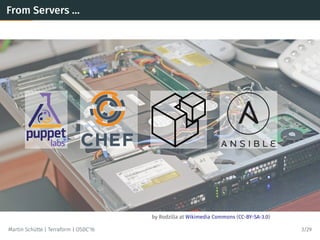
by Rodzilla at Wikimedia Commons (CC-BY-SA-3.0)
From Servers …
Martin Schütte | Terraform | OSDC’16 3/29
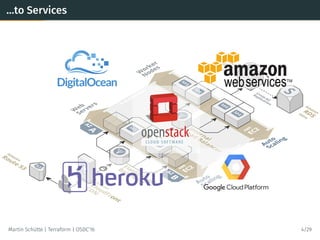
…to Services
Martin Schütte | Terraform | OSDC’16 4/29
Services also need Configuration Management
• Replace “click paths” with source code in VCS
• Lifecycle awareness, not just a setup.sh
• Reproducible environments
• Specification, documentation, policy enforcement
Martin Schütte | Terraform | OSDC’16 5/29
Core Ideas in Terraform
• Simple model of resource entities with attributes
• Stateful lifecycle with CRUD operations
• Declarative configuration
• Dependencies by inference
• Parallel execution
Martin Schütte | Terraform | OSDC’16 6/29
Core Concepts in Terraform
• Provider: a source of resources
(usually with an API endpoint & authentication)
• Resource: every thing “that has a set of configurable
attributes and a lifecycle (create, read, update, delete)” –
implies ID and state
• Provisioner: initialize a resource with local or
remote scripts
Martin Schütte | Terraform | OSDC’16 7/29
Core Concepts in Terraform
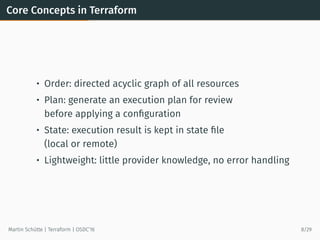
• Order: directed acyclic graph of all resources
• Plan: generate an execution plan for review
before applying a configuration
• State: execution result is kept in state file
(local or remote)
• Lightweight: little provider knowledge, no error handling
Martin Schütte | Terraform | OSDC’16 8/29
Available services
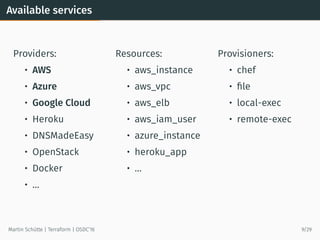
Providers:
• AWS
• Azure
• Google Cloud
• Heroku
• DNSMadeEasy
• OpenStack
• Docker
• …
Resources:
• aws_instance
• aws_vpc
• aws_elb
• aws_iam_user
• azure_instance
• heroku_app
• …
Provisioners:
• chef
• file
• local-exec
• remote-exec
Martin Schütte | Terraform | OSDC’16 9/29
DSL Syntax
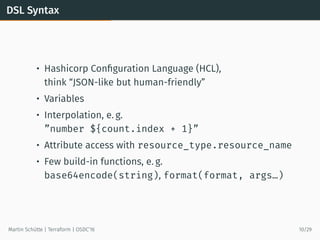
• Hashicorp Configuration Language (HCL),
think “JSON-like but human-friendly”
• Variables
• Interpolation, e. g.
”number ${count.index + 1}”
• Attribute access with resource_type.resource_name
• Few build-in functions, e. g.
base64encode(string), format(format, args…)
Martin Schütte | Terraform | OSDC’16 10/29
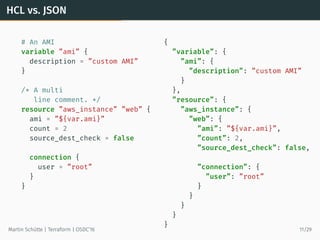
HCL vs. JSON
# An AMI
variable ”ami” {
description = ”custom AMI”
}
/* A multi
line comment. */
resource ”aws_instance” ”web” {
ami = ”${var.ami}”
count = 2
source_dest_check = false
connection {
user = ”root”
}
}
{
”variable”: {
”ami”: {
”description”: ”custom AMI”
}
},
”resource”: {
”aws_instance”: {
”web”: {
”ami”: ”${var.ami}”,
”count”: 2,
”source_dest_check”: false,
”connection”: {
”user”: ”root”
}
}
}
}
}
Martin Schütte | Terraform | OSDC’16 11/29
Example: Simple Webservice
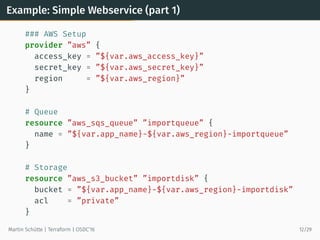
Example: Simple Webservice (part 1)
### AWS Setup
provider ”aws” {
access_key = ”${var.aws_access_key}”
secret_key = ”${var.aws_secret_key}”
region = ”${var.aws_region}”
}
# Queue
resource ”aws_sqs_queue” ”importqueue” {
name = ”${var.app_name}-${var.aws_region}-importqueue”
}
# Storage
resource ”aws_s3_bucket” ”importdisk” {
bucket = ”${var.app_name}-${var.aws_region}-importdisk”
acl = ”private”
}
Martin Schütte | Terraform | OSDC’16 12/29
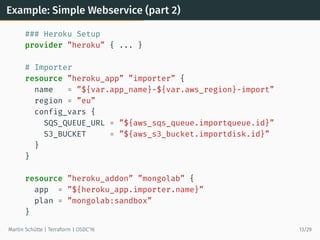
Example: Simple Webservice (part 2)
### Heroku Setup
provider ”heroku” { ... }
# Importer
resource ”heroku_app” ”importer” {
name = ”${var.app_name}-${var.aws_region}-import”
region = ”eu”
config_vars {
SQS_QUEUE_URL = ”${aws_sqs_queue.importqueue.id}”
S3_BUCKET = ”${aws_s3_bucket.importdisk.id}”
}
}
resource ”heroku_addon” ”mongolab” {
app = ”${heroku_app.importer.name}”
plan = ”mongolab:sandbox”
}
Martin Schütte | Terraform | OSDC’16 13/29
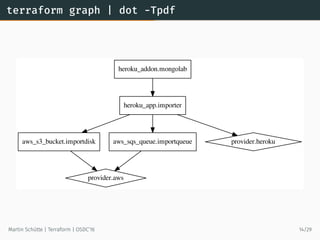
terraform graph | dot -Tpdf
aws_s3_bucket.importdisk
provider.aws
aws_sqs_queue.importqueue
heroku_addon.mongolab
heroku_app.importer
provider.heroku
Martin Schütte | Terraform | OSDC’16 14/29
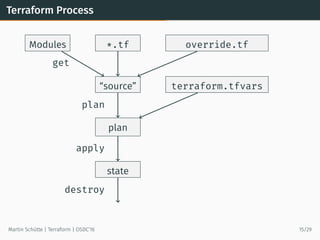
Terraform Process
*.tf override.tfModules
“source” terraform.tfvars
plan
state
get
plan
apply
destroy
Martin Schütte | Terraform | OSDC’16 15/29
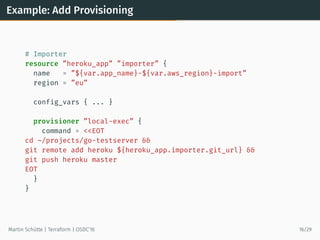
Example: Add Provisioning
# Importer
resource ”heroku_app” ”importer” {
name = ”${var.app_name}-${var.aws_region}-import”
region = ”eu”
config_vars { ... }
provisioner ”local-exec” {
command = <<EOT
cd ~/projects/go-testserver &&
git remote add heroku ${heroku_app.importer.git_url} &&
git push heroku master
EOT
}
}
Martin Schütte | Terraform | OSDC’16 16/29
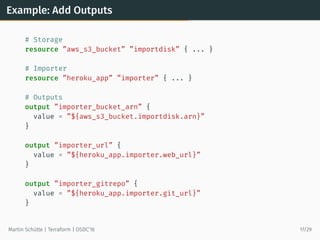
Example: Add Outputs
# Storage
resource ”aws_s3_bucket” ”importdisk” { ... }
# Importer
resource ”heroku_app” ”importer” { ... }
# Outputs
output ”importer_bucket_arn” {
value = ”${aws_s3_bucket.importdisk.arn}”
}
output ”importer_url” {
value = ”${heroku_app.importer.web_url}”
}
output ”importer_gitrepo” {
value = ”${heroku_app.importer.git_url}”
}
Martin Schütte | Terraform | OSDC’16 17/29
Modules
Modules
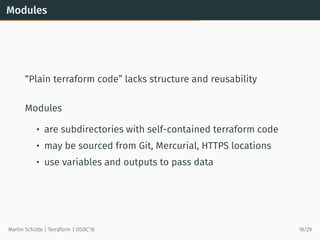
“Plain terraform code” lacks structure and reusability
Modules
• are subdirectories with self-contained terraform code
• may be sourced from Git, Mercurial, HTTPS locations
• use variables and outputs to pass data
Martin Schütte | Terraform | OSDC’16 18/29
Module Example
Every Terraform directory may be used as a module.
Here I use the previous webservice example.
Martin Schütte | Terraform | OSDC’16 19/29
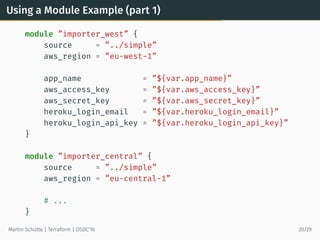
Using a Module Example (part 1)
module ”importer_west” {
source = ”../simple”
aws_region = ”eu-west-1”
app_name = ”${var.app_name}”
aws_access_key = ”${var.aws_access_key}”
aws_secret_key = ”${var.aws_secret_key}”
heroku_login_email = ”${var.heroku_login_email}”
heroku_login_api_key = ”${var.heroku_login_api_key}”
}
module ”importer_central” {
source = ”../simple”
aws_region = ”eu-central-1”
# ...
}
Martin Schütte | Terraform | OSDC’16 20/29
Using a Module Example (part 2)
# Main App, using modules
resource ”heroku_app” ”main” {
name = ”${var.app_name}-main”
region = ”eu”
config_vars {
IMPORTER_URL_LIST = <<EOT
[ ”${module.importer_west.importer_url}”,
”${module.importer_central.importer_url}” ]
EOT
}
}
output ”main_url” {
value = ”${heroku_app.main.web_url}”
}
Martin Schütte | Terraform | OSDC’16 21/29
Plugins
How to Write Own Plugins
• Learn you some Golang
• Use the schema helper lib
• Adapt to model of
Provider (setup steps, authentication) and
Resources (arguments/attributes and CRUD methods)
Martin Schütte | Terraform | OSDC’16 22/29
Plugin Example
Simple Plugin: MySQL
Implements provider mysql with resource mysql_database.
Code at builtin/providers/mysql 
Martin Schütte | Terraform | OSDC’16 23/29
Usage
Issues
Under active development, current version 0.6.15 (April 22)
• Still a few bugs, e. g. losing state info
• Modules are very simple
• Lacking syntactic sugar
(e. g. aggregations, common repetitions)
General problems for this kind of tool
• Testing is inherently difficult
• Provider coverage
• Resource model mismatch, e. g. with Heroku apps
• Ignorant of API rate limits, account ressource limits, etc.
Martin Schütte | Terraform | OSDC’16 24/29
Comparable Tools
Tools:
• AWS CloudFormation (with generator tools)
• OpenStack Heat
• Azure Resource Manager Templates
Configuration Management:
• SaltStack Salt Cloud
• Ansible v2.0 includes cloud modules
Libraries:
• fog, Ruby cloud abstraction library
• boto, Python AWS library
Martin Schütte | Terraform | OSDC’16 25/29
Workflow
• Use a VCS, i. e. git
• Use PGP to encrypt sensitive data, e. g. with Blackbox
• Use separate user credentials, know how to revoke them
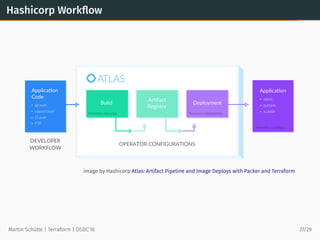
• Take a look at Hashicorp Atlas and its workflow
Martin Schütte | Terraform | OSDC’16 26/29
Hashicorp Workflow
image by Hashicorp Atlas: Artifact Pipeline and Image Deploys with Packer and Terraform
Martin Schütte | Terraform | OSDC’16 27/29
Links and Resources
Defining system infrastructure as code and
building it with tools doesn’t make the quality any
better. At worst, it can complicate things.
— Infrastructure as Code by Kief Morris
• Terraform
• hashicorp/terraform 
• StackExchange/blackbox 
• Terraforming – Export existing AWS resources
• Terraform: Beyond the Basics with AWS
• Terraform, VPC, and why you want a tfstate file per env
Martin Schütte | Terraform | OSDC’16 28/29
The End
Thank You!
Questions?
Martin Schütte
info@martin-schuette.de
slideshare.net/mschuett/ 
Martin Schütte | Terraform | OSDC’16 29/29

Terraform: Configuration Management for Cloud Services

  • 1.
    Terraform: Configuration Management forCloud Services Martin Schütte 27 April 2016
  • 2.
    TERRAFORM Build,  Combine,  and Launch  Infrastructure
  • 3.
  • 4.
    by Rodzilla atWikimedia Commons (CC-BY-SA-3.0) From Servers … Martin Schütte | Terraform | OSDC’16 3/29
  • 5.
    …to Services Martin Schütte| Terraform | OSDC’16 4/29
  • 6.
    Services also needConfiguration Management • Replace “click paths” with source code in VCS • Lifecycle awareness, not just a setup.sh • Reproducible environments • Specification, documentation, policy enforcement Martin Schütte | Terraform | OSDC’16 5/29
  • 7.
    Core Ideas inTerraform • Simple model of resource entities with attributes • Stateful lifecycle with CRUD operations • Declarative configuration • Dependencies by inference • Parallel execution Martin Schütte | Terraform | OSDC’16 6/29
  • 8.
    Core Concepts inTerraform • Provider: a source of resources (usually with an API endpoint & authentication) • Resource: every thing “that has a set of configurable attributes and a lifecycle (create, read, update, delete)” – implies ID and state • Provisioner: initialize a resource with local or remote scripts Martin Schütte | Terraform | OSDC’16 7/29
  • 9.
    Core Concepts inTerraform • Order: directed acyclic graph of all resources • Plan: generate an execution plan for review before applying a configuration • State: execution result is kept in state file (local or remote) • Lightweight: little provider knowledge, no error handling Martin Schütte | Terraform | OSDC’16 8/29
  • 10.
    Available services Providers: • AWS •Azure • Google Cloud • Heroku • DNSMadeEasy • OpenStack • Docker • … Resources: • aws_instance • aws_vpc • aws_elb • aws_iam_user • azure_instance • heroku_app • … Provisioners: • chef • file • local-exec • remote-exec Martin Schütte | Terraform | OSDC’16 9/29
  • 11.
    DSL Syntax • HashicorpConfiguration Language (HCL), think “JSON-like but human-friendly” • Variables • Interpolation, e. g. ”number ${count.index + 1}” • Attribute access with resource_type.resource_name • Few build-in functions, e. g. base64encode(string), format(format, args…) Martin Schütte | Terraform | OSDC’16 10/29
  • 12.
    HCL vs. JSON #An AMI variable ”ami” { description = ”custom AMI” } /* A multi line comment. */ resource ”aws_instance” ”web” { ami = ”${var.ami}” count = 2 source_dest_check = false connection { user = ”root” } } { ”variable”: { ”ami”: { ”description”: ”custom AMI” } }, ”resource”: { ”aws_instance”: { ”web”: { ”ami”: ”${var.ami}”, ”count”: 2, ”source_dest_check”: false, ”connection”: { ”user”: ”root” } } } } } Martin Schütte | Terraform | OSDC’16 11/29
  • 13.
  • 14.
    Example: Simple Webservice(part 1) ### AWS Setup provider ”aws” { access_key = ”${var.aws_access_key}” secret_key = ”${var.aws_secret_key}” region = ”${var.aws_region}” } # Queue resource ”aws_sqs_queue” ”importqueue” { name = ”${var.app_name}-${var.aws_region}-importqueue” } # Storage resource ”aws_s3_bucket” ”importdisk” { bucket = ”${var.app_name}-${var.aws_region}-importdisk” acl = ”private” } Martin Schütte | Terraform | OSDC’16 12/29
  • 15.
    Example: Simple Webservice(part 2) ### Heroku Setup provider ”heroku” { ... } # Importer resource ”heroku_app” ”importer” { name = ”${var.app_name}-${var.aws_region}-import” region = ”eu” config_vars { SQS_QUEUE_URL = ”${aws_sqs_queue.importqueue.id}” S3_BUCKET = ”${aws_s3_bucket.importdisk.id}” } } resource ”heroku_addon” ”mongolab” { app = ”${heroku_app.importer.name}” plan = ”mongolab:sandbox” } Martin Schütte | Terraform | OSDC’16 13/29
  • 16.
    terraform graph |dot -Tpdf aws_s3_bucket.importdisk provider.aws aws_sqs_queue.importqueue heroku_addon.mongolab heroku_app.importer provider.heroku Martin Schütte | Terraform | OSDC’16 14/29
  • 17.
    Terraform Process *.tf override.tfModules “source”terraform.tfvars plan state get plan apply destroy Martin Schütte | Terraform | OSDC’16 15/29
  • 18.
    Example: Add Provisioning #Importer resource ”heroku_app” ”importer” { name = ”${var.app_name}-${var.aws_region}-import” region = ”eu” config_vars { ... } provisioner ”local-exec” { command = <<EOT cd ~/projects/go-testserver && git remote add heroku ${heroku_app.importer.git_url} && git push heroku master EOT } } Martin Schütte | Terraform | OSDC’16 16/29
  • 19.
    Example: Add Outputs #Storage resource ”aws_s3_bucket” ”importdisk” { ... } # Importer resource ”heroku_app” ”importer” { ... } # Outputs output ”importer_bucket_arn” { value = ”${aws_s3_bucket.importdisk.arn}” } output ”importer_url” { value = ”${heroku_app.importer.web_url}” } output ”importer_gitrepo” { value = ”${heroku_app.importer.git_url}” } Martin Schütte | Terraform | OSDC’16 17/29
  • 20.
  • 21.
    Modules “Plain terraform code”lacks structure and reusability Modules • are subdirectories with self-contained terraform code • may be sourced from Git, Mercurial, HTTPS locations • use variables and outputs to pass data Martin Schütte | Terraform | OSDC’16 18/29
  • 22.
    Module Example Every Terraformdirectory may be used as a module. Here I use the previous webservice example. Martin Schütte | Terraform | OSDC’16 19/29
  • 23.
    Using a ModuleExample (part 1) module ”importer_west” { source = ”../simple” aws_region = ”eu-west-1” app_name = ”${var.app_name}” aws_access_key = ”${var.aws_access_key}” aws_secret_key = ”${var.aws_secret_key}” heroku_login_email = ”${var.heroku_login_email}” heroku_login_api_key = ”${var.heroku_login_api_key}” } module ”importer_central” { source = ”../simple” aws_region = ”eu-central-1” # ... } Martin Schütte | Terraform | OSDC’16 20/29
  • 24.
    Using a ModuleExample (part 2) # Main App, using modules resource ”heroku_app” ”main” { name = ”${var.app_name}-main” region = ”eu” config_vars { IMPORTER_URL_LIST = <<EOT [ ”${module.importer_west.importer_url}”, ”${module.importer_central.importer_url}” ] EOT } } output ”main_url” { value = ”${heroku_app.main.web_url}” } Martin Schütte | Terraform | OSDC’16 21/29
  • 25.
  • 26.
    How to WriteOwn Plugins • Learn you some Golang • Use the schema helper lib • Adapt to model of Provider (setup steps, authentication) and Resources (arguments/attributes and CRUD methods) Martin Schütte | Terraform | OSDC’16 22/29
  • 27.
    Plugin Example Simple Plugin:MySQL Implements provider mysql with resource mysql_database. Code at builtin/providers/mysql  Martin Schütte | Terraform | OSDC’16 23/29
  • 28.
  • 29.
    Issues Under active development,current version 0.6.15 (April 22) • Still a few bugs, e. g. losing state info • Modules are very simple • Lacking syntactic sugar (e. g. aggregations, common repetitions) General problems for this kind of tool • Testing is inherently difficult • Provider coverage • Resource model mismatch, e. g. with Heroku apps • Ignorant of API rate limits, account ressource limits, etc. Martin Schütte | Terraform | OSDC’16 24/29
  • 30.
    Comparable Tools Tools: • AWSCloudFormation (with generator tools) • OpenStack Heat • Azure Resource Manager Templates Configuration Management: • SaltStack Salt Cloud • Ansible v2.0 includes cloud modules Libraries: • fog, Ruby cloud abstraction library • boto, Python AWS library Martin Schütte | Terraform | OSDC’16 25/29
  • 31.
    Workflow • Use aVCS, i. e. git • Use PGP to encrypt sensitive data, e. g. with Blackbox • Use separate user credentials, know how to revoke them • Take a look at Hashicorp Atlas and its workflow Martin Schütte | Terraform | OSDC’16 26/29
  • 32.
    Hashicorp Workflow image byHashicorp Atlas: Artifact Pipeline and Image Deploys with Packer and Terraform Martin Schütte | Terraform | OSDC’16 27/29
  • 33.
    Links and Resources Definingsystem infrastructure as code and building it with tools doesn’t make the quality any better. At worst, it can complicate things. — Infrastructure as Code by Kief Morris • Terraform • hashicorp/terraform  • StackExchange/blackbox  • Terraforming – Export existing AWS resources • Terraform: Beyond the Basics with AWS • Terraform, VPC, and why you want a tfstate file per env Martin Schütte | Terraform | OSDC’16 28/29
  • 34.
    The End Thank You! Questions? MartinSchütte info@martin-schuette.de slideshare.net/mschuett/  Martin Schütte | Terraform | OSDC’16 29/29