Go Beyond 802.11ac
Wave2
Bill Rubino, Mark Denny and
Jim Florwick
May 25, 2016
With Innovations for High-Density Networks
Go Beyond 802.11ac Wave2
Bill Rubino – Enterprise Solutions Marketing Manager
Mark Denny – Enterprise Wireless Product Manager
Jim Florwick – Senior Technical Marketing Engineer
Cisco 2016 Virtual Networking Index
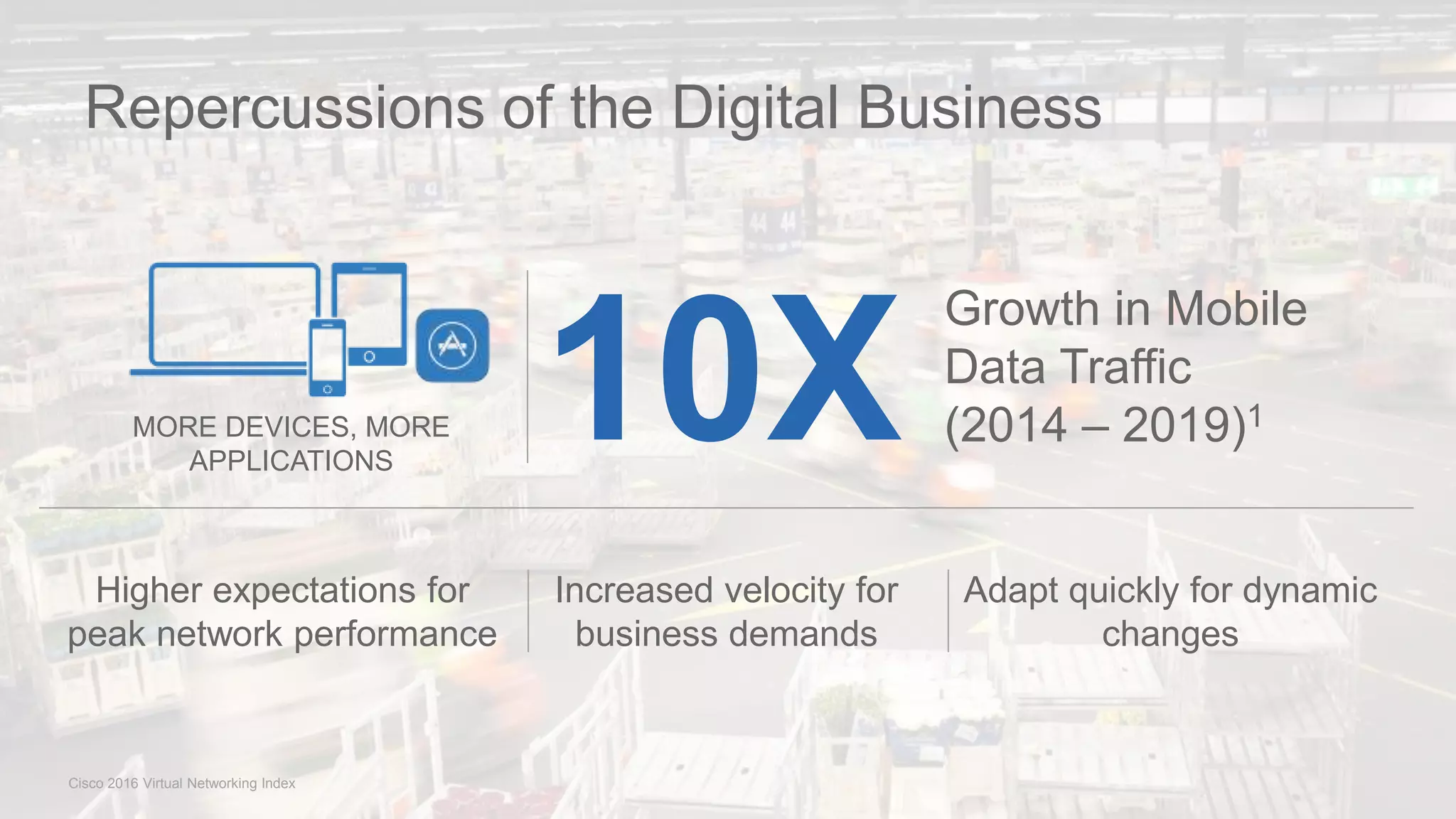
Repercussions of the Digital Business
10X
Growth in Mobile
Data Traffic
(2014 – 2019)1
Higher expectations for
peak network performance
Increased velocity for
business demands
Adapt quickly for dynamic
changes
MORE DEVICES, MORE
APPLICATIONS
HealthcareGovernment Manufacturing Education Financial
Digitization Impacts All Sectors
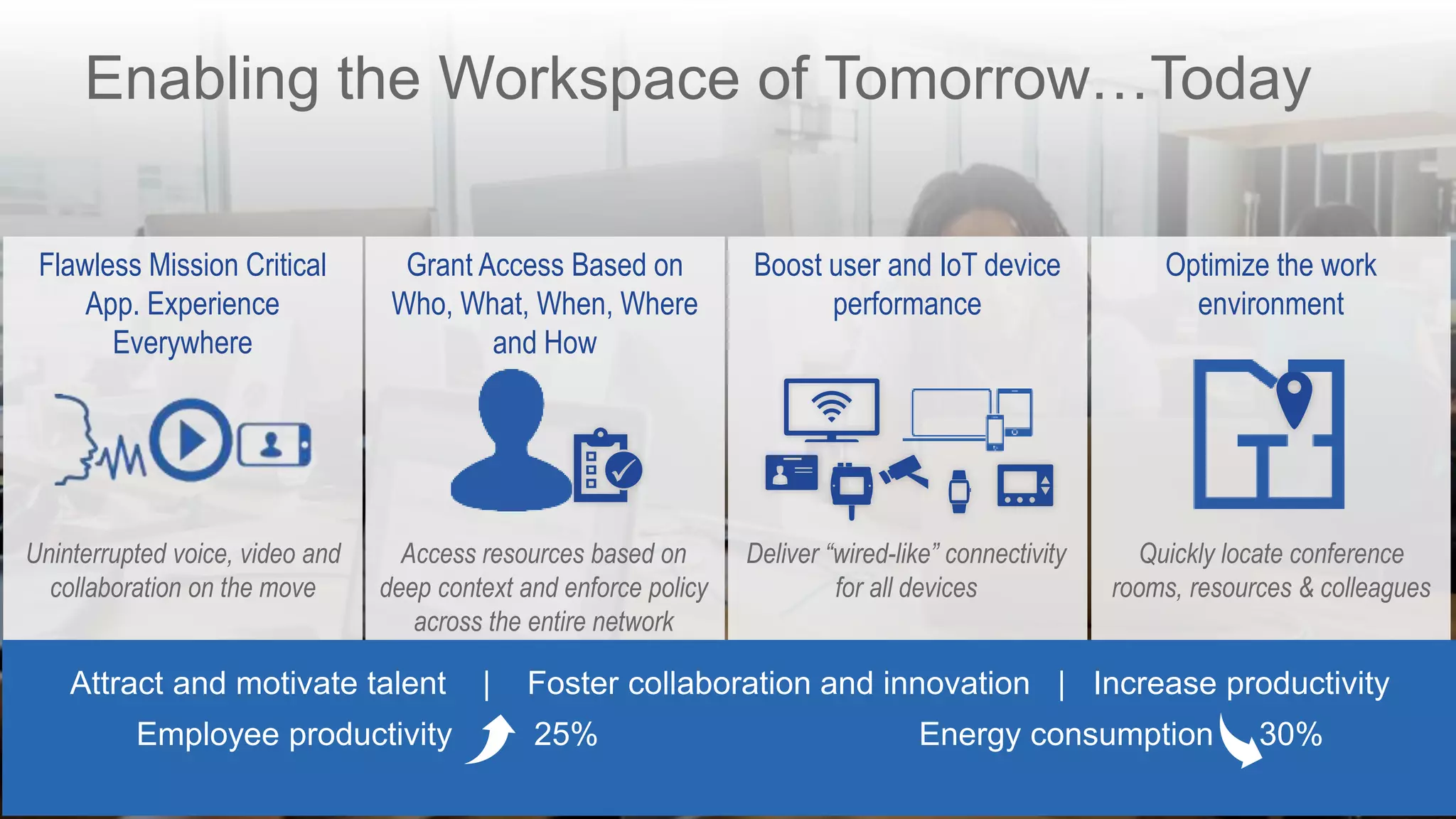
Enabling the Workspace of Tomorrow…Today
Flawless Mission Critical
App. Experience
Everywhere
Uninterrupted voice, video and
collaboration on the move
Boost user and IoT device
performance
Deliver “wired-like” connectivity
for all devices
Grant Access Based on
Who, What, When, Where
and How
Access resources based on
deep context and enforce policy
across the entire network
Optimize the work
environment
Quickly locate conference
rooms, resources & colleagues
Attract and motivate talent | Foster collaboration and innovation | Increase productivity
Employee productivity 25% Energy consumption 30%
Enabling the Workspace of Tomorrow…Today
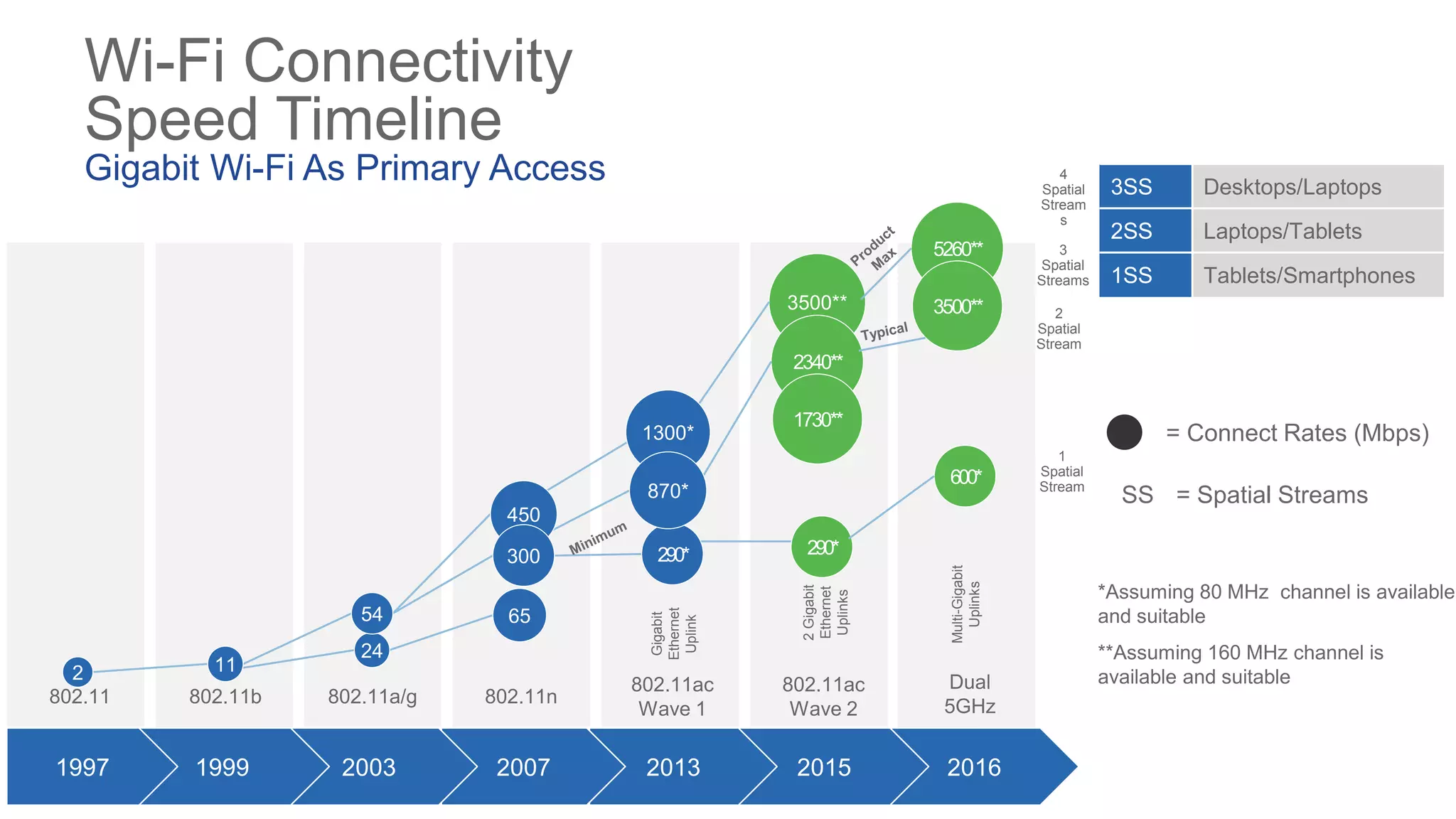
Wi-Fi Connectivity
Speed Timeline
Gigabit Wi-Fi As Primary Access 3SS Desktops/Laptops
2SS Laptops/Tablets
1SS Tablets/Smartphones
*Assuming 80 MHz channel is available
and suitable
**Assuming 160 MHz channel is
available and suitable
802.11 802.11n802.11b 802.11a/g
802.11ac
Wave 1
802.11ac
Wave 2
3500**
2340**
1730**
290*
= Connect Rates (Mbps)
= Spatial StreamsSS
20162015
Gigabit
Ethernet
Uplink
2Gigabit
Ethernet
Uplinks
1
Spatial
Stream
2
Spatial
Stream
4
Spatial
Stream
s
3
Spatial
Streams
20132007200319991997
2 11
24
54 65
450
300
1300*
290*
870*
5260**
3500**
600*
Dual
5GHz
Multi-Gigabit
Uplinks
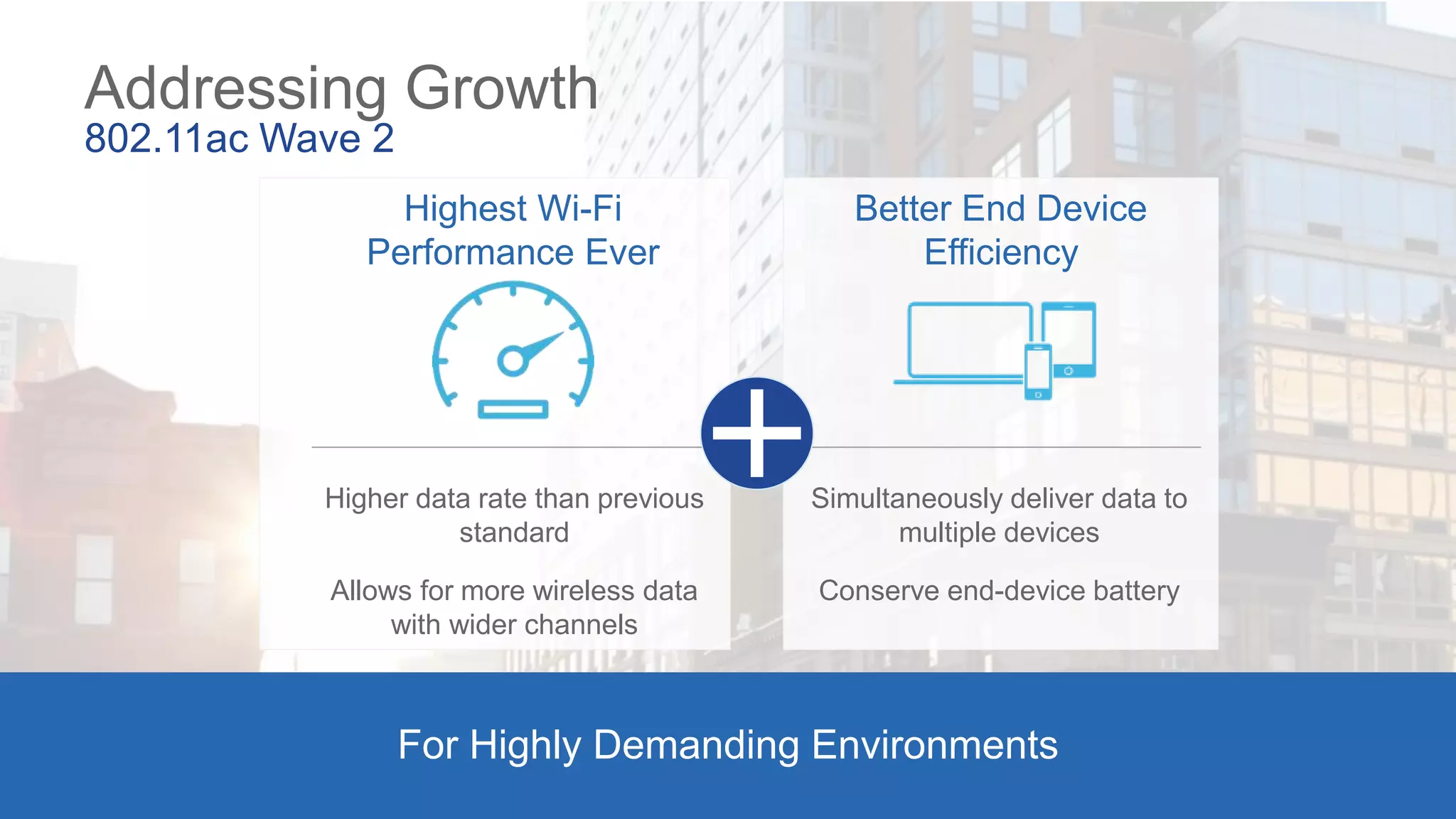
Addressing Growth
802.11ac Wave 2
Highest Wi-Fi
Performance Ever
Better End Device
Efficiency
For Highly Demanding Environments
Higher data rate than previous
standard
Allows for more wireless data
with wider channels
Simultaneously deliver data to
multiple devices
Conserve end-device battery
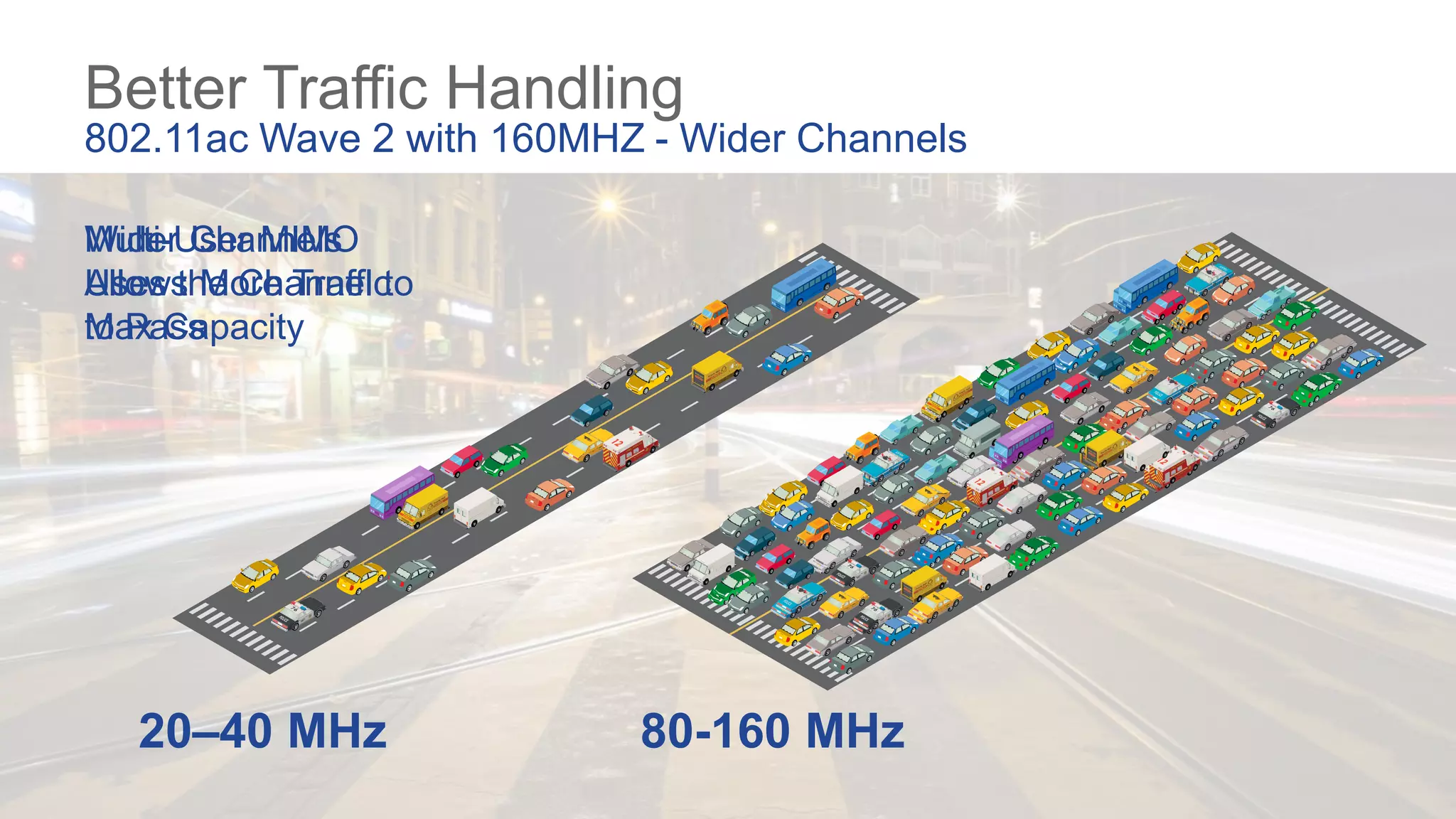
Better Traffic Handling
802.11ac Wave 2 with 160MHZ - Wider Channels
Wider Channels
Allows More Traffic
to Pass
Multi-User MIMO
Uses the Channel to
Max Capacity
20–40 MHz 80-160 MHz
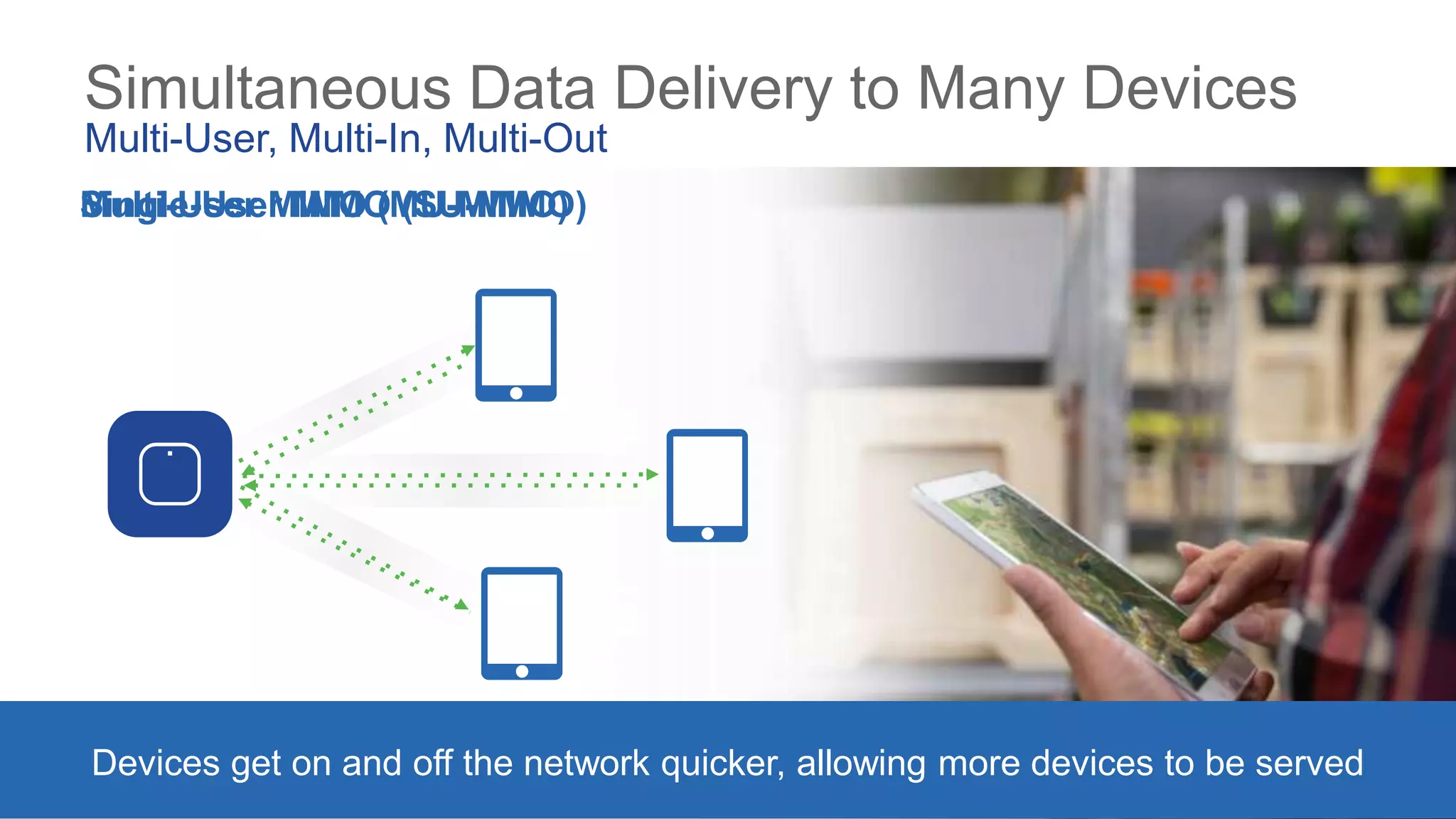
Simultaneous Data Delivery to Many Devices
Multi-User, Multi-In, Multi-Out
Devices get on and off the network quicker, allowing more devices to be served
Multi-User MIMO (MU-MIMO)Single-User MIMO (SU-MIMO)
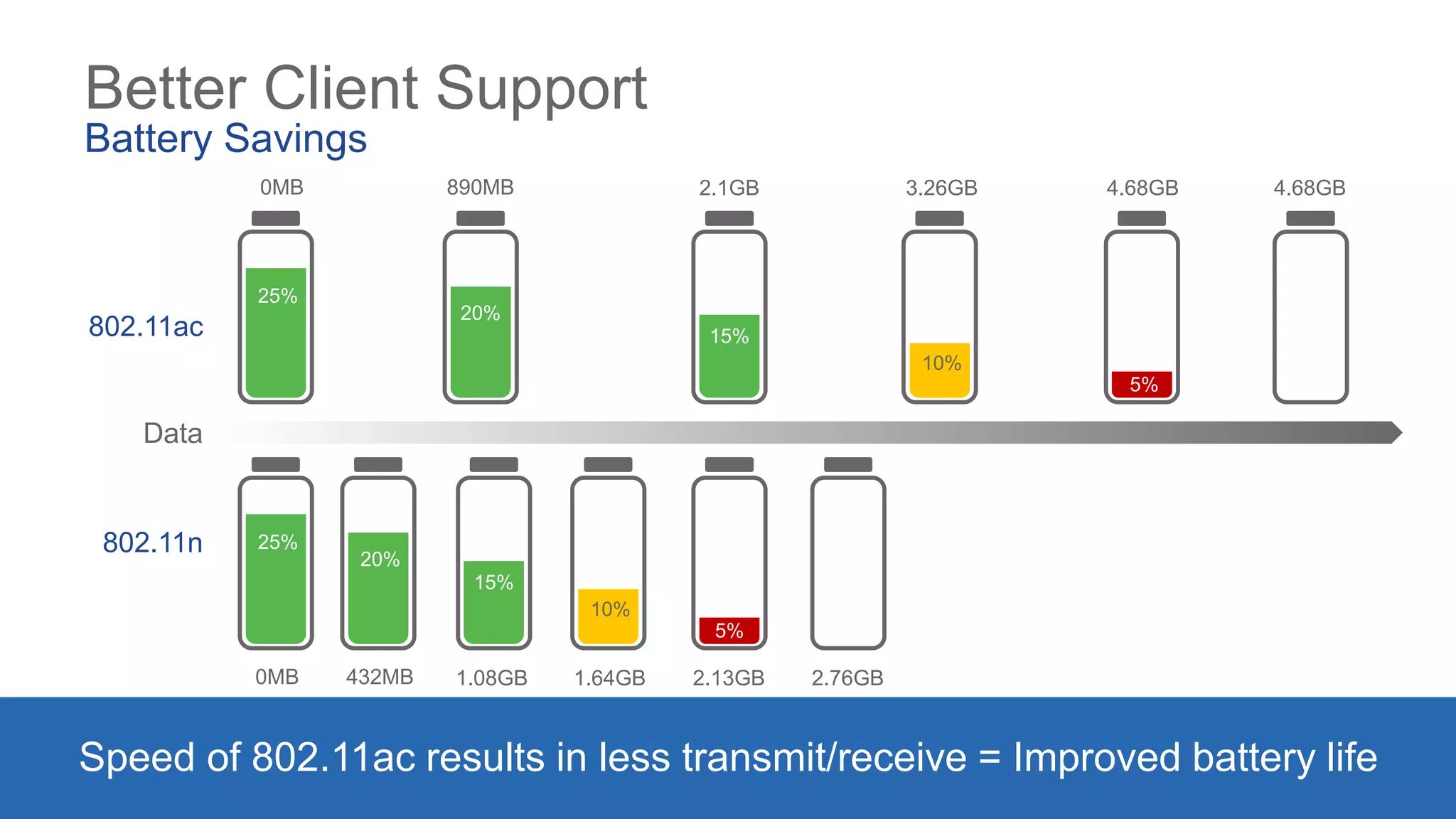
Better Client Support
Battery Savings
Speed of 802.11ac results in less transmit/receive = Improved battery life
Data
802.11ac
802.11n
0MB 890MB 2.1GB 3.26GB 4.68GB 4.68GB
0MB 432MB 1.08GB 1.64GB 2.13GB 2.76GB
25%
20%
15%
10%
5%
25%
20%
15%
10%
5%
Only Cisco Goes Beyond
the 802.11ac Wave 2
Standard
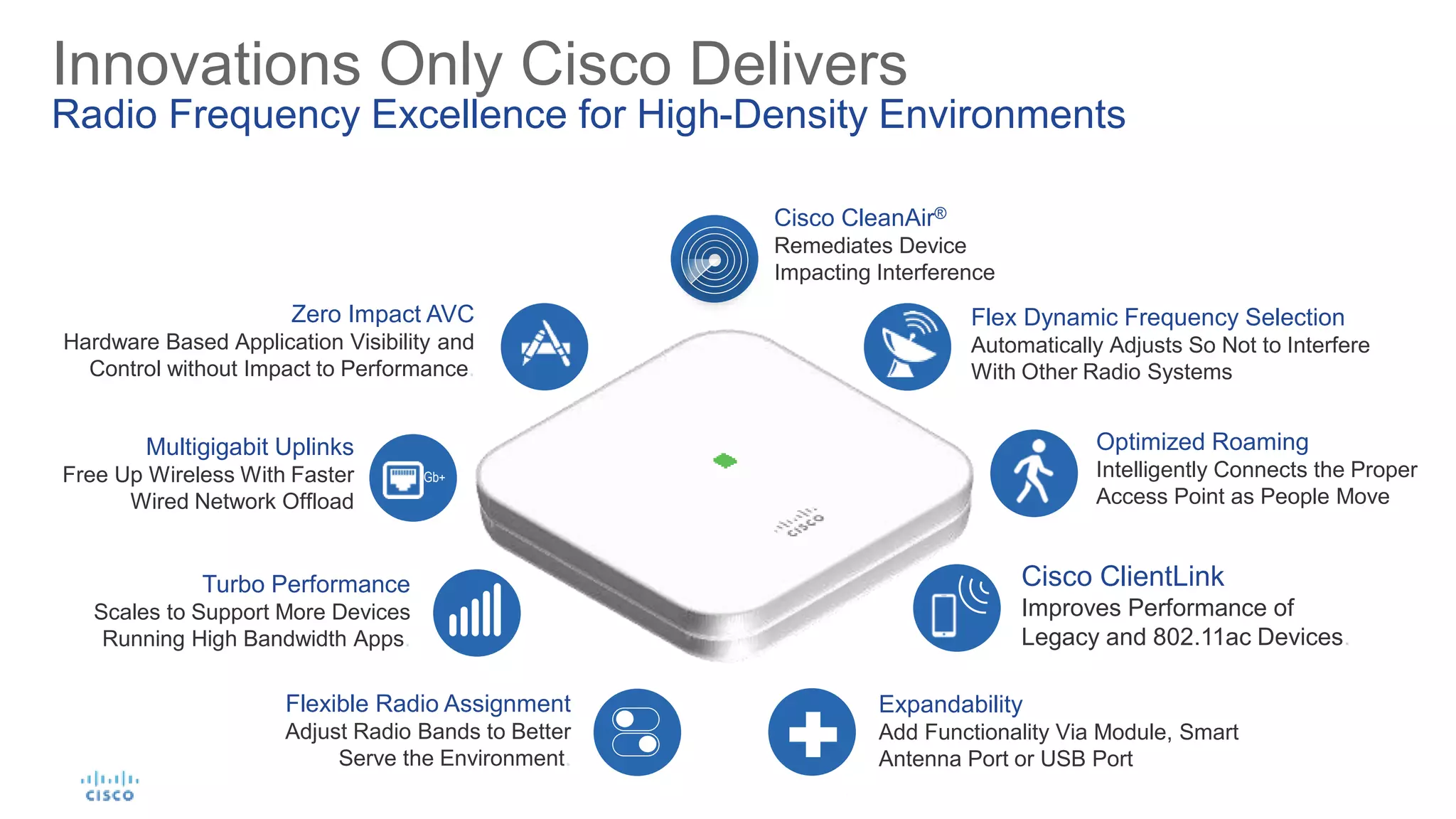
Flexible Radio Assignment
Adjust Radio Bands to Better
Serve the Environment.
Optimized Roaming
Intelligently Connects the Proper
Access Point as People Move
Turbo Performance
Scales to Support More Devices
Running High Bandwidth Apps.
Zero Impact AVC
Hardware Based Application Visibility and
Control without Impact to Performance.
Cisco CleanAir®
Remediates Device
Impacting Interference
Cisco ClientLink
Improves Performance of
Legacy and 802.11ac Devices.
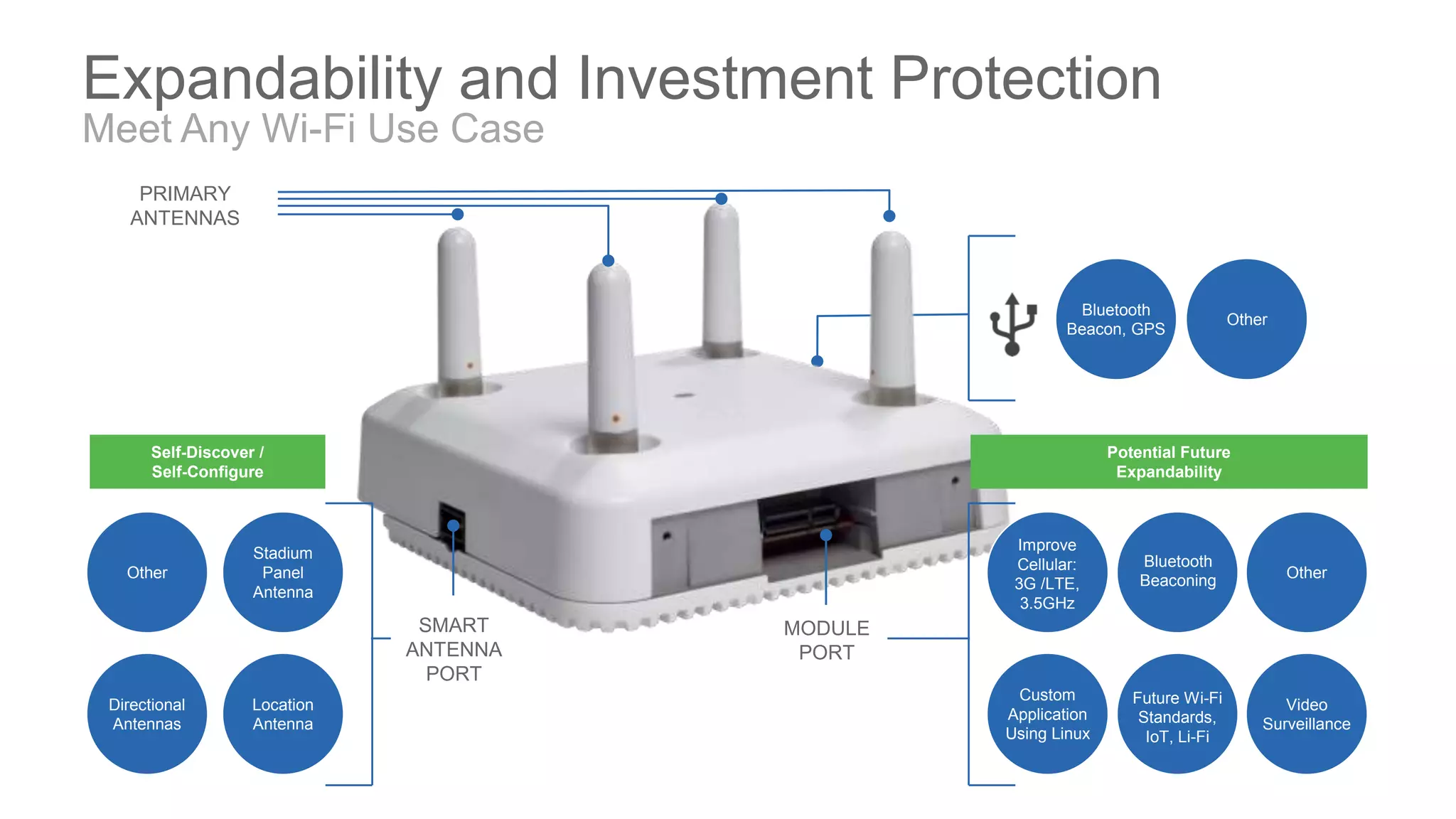
Expandability
Add Functionality Via Module, Smart
Antenna Port or USB Port
Multigigabit Uplinks
Free Up Wireless With Faster
Wired Network Offload
Gb+
Flex Dynamic Frequency Selection
Automatically Adjusts So Not to Interfere
With Other Radio Systems
Innovations Only Cisco Delivers
Radio Frequency Excellence for High-Density Environments
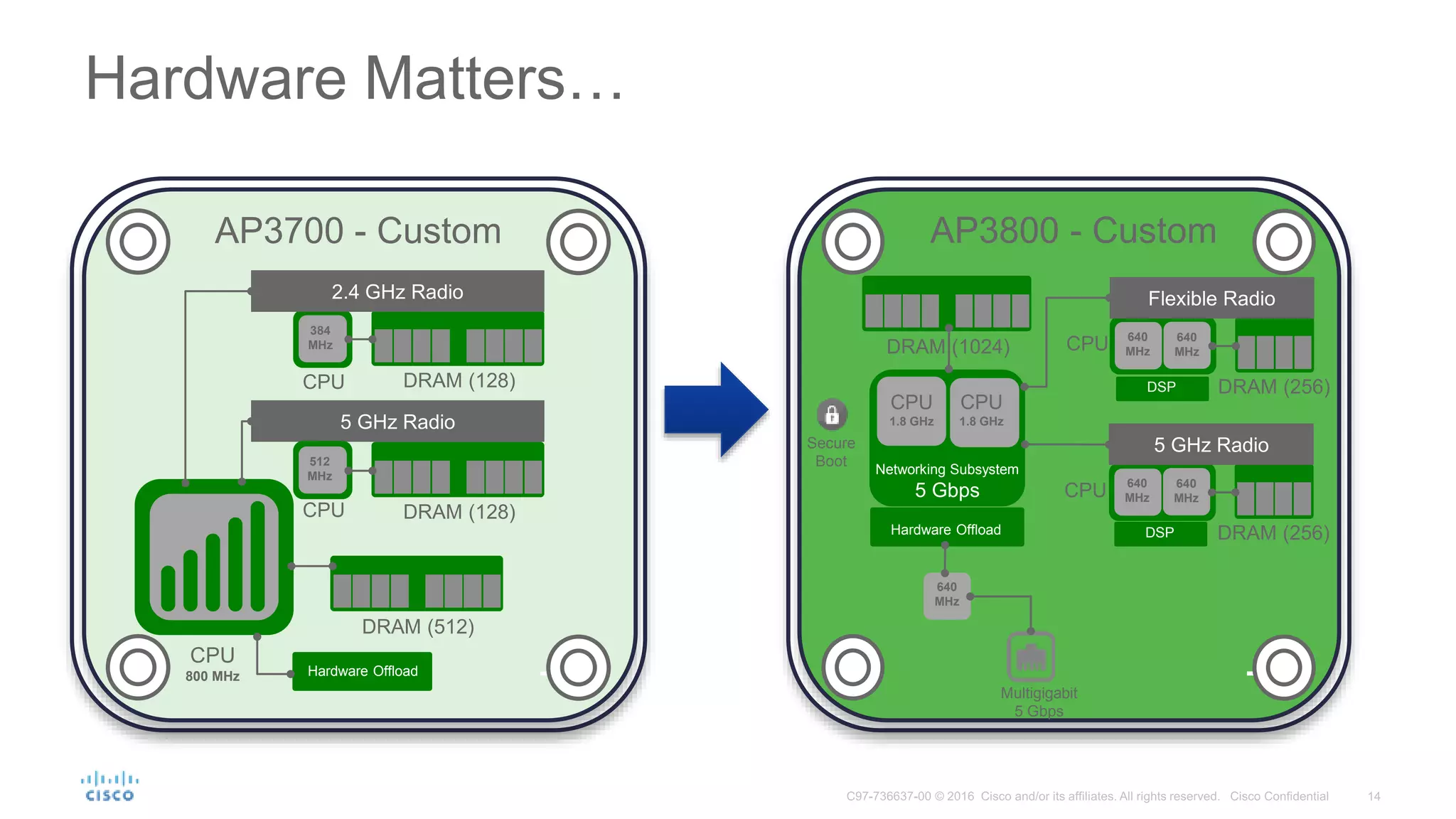
DRAM (512)
5 GHz Radio
CPU
800 MHz
DRAM (128)CPU
DRAM (128)CPU
2.4 GHz Radio
512
MHz
384
MHz
Hardware Offload
AP3700 - Custom
DRAM (1024)
DRAM (256)
CPU
Flexible Radio
640
MHz
640
MHz
CPU
1.8 GHz
CPU
1.8 GHz
Networking Subsystem
5 Gbps
Secure
Boot
Hardware Offload
Multigigabit
5 Gbps
AP3800 - Custom
DRAM (256)
CPU
5 GHz Radio
640
MHz
640
MHz
640
MHz
DSP
DSP
Hardware Matters…
© 2016 Cisco and/or its affiliates. All rights reserved. Cisco Confidential 15
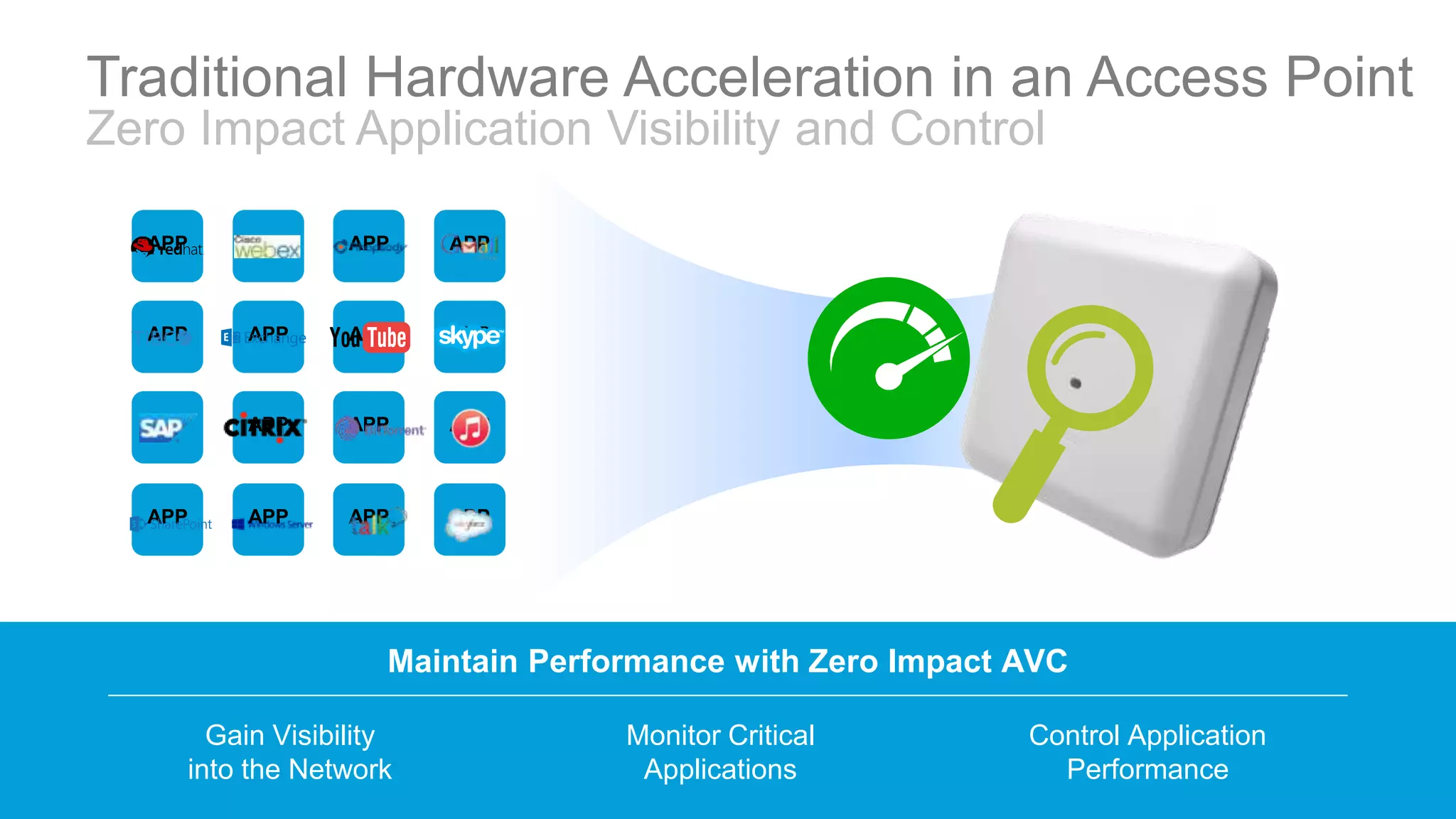
Maintain Performance with Zero Impact AVC
Gain Visibility
into the Network
Monitor Critical
Applications
Control Application
Performance
APP APP APP APP
APP APP APP APP
APP APP APP APP
APP APP APP APP
Traditional Hardware Acceleration in an Access Point
Zero Impact Application Visibility and Control
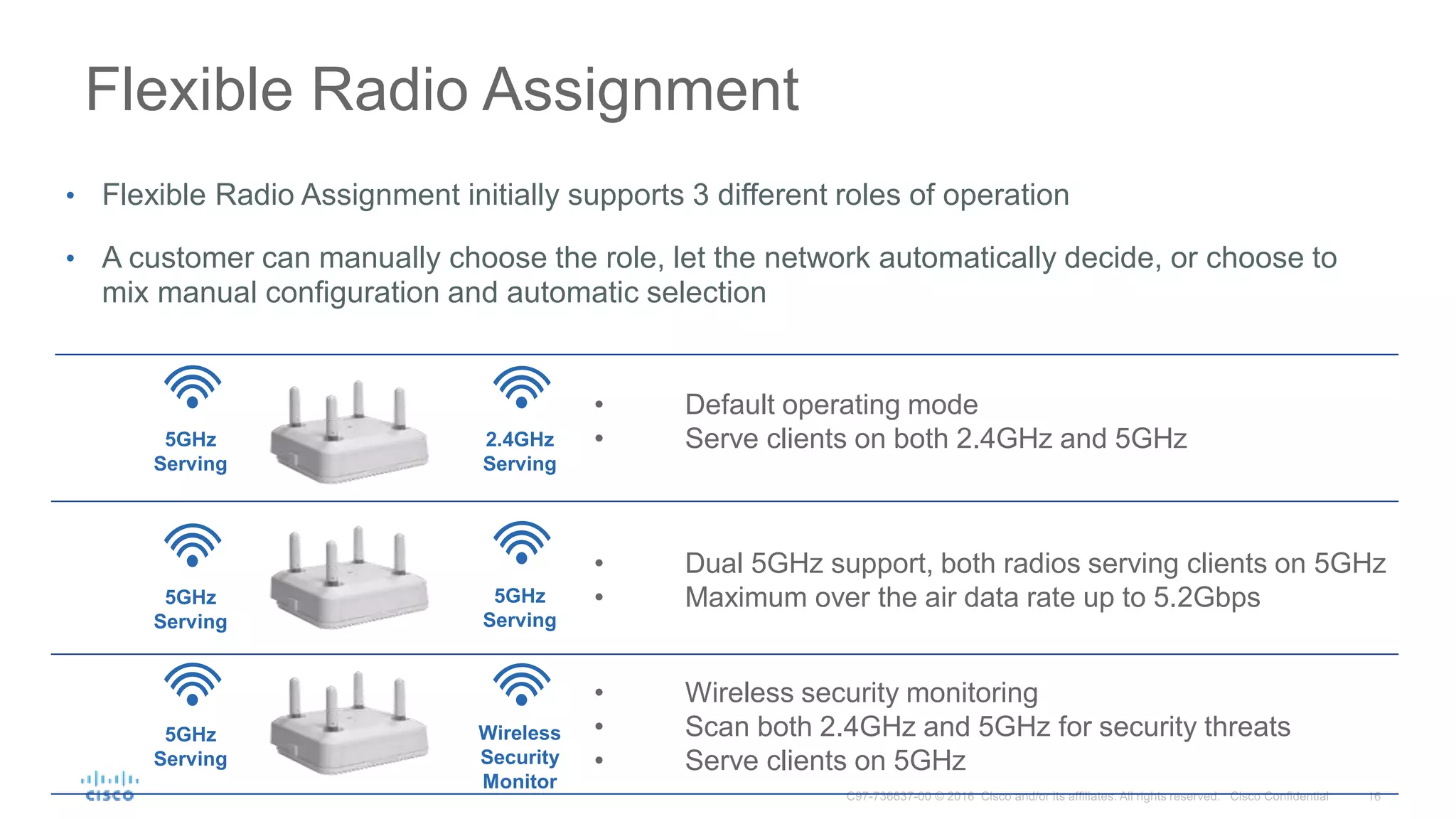
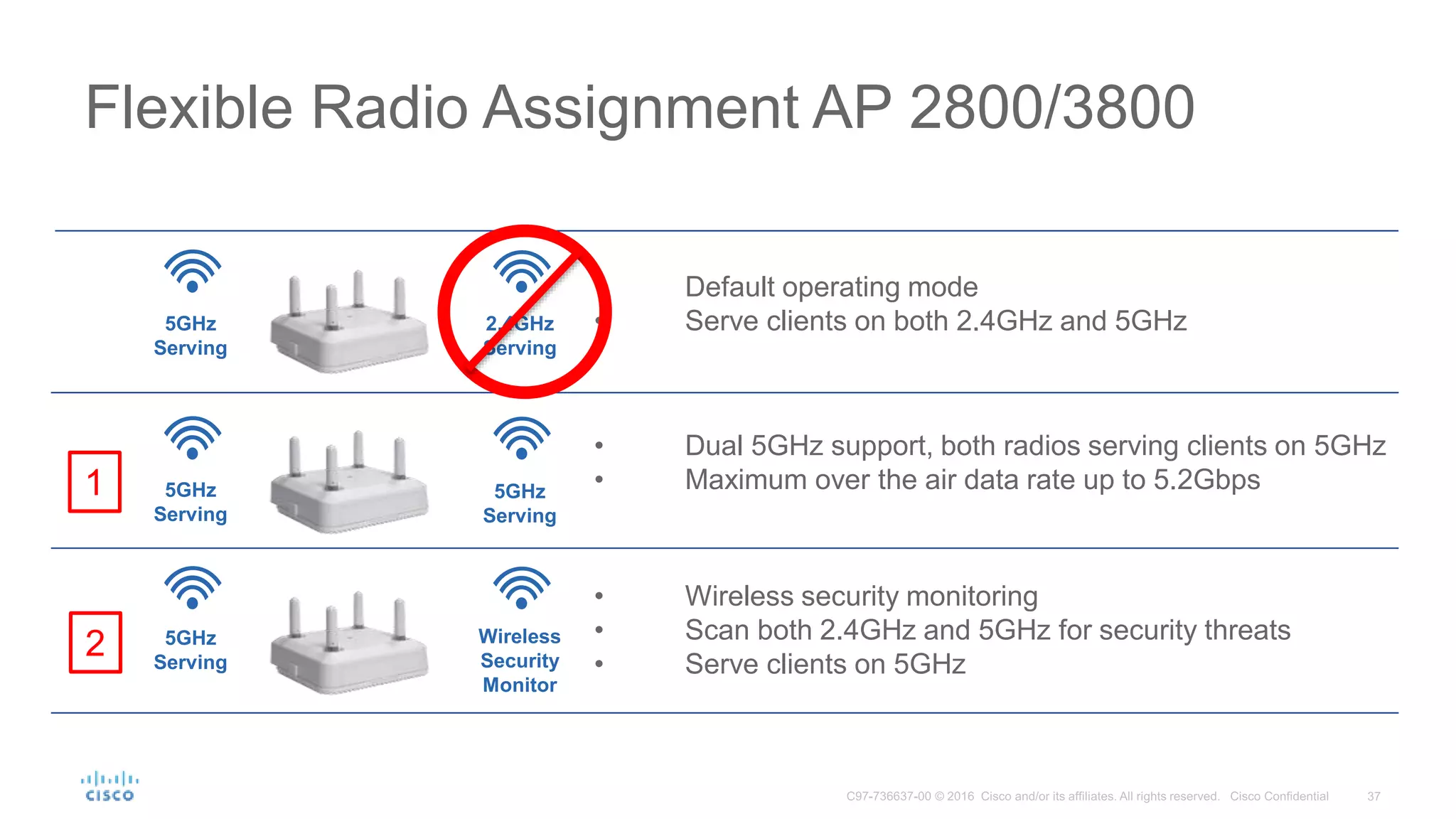
• Default operating mode
• Serve clients on both 2.4GHz and 5GHz
Flexible Radio Assignment
5GHz
Serving
2.4GHz
Serving
Wireless
Security
Monitor
• Dual 5GHz support, both radios serving clients on 5GHz
• Maximum over the air data rate up to 5.2Gbps
• Wireless security monitoring
• Scan both 2.4GHz and 5GHz for security threats
• Serve clients on 5GHz
5GHz
Serving
5GHz
Serving
5GHz
Serving
• Flexible Radio Assignment initially supports 3 different roles of operation
• A customer can manually choose the role, let the network automatically decide, or choose to
mix manual configuration and automatic selection
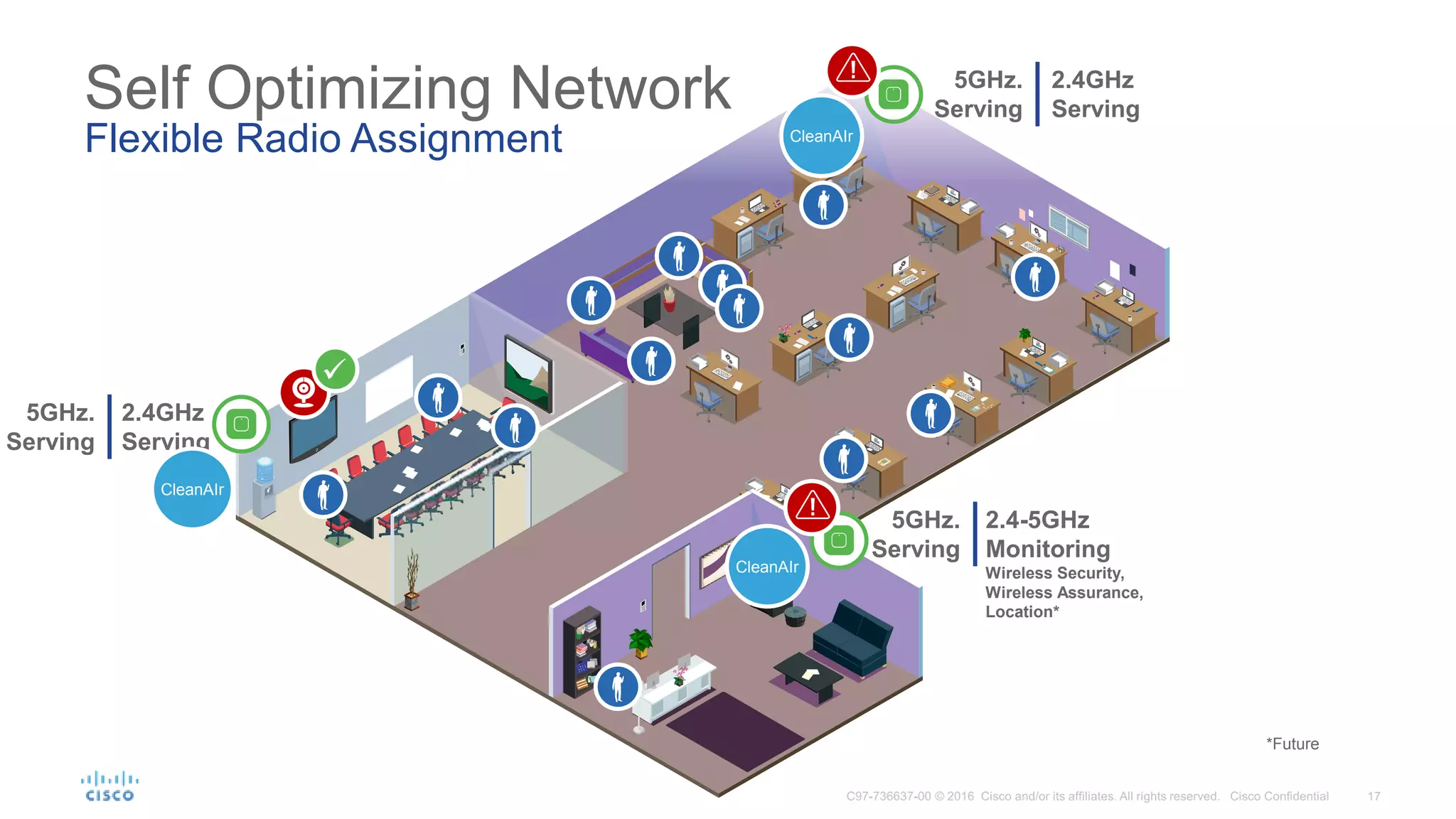
Self Optimizing Network
Flexible Radio Assignment
2.4GHz
Serving
2.4-5GHz
Monitoring
Wireless Security,
Wireless Assurance,
Location*
5GHz.
Serving
5GHz.
Serving
CleanAIr
CleanAIr
!
2.4GHz
Serving
5GHz.
Serving
CleanAIr
*Future
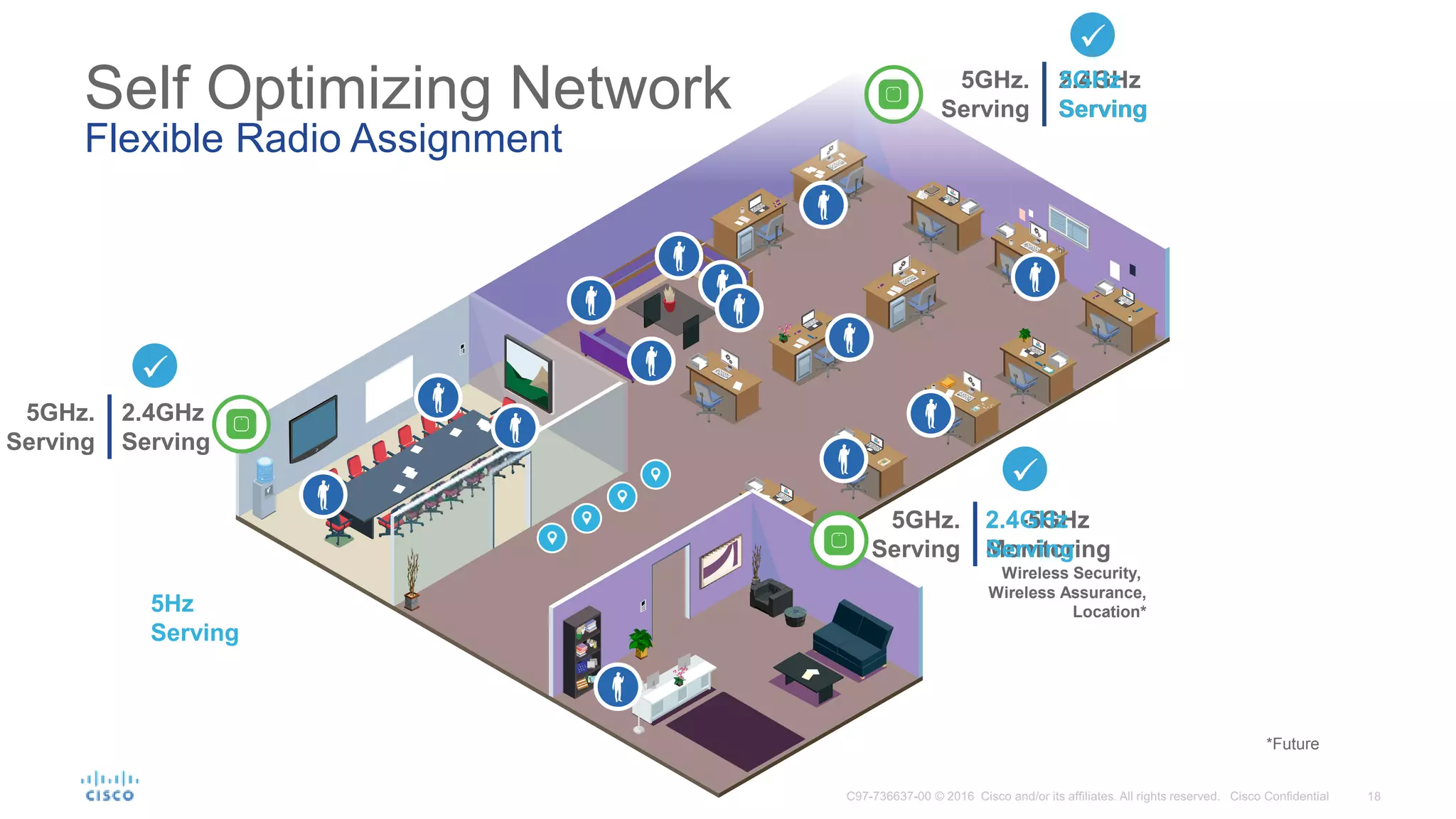
Self Optimizing Network
Flexible Radio Assignment
2.4GHz
Serving
2.4-5GHz
Monitoring
Wireless Security,
Wireless Assurance,
Location*
5GHz.
Serving
5GHz.
Serving
2.4GHz
Serving
5GHz.
Serving
5GHz
Serving
5Hz
Serving
2.4GHz
Serving
*Future
5GHz.
Serving
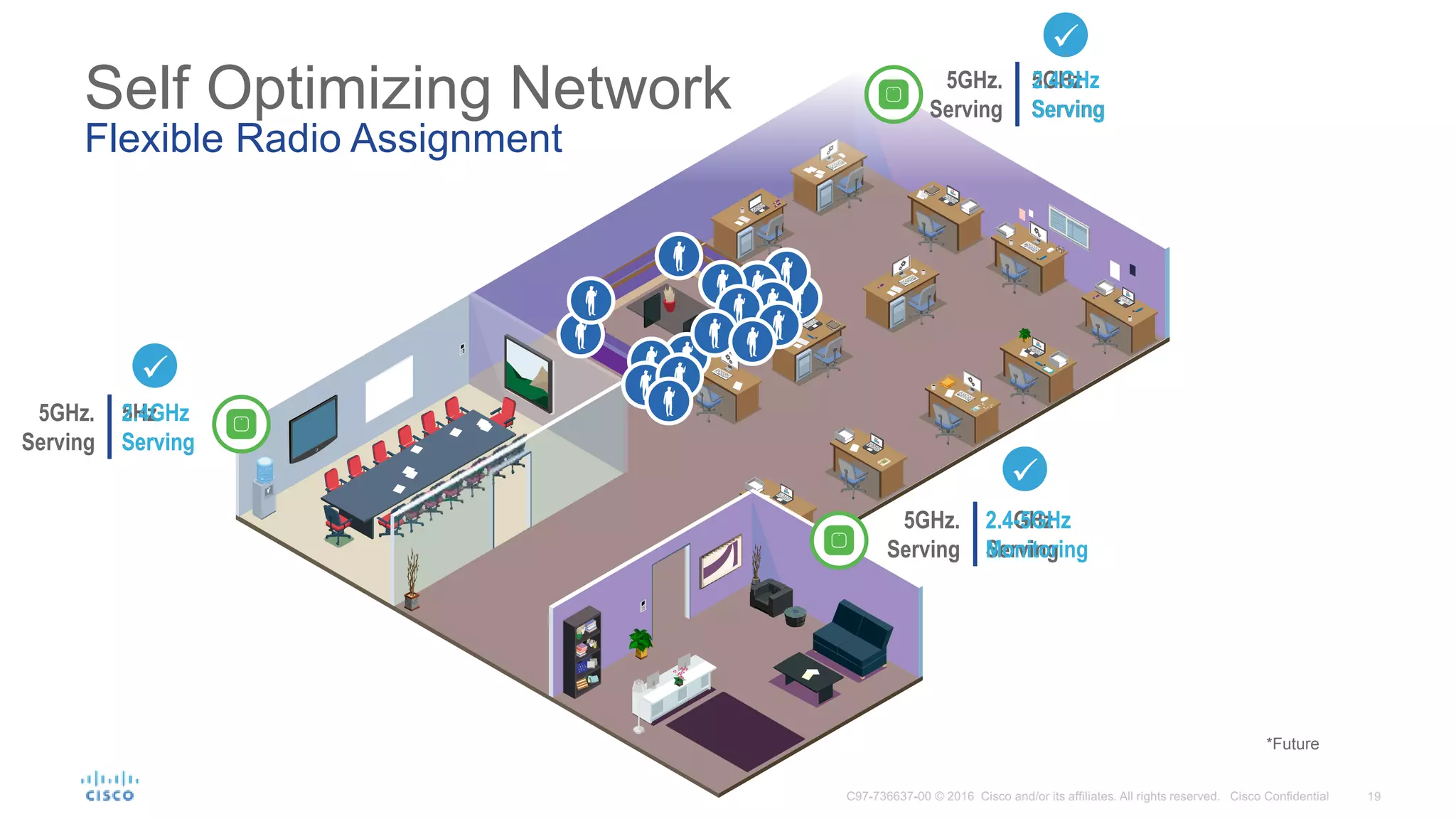
Self Optimizing Network
Flexible Radio Assignment
5GHz
Serving
2.4GHz
Serving
5GHz.
Serving
5Hz
Serving
5GHz.
Serving
2.4GHz
Serving
2.4GHz
Serving
2.4-5GHz
Monitoring
*Future
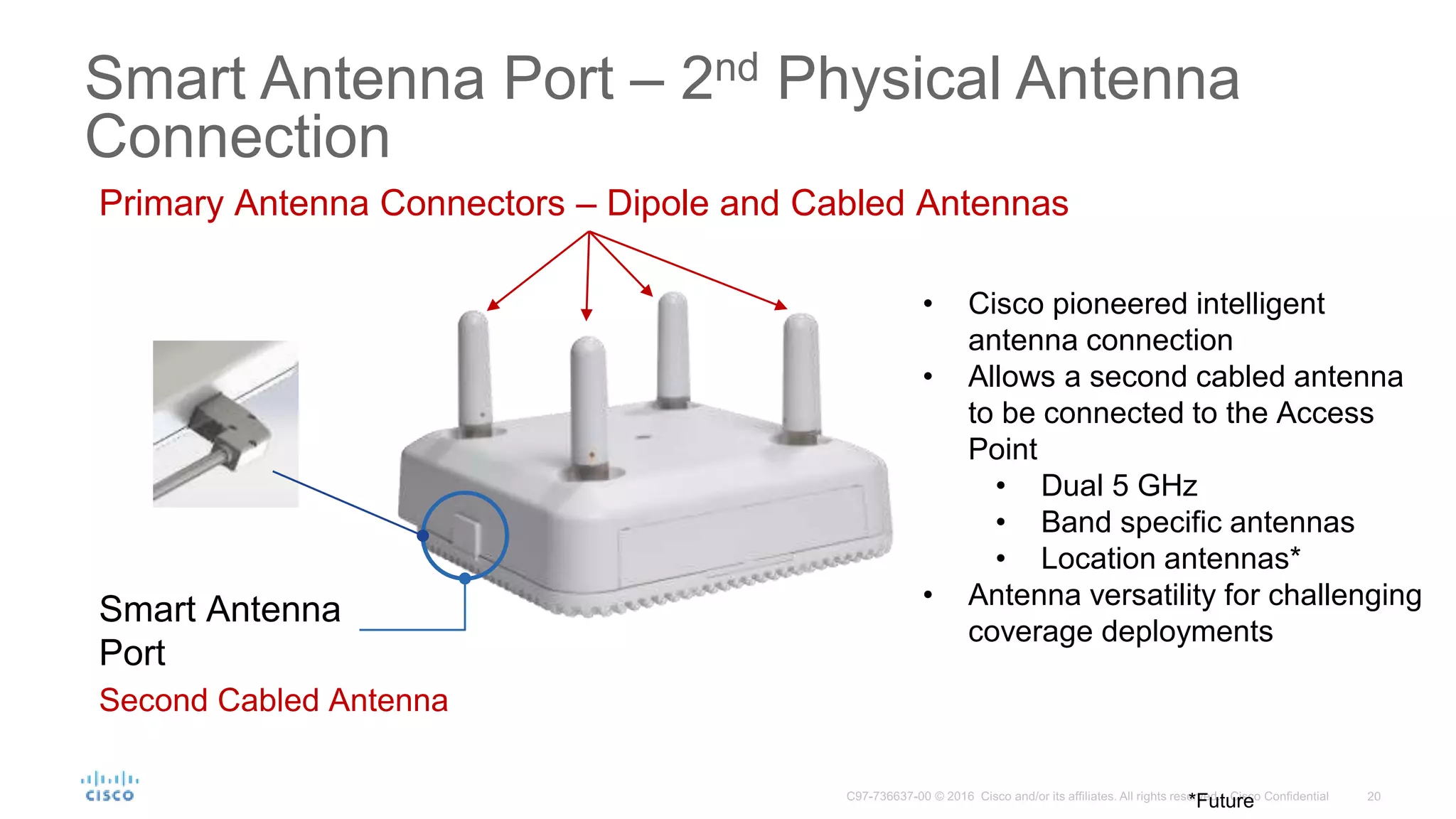
Smart Antenna
Port
Primary Antenna Connectors – Dipole and Cabled Antennas
Second Cabled Antenna
*Future
• Cisco pioneered intelligent
antenna connection
• Allows a second cabled antenna
to be connected to the Access
Point
• Dual 5 GHz
• Band specific antennas
• Location antennas*
• Antenna versatility for challenging
coverage deployments
Smart Antenna Port – 2nd Physical Antenna
Connection
5 Gigabit
Port
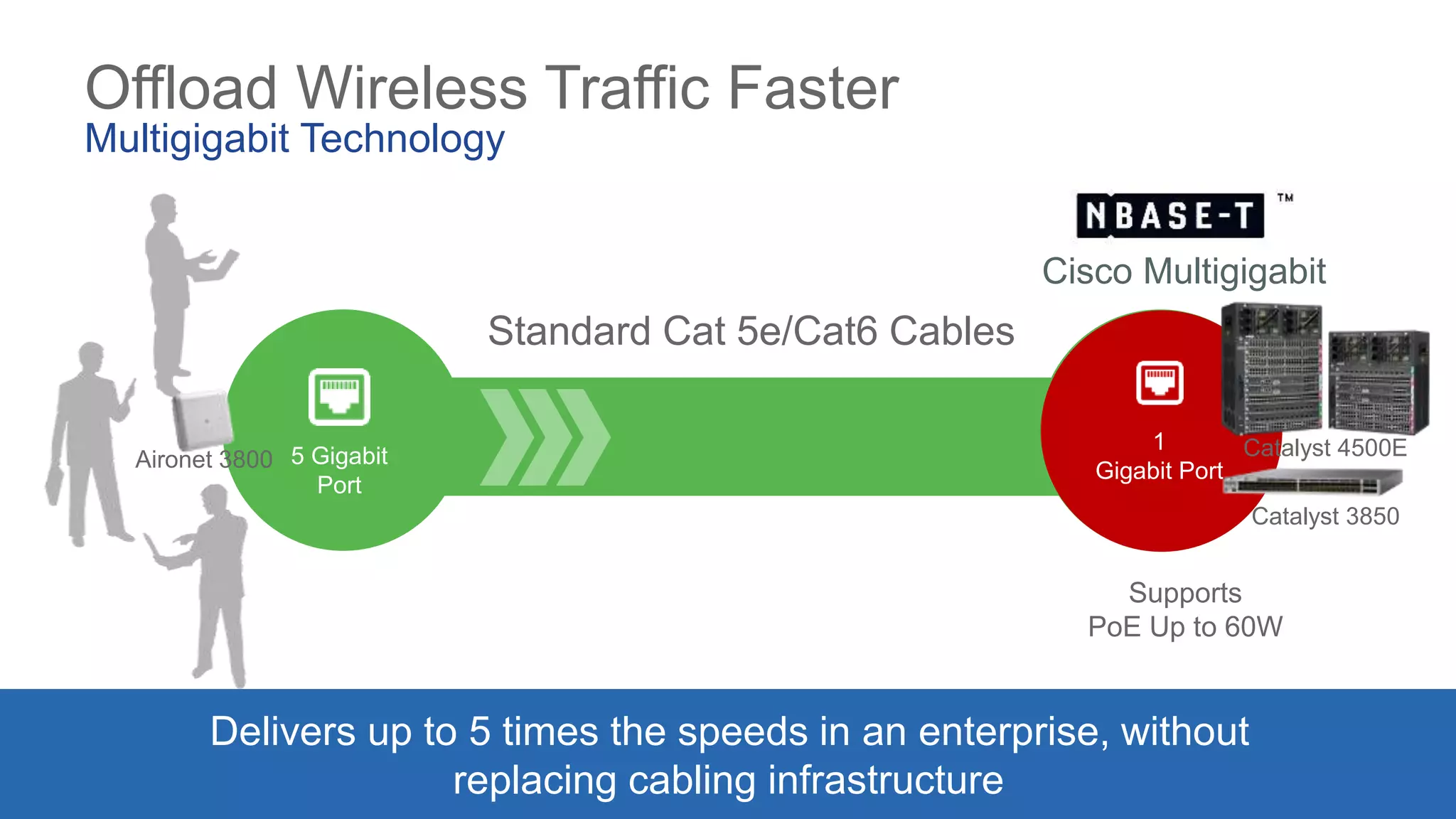
Offload Wireless Traffic Faster
Multigigabit Technology
Cisco Multigigabit
Standard Cat 5e/Cat6 Cables
1
Gigabit Port
Delivers up to 5 times the speeds in an enterprise, without
replacing cabling infrastructure
Supports
PoE Up to 60W
5 Gigabit
Port
Catalyst 4500E
Catalyst 3850
Aironet 3800
© 2016 Cisco and/or its affiliates. All rights reserved. Cisco Confidential 22
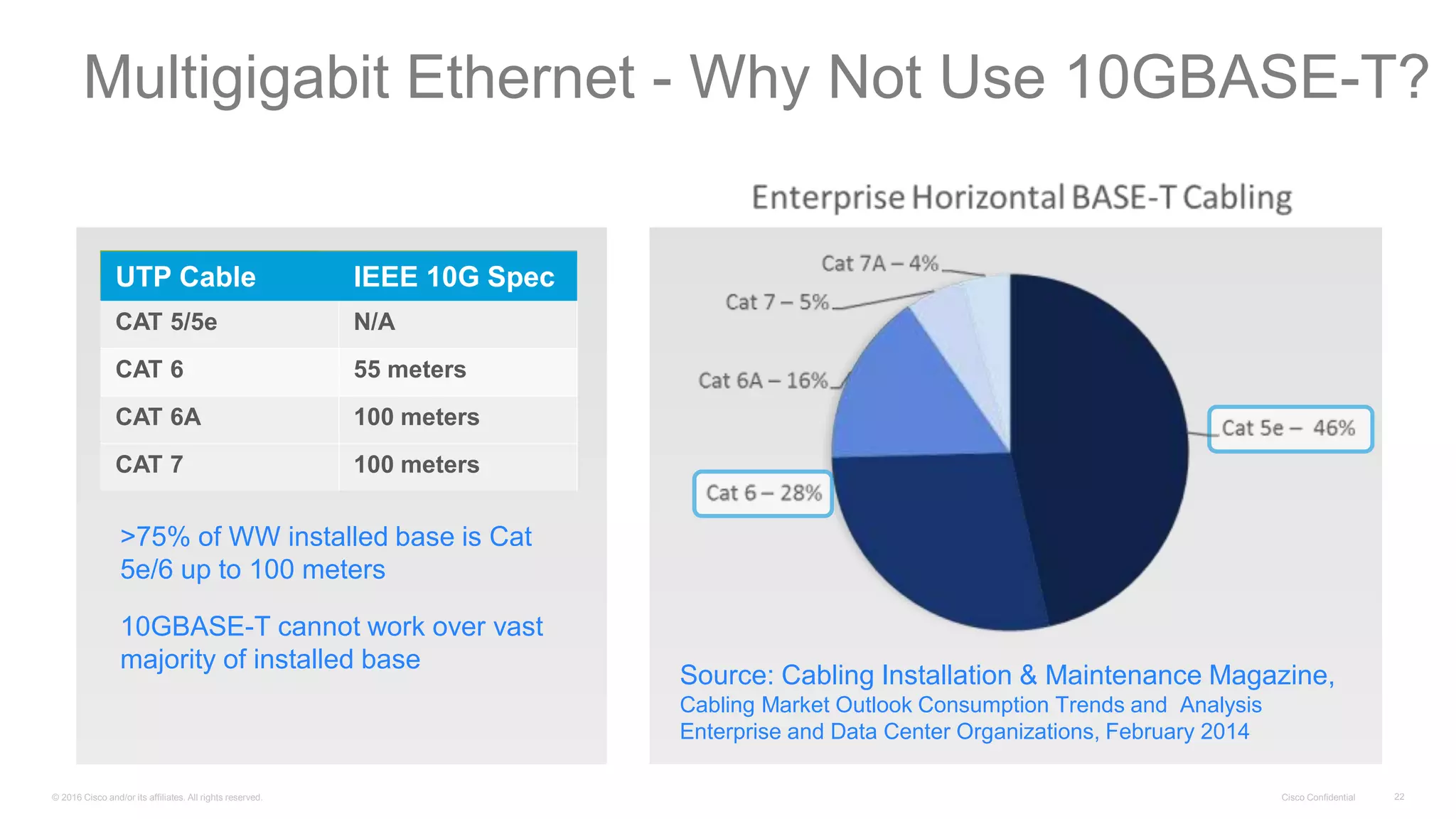
UTP Cable IEEE 10G Spec
CAT 5/5e N/A
CAT 6 55 meters
CAT 6A 100 meters
CAT 7 100 meters
>75% of WW installed base is Cat
5e/6 up to 100 meters
10GBASE-T cannot work over vast
majority of installed base
Source: Cabling Installation & Maintenance Magazine,
Cabling Market Outlook Consumption Trends and Analysis
Enterprise and Data Center Organizations, February 2014
Multigigabit Ethernet - Why Not Use 10GBASE-T?
© 2016 Cisco and/or its affiliates. All rights reserved. Cisco Confidential 23
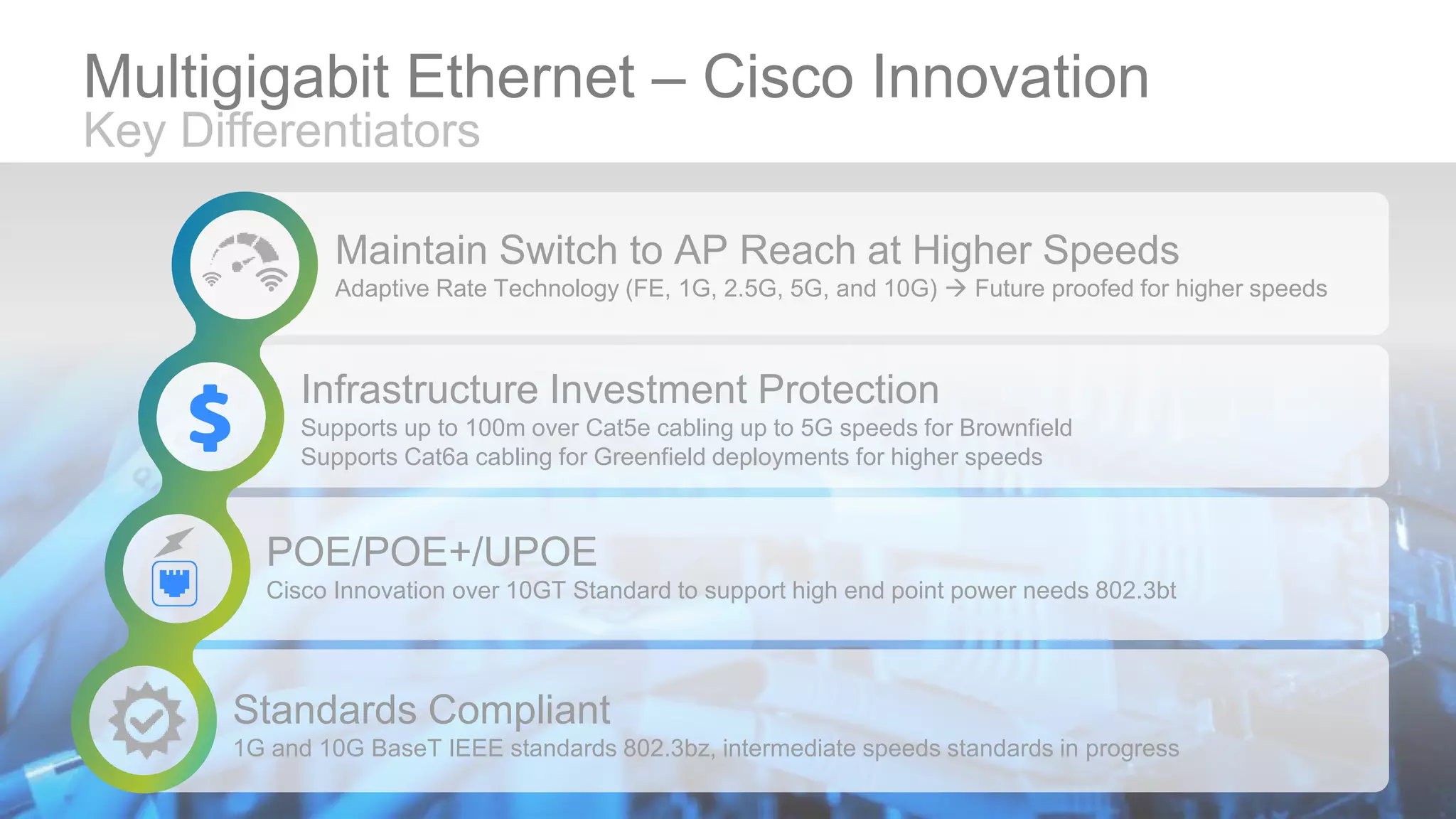
Maintain Switch to AP Reach at Higher Speeds
Adaptive Rate Technology (FE, 1G, 2.5G, 5G, and 10G)  Future proofed for higher speeds
Infrastructure Investment Protection
Supports up to 100m over Cat5e cabling up to 5G speeds for Brownfield
Supports Cat6a cabling for Greenfield deployments for higher speeds
POE/POE+/UPOE
Cisco Innovation over 10GT Standard to support high end point power needs 802.3bt
Standards Compliant
1G and 10G BaseT IEEE standards 802.3bz, intermediate speeds standards in progress
Multigigabit Ethernet – Cisco Innovation
Key Differentiators
Future Wi-Fi
Standards,
IoT, Li-Fi
Video
Surveillance
Custom
Application
Using Linux
Improve
Cellular:
3G /LTE,
3.5GHz
Bluetooth
Beacon, GPS
Location
Antenna
Directional
Antennas
Stadium
Panel
Antenna
SMART
ANTENNA
PORT
MODULE
PORT
Self-Discover /
Self-Configure
Other Other
Other
PRIMARY
ANTENNAS
Potential Future
Expandability
Bluetooth
Beaconing
Expandability and Investment Protection
Meet Any Wi-Fi Use Case
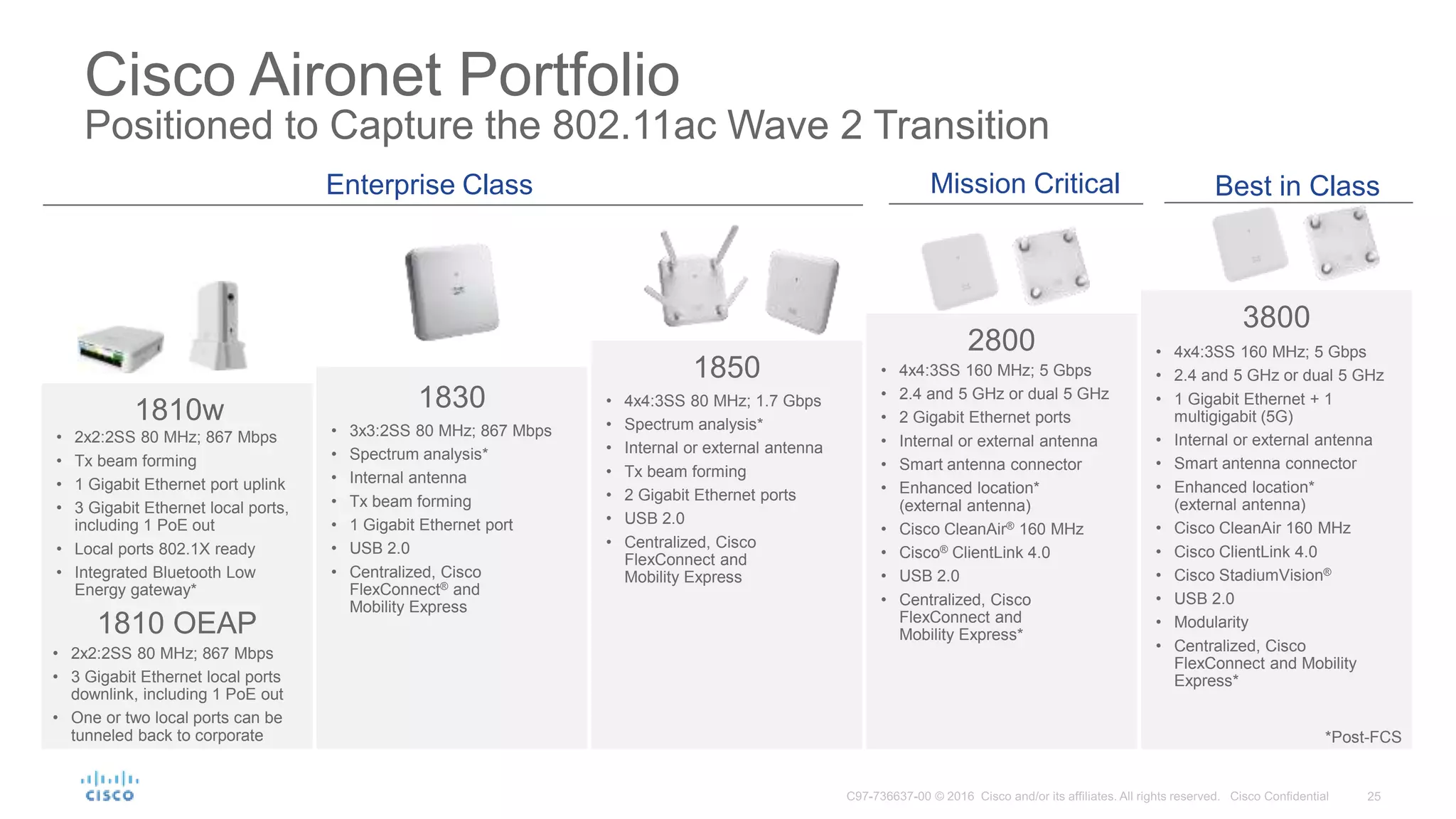
Cisco Aironet Portfolio
Positioned to Capture the 802.11ac Wave 2 Transition
Enterprise Class Mission Critical Best in Class
1850
• 4x4:3SS 80 MHz; 1.7 Gbps
• Spectrum analysis*
• Internal or external antenna
• Tx beam forming
• 2 Gigabit Ethernet ports
• USB 2.0
• Centralized, Cisco
FlexConnect and
Mobility Express
2800
• 4x4:3SS 160 MHz; 5 Gbps
• 2.4 and 5 GHz or dual 5 GHz
• 2 Gigabit Ethernet ports
• Internal or external antenna
• Smart antenna connector
• Enhanced location*
(external antenna)
• Cisco CleanAir® 160 MHz
• Cisco® ClientLink 4.0
• USB 2.0
• Centralized, Cisco
FlexConnect and
Mobility Express*
3800
• 4x4:3SS 160 MHz; 5 Gbps
• 2.4 and 5 GHz or dual 5 GHz
• 1 Gigabit Ethernet + 1
multigigabit (5G)
• Internal or external antenna
• Smart antenna connector
• Enhanced location*
(external antenna)
• Cisco CleanAir 160 MHz
• Cisco ClientLink 4.0
• Cisco StadiumVision®
• USB 2.0
• Modularity
• Centralized, Cisco
FlexConnect and Mobility
Express*
1810w
• 2x2:2SS 80 MHz; 867 Mbps
• Tx beam forming
• 1 Gigabit Ethernet port uplink
• 3 Gigabit Ethernet local ports,
including 1 PoE out
• Local ports 802.1X ready
• Integrated Bluetooth Low
Energy gateway*
1830
• 3x3:2SS 80 MHz; 867 Mbps
• Spectrum analysis*
• Internal antenna
• Tx beam forming
• 1 Gigabit Ethernet port
• USB 2.0
• Centralized, Cisco
FlexConnect® and
Mobility Express
1810 OEAP
• 2x2:2SS 80 MHz; 867 Mbps
• 3 Gigabit Ethernet local ports
downlink, including 1 PoE out
• One or two local ports can be
tunneled back to corporate *Post-FCS
Cisco AP 2800/3800 and
Flexible Radio Assignment –
Your Network, Thinking it’s way through the Options
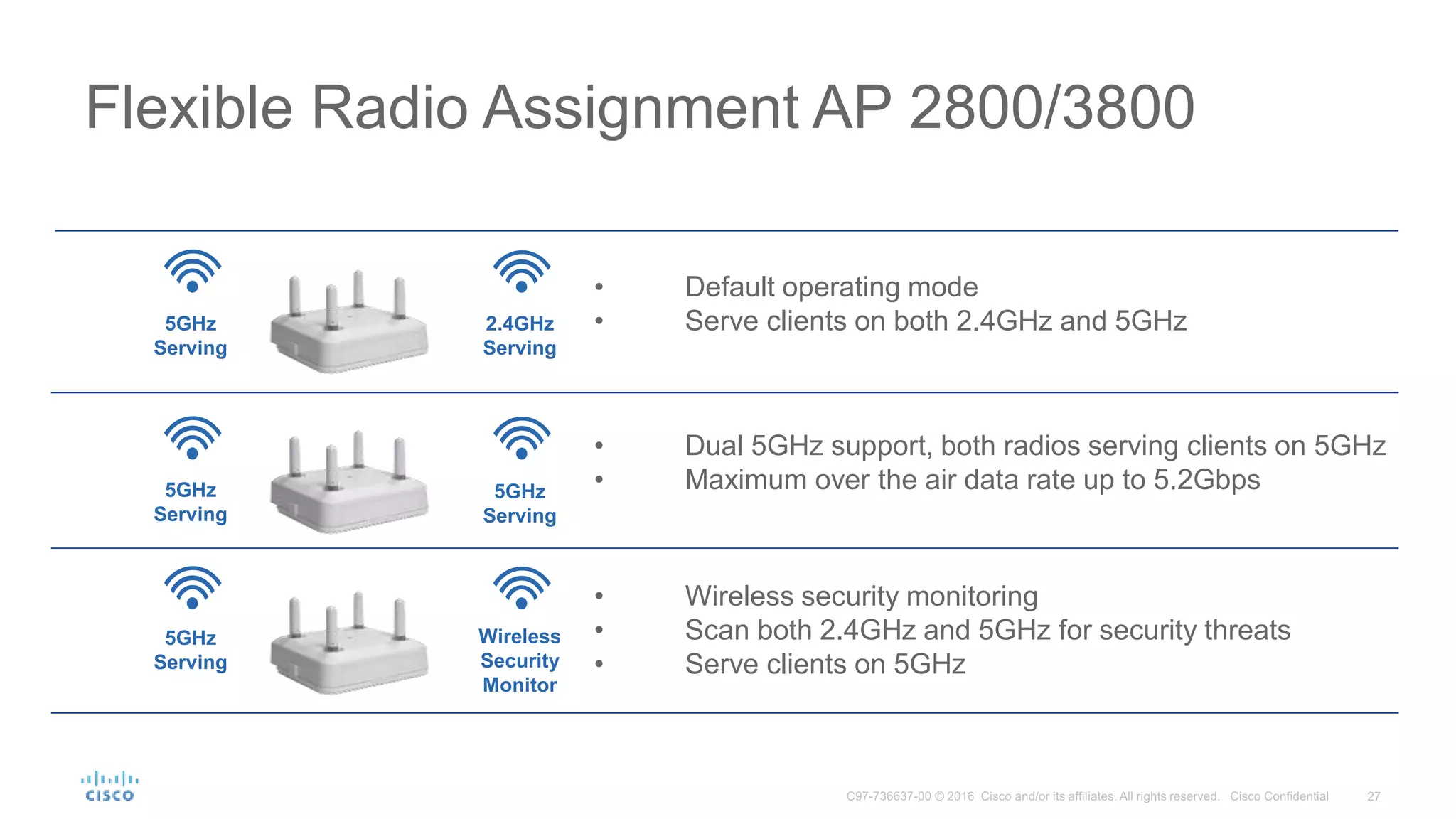
• Default operating mode
• Serve clients on both 2.4GHz and 5GHz
Flexible Radio Assignment AP 2800/3800
5GHz
Serving
2.4GHz
Serving
Wireless
Security
Monitor
• Dual 5GHz support, both radios serving clients on 5GHz
• Maximum over the air data rate up to 5.2Gbps
• Wireless security monitoring
• Scan both 2.4GHz and 5GHz for security threats
• Serve clients on 5GHz
5GHz
Serving
5GHz
Serving
5GHz
Serving
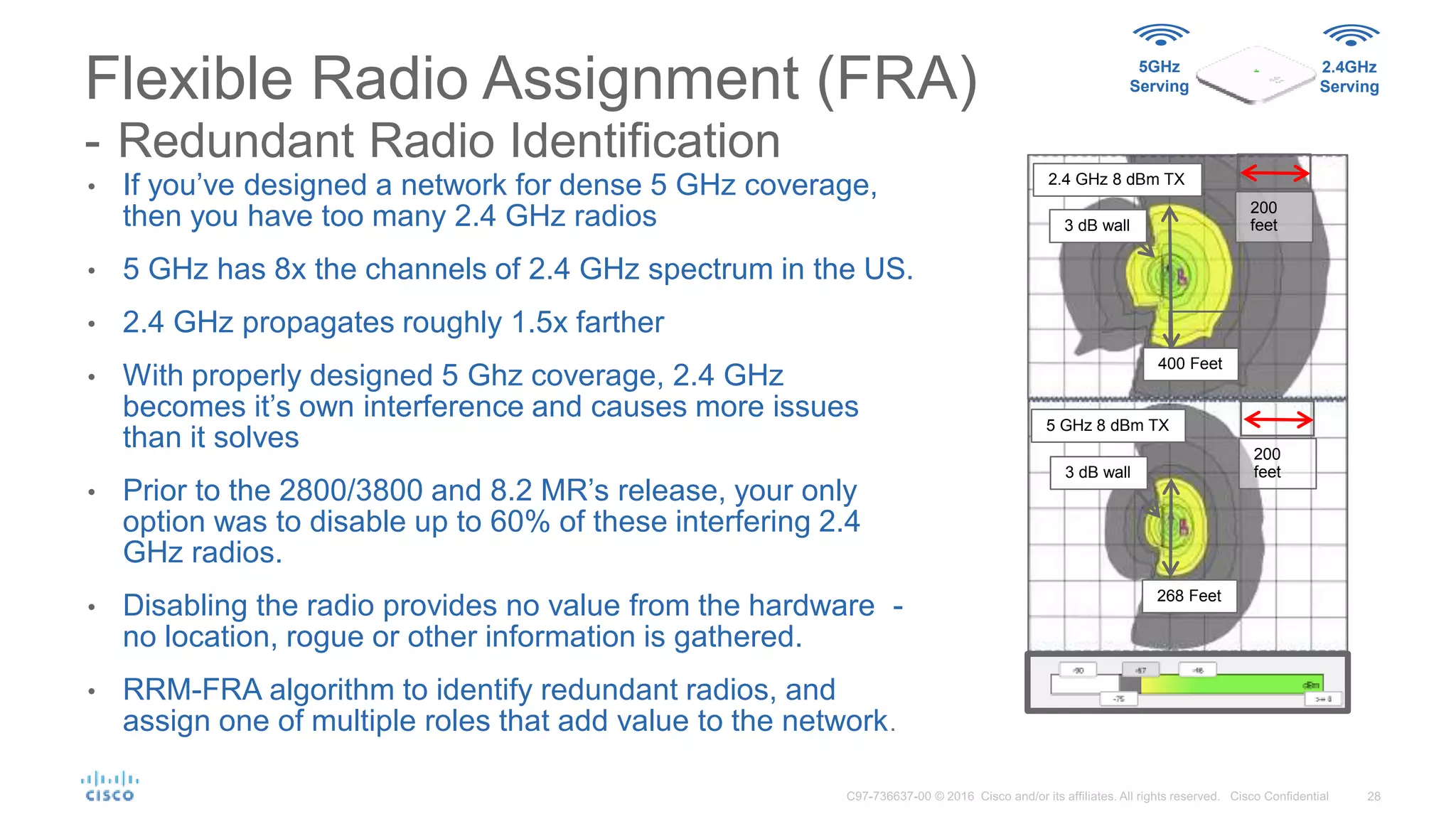
• If you’ve designed a network for dense 5 GHz coverage,
then you have too many 2.4 GHz radios
• 5 GHz has 8x the channels of 2.4 GHz spectrum in the US.
• 2.4 GHz propagates roughly 1.5x farther
• With properly designed 5 Ghz coverage, 2.4 GHz
becomes it’s own interference and causes more issues
than it solves
• Prior to the 2800/3800 and 8.2 MR’s release, your only
option was to disable up to 60% of these interfering 2.4
GHz radios.
• Disabling the radio provides no value from the hardware -
no location, rogue or other information is gathered.
• RRM-FRA algorithm to identify redundant radios, and
assign one of multiple roles that add value to the network.
Flexible Radio Assignment (FRA)
- Redundant Radio Identification
3 dB wall
5 GHz 8 dBm TX
268 Feet
3 dB wall
2.4 GHz 8 dBm TX
200
feet
400 Feet
200
feet
5GHz
Serving
2.4GHz
Serving
Running –Flexible Radio Assignment
Redundant Radio Identification
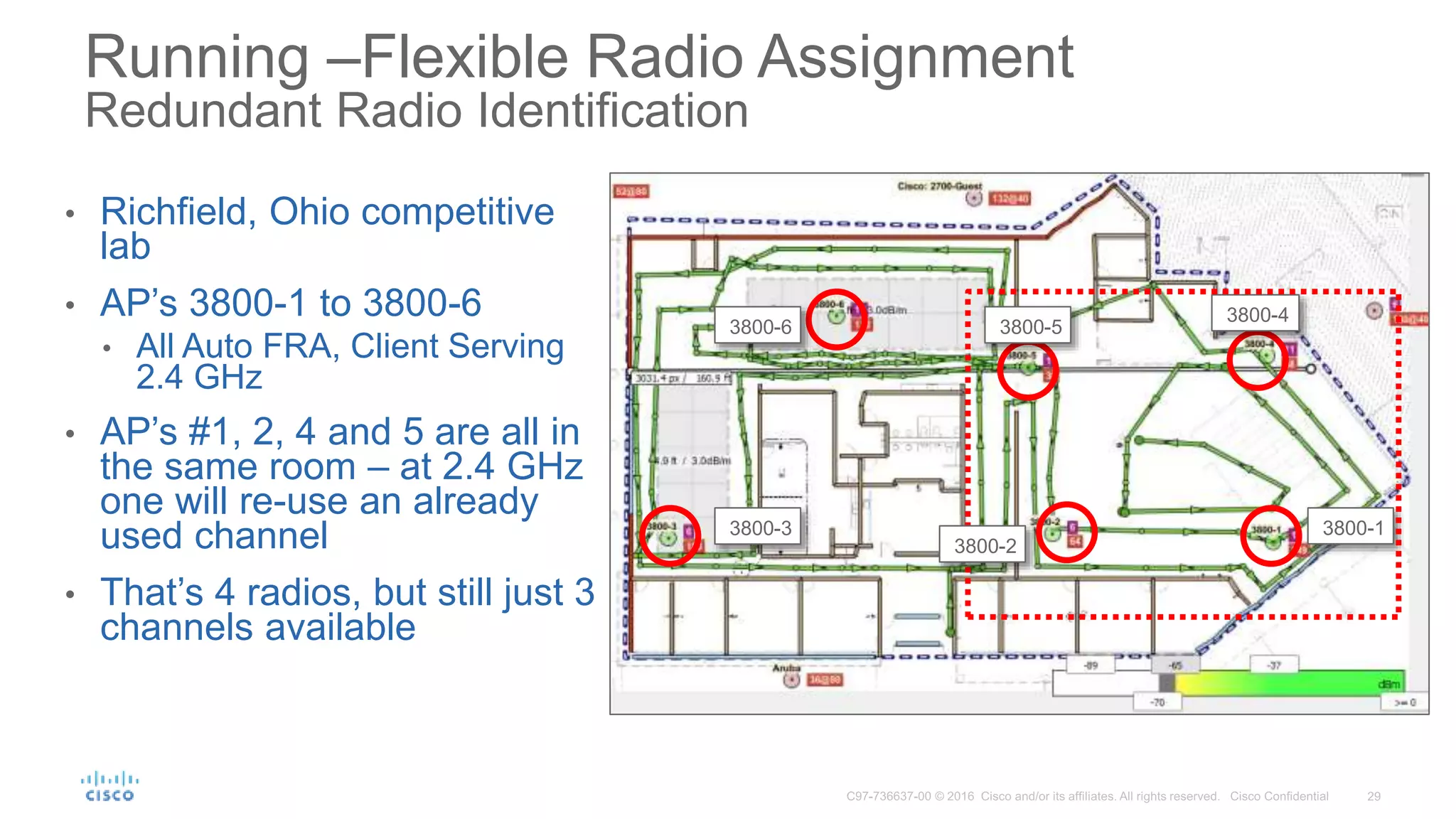
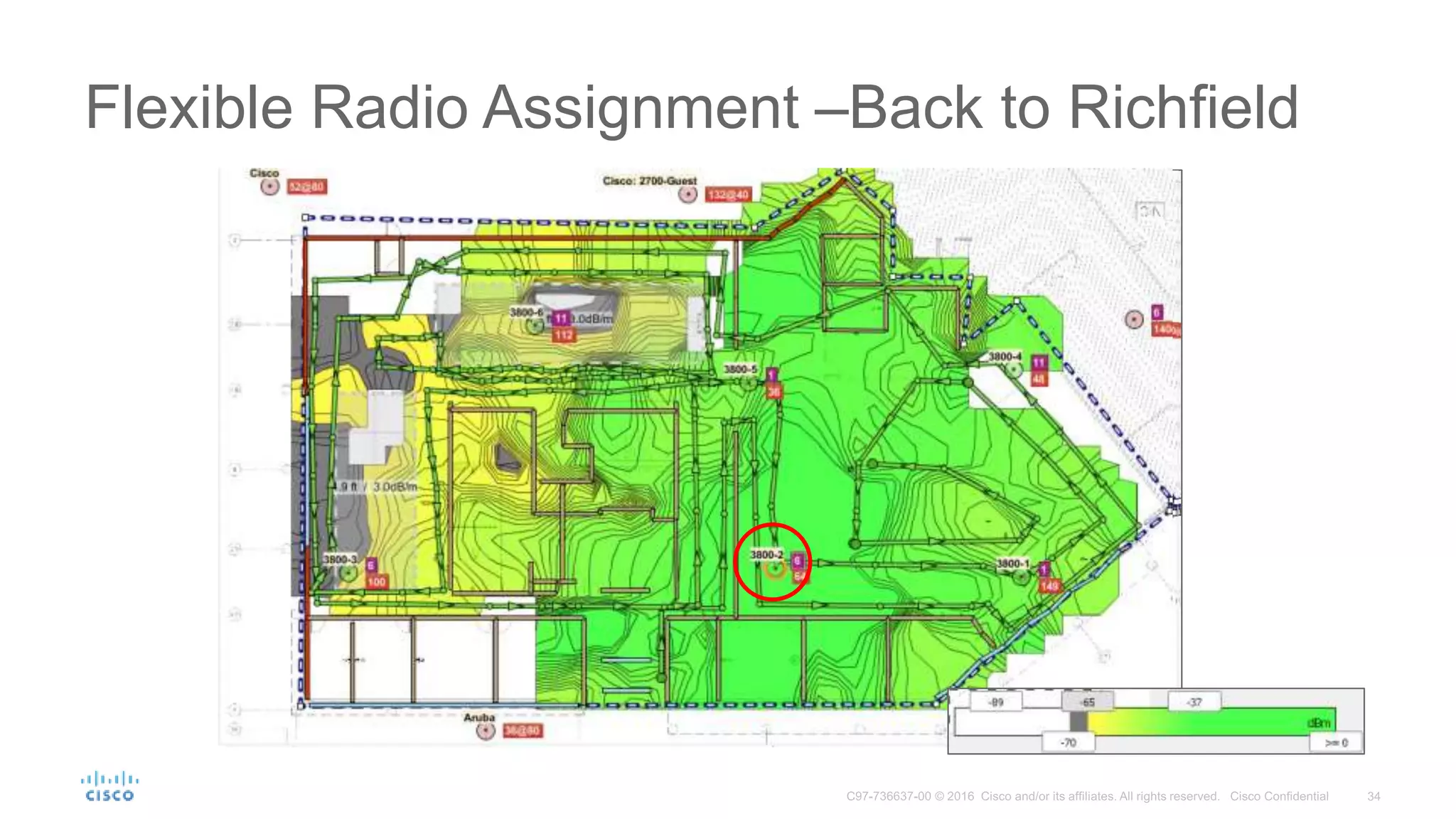
• Richfield, Ohio competitive
lab
• AP’s 3800-1 to 3800-6
• All Auto FRA, Client Serving
2.4 GHz
• AP’s #1, 2, 4 and 5 are all in
the same room – at 2.4 GHz
one will re-use an already
used channel
• That’s 4 radios, but still just 3
channels available
3800-3
3800-5
3800-4
3800-1
3800-6
3800-2
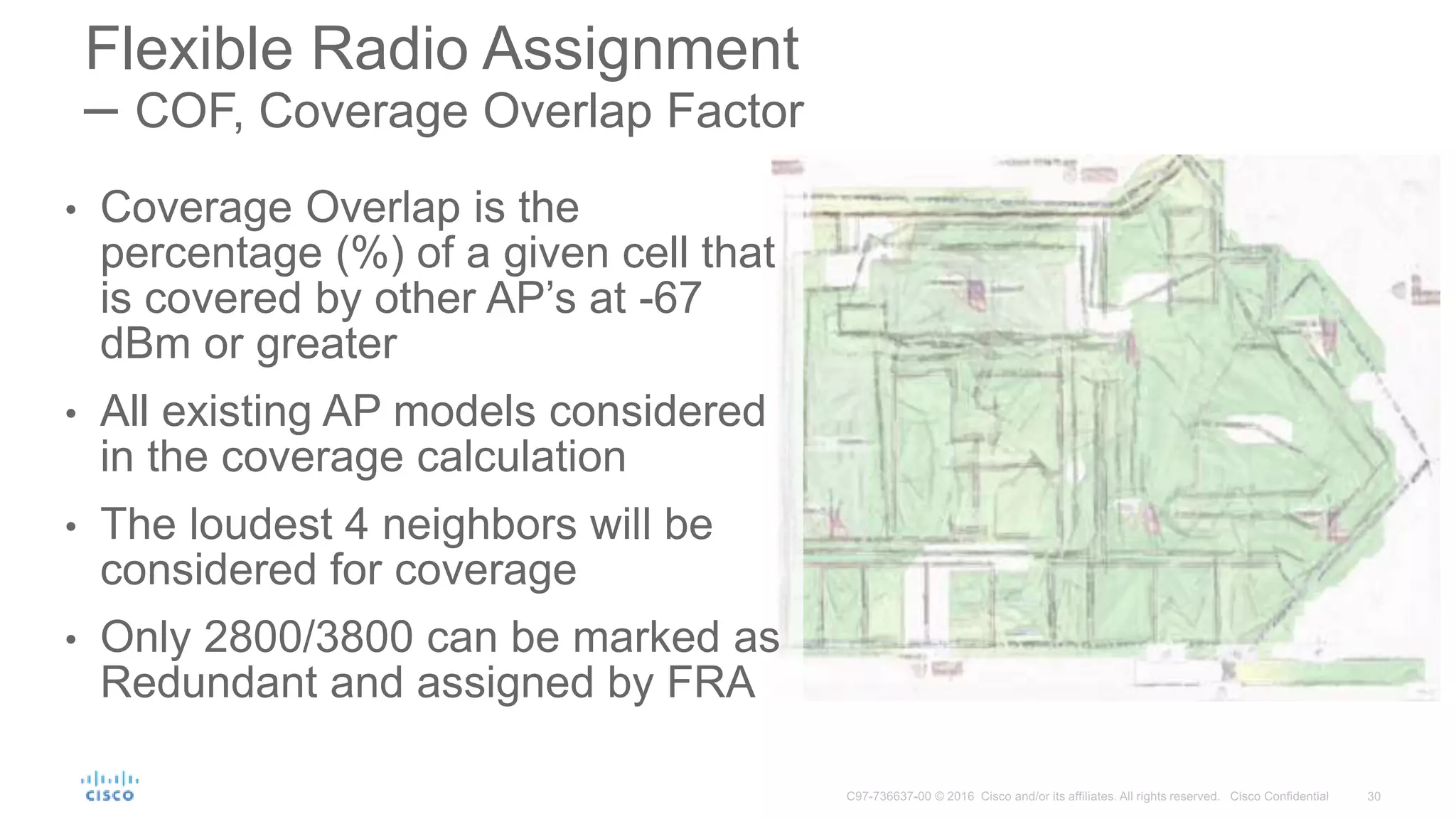
• Coverage Overlap is the
percentage (%) of a given cell that
is covered by other AP’s at -67
dBm or greater
• All existing AP models considered
in the coverage calculation
• The loudest 4 neighbors will be
considered for coverage
• Only 2800/3800 can be marked as
Redundant and assigned by FRA
Flexible Radio Assignment
– COF, Coverage Overlap Factor
Redundant Radio Identification
Per RF Neighborhood Coverage Analysis
AP-1
AP-2
AP-3
AP-4
AP-5
AP-6
AP-7
AP-8
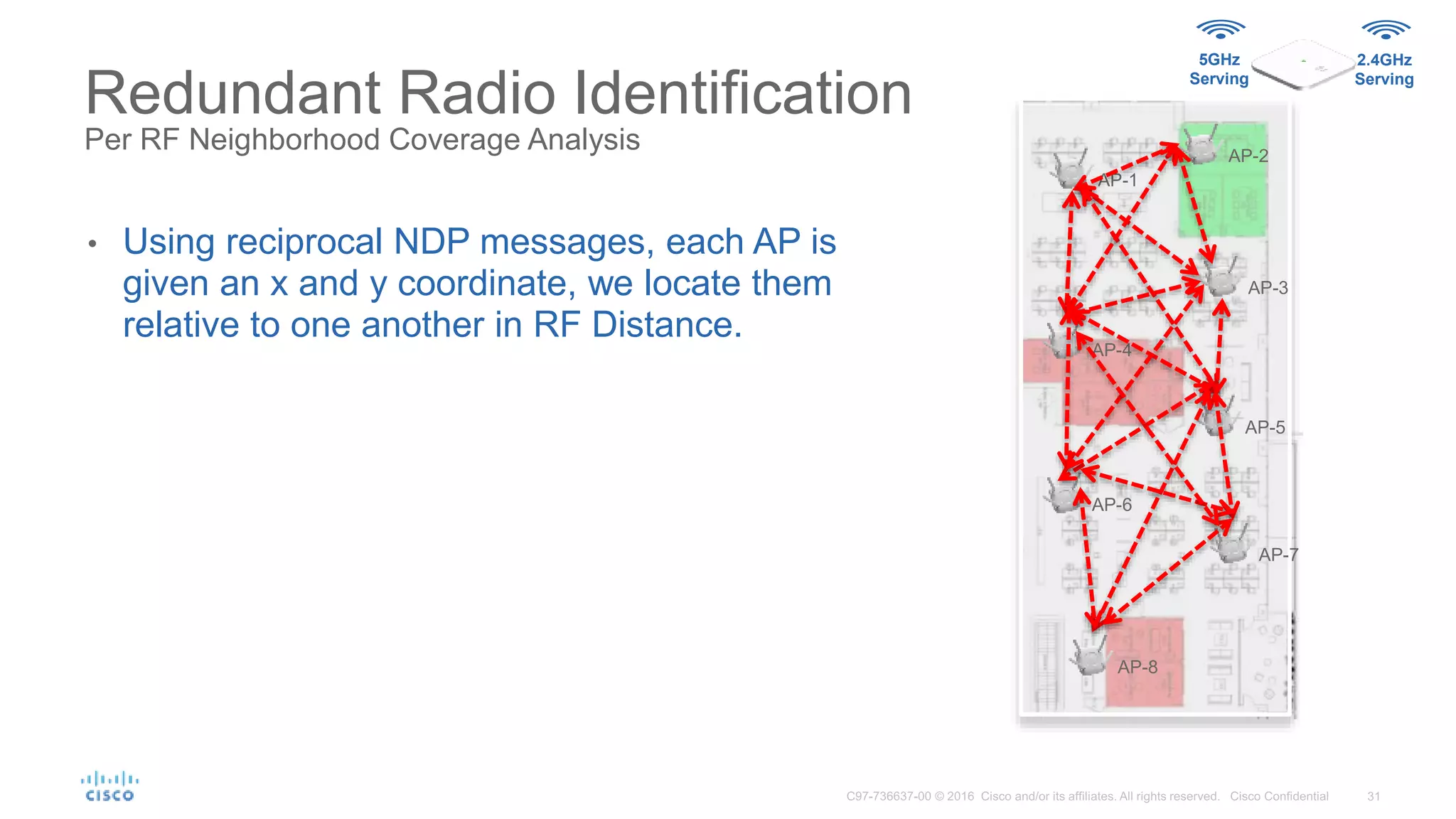
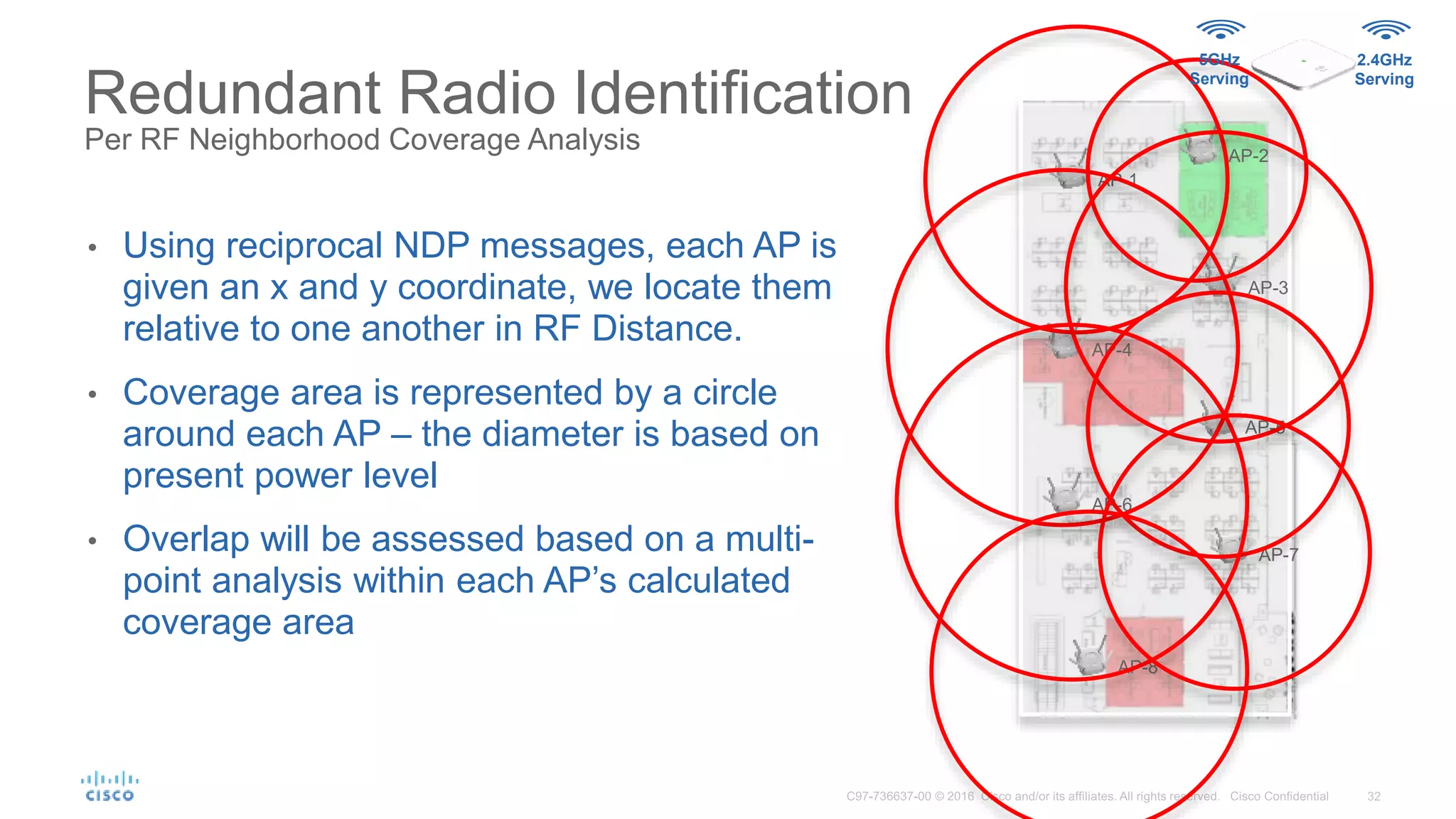
• Using reciprocal NDP messages, each AP is
given an x and y coordinate, we locate them
relative to one another in RF Distance.
5GHz
Serving
2.4GHz
Serving
Redundant Radio Identification
Per RF Neighborhood Coverage Analysis
AP-1
AP-2
AP-3
AP-4
AP-5
AP-6
AP-7
AP-8
• Using reciprocal NDP messages, each AP is
given an x and y coordinate, we locate them
relative to one another in RF Distance.
• Coverage area is represented by a circle
around each AP – the diameter is based on
present power level
• Overlap will be assessed based on a multi-
point analysis within each AP’s calculated
coverage area
5GHz
Serving
2.4GHz
Serving
Redundant Radio Identification
Per RF Neighborhood Coverage Analysis
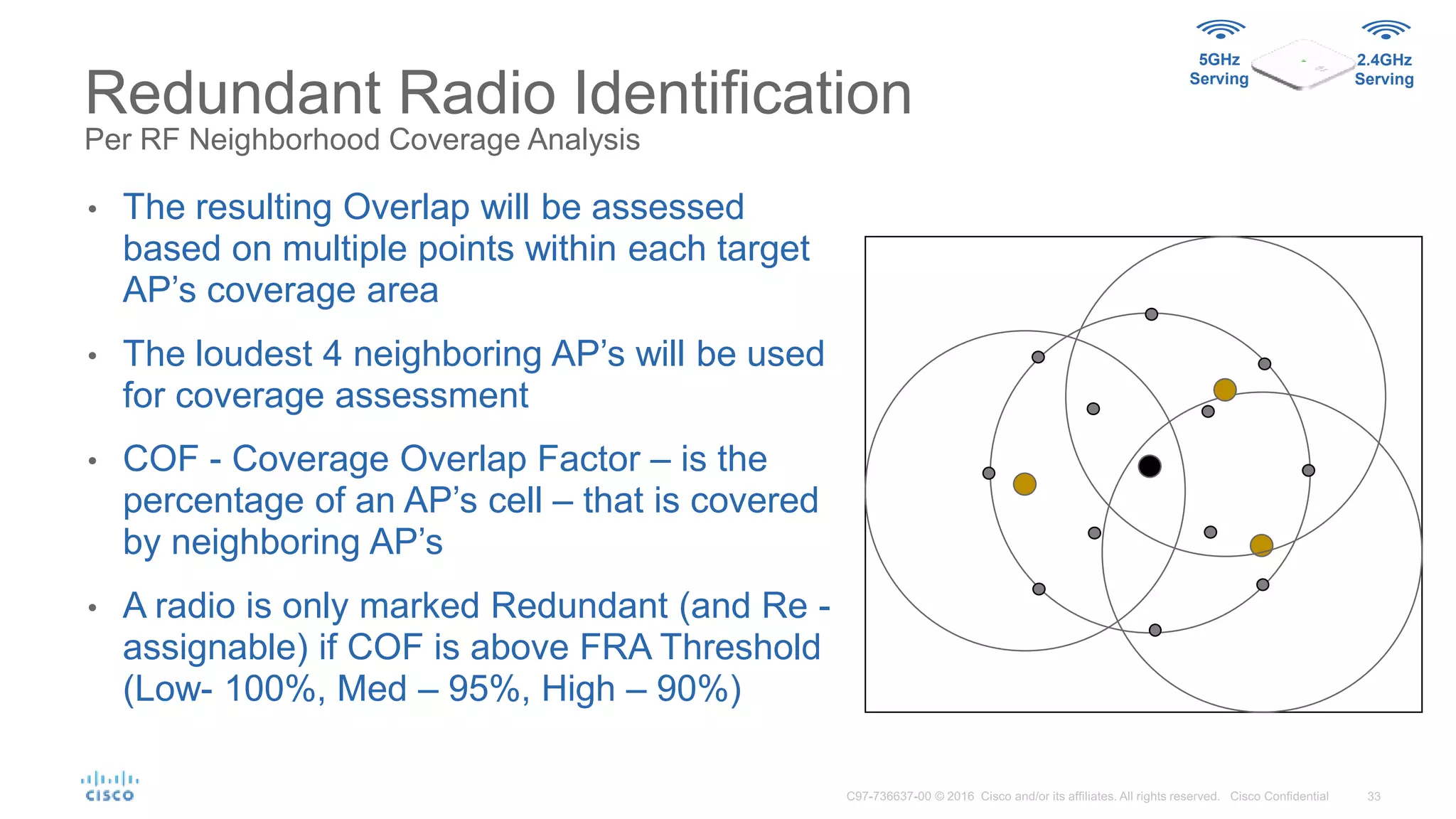
• The resulting Overlap will be assessed
based on multiple points within each target
AP’s coverage area
• The loudest 4 neighboring AP’s will be used
for coverage assessment
• COF - Coverage Overlap Factor – is the
percentage of an AP’s cell – that is covered
by neighboring AP’s
• A radio is only marked Redundant (and Re -
assignable) if COF is above FRA Threshold
(Low- 100%, Med – 95%, High – 90%)
5GHz
Serving
2.4GHz
Serving
Flexible Radio Assignment –Back to Richfield
Flexible Radio Assignment Opinion
(Cisco Controller) >show advanced fra
FRA State........................................ Enabled
FRA Sensitivity.................................. high (90)
FAR Interval..................................... 1 Hour(s)
Last Run....................................... 2366 seconds ago
Last Run Time.................................. 0 seconds
AP Name MAC Address Slot, Current BandCoverage, Overlap Factor %, Suggested Mode
-------------------------------- ----------------- ---- -------------- --------
3800-4 58:ac:78:df:9f:70 0 2.4GHz 80 2.4GHz
3800-6 58:ac:78:df:9f:50 0 2.4GHz 76 2.4GHz
3800-2 58:ac:78:df:6b:50 0 2.4GHz 76 2.4GHz
3800-3 58:ac:78:df:9e:d0 0 2.4GHz 65 2.4GHz
3800-5 58:ac:78:df:9e:80 0 5GHz 96 5GHz
3800-1 58:ac:78:df:73:20 0 5GHz 92 5GHz
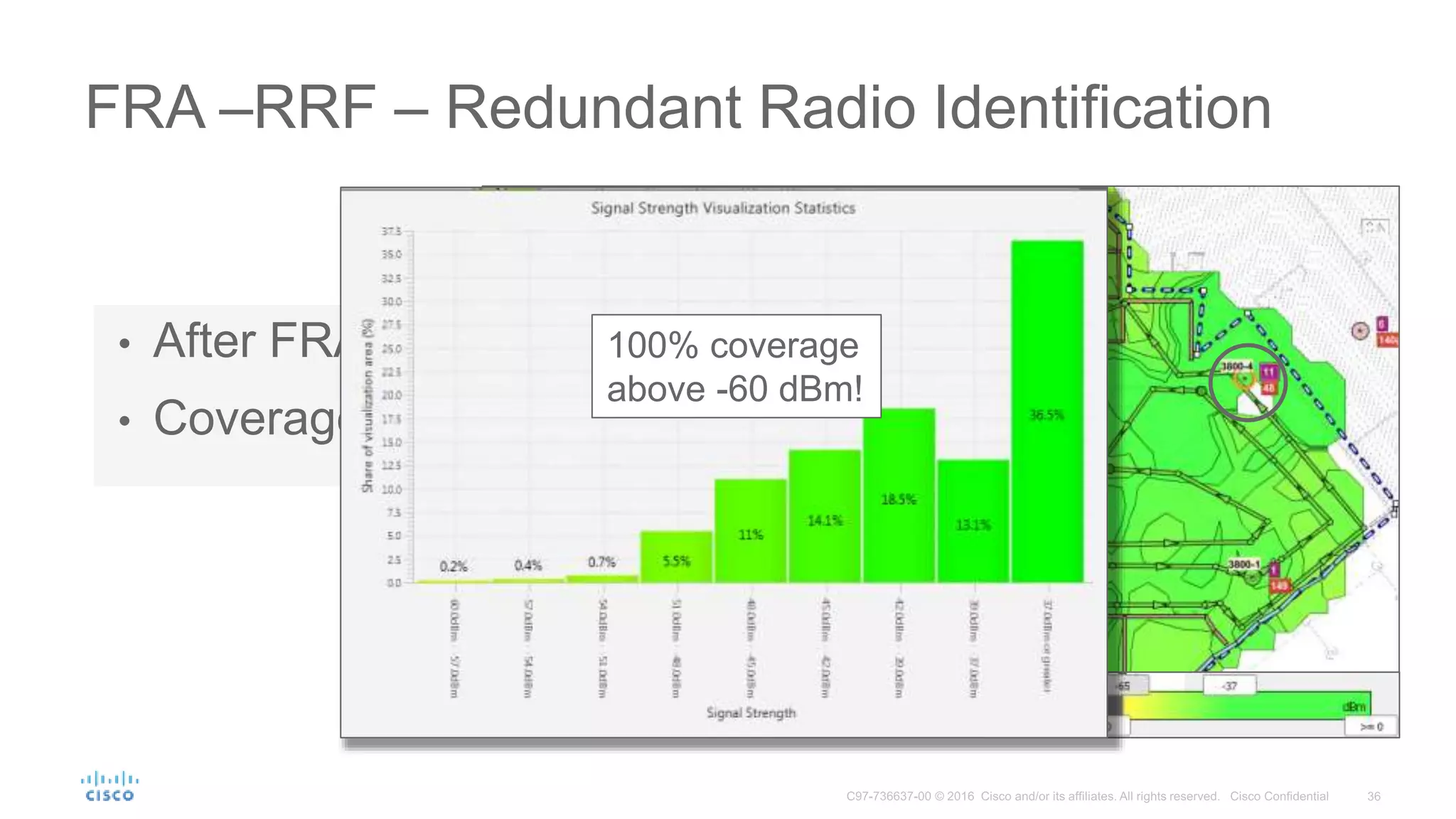
FRA –RRF – Redundant Radio Identification
• After FRA changed 2 radios Roles
• Coverage still excellent
100% coverage
above -60 dBm!
• Default operating mode
• Serve clients on both 2.4GHz and 5GHz
Flexible Radio Assignment AP 2800/3800
5GHz
Serving
2.4GHz
Serving
Wireless
Security
Monitor
• Dual 5GHz support, both radios serving clients on 5GHz
• Maximum over the air data rate up to 5.2Gbps
• Wireless security monitoring
• Scan both 2.4GHz and 5GHz for security threats
• Serve clients on 5GHz
5GHz
Serving
5GHz
Serving
5GHz
Serving
1
2
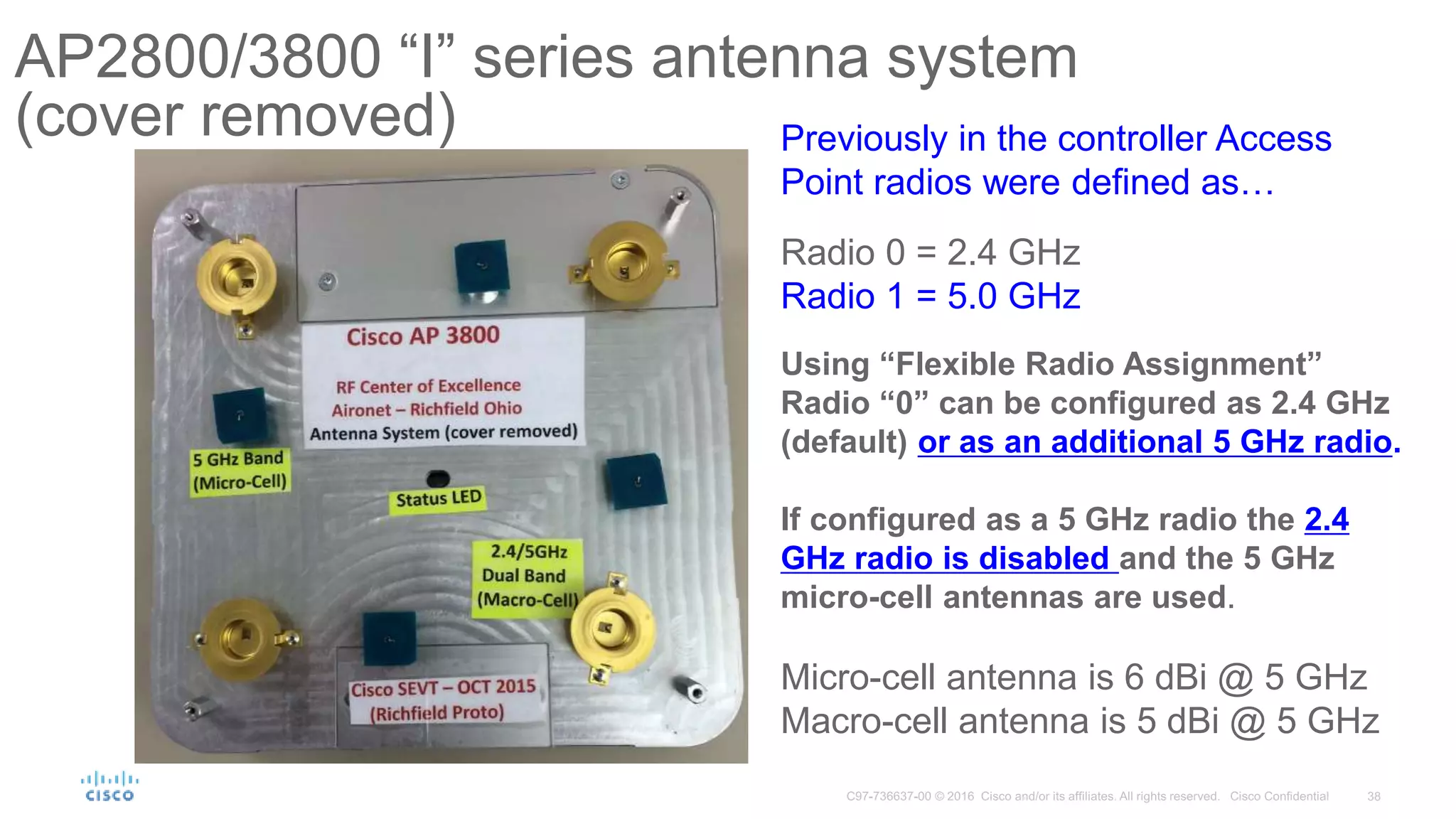
AP2800/3800 “I” series antenna system
(cover removed) Previously in the controller Access
Point radios were defined as…
Radio 0 = 2.4 GHz
Radio 1 = 5.0 GHz
Using “Flexible Radio Assignment”
Radio “0” can be configured as 2.4 GHz
(default) or as an additional 5 GHz radio.
If configured as a 5 GHz radio the 2.4
GHz radio is disabled and the 5 GHz
micro-cell antennas are used.
Micro-cell antenna is 6 dBi @ 5 GHz
Macro-cell antenna is 5 dBi @ 5 GHz
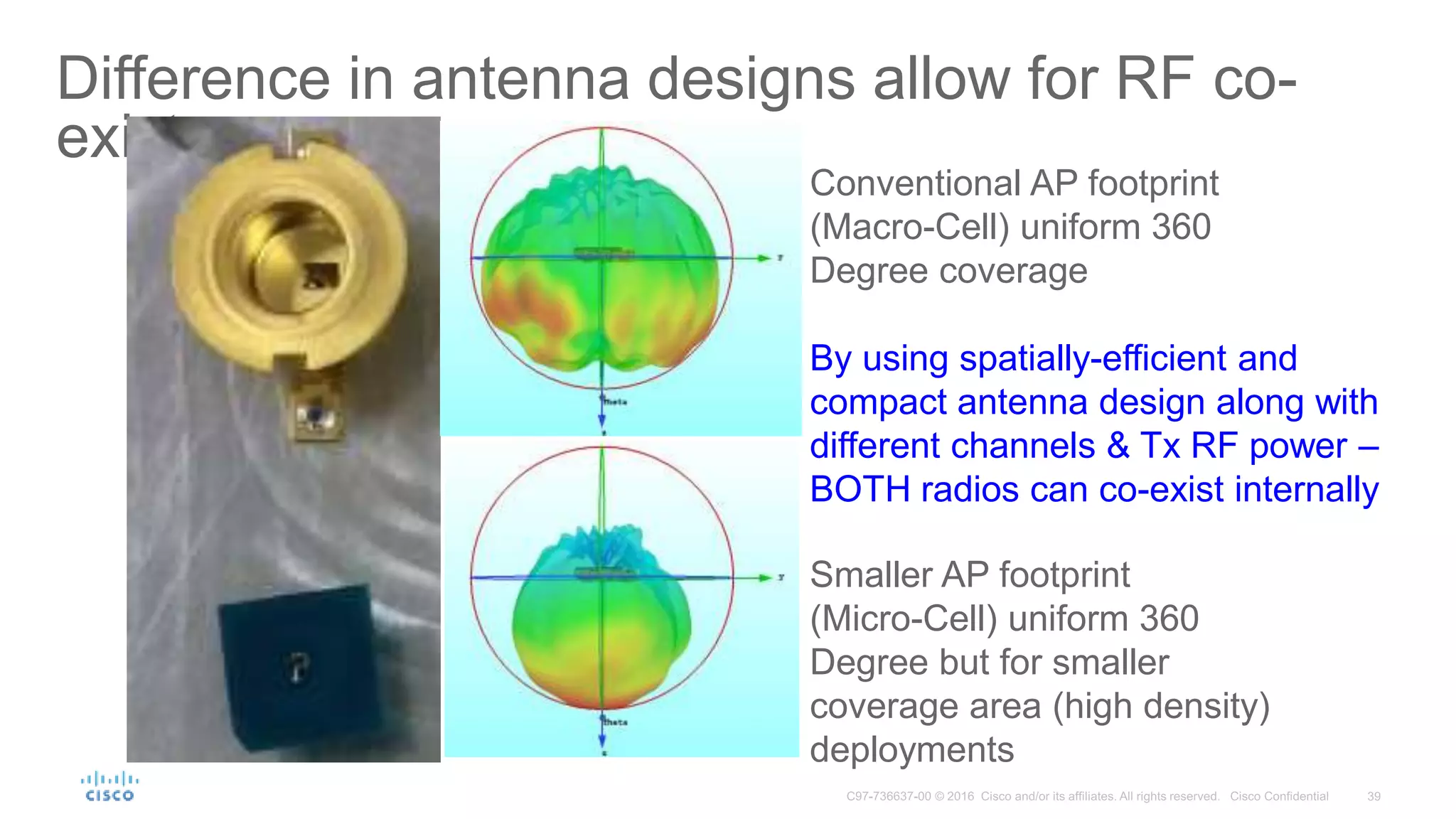
Difference in antenna designs allow for RF co-
existence
Conventional AP footprint
(Macro-Cell) uniform 360
Degree coverage
Smaller AP footprint
(Micro-Cell) uniform 360
Degree but for smaller
coverage area (high density)
deployments
By using spatially-efficient and
compact antenna design along with
different channels & Tx RF power –
BOTH radios can co-exist internally
2800i/3800i Dual Band
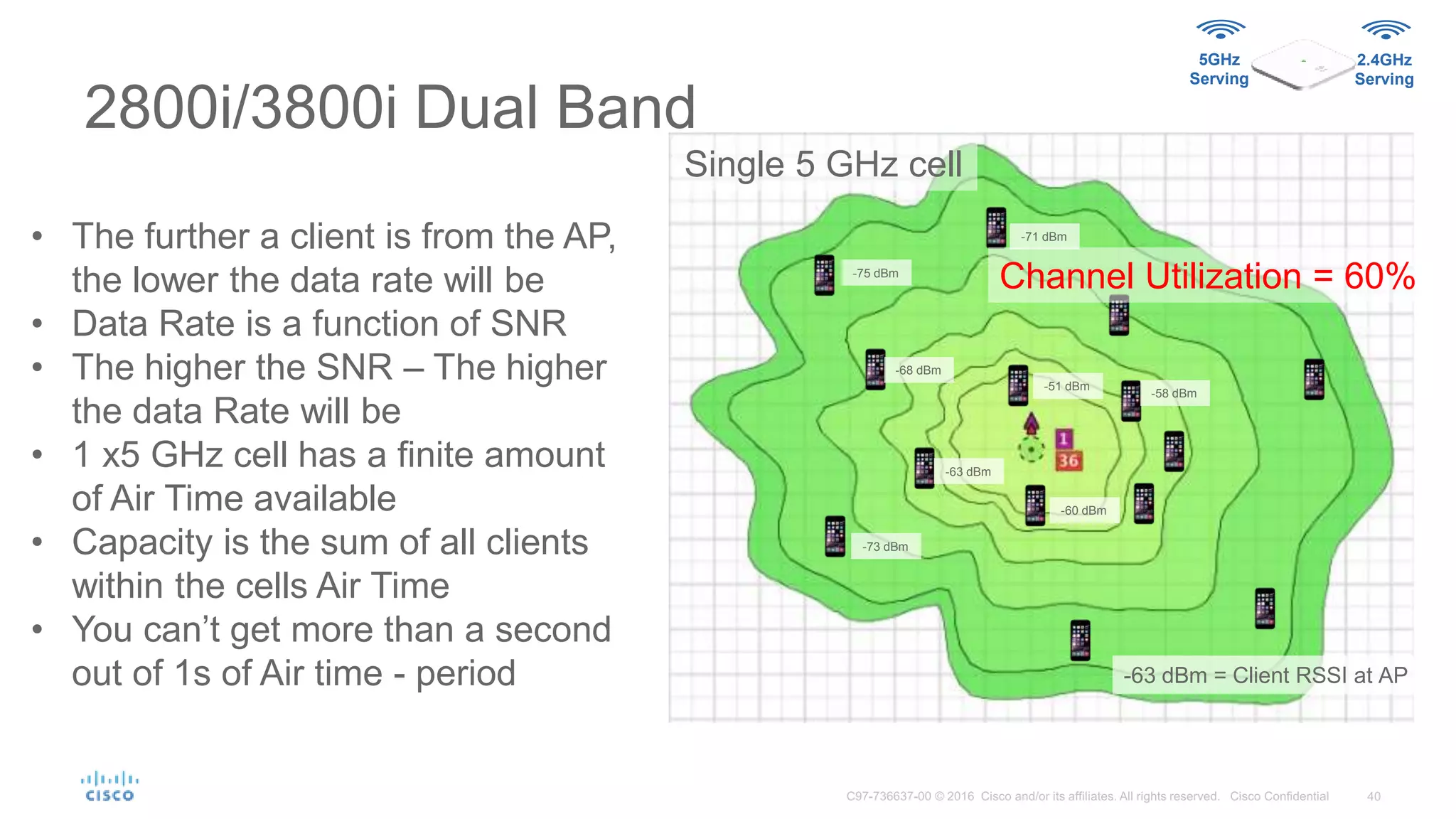
Channel Utilization = 60%
• The further a client is from the AP,
the lower the data rate will be
• Data Rate is a function of SNR
• The higher the SNR – The higher
the data Rate will be
• 1 x5 GHz cell has a finite amount
of Air Time available
• Capacity is the sum of all clients
within the cells Air Time
• You can’t get more than a second
out of 1s of Air time - period
-63 dBm
-60 dBm
-58 dBm
-68 dBm
-71 dBm
-73 dBm
-75 dBm
-51 dBm
-63 dBm = Client RSSI at AP
Single 5 GHz cell
5GHz
Serving
2.4GHz
Serving
2800i/3800i Macro/Micro
Dual 5 GHz
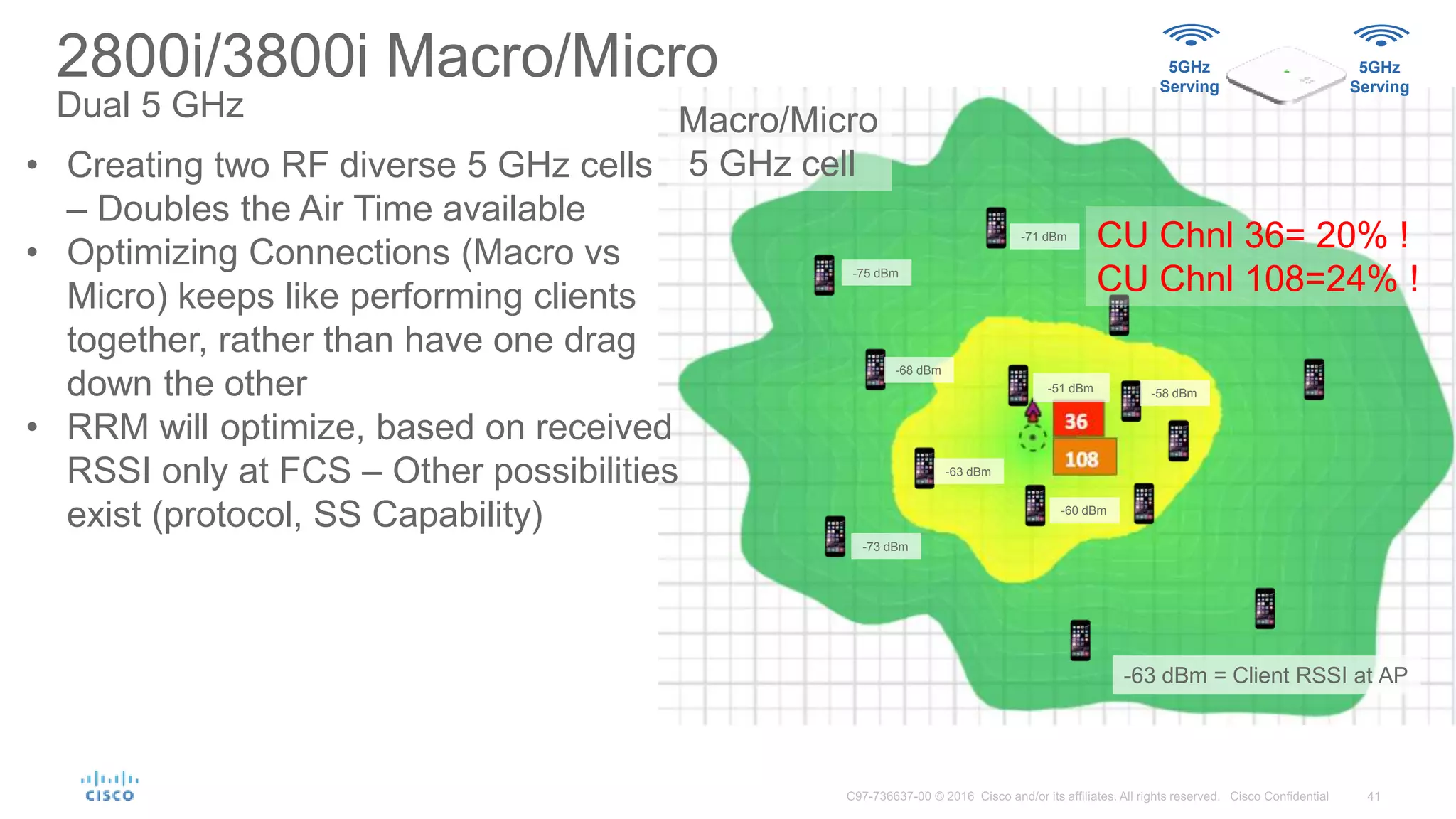
CU Chnl 36= 20% !
CU Chnl 108=24% !
• Creating two RF diverse 5 GHz cells
– Doubles the Air Time available
• Optimizing Connections (Macro vs
Micro) keeps like performing clients
together, rather than have one drag
down the other
• RRM will optimize, based on received
RSSI only at FCS – Other possibilities
exist (protocol, SS Capability)
-63 dBm
-60 dBm
-58 dBm
-68 dBm
-71 dBm
-73 dBm
-75 dBm
-51 dBm
-63 dBm = Client RSSI at AP
Macro/Micro
5 GHz cell
5GHz
Serving
5GHz
Serving
Intra-cell Roaming –
Macro to Micro
Macro=Big
Micro=small
5GHz
Serving
5GHz
Serving
-51 dBm
-51 dBm
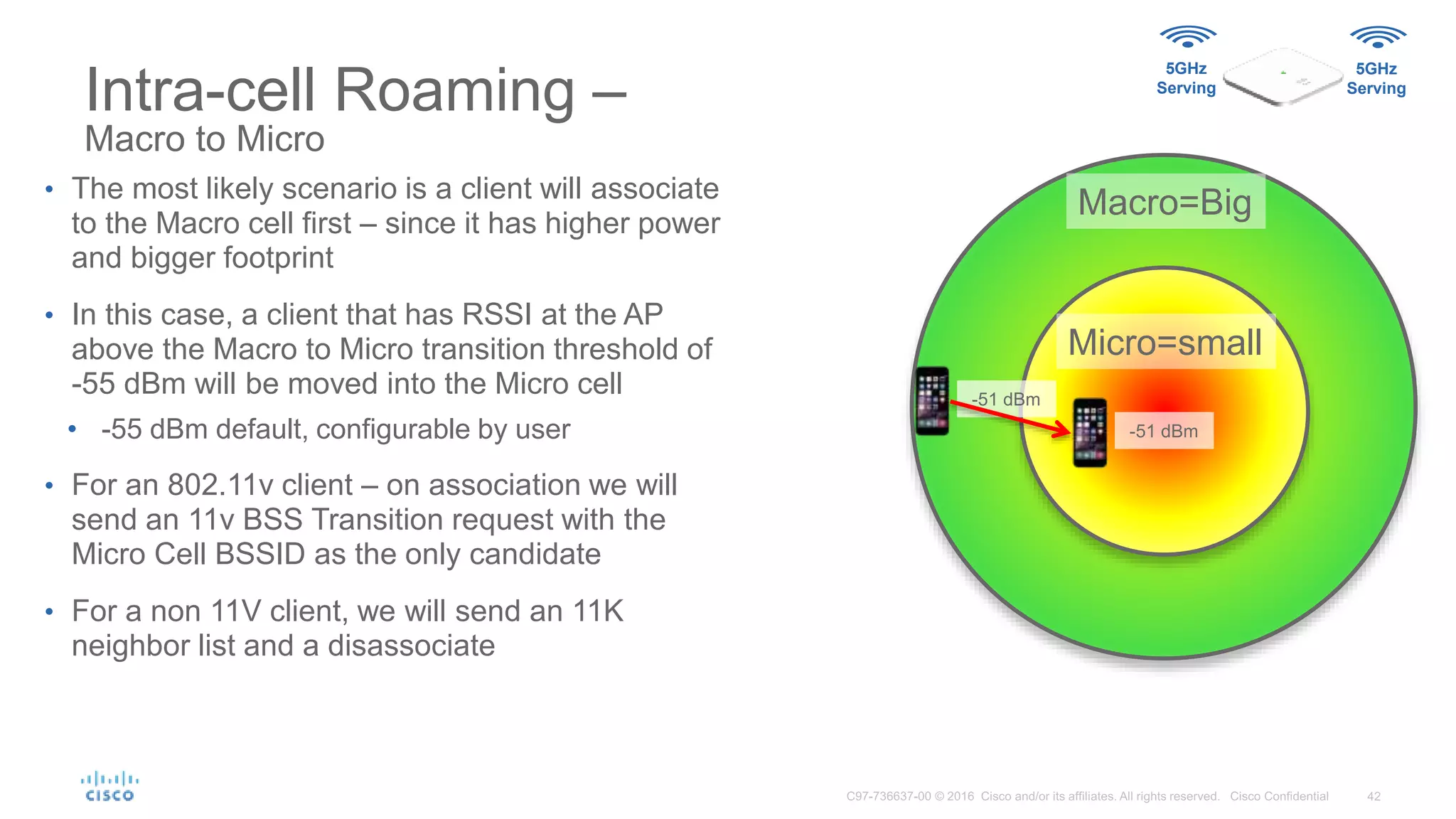
• The most likely scenario is a client will associate
to the Macro cell first – since it has higher power
and bigger footprint
• In this case, a client that has RSSI at the AP
above the Macro to Micro transition threshold of
-55 dBm will be moved into the Micro cell
• -55 dBm default, configurable by user
• For an 802.11v client – on association we will
send an 11v BSS Transition request with the
Micro Cell BSSID as the only candidate
• For a non 11V client, we will send an 11K
neighbor list and a disassociate
Intra-cell Roaming –
Macro to Micro
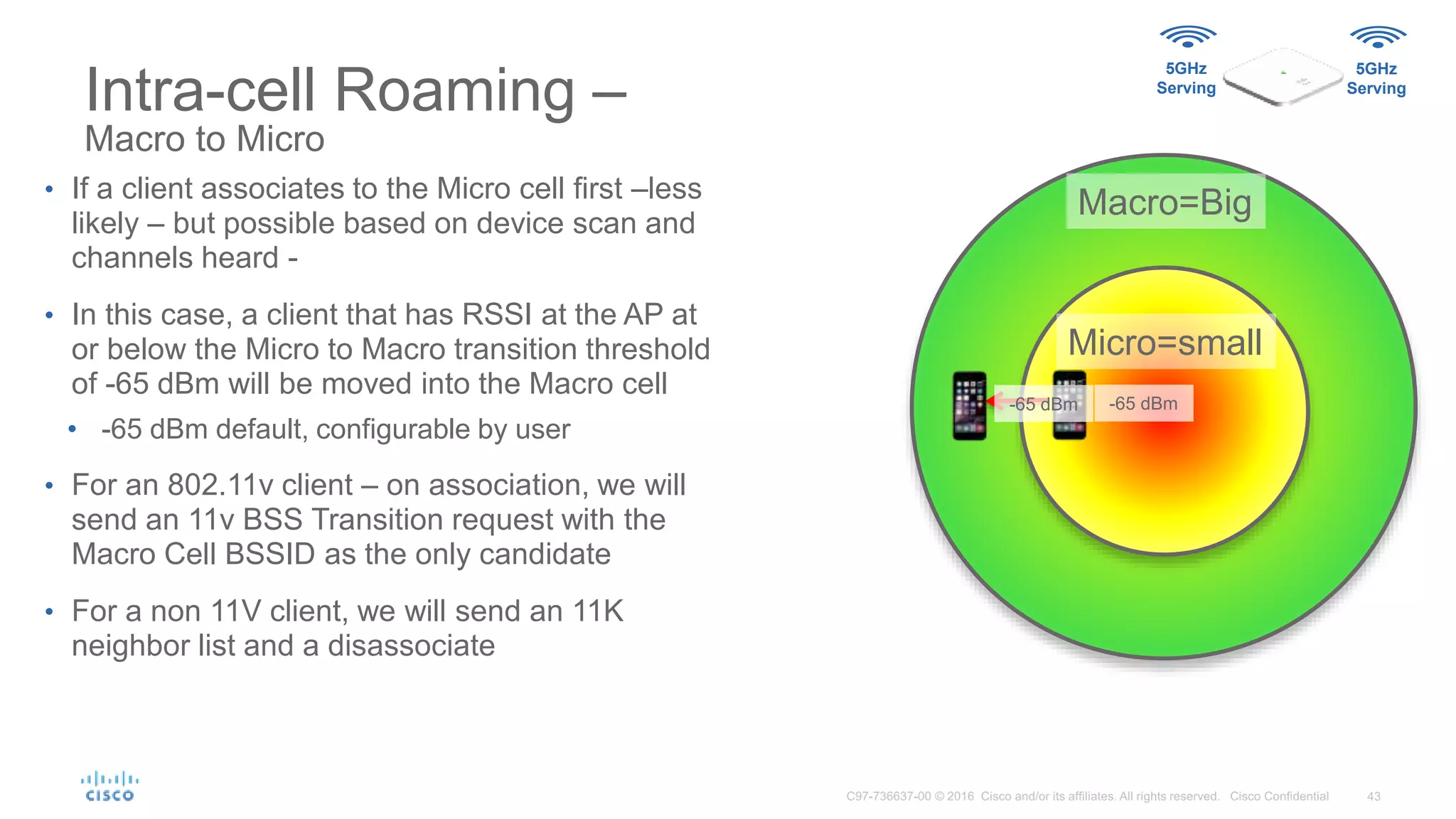
• If a client associates to the Micro cell first –less
likely – but possible based on device scan and
channels heard -
• In this case, a client that has RSSI at the AP at
or below the Micro to Macro transition threshold
of -65 dBm will be moved into the Macro cell
• -65 dBm default, configurable by user
• For an 802.11v client – on association, we will
send an 11v BSS Transition request with the
Macro Cell BSSID as the only candidate
• For a non 11V client, we will send an 11K
neighbor list and a disassociate
Macro=Big
Micro=small
5GHz
Serving
5GHz
Serving
-65 dBm-65 dBm
Micro-Macro Initial Testing
2800e/3800e Dual 5 GHz
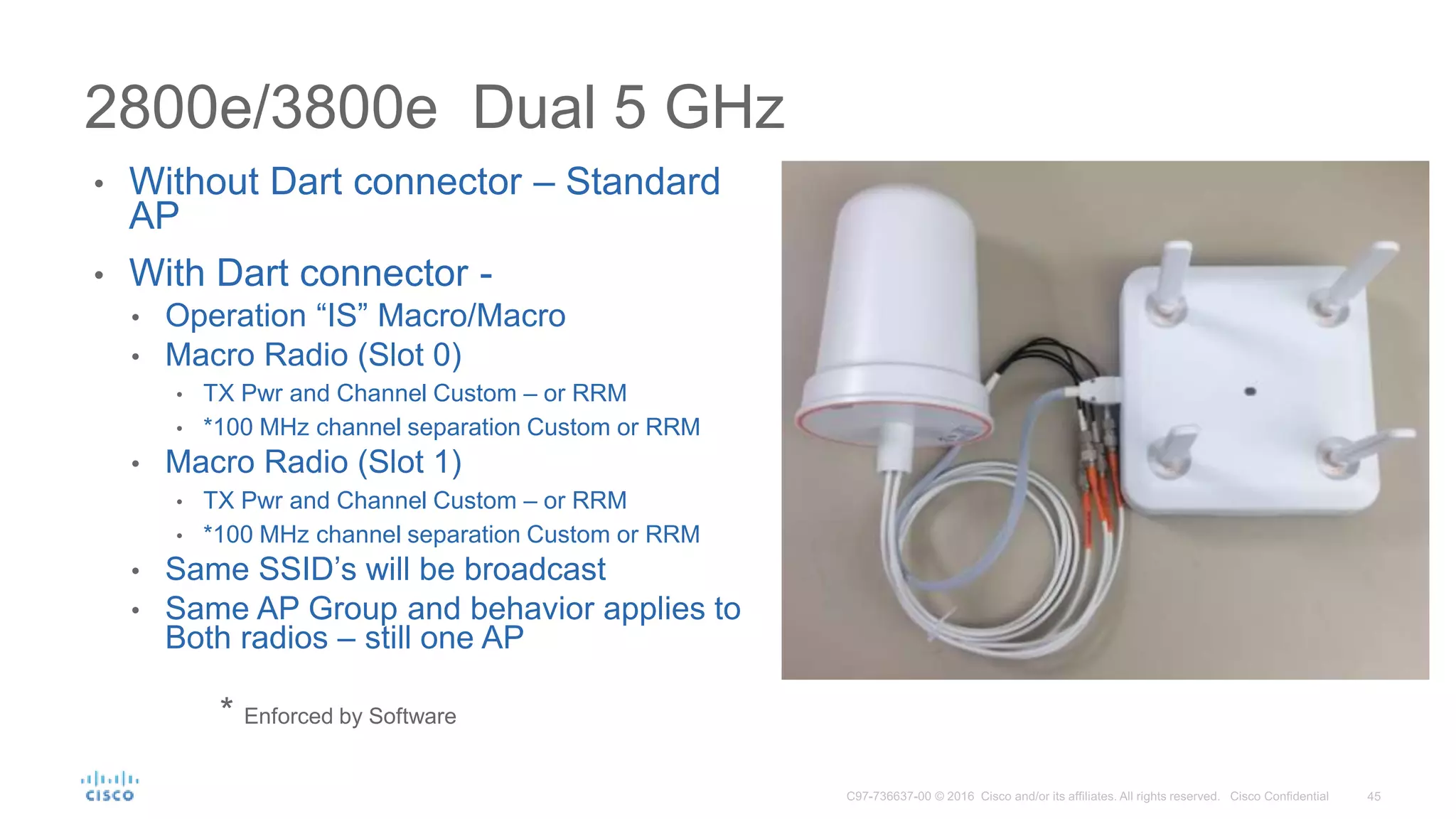
• Without Dart connector – Standard
AP
• With Dart connector -
• Operation “IS” Macro/Macro
• Macro Radio (Slot 0)
• TX Pwr and Channel Custom – or RRM
• *100 MHz channel separation Custom or RRM
• Macro Radio (Slot 1)
• TX Pwr and Channel Custom – or RRM
• *100 MHz channel separation Custom or RRM
• Same SSID’s will be broadcast
• Same AP Group and behavior applies to
Both radios – still one AP
* Enforced by Software
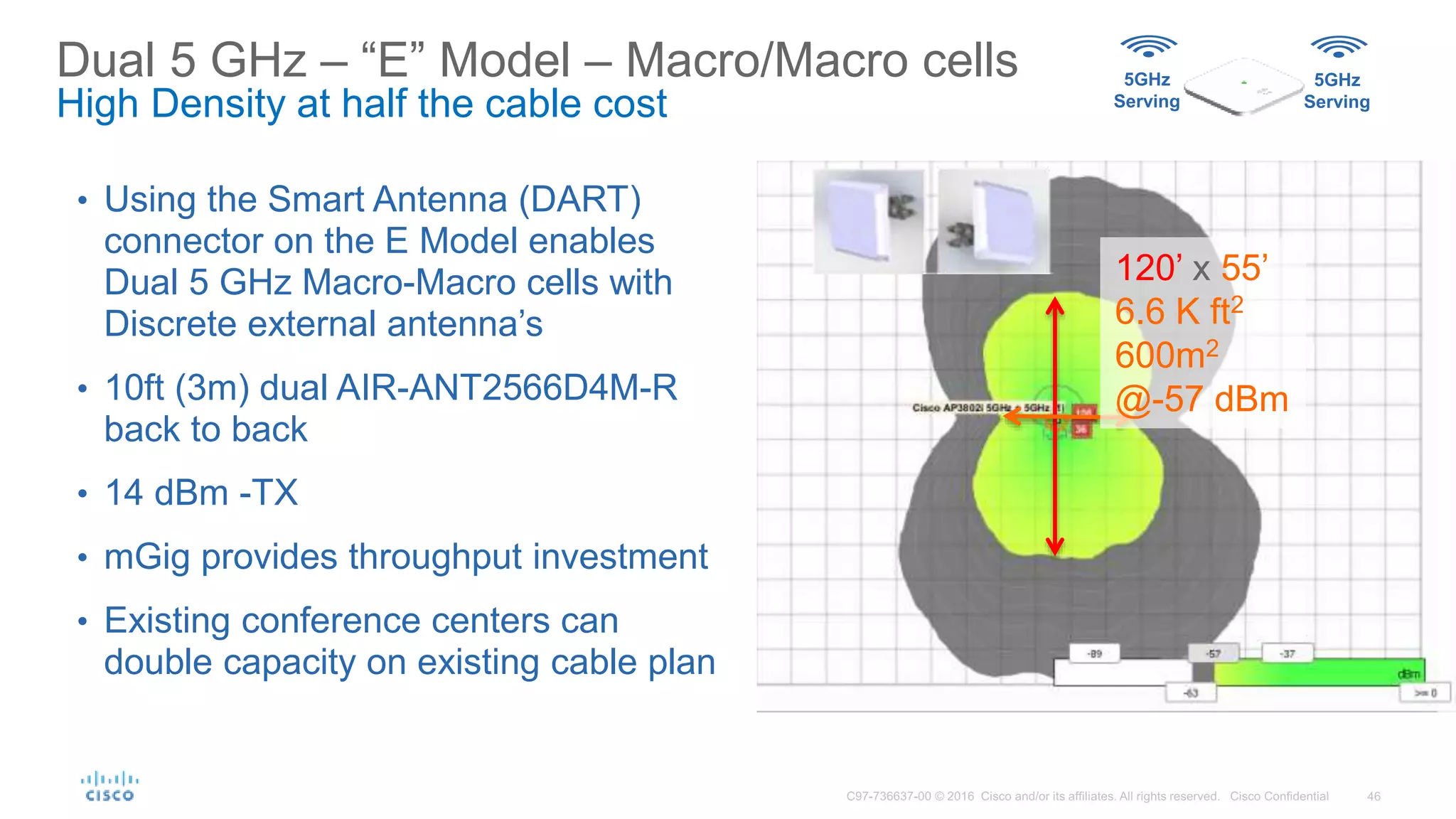
Dual 5 GHz – “E” Model – Macro/Macro cells
High Density at half the cable cost
• Using the Smart Antenna (DART)
connector on the E Model enables
Dual 5 GHz Macro-Macro cells with
Discrete external antenna’s
• 10ft (3m) dual AIR-ANT2566D4M-R
back to back
• 14 dBm -TX
• mGig provides throughput investment
• Existing conference centers can
double capacity on existing cable plan
5GHz
Serving
5GHz
Serving
120’ x 55’
6.6 K ft2
600m2
@-57 dBm
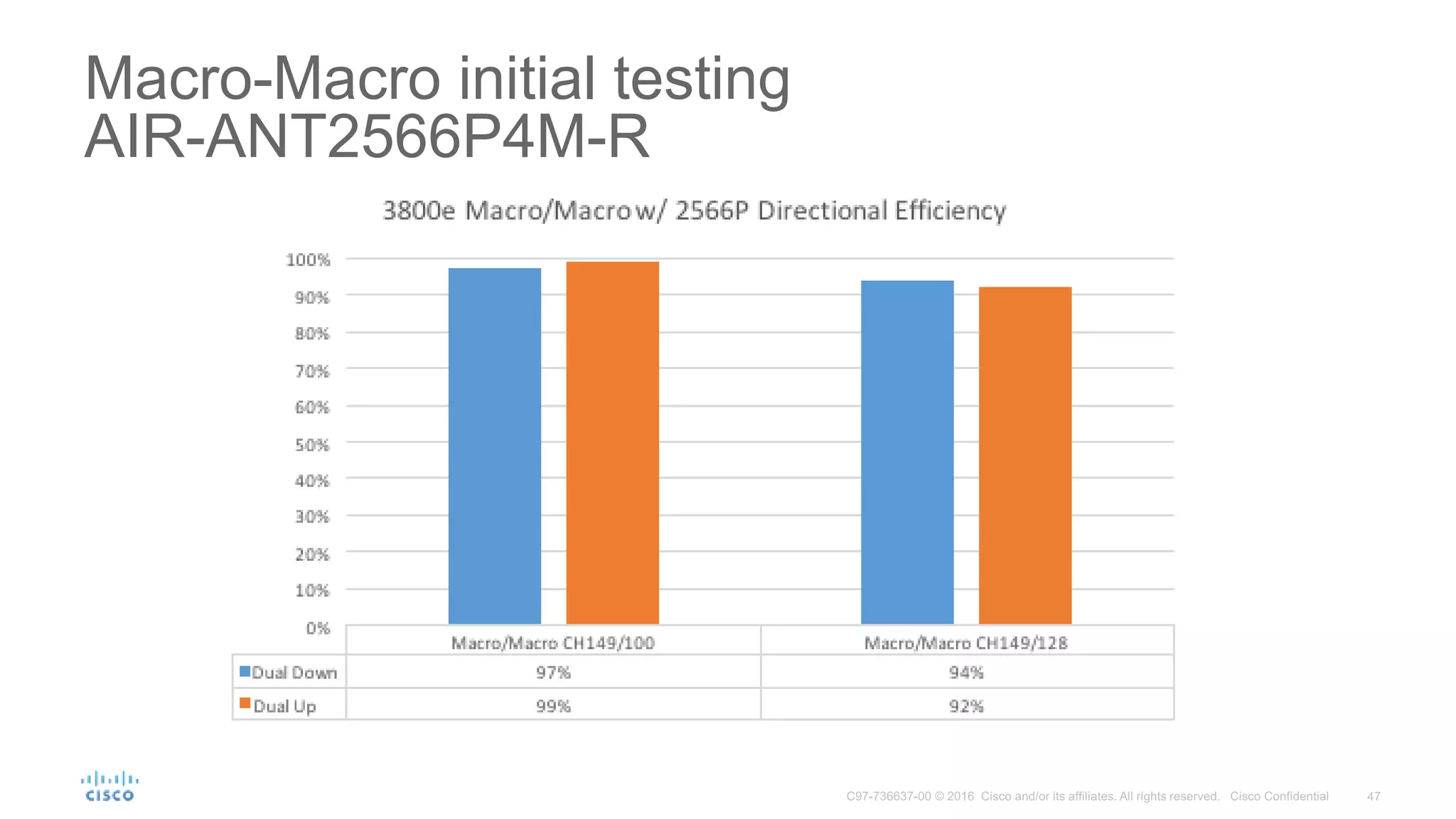
Macro-Macro initial testing
AIR-ANT2566P4M-R
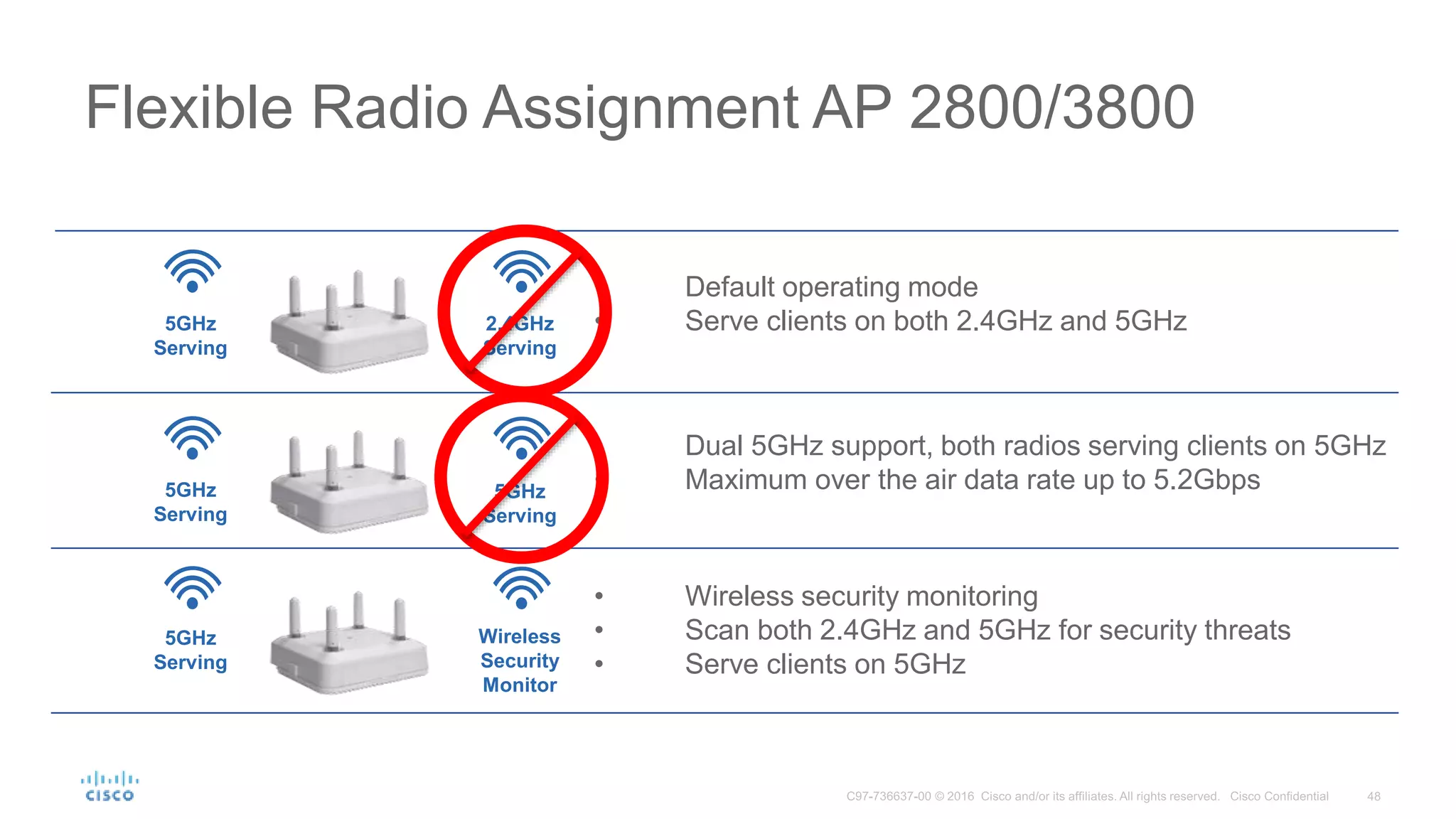
• Default operating mode
• Serve clients on both 2.4GHz and 5GHz
Flexible Radio Assignment AP 2800/3800
5GHz
Serving
2.4GHz
Serving
Wireless
Security
Monitor
• Dual 5GHz support, both radios serving clients on 5GHz
• Maximum over the air data rate up to 5.2Gbps
• Wireless security monitoring
• Scan both 2.4GHz and 5GHz for security threats
• Serve clients on 5GHz
5GHz
Serving
5GHz
Serving
5GHz
Serving
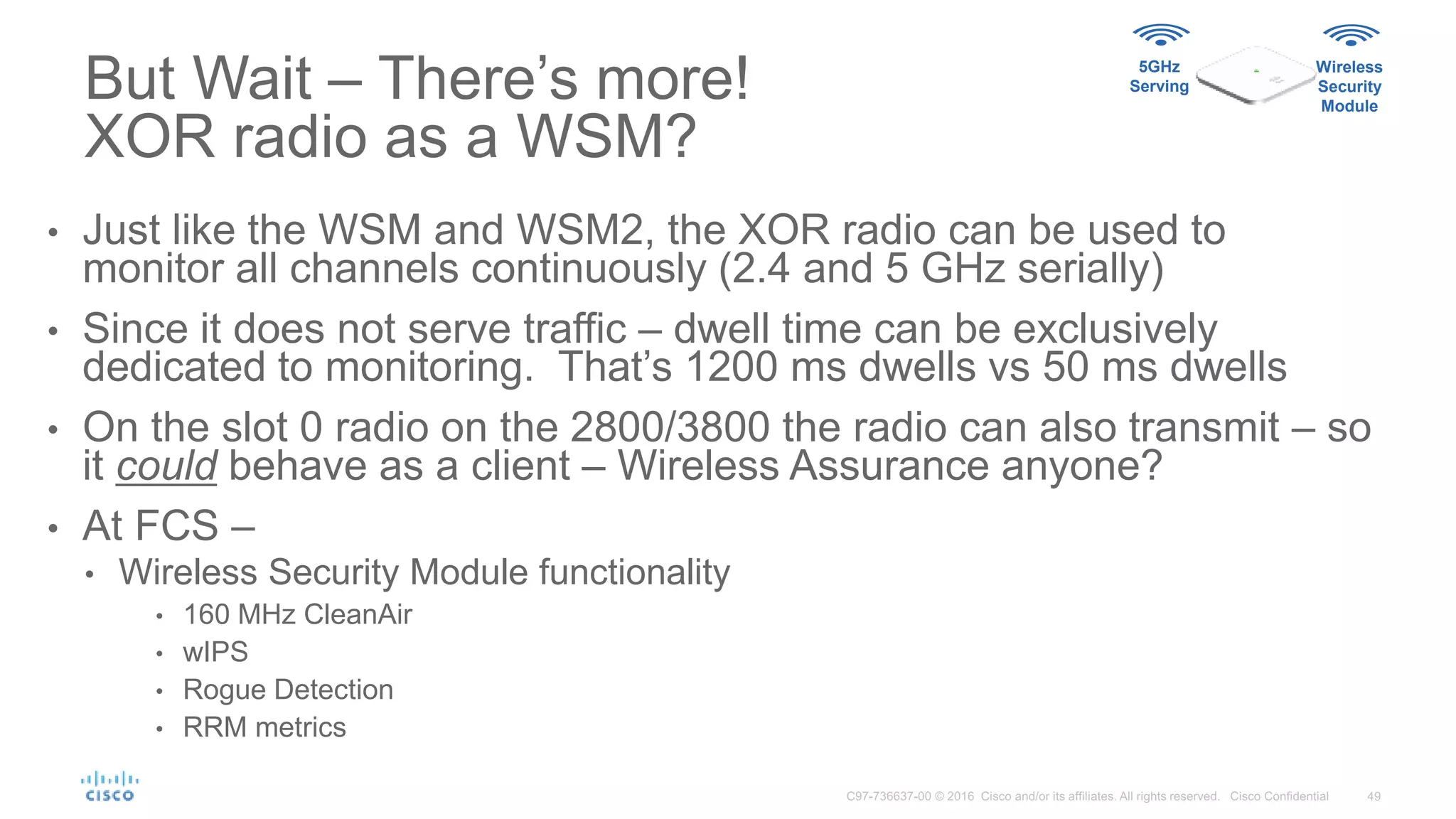
But Wait – There’s more!
XOR radio as a WSM?
5GHz
Serving
Wireless
Security
Module
• Just like the WSM and WSM2, the XOR radio can be used to
monitor all channels continuously (2.4 and 5 GHz serially)
• Since it does not serve traffic – dwell time can be exclusively
dedicated to monitoring. That’s 1200 ms dwells vs 50 ms dwells
• On the slot 0 radio on the 2800/3800 the radio can also transmit – so
it could behave as a client – Wireless Assurance anyone?
• At FCS –
• Wireless Security Module functionality
• 160 MHz CleanAir
• wIPS
• Rogue Detection
• RRM metrics
Key Takeaways
Twitter:
• @Cisco_Mobility
Facebook:
• facebook.com/CiscoWireless
Collateral and Blogs
• cisco.com/go/wireless
• cisco.com/go/80211ac
• blogs.cisco.com/wireless/
Thank you for watching.

TechWiseTV Workshop: Beyond 802.11ac Wave 2

  • 1.
    Go Beyond 802.11ac Wave2 BillRubino, Mark Denny and Jim Florwick May 25, 2016
  • 2.
    With Innovations forHigh-Density Networks Go Beyond 802.11ac Wave2 Bill Rubino – Enterprise Solutions Marketing Manager Mark Denny – Enterprise Wireless Product Manager Jim Florwick – Senior Technical Marketing Engineer
  • 3.
    Cisco 2016 VirtualNetworking Index Repercussions of the Digital Business 10X Growth in Mobile Data Traffic (2014 – 2019)1 Higher expectations for peak network performance Increased velocity for business demands Adapt quickly for dynamic changes MORE DEVICES, MORE APPLICATIONS
  • 4.
    HealthcareGovernment Manufacturing EducationFinancial Digitization Impacts All Sectors
  • 5.
    Enabling the Workspaceof Tomorrow…Today
  • 6.
    Flawless Mission Critical App.Experience Everywhere Uninterrupted voice, video and collaboration on the move Boost user and IoT device performance Deliver “wired-like” connectivity for all devices Grant Access Based on Who, What, When, Where and How Access resources based on deep context and enforce policy across the entire network Optimize the work environment Quickly locate conference rooms, resources & colleagues Attract and motivate talent | Foster collaboration and innovation | Increase productivity Employee productivity 25% Energy consumption 30% Enabling the Workspace of Tomorrow…Today
  • 7.
    Wi-Fi Connectivity Speed Timeline GigabitWi-Fi As Primary Access 3SS Desktops/Laptops 2SS Laptops/Tablets 1SS Tablets/Smartphones *Assuming 80 MHz channel is available and suitable **Assuming 160 MHz channel is available and suitable 802.11 802.11n802.11b 802.11a/g 802.11ac Wave 1 802.11ac Wave 2 3500** 2340** 1730** 290* = Connect Rates (Mbps) = Spatial StreamsSS 20162015 Gigabit Ethernet Uplink 2Gigabit Ethernet Uplinks 1 Spatial Stream 2 Spatial Stream 4 Spatial Stream s 3 Spatial Streams 20132007200319991997 2 11 24 54 65 450 300 1300* 290* 870* 5260** 3500** 600* Dual 5GHz Multi-Gigabit Uplinks
  • 8.
    Addressing Growth 802.11ac Wave2 Highest Wi-Fi Performance Ever Better End Device Efficiency For Highly Demanding Environments Higher data rate than previous standard Allows for more wireless data with wider channels Simultaneously deliver data to multiple devices Conserve end-device battery
  • 9.
    Better Traffic Handling 802.11acWave 2 with 160MHZ - Wider Channels Wider Channels Allows More Traffic to Pass Multi-User MIMO Uses the Channel to Max Capacity 20–40 MHz 80-160 MHz
  • 10.
    Simultaneous Data Deliveryto Many Devices Multi-User, Multi-In, Multi-Out Devices get on and off the network quicker, allowing more devices to be served Multi-User MIMO (MU-MIMO)Single-User MIMO (SU-MIMO)
  • 11.
    Better Client Support BatterySavings Speed of 802.11ac results in less transmit/receive = Improved battery life Data 802.11ac 802.11n 0MB 890MB 2.1GB 3.26GB 4.68GB 4.68GB 0MB 432MB 1.08GB 1.64GB 2.13GB 2.76GB 25% 20% 15% 10% 5% 25% 20% 15% 10% 5%
  • 12.
    Only Cisco GoesBeyond the 802.11ac Wave 2 Standard
  • 13.
    Flexible Radio Assignment AdjustRadio Bands to Better Serve the Environment. Optimized Roaming Intelligently Connects the Proper Access Point as People Move Turbo Performance Scales to Support More Devices Running High Bandwidth Apps. Zero Impact AVC Hardware Based Application Visibility and Control without Impact to Performance. Cisco CleanAir® Remediates Device Impacting Interference Cisco ClientLink Improves Performance of Legacy and 802.11ac Devices. Expandability Add Functionality Via Module, Smart Antenna Port or USB Port Multigigabit Uplinks Free Up Wireless With Faster Wired Network Offload Gb+ Flex Dynamic Frequency Selection Automatically Adjusts So Not to Interfere With Other Radio Systems Innovations Only Cisco Delivers Radio Frequency Excellence for High-Density Environments
  • 14.
    DRAM (512) 5 GHzRadio CPU 800 MHz DRAM (128)CPU DRAM (128)CPU 2.4 GHz Radio 512 MHz 384 MHz Hardware Offload AP3700 - Custom DRAM (1024) DRAM (256) CPU Flexible Radio 640 MHz 640 MHz CPU 1.8 GHz CPU 1.8 GHz Networking Subsystem 5 Gbps Secure Boot Hardware Offload Multigigabit 5 Gbps AP3800 - Custom DRAM (256) CPU 5 GHz Radio 640 MHz 640 MHz 640 MHz DSP DSP Hardware Matters…
  • 15.
    © 2016 Ciscoand/or its affiliates. All rights reserved. Cisco Confidential 15 Maintain Performance with Zero Impact AVC Gain Visibility into the Network Monitor Critical Applications Control Application Performance APP APP APP APP APP APP APP APP APP APP APP APP APP APP APP APP Traditional Hardware Acceleration in an Access Point Zero Impact Application Visibility and Control
  • 16.
    • Default operatingmode • Serve clients on both 2.4GHz and 5GHz Flexible Radio Assignment 5GHz Serving 2.4GHz Serving Wireless Security Monitor • Dual 5GHz support, both radios serving clients on 5GHz • Maximum over the air data rate up to 5.2Gbps • Wireless security monitoring • Scan both 2.4GHz and 5GHz for security threats • Serve clients on 5GHz 5GHz Serving 5GHz Serving 5GHz Serving • Flexible Radio Assignment initially supports 3 different roles of operation • A customer can manually choose the role, let the network automatically decide, or choose to mix manual configuration and automatic selection
  • 17.
    Self Optimizing Network FlexibleRadio Assignment 2.4GHz Serving 2.4-5GHz Monitoring Wireless Security, Wireless Assurance, Location* 5GHz. Serving 5GHz. Serving CleanAIr CleanAIr ! 2.4GHz Serving 5GHz. Serving CleanAIr *Future
  • 18.
    Self Optimizing Network FlexibleRadio Assignment 2.4GHz Serving 2.4-5GHz Monitoring Wireless Security, Wireless Assurance, Location* 5GHz. Serving 5GHz. Serving 2.4GHz Serving 5GHz. Serving 5GHz Serving 5Hz Serving 2.4GHz Serving *Future
  • 19.
    5GHz. Serving Self Optimizing Network FlexibleRadio Assignment 5GHz Serving 2.4GHz Serving 5GHz. Serving 5Hz Serving 5GHz. Serving 2.4GHz Serving 2.4GHz Serving 2.4-5GHz Monitoring *Future
  • 20.
    Smart Antenna Port Primary AntennaConnectors – Dipole and Cabled Antennas Second Cabled Antenna *Future • Cisco pioneered intelligent antenna connection • Allows a second cabled antenna to be connected to the Access Point • Dual 5 GHz • Band specific antennas • Location antennas* • Antenna versatility for challenging coverage deployments Smart Antenna Port – 2nd Physical Antenna Connection
  • 21.
    5 Gigabit Port Offload WirelessTraffic Faster Multigigabit Technology Cisco Multigigabit Standard Cat 5e/Cat6 Cables 1 Gigabit Port Delivers up to 5 times the speeds in an enterprise, without replacing cabling infrastructure Supports PoE Up to 60W 5 Gigabit Port Catalyst 4500E Catalyst 3850 Aironet 3800
  • 22.
    © 2016 Ciscoand/or its affiliates. All rights reserved. Cisco Confidential 22 UTP Cable IEEE 10G Spec CAT 5/5e N/A CAT 6 55 meters CAT 6A 100 meters CAT 7 100 meters >75% of WW installed base is Cat 5e/6 up to 100 meters 10GBASE-T cannot work over vast majority of installed base Source: Cabling Installation & Maintenance Magazine, Cabling Market Outlook Consumption Trends and Analysis Enterprise and Data Center Organizations, February 2014 Multigigabit Ethernet - Why Not Use 10GBASE-T?
  • 23.
    © 2016 Ciscoand/or its affiliates. All rights reserved. Cisco Confidential 23 Maintain Switch to AP Reach at Higher Speeds Adaptive Rate Technology (FE, 1G, 2.5G, 5G, and 10G)  Future proofed for higher speeds Infrastructure Investment Protection Supports up to 100m over Cat5e cabling up to 5G speeds for Brownfield Supports Cat6a cabling for Greenfield deployments for higher speeds POE/POE+/UPOE Cisco Innovation over 10GT Standard to support high end point power needs 802.3bt Standards Compliant 1G and 10G BaseT IEEE standards 802.3bz, intermediate speeds standards in progress Multigigabit Ethernet – Cisco Innovation Key Differentiators
  • 24.
    Future Wi-Fi Standards, IoT, Li-Fi Video Surveillance Custom Application UsingLinux Improve Cellular: 3G /LTE, 3.5GHz Bluetooth Beacon, GPS Location Antenna Directional Antennas Stadium Panel Antenna SMART ANTENNA PORT MODULE PORT Self-Discover / Self-Configure Other Other Other PRIMARY ANTENNAS Potential Future Expandability Bluetooth Beaconing Expandability and Investment Protection Meet Any Wi-Fi Use Case
  • 25.
    Cisco Aironet Portfolio Positionedto Capture the 802.11ac Wave 2 Transition Enterprise Class Mission Critical Best in Class 1850 • 4x4:3SS 80 MHz; 1.7 Gbps • Spectrum analysis* • Internal or external antenna • Tx beam forming • 2 Gigabit Ethernet ports • USB 2.0 • Centralized, Cisco FlexConnect and Mobility Express 2800 • 4x4:3SS 160 MHz; 5 Gbps • 2.4 and 5 GHz or dual 5 GHz • 2 Gigabit Ethernet ports • Internal or external antenna • Smart antenna connector • Enhanced location* (external antenna) • Cisco CleanAir® 160 MHz • Cisco® ClientLink 4.0 • USB 2.0 • Centralized, Cisco FlexConnect and Mobility Express* 3800 • 4x4:3SS 160 MHz; 5 Gbps • 2.4 and 5 GHz or dual 5 GHz • 1 Gigabit Ethernet + 1 multigigabit (5G) • Internal or external antenna • Smart antenna connector • Enhanced location* (external antenna) • Cisco CleanAir 160 MHz • Cisco ClientLink 4.0 • Cisco StadiumVision® • USB 2.0 • Modularity • Centralized, Cisco FlexConnect and Mobility Express* 1810w • 2x2:2SS 80 MHz; 867 Mbps • Tx beam forming • 1 Gigabit Ethernet port uplink • 3 Gigabit Ethernet local ports, including 1 PoE out • Local ports 802.1X ready • Integrated Bluetooth Low Energy gateway* 1830 • 3x3:2SS 80 MHz; 867 Mbps • Spectrum analysis* • Internal antenna • Tx beam forming • 1 Gigabit Ethernet port • USB 2.0 • Centralized, Cisco FlexConnect® and Mobility Express 1810 OEAP • 2x2:2SS 80 MHz; 867 Mbps • 3 Gigabit Ethernet local ports downlink, including 1 PoE out • One or two local ports can be tunneled back to corporate *Post-FCS
  • 26.
    Cisco AP 2800/3800and Flexible Radio Assignment – Your Network, Thinking it’s way through the Options
  • 27.
    • Default operatingmode • Serve clients on both 2.4GHz and 5GHz Flexible Radio Assignment AP 2800/3800 5GHz Serving 2.4GHz Serving Wireless Security Monitor • Dual 5GHz support, both radios serving clients on 5GHz • Maximum over the air data rate up to 5.2Gbps • Wireless security monitoring • Scan both 2.4GHz and 5GHz for security threats • Serve clients on 5GHz 5GHz Serving 5GHz Serving 5GHz Serving
  • 28.
    • If you’vedesigned a network for dense 5 GHz coverage, then you have too many 2.4 GHz radios • 5 GHz has 8x the channels of 2.4 GHz spectrum in the US. • 2.4 GHz propagates roughly 1.5x farther • With properly designed 5 Ghz coverage, 2.4 GHz becomes it’s own interference and causes more issues than it solves • Prior to the 2800/3800 and 8.2 MR’s release, your only option was to disable up to 60% of these interfering 2.4 GHz radios. • Disabling the radio provides no value from the hardware - no location, rogue or other information is gathered. • RRM-FRA algorithm to identify redundant radios, and assign one of multiple roles that add value to the network. Flexible Radio Assignment (FRA) - Redundant Radio Identification 3 dB wall 5 GHz 8 dBm TX 268 Feet 3 dB wall 2.4 GHz 8 dBm TX 200 feet 400 Feet 200 feet 5GHz Serving 2.4GHz Serving
  • 29.
    Running –Flexible RadioAssignment Redundant Radio Identification • Richfield, Ohio competitive lab • AP’s 3800-1 to 3800-6 • All Auto FRA, Client Serving 2.4 GHz • AP’s #1, 2, 4 and 5 are all in the same room – at 2.4 GHz one will re-use an already used channel • That’s 4 radios, but still just 3 channels available 3800-3 3800-5 3800-4 3800-1 3800-6 3800-2
  • 30.
    • Coverage Overlapis the percentage (%) of a given cell that is covered by other AP’s at -67 dBm or greater • All existing AP models considered in the coverage calculation • The loudest 4 neighbors will be considered for coverage • Only 2800/3800 can be marked as Redundant and assigned by FRA Flexible Radio Assignment – COF, Coverage Overlap Factor
  • 31.
    Redundant Radio Identification PerRF Neighborhood Coverage Analysis AP-1 AP-2 AP-3 AP-4 AP-5 AP-6 AP-7 AP-8 • Using reciprocal NDP messages, each AP is given an x and y coordinate, we locate them relative to one another in RF Distance. 5GHz Serving 2.4GHz Serving
  • 32.
    Redundant Radio Identification PerRF Neighborhood Coverage Analysis AP-1 AP-2 AP-3 AP-4 AP-5 AP-6 AP-7 AP-8 • Using reciprocal NDP messages, each AP is given an x and y coordinate, we locate them relative to one another in RF Distance. • Coverage area is represented by a circle around each AP – the diameter is based on present power level • Overlap will be assessed based on a multi- point analysis within each AP’s calculated coverage area 5GHz Serving 2.4GHz Serving
  • 33.
    Redundant Radio Identification PerRF Neighborhood Coverage Analysis • The resulting Overlap will be assessed based on multiple points within each target AP’s coverage area • The loudest 4 neighboring AP’s will be used for coverage assessment • COF - Coverage Overlap Factor – is the percentage of an AP’s cell – that is covered by neighboring AP’s • A radio is only marked Redundant (and Re - assignable) if COF is above FRA Threshold (Low- 100%, Med – 95%, High – 90%) 5GHz Serving 2.4GHz Serving
  • 34.
    Flexible Radio Assignment–Back to Richfield
  • 35.
    Flexible Radio AssignmentOpinion (Cisco Controller) >show advanced fra FRA State........................................ Enabled FRA Sensitivity.................................. high (90) FAR Interval..................................... 1 Hour(s) Last Run....................................... 2366 seconds ago Last Run Time.................................. 0 seconds AP Name MAC Address Slot, Current BandCoverage, Overlap Factor %, Suggested Mode -------------------------------- ----------------- ---- -------------- -------- 3800-4 58:ac:78:df:9f:70 0 2.4GHz 80 2.4GHz 3800-6 58:ac:78:df:9f:50 0 2.4GHz 76 2.4GHz 3800-2 58:ac:78:df:6b:50 0 2.4GHz 76 2.4GHz 3800-3 58:ac:78:df:9e:d0 0 2.4GHz 65 2.4GHz 3800-5 58:ac:78:df:9e:80 0 5GHz 96 5GHz 3800-1 58:ac:78:df:73:20 0 5GHz 92 5GHz
  • 36.
    FRA –RRF –Redundant Radio Identification • After FRA changed 2 radios Roles • Coverage still excellent 100% coverage above -60 dBm!
  • 37.
    • Default operatingmode • Serve clients on both 2.4GHz and 5GHz Flexible Radio Assignment AP 2800/3800 5GHz Serving 2.4GHz Serving Wireless Security Monitor • Dual 5GHz support, both radios serving clients on 5GHz • Maximum over the air data rate up to 5.2Gbps • Wireless security monitoring • Scan both 2.4GHz and 5GHz for security threats • Serve clients on 5GHz 5GHz Serving 5GHz Serving 5GHz Serving 1 2
  • 38.
    AP2800/3800 “I” seriesantenna system (cover removed) Previously in the controller Access Point radios were defined as… Radio 0 = 2.4 GHz Radio 1 = 5.0 GHz Using “Flexible Radio Assignment” Radio “0” can be configured as 2.4 GHz (default) or as an additional 5 GHz radio. If configured as a 5 GHz radio the 2.4 GHz radio is disabled and the 5 GHz micro-cell antennas are used. Micro-cell antenna is 6 dBi @ 5 GHz Macro-cell antenna is 5 dBi @ 5 GHz
  • 39.
    Difference in antennadesigns allow for RF co- existence Conventional AP footprint (Macro-Cell) uniform 360 Degree coverage Smaller AP footprint (Micro-Cell) uniform 360 Degree but for smaller coverage area (high density) deployments By using spatially-efficient and compact antenna design along with different channels & Tx RF power – BOTH radios can co-exist internally
  • 40.
    2800i/3800i Dual Band ChannelUtilization = 60% • The further a client is from the AP, the lower the data rate will be • Data Rate is a function of SNR • The higher the SNR – The higher the data Rate will be • 1 x5 GHz cell has a finite amount of Air Time available • Capacity is the sum of all clients within the cells Air Time • You can’t get more than a second out of 1s of Air time - period -63 dBm -60 dBm -58 dBm -68 dBm -71 dBm -73 dBm -75 dBm -51 dBm -63 dBm = Client RSSI at AP Single 5 GHz cell 5GHz Serving 2.4GHz Serving
  • 41.
    2800i/3800i Macro/Micro Dual 5GHz CU Chnl 36= 20% ! CU Chnl 108=24% ! • Creating two RF diverse 5 GHz cells – Doubles the Air Time available • Optimizing Connections (Macro vs Micro) keeps like performing clients together, rather than have one drag down the other • RRM will optimize, based on received RSSI only at FCS – Other possibilities exist (protocol, SS Capability) -63 dBm -60 dBm -58 dBm -68 dBm -71 dBm -73 dBm -75 dBm -51 dBm -63 dBm = Client RSSI at AP Macro/Micro 5 GHz cell 5GHz Serving 5GHz Serving
  • 42.
    Intra-cell Roaming – Macroto Micro Macro=Big Micro=small 5GHz Serving 5GHz Serving -51 dBm -51 dBm • The most likely scenario is a client will associate to the Macro cell first – since it has higher power and bigger footprint • In this case, a client that has RSSI at the AP above the Macro to Micro transition threshold of -55 dBm will be moved into the Micro cell • -55 dBm default, configurable by user • For an 802.11v client – on association we will send an 11v BSS Transition request with the Micro Cell BSSID as the only candidate • For a non 11V client, we will send an 11K neighbor list and a disassociate
  • 43.
    Intra-cell Roaming – Macroto Micro • If a client associates to the Micro cell first –less likely – but possible based on device scan and channels heard - • In this case, a client that has RSSI at the AP at or below the Micro to Macro transition threshold of -65 dBm will be moved into the Macro cell • -65 dBm default, configurable by user • For an 802.11v client – on association, we will send an 11v BSS Transition request with the Macro Cell BSSID as the only candidate • For a non 11V client, we will send an 11K neighbor list and a disassociate Macro=Big Micro=small 5GHz Serving 5GHz Serving -65 dBm-65 dBm
  • 44.
  • 45.
    2800e/3800e Dual 5GHz • Without Dart connector – Standard AP • With Dart connector - • Operation “IS” Macro/Macro • Macro Radio (Slot 0) • TX Pwr and Channel Custom – or RRM • *100 MHz channel separation Custom or RRM • Macro Radio (Slot 1) • TX Pwr and Channel Custom – or RRM • *100 MHz channel separation Custom or RRM • Same SSID’s will be broadcast • Same AP Group and behavior applies to Both radios – still one AP * Enforced by Software
  • 46.
    Dual 5 GHz– “E” Model – Macro/Macro cells High Density at half the cable cost • Using the Smart Antenna (DART) connector on the E Model enables Dual 5 GHz Macro-Macro cells with Discrete external antenna’s • 10ft (3m) dual AIR-ANT2566D4M-R back to back • 14 dBm -TX • mGig provides throughput investment • Existing conference centers can double capacity on existing cable plan 5GHz Serving 5GHz Serving 120’ x 55’ 6.6 K ft2 600m2 @-57 dBm
  • 47.
  • 48.
    • Default operatingmode • Serve clients on both 2.4GHz and 5GHz Flexible Radio Assignment AP 2800/3800 5GHz Serving 2.4GHz Serving Wireless Security Monitor • Dual 5GHz support, both radios serving clients on 5GHz • Maximum over the air data rate up to 5.2Gbps • Wireless security monitoring • Scan both 2.4GHz and 5GHz for security threats • Serve clients on 5GHz 5GHz Serving 5GHz Serving 5GHz Serving
  • 49.
    But Wait –There’s more! XOR radio as a WSM? 5GHz Serving Wireless Security Module • Just like the WSM and WSM2, the XOR radio can be used to monitor all channels continuously (2.4 and 5 GHz serially) • Since it does not serve traffic – dwell time can be exclusively dedicated to monitoring. That’s 1200 ms dwells vs 50 ms dwells • On the slot 0 radio on the 2800/3800 the radio can also transmit – so it could behave as a client – Wireless Assurance anyone? • At FCS – • Wireless Security Module functionality • 160 MHz CleanAir • wIPS • Rogue Detection • RRM metrics
  • 50.
    Key Takeaways Twitter: • @Cisco_Mobility Facebook: •facebook.com/CiscoWireless Collateral and Blogs • cisco.com/go/wireless • cisco.com/go/80211ac • blogs.cisco.com/wireless/
  • 52.
    Thank you forwatching.

Editor's Notes

  • #2 This cover slide should be updated with current information and left on screen as people log in. - Replace ‘Topic’, ‘Guest Speaker’ , ‘Date’
  • #3 Today we are going to talk about “driving business agility” and making a direct, positive impact on your business by moving to a multi-gigabit wi-fi environment ###
  • #4 In the next few years, Data Traffic will grow ten-fold. So, IT is being asked to support more device – both end user and non-user as well as the ever growing applications they use. These applications, such as video and collaboration are far more bandwidth intensive and add large amounts of traffic to the network This creates new challenges to IT - including: Meeting Higher Expectations for Peak Network Performance Dealing with Increased Velocity for Business Demands And the Network needs to be ready for anything so it needs to quickly adapt to an ever changing evironment.
  • #5 ...and it impacts all business. Digitization impacts all sectors including government, healthcare, manufacturing, education and financial. Even non-profit organizations are expected to accelerate business processes and introduce new services. ###
  • #8 Adding new infrastructure or replacing older infrastructure with higher-capacity equipment is what will help you support all the additional wireless traffic. Fortunately, there is new higher-speed equipment to do the job. As this diagram shows, as the bandwidth and user demands grew in the past, the wireless infrastructure grew to support them. Today is no different. With each evolution of the Wi-Fi standard, the network traffic speed increased to handle the new demands and provide a better user experience. To handle the network application traffic loads of today and tomorrow, we have the very latest iteration of the industry’s Wi-Fi standard, called 802.11ac. Client products compatible with this new standard are already shipping and many more will soon be coming your way. This new technology will dramatically increase network capacity and deliver gigabit speeds to your Wi-Fi users. At a minimum, it will double transmission speeds, and offer the capability for even far greater transmission rates in about two years.
  • #9 As the demand for new digital services increases, the need for faster wireless technology becomes paramount. The latest wireless standard 802.11ac wave 2 – introduced in 2015 focuses on two crucial areas: Increasing wireless throughput performance with higher data rates than ever before and utilizing the wider 80MHz and 160MHz channel. Improving device efficiency through the use of Multi-user Mimo that serves multiple devices at the same time. This means that devices can get on and off the network quicker, conserving battery life.
  • #10 When we look at what wider channels bring we use the analogy of a highway. With the 20MHz and 40MHz band we can think of it as a two lane highway allowing a certain amount of traffic to pass. At times of congestion the speed of that traffic slows. Supporting 80 and 160Mhz allows for more traffic to pass maintaining speed <<Click>> With the addition of multi-user mimo the gaps between the traffic get filled without impacting speed making traffic handling as efficient as possible.
  • #11 802.11 ac Wave 2 supports something called multi-user MIMO. Multi-user MIMO makes a performance and efficiency difference when the APs are transmitting to client devices that also support 802.11ac Wave 2. And those Wave 2 clients are expected to enter the market this year. <<Click>> Wave 1 supported single-user MIMO, whereby the AP transmitted to each client one at a time quickly and efficiently. Now, with multi-user MIMO, the limitation of one lower-speed client won’t hold back AP downlink throughput.   <<Click>> Multi-user MIMO is important because it allows access points and their many antennas to transmit to multiple client devices all at one time. That helps maximize air-time efficiency so that each client, regardless of what version of 802.11 it is running, gets the amount of airtime it’s supposed to get based on the technology supported. Whether that client supports 802.11ac, 802.11n, or an older version of the standard. <<Click>> This allows devices to get on and off the network faster…
  • #12 … this results in a secondary effect of Multi-user MIMO. Because devices get on and off the network faster the amount of time the device is receiving and transmitting data is reduced, this reduces the consumption of battery power.
  • #15 3800 -Industry’s first mGig AP -CPU not sold to anyone else
  • #17 Flexible Radio Assignment allows the Access Point to meet multiple use case. By default the access point serves both 2.4 and 5Ghz devices. Delivering 1.7Gbps but support the widest range of device types. It can also transition to support 5GHz on both radios boosting performance to 5.2GBps. The access point can also run in wireless security monitoring mode that collects location based data and identifies potential security risks.
  • #18 When we talk about self optimizing network – people jump to the thought that is is merely interference detection and mitigation – <<Click>> Where we detect, locate interfference – <<Click>> We then mitigate the interference to minimize impact to the Wi-Fi network. We introduced CleanAir more than 5 years ago and it has been great in identify and resolving wireless interference problems. <<Click>>
  • #19 But CleanAir is only half the story – What if there is not a problem? In the workspace of tomorrow often people gather in non-traditional areas like common areas, cafes and so on. Cisco has developed what we call Flexible Radio Assignment. Because we rely on custom silicone what we have done is develop our mission critical access points to have two radios. 1 That runs on 5GHz. all the time, and the second radio has the ability to run as 2.4 or 5GHz. And our second antenna can run in serving or monitoring mode. Where monitoring mode is collecting location-based data and supporting wireless intrusion protection activities. The Way this works is first and foremost the access points look for redundant 2.4 radios radios that are not needed– the Wi-Fi network will convert these to 5GHz to maximize coverage. If one 2.4 radio goes down the network will convert one of the 5GHz radios back to 2.4. <<Click>> But say for instance a Pop-up meeting or gathering happens in the workspace – and people start messaging others to come by. <<Click>> Well the sudden increase in users as well as their devices will in this case prompt the APs to turn the 2.4 radios to 5GHz to and perhaps they change automatically from monitoring to serving mode to maximize coverage and support the flash crowd of users.
  • #20 <<Click>> Once the crowd disperses – then the network will resolve back to the original operating configuration. Of course you can manually configure the APs in a permanent state if you desire.
  • #22 With the Cisco Aironet 3800 we are able to join forces with our Multi-gigabit access switches to seamlessly offload network traffic that exceeds 1 gig from the wireless network to the wired without any bottleneck. We are delivering on our vision to offer the best end-to-end solution that not only removes the bottle neck, but minimizes the Total Cost of Ownership by conserving the existing cabling – and reaching up to 5X the speed. For the the 2800 and 1850 Aironet Access points we offer the ability aggregate links across two GigE ports for environments that exceed 1Gbps.
  • #26 Cisco is dedicated to bringing the world’s most innovative 802.11ac Wave 2 portfolio. If you need standard 802.11ac Wave 2 functionality we offer the enterprise –class Aironet 1850 that meets or the cost-optimized 8130 access point. We have now extended our 802.11ac Wave 2 to our mission critical and best-in-class AP series. Both the 2800 and 3800 include The ability to run as 2.4 & 5GHz or have 2 - 5GHz radios They support 4x4:3SS They support all the latest HDX functionality – CleanAir, ClientLink And the support the new Flexible Radio Assignment & Smart Antenna Ports The 3800 Also adds Multi-Gigabit Uplinks and Modularity
  • #28 Flexible Radio Assignment allows the Access Point to meet multiple use case. By default the access point serves both 2.4 and 5Ghz devices. Delivering 1.7Gbps but support the widest range of device types. It can also transition to support 5GHz on both radios boosting performance to 5.2GBps. The access point can also run in wireless security monitoring mode that collects location based data and identifies potential security risks.
  • #38 Flexible Radio Assignment allows the Access Point to meet multiple use case. By default the access point serves both 2.4 and 5Ghz devices. Delivering 1.7Gbps but support the widest range of device types. It can also transition to support 5GHz on both radios boosting performance to 5.2GBps. The access point can also run in wireless security monitoring mode that collects location based data and identifies potential security risks.
  • #39 HyperLocation Technology Development Skunk works project between CTO, RF/DSP and MSE teams Early concept(s) technology partnership with Cisco Advertising Media & Sponsorships and NBA HALO Project Execution Access Point HW WiFi ASIC – Marvell WiFi with custom Cisco ASIC extensions Access Point SW and DSP Controller MSE
  • #40 HyperLocation Technology Development Skunk works project between CTO, RF/DSP and MSE teams Early concept(s) technology partnership with Cisco Advertising Media & Sponsorships and NBA HALO Project Execution Access Point HW WiFi ASIC – Marvell WiFi with custom Cisco ASIC extensions Access Point SW and DSP Controller MSE
  • #49 Flexible Radio Assignment allows the Access Point to meet multiple use case. By default the access point serves both 2.4 and 5Ghz devices. Delivering 1.7Gbps but support the widest range of device types. It can also transition to support 5GHz on both radios boosting performance to 5.2GBps. The access point can also run in wireless security monitoring mode that collects location based data and identifies potential security risks.
  • #52 Cisco is delivering the most versatile wireless network in the world, by adhering to and building upon the latest wireless standards with a focus on delivering a wireless portfolio to meet any use case today and tomorrow.