© 2018 Cisco and/or its affiliates. All rights reserved. 1
Optimizing Your
Client's Wi-Fi
Experience
Francis Girard
TSA
April 2018
Cisco
Connect Your Time
Is Now
2© 2018 Cisco and/or its affiliates. All rights reserved.
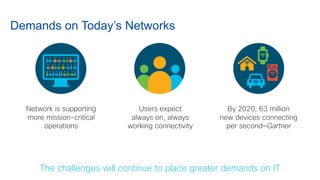
Network is supporting
more mission-critical
operations
Users expect
always on, always
working connectivity
By 2020, 63 million
new devices connecting
per second—Gartner
Demands on Today’s Networks
The challenges will continue to place greater demands on IT
3© 2018 Cisco and/or its affiliates. All rights reserved.
What are Some Typical Challenges?
• Interference
From non-WiFi systems operating in the same band
From other WiFi networks in the venue
From your own AP’s! referred to as co-channel interference
• Clients operating at low data rates (ex. 802.11g) pull down the performance of the
network
• Clients mistakenly choose a 2.4 GHz radio (louder signal) instead of 5 GHz (less load)
• Sticky Clients: Clients mistakenly stay on the same AP, even when person has moved
from one end of the venue to another
• Limitations on mounting assets. Hard to put APs where you want them
4© 2018 Cisco and/or its affiliates. All rights reserved.
Channel Efficiency - RF Matters!
5© 2018 Cisco and/or its affiliates. All rights reserved.
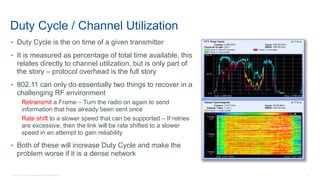
• Duty Cycle is the on time of a given transmitter
• It is measured as percentage of total time available, this
relates directly to channel utilization, but is only part of
the story – protocol overhead is the full story
• 802.11 can only do essentially two things to recover in a
challenging RF environment
Retransmit a Frame – Turn the radio on again to send
information that has already been sent once
Rate shift to a slower speed that can be supported – If retries
are excessive, then the link will be rate shifted to a slower
speed in an attempt to gain reliability
• Both of these will increase Duty Cycle and make the
problem worse if it is a dense network
Duty Cycle / Channel Utilization
6© 2018 Cisco and/or its affiliates. All rights reserved.
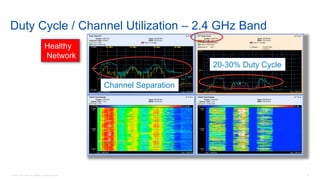
Duty Cycle / Channel Utilization – 2.4 GHz Band
Channel Separation
20-30% Duty Cycle
Healthy
Network
7© 2018 Cisco and/or its affiliates. All rights reserved.
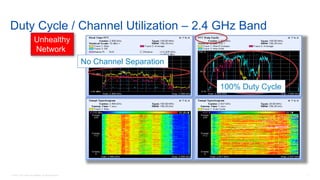
Duty Cycle / Channel Utilization – 2.4 GHz Band
No Channel Separation
100% Duty Cycle
Unhealthy
Network
8© 2018 Cisco and/or its affiliates. All rights reserved.
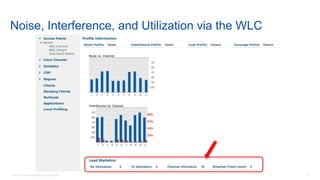
Noise, Interference, and Utilization via the WLC
9© 2018 Cisco and/or its affiliates. All rights reserved.
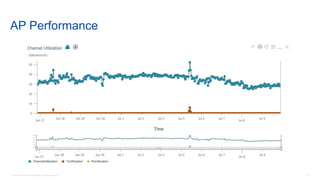
AP Performance
10© 2018 Cisco and/or its affiliates. All rights reserved.
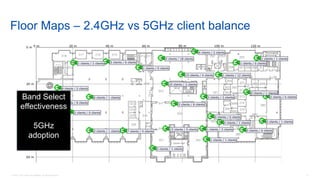
Floor Maps – 2.4GHz vs 5GHz client balance
Band Select
effectiveness
5GHz
adoption
11© 2018 Cisco and/or its affiliates. All rights reserved.
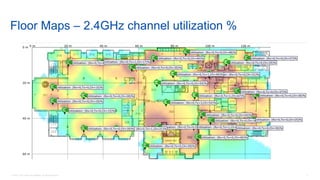
Floor Maps – 2.4GHz channel utilization %
12© 2018 Cisco and/or its affiliates. All rights reserved.
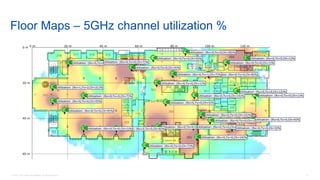
Floor Maps – 5GHz channel utilization %
13© 2018 Cisco and/or its affiliates. All rights reserved.
Techniques and Best Practices to
Optimize Your Client's Wi-Fi
Experience
14© 2018 Cisco and/or its affiliates. All rights reserved.
Improving Channel Efficiency
• Limiting the number of SSID
• Minimizing cell size
• BandSelect
• Aggressive Load Balancing
• ClientLink
• CleanAir
15© 2018 Cisco and/or its affiliates. All rights reserved.
Limiting the Number of SSID
• Each SSID requires a separate Beacon
• Each SSID will beacon at the minimum mandatory data rate
• Each AP will respond to null probe requests for all SSID
• Exponential amounts of airtime wasted
• Avoid Excessive Management Traffic
• Always aim for 2 or 3 SSID – no more
16© 2018 Cisco and/or its affiliates. All rights reserved.
Minimizing Cell Size
• Range versus rate is something that we are generally working to maximize in a coverage
design
• In a High Density Design, the reverse is actually true – we want to minimize the size of a
cell
• Minimizing the cell size is a function of limiting the propagation, there are 4 ways to do
this:
Reducing the Tx power levels of the radio’s
Disabling the lower data rates
Reducing the radio’s Rx sensitivity
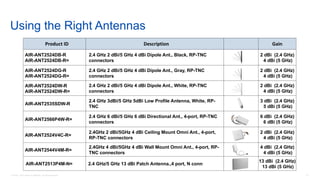
Using the right antennas to shape both Tx and Rx cell size
• Properly applied, this will maximize channel re-use in a small space
17© 2018 Cisco and/or its affiliates. All rights reserved.
Reducing the Tx Power Levels of the Radio’s
• Use Radio Resource Management (RRM)?
• TPC Threshold to adjust power levels to the floor
Increase the 5 GHz threshold and decrease 2.4 GHz threshold to favor the use of the 5 GHz band (CCI is
less of an issue in the 5 GHz band)
Apply small changes (1 or 2 dBm)
Wait a few hours for RRM to settle
Always measure the results using a site survey tool
• DCA will establish and maintain channel plan with changing interference levels – this is a
good thing
18© 2018 Cisco and/or its affiliates. All rights reserved.
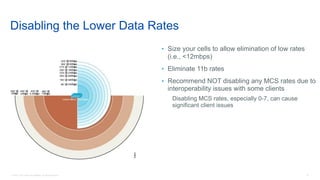
Disabling the Lower Data Rates
• Size your cells to allow elimination of low rates
(i.e., <12mbps)
• Eliminate 11b rates
• Recommend NOT disabling any MCS rates due to
interoperability issues with some clients
Disabling MCS rates, especially 0-7, can cause
significant client issues
19© 2018 Cisco and/or its affiliates. All rights reserved.
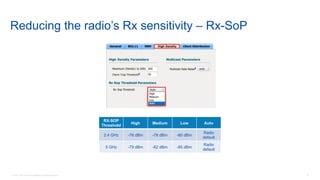
Reducing the radio’s Rx sensitivity – Rx-SoP
RX-SOP
Threshold
High Medium Low Auto
2.4 GHz -76 dBm -78 dBm -80 dBm
Radio
default
5 GHz -79 dBm -82 dBm -85 dBm
Radio
default
20© 2018 Cisco and/or its affiliates. All rights reserved.
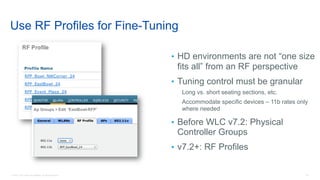
Use RF Profiles for Fine-Tuning
• HD environments are not “one size
fits all” from an RF perspective
• Tuning control must be granular
Long vs. short seating sections, etc.
Accommodate specific devices – 11b rates only
where needed
• Before WLC v7.2: Physical
Controller Groups
• v7.2+: RF Profiles
21© 2018 Cisco and/or its affiliates. All rights reserved.
Product ID Description Gain
AIR-ANT2524DB-R
AIR-ANT2524DB-R=
2.4 GHz 2 dBi/5 GHz 4 dBi Dipole Ant., Black, RP-TNC
connectors
2 dBi (2.4 GHz)
4 dBi (5 GHz)
AIR-ANT2524DG-R
AIR-ANT2524DG-R=
2.4 GHz 2 dBi/5 GHz 4 dBi Dipole Ant., Gray, RP-TNC
connectors
2 dBi (2.4 GHz)
4 dBi (5 GHz)
AIR-ANT2524DW-R
AIR-ANT2524DW-R=
2.4 GHz 2 dBi/5 GHz 4 dBi Dipole Ant., White, RP-TNC
connectors
2 dBi (2.4 GHz)
4 dBi (5 GHz)
AIR-ANT2535SDW-R
2.4 GHz 3dBi/5 GHz 5dBi Low Profile Antenna, White, RP-
TNC
3 dBi (2.4 GHz)
5 dBi (5 GHz)
AIR-ANT2566P4W-R=
2.4 GHz 6 dBi/5 GHz 6 dBi Directional Ant., 4-port, RP-TNC
connectors
6 dBi (2.4 GHz)
6 dBi (5 GHz)
AIR-ANT2524V4C-R=
2.4GHz 2 dBi/5GHz 4 dBi Ceiling Mount Omni Ant., 4-port,
RP-TNC connectors
2 dBi (2.4 GHz)
4 dBi (5 GHz)
AIR-ANT2544V4M-R=
2.4GHz 4 dBi/5GHz 4 dBi Wall Mount Omni Ant., 4-port, RP-
TNC connectors
4 dBi (2.4 GHz)
4 dBi (5 GHz)
AIR-ANT2513P4M-N= 2.4 GHz/5 GHz 13 dBi Patch Antenna.,4 port, N conn
13 dBi (2.4 GHz)
13 dBi (5 GHz)
Using the Right Antennas
22© 2018 Cisco and/or its affiliates. All rights reserved.
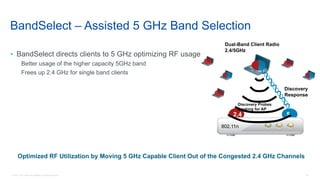
52.4
Optimized RF Utilization by Moving 5 GHz Capable Client Out of the Congested 2.4 GHz Channels
802.11n
Dual-Band Client Radio
2.4/5GHz
Discovery Probes
Looking for AP
Discovery
Response
BandSelect – Assisted 5 GHz Band Selection
• BandSelect directs clients to 5 GHz optimizing RF usage
Better usage of the higher capacity 5GHz band
Frees up 2.4 GHz for single band clients
23© 2018 Cisco and/or its affiliates. All rights reserved.
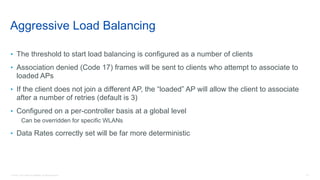
Aggressive Load Balancing
• The threshold to start load balancing is configured as a number of clients
• Association denied (Code 17) frames will be sent to clients who attempt to associate to
loaded APs
• If the client does not join a different AP, the “loaded” AP will allow the client to associate
after a number of retries (default is 3)
• Configured on a per-controller basis at a global level
Can be overridden for specific WLANs
• Data Rates correctly set will be far more deterministic
24© 2018 Cisco and/or its affiliates. All rights reserved.
Going One Step Further With
Standards Based Mechanisms
802.11r, 802.11k and 802.11v
25© 2018 Cisco and/or its affiliates. All rights reserved.
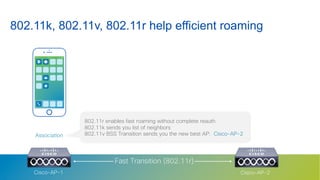
802.11k, 802.11v, 802.11r help efficient roaming
Fast Transition (802.11r)
802.11r enables fast roaming without complete reauth
802.11k sends you list of neighbors
802.11v BSS Transition sends you the new best AP: Cisco-AP-2Association
Cisco-AP-1 Cisco-AP-2
26© 2018 Cisco and/or its affiliates. All rights reserved.
With Apple
27© 2018 Cisco and/or its affiliates. All rights reserved.
Association
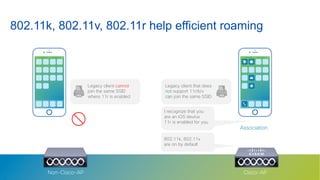
802.11k, 802.11v, 802.11r help efficient roaming
Cisco-APNon-Cisco-AP
Legacy client cannot
join the same SSID
where 11r is enabled
I recognize that you
are an iOS device
11r is enabled for you
802.11k, 802.11v
are on by default
Legacy client that does
not support 11r/k/v
can join the same SSID
28© 2018 Cisco and/or its affiliates. All rights reserved.
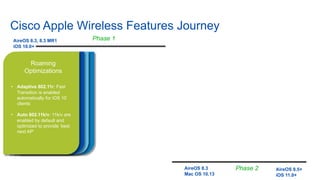
Cisco Apple Wireless Features Journey
28
Analytics
Optimizations
• 11k neighbor map: iOS 11
client sends a list of
neighbor APs upon joining
the cell
• Disconnection reason:
iOS 11 client tells us why it
disconnects
• Identity: the iOS client tells
us who it is (model, iOS
version)
MacOS
Optimizations
• Fastlane on Mac OS 10.13
and later. Upstream QoS
prioritization available on
iOS and Mac OS
QoS
Optimizations
• Fastlane: business-
relevant applications
prioritized
Roaming
Optimizations
• Adaptive 802.11r: Fast
Transition is enabled
automatically for iOS 10
clients
• Auto 802.11k/v: 11k/v are
enabled by default and
optimized to provide ‘best
next AP’
AireOS 8.3, 8.3 MR1
iOS 10.0+
AireOS 8.5+
iOS 11.0+
AireOS 8.3
Mac OS 10.13
Phase 1
Phase 2
29© 2018 Cisco and/or its affiliates. All rights reserved.
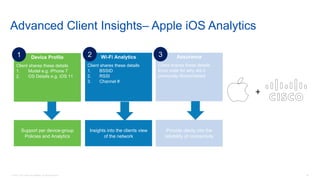
Device Profile
Client shares these details
1. Model e.g. iPhone 7
2. OS Details e.g. iOS 11
Support per device-group
Policies and Analytics
1 Wi-Fi Analytics
Client shares these details
1. BSSID
2. RSSI
3. Channel #
Insights into the clients view
of the network
2 Assurance
Client shares these details
Error code for why did it
previously disconnected
Provide clarity into the
reliability of connectivity
3
Advanced Client Insights– Apple iOS Analytics
30© 2018 Cisco and/or its affiliates. All rights reserved.
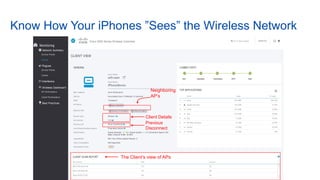
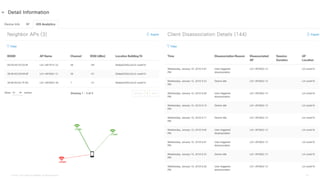
Client Details
Previous
Disconnect
The Client’s view of APs
Neighboring
AP’s
Know How Your iPhones ”Sees” the Wireless Network
32© 2018 Cisco and/or its affiliates. All rights reserved.
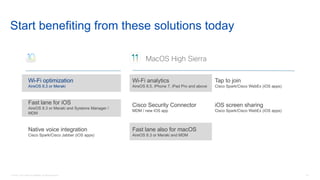
Start benefiting from these solutions today
Wi-Fi optimization
AireOS 8.3 or Meraki
Fast lane for iOS
AireOS 8.3 or Meraki and Systems Manager /
MDM
Native voice integration
Cisco Spark/Cisco Jabber (iOS apps)
Wi-Fi analytics
AireOS 8.5, iPhone 7, iPad Pro and above
Tap to join
Cisco Spark/Cisco WebEx (iOS apps)
Cisco Security Connector
MDM / new iOS app
iOS screen sharing
Cisco Spark/Cisco WebEx (iOS apps)
Fast lane also for macOS
AireOS 8.3 or Meraki and MDM
MacOS High Sierra
33© 2018 Cisco and/or its affiliates. All rights reserved.
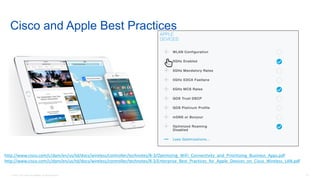
Cisco and Apple Best Practices
http://www.cisco.com/c/dam/en/us/td/docs/wireless/controller/technotes/8-3/Optimizing_WiFi_Connectivity_and_Prioritizing_Business_Apps.pdf
http://www.cisco.com/c/dam/en/us/td/docs/wireless/controller/technotes/8-3/Enterprise_Best_Practices_for_Apple_Devices_on_Cisco_Wireless_LAN.pdf
© 2018 Cisco and/or its affiliates. All rights reserved. 34
35© 2018 Cisco and/or its affiliates. All rights reserved.
Wi-Fi Assurance
36© 2018 Cisco and/or its affiliates. All rights reserved.
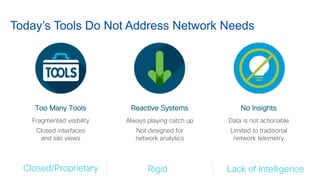
Fragmented visibility
Closed interfaces
and silo views
Always playing catch up
Not designed for
network analytics
Today’s Tools Do Not Address Network Needs
Data is not actionable
Limited to traditional
network telemetry
Too Many Tools Reactive Systems No Insights
RigidClosed/Proprietary Lack of Intelligence
37© 2018 Cisco and/or its affiliates. All rights reserved.
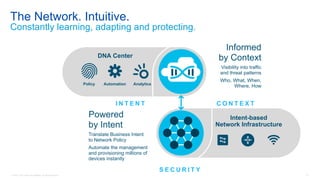
Intent-based
Network Infrastructure
DNA Center
AnalyticsPolicy Automation
I N T E N T C O N T E X T
S E C U R I T Y
L E A R N I N G
Informed
by Context
Visibility into traffic
and threat patterns
Who, What, When,
Where, How
Powered
by Intent
Translate Business Intent
to Network Policy
Automate the management
and provisioning millions of
devices instantly
The Network. Intuitive.
Constantly learning, adapting and protecting.
38© 2018 Cisco and/or its affiliates. All rights reserved.
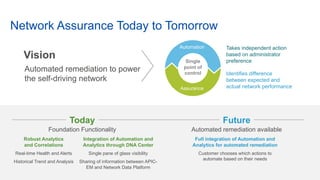
Network Assurance Today to Tomorrow
Foundation Functionality Automated remediation available
Full integration of Automation and
Analytics for automated remediation
Customer chooses which actions to
automate based on their needs
Robust Analytics
and Correlations
Real-time Health and Alerts
Historical Trend and Analysis
Integration of Automation and
Analytics through DNA Center
Single pane of glass visibility
Sharing of information between APIC-
EM and Network Data Platform
Today Future
Single
point of
control
Assurance
Automation
Identifies difference
between expected and
actual network performance
Takes independent action
based on administrator
preference
Vision
Automated remediation to power
the self-driving network
39© 2018 Cisco and/or its affiliates. All rights reserved.
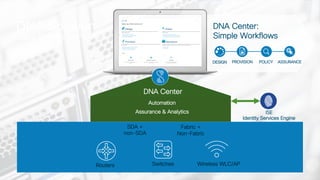
Fabric + Non Fabric
DNA Solution
Cisco Enterprise Portfolio
Automation
Assurance & Analytics ISE
Identity Services Engine
SDA +
non-SDA
Routers Switches Wireless WLC/AP
DNA Center
DESIGN PROVISION POLICY ASSURANCE
DNA Center:
Simple Workflows
Fabric +
Non-Fabric
40© 2018 Cisco and/or its affiliates. All rights reserved.
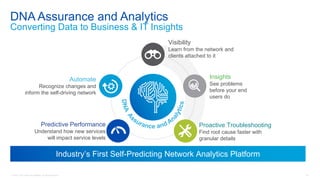
DNA Assurance and Analytics
Converting Data to Business & IT Insights
Insights
See problems
before your end
users do
Automate
Recognize changes and
inform the self-driving network
Visibility
Learn from the network and
clients attached to it
Industry’s First Self-Predicting Network Analytics Platform
Proactive Troubleshooting
Find root cause faster with
granular details
Predictive Performance
Understand how new services
will impact service levels
41© 2018 Cisco and/or its affiliates. All rights reserved.
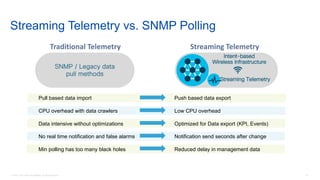
SNMP / Legacy data
pull methods
Pull based data import
CPU overhead with data crawlers
Data intensive without optimizations
No real time notification and false alarms
Min polling has too many black holes
Push based data export
Low CPU overhead
Optimized for Data export (KPI, Events)
Notification send seconds after change
Reduced delay in management data
Traditional Telemetry
Intent-based
Wireless Infrastructure
Streaming Telemetry
Streaming Telemetry
Streaming Telemetry vs. SNMP Polling
42© 2018 Cisco and/or its affiliates. All rights reserved.
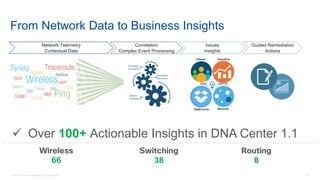
From Network Data to Business Insights
ü Over 100+ Actionable Insights in DNA Center 1.1
Router
Syslog Traceroute
Wireless
Netflow
AAA
Switch Telnet DNS CLI
OID
MIBSNMP PingIPSLA
DHCP
Guided Remediation
Actions
Issues
Insights
Correlation
Complex Event Processing
Network Telemetry
Contextual Data
NetworkApplication
BaselineClients
INSI GHTS
Wireless
66
Switching
38
Routing
8
43© 2018 Cisco and/or its affiliates. All rights reserved.
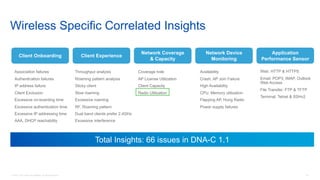
Client Onboarding
Network Coverage
& Capacity
Network Device
Monitoring
Application
Performance Sensor
Association failures
Authentication failures
IP address failure
Client Exclusion
Excessive on-boarding time
Excessive authentication time
Excessive IP addressing time
AAA, DHCP reachability
Coverage hole
AP License Utilization
Client Capacity
Radio Utilization
Availability
Crash, AP Join Failure
High Availability
CPU, Memory utilization
Flapping AP, Hung Radio
Power supply failures
Throughput analysis
Roaming pattern analysis
Sticky client
Slow roaming
Excessive roaming
RF, Roaming pattern
Dual band clients prefer 2.4GHz
Excessive interference
Client Experience
Web: HTTP & HTTPS
Email: POP3, IMAP, Outlook
Web Access
File Transfer: FTP & TFTP
Terminal: Telnet & SSHv2
Wireless Specific Correlated Insights
Total Insights: 66 issues in DNA-C 1.1
44© 2018 Cisco and/or its affiliates. All rights reserved.
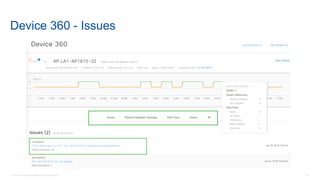
Device 360 - Issues
45© 2018 Cisco and/or its affiliates. All rights reserved.
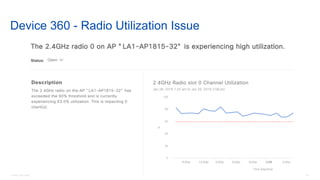
Device 360 - Radio Utilization Issue
46© 2018 Cisco and/or its affiliates. All rights reserved.
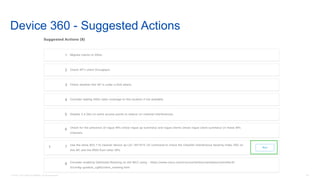
Device 360 - Suggested Actions
47© 2018 Cisco and/or its affiliates. All rights reserved.
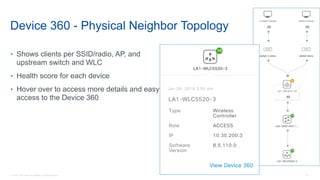
Device 360 - Physical Neighbor Topology
• Shows clients per SSID/radio, AP, and
upstream switch and WLC
• Health score for each device
• Hover over to access more details and easy
access to the Device 360
48© 2018 Cisco and/or its affiliates. All rights reserved.
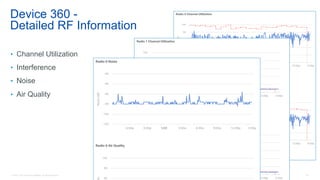
Device 360 -
Detailed RF Information
• Channel Utilization
• Interference
• Noise
• Air Quality
49© 2018 Cisco and/or its affiliates. All rights reserved.
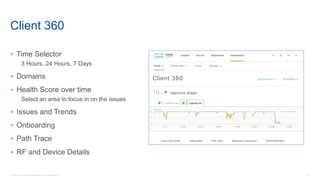
Client 360
• Time Selector
3 Hours, 24 Hours, 7 Days
• Domains
• Health Score over time
Select an area to focus in on the issues
• Issues and Trends
• Onboarding
• Path Trace
• RF and Device Details
50© 2018 Cisco and/or its affiliates. All rights reserved.
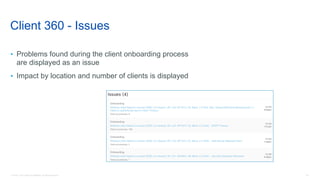
Client 360 - Issues
• Problems found during the client onboarding process
are displayed as an issue
• Impact by location and number of clients is displayed
51© 2018 Cisco and/or its affiliates. All rights reserved.
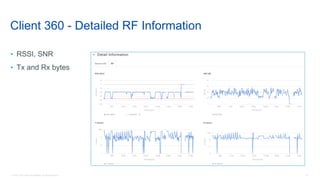
Client 360 - Detailed RF Information
• RSSI, SNR
• Tx and Rx bytes
52© 2018 Cisco and/or its affiliates. All rights reserved.
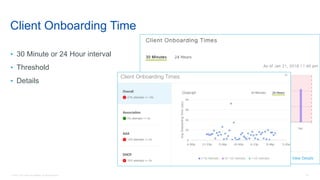
Client Onboarding Time
• 30 Minute or 24 Hour interval
• Threshold
• Details
53© 2018 Cisco and/or its affiliates. All rights reserved.
54© 2018 Cisco and/or its affiliates. All rights reserved.
Anticipate with Sensors
55© 2018 Cisco and/or its affiliates. All rights reserved.
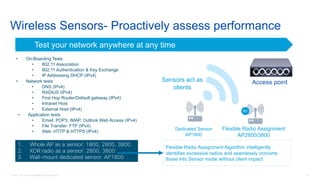
Wireless Sensors- Proactively assess performance
Test your network anywhere at any time
R1
Dedicated Sensor
AP1800
Flexible Radio Assignment
AP2800/3800
Sensors act as
clients
Access point
• On-Boarding Tests
• 802.11 Association
• 802.11 Authentication & Key Exchange
• IP Addressing DHCP (IPv4)
• Network tests
• DNS (IPv4)
• RADIUS (IPv4)
• First Hop Router/Default gateway (IPv4)
• Intranet Host
• External Host (IPv4)
• Application tests
• Email: POP3, IMAP, Outlook Web Access (IPv4)
• File Transfer: FTP (IPv4)
• Web: HTTP & HTTPS (IPv4)
1. Whole AP as a sensor: 1800, 2800, 3800
2. XOR radio as a sensor: 2800, 3800
3. Wall-mount dedicated sensor: AP1800
Flexible Radio Assignment Algorithm intelligently
identifies excessive radios and seamlessly converts
those into Sensor mode without client impact
56© 2018 Cisco and/or its affiliates. All rights reserved.
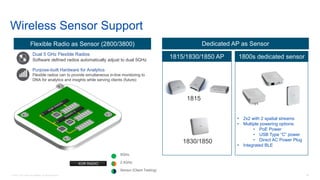
Wireless Sensor Support
Dual 5 GHz Flexible Radios
Software defined radios automatically adjust to dual 5GHz
Purpose-built Hardware for Analytics
Flexible radios can to provide simultaneous in-line monitoring to
DNA for analytics and insights while serving clients (future)
XOR RADIO
5GHz.
2.4GHz.
Sensor (Client Testing)
Flexible Radio as Sensor (2800/3800) Dedicated AP as Sensor
1815/1830/1850 AP
• 2x2 with 2 spatial streams
• Multiple powering options:
• PoE Power
• USB Type “C” power
• Direct AC Power Plug
• Integrated BLE
1815
1830/1850
1800s dedicated sensor
57© 2018 Cisco and/or its affiliates. All rights reserved.
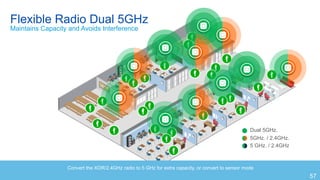
Dual 5GHz.
5GHz. / 2.4GHz.
5 GHz. / 2.4GHz
Convert the XOR/2.4GHz radio to 5 GHz for extra capacity, or convert to sensor mode
Flexible Radio Dual 5GHz
Maintains Capacity and Avoids Interference
57
58© 2018 Cisco and/or its affiliates. All rights reserved.
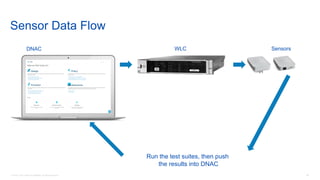
Sensor Data Flow
WLC
Run the test suites, then push
the results into DNAC
SensorsDNAC
59© 2018 Cisco and/or its affiliates. All rights reserved.
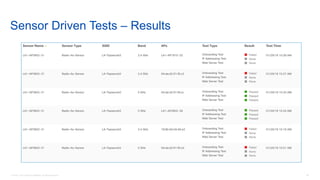
Sensor Driven Tests – Results
61© 2018 Cisco and/or its affiliates. All rights reserved.
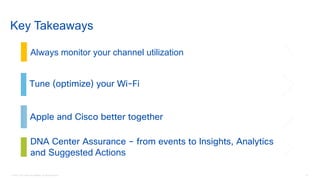
Key Takeaways
Tune (optimize) your Wi-Fi
DNA Center Assurance – from events to Insights, Analytics
and Suggested Actions
Always monitor your channel utilization
Apple and Cisco better together
Thank you.

Cisco Connect Halifax 2018 Optimizing your client's wi-fi experience

  • 1.
    © 2018 Ciscoand/or its affiliates. All rights reserved. 1 Optimizing Your Client's Wi-Fi Experience Francis Girard TSA April 2018 Cisco Connect Your Time Is Now
  • 2.
    2© 2018 Ciscoand/or its affiliates. All rights reserved. Network is supporting more mission-critical operations Users expect always on, always working connectivity By 2020, 63 million new devices connecting per second—Gartner Demands on Today’s Networks The challenges will continue to place greater demands on IT
  • 3.
    3© 2018 Ciscoand/or its affiliates. All rights reserved. What are Some Typical Challenges? • Interference From non-WiFi systems operating in the same band From other WiFi networks in the venue From your own AP’s! referred to as co-channel interference • Clients operating at low data rates (ex. 802.11g) pull down the performance of the network • Clients mistakenly choose a 2.4 GHz radio (louder signal) instead of 5 GHz (less load) • Sticky Clients: Clients mistakenly stay on the same AP, even when person has moved from one end of the venue to another • Limitations on mounting assets. Hard to put APs where you want them
  • 4.
    4© 2018 Ciscoand/or its affiliates. All rights reserved. Channel Efficiency - RF Matters!
  • 5.
    5© 2018 Ciscoand/or its affiliates. All rights reserved. • Duty Cycle is the on time of a given transmitter • It is measured as percentage of total time available, this relates directly to channel utilization, but is only part of the story – protocol overhead is the full story • 802.11 can only do essentially two things to recover in a challenging RF environment Retransmit a Frame – Turn the radio on again to send information that has already been sent once Rate shift to a slower speed that can be supported – If retries are excessive, then the link will be rate shifted to a slower speed in an attempt to gain reliability • Both of these will increase Duty Cycle and make the problem worse if it is a dense network Duty Cycle / Channel Utilization
  • 6.
    6© 2018 Ciscoand/or its affiliates. All rights reserved. Duty Cycle / Channel Utilization – 2.4 GHz Band Channel Separation 20-30% Duty Cycle Healthy Network
  • 7.
    7© 2018 Ciscoand/or its affiliates. All rights reserved. Duty Cycle / Channel Utilization – 2.4 GHz Band No Channel Separation 100% Duty Cycle Unhealthy Network
  • 8.
    8© 2018 Ciscoand/or its affiliates. All rights reserved. Noise, Interference, and Utilization via the WLC
  • 9.
    9© 2018 Ciscoand/or its affiliates. All rights reserved. AP Performance
  • 10.
    10© 2018 Ciscoand/or its affiliates. All rights reserved. Floor Maps – 2.4GHz vs 5GHz client balance Band Select effectiveness 5GHz adoption
  • 11.
    11© 2018 Ciscoand/or its affiliates. All rights reserved. Floor Maps – 2.4GHz channel utilization %
  • 12.
    12© 2018 Ciscoand/or its affiliates. All rights reserved. Floor Maps – 5GHz channel utilization %
  • 13.
    13© 2018 Ciscoand/or its affiliates. All rights reserved. Techniques and Best Practices to Optimize Your Client's Wi-Fi Experience
  • 14.
    14© 2018 Ciscoand/or its affiliates. All rights reserved. Improving Channel Efficiency • Limiting the number of SSID • Minimizing cell size • BandSelect • Aggressive Load Balancing • ClientLink • CleanAir
  • 15.
    15© 2018 Ciscoand/or its affiliates. All rights reserved. Limiting the Number of SSID • Each SSID requires a separate Beacon • Each SSID will beacon at the minimum mandatory data rate • Each AP will respond to null probe requests for all SSID • Exponential amounts of airtime wasted • Avoid Excessive Management Traffic • Always aim for 2 or 3 SSID – no more
  • 16.
    16© 2018 Ciscoand/or its affiliates. All rights reserved. Minimizing Cell Size • Range versus rate is something that we are generally working to maximize in a coverage design • In a High Density Design, the reverse is actually true – we want to minimize the size of a cell • Minimizing the cell size is a function of limiting the propagation, there are 4 ways to do this: Reducing the Tx power levels of the radio’s Disabling the lower data rates Reducing the radio’s Rx sensitivity Using the right antennas to shape both Tx and Rx cell size • Properly applied, this will maximize channel re-use in a small space
  • 17.
    17© 2018 Ciscoand/or its affiliates. All rights reserved. Reducing the Tx Power Levels of the Radio’s • Use Radio Resource Management (RRM)? • TPC Threshold to adjust power levels to the floor Increase the 5 GHz threshold and decrease 2.4 GHz threshold to favor the use of the 5 GHz band (CCI is less of an issue in the 5 GHz band) Apply small changes (1 or 2 dBm) Wait a few hours for RRM to settle Always measure the results using a site survey tool • DCA will establish and maintain channel plan with changing interference levels – this is a good thing
  • 18.
    18© 2018 Ciscoand/or its affiliates. All rights reserved. Disabling the Lower Data Rates • Size your cells to allow elimination of low rates (i.e., <12mbps) • Eliminate 11b rates • Recommend NOT disabling any MCS rates due to interoperability issues with some clients Disabling MCS rates, especially 0-7, can cause significant client issues
  • 19.
    19© 2018 Ciscoand/or its affiliates. All rights reserved. Reducing the radio’s Rx sensitivity – Rx-SoP RX-SOP Threshold High Medium Low Auto 2.4 GHz -76 dBm -78 dBm -80 dBm Radio default 5 GHz -79 dBm -82 dBm -85 dBm Radio default
  • 20.
    20© 2018 Ciscoand/or its affiliates. All rights reserved. Use RF Profiles for Fine-Tuning • HD environments are not “one size fits all” from an RF perspective • Tuning control must be granular Long vs. short seating sections, etc. Accommodate specific devices – 11b rates only where needed • Before WLC v7.2: Physical Controller Groups • v7.2+: RF Profiles
  • 21.
    21© 2018 Ciscoand/or its affiliates. All rights reserved. Product ID Description Gain AIR-ANT2524DB-R AIR-ANT2524DB-R= 2.4 GHz 2 dBi/5 GHz 4 dBi Dipole Ant., Black, RP-TNC connectors 2 dBi (2.4 GHz) 4 dBi (5 GHz) AIR-ANT2524DG-R AIR-ANT2524DG-R= 2.4 GHz 2 dBi/5 GHz 4 dBi Dipole Ant., Gray, RP-TNC connectors 2 dBi (2.4 GHz) 4 dBi (5 GHz) AIR-ANT2524DW-R AIR-ANT2524DW-R= 2.4 GHz 2 dBi/5 GHz 4 dBi Dipole Ant., White, RP-TNC connectors 2 dBi (2.4 GHz) 4 dBi (5 GHz) AIR-ANT2535SDW-R 2.4 GHz 3dBi/5 GHz 5dBi Low Profile Antenna, White, RP- TNC 3 dBi (2.4 GHz) 5 dBi (5 GHz) AIR-ANT2566P4W-R= 2.4 GHz 6 dBi/5 GHz 6 dBi Directional Ant., 4-port, RP-TNC connectors 6 dBi (2.4 GHz) 6 dBi (5 GHz) AIR-ANT2524V4C-R= 2.4GHz 2 dBi/5GHz 4 dBi Ceiling Mount Omni Ant., 4-port, RP-TNC connectors 2 dBi (2.4 GHz) 4 dBi (5 GHz) AIR-ANT2544V4M-R= 2.4GHz 4 dBi/5GHz 4 dBi Wall Mount Omni Ant., 4-port, RP- TNC connectors 4 dBi (2.4 GHz) 4 dBi (5 GHz) AIR-ANT2513P4M-N= 2.4 GHz/5 GHz 13 dBi Patch Antenna.,4 port, N conn 13 dBi (2.4 GHz) 13 dBi (5 GHz) Using the Right Antennas
  • 22.
    22© 2018 Ciscoand/or its affiliates. All rights reserved. 52.4 Optimized RF Utilization by Moving 5 GHz Capable Client Out of the Congested 2.4 GHz Channels 802.11n Dual-Band Client Radio 2.4/5GHz Discovery Probes Looking for AP Discovery Response BandSelect – Assisted 5 GHz Band Selection • BandSelect directs clients to 5 GHz optimizing RF usage Better usage of the higher capacity 5GHz band Frees up 2.4 GHz for single band clients
  • 23.
    23© 2018 Ciscoand/or its affiliates. All rights reserved. Aggressive Load Balancing • The threshold to start load balancing is configured as a number of clients • Association denied (Code 17) frames will be sent to clients who attempt to associate to loaded APs • If the client does not join a different AP, the “loaded” AP will allow the client to associate after a number of retries (default is 3) • Configured on a per-controller basis at a global level Can be overridden for specific WLANs • Data Rates correctly set will be far more deterministic
  • 24.
    24© 2018 Ciscoand/or its affiliates. All rights reserved. Going One Step Further With Standards Based Mechanisms 802.11r, 802.11k and 802.11v
  • 25.
    25© 2018 Ciscoand/or its affiliates. All rights reserved. 802.11k, 802.11v, 802.11r help efficient roaming Fast Transition (802.11r) 802.11r enables fast roaming without complete reauth 802.11k sends you list of neighbors 802.11v BSS Transition sends you the new best AP: Cisco-AP-2Association Cisco-AP-1 Cisco-AP-2
  • 26.
    26© 2018 Ciscoand/or its affiliates. All rights reserved. With Apple
  • 27.
    27© 2018 Ciscoand/or its affiliates. All rights reserved. Association 802.11k, 802.11v, 802.11r help efficient roaming Cisco-APNon-Cisco-AP Legacy client cannot join the same SSID where 11r is enabled I recognize that you are an iOS device 11r is enabled for you 802.11k, 802.11v are on by default Legacy client that does not support 11r/k/v can join the same SSID
  • 28.
    28© 2018 Ciscoand/or its affiliates. All rights reserved. Cisco Apple Wireless Features Journey 28 Analytics Optimizations • 11k neighbor map: iOS 11 client sends a list of neighbor APs upon joining the cell • Disconnection reason: iOS 11 client tells us why it disconnects • Identity: the iOS client tells us who it is (model, iOS version) MacOS Optimizations • Fastlane on Mac OS 10.13 and later. Upstream QoS prioritization available on iOS and Mac OS QoS Optimizations • Fastlane: business- relevant applications prioritized Roaming Optimizations • Adaptive 802.11r: Fast Transition is enabled automatically for iOS 10 clients • Auto 802.11k/v: 11k/v are enabled by default and optimized to provide ‘best next AP’ AireOS 8.3, 8.3 MR1 iOS 10.0+ AireOS 8.5+ iOS 11.0+ AireOS 8.3 Mac OS 10.13 Phase 1 Phase 2
  • 29.
    29© 2018 Ciscoand/or its affiliates. All rights reserved. Device Profile Client shares these details 1. Model e.g. iPhone 7 2. OS Details e.g. iOS 11 Support per device-group Policies and Analytics 1 Wi-Fi Analytics Client shares these details 1. BSSID 2. RSSI 3. Channel # Insights into the clients view of the network 2 Assurance Client shares these details Error code for why did it previously disconnected Provide clarity into the reliability of connectivity 3 Advanced Client Insights– Apple iOS Analytics
  • 30.
    30© 2018 Ciscoand/or its affiliates. All rights reserved. Client Details Previous Disconnect The Client’s view of APs Neighboring AP’s Know How Your iPhones ”Sees” the Wireless Network
  • 31.
    32© 2018 Ciscoand/or its affiliates. All rights reserved. Start benefiting from these solutions today Wi-Fi optimization AireOS 8.3 or Meraki Fast lane for iOS AireOS 8.3 or Meraki and Systems Manager / MDM Native voice integration Cisco Spark/Cisco Jabber (iOS apps) Wi-Fi analytics AireOS 8.5, iPhone 7, iPad Pro and above Tap to join Cisco Spark/Cisco WebEx (iOS apps) Cisco Security Connector MDM / new iOS app iOS screen sharing Cisco Spark/Cisco WebEx (iOS apps) Fast lane also for macOS AireOS 8.3 or Meraki and MDM MacOS High Sierra
  • 32.
    33© 2018 Ciscoand/or its affiliates. All rights reserved. Cisco and Apple Best Practices http://www.cisco.com/c/dam/en/us/td/docs/wireless/controller/technotes/8-3/Optimizing_WiFi_Connectivity_and_Prioritizing_Business_Apps.pdf http://www.cisco.com/c/dam/en/us/td/docs/wireless/controller/technotes/8-3/Enterprise_Best_Practices_for_Apple_Devices_on_Cisco_Wireless_LAN.pdf
  • 33.
    © 2018 Ciscoand/or its affiliates. All rights reserved. 34
  • 34.
    35© 2018 Ciscoand/or its affiliates. All rights reserved. Wi-Fi Assurance
  • 35.
    36© 2018 Ciscoand/or its affiliates. All rights reserved. Fragmented visibility Closed interfaces and silo views Always playing catch up Not designed for network analytics Today’s Tools Do Not Address Network Needs Data is not actionable Limited to traditional network telemetry Too Many Tools Reactive Systems No Insights RigidClosed/Proprietary Lack of Intelligence
  • 36.
    37© 2018 Ciscoand/or its affiliates. All rights reserved. Intent-based Network Infrastructure DNA Center AnalyticsPolicy Automation I N T E N T C O N T E X T S E C U R I T Y L E A R N I N G Informed by Context Visibility into traffic and threat patterns Who, What, When, Where, How Powered by Intent Translate Business Intent to Network Policy Automate the management and provisioning millions of devices instantly The Network. Intuitive. Constantly learning, adapting and protecting.
  • 37.
    38© 2018 Ciscoand/or its affiliates. All rights reserved. Network Assurance Today to Tomorrow Foundation Functionality Automated remediation available Full integration of Automation and Analytics for automated remediation Customer chooses which actions to automate based on their needs Robust Analytics and Correlations Real-time Health and Alerts Historical Trend and Analysis Integration of Automation and Analytics through DNA Center Single pane of glass visibility Sharing of information between APIC- EM and Network Data Platform Today Future Single point of control Assurance Automation Identifies difference between expected and actual network performance Takes independent action based on administrator preference Vision Automated remediation to power the self-driving network
  • 38.
    39© 2018 Ciscoand/or its affiliates. All rights reserved. Fabric + Non Fabric DNA Solution Cisco Enterprise Portfolio Automation Assurance & Analytics ISE Identity Services Engine SDA + non-SDA Routers Switches Wireless WLC/AP DNA Center DESIGN PROVISION POLICY ASSURANCE DNA Center: Simple Workflows Fabric + Non-Fabric
  • 39.
    40© 2018 Ciscoand/or its affiliates. All rights reserved. DNA Assurance and Analytics Converting Data to Business & IT Insights Insights See problems before your end users do Automate Recognize changes and inform the self-driving network Visibility Learn from the network and clients attached to it Industry’s First Self-Predicting Network Analytics Platform Proactive Troubleshooting Find root cause faster with granular details Predictive Performance Understand how new services will impact service levels
  • 40.
    41© 2018 Ciscoand/or its affiliates. All rights reserved. SNMP / Legacy data pull methods Pull based data import CPU overhead with data crawlers Data intensive without optimizations No real time notification and false alarms Min polling has too many black holes Push based data export Low CPU overhead Optimized for Data export (KPI, Events) Notification send seconds after change Reduced delay in management data Traditional Telemetry Intent-based Wireless Infrastructure Streaming Telemetry Streaming Telemetry Streaming Telemetry vs. SNMP Polling
  • 41.
    42© 2018 Ciscoand/or its affiliates. All rights reserved. From Network Data to Business Insights ü Over 100+ Actionable Insights in DNA Center 1.1 Router Syslog Traceroute Wireless Netflow AAA Switch Telnet DNS CLI OID MIBSNMP PingIPSLA DHCP Guided Remediation Actions Issues Insights Correlation Complex Event Processing Network Telemetry Contextual Data NetworkApplication BaselineClients INSI GHTS Wireless 66 Switching 38 Routing 8
  • 42.
    43© 2018 Ciscoand/or its affiliates. All rights reserved. Client Onboarding Network Coverage & Capacity Network Device Monitoring Application Performance Sensor Association failures Authentication failures IP address failure Client Exclusion Excessive on-boarding time Excessive authentication time Excessive IP addressing time AAA, DHCP reachability Coverage hole AP License Utilization Client Capacity Radio Utilization Availability Crash, AP Join Failure High Availability CPU, Memory utilization Flapping AP, Hung Radio Power supply failures Throughput analysis Roaming pattern analysis Sticky client Slow roaming Excessive roaming RF, Roaming pattern Dual band clients prefer 2.4GHz Excessive interference Client Experience Web: HTTP & HTTPS Email: POP3, IMAP, Outlook Web Access File Transfer: FTP & TFTP Terminal: Telnet & SSHv2 Wireless Specific Correlated Insights Total Insights: 66 issues in DNA-C 1.1
  • 43.
    44© 2018 Ciscoand/or its affiliates. All rights reserved. Device 360 - Issues
  • 44.
    45© 2018 Ciscoand/or its affiliates. All rights reserved. Device 360 - Radio Utilization Issue
  • 45.
    46© 2018 Ciscoand/or its affiliates. All rights reserved. Device 360 - Suggested Actions
  • 46.
    47© 2018 Ciscoand/or its affiliates. All rights reserved. Device 360 - Physical Neighbor Topology • Shows clients per SSID/radio, AP, and upstream switch and WLC • Health score for each device • Hover over to access more details and easy access to the Device 360
  • 47.
    48© 2018 Ciscoand/or its affiliates. All rights reserved. Device 360 - Detailed RF Information • Channel Utilization • Interference • Noise • Air Quality
  • 48.
    49© 2018 Ciscoand/or its affiliates. All rights reserved. Client 360 • Time Selector 3 Hours, 24 Hours, 7 Days • Domains • Health Score over time Select an area to focus in on the issues • Issues and Trends • Onboarding • Path Trace • RF and Device Details
  • 49.
    50© 2018 Ciscoand/or its affiliates. All rights reserved. Client 360 - Issues • Problems found during the client onboarding process are displayed as an issue • Impact by location and number of clients is displayed
  • 50.
    51© 2018 Ciscoand/or its affiliates. All rights reserved. Client 360 - Detailed RF Information • RSSI, SNR • Tx and Rx bytes
  • 51.
    52© 2018 Ciscoand/or its affiliates. All rights reserved. Client Onboarding Time • 30 Minute or 24 Hour interval • Threshold • Details
  • 52.
    53© 2018 Ciscoand/or its affiliates. All rights reserved.
  • 53.
    54© 2018 Ciscoand/or its affiliates. All rights reserved. Anticipate with Sensors
  • 54.
    55© 2018 Ciscoand/or its affiliates. All rights reserved. Wireless Sensors- Proactively assess performance Test your network anywhere at any time R1 Dedicated Sensor AP1800 Flexible Radio Assignment AP2800/3800 Sensors act as clients Access point • On-Boarding Tests • 802.11 Association • 802.11 Authentication & Key Exchange • IP Addressing DHCP (IPv4) • Network tests • DNS (IPv4) • RADIUS (IPv4) • First Hop Router/Default gateway (IPv4) • Intranet Host • External Host (IPv4) • Application tests • Email: POP3, IMAP, Outlook Web Access (IPv4) • File Transfer: FTP (IPv4) • Web: HTTP & HTTPS (IPv4) 1. Whole AP as a sensor: 1800, 2800, 3800 2. XOR radio as a sensor: 2800, 3800 3. Wall-mount dedicated sensor: AP1800 Flexible Radio Assignment Algorithm intelligently identifies excessive radios and seamlessly converts those into Sensor mode without client impact
  • 55.
    56© 2018 Ciscoand/or its affiliates. All rights reserved. Wireless Sensor Support Dual 5 GHz Flexible Radios Software defined radios automatically adjust to dual 5GHz Purpose-built Hardware for Analytics Flexible radios can to provide simultaneous in-line monitoring to DNA for analytics and insights while serving clients (future) XOR RADIO 5GHz. 2.4GHz. Sensor (Client Testing) Flexible Radio as Sensor (2800/3800) Dedicated AP as Sensor 1815/1830/1850 AP • 2x2 with 2 spatial streams • Multiple powering options: • PoE Power • USB Type “C” power • Direct AC Power Plug • Integrated BLE 1815 1830/1850 1800s dedicated sensor
  • 56.
    57© 2018 Ciscoand/or its affiliates. All rights reserved. Dual 5GHz. 5GHz. / 2.4GHz. 5 GHz. / 2.4GHz Convert the XOR/2.4GHz radio to 5 GHz for extra capacity, or convert to sensor mode Flexible Radio Dual 5GHz Maintains Capacity and Avoids Interference 57
  • 57.
    58© 2018 Ciscoand/or its affiliates. All rights reserved. Sensor Data Flow WLC Run the test suites, then push the results into DNAC SensorsDNAC
  • 58.
    59© 2018 Ciscoand/or its affiliates. All rights reserved. Sensor Driven Tests – Results
  • 59.
    61© 2018 Ciscoand/or its affiliates. All rights reserved. Key Takeaways Tune (optimize) your Wi-Fi DNA Center Assurance – from events to Insights, Analytics and Suggested Actions Always monitor your channel utilization Apple and Cisco better together
  • 60.