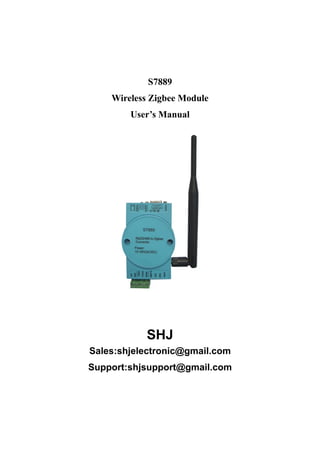
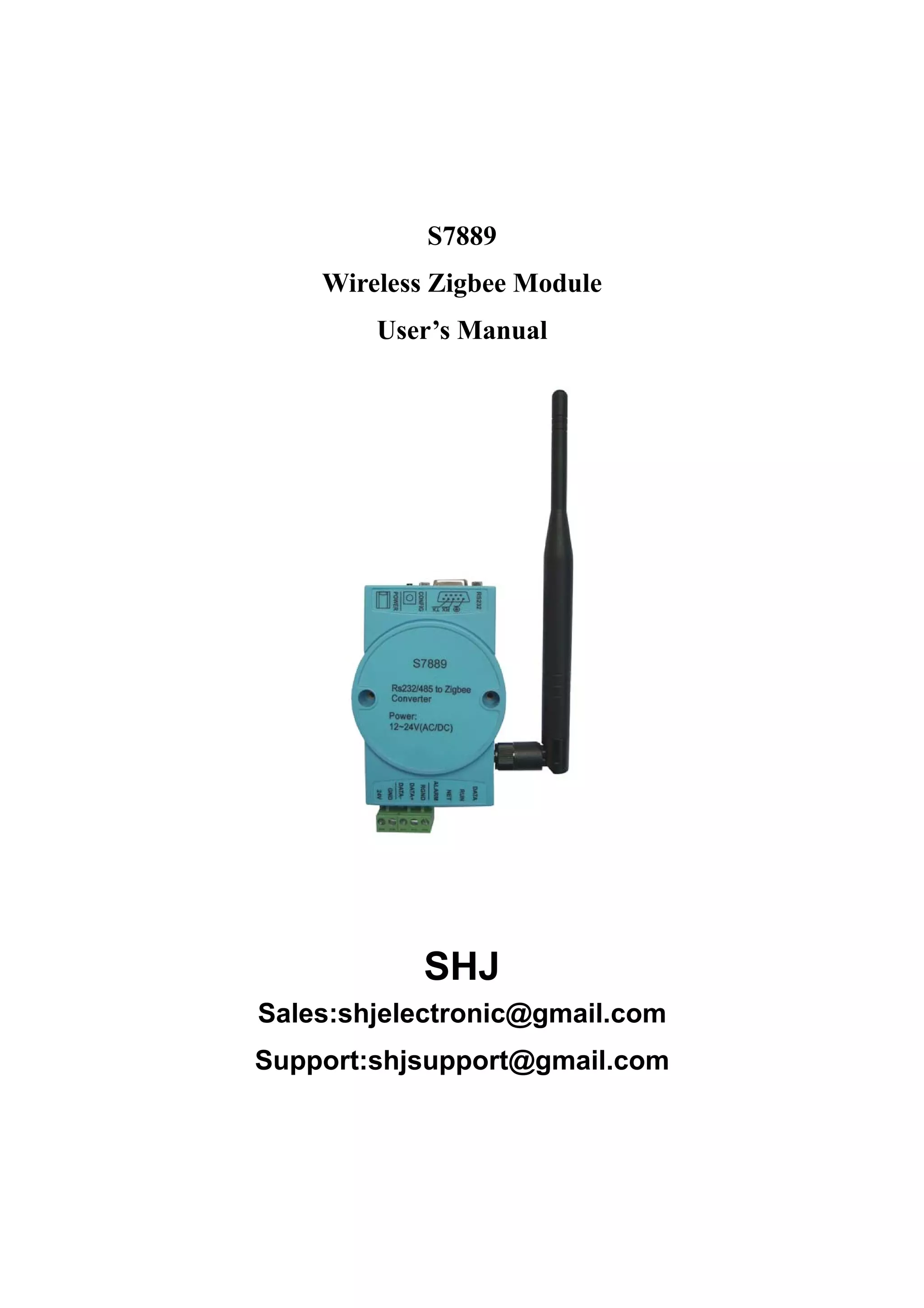
S7889
    Wireless Zigbee Module
        User’s Manual


           SHJ
Sales:shjelectronic@gmail.com
Support:shjsupport@gmail.com
S7889 User’s Manual                                                         Rev 1.1


1. Technical Parameters
           Name                            Technical Data
   Transmission Distance               100 meters ~ 2,000 meters
     Network Topology            Star, tree and chain type, mesh network
        Network ID                                255

       Network Node                              65535

     Maximum Packets                           256 bytes

       Data Interface                 TTL level, RS232 and RS485

        Serial Signal                      TXD, RXD, GND

         Serial Rate                       1200 ~ 115200 bps

      Modulation Mode            DSSS direct sequence spread spectrum
      Frequency Range                    2.405GHz~ 2.480GHz
      A Radio Channel                              16
    Receiving Sensitivity                       -94 dbm

    Transmission Power                      -27dBm~25dBm
          Antenna                       External SMA Antenna

   Conflict Prevention            GTS, CSMA - CA and CSMA - CA

   Input Voltage                      AC/DC12~ 24V, Standard is 24VDC

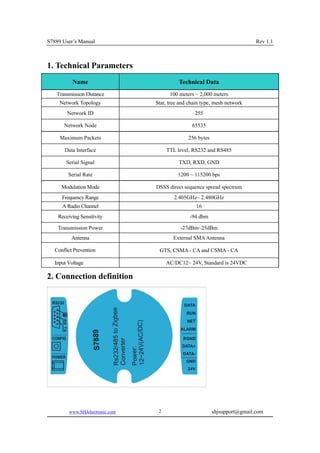
2. Connection definition


         www.SHJelectronic.com    2                        shjsupport@gmail.com
S7889 User’s Manual                                                    Rev 1.1


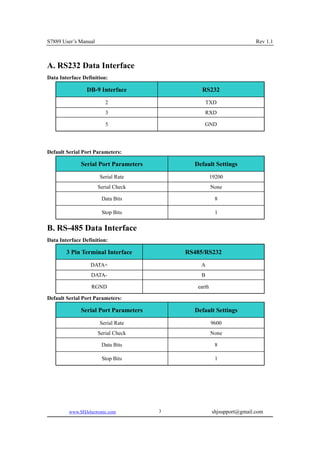
A. RS232 Data Interface
Data Interface Definition:

                DB-9 Interface                  RS232
                         2                         TXD
                         3                       RXD

                         5                       GND


Default Serial Port Parameters:

              Serial Port Parameters         Default Settings
                      Serial Rate                     19200
                      Serial Check                    None

                       Data Bits                       8

                       Stop Bits                       1

B. RS-485 Data Interface
Data Interface Definition:

        3 Pin Terminal Interface           RS485/RS232
                  DATA+                        A
                  DATA-                        B

                   RGND                       earth

Default Serial Port Parameters:

              Serial Port Parameters         Default Settings
                      Serial Rate                     9600
                      Serial Check                    None

                       Data Bits                       8

                       Stop Bits                       1


         www.SHJelectronic.com         3              shjsupport@gmail.com
S7889 User’s Manual                                                                         Rev 1.1


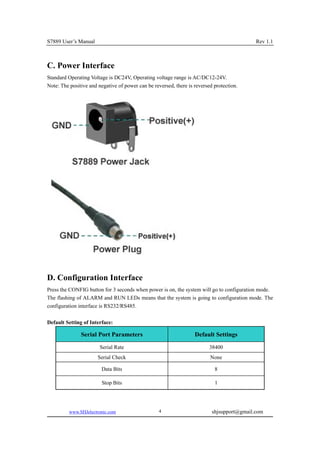
C. Power Interface
Standard Operating Voltage is DC24V, Operating voltage range is AC/DC12-24V.
Note: The positive and negative of power can be reversed, there is reversed protection.


D. Configuration Interface
Press the CONFIG button for 3 seconds when power is on, the system will go to configuration mode.
The flashing of ALARM and RUN LEDs means that the system is going to configuration mode. The
configuration interface is RS232/RS485.

Default Setting of Interface:

               Serial Port Parameters                              Default Settings
                        Serial Rate                                       38400
                       Serial Check                                       None

                        Data Bits                                           8

                        Stop Bits                                           1


          www.SHJelectronic.com                    4                       shjsupport@gmail.com
S7889 User’s Manual                                                                           Rev 1.1


3. Module MAC_ADDR Address & Module Type

Module MAC_ADDR Address Settings:
MAC_ADR Options             ID range                Configuration                    Note

                                            Center    module    address:     Unique address in the
  MAC_ADDR                0000—FFFE
                                            0000                             same network.


Module Type Seetings:
   TYPE Options             Network Type               Configuration                   Note
   PAN Coord                Center Module                                        There must be
                                                     Can replace terminal
     ROUTER                Router Module                                         only one center
                                                           device
                                                                                 node in network
  END DEVICE              Terminal Module

S7889 Zigbee wireless communication module has three Module types: the central Module, the router
Module and terminal Module. Each type can be set by jumpers or user’s MCU according to user
design.


4. Signal Channel Settings
     Channel                           Description                                  Notes

                                       0 : 2.405GHz
                                       1 : 2.410GHz
                                       2 : 2.415GHz
                                       3 : 2.420GHz
                                       4 : 2.425GHz
                                       5 : 2.430GHz
                                       6 : 2.435GHz
                                                                             Channel4, 9, 14, 15
                                       7 : 2.440GHz
       0-F                                                                   are     recommended,
                                       8 : 2.445GHz
                                                                             which can avoid WIFI
                                       9 : 2.450GHz
                                                                             interference.
                                       A : 2.455GHz
                                       B : 2.460GHz
                                       C : 2.465GHz
                                       D : 2.470GHz
                                       E : 2.475GHz
                                       F : 2.480GHz

      0x10                 AUTO mode, choose the best channel.


         www.SHJelectronic.com                  5                           shjsupport@gmail.com
S7889 User’s Manual                                                                           Rev 1.1


5. Network Type & Network ID
Network Type Settings:
NET_TYPE Options          Network Type                  Configuration                 Notes
     MESH                  Mesh network
      STAR                   Star nets              In master-slave network,
     LINE 1            Chain type nets ID=1         must have unique center
     LINE 2            Chain type nets ID=2                                    In a network, the
                                                             node.
     LINE 3            Chain type nets ID=3                                    network       type
     LINE 4            Chain type nets ID=4                                    must be the same
                                                 Not master-slave nets, no
      PEER             Peer-to-peer network
                                                      center module。


Network ID Settings:
     Options              ID Range              Configuration                     Notes

                                           In one network must have
     NET_ID                 00—FF
                                           unique network ID.


6. Tansfer Type Mode & Data Type
TX Type Mode Settings:
TX_TYPE options            Send mode                      Configuration                       Note

  BROADCAST               Broadcast mode      No target address.

                                              For center Module must be assigned
                                                                                       Target address
                                              target address before sending it out.
                                                                                       is 2 bytes MAC
                           Master-slave       For not center Module, then no need
MASTER—SLAVE                                                                           address,     the
                             mode             to assign target address because
                                                                                       first two bytes
                                              target module is center Module, it is
                                                                                       in     a    data
                                              default.
                                                                                       package.

                                              Target address must assign for both
 POINT—POINT                peer-to-peer
                                              direction.


        www.SHJelectronic.com                   6                         shjsupport@gmail.com
S7889 User’s Manual                                                                              Rev 1.1


Data Type Settings:
DATA_TYPEoptions           Data types                               Configuration
      ASCII                     ASCII             Only in the target address situations settings, in
      HEX                        Hex              broadcast cases do not need setting.


7. Serial Port Settings
Data Bit Settings:
DATA_TYPE Options                             Data Types                           Configuration

        7+1+1                   7 data bits +1parity check bit + 1 stop bit


                                                                                  Choose         them
        8+0+1                   8 data bits +0 parity check bit + 1 stop bit
                                                                                 together with Data
                                                                                 Parity Setting.

        8+1+1                   8 data bits +1parity check bit + 1 stop bit


Serial Port Baudrate Settings:
  BAUD_RATE Options                     Baud rate scope                        Configuration

        1200~115200                       1200~115200                   Choose the right baudrate.


Data Parity Settings:
DATA_PARITY Options                Module types                        Configuration

         NONE                            None

         EVEN                         Even check                 Choose the right Data Parity.

          ODD                         Odd check


Serial Port Time-out Settings:
 TIME-OUT Options                      Module types                              Notes
                                  1-255ms(Hexadecimal
      TIME_OUT                                                           Serial overtime time.
                                        display)


        www.SHJelectronic.com                       7                          shjsupport@gmail.com
S7889 User’s Manual                                                                                Rev 1.1


8. Data SRC Address Settings
SRC_ADRoptions                  Source address                       Configuration

  NO OUTPUT                 Don't output source address
                                                          To decide if choose to output the source
         HEX                   Hexadecimal output         address in data packet according to
                                                          application..
        ASCII                       ASCII output

Hexadecimal way output source address formats: 2 bytes of data source address + data package,
ASCII mode output source address formats: 4 bytes of data source address + data package.


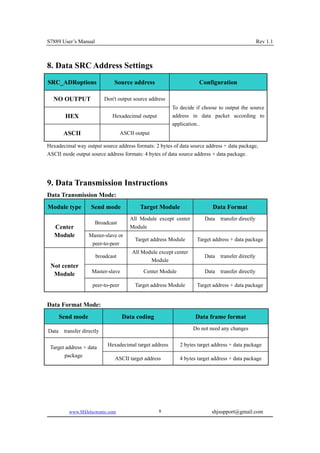
9. Data Transmission Instructions
Data Transmission Mode:
Module type          Send mode              Target Module                  Data Format
                                        All Module except center        Data   transfer directly
                       Broadcast
   Center                               Module
   Module           Master-slave or
                                          Target address Module     Target address + data package
                     peer-to-peer
                                        All Module except center
                       broadcast                                        Data   transfer directly
                                               Module
 Not center
                     Master-slave            Center Module              Data   transfer directly
  Module
                     peer-to-peer         Target address Module     Target address + data package


Data Format Mode:
       Send mode                    Data coding                     Data frame format

Data    transfer directly                                          Do not need any changes


 Target address + data       Hexadecimal target address      2 bytes target address + data package
       package
                                ASCII target address         4 bytes target address + data package


          www.SHJelectronic.com                     8                      shjsupport@gmail.com
S7889 User’s Manual                                                                          Rev 1.1


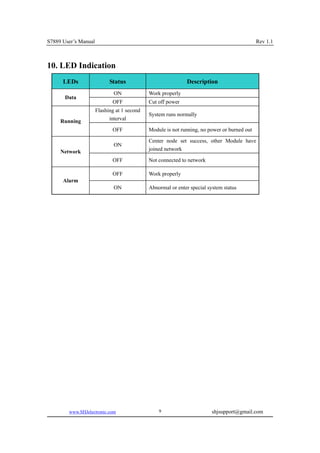
10. LED Indication
      LEDs                  Status                           Description
                              ON             Work properly
       Data
                             OFF             Cut off power
                      Flashing at 1 second
                                             System runs normally
     Running                interval

                             OFF             Module is not running, no power or burned out

                                             Center node set success, other Module have
                              ON
     Network                                 joined network

                             OFF             Not connected to network

                             OFF             Work properly
      Alarm
                              ON             Abnormal or enter special system status


        www.SHJelectronic.com                    9                       shjsupport@gmail.com

Technical s7889

  • 1.
    S7889 Wireless Zigbee Module User’s Manual SHJ Sales:shjelectronic@gmail.com Support:shjsupport@gmail.com
  • 2.
    S7889 User’s Manual Rev 1.1 1. Technical Parameters Name Technical Data Transmission Distance 100 meters ~ 2,000 meters Network Topology Star, tree and chain type, mesh network Network ID 255 Network Node 65535 Maximum Packets 256 bytes Data Interface TTL level, RS232 and RS485 Serial Signal TXD, RXD, GND Serial Rate 1200 ~ 115200 bps Modulation Mode DSSS direct sequence spread spectrum Frequency Range 2.405GHz~ 2.480GHz A Radio Channel 16 Receiving Sensitivity -94 dbm Transmission Power -27dBm~25dBm Antenna External SMA Antenna Conflict Prevention GTS, CSMA - CA and CSMA - CA Input Voltage AC/DC12~ 24V, Standard is 24VDC 2. Connection definition www.SHJelectronic.com 2 shjsupport@gmail.com
  • 3.
    S7889 User’s Manual Rev 1.1 A. RS232 Data Interface Data Interface Definition: DB-9 Interface RS232 2 TXD 3 RXD 5 GND Default Serial Port Parameters: Serial Port Parameters Default Settings Serial Rate 19200 Serial Check None Data Bits 8 Stop Bits 1 B. RS-485 Data Interface Data Interface Definition: 3 Pin Terminal Interface RS485/RS232 DATA+ A DATA- B RGND earth Default Serial Port Parameters: Serial Port Parameters Default Settings Serial Rate 9600 Serial Check None Data Bits 8 Stop Bits 1 www.SHJelectronic.com 3 shjsupport@gmail.com
  • 4.
    S7889 User’s Manual Rev 1.1 C. Power Interface Standard Operating Voltage is DC24V, Operating voltage range is AC/DC12-24V. Note: The positive and negative of power can be reversed, there is reversed protection. D. Configuration Interface Press the CONFIG button for 3 seconds when power is on, the system will go to configuration mode. The flashing of ALARM and RUN LEDs means that the system is going to configuration mode. The configuration interface is RS232/RS485. Default Setting of Interface: Serial Port Parameters Default Settings Serial Rate 38400 Serial Check None Data Bits 8 Stop Bits 1 www.SHJelectronic.com 4 shjsupport@gmail.com
  • 5.
    S7889 User’s Manual Rev 1.1 3. Module MAC_ADDR Address & Module Type Module MAC_ADDR Address Settings: MAC_ADR Options ID range Configuration Note Center module address: Unique address in the MAC_ADDR 0000—FFFE 0000 same network. Module Type Seetings: TYPE Options Network Type Configuration Note PAN Coord Center Module There must be Can replace terminal ROUTER Router Module only one center device node in network END DEVICE Terminal Module S7889 Zigbee wireless communication module has three Module types: the central Module, the router Module and terminal Module. Each type can be set by jumpers or user’s MCU according to user design. 4. Signal Channel Settings Channel Description Notes 0 : 2.405GHz 1 : 2.410GHz 2 : 2.415GHz 3 : 2.420GHz 4 : 2.425GHz 5 : 2.430GHz 6 : 2.435GHz Channel4, 9, 14, 15 7 : 2.440GHz 0-F are recommended, 8 : 2.445GHz which can avoid WIFI 9 : 2.450GHz interference. A : 2.455GHz B : 2.460GHz C : 2.465GHz D : 2.470GHz E : 2.475GHz F : 2.480GHz 0x10 AUTO mode, choose the best channel. www.SHJelectronic.com 5 shjsupport@gmail.com
  • 6.
    S7889 User’s Manual Rev 1.1 5. Network Type & Network ID Network Type Settings: NET_TYPE Options Network Type Configuration Notes MESH Mesh network STAR Star nets In master-slave network, LINE 1 Chain type nets ID=1 must have unique center LINE 2 Chain type nets ID=2 In a network, the node. LINE 3 Chain type nets ID=3 network type LINE 4 Chain type nets ID=4 must be the same Not master-slave nets, no PEER Peer-to-peer network center module。 Network ID Settings: Options ID Range Configuration Notes In one network must have NET_ID 00—FF unique network ID. 6. Tansfer Type Mode & Data Type TX Type Mode Settings: TX_TYPE options Send mode Configuration Note BROADCAST Broadcast mode No target address. For center Module must be assigned Target address target address before sending it out. is 2 bytes MAC Master-slave For not center Module, then no need MASTER—SLAVE address, the mode to assign target address because first two bytes target module is center Module, it is in a data default. package. Target address must assign for both POINT—POINT peer-to-peer direction. www.SHJelectronic.com 6 shjsupport@gmail.com
  • 7.
    S7889 User’s Manual Rev 1.1 Data Type Settings: DATA_TYPEoptions Data types Configuration ASCII ASCII Only in the target address situations settings, in HEX Hex broadcast cases do not need setting. 7. Serial Port Settings Data Bit Settings: DATA_TYPE Options Data Types Configuration 7+1+1 7 data bits +1parity check bit + 1 stop bit Choose them 8+0+1 8 data bits +0 parity check bit + 1 stop bit together with Data Parity Setting. 8+1+1 8 data bits +1parity check bit + 1 stop bit Serial Port Baudrate Settings: BAUD_RATE Options Baud rate scope Configuration 1200~115200 1200~115200 Choose the right baudrate. Data Parity Settings: DATA_PARITY Options Module types Configuration NONE None EVEN Even check Choose the right Data Parity. ODD Odd check Serial Port Time-out Settings: TIME-OUT Options Module types Notes 1-255ms(Hexadecimal TIME_OUT Serial overtime time. display) www.SHJelectronic.com 7 shjsupport@gmail.com
  • 8.
    S7889 User’s Manual Rev 1.1 8. Data SRC Address Settings SRC_ADRoptions Source address Configuration NO OUTPUT Don't output source address To decide if choose to output the source HEX Hexadecimal output address in data packet according to application.. ASCII ASCII output Hexadecimal way output source address formats: 2 bytes of data source address + data package, ASCII mode output source address formats: 4 bytes of data source address + data package. 9. Data Transmission Instructions Data Transmission Mode: Module type Send mode Target Module Data Format All Module except center Data transfer directly Broadcast Center Module Module Master-slave or Target address Module Target address + data package peer-to-peer All Module except center broadcast Data transfer directly Module Not center Master-slave Center Module Data transfer directly Module peer-to-peer Target address Module Target address + data package Data Format Mode: Send mode Data coding Data frame format Data transfer directly Do not need any changes Target address + data Hexadecimal target address 2 bytes target address + data package package ASCII target address 4 bytes target address + data package www.SHJelectronic.com 8 shjsupport@gmail.com
  • 9.
    S7889 User’s Manual Rev 1.1 10. LED Indication LEDs Status Description ON Work properly Data OFF Cut off power Flashing at 1 second System runs normally Running interval OFF Module is not running, no power or burned out Center node set success, other Module have ON Network joined network OFF Not connected to network OFF Work properly Alarm ON Abnormal or enter special system status www.SHJelectronic.com 9 shjsupport@gmail.com