Thomas Moen
                              Director of Strategy and Innovation
                              tmoen@avtex.com
                              @cloudmovr


Rich Coexistence (wrongfully Hybrid Deployment)
5.16.2012
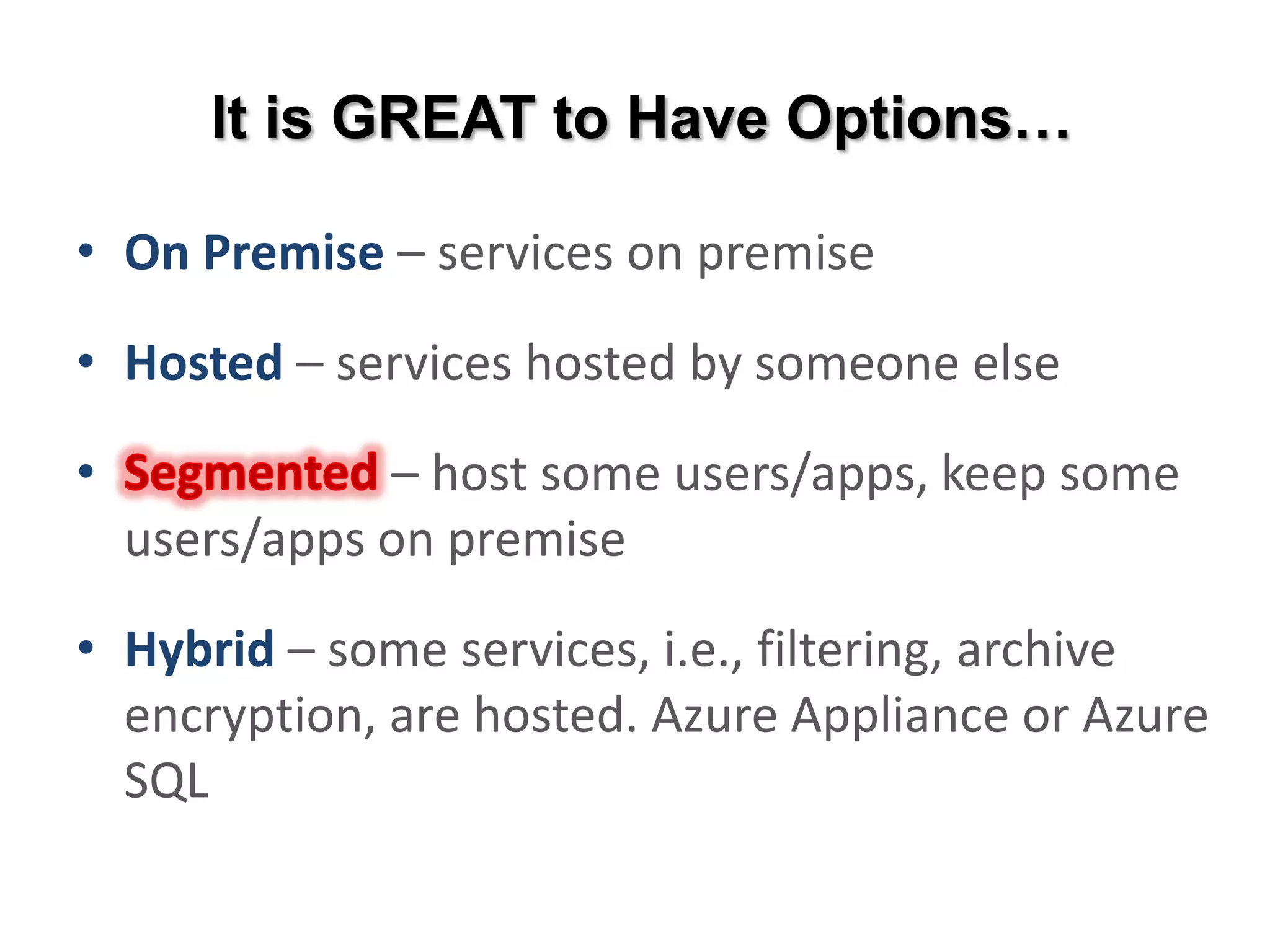
It is GREAT to Have Options…

• On Premise – services on premise

• Hosted – services hosted by someone else

• Segmented – host some users/apps, keep some
  users/apps on premise

• Hybrid – some services, i.e., filtering, archive
  encryption, are hosted. Azure Appliance or Azure
  SQL
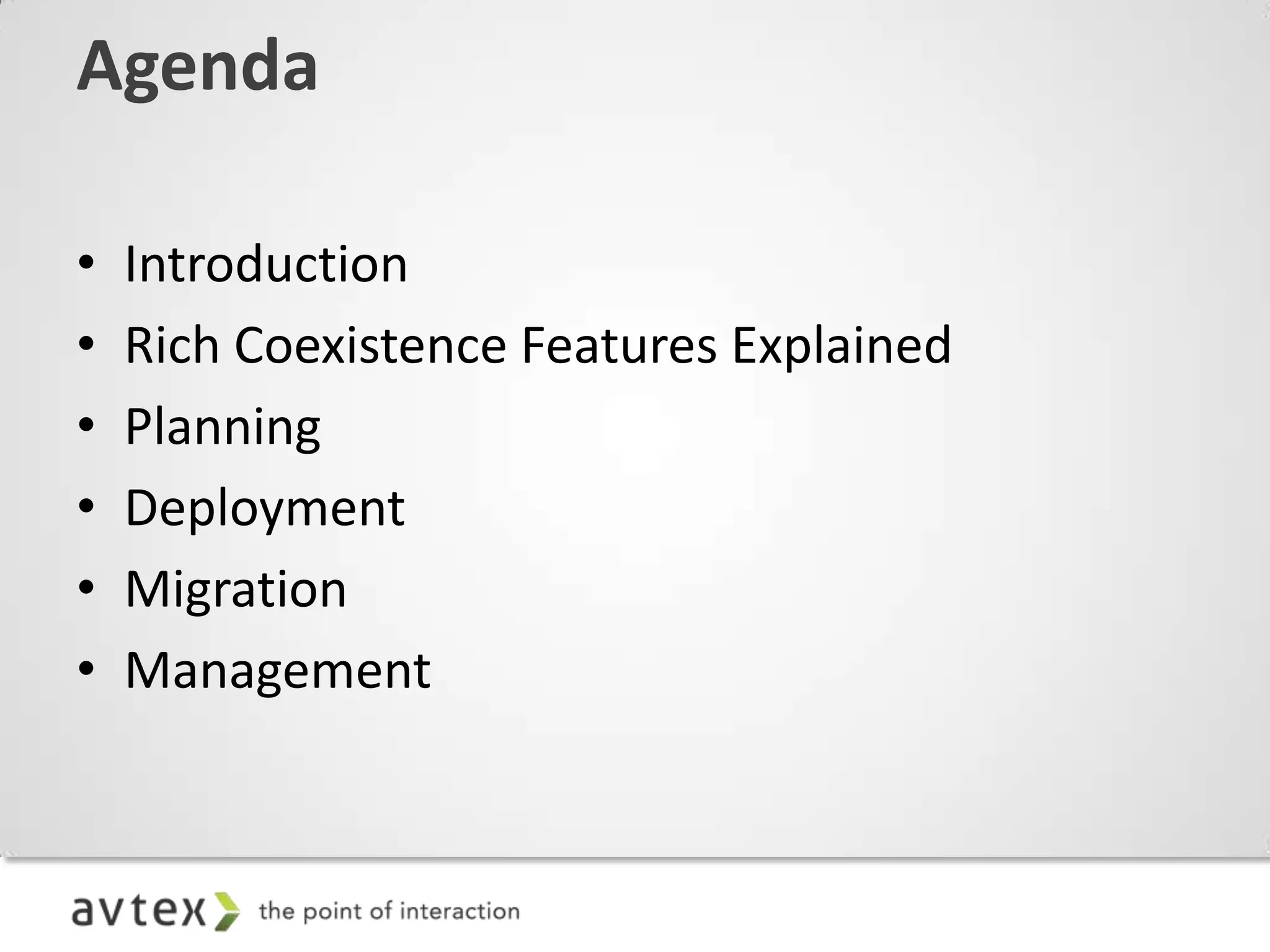
Agenda

•   Introduction
•   Rich Coexistence Features Explained
•   Planning
•   Deployment
•   Migration
•   Management
Not for the faint of heart. This is a
high impact ride. People with back,
neck, heart, or cursing at computer
 problems, should not attempt this
ride. Stay at the Exchange server at
all times. Hold on with both hands!
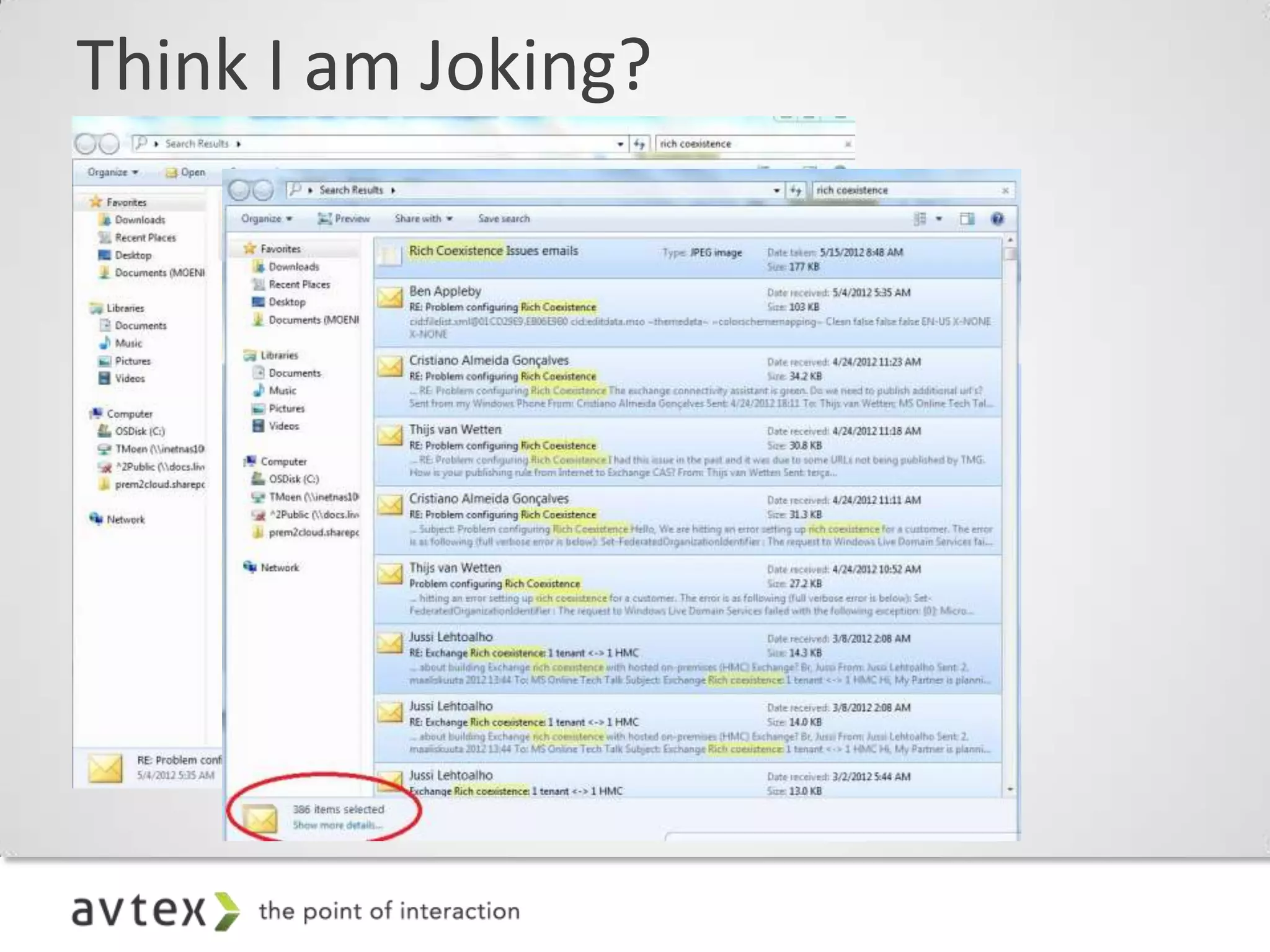
Think I am Joking?
If you are feel any discomfort with…
  – ADFS 2.0
  – Dir Sync
  – Rich Coexistence
  – PowerShell

Call a professional immediately! If you do
proceed, proceed at your own peril…
… and Keep These Close at Hand!
    On the occasion of a Service Interrupting Event (SIE), Microsoft Online Services continuously updates the channels below
     to provide you necessary information to manage your business. Microsoft Online Services strives to earn your business
                            and trust through our best in class service and ongoing communication.


                                                  Service Health Dashboard
                                      The best location for Service Update information.
                                      Updated regularly through any SIE and notifies you
                                          of any upcoming planned maintenance.


           Twitter
Feed is continuously updated as                                                                            Facebook
       SIE incidents occur.                                                                       Get the latest updates, tips
http://twitter.com/#!/Office365                                                                 and more delivered straight to
                                                                                                    your Facebook stream.
                                                                                                http://www.facebook.com/#!/
                                                     Community Blog                                        office365
                                          With access to forums, community, and
                                        community, you’re always receiving the most
                                                   updated information.
                                           http://community.office365.com/en-
                                                      us/default.aspx
Your Four New Best Friends…


http://www.microsoft.com/en-                          tmoen@avtex.com
us/download/confirmation.aspx?id=26509
                                                        @cloudmovr


                 http://technet.microsoft.com/en-                             Jack
                 us/exdeploy2010/default.aspx#Index                http://www.jackdaniels.com/
Rich Coexistence Summarized
What does coexistence mean?

  – Executed over a longer period of time (a week, a
    month, a year, etc.)
  – No requirement to ever “flip a switch”—can run in
    coexistence scenario indefinitely
  – Requires on-premises configuration and hardware
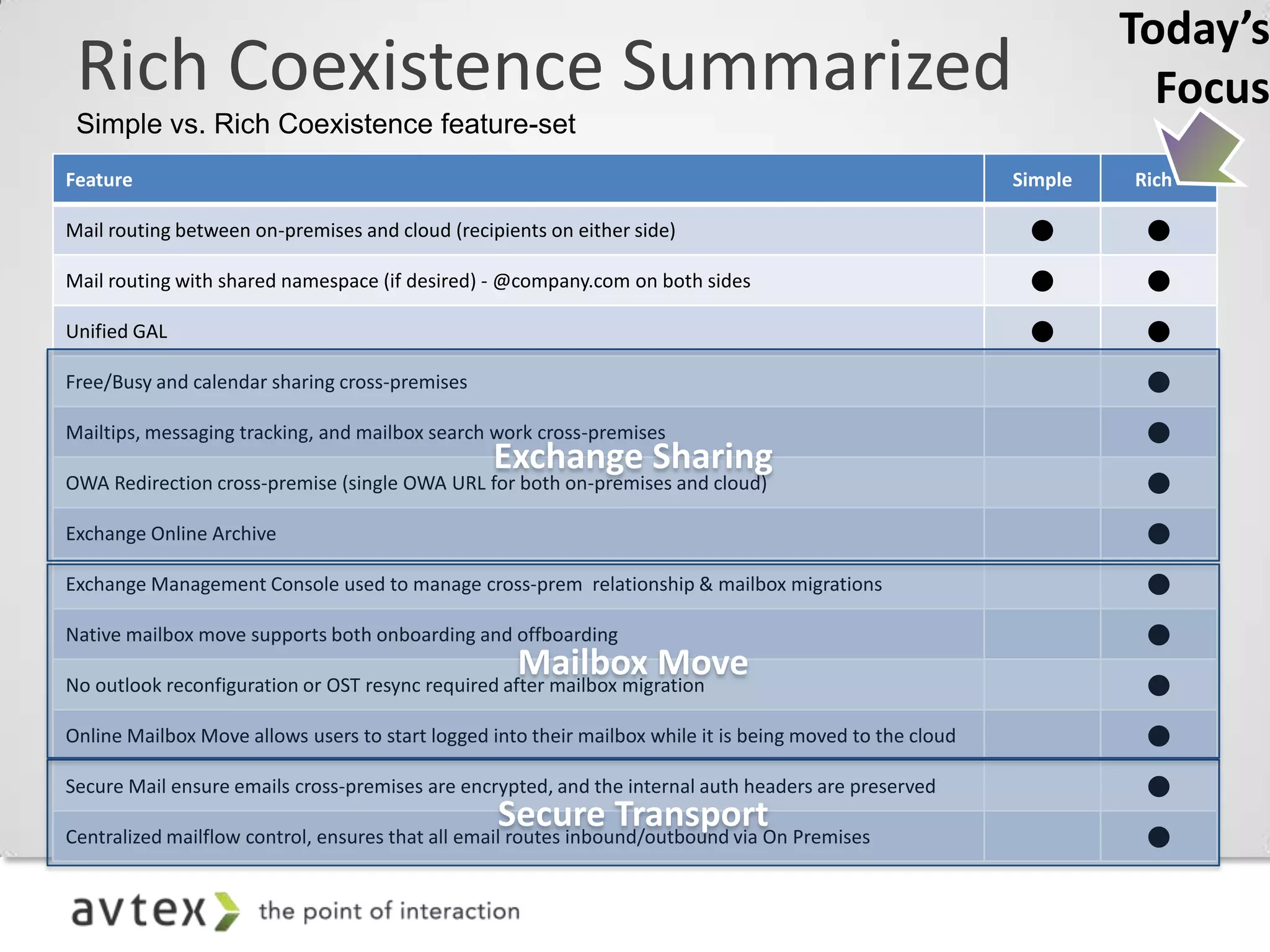
Today’s
 Rich Coexistence Summarized                                                                                          Focus
 Simple vs. Rich Coexistence feature-set
Feature                                                                                                    Simple   Rich*

Mail routing between on-premises and cloud (recipients on either side)                                              

Mail routing with shared namespace (if desired) - @company.com on both sides                                        

Unified GAL                                                                                                         

Free/Busy and calendar sharing cross-premises                                                                        

Mailtips, messaging tracking, and mailbox search work cross-premises                                                 

OWA Redirection cross-premise (single OWA URL for both on-premises and cloud)                                        

Exchange Online Archive                                                                                              

Exchange Management Console used to manage cross-prem relationship & mailbox migrations                              

Native mailbox move supports both onboarding and offboarding                                                         

No outlook reconfiguration or OST resync required after mailbox migration                                            

Online Mailbox Move allows users to start logged into their mailbox while it is being moved to the cloud             

Secure Mail ensure emails cross-premises are encrypted, and the internal auth headers are preserved                  

Centralized mailflow control, ensures that all email routes inbound/outbound via On Premises                         
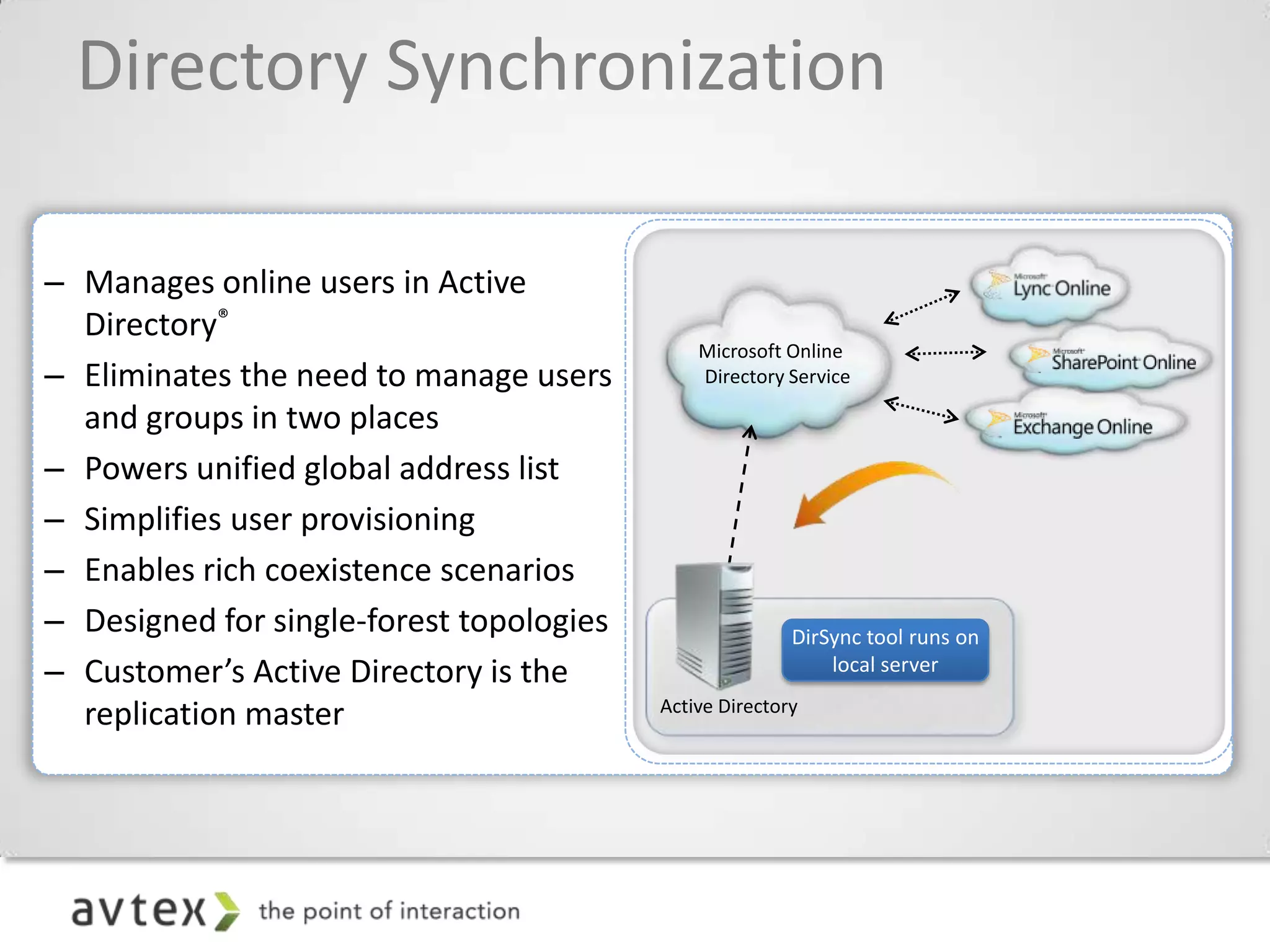
Directory Synchronization

– Manages online users in Active
  Directory®
– Eliminates the need to manage users
  and groups in two places
– Powers unified global address list
– Simplifies user provisioning
– Enables rich coexistence scenarios
– Designed for single-forest topologies   DirSync tool runs on
– Customer’s Active Directory is the          local server

  replication master
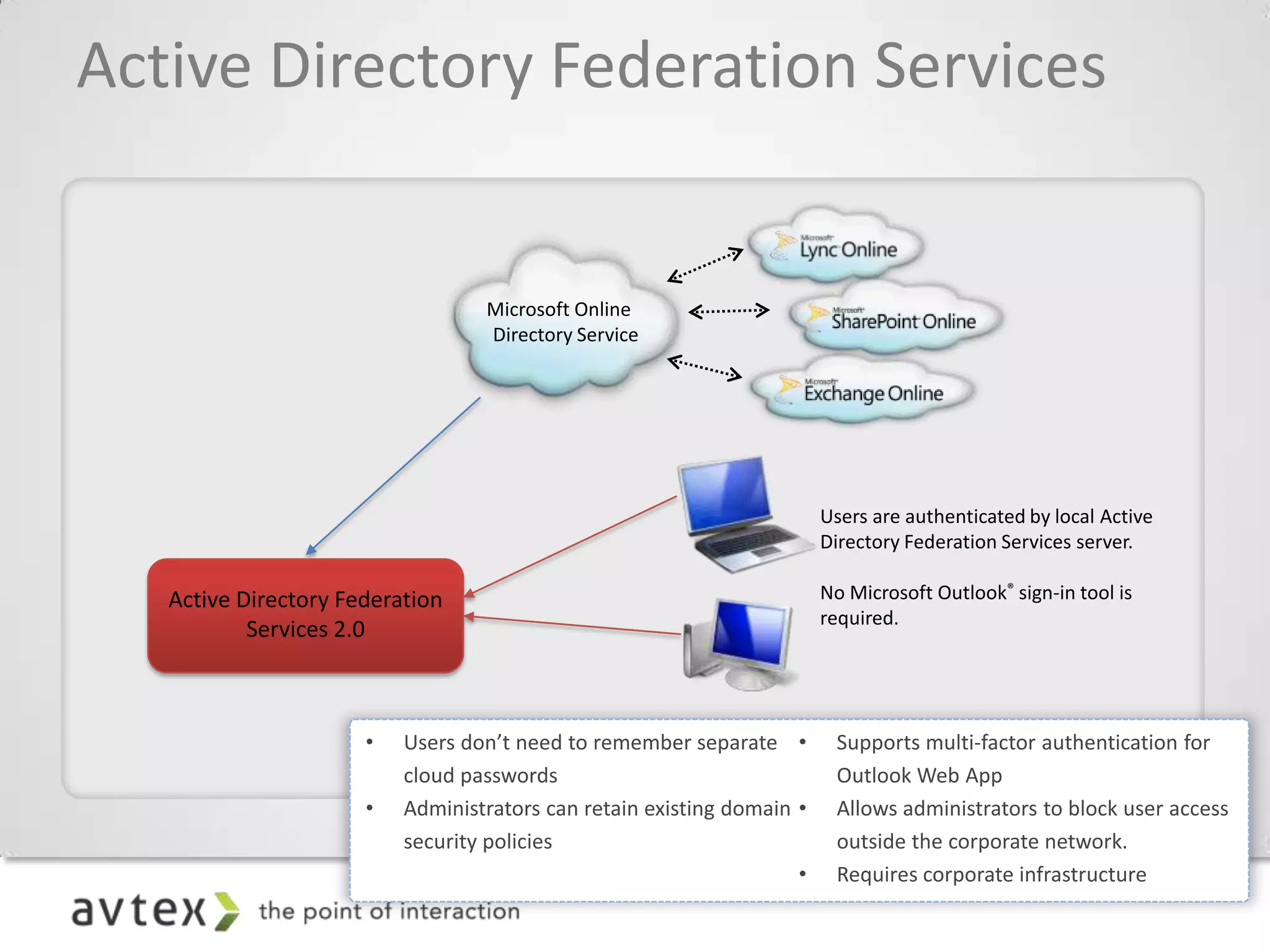
Active Directory Federation Services


                                 Users are authenticated by local Active
                                 Directory Federation Services server.

   Active Directory Federation   No Microsoft Outlook® sign-in tool is
                                 required.
           Services 2.0
Exchange 2010 Federation
• Federated Sharing provides:
   – Easy setup of external data sharing
   – Broader reach without additional steps to set up
   – More security with controls for admins and users

• Federated Sharing is made possible because:
   – Server can act on behalf of a specific user
      • Specific user identified by email address
      • User not prompted for credentials
   – Microsoft Federation Gateway acts as a trust broker
      • Reduces explicit point-to-point trust management
      • No Active Directory trusts, service ,or cloud accounts to manage
      • Minimizes certificate exchanges
      • Verifies domain ownership
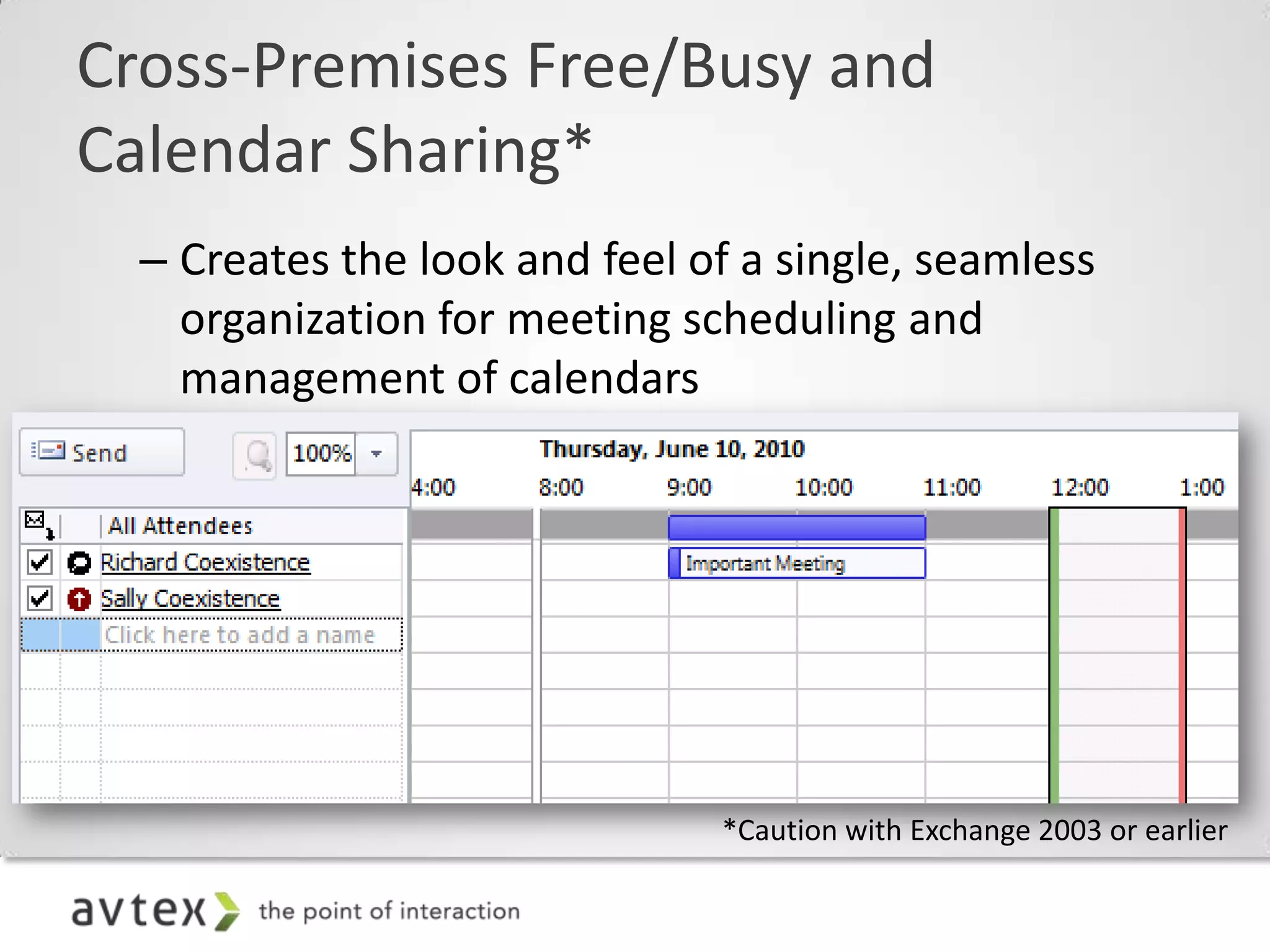
Cross-Premises Free/Busy and
Calendar Sharing*
  – Creates the look and feel of a single, seamless
    organization for meeting scheduling and
    management of calendars
  – Works with any supported Outlook client; the
    heavy lifting is done by the Exchange Server 2010
    CAS servers and the MS Federation Gateway,
    making this transparent to the end user.


                              *Caution with Exchange 2003 or earlier
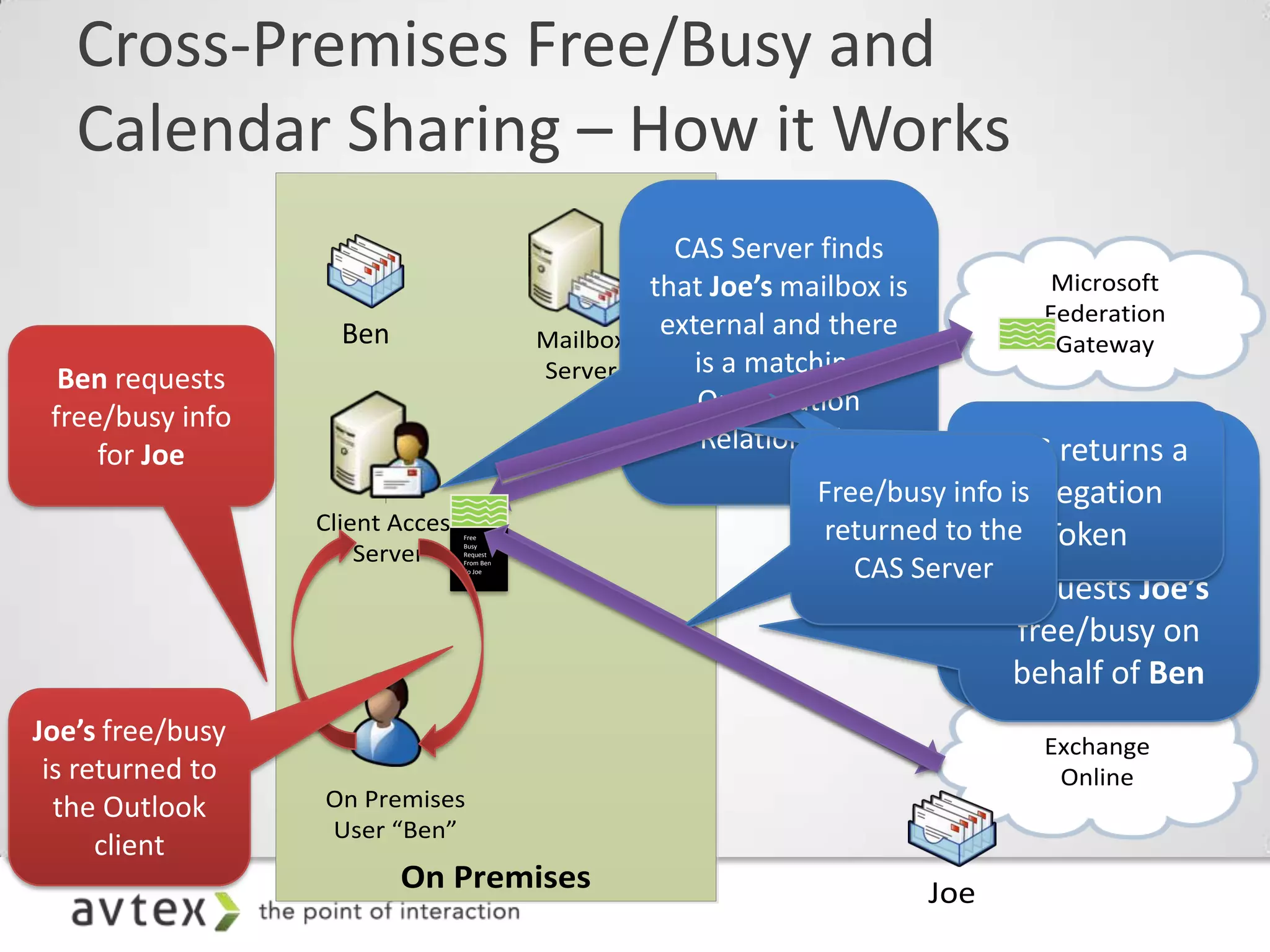
Cross-Premises Free/Busy and
Calendar Sharing – How it Works
                                                   Microsoft
                                                  Federation
         Ben                      Mailbox          Gateway
                                  Server


       Client Access   Free


           Server
                       Busy
                       Request
                       From Ben
                       To Joe


                                                  Exchange
                                                   Online
        On Premises
        User “Ben”
               On Premises                  Joe
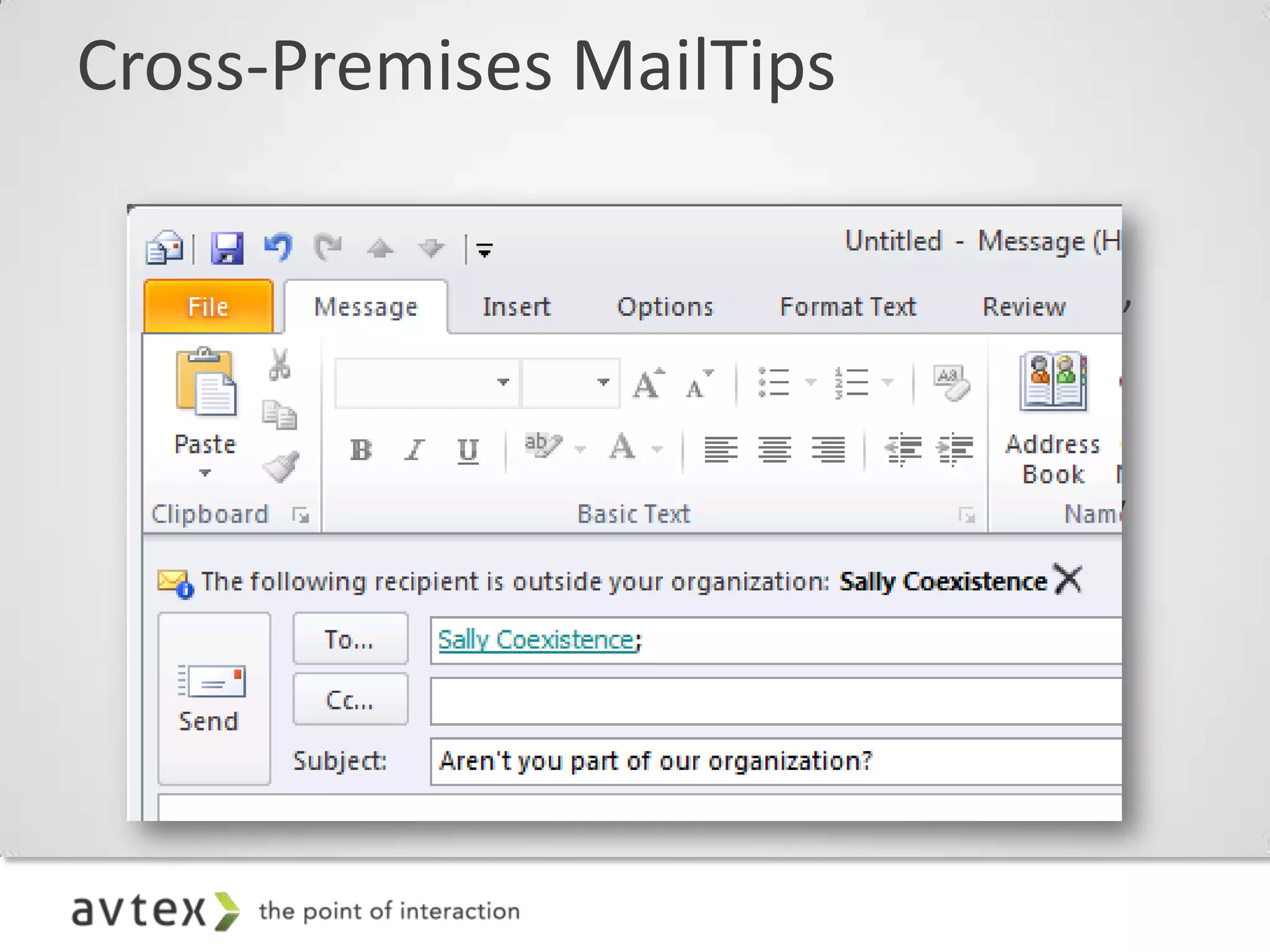
Cross-Premises MailTips

 – Creates the look and feel of a single, seamless
   organization. Correct evaluation of “Internal to”
   vs. “External to” organization context
 – Allows awareness and correct Outlook 2010
   representation of MailTips for size and quantity
   limits on DGs, etc.
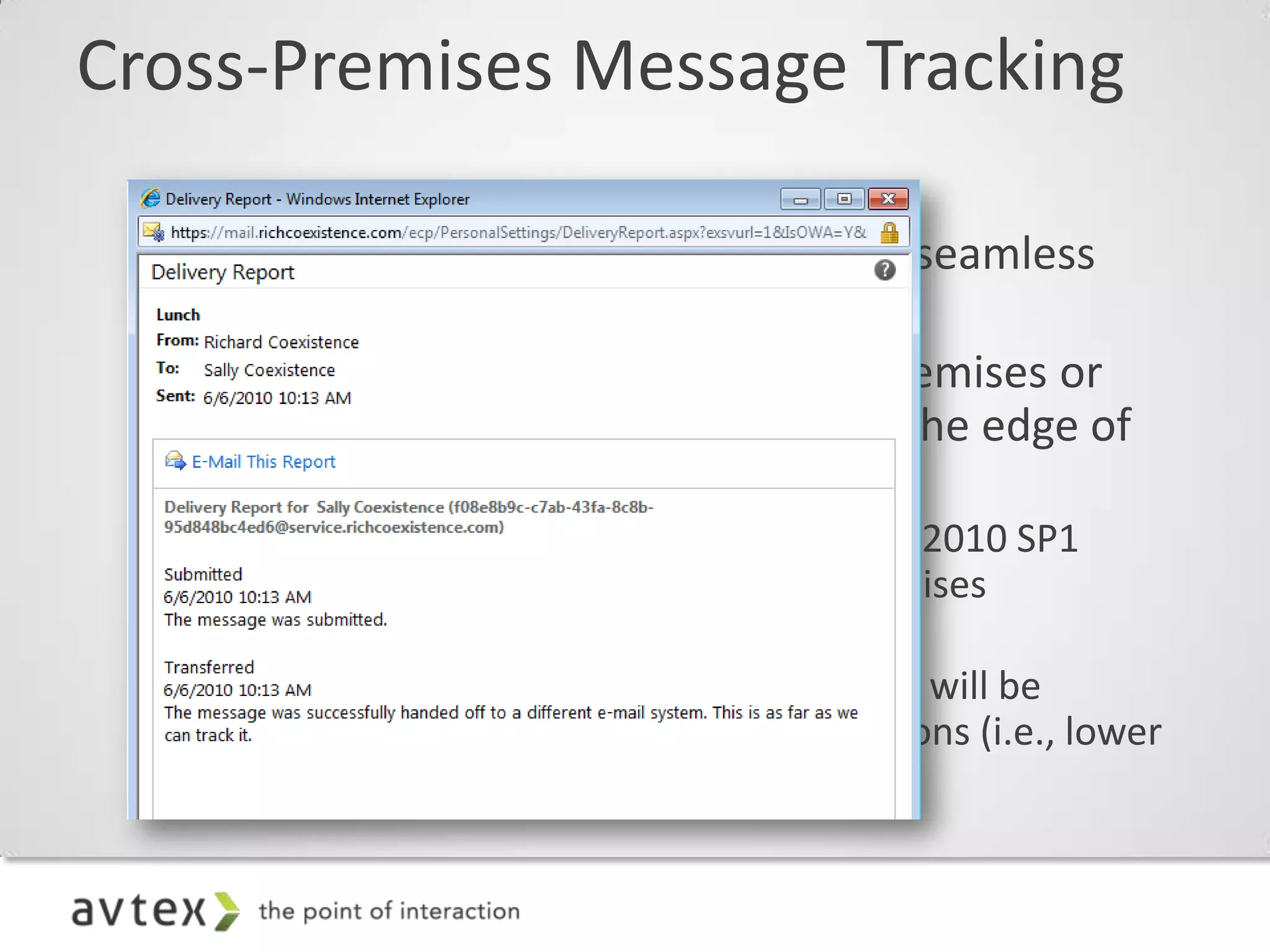
Cross-Premises Message Tracking

 – Creates the look and feel of a single, seamless
   organization
 – Message tracking started from on-premises or
   from the cloud will track through to the edge of
   the combined organization
    • Tracking fidelity across Exchange Server 2010 SP1
      servers will be identical to fully on-premises
      organizations (i.e., high fidelity)
    • Tracking fidelity across pre-2010 servers will be
      identical to fully on-premises organizations (i.e., lower
      fidelity)
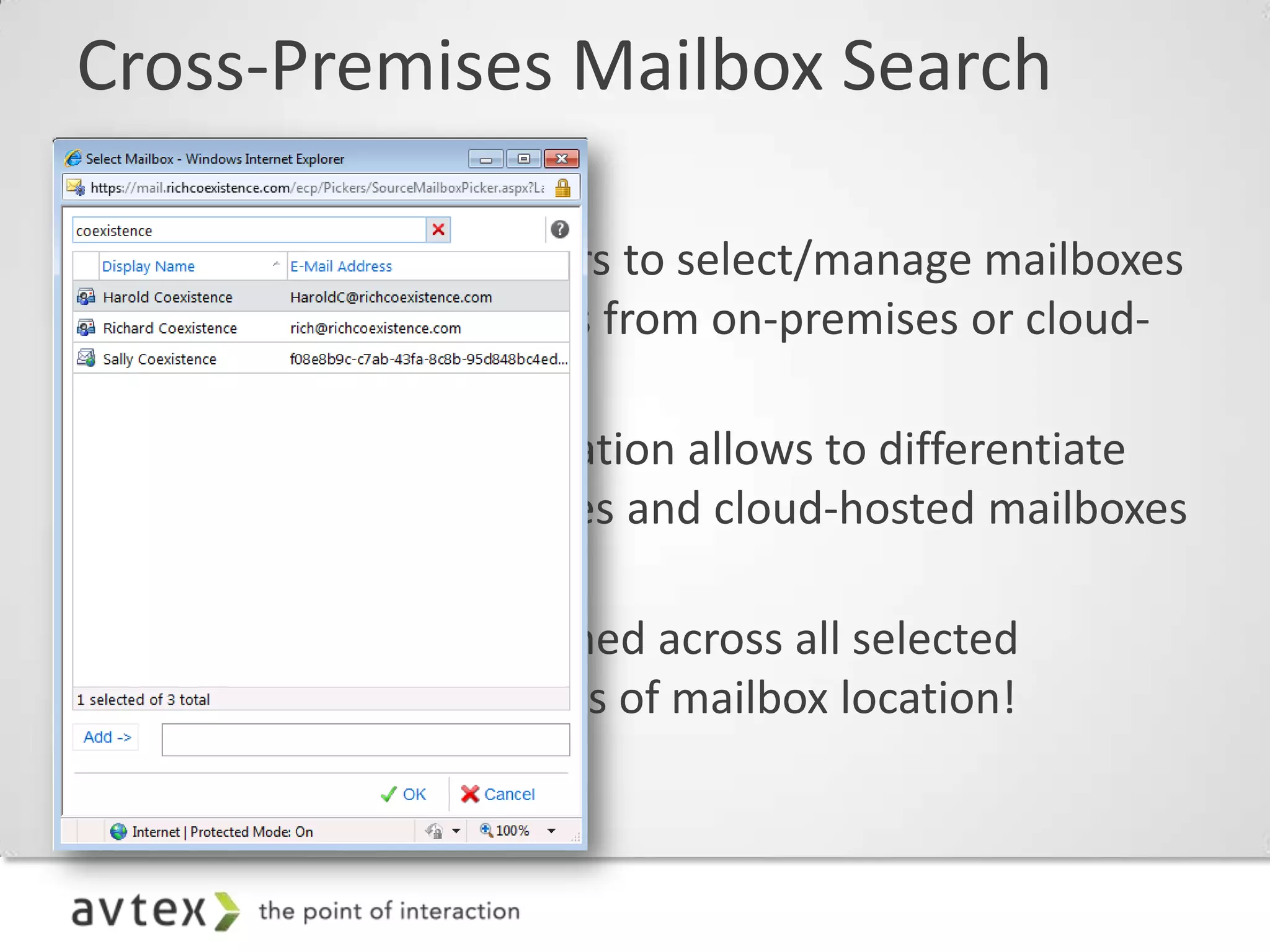
Cross-Premises Mailbox Search

 – Allows administrators to select/manage mailboxes
   for mailbox searches from on-premises or cloud-
   hosted mailboxes
 – Graphical representation allows to differentiate
   between on-premises and cloud-hosted mailboxes
   in the picker
 – Search results returned across all selected
   mailboxes, regardless of mailbox location!
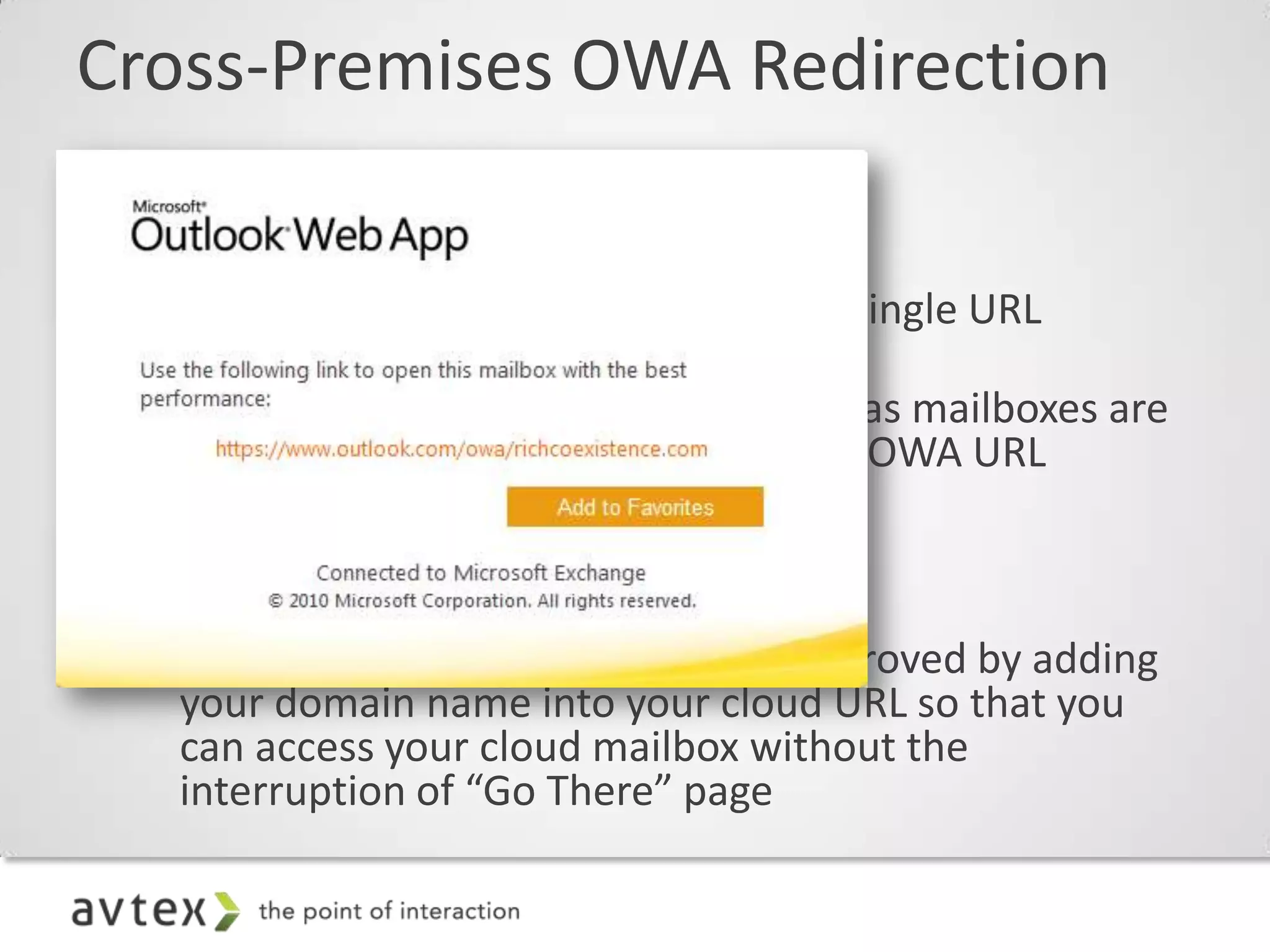
Cross-Premises OWA Redirection

• Single URL
  – Allows mailbox access to OWA via a single URL
    (pointed to on-premises CAS)
  – Ensures a good end-user experience as mailboxes are
    moved in and out of the cloud, since OWA URL
    remains unchanged

• Better cloud log-in experience
  – Log-in experience can be greatly improved by adding
    your domain name into your cloud URL so that you
    can access your cloud mailbox without the
    interruption of “Go There” page
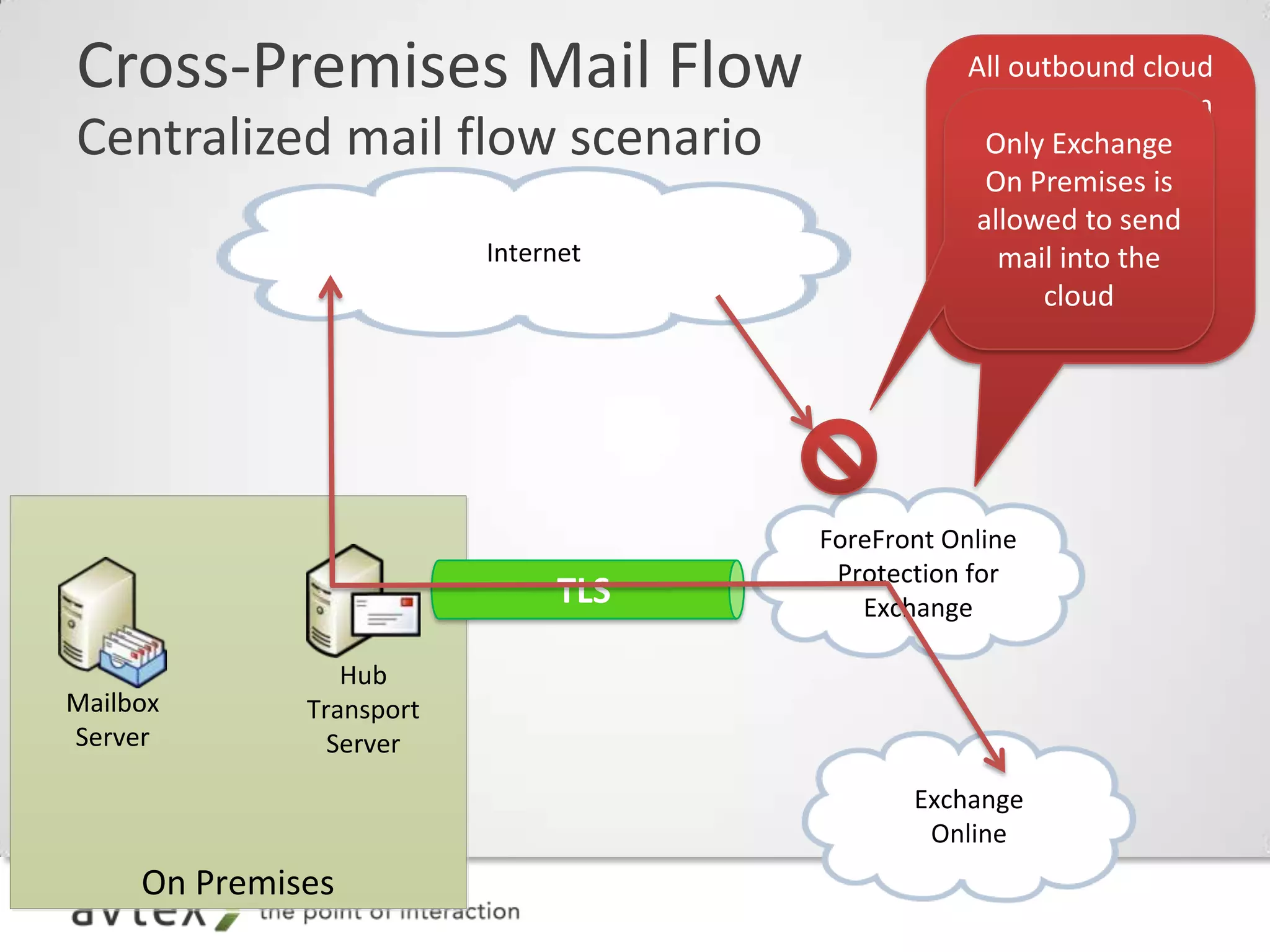
Cross-Premises Mail Flow

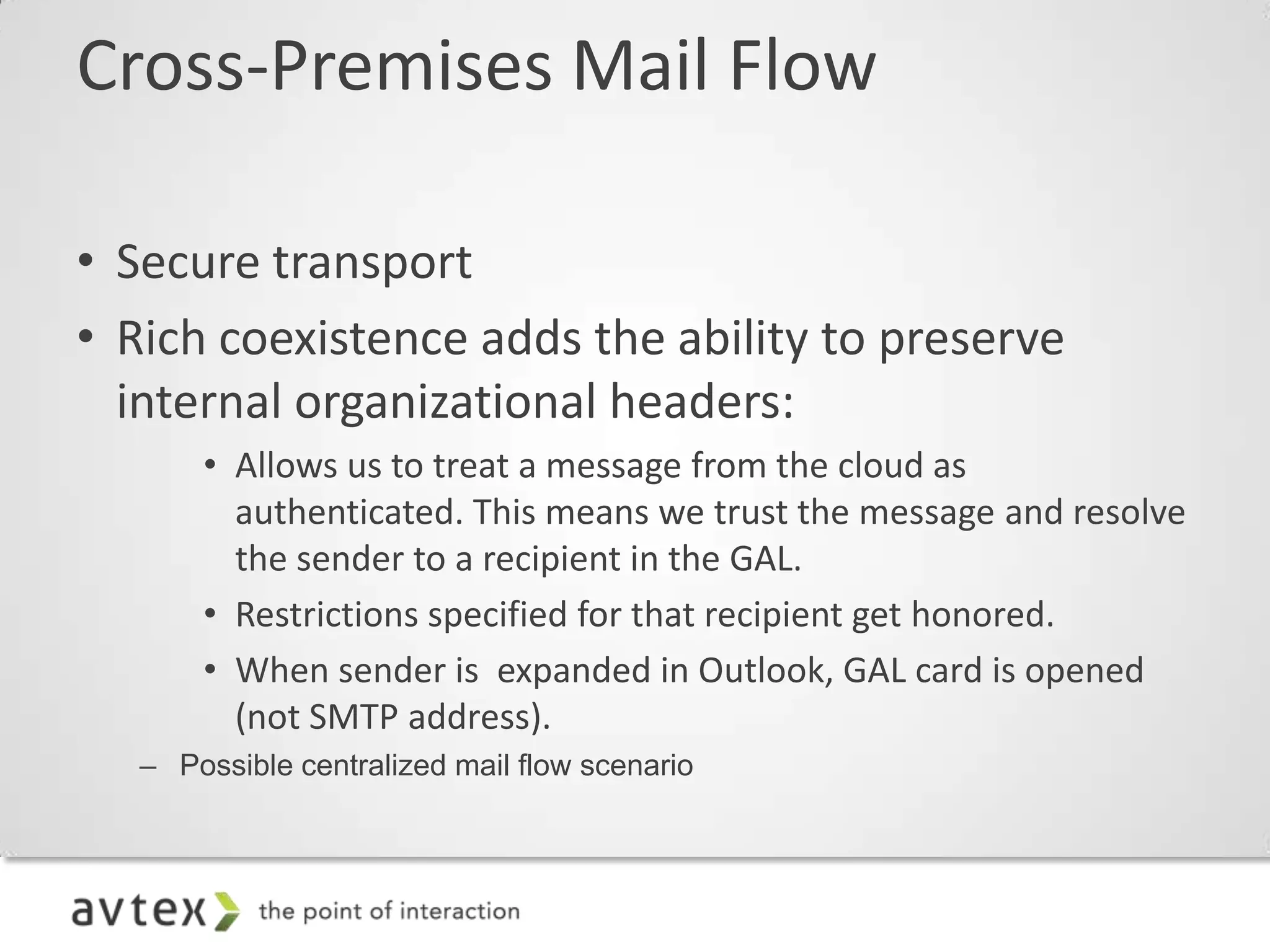
• Secure transport
• Rich coexistence adds the ability to preserve
  internal organizational headers:
       • Allows us to treat a message from the cloud as
         authenticated. This means we trust the message and resolve
         the sender to a recipient in the GAL.
       • Restrictions specified for that recipient get honored.
       • When sender is expanded in Outlook, GAL card is opened
         (not SMTP address).
   – Possible centralized mail flow scenario
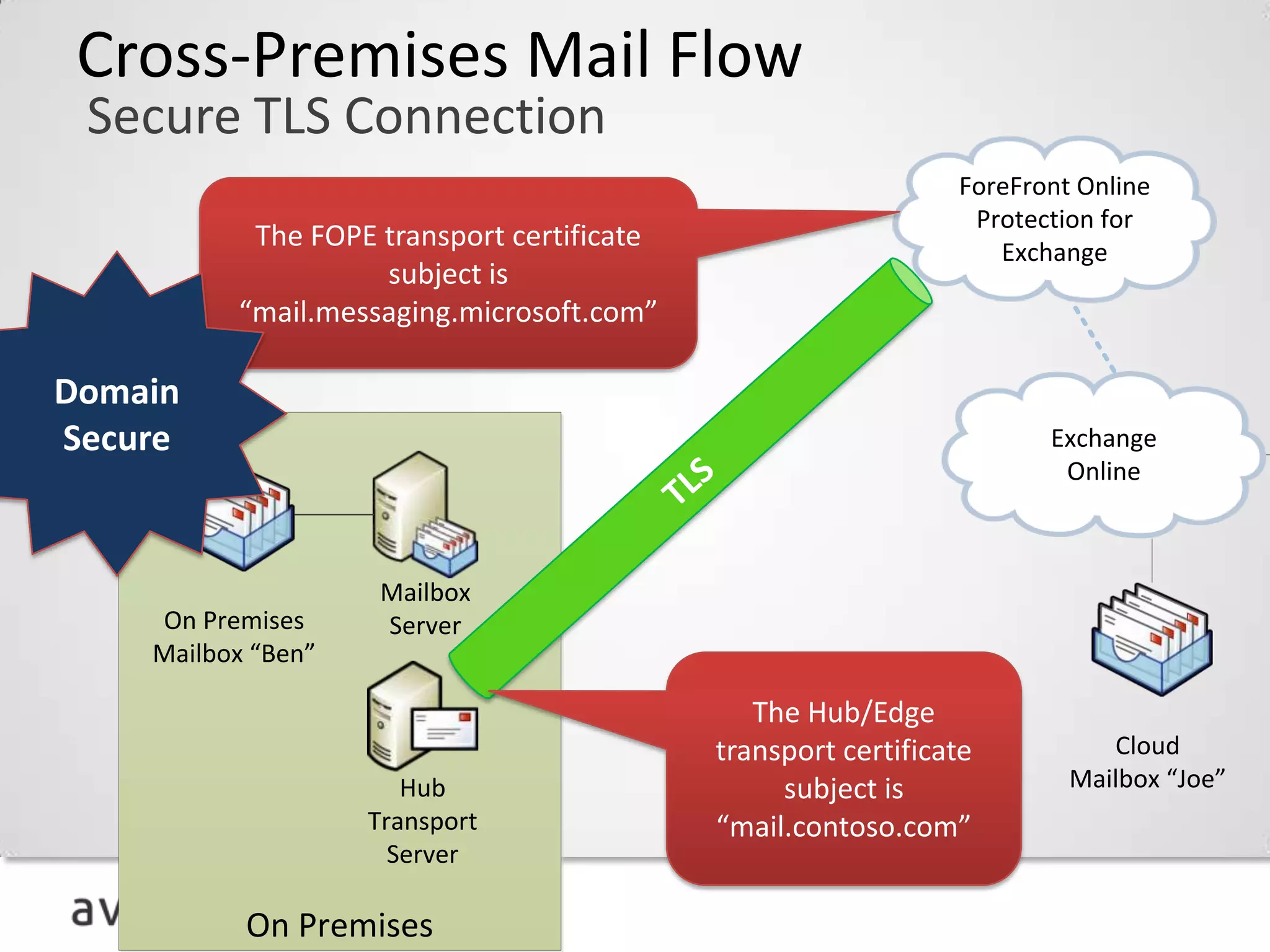
Cross-Premises Mail Flow
 Secure TLS Connection
                                ForeFront Online
                                 Protection for
                                   Exchange


Domain
Secure                                 Exchange
                                        Online


                     Mailbox
    On Premises      Server
    Mailbox “Ben”


                                            Cloud
                       Hub               Mailbox “Joe”
                    Transport
                      Server

           On Premises
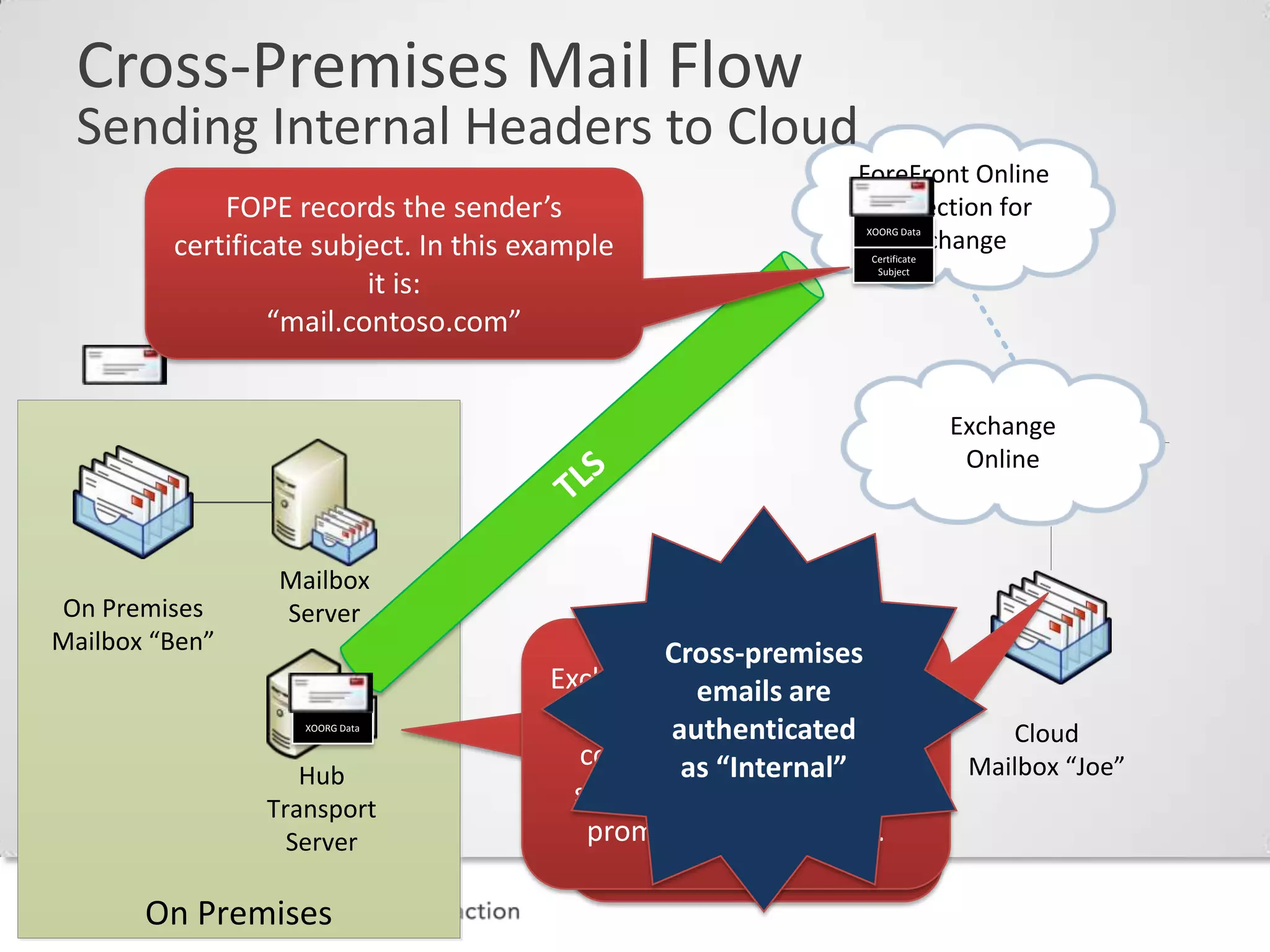
Cross-Premises Mail Flow
 Sending Internal Headers to Cloud
                                             ForeFront Online
                                              Protection for
                                                 XOORG Data
                                                Exchange
                                                 Certificate
                                                  Subject


                                                               Exchange
                                                                Online


                 Mailbox
On Premises      Server
Mailbox “Ben”                   Cross-premises
                                  emails are
                   XOORG Data
                                authenticated                      Cloud
                   Hub           as “Internal”                  Mailbox “Joe”
                Transport
                  Server

       On Premises
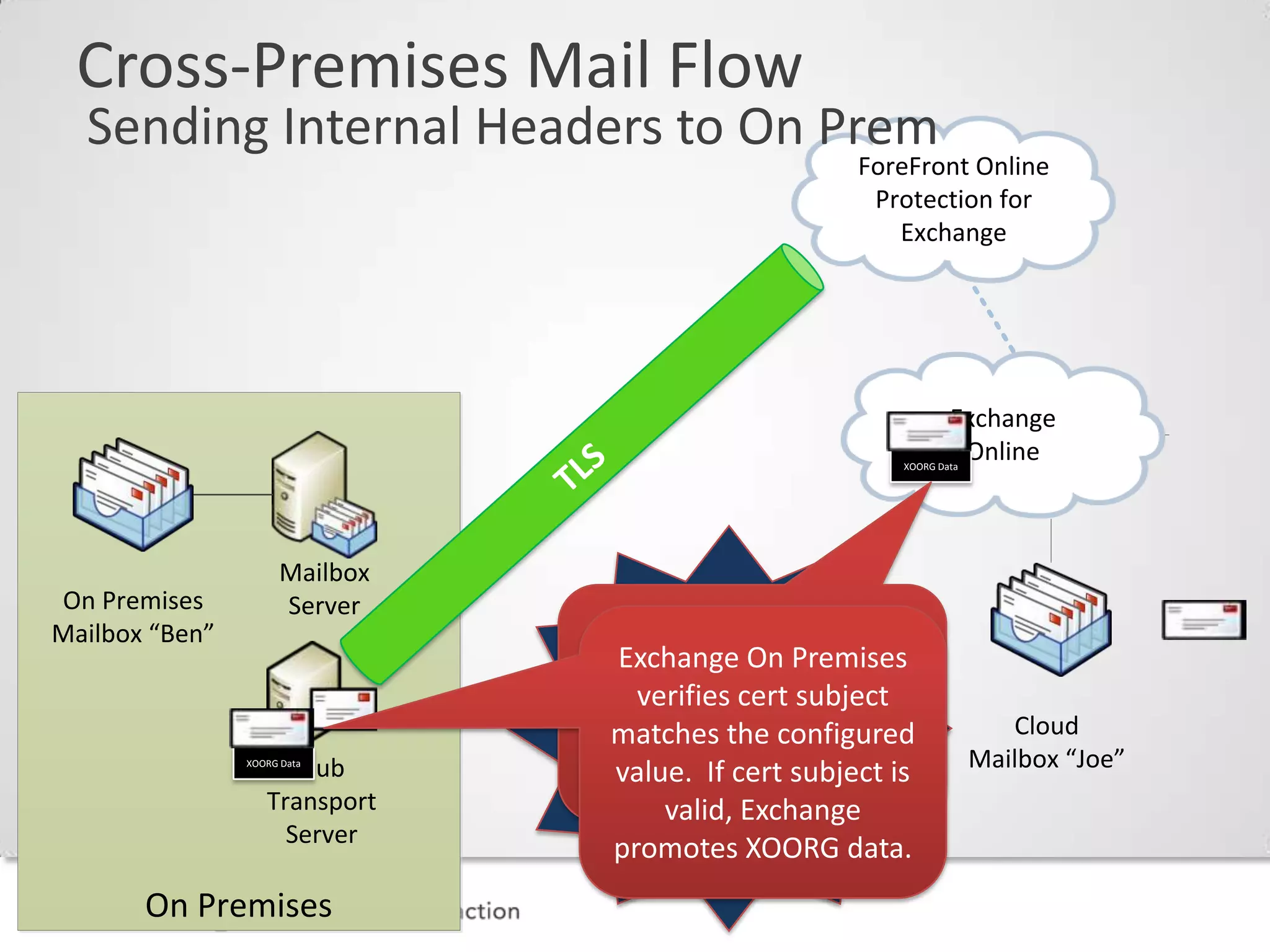
Cross-Premises Mail Flow
  Sending Internal Headers to On Prem
                                                 ForeFront Online
                                                  Protection for
                                                    Exchange


                                                            Exchange
                                                             Online
                                                    XOORG Data


                     Mailbox
On Premises          Server
Mailbox “Ben”
                               Emails from the
                                cloud are seen
                                as Internal by                      Cloud
                      Hub
                XOORG Data
                                  Transport &                    Mailbox “Joe”
                   Transport     Journal Rules
                     Server

       On Premises
Cross-Premises Mail Flow
Centralized mail flow scenario
                          Internet


                                     ForeFront Online
                                      Protection for
                                        Exchange

                 Hub
Mailbox       Transport
Server          Server
                                            Exchange
                                             Online
     On Premises
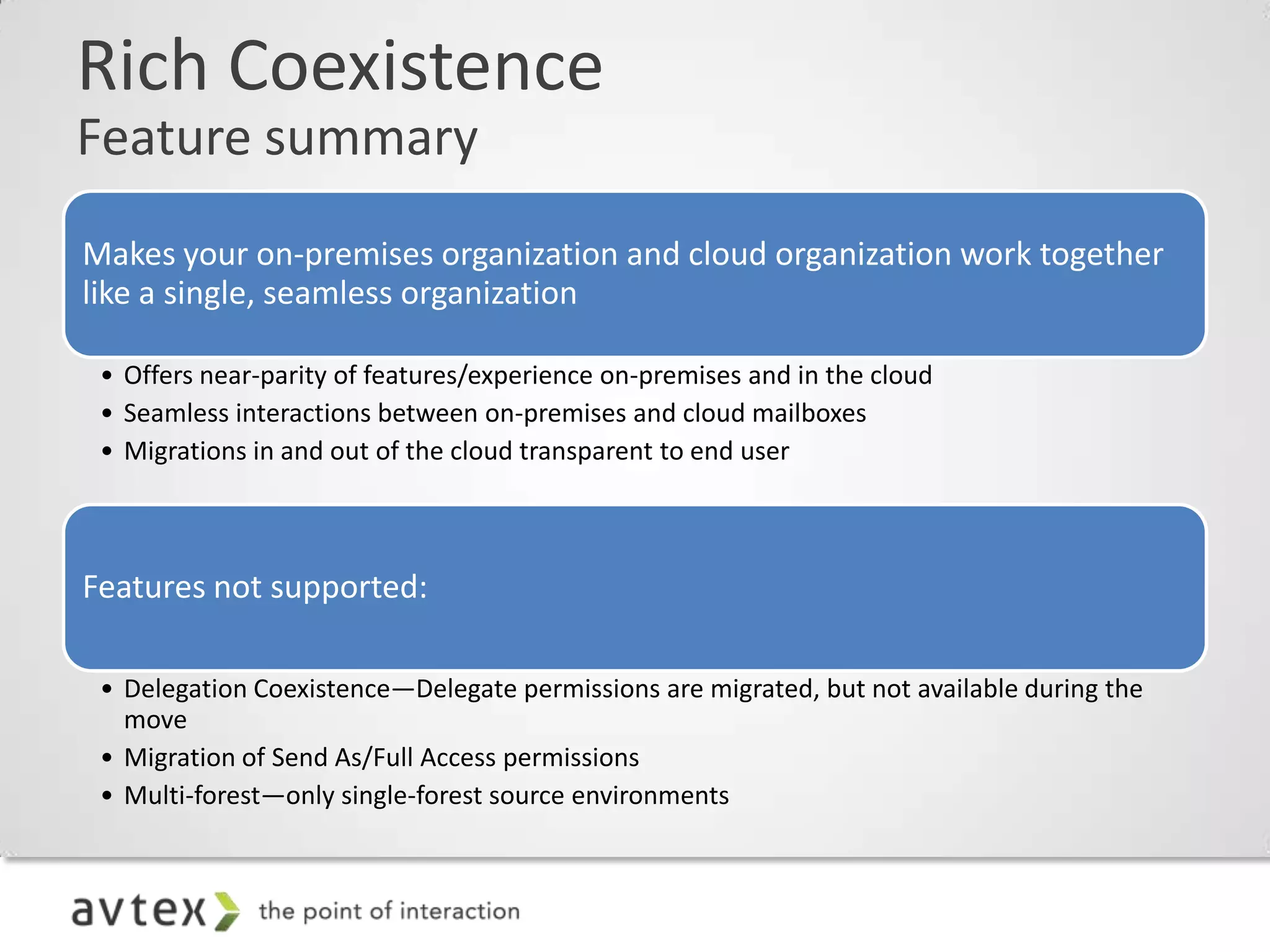
Rich Coexistence
Feature summary
Makes your on-premises organization and cloud organization work together
like a single, seamless organization

 • Offers near-parity of features/experience on-premises and in the cloud
 • Seamless interactions between on-premises and cloud mailboxes
 • Migrations in and out of the cloud transparent to end user


Features not supported:

 • Delegation Coexistence—Delegate permissions are migrated, but not available during the
   move
 • Migration of Send As/Full Access permissions
 • Multi-forest—only single-forest source environments
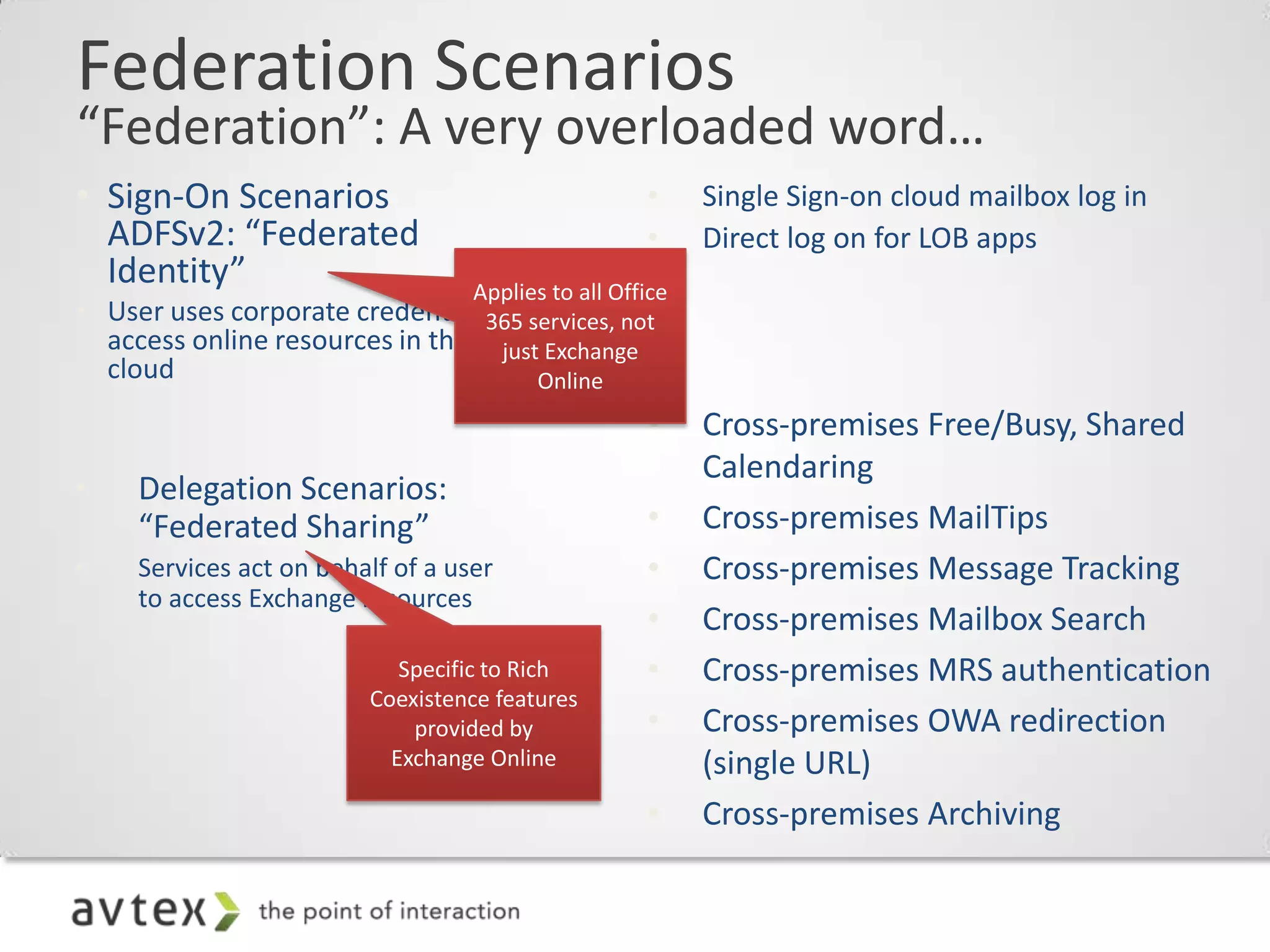
Federation Scenarios
“Federation”: A very overloaded word…
• Sign-On Scenarios                     •   Single Sign-on cloud mailbox log in
  ADFSv2: “Federated                    •   Direct log on for LOB apps
  Identity”
• User uses corporate credentials to
  access online resources in the
  cloud
                                        •   Cross-premises Free/Busy, Shared
                                            Calendaring
•    Delegation Scenarios:
     “Federated Sharing”                •   Cross-premises MailTips
•    Services act on behalf of a user   •   Cross-premises Message Tracking
     to access Exchange resources
                                        •   Cross-premises Mailbox Search
                                        •   Cross-premises MRS authentication
                                        •   Cross-premises OWA redirection
                                            (single URL)
                                        •   Cross-premises Archiving
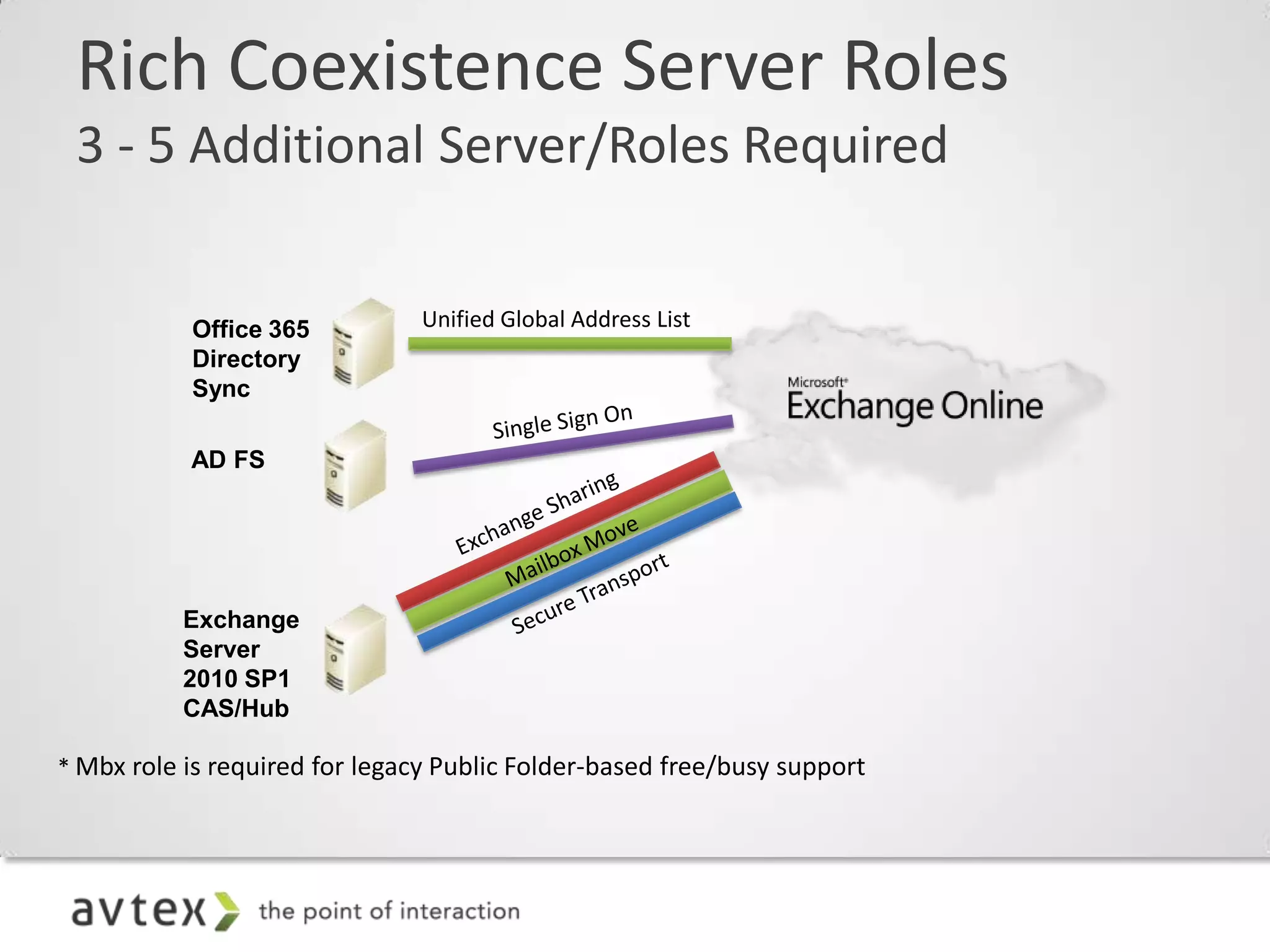
Rich Coexistence Server Roles
3 - 5 Additional Server/Roles Required
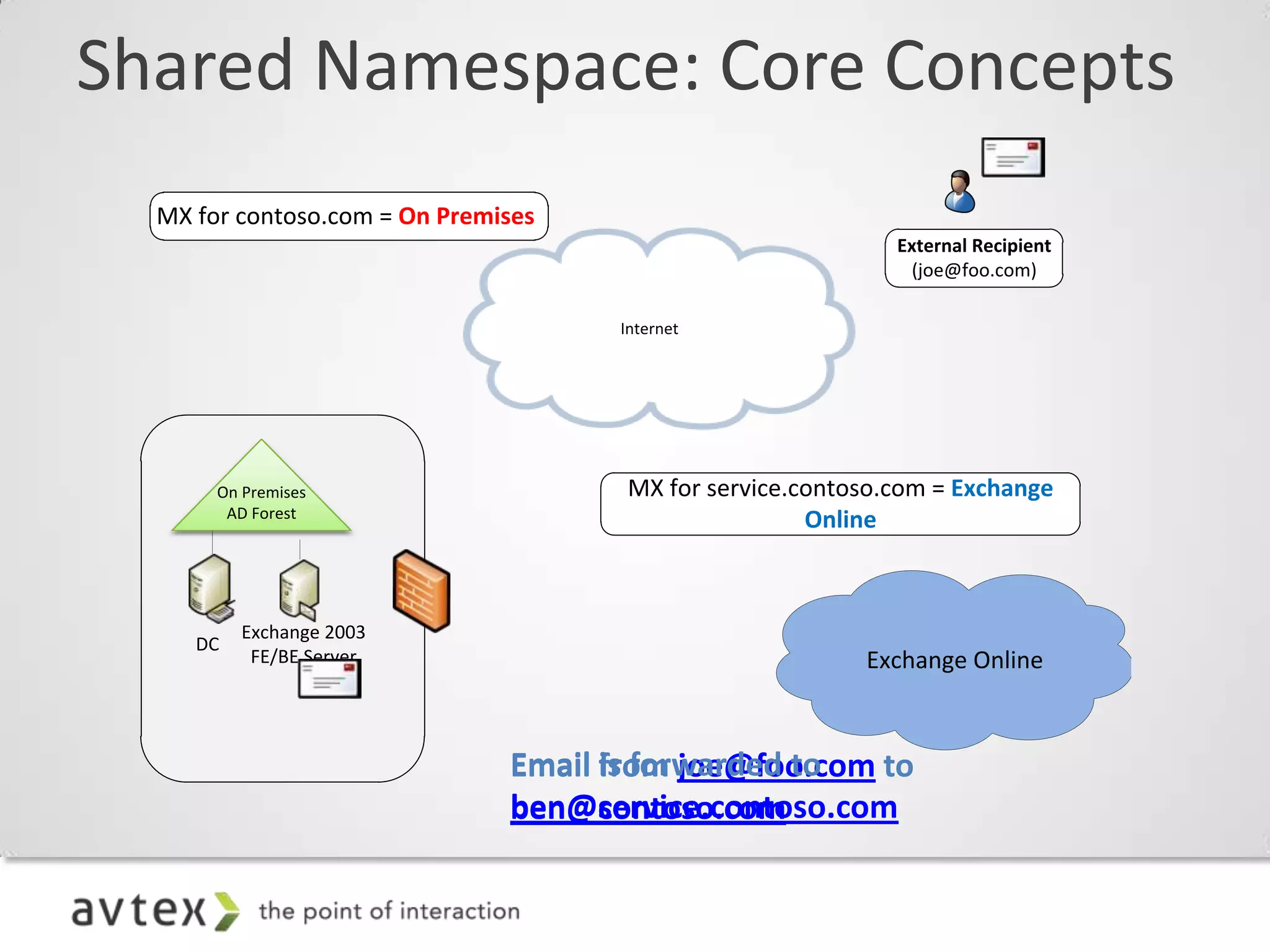
Shared Namespace: Core Concepts
  MX for contoso.com = On Premises
                                                             External Recipient
                                                              (joe@foo.com)

                                     Internet


       On Premises                    MX for service.contoso.com = Exchange
        AD Forest
                                                      Online


          Exchange 2003
     DC
           FE/BE Server                                   Exchange Online


                               Email is forwarded to
                                     from joe@foo.com to
                               ben@service.contoso.com
                               ben@contoso.com
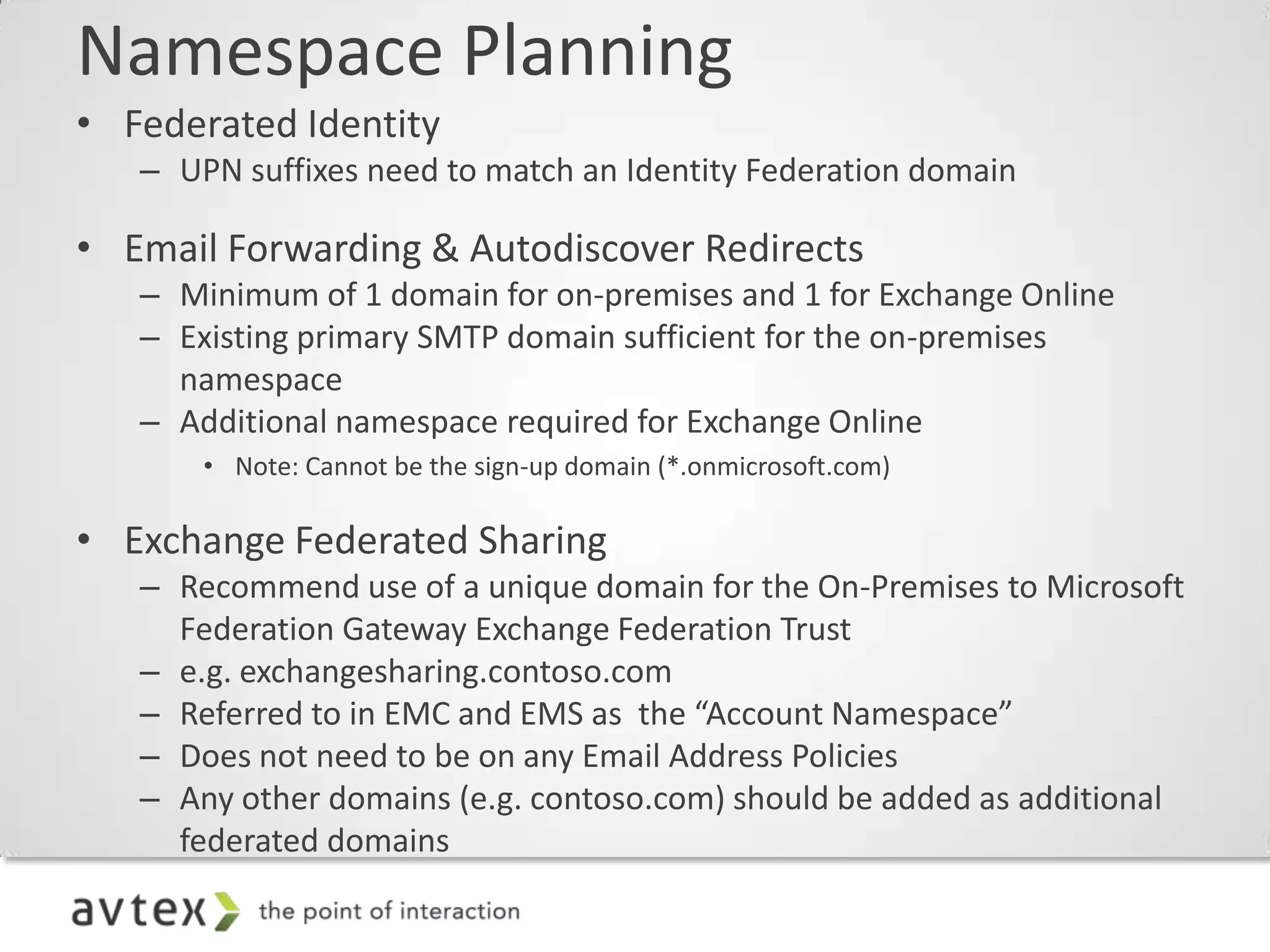
Namespace Planning
• Federated Identity
   – UPN suffixes need to match an Identity Federation domain

• Email Forwarding & Autodiscover Redirects
   – Minimum of 1 domain for on-premises and 1 for Exchange Online
   – Existing primary SMTP domain sufficient for the on-premises
     namespace
   – Additional namespace required for Exchange Online
       • Note: Cannot be the sign-up domain (*.onmicrosoft.com)

• Exchange Federated Sharing
   – Recommend use of a unique domain for the On-Premises to Microsoft
     Federation Gateway Exchange Federation Trust
   – e.g. exchangesharing.contoso.com
   – Referred to in EMC and EMS as the “Account Namespace”
   – Does not need to be on any Email Address Policies
   – Any other domains (e.g. contoso.com) should be added as additional
     federated domains
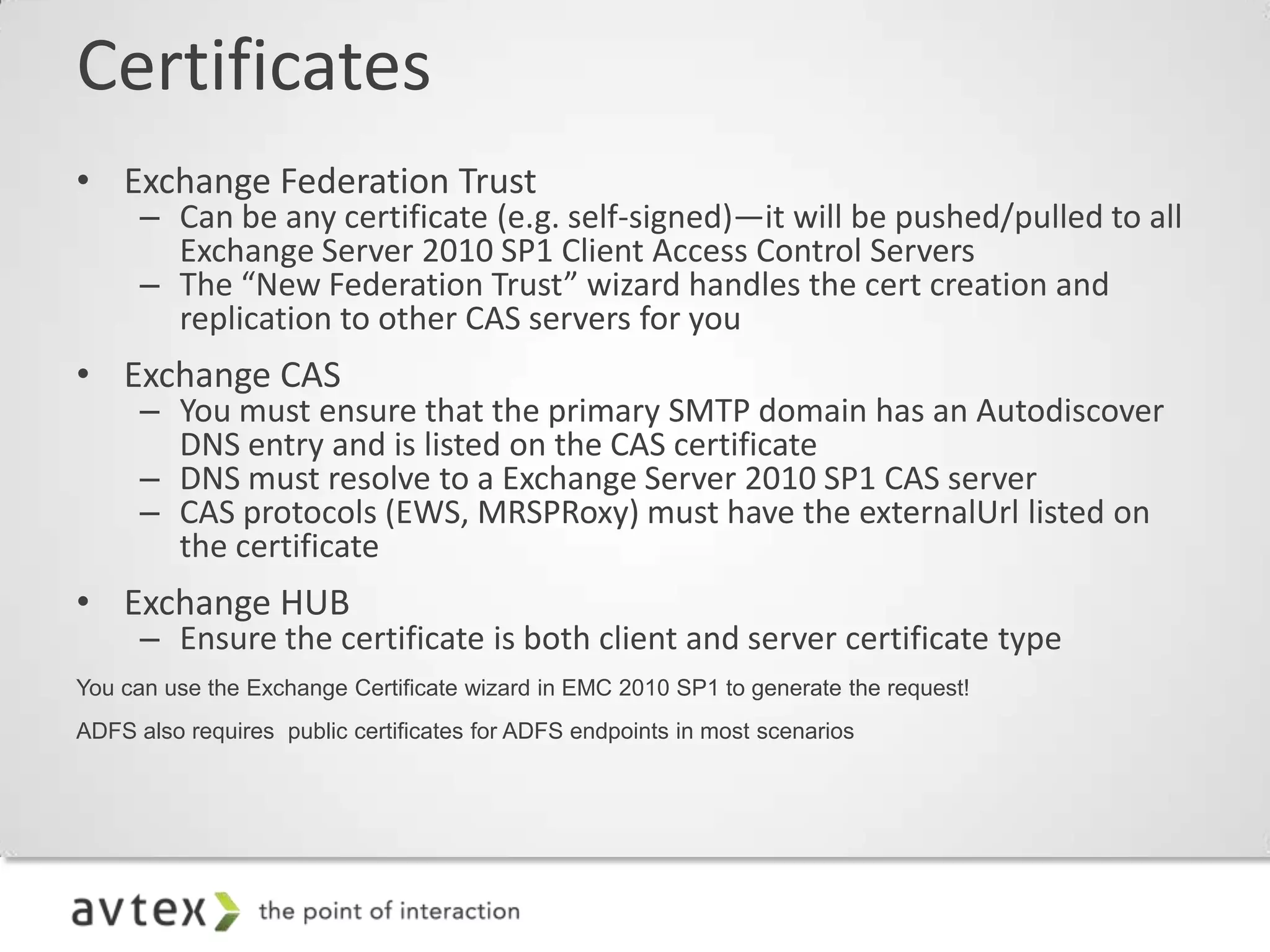
Certificates
• Exchange Federation Trust
      – Can be any certificate (e.g. self-signed)—it will be pushed/pulled to all
        Exchange Server 2010 SP1 Client Access Control Servers
      – The “New Federation Trust” wizard handles the cert creation and
        replication to other CAS servers for you
• Exchange CAS
      – You must ensure that the primary SMTP domain has an Autodiscover
        DNS entry and is listed on the CAS certificate
      – DNS must resolve to a Exchange Server 2010 SP1 CAS server
      – CAS protocols (EWS, MRSPRoxy) must have the externalUrl listed on
        the certificate
• Exchange HUB
      – Ensure the certificate is both client and server certificate type
You can use the Exchange Certificate wizard in EMC 2010 SP1 to generate the request!
ADFS also requires public certificates for ADFS endpoints in most scenarios
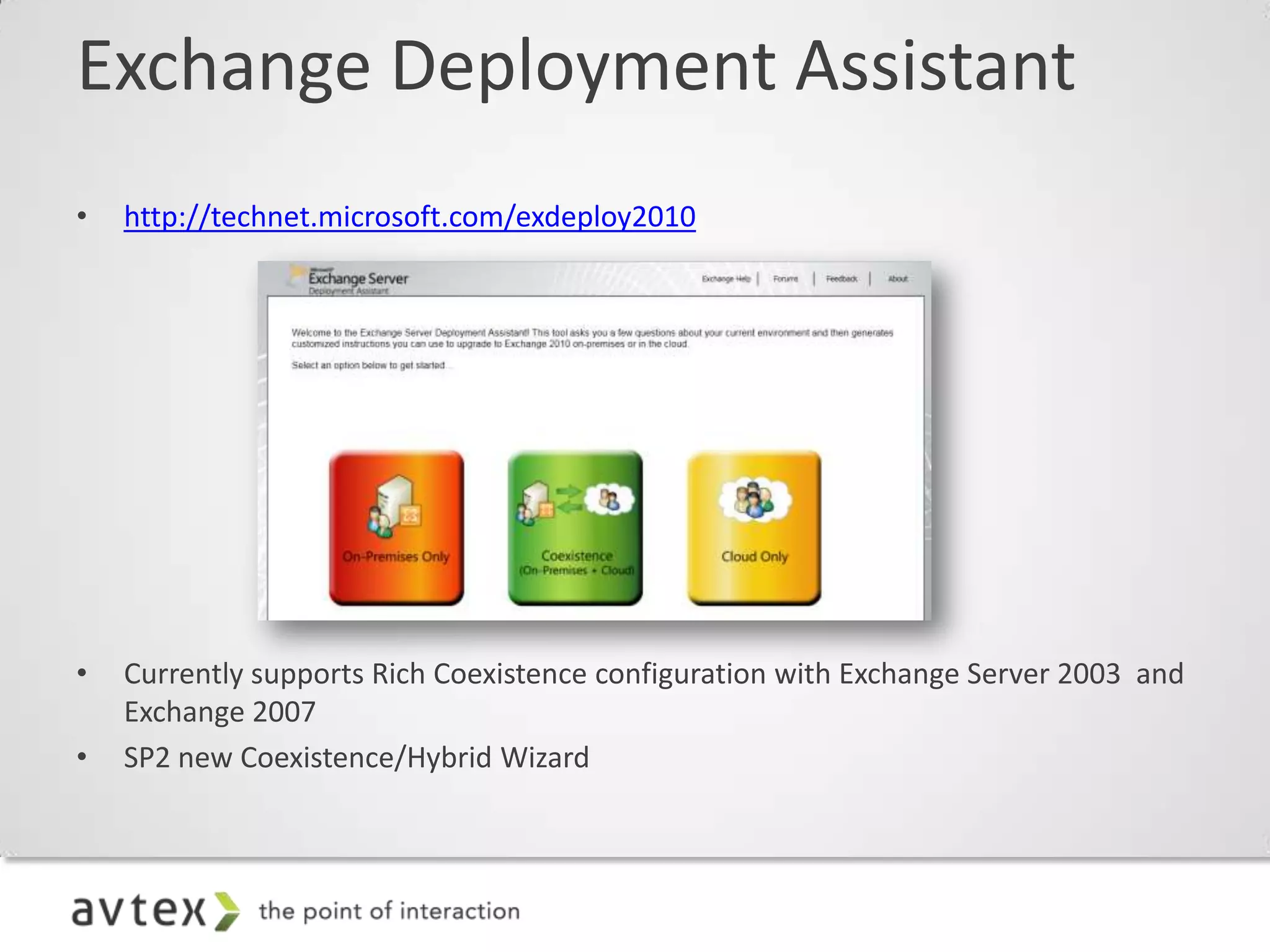
Exchange Deployment Assistant
•   http://technet.microsoft.com/exdeploy2010


•   Currently supports Rich Coexistence configuration with Exchange Server 2003 and
    Exchange 2007
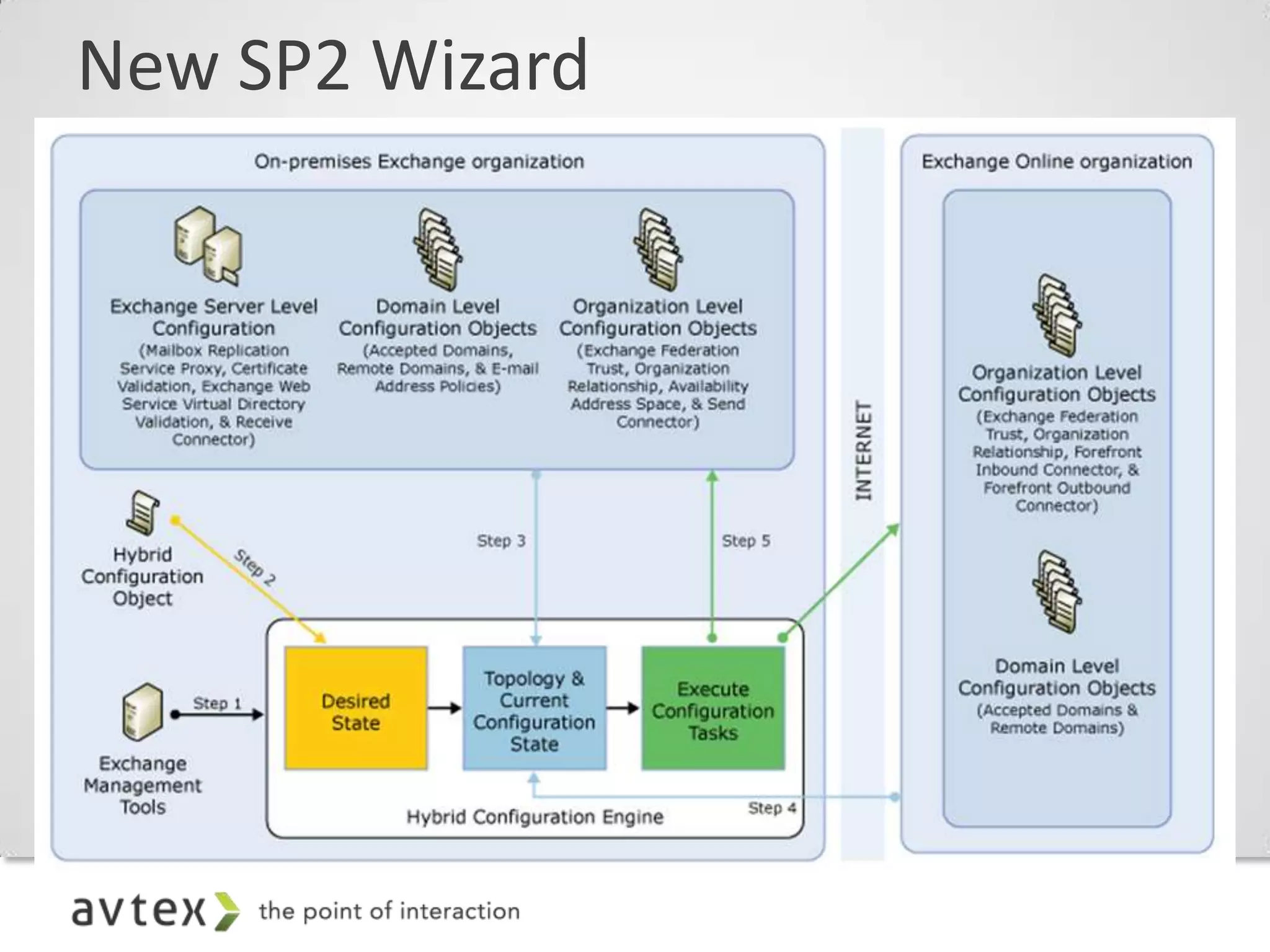
•   SP2 new Coexistence/Hybrid Wizard
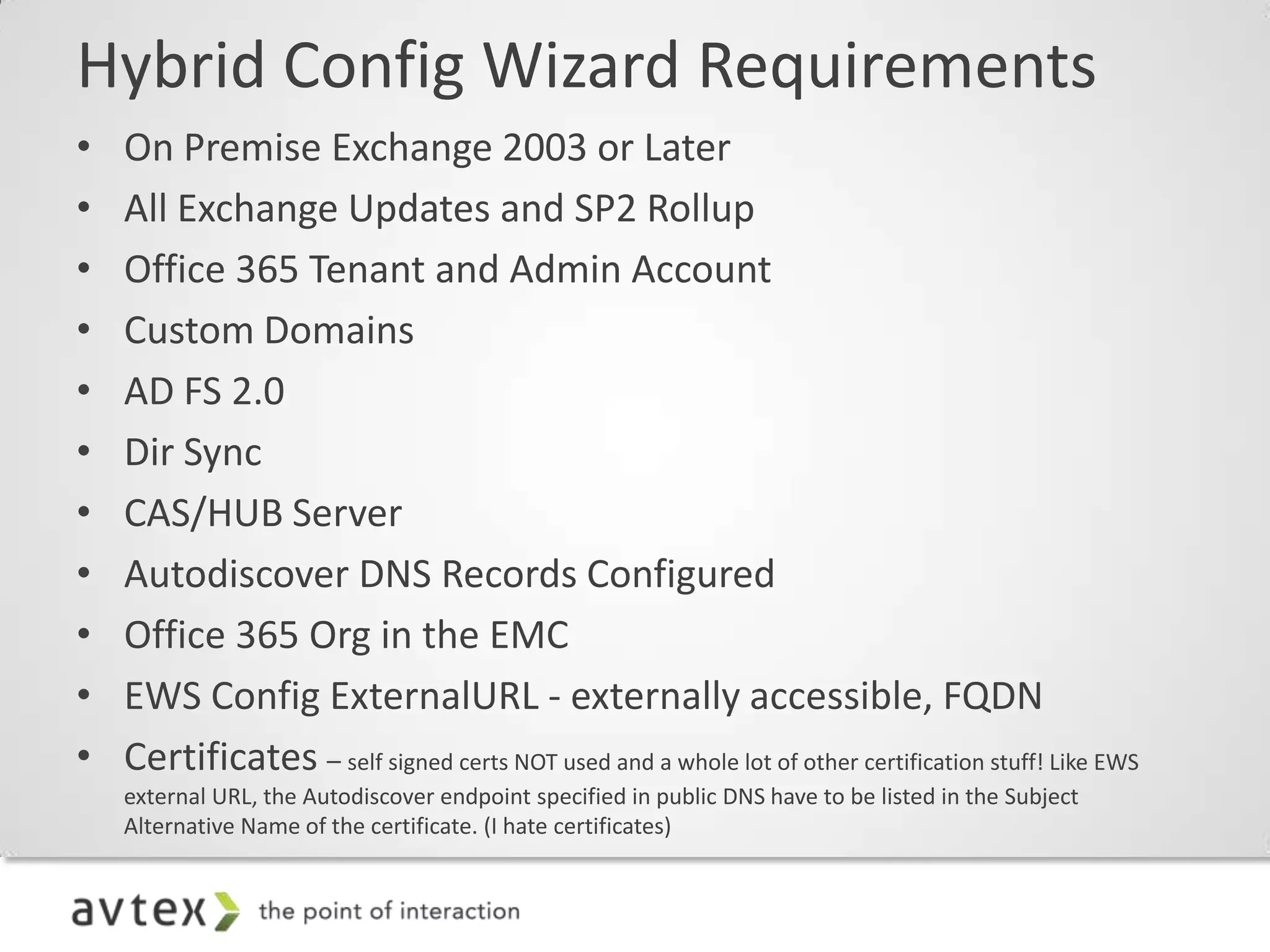
Hybrid Config Wizard Requirements
•   On Premise Exchange 2003 or Later
•   All Exchange Updates and SP2 Rollup
•   Office 365 Tenant and Admin Account
•   Custom Domains
•   AD FS 2.0
•   Dir Sync
•   CAS/HUB Server
•   Autodiscover DNS Records Configured
•   Office 365 Org in the EMC
•   EWS Config ExternalURL - externally accessible, FQDN
•   Certificates – self signed certs NOT used and a whole lot of other certification stuff! Like EWS
    external URL, the Autodiscover endpoint specified in public DNS have to be listed in the Subject
    Alternative Name of the certificate. (I hate certificates)
New SP2 Wizard
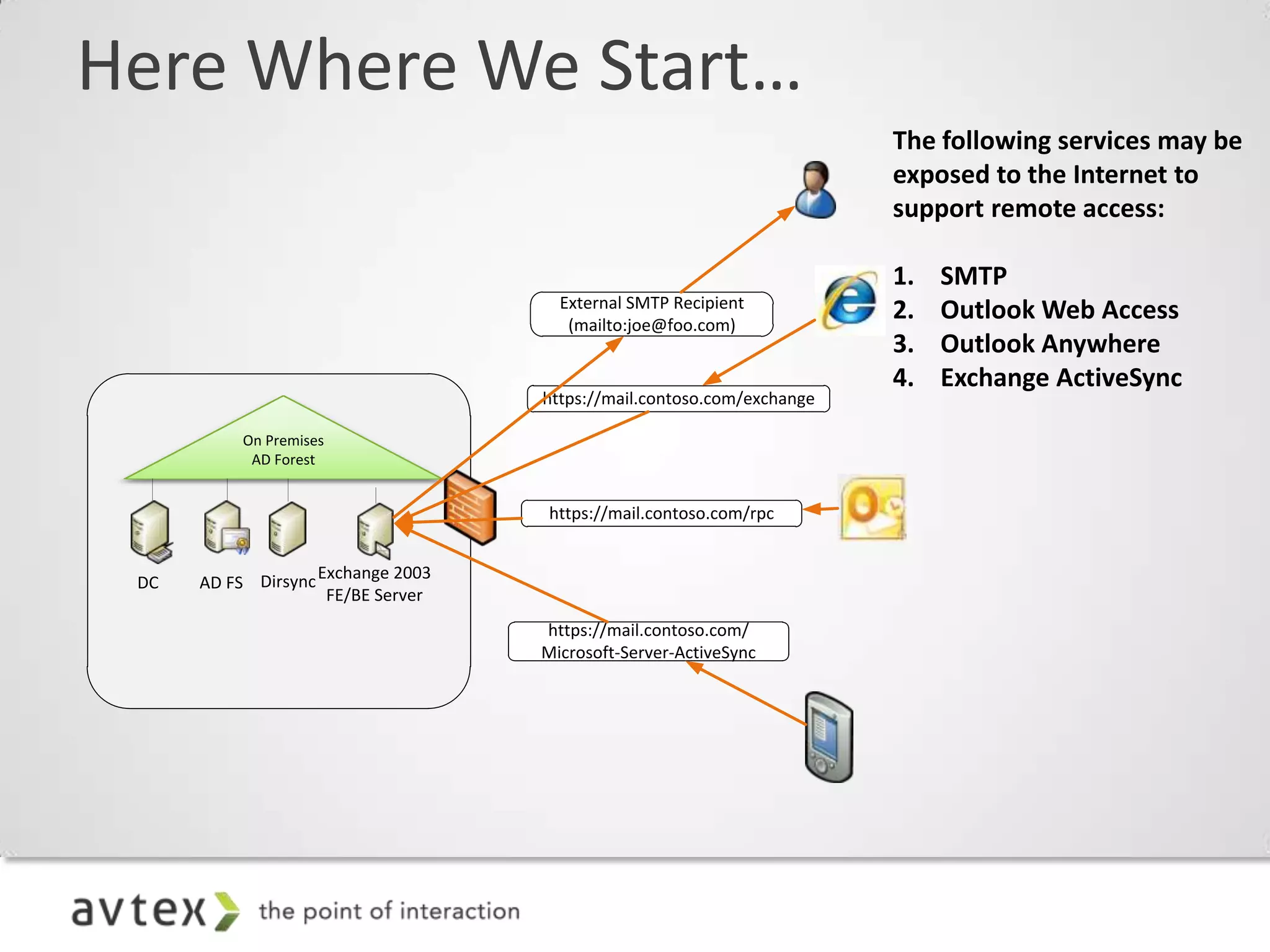
Here Where We Start…
                                                                        The following services may be
                                                                        exposed to the Internet to
                                                                        support remote access:

                                                                        1.   SMTP
                                      External SMTP Recipient
                                       (mailto:joe@foo.com)
                                                                        2.   Outlook Web Access
                                                                        3.   Outlook Anywhere
                                                                        4.   Exchange ActiveSync
                                    https://mail.contoso.com/exchange

           On Premises
            AD Forest


                                     https://mail.contoso.com/rpc


                    Exchange 2003
 DC   AD FS Dirsync
                     FE/BE Server
                                    https://mail.contoso.com/
                                    Microsoft-Server-ActiveSync
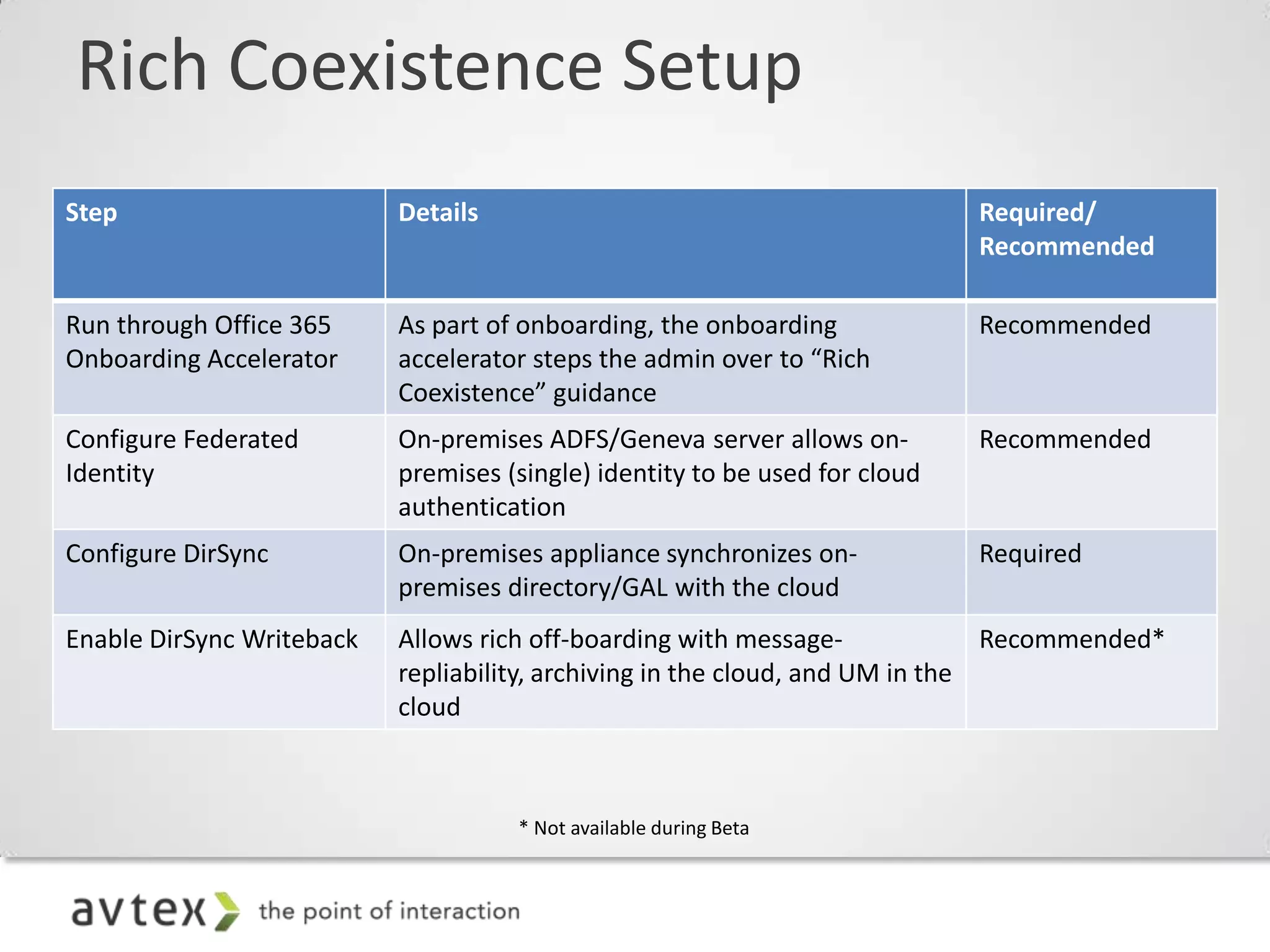
Rich Coexistence Setup
Step                       Details                                           Required/

• Step 1: Office 365 configuration steps                                     Recommended

Run through Office 365     As part of onboarding, the onboarding             Recommended
Onboarding Accelerator     accelerator steps the admin over to “Rich
                           Coexistence” guidance
Configure Federated        On-premises ADFS/Geneva server allows on-         Recommended
Identity                   premises (single) identity to be used for cloud
                           authentication
Configure DirSync          On-premises appliance synchronizes on-            Required
                           premises directory/GAL with the cloud
Enable DirSync Writeback   Allows rich off-boarding with message-              Recommended*
                           repliability, archiving in the cloud, and UM in the
                           cloud


                                       Not available during Beta
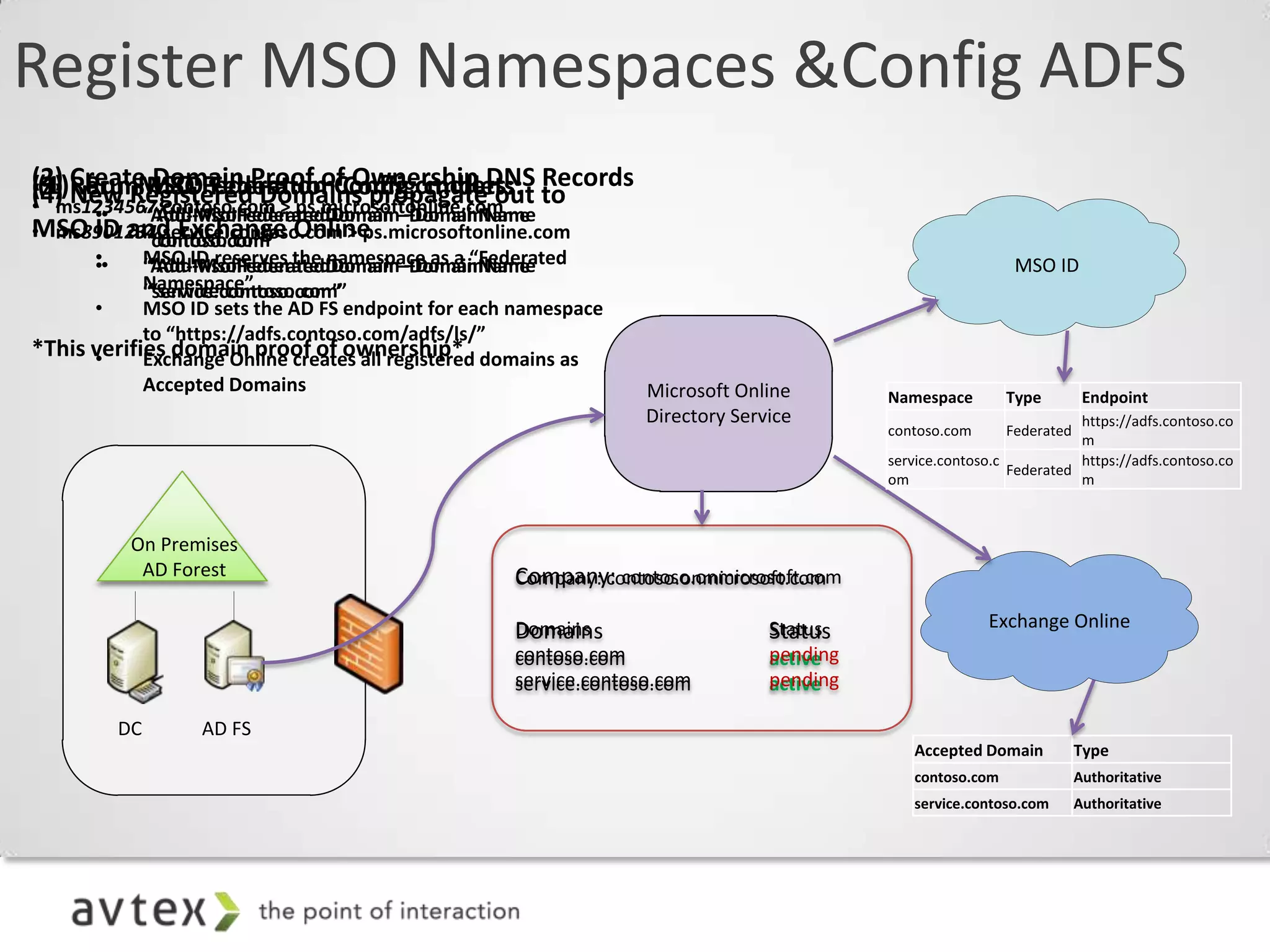
Register MSO Namespaces &Config ADFS
(2) CreateMSOFederation Config cmdlets: Records
 (1) Run Domain Proof of Ownership DNS
(3) RerunMSO Federation Config cmdlets: to
(4) New Registered Domains propagate out
• ms1234567.contoso.com > ps.microsoftonline.com
      ••   “Add-MsolFederatedDomain –DomainName
          “Add-MsolFederatedDomain –DomainName
MSO ID and Exchange Online
• ms8901234.service.contoso.com > ps.microsoftonline.com
           “contoso.com”
          “contoso.com”
      ••
      •     MSO ID reserves the namespace as a “Federated
             “Add-MsolFederatedDomain –DomainName
            “Add-MsolFederatedDomain –DomainName                                                           MSO ID
            Namespace”
             “service.contoso.com”
            “service.contoso.com”
      •     MSO ID sets the AD FS endpoint for each namespace
            to “https://adfs.contoso.com/adfs/ls/”
*This verifies domain proof of ownership* domains as
      •     Exchange Online creates all registered
            Accepted Domains                                     Microsoft Online        Namespace        Type         Endpoint
                                                                 Directory Service                                   https://adfs.contoso.co
                                                                                         contoso.com      Federated
                                                                                                                     m
                                                                                         service.contoso.c           https://adfs.contoso.co
                                                                                                           Federated
                                                                                         om                          m


            On Premises
             AD Forest                             Company: contoso.onmicrosoft.com
                                                   Company: contoso.onmicrosoft.com

                                                   Domains                     Status                  Exchange Online
                                                   Domains                     Status
                                                   contoso.com                 pending
                                                                               active
                                                   service.contoso.com
                                                   service.contoso.com         pending
                                                                               active

           DC      AD FS
                                                                                            Accepted Domain           Type
                                                                                            contoso.com               Authoritative
                                                                                            service.contoso.com       Authoritative
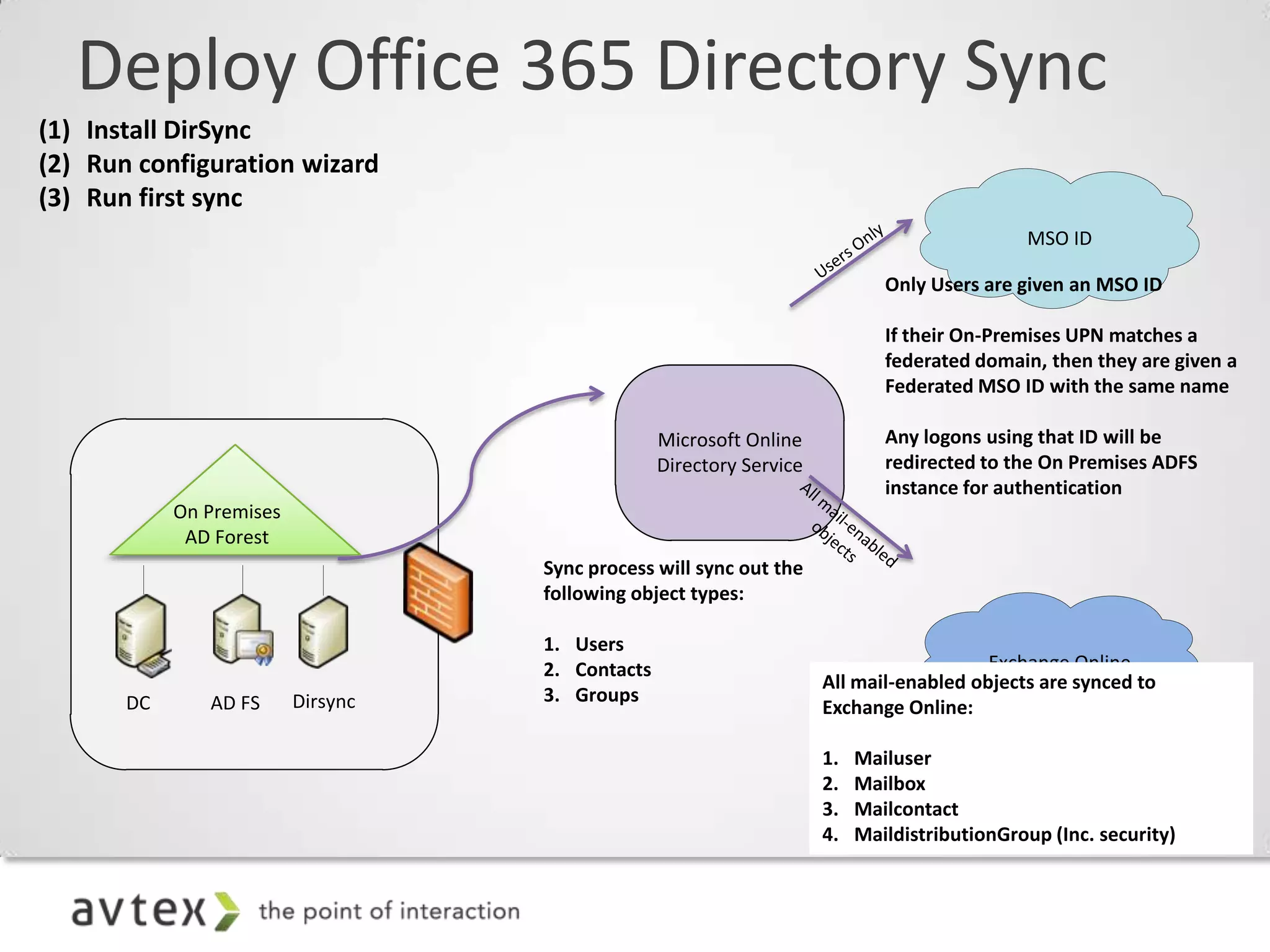
Deploy Office 365 Directory Sync
(1) Install DirSync
(2) Run configuration wizard
(3) Run first sync
                                                                                              MSO ID

                                                                              Only Users are given an MSO ID

                                                                              If their On-Premises UPN matches a
                                                                              federated domain, then they are given a
                                                                              Federated MSO ID with the same name

                                                  Microsoft Online            Any logons using that ID will be
                                                  Directory Service           redirected to the On Premises ADFS
                                                                              instance for authentication
            On Premises
             AD Forest
                                    Sync process will sync out the
                                    following object types:

                                    1. Users
                                    2. Contacts                                          Exchange Online
                                                                      All mail-enabled objects are synced to
       DC      AD FS      Dirsync   3. Groups
                                                                      Exchange Online:

                                                                      1.   Mailuser
                                                                      2.   Mailbox
                                                                      3.   Mailcontact
                                                                      4.   MaildistributionGroup (Inc. security)
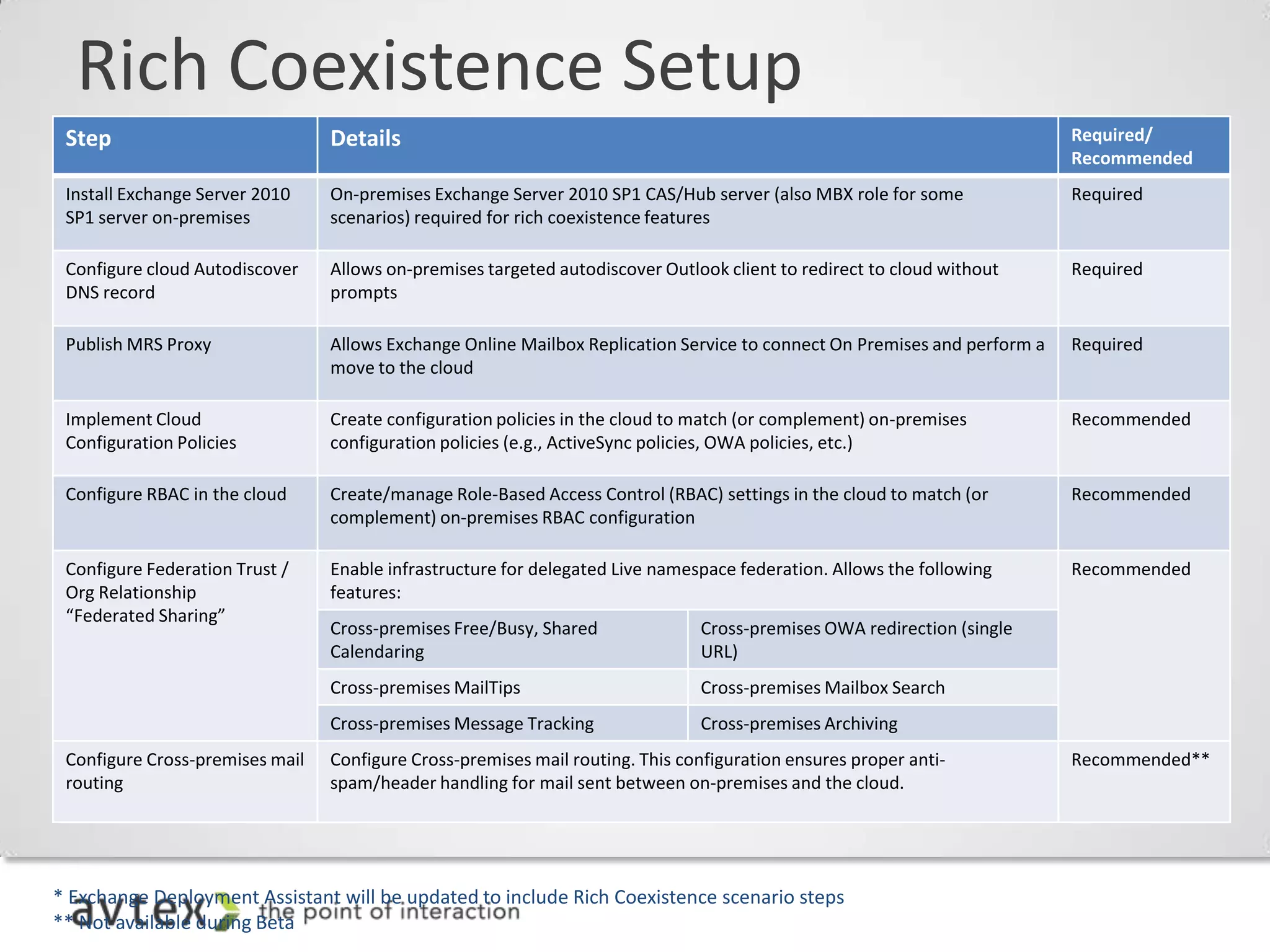
Rich Coexistence Setup
 Step                            Details                                                                                   Required/
                                                                                                                           Recommended
 Install Exchange Server 2010    On-premises Exchange Server 2010 SP1 CAS/Hub server (also MBX role for some               Required
 SP1 server on-premises          scenarios) required for rich coexistence features

  • Step 2: Exchange configuration steps*
 Configure cloud Autodiscover
 DNS record
                                 Allows on-premises targeted autodiscover Outlook client to redirect to cloud without
                                 prompts
                                                                                                                           Required


 Publish MRS Proxy               Allows Exchange Online Mailbox Replication Service to connect On Premises and perform a   Required
                                 move to the cloud

 Implement Cloud                 Create configuration policies in the cloud to match (or complement) on-premises           Recommended
 Configuration Policies          configuration policies (e.g., ActiveSync policies, OWA policies, etc.)

 Configure RBAC in the cloud     Create/manage Role-Based Access Control (RBAC) settings in the cloud to match (or         Recommended
                                 complement) on-premises RBAC configuration

 Configure Federation Trust /    Enable infrastructure for delegated Live namespace federation. Allows the following       Recommended
 Org Relationship                features:
 “Federated Sharing”
                                 Cross-premises Free/Busy, Shared              Cross-premises OWA redirection (single
                                 Calendaring                                   URL)
                                 Cross-premises MailTips                       Cross-premises Mailbox Search
                                 Cross-premises Message Tracking               Cross-premises Archiving
 Configure Cross-premises mail   Configure Cross-premises mail routing. This configuration ensures proper anti-            Recommended**
 routing                         spam/header handling for mail sent between on-premises and the cloud.


* Exchange Deployment Assistant will be updated to include Rich Coexistence scenario steps
** Not available during Beta
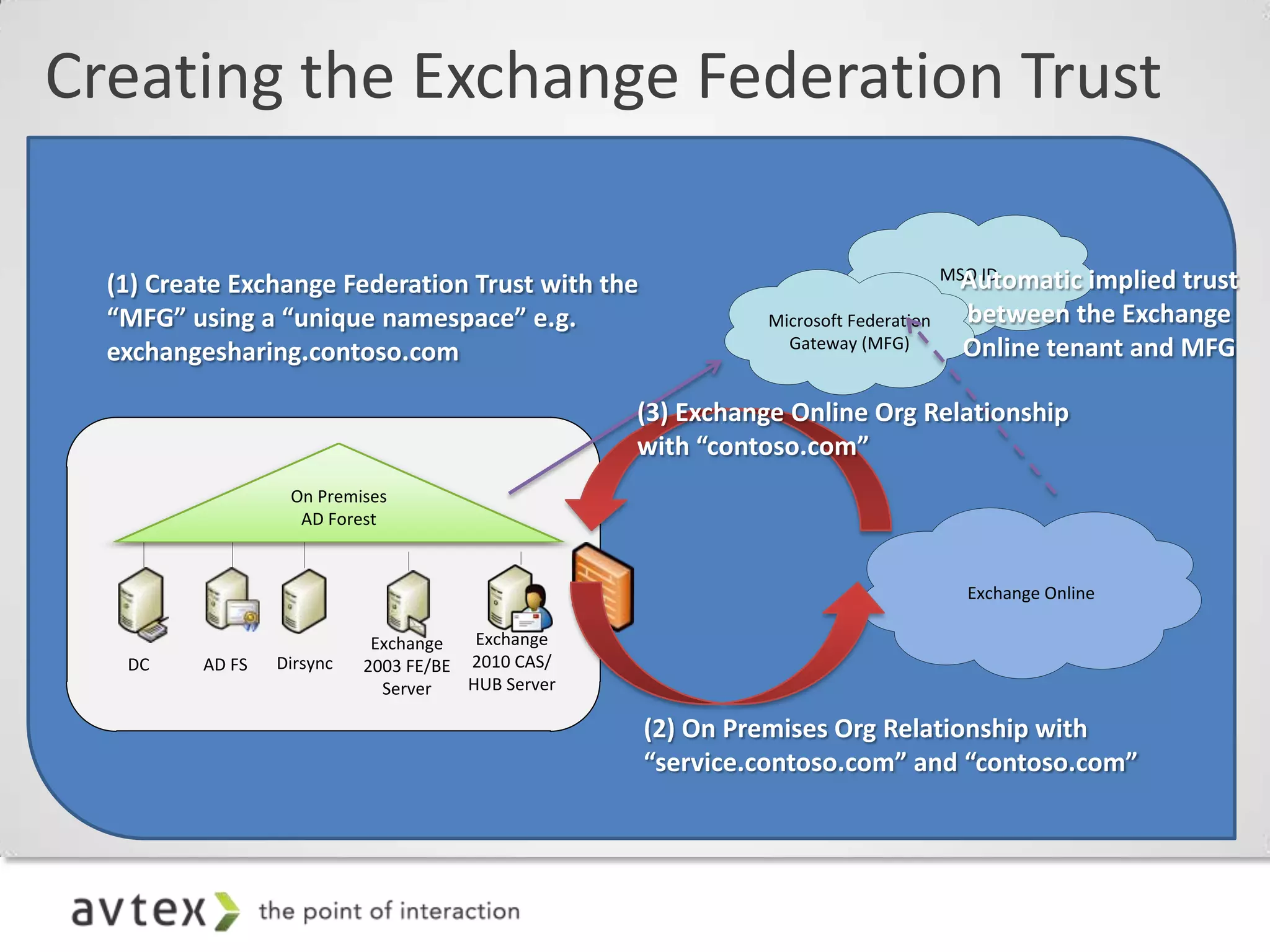
Creating the Exchange Federation Trust

                                                                                     MSO ID
                                                                                      Automatic implied trust
  (1) Create Exchange Federation Trust with the
  “MFG” using a “unique namespace” e.g.                       Microsoft Federation    between the Exchange
                                                                Gateway (MFG)         Online tenant and MFG
  exchangesharing.contoso.com

                                                    (3) Exchange Online Org Relationship
                                                    with “contoso.com”
                   On Premises
                    AD Forest


                                                                                      Exchange Online

                             Exchange   Exchange
   DC     AD FS   Dirsync   2003 FE/BE 2010 CAS/
                              Server   HUB Server

                                                    (2) On Premises Org Relationship with
                                                    “service.contoso.com” and “contoso.com”
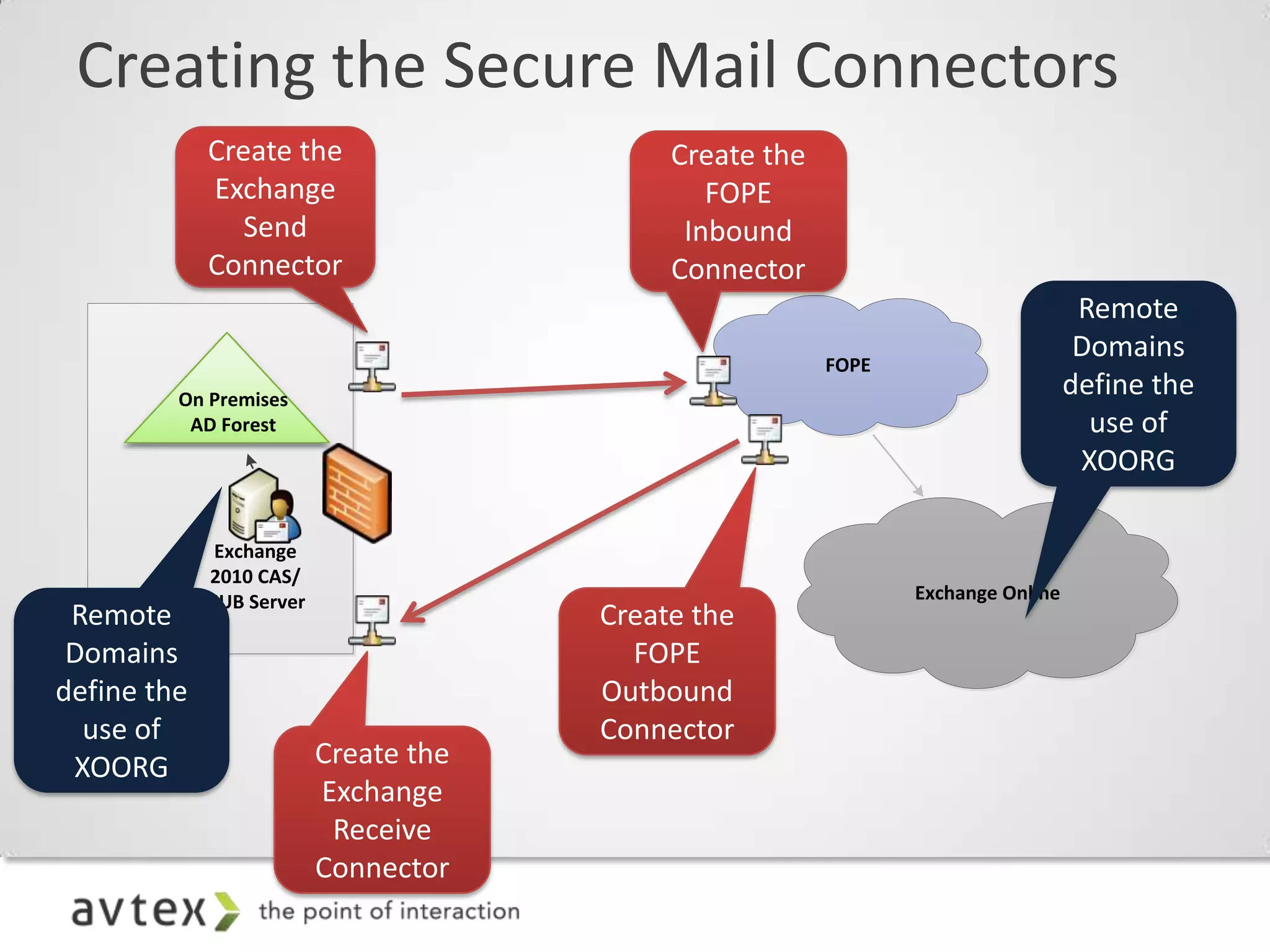
Creating the Secure Mail Connectors


                         FOPE
   On Premises
    AD Forest


      Exchange
     2010 CAS/
     HUB Server                 Exchange Online
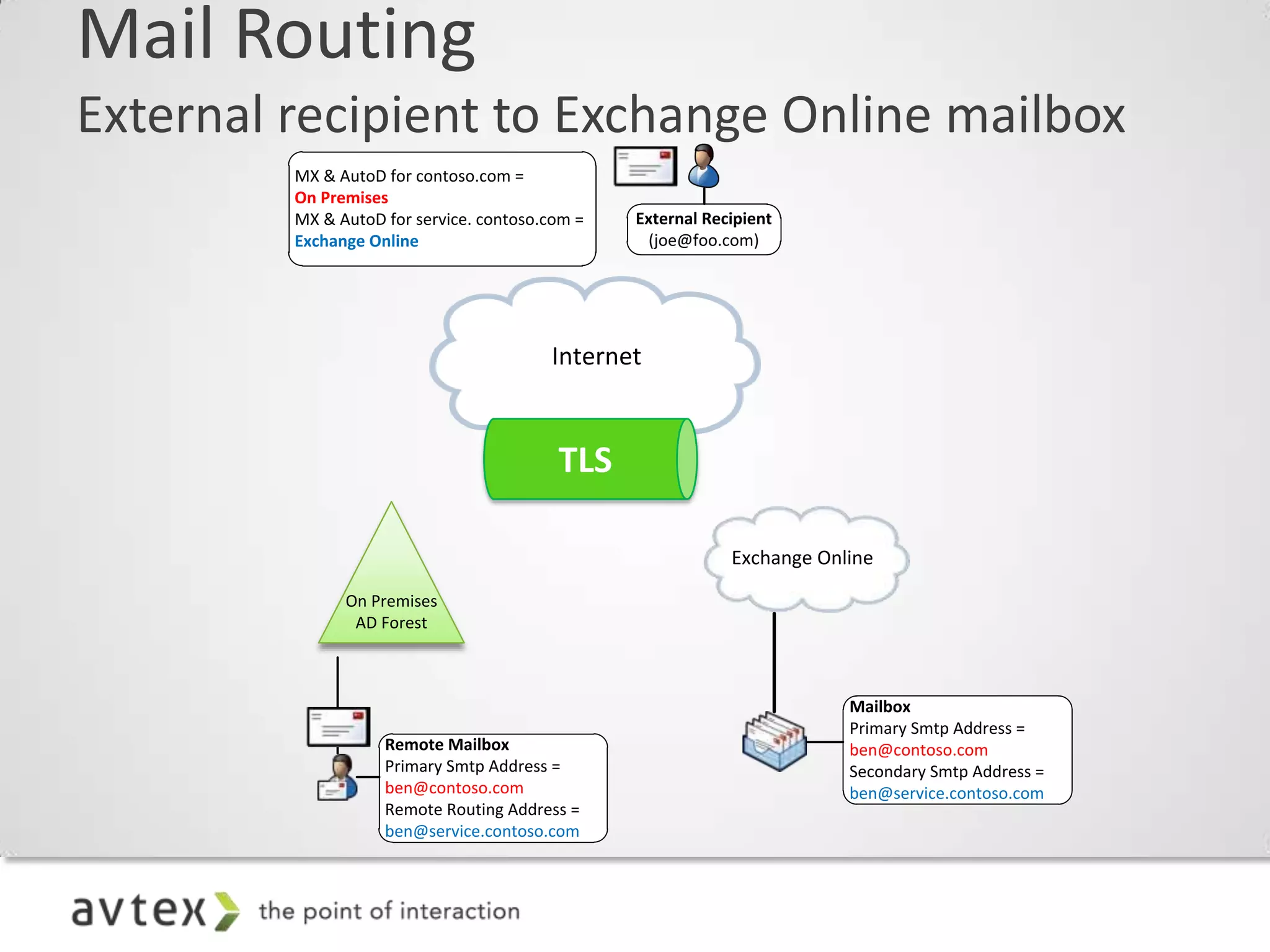
Mail Routing
External recipient to Exchange Online mailbox
         MX & AutoD for contoso.com =
         On Premises
         MX & AutoD for service. contoso.com =   External Recipient
         Exchange Online                          (joe@foo.com)


                                         Internet


                                                             Exchange Online

               On Premises
                AD Forest


                                                                         Mailbox
                                                                         Primary Smtp Address =
                    Remote Mailbox                                       ben@contoso.com
                    Primary Smtp Address =                               Secondary Smtp Address =
                    ben@contoso.com                                      ben@service.contoso.com
                    Remote Routing Address =
                    ben@service.contoso.com
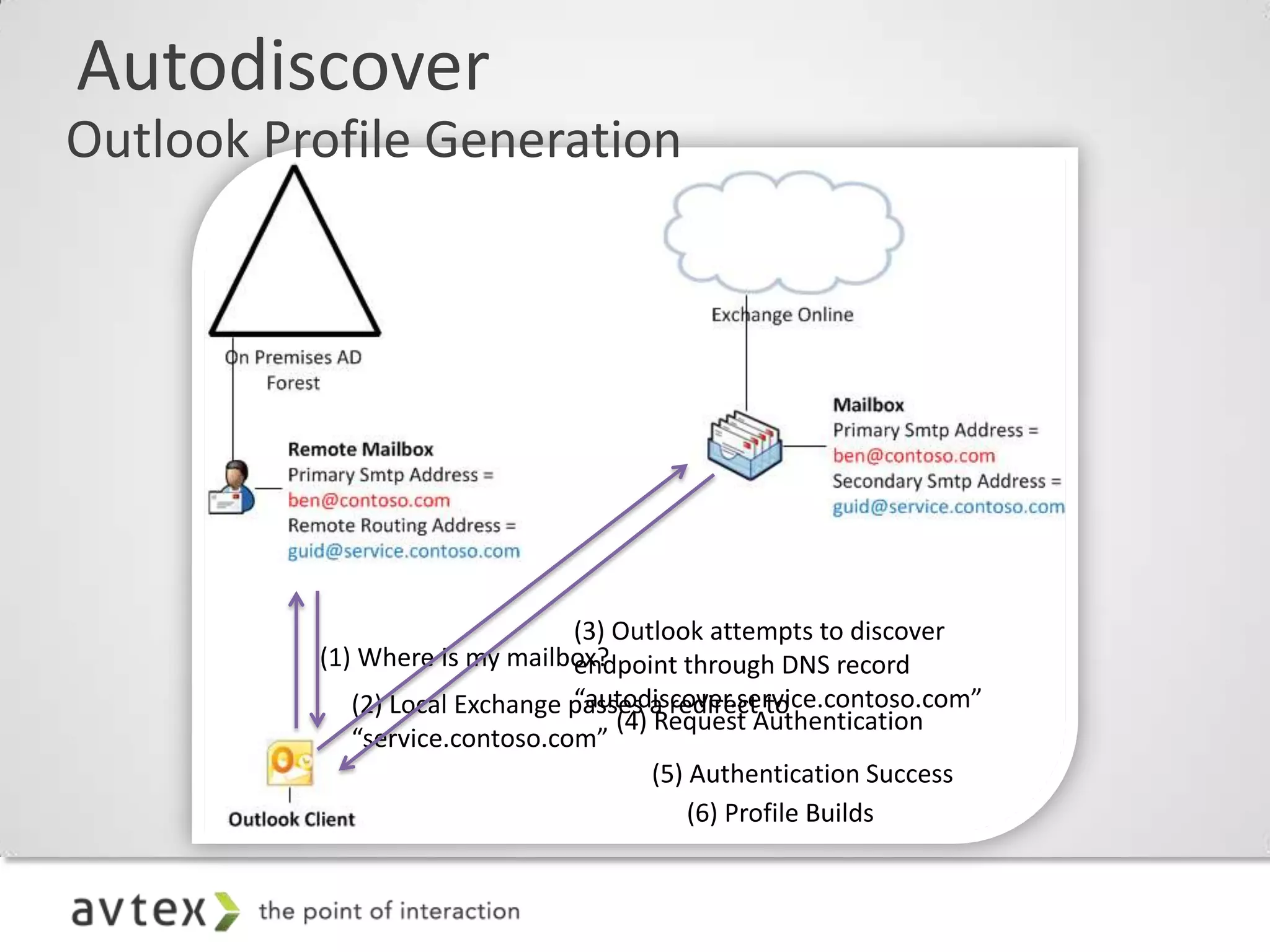
Autodiscover
Outlook Profile Generation


                                (3) Outlook attempts to discover
          (1) Where is my mailbox?
                                endpoint through DNS record
                                “autodiscover.service.contoso.com”
             (2) Local Exchange passes a redirect to
                                    (4) Request Authentication
             “service.contoso.com”
                                        (5) Authentication Success
                                            (6) Profile Builds
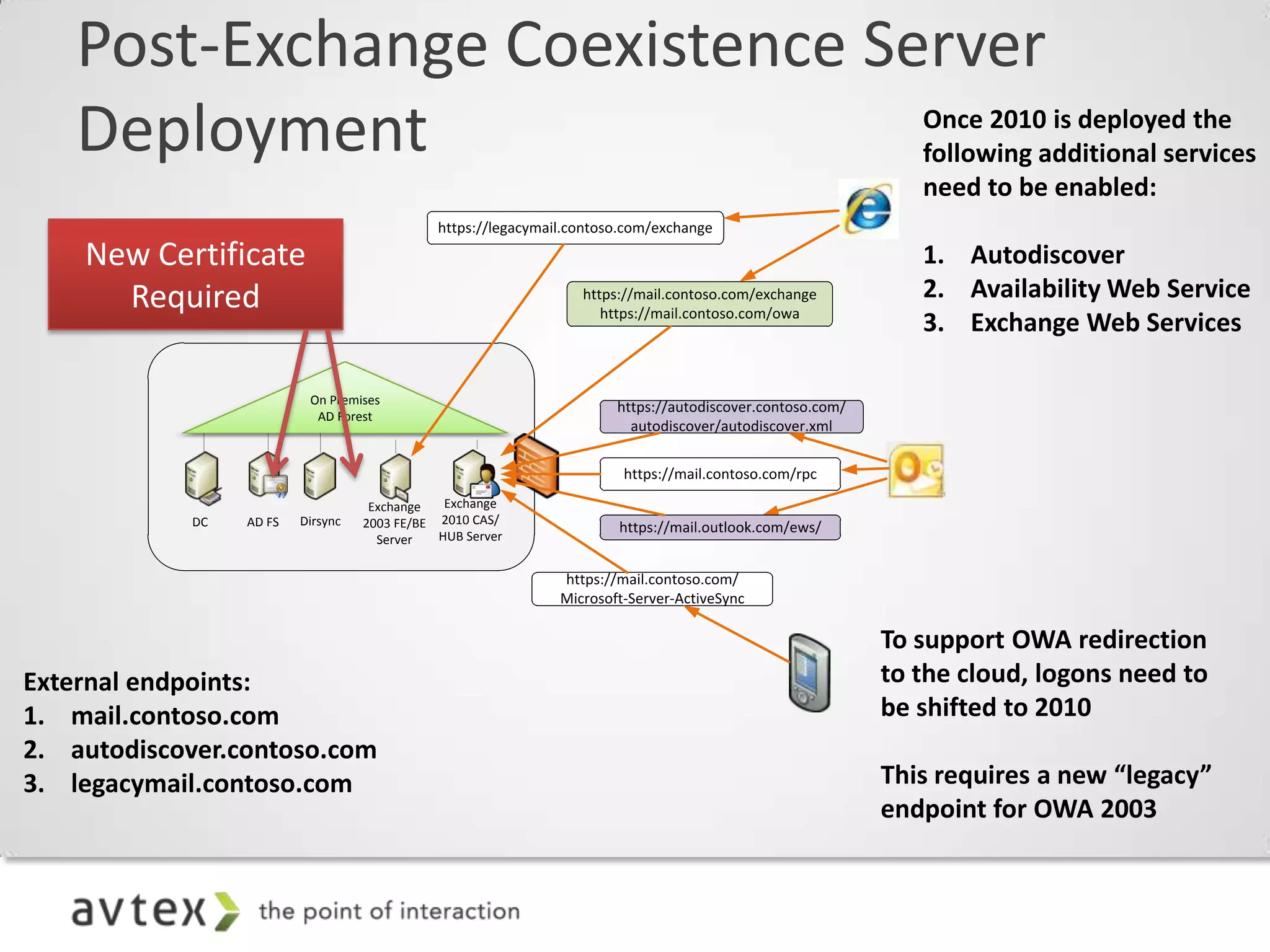
Post-Exchange Coexistence Server
    Deployment                                                                                                Once 2010 is deployed the
                                                                                                              following additional services
                                                                                                              need to be enabled:
                                              https://legacymail.contoso.com/exchange

    New Certificate                                                                                           1. Autodiscover
      Required                                                    https://mail.contoso.com/exchange           2. Availability Web Service
                                                                     https://mail.contoso.com/owa
                                                                                                              3. Exchange Web Services

                          On Premises
                                                                       https://autodiscover.contoso.com/
                           AD Forest
                                                                         autodiscover/autodiscover.xml


                                                                        https://mail.contoso.com/rpc

                                    Exchange   Exchange
            DC   AD FS   Dirsync   2003 FE/BE 2010 CAS/                https://mail.outlook.com/ews/
                                     Server   HUB Server


                                                               https://mail.contoso.com/
                                                               Microsoft-Server-ActiveSync

                                                                                                           To support OWA redirection
External endpoints:                                                                                        to the cloud, logons need to
1. mail.contoso.com                                                                                        be shifted to 2010
2. autodiscover.contoso.com
3. legacymail.contoso.com                                                                                  This requires a new “legacy”
                                                                                                           endpoint for OWA 2003
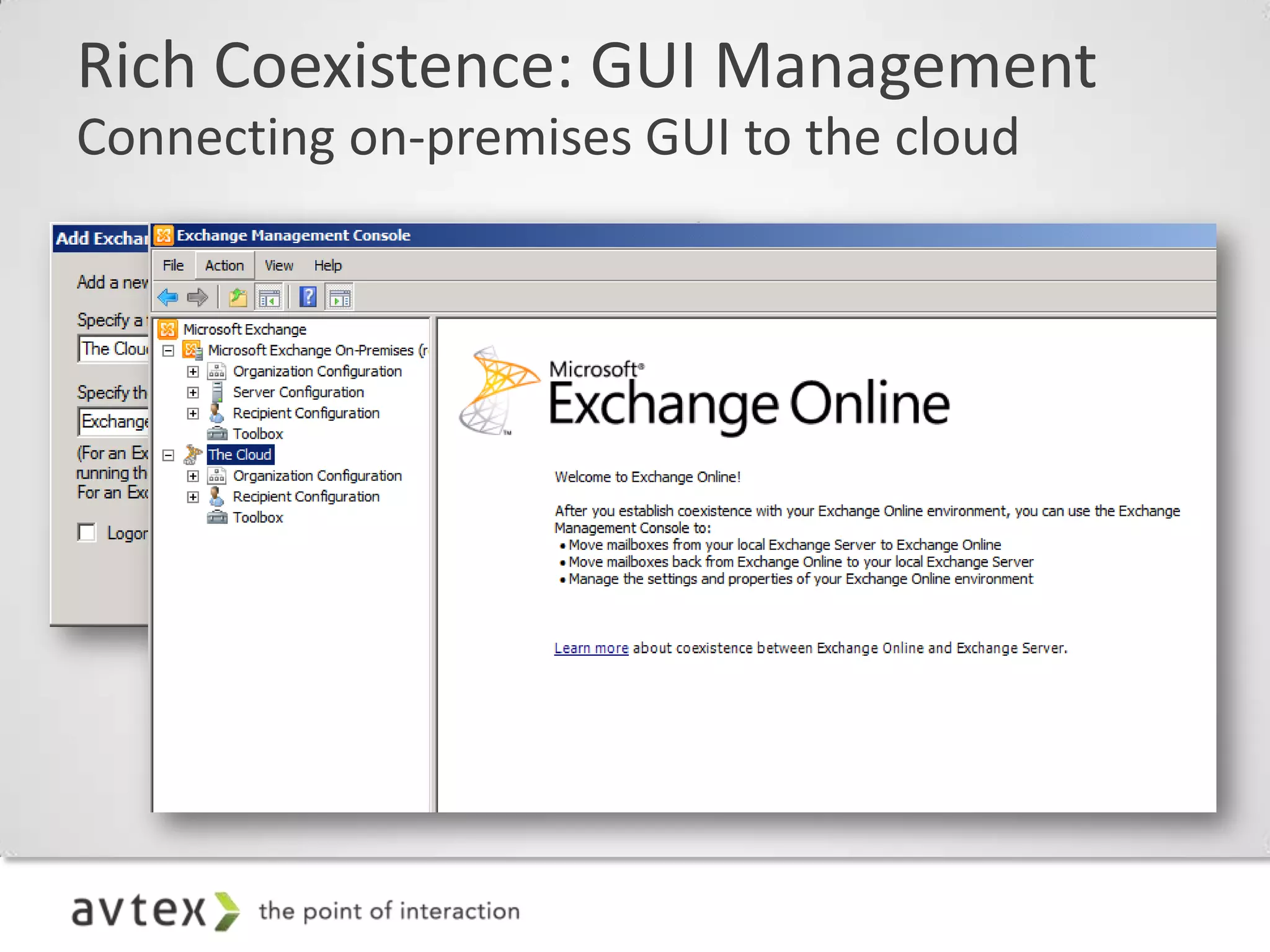
Rich Coexistence: GUI Management
Connecting on-premises GUI to the cloud

  – Once you have installed Exchange Server 2010 SP1
    on premises and connected it to your Exchange
    Online 2010 organization, you can use EMC GUI
    for a number of the configuration steps on the
    previous slides
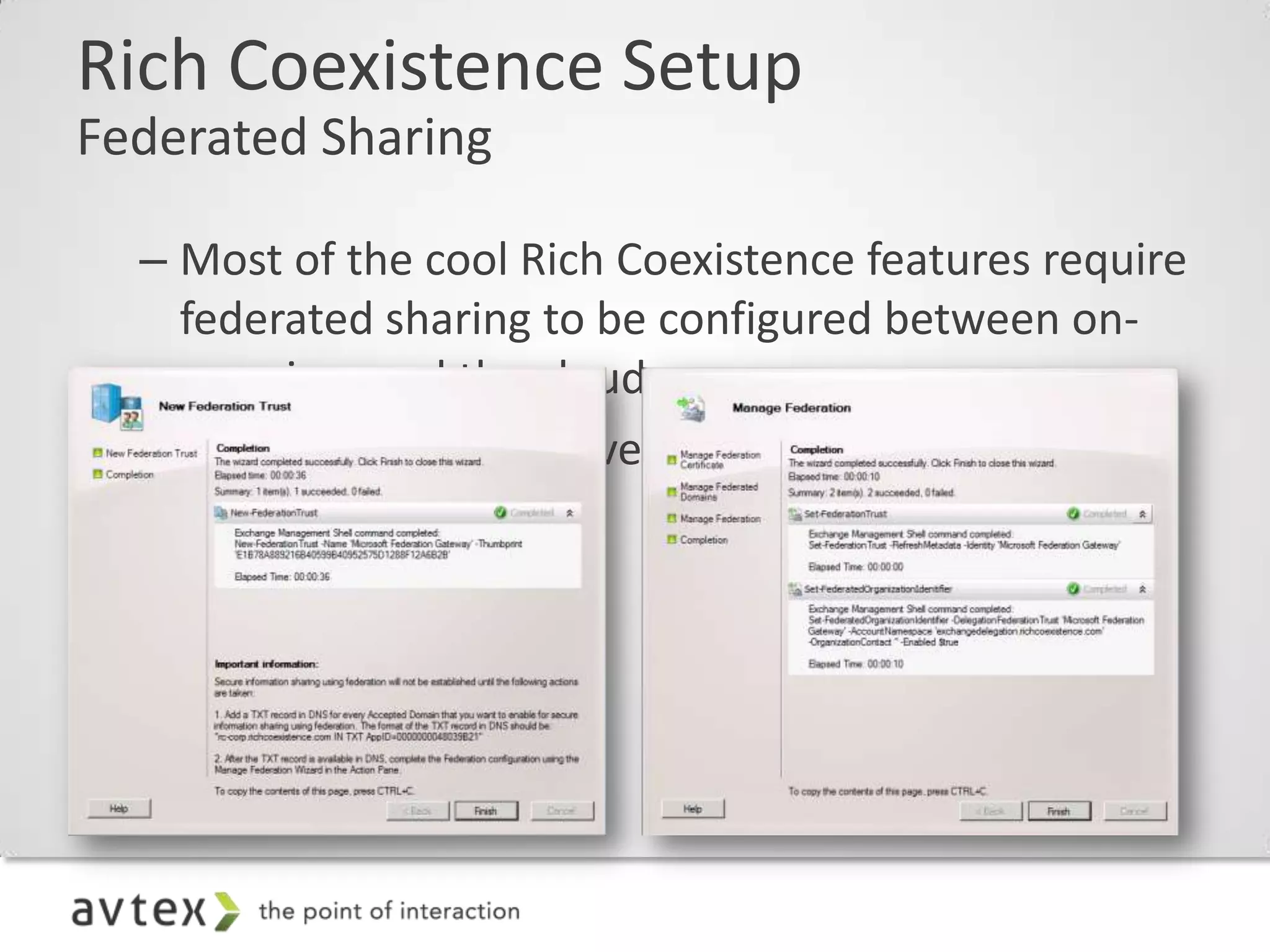
Rich Coexistence Setup
Federated Sharing

  – Most of the cool Rich Coexistence features require
    federated sharing to be configured between on-
    premises and the cloud
  – EMC in Exchange Server 2010 SP1 has GUI for this
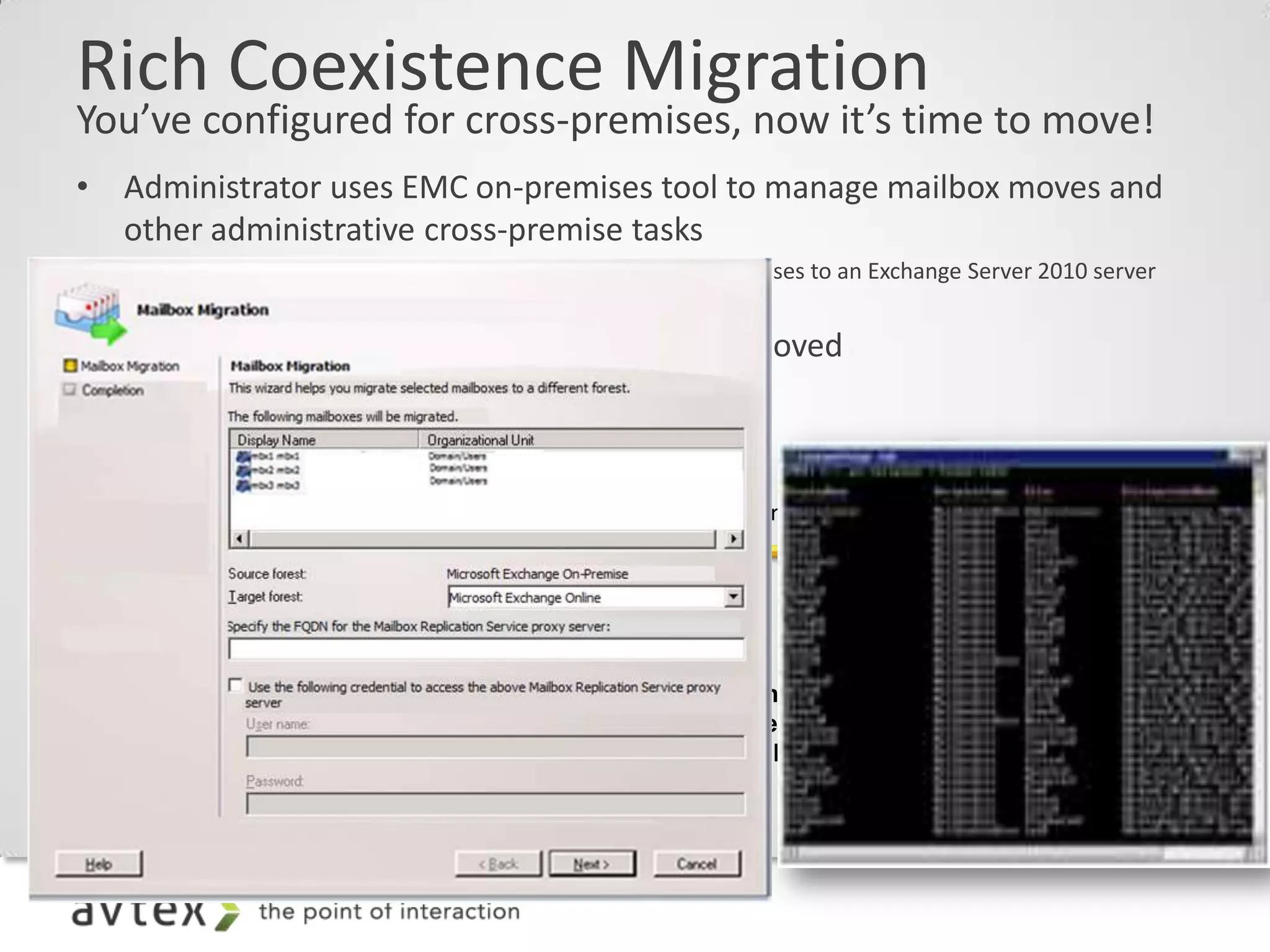
Rich Coexistence Migration
You’ve configured for cross-premises, now it’s time to move!
• Administrator uses EMC on-premises tool to manage mailbox moves and
  other administrative cross-premise tasks
    –   Note: There is no requirement to move mailboxes on premises to an Exchange Server 2010 server
        prior to moving them to the cloud
• DirSync keeps GAL in sync as mailboxes are moved
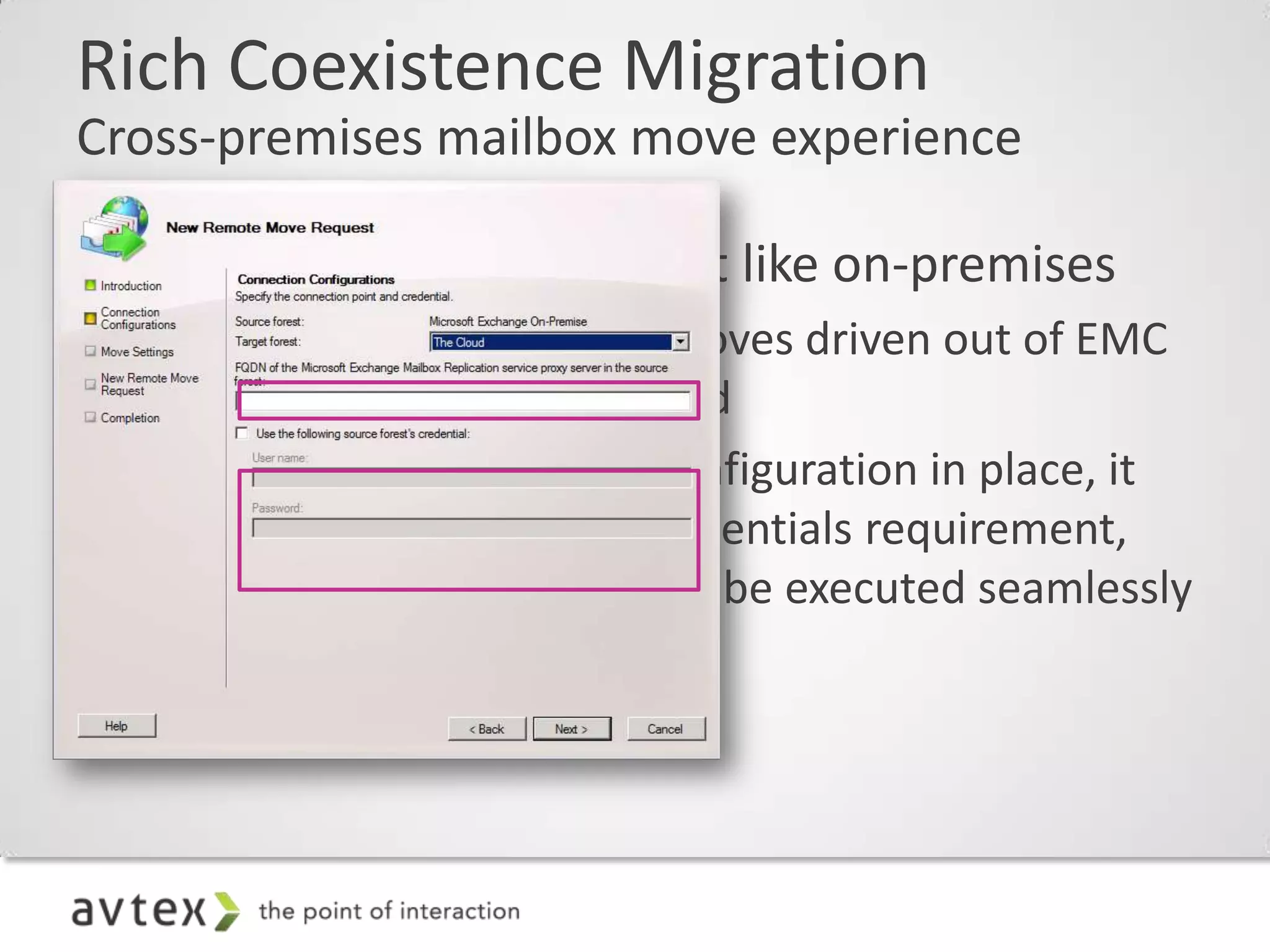
Rich Coexistence Migration
Cross-premises mailbox move experience

• Cross-Premises moves just like on-premises
  – Cross-Premises mailbox moves driven out of EMC
    GUI “Remote Move” wizard
  – With federated sharing configuration in place, it
    eliminates the explicit-credentials requirement,
    allowing mailbox moves to be executed seamlessly
    to and from the cloud
Rich Coexistence Migration
The stuff you need to know
  – It’s a true “online” move: User stays connected to their mailbox
    through the move
      • Client switchover happens automatically at the end
      • Traditional “offline” move when moving from Exchange 2003 source
  – Outlook uses Autodiscover to detect the change and fixes up the
    user’s Outlook profile automatically on the client machine
  – Since it’s a move (not a new mailbox + data copy), Outlook doesn’t see
    it as a new/different mailbox. End result = No OST resync
  – Moves are queued and paced by the datacenter
  – Object conversion for mail routing happens automatically after data
    move
      • Mailbox on-premises gets converted to mail-enabled user automatically
      • Admin can override this automation and stage the move-then-convert steps
Rich Coexistence Migration
Mailbox off-boarding
• Why might you care about off-boarding?
   – Long term coexistence scenarios
   – Compliance requirements (retaining ex-employee data)
   – Piloting online but not committed to the move

• What do you need to know about off-boarding?
   – Off-boarding is available using EMC toolset while in Rich
     Coexistence scenario
   – Off-boarding to on-premises Exchange Server 2010 database is
     an online mailbox move
   – Off-boarding to on-premises Exchange Server 2003/Exchange
     Server 2007 database is an offline mailbox move
   – Off-boarding without Rich Coexistence (i.e., any other scenario,
     including V1 off-boarding) is PST via Outlook or partner driven
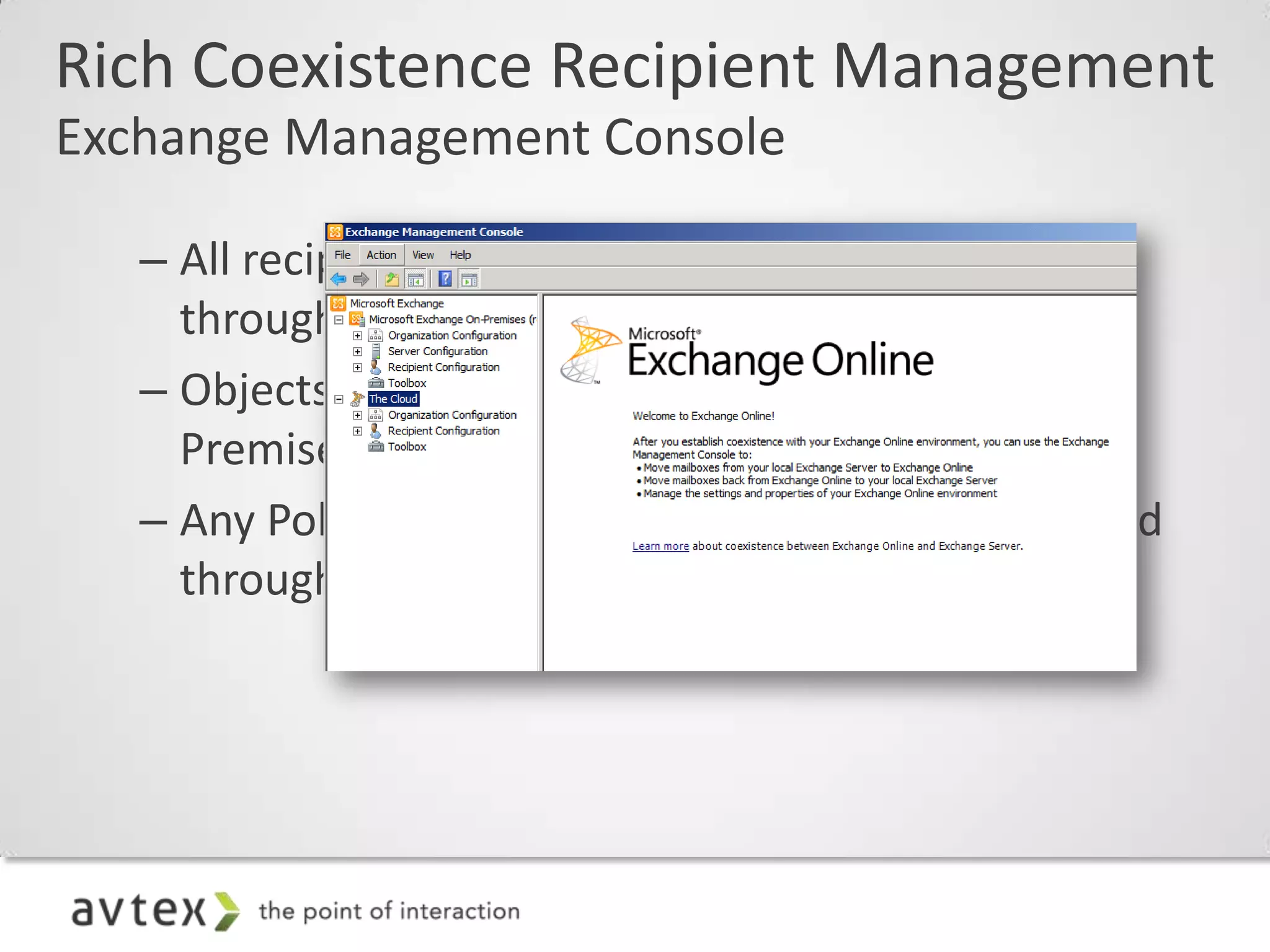
Rich Coexistence Recipient Management
Exchange Management Console

   – All recipient management should be performed
     through EMC 2010 SP1
   – Objects should be created through the On-
     Premises node
   – Any Policies (e.g. OWA Policy) should be assigned
     through the Cloud node
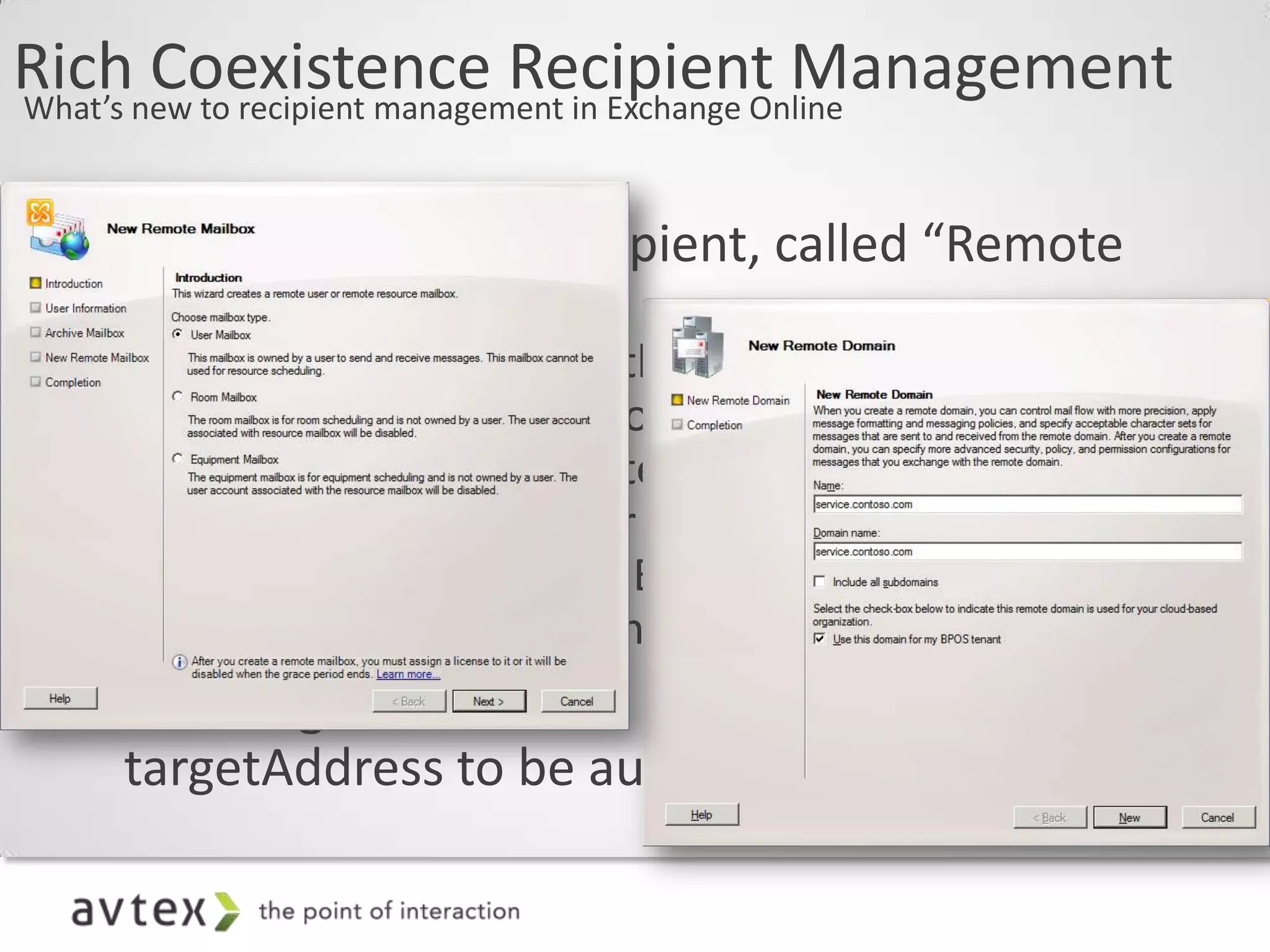
Richnew to recipient management in Exchange Online
What’s
       Coexistence Recipient Management

  • New On-Premises recipient, called “Remote
    Mailbox”
     – Represents a Mailbox that exists in Exchange
       Online (found under Contacts)
     – Specific to Rich Coexistence
     – Appears as a Mail User to legacy Exchange
     – MRS Mailbox Move to Exchange Online will leave
       a Remote Mailbox in the On Premises directory
  • New flag on a Remote Domain allows the
    targetAddress to be automatically calculated
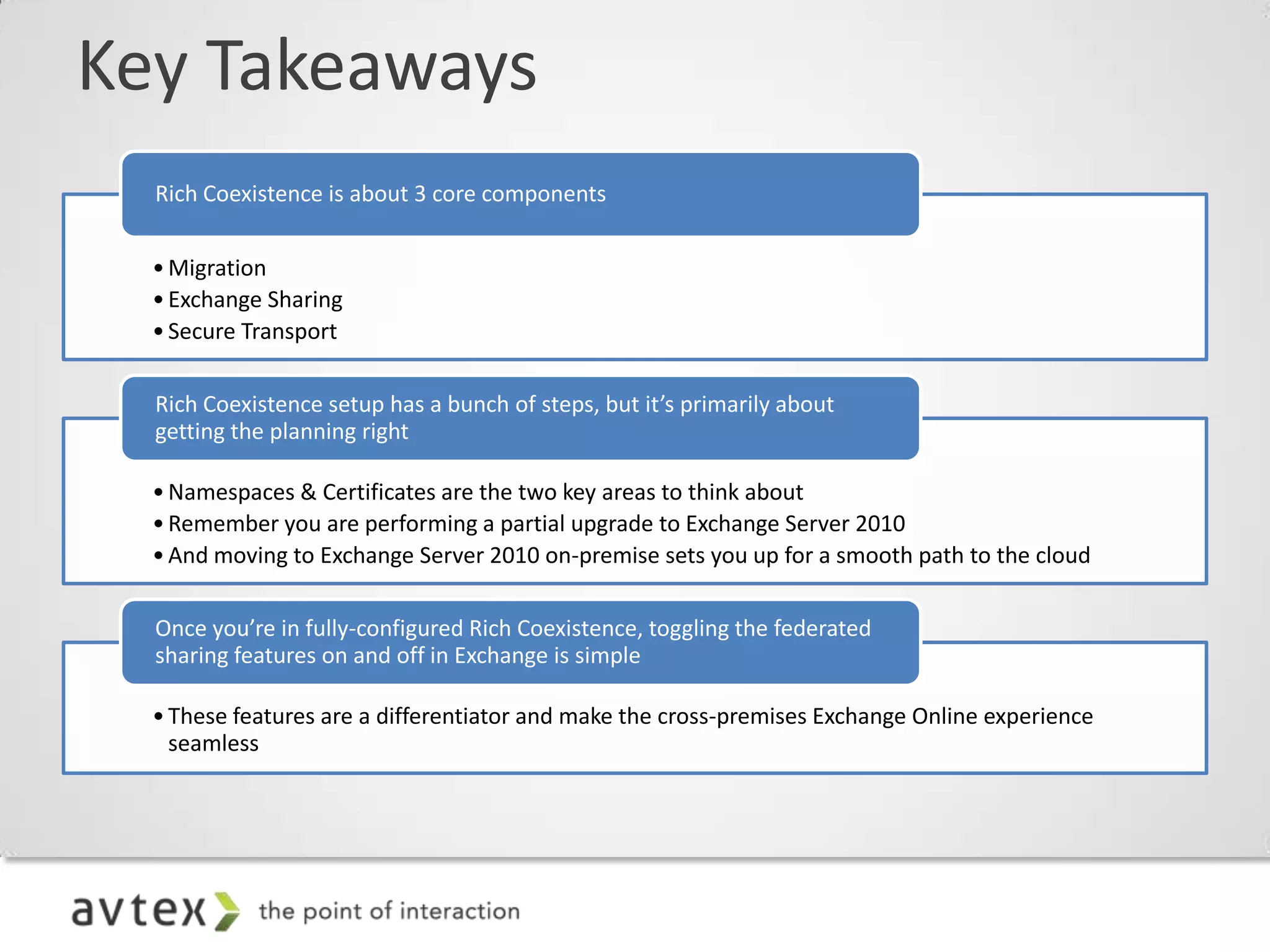
Key Takeaways
  Rich Coexistence is about 3 core components


  • Migration
  • Exchange Sharing
  • Secure Transport

  Rich Coexistence setup has a bunch of steps, but it’s primarily about
  getting the planning right

  • Namespaces & Certificates are the two key areas to think about
  • Remember you are performing a partial upgrade to Exchange Server 2010
  • And moving to Exchange Server 2010 on-premise sets you up for a smooth path to the cloud

  Once you’re in fully-configured Rich Coexistence, toggling the federated
  sharing features on and off in Exchange is simple

  • These features are a differentiator and make the cross-premises Exchange Online experience
    seamless
TechFuse 2012: Rich Coexistence

TechFuse 2012: Rich Coexistence

  • 1.
    Thomas Moen Director of Strategy and Innovation tmoen@avtex.com @cloudmovr Rich Coexistence (wrongfully Hybrid Deployment) 5.16.2012
  • 2.
    It is GREATto Have Options… • On Premise – services on premise • Hosted – services hosted by someone else • Segmented – host some users/apps, keep some users/apps on premise • Hybrid – some services, i.e., filtering, archive encryption, are hosted. Azure Appliance or Azure SQL
  • 4.
    Agenda • Introduction • Rich Coexistence Features Explained • Planning • Deployment • Migration • Management
  • 5.
    Not for thefaint of heart. This is a high impact ride. People with back, neck, heart, or cursing at computer problems, should not attempt this ride. Stay at the Exchange server at all times. Hold on with both hands!
  • 6.
    Think I amJoking?
  • 7.
    If you arefeel any discomfort with… – ADFS 2.0 – Dir Sync – Rich Coexistence – PowerShell Call a professional immediately! If you do proceed, proceed at your own peril…
  • 8.
    … and KeepThese Close at Hand! On the occasion of a Service Interrupting Event (SIE), Microsoft Online Services continuously updates the channels below to provide you necessary information to manage your business. Microsoft Online Services strives to earn your business and trust through our best in class service and ongoing communication. Service Health Dashboard The best location for Service Update information. Updated regularly through any SIE and notifies you of any upcoming planned maintenance. Twitter Feed is continuously updated as Facebook SIE incidents occur. Get the latest updates, tips http://twitter.com/#!/Office365 and more delivered straight to your Facebook stream. http://www.facebook.com/#!/ Community Blog office365 With access to forums, community, and community, you’re always receiving the most updated information. http://community.office365.com/en- us/default.aspx
  • 9.
    Your Four NewBest Friends… http://www.microsoft.com/en- tmoen@avtex.com us/download/confirmation.aspx?id=26509 @cloudmovr http://technet.microsoft.com/en- Jack us/exdeploy2010/default.aspx#Index http://www.jackdaniels.com/
  • 10.
    Rich Coexistence Summarized Whatdoes coexistence mean? – Executed over a longer period of time (a week, a month, a year, etc.) – No requirement to ever “flip a switch”—can run in coexistence scenario indefinitely – Requires on-premises configuration and hardware
  • 11.
    Today’s Rich CoexistenceSummarized Focus Simple vs. Rich Coexistence feature-set Feature Simple Rich* Mail routing between on-premises and cloud (recipients on either side)   Mail routing with shared namespace (if desired) - @company.com on both sides   Unified GAL   Free/Busy and calendar sharing cross-premises  Mailtips, messaging tracking, and mailbox search work cross-premises  OWA Redirection cross-premise (single OWA URL for both on-premises and cloud)  Exchange Online Archive  Exchange Management Console used to manage cross-prem relationship & mailbox migrations  Native mailbox move supports both onboarding and offboarding  No outlook reconfiguration or OST resync required after mailbox migration  Online Mailbox Move allows users to start logged into their mailbox while it is being moved to the cloud  Secure Mail ensure emails cross-premises are encrypted, and the internal auth headers are preserved  Centralized mailflow control, ensures that all email routes inbound/outbound via On Premises 
  • 12.
    Directory Synchronization – Managesonline users in Active Directory® – Eliminates the need to manage users and groups in two places – Powers unified global address list – Simplifies user provisioning – Enables rich coexistence scenarios – Designed for single-forest topologies DirSync tool runs on – Customer’s Active Directory is the local server replication master
  • 13.
    Active Directory FederationServices Users are authenticated by local Active Directory Federation Services server. Active Directory Federation No Microsoft Outlook® sign-in tool is required. Services 2.0
  • 14.
    Exchange 2010 Federation •Federated Sharing provides: – Easy setup of external data sharing – Broader reach without additional steps to set up – More security with controls for admins and users • Federated Sharing is made possible because: – Server can act on behalf of a specific user • Specific user identified by email address • User not prompted for credentials – Microsoft Federation Gateway acts as a trust broker • Reduces explicit point-to-point trust management • No Active Directory trusts, service ,or cloud accounts to manage • Minimizes certificate exchanges • Verifies domain ownership
  • 15.
    Cross-Premises Free/Busy and CalendarSharing* – Creates the look and feel of a single, seamless organization for meeting scheduling and management of calendars – Works with any supported Outlook client; the heavy lifting is done by the Exchange Server 2010 CAS servers and the MS Federation Gateway, making this transparent to the end user. *Caution with Exchange 2003 or earlier
  • 16.
    Cross-Premises Free/Busy and CalendarSharing – How it Works Microsoft Federation Ben Mailbox Gateway Server Client Access Free Server Busy Request From Ben To Joe Exchange Online On Premises User “Ben” On Premises Joe
  • 17.
    Cross-Premises MailTips –Creates the look and feel of a single, seamless organization. Correct evaluation of “Internal to” vs. “External to” organization context – Allows awareness and correct Outlook 2010 representation of MailTips for size and quantity limits on DGs, etc.
  • 18.
    Cross-Premises Message Tracking – Creates the look and feel of a single, seamless organization – Message tracking started from on-premises or from the cloud will track through to the edge of the combined organization • Tracking fidelity across Exchange Server 2010 SP1 servers will be identical to fully on-premises organizations (i.e., high fidelity) • Tracking fidelity across pre-2010 servers will be identical to fully on-premises organizations (i.e., lower fidelity)
  • 19.
    Cross-Premises Mailbox Search – Allows administrators to select/manage mailboxes for mailbox searches from on-premises or cloud- hosted mailboxes – Graphical representation allows to differentiate between on-premises and cloud-hosted mailboxes in the picker – Search results returned across all selected mailboxes, regardless of mailbox location!
  • 20.
    Cross-Premises OWA Redirection •Single URL – Allows mailbox access to OWA via a single URL (pointed to on-premises CAS) – Ensures a good end-user experience as mailboxes are moved in and out of the cloud, since OWA URL remains unchanged • Better cloud log-in experience – Log-in experience can be greatly improved by adding your domain name into your cloud URL so that you can access your cloud mailbox without the interruption of “Go There” page
  • 21.
    Cross-Premises Mail Flow •Secure transport • Rich coexistence adds the ability to preserve internal organizational headers: • Allows us to treat a message from the cloud as authenticated. This means we trust the message and resolve the sender to a recipient in the GAL. • Restrictions specified for that recipient get honored. • When sender is expanded in Outlook, GAL card is opened (not SMTP address). – Possible centralized mail flow scenario
  • 22.
    Cross-Premises Mail Flow Secure TLS Connection ForeFront Online Protection for Exchange Domain Secure Exchange Online Mailbox On Premises Server Mailbox “Ben” Cloud Hub Mailbox “Joe” Transport Server On Premises
  • 23.
    Cross-Premises Mail Flow Sending Internal Headers to Cloud ForeFront Online Protection for XOORG Data Exchange Certificate Subject Exchange Online Mailbox On Premises Server Mailbox “Ben” Cross-premises emails are XOORG Data authenticated Cloud Hub as “Internal” Mailbox “Joe” Transport Server On Premises
  • 24.
    Cross-Premises Mail Flow Sending Internal Headers to On Prem ForeFront Online Protection for Exchange Exchange Online XOORG Data Mailbox On Premises Server Mailbox “Ben” Emails from the cloud are seen as Internal by Cloud Hub XOORG Data Transport & Mailbox “Joe” Transport Journal Rules Server On Premises
  • 25.
    Cross-Premises Mail Flow Centralizedmail flow scenario Internet ForeFront Online Protection for Exchange Hub Mailbox Transport Server Server Exchange Online On Premises
  • 26.
    Rich Coexistence Feature summary Makesyour on-premises organization and cloud organization work together like a single, seamless organization • Offers near-parity of features/experience on-premises and in the cloud • Seamless interactions between on-premises and cloud mailboxes • Migrations in and out of the cloud transparent to end user Features not supported: • Delegation Coexistence—Delegate permissions are migrated, but not available during the move • Migration of Send As/Full Access permissions • Multi-forest—only single-forest source environments
  • 27.
    Federation Scenarios “Federation”: Avery overloaded word… • Sign-On Scenarios • Single Sign-on cloud mailbox log in ADFSv2: “Federated • Direct log on for LOB apps Identity” • User uses corporate credentials to access online resources in the cloud • Cross-premises Free/Busy, Shared Calendaring • Delegation Scenarios: “Federated Sharing” • Cross-premises MailTips • Services act on behalf of a user • Cross-premises Message Tracking to access Exchange resources • Cross-premises Mailbox Search • Cross-premises MRS authentication • Cross-premises OWA redirection (single URL) • Cross-premises Archiving
  • 28.
    Rich Coexistence ServerRoles 3 - 5 Additional Server/Roles Required
  • 29.
    Shared Namespace: CoreConcepts MX for contoso.com = On Premises External Recipient (joe@foo.com) Internet On Premises MX for service.contoso.com = Exchange AD Forest Online Exchange 2003 DC FE/BE Server Exchange Online Email is forwarded to from joe@foo.com to ben@service.contoso.com ben@contoso.com
  • 30.
    Namespace Planning • FederatedIdentity – UPN suffixes need to match an Identity Federation domain • Email Forwarding & Autodiscover Redirects – Minimum of 1 domain for on-premises and 1 for Exchange Online – Existing primary SMTP domain sufficient for the on-premises namespace – Additional namespace required for Exchange Online • Note: Cannot be the sign-up domain (*.onmicrosoft.com) • Exchange Federated Sharing – Recommend use of a unique domain for the On-Premises to Microsoft Federation Gateway Exchange Federation Trust – e.g. exchangesharing.contoso.com – Referred to in EMC and EMS as the “Account Namespace” – Does not need to be on any Email Address Policies – Any other domains (e.g. contoso.com) should be added as additional federated domains
  • 31.
    Certificates • Exchange FederationTrust – Can be any certificate (e.g. self-signed)—it will be pushed/pulled to all Exchange Server 2010 SP1 Client Access Control Servers – The “New Federation Trust” wizard handles the cert creation and replication to other CAS servers for you • Exchange CAS – You must ensure that the primary SMTP domain has an Autodiscover DNS entry and is listed on the CAS certificate – DNS must resolve to a Exchange Server 2010 SP1 CAS server – CAS protocols (EWS, MRSPRoxy) must have the externalUrl listed on the certificate • Exchange HUB – Ensure the certificate is both client and server certificate type You can use the Exchange Certificate wizard in EMC 2010 SP1 to generate the request! ADFS also requires public certificates for ADFS endpoints in most scenarios
  • 32.
    Exchange Deployment Assistant • http://technet.microsoft.com/exdeploy2010 • Currently supports Rich Coexistence configuration with Exchange Server 2003 and Exchange 2007 • SP2 new Coexistence/Hybrid Wizard
  • 33.
    Hybrid Config WizardRequirements • On Premise Exchange 2003 or Later • All Exchange Updates and SP2 Rollup • Office 365 Tenant and Admin Account • Custom Domains • AD FS 2.0 • Dir Sync • CAS/HUB Server • Autodiscover DNS Records Configured • Office 365 Org in the EMC • EWS Config ExternalURL - externally accessible, FQDN • Certificates – self signed certs NOT used and a whole lot of other certification stuff! Like EWS external URL, the Autodiscover endpoint specified in public DNS have to be listed in the Subject Alternative Name of the certificate. (I hate certificates)
  • 34.
  • 35.
    Here Where WeStart… The following services may be exposed to the Internet to support remote access: 1. SMTP External SMTP Recipient (mailto:joe@foo.com) 2. Outlook Web Access 3. Outlook Anywhere 4. Exchange ActiveSync https://mail.contoso.com/exchange On Premises AD Forest https://mail.contoso.com/rpc Exchange 2003 DC AD FS Dirsync FE/BE Server https://mail.contoso.com/ Microsoft-Server-ActiveSync
  • 36.
    Rich Coexistence Setup Step Details Required/ • Step 1: Office 365 configuration steps Recommended Run through Office 365 As part of onboarding, the onboarding Recommended Onboarding Accelerator accelerator steps the admin over to “Rich Coexistence” guidance Configure Federated On-premises ADFS/Geneva server allows on- Recommended Identity premises (single) identity to be used for cloud authentication Configure DirSync On-premises appliance synchronizes on- Required premises directory/GAL with the cloud Enable DirSync Writeback Allows rich off-boarding with message- Recommended* repliability, archiving in the cloud, and UM in the cloud Not available during Beta
  • 37.
    Register MSO Namespaces&Config ADFS (2) CreateMSOFederation Config cmdlets: Records (1) Run Domain Proof of Ownership DNS (3) RerunMSO Federation Config cmdlets: to (4) New Registered Domains propagate out • ms1234567.contoso.com > ps.microsoftonline.com •• “Add-MsolFederatedDomain –DomainName “Add-MsolFederatedDomain –DomainName MSO ID and Exchange Online • ms8901234.service.contoso.com > ps.microsoftonline.com “contoso.com” “contoso.com” •• • MSO ID reserves the namespace as a “Federated “Add-MsolFederatedDomain –DomainName “Add-MsolFederatedDomain –DomainName MSO ID Namespace” “service.contoso.com” “service.contoso.com” • MSO ID sets the AD FS endpoint for each namespace to “https://adfs.contoso.com/adfs/ls/” *This verifies domain proof of ownership* domains as • Exchange Online creates all registered Accepted Domains Microsoft Online Namespace Type Endpoint Directory Service https://adfs.contoso.co contoso.com Federated m service.contoso.c https://adfs.contoso.co Federated om m On Premises AD Forest Company: contoso.onmicrosoft.com Company: contoso.onmicrosoft.com Domains Status Exchange Online Domains Status contoso.com pending active service.contoso.com service.contoso.com pending active DC AD FS Accepted Domain Type contoso.com Authoritative service.contoso.com Authoritative
  • 38.
    Deploy Office 365Directory Sync (1) Install DirSync (2) Run configuration wizard (3) Run first sync MSO ID Only Users are given an MSO ID If their On-Premises UPN matches a federated domain, then they are given a Federated MSO ID with the same name Microsoft Online Any logons using that ID will be Directory Service redirected to the On Premises ADFS instance for authentication On Premises AD Forest Sync process will sync out the following object types: 1. Users 2. Contacts Exchange Online All mail-enabled objects are synced to DC AD FS Dirsync 3. Groups Exchange Online: 1. Mailuser 2. Mailbox 3. Mailcontact 4. MaildistributionGroup (Inc. security)
  • 39.
    Rich Coexistence Setup Step Details Required/ Recommended Install Exchange Server 2010 On-premises Exchange Server 2010 SP1 CAS/Hub server (also MBX role for some Required SP1 server on-premises scenarios) required for rich coexistence features • Step 2: Exchange configuration steps* Configure cloud Autodiscover DNS record Allows on-premises targeted autodiscover Outlook client to redirect to cloud without prompts Required Publish MRS Proxy Allows Exchange Online Mailbox Replication Service to connect On Premises and perform a Required move to the cloud Implement Cloud Create configuration policies in the cloud to match (or complement) on-premises Recommended Configuration Policies configuration policies (e.g., ActiveSync policies, OWA policies, etc.) Configure RBAC in the cloud Create/manage Role-Based Access Control (RBAC) settings in the cloud to match (or Recommended complement) on-premises RBAC configuration Configure Federation Trust / Enable infrastructure for delegated Live namespace federation. Allows the following Recommended Org Relationship features: “Federated Sharing” Cross-premises Free/Busy, Shared Cross-premises OWA redirection (single Calendaring URL) Cross-premises MailTips Cross-premises Mailbox Search Cross-premises Message Tracking Cross-premises Archiving Configure Cross-premises mail Configure Cross-premises mail routing. This configuration ensures proper anti- Recommended** routing spam/header handling for mail sent between on-premises and the cloud. * Exchange Deployment Assistant will be updated to include Rich Coexistence scenario steps ** Not available during Beta
  • 40.
    Creating the ExchangeFederation Trust MSO ID Automatic implied trust (1) Create Exchange Federation Trust with the “MFG” using a “unique namespace” e.g. Microsoft Federation between the Exchange Gateway (MFG) Online tenant and MFG exchangesharing.contoso.com (3) Exchange Online Org Relationship with “contoso.com” On Premises AD Forest Exchange Online Exchange Exchange DC AD FS Dirsync 2003 FE/BE 2010 CAS/ Server HUB Server (2) On Premises Org Relationship with “service.contoso.com” and “contoso.com”
  • 41.
    Creating the SecureMail Connectors FOPE On Premises AD Forest Exchange 2010 CAS/ HUB Server Exchange Online
  • 42.
    Mail Routing External recipientto Exchange Online mailbox MX & AutoD for contoso.com = On Premises MX & AutoD for service. contoso.com = External Recipient Exchange Online (joe@foo.com) Internet Exchange Online On Premises AD Forest Mailbox Primary Smtp Address = Remote Mailbox ben@contoso.com Primary Smtp Address = Secondary Smtp Address = ben@contoso.com ben@service.contoso.com Remote Routing Address = ben@service.contoso.com
  • 43.
    Autodiscover Outlook Profile Generation (3) Outlook attempts to discover (1) Where is my mailbox? endpoint through DNS record “autodiscover.service.contoso.com” (2) Local Exchange passes a redirect to (4) Request Authentication “service.contoso.com” (5) Authentication Success (6) Profile Builds
  • 44.
    Post-Exchange Coexistence Server Deployment Once 2010 is deployed the following additional services need to be enabled: https://legacymail.contoso.com/exchange New Certificate 1. Autodiscover Required https://mail.contoso.com/exchange 2. Availability Web Service https://mail.contoso.com/owa 3. Exchange Web Services On Premises https://autodiscover.contoso.com/ AD Forest autodiscover/autodiscover.xml https://mail.contoso.com/rpc Exchange Exchange DC AD FS Dirsync 2003 FE/BE 2010 CAS/ https://mail.outlook.com/ews/ Server HUB Server https://mail.contoso.com/ Microsoft-Server-ActiveSync To support OWA redirection External endpoints: to the cloud, logons need to 1. mail.contoso.com be shifted to 2010 2. autodiscover.contoso.com 3. legacymail.contoso.com This requires a new “legacy” endpoint for OWA 2003
  • 45.
    Rich Coexistence: GUIManagement Connecting on-premises GUI to the cloud – Once you have installed Exchange Server 2010 SP1 on premises and connected it to your Exchange Online 2010 organization, you can use EMC GUI for a number of the configuration steps on the previous slides
  • 46.
    Rich Coexistence Setup FederatedSharing – Most of the cool Rich Coexistence features require federated sharing to be configured between on- premises and the cloud – EMC in Exchange Server 2010 SP1 has GUI for this
  • 47.
    Rich Coexistence Migration You’veconfigured for cross-premises, now it’s time to move! • Administrator uses EMC on-premises tool to manage mailbox moves and other administrative cross-premise tasks – Note: There is no requirement to move mailboxes on premises to an Exchange Server 2010 server prior to moving them to the cloud • DirSync keeps GAL in sync as mailboxes are moved
  • 48.
    Rich Coexistence Migration Cross-premisesmailbox move experience • Cross-Premises moves just like on-premises – Cross-Premises mailbox moves driven out of EMC GUI “Remote Move” wizard – With federated sharing configuration in place, it eliminates the explicit-credentials requirement, allowing mailbox moves to be executed seamlessly to and from the cloud
  • 49.
    Rich Coexistence Migration Thestuff you need to know – It’s a true “online” move: User stays connected to their mailbox through the move • Client switchover happens automatically at the end • Traditional “offline” move when moving from Exchange 2003 source – Outlook uses Autodiscover to detect the change and fixes up the user’s Outlook profile automatically on the client machine – Since it’s a move (not a new mailbox + data copy), Outlook doesn’t see it as a new/different mailbox. End result = No OST resync – Moves are queued and paced by the datacenter – Object conversion for mail routing happens automatically after data move • Mailbox on-premises gets converted to mail-enabled user automatically • Admin can override this automation and stage the move-then-convert steps
  • 50.
    Rich Coexistence Migration Mailboxoff-boarding • Why might you care about off-boarding? – Long term coexistence scenarios – Compliance requirements (retaining ex-employee data) – Piloting online but not committed to the move • What do you need to know about off-boarding? – Off-boarding is available using EMC toolset while in Rich Coexistence scenario – Off-boarding to on-premises Exchange Server 2010 database is an online mailbox move – Off-boarding to on-premises Exchange Server 2003/Exchange Server 2007 database is an offline mailbox move – Off-boarding without Rich Coexistence (i.e., any other scenario, including V1 off-boarding) is PST via Outlook or partner driven
  • 51.
    Rich Coexistence RecipientManagement Exchange Management Console – All recipient management should be performed through EMC 2010 SP1 – Objects should be created through the On- Premises node – Any Policies (e.g. OWA Policy) should be assigned through the Cloud node
  • 52.
    Richnew to recipientmanagement in Exchange Online What’s Coexistence Recipient Management • New On-Premises recipient, called “Remote Mailbox” – Represents a Mailbox that exists in Exchange Online (found under Contacts) – Specific to Rich Coexistence – Appears as a Mail User to legacy Exchange – MRS Mailbox Move to Exchange Online will leave a Remote Mailbox in the On Premises directory • New flag on a Remote Domain allows the targetAddress to be automatically calculated
  • 53.
    Key Takeaways Rich Coexistence is about 3 core components • Migration • Exchange Sharing • Secure Transport Rich Coexistence setup has a bunch of steps, but it’s primarily about getting the planning right • Namespaces & Certificates are the two key areas to think about • Remember you are performing a partial upgrade to Exchange Server 2010 • And moving to Exchange Server 2010 on-premise sets you up for a smooth path to the cloud Once you’re in fully-configured Rich Coexistence, toggling the federated sharing features on and off in Exchange is simple • These features are a differentiator and make the cross-premises Exchange Online experience seamless