#TechTuesdays @infacloud
Simplifying SAP
Connectivity with Cloud
Integration
Anand Peri, Cloud Product Management
Ashwin Viswanath, Cloud Product Marketing
InformaticaCloud.com/SAP
Agenda
• SAP Integration – Why is it important?
• Demo
• Loading SAP customer info into Salesforce
• Bulk extraction from clustered tables to flat files
• Using Salesforce Outbound Messaging
• Performing lookups
• Summary
• Q & A
• Next #TechTuesdays Session
2
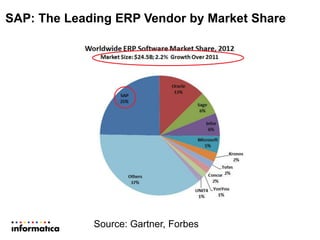
SAP: The Leading ERP Vendor by Market Share
Source: Gartner, Forbes
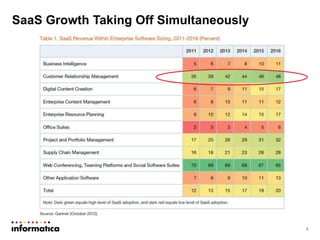
SaaS Growth Taking Off Simultaneously
4
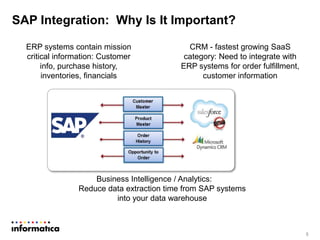
SAP Integration: Why Is It Important?
5
ERP systems contain mission
critical information: Customer
info, purchase history,
inventories, financials
CRM - fastest growing SaaS
category: Need to integrate with
ERP systems for order fulfillment,
customer information
Business Intelligence / Analytics:
Reduce data extraction time from SAP systems
into your data warehouse
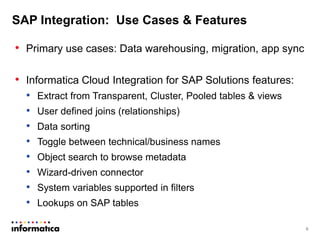
SAP Integration: Use Cases & Features
• Primary use cases: Data warehousing, migration, app sync
• Informatica Cloud Integration for SAP Solutions features:
• Extract from Transparent, Cluster, Pooled tables & views
• User defined joins (relationships)
• Data sorting
• Toggle between technical/business names
• Object search to browse metadata
• Wizard-driven connector
• System variables supported in filters
• Lookups on SAP tables
6
#TechTuesdays @infacloud
Cloud SAP Integration
Demonstration
Anand Peri, Cloud Product Management
InformaticaCloud.com/SAP
#TechTuesday Tips for Success
1. Import SAP connector transports1
2. Ensure that the SAP JCo libraries are available1
3. Setup the SAP user with privileges for several SAP
objects2
4. Use filters and only select the SAP columns that are
needed – this will improve performance
8
1 See https://community.informatica.com/docs/DOC-3340
2 See https://community.informatica.com/docs/DOC-3530
Q & A
InformaticaCloud.com/SAP
#TechTuesdays @infacloud
Next Steps
• Contact your Account Manager to try out the SAP
connector
• Join the Informatica Cloud Community:
https://community.informatica.com/community/products/inf
ormatica_cloud
• Attend #TechTuesdays Session 5: Benefits of Using
REST APIs in Integration
www.informaticacloud.com/techtuesdays
#TechTuesdays @infacloud

Tech Tuesdays SAP Connectivity

  • 1.
    #TechTuesdays @infacloud Simplifying SAP Connectivitywith Cloud Integration Anand Peri, Cloud Product Management Ashwin Viswanath, Cloud Product Marketing InformaticaCloud.com/SAP
  • 2.
    Agenda • SAP Integration– Why is it important? • Demo • Loading SAP customer info into Salesforce • Bulk extraction from clustered tables to flat files • Using Salesforce Outbound Messaging • Performing lookups • Summary • Q & A • Next #TechTuesdays Session 2
  • 3.
    SAP: The LeadingERP Vendor by Market Share Source: Gartner, Forbes
  • 4.
    SaaS Growth TakingOff Simultaneously 4
  • 5.
    SAP Integration: WhyIs It Important? 5 ERP systems contain mission critical information: Customer info, purchase history, inventories, financials CRM - fastest growing SaaS category: Need to integrate with ERP systems for order fulfillment, customer information Business Intelligence / Analytics: Reduce data extraction time from SAP systems into your data warehouse
  • 6.
    SAP Integration: UseCases & Features • Primary use cases: Data warehousing, migration, app sync • Informatica Cloud Integration for SAP Solutions features: • Extract from Transparent, Cluster, Pooled tables & views • User defined joins (relationships) • Data sorting • Toggle between technical/business names • Object search to browse metadata • Wizard-driven connector • System variables supported in filters • Lookups on SAP tables 6
  • 7.
    #TechTuesdays @infacloud Cloud SAPIntegration Demonstration Anand Peri, Cloud Product Management InformaticaCloud.com/SAP
  • 8.
    #TechTuesday Tips forSuccess 1. Import SAP connector transports1 2. Ensure that the SAP JCo libraries are available1 3. Setup the SAP user with privileges for several SAP objects2 4. Use filters and only select the SAP columns that are needed – this will improve performance 8 1 See https://community.informatica.com/docs/DOC-3340 2 See https://community.informatica.com/docs/DOC-3530
  • 9.
  • 10.
    Next Steps • Contactyour Account Manager to try out the SAP connector • Join the Informatica Cloud Community: https://community.informatica.com/community/products/inf ormatica_cloud • Attend #TechTuesdays Session 5: Benefits of Using REST APIs in Integration www.informaticacloud.com/techtuesdays #TechTuesdays @infacloud

Editor's Notes

  • #4 http://www.forbes.com/sites/louiscolumbus/2013/05/12/2013-erp-market-share-update-sap-solidifies-market-leadership/
  • #5 http://www.forbes.com/sites/louiscolumbus/2013/05/12/2013-erp-market-share-update-sap-solidifies-market-leadership/