1
About me
      Jan-yves Vanhaverbeke

      Wunderkraut Belgium (Ghent)
      Frontend Developer
      jan-yves.vanhaverbeke@wunderkraut.com

      Drupal.org: jyve
      Twitter: janyves


                                              2
Maintainable
Drupal Theming


                 3
Why
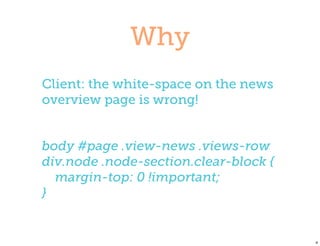
Client: the white-space on the news
overview page is wrong!


body #page .view-news .views-row
div.node .node-section.clear-block {
  margin-top: 0 !important;
}


                                       4
Agenda
‣   Drupal is special
‣   Optimize your design input
‣   Optimize your Drupal HTML
‣   Write maintainable CSS
‣   Build a maintainable theme


                                 5
Drupal is
 special

            6
Drupal is a CMS

‣   Highly customizable
‣   What if content is added?
‣   What if a block is moved?


                                7
Content-first approach

‣   First content types, taxonomy, users,
    comments
‣   Pages assembled from different
    sources
‣   Theming should support this


                                            8
Optimize your
 design input

                9
Problems with designs

‣   A design is static
‣   Not all pages will be designed
‣   Designs are rarely consistent
‣   A design reflects the ideal situation


                                           10
Solutions

‣   Ask for a Style Guide
‣   Analyze the design
‣   Keep designers involved


                              11
Style Guide


‣   All recurring design elements and
    interactions
‣   Leading in case of inconsistencies.


                                          12
Style Guide
‣   Site elements:
    ‣   Navigations: including mouse-over and active
        states
    ‣   One or more block templates
    ‣   A pager
    ‣   Message boxes: warning, confirmation and error
    ‣   A form. Typically useful for the contact form
    ‣   A list of the most important colors


                                                        13
Style Guide
‣   Typography:
    ‣   Headings: H1, H2, H3 and H4
    ‣   Links: color and (optional) underline. Also define
        a mouse-over state
    ‣   Paragraph: for default text the line-height and
        space between text should be defined
    ‣   (Un)ordered list: How does it look in content?


                                                            14
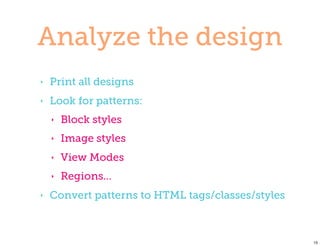
Analyze the design
‣   Print all designs
‣   Look for patterns:
    ‣   Block styles
    ‣   Image styles
    ‣   View Modes
    ‣   Regions...
‣   Convert patterns to HTML tags/classes/styles


                                                   15
Optimize
your HTML

            16
“ The Views output contains a
  rich set of div tags allowing
fine-grained CSS control over
          the output. ”


                                  17
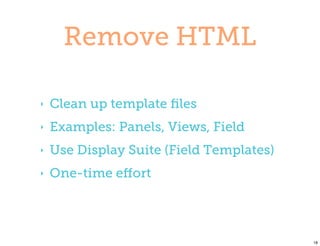
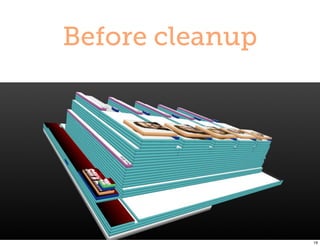
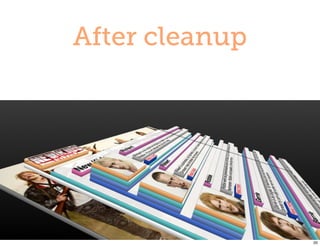
Remove HTML

‣   Clean up template files
‣   Examples: Panels, Views, Field
‣   Use Display Suite (Field Templates)
‣   One-time effort


                                          18
Before cleanup


                 19
After cleanup


                20
Module unaware HTML

‣   .panel-pane .pane-title {}
      vs
    .block > h2 {}
‣   page.tpl.php vs Panels Layout
‣   Views specific classes


                                    21
Add own classes

‣   Block class: http://drupal.org/
    project/block_class
‣   Views
‣   Display Suite
‣   Panels


                                      22
Write
maintainable CSS


                   23
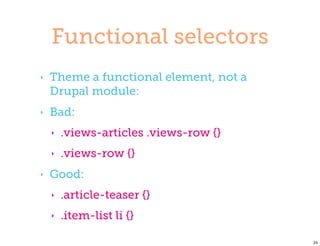
Functional selectors
‣   Theme a functional element, not a
    Drupal module:
‣   Bad:
    ‣   .views-articles .views-row {}
    ‣   .views-row {}
‣   Good:
    ‣   .article-teaser {}
    ‣   .item-list li {}

                                        24
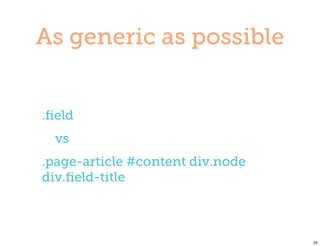
As generic as possible


.field
  vs
.page-article #content div.node
div.field-title


                                  25
Avoid overwrites

‣   Remove Drupal and module CSS
‣   function theme_css_alter(&$css) {
      unset($css['modules/system/system.menus.css']);
    }

‣   Dare to rework existing CSS as
    features are added.


                                                        26
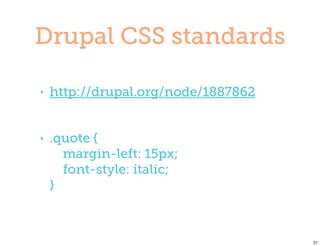
Drupal CSS standards

‣   http://drupal.org/node/1887862


‣   .quote {
      margin-left: 15px;
      font-style: italic;
    }


                                     27
Build a
maintainable theme


                     28
Theming is...

‣   Basic design
‣   Features
‣   Reusable styles


                        29
Basic design
‣   All generic elements: header, footer,
    layout
‣   Style Guide: navigation, typography,
    colors, links etc
‣   Simple content page with mixed
    typographical content.


                                            30
Features

‣   Examples: news, blog, slideshow
‣   Separate CSS files
‣   Clear separation between reuse of
    styles and custom CSS


                                        31
Styles

‣   Examples: list of teasers, block styles
‣   Power of Sass
‣   Add as you go


                                              32
Power of Sass

‣   Mixins and extendables
‣   Variables
‣   Selector nesting


                             33
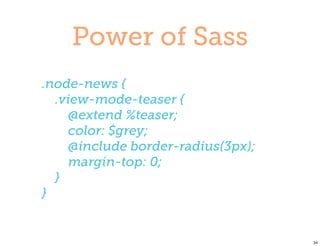
Power of Sass
.node-news {
  .view-mode-teaser {
    @extend %teaser;
    color: $grey;
    @include border-radius(3px);
    margin-top: 0;
  }
}


                                   34
Wundertheme

‣   Custom starter theme
‣   Beta
‣   https://github.com/Krimson/
    wundertheme.git


                                  35
In Summary

             36
In Summary
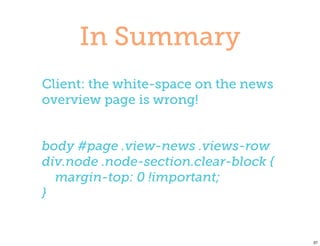
Client: the white-space on the news
overview page is wrong!


body #page .view-news .views-row
div.node .node-section.clear-block {
  margin-top: 0 !important;
}


                                       37
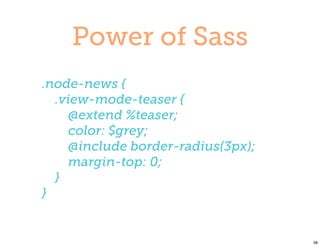
Power of Sass
.node-news {
  .view-mode-teaser {
    @extend %teaser;
    color: $grey;
    @include border-radius(3px);
    margin-top: 0;
  }
}


                                   38
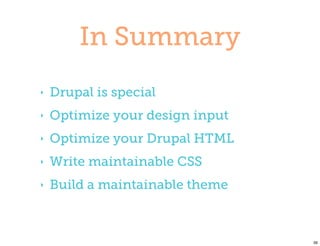
In Summary
‣   Drupal is special
‣   Optimize your design input
‣   Optimize your Drupal HTML
‣   Write maintainable CSS
‣   Build a maintainable theme


                                 39
Questions?


             40
41

Maintainable theming

  • 1.
  • 2.
    About me Jan-yves Vanhaverbeke Wunderkraut Belgium (Ghent) Frontend Developer jan-yves.vanhaverbeke@wunderkraut.com Drupal.org: jyve Twitter: janyves 2
  • 3.
  • 4.
    Why Client: the white-spaceon the news overview page is wrong! body #page .view-news .views-row div.node .node-section.clear-block { margin-top: 0 !important; } 4
  • 5.
    Agenda ‣ Drupal is special ‣ Optimize your design input ‣ Optimize your Drupal HTML ‣ Write maintainable CSS ‣ Build a maintainable theme 5
  • 6.
  • 7.
    Drupal is aCMS ‣ Highly customizable ‣ What if content is added? ‣ What if a block is moved? 7
  • 8.
    Content-first approach ‣ First content types, taxonomy, users, comments ‣ Pages assembled from different sources ‣ Theming should support this 8
  • 9.
  • 10.
    Problems with designs ‣ A design is static ‣ Not all pages will be designed ‣ Designs are rarely consistent ‣ A design reflects the ideal situation 10
  • 11.
    Solutions ‣ Ask for a Style Guide ‣ Analyze the design ‣ Keep designers involved 11
  • 12.
    Style Guide ‣ All recurring design elements and interactions ‣ Leading in case of inconsistencies. 12
  • 13.
    Style Guide ‣ Site elements: ‣ Navigations: including mouse-over and active states ‣ One or more block templates ‣ A pager ‣ Message boxes: warning, confirmation and error ‣ A form. Typically useful for the contact form ‣ A list of the most important colors 13
  • 14.
    Style Guide ‣ Typography: ‣ Headings: H1, H2, H3 and H4 ‣ Links: color and (optional) underline. Also define a mouse-over state ‣ Paragraph: for default text the line-height and space between text should be defined ‣ (Un)ordered list: How does it look in content? 14
  • 15.
    Analyze the design ‣ Print all designs ‣ Look for patterns: ‣ Block styles ‣ Image styles ‣ View Modes ‣ Regions... ‣ Convert patterns to HTML tags/classes/styles 15
  • 16.
  • 17.
    “ The Viewsoutput contains a rich set of div tags allowing fine-grained CSS control over the output. ” 17
  • 18.
    Remove HTML ‣ Clean up template files ‣ Examples: Panels, Views, Field ‣ Use Display Suite (Field Templates) ‣ One-time effort 18
  • 19.
  • 20.
  • 21.
    Module unaware HTML ‣ .panel-pane .pane-title {} vs .block > h2 {} ‣ page.tpl.php vs Panels Layout ‣ Views specific classes 21
  • 22.
    Add own classes ‣ Block class: http://drupal.org/ project/block_class ‣ Views ‣ Display Suite ‣ Panels 22
  • 23.
  • 24.
    Functional selectors ‣ Theme a functional element, not a Drupal module: ‣ Bad: ‣ .views-articles .views-row {} ‣ .views-row {} ‣ Good: ‣ .article-teaser {} ‣ .item-list li {} 24
  • 25.
    As generic aspossible .field vs .page-article #content div.node div.field-title 25
  • 26.
    Avoid overwrites ‣ Remove Drupal and module CSS ‣ function theme_css_alter(&$css) { unset($css['modules/system/system.menus.css']); } ‣ Dare to rework existing CSS as features are added. 26
  • 27.
    Drupal CSS standards ‣ http://drupal.org/node/1887862 ‣ .quote { margin-left: 15px; font-style: italic; } 27
  • 28.
  • 29.
    Theming is... ‣ Basic design ‣ Features ‣ Reusable styles 29
  • 30.
    Basic design ‣ All generic elements: header, footer, layout ‣ Style Guide: navigation, typography, colors, links etc ‣ Simple content page with mixed typographical content. 30
  • 31.
    Features ‣ Examples: news, blog, slideshow ‣ Separate CSS files ‣ Clear separation between reuse of styles and custom CSS 31
  • 32.
    Styles ‣ Examples: list of teasers, block styles ‣ Power of Sass ‣ Add as you go 32
  • 33.
    Power of Sass ‣ Mixins and extendables ‣ Variables ‣ Selector nesting 33
  • 34.
    Power of Sass .node-news{ .view-mode-teaser { @extend %teaser; color: $grey; @include border-radius(3px); margin-top: 0; } } 34
  • 35.
    Wundertheme ‣ Custom starter theme ‣ Beta ‣ https://github.com/Krimson/ wundertheme.git 35
  • 36.
  • 37.
    In Summary Client: thewhite-space on the news overview page is wrong! body #page .view-news .views-row div.node .node-section.clear-block { margin-top: 0 !important; } 37
  • 38.
    Power of Sass .node-news{ .view-mode-teaser { @extend %teaser; color: $grey; @include border-radius(3px); margin-top: 0; } } 38
  • 39.
    In Summary ‣ Drupal is special ‣ Optimize your design input ‣ Optimize your Drupal HTML ‣ Write maintainable CSS ‣ Build a maintainable theme 39
  • 40.
  • 41.