VFabric Suite
Introduction to Web Server, tc Server & Hyperic
VFabric Suite Overview
VFabric Web Server
vFabric Web Server is the Web server and load-balancing component of VMware vFabric Cloud Application Platform
(vFabric Platform). vFabric Web Server 5.0 is based on Apache HTTP Server version 2.2.
In addition to the standard features of Apache HTTP Server, vFabric Web Server provides the following mission-critical
benefits:
 Ability to easily install multiple instances of vFabric Web Server running on a single computer.
 Scalable management of multiple Web sites and servers; you can run and manage hundreds of instances of
vFabric Web Server.
 Support for heterogeneous environments (32- and 64-bit architectures): Ubuntu, RHEL, and Microsoft Windows.
vFabric Web Server can be updated and patched across all servers at once. See Supported Platforms for
details.
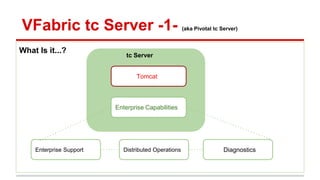
What Is it...?
VFabric tc Server -1- (aka Pivotal tc Server)
Enterprise Support Distributed Operations Diagnostics
tc Server
Tomcat
Enterprise Capabilities
Standard Edition
● vFabric tc Server is a Web application server based on open-source Apache Tomcat.
● It preserves the best of Tomcat and adds many mission-critical operational capabilities that are unavailable in the
open-source product.
● With its lean architecture and small, 10MB memory footprint, tc Server requires significantly fewer resources
than conventional servers, which allows for greater server density in virtual and cloud environments.
● Pre-configured Templates
● Many instances from a single binary install
● Clustering
● JMX management enabled by default
● Latest security patches as binaries
● Integration with vFabric components
VFabric tc Server -1- (aka Pivotal tc Server)
Troubleshooting An Application
● How many database calls does that page generate?
● What was the SQL executed?
● How long did the query take?
● Why does this page take a long time to load?
● Which part was slow?
● What happened then?!
VFabric tc Server -2- (aka Pivotal tc Server)
Spring Insight to the Rescue
What does it provide?
• Information on all database queries
• Information on all web request and response information
• Lists component calls and parameters
Where can I use it?
• Agile Development
• QA
• Load Testing
• Production Monitoring
How does it work?
• Agent instruments application code using AspectJ
• Reports to “dashboard” (insight.war) component responsible for rendering statistics
VFabric tc Server -3- (aka Pivotal tc Server)
Demo
❖ Application Summary
❖ Application View
❖ Endpoint View
❖ Response Time Histogram
❖ Request/Response Summary
❖ JDBC Query
❖ Recent Activity
❖ VFabric Hyperic Integration (more on this 2 slides down)
VFabric tc Server -4- (aka Pivotal tc Server)
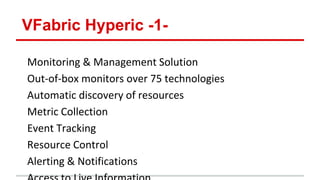
Monitoring & Management Solution
Out-of-box monitors over 75 technologies
Automatic discovery of resources
Metric Collection
Event Tracking
Resource Control
Alerting & Notifications
VFabric Hyperic -1-
VFabric Hyperic -2-
Example Architectural Deployment View
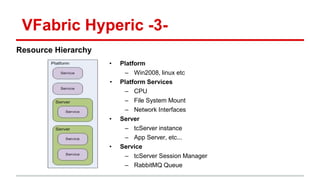
VFabric Hyperic -3-
Resource Hierarchy
• Platform
– Win2008, linux etc
• Platform Services
– CPU
– File System Mount
– Network Interfaces
• Server
– tcServer instance
– App Server, etc...
• Service
– tcServer Session Manager
– RabbitMQ Queue
tc Server Plug-In for Easier Management and Monitoring
The Hyperic tc Server plug-in enables you to remotely manage vFabric tc Server instances and applications on multiple computers. Hyperic
provides a single console with powerful dashboards through which you can:
 Manage the lifecycle of tc Runtime instances by starting, stopping, and restarting a local or remote instance.
 Manage the lifecycle of a group of tc Runtime instances that are distributed over a network of computers.
 Configure a single instance of tc Runtime. Configuration options include the various port numbers to which the tc
Runtime instance listens, JVM options such as heap size and enabling debugging, default server values for
JSPs and static content, JDBC datasources, various tc Runtime connectors, and so on.
 Deploy a Web application from an accessible file system, either local or remote. You can deploy to a single tc
Runtime instance or to a predefined group of servers.
 Manage the lifecycle of applications deployed to a single tc Runtime instance or group of servers. Application
lifecycle operations include start, stop, redeploy, undeploy, and reload.
VFabric Hyperic -4-
Spring Insight Plugin
 Enables a Hyperic Agent running on a tc Server instance to auto-discover web applications
running on that instance and to obtain detailed, real-time application health and request metrics.
 Enables alerting on those metrics, as you can with other Hyperic resources and metrics. A new
interface view of application metrics associates the application to currently monitored Hyperic
resources such as application servers, database servers, the operating system, and specific
resource types
 By providing all of this information on one screen, Hyperic makes it easier to pinpoint whether
the problem is infrastructure- or application-related. If the application is the culprit, Hyperic-
Insight integration enables you to move from Hyperic to Insight, in the same application context,
to diagnose the underlying problem
VFabric Hyperic -5-
VFabric Hyperic -6-
Demo Architectural Deployment Setup
Node #1 (platform = Nadia’s Laptop)
Tomcat Binary
Instance 1
Instance n
Node #2 (platform = Nadia’s Laptop -:)
Node #3
Hyperic Server
(AMS)
(Hyperic)
Dedicated DB
Hyperic Agent
tc Server installation
VFabric Hyperic -7-
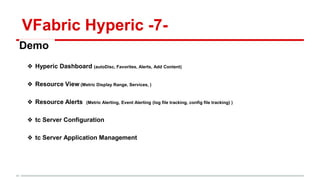
Demo
❖ Hyperic Dashboard (autoDisc, Favorites, Alerts, Add Content)
❖ Resource View (Metric Display Range, Services, )
❖ Resource Alerts (Metric Alerting, Event Alerting (log file tracking, config file tracking) )
❖ tc Server Configuration
❖ tc Server Application Management

tc server - vfabric hyperic

  • 1.
    VFabric Suite Introduction toWeb Server, tc Server & Hyperic
  • 2.
  • 3.
    VFabric Web Server vFabricWeb Server is the Web server and load-balancing component of VMware vFabric Cloud Application Platform (vFabric Platform). vFabric Web Server 5.0 is based on Apache HTTP Server version 2.2. In addition to the standard features of Apache HTTP Server, vFabric Web Server provides the following mission-critical benefits:  Ability to easily install multiple instances of vFabric Web Server running on a single computer.  Scalable management of multiple Web sites and servers; you can run and manage hundreds of instances of vFabric Web Server.  Support for heterogeneous environments (32- and 64-bit architectures): Ubuntu, RHEL, and Microsoft Windows. vFabric Web Server can be updated and patched across all servers at once. See Supported Platforms for details.
  • 4.
    What Is it...? VFabrictc Server -1- (aka Pivotal tc Server) Enterprise Support Distributed Operations Diagnostics tc Server Tomcat Enterprise Capabilities
  • 5.
    Standard Edition ● vFabrictc Server is a Web application server based on open-source Apache Tomcat. ● It preserves the best of Tomcat and adds many mission-critical operational capabilities that are unavailable in the open-source product. ● With its lean architecture and small, 10MB memory footprint, tc Server requires significantly fewer resources than conventional servers, which allows for greater server density in virtual and cloud environments. ● Pre-configured Templates ● Many instances from a single binary install ● Clustering ● JMX management enabled by default ● Latest security patches as binaries ● Integration with vFabric components VFabric tc Server -1- (aka Pivotal tc Server)
  • 6.
    Troubleshooting An Application ●How many database calls does that page generate? ● What was the SQL executed? ● How long did the query take? ● Why does this page take a long time to load? ● Which part was slow? ● What happened then?! VFabric tc Server -2- (aka Pivotal tc Server)
  • 7.
    Spring Insight tothe Rescue What does it provide? • Information on all database queries • Information on all web request and response information • Lists component calls and parameters Where can I use it? • Agile Development • QA • Load Testing • Production Monitoring How does it work? • Agent instruments application code using AspectJ • Reports to “dashboard” (insight.war) component responsible for rendering statistics VFabric tc Server -3- (aka Pivotal tc Server)
  • 8.
    Demo ❖ Application Summary ❖Application View ❖ Endpoint View ❖ Response Time Histogram ❖ Request/Response Summary ❖ JDBC Query ❖ Recent Activity ❖ VFabric Hyperic Integration (more on this 2 slides down) VFabric tc Server -4- (aka Pivotal tc Server)
  • 9.
    Monitoring & ManagementSolution Out-of-box monitors over 75 technologies Automatic discovery of resources Metric Collection Event Tracking Resource Control Alerting & Notifications VFabric Hyperic -1-
  • 10.
    VFabric Hyperic -2- ExampleArchitectural Deployment View
  • 11.
    VFabric Hyperic -3- ResourceHierarchy • Platform – Win2008, linux etc • Platform Services – CPU – File System Mount – Network Interfaces • Server – tcServer instance – App Server, etc... • Service – tcServer Session Manager – RabbitMQ Queue
  • 12.
    tc Server Plug-Infor Easier Management and Monitoring The Hyperic tc Server plug-in enables you to remotely manage vFabric tc Server instances and applications on multiple computers. Hyperic provides a single console with powerful dashboards through which you can:  Manage the lifecycle of tc Runtime instances by starting, stopping, and restarting a local or remote instance.  Manage the lifecycle of a group of tc Runtime instances that are distributed over a network of computers.  Configure a single instance of tc Runtime. Configuration options include the various port numbers to which the tc Runtime instance listens, JVM options such as heap size and enabling debugging, default server values for JSPs and static content, JDBC datasources, various tc Runtime connectors, and so on.  Deploy a Web application from an accessible file system, either local or remote. You can deploy to a single tc Runtime instance or to a predefined group of servers.  Manage the lifecycle of applications deployed to a single tc Runtime instance or group of servers. Application lifecycle operations include start, stop, redeploy, undeploy, and reload. VFabric Hyperic -4-
  • 13.
    Spring Insight Plugin Enables a Hyperic Agent running on a tc Server instance to auto-discover web applications running on that instance and to obtain detailed, real-time application health and request metrics.  Enables alerting on those metrics, as you can with other Hyperic resources and metrics. A new interface view of application metrics associates the application to currently monitored Hyperic resources such as application servers, database servers, the operating system, and specific resource types  By providing all of this information on one screen, Hyperic makes it easier to pinpoint whether the problem is infrastructure- or application-related. If the application is the culprit, Hyperic- Insight integration enables you to move from Hyperic to Insight, in the same application context, to diagnose the underlying problem VFabric Hyperic -5-
  • 14.
    VFabric Hyperic -6- DemoArchitectural Deployment Setup Node #1 (platform = Nadia’s Laptop) Tomcat Binary Instance 1 Instance n Node #2 (platform = Nadia’s Laptop -:) Node #3 Hyperic Server (AMS) (Hyperic) Dedicated DB Hyperic Agent tc Server installation
  • 15.
    VFabric Hyperic -7- Demo ❖Hyperic Dashboard (autoDisc, Favorites, Alerts, Add Content) ❖ Resource View (Metric Display Range, Services, ) ❖ Resource Alerts (Metric Alerting, Event Alerting (log file tracking, config file tracking) ) ❖ tc Server Configuration ❖ tc Server Application Management