Taverna (as a service)
Programmatic Access To Biological Databases (Perl)
1 – 4 October 2012
Rafael C. Jimenez
rafael@ebi.ac.uk
Introduction to Web Services at EBI
Table of contents
• Workflows
• Web Services
• myGrid solutions
– Biocatalogue
– Taverna
– myExperiment
• Installing Taverna
• Simple PSICQUIC workflow with Taverna
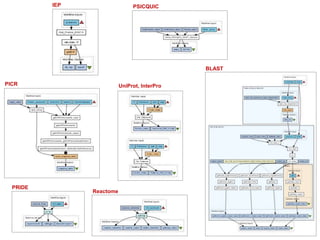
UniProt, InterPro
PSICQUIC
Reactome
PICR
PRIDE
BLAST
IEP
Introduction to Web Services at EBI
Workflow
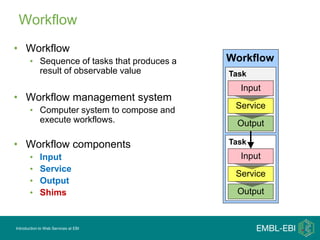
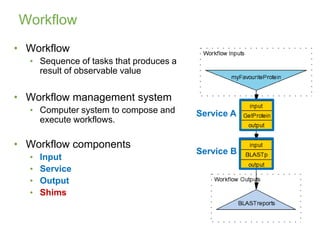
• Workflow
• Sequence of tasks that produces a
result of observable value
• Workflow management system
• Computer system to compose and
execute workflows.
• Workflow components
• Input
• Service
• Output
• Shims
Workflow
Task
Output
Service
Input
Task
Output
Service
Input
Introduction to Web Services at EBI
Workflow
• Workflow
• Sequence of tasks that produces a
result of observable value
• Workflow management system
• Computer system to compose and
execute workflows.
• Workflow components
• Input
• Service
• Output
• Shims
Service A
Service B
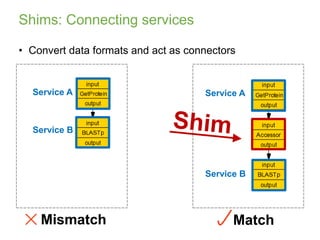
MatchMismatch
Shims: Connecting services
Service A
Service B
Service A
Service B
• Convert data formats and act as connectors
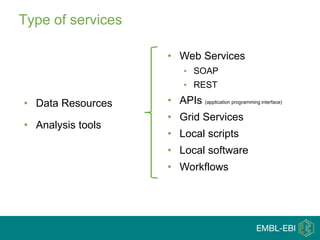
Type of services
• Data Resources
• Analysis tools
• Web Services
• SOAP
• REST
• APIs (application programming interface)
• Grid Services
• Local scripts
• Local software
• Workflows
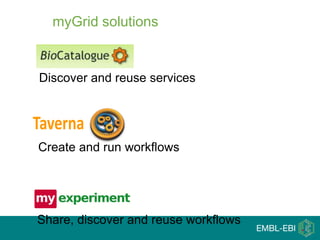
Create and run workflows
Share, discover and reuse workflows
Discover and reuse services
myGrid solutions
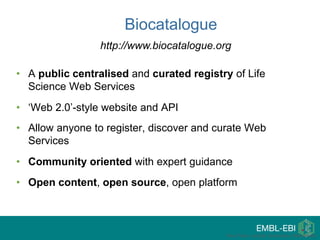
• A public centralised and curated registry of Life
Science Web Services
• ‘Web 2.0’-style website and API
• Allow anyone to register, discover and curate Web
Services
• Community oriented with expert guidance
• Open content, open source, open platform
Paul Fisher, myGrid, University of Manchester
Biocatalogue
http://www.biocatalogue.org
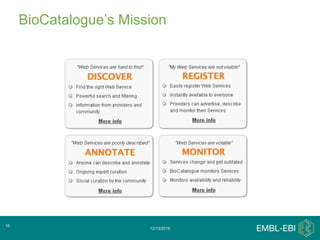
BioCatalogue’s Mission
12/13/2018
10
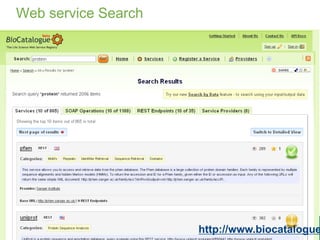
Web service Search
http://www.biocatalogue
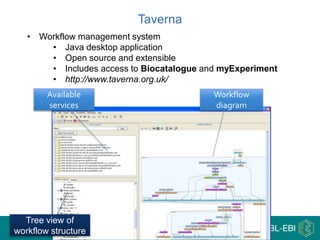
Workflow
diagram
Tree view of
workflow structure
Available
services
Taverna
• Workflow management system
• Java desktop application
• Open source and extensible
• Includes access to Biocatalogue and myExperiment
• http://www.taverna.org.uk/
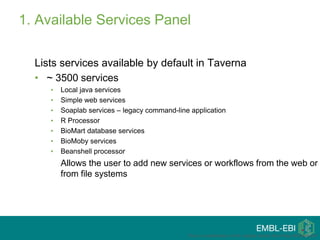
1. Available Services Panel
Lists services available by default in Taverna
• ~ 3500 services
• Local java services
• Simple web services
• Soaplab services – legacy command-line application
• R Processor
• BioMart database services
• BioMoby services
• Beanshell processor
Allows the user to add new services or workflows from the web or
from file systems
This is a modification of the original tutorial from Katy Wolstencroft
Sharing Experiments
• You can share results/experiments/experiences with your
• Research group
• Collaborators
• Scientific community
Paul Fisher, myGrid, University of Manchester
A registry of workflows
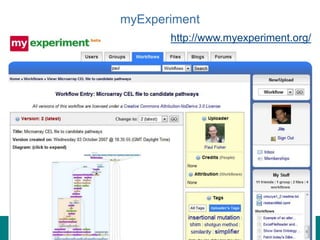
myExperiment
http://www.myexperiment.org/
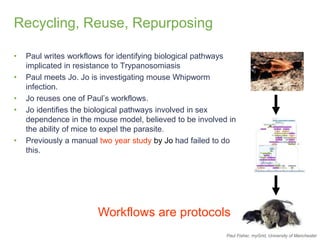
Recycling, Reuse, Repurposing
• Paul writes workflows for identifying biological pathways
implicated in resistance to Trypanosomiasis
• Paul meets Jo. Jo is investigating mouse Whipworm
infection.
• Jo reuses one of Paul’s workflows.
• Jo identifies the biological pathways involved in sex
dependence in the mouse model, believed to be involved in
the ability of mice to expel the parasite.
• Previously a manual two year study by Jo had failed to do
this.
Workflows are protocols
Paul Fisher, myGrid, University of Manchester
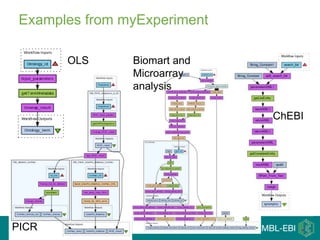
Examples from myExperiment
OLS
PICR
Biomart and
Microarray
analysis
ChEBI
Rafael Jimenez
rafael@ebi.ac.uk
TavernaWorkflow Management System
Installing the workbench
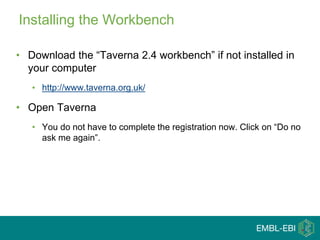
Installing the Workbench
• Download the “Taverna 2.4 workbench” if not installed in
your computer
• http://www.taverna.org.uk/
• Open Taverna
• You do not have to complete the registration now. Click on “Do no
ask me again”.
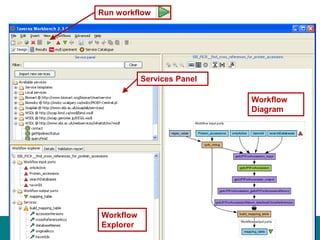
Workflow
Diagram
Services Panel
Workflow
Explorer
Run workflow
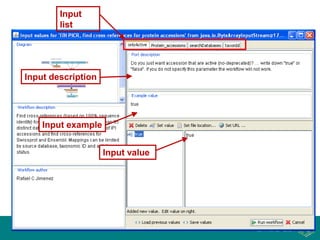
Input
list
Input description
Input example
Input value
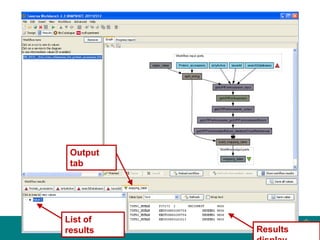
Output
tab
Results
List of
results
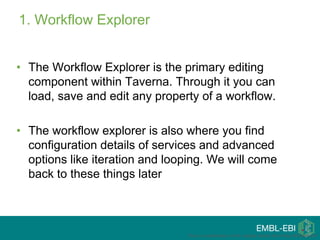
1. Workflow Explorer
• The Workflow Explorer is the primary editing
component within Taverna. Through it you can
load, save and edit any property of a workflow.
• The workflow explorer is also where you find
configuration details of services and advanced
options like iteration and looping. We will come
back to these things later
This is a modification of the original tutorial from Katy Wolstencroft
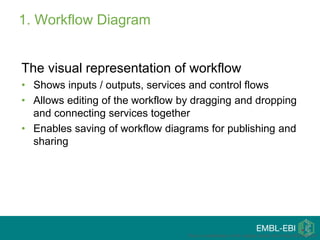
1. Workflow Diagram
The visual representation of workflow
• Shows inputs / outputs, services and control flows
• Allows editing of the workflow by dragging and dropping
and connecting services together
• Enables saving of workflow diagrams for publishing and
sharing
This is a modification of the original tutorial from Katy Wolstencroft
1. Available Services Panel
Lists services available by default in Taverna
• ~ 3500 services
• Local java services
• Simple web services
• Soaplab services – legacy command-line application
• R Processor
• BioMart database services
• BioMoby services
• Beanshell processor
Allows the user to add new services or workflows from the web or
from file systems
This is a modification of the original tutorial from Katy Wolstencroft
Rafael Jimenez
rafael@ebi.ac.uk
TavernaSimple PSICQUIC workflows with
Taverna
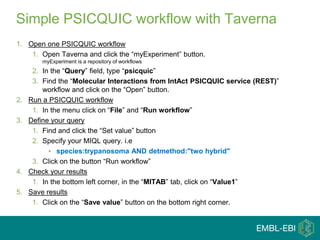
1. Open one PSICQUIC workflow
1. Open Taverna and click the “myExperiment” button.
myExperiment is a repository of workflows
2. In the “Query” field, type “psicquic”
3. Find the “Molecular Interactions from IntAct PSICQUIC service (REST)”
workflow and click on the “Open” button.
2. Run a PSICQUIC workflow
1. In the menu click on “File” and “Run workflow”
3. Define your query
1. Find and click the “Set value” button
2. Specify your MIQL query. i.e
• species:trypanosoma AND detmethod:"two hybrid"
3. Click on the button “Run workflow”
4. Check your results
1. In the bottom left corner, in the “MITAB” tab, click on “Value1”
5. Save results
1. Click on the “Save value” button on the bottom right corner.
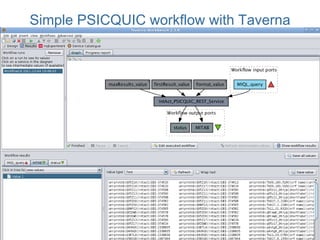
Simple PSICQUIC workflow with Taverna
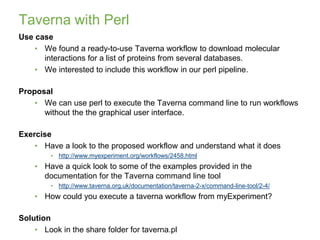
Taverna with Perl
Use case
• We found a ready-to-use Taverna workflow to download molecular
interactions for a list of proteins from several databases.
• We interested to include this workflow in our perl pipeline.
Proposal
• We can use perl to execute the Taverna command line to run workflows
without the the graphical user interface.
Exercise
• Have a look to the proposed workflow and understand what it does
• http://www.myexperiment.org/workflows/2458.html
• Have a quick look to some of the examples provided in the
documentation for the Taverna command line tool
• http://www.taverna.org.uk/documentation/taverna-2-x/command-line-tool/2-4/
• How could you execute a taverna workflow from myExperiment?
Solution
• Look in the share folder for taverna.pl
13/12/2018
30
Do you need more examples ...
• http://www.ebi.ac.uk/~rafael/talks/2011-07-
19_workshop_proteomics_bioinfomratics/Taverna-
MyExperiment_Tutorial.ppt
Thank you!
13/12/2018
32
ProteomicsServicesTeam
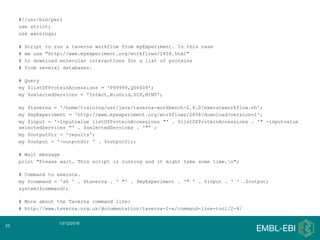
#!/usr/bin/perl
use strict;
use warnings;
# Script to run a taverna workflow from myExperiment. In this case
# we use "http://www.myexperiment.org/workflows/2458.html"
# to download molecular interactions for a list of proteins
# from several databases.
# Query
my $listOfProteinAccessions = 'P99999,Q06609';
my $selectedServices = 'IntAct,BioGrid,DIP,MINT';
my $taverna = '/home/training/usr/java/taverna-workbench-2.4.0/executeworkflow.sh';
my $myExperiment = 'http://www.myexperiment.org/workflows/2458/download?version=1';
my $input = '-inputvalue listOfProteinAccessions "' . $listOfProteinAccessions . '" -inputvalue
selectedServices "' . $selectedServices . '"' ;
my $outputDir = 'results';
my $output = '-outputdir ' . $outputDir;
# Wait message
print "Please wait. This script is running and it might take some time.n";
# Command to execute.
my $command = 'sh ' . $taverna . ' "' . $myExperiment . '" ' . $input . ' ' .$output;
system($command);
# More about the Taverna command line:
# http://www.taverna.org.uk/documentation/taverna-2-x/command-line-tool/2-4/
13/12/2018
33

Taverna as a service

  • 1.
    Taverna (as aservice) Programmatic Access To Biological Databases (Perl) 1 – 4 October 2012 Rafael C. Jimenez rafael@ebi.ac.uk
  • 2.
    Introduction to WebServices at EBI Table of contents • Workflows • Web Services • myGrid solutions – Biocatalogue – Taverna – myExperiment • Installing Taverna • Simple PSICQUIC workflow with Taverna
  • 3.
  • 4.
    Introduction to WebServices at EBI Workflow • Workflow • Sequence of tasks that produces a result of observable value • Workflow management system • Computer system to compose and execute workflows. • Workflow components • Input • Service • Output • Shims Workflow Task Output Service Input Task Output Service Input
  • 5.
    Introduction to WebServices at EBI Workflow • Workflow • Sequence of tasks that produces a result of observable value • Workflow management system • Computer system to compose and execute workflows. • Workflow components • Input • Service • Output • Shims Service A Service B
  • 6.
    MatchMismatch Shims: Connecting services ServiceA Service B Service A Service B • Convert data formats and act as connectors
  • 7.
    Type of services •Data Resources • Analysis tools • Web Services • SOAP • REST • APIs (application programming interface) • Grid Services • Local scripts • Local software • Workflows
  • 8.
    Create and runworkflows Share, discover and reuse workflows Discover and reuse services myGrid solutions
  • 9.
    • A publiccentralised and curated registry of Life Science Web Services • ‘Web 2.0’-style website and API • Allow anyone to register, discover and curate Web Services • Community oriented with expert guidance • Open content, open source, open platform Paul Fisher, myGrid, University of Manchester Biocatalogue http://www.biocatalogue.org
  • 10.
  • 11.
  • 12.
    Workflow diagram Tree view of workflowstructure Available services Taverna • Workflow management system • Java desktop application • Open source and extensible • Includes access to Biocatalogue and myExperiment • http://www.taverna.org.uk/
  • 13.
    1. Available ServicesPanel Lists services available by default in Taverna • ~ 3500 services • Local java services • Simple web services • Soaplab services – legacy command-line application • R Processor • BioMart database services • BioMoby services • Beanshell processor Allows the user to add new services or workflows from the web or from file systems This is a modification of the original tutorial from Katy Wolstencroft
  • 14.
    Sharing Experiments • Youcan share results/experiments/experiences with your • Research group • Collaborators • Scientific community Paul Fisher, myGrid, University of Manchester A registry of workflows
  • 15.
  • 16.
    Recycling, Reuse, Repurposing •Paul writes workflows for identifying biological pathways implicated in resistance to Trypanosomiasis • Paul meets Jo. Jo is investigating mouse Whipworm infection. • Jo reuses one of Paul’s workflows. • Jo identifies the biological pathways involved in sex dependence in the mouse model, believed to be involved in the ability of mice to expel the parasite. • Previously a manual two year study by Jo had failed to do this. Workflows are protocols Paul Fisher, myGrid, University of Manchester
  • 17.
    Examples from myExperiment OLS PICR Biomartand Microarray analysis ChEBI
  • 18.
  • 19.
    Installing the Workbench •Download the “Taverna 2.4 workbench” if not installed in your computer • http://www.taverna.org.uk/ • Open Taverna • You do not have to complete the registration now. Click on “Do no ask me again”.
  • 20.
  • 21.
  • 22.
  • 23.
    1. Workflow Explorer •The Workflow Explorer is the primary editing component within Taverna. Through it you can load, save and edit any property of a workflow. • The workflow explorer is also where you find configuration details of services and advanced options like iteration and looping. We will come back to these things later This is a modification of the original tutorial from Katy Wolstencroft
  • 24.
    1. Workflow Diagram Thevisual representation of workflow • Shows inputs / outputs, services and control flows • Allows editing of the workflow by dragging and dropping and connecting services together • Enables saving of workflow diagrams for publishing and sharing This is a modification of the original tutorial from Katy Wolstencroft
  • 25.
    1. Available ServicesPanel Lists services available by default in Taverna • ~ 3500 services • Local java services • Simple web services • Soaplab services – legacy command-line application • R Processor • BioMart database services • BioMoby services • Beanshell processor Allows the user to add new services or workflows from the web or from file systems This is a modification of the original tutorial from Katy Wolstencroft
  • 26.
  • 27.
    1. Open onePSICQUIC workflow 1. Open Taverna and click the “myExperiment” button. myExperiment is a repository of workflows 2. In the “Query” field, type “psicquic” 3. Find the “Molecular Interactions from IntAct PSICQUIC service (REST)” workflow and click on the “Open” button. 2. Run a PSICQUIC workflow 1. In the menu click on “File” and “Run workflow” 3. Define your query 1. Find and click the “Set value” button 2. Specify your MIQL query. i.e • species:trypanosoma AND detmethod:"two hybrid" 3. Click on the button “Run workflow” 4. Check your results 1. In the bottom left corner, in the “MITAB” tab, click on “Value1” 5. Save results 1. Click on the “Save value” button on the bottom right corner. Simple PSICQUIC workflow with Taverna
  • 28.
  • 29.
    Taverna with Perl Usecase • We found a ready-to-use Taverna workflow to download molecular interactions for a list of proteins from several databases. • We interested to include this workflow in our perl pipeline. Proposal • We can use perl to execute the Taverna command line to run workflows without the the graphical user interface. Exercise • Have a look to the proposed workflow and understand what it does • http://www.myexperiment.org/workflows/2458.html • Have a quick look to some of the examples provided in the documentation for the Taverna command line tool • http://www.taverna.org.uk/documentation/taverna-2-x/command-line-tool/2-4/ • How could you execute a taverna workflow from myExperiment? Solution • Look in the share folder for taverna.pl 13/12/2018 30
  • 30.
    Do you needmore examples ... • http://www.ebi.ac.uk/~rafael/talks/2011-07- 19_workshop_proteomics_bioinfomratics/Taverna- MyExperiment_Tutorial.ppt
  • 31.
  • 32.
    #!/usr/bin/perl use strict; use warnings; #Script to run a taverna workflow from myExperiment. In this case # we use "http://www.myexperiment.org/workflows/2458.html" # to download molecular interactions for a list of proteins # from several databases. # Query my $listOfProteinAccessions = 'P99999,Q06609'; my $selectedServices = 'IntAct,BioGrid,DIP,MINT'; my $taverna = '/home/training/usr/java/taverna-workbench-2.4.0/executeworkflow.sh'; my $myExperiment = 'http://www.myexperiment.org/workflows/2458/download?version=1'; my $input = '-inputvalue listOfProteinAccessions "' . $listOfProteinAccessions . '" -inputvalue selectedServices "' . $selectedServices . '"' ; my $outputDir = 'results'; my $output = '-outputdir ' . $outputDir; # Wait message print "Please wait. This script is running and it might take some time.n"; # Command to execute. my $command = 'sh ' . $taverna . ' "' . $myExperiment . '" ' . $input . ' ' .$output; system($command); # More about the Taverna command line: # http://www.taverna.org.uk/documentation/taverna-2-x/command-line-tool/2-4/ 13/12/2018 33