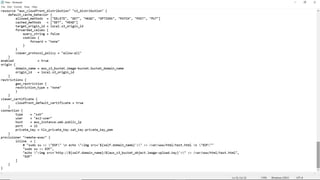
1. Create the key and security group which allow the port 80.
2. Launch EC2 instance.
3. In this Ec2 instance use the key and security group which we have created in step 1.
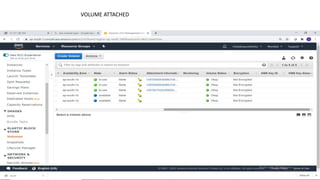
4. Launch one Volume (EBS) and mount that volume into /var/www/html
5. Developer have uploded the code into github repo also the repo has some images.
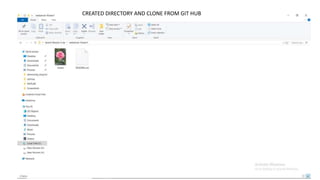
6. Copy the github repo code into /var/www/html
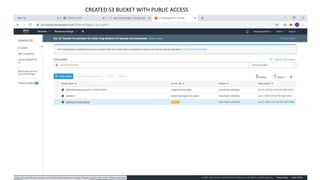
7. Create S3 bucket, and copy/deploy the images from github repo into the s3 bucket and
change the permission to public readable.
8 Create a Cloudfront using s3 bucket(which contains images) and use the Cloudfront URL
to update in code in /var/www/html
Task 1 : Have to create/launch Application using Terraform
RESULTS
INSTANCE LAUNCHED
VOLUME ATTACHED
WEB PAGE
CREATED DIRECTORY AND CLONE FROM GIT HUB
CREATED S3 BUCKET WITH PUBLIC ACCESS
CLOUD FRONT

Task1 Have to create/launch Application using Terraform

  • 1.
    1. Create thekey and security group which allow the port 80. 2. Launch EC2 instance. 3. In this Ec2 instance use the key and security group which we have created in step 1. 4. Launch one Volume (EBS) and mount that volume into /var/www/html 5. Developer have uploded the code into github repo also the repo has some images. 6. Copy the github repo code into /var/www/html 7. Create S3 bucket, and copy/deploy the images from github repo into the s3 bucket and change the permission to public readable. 8 Create a Cloudfront using s3 bucket(which contains images) and use the Cloudfront URL to update in code in /var/www/html Task 1 : Have to create/launch Application using Terraform
  • 10.
  • 11.
  • 12.
  • 13.
  • 14.
    CREATED DIRECTORY ANDCLONE FROM GIT HUB
  • 15.
    CREATED S3 BUCKETWITH PUBLIC ACCESS
  • 16.