TALLY CUSTOMIZATION
FOR
AUTO EMAIL
 This Add-on facilitates user to Email Sales Order, Sales
Invoice, Purchase Order, Purchase Invoice, Receipt
Voucher and Payment Voucher to Party automatically.
INTRODUCTION
Important
As a best practice it is advisable to take back up of your company data
before installing the Add-on
BENEFITS
 With the help of this Add-on we can able to send reports to
email automatically in daily, weekly and monthly basis.
 You can also select multiple Debtors/Creditors and
automatically Email Ledger Accounts or Outstanding
Statements to them.
SETUP GUIDE
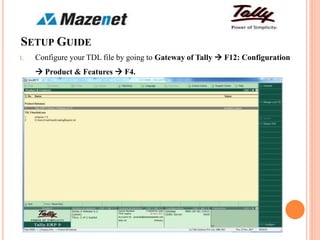
1. Configure your TDL file by going to Gateway of Tally  F12: Configuration
 Product & Features  F4.
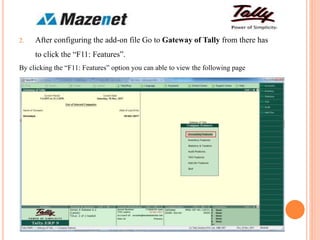
2. After configuring the add-on file Go to Gateway of Tally from there has
to click the “F11: Features”.
By clicking the “F11: Features” option you can able to view the following page
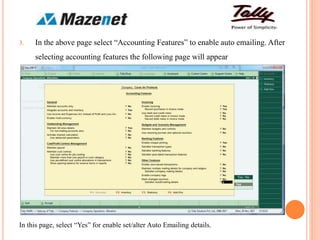
3. In the above page select “Accounting Features” to enable auto emailing. After
selecting accounting features the following page will appear
In this page, select “Yes” for enable set/alter Auto Emailing details.
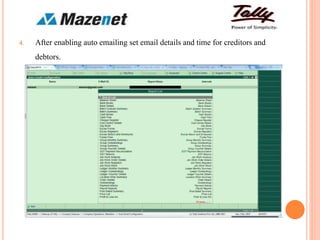
4. After enabling auto emailing set email details and time for creditors and
debtors.
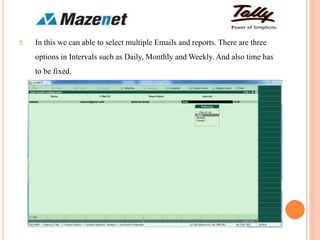
5. In this we can able to select multiple Emails and reports. There are three
options in Intervals such as Daily, Monthly and Weekly. And also time has
to be fixed.
THANK YOU

Tally customization by Auto email

  • 1.
  • 2.
     This Add-onfacilitates user to Email Sales Order, Sales Invoice, Purchase Order, Purchase Invoice, Receipt Voucher and Payment Voucher to Party automatically. INTRODUCTION Important As a best practice it is advisable to take back up of your company data before installing the Add-on
  • 3.
    BENEFITS  With thehelp of this Add-on we can able to send reports to email automatically in daily, weekly and monthly basis.  You can also select multiple Debtors/Creditors and automatically Email Ledger Accounts or Outstanding Statements to them.
  • 4.
    SETUP GUIDE 1. Configureyour TDL file by going to Gateway of Tally  F12: Configuration  Product & Features  F4.
  • 5.
    2. After configuringthe add-on file Go to Gateway of Tally from there has to click the “F11: Features”. By clicking the “F11: Features” option you can able to view the following page
  • 6.
    3. In theabove page select “Accounting Features” to enable auto emailing. After selecting accounting features the following page will appear In this page, select “Yes” for enable set/alter Auto Emailing details.
  • 7.
    4. After enablingauto emailing set email details and time for creditors and debtors.
  • 8.
    5. In thiswe can able to select multiple Emails and reports. There are three options in Intervals such as Daily, Monthly and Weekly. And also time has to be fixed.
  • 9.