Entitlement FAQs
#smartersupport 
bitly.com/smartersupport 
<Tool Name>: Get Started 
• Use it: <Customize with a description of tool/resource and 
highlight value for clients> 
• Find it: <Provide URL/description of how to access 
tool/resource> 
• Key features: 
 <Add a maximum of three tool/resource features, each as a 
separate short bullet> 
 <Choose your features carefully, as this will determine the 
remaining slides in your Quick Tip> 
2
#smartersupport 
bitly.com/smartersupport 
<Tool Name>: <Feature Name> 
• <Use this slide to demonstrate feature #1. Include text 
description (if necessary), and screen captures. Add speaker 
notes for further description (if necessary). 
3
#smartersupport 
bitly.com/smartersupport 
<Tool Name>: <Feature Name> 
• <Use this slide to demonstrate feature #2. Include text 
description (if necessary), and screen captures. Add speaker 
notes for further description (if necessary). 
4
#smartersupport 
bitly.com/smartersupport 
<Tool Name>: <Feature Name> 
• <Use this slide to demonstrate feature #3. Include text 
description (if necessary), and screen captures. Add speaker 
notes for further description (if necessary). 
5
Reference – 2013 Content 
6
Entitlement FAQs: Get Started 
• Demo description: 
o How IBM registration, log in and entitlement work 
• Quick facts: 
o Your IBM Web Identity, if set up properly, will give you single sign 
on access to all restricted support applications and content 
o Your Site Technical Contact (STC) manages your entitlement 
and enables you to open Service Requests and download fixes 
and other restricted content 
o Fix Central now requires that your Web ID is linked to an ICN 
• Common challenges: 
o Entitlement issues can be frustrating and take time to resolve 
o If your Web Identity does not match the domain name associated 
with the ICN, you may experience entitlement check failures
Entitlement FAQs: Demo 
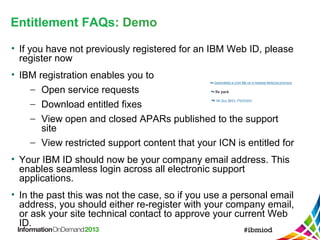
• If you have not previously registered for an IBM Web ID, please 
register now 
• IBM registration enables you to 
- Open service requests 
- Download entitled fixes 
- View open and closed APARs published to the support 
site 
- View restricted support content that your ICN is entitled for 
• Your IBM ID should now be your company email address. This 
enables seamless login across all electronic support 
applications. 
• In the past this was not the case, so if you use a personal email 
address, you should either re-register with your company email, 
or ask your site technical contact to approve your current Web 
ID.
Entitlement FAQs: Demo 
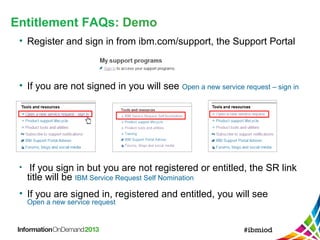
• Register and sign in from ibm.com/support, the Support Portal 
• If you are not signed in you will see Open a new service request – sign in 
• If you sign in but you are not registered or entitled, the SR link 
title will be IBM Service Request Self Nomination 
• If you are signed in, registered and entitled, you will see 
Open a new service request
Entitlement FAQs: Demo 
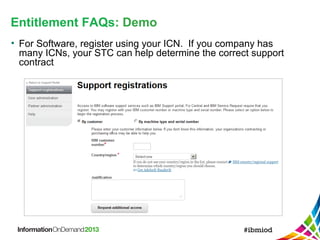
• For Software, register using your ICN. If you company has 
many ICNs, your STC can help determine the correct support 
contract
Entitlement FAQs: Demo 
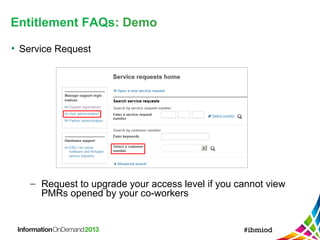
• Service Request 
- Request to upgrade your access level if you cannot view 
PMRs opened by your co-workers
Entitlement FAQs: Demo 
• Fix Central 
- Since August, additional entitlement validation has been 
added for some products and some locations. Your Web 
Identity must be linked to an IBM customer number (ICN), 
and you will receive an email validation. Fix Central 
entitlement uses the Service Request entitlement system 
- If your Web ID matches the company email domain this 
requires no set up. If you use a personal email address or 
have a different email domain (eg Business Partner), you 
will need to contact your STC to get added to the 
approved caller list for the ICN.
Entitlement FAQs: Demo 
• Fix Central - If you see this error, first read the pop-up
Entitlement FAQs: Demo 
• The button beneath the pop-up creates an entitlement PMR 
with your context pre-filled
Entitlement FAQs: Discussion 
?

IBM Insight - Smarter Support Tips - Entitlement

  • 1.
  • 2.
    #smartersupport bitly.com/smartersupport <ToolName>: Get Started • Use it: <Customize with a description of tool/resource and highlight value for clients> • Find it: <Provide URL/description of how to access tool/resource> • Key features:  <Add a maximum of three tool/resource features, each as a separate short bullet>  <Choose your features carefully, as this will determine the remaining slides in your Quick Tip> 2
  • 3.
    #smartersupport bitly.com/smartersupport <ToolName>: <Feature Name> • <Use this slide to demonstrate feature #1. Include text description (if necessary), and screen captures. Add speaker notes for further description (if necessary). 3
  • 4.
    #smartersupport bitly.com/smartersupport <ToolName>: <Feature Name> • <Use this slide to demonstrate feature #2. Include text description (if necessary), and screen captures. Add speaker notes for further description (if necessary). 4
  • 5.
    #smartersupport bitly.com/smartersupport <ToolName>: <Feature Name> • <Use this slide to demonstrate feature #3. Include text description (if necessary), and screen captures. Add speaker notes for further description (if necessary). 5
  • 6.
  • 7.
    Entitlement FAQs: GetStarted • Demo description: o How IBM registration, log in and entitlement work • Quick facts: o Your IBM Web Identity, if set up properly, will give you single sign on access to all restricted support applications and content o Your Site Technical Contact (STC) manages your entitlement and enables you to open Service Requests and download fixes and other restricted content o Fix Central now requires that your Web ID is linked to an ICN • Common challenges: o Entitlement issues can be frustrating and take time to resolve o If your Web Identity does not match the domain name associated with the ICN, you may experience entitlement check failures
  • 8.
    Entitlement FAQs: Demo • If you have not previously registered for an IBM Web ID, please register now • IBM registration enables you to - Open service requests - Download entitled fixes - View open and closed APARs published to the support site - View restricted support content that your ICN is entitled for • Your IBM ID should now be your company email address. This enables seamless login across all electronic support applications. • In the past this was not the case, so if you use a personal email address, you should either re-register with your company email, or ask your site technical contact to approve your current Web ID.
  • 9.
    Entitlement FAQs: Demo • Register and sign in from ibm.com/support, the Support Portal • If you are not signed in you will see Open a new service request – sign in • If you sign in but you are not registered or entitled, the SR link title will be IBM Service Request Self Nomination • If you are signed in, registered and entitled, you will see Open a new service request
  • 10.
    Entitlement FAQs: Demo • For Software, register using your ICN. If you company has many ICNs, your STC can help determine the correct support contract
  • 11.
    Entitlement FAQs: Demo • Service Request - Request to upgrade your access level if you cannot view PMRs opened by your co-workers
  • 12.
    Entitlement FAQs: Demo • Fix Central - Since August, additional entitlement validation has been added for some products and some locations. Your Web Identity must be linked to an IBM customer number (ICN), and you will receive an email validation. Fix Central entitlement uses the Service Request entitlement system - If your Web ID matches the company email domain this requires no set up. If you use a personal email address or have a different email domain (eg Business Partner), you will need to contact your STC to get added to the approved caller list for the ICN.
  • 13.
    Entitlement FAQs: Demo • Fix Central - If you see this error, first read the pop-up
  • 14.
    Entitlement FAQs: Demo • The button beneath the pop-up creates an entitlement PMR with your context pre-filled
  • 15.