www.ifanow.com
Scheduling Karvy Mailback Files
for Auto-Upload on IFAnow
(MFSD307, 311, 313)
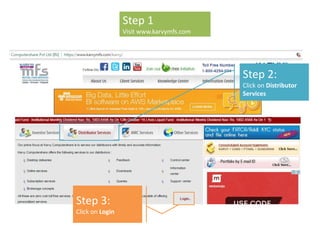
Step 2:
Click on Distributor
Services
Step 1
Visit www.karvymfs.com
Step 3:
Click on Login
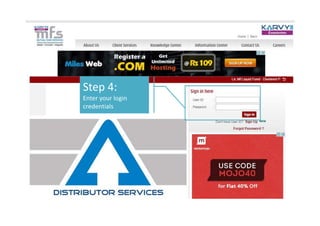
Step 4:
Enter your login
credentials
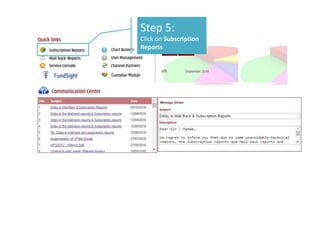
Step 5:
Click on Subscription
Reports
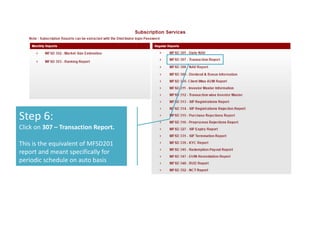
Step 6:
Click on 307 – Transaction Report.
This is the equivalent of MFSD201
report and meant specifically for
periodic schedule on auto basis
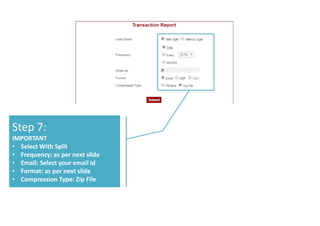
Step 7:
IMPORTANT
• Select With Split
• Frequency: as per next slide
• Email: Select your email id
• Format: as per next slide
• Compression Type: Zip File
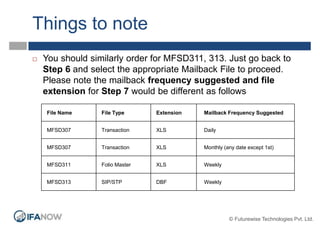
Things to note
File Name File Type Extension Mailback Frequency Suggested
MFSD307 Transaction XLS Daily
MFSD307 Transaction XLS Monthly (any date except 1st)
MFSD311 Folio Master XLS Weekly
MFSD313 SIP/STP DBF Weekly
 You should similarly order for MFSD311, 313. Just go back to
Step 6 and select the appropriate Mailback File to proceed.
Please note the mailback frequency suggested and file
extension for Step 7 would be different as follows
© Futurewise Technologies Pvt. Ltd.
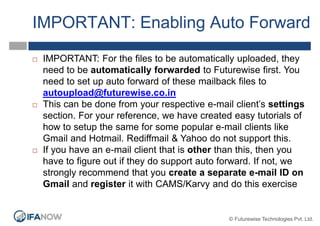
IMPORTANT: Enabling Auto Forward
 IMPORTANT: For the files to be automatically uploaded, they
need to be automatically forwarded to Futurewise first. You
need to set up auto forward of these mailback files to
autoupload@futurewise.co.in
 This can be done from your respective e-mail client’s settings
section. For your reference, we have created easy tutorials of
how to setup the same for some popular e-mail clients like
Gmail and Hotmail. Rediffmail & Yahoo do not support this.
 If you have an e-mail client that is other than this, then you
have to figure out if they do support auto forward. If not, we
strongly recommend that you create a separate e-mail ID on
Gmail and register it with CAMS/Karvy and do this exercise
© Futurewise Technologies Pvt. Ltd.
Lastly…
 Once you have done all of the above, you need to
give the information to us so that we can integrate
with IFAnow.
 Just fill out this form http://bit.ly/ifanowautouploadmf
and you are good to go!
© Futurewise Technologies Pvt. Ltd.
Thank You
IFAnow.com
support@futurewise.co.in
022 2895 4777

IFAnow - scheduling Karvy mailback

  • 1.
    www.ifanow.com Scheduling Karvy MailbackFiles for Auto-Upload on IFAnow (MFSD307, 311, 313)
  • 2.
    Step 2: Click onDistributor Services Step 1 Visit www.karvymfs.com Step 3: Click on Login
  • 3.
    Step 4: Enter yourlogin credentials
  • 4.
    Step 5: Click onSubscription Reports
  • 5.
    Step 6: Click on307 – Transaction Report. This is the equivalent of MFSD201 report and meant specifically for periodic schedule on auto basis
  • 6.
    Step 7: IMPORTANT • SelectWith Split • Frequency: as per next slide • Email: Select your email id • Format: as per next slide • Compression Type: Zip File
  • 7.
    Things to note FileName File Type Extension Mailback Frequency Suggested MFSD307 Transaction XLS Daily MFSD307 Transaction XLS Monthly (any date except 1st) MFSD311 Folio Master XLS Weekly MFSD313 SIP/STP DBF Weekly  You should similarly order for MFSD311, 313. Just go back to Step 6 and select the appropriate Mailback File to proceed. Please note the mailback frequency suggested and file extension for Step 7 would be different as follows © Futurewise Technologies Pvt. Ltd.
  • 8.
    IMPORTANT: Enabling AutoForward  IMPORTANT: For the files to be automatically uploaded, they need to be automatically forwarded to Futurewise first. You need to set up auto forward of these mailback files to autoupload@futurewise.co.in  This can be done from your respective e-mail client’s settings section. For your reference, we have created easy tutorials of how to setup the same for some popular e-mail clients like Gmail and Hotmail. Rediffmail & Yahoo do not support this.  If you have an e-mail client that is other than this, then you have to figure out if they do support auto forward. If not, we strongly recommend that you create a separate e-mail ID on Gmail and register it with CAMS/Karvy and do this exercise © Futurewise Technologies Pvt. Ltd.
  • 9.
    Lastly…  Once youhave done all of the above, you need to give the information to us so that we can integrate with IFAnow.  Just fill out this form http://bit.ly/ifanowautouploadmf and you are good to go! © Futurewise Technologies Pvt. Ltd.
  • 10.
    © Futurewise TechnologiesPvt. Ltd. Thank You IFAnow.com support@futurewise.co.in 022 2895 4777