tosivakumar@gmail.com soumya.r.subudhi@gmail.com19 March 2016
 Worlds largest Independent mobile ad network
 2.2Trillion ad requests per year
 1 Billion unique users in our network
 720 Billion total ads served
Database @ InMobi
OLTP OLAP
Database @ InMobi
 Average 1.5 Billion Transactions Per Day across the
clusters
 Average 18-22k QPS with a peak of 58k QPS
 5 min Average Write Duration < 8ms
 5 min Average Select Duration < 90 ms
 Warehouse Size of 14 TB
 Streaming Replication across 6 DC’s around the world
with WAL files in the order of 5 per sec including AWS
Today’s Agenda
 User connections
 Idle Transactions
 Replication issues
 Temporary file limit
 Out Of Memory issue
 Partitions
 Tablespaces on Master and slave
 SSH Tunneling
 Miscellaneous
User Connections
Database
C 1
C 3
C 2Direct
Connections
Concurrent
Connections
C 4
C 5
User Connections
Increasing max_connections
to a higher number
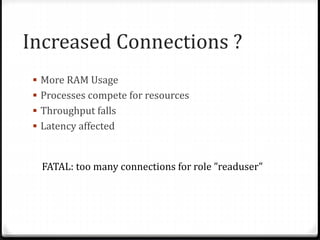
Increased Connections ?
 More RAM Usage
 Processes compete for resources
 Throughput falls
 Latency affected
FATAL: too many connections for role ”readuser"
Database
Connection
Pool
(pgbouncer)
Clients /
Applications
• Online restart/upgrade without stopping client connections
• Online reconfiguration of most of settings
User Connections
If not using db pooling :
 Enable client application pooling (Java,Hibernate,..)
 Avoid hang of connections
 Applications to be on same colo
 Good network bandwidth between hosts
 Giving each component(application) a separate user
 Improve performance by allocating more resources,
increasing RAM and CPU, use of SSDs
Idle in transactions
 Why idle in transactions ?
#ps-ef | grep postgres | grep idle
 Idle in transaction in slony
postgres: user db 127.0.0.1(55658) idle in transaction
Idle in transactions
 Alerting on idle in transaction
 Add a auto kill job – Careful
select * from pg_stat_activity where state = 'idle in
transaction’;
 select pg_terminate_backend(pid)
 Avoid using
# kill -9 <pid of process>
Long running queries
&
Same queries running multiple
times for more than 1 hour
Long running queries …
 Explain Analyze on the query
 Execution plan and cost of plan
 Missing indexes
 Partition pruning
 Statement timeout
statement_timeout = 3600000 (1 hour, in milliseconds)
 Checking if we are bottleneck on RAM,CPU
Temporary file limit issue
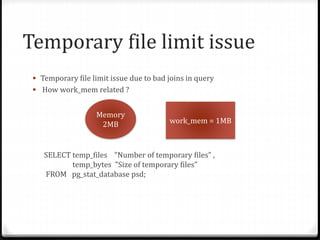
 Temporary file limit issue due to bad joins in query
 How work_mem related ?
SELECT temp_files "Number of temporary files” ,
temp_bytes "Size of temporary files”
FROM pg_stat_database psd;
Memory
2MB work_mem = 1MB
Temporary file limit issue …
 temp_file_limit = -1 (default) – No Limit
limit on per-session usage of temporary files for sorts, hashes, and
similar operations
Can be set to 20GB / 10 % of Disk space available whichever is less.
OOM Error
ERROR: out of memory
DETAIL: Failed on request of size
Postgres
Call
malloc( )
Kernel
Responds
NULL
OS level memory hit limit
OOM Error …
 Changes in configs :
 Kernel.shmmax
 Kernel.shmall
 shared_buffers
 Rechecking the queries
Replication related issues
FATAL: requested WAL segment
00000002000032A80000002B has already been removed
 Calculate numbers of files created each 16MB in size
 Calculate network speed
 Disk space available at master
 Set wal_keep_segments
FATAL: could not send data to WAL stream: server closed
the connection unexpectedly
 Transient issue
 Issue with NIC , TOR
xlog filling the disk due to failure of archive_command
 Running out of space in pg_xlog
 Loss of recovery related benefits
 Slave getting out of sync
Few other issues with
replication …
 PANIC: WAL contains references to invalid pages
 FATAL: could not open file "pg_xlog/00000006.history”
 FATAL: hot standby is not possible because max_connections =
100 is a lower setting than on the master server (its value was
500)
 FATAL: base backup could not send data, aborting backup
Partitions
PostgreSQL partitions
 Need for it
 Rule based
 A partition key
 Adding constraints
Inserting data into partitions
 INSERT <oid> <count>
 INSERT 0 123
 INSERT 0 0
too many partitions and max_locks_per_transaction issue
 max_locks_per_transaction = 64 (default)
 Check on locks
 Look at query plans
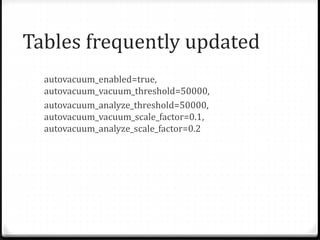
Tables frequently updated
autovacuum_enabled=true,
autovacuum_vacuum_threshold=50000,
autovacuum_analyze_threshold=50000,
autovacuum_vacuum_scale_factor=0.1,
autovacuum_analyze_scale_factor=0.2
Tablespace creation on
master and slave
 Addition of more disks
 Tablespace creation on master and slaves
Reading blocks and pages
 Data corrupted
 Index corrupted
 Recreate indexes
ERROR: could not read block xxx of relation base/xxx/xxx: I/O error
ERROR: could not read block xxx in file "base/xxx/xxx"
PANIC: _bt_restore_page: cannot add item to page
Cache Lookup
 Cache lookup failure for index during pg_dump
 Data corrupted
Secure TCP/IP Connections
with SSH Tunnels
 ssh -L 3333:foo.com:5432 joe@foo.com
 ssh –C -L 3333:foo.com:5432 joe@foo.com
 psql -h localhost -p 3333 postgres
 pg_basebackup -D /data-dir/ -p 3333 -U
replicationuser -h localhost -v
Socket connection issue
 umount -f and mount the disks - causing all socket
connections to fail
Tales from production with postgreSQL at scale

Tales from production with postgreSQL at scale

  • 1.
  • 2.
     Worlds largestIndependent mobile ad network  2.2Trillion ad requests per year  1 Billion unique users in our network  720 Billion total ads served
  • 3.
  • 4.
    Database @ InMobi Average 1.5 Billion Transactions Per Day across the clusters  Average 18-22k QPS with a peak of 58k QPS  5 min Average Write Duration < 8ms  5 min Average Select Duration < 90 ms  Warehouse Size of 14 TB  Streaming Replication across 6 DC’s around the world with WAL files in the order of 5 per sec including AWS
  • 6.
    Today’s Agenda  Userconnections  Idle Transactions  Replication issues  Temporary file limit  Out Of Memory issue  Partitions  Tablespaces on Master and slave  SSH Tunneling  Miscellaneous
  • 7.
    User Connections Database C 1 C3 C 2Direct Connections Concurrent Connections C 4 C 5
  • 8.
  • 9.
    Increased Connections ? More RAM Usage  Processes compete for resources  Throughput falls  Latency affected FATAL: too many connections for role ”readuser"
  • 10.
    Database Connection Pool (pgbouncer) Clients / Applications • Onlinerestart/upgrade without stopping client connections • Online reconfiguration of most of settings
  • 11.
    User Connections If notusing db pooling :  Enable client application pooling (Java,Hibernate,..)  Avoid hang of connections  Applications to be on same colo  Good network bandwidth between hosts  Giving each component(application) a separate user  Improve performance by allocating more resources, increasing RAM and CPU, use of SSDs
  • 12.
    Idle in transactions Why idle in transactions ? #ps-ef | grep postgres | grep idle  Idle in transaction in slony postgres: user db 127.0.0.1(55658) idle in transaction
  • 13.
    Idle in transactions Alerting on idle in transaction  Add a auto kill job – Careful select * from pg_stat_activity where state = 'idle in transaction’;  select pg_terminate_backend(pid)  Avoid using # kill -9 <pid of process>
  • 14.
    Long running queries & Samequeries running multiple times for more than 1 hour
  • 15.
    Long running queries…  Explain Analyze on the query  Execution plan and cost of plan  Missing indexes  Partition pruning  Statement timeout statement_timeout = 3600000 (1 hour, in milliseconds)  Checking if we are bottleneck on RAM,CPU
  • 16.
    Temporary file limitissue  Temporary file limit issue due to bad joins in query  How work_mem related ? SELECT temp_files "Number of temporary files” , temp_bytes "Size of temporary files” FROM pg_stat_database psd; Memory 2MB work_mem = 1MB
  • 17.
    Temporary file limitissue …  temp_file_limit = -1 (default) – No Limit limit on per-session usage of temporary files for sorts, hashes, and similar operations Can be set to 20GB / 10 % of Disk space available whichever is less.
  • 18.
    OOM Error ERROR: outof memory DETAIL: Failed on request of size Postgres Call malloc( ) Kernel Responds NULL OS level memory hit limit
  • 19.
    OOM Error … Changes in configs :  Kernel.shmmax  Kernel.shmall  shared_buffers  Rechecking the queries
  • 20.
  • 21.
    FATAL: requested WALsegment 00000002000032A80000002B has already been removed  Calculate numbers of files created each 16MB in size  Calculate network speed  Disk space available at master  Set wal_keep_segments
  • 22.
    FATAL: could notsend data to WAL stream: server closed the connection unexpectedly  Transient issue  Issue with NIC , TOR
  • 23.
    xlog filling thedisk due to failure of archive_command  Running out of space in pg_xlog  Loss of recovery related benefits  Slave getting out of sync
  • 24.
    Few other issueswith replication …  PANIC: WAL contains references to invalid pages  FATAL: could not open file "pg_xlog/00000006.history”  FATAL: hot standby is not possible because max_connections = 100 is a lower setting than on the master server (its value was 500)  FATAL: base backup could not send data, aborting backup
  • 25.
  • 26.
    PostgreSQL partitions  Needfor it  Rule based  A partition key  Adding constraints
  • 27.
    Inserting data intopartitions  INSERT <oid> <count>  INSERT 0 123  INSERT 0 0
  • 28.
    too many partitionsand max_locks_per_transaction issue  max_locks_per_transaction = 64 (default)  Check on locks  Look at query plans
  • 29.
  • 30.
    Tablespace creation on masterand slave  Addition of more disks  Tablespace creation on master and slaves
  • 31.
    Reading blocks andpages  Data corrupted  Index corrupted  Recreate indexes ERROR: could not read block xxx of relation base/xxx/xxx: I/O error ERROR: could not read block xxx in file "base/xxx/xxx" PANIC: _bt_restore_page: cannot add item to page
  • 32.
    Cache Lookup  Cachelookup failure for index during pg_dump  Data corrupted
  • 33.
    Secure TCP/IP Connections withSSH Tunnels  ssh -L 3333:foo.com:5432 joe@foo.com  ssh –C -L 3333:foo.com:5432 joe@foo.com  psql -h localhost -p 3333 postgres  pg_basebackup -D /data-dir/ -p 3333 -U replicationuser -h localhost -v
  • 34.
    Socket connection issue umount -f and mount the disks - causing all socket connections to fail