Tableau vs MicroStrategy:
ChoosingYour BI Platform
Struggling to choose the right Business Intelligence (BI) tool? You're
not alone. Both Tableau and MicroStrategy offer powerful
capabilities, but each has unique strengths and ideal use cases.
This presentation will eliminate your decision fatigue by breaking
down their key differences, pros, and cons.
2.
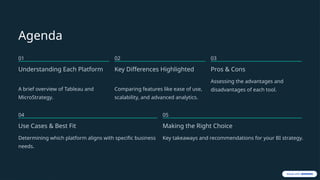
Agenda
01
Understanding Each Platform
Abrief overview of Tableau and
MicroStrategy.
02
Key Differences Highlighted
Comparing features like ease of use,
scalability, and advanced analytics.
03
Pros & Cons
Assessing the advantages and
disadvantages of each tool.
04
Use Cases & Best Fit
Determining which platform aligns with specific business
needs.
05
Making the Right Choice
Key takeaways and recommendations for your BI strategy.
3.
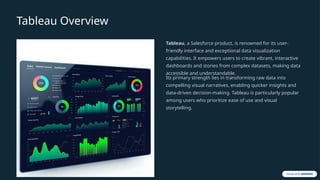
Tableau Overview
Tableau, aSalesforce product, is renowned for its user-
friendly interface and exceptional data visualization
capabilities. It empowers users to create vibrant, interactive
dashboards and stories from complex datasets, making data
accessible and understandable.
Its primary strength lies in transforming raw data into
compelling visual narratives, enabling quicker insights and
data-driven decision-making. Tableau is particularly popular
among users who prioritize ease of use and visual
storytelling.
4.
MicroStrategy Overview
MicroStrategy isa comprehensive enterprise analytics and
mobility platform designed for large-scale data
environments. It offers robust capabilities for complex data
modeling, sophisticated reporting, and advanced analytics,
including HyperIntelligence and machine learning
integrations.
Unlike Tableau's focus on visual storytelling, MicroStrategy
excels in delivering pixel-perfect, highly structured reports
and handles massive datasets, making it a preferred choice
for organizations with extensive data infrastructure and
stringent reporting requirements.
5.
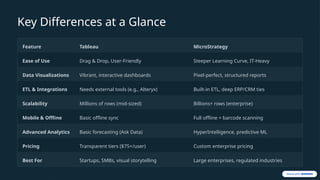
Key Differences ata Glance
Feature Tableau MicroStrategy
Ease of Use Drag & Drop, User-Friendly Steeper Learning Curve, IT-Heavy
Data Visualizations Vibrant, interactive dashboards Pixel-perfect, structured reports
ETL & Integrations Needs external tools (e.g., Alteryx) Built-in ETL, deep ERP/CRM ties
Scalability Millions of rows (mid-sized) Billions+ rows (enterprise)
Mobile & Offline Basic offline sync Full offline + barcode scanning
Advanced Analytics Basic forecasting (Ask Data) HyperIntelligence, predictive ML
Pricing Transparent tiers ($75+/user) Custom enterprise pricing
Best For Startups, SMBs, visual storytelling Large enterprises, regulated industries
6.
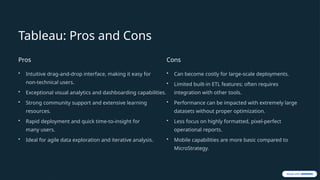
Tableau: Pros andCons
Pros
• Intuitive drag-and-drop interface, making it easy for
non-technical users.
• Exceptional visual analytics and dashboarding capabilities.
• Strong community support and extensive learning
resources.
• Rapid deployment and quick time-to-insight for
many users.
• Ideal for agile data exploration and iterative analysis.
Cons
• Can become costly for large-scale deployments.
• Limited built-in ETL features; often requires
integration with other tools.
• Performance can be impacted with extremely large
datasets without proper optimization.
• Less focus on highly formatted, pixel-perfect
operational reports.
• Mobile capabilities are more basic compared to
MicroStrategy.
7.
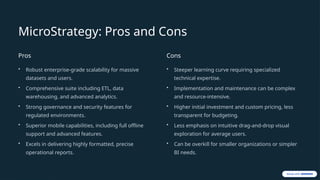
MicroStrategy: Pros andCons
Pros
• Robust enterprise-grade scalability for massive
datasets and users.
• Comprehensive suite including ETL, data
warehousing, and advanced analytics.
• Strong governance and security features for
regulated environments.
• Superior mobile capabilities, including full offline
support and advanced features.
• Excels in delivering highly formatted, precise
operational reports.
Cons
• Steeper learning curve requiring specialized
technical expertise.
• Implementation and maintenance can be complex
and resource-intensive.
• Higher initial investment and custom pricing, less
transparent for budgeting.
• Less emphasis on intuitive drag-and-drop visual
exploration for average users.
• Can be overkill for smaller organizations or simpler
BI needs.
8.
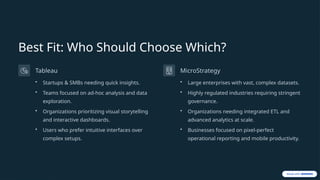
Best Fit: WhoShould Choose Which?
Tableau
• Startups & SMBs needing quick insights.
• Teams focused on ad-hoc analysis and data
exploration.
• Organizations prioritizing visual storytelling
and interactive dashboards.
• Users who prefer intuitive interfaces over
complex setups.
MicroStrategy
• Large enterprises with vast, complex datasets.
• Highly regulated industries requiring stringent
governance.
• Organizations needing integrated ETL and
advanced analytics at scale.
• Businesses focused on pixel-perfect
operational reporting and mobile productivity.
9.
Making Your Decision
Yourchoice between Tableau and MicroStrategy ultimately
depends on your organization's specific needs, size, budget,
and strategic goals. Consider the following:
• Data Volume:
• User Skill Level:
• Reporting Needs:
• Integration:
• Scalability:
10.
Conclusion: Choose Wisely
BothTableau and MicroStrategy are leaders in the BI space, each with distinct advantages. Tableau excels in user-
friendly visual analytics for agile insights, while MicroStrategy dominates in enterprise-grade scalability,
advanced analytics, and robust reporting.
Evaluate your unique requirements carefully to select the platform that best empowers your organization to
transform data into actionable intelligence and drive sustainable growth.
For a detailed comparison of other BI tools, explore our insights on Power BI vs Tableau.