MS POWERPOINT
*DEEPAKSHARMA@GMAIL.COM
(87766982154
Created by NAEMD 1
HYPERLINK
• Graphics Layout
• Bullet Points
• Difference between Power BI and Tableau
• About Them
Created by NAEMD 2
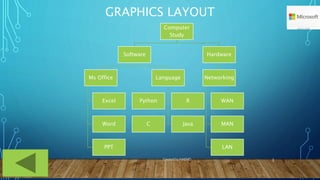
GRAPHICS LAYOUT
Computer
Study
Software
Ms Office
Excel
Word
PPT
Language
Python R
C Java
Hardware
Networking
WAN
MAN
LAN
Created by NAEMD 3
BULLET POINT
• The quick brown fox jumps over the lazy dog. The quick brown
fox jumps over the lazy dog.
• The quick brown fox jumps over the lazy dog. The quick brown fox
jumps over the lazy dog.
• The quick brown fox jumps over the lazy dog. The quick brown fox jumps
over the lazy dog.
• The quick brown fox jumps over the lazy dog. The quick brown fox jumps over
the lazy dog.
• The quick brown fox jumps over the lazy dog. The quick brown fox jumps
over the lazy dog.
• The quick brown fox jumps over the lazy dog. The quick brown fox jumps over the
lazy dog.
Created by NAEMD 4
DIFFERENCE BETWEEN
POWER BI AND TABLEAU
Created by NAEMD 5
ABOUT THEM
Power BI and Tableau are two important Business Intelligence
(BI) technologies for the collection, integration, analysis, and
presentation of business information.
They help you perform data analysis, data manipulation, and
data visualization to make sense of business data and draw
insights.
Created by NAEMD 6
DEFINITION
Power BI is a business analytics service provided by Microsoft
that can analyze and visualize data, extract insights, and
share it across various departments within your organization.
Tableau is a powerful Business Intelligence tool that
manages the data flow and turns data into actionable
information.
Created by NAEMD 7
HISTORY OF POWER BI AND TABLEAU
Power BI has an easy drag and drops functionality,
with features that allow you to copy all formatting
across similar visualizations.
Ron George originally designed power BI in the
summer of 2010, and the initial release was
available for public download on 11 July 2011.
The critical components of Power BI are Power BI
Desktop, Power Bi Service, Power BI Mobile Apps,
Power BI Gateway, and Power BI Report Server.
Tableau has the feature of drag-n-drop, which allows its
users to create interactive visuals quickly. It can also build
interactive dashboards with just a few clicks.
Tableau Software was founded in 2003 in Mountain View,
California, and Tableau Desktop 1.0 was released in
2004. On 1 August 2019, Salesforce acquired Tableau.
Tableau products include Tableau Desktop, Tableau
Server, Tableau Online, Tableau Vizable, Tableau Public,
and Tableau Reader.
Created by NAEMD 8
COST OF POWER BI AND TABLEAU
Power BI is cheaper than Tableau
software. Power BI professional version
costs less than $10 per month per user.
The yearly subscription comes around
$100. Power BI Premium is licensed by
dedicated cloud compute and storage
resources and is priced at
$4,995/month.
Tableau is more expensive, where the pro
version of Tableau comes at more than
$35 per month per user. The yearly
subscription costs around $1000.
Tableau Creator costs around $70/
month, while Tableau Viewer is priced at
$12/month. If you are a startup or a
small business, you can opt for Power BI
and then upgrade to Tableau if the need
arises.
Created by NAEMD 9
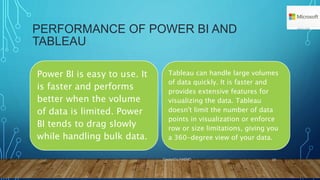
PERFORMANCE OF POWER BI AND
TABLEAU
Power BI is easy to use. It
is faster and performs
better when the volume
of data is limited. Power
BI tends to drag slowly
while handling bulk data.
Tableau can handle large volumes
of data quickly. It is faster and
provides extensive features for
visualizing the data. Tableau
doesn't limit the number of data
points in visualization or enforce
row or size limitations, giving you
a 360-degree view of your data.
Created by NAEMD 10
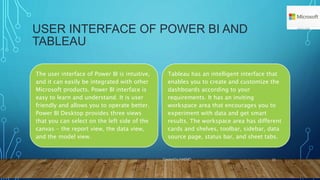
USER INTERFACE OF POWER BI AND
TABLEAU
The user interface of Power BI is intuitive,
and it can easily be integrated with other
Microsoft products. Power BI interface is
easy to learn and understand. It is user
friendly and allows you to operate better.
Power BI Desktop provides three views
that you can select on the left side of the
canvas - the report view, the data view,
and the model view.
Tableau has an intelligent interface that
enables you to create and customize the
dashboards according to your
requirements. It has an inviting
workspace area that encourages you to
experiment with data and get smart
results. The workspace area has different
cards and shelves, toolbar, sidebar, data
source page, status bar, and sheet tabs.
Created by NAEMD 11
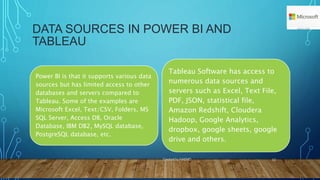
DATA SOURCES IN POWER BI AND
TABLEAU
Power BI is that it supports various data
sources but has limited access to other
databases and servers compared to
Tableau. Some of the examples are
Microsoft Excel, Text/CSV, Folders, MS
SQL Server, Access DB, Oracle
Database, IBM DB2, MySQL database,
PostgreSQL database, etc.
Tableau Software has access to
numerous data sources and
servers such as Excel, Text File,
PDF, JSON, statistical file,
Amazon Redshift, Cloudera
Hadoop, Google Analytics,
dropbox, google sheets, google
drive and others.
Created by NAEMD 12
EASE OF USING POWER BI AND TABLEAU
Power BI has an edge
because of its ease of use
since it is based on a user
interface that has its roots in
Microsoft Office 365, which
most end-users are already
familiar with.
Tableau provides some essential
advantages for exploring and
visualizing data in detail. Tableau
is also incorporating natural
language capabilities into its
software. This helps in finding
solutions to complex problems
by understanding the data better.
Created by NAEMD 13
PROGRAMMING SUPPORT FOR POWER BI
AND TABLEAU
Power BI supports Data Analysis
Expression and M language for
data manipulation and data
modeling. It can also connect to
the R programming language
using Microsoft revolution
analytics, but it is available only
for enterprise-level users
Compared to Power BI, Tableau
integrates much better with the R
language. Tableau Software
Development Kit can be implemented
using any of the four programming
languages - C, C++, Java, and Python.
By connecting to these programming
languages, you can build even more
powerful visualizations.
Created by NAEMD 14
DATA VISUALIZATION IN POWER BI AND
TABLEAU
Power BI provides an easy to use drag
and drop functionality. It provides
features that make data visually
appealing. Power BI offers a wide range
of detailed and attractive visualizations
to create reports and dashboards.
Using Power BI service, you can ask
questions about your data, and it will
give you meaningful insights.
Tableau also allows its users to customize
dashboards specifically for a device. It
delivers interactive visuals that support
insights on the fly. It can translate queries to
visualizations and makes you ask questions,
spot trends, and identify opportunities. You
don't require any prior knowledge to work
on Tableau since it provides in-built table
calculations to build reports and
dashboards.
Created by NAEMD 15
CUSTOMER SUPPORT IN POWER BI AND
TABLEAU
Microsoft Power BI is
relatively younger in
the market than
Tableau and hence has
a smaller community.
While Tableau has over
160,000 active users
participating in over 500
global user groups and over
150,000 active customers
participating in the Tableau
online community.
Created by NAEMD 16
KEY DIFFERENCES:
Tableau deploys MDX for measures and dimensions while Power BI uses DAX for
calculating and measuring columns.
Tableau platform is known for its data visualization functionality whereas Power BI
offers numerous data points to offer data visualization
Tableau BI can handle a huge volume of data with better performance while Power BI
can handle a limited volume of data.
Tableau works best when there is a vast data in the cloud but Power Bl doesn’t work
better with a massive amount of data
Tableau is used by analysts and experienced- users mostly use for their analytics
purposes and Power BI is used by both naive and experienced users.
Tableau is a little difficult whereas Power BI Interface is very easy to learn.
Created by NAEMD 17

Difference Between Power BI and Tavleau.pptx

  • 1.
  • 2.
    HYPERLINK • Graphics Layout •Bullet Points • Difference between Power BI and Tableau • About Them Created by NAEMD 2
  • 3.
    GRAPHICS LAYOUT Computer Study Software Ms Office Excel Word PPT Language PythonR C Java Hardware Networking WAN MAN LAN Created by NAEMD 3
  • 4.
    BULLET POINT • Thequick brown fox jumps over the lazy dog. The quick brown fox jumps over the lazy dog. • The quick brown fox jumps over the lazy dog. The quick brown fox jumps over the lazy dog. • The quick brown fox jumps over the lazy dog. The quick brown fox jumps over the lazy dog. • The quick brown fox jumps over the lazy dog. The quick brown fox jumps over the lazy dog. • The quick brown fox jumps over the lazy dog. The quick brown fox jumps over the lazy dog. • The quick brown fox jumps over the lazy dog. The quick brown fox jumps over the lazy dog. Created by NAEMD 4
  • 5.
    DIFFERENCE BETWEEN POWER BIAND TABLEAU Created by NAEMD 5
  • 6.
    ABOUT THEM Power BIand Tableau are two important Business Intelligence (BI) technologies for the collection, integration, analysis, and presentation of business information. They help you perform data analysis, data manipulation, and data visualization to make sense of business data and draw insights. Created by NAEMD 6
  • 7.
    DEFINITION Power BI isa business analytics service provided by Microsoft that can analyze and visualize data, extract insights, and share it across various departments within your organization. Tableau is a powerful Business Intelligence tool that manages the data flow and turns data into actionable information. Created by NAEMD 7
  • 8.
    HISTORY OF POWERBI AND TABLEAU Power BI has an easy drag and drops functionality, with features that allow you to copy all formatting across similar visualizations. Ron George originally designed power BI in the summer of 2010, and the initial release was available for public download on 11 July 2011. The critical components of Power BI are Power BI Desktop, Power Bi Service, Power BI Mobile Apps, Power BI Gateway, and Power BI Report Server. Tableau has the feature of drag-n-drop, which allows its users to create interactive visuals quickly. It can also build interactive dashboards with just a few clicks. Tableau Software was founded in 2003 in Mountain View, California, and Tableau Desktop 1.0 was released in 2004. On 1 August 2019, Salesforce acquired Tableau. Tableau products include Tableau Desktop, Tableau Server, Tableau Online, Tableau Vizable, Tableau Public, and Tableau Reader. Created by NAEMD 8
  • 9.
    COST OF POWERBI AND TABLEAU Power BI is cheaper than Tableau software. Power BI professional version costs less than $10 per month per user. The yearly subscription comes around $100. Power BI Premium is licensed by dedicated cloud compute and storage resources and is priced at $4,995/month. Tableau is more expensive, where the pro version of Tableau comes at more than $35 per month per user. The yearly subscription costs around $1000. Tableau Creator costs around $70/ month, while Tableau Viewer is priced at $12/month. If you are a startup or a small business, you can opt for Power BI and then upgrade to Tableau if the need arises. Created by NAEMD 9
  • 10.
    PERFORMANCE OF POWERBI AND TABLEAU Power BI is easy to use. It is faster and performs better when the volume of data is limited. Power BI tends to drag slowly while handling bulk data. Tableau can handle large volumes of data quickly. It is faster and provides extensive features for visualizing the data. Tableau doesn't limit the number of data points in visualization or enforce row or size limitations, giving you a 360-degree view of your data. Created by NAEMD 10
  • 11.
    USER INTERFACE OFPOWER BI AND TABLEAU The user interface of Power BI is intuitive, and it can easily be integrated with other Microsoft products. Power BI interface is easy to learn and understand. It is user friendly and allows you to operate better. Power BI Desktop provides three views that you can select on the left side of the canvas - the report view, the data view, and the model view. Tableau has an intelligent interface that enables you to create and customize the dashboards according to your requirements. It has an inviting workspace area that encourages you to experiment with data and get smart results. The workspace area has different cards and shelves, toolbar, sidebar, data source page, status bar, and sheet tabs. Created by NAEMD 11
  • 12.
    DATA SOURCES INPOWER BI AND TABLEAU Power BI is that it supports various data sources but has limited access to other databases and servers compared to Tableau. Some of the examples are Microsoft Excel, Text/CSV, Folders, MS SQL Server, Access DB, Oracle Database, IBM DB2, MySQL database, PostgreSQL database, etc. Tableau Software has access to numerous data sources and servers such as Excel, Text File, PDF, JSON, statistical file, Amazon Redshift, Cloudera Hadoop, Google Analytics, dropbox, google sheets, google drive and others. Created by NAEMD 12
  • 13.
    EASE OF USINGPOWER BI AND TABLEAU Power BI has an edge because of its ease of use since it is based on a user interface that has its roots in Microsoft Office 365, which most end-users are already familiar with. Tableau provides some essential advantages for exploring and visualizing data in detail. Tableau is also incorporating natural language capabilities into its software. This helps in finding solutions to complex problems by understanding the data better. Created by NAEMD 13
  • 14.
    PROGRAMMING SUPPORT FORPOWER BI AND TABLEAU Power BI supports Data Analysis Expression and M language for data manipulation and data modeling. It can also connect to the R programming language using Microsoft revolution analytics, but it is available only for enterprise-level users Compared to Power BI, Tableau integrates much better with the R language. Tableau Software Development Kit can be implemented using any of the four programming languages - C, C++, Java, and Python. By connecting to these programming languages, you can build even more powerful visualizations. Created by NAEMD 14
  • 15.
    DATA VISUALIZATION INPOWER BI AND TABLEAU Power BI provides an easy to use drag and drop functionality. It provides features that make data visually appealing. Power BI offers a wide range of detailed and attractive visualizations to create reports and dashboards. Using Power BI service, you can ask questions about your data, and it will give you meaningful insights. Tableau also allows its users to customize dashboards specifically for a device. It delivers interactive visuals that support insights on the fly. It can translate queries to visualizations and makes you ask questions, spot trends, and identify opportunities. You don't require any prior knowledge to work on Tableau since it provides in-built table calculations to build reports and dashboards. Created by NAEMD 15
  • 16.
    CUSTOMER SUPPORT INPOWER BI AND TABLEAU Microsoft Power BI is relatively younger in the market than Tableau and hence has a smaller community. While Tableau has over 160,000 active users participating in over 500 global user groups and over 150,000 active customers participating in the Tableau online community. Created by NAEMD 16
  • 17.
    KEY DIFFERENCES: Tableau deploysMDX for measures and dimensions while Power BI uses DAX for calculating and measuring columns. Tableau platform is known for its data visualization functionality whereas Power BI offers numerous data points to offer data visualization Tableau BI can handle a huge volume of data with better performance while Power BI can handle a limited volume of data. Tableau works best when there is a vast data in the cloud but Power Bl doesn’t work better with a massive amount of data Tableau is used by analysts and experienced- users mostly use for their analytics purposes and Power BI is used by both naive and experienced users. Tableau is a little difficult whereas Power BI Interface is very easy to learn. Created by NAEMD 17