Department of Computer and Information Science, School of Science, IUPUI Dale Roberts, Lecturer Computer Science, IUPUI E-mail: droberts@cs.iupui.edu A First C Program
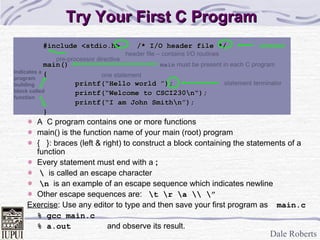
Try Your First C Program #include <stdio.h>  /* I/O header file */ main() { printf(“Hello world ”); printf(“Welcome to CSCI230\n“); printf(“I am John Smith\n”); } A  C program contains one or more functions main() is the function name of your main (root) program {  }: braces (left & right) to construct a block containing the statements of a function Every statement must end with a  ; \   is called an escape character \n   is an example of an escape sequence which indicates newline Other escape sequences are:  \t \r \a \\ \” Exercise :   Use any editor to type and then save your first program as   main.c % gcc main.c % a.out and observe its result. header file – contains I/O routines pre-processor   directive one statement main  must be present in each C program statement terminator Indicates a program building block called function comment
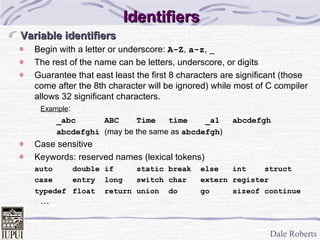
Identifiers Variable identifiers Begin with a letter or underscore:  A-Z ,  a-z , _ The rest of the name can be letters, underscore, or digits Guarantee that east least the first 8 characters are significant (those come after the 8th character will be ignored) while most of C compiler allows 32 significant characters. Example : _abc ABC Time time  _a1 abcdefgh abcdefghi  (may be the same as  abcdefgh ) Case sensitive Keywords: reserved names (lexical tokens) auto double if static break else int struct case entry long switch char extern register typedef float return union do go sizeof continue …
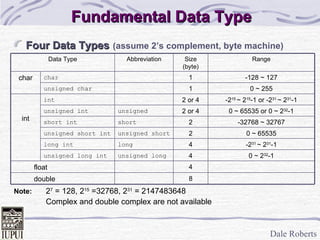
Fundamental Data Type Four Data Types   (assume 2’s complement, byte machine) Note: 2 7  = 128, 2 15  =32768, 2 31  = 2147483648 Complex and double complex are not available 8 4 4 4 2 2 2 or 4 2 or 4 1 1 Size (byte) float double 0 ~ 2 32 -1 unsigned long unsigned long int -2 31  ~ 2 31 -1 long long int 0 ~ 65535 unsigned short unsigned short int -32768 ~ 32767 short short int 0 ~ 65535 or 0 ~ 2 32 -1 unsigned unsigned int -2 15  ~ 2 15 -1 or -2 31  ~ 2 31 -1 int int 0 ~ 255 unsigned char -128 ~ 127 char char Range Abbreviation Data Type
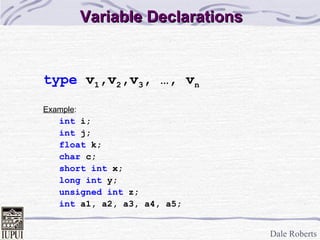
Variable Declarations type  v 1 ,v 2 ,v 3 , …, v n Example : int  i; int  j; float  k; char  c; short   int  x; long int  y; unsigned int  z; int  a1, a2, a3, a4, a5;
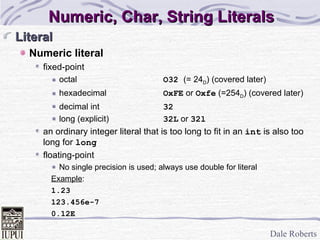
Numeric, Char, String Literals Literal Numeric literal fixed-point octal O32  (= 24 D ) (covered later) hexadecimal OxFE  or  Oxfe  (=254 D ) (covered later) decimal int 32 long (explicit) 32L  or  32l an ordinary integer literal that is too long to fit in an  int  is also too long for  long floating-point No single precision is used; always use double for literal Example :  1.23 123.456e-7 0.12E
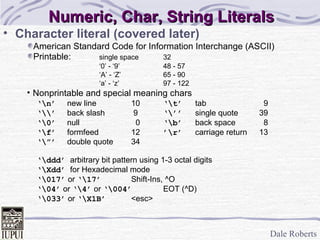
Character literal (covered later) American Standard Code for Information Interchange (ASCII) Printable:  single space 32 ‘ 0’ - ‘9’ 48 - 57 ‘ A’ - ‘Z’ 65 - 90 ‘ a’ - ‘z’ 97 - 122 Nonprintable and special meaning chars ‘ \n’   new line 10 ‘\t’ tab   9 ‘ \\’ back slash  9 ‘\’’ single quote 39 ‘ \0’ null   0 ‘\b’ back space   8 ‘ \f’ formfeed 12 ’\r’ carriage return 13 ‘ \”’ double quote 34 ‘ \ddd’   arbitrary bit pattern using 1-3 octal digits ‘ \Xdd’   for Hexadecimal mode ‘ \017’  or  ‘\17’ Shift-Ins, ^O ‘ \04’  or  ‘\4’  or  ‘\004’ EOT (^D) ‘ \033’  or  ‘\X1B’   <esc> Numeric, Char, String Literals
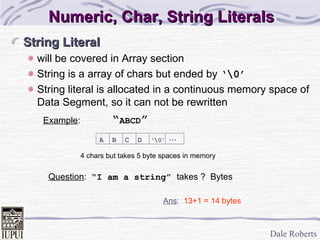
String Literal will be covered in Array section String is a array of chars but ended by  ‘\0’ String literal is allocated in a continuous memory space of Data Segment, so it can not be rewritten Example :   “ ABCD ” Numeric, Char, String Literals Ans :   13+1 = 14 bytes Question :  “I am a string”  takes ?  Bytes 4 chars but takes 5 byte spaces in memory ... A  B  C  D  ‘\0’
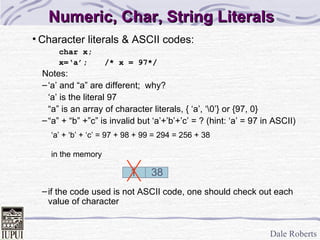
Numeric, Char, String Literals Character literals & ASCII codes: char x; x=‘a’; /* x = 97*/ Notes: ‘ a’ and “a” are different;  why? ‘ a’ is the literal 97 “ a” is an array of character literals, { ‘a’, ‘\0’} or {97, 0} “ a” + “b” +”c” is invalid but ‘a’+’b’+’c’ = ? (hint: ‘a’ = 97 in ASCII) if the code used is not ASCII code, one should check out each value of character 1  38 ‘ a’ + ‘b’ + ‘c’ = 97 + 98 + 99 = 294 = 256 + 38 in the memory
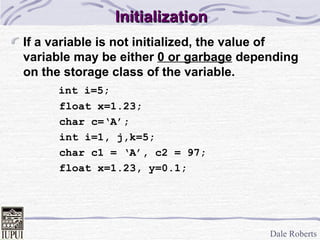
Initialization If a variable is not initialized, the value of variable may be either  0 or garbage  depending on the storage class of the variable.   int i=5; float x=1.23; char c=‘A’; int i=1, j,k=5; char c1 = ‘A’, c2 = 97; float x=1.23, y=0.1;
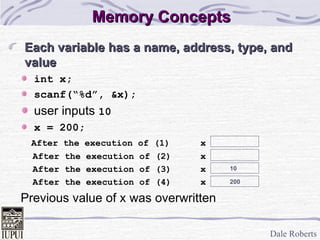
Memory Concepts Each variable has a name, address, type, and value int x; scanf(“%d”, &x); user inputs  10 x = 200; After the execution of (1) x After the execution of (2) x After the execution of (3) x After the execution of (4) x Previous value of x was overwritten 10 200
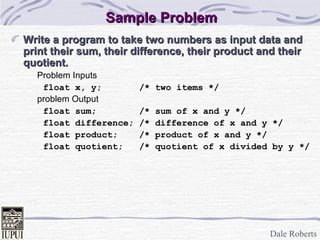
Sample Problem Write a program to take two numbers as input data and print their sum, their difference, their product and their quotient. Problem Inputs float x, y; /* two items */ problem Output float sum; /* sum of x and y */ float difference; /* difference of x and y */ float product; /* product of x and y */ float quotient; /* quotient of x divided by y */
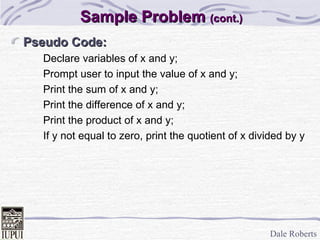
Sample Problem  (cont.) Pseudo Code: Declare variables of x and y; Prompt user to input the value of x and y; Print the sum of x and y; Print the difference of x and y; Print the product of x and y; If y not equal to zero, print the quotient of x divided by y
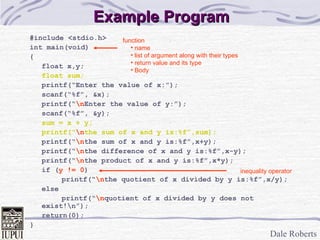
Example Program #include <stdio.h> int main(void) { float x,y; float sum; printf(“Enter the value of x:”); scanf(“%f”, &x); printf(“ \n Enter the value of y:”); scanf(“%f”, &y); sum = x + y; printf(“ \n the sum of x and y is:%f”,sum); printf(“ \n the sum of x and y is:%f”,x+y); printf(“ \n the difference of x and y is:%f”,x-y); printf(“ \n the product of x and y is:%f”,x*y); if ( y != 0 ) printf(“ \n the quotient of x divided by y is:%f”,x/y); else printf(“ \n quotient of x divided by y does not exist!\n”); return(0); } function name list of argument along with their types return value and its type Body inequality operator

T02 a firstcprogram

  • 1.
    Department of Computerand Information Science, School of Science, IUPUI Dale Roberts, Lecturer Computer Science, IUPUI E-mail: droberts@cs.iupui.edu A First C Program
  • 2.
    Try Your FirstC Program #include <stdio.h> /* I/O header file */ main() { printf(“Hello world ”); printf(“Welcome to CSCI230\n“); printf(“I am John Smith\n”); } A C program contains one or more functions main() is the function name of your main (root) program { }: braces (left & right) to construct a block containing the statements of a function Every statement must end with a ; \ is called an escape character \n is an example of an escape sequence which indicates newline Other escape sequences are: \t \r \a \\ \” Exercise : Use any editor to type and then save your first program as main.c % gcc main.c % a.out and observe its result. header file – contains I/O routines pre-processor directive one statement main must be present in each C program statement terminator Indicates a program building block called function comment
  • 3.
    Identifiers Variable identifiersBegin with a letter or underscore: A-Z , a-z , _ The rest of the name can be letters, underscore, or digits Guarantee that east least the first 8 characters are significant (those come after the 8th character will be ignored) while most of C compiler allows 32 significant characters. Example : _abc ABC Time time _a1 abcdefgh abcdefghi (may be the same as abcdefgh ) Case sensitive Keywords: reserved names (lexical tokens) auto double if static break else int struct case entry long switch char extern register typedef float return union do go sizeof continue …
  • 4.
    Fundamental Data TypeFour Data Types (assume 2’s complement, byte machine) Note: 2 7 = 128, 2 15 =32768, 2 31 = 2147483648 Complex and double complex are not available 8 4 4 4 2 2 2 or 4 2 or 4 1 1 Size (byte) float double 0 ~ 2 32 -1 unsigned long unsigned long int -2 31 ~ 2 31 -1 long long int 0 ~ 65535 unsigned short unsigned short int -32768 ~ 32767 short short int 0 ~ 65535 or 0 ~ 2 32 -1 unsigned unsigned int -2 15 ~ 2 15 -1 or -2 31 ~ 2 31 -1 int int 0 ~ 255 unsigned char -128 ~ 127 char char Range Abbreviation Data Type
  • 5.
    Variable Declarations type v 1 ,v 2 ,v 3 , …, v n Example : int i; int j; float k; char c; short int x; long int y; unsigned int z; int a1, a2, a3, a4, a5;
  • 6.
    Numeric, Char, StringLiterals Literal Numeric literal fixed-point octal O32 (= 24 D ) (covered later) hexadecimal OxFE or Oxfe (=254 D ) (covered later) decimal int 32 long (explicit) 32L or 32l an ordinary integer literal that is too long to fit in an int is also too long for long floating-point No single precision is used; always use double for literal Example : 1.23 123.456e-7 0.12E
  • 7.
    Character literal (coveredlater) American Standard Code for Information Interchange (ASCII) Printable: single space 32 ‘ 0’ - ‘9’ 48 - 57 ‘ A’ - ‘Z’ 65 - 90 ‘ a’ - ‘z’ 97 - 122 Nonprintable and special meaning chars ‘ \n’ new line 10 ‘\t’ tab 9 ‘ \\’ back slash 9 ‘\’’ single quote 39 ‘ \0’ null 0 ‘\b’ back space 8 ‘ \f’ formfeed 12 ’\r’ carriage return 13 ‘ \”’ double quote 34 ‘ \ddd’ arbitrary bit pattern using 1-3 octal digits ‘ \Xdd’ for Hexadecimal mode ‘ \017’ or ‘\17’ Shift-Ins, ^O ‘ \04’ or ‘\4’ or ‘\004’ EOT (^D) ‘ \033’ or ‘\X1B’ <esc> Numeric, Char, String Literals
  • 8.
    String Literal willbe covered in Array section String is a array of chars but ended by ‘\0’ String literal is allocated in a continuous memory space of Data Segment, so it can not be rewritten Example : “ ABCD ” Numeric, Char, String Literals Ans : 13+1 = 14 bytes Question : “I am a string” takes ? Bytes 4 chars but takes 5 byte spaces in memory ... A B C D ‘\0’
  • 9.
    Numeric, Char, StringLiterals Character literals & ASCII codes: char x; x=‘a’; /* x = 97*/ Notes: ‘ a’ and “a” are different; why? ‘ a’ is the literal 97 “ a” is an array of character literals, { ‘a’, ‘\0’} or {97, 0} “ a” + “b” +”c” is invalid but ‘a’+’b’+’c’ = ? (hint: ‘a’ = 97 in ASCII) if the code used is not ASCII code, one should check out each value of character 1 38 ‘ a’ + ‘b’ + ‘c’ = 97 + 98 + 99 = 294 = 256 + 38 in the memory
  • 10.
    Initialization If avariable is not initialized, the value of variable may be either 0 or garbage depending on the storage class of the variable. int i=5; float x=1.23; char c=‘A’; int i=1, j,k=5; char c1 = ‘A’, c2 = 97; float x=1.23, y=0.1;
  • 11.
    Memory Concepts Eachvariable has a name, address, type, and value int x; scanf(“%d”, &x); user inputs 10 x = 200; After the execution of (1) x After the execution of (2) x After the execution of (3) x After the execution of (4) x Previous value of x was overwritten 10 200
  • 12.
    Sample Problem Writea program to take two numbers as input data and print their sum, their difference, their product and their quotient. Problem Inputs float x, y; /* two items */ problem Output float sum; /* sum of x and y */ float difference; /* difference of x and y */ float product; /* product of x and y */ float quotient; /* quotient of x divided by y */
  • 13.
    Sample Problem (cont.) Pseudo Code: Declare variables of x and y; Prompt user to input the value of x and y; Print the sum of x and y; Print the difference of x and y; Print the product of x and y; If y not equal to zero, print the quotient of x divided by y
  • 14.
    Example Program #include<stdio.h> int main(void) { float x,y; float sum; printf(“Enter the value of x:”); scanf(“%f”, &x); printf(“ \n Enter the value of y:”); scanf(“%f”, &y); sum = x + y; printf(“ \n the sum of x and y is:%f”,sum); printf(“ \n the sum of x and y is:%f”,x+y); printf(“ \n the difference of x and y is:%f”,x-y); printf(“ \n the product of x and y is:%f”,x*y); if ( y != 0 ) printf(“ \n the quotient of x divided by y is:%f”,x/y); else printf(“ \n quotient of x divided by y does not exist!\n”); return(0); } function name list of argument along with their types return value and its type Body inequality operator