Chapter 6: An Introduction
to System Software and
Virtual Machines
    Invitation to Computer Science,
    C++ Version, Fourth Edition
Objectives

In this chapter, you will learn about


   System software


   Assemblers and assembly language


   Operating systems

Invitation to Computer Science, C++ Version, Fourth Edition 2
Introduction

   Von Neumann computer
       “Naked machine”
       Hardware without any helpful user-oriented
        features
       Extremely difficult for a human to work with
   An interface between the user and the hardware
    is needed to make a Von Neumann computer
    usable

Invitation to Computer Science, C++ Version, Fourth Edition 3
Introduction (continued)

   Tasks of the interface


       Hide details of the underlying hardware from the
        user


       Present information in a way that does not require
        in-depth knowledge of the internal structure of the
        system


Invitation to Computer Science, C++ Version, Fourth Edition 4
Introduction (continued)

   Tasks of the interface (continued)


       Allow easy user access to the available resources


       Prevent accidental or intentional damage to
        hardware, programs, and data


Invitation to Computer Science, C++ Version, Fourth Edition 5
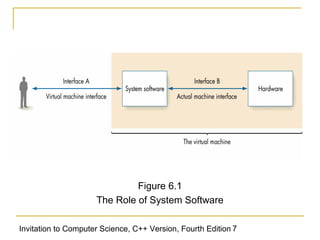
System Software: The Virtual Machine

   System software
       Acts as an intermediary between users and
        hardware
       Creates a virtual environment for the user that
        hides the actual computer architecture
   Virtual machine (or virtual environment)
       Set of services and resources created by the
        system software and seen by the user
Invitation to Computer Science, C++ Version, Fourth Edition 6
Figure 6.1
                     The Role of System Software

Invitation to Computer Science, C++ Version, Fourth Edition 7
Types of System Software

   System software is a collection of many different
    programs
   Operating system
       Controls the overall operation of the computer
       Communicates with the user
       Determines what the user wants
       Activates system programs, applications
        packages, or user programs to carry out user
        requests

Invitation to Computer Science, C++ Version, Fourth Edition 8
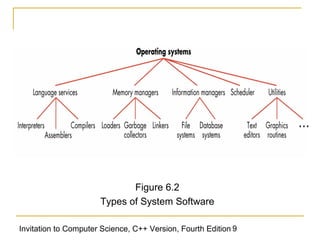
Figure 6.2
                      Types of System Software

Invitation to Computer Science, C++ Version, Fourth Edition 9
Types of System Software (continued)

   User interface
       Graphical user interface (GUI) provides graphical
        control of the capabilities and services of the
        computer
   Language services
       Assemblers, compilers, and interpreters
       Allow you to write programs in a high-level, user-
        oriented language, and then execute them

Invitation to Computer Science, C++ Version, Fourth Edition 10
Types of System Software (continued)

   Memory managers
       Allocate and retrieve memory space
   Information managers
       Handle the organization, storage, and retrieval of
        information on mass storage devices
   I/O systems
       Allow the use of different types of input and output
        devices

Invitation to Computer Science, C++ Version, Fourth Edition 11
Types of System Software (continued)

   Scheduler

       Keeps a list of programs ready to run and selects
        the one that will execute next

   Utilities

       Collections of library routines that provide services
        either to user or other system routines

Invitation to Computer Science, C++ Version, Fourth Edition 12
Assembly Language

   Machine language

       Uses binary

       Allows only numeric memory addresses

       Difficult to change

       Difficult to create data


Invitation to Computer Science, C++ Version, Fourth Edition 13
Assembly Language (continued)

   Assembly languages

       Designed to overcome shortcomings of machine
        languages

       Create a more productive, user-oriented
        environment

       Earlier termed second-generation languages

       Now viewed as low-level programming languages

Invitation to Computer Science, C++ Version, Fourth Edition 14
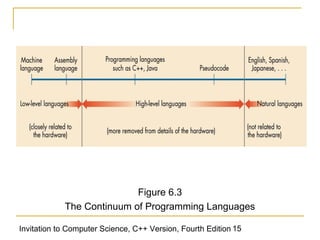
Figure 6.3
            The Continuum of Programming Languages

Invitation to Computer Science, C++ Version, Fourth Edition 15
Assembly Language (continued)

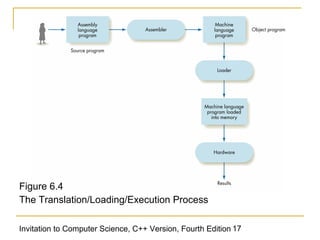
   Source program
       An assembly language program
   Object program
       A machine language program
   Assembler
       Translates a source program into a corresponding
        object program

Invitation to Computer Science, C++ Version, Fourth Edition 16
Figure 6.4
The Translation/Loading/Execution Process

Invitation to Computer Science, C++ Version, Fourth Edition 17
Assembly Language (continued)

   Advantages of writing in assembly language
    rather than machine language
       Use of symbolic operation codes rather than
        numeric (binary) ones
       Use of symbolic memory addresses rather than
        numeric (binary) ones
       Pseudo-operations that provide useful user-
        oriented services such as data generation

Invitation to Computer Science, C++ Version, Fourth Edition 18
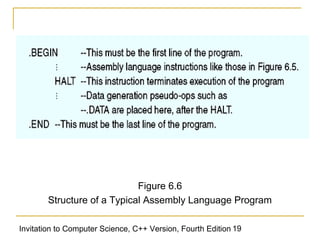
Figure 6.6
        Structure of a Typical Assembly Language Program

Invitation to Computer Science, C++ Version, Fourth Edition 19
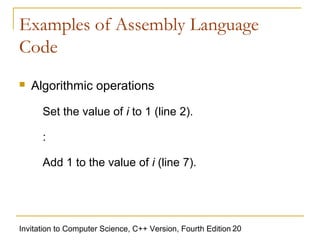
Examples of Assembly Language
Code
   Algorithmic operations

      Set the value of i to 1 (line 2).
      :

      Add 1 to the value of i (line 7).


Invitation to Computer Science, C++ Version, Fourth Edition 20
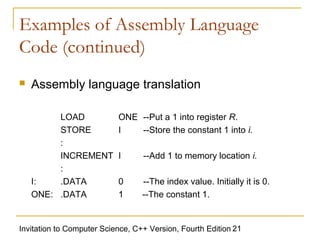
Examples of Assembly Language
Code (continued)
   Assembly language translation

         LOAD              ONE --Put a 1 into register R.
         STORE             I   --Store the constant 1 into i.
         :
         INCREMENT         I      --Add 1 to memory location i.
         :
    I:   .DATA             0      --The index value. Initially it is 0.
    ONE: .DATA             1      --The constant 1.


Invitation to Computer Science, C++ Version, Fourth Edition 21
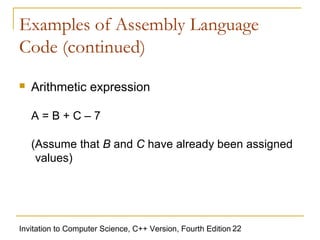
Examples of Assembly Language
Code (continued)
   Arithmetic expression

    A=B+C–7

    (Assume that B and C have already been assigned
     values)


Invitation to Computer Science, C++ Version, Fourth Edition 22
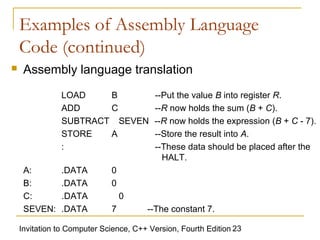
Examples of Assembly Language
    Code (continued)
    Assembly language translation
               LOAD    B                 --Put the value B into register R.
               ADD     C                 --R now holds the sum (B + C).
               SUBTRACT SEVEN            --R now holds the expression (B + C - 7).
               STORE   A                 --Store the result into A.
               :                         --These data should be placed after the
                                           HALT.
     A:        .DATA         0
     B:        .DATA         0
     C:        .DATA             0
     SEVEN:    .DATA         7         --The constant 7.

    Invitation to Computer Science, C++ Version, Fourth Edition 23
Examples of Assembly Language
Code (continued)
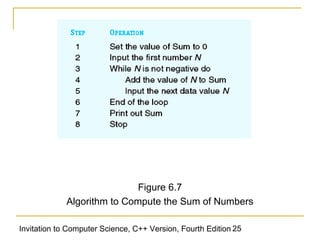
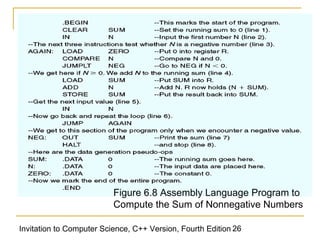
   Problem

       Read in a sequence of non-negative numbers,
        one number at a time, and compute a running
        sum

       When you encounter a negative number, print out
        the sum of the non-negative values and stop


Invitation to Computer Science, C++ Version, Fourth Edition 24
Figure 6.7
             Algorithm to Compute the Sum of Numbers

Invitation to Computer Science, C++ Version, Fourth Edition 25
Figure 6.8 Assembly Language Program to
                          Compute the Sum of Nonnegative Numbers

Invitation to Computer Science, C++ Version, Fourth Edition 26
Translation and Loading

   Before a source program can be run, an
    assembler and a loader must be invoked
   Assembler
       Translates a symbolic assembly language
        program into machine language
   Loader
       Reads instructions from the object file and stores
        them into memory for execution

Invitation to Computer Science, C++ Version, Fourth Edition 27
Translation and Loading (continued)

   Assembler tasks

       Convert symbolic op codes to binary

       Convert symbolic addresses to binary

       Perform assembler services requested by the
        pseudo-ops

       Put translated instructions into a file for future use

Invitation to Computer Science, C++ Version, Fourth Edition 28
Operating Systems

   System commands
       Carry out services such as translate a program,
        load a program, run a program
       Types of system commands
           Lines of text typed at a terminal
           Menu items displayed on a screen and selected
            with a mouse and a button: Point-and-click
       Examined by the operating system

Invitation to Computer Science, C++ Version, Fourth Edition 29
Functions of an Operating System
   Five most important responsibilities of the
    operating system
       User interface management
       Program scheduling and activation
       Control of access to system and files
       Efficient resource allocation
       Deadlock detection and error detection

Invitation to Computer Science, C++ Version, Fourth Edition 30
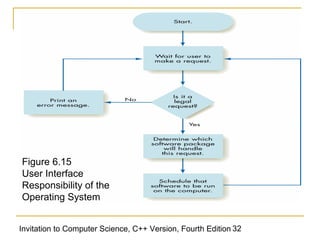
The User Interface
   Operating system
       Waits for a user command
       If command is legal, activates and schedules the
        appropriate software package

   User interfaces
       Text-oriented
       Graphical

Invitation to Computer Science, C++ Version, Fourth Edition 31
Figure 6.15
User Interface
Responsibility of the
Operating System


Invitation to Computer Science, C++ Version, Fourth Edition 32
System Security And Protection

   The operating system must prevent

       Non-authorized people from using the computer

           User names and passwords

       Legitimate users from accessing data or programs
        they are not authorized to access

           Authorization lists

Invitation to Computer Science, C++ Version, Fourth Edition 33
Efficient Allocation Of Resources

   The operating system ensures that

       Multiple tasks of the computer can be underway at
        one time

       Processor is constantly busy

           Keeps a queue of programs that are ready to run

           Whenever processor is idle, picks a job from the
            queue and assigns it to the processor

Invitation to Computer Science, C++ Version, Fourth Edition 34
The Safe Use Of Resources

   Deadlock
       Two processes are each holding a resource the
        other needs
       Neither process will ever progress
   The operating system must handle deadlocks
       Deadlock prevention
       Deadlock recovery

Invitation to Computer Science, C++ Version, Fourth Edition 35
Historical Overview of Operating
Systems Development
   First generation of system software (roughly
    1945-1955)


       No operating systems


       Assemblers and loaders were almost the only
        system software provided

Invitation to Computer Science, C++ Version, Fourth Edition 36
Historical Overview of Operating
Systems Development (continued)
   Second generation of system software (1955-
    1965)

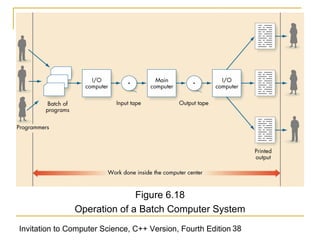
       Batch operating systems

       Ran collections of input programs one after the
        other

       Included a command language


Invitation to Computer Science, C++ Version, Fourth Edition 37
Figure 6.18
               Operation of a Batch Computer System
Invitation to Computer Science, C++ Version, Fourth Edition 38
Historical Overview of Operating
Systems Development (continued)
   Third-generation operating systems (1965-1985)


       Multiprogrammed operating systems


       Permitted multiple user programs to run at once


Invitation to Computer Science, C++ Version, Fourth Edition 39
Historical Overview of Operating
Systems Development (continued)
   Fourth-generation operating systems (1985-
    present)

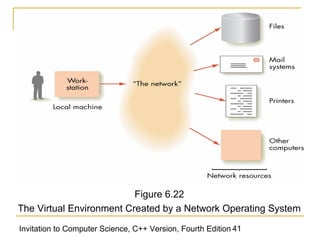
       Network operating systems

       Virtual environment treats resources physically
        residing on the computer in the same way as
        resources available through the computer’s
        network

Invitation to Computer Science, C++ Version, Fourth Edition 40
Figure 6.22
The Virtual Environment Created by a Network Operating System

Invitation to Computer Science, C++ Version, Fourth Edition 41
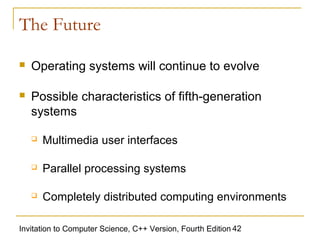
The Future

   Operating systems will continue to evolve

   Possible characteristics of fifth-generation
    systems

       Multimedia user interfaces

       Parallel processing systems

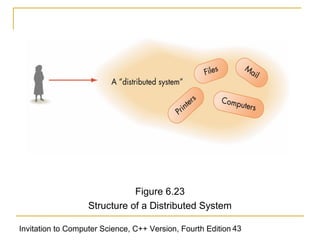
       Completely distributed computing environments

Invitation to Computer Science, C++ Version, Fourth Edition 42
Figure 6.23
                   Structure of a Distributed System

Invitation to Computer Science, C++ Version, Fourth Edition 43
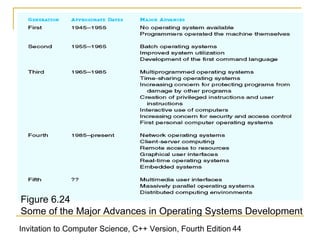
Figure 6.24
Some of the Major Advances in Operating Systems Development
Invitation to Computer Science, C++ Version, Fourth Edition 44
Summary

   System software acts as an intermediary
    between the users and the hardware

   Assembly language creates a more productive,
    user-oriented environment than machine
    language

   An assembler translates an assembly language
    program into a machine language program


Invitation to Computer Science, C++ Version, Fourth Edition 45
Summary (continued)
   Responsibilities of the operating system

       User interface management

       Program scheduling and activation

       Control of access to system and files

       Efficient resource allocation

       Deadlock detection and error detection

Invitation to Computer Science, C++ Version, Fourth Edition 46

system software

  • 1.
    Chapter 6: AnIntroduction to System Software and Virtual Machines Invitation to Computer Science, C++ Version, Fourth Edition
  • 2.
    Objectives In this chapter,you will learn about  System software  Assemblers and assembly language  Operating systems Invitation to Computer Science, C++ Version, Fourth Edition 2
  • 3.
    Introduction  Von Neumann computer  “Naked machine”  Hardware without any helpful user-oriented features  Extremely difficult for a human to work with  An interface between the user and the hardware is needed to make a Von Neumann computer usable Invitation to Computer Science, C++ Version, Fourth Edition 3
  • 4.
    Introduction (continued)  Tasks of the interface  Hide details of the underlying hardware from the user  Present information in a way that does not require in-depth knowledge of the internal structure of the system Invitation to Computer Science, C++ Version, Fourth Edition 4
  • 5.
    Introduction (continued)  Tasks of the interface (continued)  Allow easy user access to the available resources  Prevent accidental or intentional damage to hardware, programs, and data Invitation to Computer Science, C++ Version, Fourth Edition 5
  • 6.
    System Software: TheVirtual Machine  System software  Acts as an intermediary between users and hardware  Creates a virtual environment for the user that hides the actual computer architecture  Virtual machine (or virtual environment)  Set of services and resources created by the system software and seen by the user Invitation to Computer Science, C++ Version, Fourth Edition 6
  • 7.
    Figure 6.1 The Role of System Software Invitation to Computer Science, C++ Version, Fourth Edition 7
  • 8.
    Types of SystemSoftware  System software is a collection of many different programs  Operating system  Controls the overall operation of the computer  Communicates with the user  Determines what the user wants  Activates system programs, applications packages, or user programs to carry out user requests Invitation to Computer Science, C++ Version, Fourth Edition 8
  • 9.
    Figure 6.2 Types of System Software Invitation to Computer Science, C++ Version, Fourth Edition 9
  • 10.
    Types of SystemSoftware (continued)  User interface  Graphical user interface (GUI) provides graphical control of the capabilities and services of the computer  Language services  Assemblers, compilers, and interpreters  Allow you to write programs in a high-level, user- oriented language, and then execute them Invitation to Computer Science, C++ Version, Fourth Edition 10
  • 11.
    Types of SystemSoftware (continued)  Memory managers  Allocate and retrieve memory space  Information managers  Handle the organization, storage, and retrieval of information on mass storage devices  I/O systems  Allow the use of different types of input and output devices Invitation to Computer Science, C++ Version, Fourth Edition 11
  • 12.
    Types of SystemSoftware (continued)  Scheduler  Keeps a list of programs ready to run and selects the one that will execute next  Utilities  Collections of library routines that provide services either to user or other system routines Invitation to Computer Science, C++ Version, Fourth Edition 12
  • 13.
    Assembly Language  Machine language  Uses binary  Allows only numeric memory addresses  Difficult to change  Difficult to create data Invitation to Computer Science, C++ Version, Fourth Edition 13
  • 14.
    Assembly Language (continued)  Assembly languages  Designed to overcome shortcomings of machine languages  Create a more productive, user-oriented environment  Earlier termed second-generation languages  Now viewed as low-level programming languages Invitation to Computer Science, C++ Version, Fourth Edition 14
  • 15.
    Figure 6.3 The Continuum of Programming Languages Invitation to Computer Science, C++ Version, Fourth Edition 15
  • 16.
    Assembly Language (continued)  Source program  An assembly language program  Object program  A machine language program  Assembler  Translates a source program into a corresponding object program Invitation to Computer Science, C++ Version, Fourth Edition 16
  • 17.
    Figure 6.4 The Translation/Loading/ExecutionProcess Invitation to Computer Science, C++ Version, Fourth Edition 17
  • 18.
    Assembly Language (continued)  Advantages of writing in assembly language rather than machine language  Use of symbolic operation codes rather than numeric (binary) ones  Use of symbolic memory addresses rather than numeric (binary) ones  Pseudo-operations that provide useful user- oriented services such as data generation Invitation to Computer Science, C++ Version, Fourth Edition 18
  • 19.
    Figure 6.6 Structure of a Typical Assembly Language Program Invitation to Computer Science, C++ Version, Fourth Edition 19
  • 20.
    Examples of AssemblyLanguage Code  Algorithmic operations Set the value of i to 1 (line 2). : Add 1 to the value of i (line 7). Invitation to Computer Science, C++ Version, Fourth Edition 20
  • 21.
    Examples of AssemblyLanguage Code (continued)  Assembly language translation LOAD ONE --Put a 1 into register R. STORE I --Store the constant 1 into i. : INCREMENT I --Add 1 to memory location i. : I: .DATA 0 --The index value. Initially it is 0. ONE: .DATA 1 --The constant 1. Invitation to Computer Science, C++ Version, Fourth Edition 21
  • 22.
    Examples of AssemblyLanguage Code (continued)  Arithmetic expression A=B+C–7 (Assume that B and C have already been assigned values) Invitation to Computer Science, C++ Version, Fourth Edition 22
  • 23.
    Examples of AssemblyLanguage Code (continued)  Assembly language translation LOAD B --Put the value B into register R. ADD C --R now holds the sum (B + C). SUBTRACT SEVEN --R now holds the expression (B + C - 7). STORE A --Store the result into A. : --These data should be placed after the HALT. A: .DATA 0 B: .DATA 0 C: .DATA 0 SEVEN: .DATA 7 --The constant 7. Invitation to Computer Science, C++ Version, Fourth Edition 23
  • 24.
    Examples of AssemblyLanguage Code (continued)  Problem  Read in a sequence of non-negative numbers, one number at a time, and compute a running sum  When you encounter a negative number, print out the sum of the non-negative values and stop Invitation to Computer Science, C++ Version, Fourth Edition 24
  • 25.
    Figure 6.7 Algorithm to Compute the Sum of Numbers Invitation to Computer Science, C++ Version, Fourth Edition 25
  • 26.
    Figure 6.8 AssemblyLanguage Program to Compute the Sum of Nonnegative Numbers Invitation to Computer Science, C++ Version, Fourth Edition 26
  • 27.
    Translation and Loading  Before a source program can be run, an assembler and a loader must be invoked  Assembler  Translates a symbolic assembly language program into machine language  Loader  Reads instructions from the object file and stores them into memory for execution Invitation to Computer Science, C++ Version, Fourth Edition 27
  • 28.
    Translation and Loading(continued)  Assembler tasks  Convert symbolic op codes to binary  Convert symbolic addresses to binary  Perform assembler services requested by the pseudo-ops  Put translated instructions into a file for future use Invitation to Computer Science, C++ Version, Fourth Edition 28
  • 29.
    Operating Systems  System commands  Carry out services such as translate a program, load a program, run a program  Types of system commands  Lines of text typed at a terminal  Menu items displayed on a screen and selected with a mouse and a button: Point-and-click  Examined by the operating system Invitation to Computer Science, C++ Version, Fourth Edition 29
  • 30.
    Functions of anOperating System  Five most important responsibilities of the operating system  User interface management  Program scheduling and activation  Control of access to system and files  Efficient resource allocation  Deadlock detection and error detection Invitation to Computer Science, C++ Version, Fourth Edition 30
  • 31.
    The User Interface  Operating system  Waits for a user command  If command is legal, activates and schedules the appropriate software package  User interfaces  Text-oriented  Graphical Invitation to Computer Science, C++ Version, Fourth Edition 31
  • 32.
    Figure 6.15 User Interface Responsibilityof the Operating System Invitation to Computer Science, C++ Version, Fourth Edition 32
  • 33.
    System Security AndProtection  The operating system must prevent  Non-authorized people from using the computer  User names and passwords  Legitimate users from accessing data or programs they are not authorized to access  Authorization lists Invitation to Computer Science, C++ Version, Fourth Edition 33
  • 34.
    Efficient Allocation OfResources  The operating system ensures that  Multiple tasks of the computer can be underway at one time  Processor is constantly busy  Keeps a queue of programs that are ready to run  Whenever processor is idle, picks a job from the queue and assigns it to the processor Invitation to Computer Science, C++ Version, Fourth Edition 34
  • 35.
    The Safe UseOf Resources  Deadlock  Two processes are each holding a resource the other needs  Neither process will ever progress  The operating system must handle deadlocks  Deadlock prevention  Deadlock recovery Invitation to Computer Science, C++ Version, Fourth Edition 35
  • 36.
    Historical Overview ofOperating Systems Development  First generation of system software (roughly 1945-1955)  No operating systems  Assemblers and loaders were almost the only system software provided Invitation to Computer Science, C++ Version, Fourth Edition 36
  • 37.
    Historical Overview ofOperating Systems Development (continued)  Second generation of system software (1955- 1965)  Batch operating systems  Ran collections of input programs one after the other  Included a command language Invitation to Computer Science, C++ Version, Fourth Edition 37
  • 38.
    Figure 6.18 Operation of a Batch Computer System Invitation to Computer Science, C++ Version, Fourth Edition 38
  • 39.
    Historical Overview ofOperating Systems Development (continued)  Third-generation operating systems (1965-1985)  Multiprogrammed operating systems  Permitted multiple user programs to run at once Invitation to Computer Science, C++ Version, Fourth Edition 39
  • 40.
    Historical Overview ofOperating Systems Development (continued)  Fourth-generation operating systems (1985- present)  Network operating systems  Virtual environment treats resources physically residing on the computer in the same way as resources available through the computer’s network Invitation to Computer Science, C++ Version, Fourth Edition 40
  • 41.
    Figure 6.22 The VirtualEnvironment Created by a Network Operating System Invitation to Computer Science, C++ Version, Fourth Edition 41
  • 42.
    The Future  Operating systems will continue to evolve  Possible characteristics of fifth-generation systems  Multimedia user interfaces  Parallel processing systems  Completely distributed computing environments Invitation to Computer Science, C++ Version, Fourth Edition 42
  • 43.
    Figure 6.23 Structure of a Distributed System Invitation to Computer Science, C++ Version, Fourth Edition 43
  • 44.
    Figure 6.24 Some ofthe Major Advances in Operating Systems Development Invitation to Computer Science, C++ Version, Fourth Edition 44
  • 45.
    Summary  System software acts as an intermediary between the users and the hardware  Assembly language creates a more productive, user-oriented environment than machine language  An assembler translates an assembly language program into a machine language program Invitation to Computer Science, C++ Version, Fourth Edition 45
  • 46.
    Summary (continued)  Responsibilities of the operating system  User interface management  Program scheduling and activation  Control of access to system and files  Efficient resource allocation  Deadlock detection and error detection Invitation to Computer Science, C++ Version, Fourth Edition 46