INTRODUCTION
• Without software,the computer is useless.
• Software is developed by using
programming languages.
- C++ is a programming language
• C++ is well suited for developing software
to accomplish specific tasks.
3.
A BRIEF OVERVIEWOF THE
HISTORY OF COMPUTERS
• Abacus
- first device to carry
calculations
- invented in Asia but
used in ancient
Babylon, China, and
Europe
4.
A BRIEF OVERVIEWOF THE
HISTORY OF COMPUTERS
• Stepped Reckoner
- a device invented by Gottfried von Leibniz
that was able to add, subtract, multiply, and
divide
5.
A BRIEF OVERVIEWOF THE
HISTORY OF COMPUTERS
• Pascaline
- invented by Blaise Pascal in 1642
- could sums up to 8 figures long
6.
A BRIEF OVERVIEWOF THE
HISTORY OF COMPUTERS
• Mark I
- first computer-like machine built in
1944 by IBM and Harvard
University under Howard Aiken
7.
A BRIEF OVERVIEWOF THE
HISTORY OF COMPUTERS
• Punch Cards and
Calculating Machine
- invented by
Herman
Hollerith
- used to tabulate
census data
8.
A BRIEF OVERVIEWOF THE
HISTORY OF COMPUTERS
• Difference and
Analytical Engine
- invented by
Charles Babbage
- first programmable
device that could
perform complex
operations
9.
A BRIEF OVERVIEWOF THE
HISTORY OF COMPUTERS
• ENIAC
- Electronic
Numerical
Integrator and
Calculator
- built at the
University of
Pennsylvania in 1946
10.
A BRIEF OVERVIEWOF THE
HISTORY OF COMPUTERS
• In 1956, the invention of transistors
resulted in smaller, faster, more
reliable, and more energy-efficient
computers.
• This era also saw the emergence of the
software development industry with
the introduction of FORTRAN, and
COBOL.
11.
A BRIEF OVERVIEWOF THE
HISTORY OF COMPUTERS
• UNIVAC
- Universal
Automatic
Computer
- built and sold to
the US Census
Bureau in 1951
12.
A BRIEF OVERVIEWOF THE
HISTORY OF COMPUTERS
• In 1970, the microprocessor, an entire
central processing unit (CPU) on a
single chip, was invented.
• In 1977, Stephen Wozniak and Steven
Jobs designed and built the first Apple
computer in their garage.
13.
A BRIEF OVERVIEWOF THE
HISTORY OF COMPUTERS
• In 1981, IBM introduced it personal
computer (PC).
• In the 1980s, clones of the IBM PC
made the personal computer even
more affordable.
14.
ELEMENTS OF ACOMPUTER
SYSTEM
• A computer is an electronic device
capable of performing commands.
• The basic commands that a computer
performs are input (get data), output
(display result), storage, and
performance of arithmetic and logical
operations.
15.
ELEMENTS OF ACOMPUTER
SYSTEM
• Central Processing Unit (CPU)
- brain of the computer
- most expensive piece of hardware
- carries out arithmetic and logical
operations
16.
ELEMENTS OF ACOMPUTER
SYSTEM
• Hardware
- Central Processing Unit (CPU)
- Main Memory (MM): also called
random access memory (RAM)
- Input/Output Devices
- Secondary Storage
ELEMENTS OF ACOMPUTER
SYSTEM
• Main Memory or Random Access Memory
- Random Access Memory – directly
connected to the CPU
- All programs must be loaded into
main memory before they can be
executed.
19.
ELEMENTS OF ACOMPUTER
SYSTEM
• Main Memory or Random Access Memory
- All data must be brought into the
main memory before it can be
manipulated
- When computer is turned off,
everything in main memory is lost.
20.
ELEMENTS OF ACOMPUTER
SYSTEM
• Main Memory or Random Access Memory
- Main memory is an ordered
sequence of memory cells. Each cell
has a unique location in main
memory called the address of the cell.
- Each cell can contain either a
programming instruction or data.
21.
ELEMENTS OF ACOMPUTER
SYSTEM
• Secondary Storage
- a device that stores information
permanently
Examples of secondary storage:
- Hard Disks
- Flash Drives
- Floppy Disks
- Zip Disks
- CD-ROMs
- Tapes
22.
ELEMENTS OF ACOMPUTER
SYSTEM
• Input/Output Devices
- Input devices feed data and programs
into computers (Keyboard, Mouse,
Secondary Storage)
- Output devices display results
(monitor, printer, secondary storage)
23.
ELEMENTS OF ACOMPUTER
SYSTEM
• Software
- are programs written to perform
specific tasks (i.e. word processors: use to
write letters, papers, books, etc.)
- are all written in programming
languages
- two types of programs: system and
application programs
24.
ELEMENTS OF ACOMPUTER
SYSTEM
• System programs control the computer.
The system program that loads first
when you turn on your computer is
called the operating system. Without
an operating system, the computer is
useless.
25.
ELEMENTS OF ACOMPUTER
SYSTEM
• System Programs
- Operating system handles the overall
activity of the computer and
provides services such as:
Memory management
Input/output activities
Storage management
26.
ELEMENTS OF ACOMPUTER
SYSTEM
• Application programs perform a specific
task. Examples of such are:
- Word processors
- Spreadsheets
- Games
• The operating system is the program
that runs application programs.
27.
THE LANGUAGE OFA
COMPUTER
• Two types of electrical signals: analog
and digital signals
• Analog Signals – are continuously
varying continuous wave forms used
to represent such things as sound.
Audio tapes, for example, store data in
analog signals.
28.
THE LANGUAGE OFA
COMPUTER
• Digital Signals – represent information
with a sequence of 0s and 1s. A 0
represents a low voltage, and a 1
represents a high voltage. Digital
signals are more reliable carriers of
information than analog signals and
can be copied from one device to
another with exact precision.
29.
THE LANGUAGE OFA
COMPUTER
• Because digital signals are processed
inside a computer, the language of a
computer, called machine language, is a
sequence of 0s and 1s.
• Binary Digit (Bit) – digit 0 or 1
• Binary code (Binary number) – a sequence
of 0s and 1s
30.
THE LANGUAGE OFA
COMPUTER
• Byte – a sequence of eight bits
• Kilobyte (KB) : 210
bytes = 1024 bytes
• ASCII (American Standard Code for
Information Interchange) – most
commonly used seven-bit encoding
scheme on personal computers
- 128 characters
THE LANGUAGE OFA
COMPUTER
• There are other encoding schemes,
such as EBCDIC (used by IBM) and
Unicode, which is a more recent
development.
• EBCDIC consists of 256 characters
• Unicode consists of 65, 536 characters.
34.
THE LANGUAGE OFA
COMPUTER
• To store a character belonging to a
Unicode, you need 16 bits or two
bytes.
• Unicode was created to represent a
variety of characters and is
continuously expanding.
• It consists of characters from
languages other than English.
35.
THE EVOLUTION OF
PROGRAMMINGLANGUAGES
• Early computers were programmed in
machine language
• To calculate wages = rate * hours;
In machine language:
100100 010001 //Load
100110 010010 //Multiply
100010 010011 //Store
36.
THE EVOLUTION OF
PROGRAMMINGLANGUAGES
• Assembly languages were developed to
make the programmer’s job easier.
• In assembly language, instructions are
mnemonic.
• Assembler: translates a program written
in assembly language into machine
language
THE EVOLUTION OF
PROGRAMMINGLANGUAGES
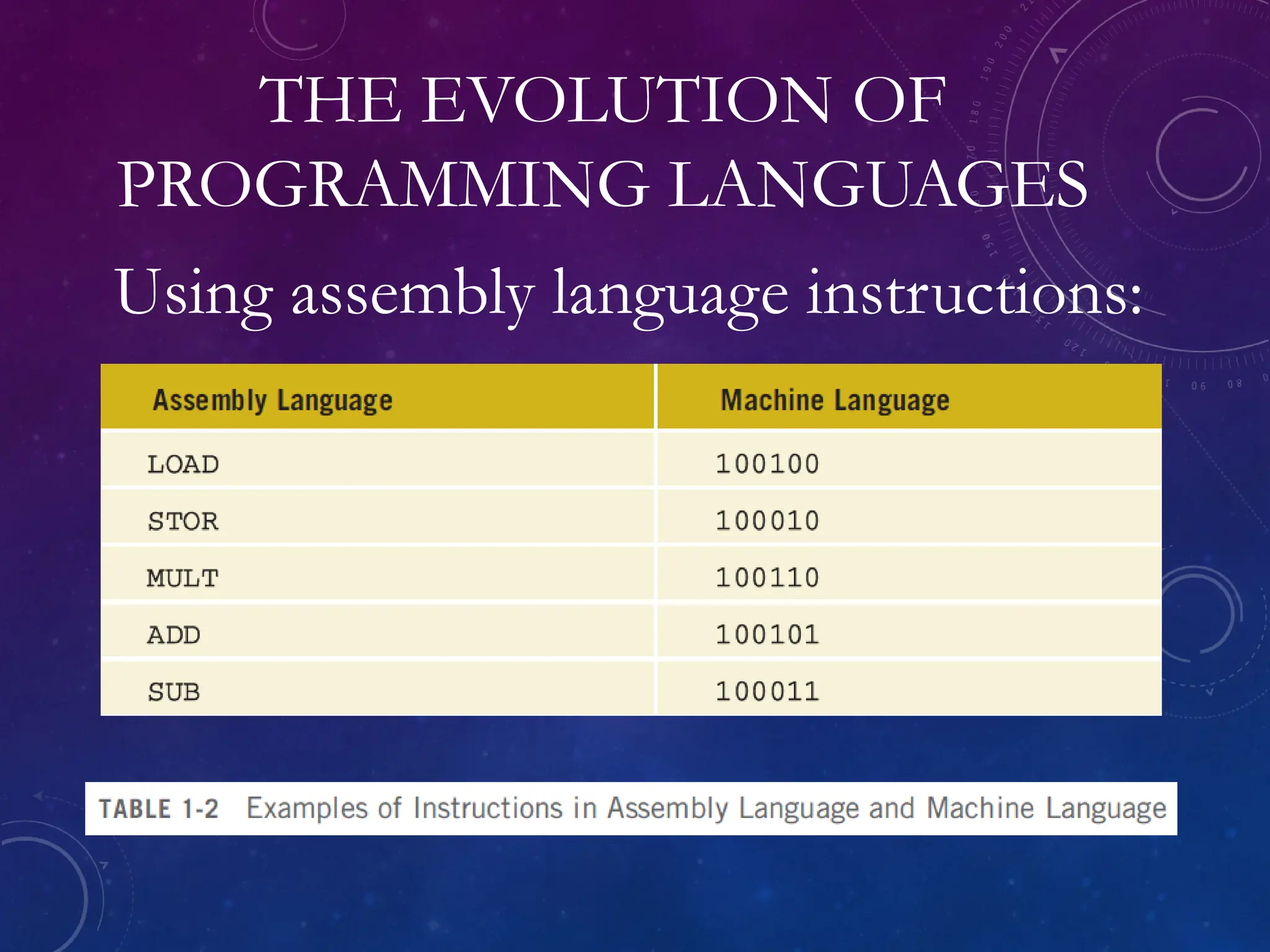
• Using assembly language instructions,
wages = rate * hours can be written as:
LOAD rate
MULT hour
STOR wages
39.
THE EVOLUTION OF
PROGRAMMINGLANGUAGES
• High-level languages include Basic,
FORTRAN, COBOL, Pascal, C, C++,
C#, and Java
• Compiler: translates a program written
in a high-level language into machine
language
• In C++:
wages = rate * hours;
40.
PROCESSING A C++PROGRAM
• Consider the following C++ program:
#include <iostream>
using namespace std;
int main()
{
cout << "My first C++ program." << endl;
return 0;
}
Sample Run:
My first C++ program.
41.
PROCESSING A C++PROGRAM
• To execute a C++ program:
- Use an editor to create a source program
in C++
- Preprocessor directives begin with #
and are processed by the preprocessor
- Use the compiler to: Check that the
program obeys the language rules; Translate
into machine language (object program)
42.
PROCESSING A C++PROGRAM
• To execute a C++ program:
- Linker: Combines object program with other
programs provided by the SDK to create
executable code; Library: contains prewritten
code you can use
- Loader: Loads executable program into
main memory
- The last step is to execute the program
43.
PROCESSING A C++PROGRAM
• Figure below shows how a typical C+
+ program is processed.
44.
PROGRAMMING WITH THEPROBLEM
ANALYSIS-CODING-EXECUTION CYCLE
• Programming is a process of problem solving.
• To be a good problem solver and a
good programmer, you must follow
good problem-solving techniques.
• Algorithm – a step by step problem-
solving process in which a solution is
arrived at in a finite amount of time
45.
• The figureshows
the summary of
the steps in
Problem analysis-
coding-execution
cycle .
PROGRAMMING WITH THE PROBLEM
ANALYSIS-CODING-EXECUTION CYCLE
46.
PROGRAMMING WITH THEPROBLEM
ANALYSIS-CODING-EXECUTION CYCLE
• In programming environment, the
problem-solving process requires the
following steps:
1. Analyze the problem
- Outline the problem and its
requirements
- Design steps (algorithm) to solve the
problem
47.
PROGRAMMING WITH THEPROBLEM
ANALYSIS-CODING-EXECUTION CYCLE
2. Implement the algorithm
- Implement the algorithm in code
- Verify that the algorithm works
3. Maintenance
- Use and modify the program if the
problem domain changes
48.
PROGRAMMING WITH THEPROBLEM
ANALYSIS-CODING-EXECUTION CYCLE
4. Thoroughly understand the problem
and all requirements.
- Does the program require user
interaction?
- Does program manipulate data?
- What is the output?
49.
PROGRAMMING WITH THEPROBLEM
ANALYSIS-CODING-EXECUTION CYCLE
5. If the problem is complex, divide it
into subproblems
- Analyze and design algorithms for
each subproblem
6. Check the correctness of algorithm
- Can test using sample data
- Some mathematical analysis might be
required
50.
PROGRAMMING WITH THEPROBLEM
ANALYSIS-CODING-EXECUTION CYCLE
7. Once the algorithm is designed and
correctness verified
- Write the equivalent code in high-level
language
8. Enter the program using text editor
9. Run code through compiler
51.
PROGRAMMING WITH THEPROBLEM
ANALYSIS-CODING-EXECUTION CYCLE
10. If compiler generates errors
- Look at code and remove errors
- Run code again through compiler
11. If there are no syntax errors
- Compiler generates equivalent
machine code
52.
PROGRAMMING WITH THEPROBLEM
ANALYSIS-CODING-EXECUTION CYCLE
12. Linker links machine code with
system resources
13. Once compiled and linked, loader
can place program into the main
memory for execution
14. The final step is to execute the
program
53.
PROGRAMMING WITH THEPROBLEM
ANALYSIS-CODING-EXECUTION CYCLE
15. Compiler guarantees that the
program follows the rules of the
language
- Does not guarantee that the program
will run correctly
54.
PROGRAMMING WITH THEPROBLEM
ANALYSIS-CODING-EXECUTION CYCLE
Example 1 – 1:
Design an algorithm to find the
perimeter and area of a rectangle.
Note:
To find the perimeter and area of a
rectangle, you need to know the
rectangle’s length and width
55.
PROGRAMMING WITH THEPROBLEM
ANALYSIS-CODING-EXECUTION CYCLE
Answer:
The algorithm is:
1. Get the length of the rectangle.
2. Get the width of the rectangle.
3. Find the perimeter using:
perimeter = 2 * (length + width)
4. Find the area using:
area = length * width
56.
PROGRAMMING WITH THEPROBLEM
ANALYSIS-CODING-EXECUTION CYCLE
Example 1 – 2:
There are 10 students in a class. Each
student has taken five tests, and each test is
worth 100 points. We want to design an
algorithm to calculate the grade for each
student, as well as the class average. The grade
is assigned as follows: If the average test score
is greater than or equal to 90, the grade is A;
57.
PROGRAMMING WITH THEPROBLEM
ANALYSIS-CODING-EXECUTION CYCLE
if the average test score is greater than or equal
to 80 and less than 90, the grade is B; if the
average test score is greater than equal to 70
and less than 80, the grade is C; if the average
test score is greater than or equal to 60 and less
than 70, the grade is D; otherwise, the grade is
F. Note that the data consists of students’
names and their test scores.
58.
PROGRAMMING WITH THEPROBLEM
ANALYSIS-CODING-EXECUTION CYCLE
Answer:
This is a problem that can be divided into
subproblems as follows:
1. Design an algorithm to find the average
test score
2. Design an algorithm to determine the
grade.
The two subproblems are to determine the
average test score and to determine the grade.
59.
PROGRAMMING WITH THEPROBLEM
ANALYSIS-CODING-EXECUTION CYCLE
Answer:
Algorithm to determine the average test score:
1. Get the five tests scores.
2. Add the five test scores. Suppose sum
stands for the sum of the test scores.
3. Suppose average stands for the average
test score:
average = sum / 5;
60.
PROGRAMMING WITH THEPROBLEM
ANALYSIS-CODING-EXECUTION CYCLE
Algorithm to determine the grade: (Suppose
grade stands for the grade assigned to a student.)
if average is greater than or equal to 90
grade = A
otherwise
if average is greater than or equal to 80 and less
than 90
grade = B
otherwise
if average is greater than or equal to 70 and less
than 80
grade = C
otherwise
if average is greater than or equal to 60 and less
than 70
grade = D
otherwise
grade = F
61.
PROGRAMMING WITH THEPROBLEM
ANALYSIS-CODING-EXECUTION CYCLE
You can use the solutions to these
subproblems to design the main algorithm as
follows:
1. totalAverage = 0;
2. Repeat the following for each student:
• Get student’s name
• Use the algorithm to find the average
test score
62.
PROGRAMMING WITH THEPROBLEM
ANALYSIS-CODING-EXECUTION CYCLE
You can use the solutions to these
subproblems to design the main algorithm as
follows:
2. Repeat the following for each student:
• Use the algorithm to find the grade
• Update totalAverage by adding
current student’s average test score
3. Determine the class average as follows:
classAverage = totalAverage / 10
• Structured design:
-dividing a problem into smaller subproblems
• Structured programming
- the process of implementing a structured
design
• The structured design approach is also called:
- Top-down (or bottom-up) design
- Stepwise refinement
- Modular programming
PROGRAMMING
METHODOLOGIES
65.
• Object-oriented design(OOD)
Steps:
- identify the components called objects
- determine how objects interact with each
other
- specify relevant data and possible operations
to be performed on that data
- each object consists of data and operations
on that data
PROGRAMMING
METHODOLOGIES
66.
• Object-oriented design(OOD)
- An object combines data and operations on
the data into a single unit
- A programming language that implements
OOD is called an object-oriented
programming (OOP) language
- Must learn how to represent data in computer
memory, how to manipulate data, and how to
implement operations
PROGRAMMING
METHODOLOGIES
67.
• Object-oriented design(OOD)
- Write algorithms and implement them in a
programming language
- Use functions to implement algorithms
- Learn how to combine data and operations
on the data into a single unit called an
object
- C++ was designed to implement OOD
- OOD is used with structured design
PROGRAMMING
METHODOLOGIES
68.
ANSI/ISO STANDARD C++
•C++ evolved from C
• C++ designed by Bjarne Stroustrup at Bell
Laboratories in early 1980s
• Many different C++ compilers were
available
• C++ programs were not always portable
from one compiler to another
• In mid-1998, ANSI/ISO C++ language
standards were approved
69.
SUMMARY
• Computer: electronicdevice that can
perform arithmetic and logical operations
• Computer system has hardware/software
Central processing unit (CPU): brain
Primary storage (MM) is volatile;
secondary storage (e.g., disk) is permanent
Operating system monitors overall activity
of the computer and provides services
Various kinds of languages
70.
SUMMARY
• Compiler: translateshigh-level language
into machine code
• Algorithm: step-by-step problem-solving
process; solution in finite amount of time
• Problem-solving process has three steps:
Analyze problem and design an
algorithm
Implement the algorithm in code
Maintain the program
71.
SUMMARY
• Structured design:
Problem is divided into smaller
subproblems
Each subproblem is solved
Combine solutions to all subproblems
• Object-oriented design (OOD): a program
is a collection of interacting objects
Object: data and operations on those
data
Editor's Notes
#7 Hollerith founded the Tabulating Machine Company which later became the computer and technology corporation known as IBM.
#9 The computers we know today use the design rules given by John von Neumann in the late 1940s. His design included components such as an arithmetic logic unit, a control unit, memory, and input/output devices.
#10 FORTRAN and COBOL are two early programming languages.
In the next technological advancement, transistors were replaced by small-sized integrated circuits, or "chips". CHips ae much smaller and more efficient than transistors, and with today's new technology it can be made to contain thousands of circuits on a single chip. They give computers tremendous processing speed.
#13 By the mid-1990s, people from many walks of life were able to afford them. Computers continue to become faster and less expensive as technology advances.
Although there are several categories of computers, such as mainframe, midsize, and micro (PC), all computers share some basic elements. (See next slide)
#14 There are two main components of a computer system: Hardware and Software
#15 The more powerful the CPU, the faster the computer.
The arithmetic and logical operations are carried out inside the CPU.
#16 INPUT DEVICES: keyboard, mouse, and secondary storage
OUTPUT DEVICES: screen, printer, and secondary storage
#17 Figure (a) shows some hardware components.
Figure (b) shows data stored in cells, the content of a cell can be either a programming instruction or data.
#21 Because programs and data must be loaded into the main memory before processing and because everything in main memory is lost when the computer is turned off, all information stored in the main memory must be saved in some other device for permanent storage.
The device that stores information permanently (unless the device becomes unusable or you change the information by rewriting it) is called secondary storage.
To be able to transfer information from main memory to secondary storage, these components must be directly connected to each other.
#25 The OS has a special program that organizes secondary storage so that you can conveniently access information. Some well-known operating systems are Windows 8, Mac OS X, Linux and Android.
#27 When you press A on your keyboard, the computer displays A on the screen. But what is actually stored inside the computer's main memory? What is the language of the computer?How does it store whatever you type on the keyboard?
Remember that a computer is an electronic device. Electrical signals are used inside the computer to process information.
#36 To represent the weekly wages equation in machine language, the programmer had to remember the machine language codes for various operations.
To manipulate data, the programmer had to remember the locations of the data in the main memory.
This need to remember specific codes made programming not only very difficult, but also error prone.
#38 Moving from machine language to assembly language made programming easier, but a programmer was still forced to think in terms of individual machine instructions.
The next step toward making programming easier was to devise high-level languages that were closer to natural languages such as English, French, German, and Spanish.
#39 One of the oldest programming languages, the FORTRAN was developed by a team of programmers at IBM led by John Backus, and was first published in 1957. The name FORTRAN is an acronym for FORmula TRANslation, because it was designed to allow easy translation of math formulas into code.
COBOL (Common Business Oriented Language) was one of the earliest high-level programming languages. It was developed in 1959 by a group of computer professionals called the Conference on Data Systems Languages (CODASYL).
In assembly language the computer cannot directly execute instructions written in a high-leve language. To execute on a computer, these C++instructions first need to be translated into machine language. A program called a compiler translates instructions written in high-level languages into machine code.
#40 In the previous sections, we discussed machine language and high-level languages and showed a C++ statement. Because a computer can understand only machine language, you are ready to review the steps required to process a program written in C++.
#41 In the previous sections, we discussed machine language and high-level languages and showed a C++ statement. Because a computer can understand only machine language, you are ready to review the steps required to process a program written in C++.
A source program is a program written in a high-level language.
The object program is the machine language versionof the high-level language program.
#42 SDK - Software development kit
Some IDEs (integrated development environment) do all this with a BUILD and REBUILD command.
#45 To develop a program to solve a problem, start by analyzing the problem. Then design the algorithm; write the program instructions in a high-level language, or code the code; and enter the program into a computer system.