Synopsis
on
FITNESSBABA Android App
BACHELOR OF TECHNOLOGY
(Computer Science and Engineering)
PUNJAB TECHNICAL UNIVERSITY
JALANDHAR
SUBMITTED TO: SUBMITTED BY:
Mr. Sumit Chopra Md Jawed Akhtar
CSE DEPT. (HOD) 1356493
Pukar Kumar sahani
1356508
K C COLLEGE OF ENGINEERING AND IT
NAWANSHAHR (PB).
Nomenclature page no.
1. Page title 1
2. Content 2
3. Overview of project 3
4. Technology use 4
5. Feasibility Study 7
6. Conclusion 7
7. Biblography 8
Overview
What is Android?
Android is an open source and Linux-based Operating System for mobile devices
such as smartphones and tablet computers.
Android was developed by the Open Handset Alliance, led by Google, and other
companies.
Android offers a unified approach to application development for mobile devices which
means developers need only develop for Android, and their applications should be able
to run on different devices powered by Android.
The first beta version of the Android Software Development Kit (SDK) was released by
Google in 2007 where as the first commercial version, Android 1.0, was released in
September 2008.
On June 27, 2012, at the Google I/O conference, Google announced the next Android
version, 4.1 Jelly Bean. Jelly Bean is an incremental update, with the primary aim of
improving the user interface, both in terms of functionality and performance.
The source code for Android is available under free and open source software
licenses. Google publishes most of the code under the Apache License version 2.0
and the rest, Linux kernel changes, under the GNU General Public License version 2.
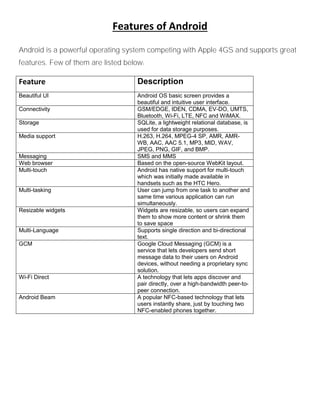
Features of Android
Android is a powerful operating system competing with Apple 4GS and supports great
features. Few of them are listed below:
Feature Description
Beautiful UI Android OS basic screen provides a
beautiful and intuitive user interface.
Connectivity GSM/EDGE, IDEN, CDMA, EV-DO, UMTS,
Bluetooth, Wi-Fi, LTE, NFC and WiMAX.
Storage SQLite, a lightweight relational database, is
used for data storage purposes.
Media support H.263, H.264, MPEG-4 SP, AMR, AMR-
WB, AAC, AAC 5.1, MP3, MID, WAV,
JPEG, PNG, GIF, and BMP.
Messaging SMS and MMS
Web browser Based on the open-source WebKit layout.
Multi-touch Android has native support for multi-touch
which was initially made available in
handsets such as the HTC Hero.
Multi-tasking User can jump from one task to another and
same time various application can run
simultaneously.
Resizable widgets Widgets are resizable, so users can expand
them to show more content or shrink them
to save space
Multi-Language Supports single direction and bi-directional
text.
GCM Google Cloud Messaging (GCM) is a
service that lets developers send short
message data to their users on Android
devices, without needing a proprietary sync
solution.
Wi-Fi Direct A technology that lets apps discover and
pair directly, over a high-bandwidth peer-to-
peer connection.
Android Beam A popular NFC-based technology that lets
users instantly share, just by touching two
NFC-enabled phones together.
Android Applications
Android applications are usually developed in the Java language using the Android
Software Development Kit. Once developed, Android applications can be packaged
easily and sold out either through a store such as Google Play or the Amazon
Appstore. Android powers hundreds of millions of mobile devices in more than 190
countries around the world. It's the largest installed base of any mobile platform and
growing fast. Every day more than 1 million new Android devices are activated
worldwide. This tutorial has been written with an aim to teach you how to develop and
package Android application. We will start from environment setup for Android
application programming and then drill down to look into various aspects of Android
applications.
Technology used
Front End
 Android software development kit
The Android software development kit (SDK) includes a comprehensive set of
development tools. These include a debugger, libraries, a handset emulator based on
QEMU, documentation, sample code, and tutorials. Currently supported development
platforms include computers running Linux, Mac OS X 10.5.8 or later, and Windows
XP or later. As of March 2015, the SDK is not available on Android itself, but the
software development is possible by using specialized Android applications.
Android Studio, [9] made by Google and powered by IntelliJ, is the official IDE;
however, developers are free to use others. Additionally, developers may use any text
editor to edit Java and XML files, then use command line tools ( Java Development Kit
and Apache Ant are required) to create, build and debug Android applications as well
as control attached Android devices (e.g., triggering a reboot, installing software
package(s) remotely).
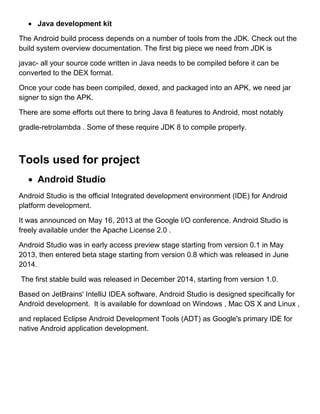
 Java development kit
The Android build process depends on a number of tools from the JDK. Check out the
build system overview documentation. The first big piece we need from JDK is
javac- all your source code written in Java needs to be compiled before it can be
converted to the DEX format.
Once your code has been compiled, dexed, and packaged into an APK, we need jar
signer to sign the APK.
There are some efforts out there to bring Java 8 features to Android, most notably
gradle-retrolambda . Some of these require JDK 8 to compile properly.
Tools used for project
 Android Studio
Android Studio is the official Integrated development environment (IDE) for Android
platform development.
It was announced on May 16, 2013 at the Google I/O conference. Android Studio is
freely available under the Apache License 2.0 .
Android Studio was in early access preview stage starting from version 0.1 in May
2013, then entered beta stage starting from version 0.8 which was released in June
2014.
The first stable build was released in December 2014, starting from version 1.0.
Based on JetBrains' IntelliJ IDEA software, Android Studio is designed specifically for
Android development. It is available for download on Windows , Mac OS X and Linux ,
and replaced Eclipse Android Development Tools (ADT) as Google's primary IDE for
native Android application development.
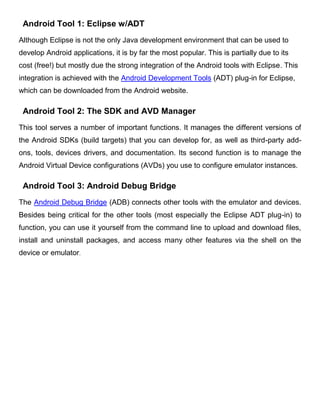
Android Tool 1: Eclipse w/ADT
Although Eclipse is not the only Java development environment that can be used to
develop Android applications, it is by far the most popular. This is partially due to its
cost (free!) but mostly due the strong integration of the Android tools with Eclipse. This
integration is achieved with the Android Development Tools (ADT) plug-in for Eclipse,
which can be downloaded from the Android website.
Android Tool 2: The SDK and AVD Manager
This tool serves a number of important functions. It manages the different versions of
the Android SDKs (build targets) that you can develop for, as well as third-party add-
ons, tools, devices drivers, and documentation. Its second function is to manage the
Android Virtual Device configurations (AVDs) you use to configure emulator instances.
Android Tool 3: Android Debug Bridge
The Android Debug Bridge (ADB) connects other tools with the emulator and devices.
Besides being critical for the other tools (most especially the Eclipse ADT plug-in) to
function, you can use it yourself from the command line to upload and download files,
install and uninstall packages, and access many other features via the shell on the
device or emulator.
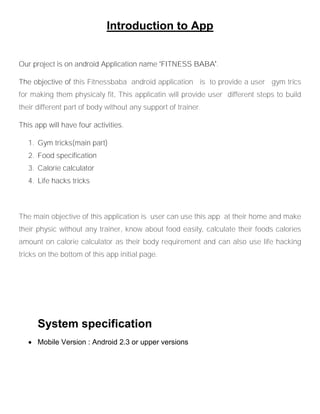
Introduction to App
Our project is on android Application name ‘FITNESS BABA’.
The objective of this Fitnessbaba android application is to provide a user gym trics
for making them physicaly fit, This applicatin will provide user different steps to build
their different part of body without any support of trainer.
This app will have four activities.
1. Gym tricks(main part)
2. Food specification
3. Calorie calculator
4. Life hacks tricks
The main objective of this application is user can use this app at their home and make
their physic without any trainer, know about food easily, calculate their foods calories
amount on calorie calculator as their body requirement and can also use life hacking
tricks on the bottom of this app initial page.
System specification
 Mobile Version : Android 2.3 or upper versions
Conclusion
The Android SDK ships with numerous other tools. Many of which are used for special
development cases. However, the tools listed above will be used with just about every
project, regardless of the type of app being developed. For more information on these
and other tools available, check out the Android Tools section of the Android website.
Also, new tools and improved tools are released on a fairly regular basis, so make sure
you keep all of the packages updated with the AVD and SDK Manager. Finally, above
and beyond the Android tools we've discussed, your best resource is the Android
Developer website. Complete with up-to-date SDK downloads, source documentation,
tutorials, technical articles, and the Android blog with the latest news, this website
provides critical knowledge and support for Android developers.
Bibliography
 www.google.com
 Wikipedia
 Developer.android.com

Synopsis on android application

  • 1.
    Synopsis on FITNESSBABA Android App BACHELOROF TECHNOLOGY (Computer Science and Engineering) PUNJAB TECHNICAL UNIVERSITY JALANDHAR SUBMITTED TO: SUBMITTED BY: Mr. Sumit Chopra Md Jawed Akhtar CSE DEPT. (HOD) 1356493 Pukar Kumar sahani 1356508 K C COLLEGE OF ENGINEERING AND IT NAWANSHAHR (PB).
  • 2.
    Nomenclature page no. 1.Page title 1 2. Content 2 3. Overview of project 3 4. Technology use 4 5. Feasibility Study 7 6. Conclusion 7 7. Biblography 8
  • 3.
    Overview What is Android? Androidis an open source and Linux-based Operating System for mobile devices such as smartphones and tablet computers. Android was developed by the Open Handset Alliance, led by Google, and other companies. Android offers a unified approach to application development for mobile devices which means developers need only develop for Android, and their applications should be able to run on different devices powered by Android. The first beta version of the Android Software Development Kit (SDK) was released by Google in 2007 where as the first commercial version, Android 1.0, was released in September 2008. On June 27, 2012, at the Google I/O conference, Google announced the next Android version, 4.1 Jelly Bean. Jelly Bean is an incremental update, with the primary aim of improving the user interface, both in terms of functionality and performance. The source code for Android is available under free and open source software licenses. Google publishes most of the code under the Apache License version 2.0 and the rest, Linux kernel changes, under the GNU General Public License version 2.
  • 4.
    Features of Android Androidis a powerful operating system competing with Apple 4GS and supports great features. Few of them are listed below: Feature Description Beautiful UI Android OS basic screen provides a beautiful and intuitive user interface. Connectivity GSM/EDGE, IDEN, CDMA, EV-DO, UMTS, Bluetooth, Wi-Fi, LTE, NFC and WiMAX. Storage SQLite, a lightweight relational database, is used for data storage purposes. Media support H.263, H.264, MPEG-4 SP, AMR, AMR- WB, AAC, AAC 5.1, MP3, MID, WAV, JPEG, PNG, GIF, and BMP. Messaging SMS and MMS Web browser Based on the open-source WebKit layout. Multi-touch Android has native support for multi-touch which was initially made available in handsets such as the HTC Hero. Multi-tasking User can jump from one task to another and same time various application can run simultaneously. Resizable widgets Widgets are resizable, so users can expand them to show more content or shrink them to save space Multi-Language Supports single direction and bi-directional text. GCM Google Cloud Messaging (GCM) is a service that lets developers send short message data to their users on Android devices, without needing a proprietary sync solution. Wi-Fi Direct A technology that lets apps discover and pair directly, over a high-bandwidth peer-to- peer connection. Android Beam A popular NFC-based technology that lets users instantly share, just by touching two NFC-enabled phones together.
  • 5.
    Android Applications Android applicationsare usually developed in the Java language using the Android Software Development Kit. Once developed, Android applications can be packaged easily and sold out either through a store such as Google Play or the Amazon Appstore. Android powers hundreds of millions of mobile devices in more than 190 countries around the world. It's the largest installed base of any mobile platform and growing fast. Every day more than 1 million new Android devices are activated worldwide. This tutorial has been written with an aim to teach you how to develop and package Android application. We will start from environment setup for Android application programming and then drill down to look into various aspects of Android applications. Technology used Front End  Android software development kit The Android software development kit (SDK) includes a comprehensive set of development tools. These include a debugger, libraries, a handset emulator based on QEMU, documentation, sample code, and tutorials. Currently supported development platforms include computers running Linux, Mac OS X 10.5.8 or later, and Windows XP or later. As of March 2015, the SDK is not available on Android itself, but the software development is possible by using specialized Android applications. Android Studio, [9] made by Google and powered by IntelliJ, is the official IDE; however, developers are free to use others. Additionally, developers may use any text editor to edit Java and XML files, then use command line tools ( Java Development Kit and Apache Ant are required) to create, build and debug Android applications as well as control attached Android devices (e.g., triggering a reboot, installing software package(s) remotely).
  • 6.
     Java developmentkit The Android build process depends on a number of tools from the JDK. Check out the build system overview documentation. The first big piece we need from JDK is javac- all your source code written in Java needs to be compiled before it can be converted to the DEX format. Once your code has been compiled, dexed, and packaged into an APK, we need jar signer to sign the APK. There are some efforts out there to bring Java 8 features to Android, most notably gradle-retrolambda . Some of these require JDK 8 to compile properly. Tools used for project  Android Studio Android Studio is the official Integrated development environment (IDE) for Android platform development. It was announced on May 16, 2013 at the Google I/O conference. Android Studio is freely available under the Apache License 2.0 . Android Studio was in early access preview stage starting from version 0.1 in May 2013, then entered beta stage starting from version 0.8 which was released in June 2014. The first stable build was released in December 2014, starting from version 1.0. Based on JetBrains' IntelliJ IDEA software, Android Studio is designed specifically for Android development. It is available for download on Windows , Mac OS X and Linux , and replaced Eclipse Android Development Tools (ADT) as Google's primary IDE for native Android application development.
  • 7.
    Android Tool 1:Eclipse w/ADT Although Eclipse is not the only Java development environment that can be used to develop Android applications, it is by far the most popular. This is partially due to its cost (free!) but mostly due the strong integration of the Android tools with Eclipse. This integration is achieved with the Android Development Tools (ADT) plug-in for Eclipse, which can be downloaded from the Android website. Android Tool 2: The SDK and AVD Manager This tool serves a number of important functions. It manages the different versions of the Android SDKs (build targets) that you can develop for, as well as third-party add- ons, tools, devices drivers, and documentation. Its second function is to manage the Android Virtual Device configurations (AVDs) you use to configure emulator instances. Android Tool 3: Android Debug Bridge The Android Debug Bridge (ADB) connects other tools with the emulator and devices. Besides being critical for the other tools (most especially the Eclipse ADT plug-in) to function, you can use it yourself from the command line to upload and download files, install and uninstall packages, and access many other features via the shell on the device or emulator.
  • 8.
    Introduction to App Ourproject is on android Application name ‘FITNESS BABA’. The objective of this Fitnessbaba android application is to provide a user gym trics for making them physicaly fit, This applicatin will provide user different steps to build their different part of body without any support of trainer. This app will have four activities. 1. Gym tricks(main part) 2. Food specification 3. Calorie calculator 4. Life hacks tricks The main objective of this application is user can use this app at their home and make their physic without any trainer, know about food easily, calculate their foods calories amount on calorie calculator as their body requirement and can also use life hacking tricks on the bottom of this app initial page. System specification  Mobile Version : Android 2.3 or upper versions
  • 9.
    Conclusion The Android SDKships with numerous other tools. Many of which are used for special development cases. However, the tools listed above will be used with just about every project, regardless of the type of app being developed. For more information on these and other tools available, check out the Android Tools section of the Android website. Also, new tools and improved tools are released on a fairly regular basis, so make sure you keep all of the packages updated with the AVD and SDK Manager. Finally, above and beyond the Android tools we've discussed, your best resource is the Android Developer website. Complete with up-to-date SDK downloads, source documentation, tutorials, technical articles, and the Android blog with the latest news, this website provides critical knowledge and support for Android developers. Bibliography  www.google.com  Wikipedia  Developer.android.com