Getting Started With Android
By: Ajay Panchal
What is Android?
• Android is an open source and Linux-based Operating System for
mobile devices
• Android was developed by the Open Handset Alliance, led by Google,
and other companies.
• The first beta version of the Android Software Development Kit (SDK)
was released by Google in 2007, whereas the first commercial
version, Android 1.0, was released in September 2008.
Versions of the android operating system
• Android 1.6. Donut.
• Android 2.1. Eclair.
• Android 2.2. Froyo.
• Android 2.3. Gingerbread.
• Android 3.0. Honeycomb.
• Android 4.0. Ice Cream Sandwich.
• Android 4.1. Jelly Bean.
• Android 4.4. KitKat.
• Android 5.0 Lollipop
• Android 6.0 Marshmallow
• Android 7.0 Nougat
• Android 8.0 Oreo
Features of Android
• Beautiful UI: Android OS basic screen provides a beautiful and
intuitive user interface.
• Connectivity: GSM/EDGE, IDEN, CDMA, EV-DO, UMTS, Bluetooth, Wi-
Fi, LTE, NFC and WiMAX.
• Storage: SQLite, a lightweight relational database, is used for data
storage purposes.
• Media support: MPEG-4 SP, MP3, WAV, JPEG, PNG, GIF, and BMP etc
• Messaging: SMS and MMS
• Web browser: Based on the open-source WebKit layout engine,
coupled with Chrome's V8 JavaScript engine supporting HTML5 and
CSS3.
• Multi-touch: it is enable the multitouch gamming and other
application with multitouch feature
• Multi-tasking: User can jump from one task to another and same time
various application can run simultaneously.
• GCM: Google Cloud Messaging (GCM) is a service that let developers
send short message data to their users on Android devices, without
needing a proprietary sync solution.
• Wi-Fi Direct: A technology that let apps discover and pair directly,
over a high-bandwidth peer-to-peer connection.
• Android Beam: A technology that let apps discover and pair directly,
over a high-bandwidth peer-to-peer connection.
• Resizable widgets: Widgets are resizable, so users can expand them to
show more content or shrink them to save space
• Multi-Language: it is enable the developer to made multi lingual and
multi reginal application development, Support single direction and
bi-directional text.
Android Applications Development
Environment
• This are the prerequisites of the android application development:
• Latest JDK from oracle
• Latest android studio version
• Android SDK
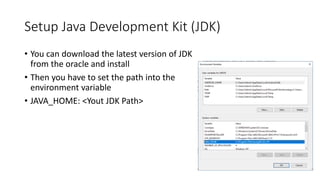
Setup Java Development Kit (JDK)
• You can download the latest version of JDK
from the oracle and install
• Then you have to set the path into the
environment variable
• JAVA_HOME: <Yout JDK Path>
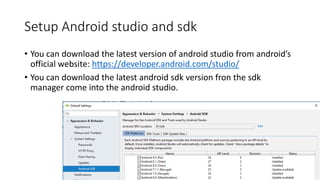
Setup Android studio and sdk
• You can download the latest version of android studio from android’s
official website: https://developer.android.com/studio/
• You can download the latest android sdk version fron the sdk
manager come into the android studio.
ANDROID – Architecture
• Linux
• Keyboard driver
• Power management
• Audio driver
• Wifi driver
• Camera driver
• Flash memory drivers
• Display driver
• etc
• Libraries
• Surface manager
• Media framework
• Sqlite
• Open Gl|ES
• Free type
• Libc
• Ssl
• Sgl
• etc
• Android Runtime
• Core libraries
• Delvic Virtual
Machine
• etc
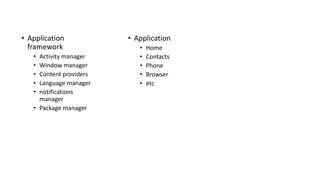
• Application
framework
• Activity manager
• Window manager
• Content providers
• Language manager
• notifications
manager
• Package manager
• Application
• Home
• Contacts
• Phone
• Browser
• etc
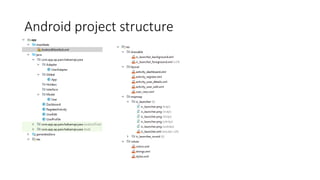
Android project structure
Applications Component
• Activities
• Views
• Layouts
• Services
• Broadcast Receivers
• Content Providers
• Fragments
• Intents
• Resources
• Manifest
Thank You

Basics of Android and Android development environment

  • 1.
    Getting Started WithAndroid By: Ajay Panchal
  • 2.
    What is Android? •Android is an open source and Linux-based Operating System for mobile devices • Android was developed by the Open Handset Alliance, led by Google, and other companies. • The first beta version of the Android Software Development Kit (SDK) was released by Google in 2007, whereas the first commercial version, Android 1.0, was released in September 2008.
  • 3.
    Versions of theandroid operating system • Android 1.6. Donut. • Android 2.1. Eclair. • Android 2.2. Froyo. • Android 2.3. Gingerbread. • Android 3.0. Honeycomb. • Android 4.0. Ice Cream Sandwich. • Android 4.1. Jelly Bean. • Android 4.4. KitKat. • Android 5.0 Lollipop • Android 6.0 Marshmallow • Android 7.0 Nougat • Android 8.0 Oreo
  • 4.
    Features of Android •Beautiful UI: Android OS basic screen provides a beautiful and intuitive user interface. • Connectivity: GSM/EDGE, IDEN, CDMA, EV-DO, UMTS, Bluetooth, Wi- Fi, LTE, NFC and WiMAX. • Storage: SQLite, a lightweight relational database, is used for data storage purposes. • Media support: MPEG-4 SP, MP3, WAV, JPEG, PNG, GIF, and BMP etc
  • 5.
    • Messaging: SMSand MMS • Web browser: Based on the open-source WebKit layout engine, coupled with Chrome's V8 JavaScript engine supporting HTML5 and CSS3. • Multi-touch: it is enable the multitouch gamming and other application with multitouch feature • Multi-tasking: User can jump from one task to another and same time various application can run simultaneously.
  • 6.
    • GCM: GoogleCloud Messaging (GCM) is a service that let developers send short message data to their users on Android devices, without needing a proprietary sync solution. • Wi-Fi Direct: A technology that let apps discover and pair directly, over a high-bandwidth peer-to-peer connection. • Android Beam: A technology that let apps discover and pair directly, over a high-bandwidth peer-to-peer connection.
  • 7.
    • Resizable widgets:Widgets are resizable, so users can expand them to show more content or shrink them to save space • Multi-Language: it is enable the developer to made multi lingual and multi reginal application development, Support single direction and bi-directional text.
  • 8.
    Android Applications Development Environment •This are the prerequisites of the android application development: • Latest JDK from oracle • Latest android studio version • Android SDK
  • 9.
    Setup Java DevelopmentKit (JDK) • You can download the latest version of JDK from the oracle and install • Then you have to set the path into the environment variable • JAVA_HOME: <Yout JDK Path>
  • 10.
    Setup Android studioand sdk • You can download the latest version of android studio from android’s official website: https://developer.android.com/studio/ • You can download the latest android sdk version fron the sdk manager come into the android studio.
  • 11.
    ANDROID – Architecture •Linux • Keyboard driver • Power management • Audio driver • Wifi driver • Camera driver • Flash memory drivers • Display driver • etc • Libraries • Surface manager • Media framework • Sqlite • Open Gl|ES • Free type • Libc • Ssl • Sgl • etc • Android Runtime • Core libraries • Delvic Virtual Machine • etc
  • 12.
    • Application framework • Activitymanager • Window manager • Content providers • Language manager • notifications manager • Package manager • Application • Home • Contacts • Phone • Browser • etc
  • 13.
  • 14.
    Applications Component • Activities •Views • Layouts • Services • Broadcast Receivers • Content Providers • Fragments • Intents • Resources • Manifest
  • 15.