Cooking the big soup
https://commons.wikimedia.org/wiki/File:Wikidata-logo-en.svg
Sebastian Burgstaller-Muehlbacher
Introduction
● Single value edits are simple, due to the web
interface of Wikidata.
● How to easily mass import data into Wikidata?
● Answer: Use Bots!
● Combine Wikidata API and query endpoints.
● Python as preferred language.
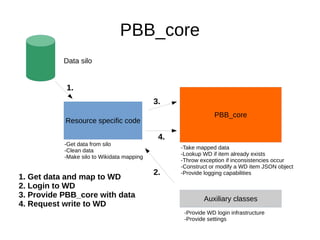
PBB_core
Resource specific code
Auxiliary classes
PBB_core
Data silo
-Get data from silo
-Clean data
-Make silo to Wikidata mapping
-Take mapped data
-Lookup WD if item already exists
-Throw exception if inconsistencies occur
-Construct or modify a WD item JSON object
-Provide logging capabilities
-Provide WD login infrastructure
-Provide settings
1.
2.
3.
4.
1. Get data and map to WD
2. Login to WD
3. Provide PBB_core with data
4. Request write to WD
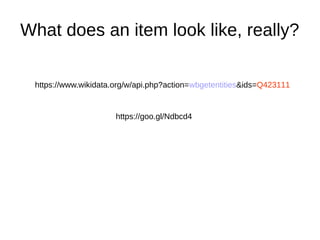
What does an item look like, really?
https://goo.gl/Ndbcd4
https://www.wikidata.org/w/api.php?action=wbgetentities&ids=Q423111
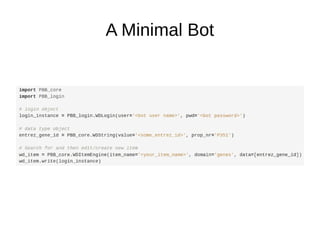
A Minimal Bot
A Minimal Bot for Mass Data Import
Advantages of PBB_core
● One interface to Wikidata for (your) bots!
● Fast development and deployment of new bots.
● Integrates Wikidata querying and writing.
● Prevents creation of duplicate items.
● Searches for duplicate use of identifiers.
● Compatible to Python 2 and Python 3.
● Execute queries with SPARQL or WDQ.
● Minimizes HTTP traffic, increases throughput.
All Wikidata data types
● All current Wikidata data types have been implemented.
– PBB_core.WDString
– PBB_core.WDItemID
– PBB_core.WDMonolingualText
– PBB_core.WDProperty
– PBB_core.WDQuantity
– PBB_core.WDTime
– PBB_core.WDUrl
– PBB_core.WDGlobeCoordinate
– PBB_core.WDCommonsMedia
Conclusions
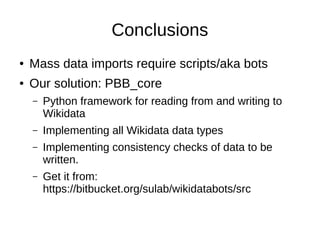
● Mass data imports require scripts/aka bots
● Our solution: PBB_core
– Python framework for reading from and writing to
Wikidata
– Implementing all Wikidata data types
– Implementing consistency checks of data to be
written.
– Get it from:
https://bitbucket.org/sulab/wikidatabots/src
Let's hack Wikidata!!
culturedigitally.org

SWAT4LS Wikidata tutorial cambridge dec 2015

  • 1.
    Cooking the bigsoup https://commons.wikimedia.org/wiki/File:Wikidata-logo-en.svg Sebastian Burgstaller-Muehlbacher
  • 2.
    Introduction ● Single valueedits are simple, due to the web interface of Wikidata. ● How to easily mass import data into Wikidata? ● Answer: Use Bots! ● Combine Wikidata API and query endpoints. ● Python as preferred language.
  • 3.
    PBB_core Resource specific code Auxiliaryclasses PBB_core Data silo -Get data from silo -Clean data -Make silo to Wikidata mapping -Take mapped data -Lookup WD if item already exists -Throw exception if inconsistencies occur -Construct or modify a WD item JSON object -Provide logging capabilities -Provide WD login infrastructure -Provide settings 1. 2. 3. 4. 1. Get data and map to WD 2. Login to WD 3. Provide PBB_core with data 4. Request write to WD
  • 4.
    What does anitem look like, really? https://goo.gl/Ndbcd4 https://www.wikidata.org/w/api.php?action=wbgetentities&ids=Q423111
  • 5.
  • 6.
    A Minimal Botfor Mass Data Import
  • 7.
    Advantages of PBB_core ●One interface to Wikidata for (your) bots! ● Fast development and deployment of new bots. ● Integrates Wikidata querying and writing. ● Prevents creation of duplicate items. ● Searches for duplicate use of identifiers. ● Compatible to Python 2 and Python 3. ● Execute queries with SPARQL or WDQ. ● Minimizes HTTP traffic, increases throughput.
  • 8.
    All Wikidata datatypes ● All current Wikidata data types have been implemented. – PBB_core.WDString – PBB_core.WDItemID – PBB_core.WDMonolingualText – PBB_core.WDProperty – PBB_core.WDQuantity – PBB_core.WDTime – PBB_core.WDUrl – PBB_core.WDGlobeCoordinate – PBB_core.WDCommonsMedia
  • 9.
    Conclusions ● Mass dataimports require scripts/aka bots ● Our solution: PBB_core – Python framework for reading from and writing to Wikidata – Implementing all Wikidata data types – Implementing consistency checks of data to be written. – Get it from: https://bitbucket.org/sulab/wikidatabots/src
  • 10.