SUN & VMware  DESKTOP TRAINING SESSION JANUARY 29, 2009 Chris Kawalek Matthias Mueller-Prove Susan Giangrande Desktop Virtualization  Sun Microsystems
Agenda: Sun Ray and VMware View Overview of the joint solution When to sell what Technical integration & roadmap  Support & GTM information
Agenda  Overview of joint solution
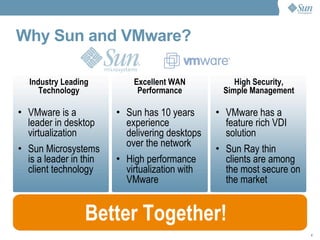
Why Sun and VMware? VMware is a leader in desktop virtualization Sun Microsystems is a leader in thin client technology Industry Leading Technology Excellent WAN Performance Sun has 10 years experience delivering desktops over the network High performance virtualization with VMware VMware has a feature rich VDI solution Sun Ray thin clients are among the most secure on the market Better Together! High Security, Simple Management
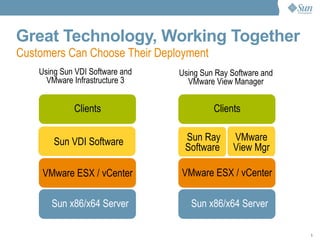
Great Technology, Working Together Sun x86/x64 Server VMware ESX / vCenter Sun Ray Software  VMware View Mgr Clients Sun x86/x64 Server VMware ESX / vCenter Sun VDI Software Clients Using Sun Ray Software and VMware View Manager Customers Can Choose Their Deployment Using Sun VDI Software and VMware Infrastructure 3
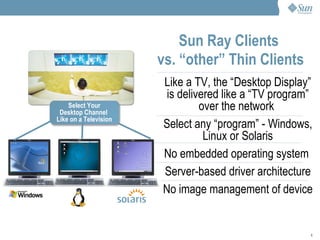
Like a TV, the “Desktop Display” is delivered like a “TV program” over the network  Select any “program” - Windows, Linux or Solaris No embedded operating system  Server-based driver architecture No image management of device Sun Ray Clients  vs. “other” Thin Clients   Applications Clients Select Your Desktop Channel  Like on a Television
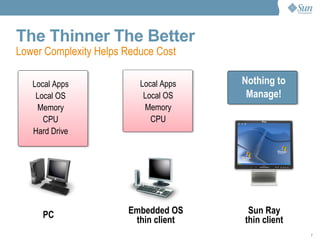
The Thinner The Better PC Embedded OS thin client Sun Ray thin client Lower Complexity Helps Reduce Cost Local Apps Local OS Memory CPU Hard Drive Local Apps Local OS Memory CPU Nothing to Manage!
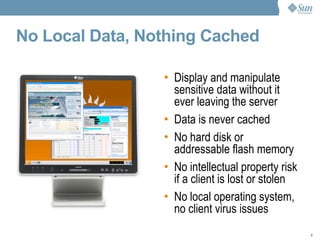
No Local Data, Nothing Cached Display and manipulate sensitive data without it ever leaving the server Data is never cached No hard disk or addressable flash memory No intellectual property risk if a client is lost or stolen No local operating system, no client virus issues
No local data (corporate, intellectual property protection) No viruses, spyware, worms Smart card enabled for 2-factor authentication Integrated VPN – Cisco EzVPN or Juniper Screen OS  Security
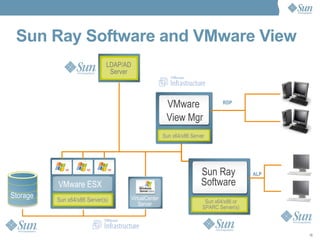
Sun Ray Software and VMware View Sun x64/x86 Server(s) VirtualCenter Server VMware ESX LDAP/AD Server Sun x64/x86 or SPARC Server(s) Storage AIP Sun x64/x86 Server VMware  View Mgr Sun Ray Software RDP ALP
Sun Ray Software 4 10/08   Rich multimedia user experience -  Windows Media Player 9 and MPEG-4 Built in VPN choices – Cisco EzVPN or Juniper Screen OS In-Session Desktop resize Remote hot-desk authentication PC/SC lite for 2 person smart card authentication (add-on component) Subscription or perpetual licensing
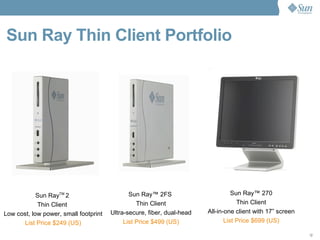
Sun Ray Thin Client Portfolio  Sun Ray TM  2  Thin Client  Low cost, low power, small footprint List Price $249 (US) Sun Ray ™  2FS  Thin Client Ultra-secure, fiber, dual-head List Price $499 (US) Sun Ray™ 270 Thin Client All-in-one client with 17” screen List Price $699 (US)
Agenda  When to sell what
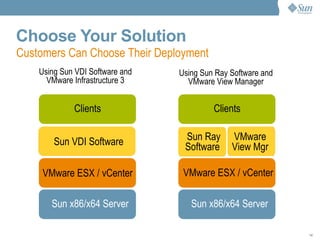
Choose Your Solution Sun x86/x64 Server VMware ESX / vCenter Sun Ray Software  VMware View Mgr Clients Sun x86/x64 Server VMware ESX / vCenter Sun VDI Software Clients Using Sun Ray Software and VMware View Manager Customers Can Choose Their Deployment Using Sun VDI Software and VMware Infrastructure 3
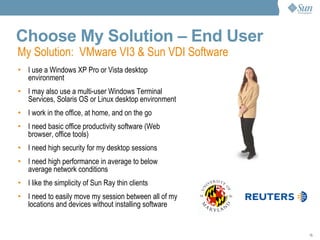
Choose My Solution – End User I use a Windows XP Pro or Vista desktop environment I may also use a multi-user Windows Terminal Services, Solaris OS or Linux desktop environment I work in the office, at home, and on the go I need basic office productivity software (Web browser, office tools) I need high security for my desktop sessions I need high performance in average to below average network conditions I like the simplicity of Sun Ray thin clients I need to easily move my session between all of my locations and devices without installing software My Solution:  VMware VI3 & Sun VDI Software
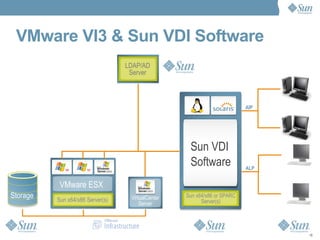
VMware VI3 & Sun VDI Software Sun x64/x86 Server(s) LDAP/AD Server Storage Sun x64/x86 or SPARC Server(s) Sun VDI Software VirtualCenter Server AIP ALP VMware ESX
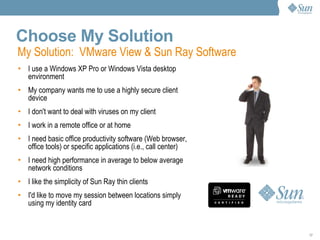
Choose My Solution I use a Windows XP Pro or Windows Vista desktop environment My company wants me to use a highly secure client device I don't want to deal with viruses on my client I work in a remote office or at home I need basic office productivity software (Web browser, office tools) or specific applications (i.e., call center) I need high performance in average to below average network conditions I like the simplicity of Sun Ray thin clients I'd like to move my session between locations simply using my identity card My Solution:  VMware View & Sun Ray Software
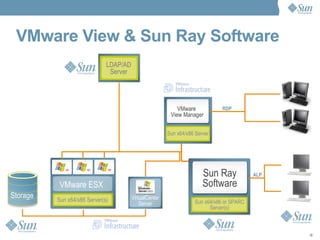
VMware View & Sun Ray Software Sun x64/x86 Server(s) VirtualCenter Server VMware ESX LDAP/AD Server Sun x64/x86 or SPARC Server(s) Storage AIP Sun x64/x86 Server VMware  View Manager Sun Ray Software RDP ALP
Agenda  Technical Integration & Roadmap > Sun Ray Technology > Sun Ray Connector for VMware View > User Perspective > Installation > Roadmap
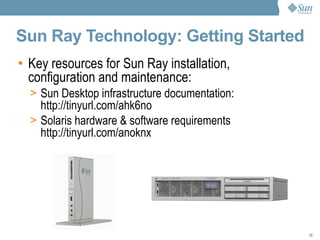
Sun Ray Technology: Getting Started Key resources for Sun Ray installation, configuration and maintenance: Sun Desktop infrastructure documentation: http://tinyurl.com/ahk6no Solaris hardware & software requirements http://tinyurl.com/anoknx
Sun Ray Software Installation  Download Sun Ray Software, which includes Sun Ray Server Software and Sun Ray Connector for Windows OS http://www.sun.com/software/sunray/getit.jsp Unzip and install the Sun Ray Server Software component using utinstall, then reboot server Unzip and install the Sun Ray Connector for Windows OS (installer) Configure Sun Ray Server using: /opt/SUNWut/sbin/utconfig Reboot server Configure Sun Ray Connector for Windows OS using: /opt/SUNWuttsc/sbin/uttscadm -c Configure Sun Ray network using: /opt/SUNWut/sbin/utadm
Sun Ray Connector for VMware Virtual Desktop Manager... ...connects users of Sun Ray clients to Windows virtual machines via VMware View broker. It provides a Sun Ray kiosk session that allows users to connect to their virtual machines.
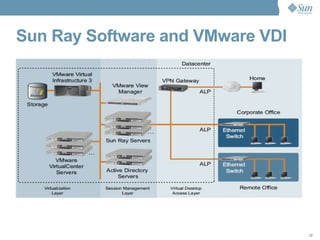
Sun Ray Software and VMware VDI
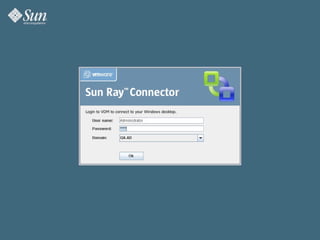
On the Sun Ray... ...the user logs in with her Active Directory user name and password...
 
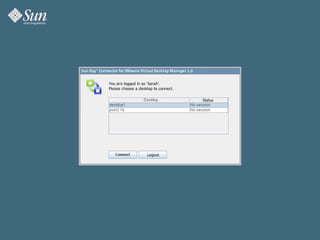
If she has more than 1 desktop assigned... ...she can select which desktop to use...
 
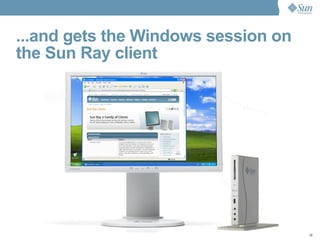
...and gets the Windows session on the Sun Ray client
System Requirements Solaris 10 (x86 or SPARC) Sun Ray Software 4.0 and above Java 5 VMware View 3 And also VMware VDM 2.1
Installation unzip srvdm_1.0.zip Depending on the architecture, install the corresponding package: For x86 : pkgadd -d Packages/Solaris_10+/i386/ For SPARC : pkgadd -d Packages/Solaris_10+/sparc/
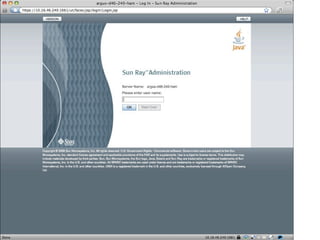
Configuration (1/5) Access Sun Ray Admin GUI http:// sunrayserver :1660
 
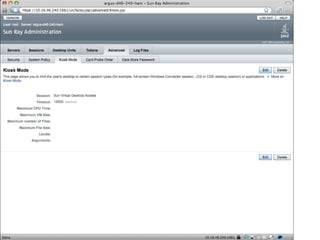
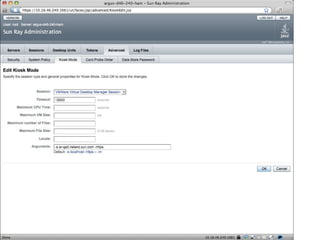
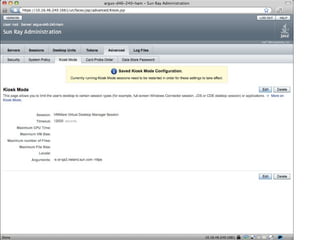
Configuration (2/5) Access Sun Ray Admin GUI In Sun Ray Admin GUI go to Advanced - Kiosk Mode
 
Configuration (3/5) Access Sun Ray Admin GUI Advanced - Kiosk Mode  Edit Select “VMware Virtual Desktop Manager Session” Arguments -s <server> : VMware View server hostname -https : Use SSL connection to VMware View server  -http : Do  not  use SSL connection to VMware View server -p <port number> : VMware View server port number
 
 
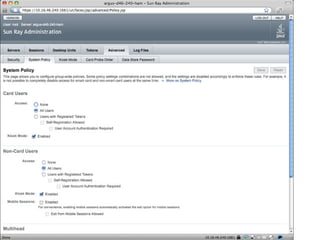
Configuration (4/5) Access Sun Ray Admin GUI Advanced - Kiosk Mode Go to Advanced - System Policy Enable Kiosk Mode for Card Users Enable Kiosk Mode for Non-Card Users
 
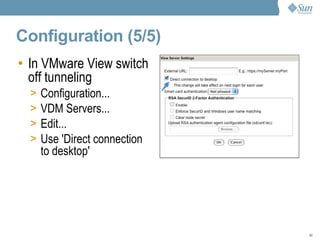
Configuration (5/5) In VMware View switch off tunneling Configuration... VDM Servers... Edit... Use 'Direct connection to desktop'
Some Challenges SSL between Sun Ray Server and VMware View Create a certificate Install it for VMware View and Sun Ray Server http://blogs.sun.com/acworkma/entry/how_to_setup_srvdm_and   Java 6 Java 6 will be supported in an upcoming release
Agenda  Sales & Go To Market Information
Field engagement model Technical questions about Sun Ray or Sun VDI Sun Ray User Group   http://www.filibeto.org/mailman/listinfo/sunray-users Blogs at Sun   http://blogs.sun.com/thinkthin http://blogs.sun.com/mprove New alias available for non-technical questions for Sun  VMware field forwards questions to your internal VMware VDI SE If the SE needs further assistance, forward to alias Alias is staffed by Sun Sales experts, Marketing, Technical Sales Specialists, Partner Alliance team  .
Where to get more information The Sun Partner Portal  http://www.sun.com/mysunconnection Register for access using VMware contract number Search on Sun Ray or Sun VDI Product Pages http://www.sun.com/virtual desktop http://www.sun.com/software/sunray http://www.sun.com/sunray/sunray2/index.xml http://www.sun.com/sunray/sunray2fs/index.xml http://www.sun.com/sunray/sunray270/index.xml Product Documentation  http://docs.sun.com
VMware Field and Partner Training  Visit the Sun Partner Portal:  http://www.sun.com/mysunconnection Login using your Sun Contract # Launch the Learning Portal:  Search by Course #, or Sun Ray, or VDI For Sales: SUN VDI Sales Essentials - Web-based Course,  Number WZT-FS1324  SUN VDI Technical Essentials - Web-based Course,  Number WZT-1325 Sun VDI Elevator Pitch - WZSW-U1-VDI.  An audio file of Sun Subject Matter Expert giving the elevator pitch Sun Sales Presentation - WZSW-U2-VDI. Audio recording, including slides Sun Virtual Desktop Solution Calculator Tool Training - TBA For SE's and Architects  (in addition to the above courses) Sun Technical Presentation - WZSW-U3-VDI  Audio recording, including slides Sun Ray Instructor Led Workshop - Contact your Partner Rep for details on schedule and locations for this training, or watch for announcements on the Partner Learning portal page. Secure Global Desktop Instructor Led Workshop -  SGD-2495  Offered in various locations worldwide.  VDI Instructor Led Workshop - Offered in various locations worldwide.
Support Structure + Sun Support Sun Ray Software Sun Ray Hardware Sun VDI Software Sun Support for VMware products VMware VDM/View VMware ESX/vCenter VMware escalations sent to partner  Seeds of Genius
Pre-Sales Support Sun Field Engineers have direct access to Support Engineers Sun SE can open support case Support team interfaces with Development What's supported?  Break/fix issues No customization No Professional Services +
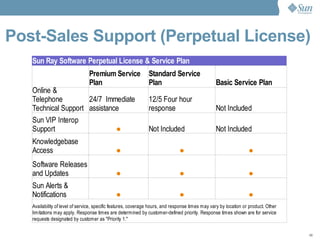
Post-Sales Support (Perpetual License)
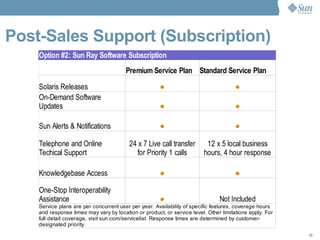
Post-Sales Support (Subscription)
Pre and Post-Sales  Support Call Process One number to call in your country. http://www.sun.com/service/contacting/solution.html Process Contact Support Center from URL above Reference “Sunray Software”  Receive a Service Request number Support will contact based on Support Level +
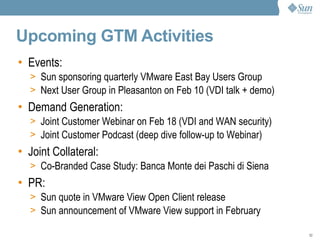
Upcoming GTM Activities Events: Sun sponsoring quarterly VMware East Bay Users Group Next User Group in Pleasanton on Feb 10 (VDI talk + demo) Demand Generation: Joint Customer Webinar on Feb 18 (VDI and WAN security) Joint Customer Podcast (deep dive follow-up to Webinar) Joint Collateral: Co-Branded Case Study: Banca Monte dei Paschi di Siena PR:  Sun quote in VMware View Open Client release Sun announcement of VMware View support in February
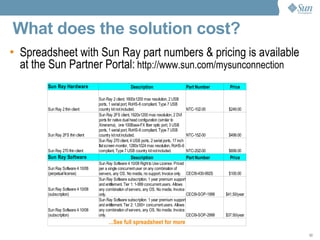
What does the solution cost?  Spreadsheet with Sun Ray part numbers & pricing is available at the Sun Partner Portal:   http://www.sun.com/mysunconnection
Q & A Please type your questions into the chat area and direct them to Host & Presenter.
SUN & VMware  DESKTOP TRAINING SESSION JANUARY 29, 2009 Chris Kawalek Matthias Mueller-Prove Susan Giangrande [email_address]

Sun & VMware Desktop Training

  • 1.
    SUN & VMware DESKTOP TRAINING SESSION JANUARY 29, 2009 Chris Kawalek Matthias Mueller-Prove Susan Giangrande Desktop Virtualization Sun Microsystems
  • 2.
    Agenda: Sun Rayand VMware View Overview of the joint solution When to sell what Technical integration & roadmap Support & GTM information
  • 3.
    Agenda Overviewof joint solution
  • 4.
    Why Sun andVMware? VMware is a leader in desktop virtualization Sun Microsystems is a leader in thin client technology Industry Leading Technology Excellent WAN Performance Sun has 10 years experience delivering desktops over the network High performance virtualization with VMware VMware has a feature rich VDI solution Sun Ray thin clients are among the most secure on the market Better Together! High Security, Simple Management
  • 5.
    Great Technology, WorkingTogether Sun x86/x64 Server VMware ESX / vCenter Sun Ray Software VMware View Mgr Clients Sun x86/x64 Server VMware ESX / vCenter Sun VDI Software Clients Using Sun Ray Software and VMware View Manager Customers Can Choose Their Deployment Using Sun VDI Software and VMware Infrastructure 3
  • 6.
    Like a TV,the “Desktop Display” is delivered like a “TV program” over the network Select any “program” - Windows, Linux or Solaris No embedded operating system Server-based driver architecture No image management of device Sun Ray Clients vs. “other” Thin Clients Applications Clients Select Your Desktop Channel Like on a Television
  • 7.
    The Thinner TheBetter PC Embedded OS thin client Sun Ray thin client Lower Complexity Helps Reduce Cost Local Apps Local OS Memory CPU Hard Drive Local Apps Local OS Memory CPU Nothing to Manage!
  • 8.
    No Local Data,Nothing Cached Display and manipulate sensitive data without it ever leaving the server Data is never cached No hard disk or addressable flash memory No intellectual property risk if a client is lost or stolen No local operating system, no client virus issues
  • 9.
    No local data(corporate, intellectual property protection) No viruses, spyware, worms Smart card enabled for 2-factor authentication Integrated VPN – Cisco EzVPN or Juniper Screen OS Security
  • 10.
    Sun Ray Softwareand VMware View Sun x64/x86 Server(s) VirtualCenter Server VMware ESX LDAP/AD Server Sun x64/x86 or SPARC Server(s) Storage AIP Sun x64/x86 Server VMware View Mgr Sun Ray Software RDP ALP
  • 11.
    Sun Ray Software4 10/08 Rich multimedia user experience - Windows Media Player 9 and MPEG-4 Built in VPN choices – Cisco EzVPN or Juniper Screen OS In-Session Desktop resize Remote hot-desk authentication PC/SC lite for 2 person smart card authentication (add-on component) Subscription or perpetual licensing
  • 12.
    Sun Ray ThinClient Portfolio Sun Ray TM 2 Thin Client Low cost, low power, small footprint List Price $249 (US) Sun Ray ™ 2FS Thin Client Ultra-secure, fiber, dual-head List Price $499 (US) Sun Ray™ 270 Thin Client All-in-one client with 17” screen List Price $699 (US)
  • 13.
    Agenda Whento sell what
  • 14.
    Choose Your SolutionSun x86/x64 Server VMware ESX / vCenter Sun Ray Software VMware View Mgr Clients Sun x86/x64 Server VMware ESX / vCenter Sun VDI Software Clients Using Sun Ray Software and VMware View Manager Customers Can Choose Their Deployment Using Sun VDI Software and VMware Infrastructure 3
  • 15.
    Choose My Solution– End User I use a Windows XP Pro or Vista desktop environment I may also use a multi-user Windows Terminal Services, Solaris OS or Linux desktop environment I work in the office, at home, and on the go I need basic office productivity software (Web browser, office tools) I need high security for my desktop sessions I need high performance in average to below average network conditions I like the simplicity of Sun Ray thin clients I need to easily move my session between all of my locations and devices without installing software My Solution: VMware VI3 & Sun VDI Software
  • 16.
    VMware VI3 &Sun VDI Software Sun x64/x86 Server(s) LDAP/AD Server Storage Sun x64/x86 or SPARC Server(s) Sun VDI Software VirtualCenter Server AIP ALP VMware ESX
  • 17.
    Choose My SolutionI use a Windows XP Pro or Windows Vista desktop environment My company wants me to use a highly secure client device I don't want to deal with viruses on my client I work in a remote office or at home I need basic office productivity software (Web browser, office tools) or specific applications (i.e., call center) I need high performance in average to below average network conditions I like the simplicity of Sun Ray thin clients I'd like to move my session between locations simply using my identity card My Solution: VMware View & Sun Ray Software
  • 18.
    VMware View &Sun Ray Software Sun x64/x86 Server(s) VirtualCenter Server VMware ESX LDAP/AD Server Sun x64/x86 or SPARC Server(s) Storage AIP Sun x64/x86 Server VMware View Manager Sun Ray Software RDP ALP
  • 19.
    Agenda TechnicalIntegration & Roadmap > Sun Ray Technology > Sun Ray Connector for VMware View > User Perspective > Installation > Roadmap
  • 20.
    Sun Ray Technology:Getting Started Key resources for Sun Ray installation, configuration and maintenance: Sun Desktop infrastructure documentation: http://tinyurl.com/ahk6no Solaris hardware & software requirements http://tinyurl.com/anoknx
  • 21.
    Sun Ray SoftwareInstallation Download Sun Ray Software, which includes Sun Ray Server Software and Sun Ray Connector for Windows OS http://www.sun.com/software/sunray/getit.jsp Unzip and install the Sun Ray Server Software component using utinstall, then reboot server Unzip and install the Sun Ray Connector for Windows OS (installer) Configure Sun Ray Server using: /opt/SUNWut/sbin/utconfig Reboot server Configure Sun Ray Connector for Windows OS using: /opt/SUNWuttsc/sbin/uttscadm -c Configure Sun Ray network using: /opt/SUNWut/sbin/utadm
  • 22.
    Sun Ray Connectorfor VMware Virtual Desktop Manager... ...connects users of Sun Ray clients to Windows virtual machines via VMware View broker. It provides a Sun Ray kiosk session that allows users to connect to their virtual machines.
  • 23.
    Sun Ray Softwareand VMware VDI
  • 24.
    On the SunRay... ...the user logs in with her Active Directory user name and password...
  • 25.
  • 26.
    If she hasmore than 1 desktop assigned... ...she can select which desktop to use...
  • 27.
  • 28.
    ...and gets theWindows session on the Sun Ray client
  • 29.
    System Requirements Solaris10 (x86 or SPARC) Sun Ray Software 4.0 and above Java 5 VMware View 3 And also VMware VDM 2.1
  • 30.
    Installation unzip srvdm_1.0.zipDepending on the architecture, install the corresponding package: For x86 : pkgadd -d Packages/Solaris_10+/i386/ For SPARC : pkgadd -d Packages/Solaris_10+/sparc/
  • 31.
    Configuration (1/5) AccessSun Ray Admin GUI http:// sunrayserver :1660
  • 32.
  • 33.
    Configuration (2/5) AccessSun Ray Admin GUI In Sun Ray Admin GUI go to Advanced - Kiosk Mode
  • 34.
  • 35.
    Configuration (3/5) AccessSun Ray Admin GUI Advanced - Kiosk Mode Edit Select “VMware Virtual Desktop Manager Session” Arguments -s <server> : VMware View server hostname -https : Use SSL connection to VMware View server -http : Do not use SSL connection to VMware View server -p <port number> : VMware View server port number
  • 36.
  • 37.
  • 38.
    Configuration (4/5) AccessSun Ray Admin GUI Advanced - Kiosk Mode Go to Advanced - System Policy Enable Kiosk Mode for Card Users Enable Kiosk Mode for Non-Card Users
  • 39.
  • 40.
    Configuration (5/5) InVMware View switch off tunneling Configuration... VDM Servers... Edit... Use 'Direct connection to desktop'
  • 41.
    Some Challenges SSLbetween Sun Ray Server and VMware View Create a certificate Install it for VMware View and Sun Ray Server http://blogs.sun.com/acworkma/entry/how_to_setup_srvdm_and Java 6 Java 6 will be supported in an upcoming release
  • 42.
    Agenda Sales& Go To Market Information
  • 43.
    Field engagement modelTechnical questions about Sun Ray or Sun VDI Sun Ray User Group http://www.filibeto.org/mailman/listinfo/sunray-users Blogs at Sun http://blogs.sun.com/thinkthin http://blogs.sun.com/mprove New alias available for non-technical questions for Sun VMware field forwards questions to your internal VMware VDI SE If the SE needs further assistance, forward to alias Alias is staffed by Sun Sales experts, Marketing, Technical Sales Specialists, Partner Alliance team .
  • 44.
    Where to getmore information The Sun Partner Portal http://www.sun.com/mysunconnection Register for access using VMware contract number Search on Sun Ray or Sun VDI Product Pages http://www.sun.com/virtual desktop http://www.sun.com/software/sunray http://www.sun.com/sunray/sunray2/index.xml http://www.sun.com/sunray/sunray2fs/index.xml http://www.sun.com/sunray/sunray270/index.xml Product Documentation http://docs.sun.com
  • 45.
    VMware Field andPartner Training Visit the Sun Partner Portal: http://www.sun.com/mysunconnection Login using your Sun Contract # Launch the Learning Portal: Search by Course #, or Sun Ray, or VDI For Sales: SUN VDI Sales Essentials - Web-based Course, Number WZT-FS1324 SUN VDI Technical Essentials - Web-based Course, Number WZT-1325 Sun VDI Elevator Pitch - WZSW-U1-VDI. An audio file of Sun Subject Matter Expert giving the elevator pitch Sun Sales Presentation - WZSW-U2-VDI. Audio recording, including slides Sun Virtual Desktop Solution Calculator Tool Training - TBA For SE's and Architects (in addition to the above courses) Sun Technical Presentation - WZSW-U3-VDI Audio recording, including slides Sun Ray Instructor Led Workshop - Contact your Partner Rep for details on schedule and locations for this training, or watch for announcements on the Partner Learning portal page. Secure Global Desktop Instructor Led Workshop - SGD-2495 Offered in various locations worldwide. VDI Instructor Led Workshop - Offered in various locations worldwide.
  • 46.
    Support Structure +Sun Support Sun Ray Software Sun Ray Hardware Sun VDI Software Sun Support for VMware products VMware VDM/View VMware ESX/vCenter VMware escalations sent to partner Seeds of Genius
  • 47.
    Pre-Sales Support SunField Engineers have direct access to Support Engineers Sun SE can open support case Support team interfaces with Development What's supported? Break/fix issues No customization No Professional Services +
  • 48.
  • 49.
  • 50.
    Pre and Post-Sales Support Call Process One number to call in your country. http://www.sun.com/service/contacting/solution.html Process Contact Support Center from URL above Reference “Sunray Software” Receive a Service Request number Support will contact based on Support Level +
  • 51.
    Upcoming GTM ActivitiesEvents: Sun sponsoring quarterly VMware East Bay Users Group Next User Group in Pleasanton on Feb 10 (VDI talk + demo) Demand Generation: Joint Customer Webinar on Feb 18 (VDI and WAN security) Joint Customer Podcast (deep dive follow-up to Webinar) Joint Collateral: Co-Branded Case Study: Banca Monte dei Paschi di Siena PR: Sun quote in VMware View Open Client release Sun announcement of VMware View support in February
  • 52.
    What does thesolution cost? Spreadsheet with Sun Ray part numbers & pricing is available at the Sun Partner Portal: http://www.sun.com/mysunconnection
  • 53.
    Q & APlease type your questions into the chat area and direct them to Host & Presenter.
  • 54.
    SUN & VMware DESKTOP TRAINING SESSION JANUARY 29, 2009 Chris Kawalek Matthias Mueller-Prove Susan Giangrande [email_address]