WIFI SSID:Spark+AISummit | Password: UnifiedDataAnalytics
Mary Grace Moesta, Databricks
Denny Lee, Databricks
Augmenting Machine Learning
with Databricks Labs AutoML
Toolkit
#UnifiedDataAnalytics #SparkAISummit
Agenda
• Discuss traditional ML pipeline problem and all of
its stages
• How AutoML Toolkit solves these problems
• Hyperparameter Optimization
• Choosing Models
• Scaling AutoML Toolkit Best Practices
3#UnifiedDataAnalytics #SparkAISummit
About Speaker
Mary Grace Moesta
Customer Success Engineer, Databricks
• Current AutoML developer
• Former data scientist at 84.51° focused on using ML
for brand accelerator and several customer
experience projects
• Likes long walks on the beach, Spark and applied
math
4#UnifiedDataAnalytics #SparkAISummit
About Speaker
Denny Lee
Developer Advocate, Databricks
• Worked with Apache Spark™ since 0.5
• Former Senior Director Data Science Engineering at
Concur
• On Project Isotope incubation team that built what
is now known as Azure HDInsight
• Former SQLCAT DW BI Lead at Microsoft
5#UnifiedDataAnalytics #SparkAISummit
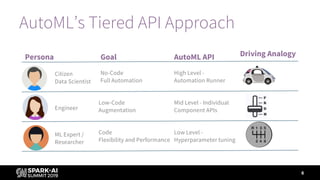
AutoML’s Tiered API Approach
6
No-Code
Full Automation
Low-Code
Augmentation
Code
Flexibility and Performance
Citizen
Data Scientist
Engineer
ML Expert /
Researcher
Persona Goal Driving AnalogyAutoML API
High Level -
Automation Runner
Mid Level - Individual
Component APIs
Low Level -
Hyperparameter tuning
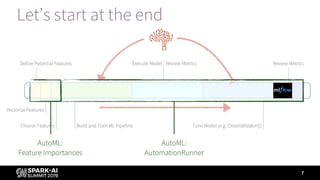
Let’s start at the end
7
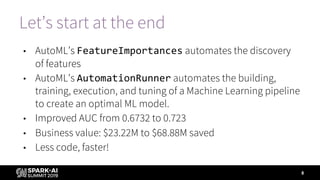
Let’s start at the end
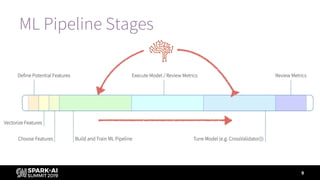
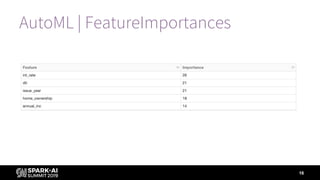
• AutoML’s FeatureImportances automates the discovery
of features
• AutoML’s AutomationRunner automates the building,
training, execution, and tuning of a Machine Learning pipeline
to create an optimal ML model.
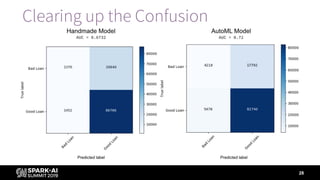
• Improved AUC from 0.6732 to 0.723
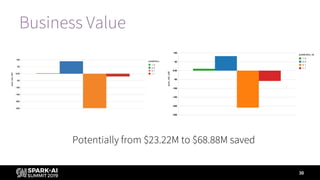
• Business value: $23.22M to $68.88M saved
• Less code, faster!
8
9
ML Pipeline Stages
10
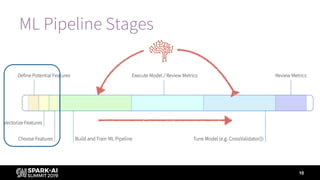
ML Pipeline Stages
Traditional ML Pipelines
Identify Important Features
11
12
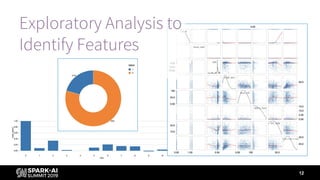
Exploratory Analysis to
Identify Features
AutoML Toolkit
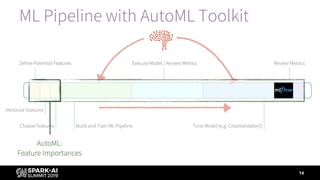
Identify Important Features
13
14
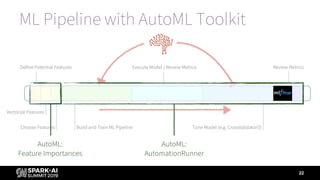
ML Pipeline with AutoML Toolkit
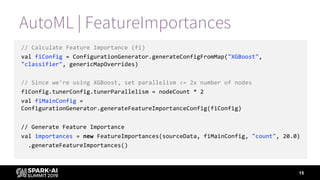
AutoML | FeatureImportances
// Calculate Feature Importance (fi)
val fiConfig = ConfigurationGenerator.generateConfigFromMap("XGBoost",
"classifier", genericMapOverrides)
// Since we're using XGBoost, set parallelism <= 2x number of nodes
fiConfig.tunerConfig.tunerParallelism = nodeCount * 2
val fiMainConfig =
ConfigurationGenerator.generateFeatureImportanceConfig(fiConfig)
// Generate Feature Importance
val importances = new FeatureImportances(sourceData, fiMainConfig, "count", 20.0)
.generateFeatureImportances()
15
AutoML | FeatureImportances
16
17
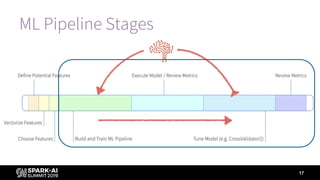
ML Pipeline Stages
Traditional Model Building and Tuning
Building and Tuning Models
18
Hand-made Model
19
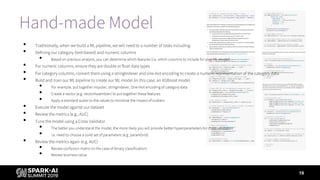
• Traditionally, when we build a ML pipeline, we will need to a number of tasks including:
• Defining our category (text-based) and numeric columns
• Based on previous analysis, you can determine which features (i.e. which columns to include for your ML model)
• For numeric columns, ensure they are double or float data types
• For category columns, convert them using a stringIndexer and one-hot encoding to create a numeric representation of the category data
• Build and train our ML pipeline to create our ML model (in this case, an XGBoost mode)
• For example, put together imputer, stringIndexer, One-Hot encoding of category data
• Create a vector (e.g. vectorAssembler) to put together these features
• Apply a standard scaler to the values to minimize the impact of outliers
• Execute the model against our dataset
• Review the metrics (e.g., AUC)
• Tune the model using a Cross Validator
• The better you understand the model, the more likely you will provide better hyperparameters for cross validation
• i.e. need to choose a solid set of parameters (e.g. paramGrid)
• Review the metrics again (e.g. AUC)
• Review confusion matrix (in the case of binary classification)
• Review business value
Hand-made Model
20
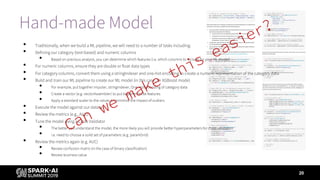
• Traditionally, when we build a ML pipeline, we will need to a number of tasks including:
• Defining our category (text-based) and numeric columns
• Based on previous analysis, you can determine which features (i.e. which columns to include for your ML model)
• For numeric columns, ensure they are double or float data types
• For category columns, convert them using a stringIndexer and one-hot encoding to create a numeric representation of the category data
• Build and train our ML pipeline to create our ML model (in this case, an XGBoost mode)
• For example, put together imputer, stringIndexer, One-Hot encoding of category data
• Create a vector (e.g. vectorAssembler) to put together these features
• Apply a standard scaler to the values to minimize the impact of outliers
• Execute the model against our dataset
• Review the metrics (e.g., AUC)
• Tune the model using a Cross Validator
• The better you understand the model, the more likely you will provide better hyperparameters for cross validation
• i.e. need to choose a solid set of parameters (e.g. paramGrid)
• Review the metrics again (e.g. AUC)
• Review confusion matrix (in the case of binary classification)
• Review business value
Can
we
make
this
easier?
AutoML Model Building and Tuning
Building and Tuning Models
21
22
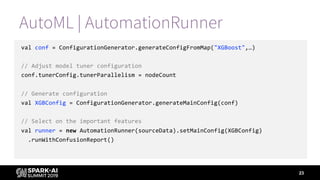
ML Pipeline with AutoML Toolkit
AutoML | AutomationRunner
val conf = ConfigurationGenerator.generateConfigFromMap("XGBoost",…)
// Adjust model tuner configuration
conf.tunerConfig.tunerParallelism = nodeCount
// Generate configuration
val XGBConfig = ConfigurationGenerator.generateMainConfig(conf)
// Select on the important features
val runner = new AutomationRunner(sourceData).setMainConfig(XGBConfig)
.runWithConfusionReport()
23
24
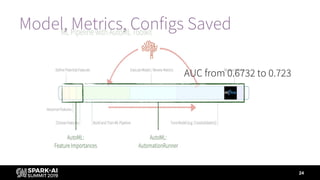
Model, Metrics, Configs Saved
AUC from 0.6732 to 0.723
25
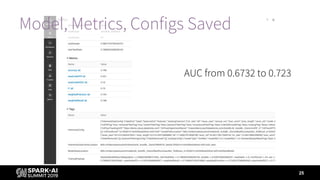
Model, Metrics, Configs Saved
AUC from 0.6732 to 0.723
How did AutoML Toolkit do this?
Able to find better hyperparameters because it:
• Tested and tuned all modifiable hyperparameters
• Performed this in a distributed fashion using a collection of
optimization algorithms
• Incorporated is the understanding of how to use the
parameters extracted from the algorithm source code
26
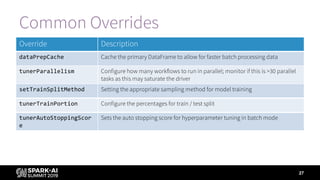
Common Overrides
27
Override Description
dataPrepCache Cache the primary DataFrame to allow for faster batch processing data
tunerParallelism Configure how many workflows to run in parallel; monitor if this is >30 parallel
tasks as this may saturate the driver
setTrainSplitMethod Setting the appropriate sampling method for model training
tunerTrainPortion Configure the percentages for train / test split
tunerAutoStoppingScor
e
Sets the auto stopping score for hyperparameter tuning in batch mode
28
Clearing up the Confusion
Business Value
29
Prediction
Label (Is
Bad Loan)
Short Description Long Description
1 1 Loss Avoided Correctly found bad loans
1 0 Profit Forfeited Incorrectly labeled bad loans
0 1 Loss Still Incurred Incorrectly labeled good loans
0 0 Profit Retained Correctly found good loans
Business value = - (loss avoided – profit forfeited) = -([1, 1] - [1, 0])
Business Value
30
Potentially from $23.22M to $68.88M saved
It’s all in the Family…Runner
31
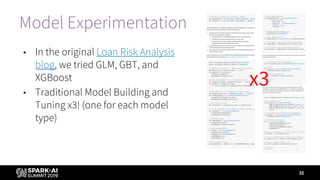
Model Experimentation
• In the original Loan Risk Analysis
blog, we tried GLM, GBT, and
XGBoost
• Traditional Model Building and
Tuning x3! (one for each model
type)
32
x3
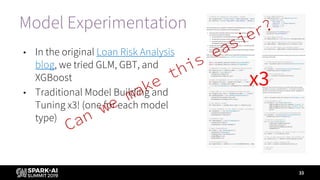
Model Experimentation
• In the original Loan Risk Analysis
blog, we tried GLM, GBT, and
XGBoost
• Traditional Model Building and
Tuning x3! (one for each model
type)
33
x3
Can
we
make
this
easier?
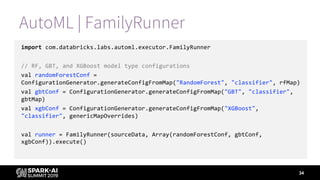
AutoML | FamilyRunner
import com.databricks.labs.automl.executor.FamilyRunner
// RF, GBT, and XGBoost model type configurations
val randomForestConf =
ConfigurationGenerator.generateConfigFromMap("RandomForest", "classifier", rfMap)
val gbtConf = ConfigurationGenerator.generateConfigFromMap("GBT", "classifier",
gbtMap)
val xgbConf = ConfigurationGenerator.generateConfigFromMap("XGBoost",
"classifier", genericMapOverrides)
val runner = FamilyRunner(sourceData, Array(randomForestConf, gbtConf,
xgbConf)).execute()
34
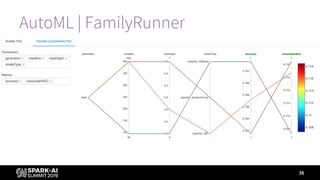
AutoML | FamilyRunner
35
Let’s end at the end
• FeatureImportances automates feature discovery
• AutomationRunner automates the building, training,
execution, and tuning of a Machine Learning pipeline
• FamilyRunner automates experimenting with model
families
• Improved AUC from 0.6732 to 0.723; potentially $23.22M to
$68.88 saved
• Less code, faster!
36
AutoML Roadmap
0.6.0 features
• Serialized model and featurization stored as SparkML Pipeline
• BinaryEncoder for high cardinality nominal features
• Euclidean distance optimizer for post modeling search
• Advanced MBO search for genetic epoch candidates to aid in faster / more
effective convergence
• Automated MLflow logging and configuration (log to same workspace
directory)
• Bug fixes
37
AutoML Roadmap
0.6.x release
• Python API
• MLeap artifact export
• LightGBM support
38
DON’T FORGET TO RATE
AND REVIEW THE SESSIONS
SEARCH SPARK + AI SUMMIT

Augmenting Machine Learning with Databricks Labs AutoML Toolkit

  • 1.
    WIFI SSID:Spark+AISummit |Password: UnifiedDataAnalytics
  • 2.
    Mary Grace Moesta,Databricks Denny Lee, Databricks Augmenting Machine Learning with Databricks Labs AutoML Toolkit #UnifiedDataAnalytics #SparkAISummit
  • 3.
    Agenda • Discuss traditionalML pipeline problem and all of its stages • How AutoML Toolkit solves these problems • Hyperparameter Optimization • Choosing Models • Scaling AutoML Toolkit Best Practices 3#UnifiedDataAnalytics #SparkAISummit
  • 4.
    About Speaker Mary GraceMoesta Customer Success Engineer, Databricks • Current AutoML developer • Former data scientist at 84.51° focused on using ML for brand accelerator and several customer experience projects • Likes long walks on the beach, Spark and applied math 4#UnifiedDataAnalytics #SparkAISummit
  • 5.
    About Speaker Denny Lee DeveloperAdvocate, Databricks • Worked with Apache Spark™ since 0.5 • Former Senior Director Data Science Engineering at Concur • On Project Isotope incubation team that built what is now known as Azure HDInsight • Former SQLCAT DW BI Lead at Microsoft 5#UnifiedDataAnalytics #SparkAISummit
  • 6.
    AutoML’s Tiered APIApproach 6 No-Code Full Automation Low-Code Augmentation Code Flexibility and Performance Citizen Data Scientist Engineer ML Expert / Researcher Persona Goal Driving AnalogyAutoML API High Level - Automation Runner Mid Level - Individual Component APIs Low Level - Hyperparameter tuning
  • 7.
  • 8.
    Let’s start atthe end • AutoML’s FeatureImportances automates the discovery of features • AutoML’s AutomationRunner automates the building, training, execution, and tuning of a Machine Learning pipeline to create an optimal ML model. • Improved AUC from 0.6732 to 0.723 • Business value: $23.22M to $68.88M saved • Less code, faster! 8
  • 9.
  • 10.
  • 11.
    Traditional ML Pipelines IdentifyImportant Features 11
  • 12.
  • 13.
  • 14.
    14 ML Pipeline withAutoML Toolkit
  • 15.
    AutoML | FeatureImportances //Calculate Feature Importance (fi) val fiConfig = ConfigurationGenerator.generateConfigFromMap("XGBoost", "classifier", genericMapOverrides) // Since we're using XGBoost, set parallelism <= 2x number of nodes fiConfig.tunerConfig.tunerParallelism = nodeCount * 2 val fiMainConfig = ConfigurationGenerator.generateFeatureImportanceConfig(fiConfig) // Generate Feature Importance val importances = new FeatureImportances(sourceData, fiMainConfig, "count", 20.0) .generateFeatureImportances() 15
  • 16.
  • 17.
  • 18.
    Traditional Model Buildingand Tuning Building and Tuning Models 18
  • 19.
    Hand-made Model 19 • Traditionally,when we build a ML pipeline, we will need to a number of tasks including: • Defining our category (text-based) and numeric columns • Based on previous analysis, you can determine which features (i.e. which columns to include for your ML model) • For numeric columns, ensure they are double or float data types • For category columns, convert them using a stringIndexer and one-hot encoding to create a numeric representation of the category data • Build and train our ML pipeline to create our ML model (in this case, an XGBoost mode) • For example, put together imputer, stringIndexer, One-Hot encoding of category data • Create a vector (e.g. vectorAssembler) to put together these features • Apply a standard scaler to the values to minimize the impact of outliers • Execute the model against our dataset • Review the metrics (e.g., AUC) • Tune the model using a Cross Validator • The better you understand the model, the more likely you will provide better hyperparameters for cross validation • i.e. need to choose a solid set of parameters (e.g. paramGrid) • Review the metrics again (e.g. AUC) • Review confusion matrix (in the case of binary classification) • Review business value
  • 20.
    Hand-made Model 20 • Traditionally,when we build a ML pipeline, we will need to a number of tasks including: • Defining our category (text-based) and numeric columns • Based on previous analysis, you can determine which features (i.e. which columns to include for your ML model) • For numeric columns, ensure they are double or float data types • For category columns, convert them using a stringIndexer and one-hot encoding to create a numeric representation of the category data • Build and train our ML pipeline to create our ML model (in this case, an XGBoost mode) • For example, put together imputer, stringIndexer, One-Hot encoding of category data • Create a vector (e.g. vectorAssembler) to put together these features • Apply a standard scaler to the values to minimize the impact of outliers • Execute the model against our dataset • Review the metrics (e.g., AUC) • Tune the model using a Cross Validator • The better you understand the model, the more likely you will provide better hyperparameters for cross validation • i.e. need to choose a solid set of parameters (e.g. paramGrid) • Review the metrics again (e.g. AUC) • Review confusion matrix (in the case of binary classification) • Review business value Can we make this easier?
  • 21.
    AutoML Model Buildingand Tuning Building and Tuning Models 21
  • 22.
    22 ML Pipeline withAutoML Toolkit
  • 23.
    AutoML | AutomationRunner valconf = ConfigurationGenerator.generateConfigFromMap("XGBoost",…) // Adjust model tuner configuration conf.tunerConfig.tunerParallelism = nodeCount // Generate configuration val XGBConfig = ConfigurationGenerator.generateMainConfig(conf) // Select on the important features val runner = new AutomationRunner(sourceData).setMainConfig(XGBConfig) .runWithConfusionReport() 23
  • 24.
    24 Model, Metrics, ConfigsSaved AUC from 0.6732 to 0.723
  • 25.
    25 Model, Metrics, ConfigsSaved AUC from 0.6732 to 0.723
  • 26.
    How did AutoMLToolkit do this? Able to find better hyperparameters because it: • Tested and tuned all modifiable hyperparameters • Performed this in a distributed fashion using a collection of optimization algorithms • Incorporated is the understanding of how to use the parameters extracted from the algorithm source code 26
  • 27.
    Common Overrides 27 Override Description dataPrepCacheCache the primary DataFrame to allow for faster batch processing data tunerParallelism Configure how many workflows to run in parallel; monitor if this is >30 parallel tasks as this may saturate the driver setTrainSplitMethod Setting the appropriate sampling method for model training tunerTrainPortion Configure the percentages for train / test split tunerAutoStoppingScor e Sets the auto stopping score for hyperparameter tuning in batch mode
  • 28.
  • 29.
    Business Value 29 Prediction Label (Is BadLoan) Short Description Long Description 1 1 Loss Avoided Correctly found bad loans 1 0 Profit Forfeited Incorrectly labeled bad loans 0 1 Loss Still Incurred Incorrectly labeled good loans 0 0 Profit Retained Correctly found good loans Business value = - (loss avoided – profit forfeited) = -([1, 1] - [1, 0])
  • 30.
    Business Value 30 Potentially from$23.22M to $68.88M saved
  • 31.
    It’s all inthe Family…Runner 31
  • 32.
    Model Experimentation • Inthe original Loan Risk Analysis blog, we tried GLM, GBT, and XGBoost • Traditional Model Building and Tuning x3! (one for each model type) 32 x3
  • 33.
    Model Experimentation • Inthe original Loan Risk Analysis blog, we tried GLM, GBT, and XGBoost • Traditional Model Building and Tuning x3! (one for each model type) 33 x3 Can we make this easier?
  • 34.
    AutoML | FamilyRunner importcom.databricks.labs.automl.executor.FamilyRunner // RF, GBT, and XGBoost model type configurations val randomForestConf = ConfigurationGenerator.generateConfigFromMap("RandomForest", "classifier", rfMap) val gbtConf = ConfigurationGenerator.generateConfigFromMap("GBT", "classifier", gbtMap) val xgbConf = ConfigurationGenerator.generateConfigFromMap("XGBoost", "classifier", genericMapOverrides) val runner = FamilyRunner(sourceData, Array(randomForestConf, gbtConf, xgbConf)).execute() 34
  • 35.
  • 36.
    Let’s end atthe end • FeatureImportances automates feature discovery • AutomationRunner automates the building, training, execution, and tuning of a Machine Learning pipeline • FamilyRunner automates experimenting with model families • Improved AUC from 0.6732 to 0.723; potentially $23.22M to $68.88 saved • Less code, faster! 36
  • 37.
    AutoML Roadmap 0.6.0 features •Serialized model and featurization stored as SparkML Pipeline • BinaryEncoder for high cardinality nominal features • Euclidean distance optimizer for post modeling search • Advanced MBO search for genetic epoch candidates to aid in faster / more effective convergence • Automated MLflow logging and configuration (log to same workspace directory) • Bug fixes 37
  • 38.
    AutoML Roadmap 0.6.x release •Python API • MLeap artifact export • LightGBM support 38
  • 39.
    DON’T FORGET TORATE AND REVIEW THE SESSIONS SEARCH SPARK + AI SUMMIT