SesamTM
40 years of success
Importing FE/CAD data to Sesam GeniE

Ole Jan Nekstad
Product Director - Sesam


3 December 2012
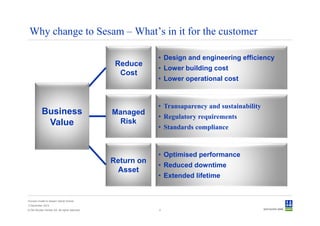
Why change to Sesam – What’s in it for the customer

                                                            • Design and engineering efficiency
                                                 Reduce
                                                            • Lower building cost
                                                  Cost
                                                            • Lower operational cost


                                                            • Transaparency and sustainability
           Business                             Managed
                                                            • Regulatory requirements
            Value                                Risk
                                                            • Standards compliance


                                                            • Optimised performance
                                                Return on
                                                            • Reduced downtime
                                                 Asset
                                                            • Extended lifetime


Convert model to Sesam GeniE format
3 December 2012
© Det Norske Veritas AS. All rights reserved.               2
Which purposes can a model
             serve when imported into Sesam?


Convert model to Sesam GeniE format
3 December 2012
© Det Norske Veritas AS. All rights reserved.   3
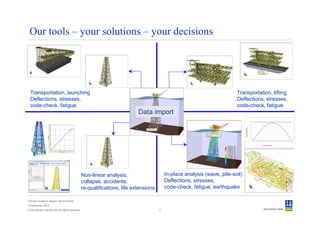
Our tools – your solutions – your decisions


  Transportation, launching                                                                                              Transportation, lifting
  Deflections, stresses,                                                                                                 Deflections, stresses,
  code-check, fatigue                                                                                                    code-check, fatigue
                                                                          Data import


                                                Non-linear analysis,                     In-place analysis (wave, pile-soil)
                                                collapse, accidents,                     Deflections, stresses,
                                                re-qualifications, life extensions       code-check, fatigue, earthquake

Convert model to Sesam GeniE format
3 December 2012
© Det Norske Veritas AS. All rights reserved.                                        4
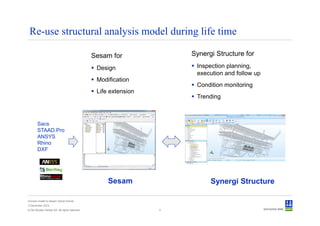
Re-use structural analysis model during life time

                                                Sesam for             Synergi Structure for

                                                 Design                Inspection planning,
                                                                       execution and follow up
                                                 Modification
                                                                       Condition monitoring
                                                 Life extension
                                                                       Trending


        Sacs
        STAAD.Pro
        ANSYS
        Rhino
        DXF


                                                     Sesam                  Synergi Structure

Convert model to Sesam GeniE format
3 December 2012
© Det Norske Veritas AS. All rights reserved.                     5
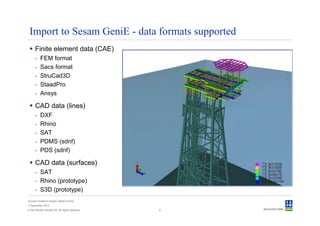
Import to Sesam GeniE - data formats supported
      Finite element data (CAE)
      -   FEM format
      -   Sacs format
      -   StruCad3D
      -   StaadPro
      -   Ansys

      CAD data (lines)
      -   DXF
      -   Rhino
      -   SAT
      -   PDMS (sdnf)
      -   PDS (sdnf)

      CAD data (surfaces)
      - SAT
      - Rhino (prototype)
      - S3D (prototype)
Convert model to Sesam GeniE format
3 December 2012
© Det Norske Veritas AS. All rights reserved.   6
Importing old Sesam format
             - Structure
             - Loads
             - Wave load conditions
             - Soil data

Convert model to Sesam GeniE format
3 December 2012
© Det Norske Veritas AS. All rights reserved.   7
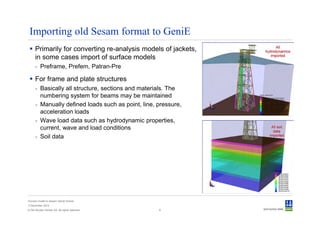
Importing old Sesam format to GeniE
      Primarily for converting re-analysis models of jackets,
      in some cases import of surface models
      - Preframe, Prefem, Patran-Pre

      For frame and plate structures
      - Basically all structure, sections and materials. The
        numbering system for beams may be maintained
      - Manually defined loads such as point, line, pressure,
        acceleration loads
      - Wave load data such as hydrodynamic properties,
        current, wave and load conditions
      - Soil data


Convert model to Sesam GeniE format
3 December 2012
© Det Norske Veritas AS. All rights reserved.       8
Importing Sacs format
             - Structure
             - Loads
             - Wave load conditions
             - Load combinations
             - Pile
             - Soil
Convert model to Sesam GeniE format
3 December 2012
© Det Norske Veritas AS. All rights reserved.   9
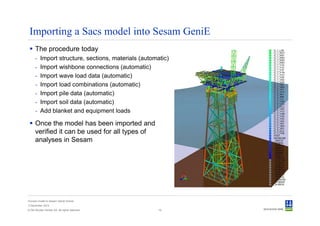
Importing a Sacs model into Sesam GeniE
      The procedure today
      -   Import structure, sections, materials (automatic)
      -   Import wishbone connections (automatic)
      -   Import wave load data (automatic)
      -   Import load combinations (automatic)
      -   Import pile data (automatic)
      -   Import soil data (automatic)
      -   Add blanket and equipment loads

      Once the model has been imported and
      verified it can be used for all types of
      analyses in Sesam


Convert model to Sesam GeniE format
3 December 2012
© Det Norske Veritas AS. All rights reserved.          10
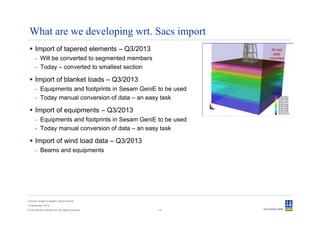
What are we developing wrt. Sacs import
      Import of tapered elements – Q3/2013
      - Will be converted to segmented members
      - Today – converted to smallest section

      Import of blanket loads – Q3/2013
      - Equipments and footprints in Sesam GeniE to be used
      - Today manual conversion of data – an easy task

      Import of equipments – Q3/2013
      - Equipments and footprints in Sesam GeniE to be used
      - Today manual conversion of data – an easy task

      Import of wind load data – Q3/2013
      - Beams and equipments


Convert model to Sesam GeniE format
3 December 2012
© Det Norske Veritas AS. All rights reserved.    14
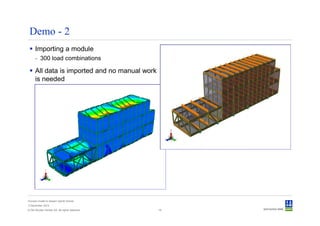
Demo - 2
      Importing a module
      - 300 load combinations

      All data is imported and no manual work
      is needed


Convert model to Sesam GeniE format
3 December 2012
© Det Norske Veritas AS. All rights reserved.   16
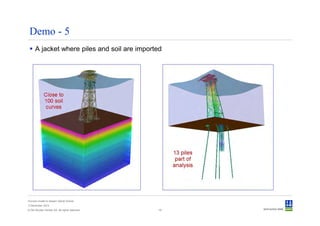
Demo - 5
      A jacket where piles and soil are imported


Convert model to Sesam GeniE format
3 December 2012
© Det Norske Veritas AS. All rights reserved.   19
Importing StruCad format
             - Structure
             - Loads


Convert model to Sesam GeniE format
3 December 2012
© Det Norske Veritas AS. All rights reserved.   20
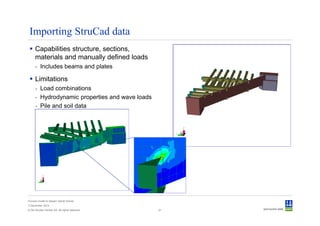
Importing StruCad data
      Capabilities structure, sections,
      materials and manually defined loads
      - Includes beams and plates

      Limitations
      - Load combinations
      - Hydrodynamic properties and wave loads
      - Pile and soil data


Convert model to Sesam GeniE format
3 December 2012
© Det Norske Veritas AS. All rights reserved.    21
Importing StaadPro format
             - Structure
             - Loads


Convert model to Sesam GeniE format
3 December 2012
© Det Norske Veritas AS. All rights reserved.   24
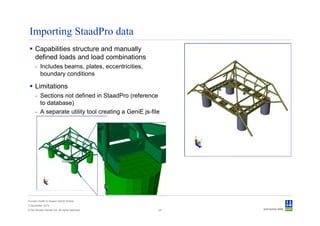
Importing StaadPro data
      Capabilities structure and manually
      defined loads and load combinations
      - Includes beams, plates, eccentricities,
        boundary conditions

      Limitations
      - Sections not defined in StaadPro (reference
        to database)
      - A separate utility tool creating a GeniE js-file


Convert model to Sesam GeniE format
3 December 2012
© Det Norske Veritas AS. All rights reserved.          25
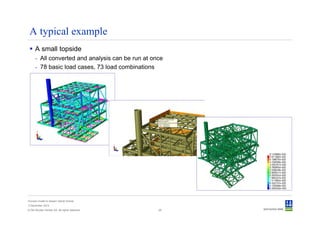
A typical example
      A small topside
      - All converted and analysis can be run at once
      - 78 basic load cases, 73 load combinations


Convert model to Sesam GeniE format
3 December 2012
© Det Norske Veritas AS. All rights reserved.      26
Importing Ansys format
             - Structure
             - Loads


Convert model to Sesam GeniE format
3 December 2012
© Det Norske Veritas AS. All rights reserved.   28
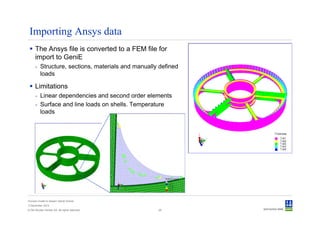
Importing Ansys data
      The Ansys file is converted to a FEM file for
      import to GeniE
      - Structure, sections, materials and manually defined
        loads

      Limitations
      - Linear dependencies and second order elements
      - Surface and line loads on shells. Temperature
        loads


Convert model to Sesam GeniE format
3 December 2012
© Det Norske Veritas AS. All rights reserved.      29
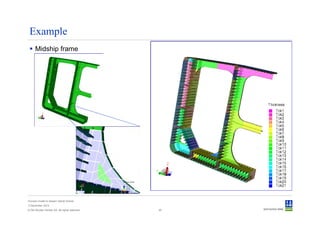
Example
      Midship frame


Convert model to Sesam GeniE format
3 December 2012
© Det Norske Veritas AS. All rights reserved.   30
Import lines from CAD
             - DXF
             - Rhino
             - SAT
             - PDMS (sdnf)
             - PDS (sdnf)
Convert model to Sesam GeniE format
3 December 2012
© Det Norske Veritas AS. All rights reserved.   31
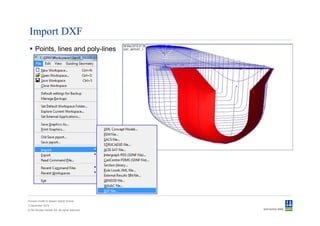
Import DXF
      Points, lines and poly-lines


Convert model to Sesam GeniE format
3 December 2012
© Det Norske Veritas AS. All rights reserved.
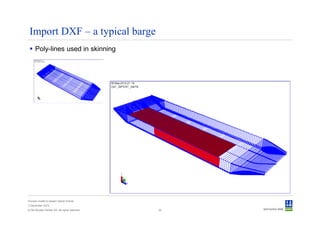
Import DXF – a typical barge
      Poly-lines used in skinning


Convert model to Sesam GeniE format
3 December 2012
© Det Norske Veritas AS. All rights reserved.   33
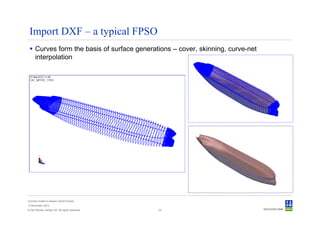
Import DXF – a typical FPSO
      Curves form the basis of surface generations – cover, skinning, curve-net
      interpolation


Convert model to Sesam GeniE format
3 December 2012
© Det Norske Veritas AS. All rights reserved.   34
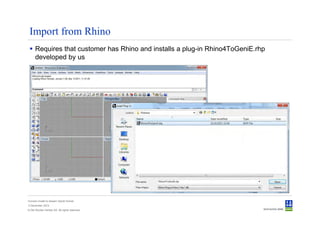
Import from Rhino
      Requires that customer has Rhino and installs a plug-in Rhino4ToGeniE.rhp
      developed by us


Convert model to Sesam GeniE format
3 December 2012
© Det Norske Veritas AS. All rights reserved.
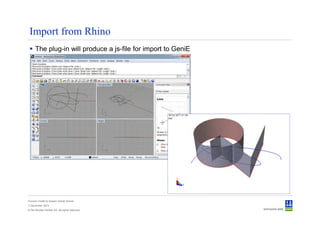
Import from Rhino
      The plug-in will produce a js-file for import to GeniE


Convert model to Sesam GeniE format
3 December 2012
© Det Norske Veritas AS. All rights reserved.
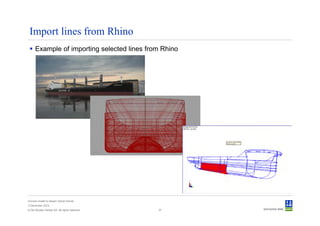
Import lines from Rhino
      Example of importing selected lines from Rhino


Convert model to Sesam GeniE format
3 December 2012
© Det Norske Veritas AS. All rights reserved.   37
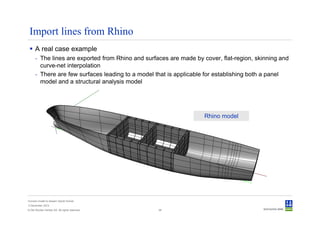
Import lines from Rhino
      A real case example
      - The lines are exported from Rhino and surfaces are made by cover, flat-region, skinning and
        curve-net interpolation
      - There are few surfaces leading to a model that is applicable for establishing both a panel
        model and a structural analysis model


                                                                    Rhino model


Convert model to Sesam GeniE format
3 December 2012
© Det Norske Veritas AS. All rights reserved.      38
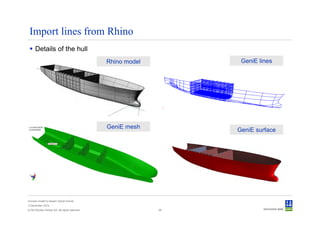
Import lines from Rhino
      Details of the hull
                                                Rhino model         GeniE lines


                                                GeniE mesh
                                                                   GeniE surface


Convert model to Sesam GeniE format
3 December 2012
© Det Norske Veritas AS. All rights reserved.                 39
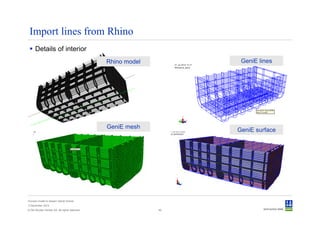
Import lines from Rhino
      Details of interior
                                                Rhino model         GeniE lines


                                                GeniE mesh
                                                                   GeniE surface


Convert model to Sesam GeniE format
3 December 2012
© Det Norske Veritas AS. All rights reserved.                 40
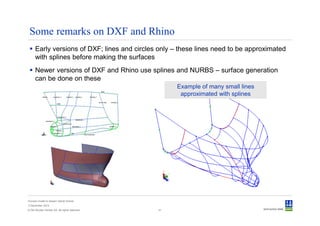
Some remarks on DXF and Rhino
      Early versions of DXF; lines and circles only – these lines need to be approximated
      with splines before making the surfaces
      Newer versions of DXF and Rhino use splines and NURBS – surface generation
      can be done on these
                                                     Example of many small lines
                                                      approximated with splines


Convert model to Sesam GeniE format
3 December 2012
© Det Norske Veritas AS. All rights reserved.   41
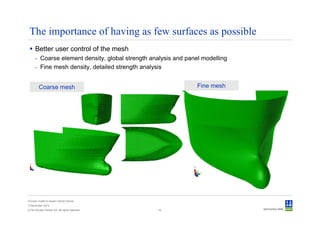
The importance of having as few surfaces as possible
      Better user control of the mesh
      - Coarse element density, global strength analysis and panel modelling
      - Fine mesh density, detailed strength analysis


         Coarse mesh                                             Fine mesh


Convert model to Sesam GeniE format
3 December 2012
© Det Norske Veritas AS. All rights reserved.     42
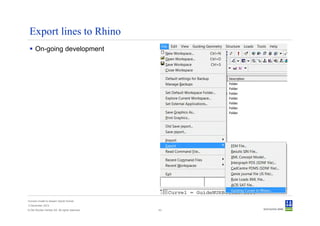
Export lines to Rhino
      On-going development


Convert model to Sesam GeniE format
3 December 2012
© Det Norske Veritas AS. All rights reserved.   43
Import surfaces from CAD
             - SAT
             - Rhino – prototype
             - S3D – prototype

Convert model to Sesam GeniE format
3 December 2012
© Det Norske Veritas AS. All rights reserved.   44
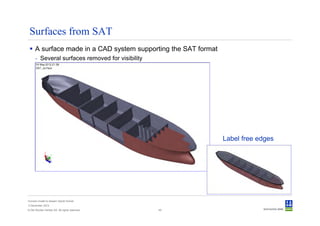
Surfaces from SAT
      A surface made in a CAD system supporting the SAT format
      - Several surfaces removed for visibility


                                                                 Label free edges


Convert model to Sesam GeniE format
3 December 2012
© Det Norske Veritas AS. All rights reserved.     45
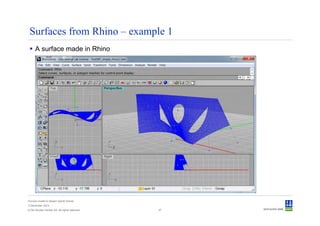
Surfaces from Rhino – example 1
      A surface made in Rhino


Convert model to Sesam GeniE format
3 December 2012
© Det Norske Veritas AS. All rights reserved.   47
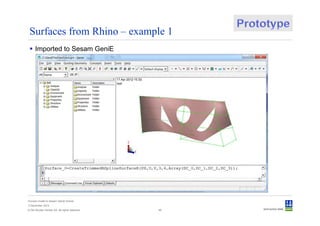
Surfaces from Rhino – example 1
      Imported to Sesam GeniE


Convert model to Sesam GeniE format
3 December 2012
© Det Norske Veritas AS. All rights reserved.   48
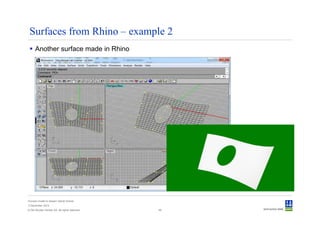
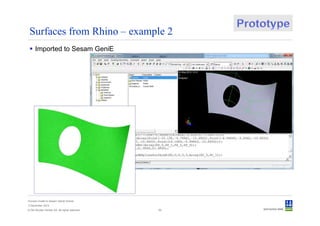
Surfaces from Rhino – example 2
      Another surface made in Rhino


Convert model to Sesam GeniE format
3 December 2012
© Det Norske Veritas AS. All rights reserved.   49
Surfaces from Rhino – example 2
      Imported to Sesam GeniE


Convert model to Sesam GeniE format
3 December 2012
© Det Norske Veritas AS. All rights reserved.   50
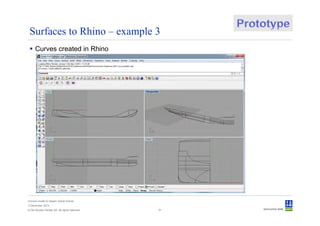
Surfaces to Rhino – example 3
      Curves created in Rhino


Convert model to Sesam GeniE format
3 December 2012
© Det Norske Veritas AS. All rights reserved.   51
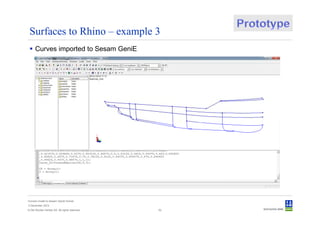
Surfaces to Rhino – example 3
      Curves imported to Sesam GeniE


Convert model to Sesam GeniE format
3 December 2012
© Det Norske Veritas AS. All rights reserved.   52
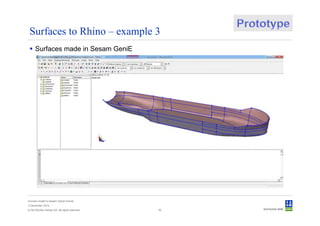
Surfaces to Rhino – example 3
      Surfaces made in Sesam GeniE


Convert model to Sesam GeniE format
3 December 2012
© Det Norske Veritas AS. All rights reserved.   53
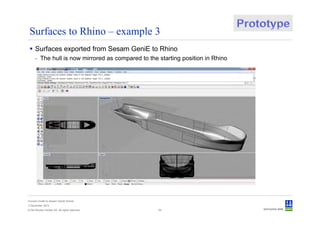
Surfaces to Rhino – example 3
      Surfaces exported from Sesam GeniE to Rhino
      - The hull is now mirrored as compared to the starting position in Rhino


Convert model to Sesam GeniE format
3 December 2012
© Det Norske Veritas AS. All rights reserved.       54
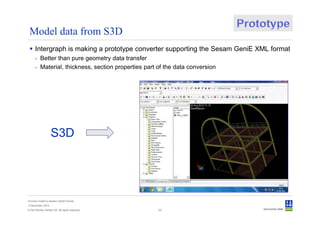
Model data from S3D
      Intergraph is making a prototype converter supporting the Sesam GeniE XML format
      - Better than pure geometry data transfer
      - Material, thickness, section properties part of the data conversion


                   S3D


Convert model to Sesam GeniE format
3 December 2012
© Det Norske Veritas AS. All rights reserved.        55
To summarize


Convert model to Sesam GeniE format
3 December 2012
© Det Norske Veritas AS. All rights reserved.   56
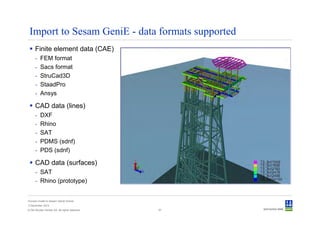
Import to Sesam GeniE - data formats supported
      Finite element data (CAE)
      -   FEM format
      -   Sacs format
      -   StruCad3D
      -   StaadPro
      -   Ansys

      CAD data (lines)
      -   DXF
      -   Rhino
      -   SAT
      -   PDMS (sdnf)
      -   PDS (sdnf)

      CAD data (surfaces)
      - SAT
      - Rhino (prototype)


Convert model to Sesam GeniE format
3 December 2012
© Det Norske Veritas AS. All rights reserved.   57
Crossing the bridge to Sesam


Convert model to Sesam GeniE format
3 December 2012
© Det Norske Veritas AS. All rights reserved.   58
Crossing the bridge gives access to a complete system


Convert model to Sesam GeniE format
3 December 2012
© Det Norske Veritas AS. All rights reserved.   59
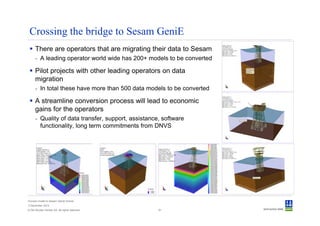
Crossing the bridge to Sesam GeniE
      There are operators that are migrating their data to Sesam
      - A leading operator world wide has 200+ models to be converted

      Pilot projects with other leading operators on data
      migration
      - In total these have more than 500 data models to be converted

      A streamline conversion process will lead to economic
      gains for the operators
      - Quality of data transfer, support, assistance, software
        functionality, long term commitments from DNVS


Convert model to Sesam GeniE format
3 December 2012
© Det Norske Veritas AS. All rights reserved.        61
Safeguarding life, property
       and the environment

       www.dnv.com


Convert model to Sesam GeniE format
3 December 2012
© Det Norske Veritas AS. All rights reserved.   62

SUC Brasil 2012 : Importing Models to Sesam GeniE

  • 1.
    SesamTM 40 years ofsuccess Importing FE/CAD data to Sesam GeniE Ole Jan Nekstad Product Director - Sesam 3 December 2012
  • 2.
    Why change toSesam – What’s in it for the customer • Design and engineering efficiency Reduce • Lower building cost Cost • Lower operational cost • Transaparency and sustainability Business Managed • Regulatory requirements Value Risk • Standards compliance • Optimised performance Return on • Reduced downtime Asset • Extended lifetime Convert model to Sesam GeniE format 3 December 2012 © Det Norske Veritas AS. All rights reserved. 2
  • 3.
    Which purposes cana model serve when imported into Sesam? Convert model to Sesam GeniE format 3 December 2012 © Det Norske Veritas AS. All rights reserved. 3
  • 4.
    Our tools –your solutions – your decisions Transportation, launching Transportation, lifting Deflections, stresses, Deflections, stresses, code-check, fatigue code-check, fatigue Data import Non-linear analysis, In-place analysis (wave, pile-soil) collapse, accidents, Deflections, stresses, re-qualifications, life extensions code-check, fatigue, earthquake Convert model to Sesam GeniE format 3 December 2012 © Det Norske Veritas AS. All rights reserved. 4
  • 5.
    Re-use structural analysismodel during life time Sesam for Synergi Structure for Design Inspection planning, execution and follow up Modification Condition monitoring Life extension Trending Sacs STAAD.Pro ANSYS Rhino DXF Sesam Synergi Structure Convert model to Sesam GeniE format 3 December 2012 © Det Norske Veritas AS. All rights reserved. 5
  • 6.
    Import to SesamGeniE - data formats supported Finite element data (CAE) - FEM format - Sacs format - StruCad3D - StaadPro - Ansys CAD data (lines) - DXF - Rhino - SAT - PDMS (sdnf) - PDS (sdnf) CAD data (surfaces) - SAT - Rhino (prototype) - S3D (prototype) Convert model to Sesam GeniE format 3 December 2012 © Det Norske Veritas AS. All rights reserved. 6
  • 7.
    Importing old Sesamformat - Structure - Loads - Wave load conditions - Soil data Convert model to Sesam GeniE format 3 December 2012 © Det Norske Veritas AS. All rights reserved. 7
  • 8.
    Importing old Sesamformat to GeniE Primarily for converting re-analysis models of jackets, in some cases import of surface models - Preframe, Prefem, Patran-Pre For frame and plate structures - Basically all structure, sections and materials. The numbering system for beams may be maintained - Manually defined loads such as point, line, pressure, acceleration loads - Wave load data such as hydrodynamic properties, current, wave and load conditions - Soil data Convert model to Sesam GeniE format 3 December 2012 © Det Norske Veritas AS. All rights reserved. 8
  • 9.
    Importing Sacs format - Structure - Loads - Wave load conditions - Load combinations - Pile - Soil Convert model to Sesam GeniE format 3 December 2012 © Det Norske Veritas AS. All rights reserved. 9
  • 10.
    Importing a Sacsmodel into Sesam GeniE The procedure today - Import structure, sections, materials (automatic) - Import wishbone connections (automatic) - Import wave load data (automatic) - Import load combinations (automatic) - Import pile data (automatic) - Import soil data (automatic) - Add blanket and equipment loads Once the model has been imported and verified it can be used for all types of analyses in Sesam Convert model to Sesam GeniE format 3 December 2012 © Det Norske Veritas AS. All rights reserved. 10
  • 11.
    What are wedeveloping wrt. Sacs import Import of tapered elements – Q3/2013 - Will be converted to segmented members - Today – converted to smallest section Import of blanket loads – Q3/2013 - Equipments and footprints in Sesam GeniE to be used - Today manual conversion of data – an easy task Import of equipments – Q3/2013 - Equipments and footprints in Sesam GeniE to be used - Today manual conversion of data – an easy task Import of wind load data – Q3/2013 - Beams and equipments Convert model to Sesam GeniE format 3 December 2012 © Det Norske Veritas AS. All rights reserved. 14
  • 12.
    Demo - 2 Importing a module - 300 load combinations All data is imported and no manual work is needed Convert model to Sesam GeniE format 3 December 2012 © Det Norske Veritas AS. All rights reserved. 16
  • 13.
    Demo - 5 A jacket where piles and soil are imported Convert model to Sesam GeniE format 3 December 2012 © Det Norske Veritas AS. All rights reserved. 19
  • 14.
    Importing StruCad format - Structure - Loads Convert model to Sesam GeniE format 3 December 2012 © Det Norske Veritas AS. All rights reserved. 20
  • 15.
    Importing StruCad data Capabilities structure, sections, materials and manually defined loads - Includes beams and plates Limitations - Load combinations - Hydrodynamic properties and wave loads - Pile and soil data Convert model to Sesam GeniE format 3 December 2012 © Det Norske Veritas AS. All rights reserved. 21
  • 16.
    Importing StaadPro format - Structure - Loads Convert model to Sesam GeniE format 3 December 2012 © Det Norske Veritas AS. All rights reserved. 24
  • 17.
    Importing StaadPro data Capabilities structure and manually defined loads and load combinations - Includes beams, plates, eccentricities, boundary conditions Limitations - Sections not defined in StaadPro (reference to database) - A separate utility tool creating a GeniE js-file Convert model to Sesam GeniE format 3 December 2012 © Det Norske Veritas AS. All rights reserved. 25
  • 18.
    A typical example A small topside - All converted and analysis can be run at once - 78 basic load cases, 73 load combinations Convert model to Sesam GeniE format 3 December 2012 © Det Norske Veritas AS. All rights reserved. 26
  • 19.
    Importing Ansys format - Structure - Loads Convert model to Sesam GeniE format 3 December 2012 © Det Norske Veritas AS. All rights reserved. 28
  • 20.
    Importing Ansys data The Ansys file is converted to a FEM file for import to GeniE - Structure, sections, materials and manually defined loads Limitations - Linear dependencies and second order elements - Surface and line loads on shells. Temperature loads Convert model to Sesam GeniE format 3 December 2012 © Det Norske Veritas AS. All rights reserved. 29
  • 21.
    Example Midship frame Convert model to Sesam GeniE format 3 December 2012 © Det Norske Veritas AS. All rights reserved. 30
  • 22.
    Import lines fromCAD - DXF - Rhino - SAT - PDMS (sdnf) - PDS (sdnf) Convert model to Sesam GeniE format 3 December 2012 © Det Norske Veritas AS. All rights reserved. 31
  • 23.
    Import DXF Points, lines and poly-lines Convert model to Sesam GeniE format 3 December 2012 © Det Norske Veritas AS. All rights reserved.
  • 24.
    Import DXF –a typical barge Poly-lines used in skinning Convert model to Sesam GeniE format 3 December 2012 © Det Norske Veritas AS. All rights reserved. 33
  • 25.
    Import DXF –a typical FPSO Curves form the basis of surface generations – cover, skinning, curve-net interpolation Convert model to Sesam GeniE format 3 December 2012 © Det Norske Veritas AS. All rights reserved. 34
  • 26.
    Import from Rhino Requires that customer has Rhino and installs a plug-in Rhino4ToGeniE.rhp developed by us Convert model to Sesam GeniE format 3 December 2012 © Det Norske Veritas AS. All rights reserved.
  • 27.
    Import from Rhino The plug-in will produce a js-file for import to GeniE Convert model to Sesam GeniE format 3 December 2012 © Det Norske Veritas AS. All rights reserved.
  • 28.
    Import lines fromRhino Example of importing selected lines from Rhino Convert model to Sesam GeniE format 3 December 2012 © Det Norske Veritas AS. All rights reserved. 37
  • 29.
    Import lines fromRhino A real case example - The lines are exported from Rhino and surfaces are made by cover, flat-region, skinning and curve-net interpolation - There are few surfaces leading to a model that is applicable for establishing both a panel model and a structural analysis model Rhino model Convert model to Sesam GeniE format 3 December 2012 © Det Norske Veritas AS. All rights reserved. 38
  • 30.
    Import lines fromRhino Details of the hull Rhino model GeniE lines GeniE mesh GeniE surface Convert model to Sesam GeniE format 3 December 2012 © Det Norske Veritas AS. All rights reserved. 39
  • 31.
    Import lines fromRhino Details of interior Rhino model GeniE lines GeniE mesh GeniE surface Convert model to Sesam GeniE format 3 December 2012 © Det Norske Veritas AS. All rights reserved. 40
  • 32.
    Some remarks onDXF and Rhino Early versions of DXF; lines and circles only – these lines need to be approximated with splines before making the surfaces Newer versions of DXF and Rhino use splines and NURBS – surface generation can be done on these Example of many small lines approximated with splines Convert model to Sesam GeniE format 3 December 2012 © Det Norske Veritas AS. All rights reserved. 41
  • 33.
    The importance ofhaving as few surfaces as possible Better user control of the mesh - Coarse element density, global strength analysis and panel modelling - Fine mesh density, detailed strength analysis Coarse mesh Fine mesh Convert model to Sesam GeniE format 3 December 2012 © Det Norske Veritas AS. All rights reserved. 42
  • 34.
    Export lines toRhino On-going development Convert model to Sesam GeniE format 3 December 2012 © Det Norske Veritas AS. All rights reserved. 43
  • 35.
    Import surfaces fromCAD - SAT - Rhino – prototype - S3D – prototype Convert model to Sesam GeniE format 3 December 2012 © Det Norske Veritas AS. All rights reserved. 44
  • 36.
    Surfaces from SAT A surface made in a CAD system supporting the SAT format - Several surfaces removed for visibility Label free edges Convert model to Sesam GeniE format 3 December 2012 © Det Norske Veritas AS. All rights reserved. 45
  • 37.
    Surfaces from Rhino– example 1 A surface made in Rhino Convert model to Sesam GeniE format 3 December 2012 © Det Norske Veritas AS. All rights reserved. 47
  • 38.
    Surfaces from Rhino– example 1 Imported to Sesam GeniE Convert model to Sesam GeniE format 3 December 2012 © Det Norske Veritas AS. All rights reserved. 48
  • 39.
    Surfaces from Rhino– example 2 Another surface made in Rhino Convert model to Sesam GeniE format 3 December 2012 © Det Norske Veritas AS. All rights reserved. 49
  • 40.
    Surfaces from Rhino– example 2 Imported to Sesam GeniE Convert model to Sesam GeniE format 3 December 2012 © Det Norske Veritas AS. All rights reserved. 50
  • 41.
    Surfaces to Rhino– example 3 Curves created in Rhino Convert model to Sesam GeniE format 3 December 2012 © Det Norske Veritas AS. All rights reserved. 51
  • 42.
    Surfaces to Rhino– example 3 Curves imported to Sesam GeniE Convert model to Sesam GeniE format 3 December 2012 © Det Norske Veritas AS. All rights reserved. 52
  • 43.
    Surfaces to Rhino– example 3 Surfaces made in Sesam GeniE Convert model to Sesam GeniE format 3 December 2012 © Det Norske Veritas AS. All rights reserved. 53
  • 44.
    Surfaces to Rhino– example 3 Surfaces exported from Sesam GeniE to Rhino - The hull is now mirrored as compared to the starting position in Rhino Convert model to Sesam GeniE format 3 December 2012 © Det Norske Veritas AS. All rights reserved. 54
  • 45.
    Model data fromS3D Intergraph is making a prototype converter supporting the Sesam GeniE XML format - Better than pure geometry data transfer - Material, thickness, section properties part of the data conversion S3D Convert model to Sesam GeniE format 3 December 2012 © Det Norske Veritas AS. All rights reserved. 55
  • 46.
    To summarize Convert modelto Sesam GeniE format 3 December 2012 © Det Norske Veritas AS. All rights reserved. 56
  • 47.
    Import to SesamGeniE - data formats supported Finite element data (CAE) - FEM format - Sacs format - StruCad3D - StaadPro - Ansys CAD data (lines) - DXF - Rhino - SAT - PDMS (sdnf) - PDS (sdnf) CAD data (surfaces) - SAT - Rhino (prototype) Convert model to Sesam GeniE format 3 December 2012 © Det Norske Veritas AS. All rights reserved. 57
  • 48.
    Crossing the bridgeto Sesam Convert model to Sesam GeniE format 3 December 2012 © Det Norske Veritas AS. All rights reserved. 58
  • 49.
    Crossing the bridgegives access to a complete system Convert model to Sesam GeniE format 3 December 2012 © Det Norske Veritas AS. All rights reserved. 59
  • 50.
    Crossing the bridgeto Sesam GeniE There are operators that are migrating their data to Sesam - A leading operator world wide has 200+ models to be converted Pilot projects with other leading operators on data migration - In total these have more than 500 data models to be converted A streamline conversion process will lead to economic gains for the operators - Quality of data transfer, support, assistance, software functionality, long term commitments from DNVS Convert model to Sesam GeniE format 3 December 2012 © Det Norske Veritas AS. All rights reserved. 61
  • 51.
    Safeguarding life, property and the environment www.dnv.com Convert model to Sesam GeniE format 3 December 2012 © Det Norske Veritas AS. All rights reserved. 62