



Sublime Text 2 - Tips & Tricks 
WordPress Leeds - November 
2014 
@rhyswynne - @winwaruk
Questions? 
@rhyswynne - @winwaruk 
2
Yes… 
@rhyswynne - @winwaruk 
3 
…I should really be using an IDE. 
I just never got around to it.
What Is Sublime Text 2? 
@rhyswynne - @winwaruk 
• Extensible Text Editor. 
• Designed for text, markup & code. 
• Customisable (we’ll talk more 
about this). 
• Not free: ($70) 
• http://www.sublimetext.com 
4
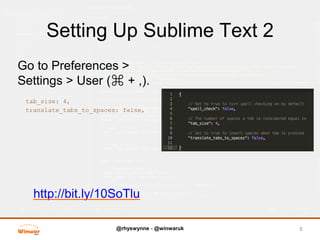
Setting Up Sublime Text 2 
Go to Preferences > 
Settings > User (⌘ + ,). 
tab_size: 4, 
translate_tabs_to_spaces: false, 
http://bit.ly/10SoTlu 
@rhyswynne - @winwaruk 
5
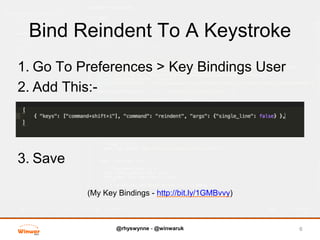
Bind Reindent To A Keystroke 
1. Go To Preferences > Key Bindings User 
2. Add This:- 
@rhyswynne - @winwaruk 
3. Save 
(My Key Bindings - http://bit.ly/1GMBvvy) 
6
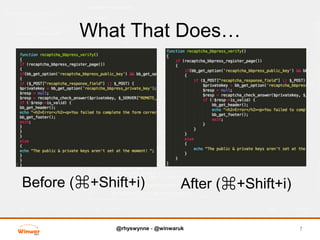
What That Does… 
@rhyswynne - @winwaruk 
7 
Before (⌘+Shift+i) After (⌘+Shift+i)
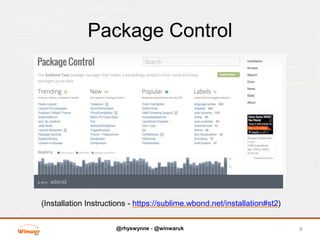
Package Control 
@rhyswynne - @winwaruk 
8 
(Installation Instructions - https://sublime.wbond.net/installation#st2)
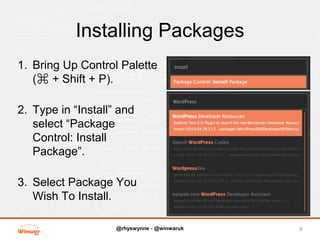
Installing Packages 
1. Bring Up Control Palette 
@rhyswynne - @winwaruk 
(⌘ + Shift + P). 
2. Type in “Install” and 
select “Package 
Control: Install 
Package”. 
3. Select Package You 
Wish To Install. 
9
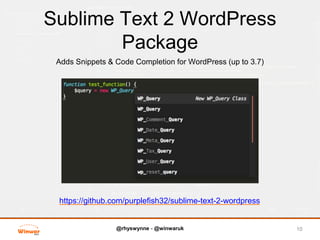
Sublime Text 2 WordPress 
Package 
Adds Snippets & Code Completion for WordPress (up to 3.7) 
@rhyswynne - @winwaruk 
10 
https://github.com/purplefish32/sublime-text-2-wordpress
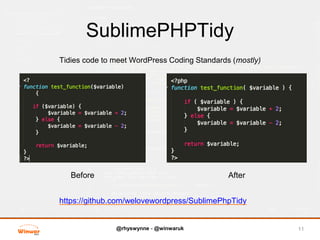
SublimePHPTidy 
Tidies code to meet WordPress Coding Standards (mostly) 
Before After 
@rhyswynne - @winwaruk 
11 
https://github.com/welovewordpress/SublimePhpTidy
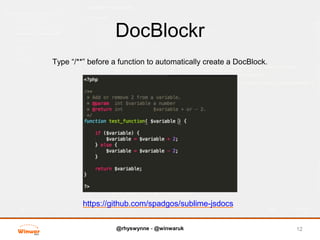
DocBlockr 
Type “/**” before a function to automatically create a DocBlock. 
@rhyswynne - @winwaruk 
12 
https://github.com/spadgos/sublime-jsdocs
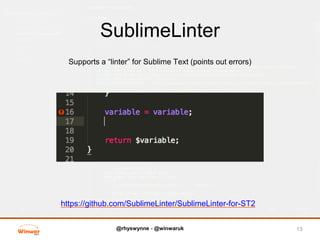
SublimeLinter 
Supports a “linter” for Sublime Text (points out errors) 
@rhyswynne - @winwaruk 
13 
https://github.com/SublimeLinter/SublimeLinter-for-ST2
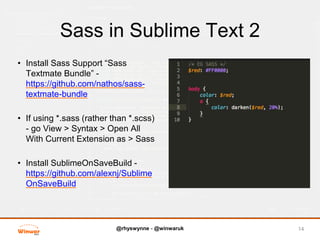
Sass in Sublime Text 2 
• Install Sass Support “Sass 
Textmate Bundle” - 
https://github.com/nathos/sass-textmate- 
@rhyswynne - @winwaruk 
bundle 
• If using *.sass (rather than *.scss) 
- go View > Syntax > Open All 
With Current Extension as > Sass 
• Install SublimeOnSaveBuild - 
https://github.com/alexnj/Sublime 
OnSaveBuild 
14
Snippets 
@rhyswynne - @winwaruk 
• Prewritten Code 
• Cmd (⌘) + Shift + P and type 
“Snippet: ” to see all Snippets. 
• Many Included with Sublime 
WordPress 
• Mine are here - 
https://github.com/rhyswynne/ 
Sublime-Text-2-Snippets 
15
Thank You! :) 
@rhyswynne - @winwaruk 
16 
Questions? 
(I mean it this time) 
http://winwar.co.uk 
http://twitter.com/rhyswynne

Sublime Text 2 Tips & Tricks

  • 1.
    Sublime Text 2- Tips & Tricks WordPress Leeds - November 2014 @rhyswynne - @winwaruk
  • 2.
  • 3.
    Yes… @rhyswynne -@winwaruk 3 …I should really be using an IDE. I just never got around to it.
  • 4.
    What Is SublimeText 2? @rhyswynne - @winwaruk • Extensible Text Editor. • Designed for text, markup & code. • Customisable (we’ll talk more about this). • Not free: ($70) • http://www.sublimetext.com 4
  • 5.
    Setting Up SublimeText 2 Go to Preferences > Settings > User (⌘ + ,). tab_size: 4, translate_tabs_to_spaces: false, http://bit.ly/10SoTlu @rhyswynne - @winwaruk 5
  • 6.
    Bind Reindent ToA Keystroke 1. Go To Preferences > Key Bindings User 2. Add This:- @rhyswynne - @winwaruk 3. Save (My Key Bindings - http://bit.ly/1GMBvvy) 6
  • 7.
    What That Does… @rhyswynne - @winwaruk 7 Before (⌘+Shift+i) After (⌘+Shift+i)
  • 8.
    Package Control @rhyswynne- @winwaruk 8 (Installation Instructions - https://sublime.wbond.net/installation#st2)
  • 9.
    Installing Packages 1.Bring Up Control Palette @rhyswynne - @winwaruk (⌘ + Shift + P). 2. Type in “Install” and select “Package Control: Install Package”. 3. Select Package You Wish To Install. 9
  • 10.
    Sublime Text 2WordPress Package Adds Snippets & Code Completion for WordPress (up to 3.7) @rhyswynne - @winwaruk 10 https://github.com/purplefish32/sublime-text-2-wordpress
  • 11.
    SublimePHPTidy Tidies codeto meet WordPress Coding Standards (mostly) Before After @rhyswynne - @winwaruk 11 https://github.com/welovewordpress/SublimePhpTidy
  • 12.
    DocBlockr Type “/**”before a function to automatically create a DocBlock. @rhyswynne - @winwaruk 12 https://github.com/spadgos/sublime-jsdocs
  • 13.
    SublimeLinter Supports a“linter” for Sublime Text (points out errors) @rhyswynne - @winwaruk 13 https://github.com/SublimeLinter/SublimeLinter-for-ST2
  • 14.
    Sass in SublimeText 2 • Install Sass Support “Sass Textmate Bundle” - https://github.com/nathos/sass-textmate- @rhyswynne - @winwaruk bundle • If using *.sass (rather than *.scss) - go View > Syntax > Open All With Current Extension as > Sass • Install SublimeOnSaveBuild - https://github.com/alexnj/Sublime OnSaveBuild 14
  • 15.
    Snippets @rhyswynne -@winwaruk • Prewritten Code • Cmd (⌘) + Shift + P and type “Snippet: ” to see all Snippets. • Many Included with Sublime WordPress • Mine are here - https://github.com/rhyswynne/ Sublime-Text-2-Snippets 15
  • 16.
    Thank You! :) @rhyswynne - @winwaruk 16 Questions? (I mean it this time) http://winwar.co.uk http://twitter.com/rhyswynne