© MOSAIC SMART DATA 1
Egor Kraev, Head of AI, Mosaic Smart Data
PyData, April 4, 2017
Streaming analytics with asynchronous Python and Kafka
© MOSAIC SMART DATA 2
Overview
▪ This talk will show what streaming graphs are, why you
really want to use them, and what the pitfalls are
▪ It then presents a simple, lightweight, yet reasonably robust
way of structuring your Python code as a streaming graph,
with the help of asyncio and Kafka
© MOSAIC SMART DATA 3
A simple streaming system
▪ The processing nodes are often stateful, need to process the messages
in the correct sequence, and update their internal state after each
message (an exponential average calculator is a basic example)
▪ The graphs often contain cycles, so for example A ->B -> C -> A
▪ The graphs nearly always have some nodes containing and emitting
multiple streams
© MOSAIC SMART DATA 4
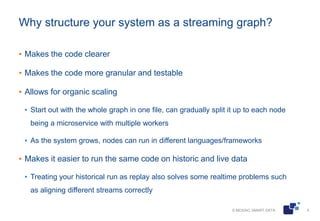
Why structure your system as a streaming graph?
▪ Makes the code clearer
▪ Makes the code more granular and testable
▪ Allows for organic scaling
▪ Start out with the whole graph in one file, can gradually split it up to each node
being a microservice with multiple workers
▪ As the system grows, nodes can run in different languages/frameworks
▪ Makes it easier to run the same code on historic and live data
▪ Treating your historical run as replay also solves some realtime problems such
as aligning different streams correctly
© MOSAIC SMART DATA 5
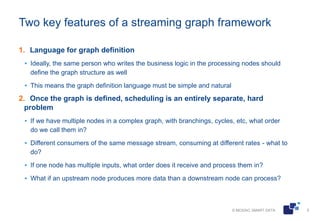
Two key features of a streaming graph framework
1. Language for graph definition
▪ Ideally, the same person who writes the business logic in the processing nodes should
define the graph structure as well
▪ This means the graph definition language must be simple and natural
2. Once the graph is defined, scheduling is an entirely separate, hard
problem
▪ If we have multiple nodes in a complex graph, with branchings, cycles, etc, what order
do we call them in?
▪ Different consumers of the same message stream, consuming at different rates - what to
do?
▪ If one node has multiple inputs, what order does it receive and process them in?
▪ What if an upstream node produces more data than a downstream node can process?
© MOSAIC SMART DATA 6
Popular kinds of scheduling logic
1. Agents
▪ Each node autonomously decides what messages to send
▪ Each node accepts messages sends to it
▪ Logic for buffering and message scheduling needs to be defined in each node
▪ For example, pykka
2. 'Push' approach
▪ First attempt at event-driven systems tends to be ‘push’
▪ For example 'reactive' systems, eg Microsoft’s RXPy
▪ When an external event appears, it’s fed to the entry point node.
▪ Each node processes what it receives, once done, triggers its downstream nodes
▪ Benefit: simpler logic in the nodes; each node must only have a list of its
downsteam nodes to send messages to
© MOSAIC SMART DATA 7
Problems with the Push approach
1. What if the downstream can't cope?
▪ Solution: 'backpressure': downstream nodes are allowed to signal upstream when
they're not coping
▪ That limits the amount of buffering we need to do internally, but can bring its own
problems.
▪ Backpressure needs to be implemented well at framework level, else we end up with a
callback nightmare: each node must have callbacks to both upstream and downstream,
and manage these as well as an internal message buffer (RXPy as example)
▪ Backpressure combined with multiple dowstreams can lead to processing locking up
accidentally,
2. Push does really badly at aligning merging streams
▪ Even if individual streams are ordered, different streams are often out of sync
▪ What if the graph branches and then re-converges, how do we make sure the 'right'
messages from both branches are processed together?
© MOSAIC SMART DATA 8
The Pull approach
▪ Let's turn the problem on its head!
▪ Let's say each node doesn't need to know its downstream, only its
parents.
▪ The execution is controlled by the downmost node. When it's ready, it
requests more messages from its parents
▪ No buffering needed
▪ When streams merge, the merging node is in control, decides which
stream to consume from first
Limitations:
▪ The sources must be able to wait until queried
▪ Has problems with two downstream nodes wanting to consume the
same message stream
© MOSAIC SMART DATA 9
The challenge
I set out to find or create an architecture with the following properties:
▪ Allows realtime processing
▪ All user-defined logic is in Python with fairly simple syntax
▪ Both processing nodes and graph structure
▪ Lightweight approach, thin layer on top of core Python
▪ Can run on a laptop
▪ Scheduling happens transparently to the user
▪ No need to buffer data inside the Python process (unless you want to)
▪ Must scale gracefully to larger data volumes
© MOSAIC SMART DATA 10
What is out there?
▪ In the JVM world, there's no shortage of great streaming systems
▪ Akka Streams: a mature library
▪ Kafka Streams: allows you to treat Kafka logs as database tables, do joins etc
▪ Flink: Stream processing framework that is good at stateful nodes
▪ On the Python side, a couple of frameworks are almost what I want
▪ Google Dataflow only supports streaming Python when running in Google Cloud,
local runner only supports finite datasets
▪ Spark has awesome Python support, but it's basic approach is map-reduce on
steroids, doesn't fit that well with stateful nodes and cyclical graphs
© MOSAIC SMART DATA 11
Collaborative multitasking, event loop, and asyncio
▪ The event loop pattern, collaborative multitasking
▪ An ‘event loop’ keeps track of multiple functions that want to be executed
▪ Each function can signal to it whether it’s ready to execute or waiting for input
▪ The event loop runs the next function until it has nothing to process, it then
surrenders control back to event loop
▪ A great way of running multiple bits of logic ‘simultaneously’ without
worrying about threading – runs well on a single thread
▪ Asyncio is Python’s official event loop implementation
© MOSAIC SMART DATA 12
Kafka
▪ A simple yet powerful messaging system
▪ A producer client can create a topic in Kafka and write messages to it
▪ Multiple consumer clients can then read these messages in sequence, each
at their own pace
▪ Partitioning of topics - if multiple consumers in the same group, each sees a
distinct subset of partitions of the topic
▪ It's a proper Big Data application with many other nice properties, the only
one that concerns us is that it's designed to deal with lots of data and lots of
clients, fast!
▪ Can spawn an instance locally in seconds, using Docker, eg using the image
at https://hub.docker.com/r/flozano/kafka/
© MOSAIC SMART DATA 13
Now let’s put it all together!
▪ Structure your graph as a collection of pull-only subgraphs, that consume
from and publish to multiple Kafka topics
▪ Inside each subgraph, can merge streams; can also choose to send each
message of a stream to one of many sources,
▪ Inside each subgraph, each message goes to at most one downstream!
▪ If two consumers want to consume the same stream, push that stream to
Kafka and let them each read from Kafka at their own pace
▪ If you have a 'hot' source that won't wait: just run a separate process that
just pushes the output of that source into a Kafka topic, then consume at
leisure
© MOSAIC SMART DATA 14
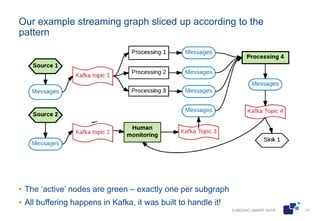
Our example streaming graph sliced up according to the
pattern
▪ The ‘active’ nodes are green – exactly one per subgraph
▪ All buffering happens in Kafka, it was built to handle it!
© MOSAIC SMART DATA 15
Scaling
▪ Thanks to asyncio, can run multiple subgraphs in the same Python
process and thread, so can in principle have a whole graph in one file (two
if you want one dedicated to user input)
▪ Scale using Kafka partitioning to begin with: for slow subgraphs, spawn
multiple nodes each looking at its own partitions of a topic
▪ If that doesn't help, replace the problematic subgraphs by applications in
other languages/frameworks
▪ So stateful Python nodes and Spark subgraphs can coexist happily,
communicating via Kafka
© MOSAIC SMART DATA 16
Example application
▪ To give a nice syntax to users, we implement a thin façade over the
AsyncIterator interface, adding overloading of operators | and >
▪ So a data source is just an async iterator with some operator
overloading on top:
▪ The | operator applies an operator (such as ‘map’) to a source, returning
a new source
▪ The a > b operator creates a coroutine that, when run, will iterate over a
and feed the results to b, a can be an iterable or async iterable
▪ The ‘run’ command asks the event loop to run all its arguments
▪ The kafka interface classes are a bit of syntactic sugar on top of aiokafka
© MOSAIC SMART DATA 17
Summary
▪ Pull-driven subgraphs
▪ Asyncio and async iterators to run many subgraphs at once
▪ Kafka to glue it all together (and to the world)
Questions? Comments?
▪ Please feel free to contact me at egor@dagon.ai

Streaming analytics with Python and Kafka

  • 1.
    © MOSAIC SMARTDATA 1 Egor Kraev, Head of AI, Mosaic Smart Data PyData, April 4, 2017 Streaming analytics with asynchronous Python and Kafka
  • 2.
    © MOSAIC SMARTDATA 2 Overview ▪ This talk will show what streaming graphs are, why you really want to use them, and what the pitfalls are ▪ It then presents a simple, lightweight, yet reasonably robust way of structuring your Python code as a streaming graph, with the help of asyncio and Kafka
  • 3.
    © MOSAIC SMARTDATA 3 A simple streaming system ▪ The processing nodes are often stateful, need to process the messages in the correct sequence, and update their internal state after each message (an exponential average calculator is a basic example) ▪ The graphs often contain cycles, so for example A ->B -> C -> A ▪ The graphs nearly always have some nodes containing and emitting multiple streams
  • 4.
    © MOSAIC SMARTDATA 4 Why structure your system as a streaming graph? ▪ Makes the code clearer ▪ Makes the code more granular and testable ▪ Allows for organic scaling ▪ Start out with the whole graph in one file, can gradually split it up to each node being a microservice with multiple workers ▪ As the system grows, nodes can run in different languages/frameworks ▪ Makes it easier to run the same code on historic and live data ▪ Treating your historical run as replay also solves some realtime problems such as aligning different streams correctly
  • 5.
    © MOSAIC SMARTDATA 5 Two key features of a streaming graph framework 1. Language for graph definition ▪ Ideally, the same person who writes the business logic in the processing nodes should define the graph structure as well ▪ This means the graph definition language must be simple and natural 2. Once the graph is defined, scheduling is an entirely separate, hard problem ▪ If we have multiple nodes in a complex graph, with branchings, cycles, etc, what order do we call them in? ▪ Different consumers of the same message stream, consuming at different rates - what to do? ▪ If one node has multiple inputs, what order does it receive and process them in? ▪ What if an upstream node produces more data than a downstream node can process?
  • 6.
    © MOSAIC SMARTDATA 6 Popular kinds of scheduling logic 1. Agents ▪ Each node autonomously decides what messages to send ▪ Each node accepts messages sends to it ▪ Logic for buffering and message scheduling needs to be defined in each node ▪ For example, pykka 2. 'Push' approach ▪ First attempt at event-driven systems tends to be ‘push’ ▪ For example 'reactive' systems, eg Microsoft’s RXPy ▪ When an external event appears, it’s fed to the entry point node. ▪ Each node processes what it receives, once done, triggers its downstream nodes ▪ Benefit: simpler logic in the nodes; each node must only have a list of its downsteam nodes to send messages to
  • 7.
    © MOSAIC SMARTDATA 7 Problems with the Push approach 1. What if the downstream can't cope? ▪ Solution: 'backpressure': downstream nodes are allowed to signal upstream when they're not coping ▪ That limits the amount of buffering we need to do internally, but can bring its own problems. ▪ Backpressure needs to be implemented well at framework level, else we end up with a callback nightmare: each node must have callbacks to both upstream and downstream, and manage these as well as an internal message buffer (RXPy as example) ▪ Backpressure combined with multiple dowstreams can lead to processing locking up accidentally, 2. Push does really badly at aligning merging streams ▪ Even if individual streams are ordered, different streams are often out of sync ▪ What if the graph branches and then re-converges, how do we make sure the 'right' messages from both branches are processed together?
  • 8.
    © MOSAIC SMARTDATA 8 The Pull approach ▪ Let's turn the problem on its head! ▪ Let's say each node doesn't need to know its downstream, only its parents. ▪ The execution is controlled by the downmost node. When it's ready, it requests more messages from its parents ▪ No buffering needed ▪ When streams merge, the merging node is in control, decides which stream to consume from first Limitations: ▪ The sources must be able to wait until queried ▪ Has problems with two downstream nodes wanting to consume the same message stream
  • 9.
    © MOSAIC SMARTDATA 9 The challenge I set out to find or create an architecture with the following properties: ▪ Allows realtime processing ▪ All user-defined logic is in Python with fairly simple syntax ▪ Both processing nodes and graph structure ▪ Lightweight approach, thin layer on top of core Python ▪ Can run on a laptop ▪ Scheduling happens transparently to the user ▪ No need to buffer data inside the Python process (unless you want to) ▪ Must scale gracefully to larger data volumes
  • 10.
    © MOSAIC SMARTDATA 10 What is out there? ▪ In the JVM world, there's no shortage of great streaming systems ▪ Akka Streams: a mature library ▪ Kafka Streams: allows you to treat Kafka logs as database tables, do joins etc ▪ Flink: Stream processing framework that is good at stateful nodes ▪ On the Python side, a couple of frameworks are almost what I want ▪ Google Dataflow only supports streaming Python when running in Google Cloud, local runner only supports finite datasets ▪ Spark has awesome Python support, but it's basic approach is map-reduce on steroids, doesn't fit that well with stateful nodes and cyclical graphs
  • 11.
    © MOSAIC SMARTDATA 11 Collaborative multitasking, event loop, and asyncio ▪ The event loop pattern, collaborative multitasking ▪ An ‘event loop’ keeps track of multiple functions that want to be executed ▪ Each function can signal to it whether it’s ready to execute or waiting for input ▪ The event loop runs the next function until it has nothing to process, it then surrenders control back to event loop ▪ A great way of running multiple bits of logic ‘simultaneously’ without worrying about threading – runs well on a single thread ▪ Asyncio is Python’s official event loop implementation
  • 12.
    © MOSAIC SMARTDATA 12 Kafka ▪ A simple yet powerful messaging system ▪ A producer client can create a topic in Kafka and write messages to it ▪ Multiple consumer clients can then read these messages in sequence, each at their own pace ▪ Partitioning of topics - if multiple consumers in the same group, each sees a distinct subset of partitions of the topic ▪ It's a proper Big Data application with many other nice properties, the only one that concerns us is that it's designed to deal with lots of data and lots of clients, fast! ▪ Can spawn an instance locally in seconds, using Docker, eg using the image at https://hub.docker.com/r/flozano/kafka/
  • 13.
    © MOSAIC SMARTDATA 13 Now let’s put it all together! ▪ Structure your graph as a collection of pull-only subgraphs, that consume from and publish to multiple Kafka topics ▪ Inside each subgraph, can merge streams; can also choose to send each message of a stream to one of many sources, ▪ Inside each subgraph, each message goes to at most one downstream! ▪ If two consumers want to consume the same stream, push that stream to Kafka and let them each read from Kafka at their own pace ▪ If you have a 'hot' source that won't wait: just run a separate process that just pushes the output of that source into a Kafka topic, then consume at leisure
  • 14.
    © MOSAIC SMARTDATA 14 Our example streaming graph sliced up according to the pattern ▪ The ‘active’ nodes are green – exactly one per subgraph ▪ All buffering happens in Kafka, it was built to handle it!
  • 15.
    © MOSAIC SMARTDATA 15 Scaling ▪ Thanks to asyncio, can run multiple subgraphs in the same Python process and thread, so can in principle have a whole graph in one file (two if you want one dedicated to user input) ▪ Scale using Kafka partitioning to begin with: for slow subgraphs, spawn multiple nodes each looking at its own partitions of a topic ▪ If that doesn't help, replace the problematic subgraphs by applications in other languages/frameworks ▪ So stateful Python nodes and Spark subgraphs can coexist happily, communicating via Kafka
  • 16.
    © MOSAIC SMARTDATA 16 Example application ▪ To give a nice syntax to users, we implement a thin façade over the AsyncIterator interface, adding overloading of operators | and > ▪ So a data source is just an async iterator with some operator overloading on top: ▪ The | operator applies an operator (such as ‘map’) to a source, returning a new source ▪ The a > b operator creates a coroutine that, when run, will iterate over a and feed the results to b, a can be an iterable or async iterable ▪ The ‘run’ command asks the event loop to run all its arguments ▪ The kafka interface classes are a bit of syntactic sugar on top of aiokafka
  • 17.
    © MOSAIC SMARTDATA 17 Summary ▪ Pull-driven subgraphs ▪ Asyncio and async iterators to run many subgraphs at once ▪ Kafka to glue it all together (and to the world) Questions? Comments? ▪ Please feel free to contact me at egor@dagon.ai