Business Production Solutions from VMware
Leveraging the next set of capabilities for improved IT Quality of Service


                                                                      © 2009 VMware Inc. All rights reserved
Contents

• VMware’s Business Impact: Your ROI to date
• Four key solution areas to focus on next:
    IT Operations
    Applications
    Business Continuity
    Desktop
• How VMware is going to deliver these solutions to you
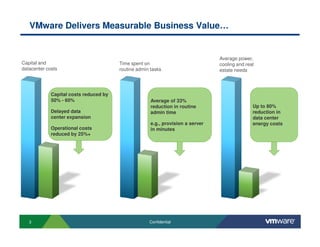
VMware Delivers Measurable Business Value…


                                                                                 Average power,
Capital and                             Time spent on                            cooling and real
datacenter costs                        routine admin tasks                      estate needs


             Capital costs reduced by
             50% - 60%                                Average of 33%
                                                      reduction in routine                      Up to 80%
             Delayed data                             admin time                                reduction in
             center expansion                                                                   data center
                                                      e.g., provision a server                  energy costs
             Operational costs                        in minutes
             reduced by 25%+


   3                                                 Confidential
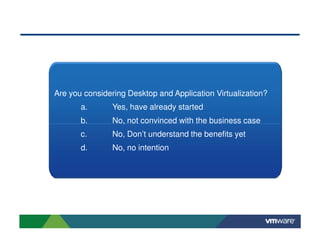
Are you considering Desktop and Application Virtualization?
       a.       Yes, have already started
       b.       No, not convinced with the business case
       c.       No, Don’t understand the benefits yet
       d.       No, no intention
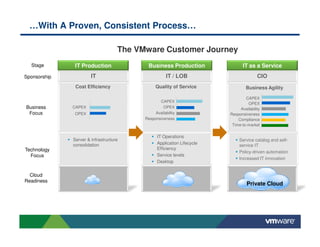
…With A Proven, Consistent Process…

                                    The VMware Customer Journey
  Stage        IT Production               Business Production                 IT as a Service
Sponsorship            IT                            IT / LOB                          CIO
               Cost Efficiency                 Quality of Service               Business Agility

                                                                                CAPEX
                                                 CAPEX
                                                                                 OPEX
Business      CAPEX                                OPEX                      Availability
 Focus         OPEX                            Availability             Responsiveness
                                          Responsiveness                    Compliance
                                                                         Time-to-market

                                                IT Operations
              Server & infrastructure                                        Service catalog and self-
              consolidation                     Application Lifecycle        service IT
Technology                                      Efficiency
                                                                             Policy-driven automation
  Focus                                         Service levels
                                                                             Increased IT innovation
                                                Desktop


  Cloud
Readiness
                                                                                 Private Cloud
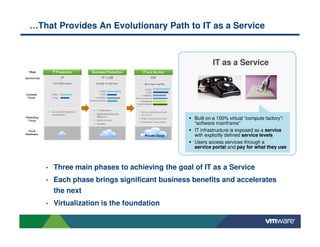
…That Provides An Evolutionary Path to IT as a Service


                                                       IT as a Service


                                               Built on a 100% virtual “compute factory”/
                                               “software mainframe”
                                               IT infrastructure is exposed as a service
                                               with explicitly defined service levels
                                               Users access services through a
                                               service portal and pay for what they use


   •   Three main phases to achieving the goal of IT as a Service
   •   Each phase brings significant business benefits and accelerates
       the next
   •   Virtualization is the foundation
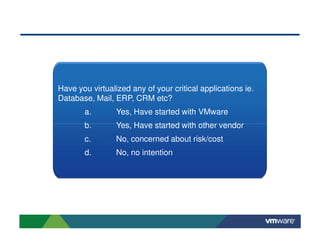
Have you virtualized any of your critical applications ie.
Database, Mail, ERP, CRM etc?
       a.        Yes, Have started with VMware
       b.        Yes, Have started with other vendor
       c.        No, concerned about risk/cost
       d.        No, no intention
Contents

• VMware’s Business Impact: Your ROI to date
• Four key solution areas to focus on next:
    IT Operations
    Applications
    Business Continuity
    Desktop
• How VMware is going to deliver these solutions to you
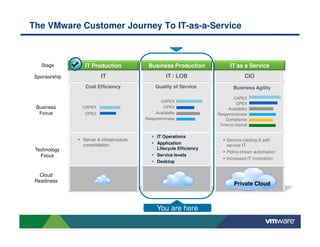
The VMware Customer Journey To IT-as-a-Service


   Stage        IT Production             Business Production                IT as a Service
 Sponsorship            IT                          IT / LOB                         CIO
                Cost Efficiency               Quality of Service              Business Agility

                                                                              CAPEX
                                                CAPEX
                                                                               OPEX
 Business      CAPEX                              OPEX                     Availability
  Focus        OPEX                           Availability            Responsiveness
                                         Responsiveness                   Compliance
                                                                       Time-to-market

                                               IT Operations
               Server & infrastructure                                     Service catalog & self-
               consolidation                   Application                 service IT
 Technology                                    Lifecycle Efficiency
                                                                           Policy-driven automation
   Focus                                       Service levels
                                                                           Increased IT innovation
                                               Desktop


   Cloud
 Readiness
                                                                               Private Cloud


                                               You are here
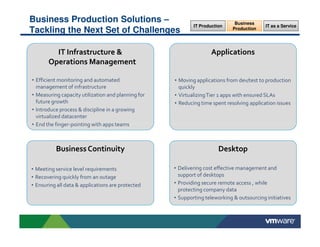
Business Production Solutions –                                               Business
                                                            IT Production                  IT as a Service
Tackling the Next Set of Challenges                                          Production


         IT Infrastructure &                                       Applications
       Operations Management

• Efficient monitoring and automated                • Moving applications from dev/test to production
  management of infrastructure                        quickly
• Measuring capacity utilization and planning for   • Virtualizing Tier 1 apps with ensured SLAs
  future growth                                     • Reducing time spent resolving application issues
• Introduce process & discipline in a growing
  virtualized datacenter
• End the finger-pointing with apps teams


          Business Continuity                                          Desktop

• Meeting service level requirements                • Delivering cost effective management and
• Recovering quickly from an outage                   support of desktops
• Ensuring all data & applications are protected    • Providing secure remote access , while
                                                      protecting company data
                                                    • Supporting teleworking & outsourcing initiatives
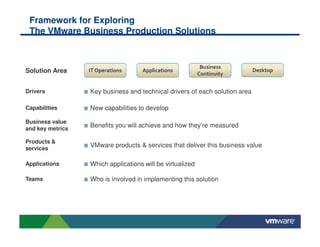
Framework for Exploring
 The VMware Business Production Solutions


                                                            Business
Solution Area     IT Operations     Applications
                                                           Continuity
                                                                             Desktop


Drivers           Key business and technical drivers of each solution area

Capabilities      New capabilities to develop

Business value
and key metrics
                  Benefits you will achieve and how they’re measured

Products &
services
                  VMware products & services that deliver this business value

Applications      Which applications will be virtualized

Teams             Who is involved in implementing this solution
IT Infrastructure & Operations Management                                       Desktop
Solution Area                                                                   Business
                                                                               Continuity

                                                                              Applications

                                                                              IT Operations


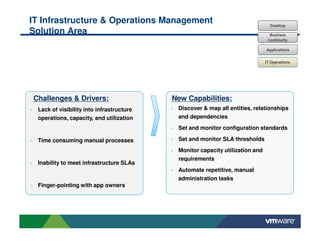
Challenges & Drivers:                     New Capabilities:
 Lack of visibility into infrastructure    Discover & map all entities, relationships
 operations, capacity, and utilization     and dependencies
                                           Set and monitor configuration standards

 Time consuming manual processes           Set and monitor SLA thresholds
                                           Monitor capacity utilization and
                                           requirements
 Inability to meet infrastructure SLAs
                                           Automate repetitive, manual
                                           administration tasks
 Finger-pointing with app owners
IT Infrastructure & Operations Management:                                 Desktop
Measurable Business Value                                                  Business
                                                                          Continuity

                                                                          Applications

                                                                         IT Operations


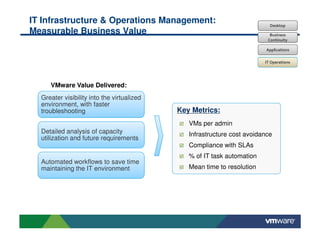
     VMware Value Delivered:
  Greater visibility into the virtualized
  environment, with faster
  troubleshooting                           Key Metrics:
                                               VMs per admin
  Detailed analysis of capacity                Infrastructure cost avoidance
  utilization and future requirements
                                               Compliance with SLAs
                                               % of IT task automation
  Automated workflows to save time
  maintaining the IT environment               Mean time to resolution
IT Infrastructure & Operations Management:                                 Desktop
VMware Products & Services                                                 Business
                                                                          Continuity

                                                                          Applications

                                                                         IT Operations


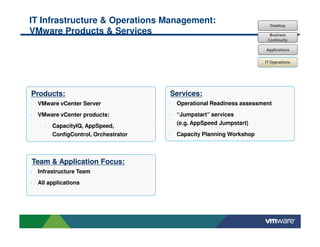
Products:                               Services:
•   VMware vCenter Server               •   Operational Readiness assessment

•   VMware vCenter products:            •   “Jumpstart” services
                                            (e.g. AppSpeed Jumpstart)
      •   CapacityIQ, AppSpeed,
          ConfigControl, Orchestrator   •   Capacity Planning Workshop


Team & Application Focus:
•   Infrastructure Team
•   All applications
VMware vCenter Server: A Unified Control Center


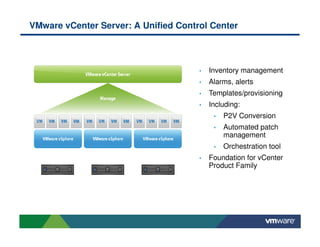
                                      •   Inventory management
                                      •   Alarms, alerts
                                      •   Templates/provisioning
                                      •   Including:
                                           •   P2V Conversion
                                           •   Automated patch
                                               management
                                           •   Orchestration tool
                                      •   Foundation for vCenter
                                          Product Family
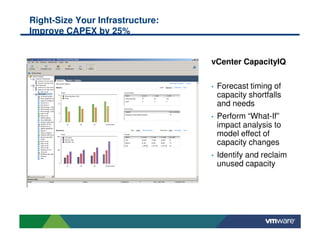
Right-Size Your Infrastructure:
Improve CAPEX by 25%


                                  vCenter CapacityIQ

                                  •   Forecast timing of
                                      capacity shortfalls
                                      and needs
                                  •   Perform “What-If”
                                      impact analysis to
                                      model effect of
                                      capacity changes
                                  •   Identify and reclaim
                                      unused capacity
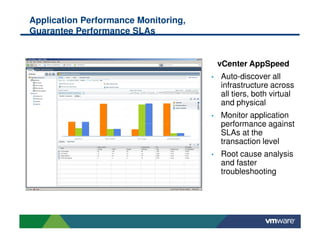
Application Performance Monitoring,
Guarantee Performance SLAs


                                          vCenter AppSpeed
                                      •   Auto-discover all
                                          infrastructure across
                                          all tiers, both virtual
                                          and physical
                                      •   Monitor application
                                          performance against
                                          SLAs at the
                                          transaction level
                                      •   Root cause analysis
                                          and faster
                                          troubleshooting
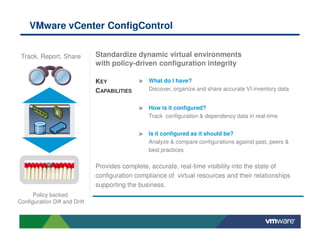
VMware vCenter ConfigControl


 Track, Report, Share          Standardize dynamic virtual environments
                               with policy-driven configuration integrity

                               KEY               What do I have?
                               CAPABILITIES      Discover, organize and share accurate VI inventory data


                                                 How is it configured?
                                                 Track configuration & dependency data in real-time


                                                 Is it configured as it should be?
                                                 Analyze & compare configurations against past, peers &
                                                 best practices

                               Provides complete, accurate, real-time visibility into the state of
                               configuration compliance of virtual resources and their relationships
                               supporting the business.
      Policy backed
Configuration Diff and Drift
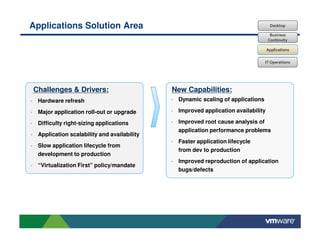
Applications Solution Area                                                        Desktop

                                                                                  Business
                                                                                 Continuity

                                                                                 Applications

                                                                               IT Operations


Challenges & Drivers:                       New Capabilities:
 Hardware refresh                            Dynamic scaling of applications

 Major application roll-out or upgrade       Improved application availability

 Difficulty right-sizing applications        Improved root cause analysis of
                                             application performance problems
 Application scalability and availability
                                             Faster application lifecycle
 Slow application lifecycle from
                                             from dev to production
 development to production
                                             Improved reproduction of application
 “Virtualization First” policy/mandate
                                             bugs/defects
Applications Solution:                                                Desktop
Measurable Business Value                                             Business
                                                                     Continuity

                                                                    Applications

                                                                    IT Operations


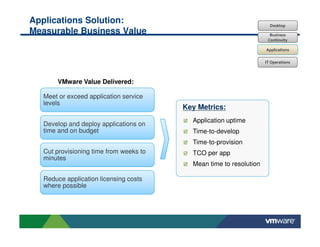
      VMware Value Delivered:

  Meet or exceed application service
  levels
                                        Key Metrics:
                                          Application uptime
  Develop and deploy applications on
  time and on budget                      Time-to-develop
                                          Time-to-provision
  Cut provisioning time from weeks to     TCO per app
  minutes
                                          Mean time to resolution

  Reduce application licensing costs
  where possible
IT Operations:                                                      Desktop
VMware Products & Services                                          Business
                                                                   Continuity

                                                                  Applications

                                                                  IT Operations


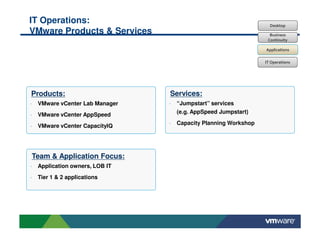
Products:                        Services:
•   VMware vCenter Lab Manager   •   “Jumpstart” services
                                     (e.g. AppSpeed Jumpstart)
•   VMware vCenter AppSpeed
                                 •   Capacity Planning Workshop
•   VMware vCenter CapacityIQ


Team & Application Focus:
•   Application owners, LOB IT
•   Tier 1 & 2 applications
The Trend Is Clear…


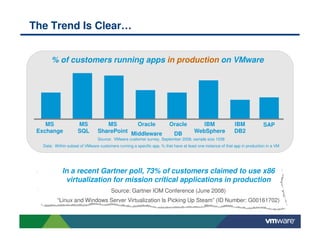
       % of customers running apps in production on VMware

                     56%              53%
                                                                                           50%

     36%                                                 41%             34%
                                                                                                            24%               27%


    MS                MS            MS        Oracle                     Oracle          IBM                 IBM             SAP
 Exchange             SQL        SharePoint Middleware                     DB         WebSphere              DB2
                                 Source: VMware customer survey, September 2008, sample size 1038
   Data: Within subset of VMware customers running a specific app, % that have at least one instance of that app in production in a VM


             In a recent Gartner poll, 73% of customers claimed to use x86
              virtualization for mission critical applications in production
                                        Source: Gartner IOM Conference (June 2008)
          “Linux and Windows Server Virtualization Is Picking Up Steam” (ID Number: G00161702)
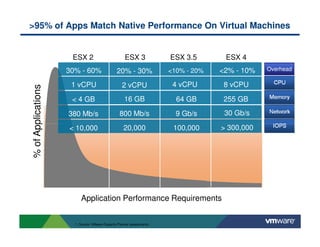
>95% of Apps Match Native Performance On Virtual Machines


                     ESX 2                           ESX 3             ESX 3.5       ESX 4
                    30% - 60%                   20% - 30%              <10% - 20%   <2% - 10%   Overhead

                     1 vCPU                        2 vCPU               4 vCPU       8 vCPU
% of Applications


                     < 4 GB                         16 GB                64 GB       255 GB

                    380 Mb/s                     800 Mb/s                9 Gb/s      30 Gb/s

                    < 10,000                        20,000              100,000     > 300,000


                         Application Performance Requirements


                      1. Source: VMware Capacity Planner assessments
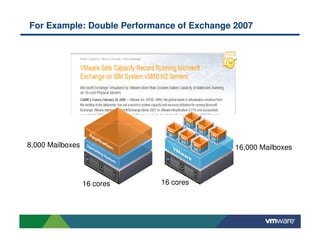
For Example: Double Performance of Exchange 2007


8,000 Mailboxes                             16,000 Mailboxes


                  16 cores   16 cores
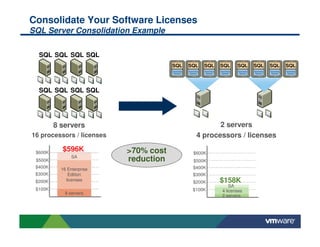
Consolidate Your Software Licenses
SQL Server Consolidation Example

  SQL SQL SQL SQL
                                       SQL   SQL   SQL   SQL    SQL   SQL   SQL   SQL


  SQL SQL SQL SQL


         8 servers                                    2 servers
16 processors / licenses                       4 processors / licenses

 $600K
           $596K           >70% cost          $600K
                SA
 $500K                     reduction          $500K
 $400K     16 Enterprise                      $400K
 $300K        Edition                         $300K
 $200K       licenses                         $200K      $158K
                                                             SA
 $100K                                        $100K      4 licenses
             8 servers
                                                         2 servers
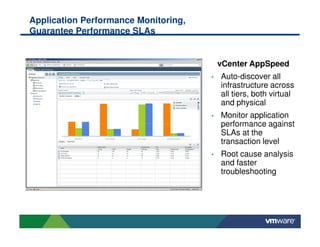
Application Performance Monitoring,
Guarantee Performance SLAs


                                          vCenter AppSpeed
                                      •   Auto-discover all
                                          infrastructure across
                                          all tiers, both virtual
                                          and physical
                                      •   Monitor application
                                          performance against
                                          SLAs at the
                                          transaction level
                                      •   Root cause analysis
                                          and faster
                                          troubleshooting
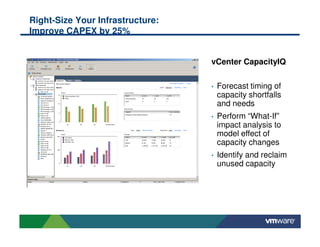
Right-Size Your Infrastructure:
Improve CAPEX by 25%


                                  vCenter CapacityIQ

                                  •   Forecast timing of
                                      capacity shortfalls
                                      and needs
                                  •   Perform “What-If”
                                      impact analysis to
                                      model effect of
                                      capacity changes
                                  •   Identify and reclaim
                                      unused capacity
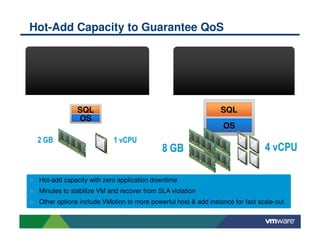
Hot-Add Capacity to Guarantee QoS

                         TPS                                              TPS

                    Latency                                             Latency


              SQL                                               SQL
              OS
                                                                OS
 2 GB                     1 vCPU
                                           8 GB                                4 vCPU

 Hot-add capacity with zero application downtime
 Minutes to stabilize VM and recover from SLA violation
 Other options include VMotion to more powerful host & add instance for fast scale-out
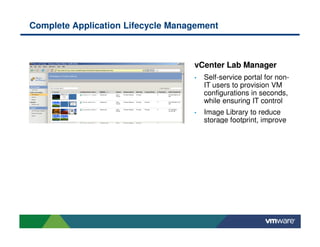
Complete Application Lifecycle Management


                                   vCenter Lab Manager
                                   •   Self-service portal for non-
                                       IT users to provision VM
                                       configurations in seconds,
                                       while ensuring IT control
                                   •   Image Library to reduce
                                       storage footprint, improve
ERROR: stackunderflow
OFFENDING COMMAND: ~
STACK:

Stream 3 - VMware Sponsor Presentation

  • 1.
    Business Production Solutionsfrom VMware Leveraging the next set of capabilities for improved IT Quality of Service © 2009 VMware Inc. All rights reserved
  • 2.
    Contents • VMware’s BusinessImpact: Your ROI to date • Four key solution areas to focus on next: IT Operations Applications Business Continuity Desktop • How VMware is going to deliver these solutions to you
  • 3.
    VMware Delivers MeasurableBusiness Value… Average power, Capital and Time spent on cooling and real datacenter costs routine admin tasks estate needs Capital costs reduced by 50% - 60% Average of 33% reduction in routine Up to 80% Delayed data admin time reduction in center expansion data center e.g., provision a server energy costs Operational costs in minutes reduced by 25%+ 3 Confidential
  • 4.
    Are you consideringDesktop and Application Virtualization? a. Yes, have already started b. No, not convinced with the business case c. No, Don’t understand the benefits yet d. No, no intention
  • 5.
    …With A Proven,Consistent Process… The VMware Customer Journey Stage IT Production Business Production IT as a Service Sponsorship IT IT / LOB CIO Cost Efficiency Quality of Service Business Agility CAPEX CAPEX OPEX Business CAPEX OPEX Availability Focus OPEX Availability Responsiveness Responsiveness Compliance Time-to-market IT Operations Server & infrastructure Service catalog and self- consolidation Application Lifecycle service IT Technology Efficiency Policy-driven automation Focus Service levels Increased IT innovation Desktop Cloud Readiness Private Cloud
  • 6.
    …That Provides AnEvolutionary Path to IT as a Service IT as a Service Built on a 100% virtual “compute factory”/ “software mainframe” IT infrastructure is exposed as a service with explicitly defined service levels Users access services through a service portal and pay for what they use • Three main phases to achieving the goal of IT as a Service • Each phase brings significant business benefits and accelerates the next • Virtualization is the foundation
  • 7.
    Have you virtualizedany of your critical applications ie. Database, Mail, ERP, CRM etc? a. Yes, Have started with VMware b. Yes, Have started with other vendor c. No, concerned about risk/cost d. No, no intention
  • 8.
    Contents • VMware’s BusinessImpact: Your ROI to date • Four key solution areas to focus on next: IT Operations Applications Business Continuity Desktop • How VMware is going to deliver these solutions to you
  • 9.
    The VMware CustomerJourney To IT-as-a-Service Stage IT Production Business Production IT as a Service Sponsorship IT IT / LOB CIO Cost Efficiency Quality of Service Business Agility CAPEX CAPEX OPEX Business CAPEX OPEX Availability Focus OPEX Availability Responsiveness Responsiveness Compliance Time-to-market IT Operations Server & infrastructure Service catalog & self- consolidation Application service IT Technology Lifecycle Efficiency Policy-driven automation Focus Service levels Increased IT innovation Desktop Cloud Readiness Private Cloud You are here
  • 10.
    Business Production Solutions– Business IT Production IT as a Service Tackling the Next Set of Challenges Production IT Infrastructure & Applications Operations Management • Efficient monitoring and automated • Moving applications from dev/test to production management of infrastructure quickly • Measuring capacity utilization and planning for • Virtualizing Tier 1 apps with ensured SLAs future growth • Reducing time spent resolving application issues • Introduce process & discipline in a growing virtualized datacenter • End the finger-pointing with apps teams Business Continuity Desktop • Meeting service level requirements • Delivering cost effective management and • Recovering quickly from an outage support of desktops • Ensuring all data & applications are protected • Providing secure remote access , while protecting company data • Supporting teleworking & outsourcing initiatives
  • 11.
    Framework for Exploring The VMware Business Production Solutions Business Solution Area IT Operations Applications Continuity Desktop Drivers Key business and technical drivers of each solution area Capabilities New capabilities to develop Business value and key metrics Benefits you will achieve and how they’re measured Products & services VMware products & services that deliver this business value Applications Which applications will be virtualized Teams Who is involved in implementing this solution
  • 12.
    IT Infrastructure &Operations Management Desktop Solution Area Business Continuity Applications IT Operations Challenges & Drivers: New Capabilities: Lack of visibility into infrastructure Discover & map all entities, relationships operations, capacity, and utilization and dependencies Set and monitor configuration standards Time consuming manual processes Set and monitor SLA thresholds Monitor capacity utilization and requirements Inability to meet infrastructure SLAs Automate repetitive, manual administration tasks Finger-pointing with app owners
  • 13.
    IT Infrastructure &Operations Management: Desktop Measurable Business Value Business Continuity Applications IT Operations VMware Value Delivered: Greater visibility into the virtualized environment, with faster troubleshooting Key Metrics: VMs per admin Detailed analysis of capacity Infrastructure cost avoidance utilization and future requirements Compliance with SLAs % of IT task automation Automated workflows to save time maintaining the IT environment Mean time to resolution
  • 14.
    IT Infrastructure &Operations Management: Desktop VMware Products & Services Business Continuity Applications IT Operations Products: Services: • VMware vCenter Server • Operational Readiness assessment • VMware vCenter products: • “Jumpstart” services (e.g. AppSpeed Jumpstart) • CapacityIQ, AppSpeed, ConfigControl, Orchestrator • Capacity Planning Workshop Team & Application Focus: • Infrastructure Team • All applications
  • 15.
    VMware vCenter Server:A Unified Control Center • Inventory management • Alarms, alerts • Templates/provisioning • Including: • P2V Conversion • Automated patch management • Orchestration tool • Foundation for vCenter Product Family
  • 16.
    Right-Size Your Infrastructure: ImproveCAPEX by 25% vCenter CapacityIQ • Forecast timing of capacity shortfalls and needs • Perform “What-If” impact analysis to model effect of capacity changes • Identify and reclaim unused capacity
  • 17.
    Application Performance Monitoring, GuaranteePerformance SLAs vCenter AppSpeed • Auto-discover all infrastructure across all tiers, both virtual and physical • Monitor application performance against SLAs at the transaction level • Root cause analysis and faster troubleshooting
  • 18.
    VMware vCenter ConfigControl Track, Report, Share Standardize dynamic virtual environments with policy-driven configuration integrity KEY What do I have? CAPABILITIES Discover, organize and share accurate VI inventory data How is it configured? Track configuration & dependency data in real-time Is it configured as it should be? Analyze & compare configurations against past, peers & best practices Provides complete, accurate, real-time visibility into the state of configuration compliance of virtual resources and their relationships supporting the business. Policy backed Configuration Diff and Drift
  • 19.
    Applications Solution Area Desktop Business Continuity Applications IT Operations Challenges & Drivers: New Capabilities: Hardware refresh Dynamic scaling of applications Major application roll-out or upgrade Improved application availability Difficulty right-sizing applications Improved root cause analysis of application performance problems Application scalability and availability Faster application lifecycle Slow application lifecycle from from dev to production development to production Improved reproduction of application “Virtualization First” policy/mandate bugs/defects
  • 20.
    Applications Solution: Desktop Measurable Business Value Business Continuity Applications IT Operations VMware Value Delivered: Meet or exceed application service levels Key Metrics: Application uptime Develop and deploy applications on time and on budget Time-to-develop Time-to-provision Cut provisioning time from weeks to TCO per app minutes Mean time to resolution Reduce application licensing costs where possible
  • 21.
    IT Operations: Desktop VMware Products & Services Business Continuity Applications IT Operations Products: Services: • VMware vCenter Lab Manager • “Jumpstart” services (e.g. AppSpeed Jumpstart) • VMware vCenter AppSpeed • Capacity Planning Workshop • VMware vCenter CapacityIQ Team & Application Focus: • Application owners, LOB IT • Tier 1 & 2 applications
  • 22.
    The Trend IsClear… % of customers running apps in production on VMware 56% 53% 50% 36% 41% 34% 24% 27% MS MS MS Oracle Oracle IBM IBM SAP Exchange SQL SharePoint Middleware DB WebSphere DB2 Source: VMware customer survey, September 2008, sample size 1038 Data: Within subset of VMware customers running a specific app, % that have at least one instance of that app in production in a VM In a recent Gartner poll, 73% of customers claimed to use x86 virtualization for mission critical applications in production Source: Gartner IOM Conference (June 2008) “Linux and Windows Server Virtualization Is Picking Up Steam” (ID Number: G00161702)
  • 23.
    >95% of AppsMatch Native Performance On Virtual Machines ESX 2 ESX 3 ESX 3.5 ESX 4 30% - 60% 20% - 30% <10% - 20% <2% - 10% Overhead 1 vCPU 2 vCPU 4 vCPU 8 vCPU % of Applications < 4 GB 16 GB 64 GB 255 GB 380 Mb/s 800 Mb/s 9 Gb/s 30 Gb/s < 10,000 20,000 100,000 > 300,000 Application Performance Requirements 1. Source: VMware Capacity Planner assessments
  • 24.
    For Example: DoublePerformance of Exchange 2007 8,000 Mailboxes 16,000 Mailboxes 16 cores 16 cores
  • 25.
    Consolidate Your SoftwareLicenses SQL Server Consolidation Example SQL SQL SQL SQL SQL SQL SQL SQL SQL SQL SQL SQL SQL SQL SQL SQL 8 servers 2 servers 16 processors / licenses 4 processors / licenses $600K $596K >70% cost $600K SA $500K reduction $500K $400K 16 Enterprise $400K $300K Edition $300K $200K licenses $200K $158K SA $100K $100K 4 licenses 8 servers 2 servers
  • 26.
    Application Performance Monitoring, GuaranteePerformance SLAs vCenter AppSpeed • Auto-discover all infrastructure across all tiers, both virtual and physical • Monitor application performance against SLAs at the transaction level • Root cause analysis and faster troubleshooting
  • 27.
    Right-Size Your Infrastructure: ImproveCAPEX by 25% vCenter CapacityIQ • Forecast timing of capacity shortfalls and needs • Perform “What-If” impact analysis to model effect of capacity changes • Identify and reclaim unused capacity
  • 28.
    Hot-Add Capacity toGuarantee QoS TPS TPS Latency Latency SQL SQL OS OS 2 GB 1 vCPU 8 GB 4 vCPU Hot-add capacity with zero application downtime Minutes to stabilize VM and recover from SLA violation Other options include VMotion to more powerful host & add instance for fast scale-out
  • 29.
    Complete Application LifecycleManagement vCenter Lab Manager • Self-service portal for non- IT users to provision VM configurations in seconds, while ensuring IT control • Image Library to reduce storage footprint, improve
  • 30.